

Page 1

LK-K81 operating instructions
Dear users:
Thank you choose our company's professional active audio products, the
sound is specially designed for morning exercise fitness dance play show
shipping guide , widely used in school, shopping centers, indoor and outdoor
activities, with good sound quality and good appearance, stable performance
and convenient operation etc., is a good companion of your work and life.
Inflammable and explosive area
In inflammable and explosive area, please do not use the sound, and abide by
relevant warning message, to avoid fire or explosion.
Inflammable and explosive areas including:
Gas station
Fuel area
Flammable or chemical products, transport and storage facilities
There is a risk of explosion danger signs of the area
Area that has a "turn off" sign for two-way wireless devices
Product features:
1. Adopt high power amplifier chip imported and circuit design of advanced
technology
2. Use strong efficient loudspeakers , sound effects clear, covering wide
transmission range
3. To connect with external audio source with outstanding, strong sound effects
Directory
Product features----------------------------------------------------------------------1
The function instructions------------------------------------------------------------2
Technical parameters----------------------------------------------------------------3
Packing list-----------------------------------------------------------------------------3
Directions for use---------------------------------------------------------------------4
Page 2
Technical parameters:
1, the out put power: 30 W
2, the frequency response: 100 Hz - 20 KHZ
3, the signal-to-noise ratio:≧70 d B
4, output impedance: 4Ω
5, power input: DC13.5 V / 1 A
6, the built-in battery:1800mAh 12v
Packing list:
unit 1 PCS
User manual
One adapter
2PCS Wireless Mic one for 202.2MHz another one for 185.15MHz
Function instructions:
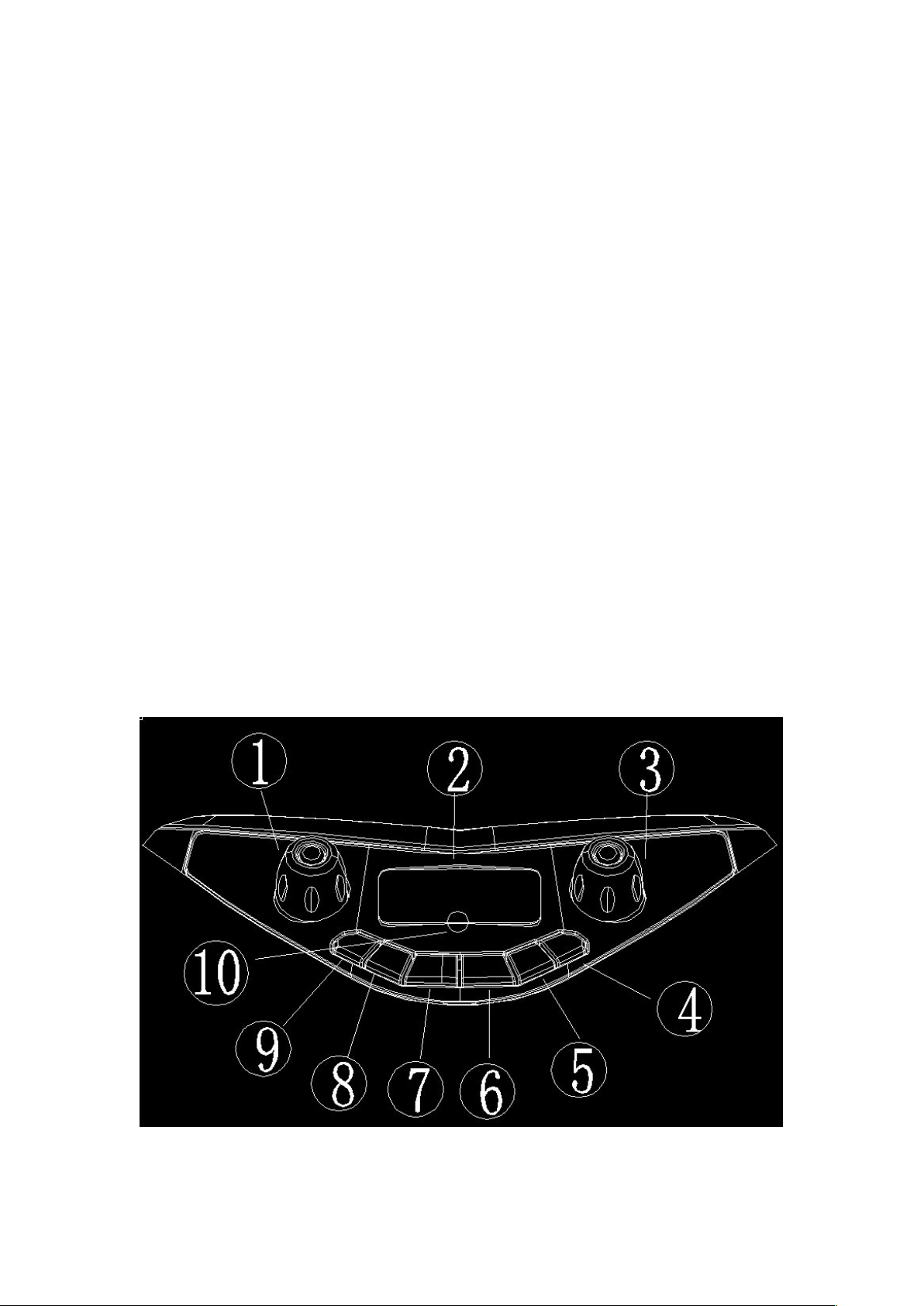
1 >, Front panel function description:
Page 3

1, Treble knob: adjust the treble ;
2, Digital display screen;
3, The main volume knob to adjust the whole machine’ volume;
4/6, /PREV/Next: when into U disk and TF card mode, short press to
select/the next song music, long press for the current song/into to retreat
quickly, when in the FM mode, a short press for existing radio, under a
selected, long press for manual step of frequency adjustment, the BT status to
up/down a song music, AUX input without this feature.
5, Play/pause button: when in U disk and TF card mode, short press to
play/pause, in FM, short press to mute, long press for automatic searching and
storage, in BT status to a short press play/pause, long press disconnect blue
tooth, the AUX input without this feature.
7, Recording key: short press once to enter the recording, short press a play
the tape again, long press the button to delete the tape;
8, The Mode key: short press to BT, USB/TF, FM, AUX, switch input state, long
press the flash mode switch;
9, karaoke priority button: press this button, the digital tube MIC light, into the
microphone priority mode, press this button again, the digital tube MIC, at this
point, the cancellation of the karaoke, in silent mode, press this button, can
open the microphone function;
10, remote control receiving head.
Page 4
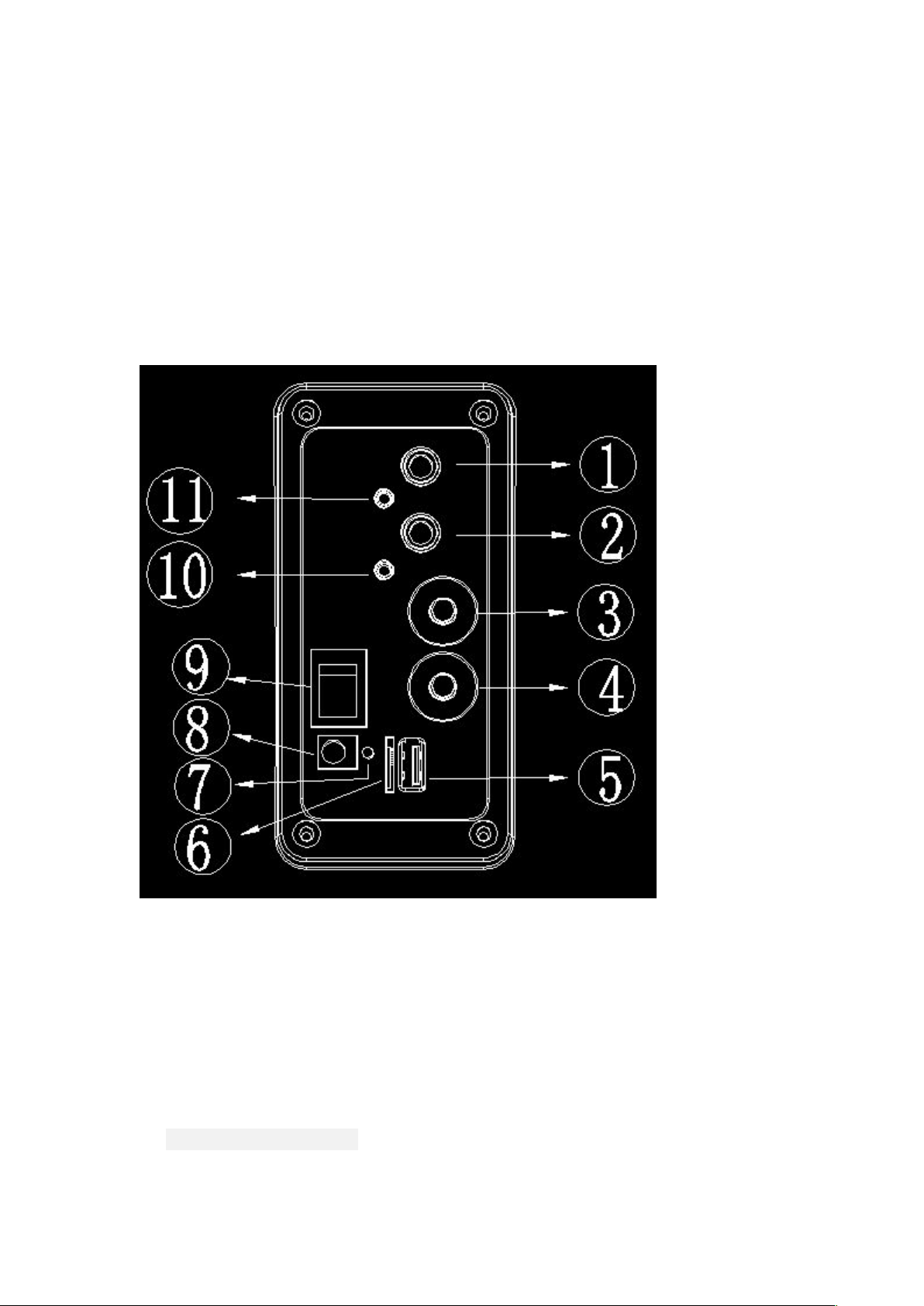
2>Back panel function description
1, Guitar input port;
2, The microphone input port;
3, Microphone volume knob to adjust the volume of the microphone;
4, Microphone: reverberation knob to adjust the phone reverberation.
5, USB interface: support 32 GB USB flash drive, can play the inside of the U
disk MP3 music files;
6, TF card interface: support 32 GB TF card, can play the TF card MP3 music
files;
7, Charging indicator light: when charging, the red light bright, when power is
full, red light goes out;
Page 5

8, The DC input port: input DC13.5 V / 1 A power supply;
9, The power switch
10, The line in input port
11,3.5mm microphone port;
FCC Statement
This equipment has been tested and found to comply with the limits for a Class B digital device,
pursuant to Part 15 of the FCC Rules. These limits are designed to provide reasonable
protection against harmful interference in a residential installation. This equipment generates
uses and can radiate radio frequency energy and, if not installed and used in accordance with
the instructions, may cause harmful interference to radio communications. However, there is
no guarantee that interference will not occur in a particular installation. If this equipment does
cause harmful interference to radio or television reception, which can be determined by turning
the equipment off and on, the user is encouraged to try to correct the interference by one or
more of the following measures:
-- Reorient or relocate the receiving antenna.
-- Increase the separation between the equipment and receiver.
-- Connect the equipment into an outlet on a circuit different from that to which the receiver is
connected.
-- Consult the dealer or an experienced radio/TV technician for help.
This device complies with part 15 of the FCC Rules. Operation is subject to the following two
conditions:(1) This device may not cause harmful interference, and (2) this device must accept
any interference received, including interference that may cause undesired operation.
Changes or modifications not expressly approved by the party responsible for compliance
could void the user's authority to operate the equipment.
Page 6
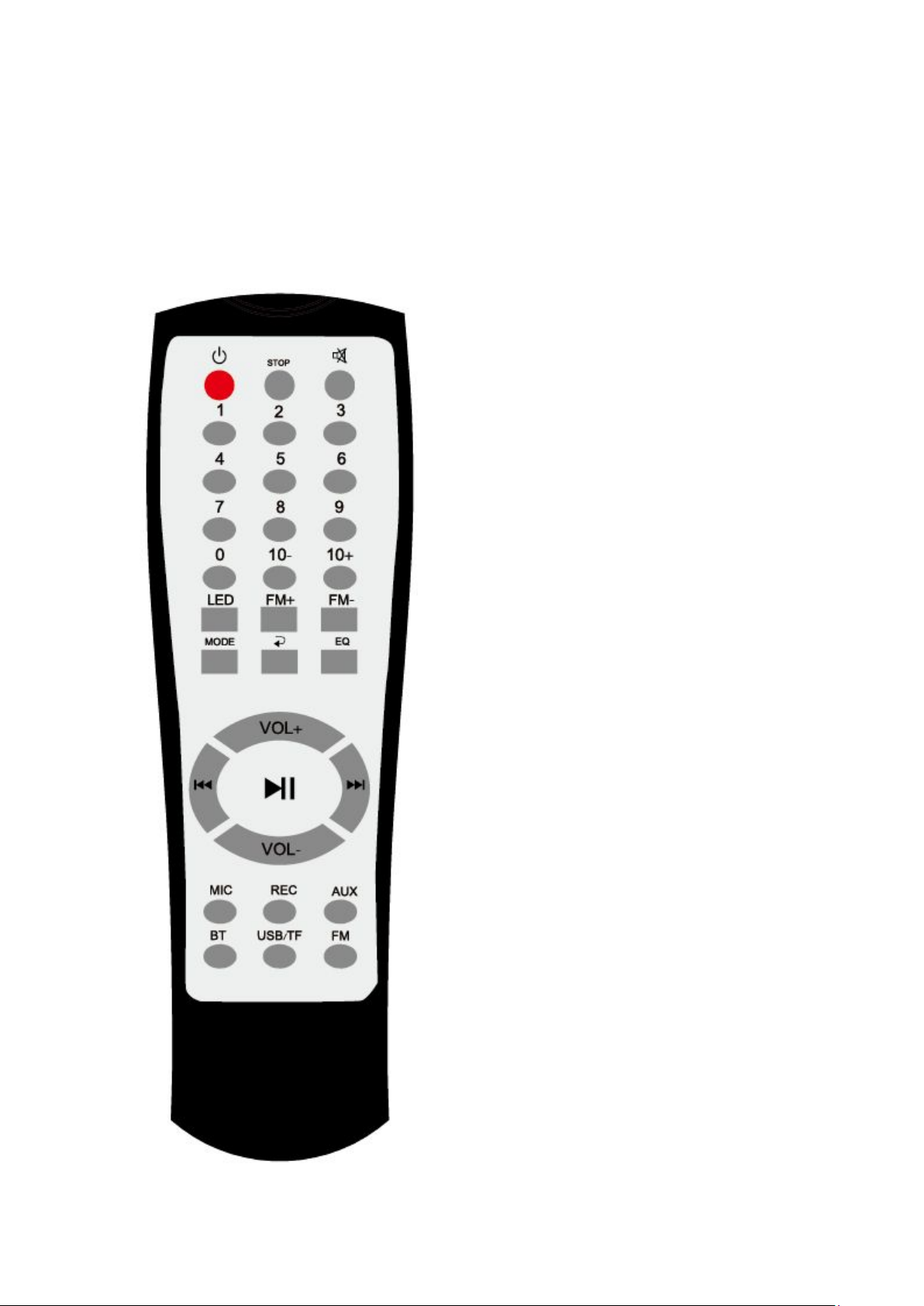
3 > Remote control functions:
Page 7
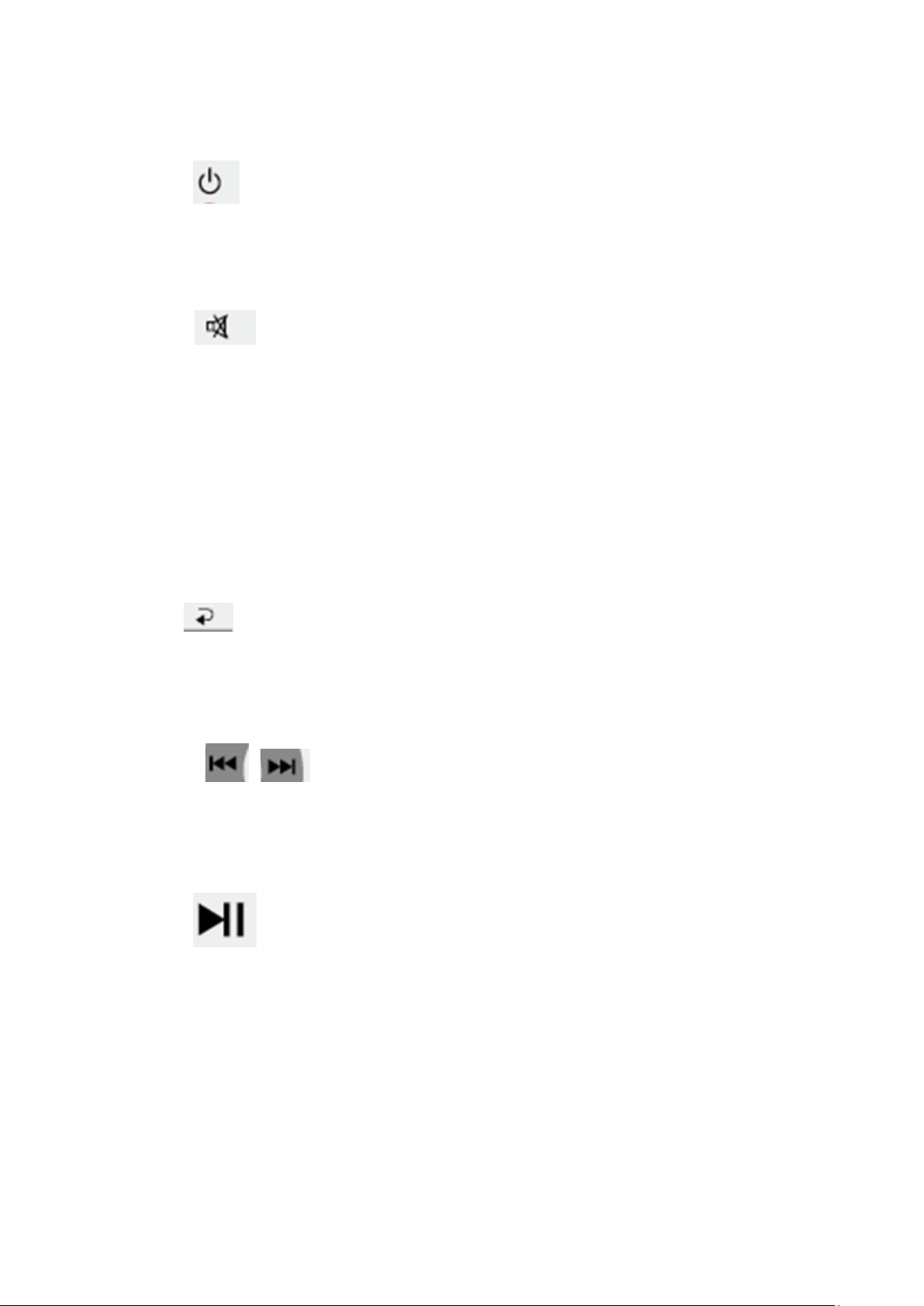
1, The standby button: press this button, the machine into standby
mode, press again, the machine has reopened;
2, The STOP button, in the condition of U disk and TF card, click on this
button, at this time to STOP play, and then click on this button, the song
come back the first song ;
3, The mute button: press this button, the music stop play, then
click, song continue to play;
4, 0-9 number keys: U disk and TF card for quickly select songs, FM radio
for the selection of existing ones ;The AUX and BT has no effect for them;
5, 10 - / 10 + : U disk and TF card quickly back the first song or fast forward
10thsong ;
6, LED key: patterns of light switch;
7, FM + / FM - : short press enter frequency, long press semi-automatic
searching;
8, MODE, channel MODE switch: short press to BT, USB/TF, FM, AUX,
switch input state;
9, key: music of U disk and TF card circulation, according to a single
cycle, fast cycle, all folders circulation, random play four circulation pattern;
10, EQ: sound mode button: RMAL , POP, ROCK, JAZZ, CLASSIC,
COUNTRY, BASS, seven kinds of models;
11, VOL + / VOL - : the whole machine volume;
12, / PRE/NEXT: when U disk and TF card, short press to
select/the next song music, long press for the current song/into to retreat
quickly, in FM, a short press for existing radio, under a selected radio, long
press for manual step frequency adjustment, the BT status to up/down a
song music, AUX input without this feature.
13, when the U disk and TF card, short press to play/pause, in FM,
short press to mute, long press for automatic searching and storage, in BT
status to a short press play/pause, long press disconnect blue tooth, the
AUX input without this feature.
14, MIC button: press this button, the digital tube MIC on light, into the
microphone priority mode, press this button again, digital tube MIC, at this
time, cancel the karaoke priority mode, in silent mode, press this button,
can open the microphone function;
15, The REC key: short press once to enter the recording, short press a
play the tape again, long press the button to delete the tape;
Page 8

16, AUX key: short press enter the AUX state;
17, BT key: short press to enter the BT status;
18, The USB/TF card key: short press enter into the state of USB/TF card
19, FM key: short press enter into the state of FM.
Directions for use
1.When play music from U disk TF card, adjust the volume of the host
volume knob to the right sound effect, pay attention to avoid the volume for
a long time with max level, so as not to feel be agitated and acceleration
component of aging.
2.Don't put the sound in harsh environments, such as moisture humidity
pollution, avoid direct sunlight and rain
3.Do not close to bare fire to avoid danger
4. Don't put the container with liquid above the speakers
5. To be used of the tropical climate conditions
6 To use elevation 2000 meters below
 Loading...