

Page 1
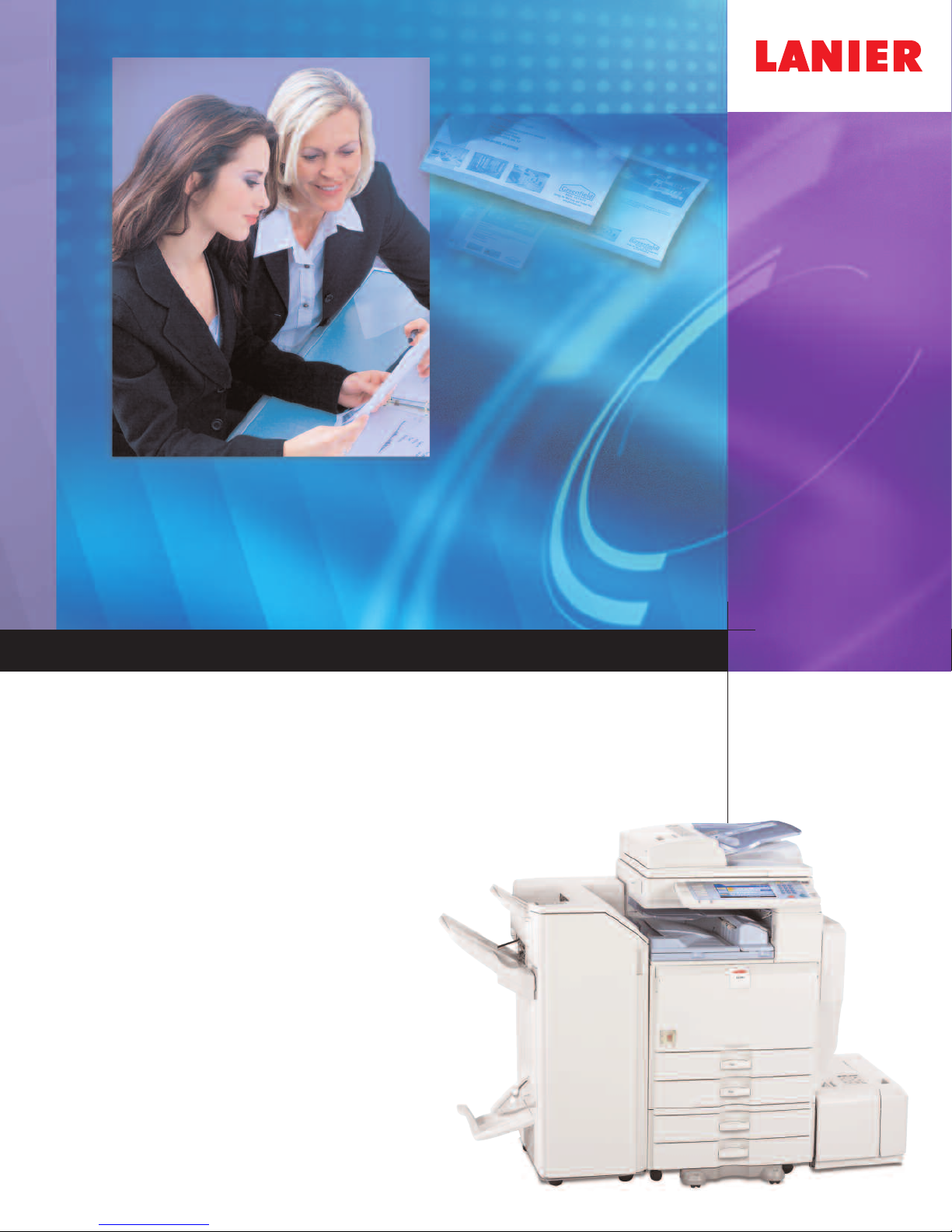
LD140/LD150
DIGITAL IMAGING SYSTEM
Optimize productivity with innovative document management
Use this power
copying, printing and faxing to sophisticated
scanning, professional finishing and
electronic distribution
ful system to handle ever
y task, from
Page 2
Innovative All-In-One Performance
To stay competitive, organizations are doing more with
less. Companies are consolidating resources, eliminating
redundancies and taking every opportunity to keep
productivity high while maintaining information
security and supporting sustainability. The LANIER
LD140/LD150 aligns perfectly with these strategies.
These systems are designed to take on an incredibly
wide variety of document tasks and come equipped
with powerful new solutions: the Personal Paperless
™
Document Manager (PPDM
breakthrough App2Me
) software and the
®
portable workflow solution.
These solutions will help you streamline workflow
and minimize operating costs.
®
Improve Productivity Immediately
Expect fast, high-quality results from the Lanier LD140/
LD150. It is equipped to help your office print, copy,
scan, fax or distribute critical documents.
• Boost productivity by copying or printing up to 50 pages per minute.
• Turn everyday documents into impressive, professionally finished output
with three finishing options, including a 1,000-Sheet Booklet Finisher.
• Manage document processing and storage capacity with 768 MB RAM
and a 40 GB Hard Disk Drive (HDD).
Keep Workflow Moving
Trust the Lanier LD140/LD150 to provide practical
functions that make it easy to run your office efficiently
and help everyone stay on task.
• Establish cost control. Set print or copy quotas for up to 500 users with
the account limit feature.
Give critical print and copy jobs higher priority with the Job Function
•
List, which allows you to send any job to the top of the queue for
immediate output.
presentations and training
Ensure efficient production of reports
•
materials with standard support for PCL or optional Adobe
PostScript®3™.
• Keep your local network clear. PDF Direct Print* lets you send PDF
files directly to the MFP without opening Adobe
Give mobile work
•
without installing drivers. Users can send an e-mail to the system
and have it print the attached PDF or JPEG file.
*Requires optional equipment.
ers an edge
,
®
Acrobat™software.
Mail to Print* allows them to print
.
®
Page 3
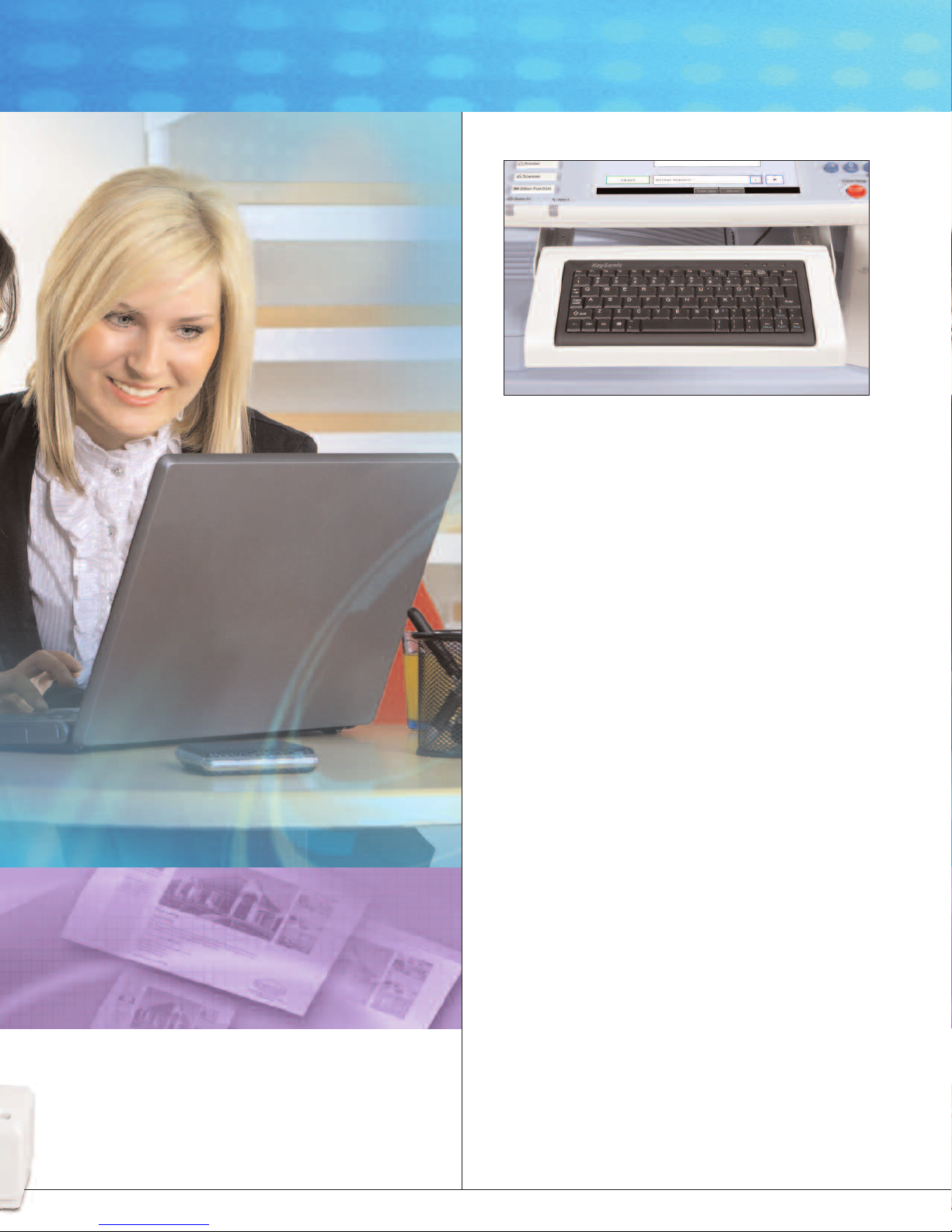
The optional keyboard provides an alternative way to enter data
at the device.*
*Does not support all functions.
Eliminate Distribution Costs
Designed to serve as your office’s zero-cost document
distribution portal, the Lanier LD140/LD150 incorporates
an impressive lineup of technologies.
• Scan full-color or black & white originals and share them instantly —
and at no cost — with Scan-to-Email/Folder/HDD.
• Do not spend time searching for e-mail addresses.The system pulls the
correct address for each recipient directly from up to five LDAP servers.
• Never waste time or resources on rescans. See full-color thumbnails of every
scanned page on the control panel, so you can verify quality prior to distribution.
• Minimize file sizes for full-color scans with the High Compression PDF feature,
which keeps large files off the network.
• Keep the network moving with Scan-to-URL. It stores documents on the
HDD, then sends recipients a link that enables viewing or downloading
via Web browser.
Next-Generation Faxing
The Lanier LD140/LD150 includes the latest fax technologies
to reduce costs and minimize transmission time.
The Lanier LD140/LD150 is engineered
to deliver exceptional speed, ef
and security.
ficiency
• Take advantage of up to three analog lines with the Super G3 modem.
This improves total fax capacity and helps prevent bottlenecks.
Send documents directly to e-mail addresses and eliminate long-distance
•
costs with Internet Fax capabilities.
• Forward inbound faxes to e-mail addresses, network folders or the system’s
HDD and go completely paperless
.
Protect Critical Documents
The Lanier LD140/LD150 includes the high-end security
ed to keep documents safe fr
technologies r
equir
variety of threats at every stage of workflow.
om a
Page 4
• Prevent unauthorized access and usage with password protection.
•
Keep sensitive documents safe without expensive mail boxes. Locked Print holds
printed files in memory until authorized users enter a PIN code or password.
• Secure latent images remaining on the system’s internal hard drive with the
D
ataOverwriteSecurity System (DOSS).
Enhance Personal Productivity
The App2Me®solution revolutionizes document management,
enabling users to create customized workflows and execute
them anywhere they go.
• Download widgets to any client (desktop PC, laptop or Smartphone) and
use them on any Lanier MFP enabled with App2Me.
• No matter where you go, your experience at each App2Me-enabled MFP
remains completely personalized for maximum convenience.
• Simplify complex workflows.Widgets can be created to combine, distribute,
edit and create documents
• Maximize productivity.App2Me improves efficiency through widgets that control
a virtually endless array of MFP, software or Web services-driven workflows.
• Create specialized widgets for virtually any need, in any framework across
multiple platforms that App2Me supports, such as Google Desktop
, as well as perform many other tasks automatically.
™
and more.
LD140/LD150
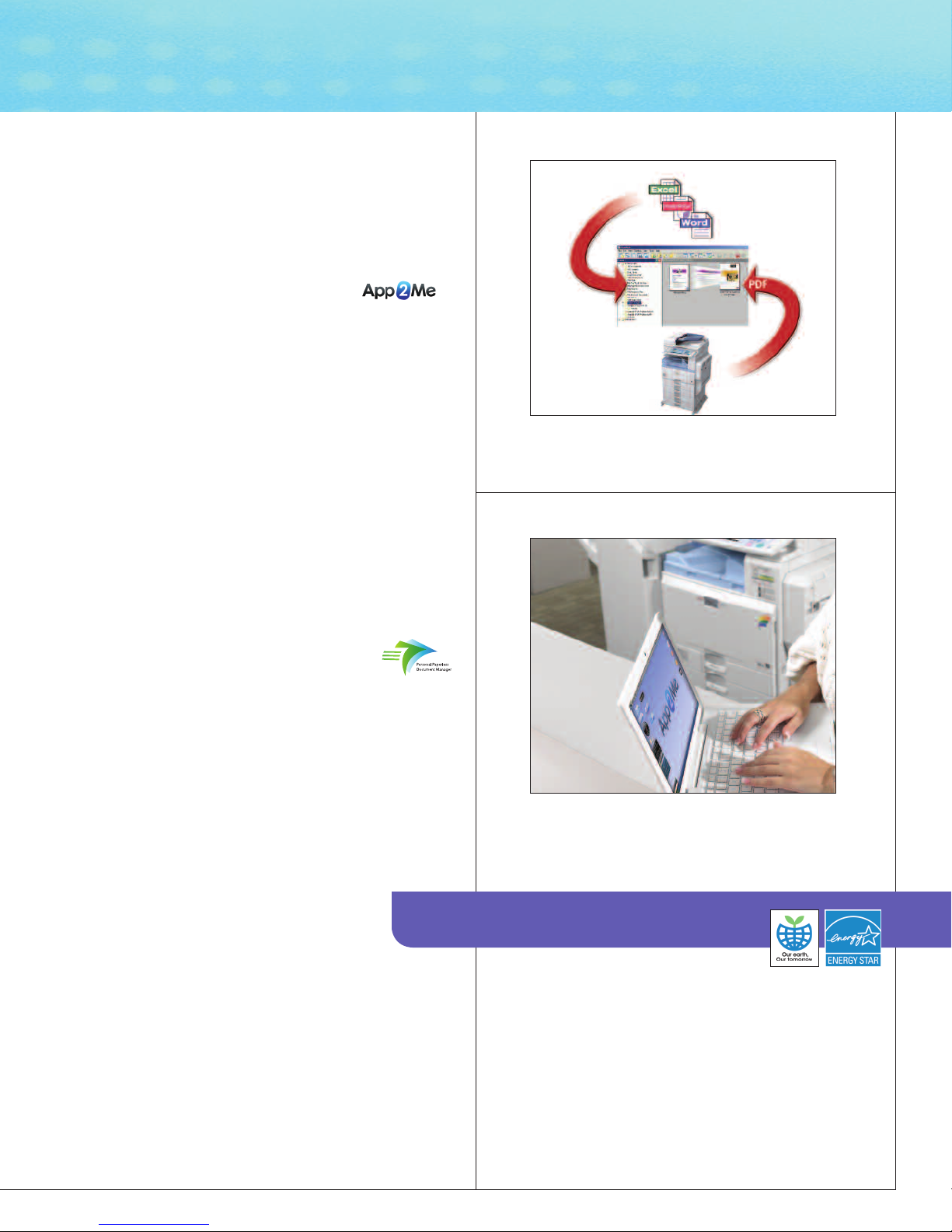
Create unique scanning workflows and save time with
Personal Paperless Document Manager (PPDM).
Customize Documents and Workflow
Personal Paperless Document Manager (PPDM)
enables users to capture, combine, convert and
share the three most prominent document types:
paper, PDFs and Microsoft®Office files.
• Make document distribution easy, secure and productive. Send paper
and electronic files to virtually any destination, including e-mail, FTP sites,
Microsoft SharePoint and content management systems.
eb folders
W
ansform paper originals into fully editable Microsoft Office files
r
T
•
fillable forms that can be edited and electronically completed. Extract data
from fillable forms into a .csv file for analysis. Convert digital and paper
documents into WAV audio files.
• Create custom workflows.When users authenticate to the
system, the interface shows only the personalized view they
create at their desktop computers.
,
, PDFs or
The Total Green Office Solution
User-Friendly Management
Make ever
y administrator’
system management, device monitoring, troubleshooting
and other tasks.
Configure system settings, address books and more with Web Image Monitor.
•
Manage multiple Lanier devices remotely with
•
• Request alerts for low supplies or error detection with Auto E-mail Notification.
• Automate service calls with @Remote
which can be configured to notify service and supply alerts
s life easier with intuitive tools for
eb SmartDeviceMonitor
W
™
(network appliance or embedded),
.
.
ith App2Me, you can download time-saving and
W
workflow-enhancing widgets and use them at any
Lanier MFP enabled with the App2Me solution.
Lanier continues its long-standing
commitment to developing office
solutions with environmentally
friendly and superior energy- and
supply-saving features, without
compr
omising pr
oductivity.
Page 5
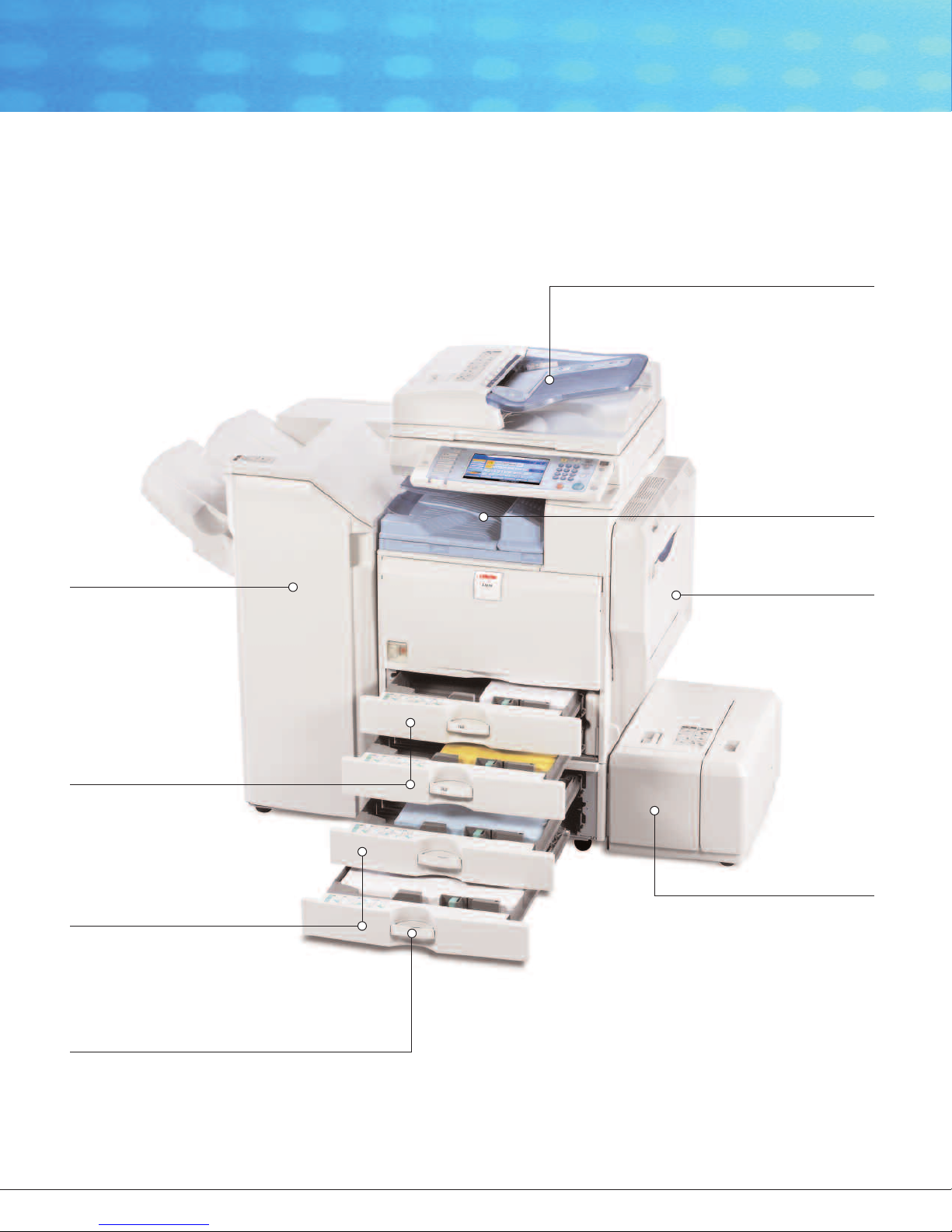
Improve Speed, Efficiency and Productivity
1,000-Sheet Finisher
Holds up to 1,000 sheets of 8.5" x 11" or smaller,
20 lb. Bond (500 sheets of 8.5" x 14" or larger)
and offers automatic three-position stapling.
LD140/LD150
2,000-Sheet Booklet/Saddle Stitch Finisher
Automatically staples documents to produce
professional-grade booklets with a variety of
staple positions and optional 2- or 3-hole punching.
3,000-Sheet Multi-Tray
Finisher
Enhances productivity,
convenience and versatility
with high-capacity trays,
optional 2- or 3-hole
punching and multi-position
stapling for a wide variety
of paper weights and sizes.
100-Sheet Automatic Reversing
Document Feeder (ARDF)
Handles multi-page and doublesided originals up to 11" x 17"
with extreme efficiency.
Automatic Stackless Duplexing
Produces two-sided booklets,
brochures and more while cutting
paper usage in half.
Inner One-Bin Tray (Optional)
Provides a cost-effective way
to separate copy, print and
fax output.
100-Sheet Stack Bypass
Holds a range of paper types
and weights up to 58 lb. Bond.
Dual 550-Sheet Paper Trays
Incr
efficiency by minimizing the
need to r
wo 550-Sheet Tray Paper Bank
T
(Optional)
Holds up to five different sizes and
orientations of paper at all times
for maximum versatility
(Letter-Sized) Large Capacity Tray
also available.
Over/Under
Handles and Easy-Open T
Ensure effortless paper loading
for all users.
eases pr
eload paper
oductivity and
.
. 2,000-Sheet
hand-Grip T
ray
rays
Large Capacity Tray (Optional)
Holds an additional 1,200 letter
sheets to optimize workflow and
minimize user intervention during
large jobs.
Easy-to-Replace Toner Cartridge
es quick r
Ensur
to minimize maintenance time.
Document Server
Stores up to 3,000 frequently used
documents for instant reprinting,
efaxing or r
r
eplacement of toner
edistribution.
-sized
Page 6
IGITAL IMAGING SYSTEM
D
LD140/LD150
NGINE/COPIER SPECIFICATIONS
E
onfiguration
C
canning ElementFlatbed with Moving CCD Array Image
S
Printing Process Twin Laser Beam Scanning &
oner
T
ystem Memory
S
ard Disk Drive
H
Document Feeder 100-Sheet ARDF (Standard)
Copy Resolution 600 x 600 dpi
rayscale
G
xposure AdjustmentManual & Automatic (Standard)
E
Quantity Indicator Up to 999
Original Type Book/Sheet/Objects
aximum Original SizeUp to 11" x 17"
M
opy Size
C
opy Type
C
Warm-Up Time 22 seconds
irst Copy Speed
F
Continuous Copying LD140: 40 copies/minute (LTR)
Speed LD150: 50 copies/minute (LTR)
ecovery Time
R
ower Source
P
imensions
D
Weight 213.8 lbs.
Standard Paper 550 sheets x 2 trays
apacity
C
Optional Paper 550 sheets x 2 trays OR
apacity
C
Paper Size 5.5"x 8.5" to 11"x 17"
Paper Weight Tray 1 & 2: 16 - 45 lb. Bond/
Reduction Ratios 25%, 50%, 65%, 73%, 78%, 85%,
nlargement Ratios121%, 129%, 155%, 200%, 400%
E
Zoom 25% to 400% in 1% increments
Standard Features Auto Magnification, Auto Paper Select,
onsole
C
ensor
S
Electrophotographic Printing
ry, Dual Component
D
68 MB RAM (std./max.)
7
0 GB Standard
4
56 levels
2
.5"x 8.5" to 11"x 17"
5
lain Paper, Transparencies, Recycled
P
Paper, Card Stock, Letterhead
D140: 4.1 seconds
L
D150: 3.5 seconds
L
0 seconds (from Auto Off)
1
20V/60Hz/12A
1
6.4" (W) x 35.8" (H) x 26.6" (D)
2
00-Sheet Bypass Tray
1
,000 x 1; 1,200-Sheet Large Capacity
2
ray (LCT)
T
0 - 169 g/m
6
ypass: 14 - 58 lb. Bond/52 - 220 g/m
B
Duplex: 16 - 45 lb. Bond/60 - 169 g/m
2
2
2
93%
Auto Tray Switch, Background Numbering,
Booklet/Magazine Copy, Center/Border
Erase, Chapters, Combine Mode, Cover
Insertion, Date Stamp, Directional
Magnification, Document Server (3,000
File Capacity), Double Copy, Electronic/
Rotate Sorting, English Preset Stamps,
Full-Color VGA Touch Screen, Java VM
Card Type F, 8 Job Presets, 10 Job
Programs, Negative/Positive, OHP Slip
Sheet, Page Number Stamp, Paper
Designate, Sample Copy, Series Copy,
Simplified Display, 500 User Codes,
User Stamps
PRINTER SPECIFICATIONS (STANDARD)
Print Speed LD140: 40 ppm
CPU RM7035C-533 MHz
Standard Interfaces 10BaseT/100BaseTX, USB 2.0
Optional Interfaces IEEE 802.11a/b/g Wireless LAN, Bluetooth,
Memory Capacity Shared with Copier Memory
Network Protocol TCP/IP, IPX/SPX, AppleTalk
Network Operating Windows Vista/2000/XP/Server 2003/2008,
Systems Netware 3.12, 3.2, 4.1, 4.11, 5.0, 5.1,
Utilities Web SmartDeviceMonitor,
LD150: 50 ppm
Gigabit Ethernet, IEEE 1284 Parallel
Interface Board Type A
6.0, 6.5, UNIX; Sun Solaris, HP-UX,
SCO OpenServer, RedHat Linux, IBM AIX,
Mac OS 8.6 - 9.2x, OS X 10.1 or later,
SAP R/3, NDPS Gateway, IBM iSeries/
AS/ 400 using OS/400 Host Print
Transform, Citrix Metaframe
SmartDeviceMonitor,
Web Image Monitor
age Description
P
anguages
L
Print Resolution Up to 600 dpi
onts for PCL 5e/635 Intellifonts, 10 Truetype Fonts,
F
onts for PS3
F
Standard Features Sample/Locked/Hold/Stored Print
Optional Features PDF Direct Print
CANNER SPECIFICATIONS
S
canning Speed
S
Scanning Resolution Up to 600 dpi
Grayscale 256 levels
can Area
S
tandard Interfaces10BaseT/100BaseTX Ethernet
S
ptional InterfacesWireless LAN (802.11a/b/g),
O
Protocol TCP/IP, SMTP, SMB, FTP, POP3, NCP
emory CapacityShared with Copier Memory
M
tandard FeaturesEmbedded Scan-to-Email, HDD, Folder,
S
ile Formats
F
AX SPECIFICATIONS (OPTION)
F
cuit
Cir
Compatibility ITU-T G3
Resolution 200 x 200/100 dpi (Standar
ompression MethodMH, MR, MMR, JBIG
C
Scanning Speed 0.40 seconds (LEF)
Modem Speed 33.6 Kbps with Auto Fallback
ransmission SpeedG3: 3 seconds per page
T
Memory 4 MB standard (320 pages)
emory Backup
M
Auto Dials 2,000 (with HDD)
Group Dials 100 (max. 500 numbers per group)
D Code Programming4digits
I
User Function Key 3 keys
Standard Features Book Transmission, Dual Access,
Optional Features Simultaneous operation of up to 3 lines
tandard PCL 5e/6 and
S
dobe PostScript3 (Optional)
A
3 International Fonts
1
36 PostScript Fonts
1
W: 61 ipm (@200 dpi);
B
C: 33 ipm (@200 dpi)
F
p to 11" x 17"
U
Gigabit Ethernet
URL
ingle-Page and Multi-Page TIFF, PDF,
S
igh Compression PDF, Single-Page JPEG
H
PSTN, PBX
)
00 x 400 dpi (Optional)
4
MMR Compression)
(
G3: 2 seconds per page
(JBIG Compression)
8 MB maximum (2,240 pages)
2
hour
1
Image Rotation, LAN-Fax Capability,
Internet Faxing (T.37), IP Faxing (T.38),
Fax Forwarding to E-mail/ HDD/Folder
d
(G3 x 3)
SECURITY FEATURES (STANDARD)
S/MIME, IPsec Communication, Locked Print Password Encryption,
Encrypt Address Book, SSL Secure Socket Layer, PDF Encryption
ONE-BIN TRAY BN3040 (OPTION)
Paper Size 5.5" x 8.5" - 11"x 17"/A3 - A5
Paper Weight 16 to 28 lb. Bond/60 - 196 g/m
Paper Capacity 125 sheets
2
SR790 FINISHER (OPTION)
Paper Size 5.5" x 8.5" - 11" x 17"/A5 - A3
Paper Weight 14 to 68 lb. Bond/52 to 256g/m
Stack Capacity Proof Tray: 250 sheets (8.5"x 11"
Staple Capacity 50 sheets (8.5" x 11")
Staple Position 1 staple/2 positions;
Dimensions 10.7" (W) x 20.5" (D) x 31.2" (H)
(Proof Tray)
14 to 42 lb. Bond/52 to 163g/m
(Shift Tray)
or smaller)
50 sheets (8.5" x 14" or larger)
Shift Tray: 1,000 sheets (8.5" x 11"
or smaller)
500 sheets (8.5" x 14" or larger)
30 sheets (8.5" x 14" or larger)
2 staples/1 position
2
2
R3020 BOOKLET FINISHER (OPTION)
S
aper Size
P
aper Weight
P
tack Capacity
S
taple Capacity
S
Staple Position 1 staple/3 positions;
addle Stitch
S
Dimensions 25.8" (W) x 24.2" (D) x 37.8" (H)
R3030 FINISHER (OPTION)
S
aper Size
P
Paper Weight 14 to 43 lb. Bond/52 to 163 g/m
Stack Capacity Proof Tray: 250 sheets (8.5"x 11"
Staple Capacity 50 sheets (8.5" x 11")
taple Position
S
Dimensions 25.8" (W) x 24.2"(D) x 37.8" (H)
.5" x 8.5" - 11" x 17"
5
4 to 43 lb. Bond/52 to 163g/m
1
Proof Tray)
(
14 to 68 lb. Bond/52 to 256g/m
(Shift Tray)
roof Tray: 250 sheets (8.5" x 11"
P
r smaller)
o
0 sheets (8.5" x 14" or larger)
5
Shift Tray: 2,000 sheets (8.5"x 11") LEF
1,000 sheets (8.5" x 11" - 11" x 17") SEF
00 sheets (5.5" x 8.5")
1
0 sheets (8.5" x 11")
5
30 sheets (8.5" x 14" or larger)
staples/2 positions
2
0 sets (2 - 5 sheets)
3
5 sets (6 - 10 sheets)
1
10 sets (11 - 15 sheets)
.5" x 8.5" - 11" x 17"
5
(Proof Tray)
4 to 68 lb. Bond/52 to 256 g/m
1
Shift Tray)
(
or smaller)
0 sheets (8.5" x 14" or larger)
5
hift Tray: 3,000 sheets (8.5"x 11") LEF
S
,500 sheets (8.5" x 11" - 11" x 17") SEF
1
30 sheets (8.5" x 14" or larger)
staple/3 positions;
1
staples/1 position
2
2
2
2
2
RT3000 LARGE CAPACITY TRAY (OPTION)
Paper Size 8.5" x
ight
Paper We
Paper Capacity 1,200 sheets
imensions
D
11"/A4
16 to 45 lb. Bond/60 - 169 g/m
3.7" (W) x 21.3" (D) x 11.4" (H)
1
2
PB3040 PAPER FEED UNIT (OPTION)
Paper Size 5.5" x 8.5" - 11"x 17"/A5 - A3
Paper Weight 16 to 45 lb. Bond/60 to 169 g/m
Paper Capacity 550 sheets x 2
Dimensions 22.8" (W) x 24.4"(D) x 10.2" (H)
PB3050 LARGE CAPACITY TRAY (OPTION)
Paper Weight 16 to 45 lb. Bond/60 to 169 g/m
Paper Capacity 2,000 sheets
Dimensions 22.8" (W) x 24.4"(D) x 10.2" (H)
2
2
ADDITIONAL OPTIONS FOR LD140/LD150
Bluetooth Interface Unit Type 3245, Bridge Unit Type BU3030,
DOSS Type I, FAC33 Cabinet, Fax Type 5001, File Format Converter
Type E, G3 Interface Type 5000, Gigabit Ethernet Board Type A,
Handset Type 1018, HDD Encryption Unit Type A, IEEE 1284 Parallel
Interface Board Type A, IEEE 802.11a/b/g Interface Unit Type J,
Key Counter Bracket Type H, Optional Counter Interface Type A,
PostScript3 Type 5000, Punch Kit Type 3260 (for SR3020 & SR3030),
Scanner Accessibility Option Type 4045, 32 MB Fax Memory,
Removable HDD and Additional Removable HDD, 3L68-17 USB
External Keyboard, Hardware 4 Pack Bundle of PPDM
Some accessories require additional equipment or may be prerequisite for
other options.
www.lanier.com
Bringing Lanier V
Lanier technology of
competitive and move ahead. Let Lanier show you how to empower your business to
improve critical processes, keep information secure, ensure compliance and promote
environmental sustainability while reducing the total cost of ownership.
alue to Y
fers a diverse por
tfolio of solutions to help your organization stay
ganization
our Or
Lanier Five Dedrick Place, West Caldwell, NJ 07006
©2009 Lanier is a registered trademark of Ricoh Americas Corporation. All rights reserved.
All other trademarks are the property of their respective owners. Print speed may be
affected by network, application or PC performance. Specifications and external appearances
are subject to change without notice. Products are shown with optional features.
L3150
 Loading...