

Lancaster 7-LX-150B, 7-LXC-100B, 7-LX-200B, 7-LX-75B, 7-LX-300B Installation, Operating And Service Manual
...Page 1
INSTALLATION, OPERATING AND
SERVICE MANUAL
DIAMOND LINE LX
ELECTRONIC WATER SOFTENER WITH
THE X-FACTOR CONTROL VALVE
PROGRAMMED FOR PRE-FILL BRINING OPTION
7-LXC-50B
7-LXC-75B
7-LXC-100B
7-LX-75B
7-LX-100B
7-LX-150B
7-LX-200B
7-LX-300B
Congratulations on purchasing your new Lancaster Water Softener. This unit is designed to give
you many years of trouble free service. When installed in accordance with the following instructions
and if given reasonable care, clear-soft water will be the result. For servicing and future inspection
purposes, please le this booklet with your important documents.
In the event that you need assistance for servicing your water softener, please rst contact the
professional contractor who installed the system.
PAGE 1
Page 2

TABLE OF CONTENTS
Job Specications ......................................................................................................................... 2
General Installation and Service Warnings .................................................................................. 3
Pre-Installation Review ................................................................................................................. 4
Bypass Valve Operation ............................................................................................................... 5
Installation Instructions, Diagrams ................................................................................................ 6-8
Placing Softener into Service ....................................................................................................... 9
General Operation ........................................................................................................................ 9
Set Time of Day ............................................................................................................................ 10
Adjust Hardness, Days Between Regenerations or Time of Regeneration .................................. 10-11
Low Battery.................................................................................................................................... 11
Contact Screen Programming ...................................................................................................... 11
Specications ............................................................................................................................... 12-15
Parts Diagrams ............................................................................................................................. 16-23
Service Instructions ...................................................................................................................... 24-26
Troubleshooting ............................................................................................................................ 27-30
JOB SPECIFICATIONS
MODEL NO.
INSTALLATION DATE
SERIAL NUMBER
INSTALLER NAME PHONE
ADDRESS
WATER TEST AT TIME OF INSTALLATION
Hardness CaCo3 (gpg)
Iron (ppm)
pH
SIZING INFORMATION
All Water is Softened Except:
Rear Hose Bib Front Hose Bib Kitchen Cold Toilets All Cold
Other
The average family uses 50 gallons per person daily for all water uses in the home.
Daily Water Usage (Gallons/Person)
x Family Size (Number of people in family)
= Total Gallons Per Day
x Grains Per Gallon of hardness
Other:
(Note: Add 4 grains per gallon of hardness for each ppm iron for total compensated hardness)
= Total Grains per Day
PAGE 2
Page 3

GENERAL INSTALLATION AND SERVICE WARNINGS
The control valve, ttings and/or bypass are designed to accommodate minor plumbing misalignments but are not designed to support
the weight of a system or the plumbing.
HYDROCARBONS SUCH AS KEROSENE, BENZENE, GASOLINE, ETC., MAY DAMAGE PRODUCTS THAT CONTAIN O-RINGS OR
PLASTIC COMPONENTS. EXPOSURE TO SUCH HYDROCARBONS MAY CAUSE THE PRODUCTS TO LEAK. DO NOT USE THE
PRODUCT(S) CONTAINED IN THIS DOCUMENT ON WATER SUPPLIES THAT CONTAIN HYDROCARBONS SUCH AS KEROSENE,
BENZENE, GASOLINE, ETC.
THIS WATER METER SHOULD NOT BE USED AS THE PRIMARY MONITORING DEVICE FOR CRITICAL OR HEALTH EFFECT
APPLICATIONS
Do not use Vaseline, oils, other hydrocarbon lubricants or spray silicone anywhere. A silicone lubricant may be used on black o-rings but
is not necessary.
The nuts and caps are designed to be unscrewed or tightened by hand or with the special plastic wrench. If necessary a pliers can be
used to unscrew the nut or cap. Do not use a pipe wrench to tighten or loosen nuts or caps. Do not place a screwdriver in the slots on
caps and/or tap with a hammer.
Do not use pipe dope or other sealants on threads. Use Teon tape on the threaded inlet, outlet and drain ttings. Teon tape is not
necessary on the nut connection or caps because of o-ring seals.
After completing any valve maintenance involving the drive assembly or the drive cap assembly and pistons unplug power source jack
from the printed circuit board (black wire) and plug back in or press and hold NEXT and REGEN buttons for 3 seconds.
This resets the electronics and establishes the service piston position. The display should ash all wording, then ash the software version
and then reset the valve to the service position.
All plumbing should be done in accordance with local plumbing codes. The pipe size for the drain line should be a minimum of ½”.
Backwash ow rates in excess of 7 gpm or length in excess of 20’ require ¾” drain line.
Solder joints near the drain must be done prior to connecting the drain line ow control tting. Leave at least 6” between the drain line
control tting and solder joints when soldering pipes that are connected on the drain line control tting. Failure to do this could cause
interior damage to the drain line ow control tting.
When assembling the installation tting package (inlet and outlet), connect the tting to the plumbing system rst and then attach the nut,
split ring and o-ring. Heat from soldering or solvent cements may damage the nut, split ring or o-ring. Solder joints should be cool and
solvent cements should be set before installing the nut, split ring and o-ring. Avoid getting primer and solvent cement on any part of the
o-rings, split rings, bypass valve or control valve.
Plug into an electrical outlet. Note: All electrical connections must be connected according to local codes. (Be certain the outlet is
uninterrupted.)
Install grounding strap on metal pipes.
This glass lled Noryl (or equivalent) fully automatic control valve is designed as the primary control center to direct and regulate all cycles
of a water softener or lter. The control valve can be set to regenerate on demand (consumption of a predetermined amount of water) and/
or as a time clock (passage of a particular number of days). The control valve can be set so that a softener can meet the Water Quality
Association (WQA) Standard S100 or NSF/ANSI Standard 44 efciency rating.
It is not recommended to change control valves from downow to upow brining or vice versa in the eld. The valve bodies
for downow and upow are unique to the regeneration type and should not be interchanged. A mismatch of valve body and
regeneration piston will result in hard water bypass during service.
The control valve is compatible with a variety of regenerants and resin cleaners. The control valve is capable of routing the ow of water
in the necessary paths to regenerate or backwash water treatment systems. The injector regulates the ow of brine or other regenerants.
The control valve regulates the ow rates for backwashing, rinsing, and the replenishing of treated water into a regenerant tank, when
applicable. The control valve uses no traditional fasteners (e.g. screws); instead clips, threaded caps and nuts and snap type latches are
used. Caps and nuts only need to be rmly hand tightened because radial seals are used. Tools required to service the valve include one
small blade screw driver, one large blade screw driver, pliers and a pair of hands. A plastic wrench is available which eliminates the need
for screwdrivers and pliers. Disassembly for servicing takes much less time than comparable products currently on the market. Control
valve installation is made easy because the distributor tube can be cut ½” above to ½” below the top of tank thread. The distributor tube
is held in place by an o-ring seal and the control valve also has a bayonet lock feature for upper distributor baskets.
The AC adapter comes with a 15 foot power cord and is designed for use with the control valve. The AC adapter is for dry location use
only. The control valve remembers all settings until the battery power is depleted if the power goes out. After the battery power is depleted,
the only item that needs to be reset is the time of day; other values are permanently stored in the nonvolatile memory. The control valve
battery is not rechargeable but is replaceable.
Allow one foot of clearance to service the valve.
PAGE 3
Page 4

PRE-INSTALLATION REVIEW
WATER QUALITY: If sand or sediment is present in the water supply, a sediment lter should be installed ahead of the water softener.
Your water softener has been designed to adequately reduce hardness from levels up to 100 grains per gallon. Ferrous bicarbonate iron
levels up to 0.5 ppm can also be reduced. This is iron that is dissolved in water and not visible to the eye in a freshly drawn sample. After
standing in contact with air, the ferrous iron will become oxidized to the ferric state and start to precipitate as a reddish brown oc. It can
be seen and may cause discolored water. Air must not come in contact with water until after it has passed through the water softener. In
some cases, additional treatment equipment may be needed to treat water having special characteristics, such as: ferric hydroxide iron,
iron bacteria, low pH, tastes and odors, etc. Consult your dealer if you have any questions. This water softener is not to be used for
treating water that is microbiologically unsafe or of unknown quality without adequate disinfection before or after treatment.
WATER PRESSURE: A minimum of 20 pounds of water pressure (psi) is required for regeneration. Maximum 100 psi. CAUTION: the
softener cannot be subject to a vacuum due to loss of pressure (such as a water main break or submersible well pump check valve failure).
WATER TEMPERATURE: The range of water temperature is 40°F to 100°F. DO NOT install any water softener with less than 10 feet of
piping between its outlet and the inlet of a water heater.
AMBIENT TEMPERATURE: DO NOT locate softener where it or its connections (including the drain and overow lines) will ever be
subject to room temperatures under 33°F.
ELECTRICITY: An uninterrupted 120 volt 60Hz source is required. Make sure electrical source is not on a timer or switch. All electrical
connections must be connected according to local codes. The plug-in transformer is for dry locations only. Surge protection is recommended
with all electrical connections.
DRAIN: All plumbing should be done in accordance with local plumbing codes. The distance between the drain and the water softener
should be as short as possible. The pipe size for the drain line should be a minimum of 1/2” (inside diameter of pipe).
SOFTENING: It is recommended that the softener be installed to soften both the hot and cold water supply. A separate hard water faucet
may be plumbed for drinking purposes if desired. Outside faucets should be left on hard water.
BYPASS: A bypass valve should be installed so that water will be available if it should be necessary to shut off the pressure in order to
service the softener.
PAGE 4
Page 5
BYPASS VALVE
The bypass valve is typically used to isolate the control valve from the plumbing system’s water pressure in order to perform control
valve repairs or maintenance. The X-Factor bypass valve is particularly unique in the water treatment industry due to its versatility
and state of the art design features. The 1” full ow bypass valve incorporates four positions, including a diagnostic position that
allows service personal to work on a pressurized system while still providing untreated bypassed water to the facility or residence. Its
completely non-metallic, all-plastic design allows for easy access and serviceability without the need for tools.
The bypass body and rotors are glass lled Noryl® (or equivalent) and the nuts and caps are glass lled polypropylene. All seals are
self-lubricating EPDM to help prevent valve seizing after long periods of non-use. Internal o-rings can easily be replaced if service is
required.
The bypass consists of two interchangeable plug valves that are operated independently by red arrow-shaped handles. The handles
identify the ow direction of the water. The plug valves enable the bypass valve to operate in four positions.
OPERATION:
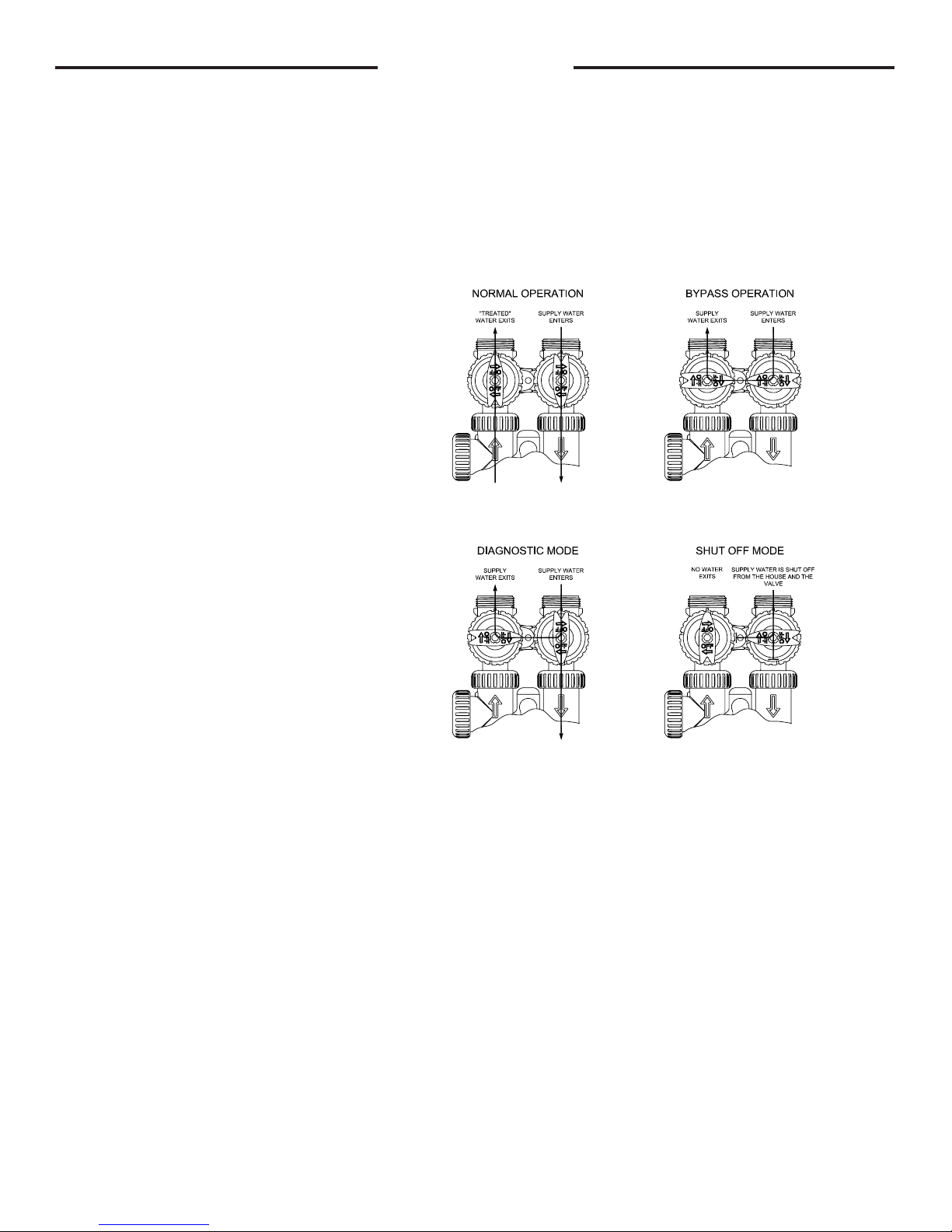
1. Normal Operation Position: The inlet and outlet
handles point in the direction of ow indicated by the
engraved arrows on the control valve. Water ows
through the control valve during normal operation and
this position also allows the control valve to isolate the
media bed during the regeneration cycle. (see gure
1)
2. Bypass Position: The inlet and outlet handles
point to the center of the bypass, the control valve
is isolated from the water pressure contained in the
plumbing system. Untreated water is supplied to the
plumbing system. (see gure 2)
3. Diagnostic Position: The inlet handle points in
the direction of ow and the outlet handle points to
the center of bypass valve, system water pressure is
allowed to the control valve and the plumbing system
while not allowing water to exit from the control valve
to the plumbing. (see gure 3)
4. Shut Off Position: The inlet handle points to the
center of the bypass valve and the outlet handle
points in the direction of ow, the water is shut off
to the plumbing system. If water is available on the
outlet side of the softener it is an indication of water
bypass around the system (i.e. a plumbing connection
somewhere in the building bypasses the system).
(see gure 4)
The working parts of the bypass valve are the rotor assemblies that are contained under the bypass valve caps. Before working on the
rotors, make sure the system is depressurized. Turn the red arrow shaped handles towards the center of the bypass valve and back
several times to ensure rotor is turning freely.
The nuts and caps are designed to be unscrewed or tightened by hand. If necessary a pliers can be used to unscrew the nut or cap. Do
not use a pipe wrench to tighten or loosen nuts or caps. Do not place screwdriver in slots on caps and/or tap with a hammer. To access
the rotor, unscrew the cap and lift the cap, rotor and handle out as one unit. Twisting the unit as you pull it out will help to remove it
more easily. There are three o-rings: one under the rotor cap, one on the rotor stem and the rotor seal. Replace worn o-rings. Clean
rotor. Reinstall rotor.
When reinstalling the red arrow handles be sure that:
1. The handle pointers are lined up with the control valve body arrows, and the rotor seal o-ring and retainer on both rotors face to the
right when being viewed from the front of the control valve; or
2. Arrows point toward each other in the bypass position.
Since the handles can be pulled off, they could be accidentally reinstalled 180° from their correct orientation. To install the red arrow
handles correctly, keep the handles pointed in the same direction as the arrows engraved on the control valve body while tightening the
bypass valve caps.
gure 1 gure 2
gure 3 gure 4
PAGE 5
Page 6
INSTALLATION INSTRUCTIONS
BRINE LINE FITTING CONNECTIONS
DRAIN LINE FITTING CONNECTION USING 5/8" POLY TUBE
Click to buy NOW!
P
D
F
-
X
C
H
A
N
G
E
w
w
w
.
d
o
c
u
-
t
r
a
c
k
.
c
o
m
(All electrical & plumbing should be done in accordance to all local codes)
1. Place the softener where you want to install it, making sure it is on
a clean, level and rm base.
2. Do all necessary plumbing (inlet to inlet, outlet to outlet, and drain
line to drain). The control valve, ttings and/or bypass are designed to
accommodate minor plumbing misalignments but are not designed to
support the weight of a system or the plumbing.
3. When assembling the installation tting package (inlet and outlet),
connect the tting to the plumbing system rst and then attach the
nut, split ring and o-ring. Heat from soldering or solvent cements may
damage the nut, split ring or o-ring. Solder joint should be cool and
solvent cements should be set before installing the nut, split ring and
o-ring. Avoid getting primer and solvent cement on any part of the
o-rings, split rings, bypass valve or control valve.
4. A jumper ground wire should be installed between the inlet
and outlet pipe whenever the metallic continuity of a water
distribution piping system is interrupted. Install grounding strap
on metal pipes.
POLYTUBE
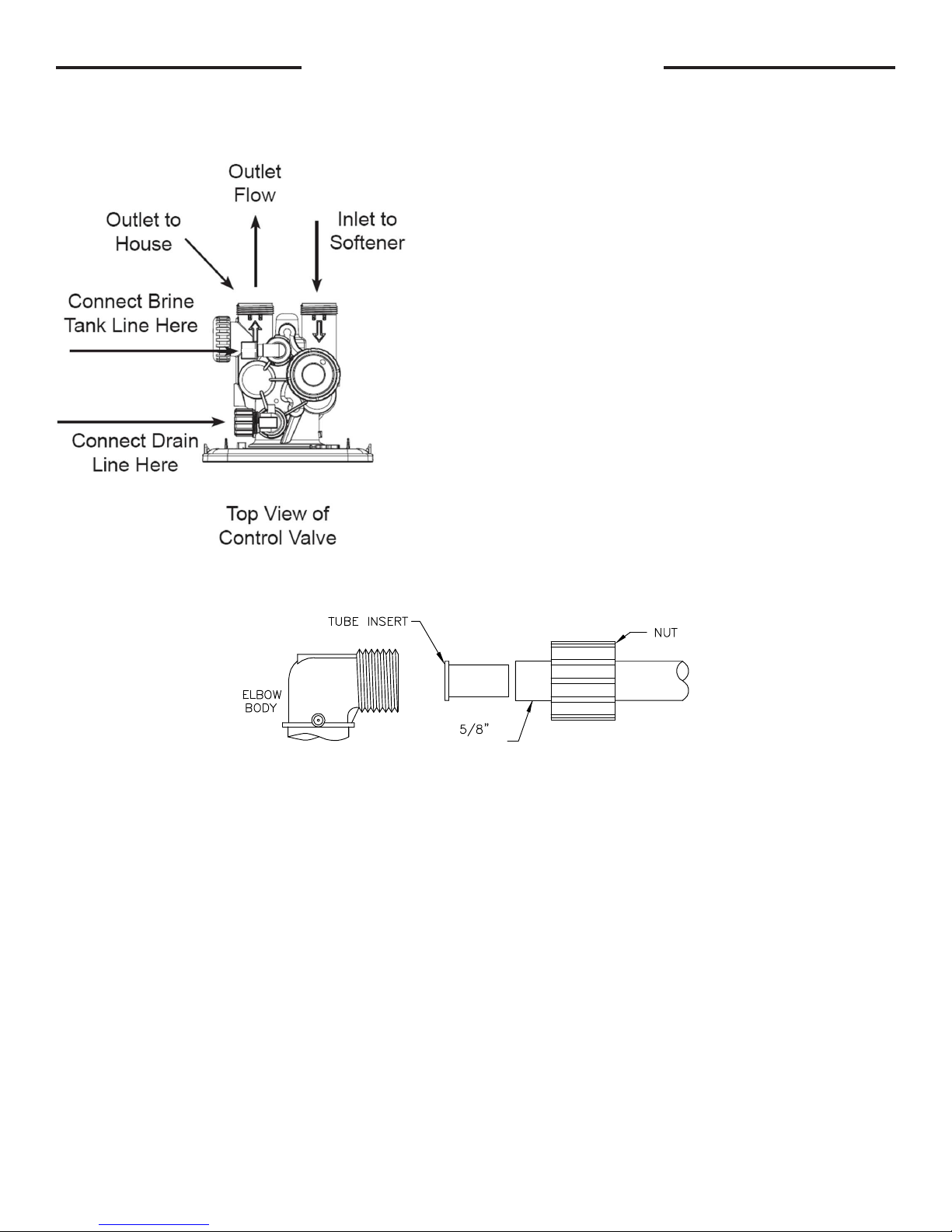
5. The drain connection may be made using either 5/8” polytube (see below) or a 3/4” female adapter. The polytube insert
is shipped attached to the drain line elbow’s locking clip. Press the insert into the drain line tubing (tubing not provided).
Loosen the nut of the drain line elbow. Press the 5/8” polytube with insert into the drain line elbow until it seats on the back
of the tting. Tighten the nut. If soldering, joints near the drain must be done prior to connecting the drain line ow control
tting. Leave at least 6” between the drain line control tting and solder joints when soldering pipes that are connected on
the drain line control tting. Failure to do this could cause interior damage to the drain line ow control tting. Never insert a
drain line into a drain, sewer line, or trap. Always allow an air gap between the drain line and the wastewater to prevent the
possibility of sewage being back-siphoned into the softener.
PAGE 6
Page 7
BRINE LINE FITTING CONNECTIONS
Click to buy NOW!
P
D
F
-
X
C
H
A
N
G
E
w
w
w
.
d
o
c
u
-
t
r
a
c
k
.
c
o
m
INSTALLATION INSTRUCTIONS CONT’D
(All electrical & plumbing should be done in accordance to all local codes)
A
E
C
B D
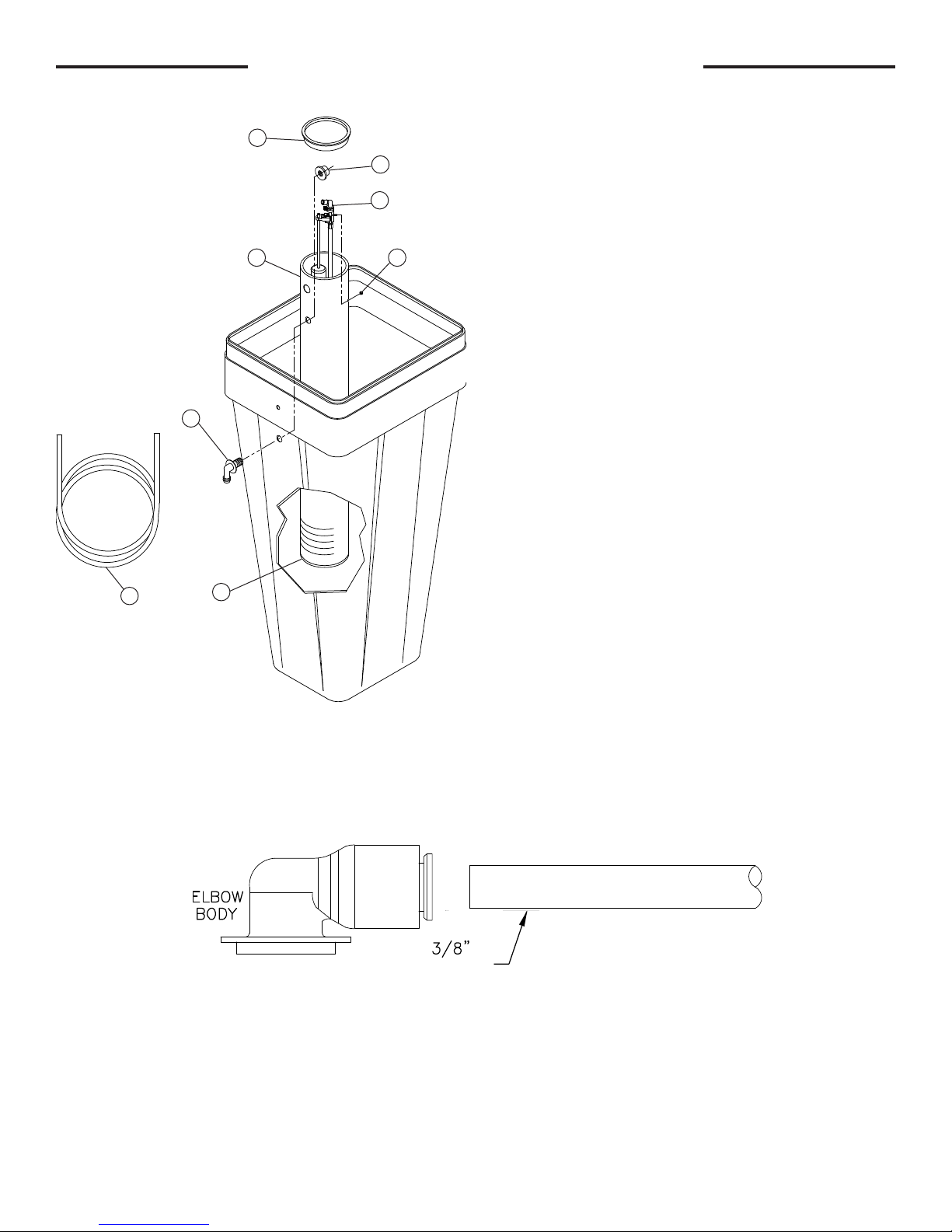
6. Assemble the brine tank. Install a brine well cap (Item A)
on the bottom of the brine well (Item B). Remove the brine
valve assembly (Item C) from the brine well by removing the
nut (Item D). Attach the brine well to the brine tank with the
two-piece overow (Items E & F) using the lower holes in
both pieces, as shown. Reinstall the brine valve assembly.
Push brine line polytube (Item G) through the upper holes in
F
the brine tank and brine well and press the polytube into the
elbow tting.
G
A
7. The brine rell ow control assembly is installed in an easy to access rell elbow located on top of the control valve. The
rell ow control assembly is attached to the control valve with a locking clip. The locking clip allows the elbow to rotate 270
degrees so the outlet can be oriented towards the brine tank.
8. Connect the brine line polytubing found with the brine tank to the brine connection on the control valve. The control valve
has a standard rell elbow to which a 3/8” exible tube can be connected, see below. Press the polytube into the brine elbow
tting. Make sure the oor is clean beneath the brine tank and that it is level and smooth.
POLYTUBE
9. A 1/2” (inside diameter, not provided) gravity drain line should be connected to the overow tting on the side of the brine
tank. This overow is in case of a malfunction in the brine shut off. If the unit is installed where water may ow in the event of
an overow and cause water damage, connect a length of exible tubing and run to a drain below the level of the overow.
(Do not connect the tubing to the drain line on the control valve. Do not run tubing above overow height at any
point.)
PAGE 7
Page 8
COLD
Click to buy NOW!
P
D
F
-
X
C
H
A
N
G
E
w
w
w
.
d
o
c
u
-
t
r
a
c
k
.
c
o
m
Click to buy NOW!
P
D
F
-
X
C
H
A
N
G
E
w
w
w
.
d
o
c
u
-
t
r
a
c
k
.
c
o
m
HOT
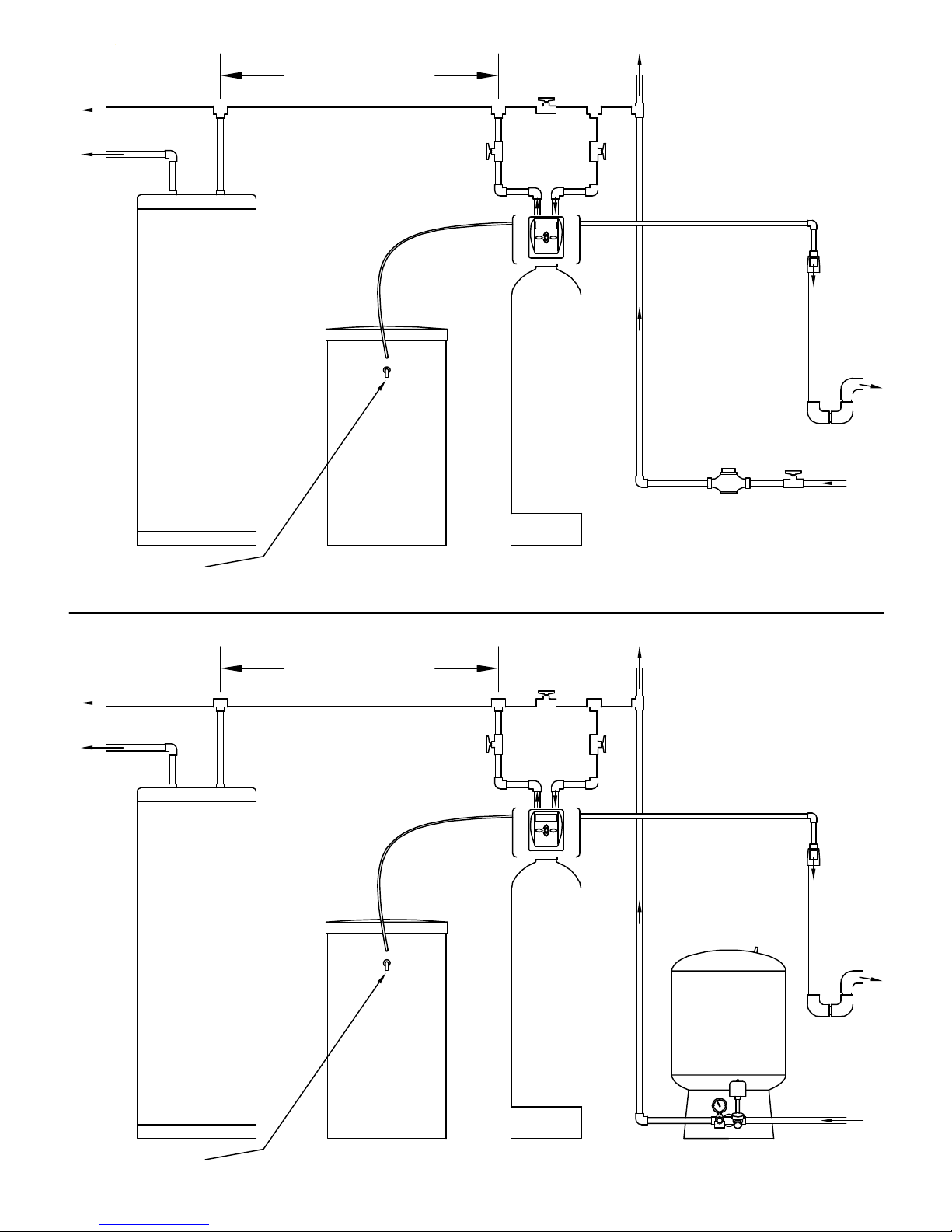
MINIMUM 10 FEET
BETWEEN
WATER SOFTENER OUTLET
AND
WATER H EATER INLET
A SIX FOOT LENGTH OF 3/8" O.D.
BRINE LIN E POLYTUBE
SUPPLIED WITH BRINE TANK.
LOCATE WATER SOFTENER
AS CLOSE AS POSSIBLE
TO BRIN E TANK.
BYPASS PLUMBING
RECOMMENDED
IF
OPTIONAL BP2000
BYPASS VALVE
IS NOT USED.
TO
OUTSIDE
TAP
LOCATE WATER SOFTEN ER CLOSE TO A DRAIN.
AVOID OVERHEAD DRA IN LINES IF POSSIBLE TO
PREVEN T BACK P RESSURE ON BRINE INJECTOR.
IF OVER HEAD D RAIN LIN E IS USED AND EXCEEDS
5 FEET ABOVE CON NECT ION ON CONTROL VALVE
IF DRAIN LINE EXC EEDS 20 FEET IN LENGTH,
DRAIN LINE PIPE SIZ E SHOU LD BE MINIMUM 3/4".
OR
DRAIN LINE
AIR GAP
ADAPTER
WATER
HEATER
TO
DRAIN
CITY WATER
INSTALLATION
WATER
METER
BRINE TANK
OVERFLO W GRAVITY DRAIN - ON LY USED IN CASE O F MALFU NCTIO N IN TH E BRINE SHUTOFF. DO NOT CONNECT TO CONTROL VALVE DRAIN LINE.
IF UNIT IS INST ALLED WH ERE OVER FLOW C OULD CAUSE W ATER D AMAGE, CONNEC T TU BING AND RUN TO FLOOR DRAIN. DO NOT RUN TUBING ABOVE OVERFLOW HEIGHT.
MINIMUM 10 FEET
BETWEEN
WATER SOFTENER OUTLET
AND
WATER H EATER INLET
COLD
HOT
A SIX FOOT LENGTH OF 3/8" O.D.
BRINE LIN E POLYTUBE
SUPPLIED WITH BRINE TANK.
WATER S OFTENER
BYPASS PLUMBING
RECOMMENDED
IF
OPTIONAL BP2000
BYPASS VALVE
IS NOT USED.
TO
OUTSIDE
TAP
LOCATE WATER SOFTEN ER CLOSE TO A DRAIN.
AVOID OVERHEAD DRA IN LINES IF POSSIBLE TO
PREVEN T BACK P RESSURE ON BRINE INJECTOR.
IF OVER HEAD D RAIN LIN E IS USED AND EXCEEDS
5 FEET ABOVE CON NECT ION ON CONTROL VALVE
IF DRAIN LINE EXC EEDS 20 FEET IN LENGTH,
DRAIN LINE PIPE SIZ E SHOU LD BE MINIMUM 3/4".
OR
FROM
WATER MAIN
WATER
HEATER
OVERFLO W GRAVITY DRAIN - ON LY USED IN CASE O F MALFU NCTIO N IN TH E BRINE SHUTOFF. DO NOT CONNECT TO CONTROL VALVE DRAIN LINE.
IF UNIT IS INST ALLED WH ERE OVER FLOW C OULD CAUSE W ATER D AMAGE, CONNEC T TU BING AND RUN TO FLOOR DRAIN. DO NOT RUN TUBING ABOVE OVERFLOW HEIGHT.
LOCATE WATER SOFTENER
AS CLOSE AS POSSIBLE
TO BRIN E TANK.
BRINE TANK
PAGE 8
WATER S OFTENER
WELL WATER
INSTALLATION
PRESSURE
TANK
DRAIN LINE
AIR GAP
ADAPTER
TO
DRAIN
FROM
WELL PUMP
Page 9
PLACING SOFTENER INTO SERVICE
Do not add salt to the brine tank yet. Do not plug the transformer into the receptacle yet. Make sure inlet and outlet valves are to their
closed positions. If using optional bypass, place in bypass position. Turn on main water supply. Open a cold water faucet. This will clear
the line of any debris (solder, pipe dope, etc.) that may be in the line. Let water run at faucet for a couple minutes, or until clear. Turn
off faucet. Manually add 1 ½ gallons of water to the brine tank. Now plug the transformer into a 120 volt receptacle (be certain the
receptacle is uninterrupted). Within 5 seconds the control display and buttons will illuminate and the time of day screen will appear.
• Press and hold the
REGEN
button for approximately 5 seconds until the motor starts.
• Wait until display reads FILL and numbers start counting down.
• Momentarily press
• Momentarily press
• Momentarily press
• Momentarily press
REGEN
again. Valve is now in the SOFTENING position.
REGEN
again. Valve is now in the BACKWASH position. (NA for model 7-LXC-50, -100)
REGEN
again. Valve is now in the REGENERANT DRAW position.
REGEN
again. Valve is now in the second BACKWASH position. (NA for model 7-LXC-50, -100)
If using optional bypass SLOWLY turn bypass valve to DIAGNOSTIC position (See gure 3 on page 5) or slowly open inlet valve to
allow water to slowly enter Softener.
When water is owing steadily to drain without the presence of air, momentarily press
REGEN
again. Display will read RINSE. Open
the outlet valve of the softener, or if using optional bypass place to NORMAL OPERATION MODE (see gure 1 on page
5). Allow control to nish the RINSE cycle. Allow the control to automatically advance to the SOFTENING position. Now
load the brine tank with salt. Solar Salt is recommended. The brine tank salt level should be checked every couple of
weeks to determine salt usage. Keeping the brine tank salt level at least 1/2 full is recommended.
SANITIZING: Use 2 oz. of 5 ¼% unscented household chlorine bleach for each cubic foot of resin. Pour bleach directly into the 4”
diameter white brine well located inside the brine tank. Press and hold the
system to complete the regeneration automatically. Check for other local and state codes which may also specify sanitation methods.
Note: The rst step of the regeneration process is to ll the brine tank with the proper amount of water. The brine tank will
only have a very slight amount of water in it after the regeneration cycles are completed.
REGEN
for 5 - 6 seconds until the motor starts running. Allow
GENERAL OPERATION
Note: As an energy saving feature, the control will automatically turn off all SOLID BLUE or SOLID GREEN display
illumination and keypad illumination after about 5 minutes of the last keypad button push. Any further keypad touch will
cause the re-illumination of the display and keypad, and re-activate keypad control.
User Displays
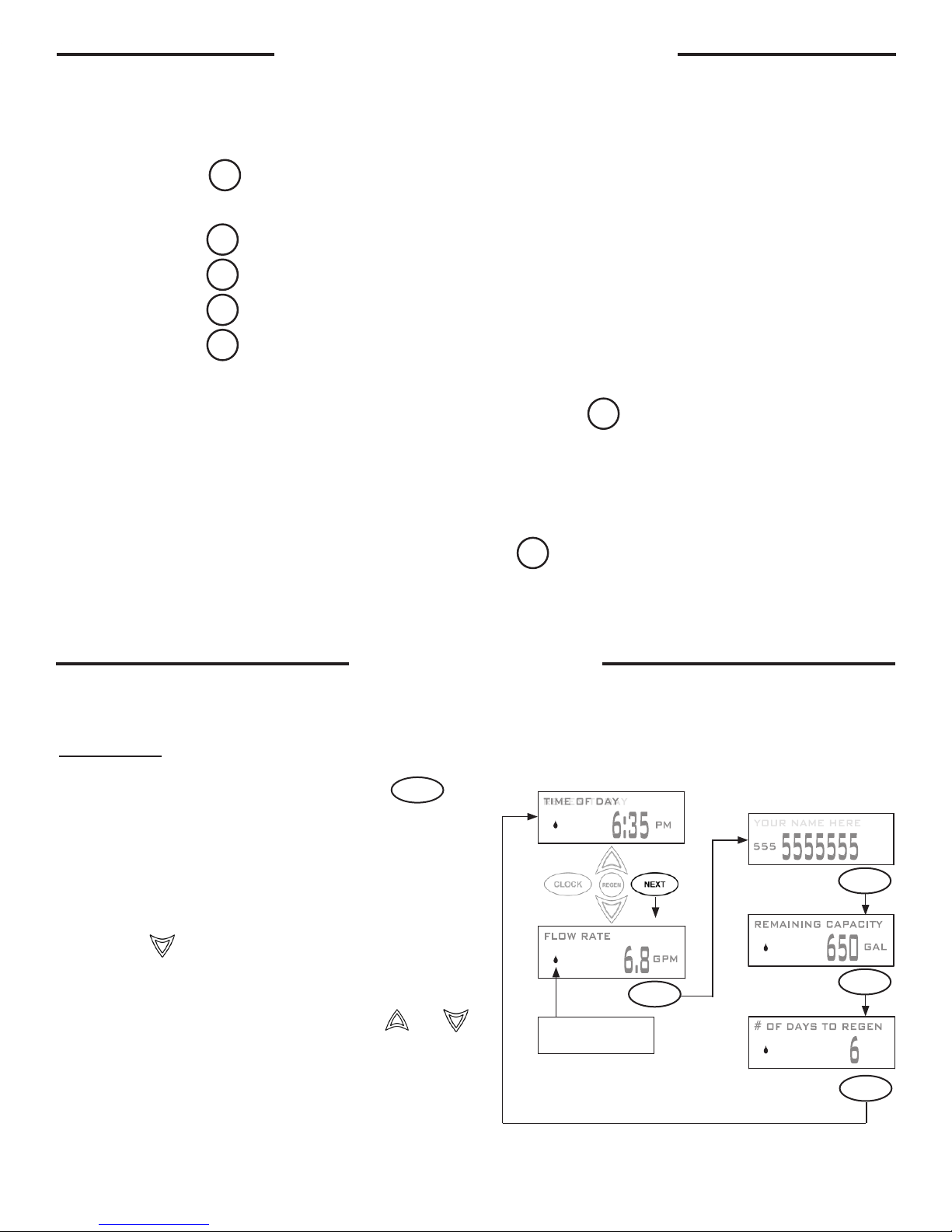
When the system is in normal service mode, one of up to ve
available User Displays will be shown. Pressing
alternate between the following displays:
• Current time of day
• Treated water ow rate
• Service contact name and phone number (if entered)
• Remaining Capacity of treated water available
• Remaining days to regeneration (if Day Override is
programmed)
Pressing the button while in the Capacity Remaining or
Days Remaining displays will decrease the capacity remaining
in ten gallon increments or the days remaining in one day
increments.
To clear the Service Call reminder, press the and
buttons simultaneously while the number and banner text
screen is displayed.
If the system has called for a regeneration that will occur at
the preset time of regeneration, the words REGEN TODAY will
alternate with the header on the display.
Utilizing the control valve’s built-in water meter, a water drop
ashes on the display when water is being treated (i.e. water is
owing through the system).
NEXT
will
Drop will ash while water
is being treated.
Contact Screen
NEXT
NEXT
NEXT
NEXT
PAGE 9
Page 10

SET TIME OF DAY
Current time of day needs to be entered during initial installation, and adjusted when daylight saving time begins or ends.
If an extended power outage occurs and depletes the on-board non-rechargeable coin cell battery, when power resumes
the time of day should be reset and battery replaced.
STEP 1
STEP 2
STEP 1 – Press
STEP 2 - Current Time (hour): Set the hour of the day using or buttons. AM/PM toggles
after 12. Press
STEP 3
STEP 3 - Current Time (minutes): Set the minutes of the day using or buttons. Press
NEXT to exit Set Time of Day. Press
RETURN TO NORMAL MODE
ADJUST HARDNESS, DAYS BETWEEN REGENERATIONS,
CLOCK
NEXT
to go to Step 3.
to return to previous step.
REGEN
OR TIME OF REGENERATION
STEP 1
STEP 2
STEP 3
STEP 4
STEP 1 - Press
NEXT
and simultaneously for 3 seconds to access Installer Display Settings.
STEP 2 – Hardness: Set the amount of hardness in grains of hardness as calcium carbonate per
gallon using the or buttons. The default is 20 with value ranges from 1 to 150 in 1 grain
increments. Note: The grains per gallon can be increased if soluble iron needs to be reduced. Press
NEXT
to go to step 3. Press
to exit Installer Display Settings.
REGEN
STEP 3 – Day Override: Set the maximum number of days between regenerations. If value set to
“OFF”, regeneration initiation is based solely on volume used. If value is set as a number (allowable
range from 1 to 28) a regeneration initiation will be called for on that day even if sufcient volume of
water were not used to call for a regeneration. Set Day Override using or buttons:
• number of days between regeneration (1 to 28); or
• “OFF”.
Press
NEXT
to go to step 4. Press
REGEN
to return to previous step.
STEP 4 – Next Regeneration Time (hour): Set the hour of day for regeneration using or
buttons. AM/PM toggles after 12. The default time is 2:00 AM. Press
REGEN
to return to previous step.
to go to Step 5. Press
NEXT
PAGE 10
Page 11

STEP 5
STEP 5 – Next Regeneration Time (minutes): Set the minutes of day for regeneration using
or buttons. Press
NEXT
to return to normal operation. Press
REGEN
to return to
previous step.
RETURN TO NORMAL MODE
LOW BATTERY
A non-rechargeable coin cell battery is located on the circuit board, used only to maintain the time of day during power
outages (all other information will be stored in memory no matter how long the power outage). The screen displays LOW
BATTERY when the battery needs to be replaced. The screen will remain illuminated solid blue when LOW BATTERY is
displayed. Initially LOW BATTERY display will alternate with the User display, nally displaying only LOW BATTERY. User
displays are still accessible by pressing
NEXT
.
CONTACT SCREEN PROGRAMMING
STEP 1
STEP 2
STEP 3
STEP 4
STEP 1 - Press
NEXT
and simultaneously for 3 seconds to access Installer Display
Settings.
STEP 2 - Press
STEP 3 - Press
NEXT
to go to step 3.
NEXT
to go to step 4.
From Step 4, while hour is ashing, press and hold both the
change phone number and banner text.
CLOCK
and button to
Phone Number - Set phone number using the or arrow. Press
to the next digit. Press
Banner Text - Set the banner text up to a maximum of 44 characters. Use the or
to select letters of the alphabet, numbers, ampersand (&), or a space in the banner text.
Press
REGEN
to return to previous digit.
NEXT
to forward to the next character or to exit the Installer Display Settings.
PAGE 11
NEXT
to forward
Page 12

X FACTOR SERIES
GENERAL SPECIFICATIONS
1” Control Valve Size;
W” x L” x H”
Inlet/Outlet Fitting
Options; inches
Drain Pipe NPT (OD
Poly Tube) Size; inches
Working Pressure;
Min to Max (PSI)
Water Operating Temp;
Min to Max (°F)
AC Adaptor Input;
Voltage - Hertz
AC Adaptor Output;
Voltage - Current
3 Volt Lithium Coin Cell
Battery; type
PC Board Relay Terminal
Block DC Output; Voltage
** Relay Specications: 12V DC Relay with a coil resistance not less than 80 ohms. If mounting the relay under the control
valve cover, check for proper mounting location dimensions on the backplate.
9.3 x 10.5 x 7.0
3/4 to 1.25
3/4 (5/8)
20 to 100
35 to 100
120V AC - 60 Hz
12V AC - 500 mA
2032
12V DC **
8.50 215.9
9.3
186.17.33
7.0
10.15 257.9
10.5
3.39 86.1
General Notes for estimating only.
PAGE 12
Page 13

X FACTOR SERIES
LX SPECIFICATIONS
MODEL NUMBER 7-LX-75B 7-LX-100B 7-LX-150B 7-LX-200B 7-LX-300B
Service Flow (GPM)
at 15 PSI Pressure Drop
Resin Tank Size;
Diameter x Height (inches)
Resin; Cu. Ft. 0.75 1 1.5 2 3
Brine Tank Size; (inches) 15 x 17 x 36 15 x 17 x 36 15 x 17 x 36 18 x 40 18 x 40
Brine Tank Capacity;
Lbs NaCl
Drain Line Flow Control;
GPM
Brine Line (Re-Fill)Flow
Control; GPM
Injector; color 1C - Violet 1E - White 1E - White 1F - Blue 1H - Green
13 17 16 18 19
8 x 44 10 x 40 10 x 54 12 x 48 14 x 65
275 275 275 450 450
1.0 1.7 1.7 2.7 4.2
0.5 0.5 0.5 0.5 0.5
X FACTOR SERIES
LXC SPECIFICATIONS
MODEL NUMBER
7-LXC-50B
(PACKED BED)
7-LXC-75B
7-LXC-100B
(PACKED BED)
Service Flow (GPM)
at 15 PSI Pressure Drop
Resin Tank Size;
Diameter x Height
(inches)
Resin; Cu. Ft. 0.5 0.75 1
Cabinet Size (including
top cover); W” x L” x H”
Cabinet Capacity (with
grid); Lbs NaCl
Drain Line Flow Control;
GPM
Brine Line (Re-Fill) Flow
Control; GPM
Injector; color 1D - Red 1E - White 1E - White
14 18 17
9 x 18 10 x 35 10 x 35
13.5 x 22.5 x 27.25 13.5 x 22.5 x 44 13.5 x 22.5 x 44
75 225 225
0.7 1.7 1.7
0.5 0.5 0.5
PAGE 13
Page 14

X FACTOR SERIES
LX SPECIFICATIONS
MODEL NUMBER 7-LX-75B 7-LX-100B 7-LX-150B 7-LX-200B 7-LX-300B
CYCLES*
(Downow Regenerant,
Prell)
1st: Fill; Lbs NaCl 6.0 8.0 12.0 16.0 24.0
2nd: Softening; Minutes
(Regenerant Production)
3rd: Backwash; Minutes 10 10 10 10 10
4th: Regenerant Draw
DN; Minutes
(Draw & Slow Rinse)
5th: Backwash; Minutes 10 10 10 10 10
6th: Rinse; Minutes
(Fast Rinse)
7th: End - - - - -
GRAINS
CAPACITY
LBS NaCl
Per
Regeneration
(Re-) FILL
Minutes
GALLONS¹
WATER TO
DRAIN
at
40/50/60
PSI
Inlet Pressure
Low 12,750 17,000 25,500 34,000 51,000
Medium* 18,000 24,000 36,000 48,000 72,000
High 24,000 32,000 48,000 64,000 96,000
Low 3.4 4.5 6.75 9.0 13.5
Medium* 6.0 8.0 12.0 16.0 24.0
High 11.3 15.0 22.5 30.0 45.0
Low 2.3 3.0 4.5 6.0 9.0
Medium* 4.0 5.3 8.0 10.7 16.0
High 7.5 10.0 15.0 20.0 30.0
Low 38.4/39.6/40.4 60.8/62.5/63.8 61.5/63.3/64.5 94.5/96.3/98.0 142.5/145.5/148.0
Medium* 39.3/40.5/41.3 61.9/63.7/64.9 63.3/65.0/66.3 96.8/98.6/100.3 146.0/149.0/151.5
High 41.0/42.3/43.0 64.3/66.0/67.3 66.8/68.5/69.8 101.5/103.3/105.0 153.0/156.0/158.5
60 60 60 60 60
50 50 50 50 50
5 5 5 5 5
WATER²
USAGE
% Efciency
at
10 GRAINS
per GALLON
and
40 PSI
Inlet Pressure
* Factory Setting.
1
Gallons to Drain = (Backwash Min. x DLFC Gal./Min.) + (Fast Rinse Min. x DLFC Gal./Min.) + (Regenerant Draw DN Min. x Slow
Rinse Gal./Min.) + (LBS. NaCl x 1 Gal./3 LBS. NaCl)
Note: Slow Rinse Gal./Min. is obtained from injector charts for each color injector at various pressures.
2
Water Usage % Efciency =
Low 97.1 96.5 97.6 97.3 97.3
Medium* 97.9 97.5 98.3 98.0 98.0
High 98.3 98.0 98.6 98.4 98.4
Gallons Treated
Gallons Treated + Gallons to Drain
X 100
PAGE 14
Page 15

X FACTOR SERIES
LXC SPECIFICATIONS
MODEL NUMBER
CYCLES*
(Downow Regenerant,
Prell)
1st: Fill; Lbs NaCl 4.0 6.0 8.0
2nd: Softening; Minutes
(Regenerant Production)
3rd: Backwash; Minutes NA 10 NA
4th: Regenerant Draw
DN; Minutes
(Draw & Slow Rinse)
5th: Backwash; Minutes NA 10 NA
6th: Rinse; Minutes
(Fast Rinse)
7th: End - - -
7-LXC-50B
(PACKED BED)
60 60 60
50 50 50
5 5 5
7-LXC-75B
7-LXC-100B
(PACKED BED)
GRAINS
CAPACITY
LBS NaCl
Per
Regeneration
(Re-) FILL
Minutes
GALLONS¹
WATER TO
DRAIN
at
40/50/60
PSI
Inlet Pressure
WATER²
USAGE
% Efciency
at
10 GRAINS
per GALLON
and
40 PSI
Inlet Pressure
Low 8,500 12,750 17,000
Medium* 12,000 18,000 24,000
High 16,000 24,000 32,000
Low 2.3 3.4 4.5
Medium* 4.0 6.0 8.0
High 7.5 11.3 15.0
Low 1.5 2.3 3.0
Medium* 2.7 4.0 5.3
High 5.0 7.5 10.0
Low 18.5/20.0/21.3 60.4/62.1/63.4 26.8/28.5/29.8
Medium* 19.0/20.6/21.8 61.2/63.0/64.2 27.9/29.7/30.9
High 20.3/21.8/23.0 63.1/64.8/66.1 30.3/32.0/33.3
Low 97.9 95.5 98.4
Medium* 98.4 96.7 98.9
High 98.8 97.4 99.1
* Factory Setting.
1
Gallons to Drain = (Backwash Min. x DLFC Gal./Min.) + (Fast Rinse Min. x DLFC Gal./Min.) + (Regenerant Draw DN Min. x Slow
Rinse Gal./Min.) + (LBS. NaCl x 1 Gal./3 LBS. NaCl)
Note: Slow Rinse Gal./Min. is obtained from injector charts for each color injector at various pressures.
2
Water Usage % Efciency =
Gallons Treated + Gallons to Drain
Gallons Treated
X 100
PAGE 15
Page 16

Click to buy NOW!
P
D
F
-
X
C
H
A
N
G
E
w
w
w
.
d
o
c
u
-
t
r
a
c
k
.
c
o
m
SOFTENER ASSEMBLY
Click to buy NOW!
P
D
F
-
X
C
H
A
N
G
E
w
w
w
.
d
o
c
u
-
t
r
a
c
k
.
c
o
m
Dwg.
1
No.
2
1 LXCV1 (detailed components shown in this manual) Metered Control Valve 1
3
2 D1203 Top Distributor 1
4
5
FG844VT, D1130-12 Ft. (cut for 44 in.), R-DIP1050 Tank, Pipe, Connector, Assy for Model 7-LX-75B 1
Order No. Description Qty
FG1040VT, D1130-12 Ft. (cut for 40 in.), R-DIP1050 Tank, Pipe, Connector, Assy for Model 7-LX-100B 1
3,4,5
FG1054VT, D1130-12 Ft. (cut for 54 in.), R-DIP1050 Tank, Pipe, Connector, Assy for Model 7-LX-150B 1
FG1248VT, D1130-12 Ft. (cut for 48 in.), R-DIP1050 Tank, Pipe, Connector, Assy for Model 7-LX-200B 1
FG1465VT, D1130-12 Ft. (cut for 65 in.), R-DIP1050 Tank, Pipe, Connector, Assy for Model 7-LX-300B 1
A4074 (3/4 Cu. Ft. = 39 LBS) Ion Exchange Resin for Model 7-LX-75B 1
A4074 (1 Cu. Ft. = 52 LBS) Ion Exchange Resin for Model 7-LX-100B 1
6
6
A4074 (1 1/2 Cu. Ft. = 78 LBS) Ion Exchange Resin for Model 7-LX-150B 1
A4074 (2 Cu. Ft. = 104 LBS) Ion Exchange Resin for Model 7-LX-200B 1
A4074 (3 Cu. Ft. = 156 LBS) Ion Exchange Resin for Model 7-LX-300B 1
BRINE TANK ASSEMBLY
Dwg. No. Order No. Description Qty
1 G2136 18x40 Brine Tank with Cover for Model 7-LX-200B, -300B 1
2
3 H7016
4 4740
5 H1018 Two Piece Overow Set 1
6
7 H1023 3/8”O.D.x6 Ft. Poly Tubing 1
H1031 4x28 Slotted Brine Well for Model 7-LX-75B, -100B, -150B 1
H1036 4x46 Slotted Brine Well for Model 7-LX-200B, -300B 1
4 inch Brine Well Cap for Model 7-LX-75B, -100B, -150B
(Top Cap Only for Models 7-LX-200B, -300B)
3/8” Brine Valve Assembly
(using 1/2”x24” long air check assy for Model 7-LX-75B, -100B, -150B)
4740-L
(using 1/2”x43” long air check assy for Model 7-LX-200B, -300B)
1640N Nylon Screw (only for Model 7-LX-200B, -300B) 1
6785N Nylon Nut (only for Model 7-LX-200B, -300B) 1
2
(1)
1
L56-40A 18 x 40
Brine Tank Assy.
3
6
5
4
1
2
4740 BRINE VALVE ASSEMBLY
3
Dwg No. Order No. Description Qty
1 H4600 3/8” Safety Brine Valve 1
2 10151 Pin 1
3 H4640-9.5 Float Assembly 1
4 H4500-48
Air Check Assembly (uncut length)
see brine tank assy for cut length
1
3
2
7
J7952 15 x 17 x 36
Brine Tank Assy.
4
1
PAGE 16
Page 17

X-FACTOR FRONT COVER AND DRIVE ASSEMBLY
Drawing No. Order No. Description Quantity
1
2 V3107-01 Motor 1
3 V3106-01 Drive Bracket & Spring Clip 1
4 V3757LP PC Board 1
5 V3110 Drive Gear 12x36 3
6 V3109 Drive Gear Cover 1
V3692-02LW LP Front Cover Assembly
1
When replacing the battery, align
positives and push down to fully seat.
Battery Fully Seated
AC Adapter
Order No.
(Not shown)
V3186
Supply Voltage 120V AC
Supply Frequency 60 Hz
Output Voltage 12V AC
Output Current 500 mA
No user serviceable parts are
on the PC board, the motor, or
the power adapter. The means
of disconnection from the main
power supply is by unplugging
the power adapter from the wall.
Correct
Battery
Orientation
1
Battery replacement is
3 volt lithium coin cell
type 2032.
4
5
After completing any valve maintenance involving the drive assembly or the drive cap assembly and pistons, unplug
power source jack from the printed circuit board (black wire) and plug back in or press and hold
for 3 seconds. This resets the electronics and establishes the service piston position. The display should ash the
software version and then reset the valve to the service position.
PAGE 17
6
2
NEXT
and
3
REGEN
buttons
Page 18

1
2
3
4
5
DRIVE CAP ASSEMBLY, DOWNFLOW PISTON,
REGENERANT PISTON AND SPACER STACK ASSEMBLY
Drawing
Order No. Description Qty
No.
1 V3005 Spacer Stack Assembly 1
2 V3004 Drive Cap Assy 1
3 V3178LP Back Plate 1
4 V3011 Piston Downow Assy 1
5 V3174 Regenerant Piston 1
6 V3135 O-ring 228 1
7 V3180 O-ring 337 1
8 V3105 O-ring 215 (Distributor Tube) 1
Not Shown V3001 Body Assy Downow 1
After completing any valve
maintenance involving the drive
assembly or the drive cap assembly
and pistons, unplug power source jack
from the printed circuit board (black
wire) and plug back in or press and
hold
NEXT
and
REGEN
buttons for 3
2
seconds. This resets the electronics
and establishes the service piston
position. The display should ash the
software version and then reset the
valve to the service position.
Do not use Vaseline, oils, other hydrocarbon lubricants
or spray silicone anywhere. A silicone lubricant may be
used on black o-rings but is not necessary. Avoid any
type of lubricants, including silicone, on the clear
lip seals.
3
5
4
6
1
7
8
INJECTOR CAP, INJECTOR SCREEN, INJECTOR, PLUG AND O-RING
Drawing No. Order No. Description Qty
1 V3176 INJECTOR CAP 1
2 V3152 O-RING 135 1
3 V3177-01 INJECTOR SCREEN CAGE 1
4 V3010-1Z INJECTOR ASSY Z PLUG 1
V3010-1A INJECTOR ASSY A BLACK
V3010-1B INJECTOR ASSY B BROWN
V3010-1C INJECTOR ASSY C VIOLET
V3010-1D INJECTOR ASSY D RED
V3010-1E INJECTOR ASSY E WHITE
5
Not Shown V3170 O-RING 011 *
* The injector plug and the injector each contain one 011 (lower) and 013 (upper) o-ring.
Not Shown V3171 O-RING 013 *
The nut and caps are designed to be unscrewed or tightened by hand or with the service spanner wrench (see page 21).
If necessary a pliers can be used to unscrew the nut or cap. Do not use a pipe wrench to tighten or loosen nuts or caps.
Do not place a screwdriver in slots on caps and/or tap with a hammer.
V3010-1F INJECTOR ASSY F BLUE
V3010-1G INJECTOR ASSY G YELLOW
V3010-1H INJECTOR ASSY H GREEN
V3010-1I INJECTOR ASSY I ORANGE
V3010-1J INJECTOR ASSY J LIGHT BLUE
V3010-1K INJECTOR ASSY K LIGHT GREEN
1
PAGE 18
Page 19

REFILL FLOW CONTROL ASSEMBLY
Drawing No. Order No. Description Quantity
1 V3195-01 WS1 Re ll Port Plug Asy This part is required for backwash only systems
2 H4615 Elbow Locking Clip 1
3 H4628 Elbow 3/8” Liqui t 1
4 V3163 0-ring 019 1
5 V3165-01* WS1 RFC Retainer Asy (0.5 gpm) 1
6 V3182 WS1 RFC 1
7 V4144-01 Elbow 3/8 Liqui t Asy w/RFC 1
Not Shown V3552 WS1 Brine Elbow Asy w/RFC Option
Not Shown H4650 Elbow ½” with nut and insert Option
*Assembly includes V3182 WS1 (0.5 gpm) RFC.
Drawing No. Order No. Description Qty
1 H4615 Elbow Locking Clip 1
2 H4628 Elbow 3/8” Liquit 1
3 V3163 O-ring 019 1
4 V3165-01* RFC Retainer Assy (0.5 gpm) 1
5 V3182 RFC 1
6 V4144-01 Elbow 3/8 Liquit Assy w/RFC 1
*Assembly includes V3182 RFC.
6
2
3
4
5
1
WATER METER
Drawing No. Order No. Description Qty
1 V3151 Nut 1” QC 1
2 V3003* Meter Assy 1
3 V3118-01 Turbine Assy 1
4 V3105 0-ring 215 1
*Order number V3003 includes V3118-01 Turbine
Assy and V3105 O-ring 215.
THIS WATER METER SHOULD NOT BE USED AS THE PRIMARY MONITORING
DEVICE FOR CRITICAL OR HEALTH EFFECT APPLICATIONS.
The nut and caps are designed to be unscrewed or tightened by hand or with the
service spanner wrench. If necessary a pliers can be used to unscrew the nut or
cap. Do not use a pipe wrench to tighten or loosen nuts or caps. Do not place a
screwdriver in slots on caps and/or tap with a hammer.
PAGE 19
Page 20

DRAIN LINE - 3/4”
Dwg
No.
Order No. Description Qty
1 H4615 Elbow Locking Clip 1
2 V3194 Polytube insert 5/8 Option
3 V3192 Nut ¾ Drain Elbow Option
4* V3158 Drain Elbow ¾ Male 1
5 V3163 O-ring 019 1
4
6* V3159 DLFC Retainer Assy 1
V3162-007 DLFC 0.7 gpm for ¾
V3162-010 DLFC 1.0 gpm for ¾
V3162-013 DLFC 1.3 gpm for ¾
V3162-017 DLFC 1.7 gpm for ¾
V3162-022 DLFC 2.2 gpm for ¾
V3162-027 DLFC 2.7 gpm for ¾
V3162-032 DLFC 3.2 gpm for ¾
7
V3162-042 DLFC 4.2 gpm for ¾
V3162-053 DLFC 5.3 gpm for ¾
V3162-065 DLFC 6.5 gpm for ¾
V3162-075 DLFC 7.5 gpm for ¾
One
DLFC
must
be
used
if ¾
tting
is
used
Water
Proper DLFC orientation
directs water ow towards
the washer face with
rounded edge.
Flow
V3162-090 DLFC 9.0 gpm for ¾
V3162-100 DLFC 10.0 gpm for ¾
*4 and 6 can be ordered as a complete assembly V3331 Drain Elbow and Retainer Assy
Do not use pipe dope or other sealants on threads. Teon tape must be used on threads of 3/4” NPT connection (unless
using 5/8” polytubing).
Do not use Vaseline, oils, other hydrocarbon lubricants or spray silicone anywhere. A silicone lubricant may be used on
black o-rings but is not necessary.
INSTALLATION FITTING ASSEMBLIES
Description: Fitting 1” PVC Male NPT Elbow
Drawing
Do not use pipe dope or other sealants on threads. Teon tape must be used on threads of 1” NPT connection. Teon
Order No: V3007 (Standard)
Assembly
Order
No.
No.
1 V3151 Nut 1” Quick Connect 2
2 V3150 Split Ring 2
3 V3105 O-Ring 215 2
4 V3149
Description Quantity
Fitting 1 PVC Male
NPT Elbow
Description: Fitting Vertical Adapter Assembly
2
tape is not necessary on the nut connection nor caps because of o-ring seals.
The nut and caps are designed to be unscrewed or tightened by hand or with the service spanner wrench. If necessary a
pliers can be used to unscrew the nut or cap. Do not use a pipe wrench to tighten or loosen nuts or caps. Do not place a
screwdriver in slots on caps and/or tap with a hammer.
Do not use Vaseline, oils, other hydrocarbon lubricants or spray silicone anywhere. A silicone lubricant may be used on
black o-rings but is not necessary.
Order No. V3191-01 (Optional)
Drawing
Order
No.
No.
1 V3151 Nut 1” Quick Connect 2
2 V3150 Split Ring 2
3 V3105 O-Ring 215 2
4 V3191 Vertical Adapter 2
3
Description Quantity
2
1
4
PAGE 20
Page 21

BYPASS VALVE
(Order No. BP2000)
Drawing No. Order No. Description Qty
1 V3151 Nut 1” Quick Connect 2
2 V3150 Split Ring 2
3 V3105 O-Ring 215 2
4 V3145 Bypass 1” Rotor 2
5 V3146 Bypass Cap 2
6 V3147 Bypass Handle 2
7 V3148 Bypass Rotor Seal Retainer 2
8 V3152 O-ring 135 2
9 V3155 O-ring 112 2
10 V3156 O-ring 214 2
SERVICE SPANNER WRENCH
Although no tools are necessary to assemble or disassemble the valve, the wrench (shown in various positions on the
valve) may be purchased to aid in assembly or disassembly.
Loosens Drive Cap
(Order No. V3193)
Loosens Injector And
Bypass Caps
PAGE 21
Page 22

1 1/4 NPT
1 1/4 NPT
1 BSPT
CHANGE
CHANGE
R
BY:
LTR
DATE:
TITLE:
DATE
SCALE:
PART #:
REV.
DWG #:
Clack Corporation
4462 DURAFORM LANE, WINDSOR, WI 53598
TELEPHONE NO. 1-608-846-3010
C
C
1:2
12/1/05
D.A.K.
WS1F1_1-2&Sol1_1-4_0707
MODEL:
DWG:
WS1F1_1-2&Sol1_1-4_0707
CONFIG:
exploded-(artwork)
SHEET:
1 OF 1
WS1 ADAPTER 1 1/2 & 1 1/4 SOLVENT ASSEMBLY
OPTIONAL INSTALLATION FITTING ASSEMBLIES
Description: Fitting ¾” & 1” PVC Solvent 90°
Drawing
No.
1 V3151 Nut 1” Quick Connect 2
2 V3150 Split Ring 2
3 V3105 O-Ring 215 2
4 V3189
Order No: V3007-01
Assembly
Order
No.
Fitting ¾&1 PVC
Solvent 90
Description Quantity
Description: Fitting 1” Brass Sweat Assembly
Drawing
No.
1 V3151 Nut 1” Quick Connect 2
2 V3150 Split Ring 2
3 V3105 O-Ring 215 2
4 V3188
2
Do not install in California.
Order No: V3007-02
Order
No.
Fitting 1 Brass Sweat
Assembly
Description Quantity
2
Description: Fitting ¾” Brass Sweat Assembly
Order No: V3007-03
Drawing
Order No. Description Quantity
No.
1 V3151
Nut 1” Quick
Connect
2 V3150 Split Ring 2
3 V3105 O-Ring 215 2
4 V3188-01
Fitting ¾ Brass
Sweat
Do not install in California.
2
2
Description: Fitting 1” Plastic Male NPT Assembly
Order No: V3007-04
Drawing
No.
Order
No.
Description Quantity
1 V3151 Nut 1” Quick Connect 2
2 V3150 Split Ring 2
3 V3105 O-Ring 215 2
4 V3164
Fitting 1" Plastic Male
NPT
Description: Fitting 1-¼” Plastic Male NPT Assembly
Order No: V3007-05
Drawing
No.
Order
No.
Description Quantity
1 V3151 Nut 1” Quick Connect 2
2 V3150 Split Ring 2
3 V3105 O-Ring 215 2
2
4 V3317
Fitting 1-¼" Plastic
Male NPT
Order No. V3007-07
Description: Fitting 1¼” & 1½” PVC Solvent Assembly
Drawing
No.
Order
No.
Description Quantity
1 V3151 Nut 1” Quick Connect 2
2 V3150 Split Ring 2
3 V3105 O-Ring 215 2
2
4 V3352 Fitting 1¼”&1½” PVC
Solvent
4
2
4
4
1
2
3
1 NPT
3
1
2
3
1
2
Description: Fitting 1¼” & 1½” Brass Sweat Assembly
Drawing
No.
1 V3151 Nut 1” Quick Connect 2
2 V3150 Split Ring 2
3 V3105 O-Ring 215 2
4 V3375
3
Order
No.
1
2
Description Quantity
Fitting 1¼" & 1½"
Brass Sweat
4
Description: Fitting 3/4" Brass SharkBite Assembly
Drawing
No.
1 V3151 Nut 1" Quick Connect 2
2 V3150 Split Ring 2
3 V3105 O-Ring 215 2
4 V3628 Ftg 3/4 Brass Shark-
2
3
Order No: V3007-09
Order No. V3007-12
Order
No.
1
2
Bite
Description Quantity
2
4
Description: Fitting 1" Brass SharkBite Assembly
Order No. V3007-13
Drawing
No.
Order
No.
Description Quantity
1 V3151 Nut 1" Quick Connect 2
2 V3150 Split Ring 2
3 V3105 O-Ring 215 2
4 V3629 Ftg 1" Brass Shark-
2
Bite
1
4
2
3
Description: WS1 FTG 3/4 JG QC 90 ASY
Order No. V3007-15
Drawing No. Order No. Description Quantity
1 V3151 WS1 NUT 1 QC 2
2 V3150 WS1 SPLIT RING 2
3 V3105 O-RING 215 2
4 V3790 WS1 ELBOW 3/4 QC W/STEM 2
2
3
1
4
Order No. V3007-17
Description: WS1 FTG 1” JG QC ASY
Drawing No. Order No. Description Quantity
1 V3105 O-RING 215 2
2 V3150 WS1 SPLIT RING 2
3 V3151 WS1 NUT 1 QC 2
4 V4045 WS1 FTG 1 INCH QC 2
4
3
2
1
PAGE 22
Page 23

CABINET SOFTENER ASSEMBLY
20
9
16
"
Water Specialist - CWS-18 Cabinet
The Water Specialist - CWS-18 Cabinet
accepts 18” tall mineral tanks.
The Water Specialist – CWS-35 Cabinet
accepts 35” tall mineral tanks up to
a 12” diameter to maximize system
capability.
Water Specialist - CWS-35 Cabinet
27
3
4
"
20
9
16
"
16
1313"
17
5
8
"
5
8
" 20
Water Specialist - CWS-18 Cabinet
The Water Specialist - CWS-18 Cabinet
accepts 18” tall mineral tanks.
20
9
16
"
Order No. Description
G2700T, G2718B Cabinet, Top Cover for Model 7-LXC-50B
G2700T, G2735B Cabinet, Top Cover for Model 7-LXC-75B, -100B
LXCV1 (detailed components shown in this manual) Metered Control Valve
D1203 Top Distributor
FG918VT, D1130-12 Ft. (cut for 18 in.), R-DIP1050 Tank, Pipe, Connector, Assy for Model 7-LXC-50B
FG1035VT, D1130-12 Ft. (cut for 35 in.), R-DIP1050 Tank, Pipe, Connector, Assy for Model 7-LXC-75B, -100B
A4074 (1/2 Cu. Ft. = 26 LBS) Ion Exchange Resin for Model 7-LXC-50B
A4074 (3/4 Cu. Ft. = 39 LBS) Ion Exchange Resin for Model 7-LXC-75B
A4074 (1 Cu. Ft. = 52 LBS) Ion Exchange Resin for Model 7-LXC-100B
7-LXC-50B MINI CABINET
G2700T
17
34
3
27
"
4
5
"
8
5
44
"
8
1
"
2
G2718B
1313"
16
7-LXC-75B, 7-LXC-100B CABINET
G2700T
G2735B
9
20
"
16
13
13
"
16
PAGE 23
20
5
"
8
Page 24

Service Instructions
When servicing the valve, water may leak from
the valve. Water from the valve may create a slip
hazard. Clean up water spills.
Disconnect from electrical power prior to
servicing the valve.
Disconnect from electrical power prior to
servicing the valve.
SERVICE INSTRUCTIONS
When servicing the valve, water may leak
from the valve. Water from the valve may
create a slip hazard. Clean up water spills.
Disconnect from electrical power prior to
servicing the valve.
DRIVE ASSEMBLY:
Remove the valve cover to access the drive assembly.
Disconnect the power source plug (black wire) from the PC board prior to disconnecting the motor or water meter plugs from the PC
board. The power source plug connects to the four-pin jack. The motor plug connects to the two-pin jack on the left-hand side of the PC
board. The water meter plug (gray wire) connects to the three-pin jack on the far right-hand side of the PC board.
The PC board can be removed separately from the drive bracket but it is not recommended. Do not attempt to remove the display panel
from the PC board. Handle the board by the edges. To remove the PC board from the drive bracket, unplug the power, water meter and
motor plugs from the PC board. Lift the middle latch along the top of the drive bracket while pulling outward on the top of the PC board.
The drive bracket has two plastic pins that t into the holes on the lower edge of the PC board. Once the PC board is tilted about 45°
from the drive bracket it can be lifted off of these pins. To reinstall the PC board, position the lower edge of the PC board so that the
holes in the PC board line up with the plastic pins. Push the top of the PC board towards the valve until it snaps under the middle latch,
weave the power and water meter wires into the holders and reconnect the motor, water meter and power plugs.
The drive bracket must be removed to access the drive cap assembly and pistons or the drive gear cover. It is not necessary to remove
the PC board from the drive bracket to remove the drive bracket. To remove the drive bracket start by removing the plugs for the power
source and the water meter. Unweave the wires from the side holders. Two tabs on the top of the drive back plate hold the drive bracket
in place. Simultaneously lift the two tabs and gently ease the top of the drive bracket forward. The lower edge of the drive bracket has
two notches that rest on the drive back plate. Lift up and outward on the drive bracket to disengage the notches.
To reassemble, seat the bottom of the drive bracket so the notches are engaged at the bottom of the drive back plate. Push the top of
the drive bracket toward the two latches. The drive bracket may have to be lifted slightly to let the threaded piston rod pass through
the hole in the drive bracket. Maintain a slight engaging force on top of the drive bracket while deecting the bracket slightly to the left
by pressing on the side of the upper right corner. This helps the drive gears mesh with the drive cap assembly. The drive bracket is
properly seated when it snaps under the latches on the drive back plate. If resistance is felt before latching, then notches are not fully
engaged, the piston rod is not in hole, the wires are jammed between the drive bracket and drive back plate, or the gear is not engaging
the drive cap assembly.
To inspect the drive gears, the drive gear cover needs to be removed. Before trying to remove the gear cover, the drive bracket must
be removed from the drive back plate. (Refer to the instructions above regarding removing the drive bracket from the drive back plate.
The drive gear cover can be removed from the drive bracket without removing the motor or the PC board.) The drive gear cover is held
in place on the drive bracket by three clips. The largest of the three clips is always orientated to the bottom of the drive bracket. With
the PC board facing up, push in and down on the large clip on the drive gear cover. Handle the cover and the gears carefully so that the
gears do not fall off the pegs in the cover.
Replace broken or damaged drive gears. Do not lubricate any of the gears. Avoid getting any foreign matter on the reective coating
because dirt or oils may interfere with pulse counting.
The drive gear cover only ts on one way, with the large clip orientated towards the bottom. If all three clips are outside of the gear
shroud on the drive bracket the drive gear cover slips easily into place.
The drive bracket does not need to be removed from the drive plate if the motor needs to be removed. To remove the motor, disconnect
the power and motor plugs from the jacks on the PC board. Move the spring clip loop to the right and hold. Rotate the motor at least a
¼ turn in either direction so the wires are vertical (up & down) before gently pulling on the wire connectors to remove the motor. Pulling
directly on the wires without rotating the motor may break the wires off the motor.
Replace the motor if necessary. Do not lubricate the motor or the gears. To reinstall the motor, move the spring clip loop to the right and
hold. Gently turn the motor while inserting so that the gear on the motor meshes with the gears under the drive gear cover. Release the
spring clip loop and continue to rotate the motor until the wires are horizontal and the motor housing engages the small plastic bulge
inside the drive bracket motor retainer. Reconnect the motor plug to the two-pronged jack on the lower left side of the PC board. If the
motor will not easily engage with the drive gears when reinstalling, lift and slightly rotate the motor before reinserting. Reconnect the
power plug.
Replace the valve cover. After completing any valve maintenance involving the drive assembly or the drive cap assembly and pistons
unplug power source jack from the printed circuit board (black wire) and plug back in or press and hold NEXT and REGEN buttons for 3
seconds.
This resets the electronics and establishes the service piston position. The display should ash all wording, then ash the software
version and then reset the valve to the service position.
PAGE 24
Page 25

DRIVE CAP ASSEMBLY, MAIN PISTON AND REGENERANT PISTON:
The drive assembly must be removed to access the drive cap assembly. The drive cap assembly must be removed to access the
piston(s). The drive cap assembly is threaded into the control valve body and seals with an o-ring. To remove the drive cap assembly
use the special plastic wrench or insert a ¼” to ½” at blade screwdriver into one of the slots around the top 2” of the drive cap
assembly so it engages the notches molded into the drive back plate around the top 2” of the piston cavity. See below. The notches are
visible through the holes. Lever the screwdriver so the drive cap assembly turns counter clockwise. Once loosened unscrew the drive
cap assembly by hand and pull straight out.
The drive cap assembly contains the drive cap, the main drive gear, drive cap spline, piston rod and various other parts that should not
be dissembled in the eld. The only replaceable part on the drive cap assembly is the o-ring. Attached to the drive cap assembly is the
main piston and if a regenerant is used, a regenerant piston.
The regenerant piston (the small diameter one behind the main piston) is removed from the main piston by pressing sideways and
unsnapping it from its latch. Chemically clean in dilute sodium bisulte or vinegar, or replace the regenerant piston if needed. To remove
the main piston fully extend the piston rod and then unsnap the main piston from its latch by pressing on the side with the number.
Chemically clean in dilute sodium bisulte or vinegar, or replace the main piston.
Reattach the main piston to the drive cap assembly. Reattach the regenerant piston (if needed) to the main piston. Reinsert the drive
cap assembly and piston into the spacer stack assembly and hand tighten the drive cap assembly. Continue to tighten the drive cap
assembly using a screwdriver as a ratchet until the black o-ring on the spacer stack assembly is no longer visible through the drain port.
Excessive force can break the notches molded into the drive back plate. Make certain that the main drive gear still turns freely.
The exact position of the piston is not important as long as the main drive gear turns freely. Reattach the drive assembly to the control
valve and connect all plugs. After completing any valve maintenance involving the drive assembly or the drive cap assembly and
pistons unplug power source jack from the printed circuit board (black wire) and plug back in or press and hold NEXT and REGEN
buttons for 3 seconds.
This resets the electronics and establishes the service piston position. The display should ash all wording, then ash the software
version and then reset the valve to the service position.
REFILL FLOW CONTROL ASSEMBLY:
To clean or replace the rell ow control, pull out the elbow-locking clip and then pull straight up on the elbow. Replace the elbow
locking clip in the slot so that it is not misplaced. Twist to remove the white ow control retainer. The ow control can be removed by
prying upward through the side slots of the retainer with a small at blade screwdriver.
Chemically clean the ow control or the white ow control retainer using dilute sodium bisulte or vinegar. Do not use a wire brush. If
necessary, replace the ow control, o-ring on the ow control retainer, or the o-ring on the elbow.
Reseat the ow control so the rounded end is visible in the ow control. Reseat the white ow control retainer by pushing the retainer
into the elbow until the o-ring seats. Remove locking clip, push down on elbow to reseat and insert locking clip.
Do not use Vaseline, oils, or other unacceptable lubricants on o-rings. A silicone lubricant may be used on the o-ring on the elbow or the
white retainer.
PAGE 25
Page 26

SPACER STACK ASSEMBLY:
To access the spacer stack assembly remove the drive assembly, drive cap assembly and piston. The spacer stack assembly can be
removed easily without tools by using thumb and forenger. Inspect the black o-rings and clear lip seals for wear or damage. Replace
the entire stack if necessary. Do not disassemble the stack.
The spacer stack assembly may be chemically cleaned (dilute sodium bisulte or vinegar) or wiped with a soft cloth.
The spacer stack assembly can be pushed in to the control valve body bore by hand. Since the spacer stack assembly can be
compressed it is easier to use a blunt object (5/8” to 1-1/8” in diameter) to push the center of the assembly into the control valve body.
The assembly is properly seated when at least four threads are exposed (approximately 5/8”). Do not force the spacer stack assembly
in. The control valve body bore interior can be lubricated with silicone to allow for easy insertion of the entire stack.
Reattach the drive cap assembly and piston(s) and the drive assembly.
After completing any valve maintenance involving the drive assembly or the drive cap assembly and pistons unplug power source jack
from the printed circuit board (black wire) and plug back in or press and hold NEXT and REGEN buttons for 3 seconds.
This resets the electronics and establishes the service piston position. The display should ash all wording, then ash the software
version and then reset the valve to the service position.
INJECTOR CAP, SCREEN, INJECTOR PLUG AND INJECTOR:
Unscrew the injector cap and lift off. Loosen cap with special plastic wrench or pliers if necessary. Attached to the injector cap is a
screen. Remove the screen and clean if fouled.
The plug and/or injector can be pried out with a small screwdriver. The plug can be wiped clean. If the plug leaks replace the entire
plug. The injector consists of a throat and a nozzle. Chemically clean the injector with vinegar or sodium bisulte. The holes can be
blown out with air. Both pieces have small diameter holes that control the ow rates of water to insure that the proper concentration
of regenerant is used. Sharp objects, which can score the plastic, should not be used to clean the injector. Scoring the injector or
increasing the diameter of the hole could change the operating parameters of the injector.
Push the plug(s) and/or injectors rmly in place, replace the screen and hand tighten the injector cap.
WATER METER:
The water meter assembly is connected to the PC board by a wire. If the entire water meter assembly is to be replaced, remove the
control valve cover and disconnect the power source and water meter plugs from the PC board. Unlatch the drive assembly and lean it
forward. Unthread the water meter wire from the side of the drive assembly and through the drive back plate. To reinstall, rethread the
water meter wire through the drive back plate and the side of the drive assembly. Reattach the drive assembly and the water meter and
power plugs.
THIS WATER METER SHOULD NOT BE USED AS THE PRIMARY MONITORING DEVICE FOR CRITICAL OR HEALTH EFFECT
APPLICATIONS.
OPERATING PRESSURES: 20 PSI MINIMUM / 125 PSI MAXIMUM • OPERATING TEMPERATURES: 40°F MINIMUM / 110°F
MAXIMUM
If no water meter wire is visible, then a plug is installed, not a water meter.
The water meter wire does not need to be removed from the PC board if the water meter is only being inspected and cleaned. To
remove the water meter assembly, unscrew the meter cap on the left side of the control valve. Pliers may be used to unscrew the nut if
necessary.
With the nut removed, a slot at the top of the water meter is visible. Twist a at blade screwdriver in the slot between the control valve
body and the meter. When the meter is part way out it is easy to remove the water meter from the housing. Once the water meter is
removed from the control valve body, gently pull forward on the turbine to remove it from the shaft. Do not use a wire brush to clean the
turbine. Wipe with a clean cloth or chemically clean in dilute sodium bisulte or vinegar. The turbine can be immersed in the chemical.
Do not immerse electronics. If the turbine is scored or damaged or the bearings on the turbine are worn, replace the turbine.
Do not lubricate the turbine shaft. The turbine shaft bearings are prelubricated. Do not use Vaseline, oils, or other unacceptable
lubricants on the o-ring. A silicone lubricant may be used on the black o-ring.
Snap the turbine on the shaft and reinsert the water meter into the side slot. Hand tighten the nut. Do not use a pipe wrench to tighten
nut.
PAGE 26
Page 27

Problem Possible Cause Solution
1. No Display on PC Board
2. PC Board does not display correct time of
day
3. Display does not indicate that water is
owing. Refer to user instructions for how the
display indicates water is owing
4. Control valve regenerates at wrong time
of day
5. Time of day ashes on and off
6. Control valve does not regenerate
automatically when the REGEN button
7. Control valve does not regenerate
automatically but does when the REGEN
button
TROUBLESHOOTING
a. No power at electric outlet a. Repair outlet or use working outlet
b. Control valve Power Adapter not plugged
into outlet or power cord end not
connected to PC board connection
c. Improper power supply c. Verify proper voltage is being delivered to
d. Defective Power Adapter d. Replace Power Adapter
e. Defective PC Board e. Replace PC Board
a. Power Adapter plugged into electric outlet
controlled by light switch
b. Tripped breaker switch and/or tripped GFI b. Reset breaker switch and/ or GFI switch
c. Power outage c. Reset time of day. If PC Board has battery
d. Defective PC Board d. Replace PC Board
a. Bypass valve in bypass position a. Turn bypass handles to place bypass in
b. Meter is not connected to meter connection
on PC Board
c. Restricted/ stalled meter turbine c. Remove meter and check for rotation or
d. Meter wire not installed securely into three
pin connector
e. Defective meter e. Replace meter
f. Defective PC Board f. Replace PC Board
a. Power outage a. Reset time of day. If PC Board has battery
b. Time of day not set correctly b. Reset to correct time of day
c. Time of regeneration set incorrectly c. Reset regeneration time
d. Control valve set at “on 0” (immediate
regeneration)
e. Control valve set at “NORMAL + on 0”
(delayed and/ or immediate)
a. Power outage a. Reset time of day. If PC Board has battery
a. Broken drive gear or drive cap assembly a. Replace drive gear or drive cap assembly
b. Broken Piston Rod b. Replace piston rod
c. Defective PC Board c. Defective PC Board
a. Bypass valve in bypass position a. Turn bypass handles to place bypass in
b. Meter is not connected to meter connection
on PC Board
c. Restricted/ stalled meter turbine c. Remove meter and check for rotation or
d. Incorrect programming d. Check for programming error
e. Meter wire not installed securely into three
pin connector
f. Defective meter f. Replace meter
g. Defective PC Board g. Replace PC Board
b. Plug Power Adapter into outlet or connect
power cord end to PC Board connection
PC Board
a. Use uninterrupted outlet
back up present the battery may be
depleted. See Front Cover and Drive
Assembly drawing for instructions.
service position
b. Connect meter to three pin connection
labeled METER on PC Board
foreign material
d. Verify meter cable wires are installed
securely into three pin connector labeled
METER
back up present the battery may be
depleted. See Front Cover and Drive
Assembly drawing for instructions.
d. Check programming setting and reset to
NORMAL (for a delayed regen time)
e. Check programming setting and reset to
NORMAL (for a delayed regen time)
back up present the battery may be
depleted. See Front Cover and Drive
Assembly drawing for instructions.
service position
b. Connect meter to three pin connection
labeled METER on PC Board
foreign material
e. Verify meter cable wires are installed
securely into three pin connector labeled
METER
PAGE 27
Page 28

Problem Possible Cause Solution
8. Hard or untreated water is being delivered
9. Control valve uses too much regenerant
10. Residual regenerant being delivered to
service
11. Excessive water in regenerant tank
12. Control valve fails to draw in regenerant
a. Bypass valve is open or faulty a. Fully close bypass valve or replace
b. Media is exhausted due to high water
usage
c. Meter not registering c. Remove meter and check for rotation or
d. Water quality uctuation d. Test water and adjust program values
e. No regenerant or low level of regenerant in
regenerant tank
f. Control fails to draw in regenerant f. Refer to Trouble Shooting Guide number 12
g. Insufcient regenerant level in regenerant
tank
h. Damaged seal/stack assembly h. Replace seal/stack assembly
i. Control valve body type and piston type mix
matched
j. Fouled media bed j. Replace media bed
a. Improper rell setting a. Check rell setting
b. Improper program settings b. Check program setting to make sure
c. Control valve regenerates frequently c. Check for leaking xtures that may
a. Low water pressure a. Check incoming water pressure – water
b. Incorrect injector size b. Replace injector with correct size for the
c. Restricted drain line c. Check drain line for restrictions or debris
a. Improper program settings a. Check rell setting
b. Plugged injector b. Remove injector and clean or replace
c. Drive cap assembly not tightened in
properly
d. Damaged seal/ stack assembly d. Replace seal/ stack
e. Restricted or kinked drain line e. Check drain line for restrictions or debris
f. Plugged backwash ow controller f. Remove backwash ow controller and
g. Missing rell ow controller g. Replace rell ow controller
a. Injector is plugged a. Remove injector and clean or replace
b. Faulty regenerant piston b. Replace regenerant piston
c. Regenerant line connection leak c. Inspect regenerant line for air leak
d. Drain line restriction or debris cause
excess back pressure
e. Drain line too long or too high e. Shorten length and or height
f. Low water pressure f. Check incoming water pressure – water
b. Check program settings or diagnostics for
abnormal water usage
foreign material
accordingly
e. Add proper regenerant to tank
g. Check rell setting in programming. Check
rell ow control for restrictions or debris
and clean or replace
i. Verify proper control valve body type and
piston type match
they are specic to the water quality and
application needs
be exhausting capacity or system is
undersized
pressure must remain at minimum of 25
psi
application
and clean
c. Re-tighten the drive cap assembly
and or un-kink drain line
clean or replace
d. Inspect drain line and clean to correct
restriction
pressure must remain at minimum of 25
psi
PAGE 28
Page 29

Problem Possible Cause Solution
13. Water running to drain
14. Err – 101 = Control unable to sense motor
movement
15. Err – 102 = Control valve motor ran too
short and was unable to nd the next cycle
position and stalled
a. Power outage during regeneration a. Upon power being restored control will
nish the remaining regeneration time.
Reset time of day.
b. Damaged seal/ stack assembly b. Replace seal/ stack assembly
c. Piston assembly failure c. Replace piston assembly
d. Drive cap assembly not tightened in
d. Re-tighten the drive cap assembly
properly
a. Motor not inserted full to engage pinion,
motor wires broken or disconnected
b. PC Board not properly snapped into drive
bracket
c. Missing reduction gears c. Replace missing gears
a. Foreign material is lodged in control valve a. Open up control valve and pull out piston
b. Mechanical binding b. Check piston and seal/ stack assembly,
c. Main drive gear too tight c. Loosen main drive gear. Press NEXT
d. Improper voltage being delivered to PC
Board
a. Disconnect power, make sure motor is
fully engaged, check for broken wires,
make sure two pin connector on motor
is connected to the two pin connection
on the PC Board labeled MOTOR. Press
NEXT and REGEN buttons for 3 seconds
to resynchronize software with piston
position or disconnect power supply
from PC Board for 5 seconds and then
reconnect.
b. Properly snap PC Board into drive bracket
and then Press NEXT and REGEN
buttons for 3 seconds to resynchronize
software with piston position or disconnect
power supply from PC Board for 5
seconds and then reconnect.
assembly and seal/ stack assembly for
inspection. Press NEXT and REGEN
buttons for 3 seconds to resynchronize
software with piston position or disconnect
power supply from PC Board for 5
seconds and then reconnect.
check reduction gears, check drive
bracket and main drive gear interface.
Press NEXT and REGEN buttons for 3
seconds to resynchronize software with
piston position or disconnect power supply
from PC Board for 5 seconds and then
reconnect.
and REGEN buttons for 3 seconds
to resynchronize software with piston
position or disconnect power supply
from PC Board for 5 seconds and then
reconnect.
d. Verify that proper voltage is being supplied.
Press NEXT and REGEN buttons for 3
seconds to resynchronize software with
piston position or disconnect power supply
from PC Board for 5 seconds and then
reconnect.
PAGE 29
Page 30

Problem Possible Cause Solution
16. Err – 103 = Control valve motor ran too
long and was unable to nd the next cycle
position
17. Err – 104 = Control valve motor ran too
long and timed out trying to reach home
position
18.Err – 106,
Err - 116 = MAV/ SEPS/ NHBP/ AUX MAV
valve motor ran too long and unable to nd
the proper park position
Motorized Alternating Valve = MAV
Separate Source = SEPS
No Hard Water Bypass = NHBP
Auxiliary MAV = AUX MAV
19. Err – 107,
Err - 117 = MAV/ SEPS/ NHBP/ AUX MAV
valve motor ran too short (stalled) while
looking for proper park position
Motorized Alternating Valve = MAV
Separate Source = SEPS
No Hard Water Bypass = NHBP
Auxiliary MAV = AUX MAV
a. Motor failure during a regeneration a. Check motor connections then Press
NEXT and REGEN buttons for 3 seconds
to resynchronize software with piston
position or disconnect power supply
from PC Board for 5 seconds and then
reconnect.
b. Foreign matter built up on piston and stack
assemblies creating friction and drag
enough to time out motor
c. Drive bracket not snapped in properly and
out enough that reduction gears and drive
gear do not interface
a. Drive bracket not snapped in properly and
out enough that reduction gears and drive
gear do not interface
a. Control valve programmed for ALT A or b,
nHbP, SEPS, or AUX MAV with out having
a MAV or NHBP valve attached to operate
that function
b. MAV/ NHBP motor wire not connected to
PC Board
c. MAV/ NHBP motor not fully engaged with
reduction gears
d. Foreign matter built up on piston and stack
assemblies creating friction and drag
enough to time out motor
a. Foreign material is lodged in MAV/ NHBP
valve
b. Mechanical binding b. Check piston and seal/ stack assembly,
b. Replace piston and stack assemblies.
Press NEXT and REGEN buttons for 3
seconds to resynchronize software with
piston position or disconnect power supply
from PC Board for 5 seconds and then
reconnect.
c. Snap drive bracket in properly then Press
NEXT and REGEN buttons for 3 seconds
to resynchronize software with piston
position or disconnect power supply
from PC Board for 5 seconds and then
reconnect.
a. Snap drive bracket in properly then Press
NEXT and REGEN buttons for 3 seconds
to resynchronize software with piston
position or disconnect power supply
from PC Board for 5 seconds and then
reconnect.
a. Press NEXT and REGEN buttons for 3
seconds to resynchronize software with
piston position or disconnect power supply
from PC Board for 5 seconds and then
reconnect. Then re-program valve to
proper setting
b. Connect MAV/ NHBP motor to PC Board
two pin connection labeled DRIVE. Press
NEXT and REGEN buttons for 3 seconds
to resynchronize software with piston
position or disconnect power supply
from PC Board for 5 seconds and then
reconnect.
c. Properly insert motor into casing, do not
force into casing Press NEXT and REGEN
buttons for 3 seconds to resynchronize
software with piston position or disconnect
power supply from PC Board for 5
seconds and then reconnect.
d. Replace piston and stack assemblies.
Press NEXT and REGEN buttons for 3
seconds to resynchronize software with
piston position or disconnect power supply
from PC Board for 5 seconds and then
reconnect.
a. Open up MAV/ NHBP valve and check
piston and seal/ stack assembly for
foreign material. Press NEXT and REGEN
buttons for 3 seconds to resynchronize
software with piston position or disconnect
power supply from PC Board for 5
seconds and then reconnect.
check reduction gears, drive gear
interface, and check MAV/ NHBP black
drive pinion on motor for being jammed
into motor body. Press NEXT and REGEN
buttons for 3 seconds to resynchronize
software with piston position or disconnect
power supply from PC Board for 5
seconds and then reconnect.
5/16
1340 MANHEIM PIKE ● LANCASTER PA 17601-3196 ● TEL:717-397-3521 ● FAX: 717-392-0266
www.lancasterwatertreatment.com ● E-mail: info@lancasterpump.com
A DIVISION OF C-B TOOL CO.
PAGE 30
 Loading...