

Page 1

LaMetric Time
User guide (v.2.0.1)
Page 2

Table of contents
1. Meet LaMetric
2. Safety and handling
3.Get started in 3 easy steps
3.1. Step 1. Turn on the device
3.2. Step 2. Download smartphone app
3.3. Step 3. Register and configure the device
3.3.1. Registration
3.3.2. Configuration
3.3.3. Errors of the configuration process
4. Configuration via the application
4.1. Manage Devices
4.1.1. LaMetric is Available
4.1.2. LaMetric is Not Available
4.1.3. Add another device
4.2. Basic apps configuration
4.2.1. Clock
4.2.2. Weather
4.2.3. Radio
4.2.4. Stopwatch
4.2.5. Timer
4.3. Apps management
4.3.1. Apps reordering
4.3.2. Apps duplicating
4.3.3. Apps removing
4.4. Working modes
4.4.1. Click to scroll apps
4.4.2. Auto Scroll apps
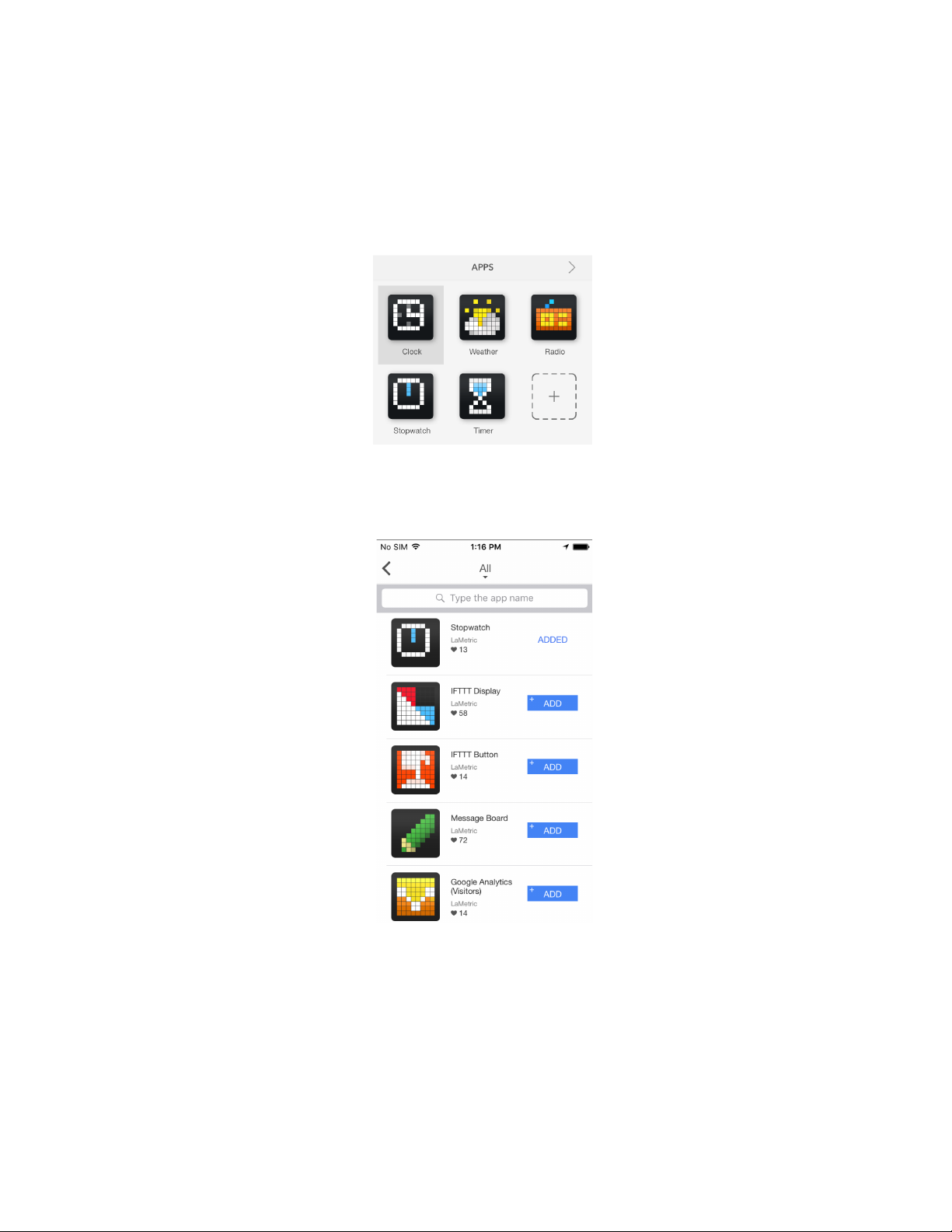
4.4.3. Show one app
4.5. Install apps from LaMetric Store
4.6. Device Settings
4.6.1. Brightness control
4.6.2. Screen Saver
4.6.3. Text animation
4.6.4. Text speed control
4.6.5. Volume control
4.6.6. Wi-Fi connection
4.6.7. Stream music
4.6.8. Smartphone notifications
1
Page 3

4.6.9. Software update
4.6.10. System information
4.6.11. Privacy
5. Device usage
5.1. Switching on
5.2. Using apps and navigation between them
5.2.1. Using apps
5.2.2. Navigation between apps
5.3. Streaming music on LaMetric
5.4. Charging
5.5. Switching off
5.6. Resetting to factory defaults
5.7. Updating software via USB
5.8. Device notifications
5.8.1. Operating system notifications
5.8.2. Errors notifications
6. LaMetric IFTTT Channel
6.1. Get started
6.2. Add an applet for IFTTT Indicator app
6.3. Add a applet for IFTTT Button app
6.4. Manage IFTTT applets
6.5. Create your own applet
6.6. Display Notification
7. Create Apps for LaMetric
7.1. Getting started
7.2. Indicator Apps
7.3. Button Apps
7.4. Notification Apps
7.5. Create App using Template
7.6. App Status
7.7. Searching and creating icons
8. Customer support
9. Regulations
9.1. CE
9.2. FCC Information and Copyright
9.3. FCC RF warning statement
9.4. WEEE Information
10. Warranty
11. Contact
2
Page 4
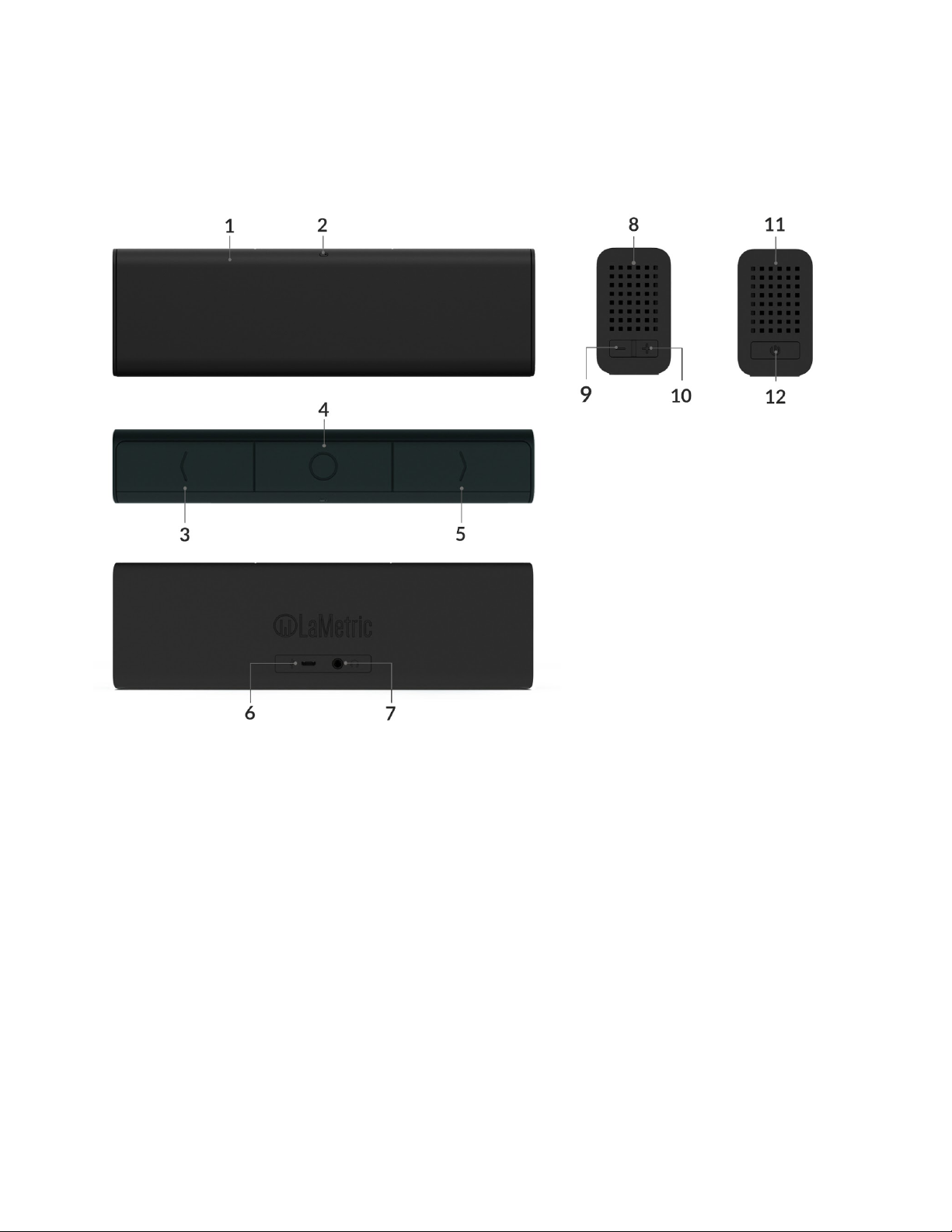
1. Meet LaMetric
1. Screen
2. Ambient Light Sensor
3. Left navigation button
4. Action button
5. Right navigation button
6. Micro-USB connector
7. Audio out
8. Speaker
9. Volume down
10. Volume up
11. Speaker
12. On/Off
3
Page 5

2. Safety and handling
Before you start using LaMetric, please read this information to ensure your own safety and extend the
service life of your device.
1. LaMetric can be damaged if dropped or burned. Don’t use a damaged LaMetric, as it may cause
injury. Don’t attempt to repair LaMetric yourself.
2. Do not disassemble or modify the device. Modification or disassembly of the device could result
in fire or electrical shock.
3. Do not expose your device to excessively high or low temperatures. Avoid direct sunlight.
4. Avoid heating or cooling the battery. An excessively hot battery may cause skin burns.
5. Avoid exposure to liquids or damp (do not use the device in the rain, in the street at higher
humidity, near bodies of water etc.). Avoid penetration of liquids or moisture since this may
cause a short circuit and/or damage to the battery.
6. Avoid any mechanical pressure on the screen. Protect the screen from objects that may scratch
or damage it.
7. Do not put objects on your LaMetric.
8. Do not place your device on an unstable, slant or vibrant surface.
9. Use device only with original power adapter and USB cable.
10. Use only original software.
11. Use LaMetric only indoor.
12. Use your device carefully to enjoy it longer.
4
Page 6

3.Get started in 3 easy steps
Now you are holding LaMetric in your hands and can not wait to start using it. Follow three easy steps
to start.
3.1. Step 1. Turn on the device
Connect LaMetric to a power outlet via USB cable and power adapter. Press the On/Off button to start
up your LaMetric.
Look at LaMetric screen and you will see an invitation to setup -
It means that your device is waiting while you configure it via the mobile app.
3.2. Step 2. Download smartphone app
Visit go.lametric.com from your smartphone to download iOS or Android app.
3.3. Step 3. Register and configure the device
3.3.1. Registration
At first, you should create an account that will be connected to your device, so nobody else will be able
to change your settings.
1. Open LaMetric app on your smartphone by tapping and choose “Sign up” .
5
Page 7

2. Enter your email, name, and password (it should be no less than 6 symbols). Confirm password on
the last field.
iOS Android
3 . Tap Sign up to complete the registration process.
3.3.2. Configuration
Now you can start to configure your device.
1. Make sure LaMetric is ready. Look at LaMetric, it should be waiting for connection from your phone
or tablet. Tap Next to continue.
6
Page 8

2. Connect to LaMetric. Now you can see the unique name of your LaMetric on the screen. You
should connect your smartphone or tablet to the Wi-Fi network with this name.
● If you use iPhone, just press the Home button on your smartphone and go to your iPhone’s
Wi-Fi settings. Choose network with the name which you see on LaMetric. Come back to
LaMetric app.
● If you use Android, simply choose a network with the same name which you see on LaMetric.
iOS Android
3. Connect LaMetric to home/office Wi-Fi network. Select your home or office Wi-Fi network, which
you usually use, to connect LaMetric to and enter the password. Tap Set up in the right corner on
iPhone, or tap Next on Android smartphone to continue.
iOS Android
7
Page 9

If you wish to connect you LaMetric to the hidden Wi-Fi access point please choose 'Other' network like
on the following screenshot:
Before connecting LaMetric to your Wi-Fi network please make sure that it supports your network:
LaMetric supports 802.11 b/g/n 2.4 GHz networks.
Please also make sure LaMetric supports your network security:
LaMetric supports
● Open Wi-Fi networks
● Closed Wi-Fi networks with WEP or WPA/WPA2 security
● Hidden Wi-Fi networks (as described above)
LaMetric doesn't support
● Closed Wi-Fi networks with WPA2-Enterprise security.
● Web page logins
4. Wait a few seconds while LaMetric is connecting to Wi-Fi network.
5. Time at LaMetric. Congratulations, your LaMetric is ticking now! You can press the Right or Left
navigation button to switch between basic apps as well. But this is not the end! You might want to
continue device configuration and make it show other information. You just need to tap Go when the
screen, that you see below, appears.
8
Page 10

Do you see LaMetric with a clock on the screen? Tap it to adjust settings of basic applications.
Read 4. Configuration via the application to know how to manage 4.2.1.Clock , 4.2.2.Weather ,
4.2.3.Radio , 4.2.4. Stopwatch , 4.2.5. Timer app or how to 4.5 Install/Update apps from the LaMetric
Store .
9
Page 11

3.3.3. Errors of the configuration process
If for some reason you can not configure your device, select a possible case among following,
depending on the screen that arises:
1. If you see this screen, it means that configuration process was interrupted and not completed.
Just tap + to set up your LaMetric. Then follow all steps of configuration process from
3.3.2.Configuration .
2. If you entered an incorrect password to your home or office Wi-Fi network, there will appear a screen
with an error. You should check whether Wi-Fi password has not been recently changed. Tap Try again
and enter a correct password.
10
Page 12
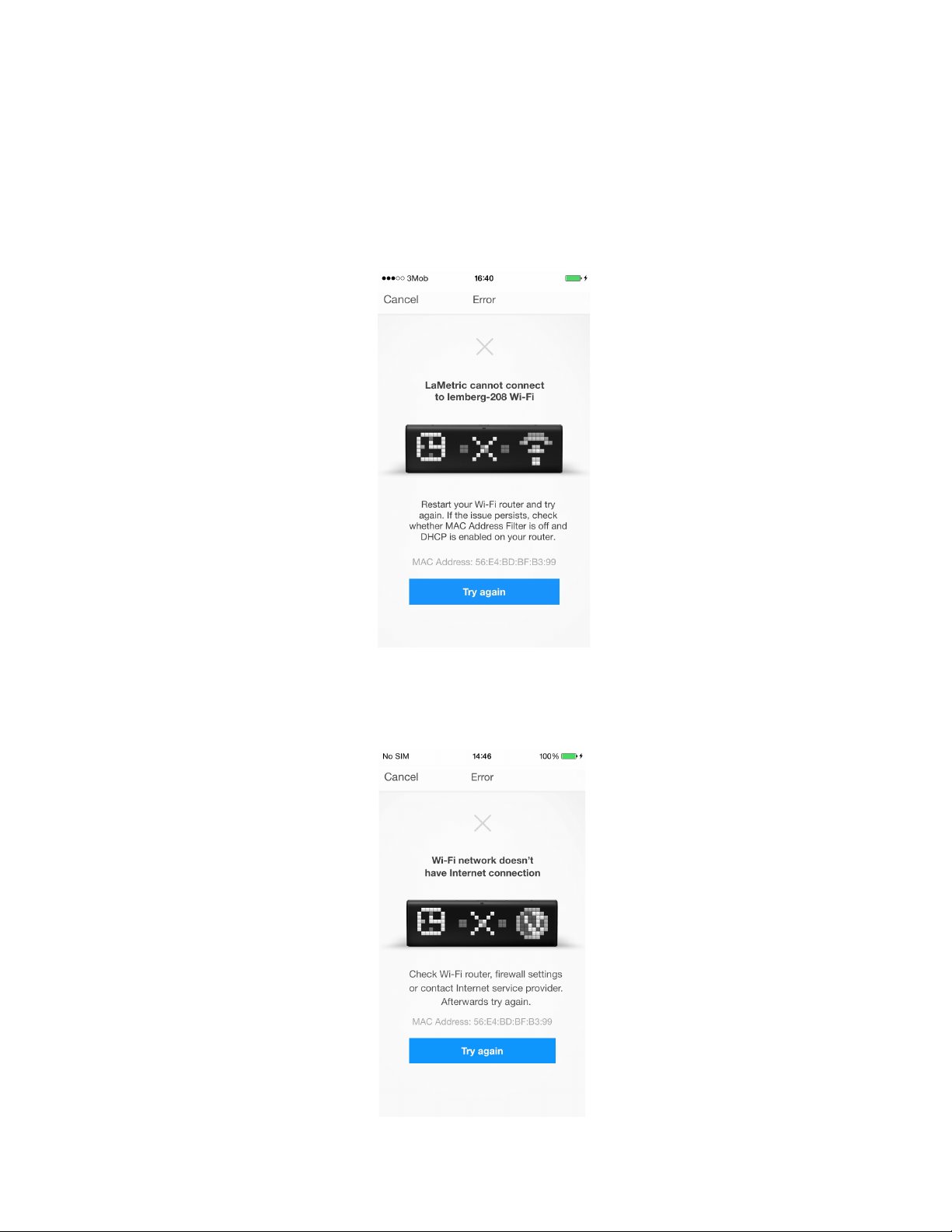
3. The error, that you see on a screen below, may appear because of some settings of your Wi-Fi
router. At first, try to reboot your router. If it does not work, you should check MAC Address Filter on
your router, it should be off. If it is on, you need to add to this filter MAC Address, that you see on the
screen and make sure, that DHCP on your router is on.
You may also contact a person, who is responsible for settings of your router, to make these settings
and solve the problem.
4. If you see the following screen, make sure, that your Wi-Fi network has access to the Internet and
contact your Internet service provider if necessary.
11
Page 13

5. If you see the following screen, try to configure LaMetic again. Read 3.3.2.Configuration to find out
how to do it.
If the issue persists, please contact our support team. You can find more information about support in
8.Customer support.
6. If a screen, which you see below, appears, make sure that you have bought your LaMetric in official
points of sale. If yes, please contact support.
You can find more information about support in 8.Customer support.
12
Page 14

7. This error may arise when time settings on your smartphone are incorrect. Check it and try again.
8. If you see the below error, the device is connected to another user account. You should use mobile
application under correct account or reset LaMetric to factory defaults to register it under the other
account.
9. If a connection between your device and smartphone was lost, you should connect to LaMetric
again. Read the second point of 3.3.2. Configuration to do it.
13
Page 15

10. The following error may occur if Wi-Fi network on your smartphone is not the same as was chosen
to connect LaMetric to. Tap Got It and connect your smartphone to the right one.
11. If the problem arises because additional settings on your router are required, you will be headed to
the following screen.
14
Page 16

Your Wi-Fi network configuration prevents devices from communicating with LaMetric. In order to
resolve this issue, you will need to disable AP (access point) isolation, AP isolation (also known as
'Client Isolation' or 'Guest Mode') on your router. Please refer to your router documentation to learn how
to disable AP isolation.
If you do not have access to your router settings, or if you are attempting to connect through a guest,
hotel or public network with AP/client isolation, you will be unable to set up your LaMetric.
If you are attempting to connect through a Wi-Fi extender, please check your extender settings. You will
need to disable AP isolation on your Wi-Fi extender before setting up LaMetric to work with your Wi-Fi
network.
15
Page 17

4. Configuration via the application
4.1. Manage Devices
4.1.1. LaMetric is Available
After finishing configuration process start to manage your device from the screen below.
When you see LaMetric with a clock on the screen, it means that your device is connected to your
smartphone or tablet and you can manage it via the mobile application. Tap LaMetric on this screen.
Now you can configure basic apps, such as 4.2.1.Clock , 4.2.2.Weather , 4.2.3.Radio , 4.2.4.
Stopwatch , 4.2.5. Timer , as well as make 4.6. Device Settings , 4.3. Apps management , 4.5.Install
apps from LaMetric Store .
16
Page 18

4.1.2. LaMetric is Not Available
When you see the screen with not available LaMetric, it means that device and smartphone cannot
connect each other.
Tap on LaMetric to find out the reason of the problem.
There appears the screen with possible cases. Scroll to find out all of them.
You should choose one, depending on what LaMetric shows on the screen.
17
Page 19

Look at your device:
1. If you see , it means LaMetric lost Wi-Fi, it may happen when
the device was moved to another place. Tap on the same image on the screen, then click on
Setup and begin configuration process from 3.3.2.Configuration .
2. Tap on if you see some information on LaMetric’s display, but
can not configure it. There might be several reasons of this:
● Maybe Wi-Fi network on your smartphone is not the same as was chosen to connect LaMetric
to. Tap Got It and connect your smartphone to the right one.
18
Page 20

● If the problem arises because additional settings on your router are required, you will be headed
to such screen.
Your Wi-Fi network configuration prevents devices from communicating with LaMetric. In order
to resolve this issue, you will need to disable AP (access point) isolation, AP isolation (also
known as 'Client Isolation' or 'Guest Mode'), on your router. Please refer to your router
documentation to learn how to disable AP isolation.
If you do not have access to your router settings, or if you are attempting to connect through a
guest, hotel or public network with AP/client isolation, you will be unable to set up your LaMetric.
If you are attempting to connect through a Wi-Fi extender, please check your extender settings.
You will need to disable AP isolation on your Wi-Fi extender before setting up LaMetric to work
with your Wi-Fi network.
● If there was an incorrect time on your LaMetric, at first, you should try restarting it.
Tap Got it on a screen that appears and restart your device - turn off, then turn on. If it does not
help, try resetting it. Read 5.6. Resetting to factory defaults to know how to make it.
19
Page 21

● If you see the following screen, you should check whether LaMetric mobile application is
updated to the latest version.
Update LaMetric mobile application from App Store or Play Market and try to connect your
smartphone to LaMetric again.
3. If you see on your device, you have possibly reset it recently.
Tap this image on the screen, then click on Setup .
20
Page 22

Start configuration process as it is described in 3.3.2.Configuration .
4. If you see nothing on LaMetric , it is turned off and you need to turn it on to
configure it.
5. If you are not sure, what your device shows, because you do not see it, choose I don’t see
LaMetric. When you are near LaMetric, try to check if LaMetric available again.
21
Page 23

If you did everything right, your device is now available again to be configured. Read more about it in
the paragraph 4.1.1. LaMetric is Available .
4.1.3. Add another device
If you have more than one LaMetric, you have more opportunities!
You can manage several LaMetric from the same mobile application. To start using one more device,
please tap + on the right-top side of Manage Devices screen.
To set up new LaMetric you should start configuration process again. Read 3.3.2.Configuration .
22
Page 24
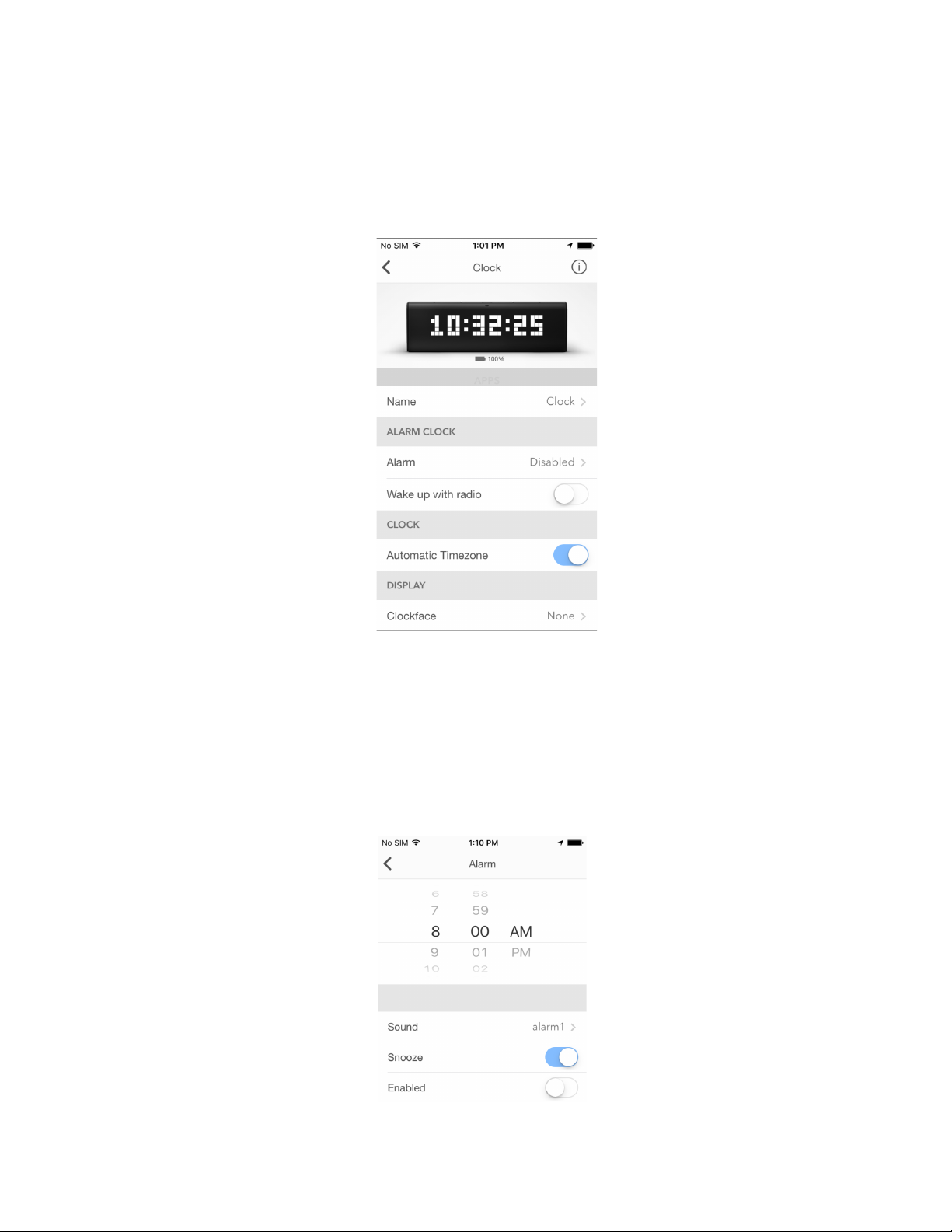
4.2. Basic apps configuration
4.2.1. Clock
Use this app to track time, date or set an alarm.
1. Change app name
Go to Name and change an app name if you wish.
2. Set Alarm
● Tap Alarm and choose an hour.
23
Page 25
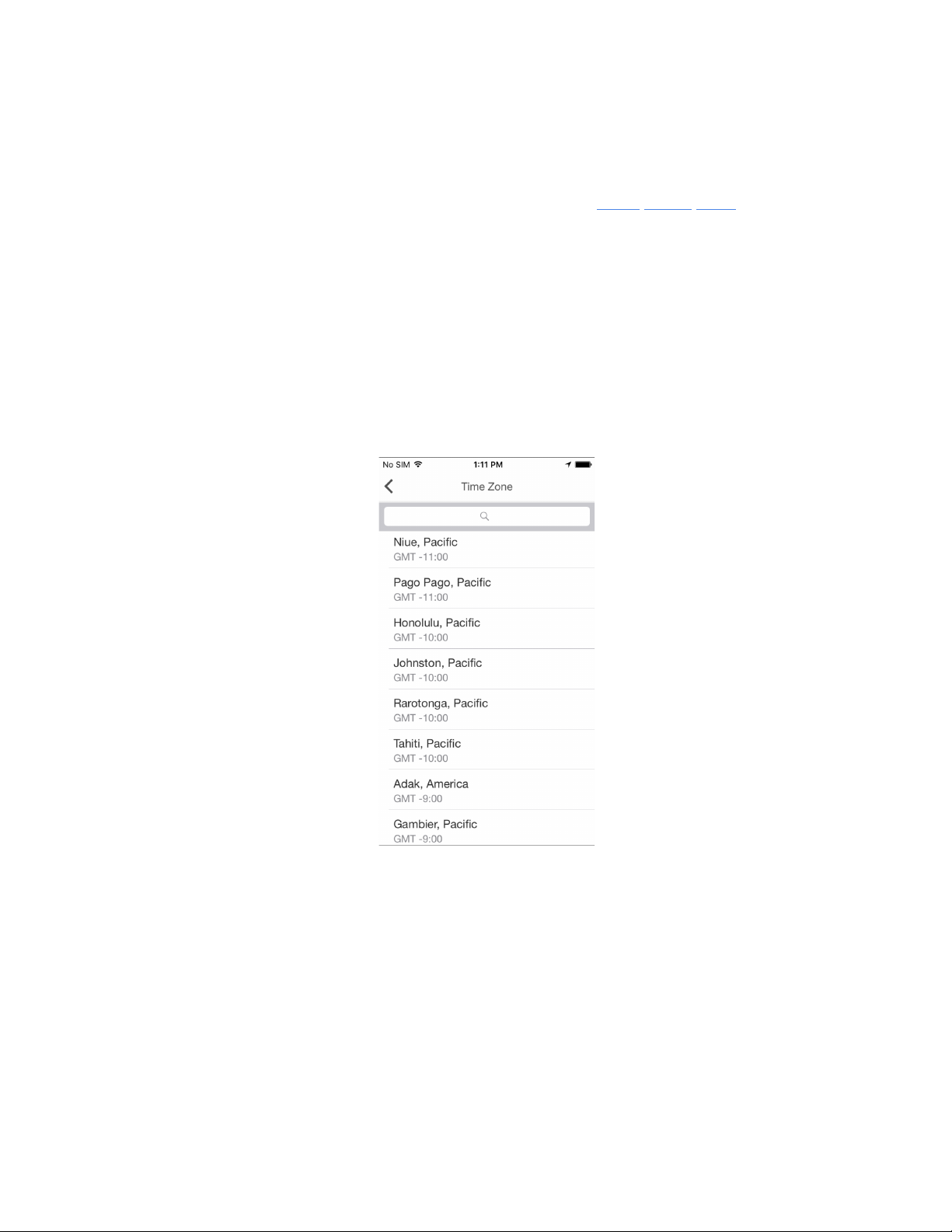
● You can also choose a sound you like or enable Wake up with radio .
● If you wish to repeat alarm sound in 10 minutes, turn Snooze on.
● Make sure your alarm is enabled - gray pixel should appear on the right top side of the current
time on the device.
You can also set an alarm directly on LaMetric . To do this read 5.2.1. Using apps . Please note, that
Clock app supports single alarm to be configured. If you need more than one alarm to be configured,
you should duplicate Clock app.
3. Select Time Zone
If Automatic timezone option is turned off – option to choose the time zone from the list appears.
Tap Timezone and choose one from the list or search it in the top field.
4. Set how to display an information
● Tap Clockface to add an image that will be displayed right before the clock on the screen. Use
categories on the top to make your choice faster.
● Turn 24 Hours on and the time will be displayed in the mode of 24:00, or turn it off to see the
time in the mode of 12 hours AM/PM.
● Switch Day of Week on and LaMetric will show you it on the bottom of the screen as highlighted
indicator.
● The option ‘ Week starts on Monday’ allows to tread first day as Monday. First day by default is
Sunday.
● Switch Show Seconds on to see hours, minutes and seconds on the screen of your LaMetric.
24
Page 26
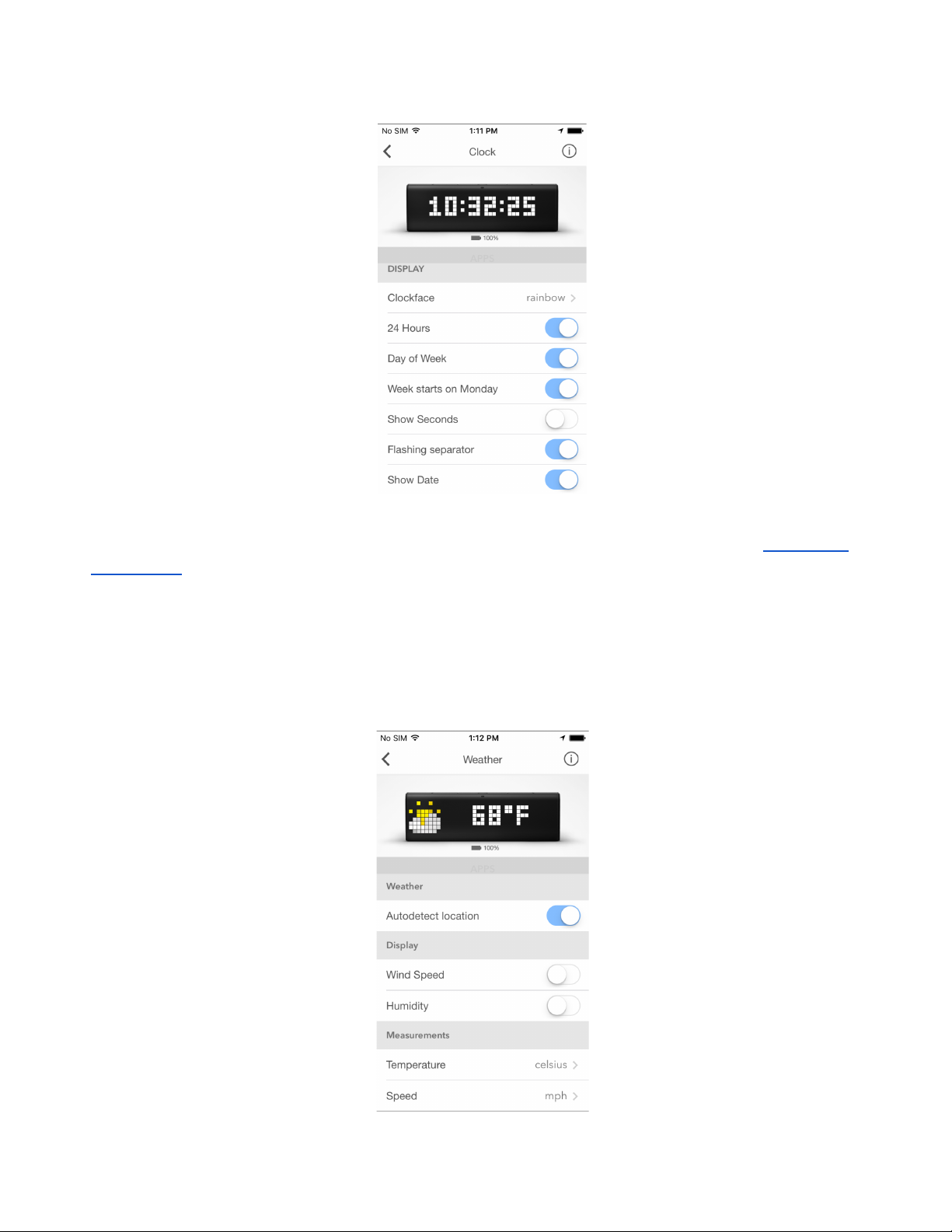
● Make Show Date enabled to see also current date on the screen of LaMetric.
If you want to know time in another time zone too, you should duplicate Clock app. Read 4.3.2.Apps
duplicating to know how to do this.
4.2.2. Weather
Use this app to display the real-time weather information on your LaMetric, as well as the weather
forecast for current and next day.
25
Page 27
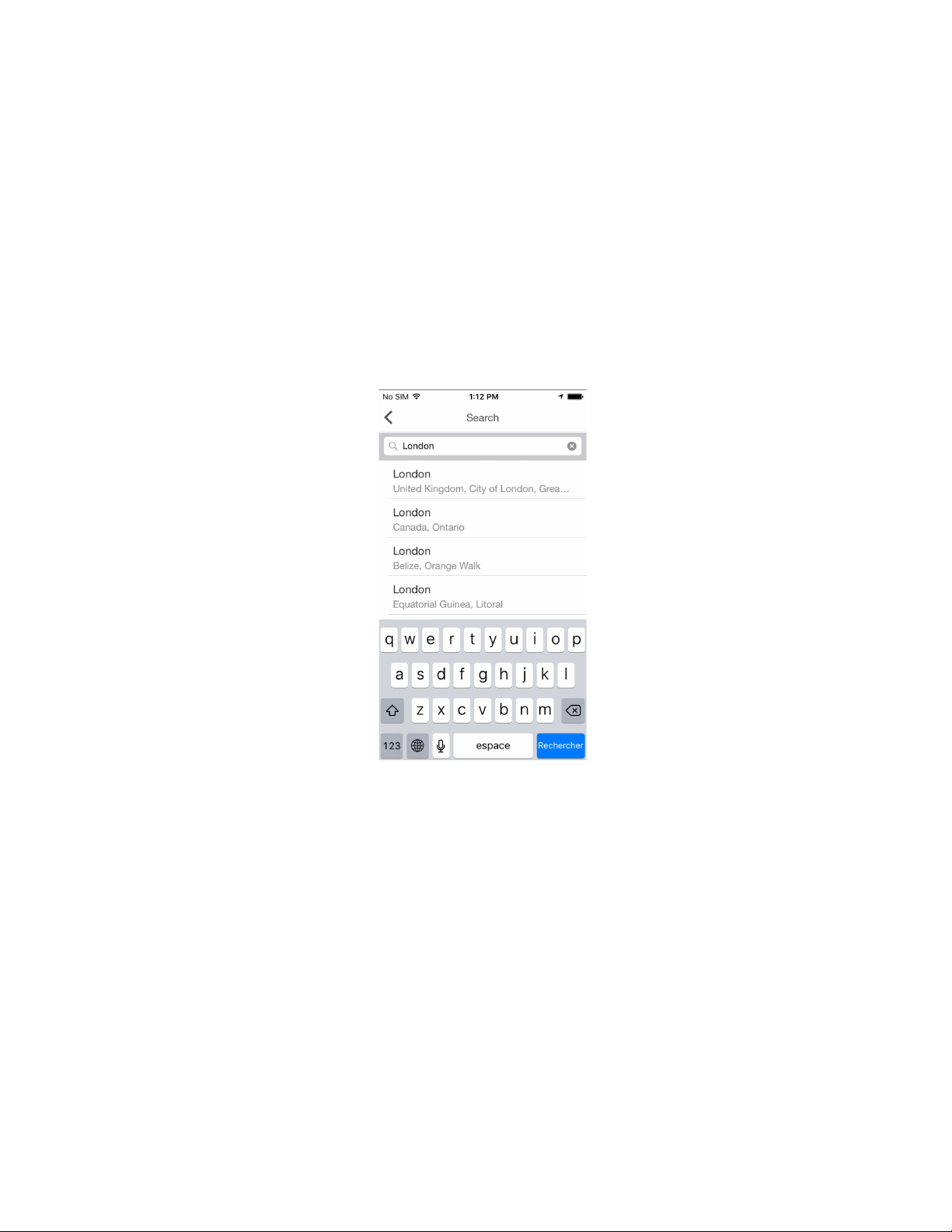
1. Change app name
Go to Weather > App Name and change it if you wish, for example My Weather or Weather in New
York.
2. Select the city
If Autodetect location is on LaMetric shows the weather at your location. You can change it to track
the weather at other locations - make this option off and choose a city you wish.
Tap City and use Search on the top field to choose the city , in which you wish to know the weather.
3. Set how to display an information
● Turn Wind Speed on to see it additionally on LaMetric screen.
● Turn Humidity on if necessary.
4. Set measurements
● You can tap Temperature to choose either celsius or fahrenheit should be shown.
● Swipe up and tap Speed to choose either km/h (kilometers per hour) or mph (miles per hour).
26
Page 28
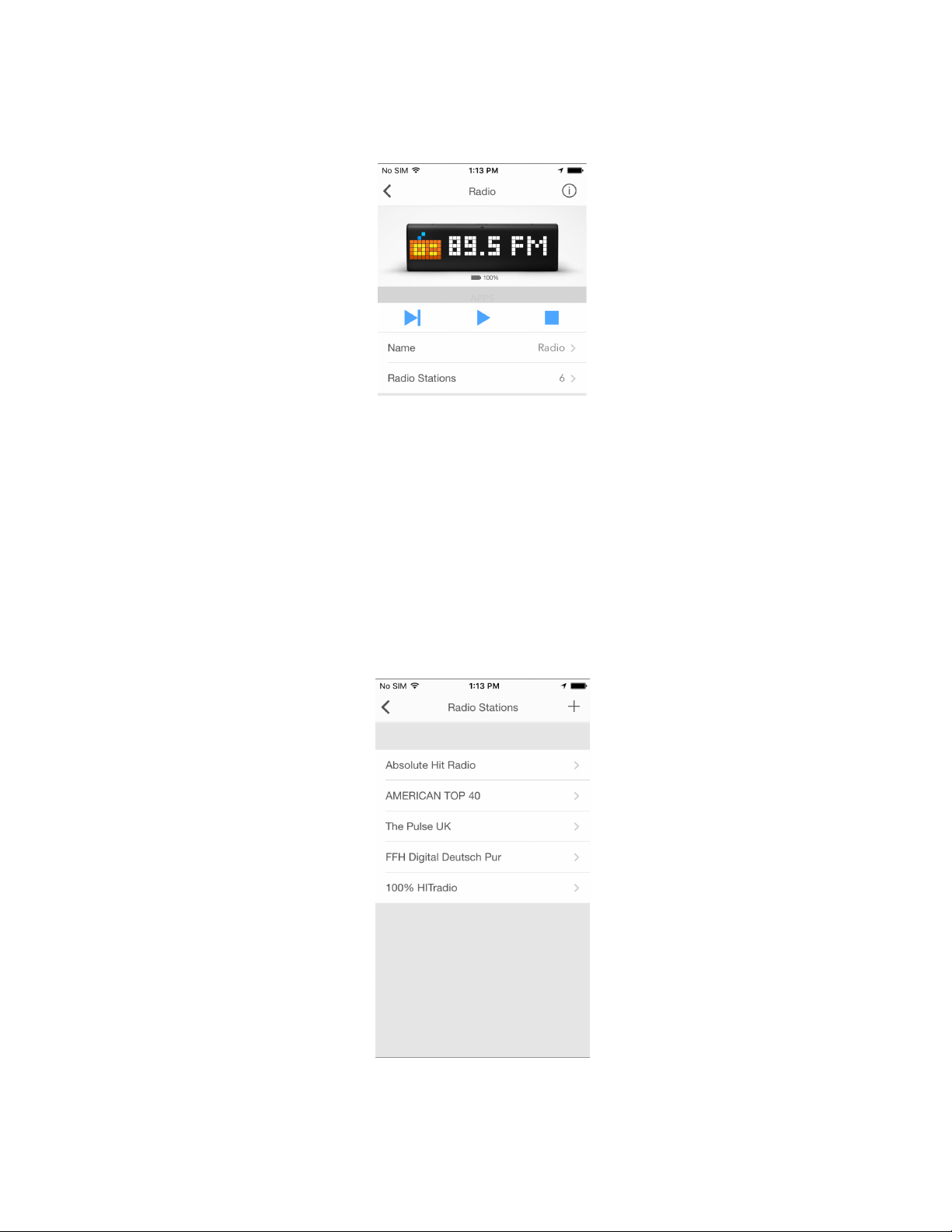
4.2.3. Radio
Use this app to listen to your favorite radio stations among more than 3000 available.
1. Change App name
Go to Radio > App Name and change it if you wish.
2. Select favorite radio stations
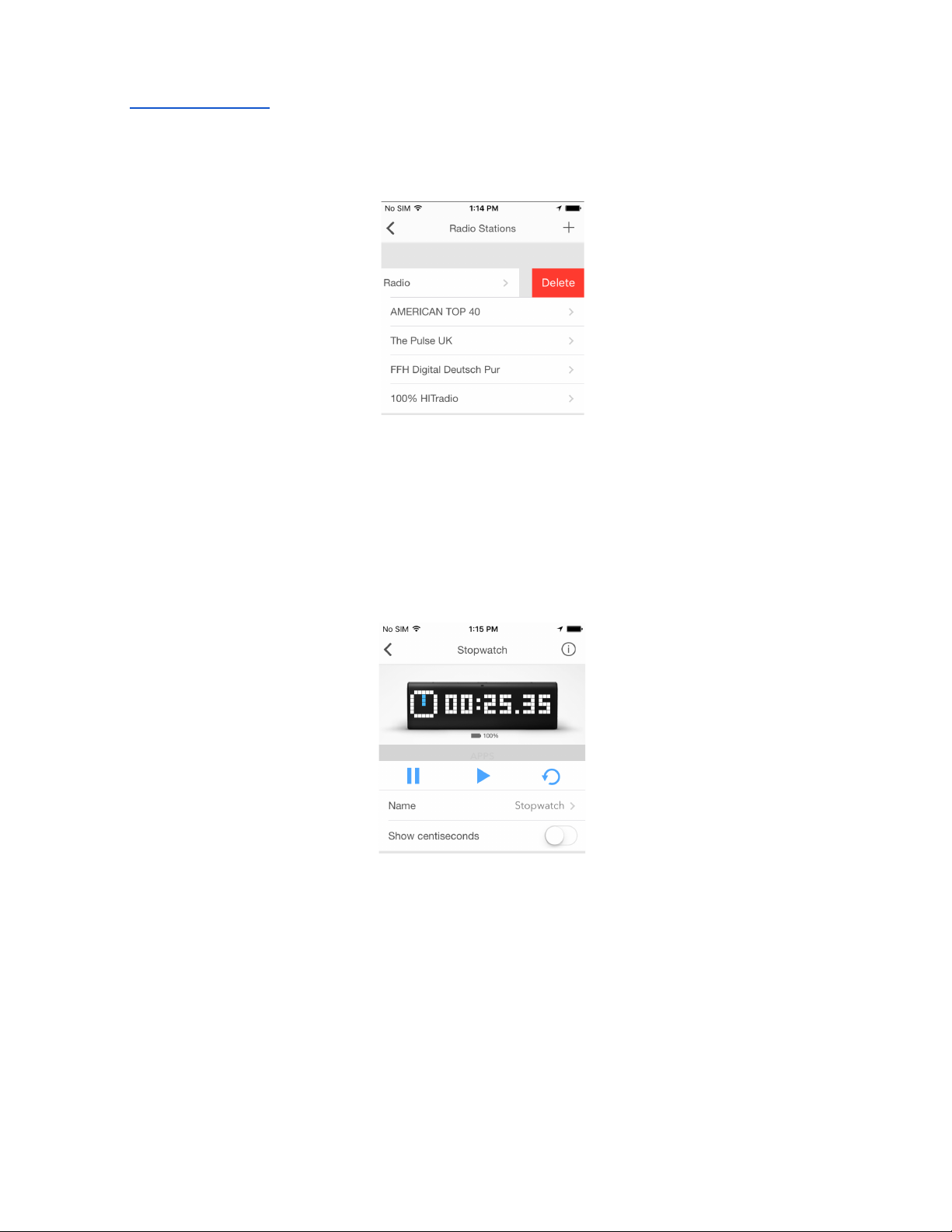
● Tap Radio Stations . There are a few stations in the list by default. Tap + in the right-top side to
add a new station to your list.
27
Page 29
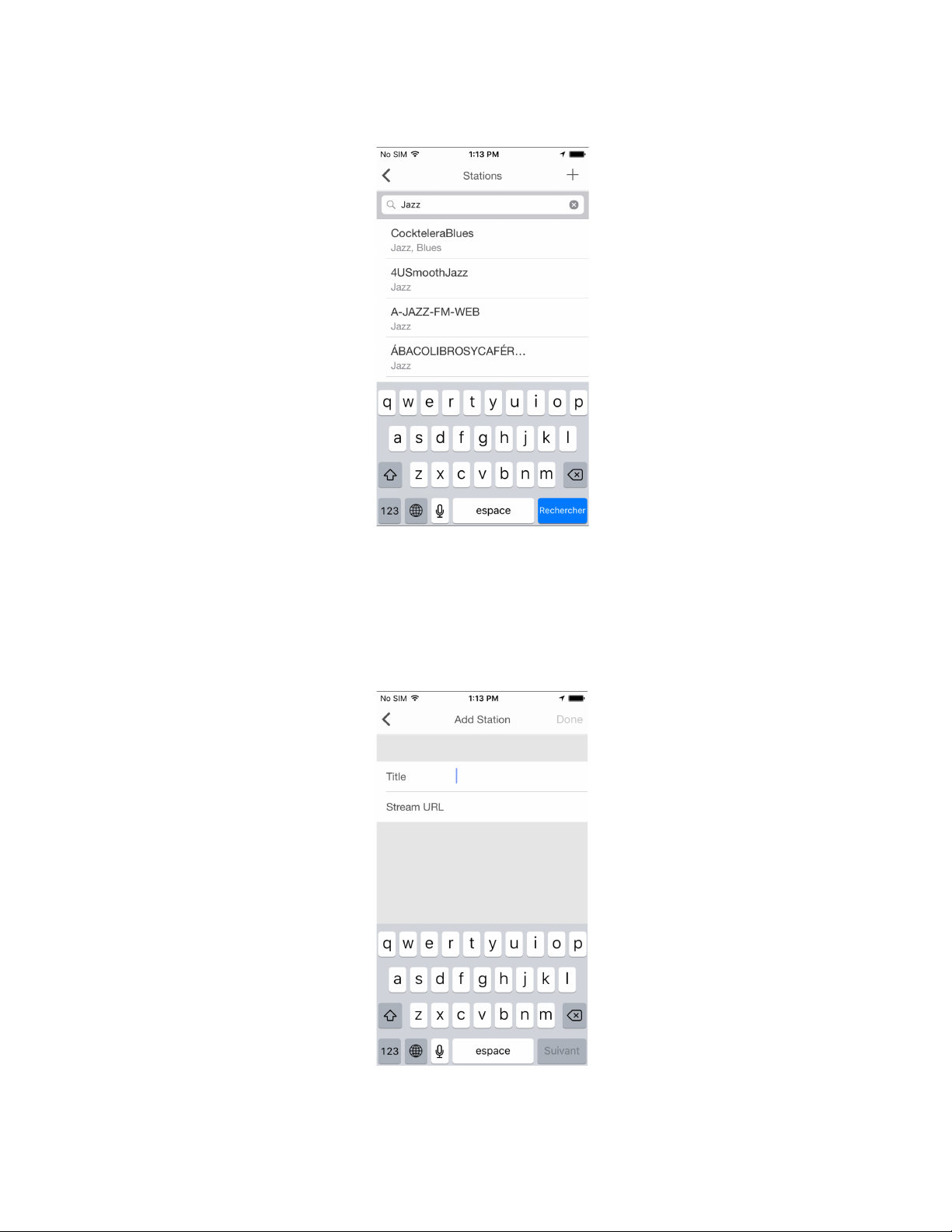
● Use search or choose among available stations from the list. Use genres of music to make your
search easier.
● If you can not find your favorite radio station among available, you may add it manually. Just find
the stream URL of this radio station on the Internet. On the screen with the list of stations tap +
and you will be moved to the screen, where you may add the stream URL and the name of the
radio station you wish to add. Enjoy the music!
3. Use Next, Play and Stop buttons on the screen to manage Radio app.
28
Page 30
You may also turn the radio on or off, or switch to another radio station directly on Lametric. Please
read 5.2.1. Using apps .
4. To delete radio station from your list swipe left on the name of a station and tap Delete .
4.2.4. Stopwatch
Use this app to find out how much time you spend on doing something. For example, you can detect
how much time you need for your physical training or home cleaning.
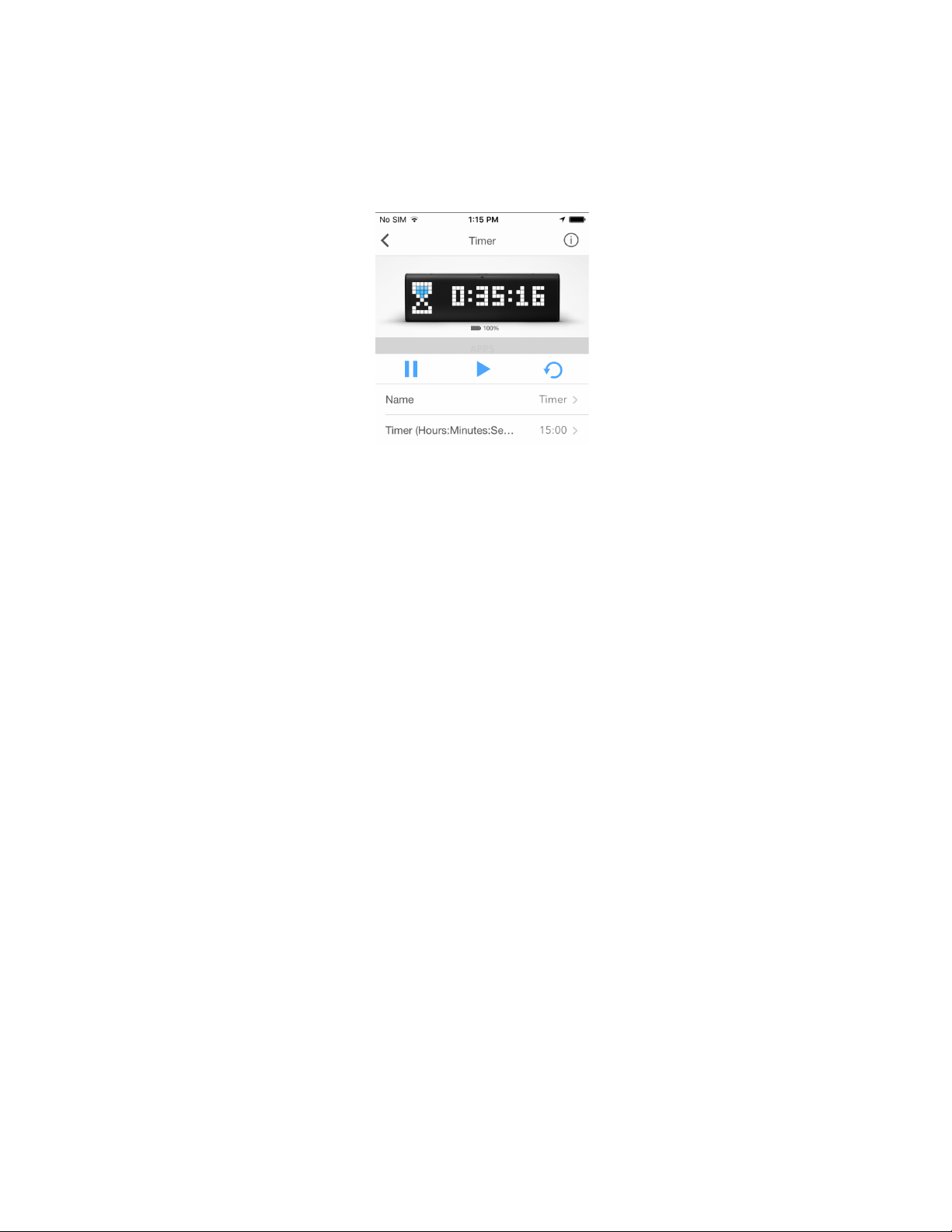
Go to Stopwatch > Name and change it if you wish.
Enable Show centiseconds if necessary.
Use Pause, Start, and Reset buttons on the screen to manage Stopwatch app.
You can also make the same actions directly on LaMetric. Press the Action button to start , press it
again to make a pause. Long press of the Action button will wipe all settings and will return to the
beginning.
29
Page 31
4.2.5. Timer
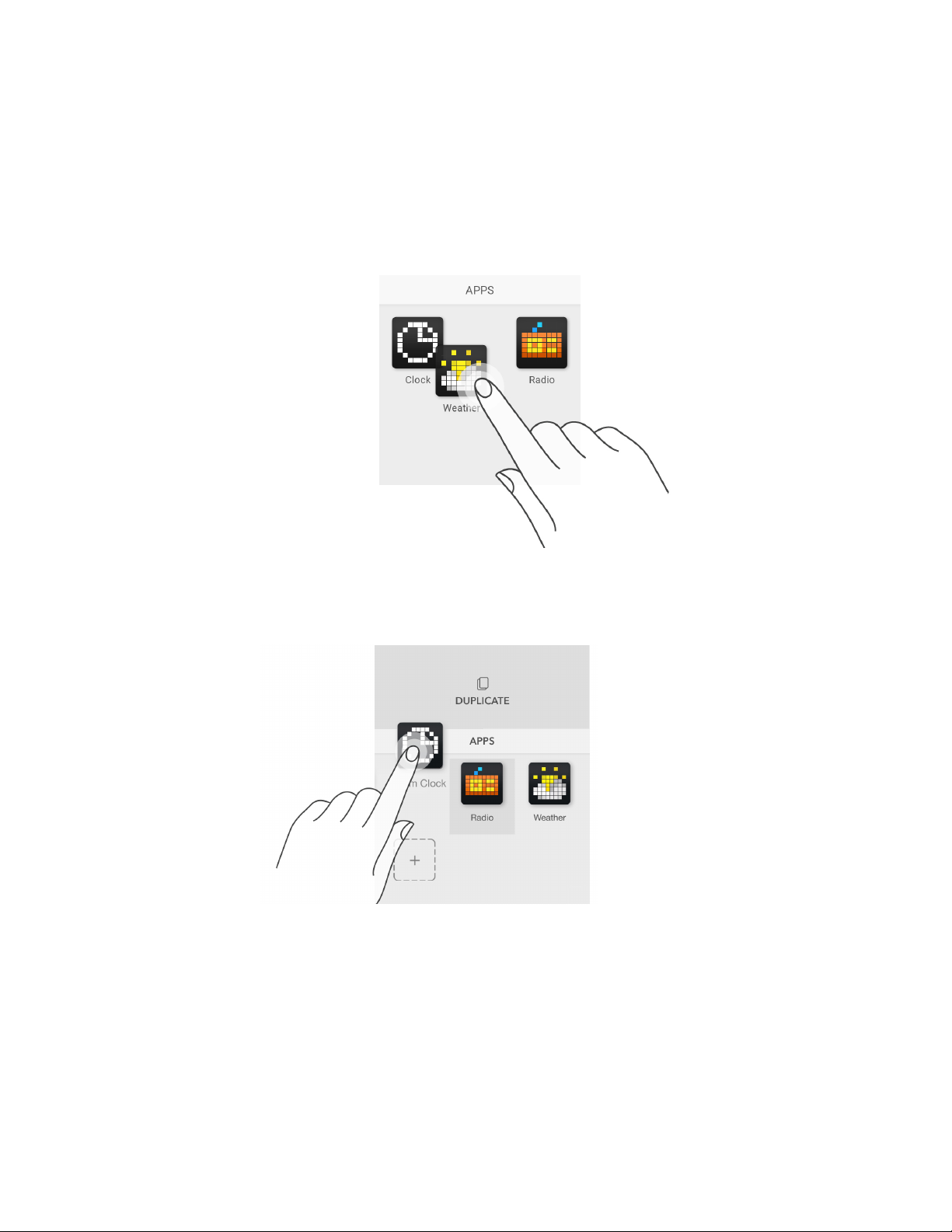
Use this app to count seconds in reverse order to zero and to know when a time, that you have set, is
over. You may use this app, for example, while cooking and you will always know when your dish is
ready.
Go to Name > Timer and change it if you wish.
Tap Timer (Hours:Minutes:Seconds) and set a time you need. It will appear on LaMetric.
Use Pause, Start, and Reset buttons on the screen to manage Timer app.
You can also make the same actions directly on LaMetric. Press the Action button to start a
countdown, press it again to make a pause. Long press of the Action button will return to the time, that
was set at the beginning.
At the end of the countdown, you will hear a beep. It means, the time, that was set, is over.
30
Page 32
4.3. Apps management
On the screen with apps, you can duplicate, remove or reorder apps.
4.3.1. Apps reordering
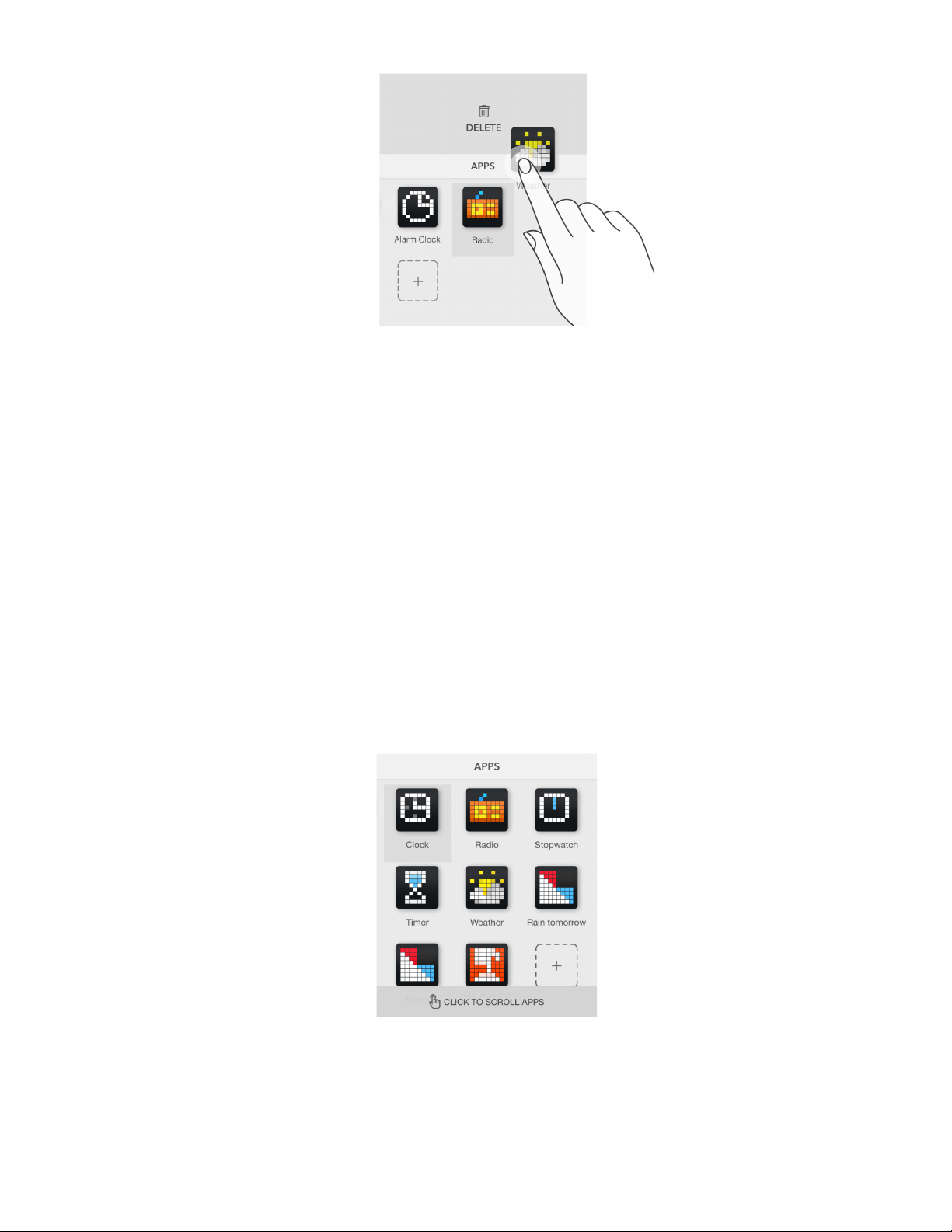
Apps order on LaMetric is the same as on mobile application. To change apps order just tap the app
and hold, then drag it to another place on the screen.
4.3.2. Apps duplicating
Just tap the app and hold while Duplicate appears above, then drag it there.
You’ll get the same app on the screen and may manage it. Such basic apps as Weather, Radio,
Stopwatch, and Timer can not be duplicated.
4.3.3. Apps removing
Tap the app you wish to remove and hold while Delete appears above, then drag it there.
31
Page 33
Clock and Radio apps should be always installed on LaMetric, you will not be able to remove them.
4.4. Working modes
Working modes are responsible for the way how apps are switched on LaMetric. To select an
appropriate way of apps changing on LaMetric screen use the Mode Switcher on the bottom of the
screen with apps. Select work mode by swiping right or left.
4.4.1. Click to scroll apps
If you want to change apps on the screen of LaMetric using navigation buttons on the device, choose
Click To Scroll Apps . This mode should be used mostly when LaMetric stands on your desk and is
used for your own necessities. To switch between apps on the device just press the Right or Left
navigation button .
4.4.2. Auto Scroll apps
If you wish to change apps on the screen of LaMetric automatically, choose Auto Scroll Apps . This
mode is the most suitable for shared use of LaMetric when you use it with the family or colleagues. Put
32
Page 34
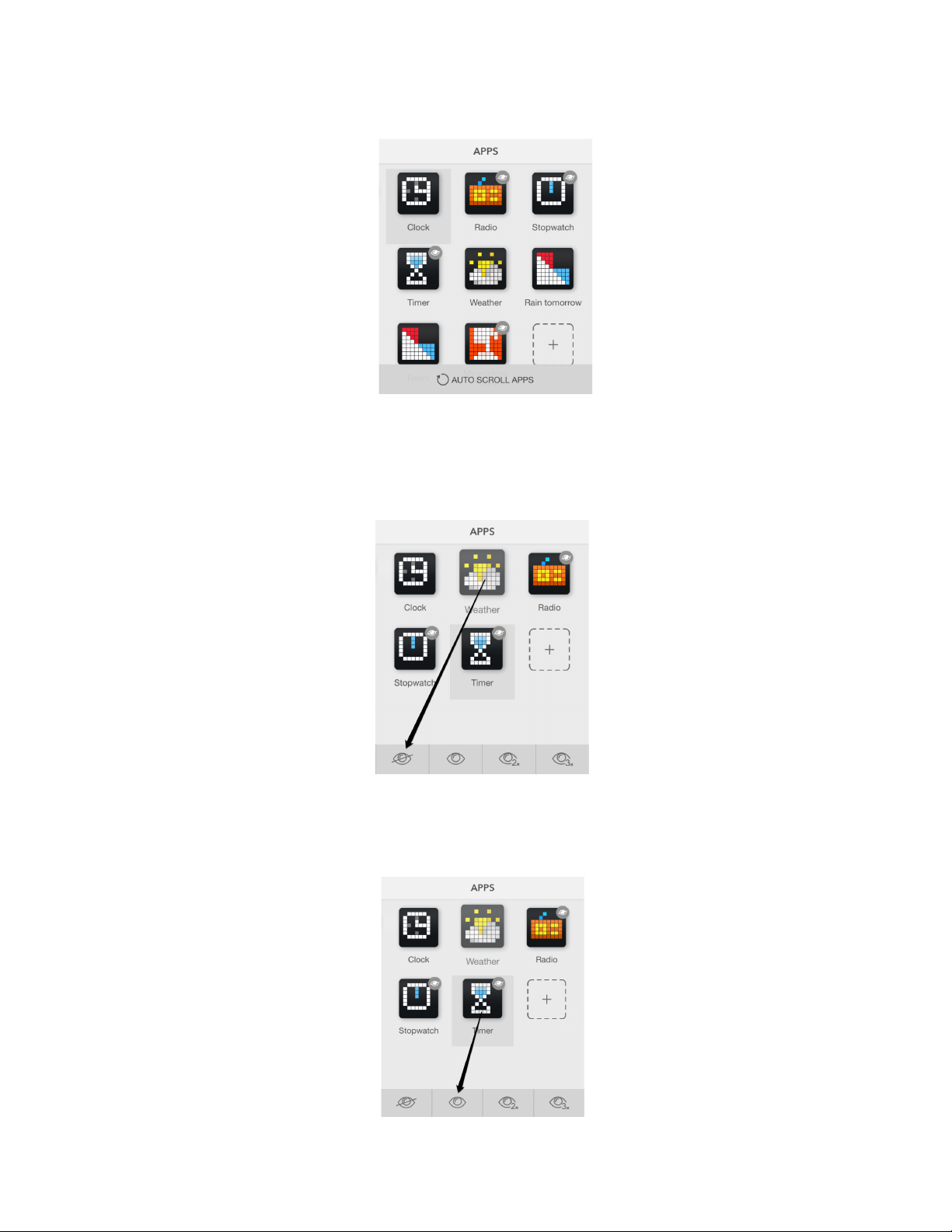
LaMetric on a shelf or a desk to make it visible for everyone. Track the information you need. Please
note, that Radio, Stopwatch and Timer will not be displayed in this mode.
Sometimes it may be necessary to hide some apps in this mode. You may wish to make only a few of
them visible while scrolling, for example just Clock and Weather. To do that – drag app icon to the
bottom bar on top of the crossed ‘eye’ icon.
If you wish to make the hidden app visible again in this mode, drag the app icon to the bottom bar on
top of the ‘eye’ icon.
33
Page 35
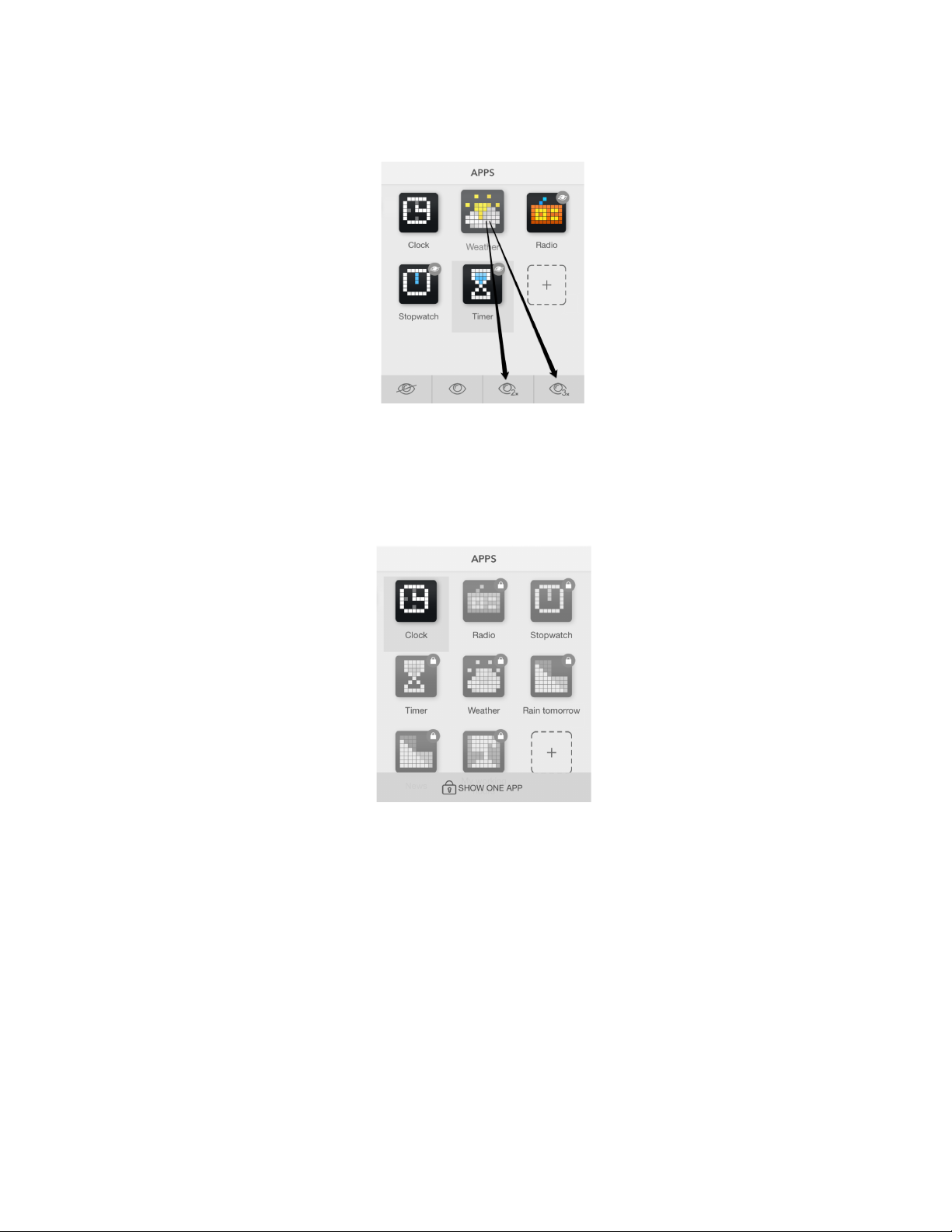
It is also possible to make app stay 2 or 3 times longer than others. Just drag to the corresponding ‘eye’
icon 2x or 3x.
4.4.3. Show one app
If there is a necessity to display only one app and do not change it on the screen, choose Show one
app .
Even if somebody presses any button, there will be the same information which you have selected, for
example, Facebook page likes. This mode will be suitable when you use LaMetric to engage customers
in shops, malls, restaurants, hotels and other public places and want to prevent apps scrolling.
34
Page 36
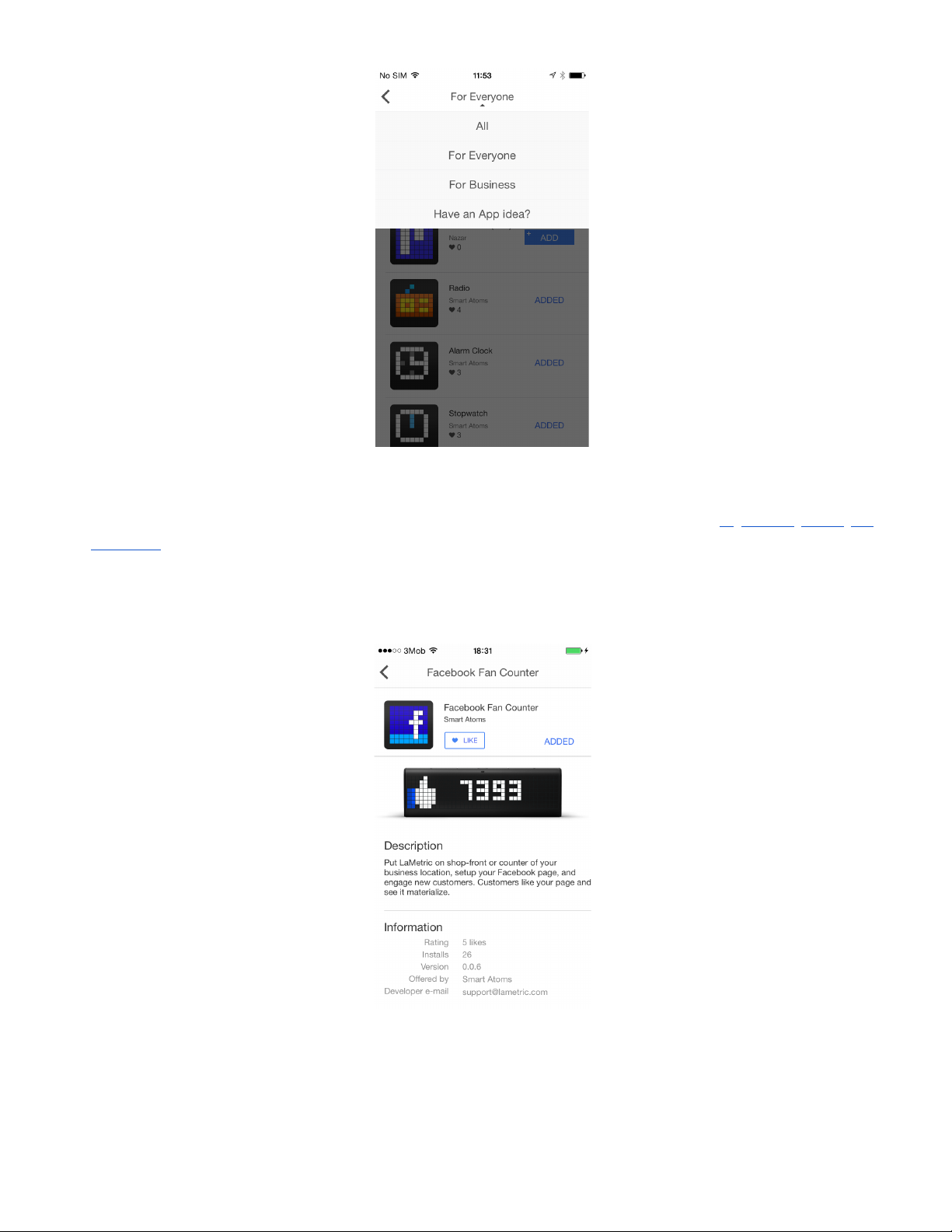
4.5. Install apps from LaMetric Store
If you want to extend your possibilities, you can install new apps from the Store. More apps - more
opportunities!
● To install new app tap + button.
● LaMetric Store opens, and you can choose an app you wish to install. To do this just tap Add.
● Select among categories of apps ( All, For Everyone, For Business ) on the top of the screen.
35
Page 37
If you want to create your own app or to share app idea chose the option Have an App idea? and you
will be moved to Lametric Developer. Read more about LaMetric Developer in 7. Create Apps for
LaMetric .
● Click on the app you are interested in to review the description and get how it works.
You will also find out such information as developer e-mail, version of an app, its rating, and downloads.
36
Page 38
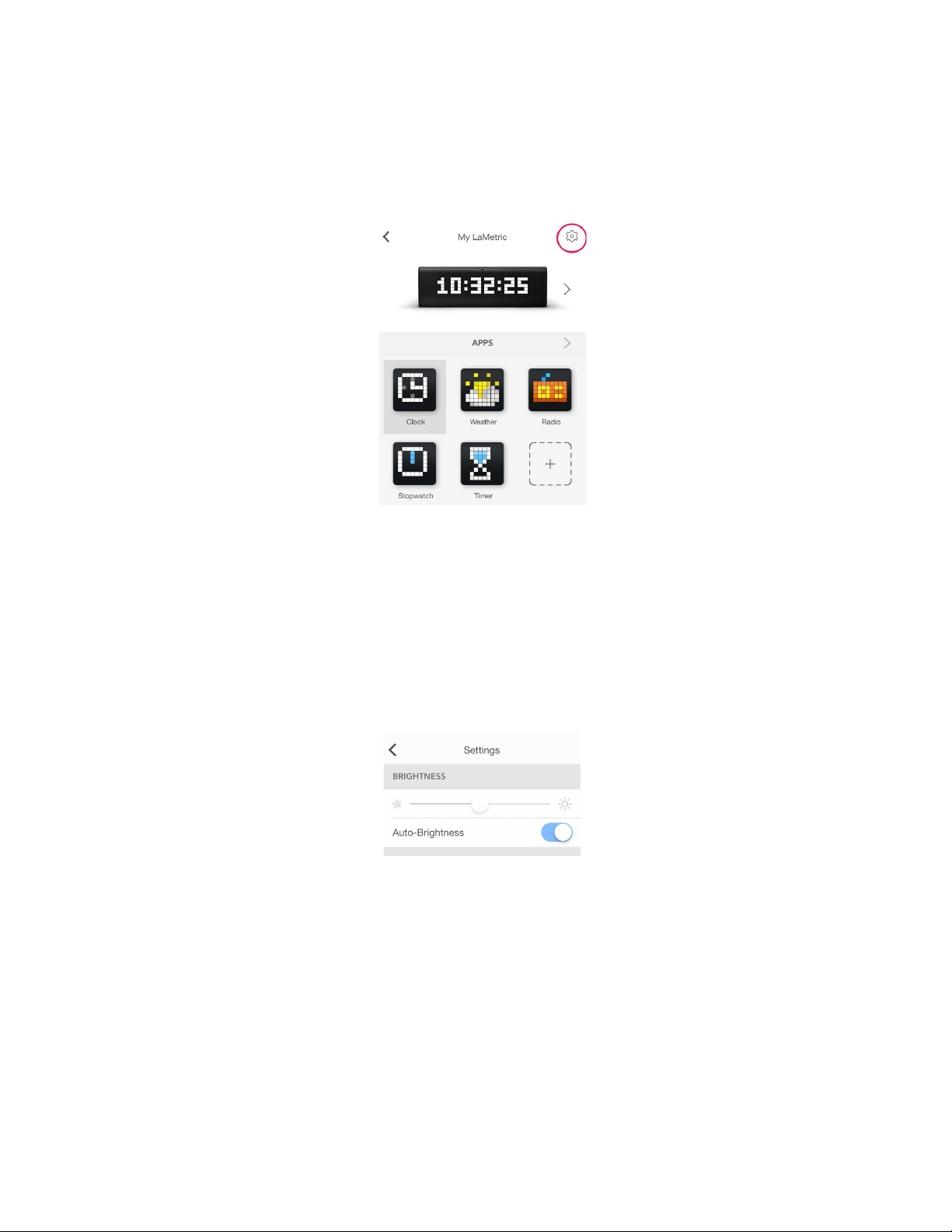
4.6. Device Settings
Tap settings icon on the screen with apps to change main settings of your device.
4.6.1. Brightness control
Go to Settings > Brightness and drag a slider left or right to change a brightness of the screen of
LaMetric, if Auto-Brightness is off.
If Auto-Brightness is on, LaMetric adjusts the screen brightness automatically depending on current
light conditions using the built-in ambient light sensor.
Please note, higher brightness drains battery faster (for battery version of LaMetric).
4.6.2. Screen Saver
This option will be useful for the ones who use LaMetric at a bedside.
Screen Saver is used to decrease distraction at night. The brightness of the display is decreased to the
low level while you sleep, however, you will still see a time on LaMetric once you wake up at night.
37
Page 39
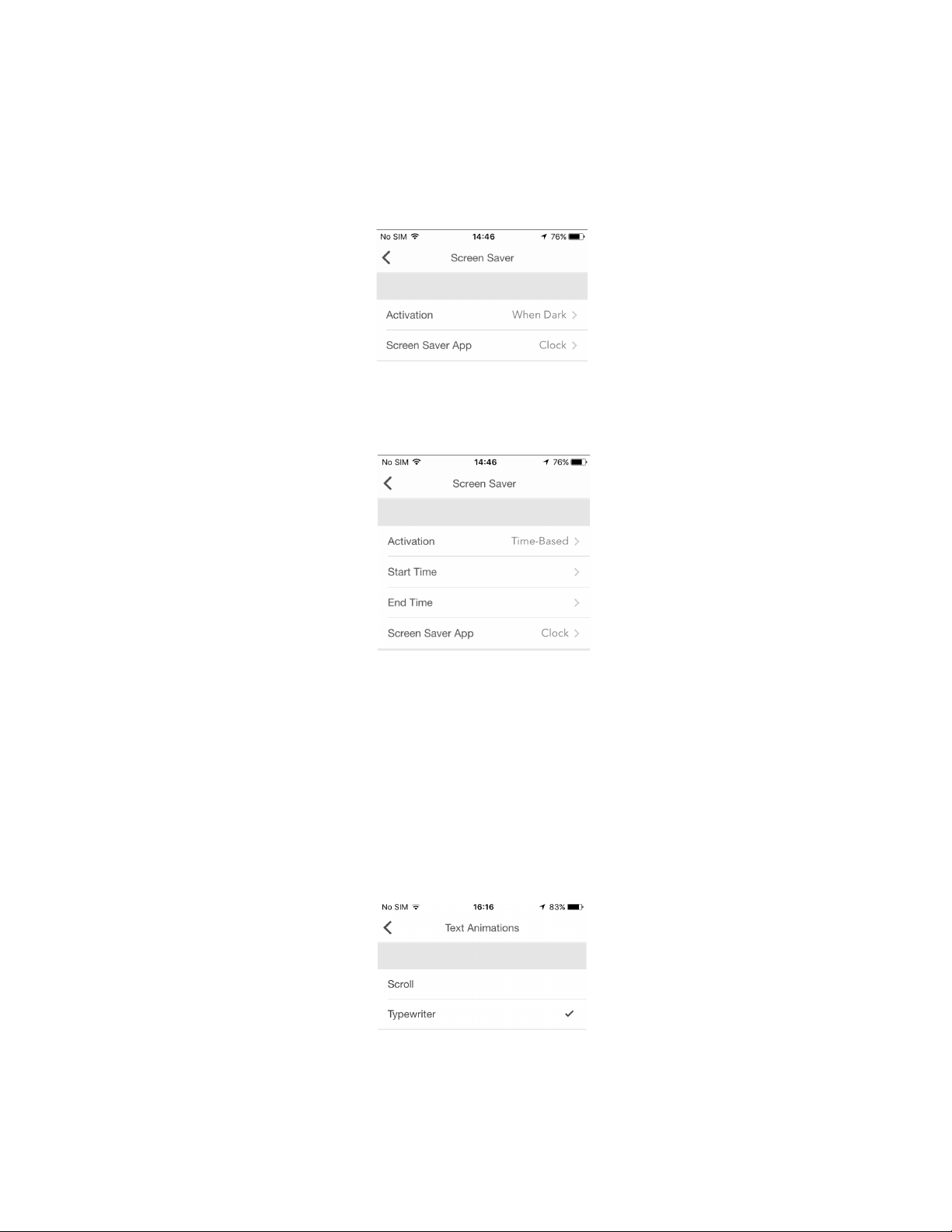
To activate Screen Saver go to your LaMetric's Settings > Screen Saver > Activation . Chose an
option for the activation: When dark or Time based.
If you chose the option When dark , Screen Saver will be activated when it is completely dark in the
room. It will be deactivated in the morning or if you turn the light on in a room.
If you chose the option Time based , you will be able to set start and end time for Screen Saver.
Please note that Screen Saver becomes available only if Auto-Brightness is enabled.
4.6.3. Text animation
You can choose the style of text animation to make it more suitable for you. Go to Settings > Text >
Text Animation (iOS) or Settings > Display > Text Animation (Android) and select the style among
two available:
- Scroll
- Typewriter
If you choose the Typewriter , the option to control the speed of text becomes available. Please read
the next clause to find more information on it.
38
Page 40
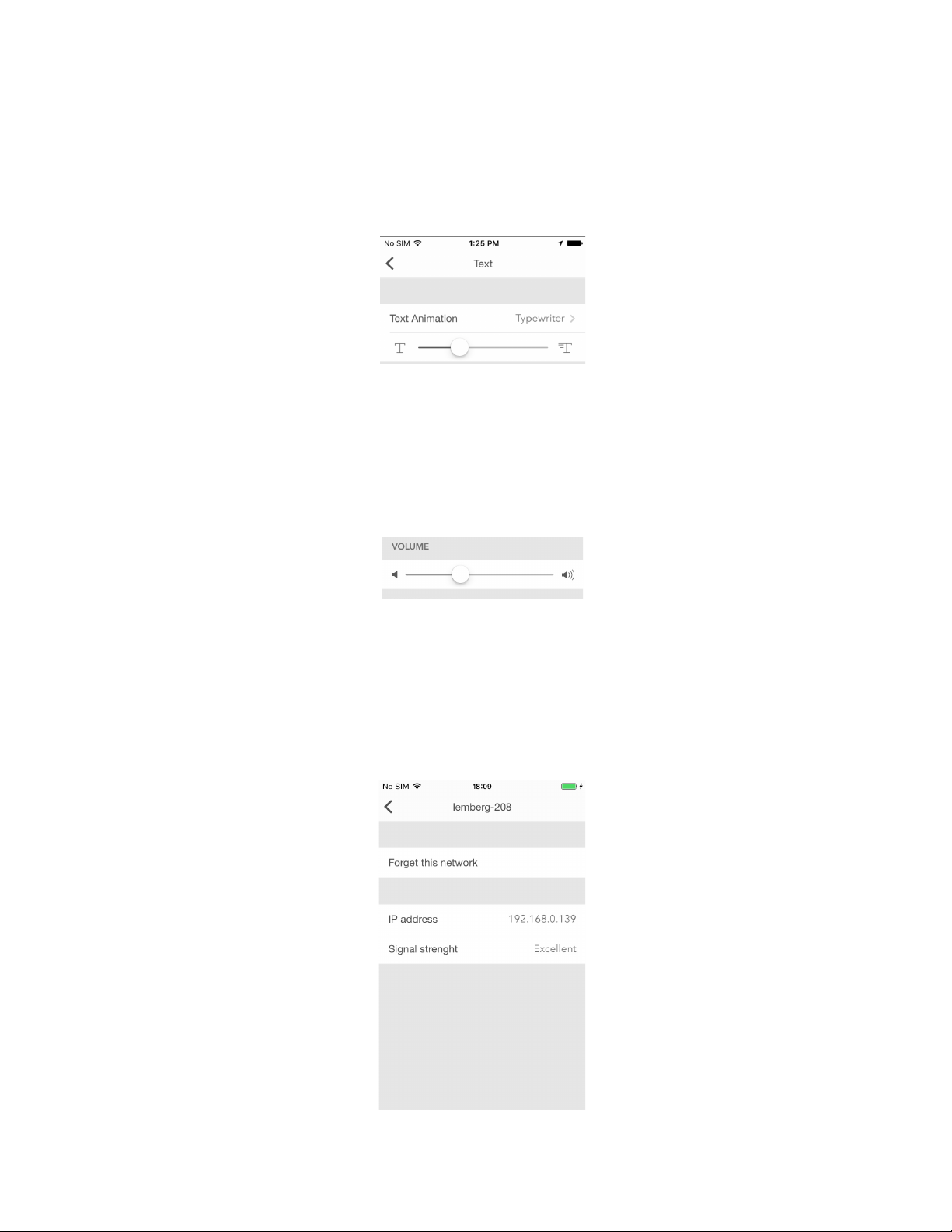
4.6.4. Text speed control
To slow down the text (for example, the name of songs that you listen to or some notifications that
appear on the device) and control its speed, please use the Typewriter option. Go to Settings > Text >
Text Animation > Typewriter (iOS) or Settings > Display > Text Animation > Typewriter (Android)
and chose a comfortable speed of text.
4.6.5. Volume control
Go to Settings > Volume and drag a slider left or right to select a suitable volume. Minimum volume is
to the left, maximum to the right. Changing volume directly on LaMetric is possible too with the help of
Volume up and Volume down buttons.
4.6.6. Wi-Fi connection
Go to Settings > Wi-Fi to know what Wi-Fi network your LaMetric is connected to. There you can see
your IP address and Signal strength . You can also tap Forget this network if you want to connect
LaMetric to another Wi-Fi network.
39
Page 41
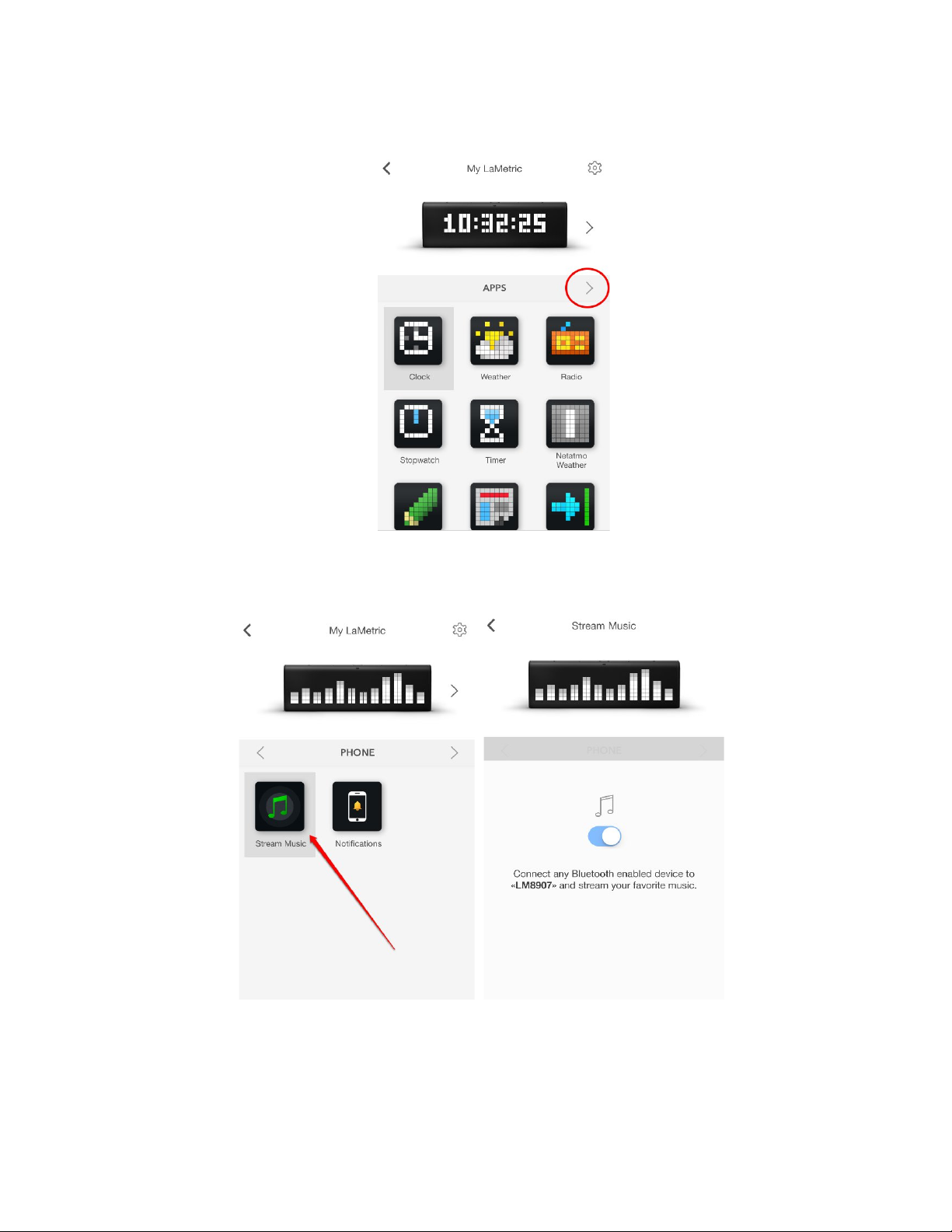
4.6.7. Stream music
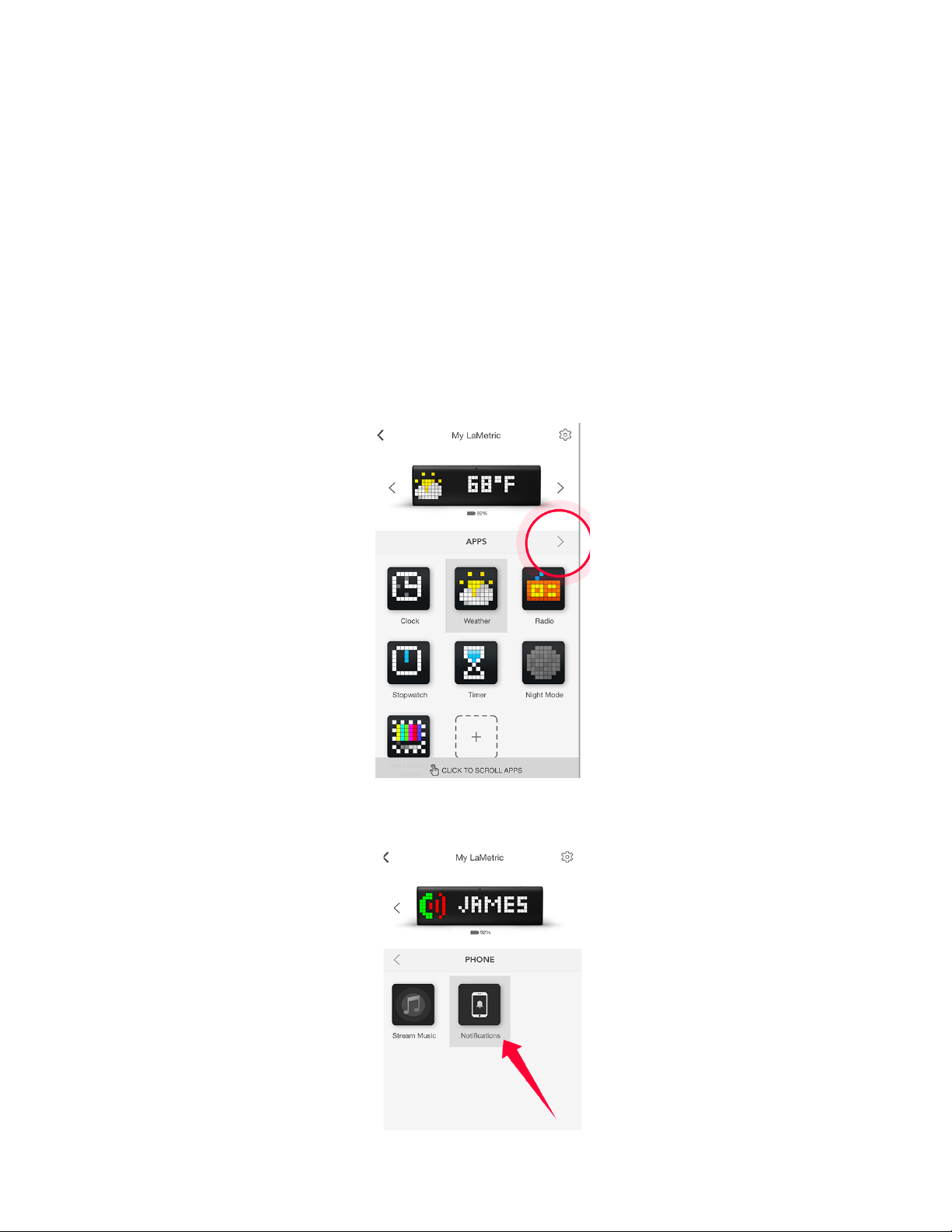
Go to the list of apps at your LaMetric Time app and swipe to the left or just tap the circled narrow:
Choose ‘Stream music’ and turn it on:
Go to Settings > Bluetooth and enable it. Connect phone or tablet to Bluetooth device called
“LMXXXX” - search it after enabling Bluetooth on your phone. Go to your player and stream your
favorite music.
40
Page 42
4.6.8. Smartphone notifications
!!! IMPORTANT !!! Remember to use notifications feature when your LaMetric Time is in private space
only. Otherwise, there is a high risk your personal messages may be shared with the others.
Make sure your LaMetric Time runs the latest firmware version 2.0.0 and your LaMetric smartphone
app is up to date as well.
Please note that your phone must have Bluetooth Low Energy hardware. All iPhones since version 5
already have it. If you use Android – please check your phone’s tech specs.
To get started go to the list of apps at your LaMetric Time app and swipe to the left or just tap the circled
narrow:
Choose 'Notifications':
41
Page 43
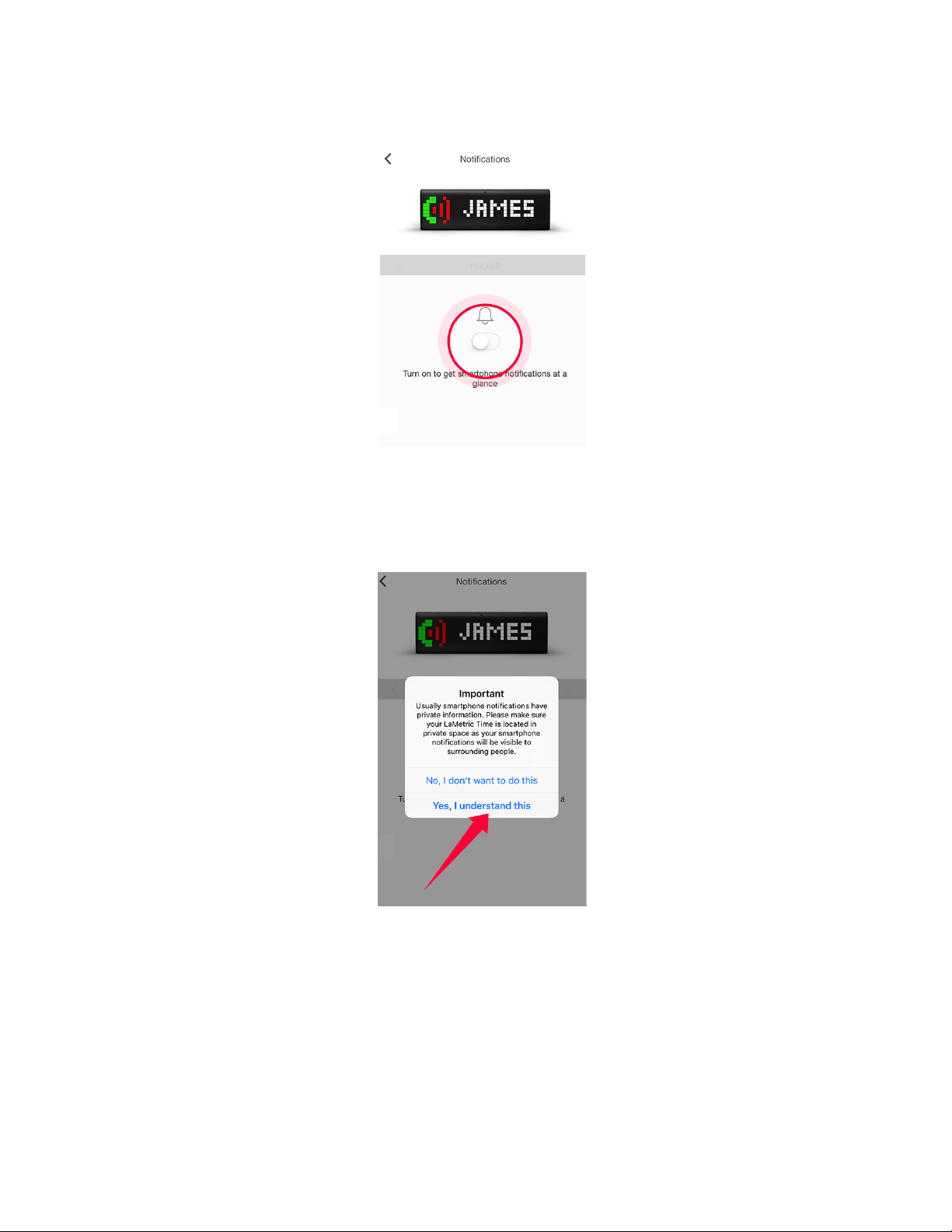
Follow the next steps to enable notifications:
Make sure your private messages won't be seen by the others, keep your LaMetric Time in private
space:
Go to your phone settings to enable Bluetooth:
42
Page 44
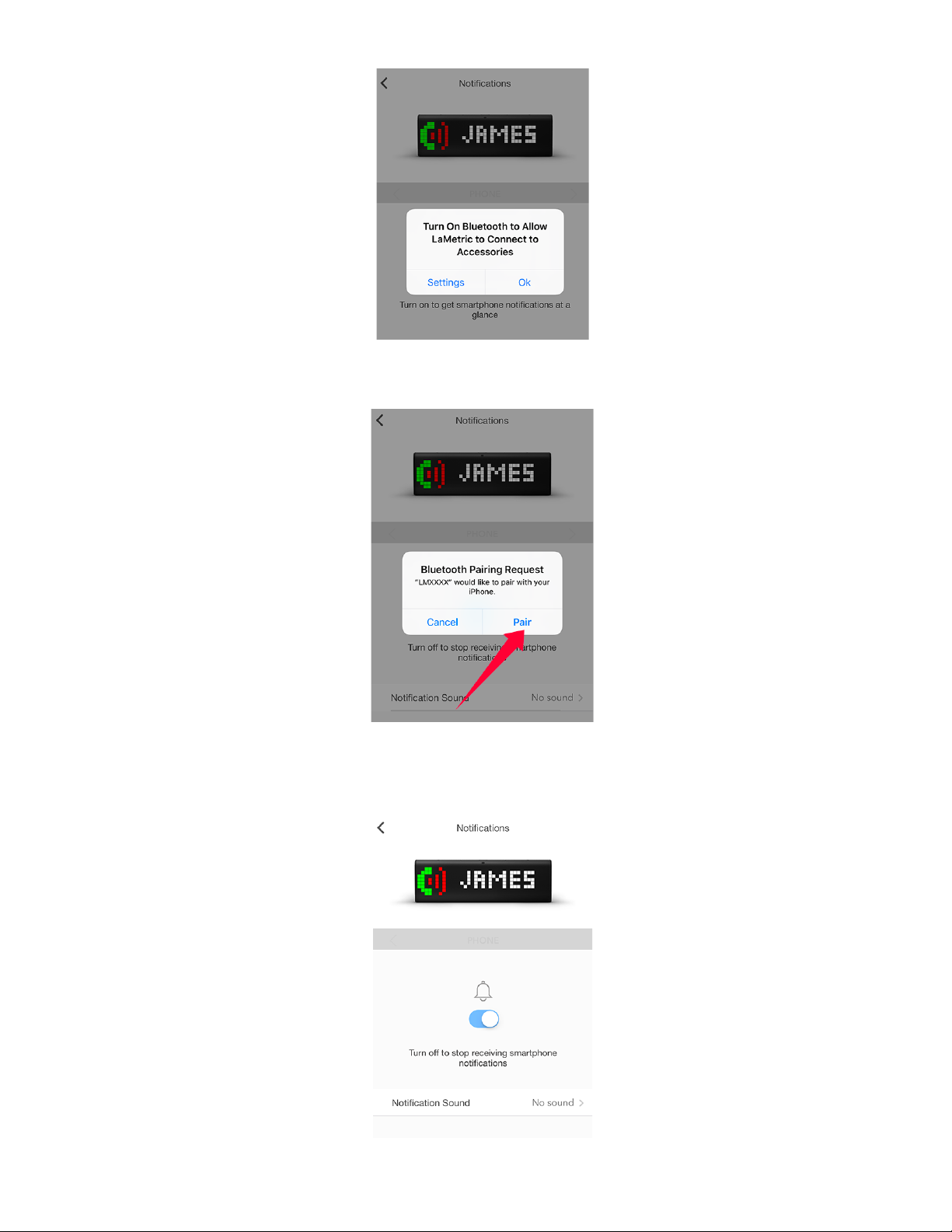
Accept Bluetooth pairing request:
Select sound for your notifications from the available list:
43
Page 45

4.6.9. Software update
To check a new available firmware and update it go to Settings > Software update > Install now .
4.6.10. System information
Go to Settings > About > Name and enter the new name of your device. The default name is My
LaMetric . SN is a serial number of the device. Further data on the list - the system information about
the device.
4.6.11. Privacy
Go to Settings > Privacy and turn on Send Logs Automatically to make server receive technical
information about your device and help LaMetric team to resolve arisen issues faster.
5. Device usage
5.1. Switching on
Connect LaMetric to a power outlet via USB cable and power adapter. Press the On/Off button to start
up your LaMetric.
5.2. Using apps and navigation between them
When LaMetric is configured, as it was described in 4. Configuration via the application , you have
already 5 apps installed. They are working autonomously and you do not need to use your smartphone,
only if there will be a necessity to change some settings of apps as in 4.2.1.Clock , 4.2.2.Weather ,
4.2.3.Radio , 4.2.4. Stopwatch , 4.2.5. Timer .
Please note that such apps as Clock, Stopwatch and Timer do not need Internet access, but Radio and
Weather will not work without it.
5.2.1. Using apps
Using apps is also possible with the help of buttons directly on LaMetric.
Clock. You can set an alarm directly on Lametric:
● To see alarm configuration (whether an alarm is on or off and what time was set), short press
the Action button when you see current time on your device (if you press it again, you will be
moved back to a
44
Page 46

● clock).
● Then (while you see alarm configuration) press and hold a few seconds the Action button to
enter edit mode and have a possibility to change alarm settings.
● In edit mode, current section that can be changed starts to blink. Left or Right navigation
buttons allow moving between sections. Action button changes value.
● Sections, that can be changed:
- First section - OFF / ON / Radio. When handbell is colored - the alarm is on, when it is black &
white - off. When you choose radio icon in the first section and set the alarm, radio will start to
play instead of alarm sound.
- Second section - Hours.
- Third and fourth sections - Minutes.
- Fifth section - AM/PM, that appears additionally in 12h format.
- There is no possibility to choose a day. When the alarm is turned on, it will be fired when time on
alarm and on clock will be the same. If you will not change an hour, it will be fired every day at
the same time.
● After you have changed all you needed, press and hold a few seconds the Action button to
confirm the configuration. After that short click on Action button to return to the current time.
● If you will not perform any actions in edit mode - it will return to current time automatically after
15 seconds.
● To dismiss alarm press and hold the Action button when the alarm is active. “DISMISSED”
notification has to be shown. If the radio is turned on instead of the alarm sound, switch to the
Radio app and use the short press of the Action button to turn it off.
● When the alarm has been fired you can snooze it by short clicking on any of the buttons on the
top ( Left, Right navigation buttons or Action button ). “SNOOZED” message has to appear.
Next time alarm will be fired in 10 minutes from the time when it was snoozed. Snooze function
can be disabled from Alarm configuration option in the mobile app. Read 4.2.1. Clock to find out
how to do this.
● If you let alarm to be activated for a long time it will be automatically snoozed after 15 minutes.
Auto snooze will work 3 times and for the 4th time, it will be dismissed.
● If your alarm is already configured, you can quickly turn it on or off by long pressing on the
Action button when you see current time on your device.
● Please note, that only single alarm may be configured. If you need more, you should duplicate
Clock app. Read 4.3.2.Apps duplicating to know how to do this.
45
Page 47
Weather. A short press of the Action button makes LaMetric show you the weather for today. Use the
short press again to see the weather forecast for tomorrow.
Radio. Use the Action button to turn Radio on or off and switch to another radio station:
● A short press of the Action button, while Radio app is on LaMetric’s screen, turns the radio on.
There appears the name of the radio station on display.
● To switch to another station press and hold the Action button.
● To stop the music just press the Action button.
Stopwatch. Press the Action button to start , press it again to make a pause. Long press of the Action
button will wipe all settings and will return to the beginning.
Timer. Press the Action button to start a countdown, press it again to make pause. Long press of the
Action button will return to the time, that was set at the beginning.
5.2.2. Navigation between apps
You can navigate between apps using the Right or Left Navigation buttons on LaMetric.
Short press the On/Off button will always return you to Clock app.
5.3. Streaming music on LaMetric
If you wish to stream your favorite music on LaMetric, you can do it in two ways - using Stream music or
Radio app. Read all information about these two ways in 4.6.7. Stream music and 4.2.3.Radio .
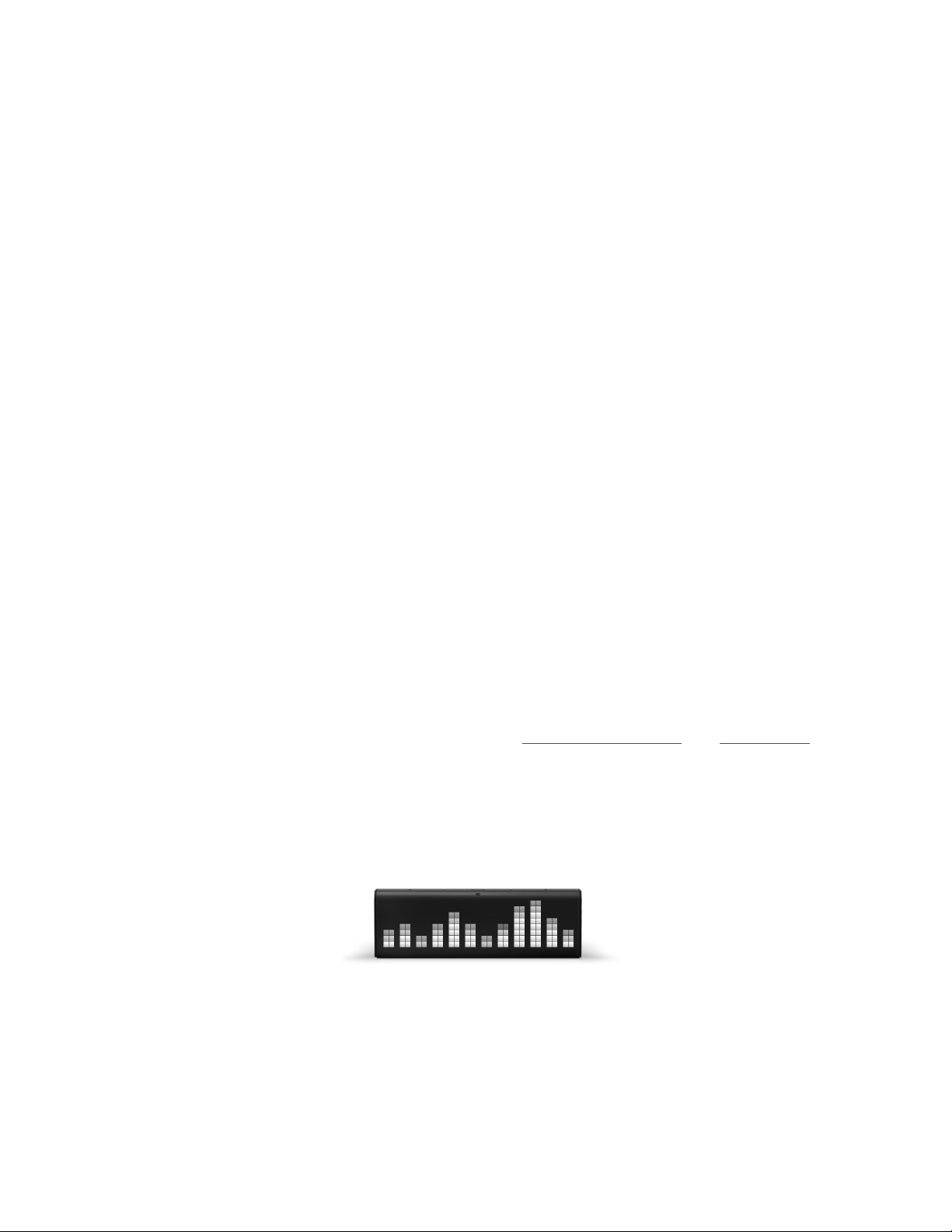
While listening to music you may need to change loudness. To do this just press the Volume up or
Volume down buttons on the left side of the device. Enjoy the music from two speakers and
visualization of the sound on the device.
5.4. Charging
If you have battery-operated LaMetric and need to check a battery level, disconnect it from a power
outlet. The battery icon will appear on the screen.
46
Page 48
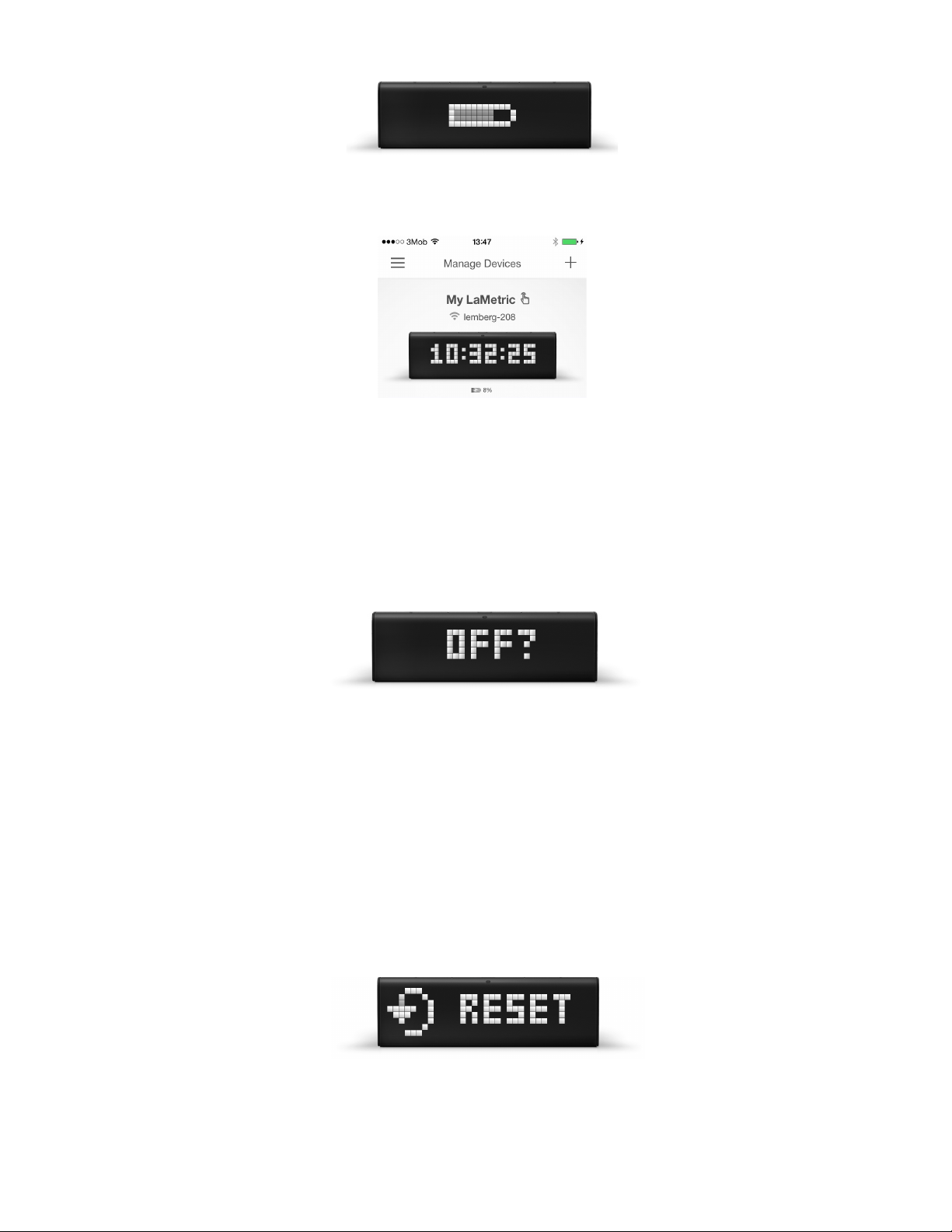
Battery level is also displayed on mobile app under LaMetric on Manage Devices screen.
If you see the low battery icon on the screen, charge the device by connecting to the power outlet via
USB cable and power adapter.
5.5. Switching off
If you wish to power off the device, press and hold the On/Off button for about 3 sec. When ‘OFF?’
message appears, click the Action button .
5.6. Resetting to factory defaults
If you want to wipe all settings or register LaMetric under another account, you may reset the device to
its default factory settings.
To do this, switch the device off, then press and hold the On/Off and the Volume up buttons
simultaneously and start LaMetric in Recovery mode. There you will see a menu where you can choose
between ‘RESET’, ‘REBOOT’ or ‘MOUNT’ by clicking on Left or Right navigation button. When
‘RESET’ message appears, press the Action button to reset your device to factory default settings.
Now you can create another account to connect your LaMetric to and configure it.
47
Page 49
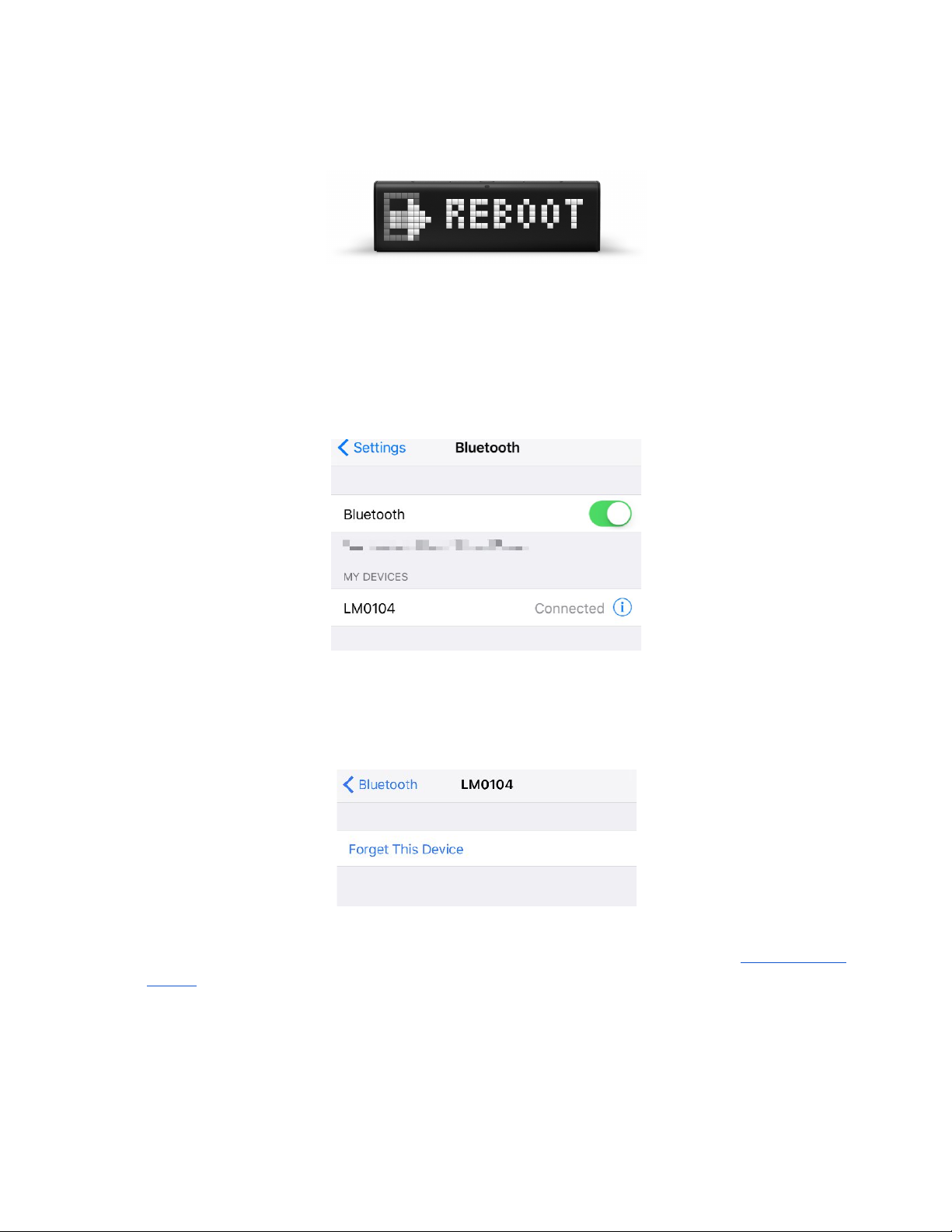
If you see ‘RESET’ message on the screen but you are not sure you wish to reset the device, press the
Left or Right navigation button . When ‘REBOOT’ message appears, press the Action button to
reboot the device from Recovery to Normal mode.
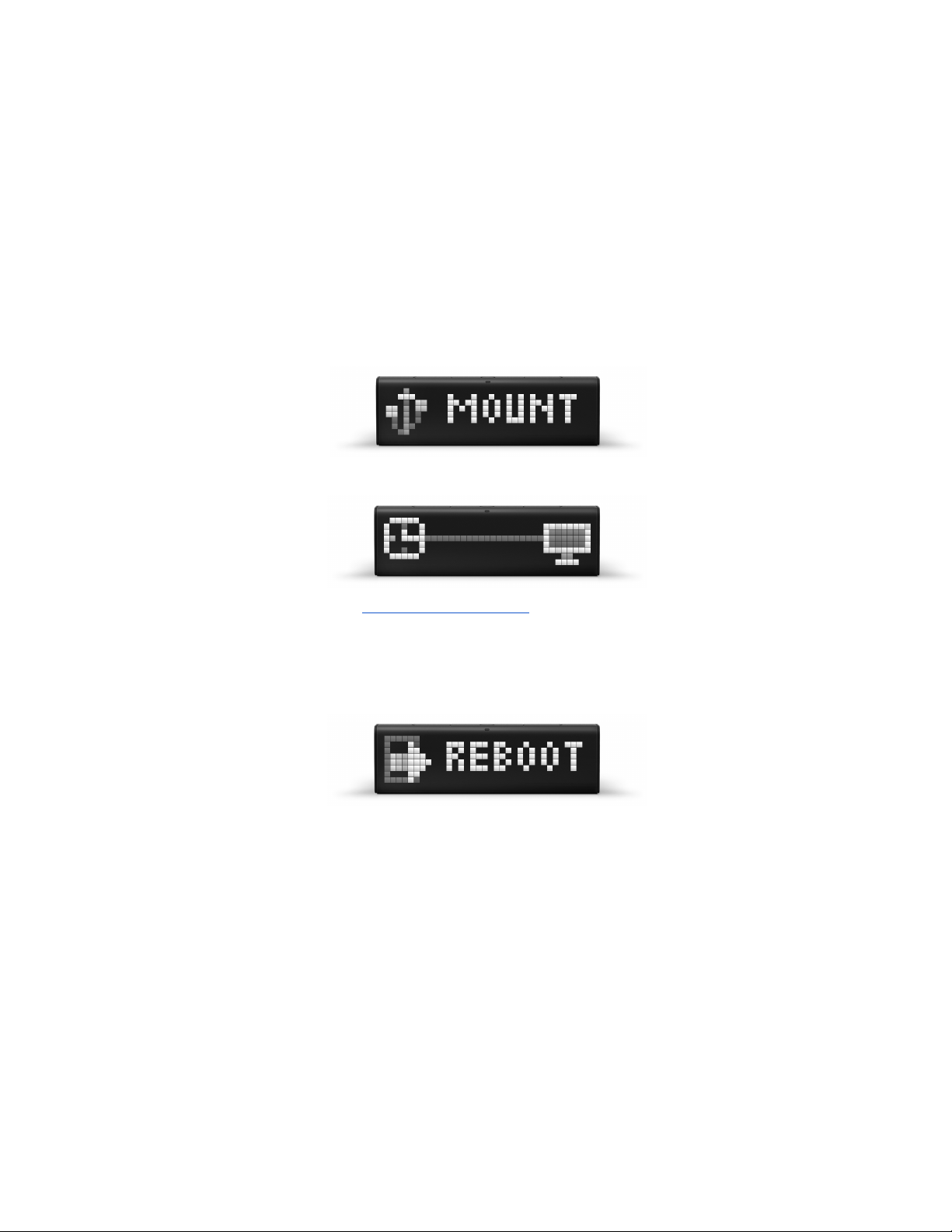
Important : if you used LaMetric smartphone notifications before and your LaMetric Time was resetted,
please follow the next steps to be able to use LaMetric smartphone notifications feature again:
- Go to your phone’s Settings => Bluetooth
- Select Connected devices (your LaMetric Time will be displayed as following: ‘LMXXXX’). Tap
‘ Forget this device ’:
- Go to your LaMetric Time app to enable smartphone notifications. See section 4.6.7. Stream
music .
48
Page 50
5.7. Updating software via USB
Follow a few easy steps to update software:
1. Connect device to PC using USB cable.
2. Start device in Recovery mode (press and hold Volume Up button and short press the On/Off
button at the same time).
3. Mount mass storage (navigate in Recovery mode to ‘MOUNT’ using Left or Right navigation
buttons and confirm with Action button ).
4. PC should detect new mass storage device and LaMetric will be temporarily locked.
5. Drop latest software file from firmware.lametric.com to the root folder of the disk drive that
appeared on your PC.
6. Safely disconnect LaMetric from PC and reboot it (navigate to ‘REBOOT’ using Left or Right
buttons and confirm with Action button ).
7. The software will be installed automatically. The device will reboot few times.
8. In a case of some issue - error file update.err.txt will be created on the disk. To check the error –
mount disk again and open the file to find out the reason of failure.
49
Page 51
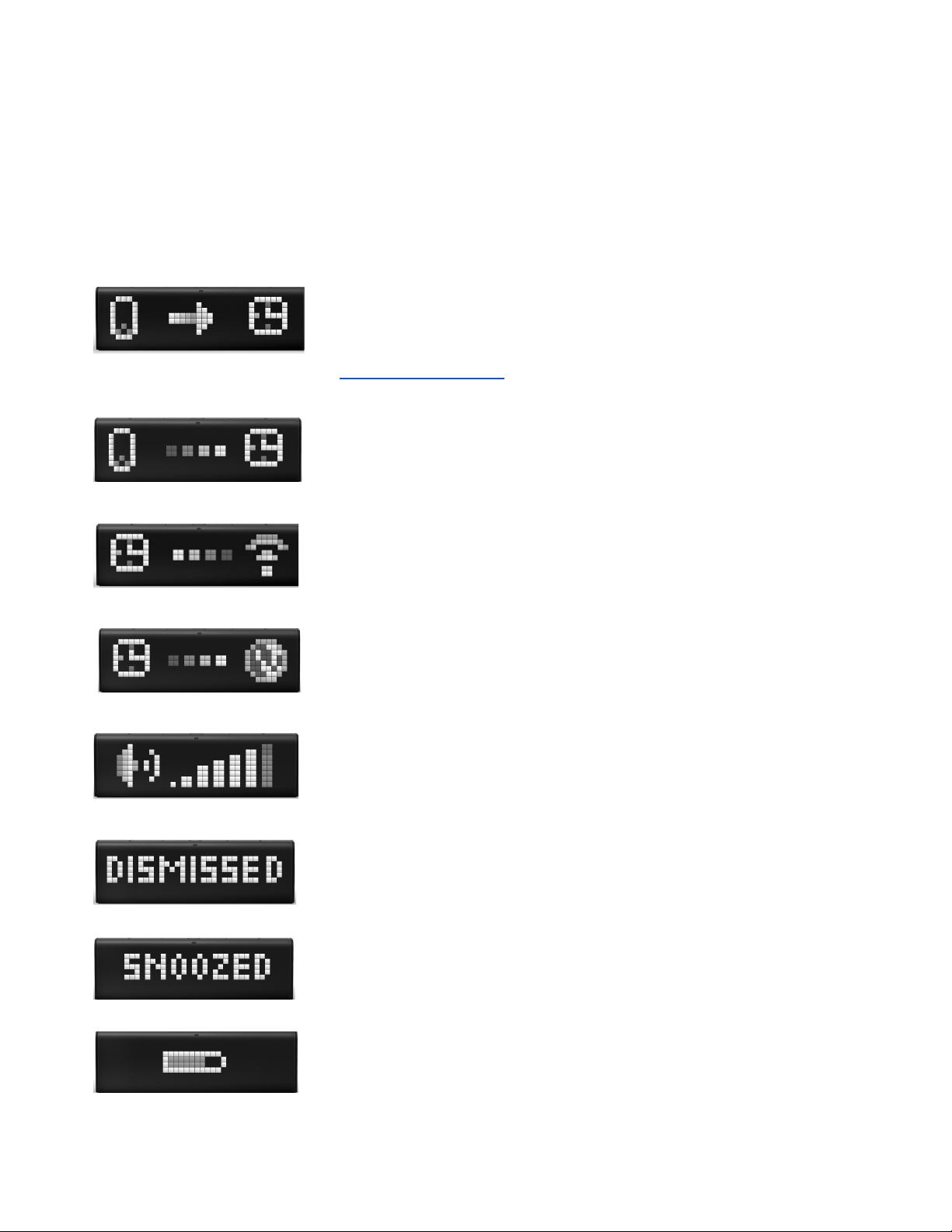
5.8. Device notifications
LaMetric will always notify you if something goes wrong or some your actions are needed.
5.8.1. Operating system notifications
If you see on LaMetric:
- your device is waiting while you configure it via the mobile app. To
configure LaMetric, please read 3.3.2. Configuration .
- the smartphone is connecting to LaMetric.
- LaMetric is connecting to Wi-Fi network. Just wait a few seconds.
- LaMetric is connecting to the Internet.
- notification during volume changing.
- your alarm was dismissed.
- your alarm was snoozed.
- LaMetric is displaying battery level.
50
Page 52
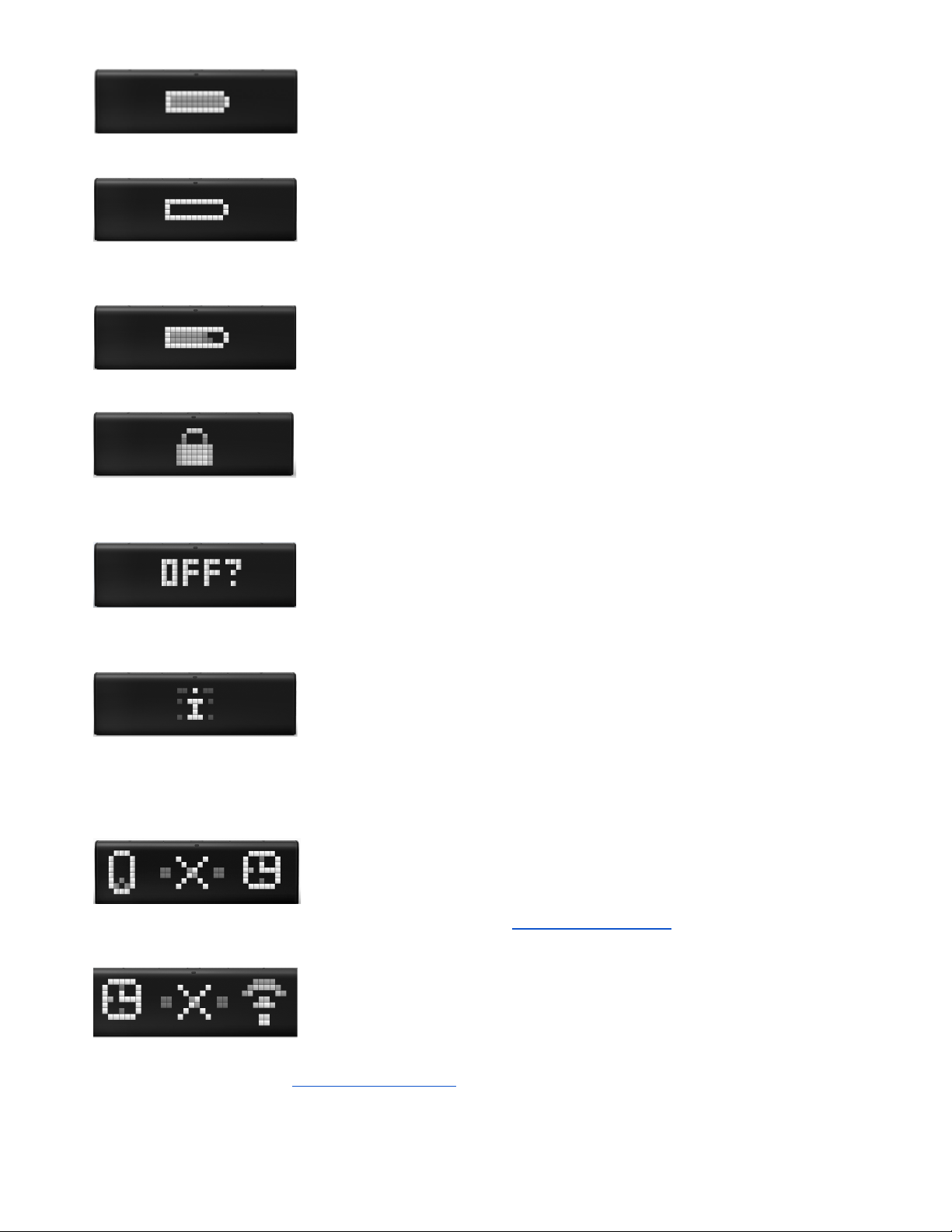
- LaMetric is fully charged.
- Low battery notification. If you see it, charge the device by connecting to
the power outlet via USB cable and power adapter.
- LaMetric is being charged.
- notification of locked LaMetric. You may see this notification when you
connect it to your PC and it will detect new mass storage device.
- LaMetric is asking whether you really want to switch it off. If yes, press the
Action button .
- you got new notification from an app on your LaMetric.
5.8.2. Errors notifications
- your smartphone has disconnected from LaMetric. To connect Lametric
to smartphone again please read the second section of 3.3.2. Configuration .
- LaMetric lost Wi-Fi. To connect your device to the last Wi-Fi network, use
the short press of the Action button . If the device was moved to another place, you should begin
configuration process from 3.3.2. Configuration . This notification may also appear during configuration
51
Page 53
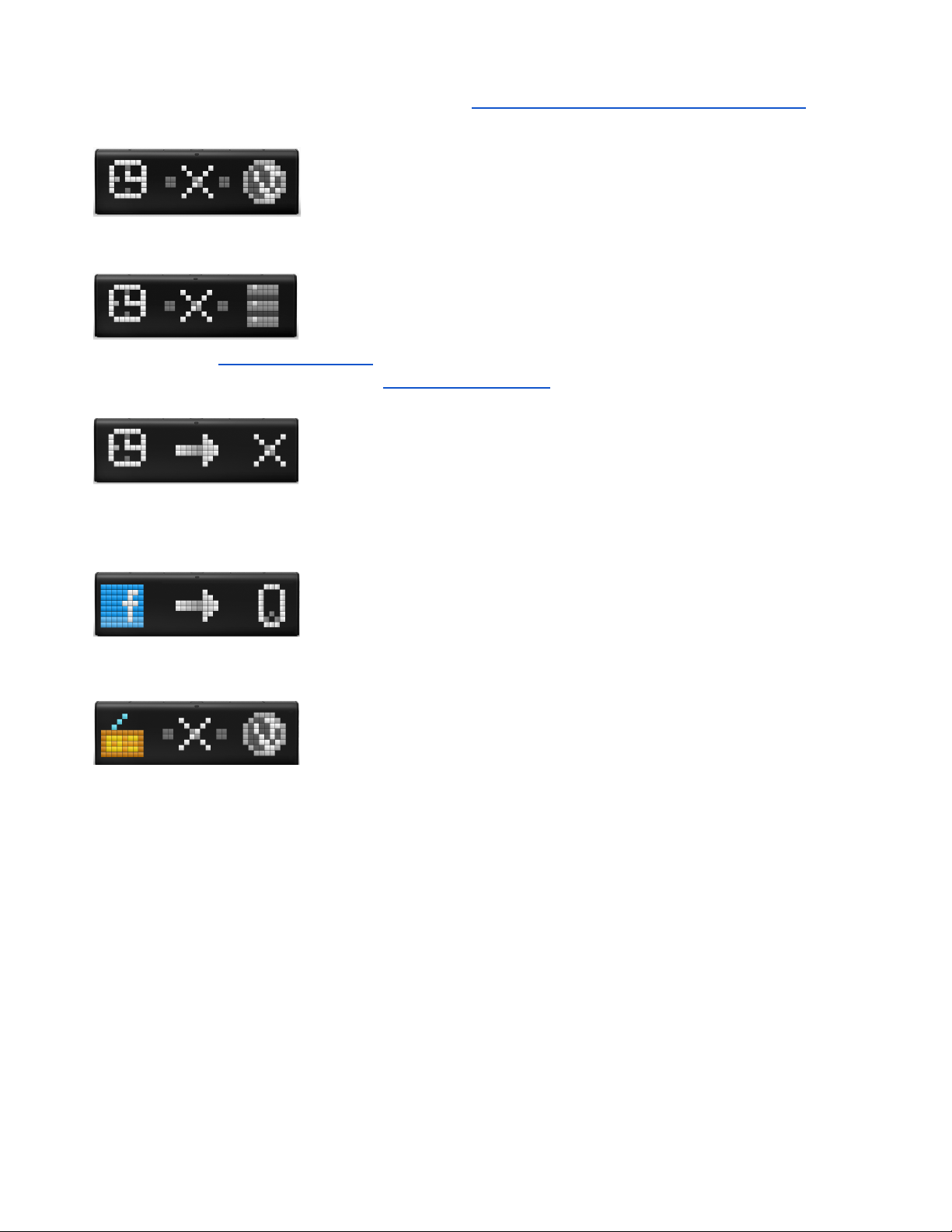
process if you entered an incorrect password to your Wi-Fi network or some additional settings on your
Wi-Fi router are required. In this case please read 3.3.3. Errors of the configuration process .
- Wi-Fi network doesn't have the Internet connection. Make sure, that your
Wi-Fi network has access to the Internet and contact your Internet service provider if necessary.
- LaMetric can not connect to the server. Try configuring LaMetic again as
it is described in 3.3.2.Configuration . If the issue persists, please contact our support team. You can
find more information about support in 8.Customer support.
- an app doesn’t work. This may happen because of incorrect settings of
some app (for example, for Facebook Fan Counter you possibly used an account that is not valid). Try
changing settings of the app or contact app developer to solve this issue.
- this app needs some settings in the mobile app. For example, for
Facebook Fan Counter you need to login to your account via mobile app.
- this app needs the Internet. For example, Radio app will not work without
the Internet.
52
Page 54
6. LaMetric IFTTT Channel
IFTTT stands for ‘IF This, Then That’ and is a service that connects your favorite devices, apps and
websites with simple rules called ‘applets’. The great news is that you can use IFTTT with LaMetric too!
Using LaMetric IFTTT channel will allow you to get notifications on your device with IFTTT Indicator
app , take IFTTT actions with the click on a button with IFTTT Button app or configure direct notifications
to your LaMetric device without installing any additional apps with Display Notification .
6.1. Get started
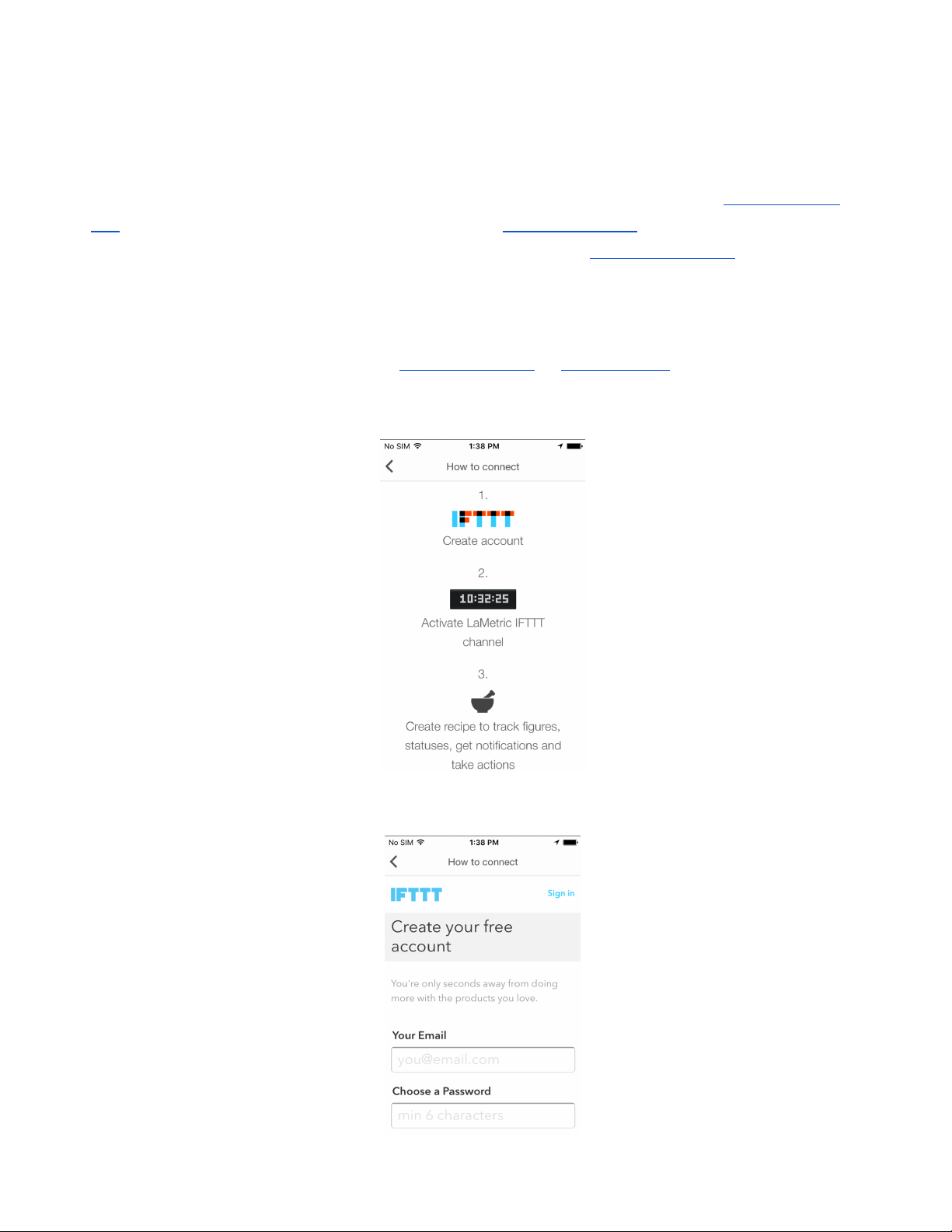
1. Sign in to IFTTT and activate the LaMetric channel via IFTTT website or via your IFTTT app. To
start using IFTTT with LaMetric via IFTTT app, open it and tap How to connect . You will be
moved to three easy steps:
● Create your IFTTT account:
53
Page 55
● Activate LaMetric IFTTT channel:
Press the Connect button to activate LaMertic channel and start using awesome applets.
3. Start using the existing applets or create your own.
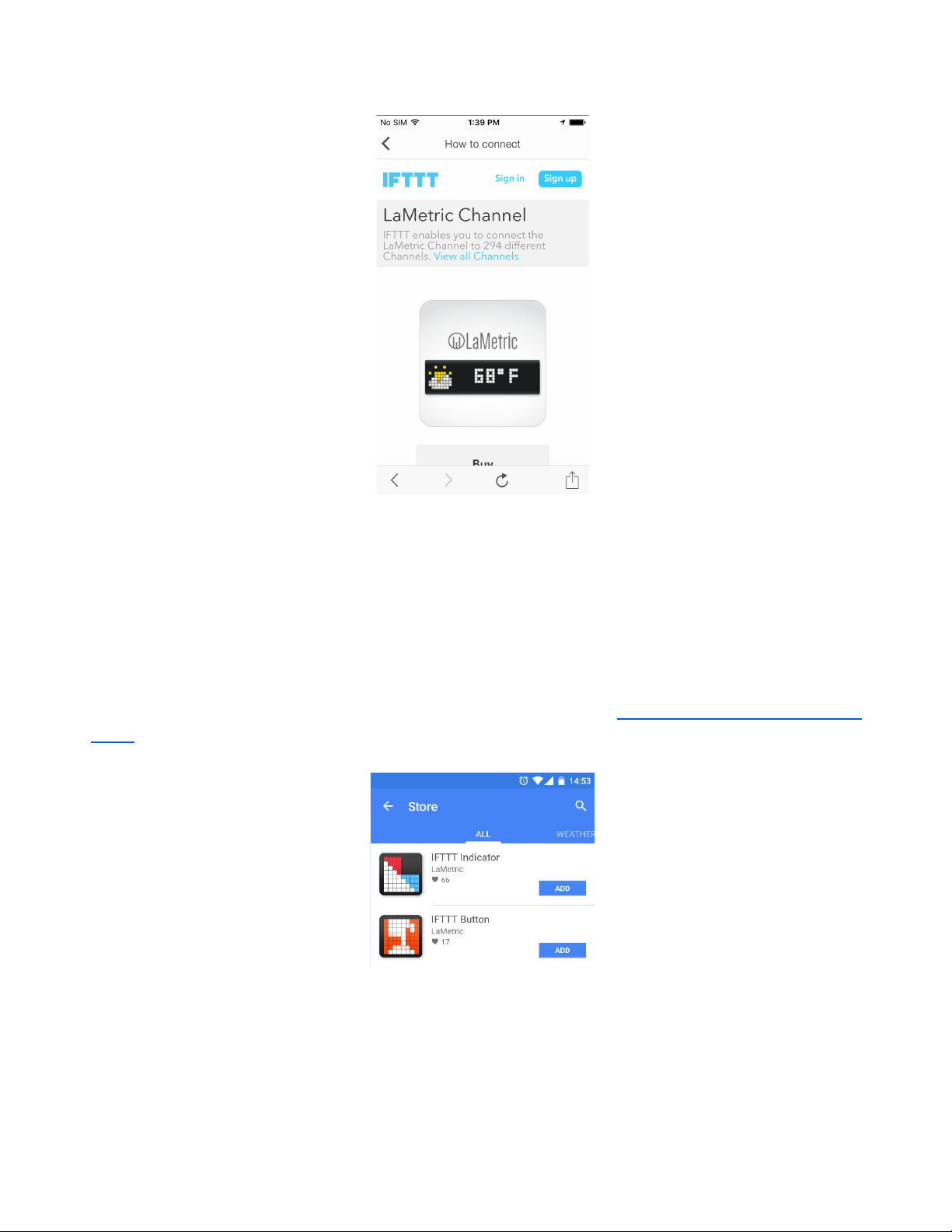
6.2. Add an applet for IFTTT Indicator app
Install IFTTT Indicator or Button app on your LaMetric from the store ( 4.5. Install apps from LaMetric
Store ):
Use this app to receive important notifications to your device and never miss them:
● Track your favorite team's score on your desk
● Rain tomorrow? Get notified and never forget an umbrella
● Go out of the office? Let family know
● Breaking technology news? Notify to the whole team
54
Page 56
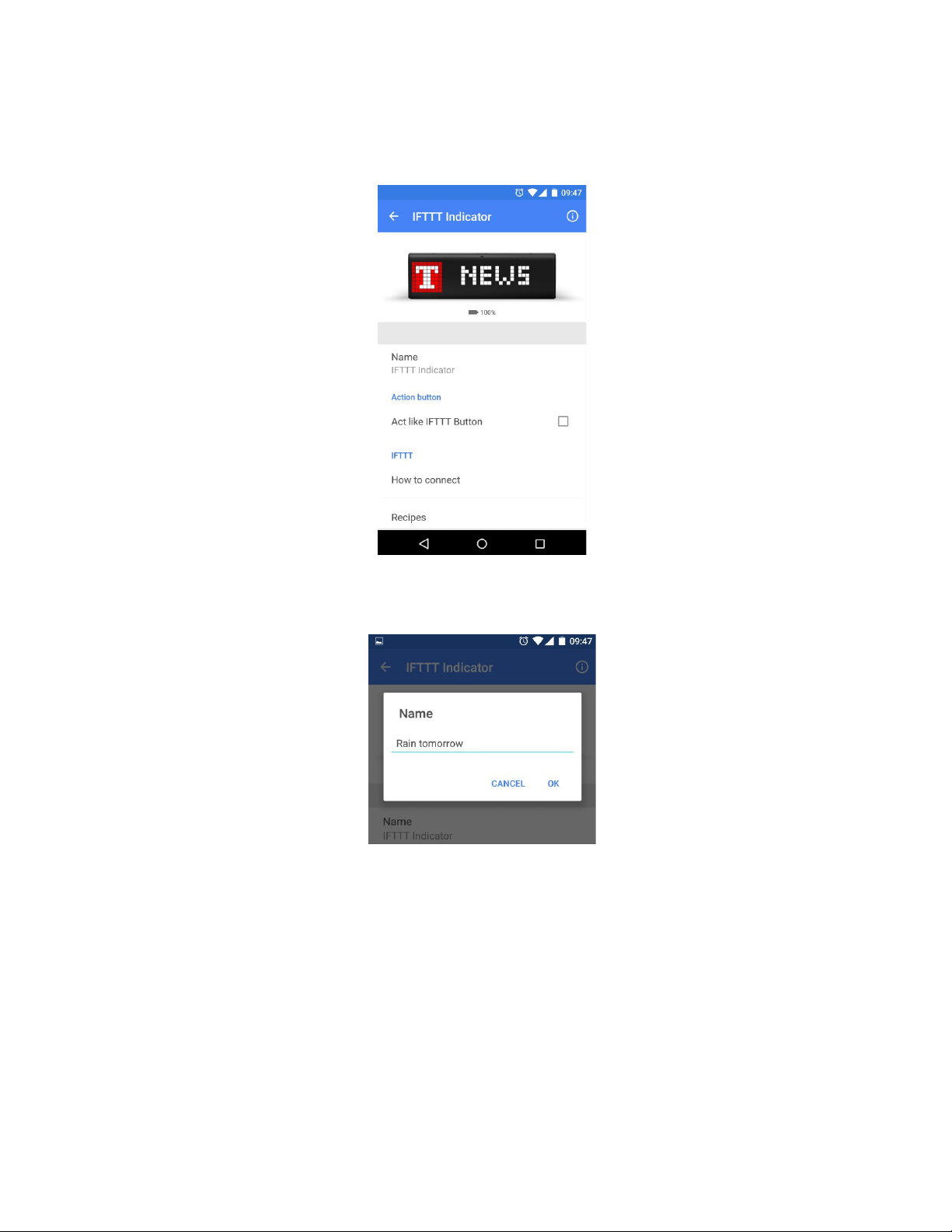
Applets for IFTTT Indicator app are created on the principle - if something happens, then get the
notification to LaMetric . You may use published applets or create your own.
Before adding an applet you may change settings of IFTTT Indicator app:
1. Change the name of your app if it is needed.
2. Enable ‘Act like IFTTT button’ if you wish to add an applet to take some actions with pressing
the Action button. If you choose this option you will be able to create two applets for one IFTTT
Indicator app: one - for notifications, another - for actions.
3. Enable notifications and choose a sound of notification.
After all settings are made, you may add an applet you wish. To make it follow next steps:
● Tap Applets and use search or filter to find an applet faster.
55
Page 57
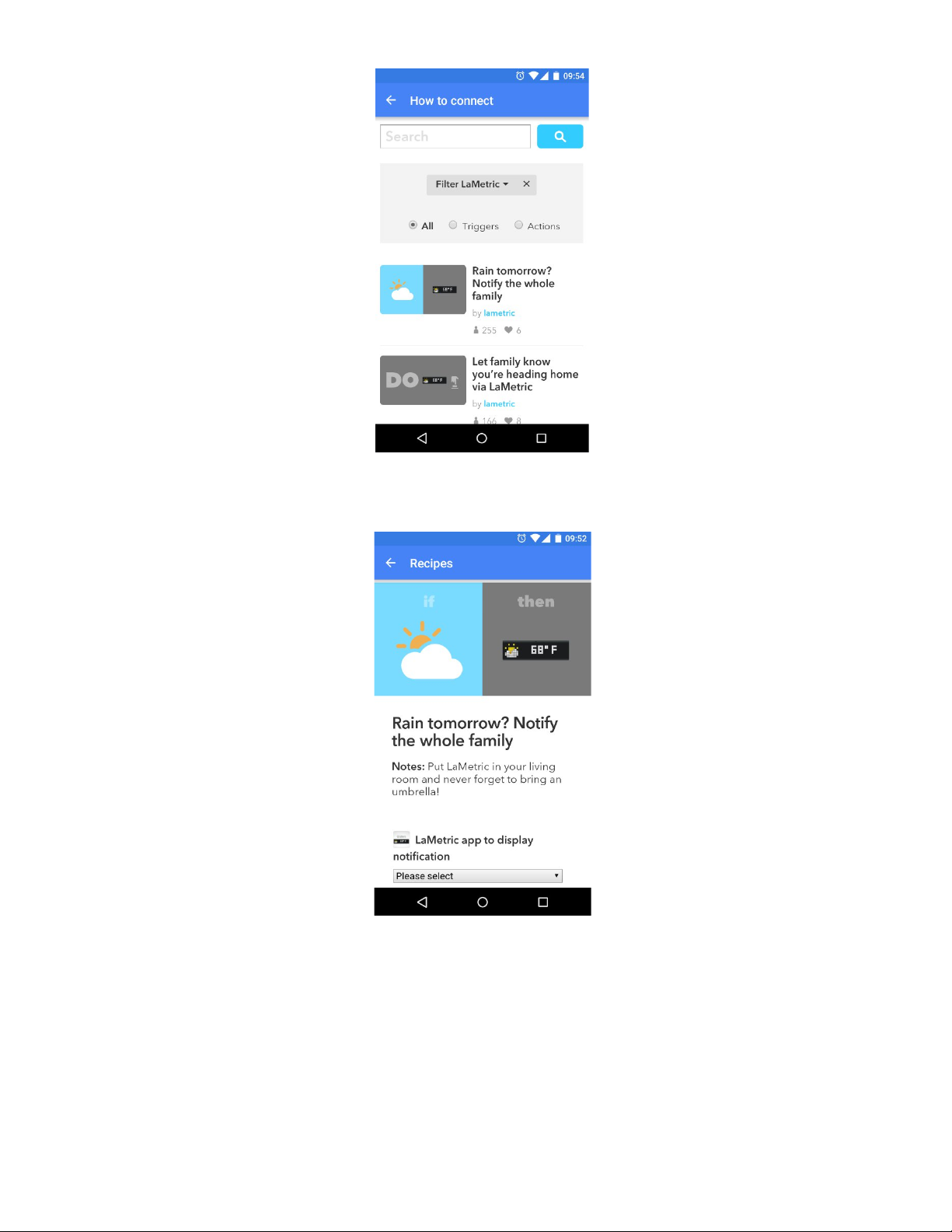
● Tap on the name of the applet you wish to add.
● Select LaMetric app to display notifications. If you have more than one IFTTT Indicator app, all
of them will be visible there.
● Choose an icon and text to be displayed on the device when applet runs.
56
Page 58
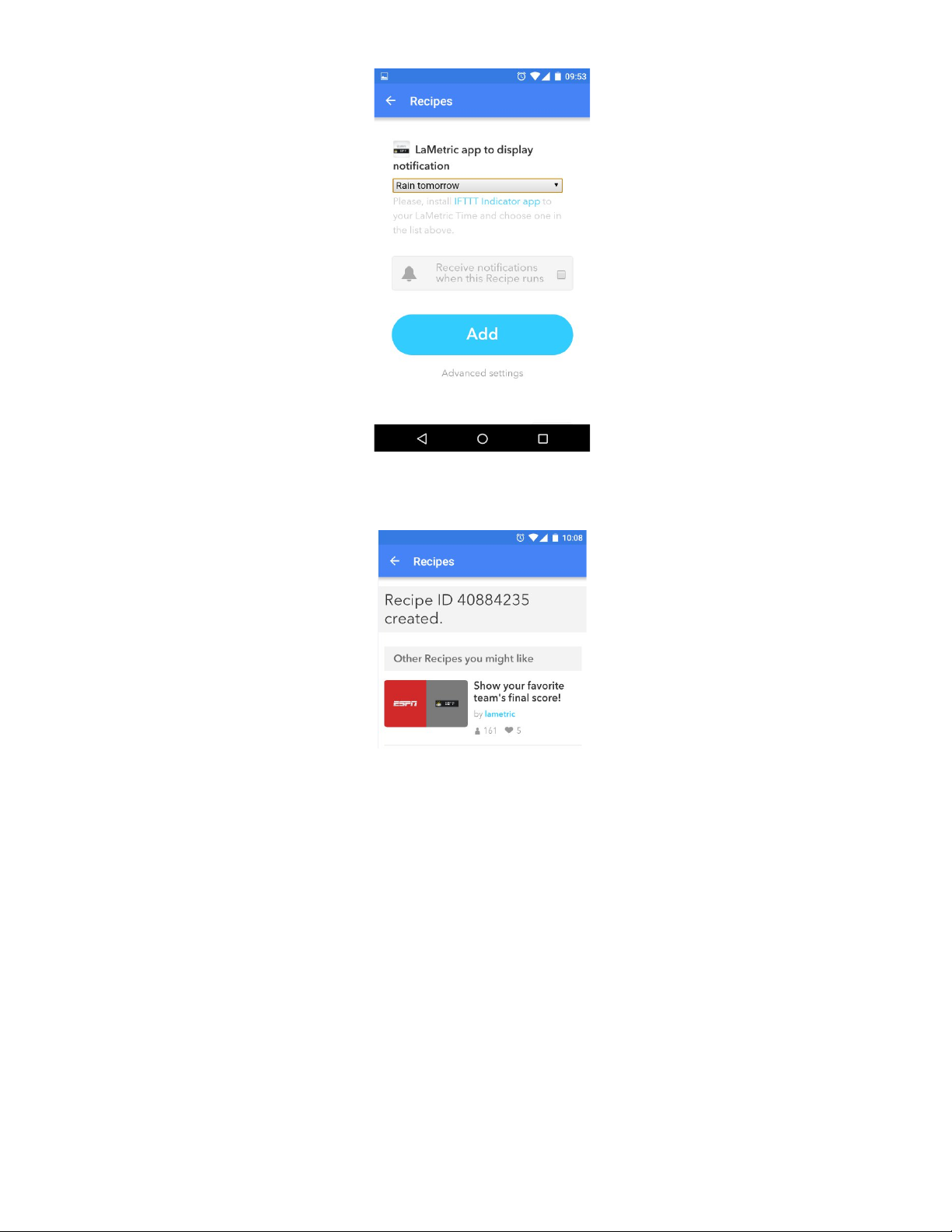
● Finally, tap Add on the bottom of the screen. Voila, your applet was created!
6.3. Add a applet for IFTTT Button app
Use this app to take some action when the Action button is pressed. With IFTTT Button app you may:
● Book time slot in the meeting room with a press of the Action button
● Track your work hours in a simple click
● Control your smart home with app-buttons - lights On/Off, heat up your room etc.
Applets for IFTTT Button app are created on the principle - if the Action button is pressed on
LaMetric, then some action is made .
57
Page 59
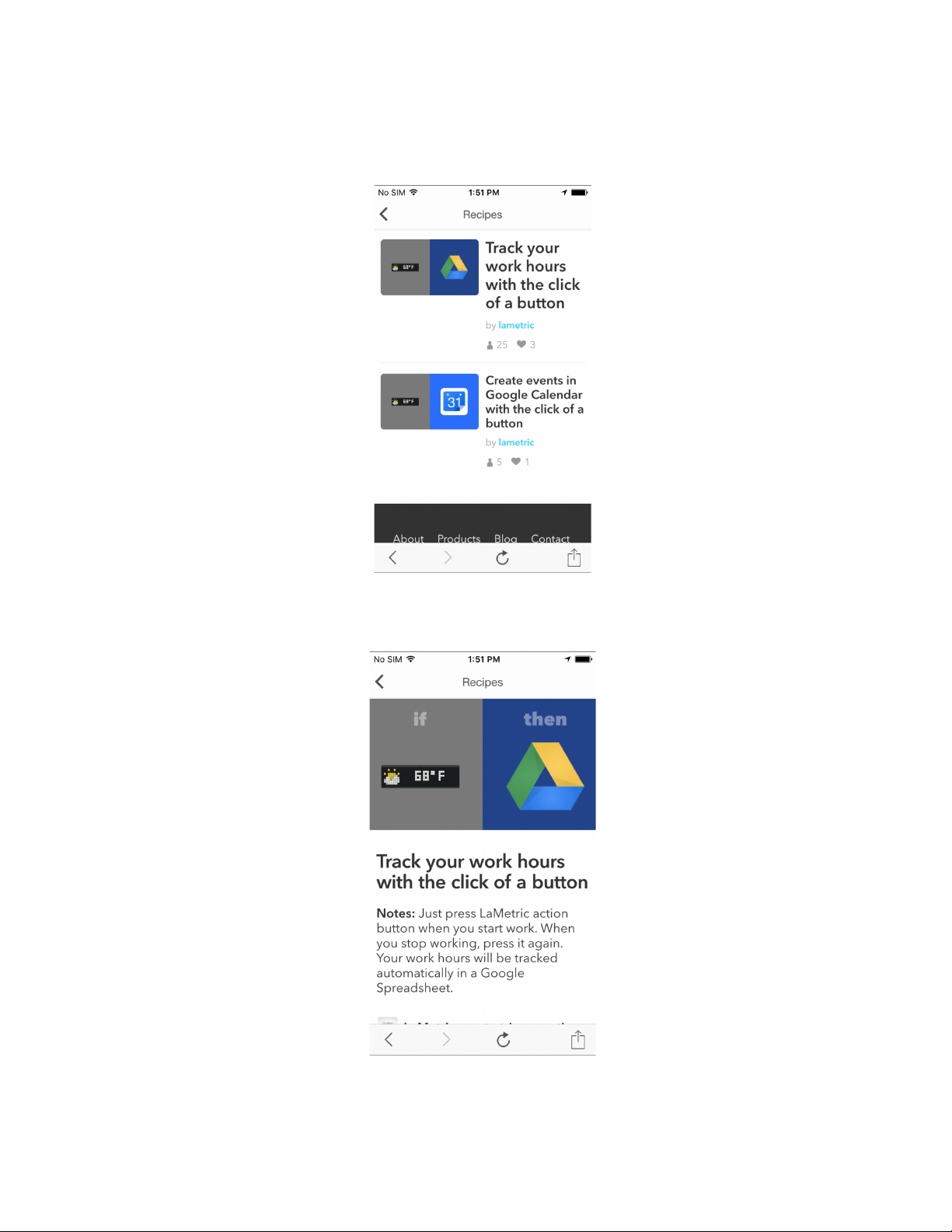
To add an applet you wish, follow next steps:
● Open your IFTTT Button app and tap Applets .
● Choose one from the list or use search.
● Select the applet.
58
Page 60
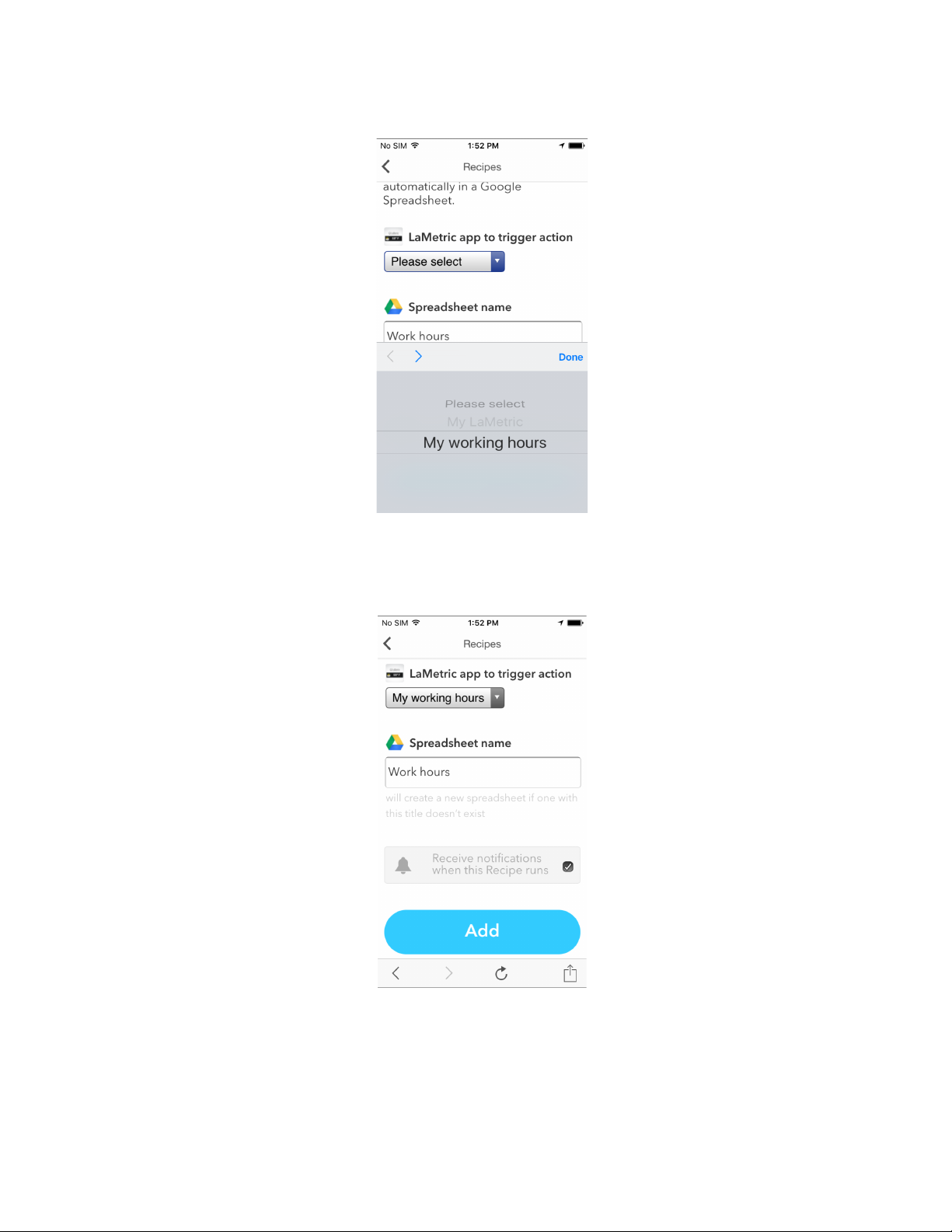
● Select LaMetric app for this applet. If you have more than one IFTTT Button app, all of them will
be visible there. Tap Done to continue.
● To finish tap Add on the bottom of the screen. That’s all! All you need now is to press the
Action button and your applet will run!
You may also change the name of your IFTTT Button app, add an icon and a text that will appear on
the screen of LaMetric when you switch to this app.
59
Page 61
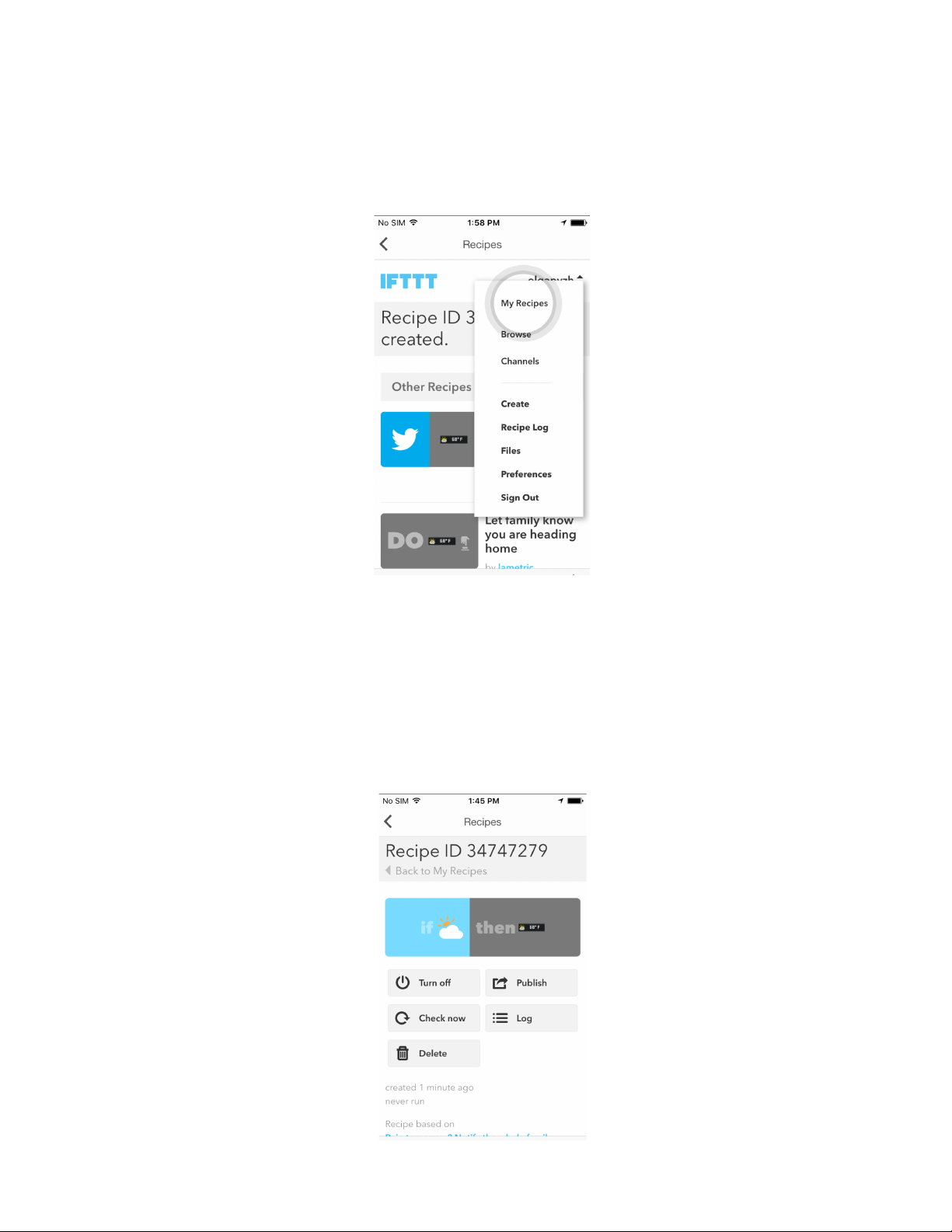
6.4. Manage IFTTT applet s
To make any changes of your applet go to IFTTT app > Applets > My Applets that is available under
the name of your IFTTT account.
You will be able:
- to edit applet
- to turn the applet off
- to publish it and make available for other users
- to check it
- to look through logs
- delete applet.
60
Page 62
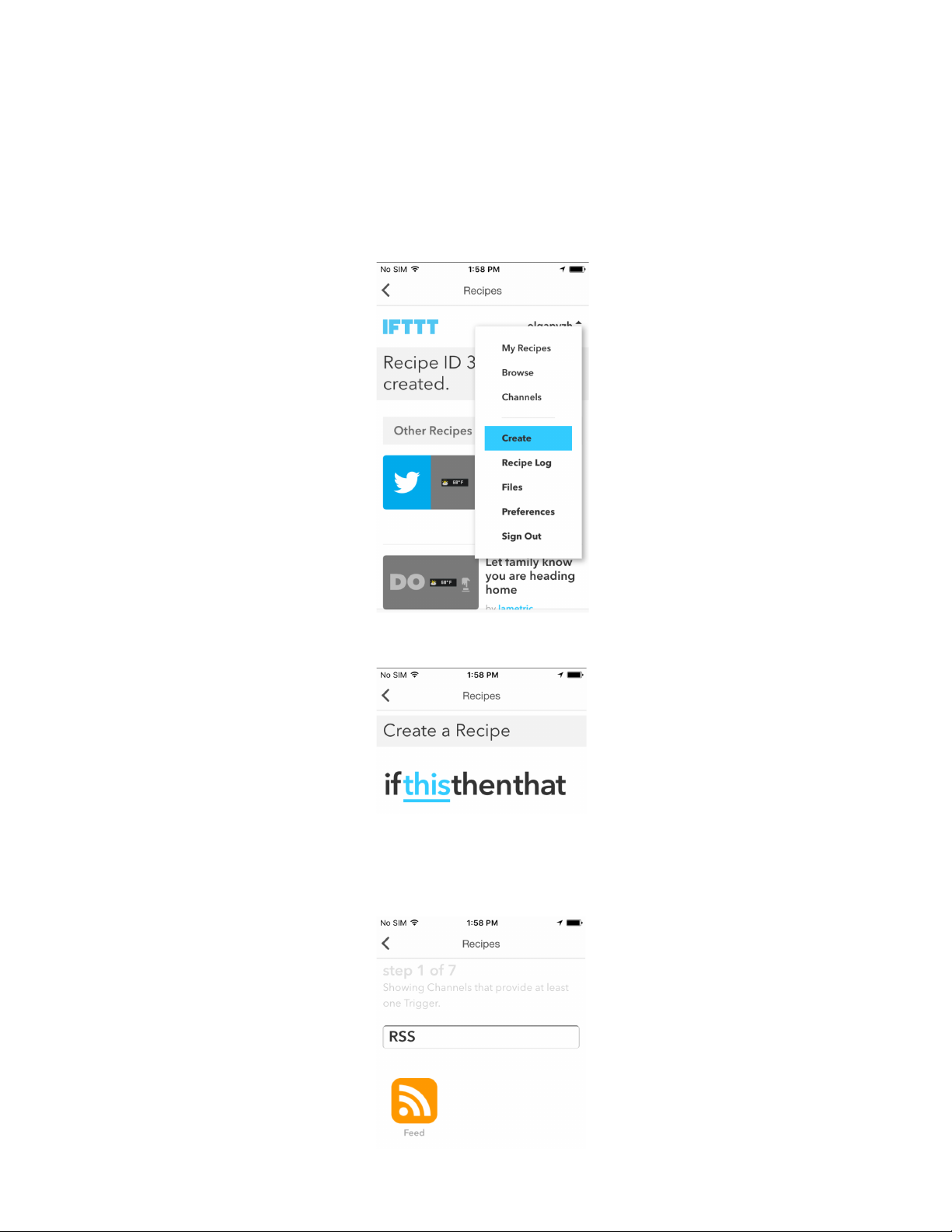
6.5. Create your own applet
If you have not found an appropriate applet among published, don’t be upset. Create your own, it is
easy!
1. Go to your installed IFTTT Indicator or Button app and tap Applets.
2. Then choose Create that is available under the name of your IFTTT account.
3. Tap ‘This’ to create a condition that should be fulfilled to make applet run.
4. Choose a channel from which you wish to receive notifications (for IFTTT Indicator app as in the
example below) or a channel that will be used to take an action (for IFTTT Button app choose
LaMetric as a channel for this step).
61
Page 63
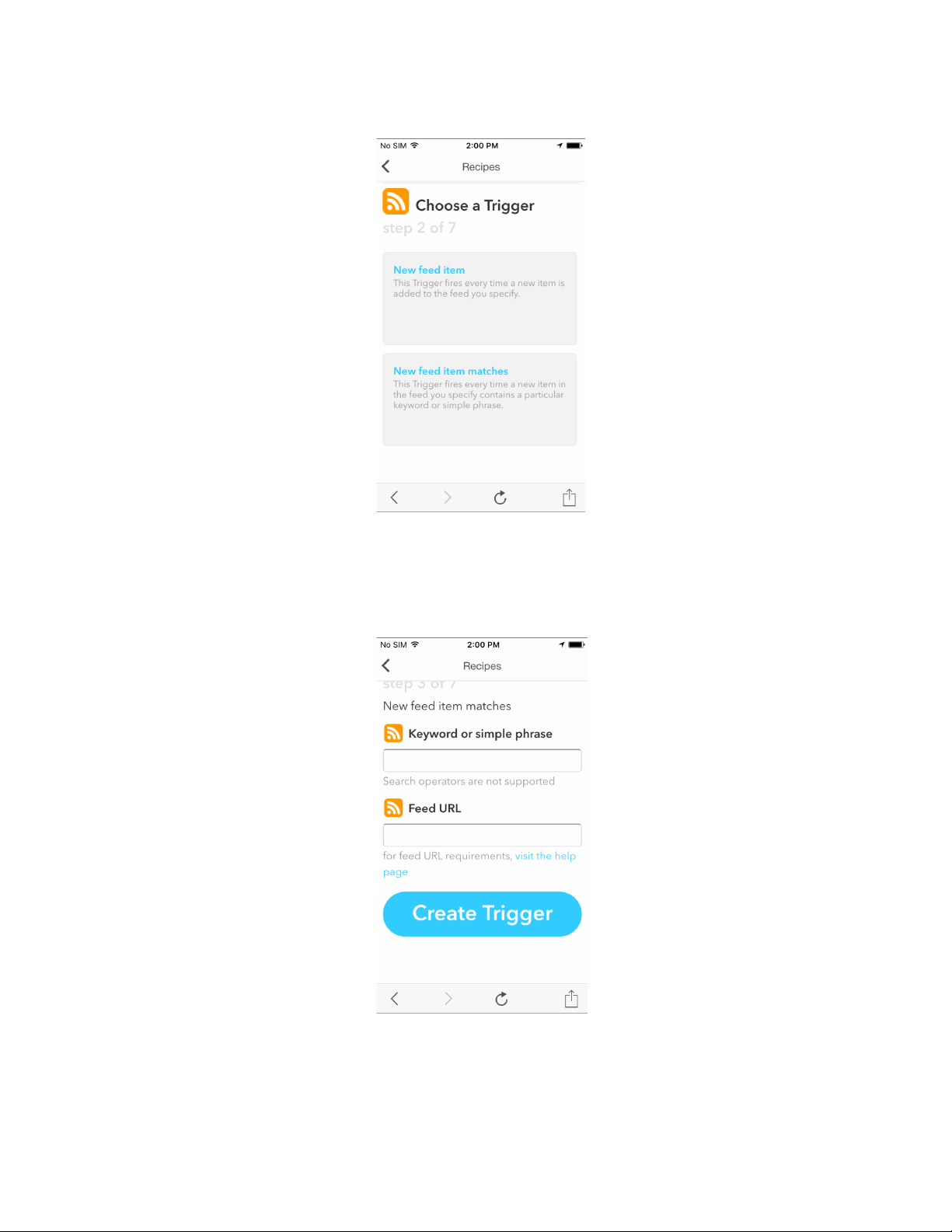
5. Choose a trigger.
6. Complete trigger fields and tap Create Trigger .
7. Press ‘That’ and choose what should happen if a condition, that you have indicated previously, is
fulfilled.
62
Page 64
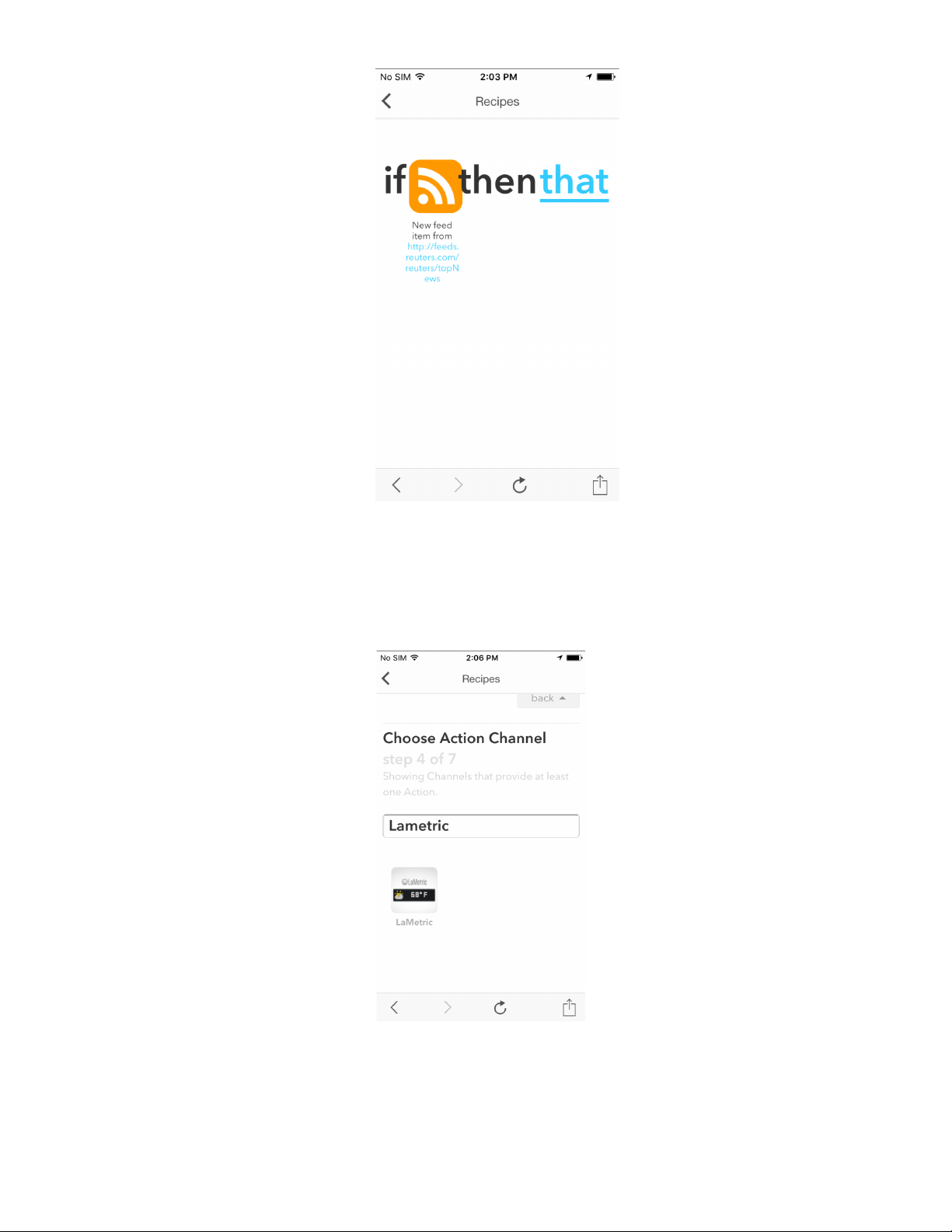
8. Choose a channel to display notifications (for IFTTT Indicator app as in our example) or a
channel for some actions (for IFTTT Button app).
9. Choose an action for your applet.
63
Page 65
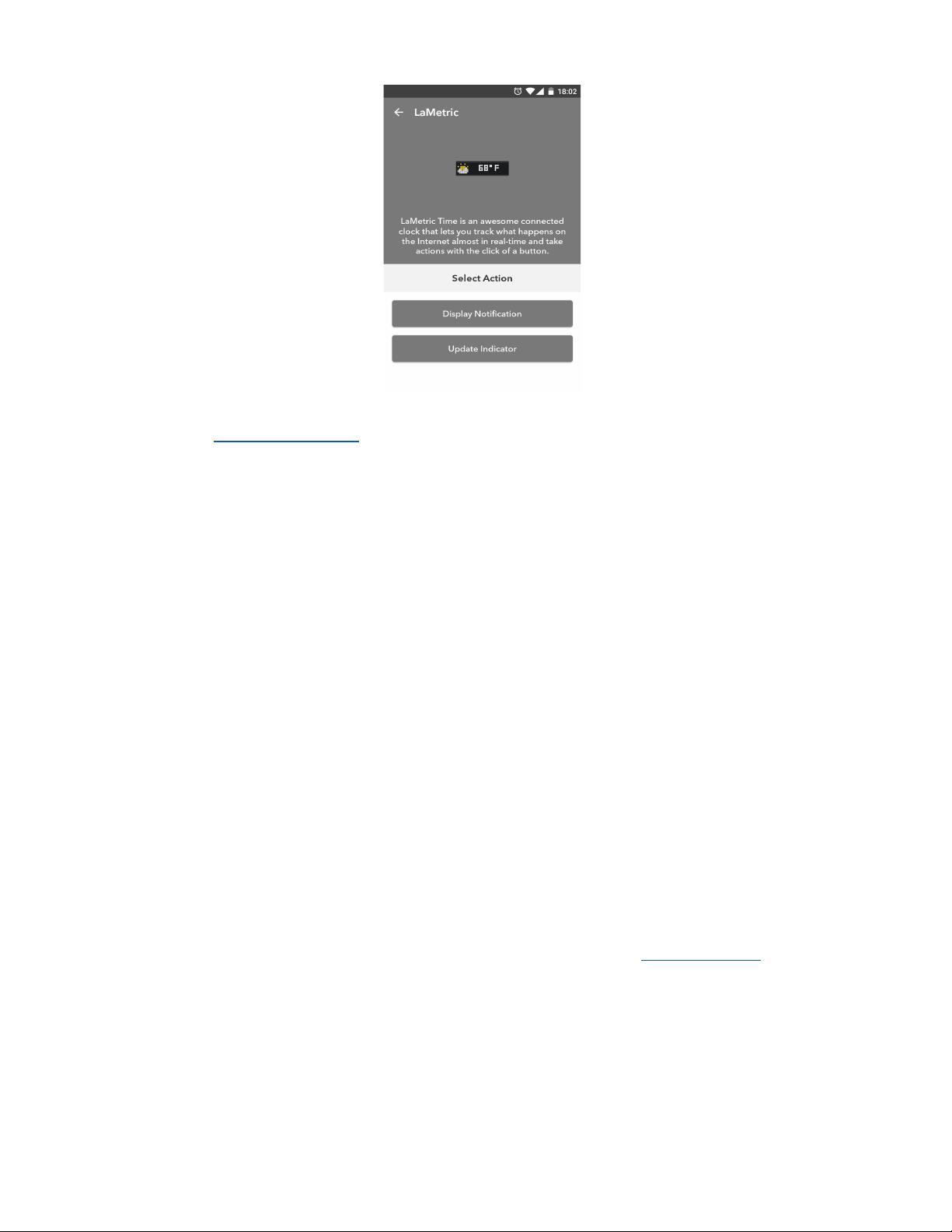
10. Choose Display Notification for notifications to be sent directly on LaMetric device or Update
Idicator to use IFTTT app for this applet. Then select an icon and enter desirable text. Tap
Create action to continue.
11. Review your applet and tap Create applet to finish. Congratulations, you have done it!
With LaMetric IFTTT channel you have possibility to create numerous applets to make your life easier
and brighter! Try it out!
6.6. Display Notification
With Display Notification you don’t need to install any additional apps on your LaMetric device.
Use Display Notification on your LaMetric Time to get actual and instantaneous notifications when you
get new emails or get messages from the systems of your Smart Home. It will allow you to be updated
about new interesting tweets and always know what new is happenig in the area you are interested in.
Display notification will be hidden from the screen of LaMetric Time once the message is scrolled out.
To set up Display Notification use IFTTT app on your smartphone or use desktop version . Browse
applet s:
64
Page 66
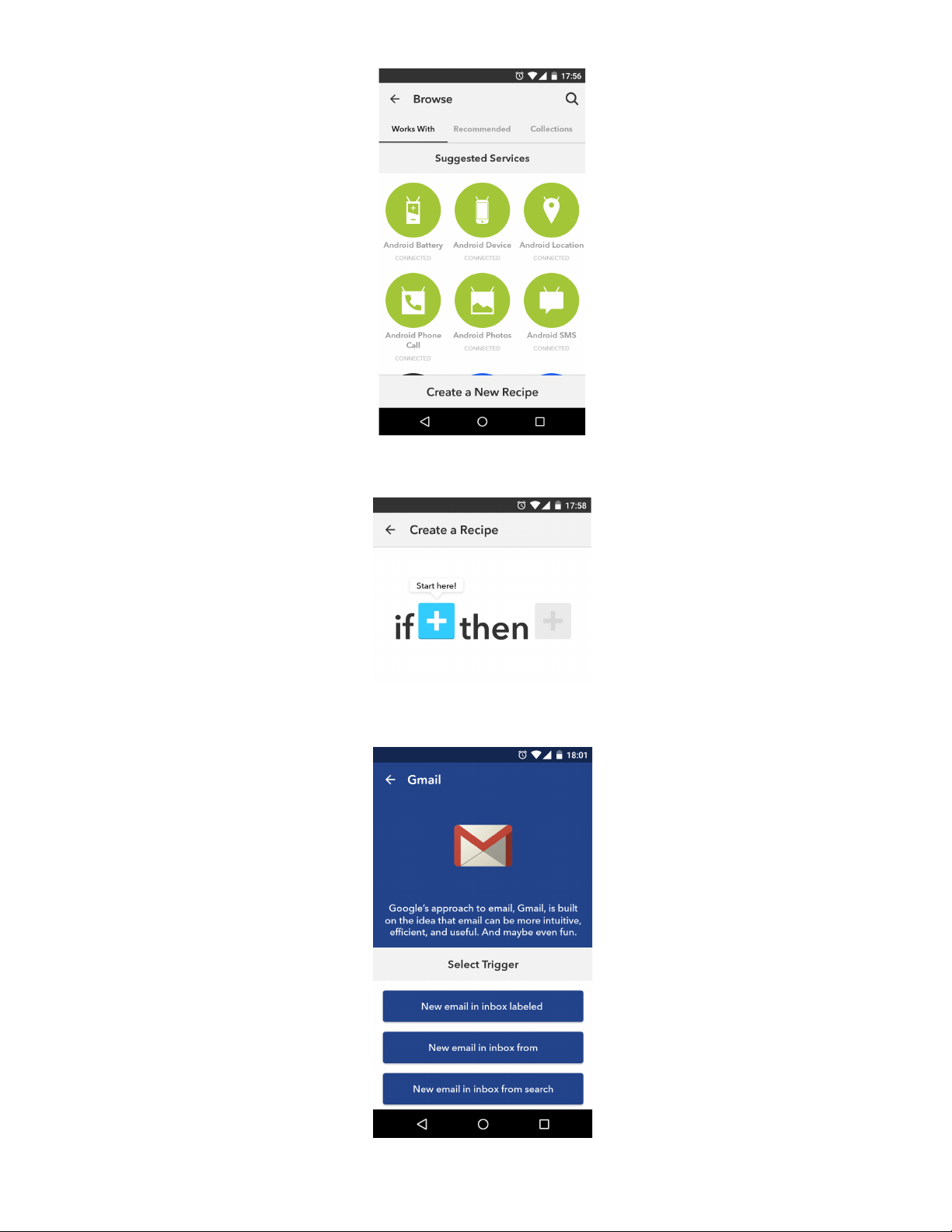
Or create your own new applet :
For example, to get notification on your LaMetric Time device every time you get new emails, connect
to Gmail channel and choose appropriate trigger:
65
Page 67
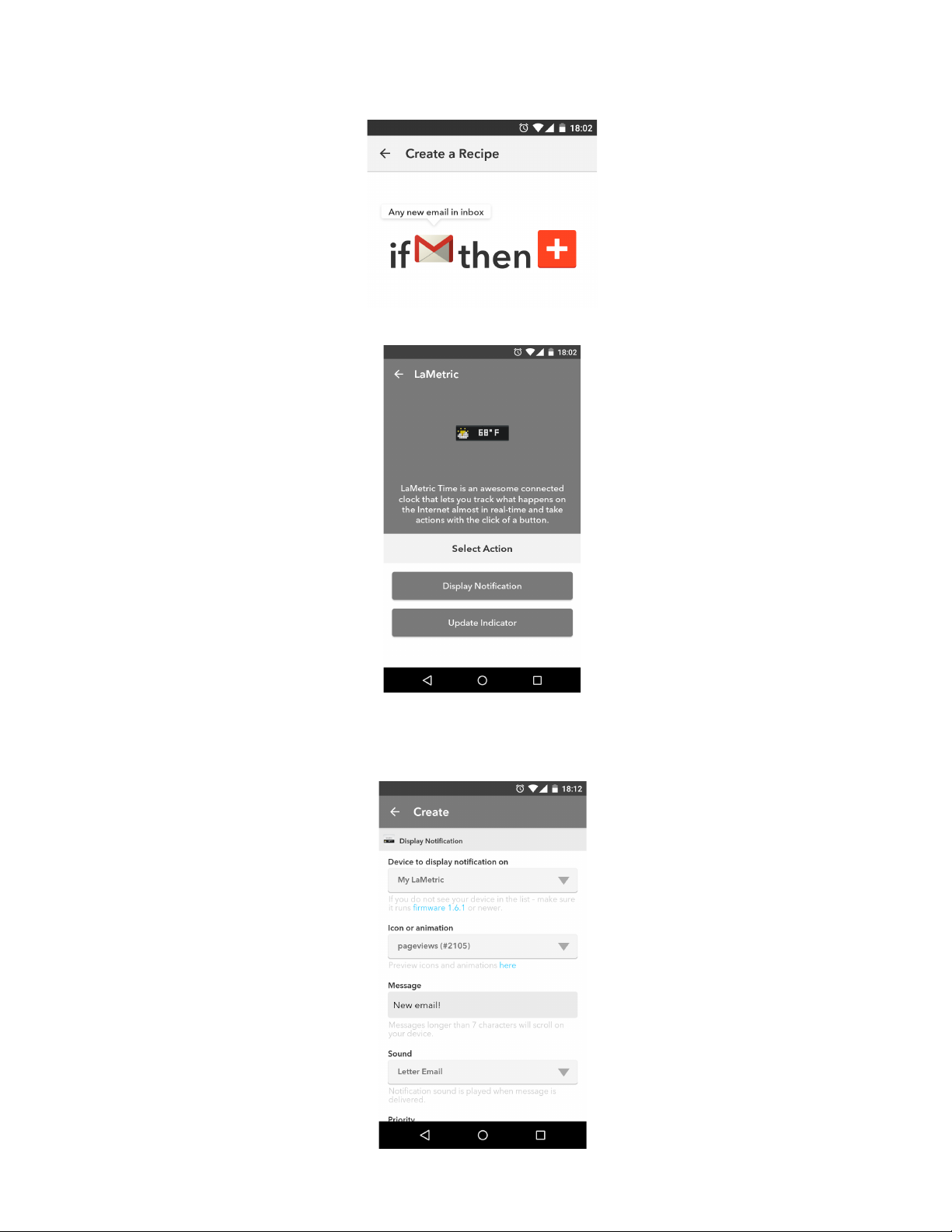
Continue creating your applet by selecting “Then” action:
Choose Display Notifications on LaMetric Channel:
Choose settings (choose device to display notification on, icon, sound, type a message that you want
to be displayed):
66
Page 68
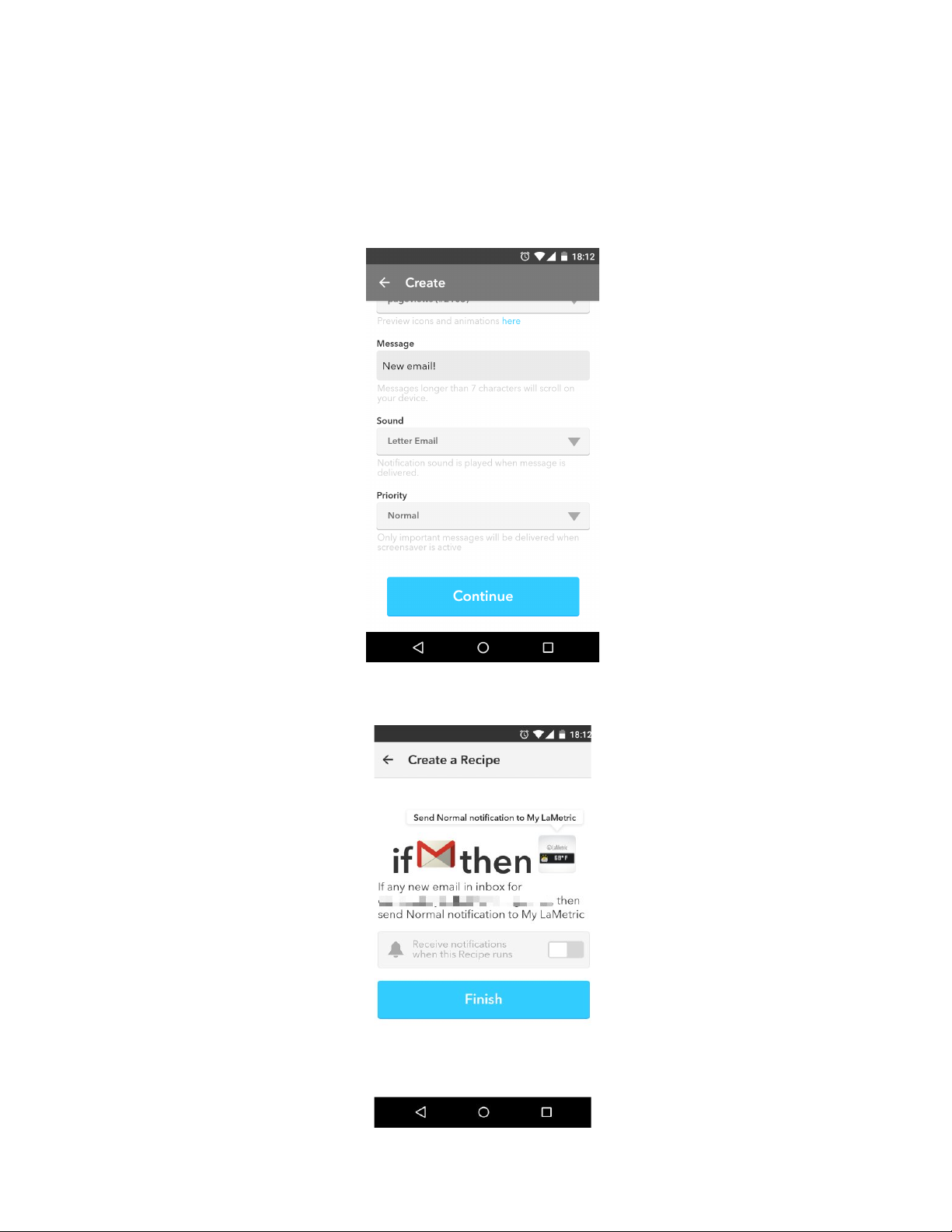
With Display Notification you can configure notification sound as well as the priority of the notifications.
There are two notification priorities : normal and important.
● Normal priority is useful for informational messages, like RSS news or twitter. They will be
ignored when the screen saver is active and will not interrupt your sleep.
● Important priority is useful when you want to get messages from security systems, like smoke
detectors or SmartThings. These messages will be shown when the screensaver is active so
you don't miss them.
It is almost ready, tap finish:
Now each time you get new emails, you will get a notification on your LaMetric Time. Enjoy!
67
Page 69
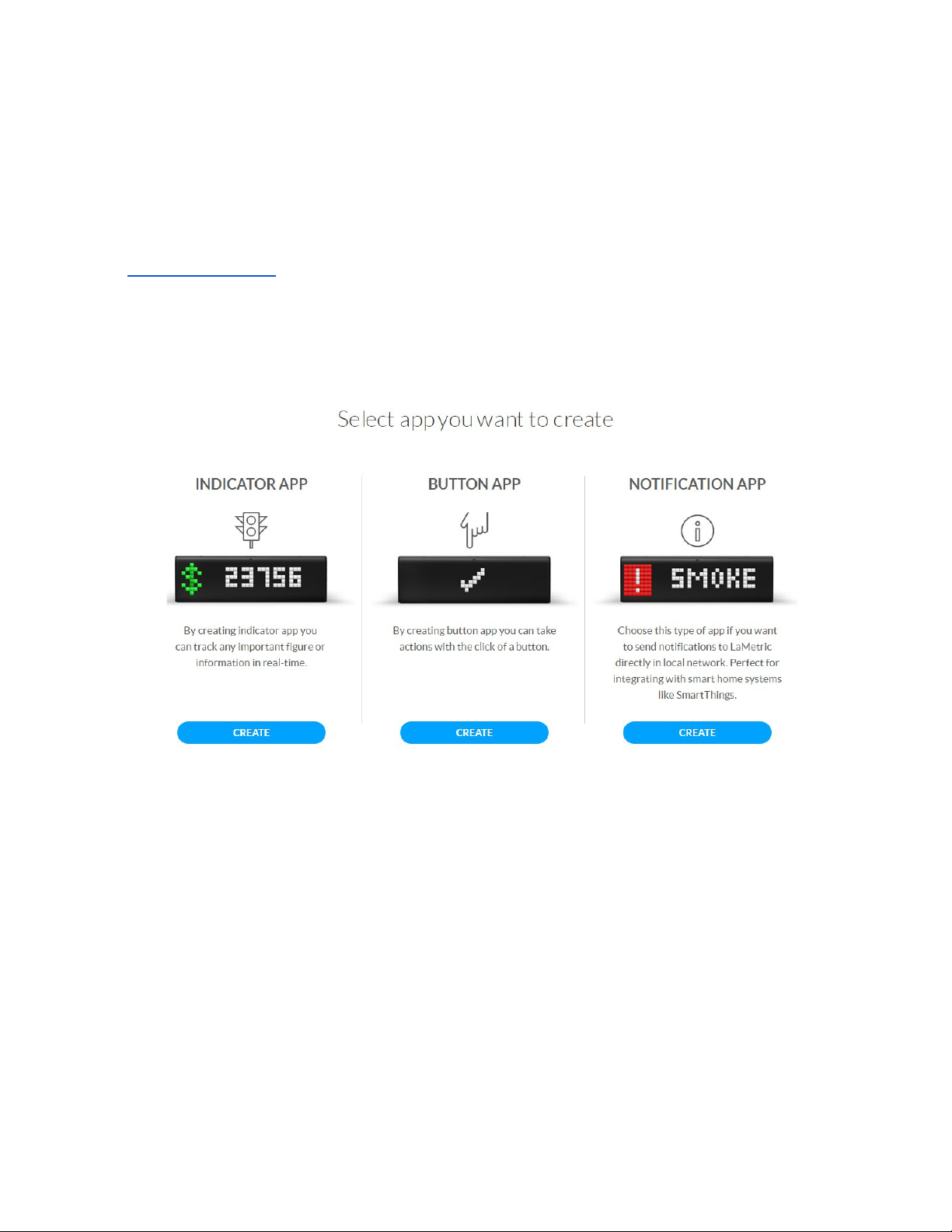
7. Create Apps for LaMetric
7.1. Getting started
Developers have a great possibility to create their own apps and use it on LaMetric.
Visit LaMetric Developer and sign up to start.
You can create three types of apps: Indicator App , Button App and Notification App . Choose which
one you wish to create.
7.2. Indicator Apps
Indicator App is used for tracking data on LaMetric.
Go to Create App and:
1. Create user interface. Select between 4 types of frames:
● Name - use for displaying notifications or messages, for example, to notify your colleagues
about the birthday of one of the employees.
● Metric - use for tracking key performance indicators, increasing or decreasing of figures, you are
interested in. For example, use for displaying your profit growth in percentage.
● Goal - use for displaying an information, that lets you know where you are in reaching your goal.
For example, if you are losing weight or collect money for some great purchase, you will always
know your current situation.
68
Page 70

● Sparkline - use for displaying trends, for instance, to know how your sales increased during a
current year.
2. Select communication type. If you select Poll , LaMetric will update data by polling your server,
if Push - LaMetric will update data when your application push it.
3. Enter data URL and Poll frequency (if you selected Poll type).
Go to Store Info to enter name and description of your app. Enable Private app and it will be displayed
only for you, or choose Store Categories if you wish to distribute your app to LaMetric community.
7.3. Button Apps
Button App is used for taking action when Action button on LaMetric is pressed.
● Go to Create App to select an icon, enter button name and data URL.
● Go to Store Info to enter name and description of your app. Enable Private app and it will be
displayed only for you, or choose Store Categories if you wish to distribute your app to
LaMetric community.
7.4. Notification Apps
Notification App is used for sending notifications to LaMetric directly. It is perfect for integration with
smart home systems like SmartThings or any other.
● Go to Create App to name an app, write description for it and enter redirect URL. Save an app.
● Open your saved app to see app info, there you’ll find Client ID and Client Secret that you can
use in OAuth2 authentication flow to access API on https://developer.lametric.com/api/v2
7.5. Create App using Template
Go to Samples, choose a sample and click on Create Using Template to create your own app basing
on templates.
7.6. App Status
Each new app may be Published (added to Store), Unpublished (removed from Store) or Draft. To
check App status go to My Apps . Installs and likes are also displayed there.
69
Page 71
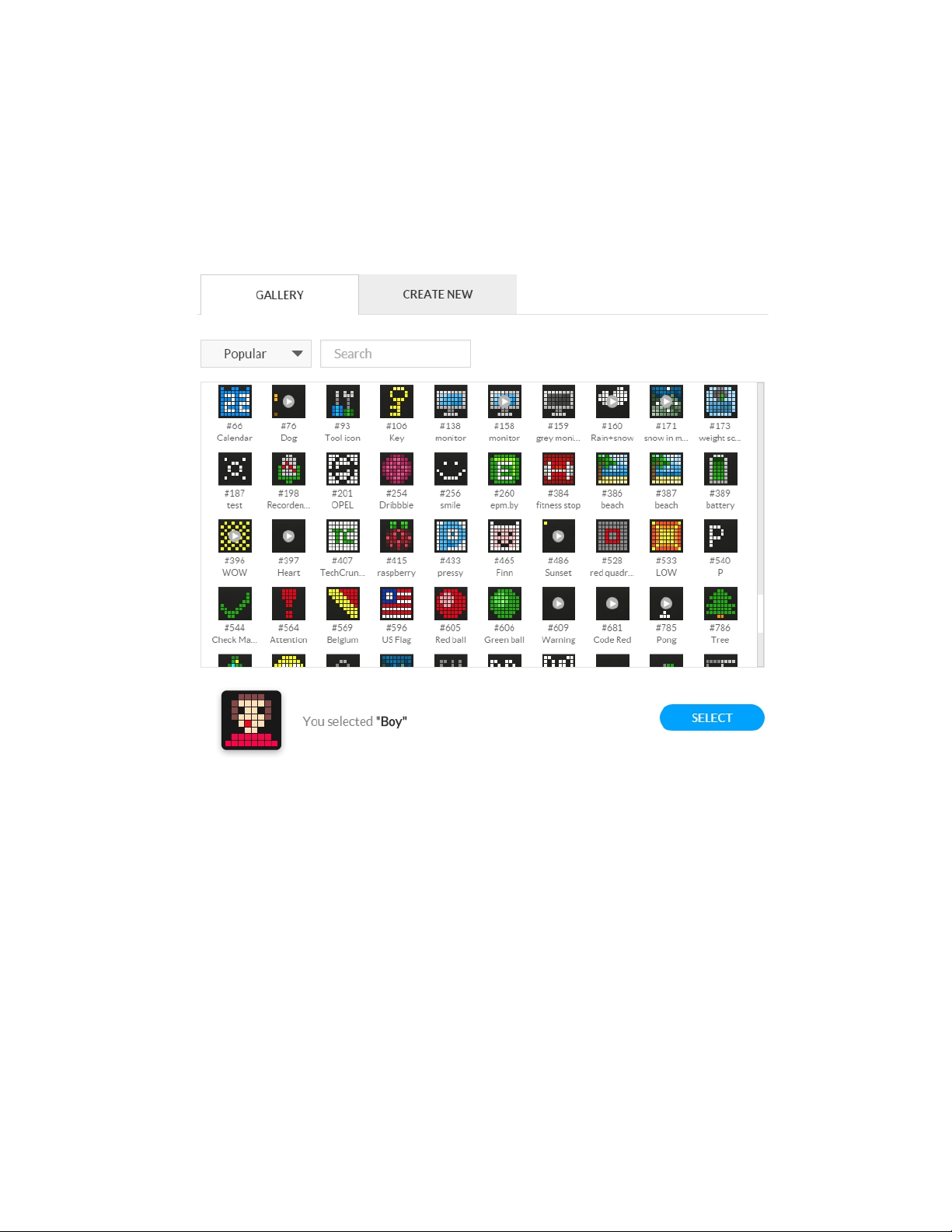
7.7. Searching and creating icons
Each time you create or edit your app you may choose an icon from Gallery or Create New .
When you want to choose an icon among available, you can use search or categories to make your
choice faster.
If there is no suitable icon for your app you may create it by yourself. Just go to Create New , draw an
image or create an animation, enter its name, save and that’s all!
70
Page 72
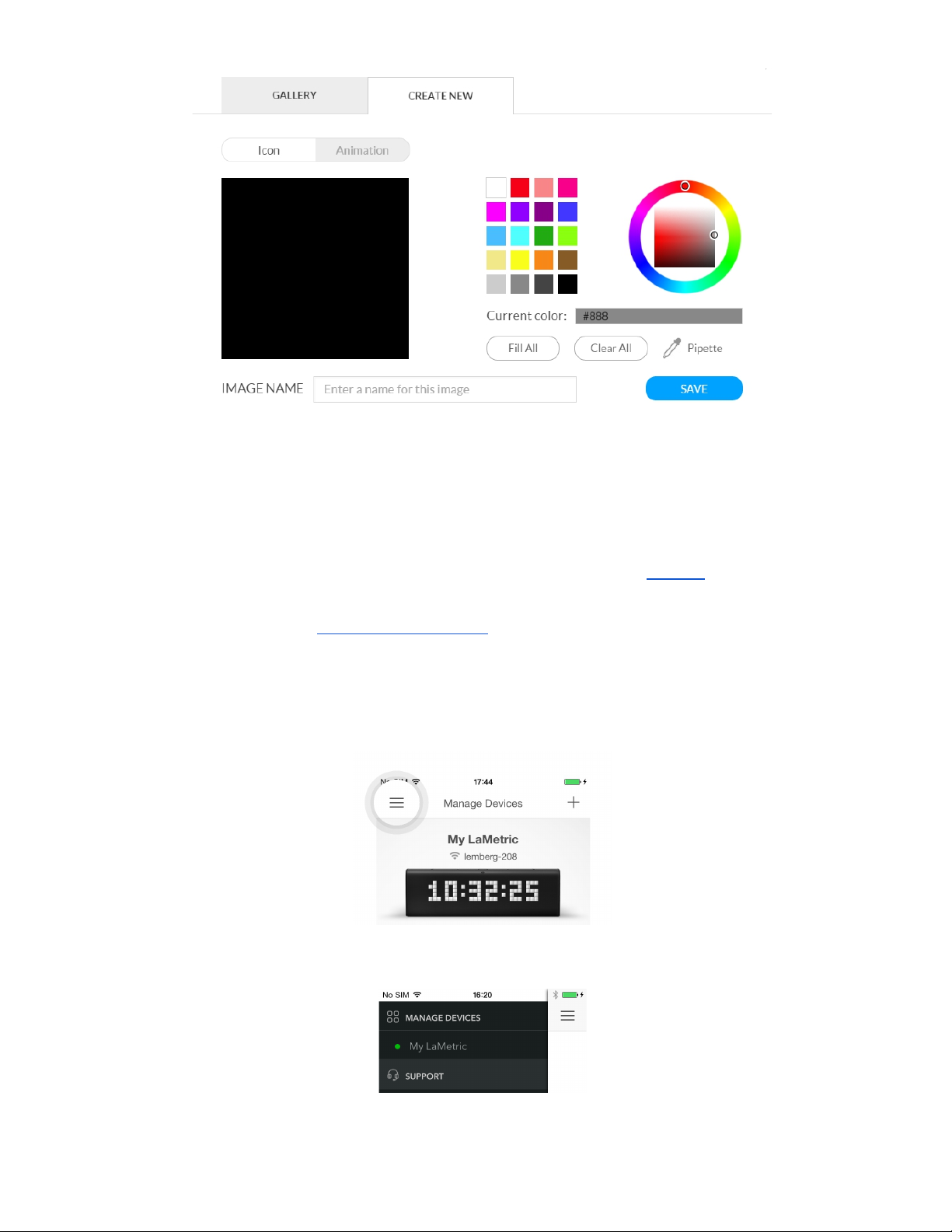
8. Customer support
In case of issues that are not described in current User Guide and on our website , you can:
● Contact us by email - [email protected]
● Send us an email through the smartphone app (we recommend to use this option).
1. If you have an issue, open Manage Device screen and tap menu icon as on the screen below.
2. Tap Support to continue.
71
Page 73
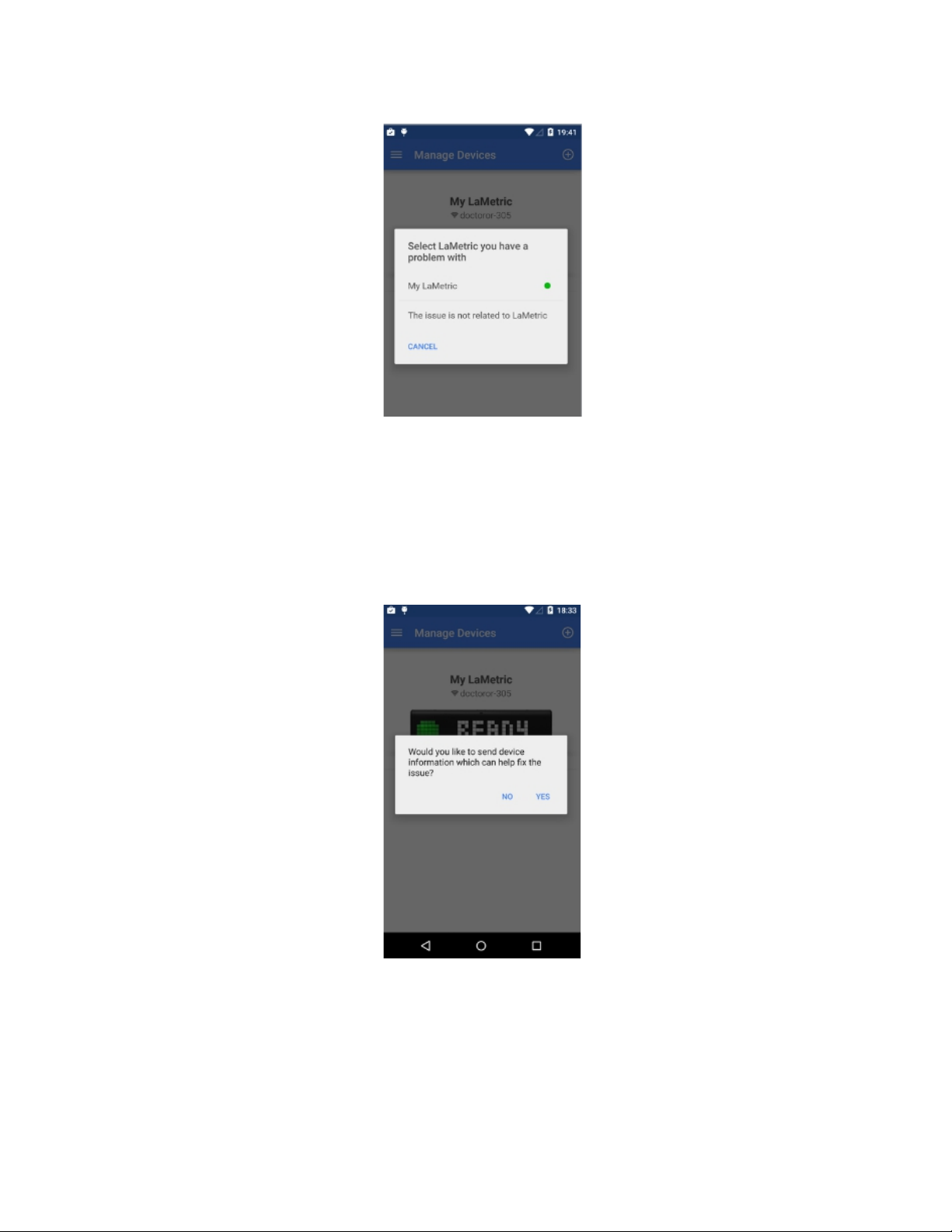
3. Select LaMetric you have a problem with or tap The issue is not related to LaMetric .
4. If you select The issue is not related to LaMetric , the screen with email application opens. Explain
the problem and send.
5. If you select Lametric you have a problem with, then choose whether to send device information or
not.
6. If you choose Yes , you can send an email with device information, that can help to solve your
problem faster(we recommend to use this option). If you choose No , an email without this information
will be sent. Write your message in email application and send.
Our support team will do their best to reply as soon as possible and solve your problem.
72
Page 74

9. Regulations
9.1. CE
This device complies with CE. All certificates can found here .
9.2. FCC Information and Copyright
This equipment has been tested and found to comply with the limits for a Class B digital device,
pursuant to part 15 of the FCC Rules.
These limits are designed to provide reasonable protection against harmful interference in a residential
installation. This equipment generates, uses and can radiate radio frequency energy and, if not installed
and used in accordance with the instructions, may cause harmful interference to radio communications.
However, there is no guarantee that interference will not occur in a particular installation. If this
equipment does cause harmful interference to radio or television reception, which can be determined
by turning the equipment off and on, the user is encouraged to try to correct the interference by one or
more of the following measures:
● Reorient or relocate the receiving antenna.
● Increase the separation between the equipment and receiver.
● Connect the equipment into an outlet on a circuit different from that to which the receiver is
connected.
● Consult the dealer or an experienced radio/TV technician for help.
This device complies with part 15 of the FCC Rules. Operation is subject to the following two
conditions:
1) This device may not cause harmful interference, and
2) This device must accept any interference received, including interference that may cause
undesired operation.
Changes or modifications not expressly approved by the party responsible for compliance could void
the user's authority to operate the equipment.
9.3. FCC RF warning statement
The device has been evaluated to meet general RF exposure requirement. The device can be used in
portable exposure condition without restriction.
73
Page 75

9.4. WEEE Information
For EU (European Union) member users:
According to the WEEE (Waste electrical and electronic equipment) Directive, do not dispose of this
product as household waste or commercial waste.
This symbol on the product or on its packaging indicates that this product must not
be disposed of with your other household waste. Instead, the device should be
taken to the waste collection centers for activation of the treatment, collection,
recycling and disposal procedure. Inappropriate disposal may be harmful. The
separate collection and recycling of waste equipment at the time of disposal will
help to conserve natural resources and ensure that it is recycled in a manner that
protects human health and the environment.
Waste electrical and electronic equipment should be appropriately collected and recycled as required
by practices established for your country. For information on recycling this product and where you can
drop off your waste equipment for recycling, please contact your local authorities, your household or
waste disposal service.
10. Warranty
Warranty period is 12 months from the date of retail purchase. Warranty is applicable only to original
purchaser. Visit lametric.com to view, download and print the limited warranty policy.
11. Contact
Manufactured by
Smart Atoms Limited
39C Fermoy Road
London, W9 3NH
United Kingdom
74
 Loading...