

Page 1
NEW: Watch Online
Installation Video!
MODELS: LL-SDL-EZ
STOP !: DO NOT RETURN TO STORE: Missing Parts? Problem? Light not working? For any issue or problem
please send email to [email protected] with name, address, problem or missing parts. Lake Lite Inc. can quickly
correct any issue, problem, or question you may have. Please email a short description of your issue to
[email protected] with name, address, phone number and someone will be happy to quickly assist you.
No email access please call: Ph: 260-918-2758.
NOTE: There are two battery clips to securely hold the batteries in the battery holder so they do not fall
out. Please don’t forget to use them or throw them away
Battery & Top Installation
1. Place battery in corr ec t posi ti on in holder
2. Place battery cl ip over battery and Make sure i t SNAPS i n plac e on bot h si des of the batt er y hol der.
3. Check the LED is screwed in the socket tightly and in correct position.
4. Check to make sure the Light comes on when you cover the solar panel (or try in dark room) * Note:
Battery must have some c har g e to tes t. Mak e sur e you check the unit is working proper ly before
screwing the top on so you do not have to unscrew the li d ag ai n.
5. Check that the o-ring /Seal is in proper position around the top lid
6. Screw Top down tightly ensuring that the o-ring /seal has been draw n dow n ti ghtl y to make a good seal.
Mounting Instructions :
• You may place the solar light in the pocket, or if you would like, you may use a small
amount of silicone glue on the bottom and then place in the pocket. We recommend
Clear Silicone caulk/glue.
• WARNING: We recommend a removable glue such as silicone that will not damage
your dock, and will allow you to remove the light from the pocket if it is damaged or you
need to move it. DO NOT use Super Glue, Epoxy, or other non removable adhesives.
DO NOT use adhesives that m ay chemically damage your dock.
• DISCLAIMER: Lake Lite Inc. does not take responsibility for any damage resulting from
use of adhesives on your EZ Dock. If you have any questions about adhesives on your
EZ Dock please contact your EZ Dock representative.
Changing LED Colors & LED Installation Color LED’s - Sold Separately
NOTE: DO NOT worry if you accidently plug the LED in backward s it will N OT damag e anything it sim ply will no t illum inat e.
Simply turn it around and reinsert into the socket if you incur this problem.
NOTE: Battery must have some charge in order to see if LED illuminates: Generally batteries com e with a small amount of
charge. Also LED will not illuminate if solar panel is exposed to enough light: (try in dark area)
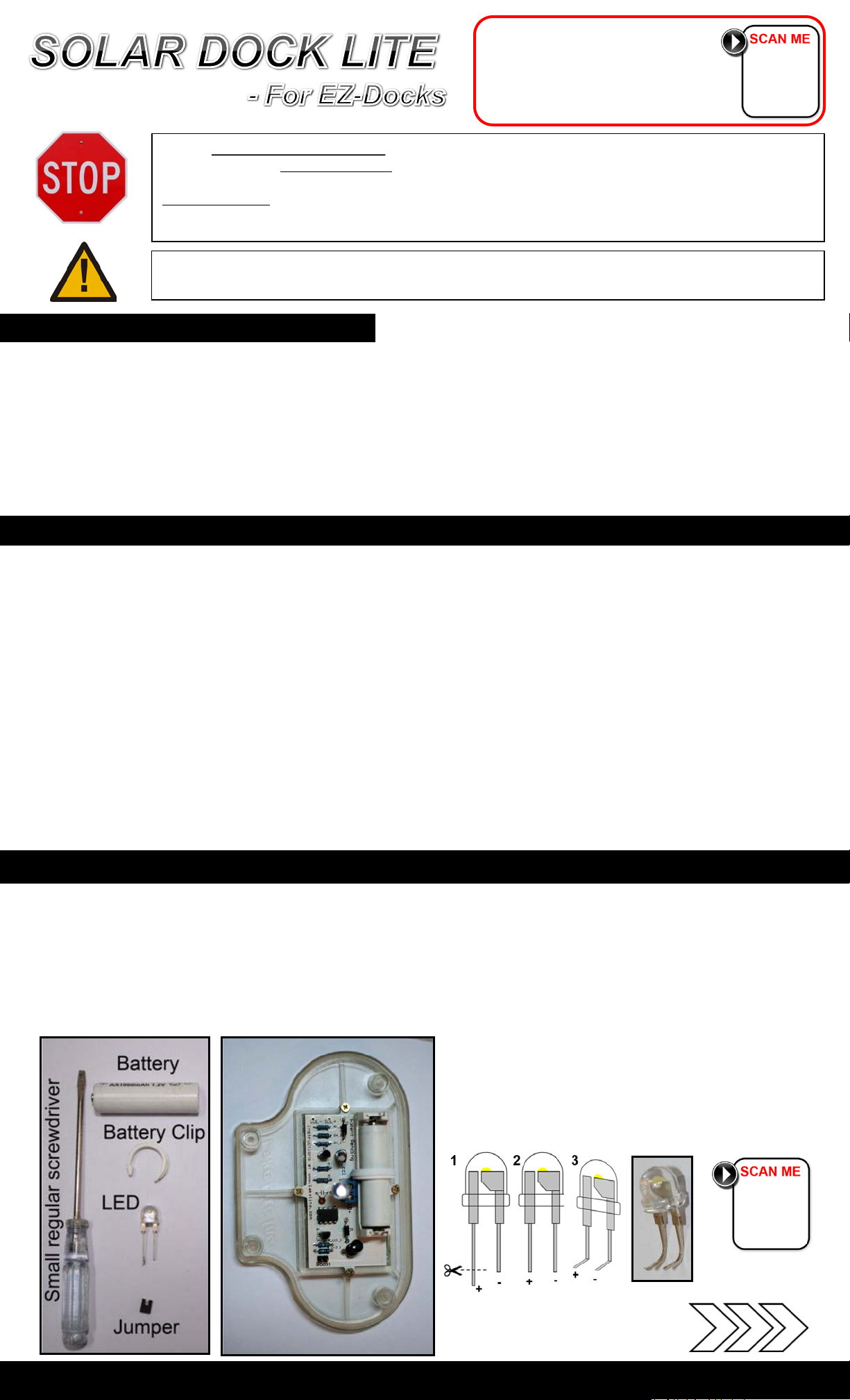
NOTE: This operation requires a small regular screwdriver and a pair of pliers.
NOTE: There is no way to tell which color an LED is until it is illum ina t ed.
Make sure you have the following things seen below:
Cut Longer (+) side to same l ength as t he (-) side.
Use pliers to Bend as seen. NOTE Bend direction.
NEW: Watch Online
Video for Installing &
Changing LED Colors!
Continue to other side
For more detailed instructions and information about changing LED’s visit www.lakelite.com
Page 2
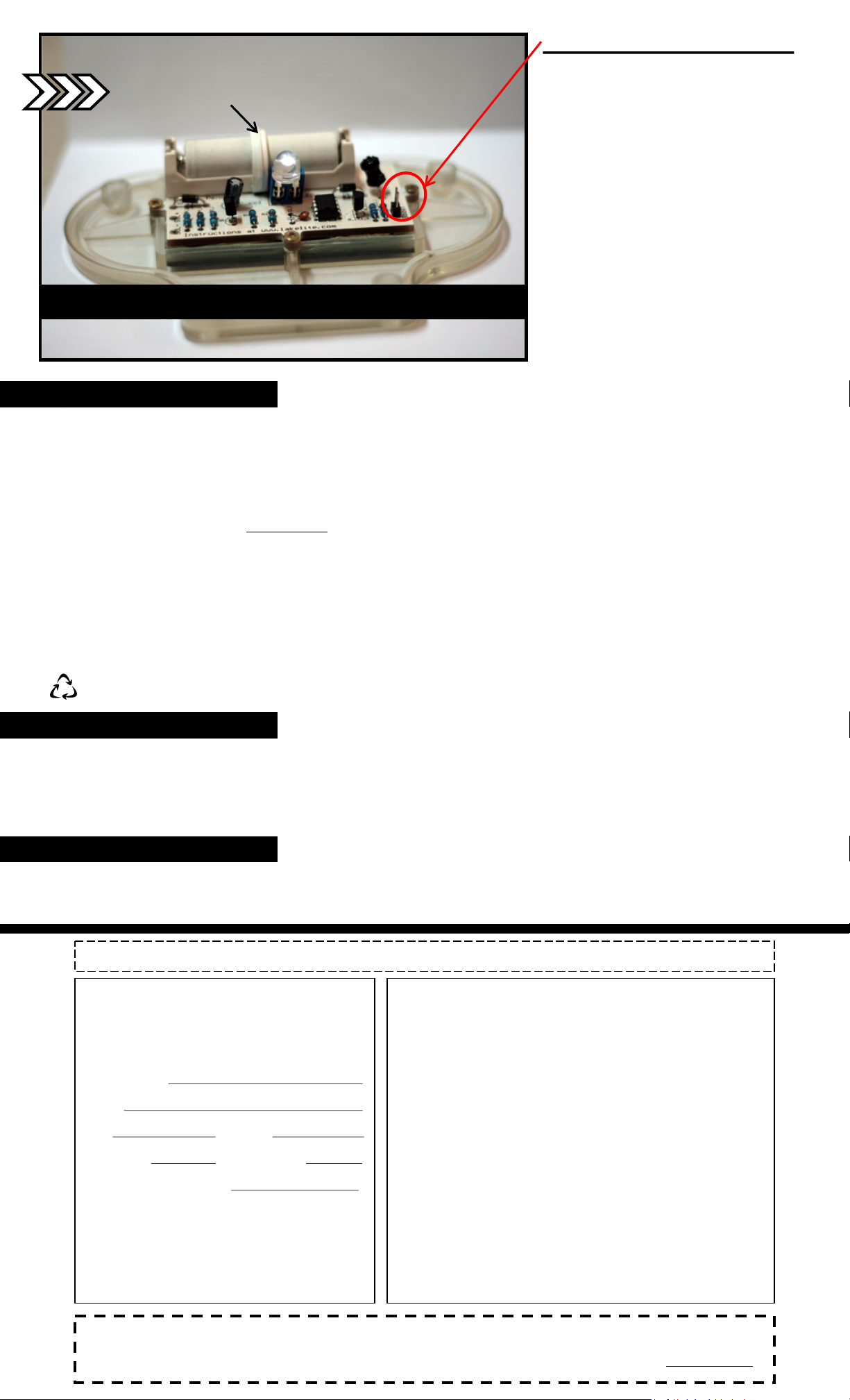
NOTE: Battery Clip
Proper Installation of battery, battery clip & 8mm LED
Troubleshooting
Q: My light doe s not work.
1. Make sure battery is securely in place & in proper position.
2. Your LE D may be ins ta l led backwards . Try rev ersing.
Q: I replaced my LED with a different color LED but it did not illuminate.
1. The battery must be charge d and the LED must be proper ly installed in order for the LED to illuminate.
2. After installing the L ED try placing the unit in a da r k area. The light is activated and turned on by the dark.
3. FOLLOW INSTRUCTIONS AGAIN CAREFULLY!
4. You may also visit www.lakelite.com for more detailed instructions or call Lake Lite at 260-918-2758.
5.
Q: My light has a short run time.
1. Impro pe r location. The light is power ed by the sunlight, place light in dire c t s unlight.
2. Batteries may be dead, replace with new Ni-Cd or Ni-Mh batteries.
3. You may be using the BOOST opti o n with low capacity batteries: Try purchasing Ni-Mh types of 2000-2500mA.
Q: My light is very dim.
1. LED may have poor connecti o n in socket: Che ck connection: (in a very rare instance the LED may be f au l ty, please cont act us)
2. Batteries may be dead, replace with new Ni-Cd or Ni-Mh batteries. – This is the most common reason.
3. Dock Lite is in a shaded are a and is not recei ving ful l sunlight thro ug hout the day . Plac e in sunny are a no t shaded by objects.
IMPORTANT: For best performance, replace with rechargeable AA Ni-Cd or Ni-Mh batteries every 2 seasons of use!
POWER BOOST OPTION:
If you would like your Lite to be brighter yet,
simply use the small black jum per and slip it
over the BOOST pins.
WARNING: The boost option uses 2X the
power. Run times with provided battery will
be shorter: We HIGHLY recommend you
purchase higher capacity Ni-Mh Batteries in
the range of 2000-2500mA to increase run
times. The solar panel is capable of charging
the larger batteries: You can purchase these
batteries at m ost stores such as Wal-Mart.
You may also use higher capacity Ni-Mh
batteries without the boost option for very
long run times.
WARNING: Power Boost can only be used
with newer (8mm) Jumbo size LED’s.
Power boost option will ruin our older
(5mm) LED. We will discontinue our 5mm
LED’s shortly so when ordering color
LED’s for your EZ Dock Lite ask for the
8mm size, as they are much brighter.
Storage Tips (Winter)
Extreme winter weather can reduce the life expectancy of your Solar Dock Lite
1. Cold weather can dramatically reduce the life expectancy of your rechargeable Ni-Cd or Ni-Mh battery.
2. Store yo ur Solar Dock Lite inside during cold months when your dock is not in us e
3. If you have glued your Solar Dock Lite base unit to your Brock post you may simply remove the Solar Top (Electronics Portion) and store
inside if you don’t plan to sto r e you Brock posts ins ide.
Disclaimer
EZ DOCK is a registered trademark of E-Z Dock, Inc. Lake Lite, Inc. and this product
are not sponsored by, endorsed by, or affiliated with E-Z Dock, Inc. in any way."
CAUTION: CONTAINS NICKEL-CADMIUM BATTERIES. BATTERY MUST BE RECYCLED OR DISPO S ED OF PROPERLY.
Owner Registration Card
Please fill out and affix pr oper postage a nd return this o wner
registration car d wit hin 10 days to insure that your new Solar
Dock Lite for EZ Dock is covered by the limited warranty.
Purchaser’s Name .
Address .
State . Zip .
Purchase Date: . Number of Lights : .
Where Purchased (Store Name): .
Model No. SDL-C
UPC No. 094922533210
Lake Lite Inc.
2301 Fairfie ld Ave, Suite 107, Fort Wayne, IN 46807
Lake Lite Inc. 1-Year Limit ed Warranty
The retailer warrants the Solar Dock Lite to be free from defects in workmanship
and material present at time of shipment from the factory for a period of one year
after the dat e of purchase by the original pur c haser. We agree to cor r ect such
defects w itho ut charg e or at our optio n repl ace w ith a com parabl e o r super io r
model if the product is returned to the retailer. T o obtain warranty ser v ice, you
must prese nt a co py of the recei pt a s proof of purcha s e . All costs of removing and
reinstall ing t he product are you responsibili ty. Damage to any part such as by
accident or misuse or improper installation or by affixing any accessories, is not
covered by this warranty. There is no other express warranty. The retailer hereby
disclaims any and all war r a nties, including but not limited to, those of
merchantabil ity and fitne ss f or a particular purpos e to the exte nt permitte d by law .
The duration of any implied warranty, which cannot be disclaimed, is limited to
the time period a s s pe cif ied in the express warranty. S o me states do no allow
limitation on how long an implied war r anty lasts, so the abov e limitation may not
apply to y o u. The r etailer shall not be liable fo r incide nt a l, conseque n ti a l , or
special damag e s ar ising out of or in connec tion w ith pro duct use or perf or ma nce
except as may otherwise be accorded by law. Some states do not allo w the
exclusion o f incide ntal or cons e q ue nt i a l damage, s o the above exclus ion or
limitation may apply to you. This warranty gives specific legal rights, and you
may also have other rights, which vary from state to state. This warranty
supersedes all prior warranties.
WARNING! Lake Lite I nc. doe s no t warrant the L E D or Solar Dock Lite fro m de f e cts as s o ciated with misplacing the LED in the wrong LED color
labeled so cke t. A ny defects o f a Red, Orang e , or Yel lo w LED are not warr ante d i f they are place d in the W hite /Bl ue /G r ee n Only socket. PLEASE
READ INSTRUCTIONS CAREFULLY. IF YOU ARE UNSURE PLEASE R EFER TO OUR DETAILED INSTRUCTIONS AT www.lakelite.com.
 Loading...