

Page 1
MAN087
Model 01165 User Instructions
Model 01165
Lafayette Manual Muscle
Test System
User Instructions
Fax: (765) 423-4111
.
www.lafayetteinstrument.com
.
info@lafayetteinstrument.com
Page 2

Lafayette Manual Muscle Test System
Table of Contents
Features 2
Specications 3
Precautions 3
Basic Operations 3
Function Buttons 4
Screens 4
Resets 9
Accessories 10
Appendix A - Torque Measurements with the MMT 10
The Lafayette Manual Muscle Tester (MMT) System is an ergonomic hand-held device
used for objectively quantifying muscle strength. The test is performed with the clinician
applying force to the limb of a patient. The objective of the test is for the clinician to
overcome or “break” the patient’s resistance. The MMT records the peak force and the
time required to achieve the “break” providing reliable, accurate, and stable muscle
strength readings.
The MMT also features interactive menus to allow a wide range of options such as data
storage, preset test times, and force thresholds to be implemented. While powerful and
versatile, the MMT is still small enough to t comfortably in the palm of the hand. Its
ergonomic design allows for both patient and tester comfort while easily conforming to
manual muscle testing protocols.
Features
• Designed for high inter and intra instrument reproducibility
• Three, easy to change molded plastic stirrups with pads
• Force measurements in pounds, kilograms, or Newton (user selectable)
• Measures peak force, time to reach peak force, total test time, time within selectable
ranges, and the average force
• Data storage for up to 150 tests in on-board memory
• Automatic or manual storage of data
• Measurement range 0-300lbs (136.1kg/1335N)
• Selectable test time form 1 – 10 seconds
• Tone to indicate start, stop, and entering within a range
• Microprocessor controlled
• Built-in stored data browsing capability
• Easy to read graphical LCD display
• Automatic shut o after 5 minutes of inactivity
• Battery indicator on LCD display
• Interactive menus allowing users to select device options
• Battery powered: (1) rechargeable lithium-ion battery
• Minimal measurement drift
2
Page 3

Model 01165 User Instructions
Specications
• Size: 3.16” x 5.11” x 1.6” (8.03cm x 12.98cm x 4.1cm)
• Weight: 312 g
• Range: 0-300 lbs (136.1kg) (1335 N)
• Accuracy: ± 1 % over full scale or ± 0.2 lbs
• Resolution: 0.1lbs/0.1kg/0.1N(0-999.9N) / 1N(1000N-1335N)
• Battery Life: 6 hrs powered on, 30 minutes after low battery condition
• Charge Time: 80% charge => 45 minutes / Full charge => 2 hrs
• Data Storage Capacity: 150 tests
• Preset Test Length: 0.5-10 seconds; in 0.1 second increments
Precautions
• When performing repeated tests, inconsistent placement of the MMT will adversely
aect scores.
• Extreme temperature, especially heat, may aect the values obtained.
• The MMT cannot tolerate the stress of being used as a oor scale.
• Care should be taken not to drop the MMT, as it may aect the calibration.
• Exceeding the force limit (300lbs/136kg/1335N) may permanently damage and/or
invalidate the calibration of the MMT.
• Upon initial receipt of MMT, charge for 2 hours.
• Stirrup should be rotated clockwise on and o to reduce friction on O-ring.
Basic Operations
The Lafayette MMT is small enough to be held in one hand and easily read. The size and
weight of the MMT permit the examiner to use the same procedures and break test
techniques described in the literature and taught by academic institutions without any
modication of technique or positioning. The unit is simply placed between the examiner’s
hand and the limb being tested. The examiner’s downward force is transmitted to the limb
through the MMT unit. The MMT is designed for one hand operation. It can comfortably
t in the right or left hand, with settings for both dexterities. The hand is placed under
the strap and around the body of the MMT. This allows easy access to the TOP buttons
with the thumb. All of the other buttons are pressed using the opposite hand.
The MMT is activated by pressing the Menu/Select button. Measurements are taken by
pressing the padded stirrup against the muscle being tested on the subject. The force
and time data are displayed on the LCD screen. To conserve battery life, the MMT will
deactivate itself when not in use for ve minutes. All data on the main screen at power
down is saved and will be shown when the MMT is activated again.
3
Page 4
Lafayette Manual Muscle Test System
Function Buttons
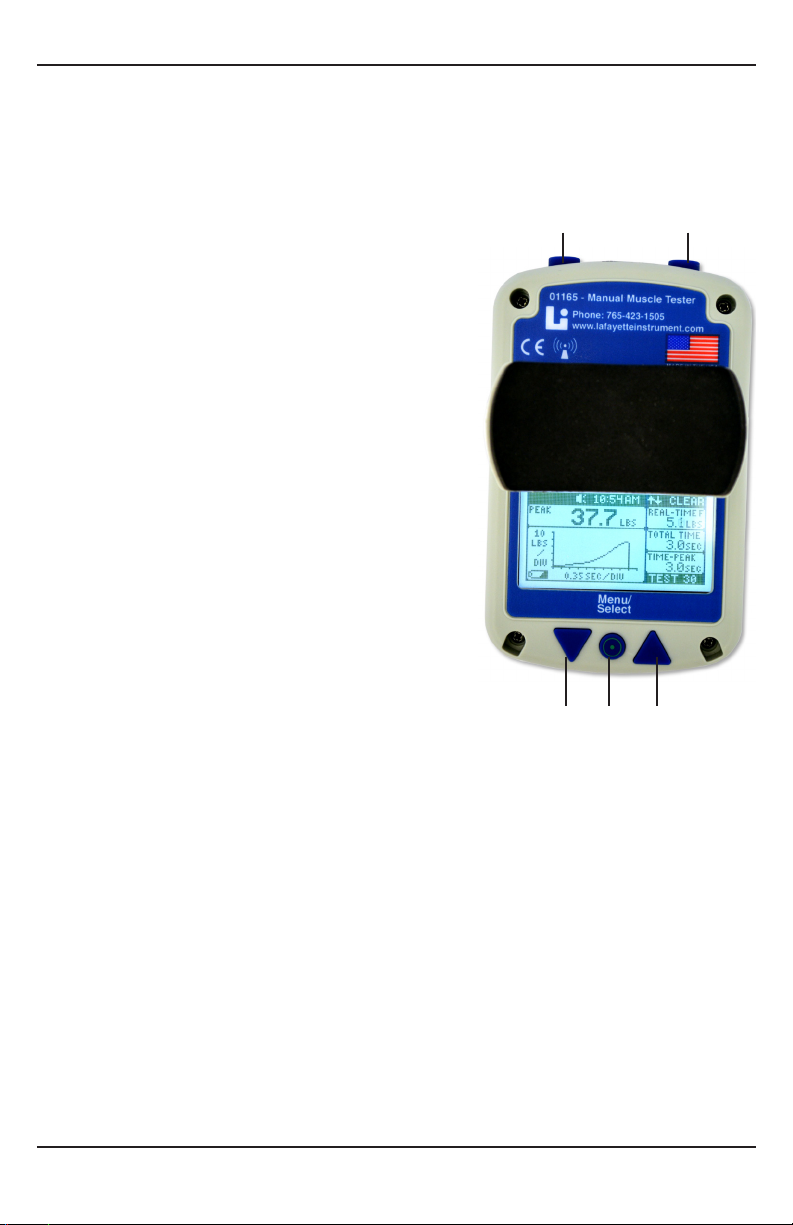
The MMT has ve function buttons that control the menus and allow the selection of
options and settings.
1. POWER/MENU/SELECT Button: The round
MENU/SELECT button is located on the bottom
middle of the MMT. This is the button used
to power on the device. Holding the MENU/
SELECT button for 5 seconds will power o the
unit. It is placed for easy access regardless of
right or left hand operation. The MENU/SELECT
allows you to enter into the Menu screen and
select various options within it.
2, 3. NAVIGATION Buttons: While on the Test
screen the NAVIGATION buttons are used to
enlarge the graph and return back to the Test
screen from the enlarged graph. While in the
Menu screen, the NAVIGATION buttons are
used to navigate the various menu screens.
4, 5. TOP buttons: On the Main screen the TOP
buttons are used to SEND, CLEAR, and START
tests when applicable. On the menu screen
these buttons are used to return back one
screen, BACK, or return to the Test screen, TEST.
These buttons can be flipped for a specific
dexterity by changing the button orientation
in the OPTIONS menu.
4 5
2 1 3
Screens
Test Screen
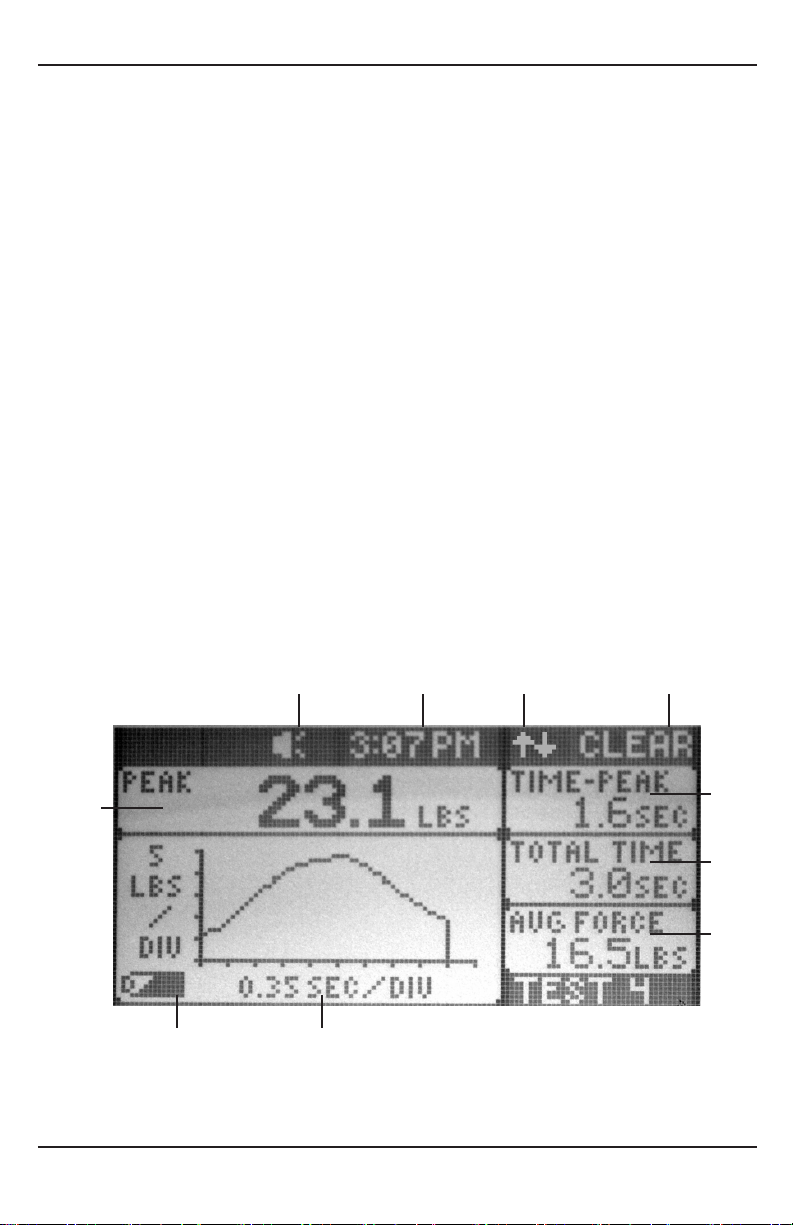
The Main Measurement Screen shows all measurement information that is being captured.
This screen is shown whenever a measurement is in progress. (see diagram on next page)
1. Battery Indicator: Indicates the remaining capacity in the charge of the battery.
2. Force over Time Graph Area: The graph displays the data for the previously conducted
test, and automatically populates the chart to maximize the viewing area. The Y-axis
label shows the amount of force (in lbs, kg, or N), and the X-axis shows the time in
seconds.
4
Page 5
Model 01165 User Instructions
Each of these three windows can have any of the following measurements displayed
3. Ave. Force: Average force exerted over the range.
4. Total Time: The total time is the total duration of the test in seconds.
5. Time-Peak: Time to peak is the elapsed time in seconds from the start of the test until
the maximum force has been reached.
•
during or after a test is taken:
• Real-Time Force: This displays the real time force that is measured during the test.
• Time in Range: Cumulative time within the specied range
• Time ↑ Range: Cumulative time above the specied range
• Time ↓ Range: Cumulative time below the specied range
6. Clear (Top Button Function): This area shows the current function for the top button.
In the Test screen window, shown above, the clear function clears the current test,
and allows the user to take another test.
7. Wireless Communication Indicator: This character indicates when the wireless is
enabled.
8. Time Display: This time is displayed and can be set manually or synced with a PC in
the Options Menu.
9. Sound Indicator: Indicates whether beeper is on or o for the current test.
10. Peak Force: The peak force displays the maximum force during the test and displays
what units the force is being measured in (lbs, kg, or N).
7* 6*9 8
10
5
4
3
1 2
* indicates elements that will move depending on chosen button orientation - set in
OPTIONS menu
5
Page 6
Lafayette Manual Muscle Test System
Low Battery Indicator Screen & Charging
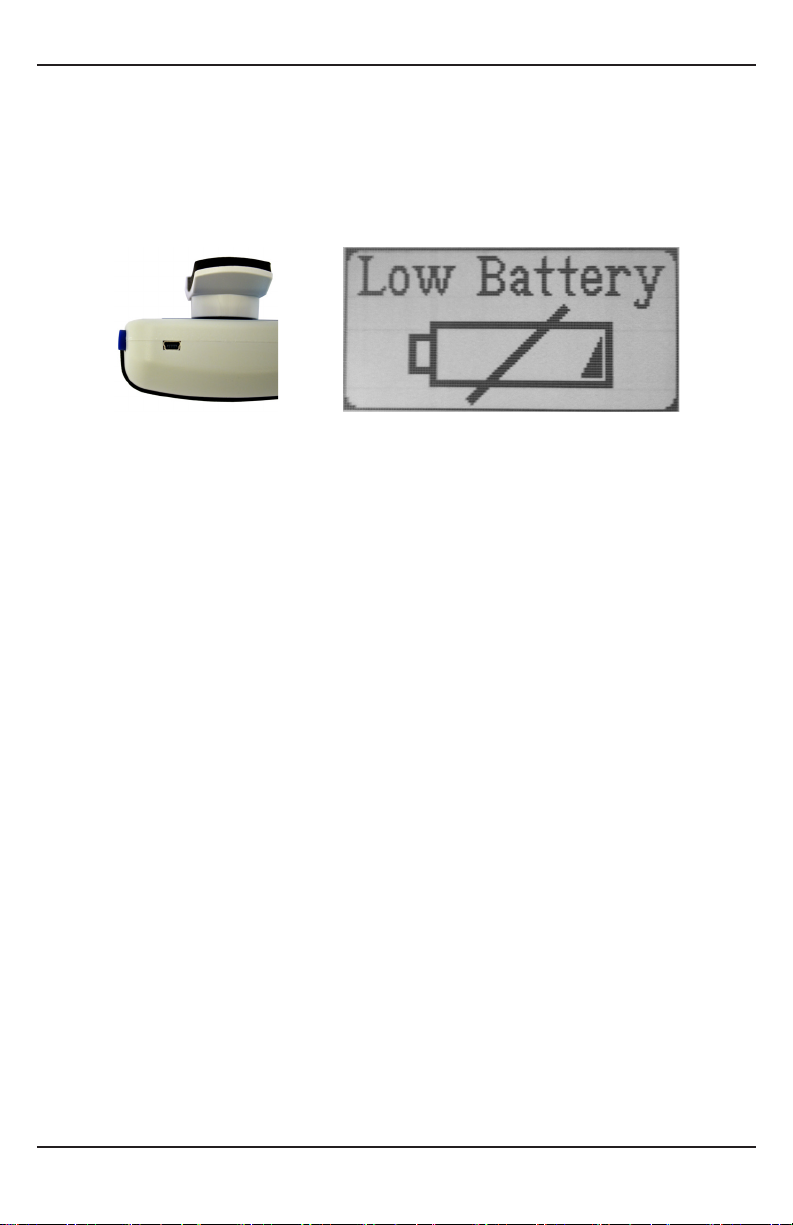
The low battery indicator screen is shown when the battery needs to be charged. The
screen will appear and then the system will power o. This screen will re-appear when
the power button is pressed until the unit is recharged via the USB connector. The device
should take about 45 minutes to charge 80% of the capacity, or about 2 hours for a full
charge.
Test Setup Menu Screen
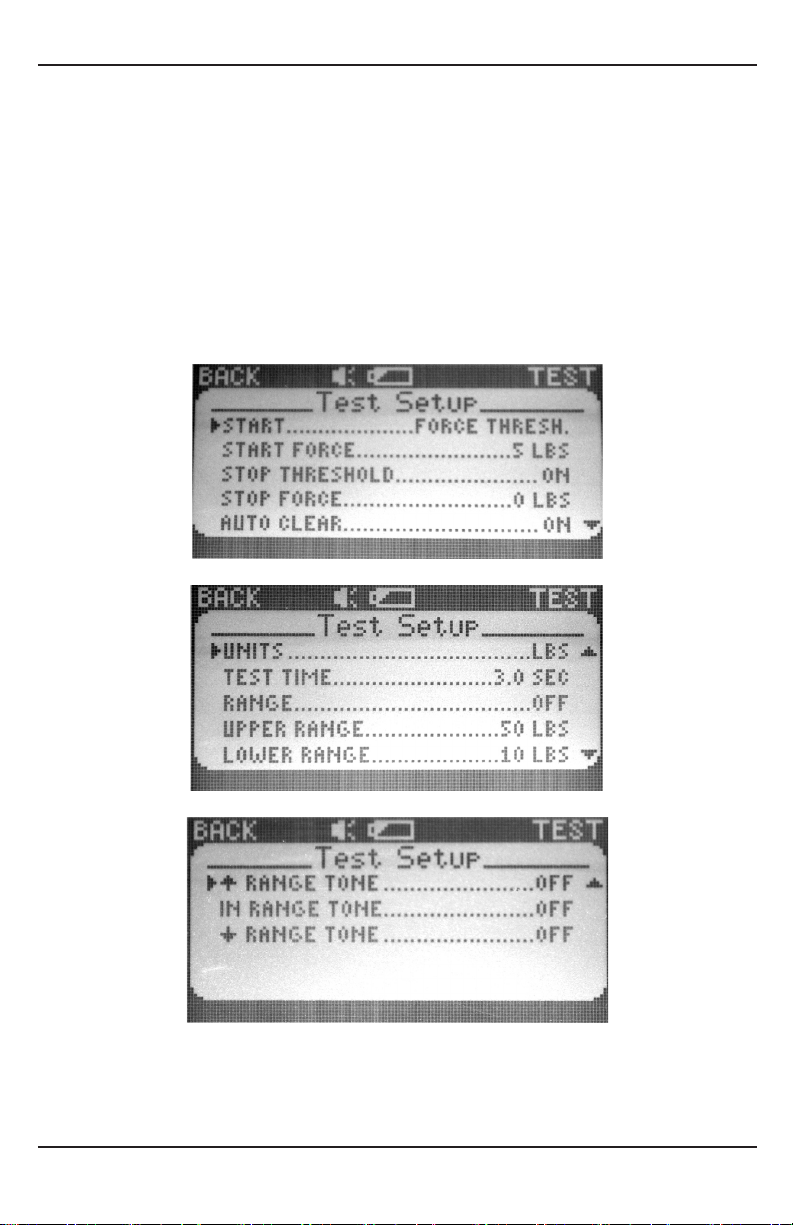
The Test Setup menu screen allows the user to setup various test options.
START
Starting a test can either be done by passing a FORCE THRESHOLD., or after a certain
amount of TIME DELAY, triggered by the top button.
START FORCE/TIME DELAY
These options allow you to select customized force thresholds and time delays.
STOP THRESHOLD
If enabled, the test will end when the force applied drops below the value set in STOP
FORCE. If disabled, the test will resume for the amount of time set by the TEST TIME.
STOP FORCE
If STOP THRESHOLD is enabled, each test will be stopped when the force is less than or
equal to this force. Stop force cannot exceed start force.
AUTO CLEAR
If enabled, manually clearing the data is not required prior to starting new tests.
UNITS
Allows selection of pounds (lbs), kilograms (kg), or Newtons (N).
TEST TIME
Allows users to select preset time for testing.
6
Page 7
Model 01165 User Instructions
RANGE
Allows an upper and lower range to be enabled for testing. These ranges are set by setting
the UPPER RANGE and LOWER RANGE.
RANGE TONES (↑ RANGE TONE, IN RANGE TONE, ↓ RANGE TONE)
Range tones are enabled by turning on each corresponding tone. The ↑ RANGE TONE
is a single beep. The IN RANGE TONE is two quick beeps. The ↓ RANGE TONE is three
quick beeps.
7
Page 8
Lafayette Manual Muscle Test System
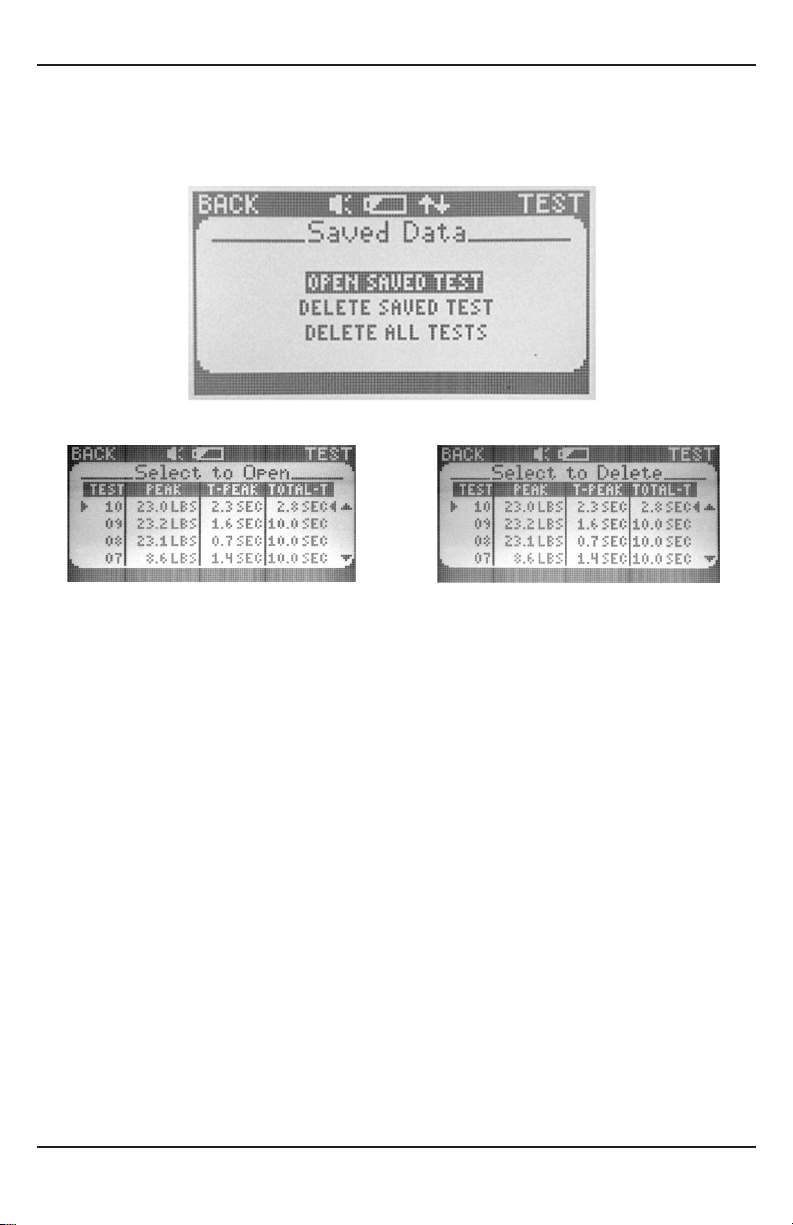
Saved Data Menu Screen
The Saved Data menu screen allows users to manage tests that have been saved in the
internal memory.
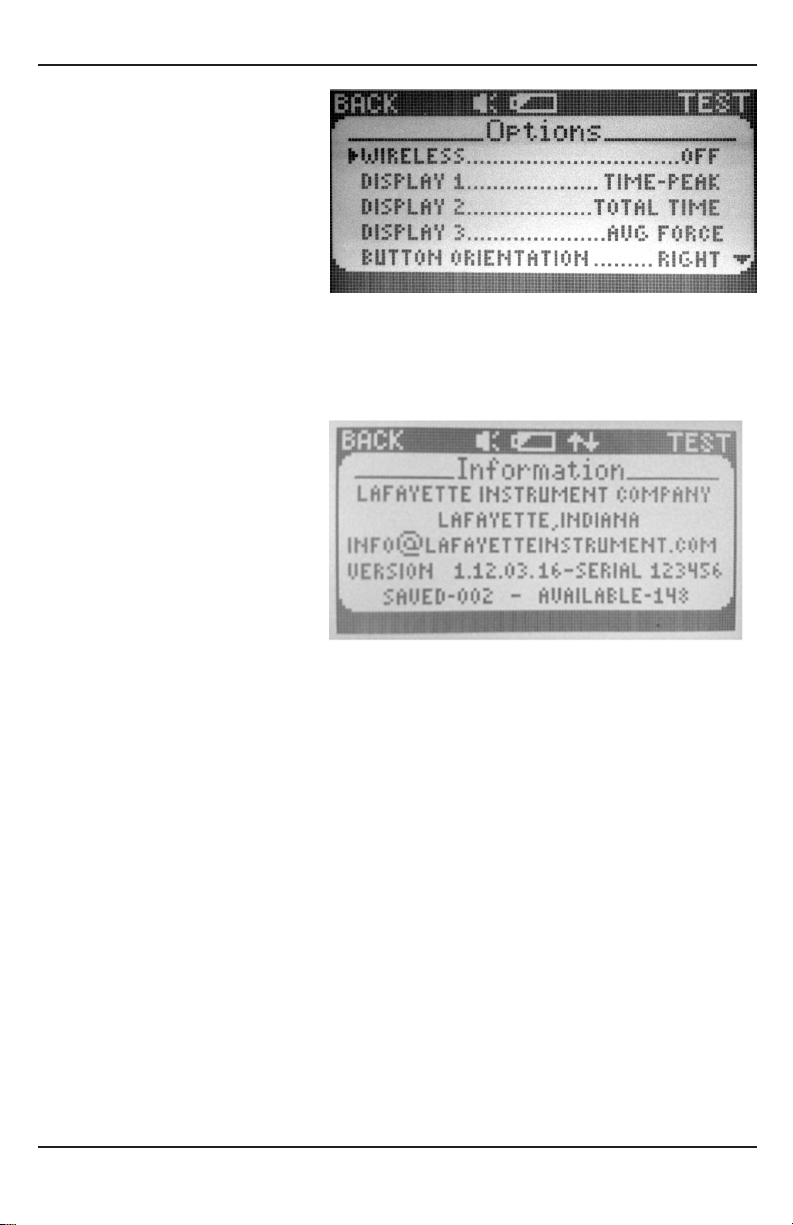
Options Menu Screen
The Options menu allows user to customize the setup of their unit.
WIRELESS
Toggles on/o the module for wireless connection.
DISPLAYS 1, 2, 3
Correspond to the customizable measurement areas on the Test Screen
BUTTON ORIENTATION
Switches the functionality of the top buttons, allowing for use in either hand.
BACKLIGHT
Toggles unit’s backlight on/o.
SOUND
Toggles unit’s sound on/o.
PC TIME SYNC
Allows the MMT to automatically set its time when connected to a PC
8
Page 9
Model 01165 User Instructions
DATE
Updates the MMT system date.
TIME
Updates the MMT system time.
Information Menu Screen
The Information menu screen provides a contact email and various information about
the MMT.
Resets
To restore MMT to factory defaults, press MENU/SELECT and navigate to the Information
screen. Press and hold MENU/SELECT then press the upper left button until screen reads
“Restored Defaults”.
Hard Reset: If the MMT freezes press MENU/SELECT and the upper right button until the
unit powers o.
9
Page 10
Accessories
Lafayette Manual Muscle Test System
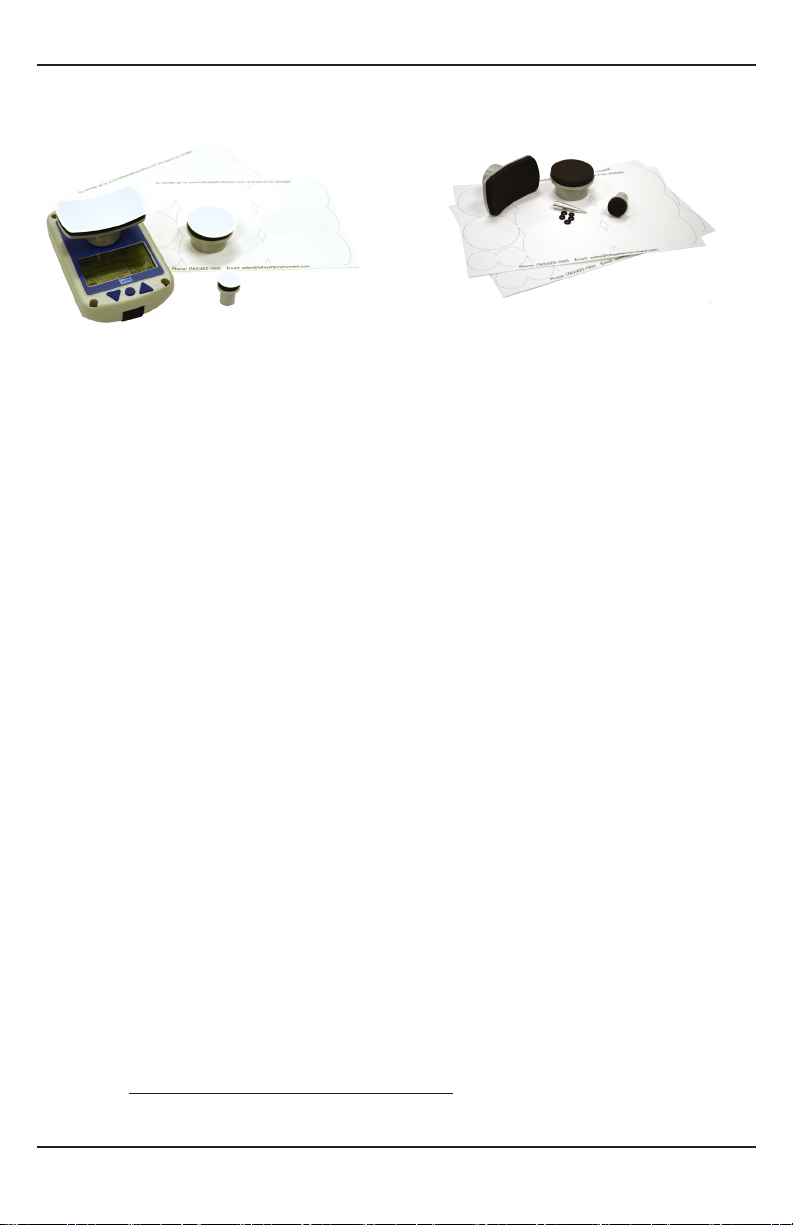
Disposable Sanitary Covers
Model 01165SC
Replacement Set of 25 adhesive Sanitary
Covers for MMT Stirrups.
MMT Replacement Kit
Model 01165RK
Replacement Set of Stirrups, O-rings,
and Sanitary Covers for the MMT.
Appendix A – Torque measurements with the MMT
In some research and rehabilitation applications, it is necessary to obtain torque
measurements for the limb being tested. Torque is often a more accurate indicator of
total strength because it takes into account the length of the muscle being tested. The
Lafayette Manual Muscle Test System (MMT) can be used to obtain torque values through
a series of basic calculations.
Torque is measured in units of Newton meters (Nwm) in the Metric system and in foot
pounds (ftwlbs) in the English system. Torque is the product of the force applied times
the distance between the force and the pivot point (usually a joint).
Equations for obtaining torque readings with the MMT using metric values:
Torque = Force * Distance
Where force equals the MMT reading converted to Newtons and distance is the length
between where the force is applied and the joint being tested in meters.
Newtons conversions: 1 pound = 4.45 Newtons; 1 kilogram = 9.81 Newtons
Newtons are calculated at sea level.
Normative Strength can also be quantied as torque per kilogram bodyweight (Nwm/
kg). This value is obtained by dividing the torque by the person’s bodyweight in kg.
Strength =
((MMT reading in Newtons) * distance)
bodyweight in kilograms
10
 Loading...