

Page 1
Model: WT470 www.lacrossetechnology.fr Page | 1
Model: WT470
Quick Setup Guide
BLUETOOTH ALARM CLOCK
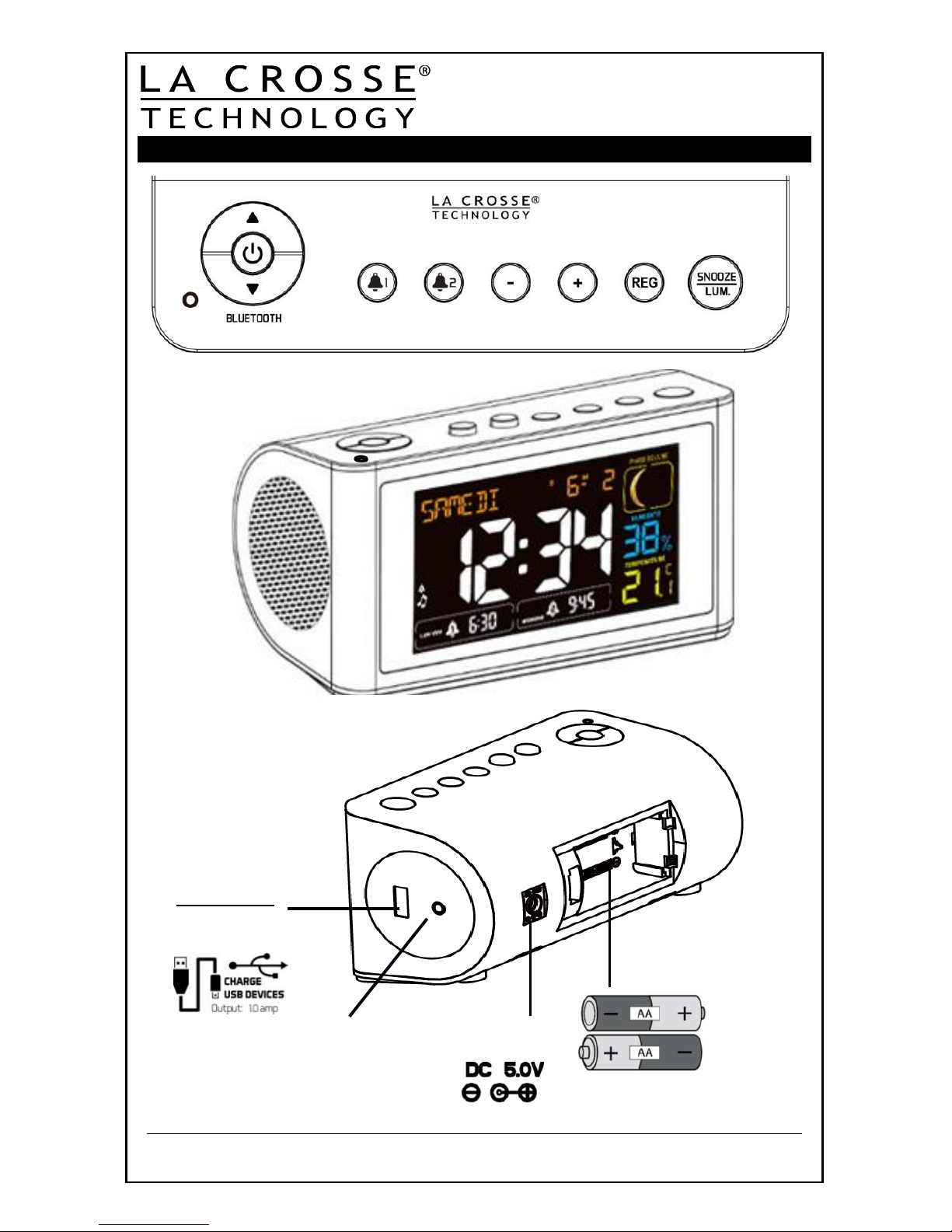
BUTTONS
FRONT
Battery
Compartment
2 “AA” LR6
USB Port
Output 1Amp
BACK
VIEW
FRONT
VIEW
AC Power Jack
Audio Input
Page 2
Model: WT470 www.lacrossetechnology.fr Page | 2
Get Started
Step 1: Insert 5 volt AC adapter into the wall then into the back of the
alarm clock.
Step 2: Insert 2 A A LR6 Alkaline batteries (not included) into the alarm
clock. Observe the correct polarity.
Restart: If there is no indoor temperature data after 60 seconds, unplug
the AC adapter and remove batteries from the alarm clock, press any
button 20 times. After 15 minutes, return to Step 1 above.
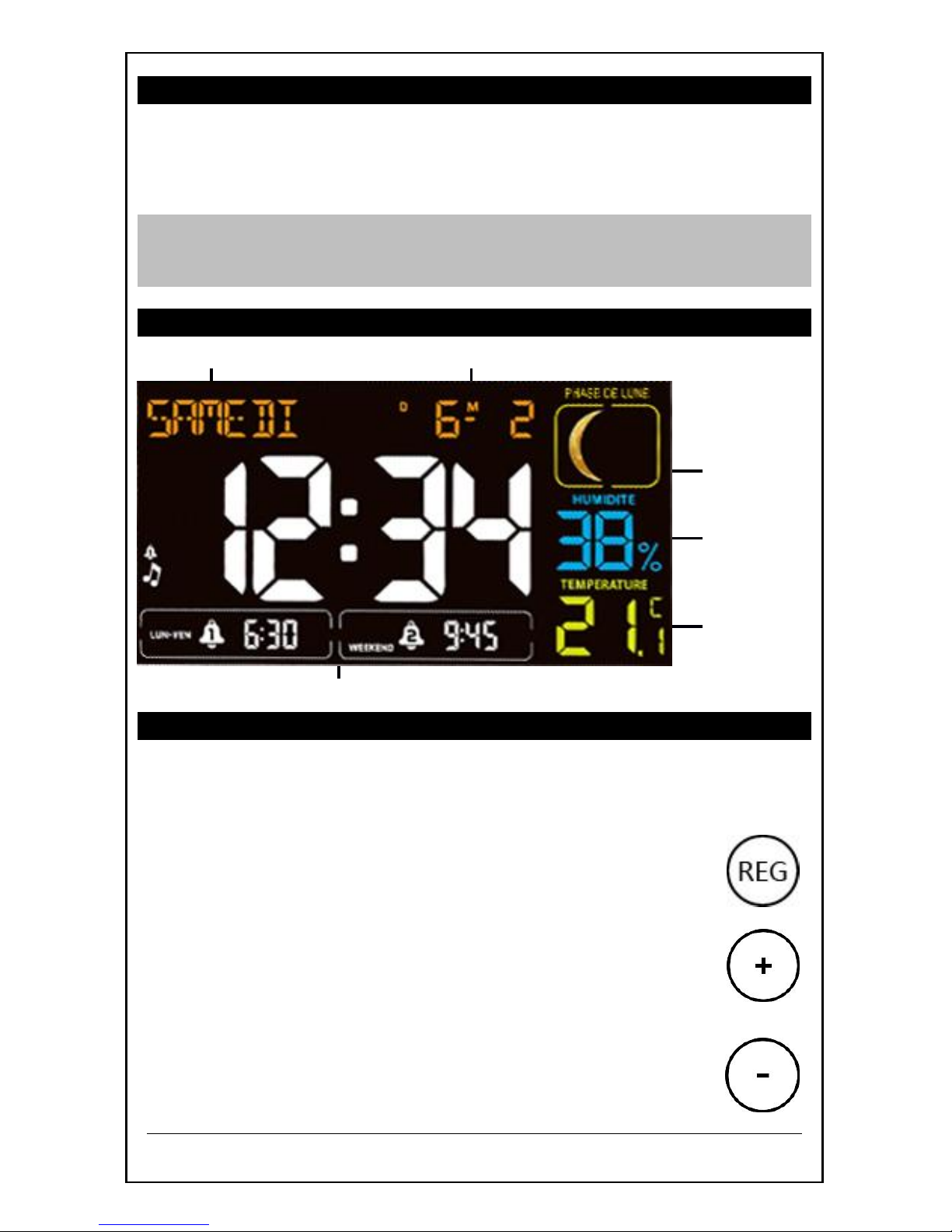
LCD Features
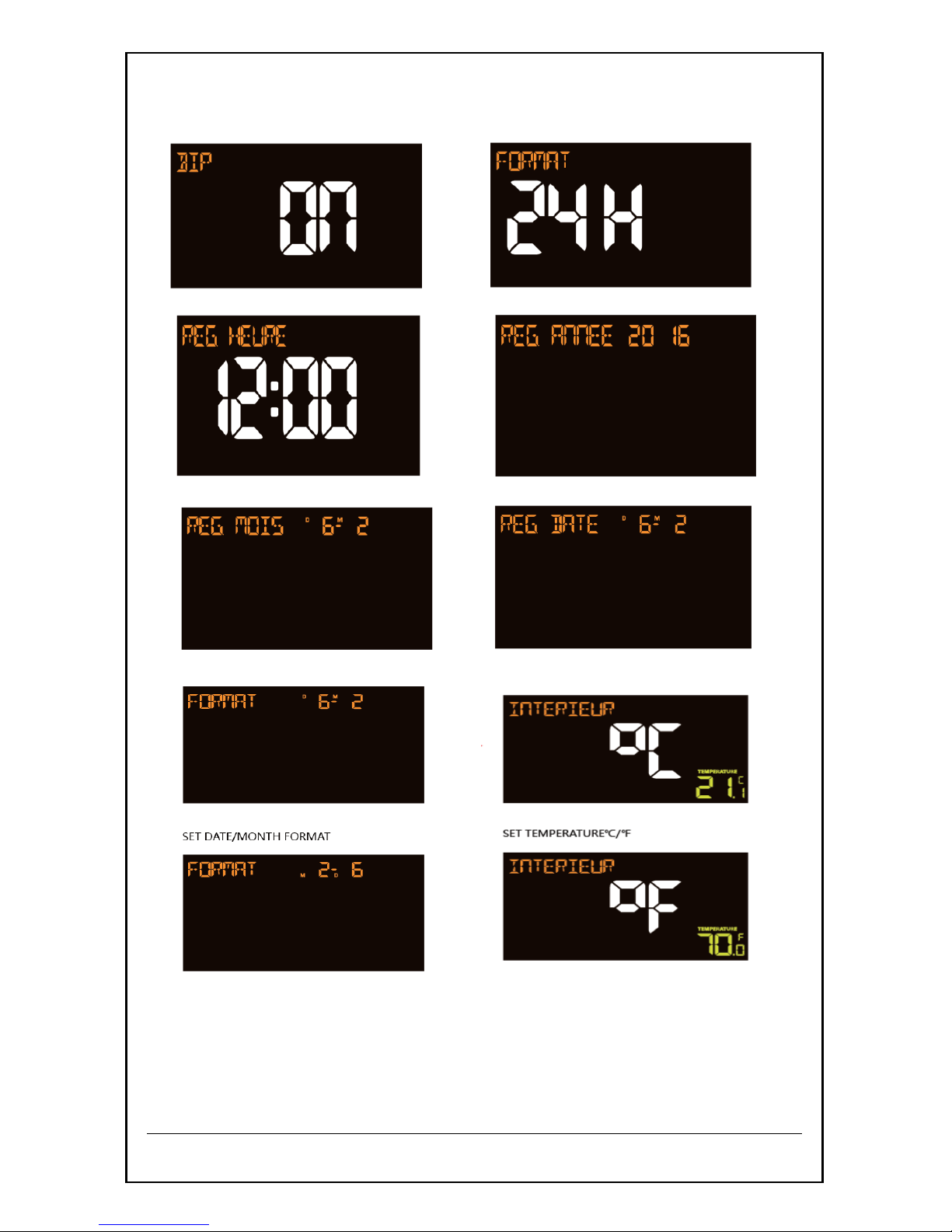
Set Time, Date, Temperature Unit, Language
1. Hold the REG button to enter time set mode.
2. Press the + or - buttons to adjust values.
3. Press the REG button to confirm adjustments and move to the next
item.
4. Press the SNOOZE/LUM. button at any time to exit.
TIME SET ORDER:
1. Beep ON/OFF
2. Time format (24h/12h)
3. Hour
4. Minutes
5. Year
6. Month
7. Date
8. Date/Month Format (D/M or M/D)
9. Fahrenheit/Celsius
Weekday Date/Month
Moon
Phase
Indoor
Humidity
Indoor
Temperature
Two Alarms
Page 3
Model: WT470 www.lacrossetechnology.fr Page | 3
Press the SNOOZE/LUM. button at any time to exit, or wait 20 seconds
without pressing buttons to return to the normal time display.
Page 4
Model: WT470 www.lacrossetechnology.fr Page | 4
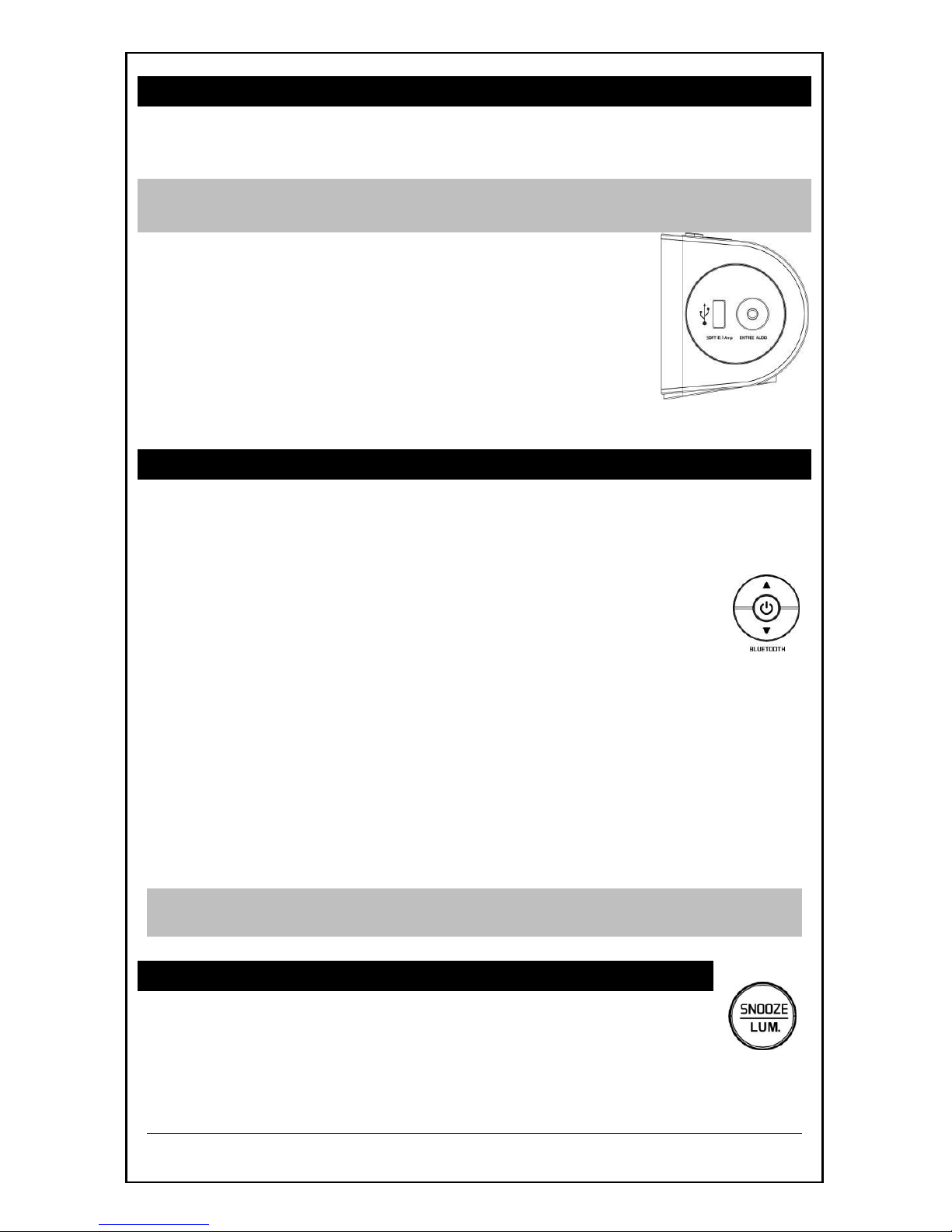
USB Charging Port, Audio IN
Charge a smart phone, camera or other devices when the alarm clock is
plugged into a power outlet with the included 5V AC adapter.
Note: This is a power-output charging port (SORTIE). It does not supply
power to the alarm clock.
Connect your external device’s USB charging cable
(not included) to the USB charging port.
Charging times will vary.
USB Power Output: 1A maximum current. Charge
1A devices or devices that are self-regulating.
3.5mm AUDIO IN, when audio in, the BT will
disconnect
Bluetooth Operation
1. Press and hold BLUETOOTH
®
POWER to turn on the Bluetooth
function.
2. Activate the Bluetooth® function on your mobile
device to pair with the clock.
3. The purple LED will flash until there is connection
with your mobile device. Once there is connection,
the purple LED will change to blue and will be solid.
4. Use the ▲ or ▼ buttons on top to adjust the volume.
5. If a phone call is made or received, the Bluetooth®
connection will be temporarily interrupted. It will
automatically reconnect after the call.
6. Press Bluetooth Power to pause and repress and continue to
play
7. Press and hold the BLUETOOTH
®
POWER button again to turn off
BT.
Note: If the clock is unplugged briefly and is plugged in again, the clock
may lose Bluetooth connectivity.
Adjust Backlight HI/LOW/OFF
For a constant backlight you must use the AC adapter.
When using A/C power:
Press the SNOOZE/LUM. button to adjust the backlight between bright,
dim and off.
Page 5
Model: WT470 www.lacrossetechnology.fr Page | 5
When using battery power only:
Press the SNOOZE/LUM. button for 10 second backlight
Time Alarm Options-Single, M-F or Weekend
Your clock has two separate
alarms (1& 2).
Each alarm can be set one time
(Day Alarm), Monday-Friday, or
for Weekends.
Set Time Alarm 1 & Alarm 2
Setting the alarm and activating the alarm are separate actions.
Alarm Time setting order: 1. Hours, 2. Minutes
Alarm 1:
1. Hold the ALARM button for 3 seconds to enter alarm
time set mode.
2. Press the + or - buttons to adjust the alarm hour.
3. Press the ALARM button to confirm and set the minutes.
4. Press the + or - buttons to adjust the alarm minutes.
5. Press the ALARM button to confirm and set the ALARM TYPE
6. Press the + or - buttons to choose alarm type
7. Press the ALARM button to confirm and set the ALARM SOUND
8. Press the ALARM button to confirm.
Alarm 2:
Repeat steps 1-8 using ALARM 2 button.
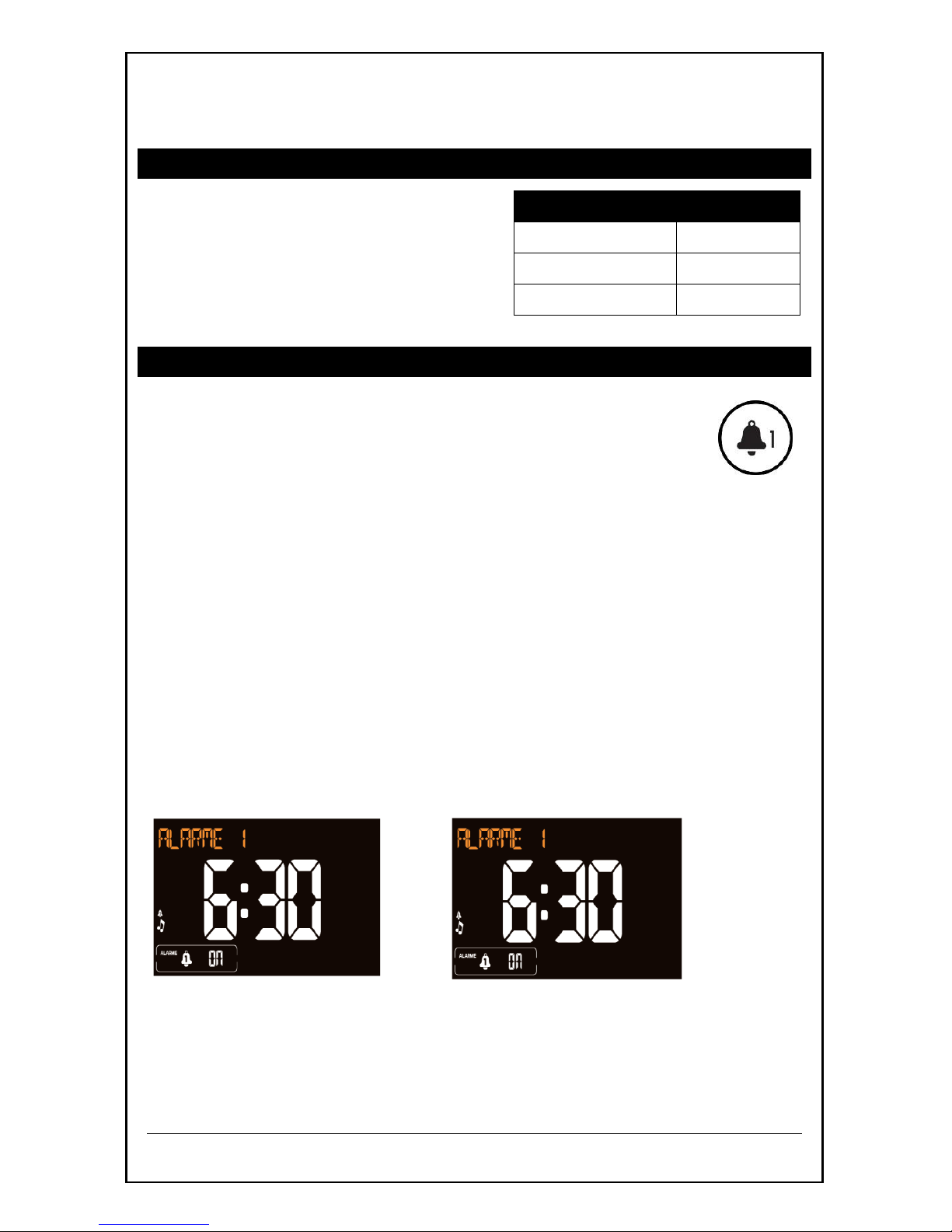
ALARM1 HOUR ALARM1 MINUTES
.
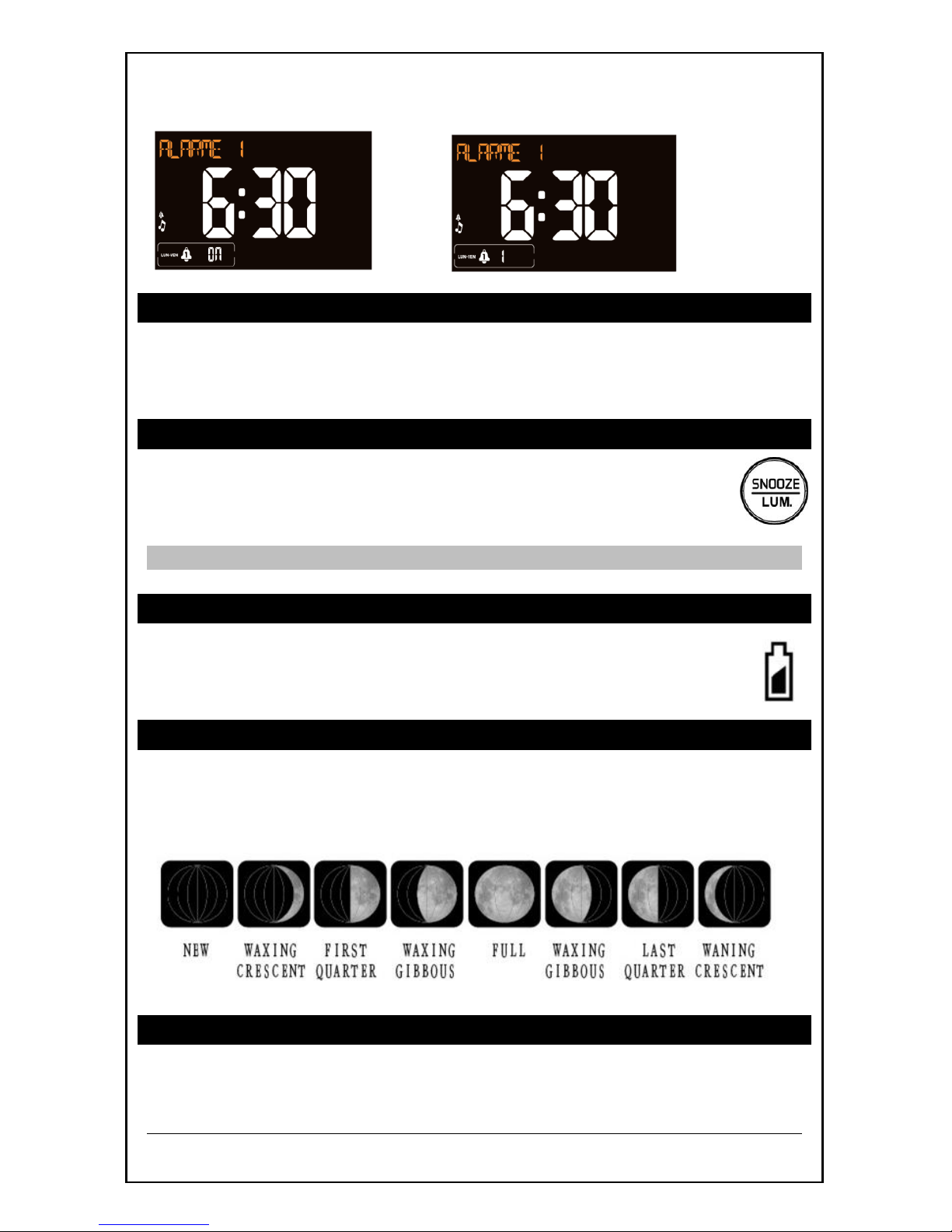
Alarm Type
Words
One Time
ALARME
Monday-Friday
LUN-VEN
Weekend only
WEEKEND
Page 6
Model: WT470 www.lacrossetechnology.fr Page | 6
ALARM1 TYPE ALARM1 SOUND
Deactivate Time Alarm 1 or Time Alarm 2
Press and release the ALARM 1 or ALARM 2 button to deactivate the
specific alarm.
Snooze (Silences Alarm Temporarily)
When alarm sounds, press the SNOOZE/LUM. button to silence
either alarm for 10 minutes.
Note: The alarm sounds for 2 minutes and then shut off completely.
Low Battery Icon
When the icon is displayed below the time,replace
batteries in the alarm clock.
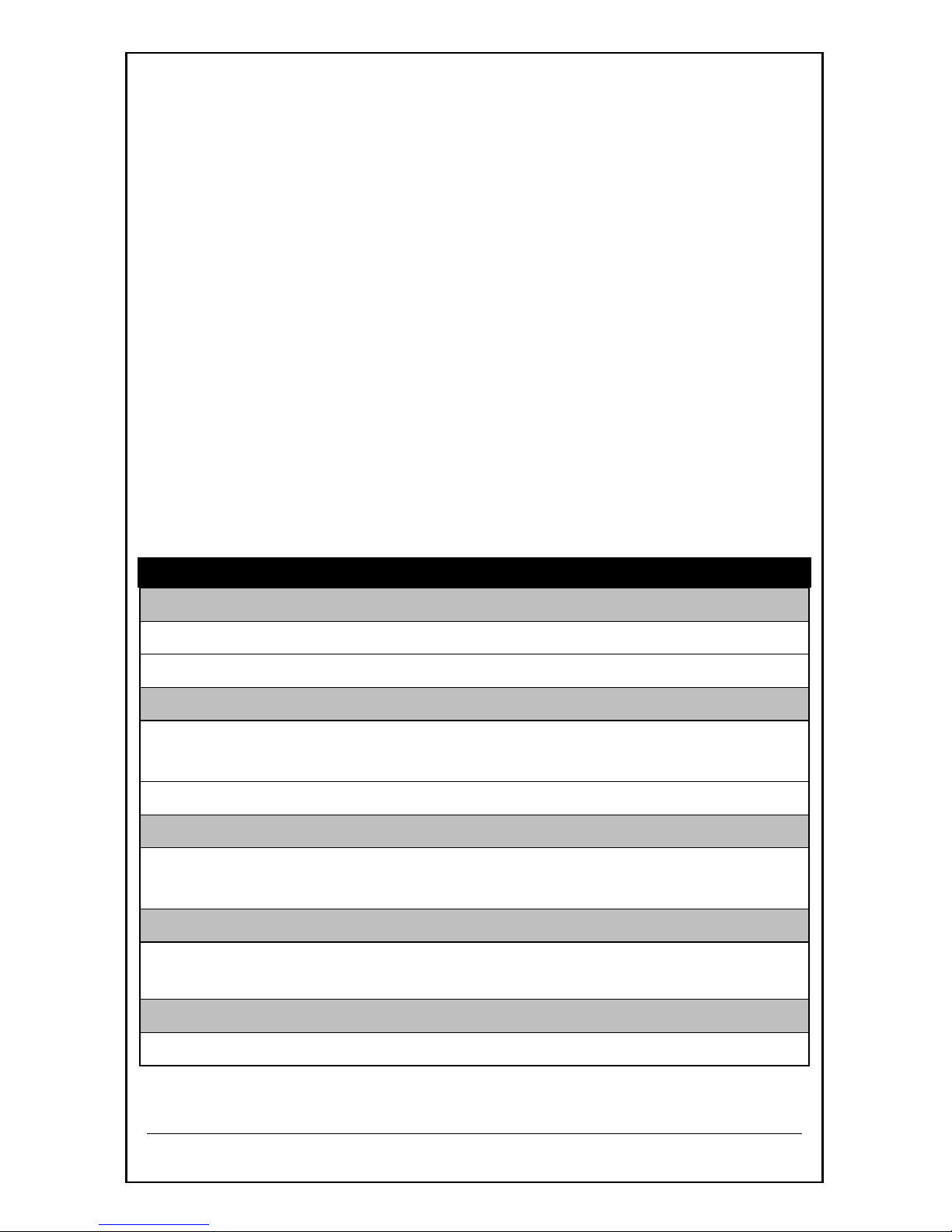
MOON PHASE
The moon phase is based on the lunar calendar and the year, month and
date set. Most Internet moon phase calculations are based on the lunar
calendar.
ALARM CLOCK CARE AND MAINTENANCE
Do not mix old and new batteries
Do not mix Alkaline, Standard, Lithium or Rechargeable Batteries
Low
Battery
Page 7
Model: WT470 www.lacrossetechnology.fr Page | 7
Always purchase the correct size and grade of battery most suitable
for intended use.
Replace all batteries of a set at the same time.
Clean the battery contacts and also those of the device prior to
battery installation.
Ensure the batteries are installed with correct polarity (+and -).
Remove batteries from equipment which is not to be used for an
extended period of time.
Remove expired batteries promptly.
Do not expose to extreme temperature, vibration or shock.
Clean with a soft damp cloth. Do not use solvents or scouring
agents.
The alarm clock is not a toy. Keep it out of reach of children.
The alarm clock is not to be used for medical purpose or for public
information. It is intended for home use only.
The specs of this alarm clock may change without prior notice.
Improper use or unauthorized opening of housing voids warranty.
If the alarm clock is not working properly, change the batteries and/or
check the A/C adapter connection.
SPECIFICATIONS
Indoor:
Temperature Range: +32°F to +122°F (0°C to 50°C)
Humidity Range: 1% to 99% RH
Power:
Alarm Clock: A/C power adapter (included) 5.0V
HX18-0502000-AG
Battery backup; 2-AA, IEC, LR6 batteries (not included)
Battery Life:
Battery Backup: Battery life is over 24 months when using the
AC adapter for primary power
USB:
Output: 1 Amp maximum current (charging cable not
included)
Dimensions:
Alarm Clock: 143 x 75 x 70 mm (5.63” L x 2.95" D x 2.76 " H)
Page 8
Model: WT470 www.lacrossetechnology.fr Page | 8
LIABILITY DISCLAIMER
The electrical and electronic wastes contain hazardous substances.
Disposal of electronic waste in wild country and/or in unauthorized
grounds strongly damages the environment.
Please contact your local or/and regional authorities to retrieve the
addresses of legal dumping grounds with selective collection.
All electronic instruments must from now on be recycled. User shall
take an active part in the reuse, recycling and recovery of the
electrical and electronic waste.
The unrestricted disposal of electronic waste may do harm on public
health and the quality of environment.
As stated on the gift box and labeled on the product, reading the
“User manual” is highly recommended for the benefit of the user.
This product must however not be thrown in general rubbish
collection points.
The manufacturer and supplier cannot accept any responsibility for
any incorrect readings and any consequences that occur should an
inaccurate reading take place.
This product is designed for use in the home only as indication of the
temperature.
This product is not to be used for medical purposes or for public
information.
The specifications of this product may change without prior notice.
This product is not a toy. Keep out of the reach of children.
No part of this manual may be reproduced without written
authorization of the manufacturer.
R&TTE Directive 1999/5/EC
Summary of the Declaration of Conformity : We hereby declare that
this wireless transmission device does comply with the essential
requirements of R&TTE Directive 1999/5/EC.
 Loading...