

Page 1

LaCie Rugged USB-C User Manual
© 2016 Seagate Technology LLC. All rights reserved. Seagate, Seagate Technology,
the Wave logo, and FreeAgent are trademarks or registered trademarks of Seagate
Technology LLC, or one of its affiliates. All other trademarks or registered
trade marks are the prope rty of their respe ctive owners. When referring to hard
drive capacity, one gigabyte, or GB, equals one billion bytes and one terabyte, or
TB, e quals one thousand billion bytes when referring to hard drive capacity. In
addition, some of the listed capacity is used for formatting and other functions, and
thus will not be available for data storage. Quantitative usage e xamples for various
applications are for illustrative purposes. Actual quantities will vary based on
various factors including file size, file format, features, and application software.
Seagate reserves the right to change, without notice, product offerings or
specifications.
Seagate Technology LLC
10200 S. De Anza Boulevard
Cupertino, CA 95014 U.S.A
Click here to access an up-to-date online version
of this document. You will also fin d the most recent content as well as expandable illustrations, easier
navigation, and search capability.
Model:
Page 2

. . . . . . . . . . . . . . . . . . . . . . . . . . . . . . . . . . . . . . . . . . . . . . . . . . . . . . . . . . . . . . . . . . . . . . . . . . . . . . . . . . . . . . . . . . . . . . . . . . . . . . . . . . . . . . . . . . . . . . . . . . . . . . . . . . . . . . . . . . . . . . . . . . . . . . . . . . . . . . . . . . . . . . . . . . . . . . . . . . . . . . . . . . . . . . . . . . . . . . . . . . . . . . . . . . . . . . . . . . . . . . . . . . . . . . . . . . . . . . . . . . . . . . . . . . . . . . . . . . . . . . . . . . . . . . . . . . . . . . . .
. . . . . . . . . . . . . . . . . . . . . . . . . . . . . . . . . . . . . . . . . . . . . . . . . . . . . . . . . . . . . . . . . . . . . . . . . . . . . . . . . . . . . . . . . . . . . . . . . . . . . . . . . . . . . . . . . . . . . . . . . . . . . . . . . . . . . . . . . . . . . . . . . . . . . . . . . . . . . . . . . . . . . . . . . . . . . . . . . . . . . . . . . . . . . . . . . . . . . . . . . . . . . . . . . . . . . . . . . . . . . . . . . . . . . . . . . . . . . . . . . . . . . . . . . . . . . . . . . . . . . . . . . . . . . . . . . . . . . . . .
. . . . . . . . . . . . . . . . . . . . . . . . . . . . . . . . . . . . . . . . . . . . . . . . . . . . . . . . . . . . . . . . . . . . . . . . . . . . . . . . . . . . . . . . . . . . . . . . . . . . . . . . . . . . . . . . . . . . . . . . . . . . . . . . . . . . . . . . . . . . . . . . . . . . . . . . . . . . . . . . . . . . . . . . . . . . . . . . . . . . . . . . . . . . . . . . . . . . . . . . . . . . . . . . . . . . . . . . . . . . . . . . . . . . . . . . . . . . . . . . . . . . . . . . . . . . . . . . . . . . . . . . . . . . . . . . . . . . . . . .
. . . . . . . . . . . . . . . . . . . . . . . . . . . . . . . . . . . . . . . . . . . . . . . . . . . . . . . . . . . . . . . . . . . . . . . . . . . . . . . . . . . . . . . . . . . . . . . . . . . . . . . . . . . . . . . . . . . . . . . . . . . . . . . . . . . . . . . . . . . . . . . . . . . . . . . . . . . . . . . . . . . . . . . . . . . . . . . . . . . . . . . . . . . . . . . . . . . . . . . . . . . . . . . . . . . . . . . . . . . . . . . . . . . . . . . . . . . . . . . . . . . . . . . . . . . . . . . . . . . . . . . . . . . . . . . . . . . . . . . .
. . . . . . . . . . . . . . . . . . . . . . . . . . . . . . . . . . . . . . . . . . . . . . . . . . . . . . . . . . . . . . . . . . . . . . . . . . . . . . . . . . . . . . . . . . . . . . . . . . . . . . . . . . . . . . . . . . . . . . . . . . . . . . . . . . . . . . . . . . . . . . . . . . . . . . . . . . . . . . . . . . . . . . . . . . . . . . . . . . . . . . . . . . . . . . . . . . . . . . . . . . . . . . . . . . . . . . . . . . . . . . . . . . . . . . . . . . . . . . . . . . . . . . . . . . . . . . . . . . . . . . . . . . . . . . . . . . . . . . . .
. . . . . . . . . . . . . . . . . . . . . . . . . . . . . . . . . . . . . . . . . . . . . . . . . . . . . . . . . . . . . . . . . . . . . . . . . . . . . . . . . . . . . . . . . . . . . . . . . . . . . . . . . . . . . . . . . . . . . . . . . . . . . . . . . . . . . . . . . . . . . . . . . . . . . . . . . . . . . . . . . . . . . . . . . . . . . . . . . . . . . . . . . . . . . . . . . . . . . . . . . . . . . . . . . . . . . . . . . . . . . . . . . . . . . . . . . . . . . . . . . . . . . . . . . . . . . . . . . . . . . . . . . . . . . . . . . . . . . . . .
. . . . . . . . . . . . . . . . . . . . . . . . . . . . . . . . . . . . . . . . . . . . . . . . . . . . . . . . . . . . . . . . . . . . . . . . . . . . . . . . . . . . . . . . . . . . . . . . . . . . . . . . . . . . . . . . . . . . . . . . . . . . . . . . . . . . . . . . . . . . . . . . . . . . . . . . . . . . . . . . . . . . . . . . . . . . . . . . . . . . . . . . . . . . . . . . . . . . . . . . . . . . . . . . . . . . . . . . . . . . . . . . . . . . . . . . . . . . . . . . . . . . . . . . . . . . . . . . . . . . . . . . . . . . . . . . . . . . . . . .
. . . . . . . . . . . . . . . . . . . . . . . . . . . . . . . . . . . . . . . . . . . . . . . . . . . . . . . . . . . . . . . . . . . . . . . . . . . . . . . . . . . . . . . . . . . . . . . . . . . . . . . . . . . . . . . . . . . . . . . . . . . . . . . . . . . . . . . . . . . . . . . . . . . . . . . . . . . . . . . . . . . . . . . . . . . . . . . . . . . . . . . . . . . . . . . . . . . . . . . . . . . . . . . . . . . . . . . . . . . . . . . . . . . . . . . . . . . . . . . . . . . . . . . . . . . . . . . . . . . . . . . . . . . . . . . . . . . . . . . .
. . . . . . . . . . . . . . . . . . . . . . . . . . . . . . . . . . . . . . . . . . . . . . . . . . . . . . . . . . . . . . . . . . . . . . . . . . . . . . . . . . . . . . . . . . . . . . . . . . . . . . . . . . . . . . . . . . . . . . . . . . . . . . . . . . . . . . . . . . . . . . . . . . . . . . . . . . . . . . . . . . . . . . . . . . . . . . . . . . . . . . . . . . . . . . . . . . . . . . . . . . . . . . . . . . . . . . . . . . . . . . . . . . . . . . . . . . . . . . . . . . . . . . . . . . . . . . . . . . . . . . . . . . . . . . . . . . . . . . . .
. . . . . . . . . . . . . . . . . . . . . . . . . . . . . . . . . . . . . . . . . . . . . . . . . . . . . . . . . . . . . . . . . . . . . . . . . . . . . . . . . . . . . . . . . . . . . . . . . . . . . . . . . . . . . . . . . . . . . . . . . . . . . . . . . . . . . . . . . . . . . . . . . . . . . . . . . . . . . . . . . . . . . . . . . . . . . . . . . . . . . . . . . . . . . . . . . . . . . . . . . . . . . . . . . . . . . . . . . . . . . . . . . . . . . . . . . . . . . . . . . . . . . . . . . . . . . . . . . . . . . . . . . . . . . . . . . . . . . . . .
. . . . . . . . . . . . . . . . . . . . . . . . . . . . . . . . . . . . . . . . . . . . . . . . . . . . . . . . . . . . . . . . . . . . . . . . . . . . . . . . . . . . . . . . . . . . . . . . . . . . . . . . . . . . . . . . . . . . . . . . . . . . . . . . . . . . . . . . . . . . . . . . . . . . . . . . . . . . . . . . . . . . . . . . . . . . . . . . . . . . . . . . . . . . . . . . . . . . . . . . . . . . . . . . . . . . . . . . . . . . . . . . . . . . . . . . . . . . . . . . . . . . . . . . . . . . . . . . . . . . . . . . . . . . . . . . . . . . . . . .
. . . . . . . . . . . . . . . . . . . . . . . . . . . . . . . . . . . . . . . . . . . . . . . . . . . . . . . . . . . . . . . . . . . . . . . . . . . . . . . . . . . . . . . . . . . . . . . . . . . . . . . . . . . . . . . . . . . . . . . . . . . . . . . . . . . . . . . . . . . . . . . . . . . . . . . . . . . . . . . . . . . . . . . . . . . . . . . . . . . . . . . . . . . . . . . . . . . . . . . . . . . . . . . . . . . . . . . . . . . . . . . . . . . . . . . . . . . . . . . . . . . . . . . . . . . . . . . . . . . . . . . . . . . . . . . . . . . . . . . .
. . . . . . . . . . . . . . . . . . . . . . . . . . . . . . . . . . . . . . . . . . . . . . . . . . . . . . . . . . . . . . . . . . . . . . . . . . . . . . . . . . . . . . . . . . . . . . . . . . . . . . . . . . . . . . . . . . . . . . . . . . . . . . . . . . . . . . . . . . . . . . . . . . . . . . . . . . . . . . . . . . . . . . . . . . . . . . . . . . . . . . . . . . . . . . . . . . . . . . . . . . . . . . . . . . . . . . . . . . . . . . . . . . . . . . . . . . . . . . . . . . . . . . . . . . . . . . . . . . . . . . . . . . . . . . . . . . . . . . . .
. . . . . . . . . . . . . . . . . . . . . . . . . . . . . . . . . . . . . . . . . . . . . . . . . . . . . . . . . . . . . . . . . . . . . . . . . . . . . . . . . . . . . . . . . . . . . . . . . . . . . . . . . . . . . . . . . . . . . . . . . . . . . . . . . . . . . . . . . . . . . . . . . . . . . . . . . . . . . . . . . . . . . . . . . . . . . . . . . . . . . . . . . . . . . . . . . . . . . . . . . . . . . . . . . . . . . . . . . . . . . . . . . . . . . . . . . . . . . . . . . . . . . . . . . . . . . . . . . . . . . . . . . . . . . . . . . . . . . . . .
. . . . . . . . . . . . . . . . . . . . . . . . . . . . . . . . . . . . . . . . . . . . . . . . . . . . . . . . . . . . . . . . . . . . . . . . . . . . . . . . . . . . . . . . . . . . . . . . . . . . . . . . . . . . . . . . . . . . . . . . . . . . . . . . . . . . . . . . . . . . . . . . . . . . . . . . . . . . . . . . . . . . . . . . . . . . . . . . . . . . . . . . . . . . . . . . . . . . . . . . . . . . . . . . . . . . . . . . . . . . . . . . . . . . . . . . . . . . . . . . . . . . . . . . . . . . . . . . . . . . . . . . . . . . . . . . . . . . . . . .
. . . . . . . . . . . . . . . . . . . . . . . . . . . . . . . . . . . . . . . . . . . . . . . . . . . . . . . . . . . . . . . . . . . . . . . . . . . . . . . . . . . . . . . . . . . . . . . . . . . . . . . . . . . . . . . . . . . . . . . . . . . . . . . . . . . . . . . . . . . . . . . . . . . . . . . . . . . . . . . . . . . . . . . . . . . . . . . . . . . . . . . . . . . . . . . . . . . . . . . . . . . . . . . . . . . . . . . . . . . . . . . . . . . . . . . . . . . . . . . . . . . . . . . . . . . . . . . . . . . . . . . . . . . . . . . . . . . . . . . .
. . . . . . . . . . . . . . . . . . . . . . . . . . . . . . . . . . . . . . . . . . . . . . . . . . . . . . . . . . . . . . . . . . . . . . . . . . . . . . . . . . . . . . . . . . . . . . . . . . . . . . . . . . . . . . . . . . . . . . . . . . . . . . . . . . . . . . . . . . . . . . . . . . . . . . . . . . . . . . . . . . . . . . . . . . . . . . . . . . . . . . . . . . . . . . . . . . . . . . . . . . . . . . . . . . . . . . . . . . . . . . . . . . . . . . . . . . . . . . . . . . . . . . . . . . . . . . . . . . . . . . . . . . . . . . . . . . . . . . . .
. . . . . . . . . . . . . . . . . . . . . . . . . . . . . . . . . . . . . . . . . . . . . . . . . . . . . . . . . . . . . . . . . . . . . . . . . . . . . . . . . . . . . . . . . . . . . . . . . . . . . . . . . . . . . . . . . . . . . . . . . . . . . . . . . . . . . . . . . . . . . . . . . . . . . . . . . . . . . . . . . . . . . . . . . . . . . . . . . . . . . . . . . . . . . . . . . . . . . . . . . . . . . . . . . . . . . . . . . . . . . . . . . . . . . . . . . . . . . . . . . . . . . . . . . . . . . . . . . . . . . . . . . . . . . . . . . . . . . . . .
. . . . . . . . . . . . . . . . . . . . . . . . . . . . . . . . . . . . . . . . . . . . . . . . . . . . . . . . . . . . . . . . . . . . . . . . . . . . . . . . . . . . . . . . . . . . . . . . . . . . . . . . . . . . . . . . . . . . . . . . . . . . . . . . . . . . . . . . . . . . . . . . . . . . . . . . . . . . . . . . . . . . . . . . . . . . . . . . . . . . . . . . . . . . . . . . . . . . . . . . . . . . . . . . . . . . . . . . . . . . . . . . . . . . . . . . . . . . . . . . . . . . . . . . . . . . . . . . . . . . . . . . . . . . . . . . . . . . . . . .
. . . . . . . . . . . . . . . . . . . . . . . . . . . . . . . . . . . . . . . . . . . . . . . . . . . . . . . . . . . . . . . . . . . . . . . . . . . . . . . . . . . . . . . . . . . . . . . . . . . . . . . . . . . . . . . . . . . . . . . . . . . . . . . . . . . . . . . . . . . . . . . . . . . . . . . . . . . . . . . . . . . . . . . . . . . . . . . . . . . . . . . . . . . . . . . . . . . . . . . . . . . . . . . . . . . . . . . . . . . . . . . . . . . . . . . . . . . . . . . . . . . . . . . . . . . . . . . . . . . . . . . . . . . . . . . . . . . . . . . .
Cont ent sCont ent s
1 Introduction
Box content
Minim um system r equirements
2 Cables and Connectors
USB-C
Cables
USB 3.1 (USB-C) cable
USB 3.1 (USB-C)–to–USB Type A cable
3 Getting Connected
STEP 1 - Connect the USB cable
STEP 2 - LaCie Setup Assistant
4 Optional Formatting and Partitioning
About file system form ats
Formatting instructions
5 Safely Remove Rugged USB-C From Your Computer
Mac
Windows
6 Frequently asked questions
All users
Mac
. . . . . . . . . . . . . . . . . . . . . . . . . . . . . . . . . . . . . . . . . . . . . . . . . . . . . . . . . . . . . . . . . . . . . . . . . . . . . . . . . . . . . . . . . . . . . . . . . . . . . . . . . . . . . . . . . . . . . . . . . . . . . . . . . . . . . . . . . . . . . . . . . . . . . . . . . . . . . . . . . . . . . . . . . . . . . . . . . . . . . . . . . . . . . . . . . . . . . . . . . . . . . . . . . . . . . . . . . . . . . . . . . . . . . . . . . . . . . . . . . . . . . . . . . . . . . . . . . . . . . . . . . . . . . . . . . . . . . . . .Launch LaCie Setup Assistant - Mac
. . . . . . . . . . . . . . . . . . . . . . . . . . . . . . . . . . . . . . . . . . . . . . . . . . . . . . . . . . . . . . . . . . . . . . . . . . . . . . . . . . . . . . . . . . . . . . . . . . . . . . . . . . . . . . . . . . . . . . . . . . . . . . . . . . . . . . . . . . . . . . . . . . . . . . . . . . . . . . . . . . . . . . . . . . . . . . . . . . . . . . . . . . . . . . . . . . . . . . . . . . . . . . . . . . . . . . . . . . . . . . . . . . . . . . . . . . . . . . . . . . . . . . . . . . . . . . . . . . . . . . . . . . . . . . . . . . . . . . . .Launch LaCie Setup Assistant - Windo ws
. . . . . . . . . . . . . . . . . . . . . . . . . . . . . . . . . . . . . . . . . . . . . . . . . . . . . . . . . . . . . . . . . . . . . . . . . . . . . . . . . . . . . . . . . . . . . . . . . . . . . . . . . . . . . . . . . . . . . . . . . . . . . . . . . . . . . . . . . . . . . . . . . . . . . . . . . . . . . . . . . . . . . . . . . . . . . . . . . . . . . . . . . . . . . . . . . . . . . . . . . . . . . . . . . . . . . . . . . . . . . . . . . . . . . . . . . . . . . . . . . . . . . . . . . . . . . . . . . . . . . . . . . . . . . . . . . . . . . . . .LaCie Se tup Assis tant steps
. . . . . . . . . . . . . . . . . . . . . . . . . . . . . . . . . . . . . . . . . . . . . . . . . . . . . . . . . . . . . . . . . . . . . . . . . . . . . . . . . . . . . . . . . . . . . . . . . . . . . . . . . . . . . . . . . . . . . . . . . . . . . . . . . . . . . . . . . . . . . . . . . . . . . . . . . . . . . . . . . . . . . . . . . . . . . . . . . . . . . . . . . . . . . . . . . . . . . . . . . . . . . . . . . . . . . . . . . . . . . . . . . . . . . . . . . . . . . . . . . . . . . . . . . . . . . . . . . . . . . . . . . . . . . . . . . . . . . . . .Windo ws
. . . . . . . . . . . . . . . . . . . . . . . . . . . . . . . . . . . . . . . . . . . . . . . . . . . . . . . . . . . . . . . . . . . . . . . . . . . . . . . . . . . . . . . . . . . . . . . . . . . . . . . . . . . . . . . . . . . . . . . . . . . . . . . . . . . . . . . . . . . . . . . . . . . . . . . . . . . . . . . . . . . . . . . . . . . . . . . . . . . . . . . . . . . . . . . . . . . . . . . . . . . . . . . . . . . . . . . . . . . . . . . . . . . . . . . . . . . . . . . . . . . . . . . . . . . . . . . . . . . . . . . . . . . . . . . . . . . . . . . .Mac
. . . . . . . . . . . . . . . . . . . . . . . . . . . . . . . . . . . . . . . . . . . . . . . . . . . . . . . . . . . . . . . . . . . . . . . . . . . . . . . . . . . . . . . . . . . . . . . . . . . . . . . . . . . . . . . . . . . . . . . . . . . . . . . . . . . . . . . . . . . . . . . . . . . . . . . . . . . . . . . . . . . . . . . . . . . . . . . . . . . . . . . . . . . . . . . . . . . . . . . . . . . . . . . . . . . . . . . . . . . . . . . . . . . . . . . . . . . . . . . . . . . . . . . . . . . . . . . . . . . . . . . . . . . . . . . . . . . . . . . .Eject via Finder windo w
. . . . . . . . . . . . . . . . . . . . . . . . . . . . . . . . . . . . . . . . . . . . . . . . . . . . . . . . . . . . . . . . . . . . . . . . . . . . . . . . . . . . . . . . . . . . . . . . . . . . . . . . . . . . . . . . . . . . . . . . . . . . . . . . . . . . . . . . . . . . . . . . . . . . . . . . . . . . . . . . . . . . . . . . . . . . . . . . . . . . . . . . . . . . . . . . . . . . . . . . . . . . . . . . . . . . . . . . . . . . . . . . . . . . . . . . . . . . . . . . . . . . . . . . . . . . . . . . . . . . . . . . . . . . . . . . . . . . . . . .Eject via Des ktop
. . . . . . . . . . . . . . . . . . . . . . . . . . . . . . . . . . . . . . . . . . . . . . . . . . . . . . . . . . . . . . . . . . . . . . . . . . . . . . . . . . . . . . . . . . . . . . . . . . . . . . . . . . . . . . . . . . . . . . . . . . . . . . . . . . . . . . . . . . . . . . . . . . . . . . . . . . . . . . . . . . . . . . . . . . . . . . . . . . . . . . . . . . . . . . . . . . . . . . . . . . . . . . . . . . . . . . . . . . . . . . . . . . . . . . . . . . . . . . . . . . . . . . . . . . . . . . . . . . . . . . . . . . . . . . . . . . . . . . . .Pro blem: My file trans fers are too slo w.
. . . . . . . . . . . . . . . . . . . . . . . . . . . . . . . . . . . . . . . . . . . . . . . . . . . . . . . . . . . . . . . . . . . . . . . . . . . . . . . . . . . . . . . . . . . . . . . . . . . . . . . . . . . . . . . . . . . . . . . . . . . . . . . . . . . . . . . . . . . . . . . . . . . . . . . . . . . . . . . . . . . . . . . . . . . . . . . . . . . . . . . . . . . . . . . . . . . . . . . . . . . . . . . . . . . . . . . . . . . . . . . . . . . . . . . . . . . . . . . . . . . . . . . . . . . . . . . . . . . . . . . . . . . . . . . . . . . . . . . .Pro blem: I have an older co mputer with USB 2.0 po rts.
. . . . . . . . . . . . . . . . . . . . . . . . . . . . . . . . . . . . . . . . . . . . . . . . . . . . . . . . . . . . . . . . . . . . . . . . . . . . . . . . . . . . . . . . . . . . . . . . . . . . . . . . . . . . . . . . . . . . . . . . . . . . . . . . . . . . . . . . . . . . . . . . . . . . . . . . . . . . . . . . . . . . . . . . . . . . . . . . . . . . . . . . . . . . . . . . . . . . . . . . . . . . . . . . . . . . . . . . . . . . . . . . . . . . . . . . . . . . . . . . . . . . . . . . . . . . . . . . . . . . . . . . . . . . . . . . . . . . . . . .Pro blem: I must us e a USB hub for my USB device s.
. . . . . . . . . . . . . . . . . . . . . . . . . . . . . . . . . . . . . . . . . . . . . . . . . . . . . . . . . . . . . . . . . . . . . . . . . . . . . . . . . . . . . . . . . . . . . . . . . . . . . . . . . . . . . . . . . . . . . . . . . . . . . . . . . . . . . . . . . . . . . . . . . . . . . . . . . . . . . . . . . . . . . . . . . . . . . . . . . . . . . . . . . . . . . . . . . . . . . . . . . . . . . . . . . . . . . . . . . . . . . . . . . . . . . . . . . . . . . . . . . . . . . . . . . . . . . . . . . . . . . . . . . . . . . . . . . . . . . . . .Pro blem: The pro vided USB cables ar e to o sho r t.
. . . . . . . . . . . . . . . . . . . . . . . . . . . . . . . . . . . . . . . . . . . . . . . . . . . . . . . . . . . . . . . . . . . . . . . . . . . . . . . . . . . . . . . . . . . . . . . . . . . . . . . . . . . . . . . . . . . . . . . . . . . . . . . . . . . . . . . . . . . . . . . . . . . . . . . . . . . . . . . . . . . . . . . . . . . . . . . . . . . . . . . . . . . . . . . . . . . . . . . . . . . . . . . . . . . . . . . . . . . . . . . . . . . . . . . . . . . . . . . . . . . . . . . . . . . . . . . . . . . . . . . . . . . . . . . . . . . . . . . .Pro blem: I must password pro tect and/o r encrypt my hard dr ive
. . . . . . . . . . . . . . . . . . . . . . . . . . . . . . . . . . . . . . . . . . . . . . . . . . . . . . . . . . . . . . . . . . . . . . . . . . . . . . . . . . . . . . . . . . . . . . . . . . . . . . . . . . . . . . . . . . . . . . . . . . . . . . . . . . . . . . . . . . . . . . . . . . . . . . . . . . . . . . . . . . . . . . . . . . . . . . . . . . . . . . . . . . . . . . . . . . . . . . . . . . . . . . . . . . . . . . . . . . . . . . . . . . . . . . . . . . . . . . . . . . . . . . . . . . . . . . . . . . . . . . . . . . . . . . . . . . . . . . . .Pro blem: I'm receiving file trans fer err o r mes s age s .
4
4
4
6
6
6
6
7
8
8
9
9
9
10
12
12
12
13
13
14
14
14
14
14
16
16
16
16
16
17
17
17
18
Page 3

. . . . . . . . . . . . . . . . . . . . . . . . . . . . . . . . . . . . . . . . . . . . . . . . . . . . . . . . . . . . . . . . . . . . . . . . . . . . . . . . . . . . . . . . . . . . . . . . . . . . . . . . . . . . . . . . . . . . . . . . . . . . . . . . . . . . . . . . . . . . . . . . . . . . . . . . . . . . . . . . . . . . . . . . . . . . . . . . . . . . . . . . . . . . . . . . . . . . . . . . . . . . . . . . . . . . . . . . . . . . . . . . . . . . . . . . . . . . . . . . . . . . . . . . . . . . . . . . . . . . . . . . . . . . . . . . . . . . . . . .Windows
. . . . . . . . . . . . . . . . . . . . . . . . . . . . . . . . . . . . . . . . . . . . . . . . . . . . . . . . . . . . . . . . . . . . . . . . . . . . . . . . . . . . . . . . . . . . . . . . . . . . . . . . . . . . . . . . . . . . . . . . . . . . . . . . . . . . . . . . . . . . . . . . . . . . . . . . . . . . . . . . . . . . . . . . . . . . . . . . . . . . . . . . . . . . . . . . . . . . . . . . . . . . . . . . . . . . . . . . . . . . . . . . . . . . . . . . . . . . . . . . . . . . . . . . . . . . . . . . . . . . . . . . . . . . . . . . . . . . . . . .Pro blem: The har d drive ico n do es no t appear o n my de s ktop.
. . . . . . . . . . . . . . . . . . . . . . . . . . . . . . . . . . . . . . . . . . . . . . . . . . . . . . . . . . . . . . . . . . . . . . . . . . . . . . . . . . . . . . . . . . . . . . . . . . . . . . . . . . . . . . . . . . . . . . . . . . . . . . . . . . . . . . . . . . . . . . . . . . . . . . . . . . . . . . . . . . . . . . . . . . . . . . . . . . . . . . . . . . . . . . . . . . . . . . . . . . . . . . . . . . . . . . . . . . . . . . . . . . . . . . . . . . . . . . . . . . . . . . . . . . . . . . . . . . . . . . . . . . . . . . . . . . . . . . . .Pro blem: The har d drive ico n do esn't appear in Co mputer.
18
18
18
Page 4

Introducon
Welcome to the user manual for LaCie Rugged USB-C. The most portable of LaCie's fie ld-tested Rugged
hard drive range, Rugged USB-C gives you USB 3.1 Gen 1 transfer rates. Additionally, Rugged USB-C's casing
is small and lightweight for easy travel and it withstands bumps and drops of up to 1.2 meters. Professionals
and enthusiasts can appreciate LaCie Rugged USB-C's durability while enjoying high-end performance when
connected to a computer with a USB 3.1 Gen 1 port.
Review this user manual for instructions how to connect your LaCie Rugged USB-C to your computer. For
common questions and answe rs about your hard drive, please see Frequently asked questions.
You can get the latest tips regarding your product and updated technical information at LaCie custome r
support.
Box content
LaCie Rugged USB-C
USB 3.1 Gen 2 (USB-C) cable
USB 3.1 Gen 1 (USB-C)–to–USB Type A cable (compatible with Type A USB 2.0 and USB 3.0 ports)
Quick Install Guide
Software: LaCie Backup Assistant
Minimum system requirements
You can connect your LaCie device to a computer that mee ts the following minimum requirements:
Windows 7 or higher
Mac OS X 10.7 or higher
Note: A PDF of this user manual and software utilities are pre-loade d on the drive.
Important info: Save your packaging. If you experience problems with your hard drive and want
to exchange it, the hard drive must be returned in its original packaging.
4LaCie Rugged USB-C
2/24/17
Page 5

Note: For optimal performance up to 5Gb/s, connect the product to a USB 3.1 Gen 1 or USB 3.0
host port on your computer. Connecting LaCie Rugged USB-C to a USB 2.0 port reduces
pe rformance to USB 2.0 transfer rates, up to 480Mb/s.
5LaCie Rugged USB-C
2/24/17
Page 6
Cables and Connectors
USB-C
USB-C protocols
USB is a serial input/output technology for connecting peripheral devices to a computer. USB-C is the latest
implementation of this standard and it provides higher bandwidth and new power management features.
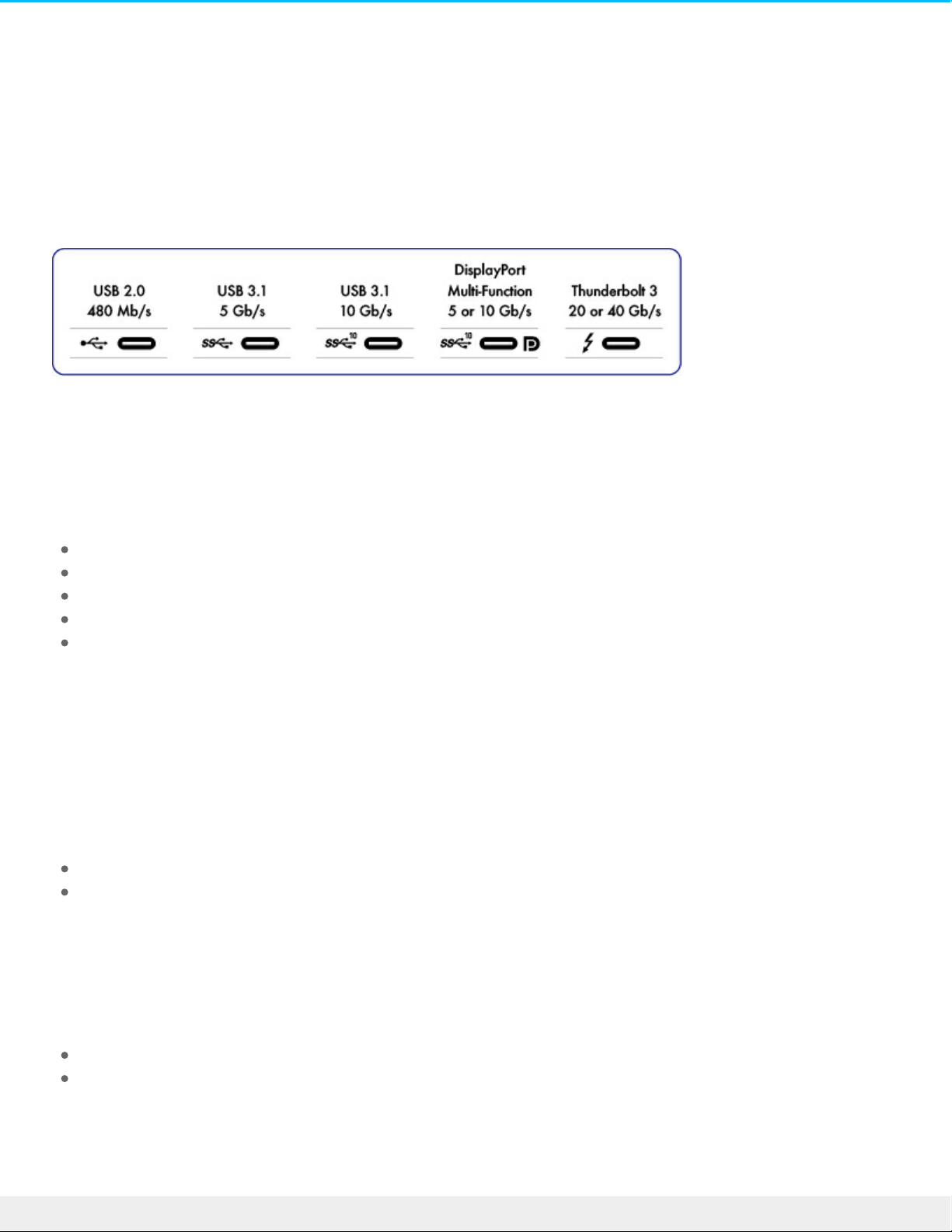
USB-C supports many protocols:
Thunderbolt 3: transfer rates up to 40Gb/s
USB 3.1 Gen 2: transfer rates up to 10Gb/s
USB 3.1 Gen 1: transfer rates up to 5Gb/s
SuperSpee d USB 3.0: transfer rates up to 5Gb/s
Hi-Speed USB 2.0: transfer rates up to 480Mb/s
The USB-C port on the LaCie Rugged USB-C is USB 3.1 Ge n 1. You can connect Rugged USB-C to any USB-C
or USB Type A port but transfer rates vary. See below for more details.
Cables
Your LaCie hard drive is shipped with two cables for universal compatibility with all modern computers:
USB 3.1 Gen 2 (USB-C)
USB 3.1 Gen 1 (USB-C)–to–USB Type A (USB 3.0 and USB 2.0)
For optimal transfer rates up to 5Gb/s, connect LaCie Rugged USB-C to a USB 3.1 port.
LaCie Rugged USB-C also supports connections to computers with USB Type A ports. Transfer rates with
USB Type A connections have the potential to reach the spe e ds listed below.
Hi-Speed USB 2.0: up to 480Mb/s
SuperSpee d USB 3.0: up to 5Gb/s
USB 3.1 (USB-C) cable
6LaCie Rugged USB-C
2/24/17
Page 7
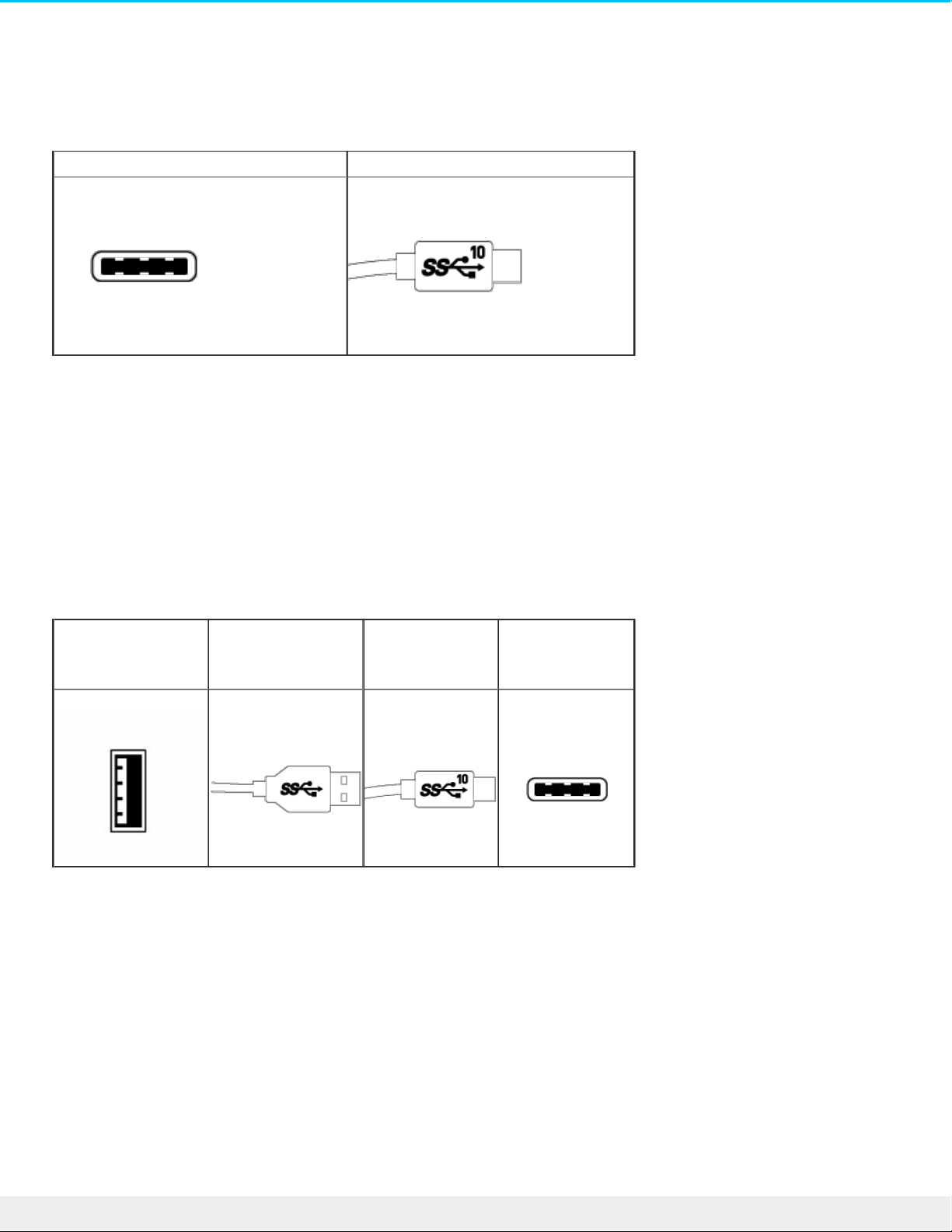
Use the USB-C cable to e nsure maximum data transfer rates with compatible ports. Connecting your product
is easy since the USB-C cable is identical on both ends. Further, the USB-C ports on your LaCie hard drive
and computer are conveniently rounded to accept the cable end no matter how it is connected.
Connector face Cable end
USB 3.1 (USB-C)–to–USB Type A cable
Use the USB 3.1 (USB-C)–to–USB Type A cable for compatibility with computers that do not have a USB-C
port. The USB-C end is connected to the LaCie hard drive and the Type A end is connected to the
computer’s USB 3.0 or USB 2.0 Type A port.
Hard drive performance is limited to USB 3.0 transfer rates when connected to a USB 3.0 port and, USB 2.0
transfer rates when connected to a USB 2.0 port
Connector face
(USB Type A to
computer)
Cable end
(USB Type A to
computer)
Cable end
(USB-C to
product)
Connector face
(USB-C to
product)
7LaCie Rugged USB-C
2/24/17
Page 8
Geng Connected
Follow the setup steps in the order they are given to ensure that your LaCie hard drive's volume mounts
correctly on your computer.
STEP 1 - Connect the USB cable
Before connecting LaCie Rugged USB-C, confirm the USB port on your computer. Your LaCie device is
shipped with two cables (see Cables and Connectors):
USB-C: use this cable if your computer has a USB-C port.
USB-C–to–USB Type A (USB 3.0/USB 2.0): use this cable if your computer does not have a USB-C port.
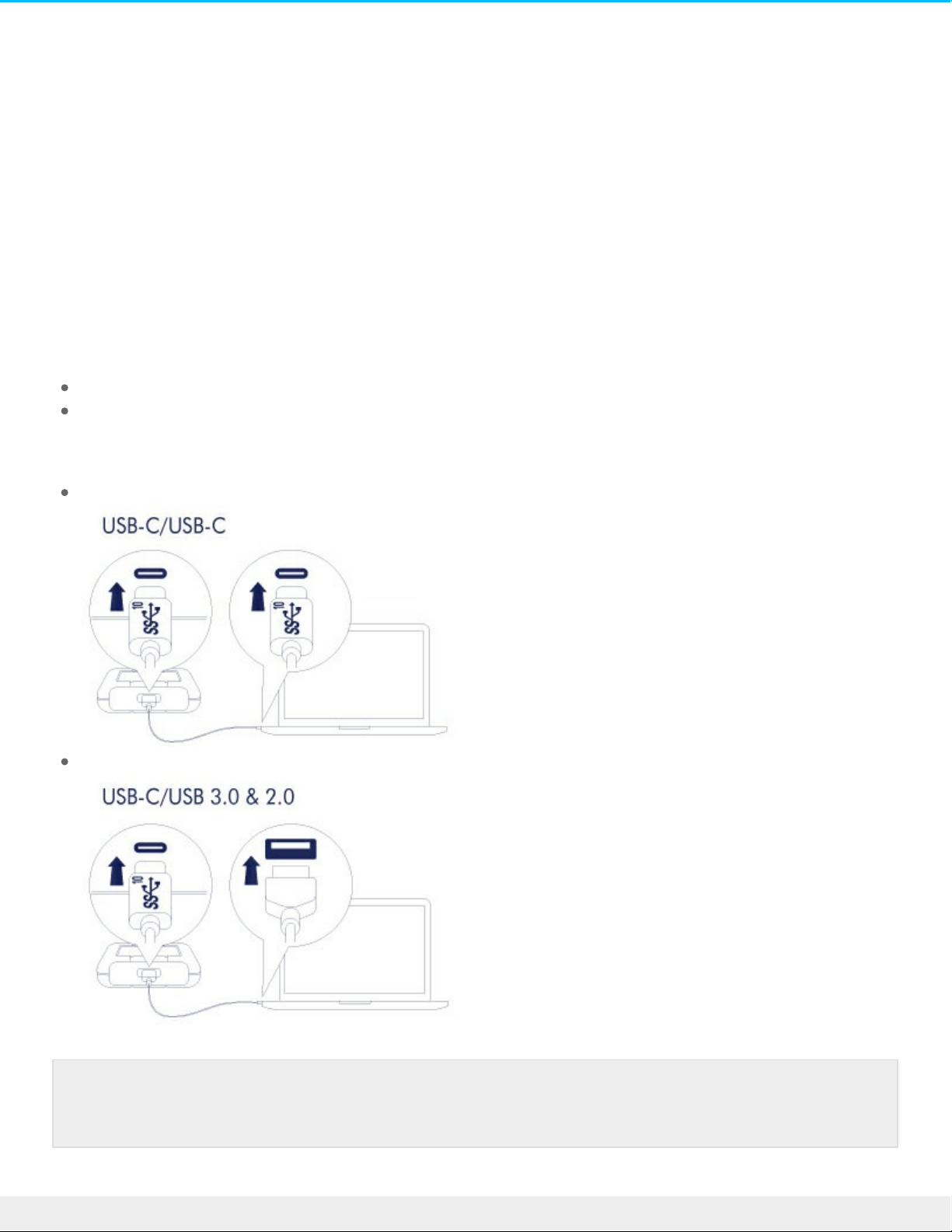
Connect the cable to the USB-C port on LaCie Rugged USB-C and a USB port on your computer.
The image below shows a connection to a computer with a USB-C port.
The image below shows a connection to a computer with a USB 3.0/2.0 Type A port.
Note: If the drive does not mount on your computer, see troubleshooting topics in the
Frequently asked questions section to help resolve common issues.
8LaCie Rugged USB-C
2/24/17
Page 9
STEP 2 - LaCie Setup Assistant
LaCie Setup Assistant must be launched before using your drive . It will allow you to:
Easily format the hard drive according to your needs.
Register your LaCie de vice.
Copy the use r manual to the hard drive.
Install software for added features.
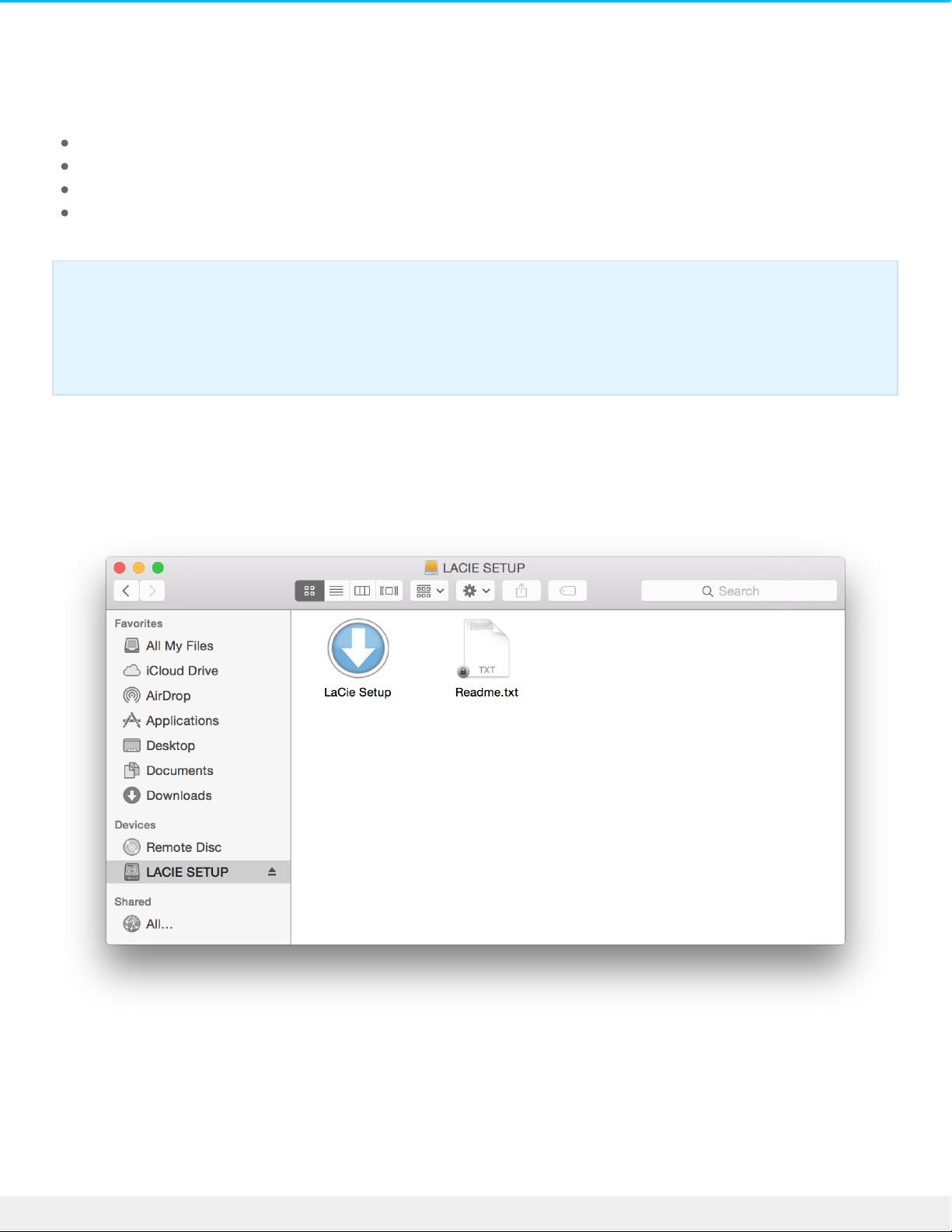
Launch LaCie Setup Assistant - Mac
Ope n the LACIE SETUP volume on your de sktop and then double click LaCie Setup.
Launch LaCie Setup Assistant - Windows
AutoPlay: Windows AutoPlay may detect your LaCie hard drive as soon as it is connected to your computer.
If the AutoPlay window appe ars, choose Open folder to view files using Windows Explorer and double-click
LaCie Setup.
Important info: If you do not launch LaCie Setup Assistant or if you quit LaCie Setup Assistant
after the formatting has begun, your drive will not be ready to use and will require manual
formatting. Additionally, the user manual and utilities will not be available and must be
downloaded from the LaCie customer support.
9LaCie Rugged USB-C
2/24/17
Page 10
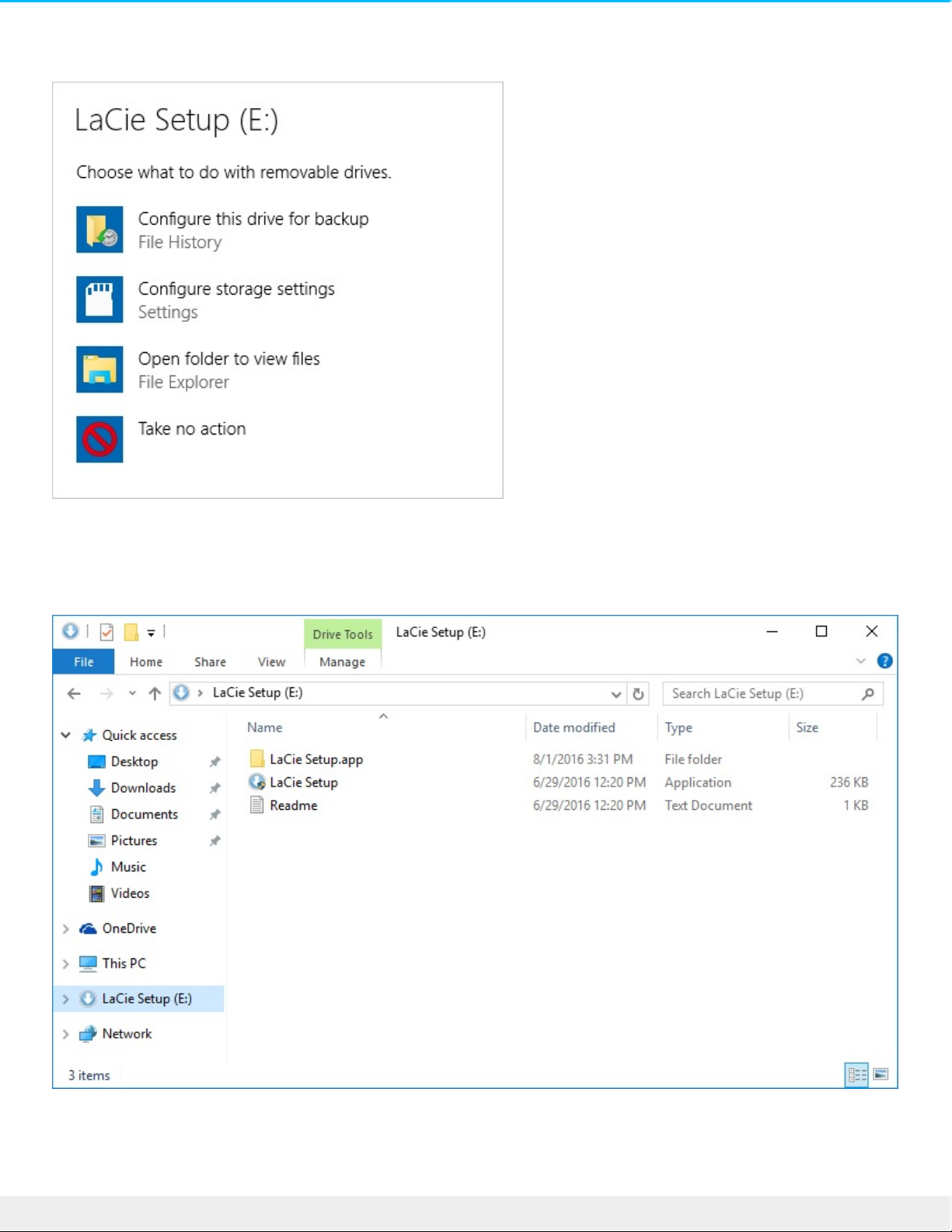
Manual access: open the LACIE SETUP volume in a Windows Explorer window and double-click LaCie
Setup.
LaCie Setup Assistant steps
10LaCie Rugged USB-C
2/24/17
Page 11

Follow the steps below to format your LaCie device for your operating system. LaCie Setup Assistant guide s
you through formatting and registering your hard drive as we ll as installing LaCie software utilities.
You can also use your system's native disk utility program to format or partition your LaCie drive. If you use
the disk utility, you can download software utilities and the user manual from LaCie customer support.
1. Select your language.
2. Read the license agreement before choosing Next. Selecting Next confirms that you accept the license
agreeme nt.
3. Use the slider to partition your LaCie hard drive. There are two options for partitions:
LaCie Share: formatted as FAT32 for compatibility with Windows and Mac.
LaCie: formatted for your operating system, NTFS for Windows or HFS+ for Mac.
Move the slider to the left to reduce the size of the LaCie Share partition. If you do not want the LaCie
Share volume, move the slider all the way to the left.
4. A prompt alerts you that the disk will be formatted. Se lect Yes to continue. LaCie Setup Assistant
formats the hard drive.
5. Register your LaCie de vice.
6. Choose the software utilities that you want to install. Certain software utilities may begin to install before
LaCie Setup Assistant has finished. Follow the software utility installer before completing LaCie Setup
Assistant. If you do not install software utilities during this step, you can return to LaCie Setup Assistant
at any time.
7. LaCie Setup Assistant provide s a summary of the installation. Choose Finish to close the program.
To install software utilities after the initial installation, you can run LaCie Setup Assistant again. Since the
format is complete you are only prompted to choose software utilities. LaCie Setup Assistant is available on:
LaCie Share: if you created two partitions
LaCie: if you created one partition
Important info for Mac users: You may be prompted to enter your computer password to
continue with LaCie Setup Assistant.
Important info for Windows users: While running LaCie Se tup Assistant, generic pop-up
windows may ask if you wish to change your computer's settings. This is a normal request when
formatting a hard drive or installing software. To successfully complete LaCie Setup Assistant,
please agree to change the settings.
11LaCie Rugged USB-C
2/24/17
Page 12
Oponal Formang and Paroning
You can use LaCie Setup Assistant to format your LaCie hard drive when it is first connected to a computer
(Mac or Windows). LaCie Setup Assistant helps you to quickly format the storage device according to your
nee ds.
Read the information below if you:
Aborted LaCie Setup Assistant while it was formatting.
Want to reformat your storage device after successfully formatting the hard drive with LaCie Setup
Assistant.
About file system formats
NTFS: since it is the native file system for Windows, volumes created in NTFS are read and write with
computers running Windows. Mac OS can read NTFS volumes but cannot native ly write to them.
Mac OS Extended (HFS+): the native hard drive file system for Mac. Windows cannot native ly read or write
to HFS+ (journaled) hard drives.
exFAT: generally compatible with Mac and Windows. exFAT is not a journaled file system which means it can
be more susceptible to data corruption when errors occur or the drive is not disconnected prope rly from
the computer.
FAT32: compatible with Mac and Windows. Howeve r, FAT32 is a legacy file system de signed for low
capacity hard drives and it is not recommended for modern hard drives or operating systems. A FAT32
partition can reach up to 32GB when formatted on a Windows PC.
How to choose the file system format
Use NTFS if:
…the storage device is connected to Windows PCs.
Use HFS+ if:
…the storage device is connected to Macs.
You can use exFAT if:
…the storage device is shared between Mac and Windows computers.
Use FAT32 if:
…the storage device is connected to olde r Windows and Mac computers. FAT32 is not recommende d for
modern ope rating systems and computers.
Formang instrucons
The steps be low help you format and partition a storage de vice .
12LaCie Rugged USB-C
2/24/17
Page 13

Windows
1. Make sure the storage device is connected to and mounted on the computer.
2. Go to Search and then type diskmgmt.msc. In the search results, double click Disk Management.
3. From the list of storage de vices in the middle of the Disk Management window, locate your LaCie
de vice.
4. The partition must be available to format. If it is currently formatted, right click on the partion and then
choose Delete.
5. To create a new partition, right click on the volume and select New Simple Volume. Follow the on-screen
instructions when the New Simple Volume Wizard appears.
Mac
1. Make sure the storage device is connected to and mounted on the computer.
2. Select Go > Utilities in the Finder menu bar.
3. In the Utilities folder, double-click Disk Utility. All connected storage devices, partitions or disk images
are displayed in the left column.
4. Select the LaCie hard drive in the left column.
5. Click the Erase tab.
6. Choose a format from the drop-down window.
7. Enter a name for the volume.
8. Click Erase and confirm your se lection in the pop-up window.
Caution: Formatting erases everything on the storage device . LaCie highly recommends that you
back up all data on your storage device before performing the steps below. LaCie is not
responsible for any data lost due to formatting, partitioning or using a LaCie storage device.
Note: Refer to your ope rating system's docume ntation for more information on formatting and
partitioning storage devices.
13LaCie Rugged USB-C
2/24/17
Page 14
Safely Remove Rugged USB-C From Your
Computer
Always eject a storage drive from your computer be fore physically disconnecting it. Your computer must
pe rform filing and housekeeping ope rations on the drive before it is removed. Therefore, if you unplug the
drive without using the operating system’s software, your files can become corrupt or damaged.
Mac
There are seve ral ways you can eject your hard drive from a Mac. See below for two options.
Eject via Finder window
1. Ope n a Finder window.
2. On the sidebar, go to Devices to locate LaCie and click the eject symbol to the right of the drive name.
3. Once the hard drive disappears from the sidebar or, the Finder window closes, you can disconnect the
hard drive's cable from your Mac.
Eject via Desktop
1. Select the de sktop icon for your hard drive and drag it to the Trash.
2. When the hard drive's icon is no longer visible on your desktop, you can physically disconnect the hard
drive from your Mac.
Windows
Use the Safely Remove tool to eject a hard drive.
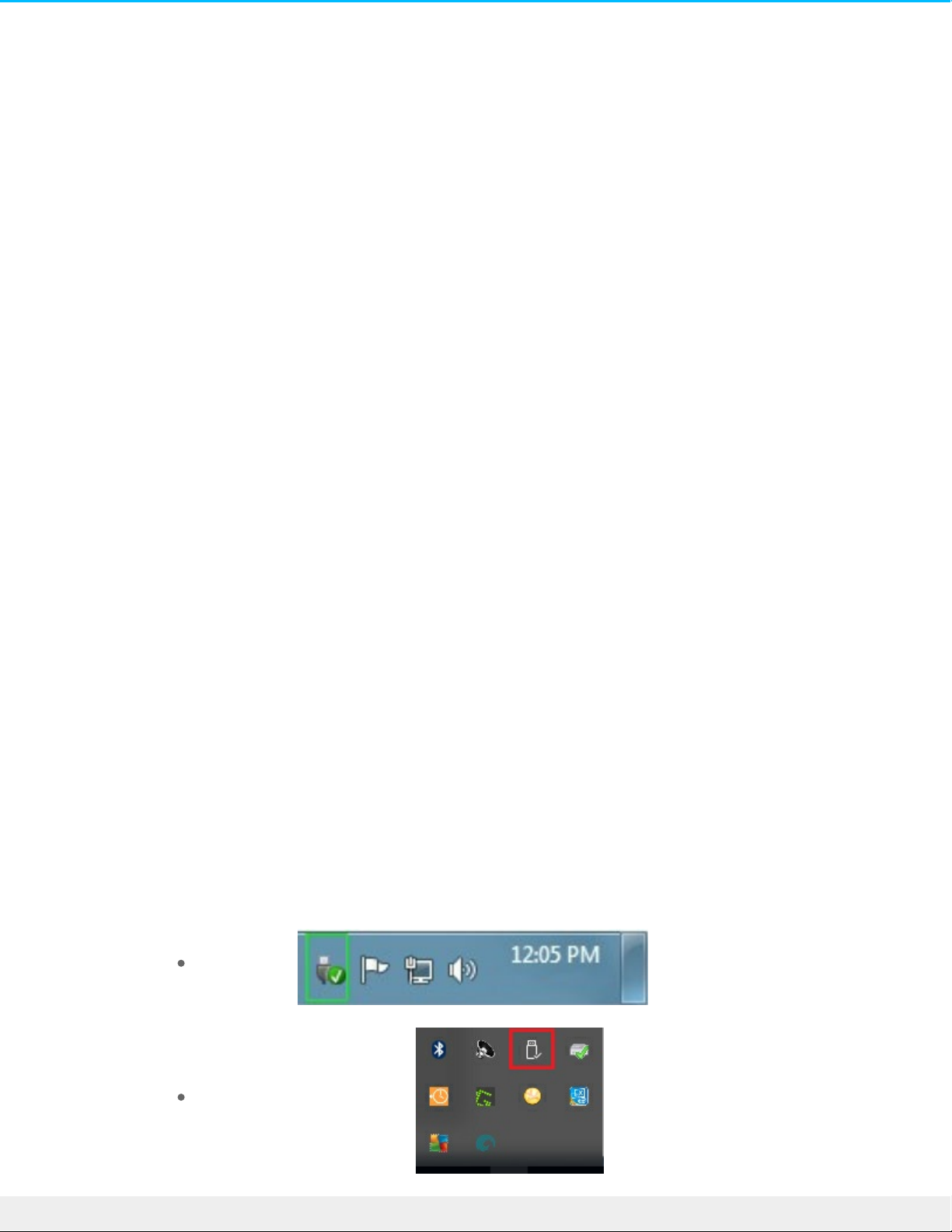
1. Click the Safely Remove icon in your Windows System Tray to vie w the de vices you can
eject.
Windows 7:
Windows 8 / Windows 10:
14LaCie Rugged USB-C
2/24/17
Page 15

2. If you don't see the Safely Remove Hardware icon, click the Show hidden icons arrow in the
system tray to display all icons in the notification area.
3. In the list of devices, choose the device you want to remove. Windows displays a
notification when it is safe to remove the device.
4. Disconnect the hard drive from the computer.
15LaCie Rugged USB-C
2/24/17
Page 16

Frequently asked quesons
For help setting up and using your LaCie hard drive, review the frequently asked questions below. For
additional support resources, go to LaCie customer support.
All users
Problem: My file transfers are too slow.
Q: Are both ends of the USB cable firmly attached?
A: Revie w troubleshooting tips for cable connections be low:
Check both ends of the USB cable and make sure that they are fully seated in their respective ports.
Try disconnecting the cable, waiting 10 seconds, and then reconnecting it.
Try a different USB cable.
Q: Is the hard drive connected to a Hi-Spe e d USB 2.0 port on your computer or hub?
A: If your hard drive is connected to a Hi-Speed 2.0 port or hub, the inferior performance is normal. LaCie
Rugged USB-C performance will improve when it is connected to a USB 3.1 port or a SuperSpe e d USB 3.0
port. Otherwise, LaCie Rugged USB-C operates at slower USB transfer rates.
Q: Are there other USB device s connected to the same port or hub?
A: Disconnect other USB de vices and see if the hard drive's pe rformance improves.
Problem: I have an older computer with USB 2.0 ports.
Q: Will my hard drive's USB 3.1 Ge n 1 port work with my computer's USB 2.0 port?
A: Yes, the cable e nd that plugs into the computer (USB Type A) is compatible with both USB 3.0 and USB
2.0. Make ce rtain to use the include d cable with the correct USB Type A connector. Howe ver, the transfer
rates are much slowe r with USB 2.0.
Problem: I must use a USB hub for my USB devices.
Q: Can I use my hard drive with a USB hub?
A: Yes, the hard drive can be connected to a USB hub. If you use a hub and e ncounter de tection problems,
slower than normal transfer rates, random disconnection from your computer or other unusual issues, try
connecting the hard drive directly to the computer's USB port.
Some USB hubs are less than efficient with power management, which can be problematic for connected
de vices. In such a case, consider trying a powered USB hub that include s a power cable.
16LaCie Rugged USB-C
2/24/17
Page 17

Please note that USB 2.0 hubs limit your hard drive's transfer rates to USB 2.0 speeds.
Problem: The provided USB cables are too short.
Q: Can I use my hard drive with a longer cable?
A: Yes, provided it is certified according to USB standards. However, LaCie recommends using the cable
shipped with your hard drive for the best results. If you use a longer cable and experience problems with
de tection, transfer rates or disconnection, use the original cable included with your hard drive.
Problem: I must password protect and/or encrypt my hard drive
Q: Can I protect my hard drive with a password?
A: Yes, it is possible to protect the hard drive or individual folders and files with a password. There are
many third-party solutions for password protection. Howe ver, LaCie cannot guarantee them since we do not
test third-party applications.
Some ve rsions of Windows have a built-in utility called Bitlocker that can protect hard drives with a
password. For more information about Bitlocker, consult Microsoft's support documentation.
Q: Can I encrypt my hard drive?
A: Yes, the hard drive can be encrypted. There are many third-party solutions for encryption. Howeve r,
LaCie cannot guarantee them since we do not test third-party applications.
Some ve rsions of Windows have a built-in utility called Bitlocker that can encrypt hard drive s. For more
information about Bitlocker, consult Microsoft's support docume ntation
Problem: I'm receiving file transfer error messages.
Q: Did you get an "Error -50" message while copying to a FAT32 volume?
A: When copying files or folders from a computer to a FAT32 volume, certain characters in the names cannot
be copied. These characters include, but are not limited to: ? < > / \ :
Check your files and folders to e nsure that these characters are not in the names.
If this is a recurring problem or you cannot find files with incompatible characters, consider reformatting the
drive to NTFS (Windows use rs) or HFS+ (Mac users). Se e Optional Formatting and Partitioning.
Q: Did you get an error message telling you that the drive has be en disconnected when coming out of sleep
mode?
A: Ignore this message since the drive remounts on the desktop de spite the pop-up. LaCie drives conse rve
power by spinning down when you set your computer to sleep mode. When the computer awakes from
sleep mode, the drive may not have e nough time to spin up, causing the pop-up to appear.
17LaCie Rugged USB-C
2/24/17
Page 18

Mac
Problem: The hard drive icon does not appear on my desktop.
Q: Is your Finde r configured to hide hard drives on the desktop?
A: Go to Finde r and then check Preferences > G eneral tab > Show these items on the desktop. Confirm that
Hard Disks is selected.
Q: Is your hard drive mounting in the ope rating system?
A: Ope n Disk Utility at Go > Utilities > Disk Utility. If the hard drive is listed in the left-hand column, check
your Finder preferences to see why it is not displaye d on the desktop (review the question above).
Q: Doe s your computer's configuration meet the minimum system requirements for use with this hard
drive?
A: Refer to the product packaging for the list of supported operating systems.
Q: Did you follow the correct installation steps for your operating system?
A: Revie w the installation steps in Getting Connected.
Windows
Problem: The hard drive icon doesn't appear in Computer.
Q: Is the hard drive listed in Device Manager?
A: All drives appear in at least one place in Device Manager.
Go to to type Device Manager and then launch it. Look in the Disk Drives section and, if necessary,
click the plus sign to view the full list of device s. If you're uncertain that your drive is listed, safely unplug it
and then reconnect it. The entry that changes is your LaCie hard drive.
Q: Is your hard drive listed next to an unusual icon?
A: Windows Device Manager usually provides information about failures with pe ripherals. While the Device
Manager can assist with troubleshooting most problems, it may not display the exact cause or provide a
precise solution.
An unusual icon next to the hard drive can reveal a problem. For example, instead of the normal icon based
on the type of device, it has an exclamation point, question mark or an X. Right click this icon and then
choose Properties. The Ge neral tab provides a potential reason why the device is not working as e xpected.
18LaCie Rugged USB-C
2/24/17
 Loading...