

Page 1
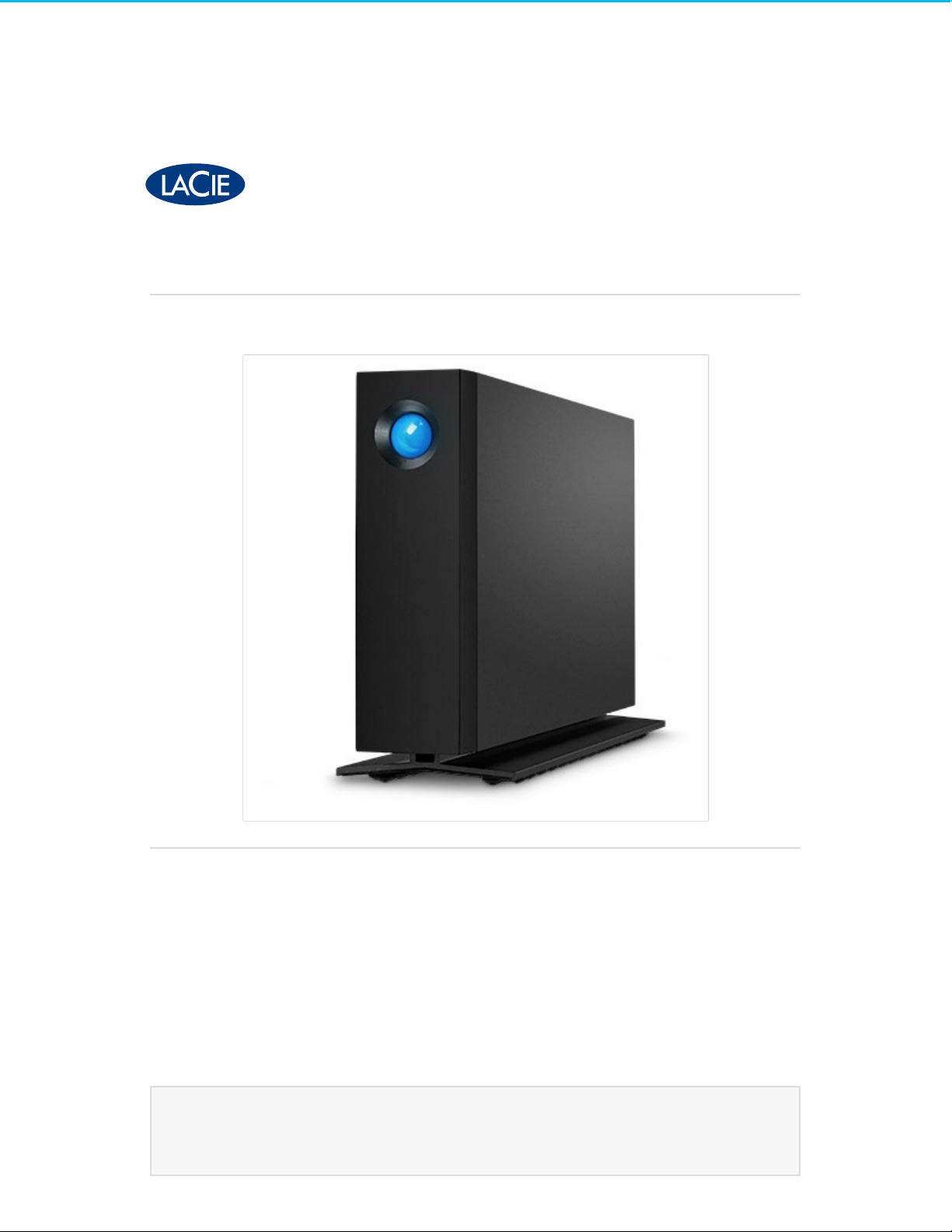
LaCie d2 Professional User Manual
Click here to access an up-to-date onl ine version
of this document. You will also fin d the most recent content as well as expandable illustrations, easier
navigation, and search capability.
Model:
Page 2

. . . . . . . . . . . . . . . . . . . . . . . . . . . . . . . . . . . . . . . . . . . . . . . . . . . . . . . . . . . . . . . . . . . . . . . . . . . . . . . . . . . . . . . . . . . . . . . . . . . . . . . . . . . . . . . . . . . . . . . . . . . . . . . . . . . . . . . . . . . . . . . . . . . . . . . . . . . . . . . . . . . . . . . . . . . . . . . . . . . . . . . . . . . . . . . . . . . . . . . . . . . . . . . . . . . . . . . . . . . . . . . . . . . . . . . . . . . . . . . . . . . . . . . . . . . . . . . . . . . . . . . . . . . . . . . . . . . . . . . .
. . . . . . . . . . . . . . . . . . . . . . . . . . . . . . . . . . . . . . . . . . . . . . . . . . . . . . . . . . . . . . . . . . . . . . . . . . . . . . . . . . . . . . . . . . . . . . . . . . . . . . . . . . . . . . . . . . . . . . . . . . . . . . . . . . . . . . . . . . . . . . . . . . . . . . . . . . . . . . . . . . . . . . . . . . . . . . . . . . . . . . . . . . . . . . . . . . . . . . . . . . . . . . . . . . . . . . . . . . . . . . . . . . . . . . . . . . . . . . . . . . . . . . . . . . . . . . . . . . . . . . . . . . . . . . . . . . . . . . . .
. . . . . . . . . . . . . . . . . . . . . . . . . . . . . . . . . . . . . . . . . . . . . . . . . . . . . . . . . . . . . . . . . . . . . . . . . . . . . . . . . . . . . . . . . . . . . . . . . . . . . . . . . . . . . . . . . . . . . . . . . . . . . . . . . . . . . . . . . . . . . . . . . . . . . . . . . . . . . . . . . . . . . . . . . . . . . . . . . . . . . . . . . . . . . . . . . . . . . . . . . . . . . . . . . . . . . . . . . . . . . . . . . . . . . . . . . . . . . . . . . . . . . . . . . . . . . . . . . . . . . . . . . . . . . . . . . . . . . . . .
. . . . . . . . . . . . . . . . . . . . . . . . . . . . . . . . . . . . . . . . . . . . . . . . . . . . . . . . . . . . . . . . . . . . . . . . . . . . . . . . . . . . . . . . . . . . . . . . . . . . . . . . . . . . . . . . . . . . . . . . . . . . . . . . . . . . . . . . . . . . . . . . . . . . . . . . . . . . . . . . . . . . . . . . . . . . . . . . . . . . . . . . . . . . . . . . . . . . . . . . . . . . . . . . . . . . . . . . . . . . . . . . . . . . . . . . . . . . . . . . . . . . . . . . . . . . . . . . . . . . . . . . . . . . . . . . . . . . . . . .
. . . . . . . . . . . . . . . . . . . . . . . . . . . . . . . . . . . . . . . . . . . . . . . . . . . . . . . . . . . . . . . . . . . . . . . . . . . . . . . . . . . . . . . . . . . . . . . . . . . . . . . . . . . . . . . . . . . . . . . . . . . . . . . . . . . . . . . . . . . . . . . . . . . . . . . . . . . . . . . . . . . . . . . . . . . . . . . . . . . . . . . . . . . . . . . . . . . . . . . . . . . . . . . . . . . . . . . . . . . . . . . . . . . . . . . . . . . . . . . . . . . . . . . . . . . . . . . . . . . . . . . . . . . . . . . . . . . . . . . .
. . . . . . . . . . . . . . . . . . . . . . . . . . . . . . . . . . . . . . . . . . . . . . . . . . . . . . . . . . . . . . . . . . . . . . . . . . . . . . . . . . . . . . . . . . . . . . . . . . . . . . . . . . . . . . . . . . . . . . . . . . . . . . . . . . . . . . . . . . . . . . . . . . . . . . . . . . . . . . . . . . . . . . . . . . . . . . . . . . . . . . . . . . . . . . . . . . . . . . . . . . . . . . . . . . . . . . . . . . . . . . . . . . . . . . . . . . . . . . . . . . . . . . . . . . . . . . . . . . . . . . . . . . . . . . . . . . . . . . . .
. . . . . . . . . . . . . . . . . . . . . . . . . . . . . . . . . . . . . . . . . . . . . . . . . . . . . . . . . . . . . . . . . . . . . . . . . . . . . . . . . . . . . . . . . . . . . . . . . . . . . . . . . . . . . . . . . . . . . . . . . . . . . . . . . . . . . . . . . . . . . . . . . . . . . . . . . . . . . . . . . . . . . . . . . . . . . . . . . . . . . . . . . . . . . . . . . . . . . . . . . . . . . . . . . . . . . . . . . . . . . . . . . . . . . . . . . . . . . . . . . . . . . . . . . . . . . . . . . . . . . . . . . . . . . . . . . . . . . . . .
. . . . . . . . . . . . . . . . . . . . . . . . . . . . . . . . . . . . . . . . . . . . . . . . . . . . . . . . . . . . . . . . . . . . . . . . . . . . . . . . . . . . . . . . . . . . . . . . . . . . . . . . . . . . . . . . . . . . . . . . . . . . . . . . . . . . . . . . . . . . . . . . . . . . . . . . . . . . . . . . . . . . . . . . . . . . . . . . . . . . . . . . . . . . . . . . . . . . . . . . . . . . . . . . . . . . . . . . . . . . . . . . . . . . . . . . . . . . . . . . . . . . . . . . . . . . . . . . . . . . . . . . . . . . . . . . . . . . . . . .
. . . . . . . . . . . . . . . . . . . . . . . . . . . . . . . . . . . . . . . . . . . . . . . . . . . . . . . . . . . . . . . . . . . . . . . . . . . . . . . . . . . . . . . . . . . . . . . . . . . . . . . . . . . . . . . . . . . . . . . . . . . . . . . . . . . . . . . . . . . . . . . . . . . . . . . . . . . . . . . . . . . . . . . . . . . . . . . . . . . . . . . . . . . . . . . . . . . . . . . . . . . . . . . . . . . . . . . . . . . . . . . . . . . . . . . . . . . . . . . . . . . . . . . . . . . . . . . . . . . . . . . . . . . . . . . . . . . . . . . .
. . . . . . . . . . . . . . . . . . . . . . . . . . . . . . . . . . . . . . . . . . . . . . . . . . . . . . . . . . . . . . . . . . . . . . . . . . . . . . . . . . . . . . . . . . . . . . . . . . . . . . . . . . . . . . . . . . . . . . . . . . . . . . . . . . . . . . . . . . . . . . . . . . . . . . . . . . . . . . . . . . . . . . . . . . . . . . . . . . . . . . . . . . . . . . . . . . . . . . . . . . . . . . . . . . . . . . . . . . . . . . . . . . . . . . . . . . . . . . . . . . . . . . . . . . . . . . . . . . . . . . . . . . . . . . . . . . . . . . . .
. . . . . . . . . . . . . . . . . . . . . . . . . . . . . . . . . . . . . . . . . . . . . . . . . . . . . . . . . . . . . . . . . . . . . . . . . . . . . . . . . . . . . . . . . . . . . . . . . . . . . . . . . . . . . . . . . . . . . . . . . . . . . . . . . . . . . . . . . . . . . . . . . . . . . . . . . . . . . . . . . . . . . . . . . . . . . . . . . . . . . . . . . . . . . . . . . . . . . . . . . . . . . . . . . . . . . . . . . . . . . . . . . . . . . . . . . . . . . . . . . . . . . . . . . . . . . . . . . . . . . . . . . . . . . . . . . . . . . . . .
. . . . . . . . . . . . . . . . . . . . . . . . . . . . . . . . . . . . . . . . . . . . . . . . . . . . . . . . . . . . . . . . . . . . . . . . . . . . . . . . . . . . . . . . . . . . . . . . . . . . . . . . . . . . . . . . . . . . . . . . . . . . . . . . . . . . . . . . . . . . . . . . . . . . . . . . . . . . . . . . . . . . . . . . . . . . . . . . . . . . . . . . . . . . . . . . . . . . . . . . . . . . . . . . . . . . . . . . . . . . . . . . . . . . . . . . . . . . . . . . . . . . . . . . . . . . . . . . . . . . . . . . . . . . . . . . . . . . . . . .
. . . . . . . . . . . . . . . . . . . . . . . . . . . . . . . . . . . . . . . . . . . . . . . . . . . . . . . . . . . . . . . . . . . . . . . . . . . . . . . . . . . . . . . . . . . . . . . . . . . . . . . . . . . . . . . . . . . . . . . . . . . . . . . . . . . . . . . . . . . . . . . . . . . . . . . . . . . . . . . . . . . . . . . . . . . . . . . . . . . . . . . . . . . . . . . . . . . . . . . . . . . . . . . . . . . . . . . . . . . . . . . . . . . . . . . . . . . . . . . . . . . . . . . . . . . . . . . . . . . . . . . . . . . . . . . . . . . . . . . .
. . . . . . . . . . . . . . . . . . . . . . . . . . . . . . . . . . . . . . . . . . . . . . . . . . . . . . . . . . . . . . . . . . . . . . . . . . . . . . . . . . . . . . . . . . . . . . . . . . . . . . . . . . . . . . . . . . . . . . . . . . . . . . . . . . . . . . . . . . . . . . . . . . . . . . . . . . . . . . . . . . . . . . . . . . . . . . . . . . . . . . . . . . . . . . . . . . . . . . . . . . . . . . . . . . . . . . . . . . . . . . . . . . . . . . . . . . . . . . . . . . . . . . . . . . . . . . . . . . . . . . . . . . . . . . . . . . . . . . . .
. . . . . . . . . . . . . . . . . . . . . . . . . . . . . . . . . . . . . . . . . . . . . . . . . . . . . . . . . . . . . . . . . . . . . . . . . . . . . . . . . . . . . . . . . . . . . . . . . . . . . . . . . . . . . . . . . . . . . . . . . . . . . . . . . . . . . . . . . . . . . . . . . . . . . . . . . . . . . . . . . . . . . . . . . . . . . . . . . . . . . . . . . . . . . . . . . . . . . . . . . . . . . . . . . . . . . . . . . . . . . . . . . . . . . . . . . . . . . . . . . . . . . . . . . . . . . . . . . . . . . . . . . . . . . . . . . . . . . . . .
. . . . . . . . . . . . . . . . . . . . . . . . . . . . . . . . . . . . . . . . . . . . . . . . . . . . . . . . . . . . . . . . . . . . . . . . . . . . . . . . . . . . . . . . . . . . . . . . . . . . . . . . . . . . . . . . . . . . . . . . . . . . . . . . . . . . . . . . . . . . . . . . . . . . . . . . . . . . . . . . . . . . . . . . . . . . . . . . . . . . . . . . . . . . . . . . . . . . . . . . . . . . . . . . . . . . . . . . . . . . . . . . . . . . . . . . . . . . . . . . . . . . . . . . . . . . . . . . . . . . . . . . . . . . . . . . . . . . . . . .
. . . . . . . . . . . . . . . . . . . . . . . . . . . . . . . . . . . . . . . . . . . . . . . . . . . . . . . . . . . . . . . . . . . . . . . . . . . . . . . . . . . . . . . . . . . . . . . . . . . . . . . . . . . . . . . . . . . . . . . . . . . . . . . . . . . . . . . . . . . . . . . . . . . . . . . . . . . . . . . . . . . . . . . . . . . . . . . . . . . . . . . . . . . . . . . . . . . . . . . . . . . . . . . . . . . . . . . . . . . . . . . . . . . . . . . . . . . . . . . . . . . . . . . . . . . . . . . . . . . . . . . . . . . . . . . . . . . . . . . .
. . . . . . . . . . . . . . . . . . . . . . . . . . . . . . . . . . . . . . . . . . . . . . . . . . . . . . . . . . . . . . . . . . . . . . . . . . . . . . . . . . . . . . . . . . . . . . . . . . . . . . . . . . . . . . . . . . . . . . . . . . . . . . . . . . . . . . . . . . . . . . . . . . . . . . . . . . . . . . . . . . . . . . . . . . . . . . . . . . . . . . . . . . . . . . . . . . . . . . . . . . . . . . . . . . . . . . . . . . . . . . . . . . . . . . . . . . . . . . . . . . . . . . . . . . . . . . . . . . . . . . . . . . . . . . . . . . . . . . . .
. . . . . . . . . . . . . . . . . . . . . . . . . . . . . . . . . . . . . . . . . . . . . . . . . . . . . . . . . . . . . . . . . . . . . . . . . . . . . . . . . . . . . . . . . . . . . . . . . . . . . . . . . . . . . . . . . . . . . . . . . . . . . . . . . . . . . . . . . . . . . . . . . . . . . . . . . . . . . . . . . . . . . . . . . . . . . . . . . . . . . . . . . . . . . . . . . . . . . . . . . . . . . . . . . . . . . . . . . . . . . . . . . . . . . . . . . . . . . . . . . . . . . . . . . . . . . . . . . . . . . . . . . . . . . . . . . . . . . . . .
. . . . . . . . . . . . . . . . . . . . . . . . . . . . . . . . . . . . . . . . . . . . . . . . . . . . . . . . . . . . . . . . . . . . . . . . . . . . . . . . . . . . . . . . . . . . . . . . . . . . . . . . . . . . . . . . . . . . . . . . . . . . . . . . . . . . . . . . . . . . . . . . . . . . . . . . . . . . . . . . . . . . . . . . . . . . . . . . . . . . . . . . . . . . . . . . . . . . . . . . . . . . . . . . . . . . . . . . . . . . . . . . . . . . . . . . . . . . . . . . . . . . . . . . . . . . . . . . . . . . . . . . . . . . . . . . . . . . . . . .
. . . . . . . . . . . . . . . . . . . . . . . . . . . . . . . . . . . . . . . . . . . . . . . . . . . . . . . . . . . . . . . . . . . . . . . . . . . . . . . . . . . . . . . . . . . . . . . . . . . . . . . . . . . . . . . . . . . . . . . . . . . . . . . . . . . . . . . . . . . . . . . . . . . . . . . . . . . . . . . . . . . . . . . . . . . . . . . . . . . . . . . . . . . . . . . . . . . . . . . . . . . . . . . . . . . . . . . . . . . . . . . . . . . . . . . . . . . . . . . . . . . . . . . . . . . . . . . . . . . . . . . . . . . . . . . . . . . . . . . .
. . . . . . . . . . . . . . . . . . . . . . . . . . . . . . . . . . . . . . . . . . . . . . . . . . . . . . . . . . . . . . . . . . . . . . . . . . . . . . . . . . . . . . . . . . . . . . . . . . . . . . . . . . . . . . . . . . . . . . . . . . . . . . . . . . . . . . . . . . . . . . . . . . . . . . . . . . . . . . . . . . . . . . . . . . . . . . . . . . . . . . . . . . . . . . . . . . . . . . . . . . . . . . . . . . . . . . . . . . . . . . . . . . . . . . . . . . . . . . . . . . . . . . . . . . . . . . . . . . . . . . . . . . . . . . . . . . . . . . . .
Cont en t sCont en t s
1 Introduction
Box content
Minim um system requirements
Views
Technical specifications
Position and stacking
2 System LEDs
Power button
Power-saving mode
LED status
Receiving power
3 Cables and Connectors
USB-C protocols
Cables
4 Getting Connected
STEP 1 – Connect the USB cable
STEP 2 - Prepare and connect the power supply
STEP 3 - Set up LaCie d2 Professional
Storage format
Disconnecting the hard drive
5 Optional Formatting and Partitioning
About file system formats
. . . . . . . . . . . . . . . . . . . . . . . . . . . . . . . . . . . . . . . . . . . . . . . . . . . . . . . . . . . . . . . . . . . . . . . . . . . . . . . . . . . . . . . . . . . . . . . . . . . . . . . . . . . . . . . . . . . . . . . . . . . . . . . . . . . . . . . . . . . . . . . . . . . . . . . . . . . . . . . . . . . . . . . . . . . . . . . . . . . . . . . . . . . . . . . . . . . . . . . . . . . . . . . . . . . . . . . . . . . . . . . . . . . . . . . . . . . . . . . . . . . . . . . . . . . . . . . . . . . . . . . . . . . . . . . . . . . . . . . .Fro nt
. . . . . . . . . . . . . . . . . . . . . . . . . . . . . . . . . . . . . . . . . . . . . . . . . . . . . . . . . . . . . . . . . . . . . . . . . . . . . . . . . . . . . . . . . . . . . . . . . . . . . . . . . . . . . . . . . . . . . . . . . . . . . . . . . . . . . . . . . . . . . . . . . . . . . . . . . . . . . . . . . . . . . . . . . . . . . . . . . . . . . . . . . . . . . . . . . . . . . . . . . . . . . . . . . . . . . . . . . . . . . . . . . . . . . . . . . . . . . . . . . . . . . . . . . . . . . . . . . . . . . . . . . . . . . . . . . . . . . . . .Back
. . . . . . . . . . . . . . . . . . . . . . . . . . . . . . . . . . . . . . . . . . . . . . . . . . . . . . . . . . . . . . . . . . . . . . . . . . . . . . . . . . . . . . . . . . . . . . . . . . . . . . . . . . . . . . . . . . . . . . . . . . . . . . . . . . . . . . . . . . . . . . . . . . . . . . . . . . . . . . . . . . . . . . . . . . . . . . . . . . . . . . . . . . . . . . . . . . . . . . . . . . . . . . . . . . . . . . . . . . . . . . . . . . . . . . . . . . . . . . . . . . . . . . . . . . . . . . . . . . . . . . . . . . . . . . . . . . . . . . . .Enclo s ure dimensio ns
. . . . . . . . . . . . . . . . . . . . . . . . . . . . . . . . . . . . . . . . . . . . . . . . . . . . . . . . . . . . . . . . . . . . . . . . . . . . . . . . . . . . . . . . . . . . . . . . . . . . . . . . . . . . . . . . . . . . . . . . . . . . . . . . . . . . . . . . . . . . . . . . . . . . . . . . . . . . . . . . . . . . . . . . . . . . . . . . . . . . . . . . . . . . . . . . . . . . . . . . . . . . . . . . . . . . . . . . . . . . . . . . . . . . . . . . . . . . . . . . . . . . . . . . . . . . . . . . . . . . . . . . . . . . . . . . . . . . . . . .Weight
. . . . . . . . . . . . . . . . . . . . . . . . . . . . . . . . . . . . . . . . . . . . . . . . . . . . . . . . . . . . . . . . . . . . . . . . . . . . . . . . . . . . . . . . . . . . . . . . . . . . . . . . . . . . . . . . . . . . . . . . . . . . . . . . . . . . . . . . . . . . . . . . . . . . . . . . . . . . . . . . . . . . . . . . . . . . . . . . . . . . . . . . . . . . . . . . . . . . . . . . . . . . . . . . . . . . . . . . . . . . . . . . . . . . . . . . . . . . . . . . . . . . . . . . . . . . . . . . . . . . . . . . . . . . . . . . . . . . . . . .Electrical
. . . . . . . . . . . . . . . . . . . . . . . . . . . . . . . . . . . . . . . . . . . . . . . . . . . . . . . . . . . . . . . . . . . . . . . . . . . . . . . . . . . . . . . . . . . . . . . . . . . . . . . . . . . . . . . . . . . . . . . . . . . . . . . . . . . . . . . . . . . . . . . . . . . . . . . . . . . . . . . . . . . . . . . . . . . . . . . . . . . . . . . . . . . . . . . . . . . . . . . . . . . . . . . . . . . . . . . . . . . . . . . . . . . . . . . . . . . . . . . . . . . . . . . . . . . . . . . . . . . . . . . . . . . . . . . . . . . . . . . .Po we r o n
. . . . . . . . . . . . . . . . . . . . . . . . . . . . . . . . . . . . . . . . . . . . . . . . . . . . . . . . . . . . . . . . . . . . . . . . . . . . . . . . . . . . . . . . . . . . . . . . . . . . . . . . . . . . . . . . . . . . . . . . . . . . . . . . . . . . . . . . . . . . . . . . . . . . . . . . . . . . . . . . . . . . . . . . . . . . . . . . . . . . . . . . . . . . . . . . . . . . . . . . . . . . . . . . . . . . . . . . . . . . . . . . . . . . . . . . . . . . . . . . . . . . . . . . . . . . . . . . . . . . . . . . . . . . . . . . . . . . . . . .Po we r o ff
. . . . . . . . . . . . . . . . . . . . . . . . . . . . . . . . . . . . . . . . . . . . . . . . . . . . . . . . . . . . . . . . . . . . . . . . . . . . . . . . . . . . . . . . . . . . . . . . . . . . . . . . . . . . . . . . . . . . . . . . . . . . . . . . . . . . . . . . . . . . . . . . . . . . . . . . . . . . . . . . . . . . . . . . . . . . . . . . . . . . . . . . . . . . . . . . . . . . . . . . . . . . . . . . . . . . . . . . . . . . . . . . . . . . . . . . . . . . . . . . . . . . . . . . . . . . . . . . . . . . . . . . . . . . . . . . . . . . . . . .Manually initiating po wer-s aving mo de
. . . . . . . . . . . . . . . . . . . . . . . . . . . . . . . . . . . . . . . . . . . . . . . . . . . . . . . . . . . . . . . . . . . . . . . . . . . . . . . . . . . . . . . . . . . . . . . . . . . . . . . . . . . . . . . . . . . . . . . . . . . . . . . . . . . . . . . . . . . . . . . . . . . . . . . . . . . . . . . . . . . . . . . . . . . . . . . . . . . . . . . . . . . . . . . . . . . . . . . . . . . . . . . . . . . . . . . . . . . . . . . . . . . . . . . . . . . . . . . . . . . . . . . . . . . . . . . . . . . . . . . . . . . . . . . . . . . . . . . .Po we r-saving mode: managed by the PC/Mac
. . . . . . . . . . . . . . . . . . . . . . . . . . . . . . . . . . . . . . . . . . . . . . . . . . . . . . . . . . . . . . . . . . . . . . . . . . . . . . . . . . . . . . . . . . . . . . . . . . . . . . . . . . . . . . . . . . . . . . . . . . . . . . . . . . . . . . . . . . . . . . . . . . . . . . . . . . . . . . . . . . . . . . . . . . . . . . . . . . . . . . . . . . . . . . . . . . . . . . . . . . . . . . . . . . . . . . . . . . . . . . . . . . . . . . . . . . . . . . . . . . . . . . . . . . . . . . . . . . . . . . . . . . . . . . . . . . . . . . . .Exiting po wer-s aving mo de
. . . . . . . . . . . . . . . . . . . . . . . . . . . . . . . . . . . . . . . . . . . . . . . . . . . . . . . . . . . . . . . . . . . . . . . . . . . . . . . . . . . . . . . . . . . . . . . . . . . . . . . . . . . . . . . . . . . . . . . . . . . . . . . . . . . . . . . . . . . . . . . . . . . . . . . . . . . . . . . . . . . . . . . . . . . . . . . . . . . . . . . . . . . . . . . . . . . . . . . . . . . . . . . . . . . . . . . . . . . . . . . . . . . . . . . . . . . . . . . . . . . . . . . . . . . . . . . . . . . . . . . . . . . . . . . . . . . . . . . .USB-C to USB-C cable
. . . . . . . . . . . . . . . . . . . . . . . . . . . . . . . . . . . . . . . . . . . . . . . . . . . . . . . . . . . . . . . . . . . . . . . . . . . . . . . . . . . . . . . . . . . . . . . . . . . . . . . . . . . . . . . . . . . . . . . . . . . . . . . . . . . . . . . . . . . . . . . . . . . . . . . . . . . . . . . . . . . . . . . . . . . . . . . . . . . . . . . . . . . . . . . . . . . . . . . . . . . . . . . . . . . . . . . . . . . . . . . . . . . . . . . . . . . . . . . . . . . . . . . . . . . . . . . . . . . . . . . . . . . . . . . . . . . . . . . .USB-C to USB Type A cable
. . . . . . . . . . . . . . . . . . . . . . . . . . . . . . . . . . . . . . . . . . . . . . . . . . . . . . . . . . . . . . . . . . . . . . . . . . . . . . . . . . . . . . . . . . . . . . . . . . . . . . . . . . . . . . . . . . . . . . . . . . . . . . . . . . . . . . . . . . . . . . . . . . . . . . . . . . . . . . . . . . . . . . . . . . . . . . . . . . . . . . . . . . . . . . . . . . . . . . . . . . . . . . . . . . . . . . . . . . . . . . . . . . . . . . . . . . . . . . . . . . . . . . . . . . . . . . . . . . . . . . . . . . . . . . . . . . . . . . . .USB-C to USB-C
. . . . . . . . . . . . . . . . . . . . . . . . . . . . . . . . . . . . . . . . . . . . . . . . . . . . . . . . . . . . . . . . . . . . . . . . . . . . . . . . . . . . . . . . . . . . . . . . . . . . . . . . . . . . . . . . . . . . . . . . . . . . . . . . . . . . . . . . . . . . . . . . . . . . . . . . . . . . . . . . . . . . . . . . . . . . . . . . . . . . . . . . . . . . . . . . . . . . . . . . . . . . . . . . . . . . . . . . . . . . . . . . . . . . . . . . . . . . . . . . . . . . . . . . . . . . . . . . . . . . . . . . . . . . . . . . . . . . . . . .USB-C to USB Type A
4
4
4
4
4
4
5
5
5
6
6
7
7
7
8
8
8
8
8
9
9
11
11
11
11
12
13
13
13
13
14
15
16
17
18
18
Page 3

. . . . . . . . . . . . . . . . . . . . . . . . . . . . . . . . . . . . . . . . . . . . . . . . . . . . . . . . . . . . . . . . . . . . . . . . . . . . . . . . . . . . . . . . . . . . . . . . . . . . . . . . . . . . . . . . . . . . . . . . . . . . . . . . . . . . . . . . . . . . . . . . . . . . . . . . . . . . . . . . . . . . . . . . . . . . . . . . . . . . . . . . . . . . . . . . . . . . . . . . . . . . . . . . . . . . . . . . . . . . . . . . . . . . . . . . . . . . . . . . . . . . . . . . . . . . . . . . . . . . . . . . . . . . . . . . . . . . . . . .
. . . . . . . . . . . . . . . . . . . . . . . . . . . . . . . . . . . . . . . . . . . . . . . . . . . . . . . . . . . . . . . . . . . . . . . . . . . . . . . . . . . . . . . . . . . . . . . . . . . . . . . . . . . . . . . . . . . . . . . . . . . . . . . . . . . . . . . . . . . . . . . . . . . . . . . . . . . . . . . . . . . . . . . . . . . . . . . . . . . . . . . . . . . . . . . . . . . . . . . . . . . . . . . . . . . . . . . . . . . . . . . . . . . . . . . . . . . . . . . . . . . . . . . . . . . . . . . . . . . . . . . . . . . . . . . . . . . . . . . .
. . . . . . . . . . . . . . . . . . . . . . . . . . . . . . . . . . . . . . . . . . . . . . . . . . . . . . . . . . . . . . . . . . . . . . . . . . . . . . . . . . . . . . . . . . . . . . . . . . . . . . . . . . . . . . . . . . . . . . . . . . . . . . . . . . . . . . . . . . . . . . . . . . . . . . . . . . . . . . . . . . . . . . . . . . . . . . . . . . . . . . . . . . . . . . . . . . . . . . . . . . . . . . . . . . . . . . . . . . . . . . . . . . . . . . . . . . . . . . . . . . . . . . . . . . . . . . . . . . . . . . . . . . . . . . . . . . . . . . . .
. . . . . . . . . . . . . . . . . . . . . . . . . . . . . . . . . . . . . . . . . . . . . . . . . . . . . . . . . . . . . . . . . . . . . . . . . . . . . . . . . . . . . . . . . . . . . . . . . . . . . . . . . . . . . . . . . . . . . . . . . . . . . . . . . . . . . . . . . . . . . . . . . . . . . . . . . . . . . . . . . . . . . . . . . . . . . . . . . . . . . . . . . . . . . . . . . . . . . . . . . . . . . . . . . . . . . . . . . . . . . . . . . . . . . . . . . . . . . . . . . . . . . . . . . . . . . . . . . . . . . . . . . . . . . . . . . . . . . . . .
. . . . . . . . . . . . . . . . . . . . . . . . . . . . . . . . . . . . . . . . . . . . . . . . . . . . . . . . . . . . . . . . . . . . . . . . . . . . . . . . . . . . . . . . . . . . . . . . . . . . . . . . . . . . . . . . . . . . . . . . . . . . . . . . . . . . . . . . . . . . . . . . . . . . . . . . . . . . . . . . . . . . . . . . . . . . . . . . . . . . . . . . . . . . . . . . . . . . . . . . . . . . . . . . . . . . . . . . . . . . . . . . . . . . . . . . . . . . . . . . . . . . . . . . . . . . . . . . . . . . . . . . . . . . . . . . . . . . . . . .
. . . . . . . . . . . . . . . . . . . . . . . . . . . . . . . . . . . . . . . . . . . . . . . . . . . . . . . . . . . . . . . . . . . . . . . . . . . . . . . . . . . . . . . . . . . . . . . . . . . . . . . . . . . . . . . . . . . . . . . . . . . . . . . . . . . . . . . . . . . . . . . . . . . . . . . . . . . . . . . . . . . . . . . . . . . . . . . . . . . . . . . . . . . . . . . . . . . . . . . . . . . . . . . . . . . . . . . . . . . . . . . . . . . . . . . . . . . . . . . . . . . . . . . . . . . . . . . . . . . . . . . . . . . . . . . . . . . . . . . .
. . . . . . . . . . . . . . . . . . . . . . . . . . . . . . . . . . . . . . . . . . . . . . . . . . . . . . . . . . . . . . . . . . . . . . . . . . . . . . . . . . . . . . . . . . . . . . . . . . . . . . . . . . . . . . . . . . . . . . . . . . . . . . . . . . . . . . . . . . . . . . . . . . . . . . . . . . . . . . . . . . . . . . . . . . . . . . . . . . . . . . . . . . . . . . . . . . . . . . . . . . . . . . . . . . . . . . . . . . . . . . . . . . . . . . . . . . . . . . . . . . . . . . . . . . . . . . . . . . . . . . . . . . . . . . . . . . . . . . . .
. . . . . . . . . . . . . . . . . . . . . . . . . . . . . . . . . . . . . . . . . . . . . . . . . . . . . . . . . . . . . . . . . . . . . . . . . . . . . . . . . . . . . . . . . . . . . . . . . . . . . . . . . . . . . . . . . . . . . . . . . . . . . . . . . . . . . . . . . . . . . . . . . . . . . . . . . . . . . . . . . . . . . . . . . . . . . . . . . . . . . . . . . . . . . . . . . . . . . . . . . . . . . . . . . . . . . . . . . . . . . . . . . . . . . . . . . . . . . . . . . . . . . . . . . . . . . . . . . . . . . . . . . . . . . . . . . . . . . . . .
. . . . . . . . . . . . . . . . . . . . . . . . . . . . . . . . . . . . . . . . . . . . . . . . . . . . . . . . . . . . . . . . . . . . . . . . . . . . . . . . . . . . . . . . . . . . . . . . . . . . . . . . . . . . . . . . . . . . . . . . . . . . . . . . . . . . . . . . . . . . . . . . . . . . . . . . . . . . . . . . . . . . . . . . . . . . . . . . . . . . . . . . . . . . . . . . . . . . . . . . . . . . . . . . . . . . . . . . . . . . . . . . . . . . . . . . . . . . . . . . . . . . . . . . . . . . . . . . . . . . . . . . . . . . . . . . . . . . . . . .
. . . . . . . . . . . . . . . . . . . . . . . . . . . . . . . . . . . . . . . . . . . . . . . . . . . . . . . . . . . . . . . . . . . . . . . . . . . . . . . . . . . . . . . . . . . . . . . . . . . . . . . . . . . . . . . . . . . . . . . . . . . . . . . . . . . . . . . . . . . . . . . . . . . . . . . . . . . . . . . . . . . . . . . . . . . . . . . . . . . . . . . . . . . . . . . . . . . . . . . . . . . . . . . . . . . . . . . . . . . . . . . . . . . . . . . . . . . . . . . . . . . . . . . . . . . . . . . . . . . . . . . . . . . . . . . . . . . . . . . .
. . . . . . . . . . . . . . . . . . . . . . . . . . . . . . . . . . . . . . . . . . . . . . . . . . . . . . . . . . . . . . . . . . . . . . . . . . . . . . . . . . . . . . . . . . . . . . . . . . . . . . . . . . . . . . . . . . . . . . . . . . . . . . . . . . . . . . . . . . . . . . . . . . . . . . . . . . . . . . . . . . . . . . . . . . . . . . . . . . . . . . . . . . . . . . . . . . . . . . . . . . . . . . . . . . . . . . . . . . . . . . . . . . . . . . . . . . . . . . . . . . . . . . . . . . . . . . . . . . . . . . . . . . . . . . . . . . . . . . . .
. . . . . . . . . . . . . . . . . . . . . . . . . . . . . . . . . . . . . . . . . . . . . . . . . . . . . . . . . . . . . . . . . . . . . . . . . . . . . . . . . . . . . . . . . . . . . . . . . . . . . . . . . . . . . . . . . . . . . . . . . . . . . . . . . . . . . . . . . . . . . . . . . . . . . . . . . . . . . . . . . . . . . . . . . . . . . . . . . . . . . . . . . . . . . . . . . . . . . . . . . . . . . . . . . . . . . . . . . . . . . . . . . . . . . . . . . . . . . . . . . . . . . . . . . . . . . . . . . . . . . . . . . . . . . . . . . . . . . . . .
. . . . . . . . . . . . . . . . . . . . . . . . . . . . . . . . . . . . . . . . . . . . . . . . . . . . . . . . . . . . . . . . . . . . . . . . . . . . . . . . . . . . . . . . . . . . . . . . . . . . . . . . . . . . . . . . . . . . . . . . . . . . . . . . . . . . . . . . . . . . . . . . . . . . . . . . . . . . . . . . . . . . . . . . . . . . . . . . . . . . . . . . . . . . . . . . . . . . . . . . . . . . . . . . . . . . . . . . . . . . . . . . . . . . . . . . . . . . . . . . . . . . . . . . . . . . . . . . . . . . . . . . . . . . . . . . . . . . . . . .
. . . . . . . . . . . . . . . . . . . . . . . . . . . . . . . . . . . . . . . . . . . . . . . . . . . . . . . . . . . . . . . . . . . . . . . . . . . . . . . . . . . . . . . . . . . . . . . . . . . . . . . . . . . . . . . . . . . . . . . . . . . . . . . . . . . . . . . . . . . . . . . . . . . . . . . . . . . . . . . . . . . . . . . . . . . . . . . . . . . . . . . . . . . . . . . . . . . . . . . . . . . . . . . . . . . . . . . . . . . . . . . . . . . . . . . . . . . . . . . . . . . . . . . . . . . . . . . . . . . . . . . . . . . . . . . . . . . . . . . .
. . . . . . . . . . . . . . . . . . . . . . . . . . . . . . . . . . . . . . . . . . . . . . . . . . . . . . . . . . . . . . . . . . . . . . . . . . . . . . . . . . . . . . . . . . . . . . . . . . . . . . . . . . . . . . . . . . . . . . . . . . . . . . . . . . . . . . . . . . . . . . . . . . . . . . . . . . . . . . . . . . . . . . . . . . . . . . . . . . . . . . . . . . . . . . . . . . . . . . . . . . . . . . . . . . . . . . . . . . . . . . . . . . . . . . . . . . . . . . . . . . . . . . . . . . . . . . . . . . . . . . . . . . . . . . . . . . . . . . . .
. . . . . . . . . . . . . . . . . . . . . . . . . . . . . . . . . . . . . . . . . . . . . . . . . . . . . . . . . . . . . . . . . . . . . . . . . . . . . . . . . . . . . . . . . . . . . . . . . . . . . . . . . . . . . . . . . . . . . . . . . . . . . . . . . . . . . . . . . . . . . . . . . . . . . . . . . . . . . . . . . . . . . . . . . . . . . . . . . . . . . . . . . . . . . . . . . . . . . . . . . . . . . . . . . . . . . . . . . . . . . . . . . . . . . . . . . . . . . . . . . . . . . . . . . . . . . . . . . . . . . . . . . . . . . . . . . . . . . . . .
. . . . . . . . . . . . . . . . . . . . . . . . . . . . . . . . . . . . . . . . . . . . . . . . . . . . . . . . . . . . . . . . . . . . . . . . . . . . . . . . . . . . . . . . . . . . . . . . . . . . . . . . . . . . . . . . . . . . . . . . . . . . . . . . . . . . . . . . . . . . . . . . . . . . . . . . . . . . . . . . . . . . . . . . . . . . . . . . . . . . . . . . . . . . . . . . . . . . . . . . . . . . . . . . . . . . . . . . . . . . . . . . . . . . . . . . . . . . . . . . . . . . . . . . . . . . . . . . . . . . . . . . . . . . . . . . . . . . . . . .
. . . . . . . . . . . . . . . . . . . . . . . . . . . . . . . . . . . . . . . . . . . . . . . . . . . . . . . . . . . . . . . . . . . . . . . . . . . . . . . . . . . . . . . . . . . . . . . . . . . . . . . . . . . . . . . . . . . . . . . . . . . . . . . . . . . . . . . . . . . . . . . . . . . . . . . . . . . . . . . . . . . . . . . . . . . . . . . . . . . . . . . . . . . . . . . . . . . . . . . . . . . . . . . . . . . . . . . . . . . . . . . . . . . . . . . . . . . . . . . . . . . . . . . . . . . . . . . . . . . . . . . . . . . . . . . . . . . . . . . .
. . . . . . . . . . . . . . . . . . . . . . . . . . . . . . . . . . . . . . . . . . . . . . . . . . . . . . . . . . . . . . . . . . . . . . . . . . . . . . . . . . . . . . . . . . . . . . . . . . . . . . . . . . . . . . . . . . . . . . . . . . . . . . . . . . . . . . . . . . . . . . . . . . . . . . . . . . . . . . . . . . . . . . . . . . . . . . . . . . . . . . . . . . . . . . . . . . . . . . . . . . . . . . . . . . . . . . . . . . . . . . . . . . . . . . . . . . . . . . . . . . . . . . . . . . . . . . . . . . . . . . . . . . . . . . . . . . . . . . . .
. . . . . . . . . . . . . . . . . . . . . . . . . . . . . . . . . . . . . . . . . . . . . . . . . . . . . . . . . . . . . . . . . . . . . . . . . . . . . . . . . . . . . . . . . . . . . . . . . . . . . . . . . . . . . . . . . . . . . . . . . . . . . . . . . . . . . . . . . . . . . . . . . . . . . . . . . . . . . . . . . . . . . . . . . . . . . . . . . . . . . . . . . . . . . . . . . . . . . . . . . . . . . . . . . . . . . . . . . . . . . . . . . . . . . . . . . . . . . . . . . . . . . . . . . . . . . . . . . . . . . . . . . . . . . . . . . . . . . . . .
. . . . . . . . . . . . . . . . . . . . . . . . . . . . . . . . . . . . . . . . . . . . . . . . . . . . . . . . . . . . . . . . . . . . . . . . . . . . . . . . . . . . . . . . . . . . . . . . . . . . . . . . . . . . . . . . . . . . . . . . . . . . . . . . . . . . . . . . . . . . . . . . . . . . . . . . . . . . . . . . . . . . . . . . . . . . . . . . . . . . . . . . . . . . . . . . . . . . . . . . . . . . . . . . . . . . . . . . . . . . . . . . . . . . . . . . . . . . . . . . . . . . . . . . . . . . . . . . . . . . . . . . . . . . . . . . . . . . . . . .
. . . . . . . . . . . . . . . . . . . . . . . . . . . . . . . . . . . . . . . . . . . . . . . . . . . . . . . . . . . . . . . . . . . . . . . . . . . . . . . . . . . . . . . . . . . . . . . . . . . . . . . . . . . . . . . . . . . . . . . . . . . . . . . . . . . . . . . . . . . . . . . . . . . . . . . . . . . . . . . . . . . . . . . . . . . . . . . . . . . . . . . . . . . . . . . . . . . . . . . . . . . . . . . . . . . . . . . . . . . . . . . . . . . . . . . . . . . . . . . . . . . . . . . . . . . . . . . . . . . . . . . . . . . . . . . . . . . . . . . .
. . . . . . . . . . . . . . . . . . . . . . . . . . . . . . . . . . . . . . . . . . . . . . . . . . . . . . . . . . . . . . . . . . . . . . . . . . . . . . . . . . . . . . . . . . . . . . . . . . . . . . . . . . . . . . . . . . . . . . . . . . . . . . . . . . . . . . . . . . . . . . . . . . . . . . . . . . . . . . . . . . . . . . . . . . . . . . . . . . . . . . . . . . . . . . . . . . . . . . . . . . . . . . . . . . . . . . . . . . . . . . . . . . . . . . . . . . . . . . . . . . . . . . . . . . . . . . . . . . . . . . . . . . . . . . . . . . . . . . . .
Toolkit Optimive
Manual form atting
6 Safely Remove LaCie d2 Professional From Your Computer
Mac
Windows
7 Frequently Asked Questions
Hard drive icon
File transfers
File transfer error m essages
Using a USB hub for USB devices
Provided USB cables
USB 2.0 ports
8 Regulatory Compliance
FCC Declaration of Conformance
FCC Class A Information
FCC Caution
Important Note: FCC Radiation Exposure Statement
China/Taiwan RoHS
Industry Canada
Important Note for m obile device use
Note Importante pour l'utilisation de dispositifs mobiles
Europe – EU Declaration of Conform ity
Power source
. . . . . . . . . . . . . . . . . . . . . . . . . . . . . . . . . . . . . . . . . . . . . . . . . . . . . . . . . . . . . . . . . . . . . . . . . . . . . . . . . . . . . . . . . . . . . . . . . . . . . . . . . . . . . . . . . . . . . . . . . . . . . . . . . . . . . . . . . . . . . . . . . . . . . . . . . . . . . . . . . . . . . . . . . . . . . . . . . . . . . . . . . . . . . . . . . . . . . . . . . . . . . . . . . . . . . . . . . . . . . . . . . . . . . . . . . . . . . . . . . . . . . . . . . . . . . . . . . . . . . . . . . . . . . . . . . . . . . . . .How to cho o se the file s ys tem format
. . . . . . . . . . . . . . . . . . . . . . . . . . . . . . . . . . . . . . . . . . . . . . . . . . . . . . . . . . . . . . . . . . . . . . . . . . . . . . . . . . . . . . . . . . . . . . . . . . . . . . . . . . . . . . . . . . . . . . . . . . . . . . . . . . . . . . . . . . . . . . . . . . . . . . . . . . . . . . . . . . . . . . . . . . . . . . . . . . . . . . . . . . . . . . . . . . . . . . . . . . . . . . . . . . . . . . . . . . . . . . . . . . . . . . . . . . . . . . . . . . . . . . . . . . . . . . . . . . . . . . . . . . . . . . . . . . . . . . . .Mac
. . . . . . . . . . . . . . . . . . . . . . . . . . . . . . . . . . . . . . . . . . . . . . . . . . . . . . . . . . . . . . . . . . . . . . . . . . . . . . . . . . . . . . . . . . . . . . . . . . . . . . . . . . . . . . . . . . . . . . . . . . . . . . . . . . . . . . . . . . . . . . . . . . . . . . . . . . . . . . . . . . . . . . . . . . . . . . . . . . . . . . . . . . . . . . . . . . . . . . . . . . . . . . . . . . . . . . . . . . . . . . . . . . . . . . . . . . . . . . . . . . . . . . . . . . . . . . . . . . . . . . . . . . . . . . . . . . . . . . . .macOS vers io n 10.11 and later
. . . . . . . . . . . . . . . . . . . . . . . . . . . . . . . . . . . . . . . . . . . . . . . . . . . . . . . . . . . . . . . . . . . . . . . . . . . . . . . . . . . . . . . . . . . . . . . . . . . . . . . . . . . . . . . . . . . . . . . . . . . . . . . . . . . . . . . . . . . . . . . . . . . . . . . . . . . . . . . . . . . . . . . . . . . . . . . . . . . . . . . . . . . . . . . . . . . . . . . . . . . . . . . . . . . . . . . . . . . . . . . . . . . . . . . . . . . . . . . . . . . . . . . . . . . . . . . . . . . . . . . . . . . . . . . . . . . . . . . .Windo ws
. . . . . . . . . . . . . . . . . . . . . . . . . . . . . . . . . . . . . . . . . . . . . . . . . . . . . . . . . . . . . . . . . . . . . . . . . . . . . . . . . . . . . . . . . . . . . . . . . . . . . . . . . . . . . . . . . . . . . . . . . . . . . . . . . . . . . . . . . . . . . . . . . . . . . . . . . . . . . . . . . . . . . . . . . . . . . . . . . . . . . . . . . . . . . . . . . . . . . . . . . . . . . . . . . . . . . . . . . . . . . . . . . . . . . . . . . . . . . . . . . . . . . . . . . . . . . . . . . . . . . . . . . . . . . . . . . . . . . . . .Eject via Finder windo w
. . . . . . . . . . . . . . . . . . . . . . . . . . . . . . . . . . . . . . . . . . . . . . . . . . . . . . . . . . . . . . . . . . . . . . . . . . . . . . . . . . . . . . . . . . . . . . . . . . . . . . . . . . . . . . . . . . . . . . . . . . . . . . . . . . . . . . . . . . . . . . . . . . . . . . . . . . . . . . . . . . . . . . . . . . . . . . . . . . . . . . . . . . . . . . . . . . . . . . . . . . . . . . . . . . . . . . . . . . . . . . . . . . . . . . . . . . . . . . . . . . . . . . . . . . . . . . . . . . . . . . . . . . . . . . . . . . . . . . . .Eject via Des kto p
. . . . . . . . . . . . . . . . . . . . . . . . . . . . . . . . . . . . . . . . . . . . . . . . . . . . . . . . . . . . . . . . . . . . . . . . . . . . . . . . . . . . . . . . . . . . . . . . . . . . . . . . . . . . . . . . . . . . . . . . . . . . . . . . . . . . . . . . . . . . . . . . . . . . . . . . . . . . . . . . . . . . . . . . . . . . . . . . . . . . . . . . . . . . . . . . . . . . . . . . . . . . . . . . . . . . . . . . . . . . . . . . . . . . . . . . . . . . . . . . . . . . . . . . . . . . . . . . . . . . . . . . . . . . . . . . . . . . . . . .China Ro HS 2
. . . . . . . . . . . . . . . . . . . . . . . . . . . . . . . . . . . . . . . . . . . . . . . . . . . . . . . . . . . . . . . . . . . . . . . . . . . . . . . . . . . . . . . . . . . . . . . . . . . . . . . . . . . . . . . . . . . . . . . . . . . . . . . . . . . . . . . . . . . . . . . . . . . . . . . . . . . . . . . . . . . . . . . . . . . . . . . . . . . . . . . . . . . . . . . . . . . . . . . . . . . . . . . . . . . . . . . . . . . . . . . . . . . . . . . . . . . . . . . . . . . . . . . . . . . . . . . . . . . . . . . . . . . . . . . . . . . . . . . .Taiwan Ro HS
18
19
20
20
20
21
22
22
22
22
22
24
24
24
24
24
24
24
25
25
25
25
25
26
26
27
28
28
29
29
30
Page 4

Introducon
LaCie d2 Professional is ideal for professional editors, photographers and graphic artists who work with
bandwidth-intensive content such as 4K video and 3D graphics.
For updated technical information about your device, visit www.lacie.com/support/d2-pro.
Box content
LaCie d2 Professional
USB-C (USB 3.1 Gen 2) cable
USB-C to USB 3.0/USB 2.0 adapter cable (compatible with Type A ports)
External power supply
Quick Install Guide
Minimum system requirements
Computer with a USB-C, USB 3.0 or USB 2.0 port
Windows® 7 and later / macOS® 10.12 and later
600MB recommended
Views
Front Back
Important—Save your packaging. If you experience problems with your hard drive and want to
exchange it, the hard drive must be returned in its original packaging.
4LaCie d2 Pro fes s io nal
8/14/18
Page 5
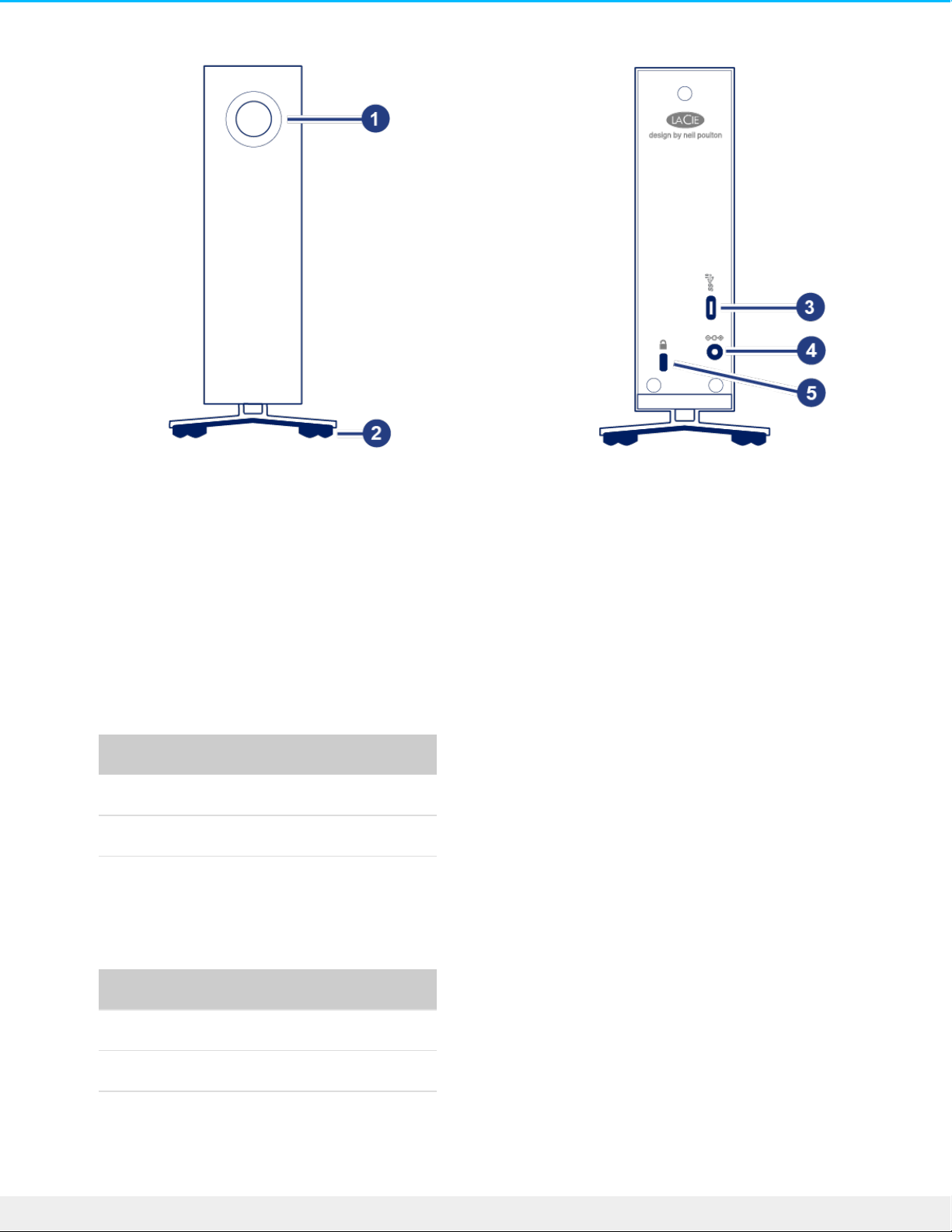
1. Multi-function status LED / power button
2. Vibration-dampening rubber feet
3. USB 3.1 Gen 2 port
4. Power supply connection
5. Kensington® lock slot
Technical specificaons
Enclosure dimensions
Side Dimensions (mm / in)
Width 60 / 2.36
Height 30 / 5.12
Length 195 / 7.68
Weight
Capacity Weight (kg / lbs)
4TB 1.3 / 2.87
6TB 1.3 / 2.87
10TB 1.3 / 2.87
5LaCie d2 Pro fes s io nal
8/14/18
Page 6

Electrical
Power supply
100-240V
50-60 Hz
18W
Power supply barrel dimensions (mm)
Inner diameter 2.5
Outer diameter 5.5
Length 11.5
Posion and stacking
Always make certain to place your LaCie d2 Professional on a flat, even surface that can support the heat
output and airflow of a professional hard drive enclosure. For proper heat dissipation, d2 Professional is
designed to stand upright. Do not place the enclosure on its side when it is powered on.
The device does not support stacking. Do not stack other drives, enclosures, or equipment on top of the
enclosure.
The warranty for your d2 Professional will be voided if you:
Stack d2 Professional on another device.
Stack other drives, enclosures, or equipment on top of d2 Professional.
Use only the power supply provided with your LaCie d2 Professional. Power supplies from
third-party devices and other LaCie products can damage your d2 Professional.
6LaCie d2 Pro fes s io nal
8/14/18
Page 7
System LEDs
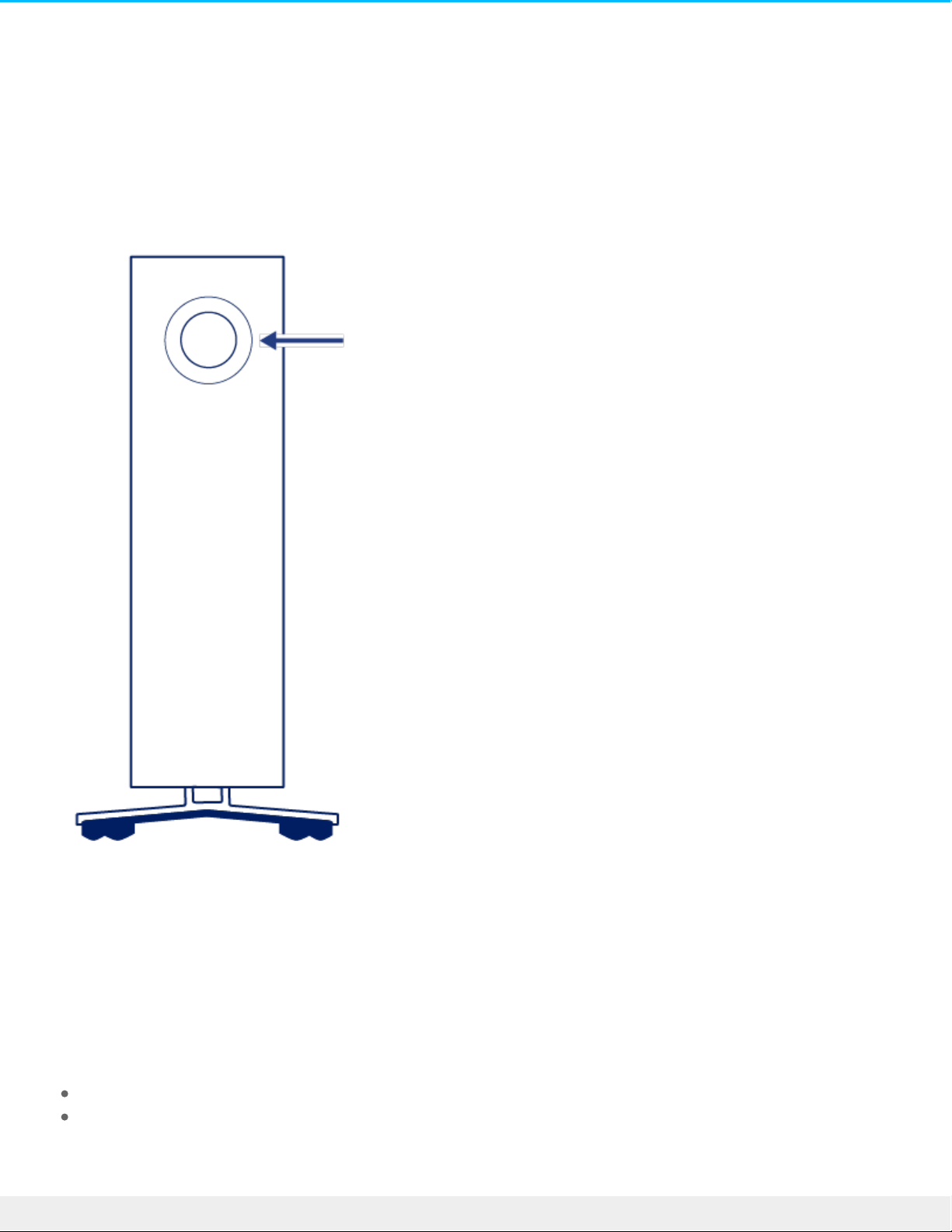
LaCie d2 Professional features a multi-functional LED and power button on the front of the enclosure.
Power buon
Power on
In most instances, d2 Professional powers on automatically when connected to a computer and an active
power source. However, the LED button can be used to power on the device if the following two conditions
are met:
The device was powered off using a long press.
The device remains connected to the computer’s USB port and an active power source.
7LaCie d2 Pro fes s io nal
8/14/18
Page 8

To power on the device, push the LED button for one second.
Power off
Follow the steps below to turn the device off:
1. Make certain that d2 Professional’s volumes are not being accessed.
2. Eject the volumes. See Safely Remove LaCie d2 Professional From Your Computer for instructions. Once
the volumes have been properly ejected, the device enters power-saving mode.
3. Apply a long press (minimum four seconds) to the LED button. The LED turns solid blue before turning
off.
Power-saving mode
Your d2 Professional can conserve energy by entering power-saving mode. The hard drive within the
enclosure spins down to reduce power consumption when the device is in power-saving mode. Powersaving mode can extend the life of the hard drive by sparing it from working during extended periods of
inactivity.
Manually iniang power-saving mode
You can place d2 Professional in power-saving mode using the LED button.
1. Make certain that d2 Professional’s volumes are not being accessed.
2. Eject the volumes. See Safely Remove LaCie d2 Professional From Your Computer for instructions. Once
the volumes have been properly ejected, the device enters power-saving mode.
3. Apply a short press to the LED button. A short press lasts no longer than 1 second.
To wake up the device, apply another short press to the LED button.
Power-saving mode: managed by the PC/Mac
You can initiate power-saving mode on your computer.
1. Place the host computer into sleep mode.
2. macOS—Go to System Preferences > Energy Saver to enable sleep mode for hard drives.
Windows—Go to Control Panel > Hardware > Power Options > Choose a power plan > Change advanced
power settings. Click on Hard disk and Turn off the hard disk after. Choose the time to spin down USB
hard drives.
Exing power-saving mode
To exit power-saving mode, review the table below:
8LaCie d2 Pro fes s io nal
8/14/18
Page 9

Entering power-saving mode Exiting power-saving mode
The host computer placed the product into
power-saving mode due to inactivity.
Access d2 Professional’s volume on the host
computer. For example, copy files to its
volume.
The computer is in sleep mode. Wake up the computer.
LED status
The LED helps you identify the general status of your d2 Professional.
LED State
Off The device is turned off. The USB-C cable is not connected to a computer
that is turned on and/or the power cable is not connected to a live power
outlet.
Solid blue Device is ready.
Blinking blue During normal operation, the LED blinks to indicate access to the hard drive.
Slow blinking
blue, 10 second
interval
The device is in power-saving mode because the host computer is in sleep
mode.
Fast blinking blue Device is starting up or shutting down.
Blinking red, 1
second interval
Temperature warning.
Solid red Temperature critical.
Receiving power
LaCie d2 Professional powers on automatically when it meets the following two conditions:
Connected directly to a computer. The computer must be powered on.
Connected to a live power source via the included power supply.
9LaCie d2 Pro fes s io nal
8/14/18
Page 10

Use only the power supply provided with your LaCie d2 Professional. Power supplies from
third-party devices and other LaCie products can damage your d2 Professional.
10LaCie d2 Pro fessio nal
8/14/18
Page 11
Cables and Connectors
USB-C protocols
USB is a serial input/output technology for connecting peripheral devices to a computer. USB-C is the latest
implementation of this standard and it provides higher bandwidth and new power management features.
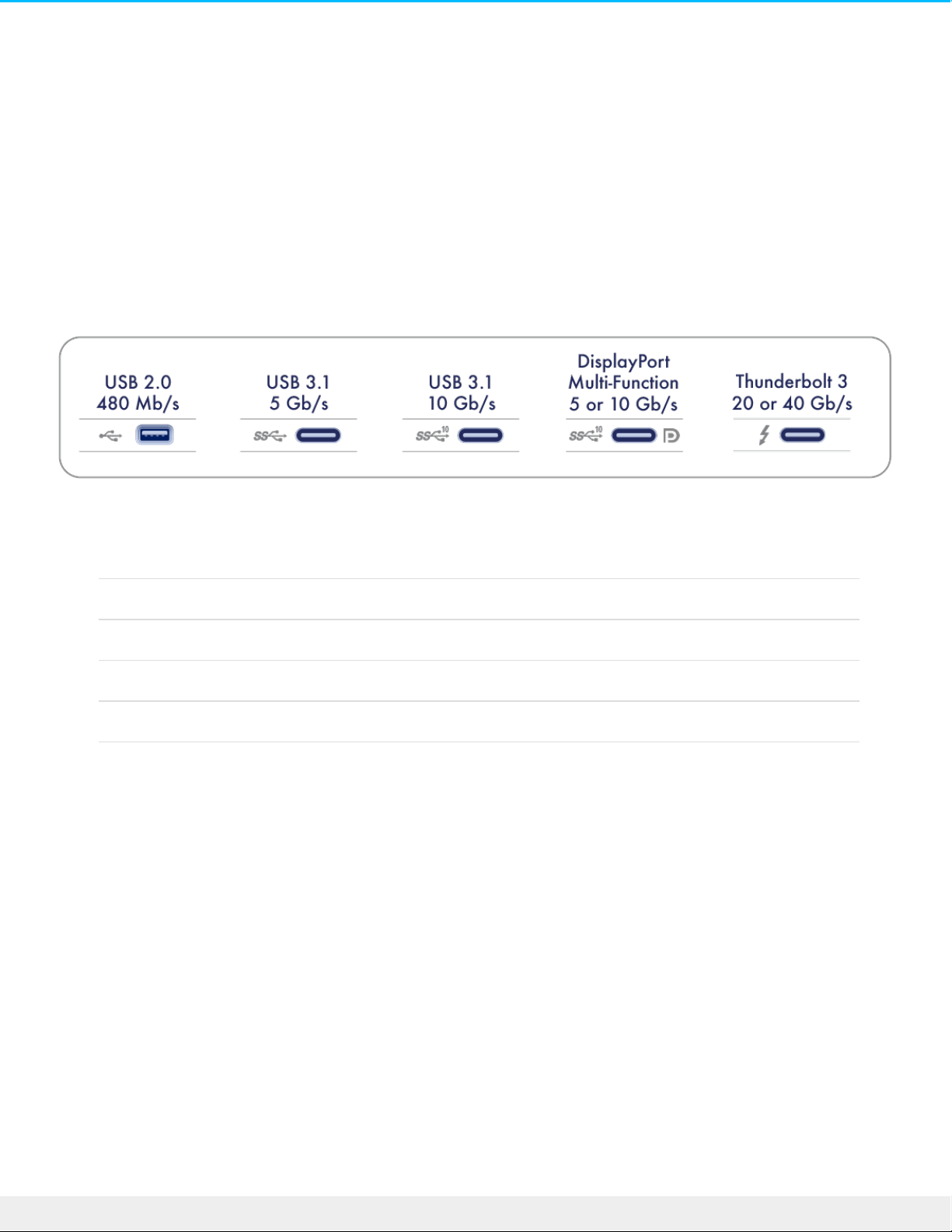
USB-C supports many protocols:
Thunderbolt 3 Transfer rates up to 40Gb/s
USB 3.1 Gen 2 Transfer rates up to 10Gb/s
USB 3.1 Gen 1 Transfer rates up to 5Gb/s
SuperSpeed USB 3.0 Transfer rates up to 5Gb/s
Hi-Speed USB 2.0 Transfer rates up to 480Mb/s
You can connect your device to any USB-C or USB Type A port but transfer rates vary. See below for more
details.
Cables
Your d2 Professional is shipped with two cables for universal compatibility with modern computers.
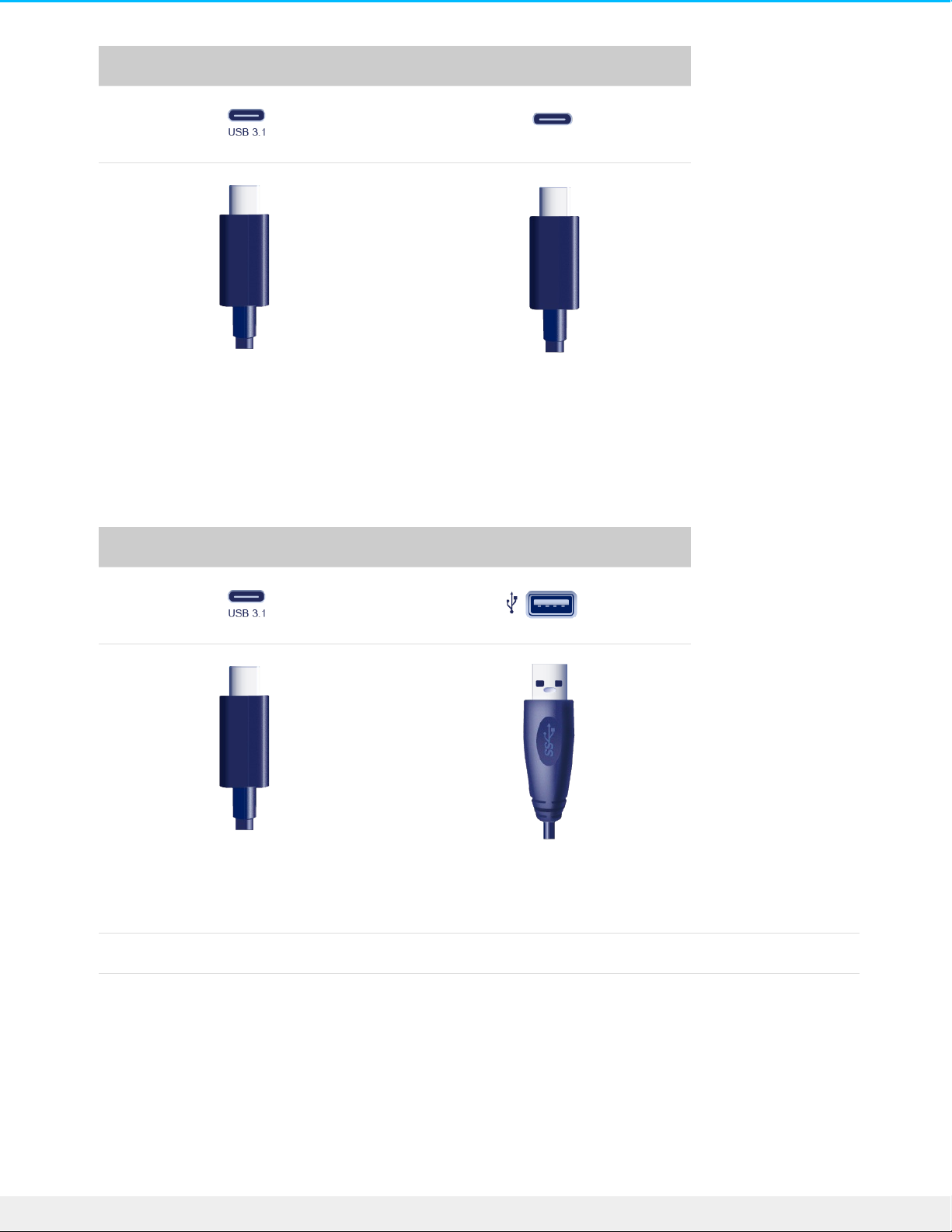
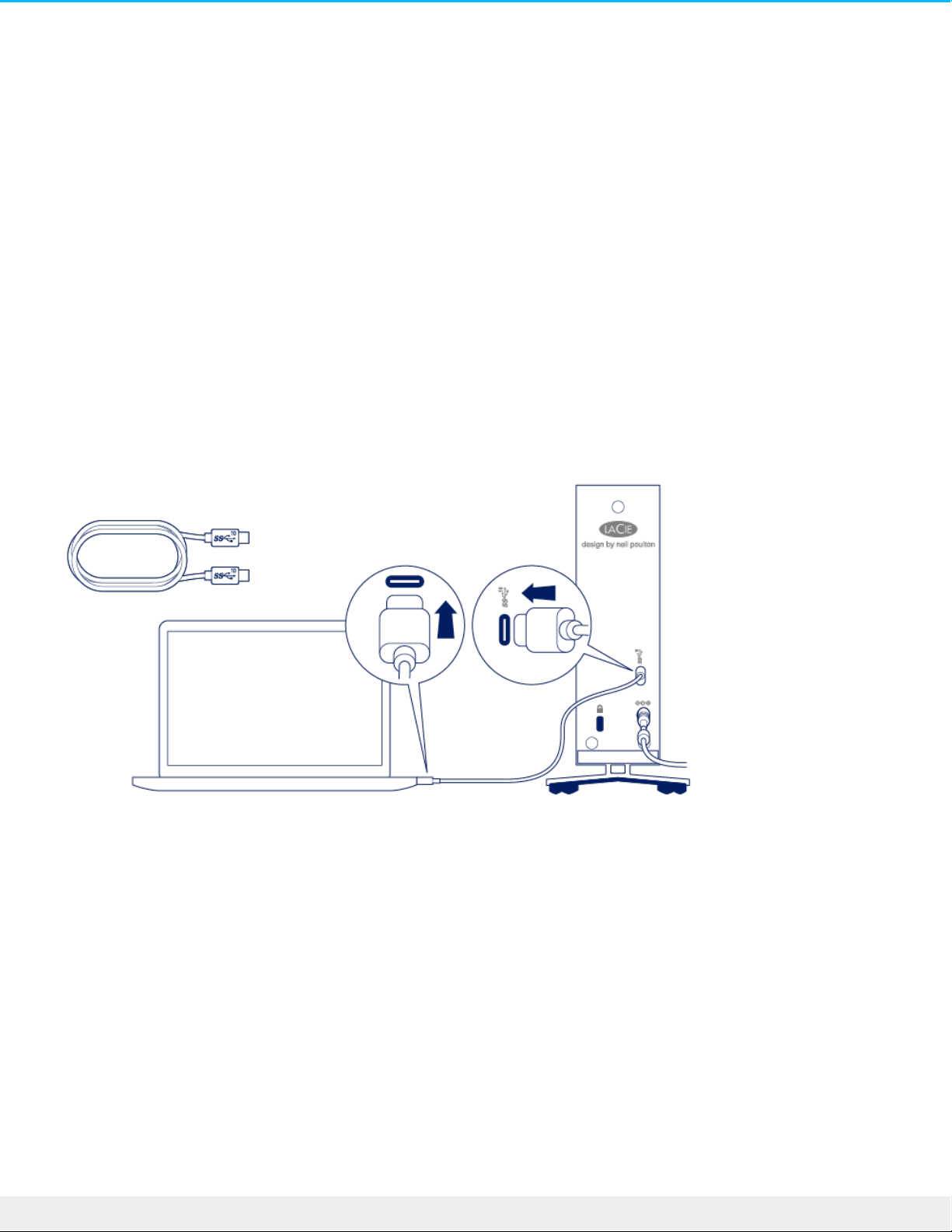
USB-C to USB-C cable
For optimal transfer rates, use the USB-C to USB-C cable to connect d2 Professional to a USB-C (USB 3.1 or
Thunderbolt 3) port on your computer.
11LaCie d2 Pro fessio nal
8/14/18
Page 12
d2 Professional Computer
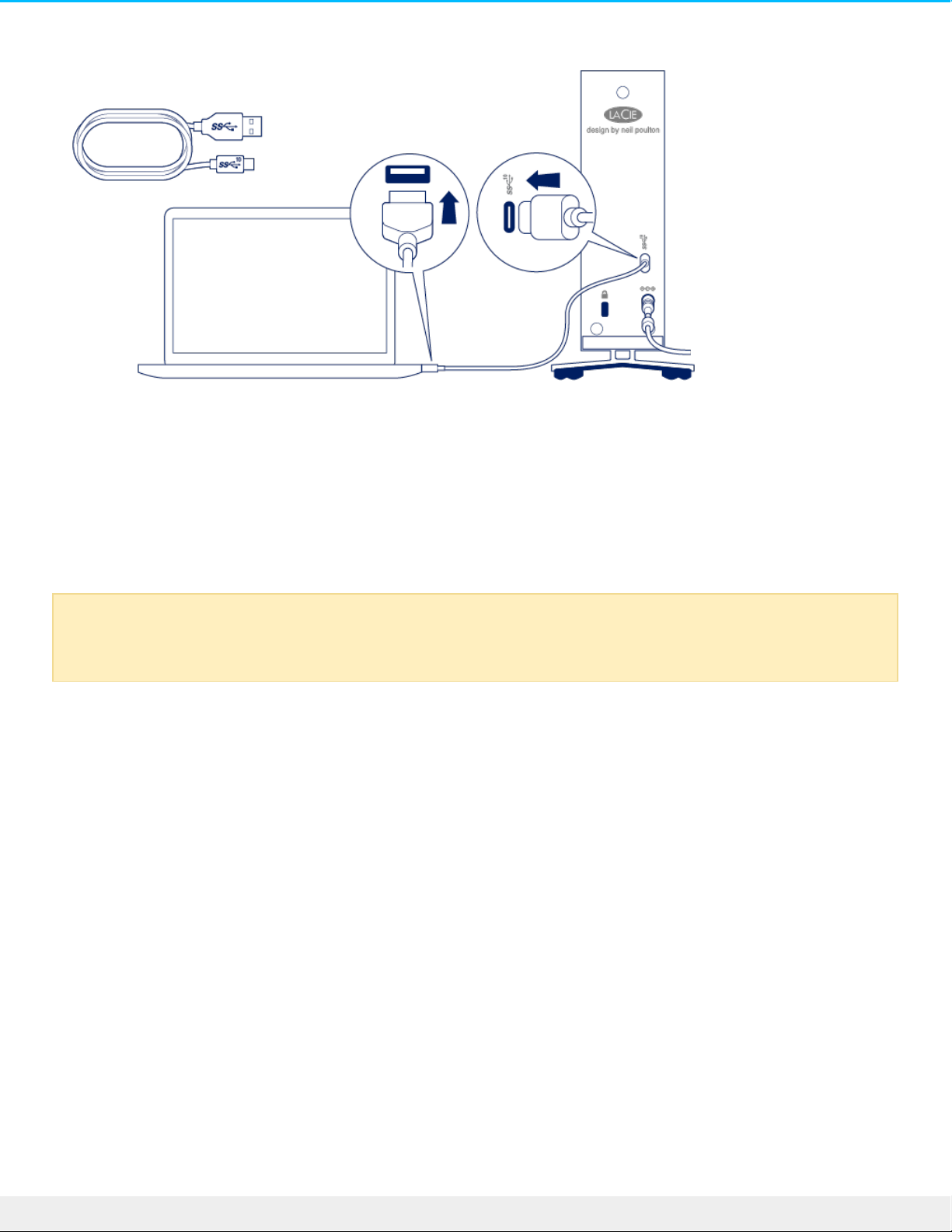
USB-C to USB Type A cable
Use the USB-C to USB Type A cable to connect d2 Professional to a Type A (USB 3.0 or USB 2.0) port on
your computer.
d2 Professional Computer
Transfer rates with USB Type A connections have the potential to reach the following speeds:
SuperSpeed USB 3.0 Transfer rates up to 5Gb/s
Hi-Speed USB 2.0 Transfer rates up to 480Mb/s
12LaCie d2 Pro fess io nal
8/14/18
Page 13
Geng Connected
STEP 1 – Connect the USB cable
Confirm the type of USB port on your computer, and then choose the appropriate cable to connect LaCie d2
Professional.
USB-C to USB-C
For optimal transfer rates, use the USB-C to USB-C cable to connect d2 Professional to a USB-C (USB 3.1 or
Thunderbolt 3) port on your computer.
USB-C to USB Type A
Use the USB-C to USB Type A cable to connect d2 Professional to a computer’s Type A port (USB 3.0 or USB
2.0).
13LaCie d2 Pro fess io nal
8/14/18
Page 14
STEP 2 - Prepare and connect the power supply
LaCie d2 Professional will power on automatically when it is connected to a computer that is turned on and a
live power outlet.
1. Press the release tab on the universal power supply to unlock the safety cover. Slide the cover back to
remove it.
2. Place the adapter plug for your location into the channel on the power supply. Slide it forward to lock it in
place.
Use only the power supply provided with your d2 Professional. Power supplies from third-party
devices and other LaCie products can damage your d2 Professional.
14LaCie d2 Pro fess io nal
8/14/18
Page 15
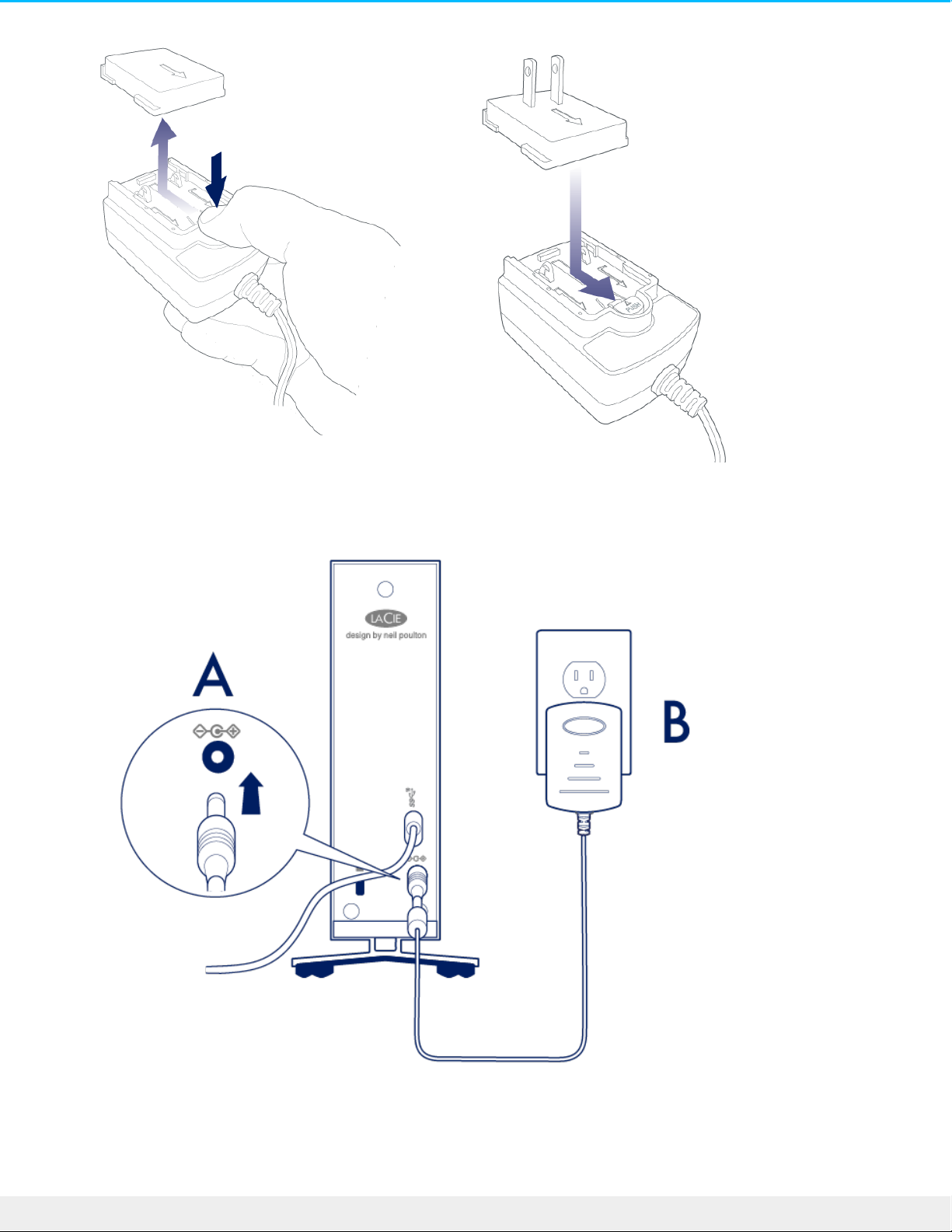
3. Connect the power cable to the power input on d2 Professional, and then connect the power supply to a
live power outlet.
STEP 3 - Set up LaCie d2 Professional
15LaCie d2 Pro fess io nal
8/14/18
Page 16
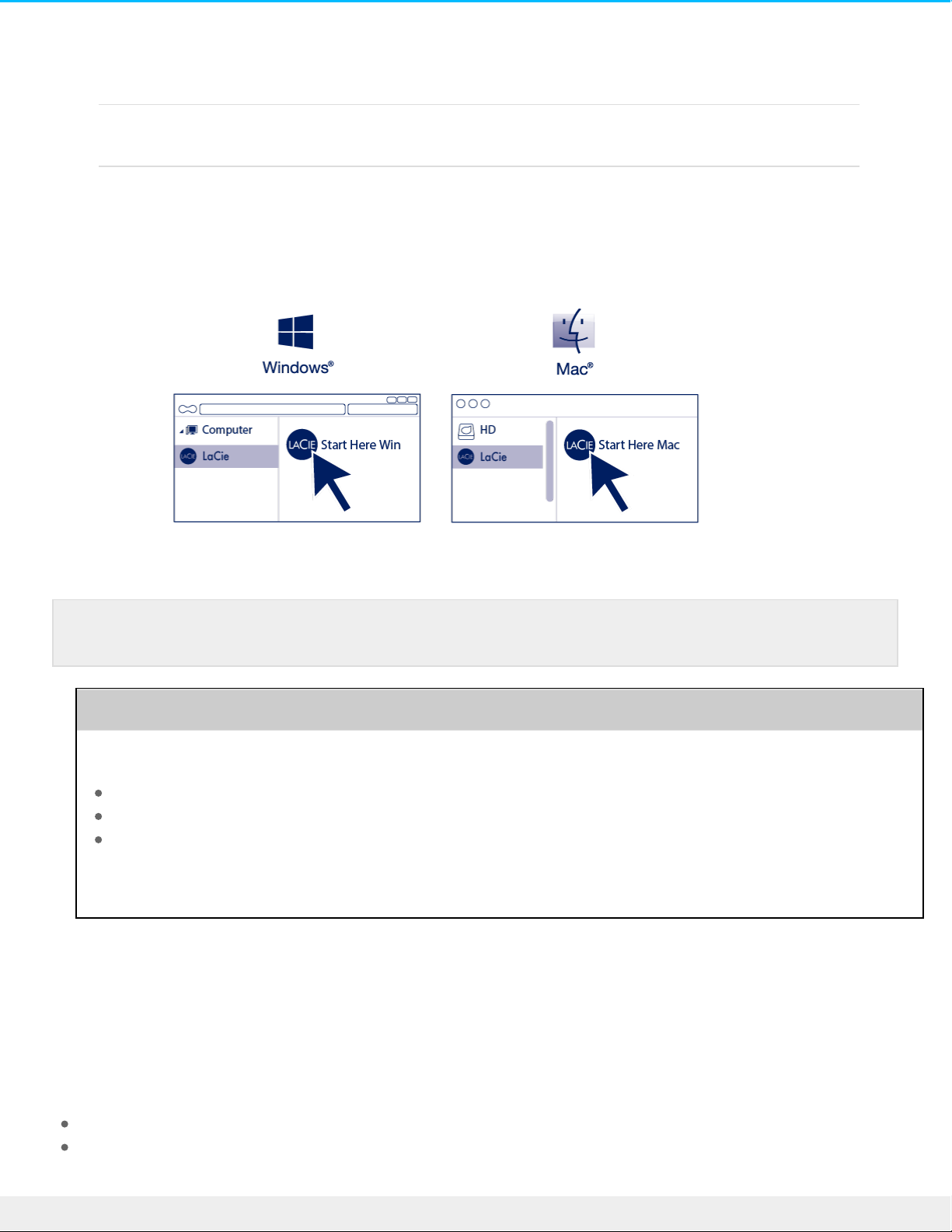
The setup process lets you:
Register your device Get the most from your device with easy access to information
and support.
Install Toolkit Manage backup plans, mirror folders, and more.
1. Using a file manager such as File Explorer or Finder, open LaCie d2 Professional and launch Start Here
Win or Start Here Mac.
2. Follow the onscreen instructions.
Learn more about Toolkit
Toolkit provides useful tools that let you easily:
Manage backup plans (Windows only).
Create mirror folders.
Optimize disk format for use with a specific operating system.
For details on Toolkit features, see the Toolkit user manual.
Storage format
LaCie d2 Professional is delivered preformatted as exFAT for compatibility with both Windows and Mac
computers. If you use the drive with only one type of computer, you can optimize file copy performance by
formatting the drive in the native file system for your operating system. Choose one of the following
methods to optimize your drive:
Use Toolkit to optimize disk format. See the Toolkit user manual for details.
Manually format your drive. See Optional Formatting and Partitioning for details.
Your computer must be connected to the internet to install Toolkit.
16LaCie d2 Pro fess io nal
8/14/18
Page 17

Disconnecng the hard drive
In order to avoid file system corruption, it’s important to unmount your hard drive’s volumes before
disconnecting the interface cable. See Safely Remove LaCie d2 Professional From Your Computer for
details.
17LaCie d2 Pro fess io nal
8/14/18
Page 18

Oponal Formang and Paroning
LaCie d2 Professional is delivered formatted in exFAT for compatibility with both Windows and Mac
computers. If you use the drive with only one type of computer, you can optimize file copy performance by
formatting the drive in the native file system for your operating system—NTFS for Windows or HFS+ for
Macs. There are two ways you can optimize performance:
Toolkit Optimize—Format your drive for optimal performance with just a few simple clicks.
Manual formatting—Use Disk Management (Windows) or Disk Utility (Mac) to format your drive in non-native
formats.
About file system formats
NTFS—The native file system for Windows. macOS can read NTFS volumes but cannot natively write to
them.
Mac OS Extended (HFS+)—The native hard drive file system for macOS. Windows cannot natively read or
write to HFS+ (journaled) volumes.
APFS (Apple File System)—An Apple file system optimized for solid state drives (SSDs) and flash-based
storage systems. While you can format your hard disk drive (HDD) in APFS, performance may be degraded
when files on the drive are routinely subjected to extensive editing (for example, large-scale image, video,
audio, and music editing).
exFAT—Compatible with Mac and Windows. exFAT is not a journaled file system which means it can be
more susceptible to data corruption when errors occur or the drive is not disconnected properly from the
computer.
FAT32—Compatible with Mac and Windows. However, FAT32 is a legacy file system designed for low
capacity hard drives and it is not recommended for modern hard drives or operating systems. A FAT32
partition can reach up to 32GB when formatted on a Windows PC.
How to choose the file system format
Use NTFS if:
…you connect the storage device to Windows computers, and you don’t need to allow a Mac to write to
the disk.
18LaCie d2 Pro fess io nal
8/14/18
Page 19

Use HFS+ if:
…you connect the storage device to Mac computers, and you don’t need to allow a Windows computer to
read or write to the disk.
Use exFAT if:
…you need to allow both Mac and Windows computers to read and write to the disk.
You can use FAT32 if:
…you connect the storage device to older Windows and Mac computers. FAT32 is not recommended for
modern operating systems and computers.
Toolkit Opmive
Use Toolkit Optimize to format your drive for optimal performance with your operating system’s native file
format— NTFS for Windows or HFS+ for macOS. File transfer rates can be significantly better with the native
format.
1. Connect LaCie d2 Professional to your computer.
2. Open Toolkit.
3. On the Main Menu, click on the d2 Professional device.
4. Click on the More menu icon for the volume you want to optimize. There are two options:
OPTIMIZE— Let Toolkit choose the optimal format for your computer system and configure the
volume for you with just a few clicks.
FORMAT— Opens the disk management utility for your operating system, which you can use to
manually format your drive. Use this option if you want to format the drive in non-native formats.
Formatting erases everything on the storage device. LaCie highly recommends that you back up
all data on your storage device before performing the steps below. LaCie is not responsible for
any data lost due to formatting, partitioning, or using a LaCie storage device.
19LaCie d2 Pro fess io nal
8/14/18
Page 20
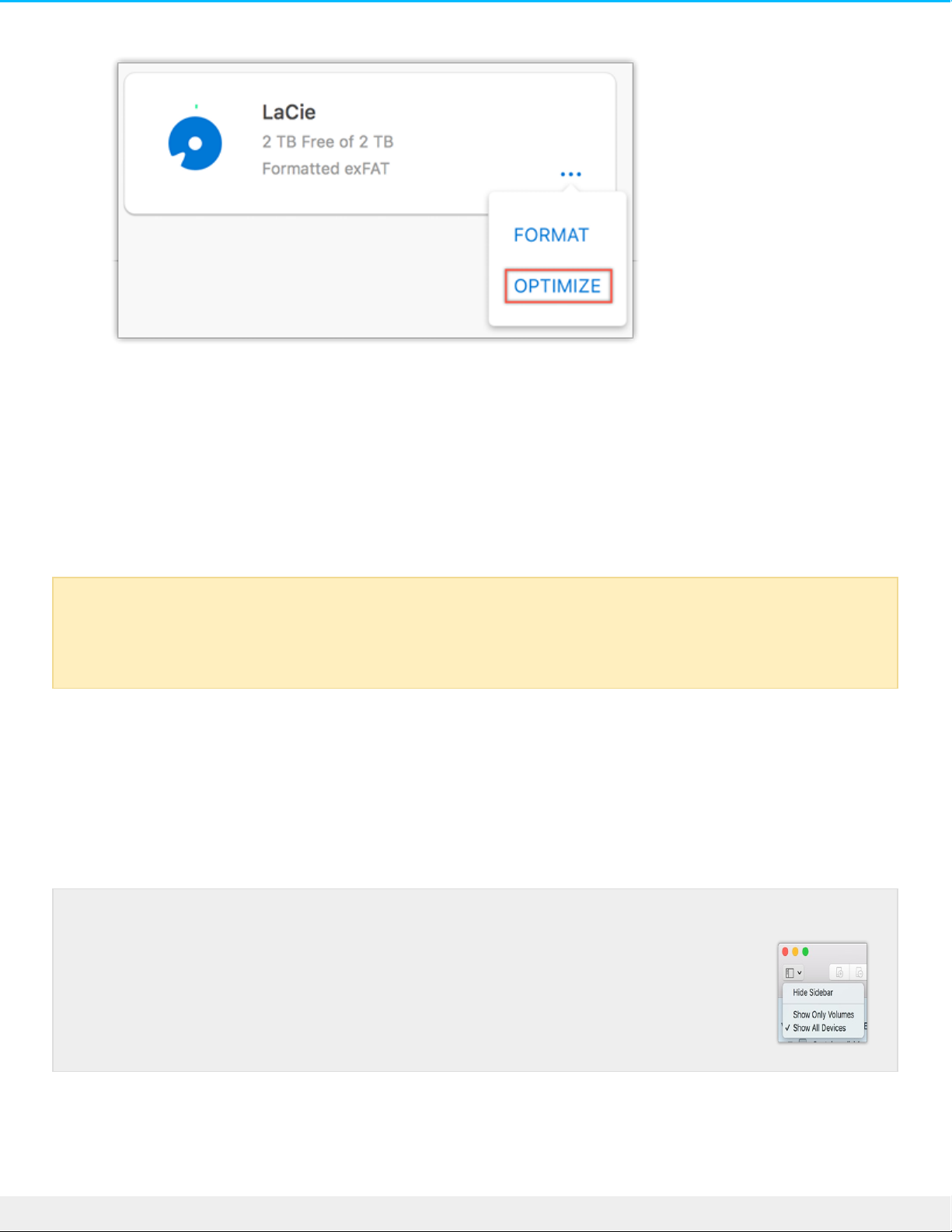
5. Click Optimize.
6. A notice appears asking you to confirm the format operation. Click Format.
Manual formang
Use the steps below to manually format and partition a storage device.
Mac
macOS version 10.11 and later
1. Open the Finder and go to Applications > Utilities > Disk Utility.
2. In the sidebar to the left, select your d2 Professional drive.
3. Select Erase.
4. A dialog box opens. Enter a name for the drive. This will be the name displayed when the drive mounts.
5. For Format, select OS X Extended (Journaled).
Formatting erases everything on the storage device. LaCie highly recommends that you back up
all data on your storage device before performing the steps below. LaCie is not responsible for
any data lost due to formatting, partitioning, or using a LaCie storage device.
macOS starting version 10.13—Make sure to select the disk and not just the
volume. If you don’t see two entries listed in the sidebar, change the view in
disk utility to show both the drive and the volume. The view button is in the
upper left side of the Disk Utility window. Change the view to Show All Devices.
This feature was introduced in macOS 10.13 and is not available in 10.11 or
10.12.
20LaCie d2 Pro fess io nal
8/14/18
Page 21

6. For Scheme, select GUID Partition Map.
7. Click Erase.
8. Disk Utility formats the drive. When it’s finished, click Done.
Windows
1. Make sure the storage device is connected to and mounted on the computer.
2. Go to Search and then type diskmgmt.msc. In the search results, double-click Disk Management.
3. From the list of storage devices in the middle of the Disk Management window, locate your LaCie
device.
4. The partition must be available to format. If it is currently formatted, right click on the partion and then
choose Delete.
5. To create a new partition, right click on the volume and select New Simple Volume. Follow the on-screen
instructions when the New Simple Volume Wizard appears.
21LaCie d2 Pro fess io nal
8/14/18
Page 22

Safely Remove LaCie d2 Professional From
Your Computer
Always eject a storage drive from your computer before physically disconnecting it. Your computer must
perform filing and housekeeping operations on the drive before it is removed. Therefore, if you unplug the
drive without using the operating system’s software, your files can become corrupt or damaged.
Mac
There are several ways you can eject your hard drive from a Mac. See below for two options.
Eject via Finder window
1. Open a Finder window.
2. On the sidebar, go to Devices and locate the drive you want to eject. Click the eject symbol to the right
of the drive name.
3. Once the hard drive disappears from the sidebar or, the Finder window closes, you can disconnect the
hard drive’s cable from your Mac.
Eject via Desktop
1. Select the desktop icon for your hard drive and drag it to the Trash.
2. When the hard drive’s icon is no longer visible on your desktop, you can physically disconnect the hard
drive from your Mac.
Windows
Use the Safely Remove tool to eject a hard drive.
1. Click the Safely Remove icon in your Windows System Tray to view the devices you can eject.
Windows 7
22LaCie d2 Pro fess io nal
8/14/18
Page 23

Windows 8 / Windows 10
2. If you don't see the Safely Remove Hardware icon, click the Show hidden icons arrow in the system tray
to display all icons in the notification area.
3. In the list of devices, choose the device you want to eject. Windows displays a notification when it is
safe to remove the device.
4. Disconnect the hard drive from the computer.
23LaCie d2 Pro fess io nal
8/14/18
Page 24

Frequently Asked Quesons
For help setting up and using your LaCie hard drive, review the frequently asked questions below. For
additional support resources, go to www.lacie.com/support/d2-pro.
Hard drive icon
Why does the hard drive icon not appear on my desktop (Mac)?
Why does the hard drive icon not appear in Computer (Windows)?
File transfers
Why are my file transfers slow?
File transfer error messages
Why did I get an error message telling me that the drive has been disconnected when coming out of sleep
mode?
Why did I get an “Error -50” message while copying to a FAT32 volume?
Using a USB hub for USB devices
Can I use my hard drive with a USB hub?
Provided USB cables
Can I use my hard drive with a longer cable?
USB 2.0 ports
Will my hard drive’s USB 3.1 Gen 1 port work with my computer’s USB 2.0 port?
24LaCie d2 Pro fess io nal
8/14/18
Page 25

Regulatory Compliance
FCC Declaraon of Conformance
This device complies with Part 15 of the FCC Rules. Operation is subject to the following two conditions: (1)
this device may not cause harmful interference, and (2) this device must accept any interference received,
including interference that may cause undesired operation.
FCC Class A Informaon
This equipment has been tested and found to comply with the limits for a Class A digital device, pursuant to
Part 15 of the FCC Rules. These limits are designed to provide reasonable protection against harmful
interference in a residential installation. This equipment generates, uses and can radiate radio frequency
energy and, if not installed and used in accordance with the instructions, may cause harmful interference to
radio communications. However, there is no guarantee that interference will not occur in a particular
installation.
If this equipment does cause harmful interference to radio or television reception, which can be determined
by turning the equipment off and on, the user is encouraged to try to correct the interference by one of the
following measures:
Reorient or relocate the receiving antenna.
Increase the separation between the equipment and receiver.
Connect the equipment into an outlet on a circuit different from that to which the receiver is connected.
Consult the dealer or an experienced radio/TV technician for help.
This device complies with Part 15 of the FCC Rules. Operation is subject to the following two conditions: (1)
This device may not cause harmful interference, and (2) this device must accept any interference received,
including interference that may cause undesired operation.
FCC Cauon
Any changes or modifications not expressly approved by the party responsible for compliance could void
the user's authority to operate this equipment.
Important Note: FCC Radiaon Exposure Statement
This equipment complies with FCC radiation exposure limits set forth for an uncontrolled environment. This
equipment should be installed and operated with minimum distance 20cm between the radiator and your
25LaCie d2 Pro fess io nal
8/14/18
Page 26

body. This transmitter must not be co-located or operating in conjunction with any other antenna or
transmitter. The availability of some specific channels and/or operational frequency bands are country
dependent and are firmware programmed at the factory to match the intended destination. The firmware
setting is not accessible by the end user.
China/Taiwan RoHS
China RoHS 2
China RoHS 2 refers to the Ministry of Industry and Information Technology Order No. 32,
effective July 1, 2016, titled Management Methods for the Restriction of the Use of Hazardous
Substances in Electrical and Electronic Products. To comply with China RoHS 2, we determined
this product's Environmental Protection Use Period (EPUP) to be 20 years in accordance with
the
, SJT 11364-2014.
中国 RoHS 2 是指 2016 年 7 月 1 日起施行的工业和信息化部令第 32 号“电力电子产品限制使用有害
物质管理办法”。为了符合中国 RoHS 2 的要求,我们根据“电子电气产品有害物质限制使用标识”(SJT
11364-2014) 确定本产品的环保使用期 (EPUP) 为 20 年。
部件名称
Part Name
有害物质
Hazardous Substances
铅
(Pb)
汞
(Hg)
镉
(Cd)
六价铬
(Cr )
多溴联苯
(PBB)
多溴二苯醚
(PBDE)
硬盘驱动器
HDD
X O O O O O
外接硬盘印刷电路
板
Bridge PCBA
X O O O O O
电源
(如果提供)
Power Supply
(if provided)
X O O O O O
接口电缆
(如果提供)
Interface cable
(if provided)
X O O O O O
+6
26LaCie d2 Pro fess io nal
8/14/18
Page 27

其他外壳组件
Other enclosure
components
O O O O O O
本表格依据 SJ/T 11364 的规定编制。
This table is prepared in accordance with the provisions of SJ/T 11364-2014
O: 表示该有害物质在该部件所有均质材料中的含量均在 GB/T 26572 规定的限量要求以下。
O: Indicates that the hazardous substance contained in all of the homogeneous materials for this part is
below the limit requirement of GB/T26572.
X: 表示该有害物质至少在该部件的某一均质材料中的含量超出 GB/T 26572 规定的限量要求。
X: Indicates that the hazardous substance contained in at least one of the homogeneous materials used
for this part is above the limit requirement of GB/T26572.
Taiwan RoHS
Taiwan RoHS refers to the Taiwan Bureau of Standards, Metrology and Inspection’s (BSMI’s) requirements in
standard CNS 15663, Guidance to reduction of the restricted chemical substances in electrical and electronic
equipment. Beginning on January 1, 2018, Seagate products must comply with the “Marking of presence”
requirements in Section 5 of CNS 15663. This product is Taiwan RoHS compliant.
The following table meets the Section 5 “Marking of presence” requirements.
台灣RoHS是指台灣標準局計量檢驗局(BSMI)對標準CNS15663要求的減排電子電氣設備限用化學物質指引。從2018
年1月1日起,Seagate產品必須符合CNS15663第5節「含有標示」要求。本產品符合台灣RoHS。 下表符合第5節
「含有標示」要求。
產品名稱:外接式磁碟陣列,型號:LRDMU03
Product Name: LaCie d2 Professional, Model: LRDMU03
單元
Unit
限用物質及其化學符號
Restricted Substance and its chemical symbol
鉛
(Pb)
汞
(Hg)
鎘
(Cd)
六價鉻
(Cr )
多溴聯苯
(PBB)
多溴二苯醚
(PBDE)
硬盘驱动器
HDD
— O O O O O
+6
27LaCie d2 Pro fess io nal
8/14/18
Page 28

外接硬盤印刷電路
板
Bridge PCBA
— O O O O O
電源
(如果提供)
Power Supply
(if provided)
— O O O O O
接口電纜
(如果提供)
Interface cable
(if provided)
— O O O O O
其他外殼組件
Other enclosure
components
O O O O O O
備考 1. "O" 係指該项限用物質之百分比含量未超出百分比含量基準值。
Note 1. "O" indicates that the percentage content of the restricted substance does not exceed the
percentage of reference value of presence.
備考 2. "—" 係指該项限用物質為排除項目。
Note 2. "—" indicates that the restricted substance corresponds to the exemption.
Industry Canada
This device complies with RSS-210 of the Industry Canada Rules. Operation is subject to the following two
conditions: (1) This device may not cause harmful interference, and (2) this device must accept any
interference received, including interference that may cause undesired operation.
Ce dispositif est conforme à la norme CNR-210 d'Industrie Canada applicable aux appareils radio exempts
de licence. Son fonctionnement est sujet aux deux conditions suivantes: (1) le dispositif ne doit pas
produire de brouillage préjudiciable, et (2) ce dispositif doit accepter tout brouillage reçu, y compris un
brouillage susceptible de provoquer un fonctionnement indésirable.
Important Note for mobile device use
Radiation Exposure Statement: This equipment complies with IC radiation exposure limits set forth for an
uncontrolled environment. This equipment should be installed and operated with minimum distance 20cm
between the radiator & your body.
28LaCie d2 Pro fess io nal
8/14/18
Page 29

Note Importante pour l'ulisaon de disposifs
mobiles
Déclaration d'exposition aux radiations:
Cet équipement est conforme aux limites d'exposition aux rayonnements IC établies pour un
environnement non contrôlé. Cet équipement doit être installé et utilisé avec un minimum de 20 cm de
distance entre la source de rayonnement et votre corps.
Europe – EU Declaraon of Conformity
This device complies with the essential requirements of the EMC Directive 2004/108/EC. The following test
methods have been applied in order to prove presumption of conformity with the essential requirements
of the EMC Directive 2004/108/EC:
EN 60950-1:2006/AC:2011: Information technology equipment - Safety - Part 1: General requirements
EN 55022: 2010/AC:2011: Information technology equipment - Radio disturbance characteristics
Limits and methods of measurement
EN 55024: 2010: Information technology equipment - Immunity characteristics - Limits and methods of
measurement
Česky
[Czech]
LaCie tímto prohlašuje, že tento direct attached storage device je ve shodě se základními
požadavky a dalšími příslušnými ustanoveními směrnice 2004/5/ES.
Dansk
[Danish]
Undertegnede LaCie erklærer herved, at følgende udstyr direct attached storage device
overholder de væsentlige krav og øvrige relevante krav i direktiv 2004/5/EF.
Deutsch
[German]
Hiermit erklärt LaCie, dass sich das Gerät direct attached storage device in
Übereinstimmung mit den grundlegenden Anforderungen und den übrigen einschlägigen
Bestimmungen der Richtlinie 2004/5/EG befindet.
Eesti
[Estonian]
Käesolevaga kinnitab LaCie seadme direct attached storage device vastavust direktiivi
2004/5/EÜ põhinõuetele ja nimetatud direktiivist tulenevatele teistele asjakohastele
sätetele.
English Hereby, LaCie, declares that this direct attached storage device is in compliance with the
essential requirements and other relevant provisions of Directive 2004/5/EC.
Español
[Spanish]
Por medio de la presente LaCie declara que el direct attached storage device cumple con
los requisitos esenciales y cualesquiera otras disposiciones aplicables o exigibles de la
Directiva 2004/5/CE.
Ελληνική
[Greek]
ΜΕ ΤΗΝ ΠΑΡΟΥΣ LaCieΔΗΛΩΝΕΙ direct attached storage device ΣΥΜΜΟΡΦΩΝΕΤΑΙ
ΠΡΟΣ ΤΙΣ ΟΥΣΙΩΔΕΙΣ ΑΠΑΙΤΗΣΕΙΣ ΚΑΙ ΤΙΣ ΛΟΙΠΕΣ ΣΧΕΤΙΚΕΣ ΔΙΑΤΑΞΕΙΣ ΤΗΣ ΟΔΗΓΙΑΣ
2004/5/ΕΚ.
Français
[French]
Par la présente LaCie déclare que l'appareil direct attached storage device est conforme
aux exigences essentielles et aux autres dispositions pertinentes de la directive
2004/5/CE.
29LaCie d2 Pro fess io nal
8/14/18
Page 30

Italiano
[Italian]
Con la presente LaCie dichiara che questo direct attached storage device è conforme ai
requisiti essenziali ed alle altre disposizioni pertinenti stabilite dalla direttiva 2004/5/CE.
Latviski
[Latvian]
Ar šo LaCie deklarē, ka direct attached storage device atbilst Direktīvas 2004/104/EK
būtiskajām prasībām un citiem ar to saistītajiem noteikumiem.
Lietuvių
[Lithuanian]
Šiuo LaCie deklaruoja, kad šis direct attached storage device atitinka esminius reikalavimus
ir kitas 2004/104/EB Direktyvos nuostatas.
Nederlands
[Dutch]
Hierbij verklaart LaCie dat het toestel direct attached storage device in overeenstemming
is met de essentiële eisen en de andere relevante bepalingen van richtlijn 2004/104/EG.
Malti
[Maltese]
Hawnhekk, LaCie, jiddikjara li dan direct attached storage device jikkonforma mal-ħtiġijiet
essenzjali u ma provvedimenti oħrajn relevanti li hemm fid-Dirrettiva 2004/104/EC.
Magyar
[Hungarian]
Alulírott, LaCie nyilatkozom, hogy a direct attached storage device megfelel a vonatkozó
alapvetõ követelményeknek és az 2004/104/EC irányelv egyéb elõírásainak.
Polski
[Polish]
Niniejszym LaCie oświadcza, że direct attached storage device jest zgodny z zasadniczymi
wymogami oraz pozostałymi stosownymi postanowieniami Dyrektywy 2004/104/EC.
Português
[Portuguese]
LaCie declara que este direct attached storage device está conforme com os requisitos
essenciais e outras disposições da Directiva 2004/104/CE.
Slovensko
[Slovenian]
LaCie izjavlja, da je at direct attached storage device v skladu z bistvenimi zahtevami in
ostalimi relevantnimi določili direktive 2004/104/ES.
Slovensky
[Slovak]
LaCie týmto vyhlasuje, že direct attached storage device spĺňa základné požiadavky a
všetky príslušné ustanovenia Smernice 2004/104/ES.
Suomi
[Finnish]
LaCie vakuuttaa täten että direct attached storage device tyyppinen laite on direktiivin
2004/104/EY oleellisten vaatimusten ja sitä koskevien direktiivin muiden ehtojen
mukainen.
Svenska
[Swedish]
Härmed intygar LaCie att denna direct attached storage device står I överensstämmelse
med de väsentliga egenskapskrav och övriga relevanta bestämmelser som framgår av
direktiv 2004/104/EG.
Power source
Caution: Use the product with the provided power cable only.
Note: To protect your data, always follow the safe removal procedures for your operating
system when disconnecting your product.
30LaCie d2 Pro fess io nal
8/14/18
 Loading...