

Page 1

LaCie 2big USB 3.0 • DESIGN BY NEIL POULTON Table of Contents
User Manual page 1
Table of Contents
1. Introduction .............................................................................................................. 4
1.1. Minimum System Requirements ..................................................................................................... 5
1.2. Box Content ................................................................................................................................ 6
1.3. Views of the Drive ........................................................................................................................ 7
1.4. Cables and Connectors ................................................................................................................ 9
2. Setting Up Your LaCie 2big USB 3.0 ....................................................................... 10
2.1. Connect the Interface Cable ....................................................................................................... 11
2.2. Turn the Drive On ...................................................................................................................... 12
2.3. Disconnecting Your Hard Drive ................................................................................................... 13
3. RAID ....................................................................................................................... 14
3.1. About RAID Modes ..................................................................................................................... 14
3.1.1. RAID 0 (FAST - High performance) .................................................................................... 14
3.1.2. JBOD (Just a bunch of disks) ............................................................................................ 15
3.1.3. RAID 1 (SAFE - Data protection) ........................................................................................ 16
3.2. Changing the RAID Mode ........................................................................................................... 17
3.3. Removing and Installing Drives .................................................................................................... 19
3.4. Formatting and Partitioning ......................................................................................................... 20
3.4.1. File System Formats ......................................................................................................... 20
3.4.2. Formatting for Window XP Users ....................................................................................... 22
3.4.3. Formatting for Windows Vista and Windows 7 Users ........................................................... 25
3.4.4. Formatting for Mac Users ................................................................................................. 29
4. Troubleshooting ..................................................................................................... 31
4.1. LED Status Indicators .................................................................................................................. 32
4.2. Basic Troubleshooting Topics ...................................................................................................... 33
5. Contacting Customer Support ................................................................................. 34
5.1. LaCie Technical Support Contacts ............................................................................................... 35
6. Warranty Information ............................................................................................. 36
Page 2
LaCie 2big USB 3.0 • DESIGN BY NEIL POULTON Foreword
User Manual page 2
Copyrights
Copyright © 2010 LaCie. All rights reserved. No part of this publication may
be reproduced, stored in a retrieval system, or transmitted in any form or by any
means, electronic, mechanical, photocopying, recording or otherwise, without
the prior written consent of LaCie.
Trademarks
Apple, Mac, and Macintosh are registered trademarks of Apple Inc. Microsoft,
Windows 95, Windows 98, Windows Me,
Windows NT, Windows 2000, Windows
XP, Windows Vista, and Windows 7 are
registered trademarks of Microsoft Corporation. Other trademarks mentioned in
this manual are the property of their respective owners.
Changes
The material in this document is for information only and subject to change
without notice. While reasonable efforts
have been made in the preparation of this
document to assure its accuracy, LaCie
assumes no liability resulting from errors
or omissions in this document, or from the
use of the information contained herein.
LaCie reserves the right to make changes
or revisions in the product design or the
product manual without reservation and
without obligation to notify any person of
such revisions and changes.
Canada Compliance Statement
This Class B digital apparatus meets all
requirements of the Canadian Interference-Causing Equipment Regulations.
Japan Compliance Statement
This is a Class B product based on the
standard of the Voluntary Control Council for Interference from Information Technology Equipment (VCCI). If this is used
near a radio or television receiver in a
domestic environment, it may cause radio
interference. Install and use the equipment according to the instruction manual.
FCC Statement
This device complies with Part 15 of the
FCC Rules. Operation is subject to the
following conditions:
1. The devices may not cause harmful
interference
2. The devices must accept any interference received, including interference that may cause undesired
operation.
NOTE: This equipment has been tested
and found to comply with the limits for
a Class B digital device, pursuant to Part
15 of the FCC Rules. These limits are
designed to provide reasonable protection against harmful interference in a
residential installation. This equipment
generates, uses and can radiate radio
frequency energy and, if not installed and
used in accordance with the instructions,
may cause harmful interference to radio
communications. However, there is no
guarantee that interference will not occur
in a particular installation. If this equipment does cause harmful interference to
radio or television reception, which can
be determined by turning the equipment
off and on, the user is encouraged to try
and correct the interference by one or
more of the following measures:
✦ Reorient or relocate the receiving
antenna.
✦ Increase the separation between
the equipment and receiver.
✦ Connect the equipment into an out-
let on a circuit different from that to
which the receiver is connected.
✦ Consult the dealer or an experi-
enced radio/TV technician for help.
Manufacturer’s Declaration
for CE Certification
We, LaCie, solemnly declare that this
product conforms to the following European standards: Class B EN60950,
EN55022, EN55024, EN61000-3-2:
2000, EN61000-3-3: 2001
With reference to the following conditions: 73/23/EEC Low Voltage Directive;
89/336/EEC EMC Directive
This symbol on the product
or on its packaging indicates that this product must
not be disposed of with your
other household waste. Instead, it is your responsibility to dispose of
your waste equipment by handing it over
to a designed collection point for the recycling of waste electrical and electronic
equipment. The separate collection and
recycling of your waste equipment at the
time of disposal will help to conserve natural resources and ensure that it is recycled in a manner that protects human
health and the environment. For more information about where you can drop off
your waste equipment for recycling,
please contact your local city office, your
household waste disposal service, or the
shop where you purchased the product.
CAUTION: Modifications not authorized
by the manufacturer may void the user’s
authority to operate this device.
CAUTION: A shielded-type power cord
is required in order to meet FCC emission
limits and also to prevent interference to
the nearby radio and television reception.
It is essential that only the supplied power
cord be used.
Tested to comply with FCC
standards for home or office
use
LaCie 2big USB 3.0
100716v1.1
Page 3

LaCie 2big USB 3.0 • DESIGN BY NEIL POULTON Foreword
User Manual page 3
Health and Safety
Precautions
✦ Only qualified persons are autho-
rized to carry out maintenance on
this device.
✦ Read this User Manual carefully
and follow the correct procedure
when setting up the device.
✦ Do not open a disk drive or attempt
to disassemble or modify it. Never
insert any metallic object into the
drive to avoid any risk of electrical
shock, fire, short-circuiting or dangerous emissions. The disk drives
shipped with your LaCie 2big USB
3.0 contain no user-serviceable
parts. If it appears to be malfunctioning, have it inspected by a qualified
LaCie Technical Support representative.
✦ Never expose your device to rain,
or use it near water, or in damp or
wet conditions. Never place objects
containing liquids on the LaCie
2big USB 3.0, as they may spill into
its openings. Doing so increases the
risk of electrical shock, short-circuiting, fire or personal injury.
✦ Make sure that the computer and
LaCie 2big USB 3.0 are electrically
grounded. If the devices are not
grounded, there is an increased risk
of electrical shock.
General Use
Precautions
✦ Power requirements 100-240 V~,
1.44 A, 50-60 Hz, (supply voltage
fluctuations not exceeding ± 10%
of the nominal and transient overvoltages according to over-voltage
category II).
✦ Do not expose the LaCie 2big USB
3.0 to temperatures outside the
range of 5° C to 35° C (41° F to
95° F); or to operational humidity
beyond 5-80%, non-condensing,
or non-operating humidity beyond
10-90%, non-condensing. Doing
so may damage the LaCie 2big
USB 3.0 or disfigure its casing.
Avoid placing your LaCie 2big USB
3.0 near a source of heat or exposing it to sunlight (even through
a window). Inversely, placing your
LaCie 2big USB 3.0 in an environment that is too cold may damage
the unit.
✦ Rated cooling for altitudes up to
2000 meters.
✦ Always unplug the LaCie 2big USB
3.0 from the electrical outlet if there
is a risk of lightning or if it will be
unused for an extended period of
time. Otherwise, there is an increased risk of electrical shock,
short-circuiting or fire.
✦ Use only the power supply shipped
with the device.
✦ Do not use the LaCie 2big USB 3.0
near other electrical appliances
such as televisions, radios or speakers. Doing so may cause interference which will adversely affect the
operation of the other products.
✦ Do not place the LaCie 2big USB
3.0 near sources of magnetic interference, such as computer displays,
televisions or speakers.
✦ Magnetic interference can affect the
operation and stability of your LaCie 2big USB 3.0.
✦ Never use excessive force on your
LaCie 2big USB 3.0. If you detect a
problem, consult the Troubleshooting section in this manual.
✦ Protect your LaCie 2big USB 3.0
from excessive exposure to dust
during use or storage. Dust can
build up inside the device, increasing the risk of damage or malfunction.
✦ Never use benzene, paint thinners,
detergent or other chemical products to clean the outside of the LaCie 2big USB 3.0. Such products
will disfigure and discolor the casing. Instead, use a soft, dry cloth to
wipe the device.
✦ Please replace defective hard drives
only with a new drive provided by
LaCie. For drive removal process,
see section 3.3. Removing and In-
stalling Drives.
IMPORTANT INFO: Any loss, corrup-
tion or destruction of data while using
a LaCie drive or drive system is the sole
responsibility of the user, and under no
circumstances will LaCie be held liable for
the recovery or restoration of this data. To
help prevent the loss of your data, LaCie
highly recommends that you keep TWO
copies of your data; one copy on your
external hard disk, for instance, and a
second copy either on your internal hard
disk, another external hard disk or some
other form of removable storage media.
If you would like more information on
backup, please refer to our web site.
IMPORTANT INFO: 1TB (Terabyte)
= 1,000GB. 1GB = 1000MB. 1MB =
1,000,000 Bytes. Total accessible capacity varies depending upon operating
environment (typically up to 10% less per
TB). Capacity and cache memory vary depending upon RAID mode.
Page 4
LaCie 2big USB 3.0 • DESIGN BY NEIL POULTON Introduction
User Manual page 4
1. Introduction
Congratulations on the purchase of your new LaCie
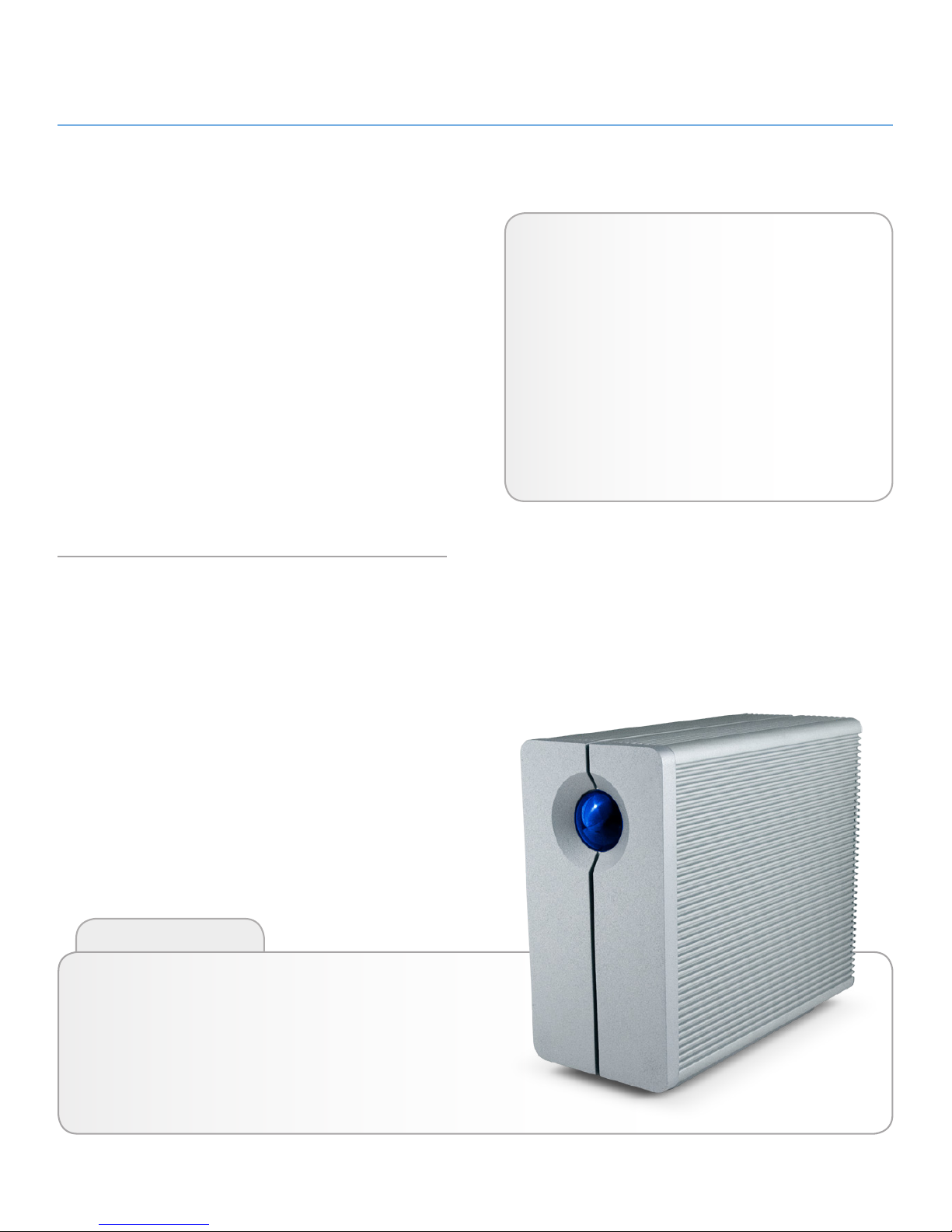
2big USB 3.0. The 2big USB 3.0 is the ultimate approach to a
flexible RAID (Redundant Array of Independent/Inexpensive Disks)
solution, with its ability to manage various RAID levels for a wide
range of applications.
Since needs differ among all users, the LaCie 2big USB 3.0 allows
you to choose between faster transfer rates or file mirroring with a
simple flip of a switch. For high-speed demanding programs, such
as video editing or graphics, you may choose RAID 0 (FAST). If
data backup is important, RAID 1(SAFE) will keep a copy of each
file on the 2big’s two disks. Providing greater integrity and availability than standard hard disk storage, RAID technology is one of
the best means to protect your data.
With the USB 3.0 interface, you will experience enhanced transfer
rates to compliment whatever RAID level you choose.
Features
✦ SuperSpeed USB 3.0, up to 5 Gb/s
✦ Backward compatible to Hi-Speed USB 2.0, up to
480 Mb/s
✦ Three RAID modes: RAID 0, RAID 1, JBOD
✦ Two removable SATA drives with locks
✦ Plug & play
✦ Optimized Power Management
Click a topic:
✦ Connect the Interface Cable
✦ Turn the Drive On
✦ Changing the RAID Mode
Quick Links
Page 5
LaCie 2big USB 3.0 • DESIGN BY NEIL POULTON Introduction
User Manual page 5
1.1. Minimum System Requirements
Operating System Interface Port Disk Space
The latest versions
of Microsoft Windows XP*, Windows
Vista, or Windows 7
USB 3.0** or USB
2.0
Minimum of
600MB recommended
The latest versions
of Mac OS 10.5.x,
or 10.6.x
USB 3.0** or USB
2.0
Minimum of
600MB recommended
*Windows XP will not recognize logical volumes greater than 2TB.
For details, see section 3.4.1. File System Formats.
**To take advantage of SuperSpeed USB 3.0 transfer rates, the
LaCie 2big USB 3.0 must be connected to a USB 3.0 port. If
your computer does not have a USB 3.0 port, you may add a
USB 3.0 PCI-Express card (desktop computer) or a USB 3.0
ExpressCard 34 (portable). LaCie offers a wide selection of peripherals, including expansion cards. Visit the LaCie web site at
www.lacie.com/accessories.
TECHNICAL NOTE: The USB 3.0 interface may require addi-
tional drivers to operate on your computer. Please confirm that
your operating system supports USB 3.0 and, if necessary, download the necessary drivers.
TECHNICAL NOTE: The LaCie 2big USB 3.0 is compatible
with USB 3.0 and USB 2.0 interfaces. When attaching the 2big
USB 3.0 to a USB 2.0 port, transfer rates are limited to USB 2.0
speeds (up to 480 Mb/s).
Page 6
LaCie 2big USB 3.0 • DESIGN BY NEIL POULTON Introduction
User Manual page 6
1.2. Box Content
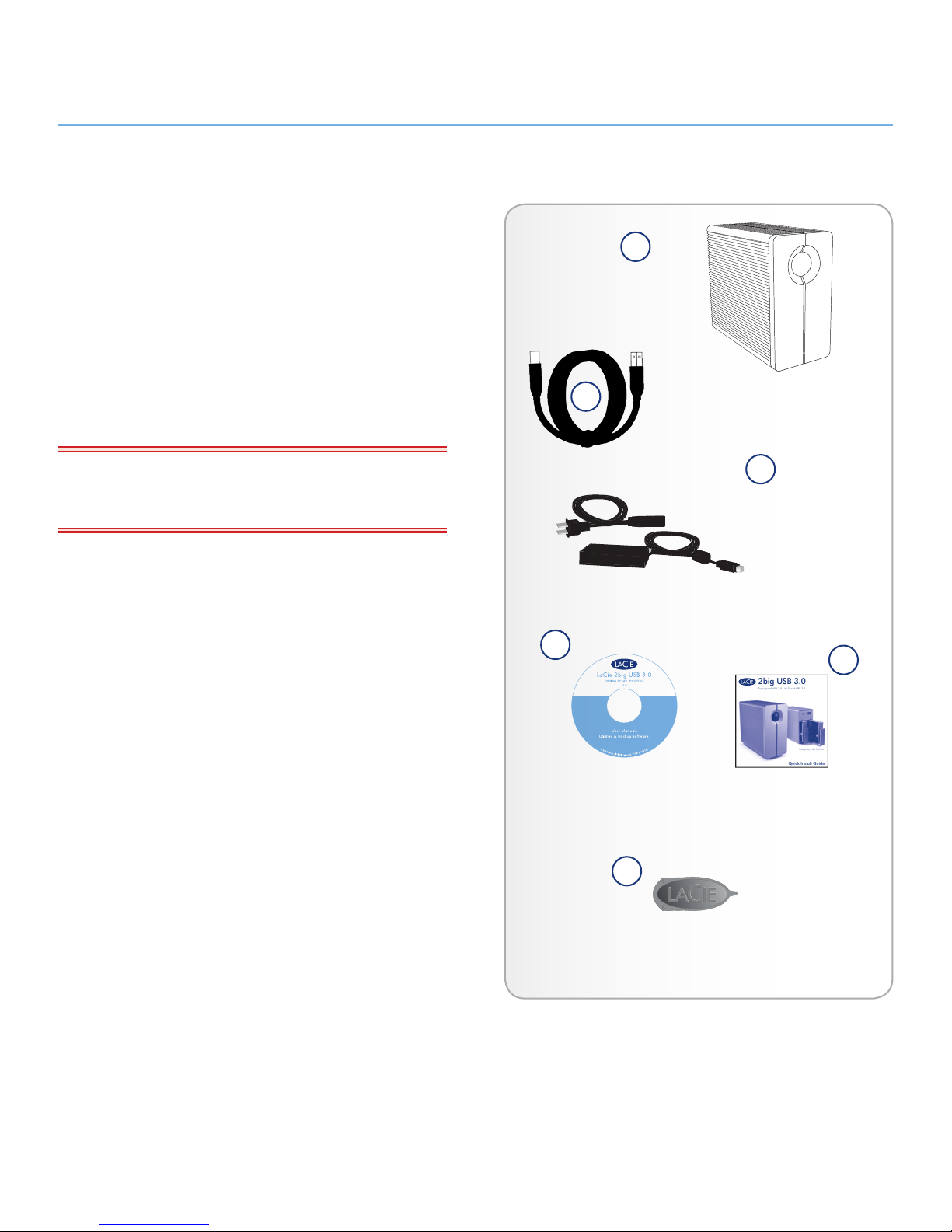
Your LaCie 2big USB 3.0 package contains the system tower and
an accessories box containing the items listed below.
1. LaCie 2big USB 3.0
2. SuperSpeed USB 3.0 cable (compatible with USB 2.0)
3. Power supply kit
4. LaCie Utilities CD-ROM
5. Quick Install Guide
6. 2-in-1 RAID modification and drive removal tool
IMPORTANT INFO: Please save your packaging. In the event
that the drive should need to be repaired or serviced, it must be
returned in its original packaging.
Quick Install Guide
2big USB 3.0
SuperSpeed USB 3.0 | Hi-Speed USB 2.0
Design by Neil Poulton
4
1
2
3
5
6
Page 7
LaCie 2big USB 3.0 • DESIGN BY NEIL POULTON Introduction
User Manual page 7
1.3. Views of the Drive
Front View
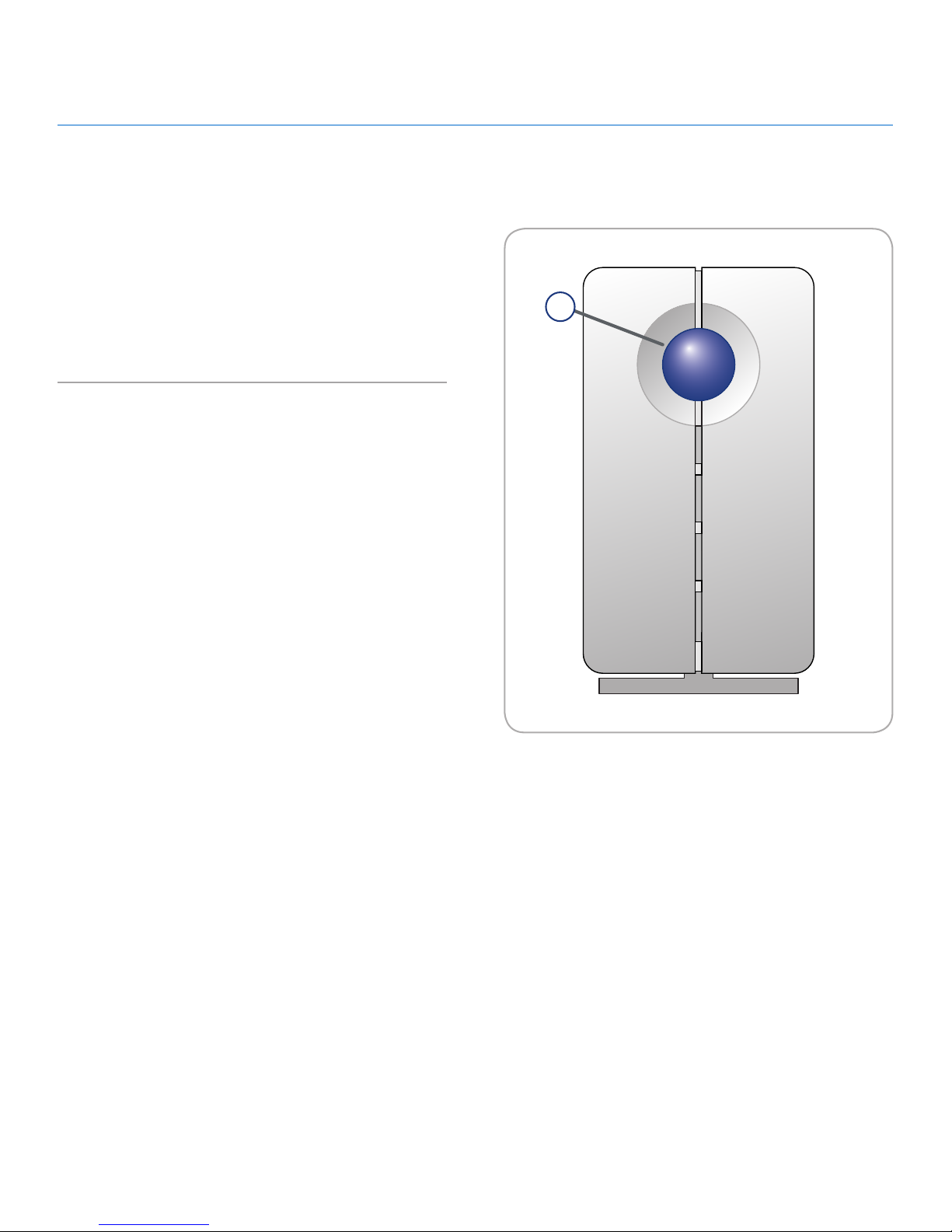
The blue LED (A) on the front of the LaCie 2big USB 3.0 serves
as a status indicator for the RAID, and an on/off button (see Auto
Power and Manual Shut Off for more information on the auto
power function).
See troubleshooting section 4.1. LED Status Indicators for more
information.
A
Fig. 01
Page 8
LaCie 2big USB 3.0 • DESIGN BY NEIL POULTON Introduction
User Manual page 8
Confirm
Fast JBOD Safe
USB 3.0
DESIGNED BY NEIL POULTON
1
Rear View
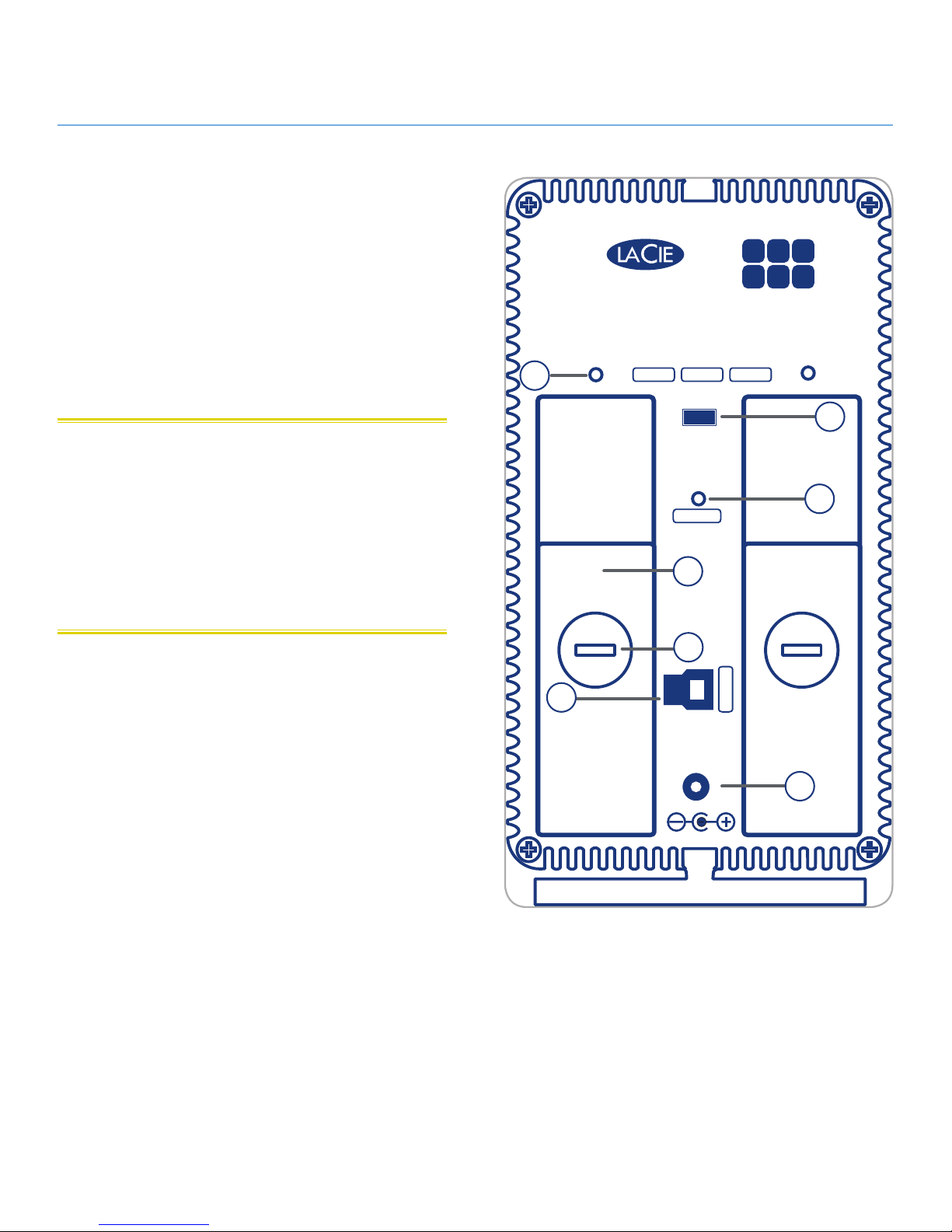
1. Drive status LED
2. Drive tray handle
3. Drive lock
4. USB 3.0 port
5. Power input connection
6. RAID confirmation button
7. RAID selection switch
CAUTION: To avoid overheating, the LaCie 2big USB 3.0 should
be installed in a well-ventilated area and in such a way as to maintain sufficient airflow across the controller chips. Please use the included stand and rubber feet which elevate the 2Big and allow for
better heat dissipation.
Environmental Requirements:
Temperature: 0 – 35° C (32 – 95° F)
Operation Humidity: 20 – 80%, non-condensing
Storage Humidity: 10 – 90%, non-condensing
6
7
2
3
4
5
Fig. 02
Page 9
LaCie 2big USB 3.0 • DESIGN BY NEIL POULTON Introduction
User Manual page 9
1.4. Cables and Connectors
USB
USB is a serial input/output technology for connecting peripheral devices to a computer or to other peripherals, such as USB
hubs. Hi-Speed USB 2.0 is a common interface that supports high
speed devices such as hard drives, CD/DVD drives, and digital
cameras. SuperSpeed USB 3.0 offers transfer rates up to ten times
faster than its predecessor.
Included USB 3.0 Cable
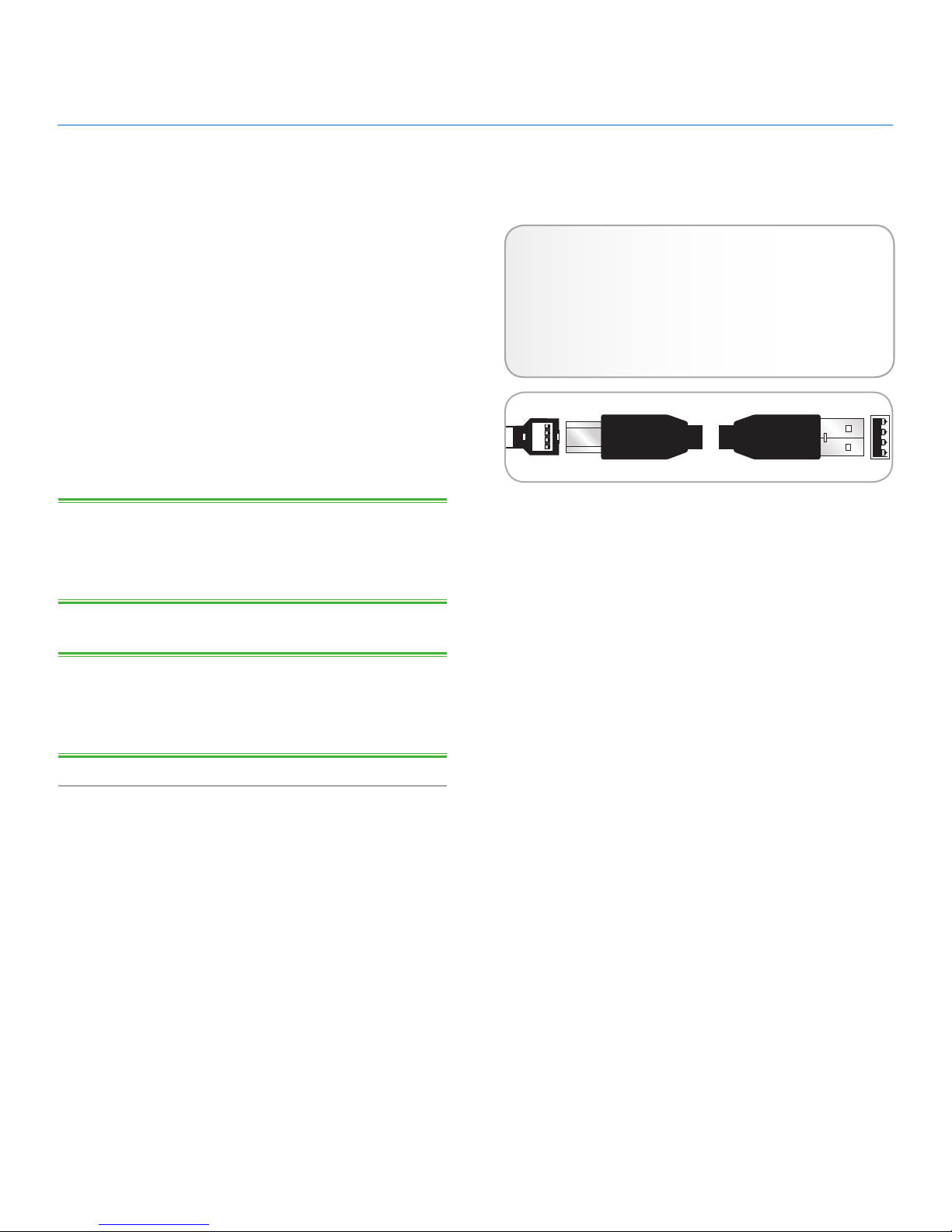
Your LaCie drive is shipped with a SuperSpeed USB 3.0 cable,
to ensure maximum data transfer performance when connected
to a SuperSpeed USB 3.0 port (up to 5 Gb/s). The cable is also
backward compatible to accommodate Hi-Speed USB 2.0 ports
(up to 480 Mb/s).
TECHNICAL NOTE: The USB 3.0 interface may require addi-
tional drivers to operate on your computer. Please confirm that
your operating system supports USB 3.0 and, if necessary, download the necessary drivers.
TECHNICAL NOTE: The LaCie 2big USB 3.0 is compatible
with USB 3.0 and USB 2.0 interfaces. When attaching the 2big
USB 3.0 to a USB 2.0 port, transfer rates are limited to USB 2.0
speeds (up to 480 Mb/s).
Hi-Speed USB 3.0 Benefits
✦ Backwards compatibility: Super-Speed USB 3.0 works
with Hi-Speed USB 2.0 specifications. The transfer
rates do not exceed USB 2.0 speeds.
✦ Hot-pluggable: no need to shut down or restart your
computer when adding or removing devices.
Fig. 03 - USB 3.0 Cable
Page 10

LaCie 2big USB 3.0 • DESIGN BY NEIL POULTON Setup
User Manual page 10
This section covers the installation and configuration of the
LaCie 2big USB 3.0. Follow the steps below to power on and
configure your 2big USB 3.0:
2. Setting Up Your LaCie 2big USB 3.0
Step 1: 2.1. Connect the Interface Cable
Step 2: 2.2. Turn the Drive On
Step 3: 3.4. Formatting and Partitioning – Format the
drives to suit your storage needs. For more information
about file system formats, see section 3.4.1. File System
Formats.
Page 11
LaCie 2big USB 3.0 • DESIGN BY NEIL POULTON Setup
User Manual page 11
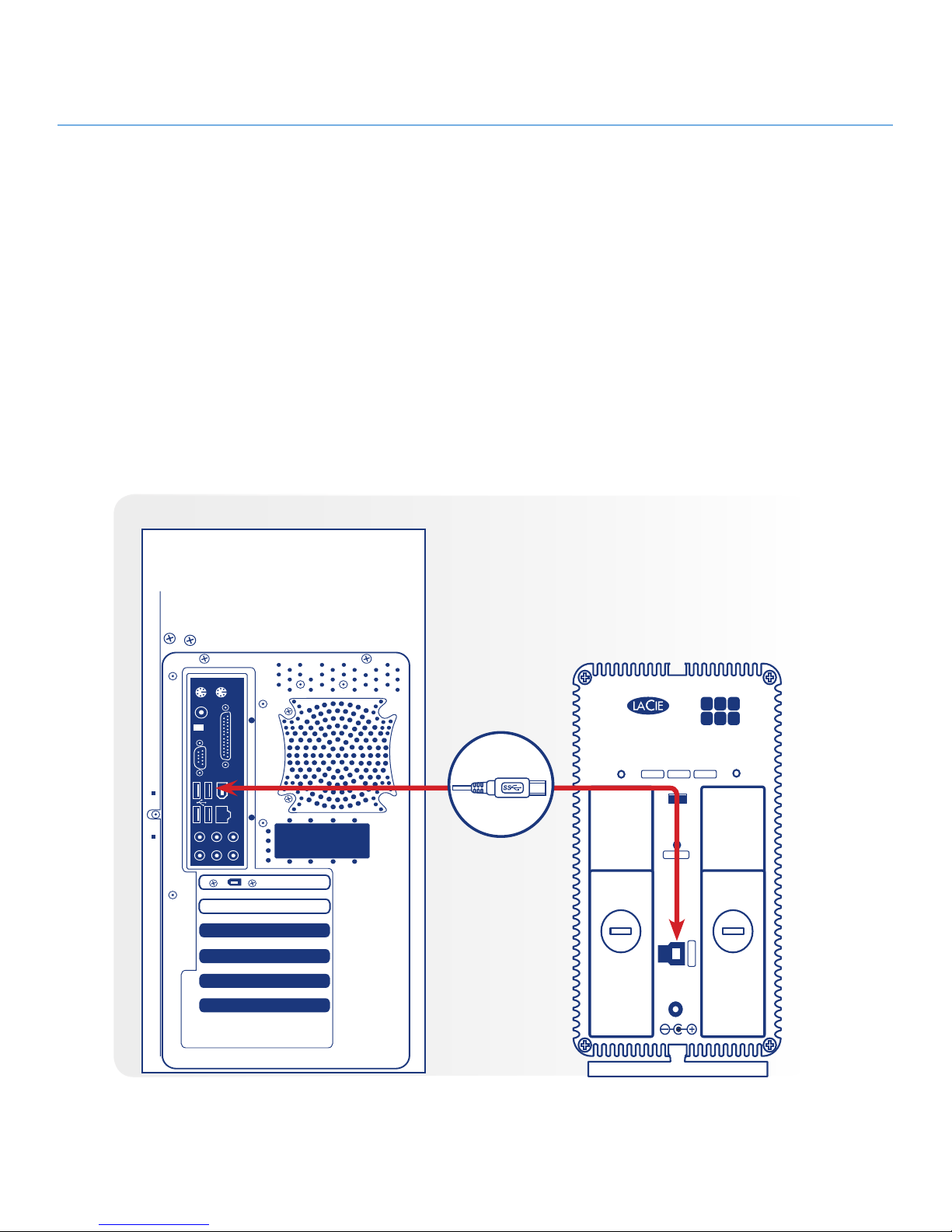
1. Plug one end of the interface cable into the corresponding
port (USB 3.0 or USB 2.0) on your host computer.
2. Connect the other end of the cable to the matching port on
the 2big USB 3.0.
2.1. Connect the Interface Cable
Fig. 04
Confirm
Fast JBOD Safe
USB 3.0
DESIGNED BY NEIL POULTON
USB 3.0
Page 12
LaCie 2big USB 3.0 • DESIGN BY NEIL POULTON Setup
User Manual page 12
Confirm
Fast JBOD Safe
USB 3.0
DESIGNED BY NEIL POULTON
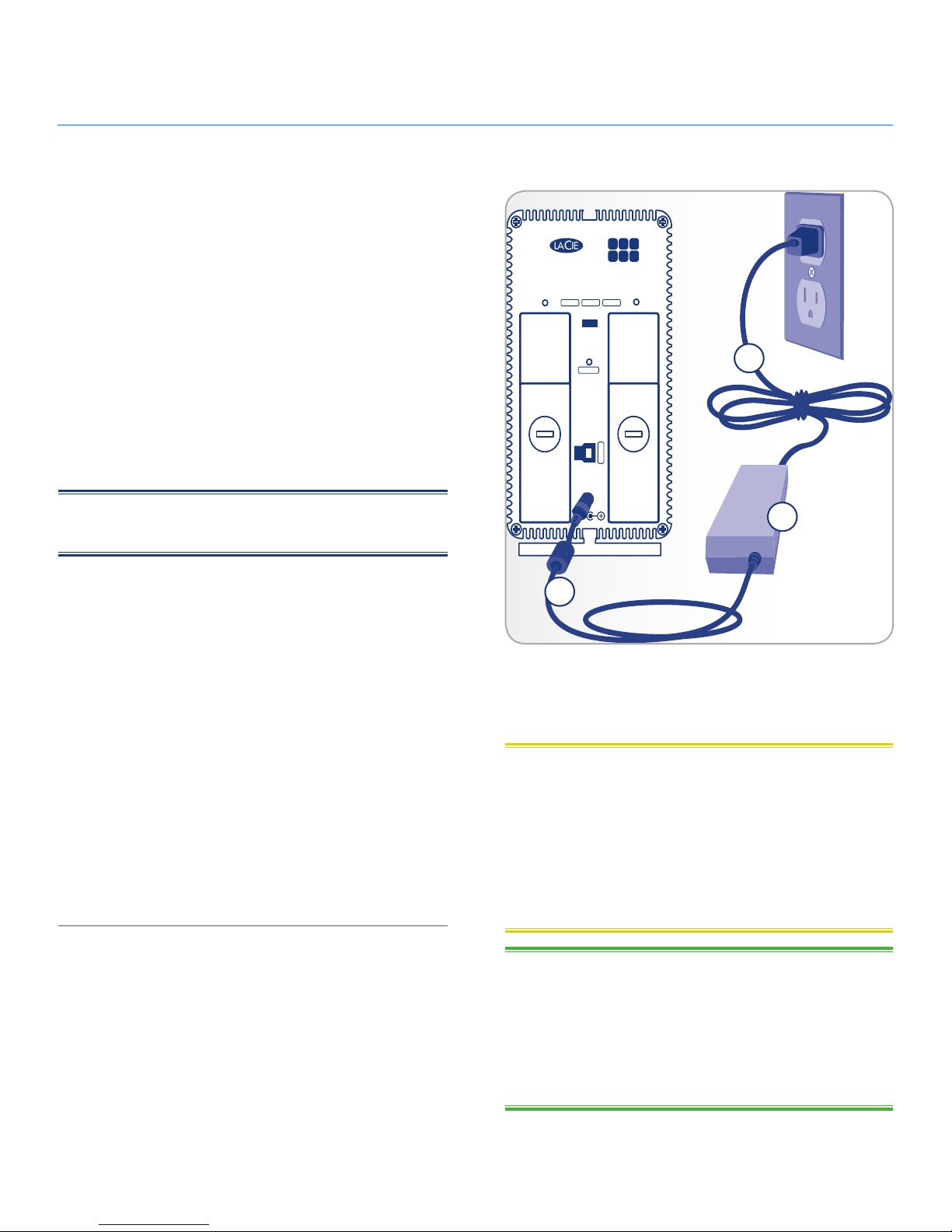
2.2. Turn the Drive On
The power supply kit is composed of two cables: one cable (A)
connects to the LaCie drive; and the other cable (B) connects to a
power outlet, such as a wall outlet or a surge protector.
1. Connect Cable A to the 2big USB 3.0.
2. Connect Cable B to the power supply brick (C).
3. Connect Cable B to a surge protector or wall outlet.
4. The 2big USB 3.0 is in auto mode by default. It will boot
when plugged into a USB 3.0 or USB 2.0 slot on a computer that is powered on. Without a computer, push the LED
button on the front to power on the 2big USB 3.0.
The 2big USB 3.0 may take a few seconds to boot up.
NOTE: Depending on your country, power outlet connections
may be different from the illustration.
Auto Power and Manual Shut Off
The 2big USB 3.0 will shut off when:
✦ it is disconnected from the computer after unmounting the
drives (2.3. Disconnecting Your Hard Drive)
✦ shutting down the computer while the drives are connected
and mounted on the desktop
✦ performing a long push on the front LED button while the
drives are powered on. The 2big USB 3.0 will take more
than a few seconds to switch off when using a long push as
it finishes writing the last action.
Your LaCie 2big USB 3.0 also conserves energy by powering off
the LEDs and entering Eco mode automatically if the drives have
not been used for 30 minutes. The partition(s) will remain on the
desktop (Mac) or in My Computer (Windows) while the drives stay
in Eco mode until the 2big USB 3.0 is accessed.
A
B
C
Fig. 05
CAUTION: Only use the AC adapter supplied with your specif-
ic LaCie device. Do not use a power supply from another LaCie
device or another manufacturer. Using any other power cable or
power supply may cause damage to the device and void your warranty.
Always remove the AC adapter before transporting your LaCie
drive. Failure to remove the adapter may result in damage to your
drive and will void your warranty.
TECHNICAL NOTE: You may use your LaCie drive when in a
foreign country thanks to its 100-240 Volt power supply. To be
able to use this feature, you may need to purchase an appropriate
adapter or cord. LaCie accepts no responsibility for any damage
to the drive resulting from the use of an inappropriate adapter.
Using an adapter other than one authorized by LaCie will void
your warranty.
Page 13
LaCie 2big USB 3.0 • DESIGN BY NEIL POULTON Setup
User Manual page 13
2.3. Disconnecting Your Hard Drive
USB devices feature “plug & play” connectivity, which means that
a drive can be connected and disconnected while the computer
is running. To prevent failures, it is important to follow the steps
below before disconnecting your hard drive.
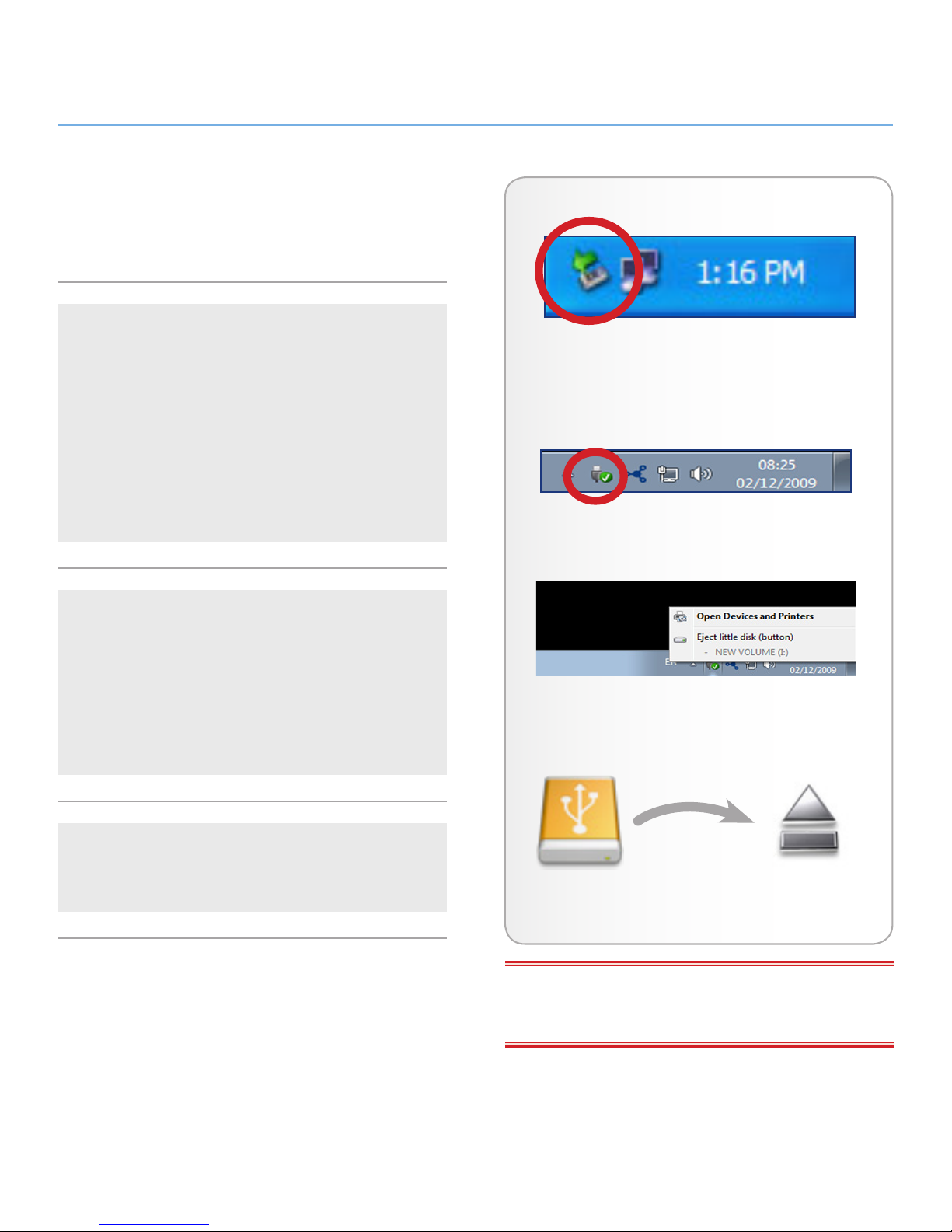
Windows XP Users
From the System Tray located in the lower right-hand side of
your screen, click on the Eject icon (a small green arrow over a
hardware image) (Fig. 06 – Windows XP Users).
A message will appear, detailing the devices that the Eject icon
controls, i.e. “Safely re move…” Select the disk you wish to unmount.
You will then be given the following message: “‘The USB Mass
Storage Device’ device can now be safely removed from the
system”. It is now safe to disconnect the device.
Windows Vista/Windows 7 Users
From the System Tray located in the lower right-hand side of
your screen, click on the plug icon (note the white check mark
inside a green circle). Fig. 07 – Windows Vista/Windows 7 Us-
ersA message will appear, detailing the devices that may be
safely unmounted. Fig. 08 – Windows Vista/Windows 7 Users
Select Eject for the device you wish to unmount. A message will
appear notifying you that it is safe to remove the device.
Mac Users
Drag the hard drive icon to the trash (Fig. 09 – Mac Users).
The drive can now be disconnected.
Fig. 06 – Windows XP Users
Fig. 08 – Windows Vista/Windows 7 Users
Fig. 09 – Mac Users
Fig. 07 – Windows Vista/Windows 7 Users
IMPORTANT INFO: For maximum energy efficiency, the 2big
USB 3.0 will automatically shut down when it is unplugged from
the computer.
Page 14
LaCie 2big USB 3.0 • DESIGN BY NEIL POULTON RAID
User Manual page 14
3. RAID
3.1. About RAID Modes
This section will help you decide which RAID mode is right for your
application.
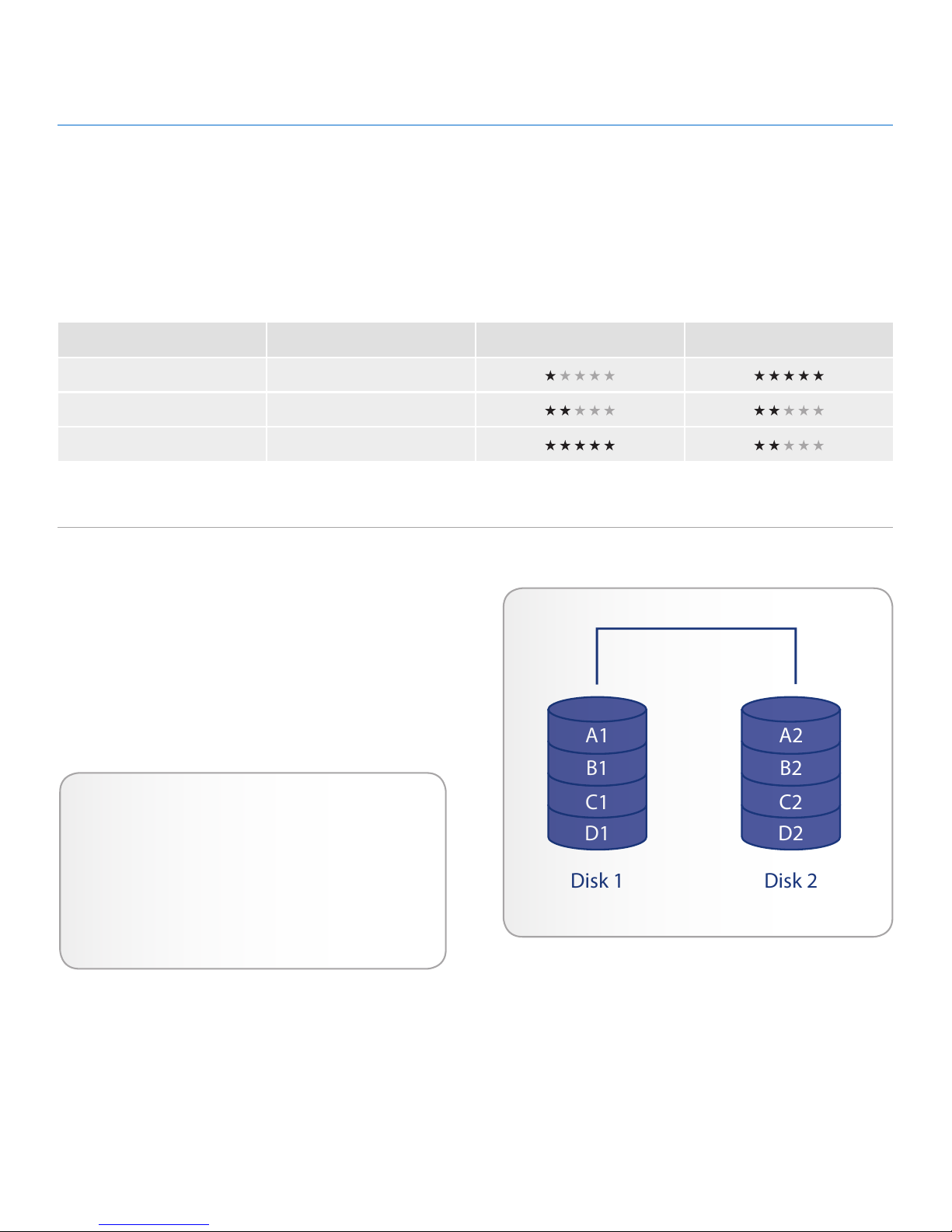
3.1.1. RAID 0 (FAST - High performance)
The 2big USB 3.0 is pre-configured in RAID 0, the faster level of
RAID. Requiring at least two drives, RAID 0 stripes data onto each
disk. The available capacities of each disk are added together so
that one logical volume mounts on the computer.
In the event that one disk in the array fails, all the files become
inaccessible because parts of each string of data have been written to all the disks. See Fig. 10.
Applications
RAID 0 is ideal for users who need maximum speed and
capacity. Video editors working with very large files may use
RAID 0 when editing multiple streams of video for optimal
playback performance. While a RAID 0 array is suited for
actively working with files, users interested in a higher level
of security should consider RAID 1.
A1
B1
C1
D1
A2
B2
C2
D2
Disk 1 Disk 2
RAID Mode Capacity Protection Speed
RAID 0 (FAST) 100%
JBOD 100%
RAID 1 (SAFE) 50%
Fig. 10
Page 15
LaCie 2big USB 3.0 • DESIGN BY NEIL POULTON RAID
User Manual page 15
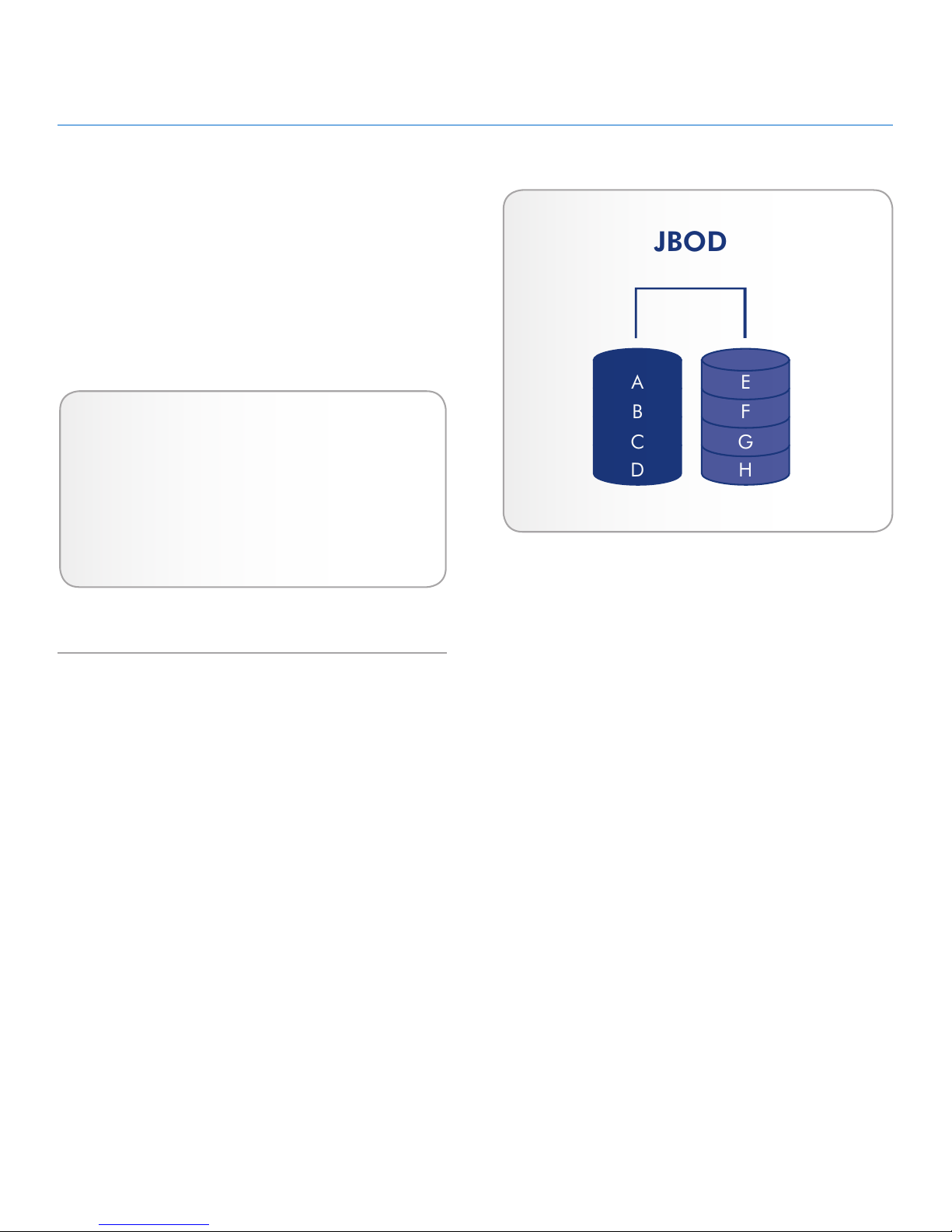
3.1.2. JBOD (Just a bunch of disks)
When the 2big USB 3.0 is set to JBOD, each drive is considered
a separate device, similar to individual hard disk drives. Each disk
will mount on your computer as separate hard drives, divided into
the partitions created by your operating system’s disk management utility. One great advantage of JBOD is the use of the full
capacity of both drives. Also, in the event of a single drive failure,
files stored on the healthy drive are not lost. However, this configuration offers none of the benefits of RAID 0 (speed) or RAID 1
(complete data protection).
JBOD
A
B
C
D
E
F
G
H
I
J
K
O
L
P
M
N
Applications
JBOD can be used with any application. In the event of
a single drive failure, files on the healthy drive will not be
lost. However, choosing to forgo RAID 0 and RAID 1 does
have its drawbacks since superior performance or total data
security will not be available.
Fig. 11
Page 16
LaCie 2big USB 3.0 • DESIGN BY NEIL POULTON RAID
User Manual page 16
3.1.3. RAID 1 (SAFE - Data protection)
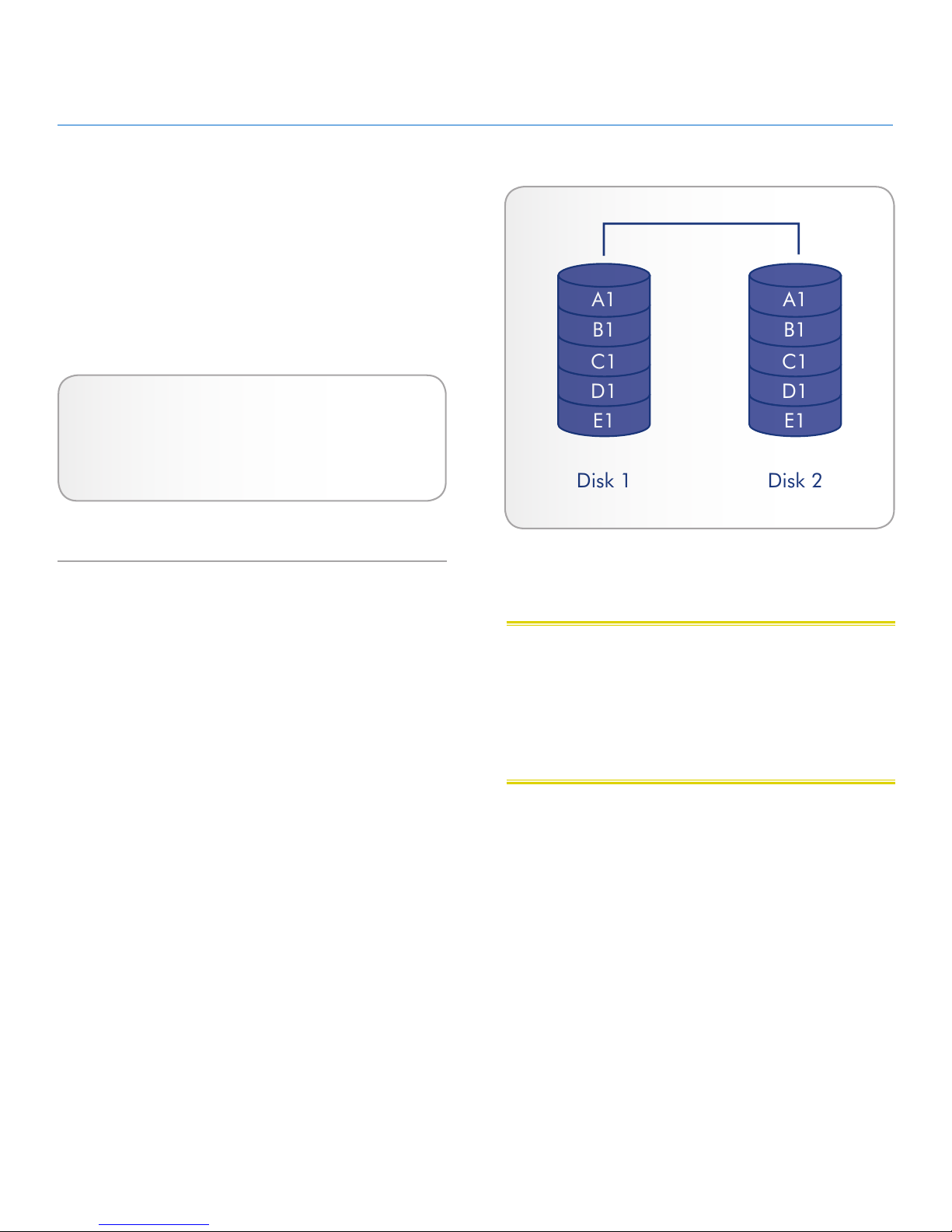
In RAID 1, the two physical disks are mirrored together so that one
single logical volume mounts on the desktop. Please note that the
combined storage will not exceed the available capacity of the
lowest-capacity single disk.
All data is saved simultaneously on each disk (Fig. 12). If one
physical disk fails, the data is available immediately on the second
disk. No data is lost if one disk fails.
Applications
✦ Maximum data safety
✦ RAID 1 reduces the total available capacity by 50%
because two copies of the data are saved.
Disk 1 Disk 2
A1
B1
C1
D1
E1
A1
B1
C1
D1
E1
Fig. 12
CAUTION: Your LaCie 2big USB 3.0 comes preconfigured in
RAID 0, which provides faster transfer rates and allows access to
the whole storage capacity. Unlike RAID 1, it does not provide any
security. If a drive fails, all data will be lost. If you are concerned
about data security, LaCie highly recommends changing your
2big USB 3.0 to RAID 1. See section 3.1. About RAID Modes, for
more information.
Page 17
LaCie 2big USB 3.0 • DESIGN BY NEIL POULTON RAID
User Manual page 17
Fast SafeJBOD
Confirm
USB 3.0
DESIGNED BY NEIL POULTON
3.2. Changing the RAID Mode
See section 3. RAID to become familiar with the levels of RAID
available to the 2big USB 3.0 before following the steps below.
IMPORTANT INFO: Changing the level of RAID will require
that you format the LaCie 2big USB 3.0. Please back up any
data stored on the LaCie 2big USB 3.0 before following the steps
below.
CAUTION: Your LaCie 2big USB 3.0 comes preconfigured in
RAID 0, which provides faster transfer rates and allows access to
the whole storage capacity. Unlike RAID 1, it does not provide
any security. If a drive fails, all data will be lost. If you are concerned about data security, LaCie highly recommends changing
your 2big USB 3.0 to RAID 1. See section 3.1. About RAID Modes,
for more information.
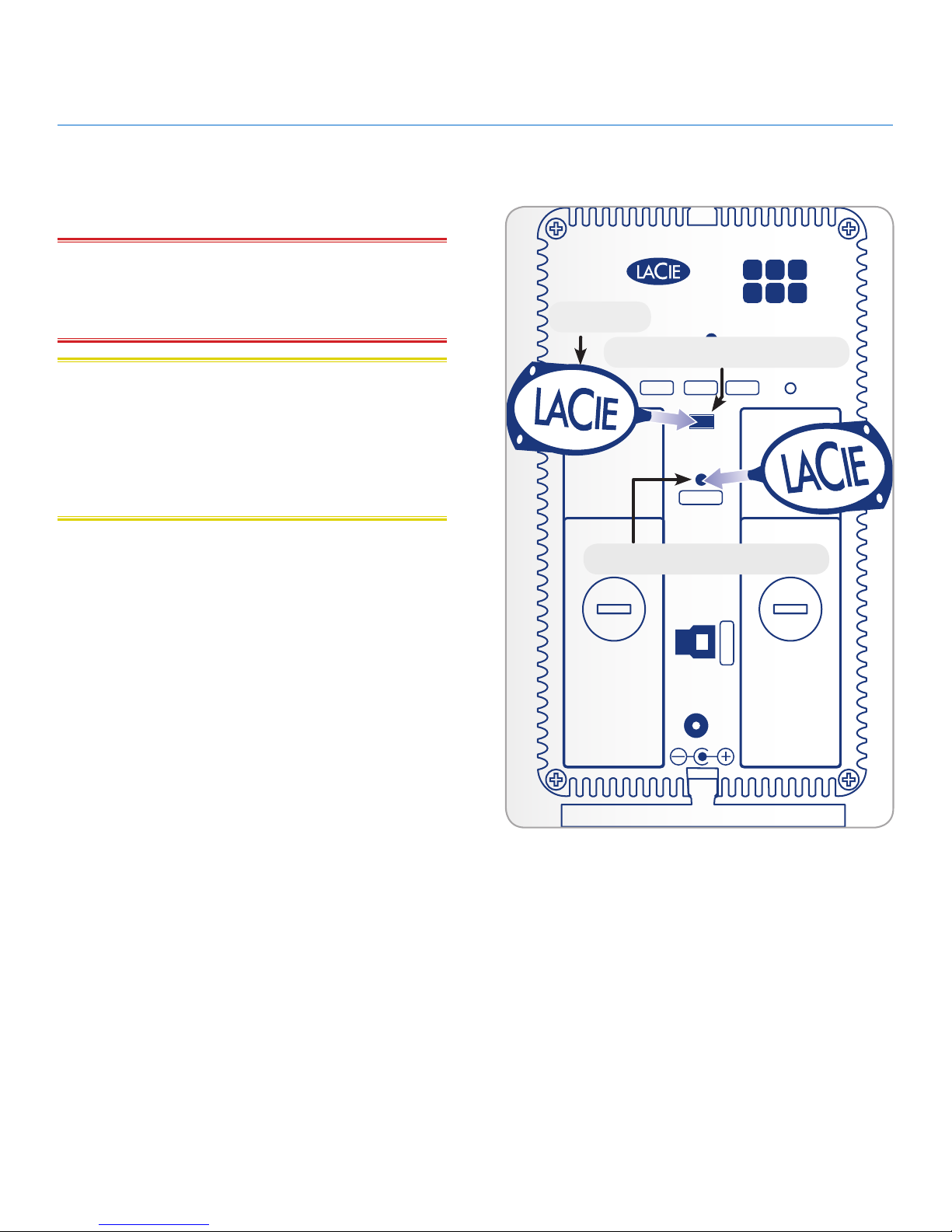
Note the rectangular slot located between the two drive trays on
the back of the 2big USB 3.0 (Fig. 13). This is the RAID selection
switch. There is a switch inside the slot used for selecting the level
of RAID:
✦ Left = RAID 0 (FAST)
✦ Center = JBOD
✦ Right = RAID 1 (SAFE)
The RAID confirmation button is below the RAID selection switch;
a small circular slot with a button inside (Fig. 13).
The 2big USB 3.0 must be turned on to change the level of RAID.
Attach the power cable if it is disconnected. Switch on the 2big
USB 3.0 by pressing the front LED button. The front LED will blink
as the RAID boots. It will become solid blue when ready.
To change the RAID mode:
1. Unmount the 2big USB 3.0 volumes from your computer
(2.3. Disconnecting Your Hard Drive) and disconnect the
interface cable.
2. To modify the level of RAID, use the 2-in-1 tool to slide the
switch to the desired position (Fig. 13).
3. Validate the new level by pushing the RAID confirmation
button with the 2-in-1 tool (Fig. 13). The 2big USB 3.0 will
turn off to signal the RAID change confirmation.
4. Reattach the USB 3.0 cable to your computer. The 2big
USB 3.0 will start automatically if the computer is on. The
new RAID level has been successfully configured.
5. Format the disks. See section 3.4. Formatting and Partition-
ing.
continued on the next page>>
Fig. 13
RAID Selection Switch
Tool
RAID Confirmation Button
Page 18

LaCie 2big USB 3.0 • DESIGN BY NEIL POULTON RAID
User Manual page 18
IMPORTANT INFO: You must partition the disk drives after
changing the RAID mode. See section 3.4. Formatting and Par-
titioning.
CAUTION: Disk drives must be inserted correctly in the 2big USB
3.0 before changing the RAID level.
TECHNICAL NOTE: The drive status LEDs on the rear of the 2big
USB 3.0 will blink with disk activity. See 4.1. LED Status Indicators
for more information on LED behavior.
Page 19
LaCie 2big USB 3.0 • DESIGN BY NEIL POULTON Installing Drives
User Manual page 19
In the event that an individual hard disk fails in the LaCie 2big
USB 3.0, please contact your LaCie reseller or LaCie Customer
Support. Please replace a defective hard drive only with a new
drive provided by LaCie. For drive removal and replacement process, please follow the steps below.
CAUTION: After continuous use of the LaCie 2big USB 3.0,
drives may be hot. Use caution when removing.
IMPORTANT NOTE: A replacement drive must have the same
or greater capacity than the drive it is replacing.
To Remove a Drive:
✦ RAID 0 or JBOD: Turn off the 2big USB 3.0 and unplug it.
✦ RAID 1: The 2big USB 3.0 may stay on while removing the
disk.
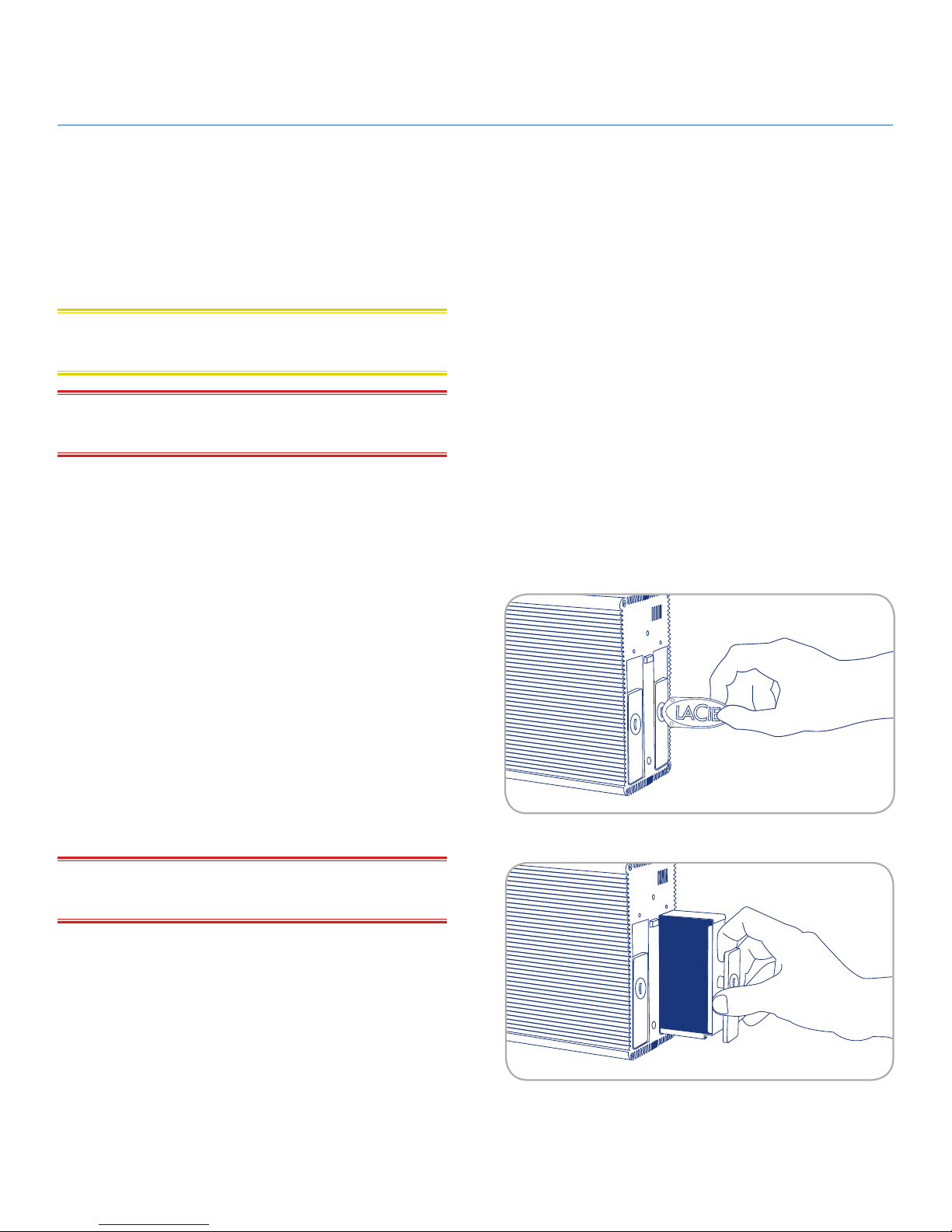
1. The drive tray may be locked. To unlock it, insert the round
end of the provided 2-in-1 tool into the slot on the drive
lock and turn the lock until the slot is vertical (Fig. 14).
2. Draw out the drive tray by inserting your finger into the
space behind the drive tray handle and pulling to disengage
the drive (Fig. 15).
3. Grasp the drive tray handle and carefully extract the drive
(Fig. 15).
✦ RAID 0: Turn the 2big USB 3.0 on. To use the remaining
drive, you must format it (See 3.4. Formatting and Partition-
ing).
✦ RAID 1 or JBOD: If it is off, turn the 2big USB 3.0 on to
use the remaining drive. Please note that RAID 1 requires a
second disk to mirror data.
IMPORTANT NOTE: LaCie highly recommends replacing the
disk that has been removed.
continued on the next page>>
3.3. Removing and Installing Drives
Fig. 14
Fig. 15
Page 20

LaCie 2big USB 3.0 • DESIGN BY NEIL POULTON Installing Drives
User Manual page 20
To Install a Drive:
1. If the 2big USB 3.0 is configured in RAID 0, turn the device
off and unplug it. If the 2big USB 3.0 is configured in RAID
1, you can leave it turned on and continue to step 2.
2. Carefully insert the drive tray into an empty drive bay. When
the drive tray is almost flush, you will feel a bit of resistance.
Press the drive tray handle firmly until the drive snaps into
place and it is in line with the back pane of the 2big USB
3.0.
3. Use the 2-in-1 tool to lock the drive lock. Turn the lock until
the grooves are vertically oriented. The drives are locked
when both locks are vertical.
TECHNICAL NOTE: Data is still accessible during a RAID 1
rebuild. The 2big USB 3.0 can be disconnected from the workstation during the rebuild; only the power must be connected.Important Info: Drive warranty will be void if you replace the defective
drive with a drive not provided by LaCie. Drives purchased from
LaCie are shipped pre-installed in drive trays with handles.
IMPORTANT INFO: In order for rebuilding to occur in RAID 1
mode, the product must be turned on while a replacement disk
is installed.
IMPORTANT INFO: Rebuilding a RAID 1 array can take sev-
eral hours. For example, rebuilding a 1TB RAID 1 array can take
more than three hours. LaCie does not recommend removing any
drives during a rebuild.
Page 21

LaCie 2big USB 3.0 • DESIGN BY NEIL POULTON Formatting
User Manual page 21
3.4. Formatting and Partitioning
The 2big USB 3.0 comes pre-formatted in NTFS, optimized for
Windows XP, Windows Vista, and Windows 7. Please read the following information on file system formats for Windows and Mac
operating systems to determine if you need to reformat the 2big
USB 3.0. See sections 3.4.2. Formatting for Window XP Users,
3.4.3. Formatting for Windows Vista and Windows 7 Users, and
3.4.4. Formatting for Mac Users for formatting instructions.
3.4.1. File System Formats
Windows Users
The LaCie 2big USB 3.0 comes preformatted in NTFS for optimum
performance with Windows XP, Windows Vista, and Windows 7.
TECHNICAL NOTE: Windows XP 32-bit does not support vol-
umes greater than 2TB. Windows XP x64, Windows Vista, and
Windows 7 allow for partitions greater than 2TB but the disk must
be converted to the GPT file system. This process is outlined in
3.4.3. Formatting for Windows Vista and Windows 7 Users.
FAT 32
FAT is an acronym for File Allocation Table, which dates back to
the beginnings of DOS programming. Originally, FAT was only
16 bits, but after the second release of Windows 95 it was upgraded to 32 bits, hence the name FAT 32. In theory, FAT 32
volume sizes can range from less than 1MB all the way to 2TB. It
is the native file system of Windows 98 and Windows Me, and is
supported by Windows XP, Windows Vista, and Windows 7. When
FAT 32 is used with Windows XP, Windows Vista, and Windows
7, volume size is limited to 32GB (by the Windows partition utility
Disk Management), and the individual file size is limited to 4GB.
NTFS
This acronym stands for New Technology File System, and it is
the native file system for Windows NT, Windows 2000, Windows
XP, Windows Vista, and Windows 7. NTFS offers several features
that are not available with FAT 32, such as file compression, encryption, permissions, auditing, and enhanced RAID capabilities.
The minimum supported volume size for NTFS is 10MB, with a
maximum of 2TB when initialized in MBR format or without a limit
when initialized in GPT format.
continued on the next page>>
File System Formats
There are two primary file system formats compatible with
the Windows operating systems – NTFS and FAT32 (MSDOS). Use the information below to determine which format
is best for you.
Use NTFS if…
...you will be using the drive only with Windows XP, Windows Vista, and/or Windows 7 (performance will generally
be greater when compared to FAT 32). This file system is
compatible in read only mode with Mac OS X 10.3 and
higher. See technical note at left for information on the 2TB
volume size limitation.
Use FAT 32 (MS-DOS) if…
...you will be using your drive with both Windows and Mac
OS X 10.3. Maximum single file size is 4GB.
Page 22
LaCie 2big USB 3.0 • DESIGN BY NEIL POULTON Formatting
User Manual page 22
Mac OS X Users:
The LaCie 2big USB 3.0 comes preformatted in NTFS, a file system native to Windows. While Mac OS X can read NTFS, writing
data is not supported. You may customize the drive by reformatting and/or partitioning the 2big USB 3.0 for optimal performance in Mac OS environments.
Mac OS Extended (HFS+)
Mac OS Extended refers to the file system used by Mac OS X.
HFS+ uses hard disk space more efficiently and is not limited by
block size.
MS-DOS File System (FAT 32)
This is the Microsoft file system, more typically known as FAT 32.
Use this file system if you are going to move your LaCie hard disk
drive between Mac and Windows operating systems.
File System Formats
There are two file system formats recommended by LaCie
when using the 2big USB 3.0 with the Mac OS – Extended
(HFS+) and FAT32 (MS-DOS). Use the information below
to determine which format is best for you.
Use Extended (HFS+) if…
...you will be using the drive only within a Mac OS X environment. This file system is not compatible with Windows.
Use FAT 32 (MS-DOS) if…
...you will be using your drive with both Windows and Mac.
Maximum single file size is 4GB.
Page 23
LaCie 2big USB 3.0 • DESIGN BY NEIL POULTON Formatting
User Manual page 23
3.4.2. Formatting for Window XP Users
The steps listed below will help you format and partition your disk
drive using Windows XP. Please see 3.4.3. Formatting for Win-
dows Vista and Windows 7 Users or 3.4.4. Formatting for Mac
Users for instructions on formatting using alternative operating
systems. For more information on the optimal file format, go to
3.4.1. File System Formats.
CAUTION: Following these steps will erase everything from the 2big
USB 3.0. Please back up all data that you want to preserve before performing these steps.
IMPORTANT NOTE: Windows XP 32-bit does not recognize
volumes greater than 2TB. Windows XP x64, Windows Vista (32and 64-bit versions), and Windows 7 (32- and 64-bit versions)
recognize volumes greater than 2TB but the disks must be converted to the GPT file system.
1. Connect the drive to the power source and to the computer
via the interface port.
2. Right-click My Computer and select Manage.
3. From the “Computer Management” window, select Disk
Management (located below the Storage group).
4. If the “Initialize and Convert Disk Wizard” window appears,
click Cancel.
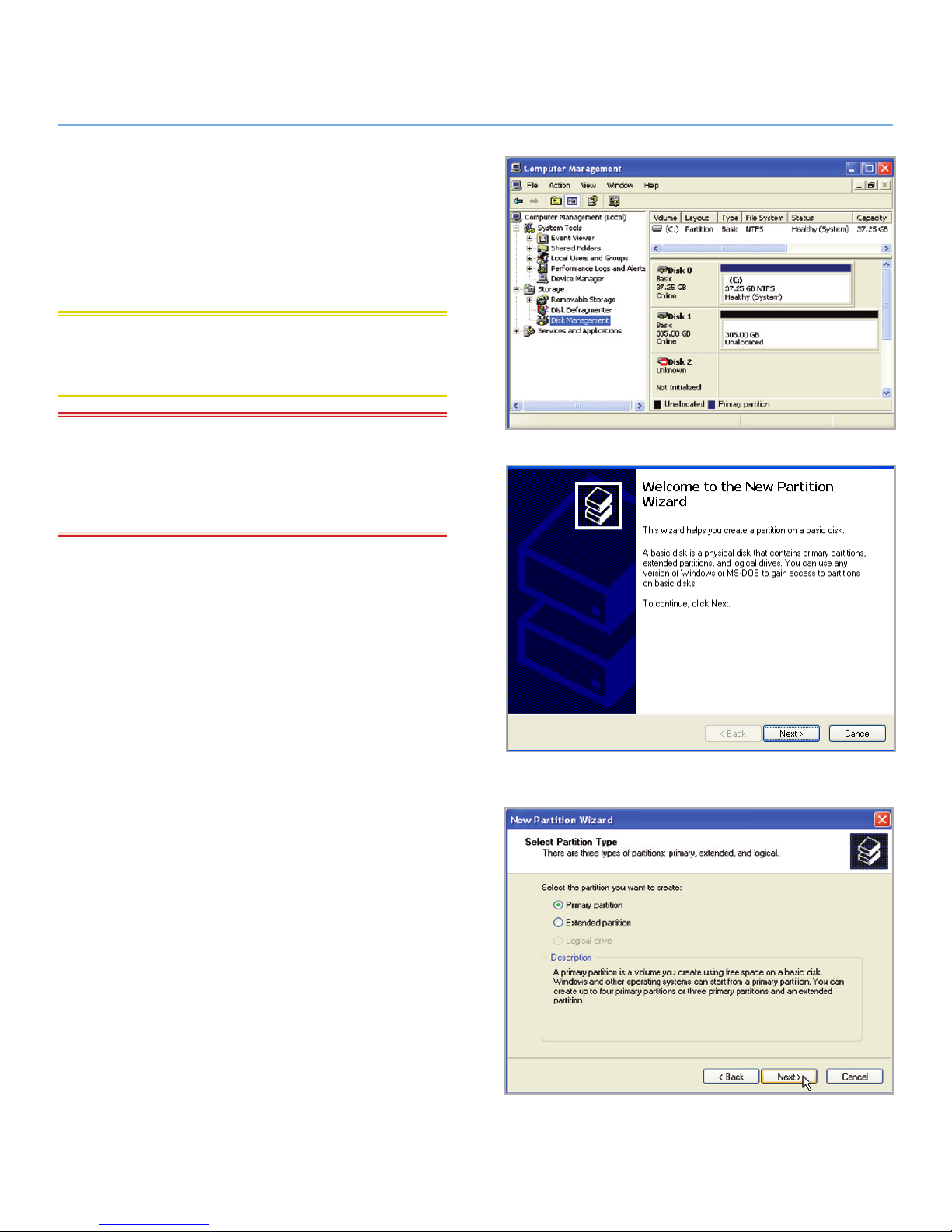
5. Windows will list the hard disks that are installed on the
system (Fig. 16). If there is a red circle with a white line,
you must initialize the disk. Right-click the icon to select
Initialize.
6. In the rectangular box to the right that says “Unallocated”
or lists partitions from a previous format, right-click and select New Partition…
7. On the first page of the “New Partition Wizard” (Fig. 17).
Click Next.
8. Select the Primary or Extended option (Fig. 18). Click
Next.
continued on the next page>>
Fig. 16
Fig. 17
Fig. 18
Page 24
LaCie 2big USB 3.0 • DESIGN BY NEIL POULTON Formatting
User Manual page 24
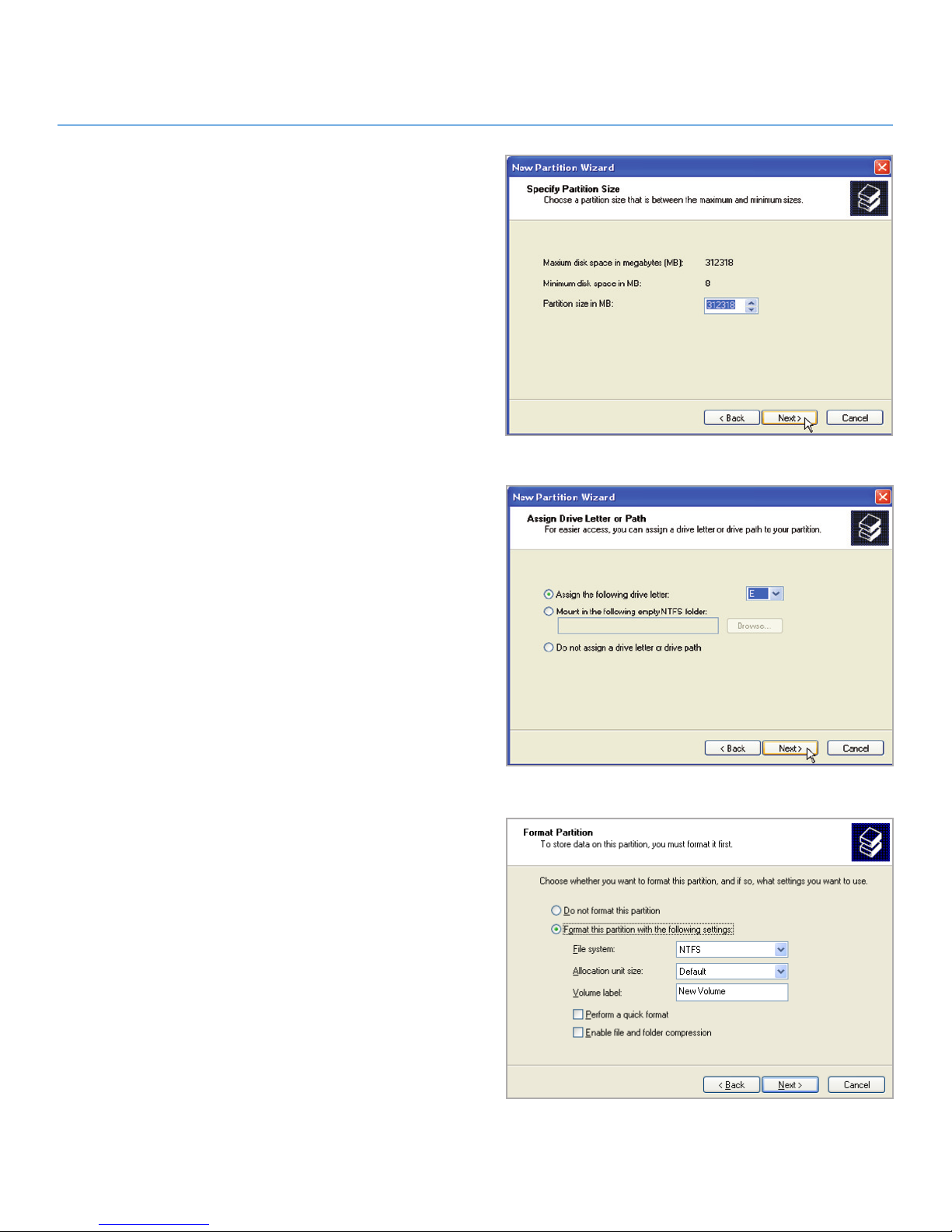
9. Specify the partition size. Please note that FAT32 partitions must be 32GB (32000MB) or smaller. By default, the
partition occupies the entire volume (Fig. 19) but you may
change the size based upon the working environment. Click
Next.
10. Assign a drive letter or mount path (Fig. 20). Click Next.
11. Select the file format for the disk (FAT32 will only appear
as an option if the partion is 32GB or less - see 3.4.1. File
System Formats). Once FAT32 or NTFS has been selected
(Fig. 21), you have the option to Perform a quick format,
which allows for a much faster format. While Disk Management does not check the drive for errors as extensively with
a quick format, the option does save a significant amount
of time. Click Next.
continued on the next page>>
Fig. 19
Fig. 20
Fig. 21
Page 25
LaCie 2big USB 3.0 • DESIGN BY NEIL POULTON Formatting
User Manual page 25
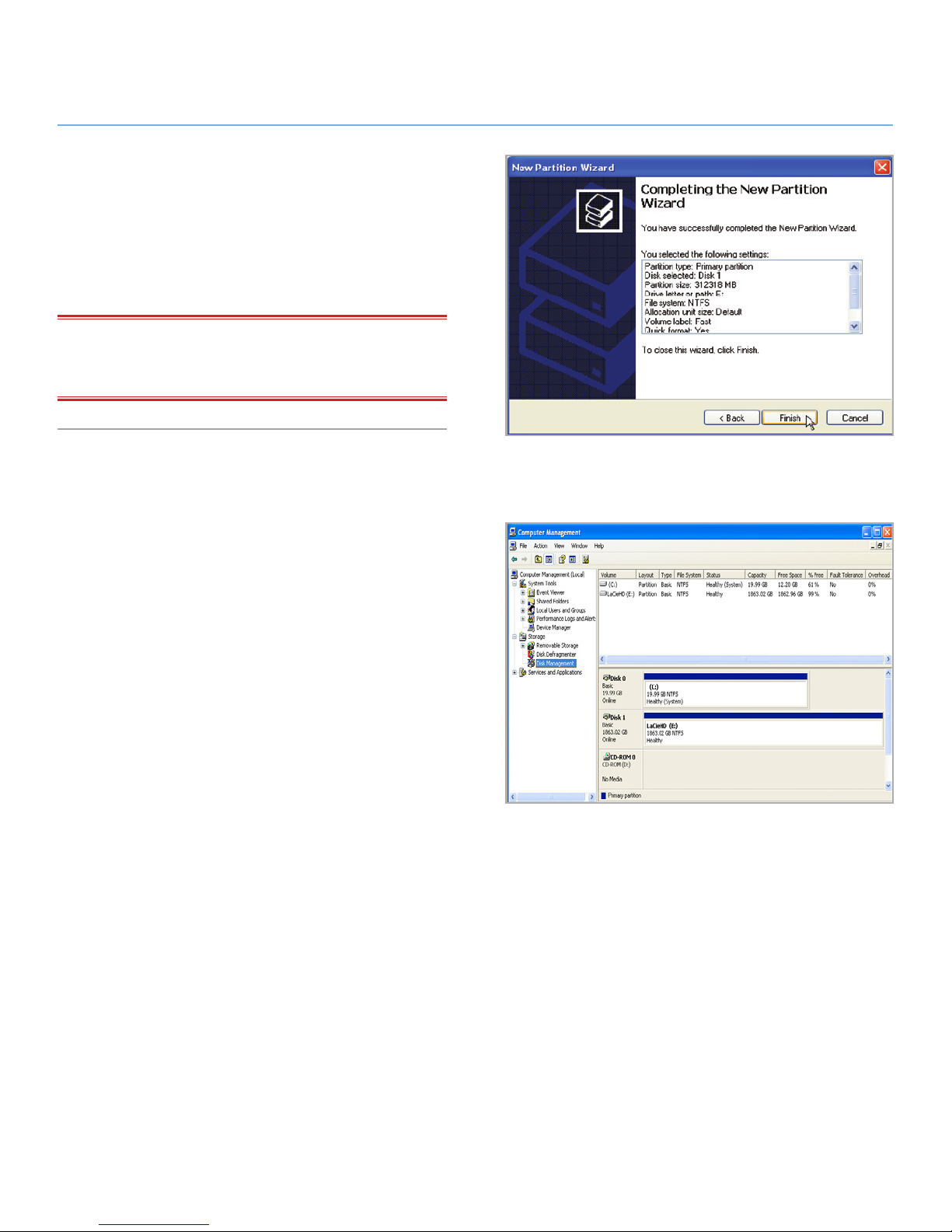
12. A window appears listing your choices. If all seems well,
click Finish to begin the format process (Fig. 22). To make
a change, select Back.
13. Your drive’s partition(s) should have a “Healthy” status in
the list of drives in Disk Management (Fig. 23). You will
also see the drive’s partition(s) in My Computer. The drive
is ready for use.
IMPORTANT INFO: Please refer to section 3.4.1. File System
Formats, for a more detailed comparison of the various file system
formats.
Fig. 22
Fig. 23
Page 26
LaCie 2big USB 3.0 • DESIGN BY NEIL POULTON Formatting
User Manual page 26
3.4.3. Formatting for Windows Vista and
Windows 7 Users
Master Boot Record or GUID Partition Table?
Master Boot Record (MBR) partitioning has been the hard drive
standard for many years. It supports a maximum of four primary
partitions with a size limit of 2TB per partition. Due to partition limitations in the face of ever-expanding hard disk drive
sizes, Global Unique Identifier Partition Tables (GPT) has been
established to allow for more partitions with greater capacities.
Further, GPT has many additional advantages that may offer
enhancements in performance.
However, GPT is not compatible with Windows XP 32-bit. While
Windows XP 64-bit supports GPT, it is best to use MBR if you
intend to share your LaCie device with computers running Windows XP 32-bit.
Switching from MBR to GPT or, conversely, from GPT to MBR,
is not difficult. Please copy all important data to a separate disk
before making the change since adjusting the partition table
format is destructive:
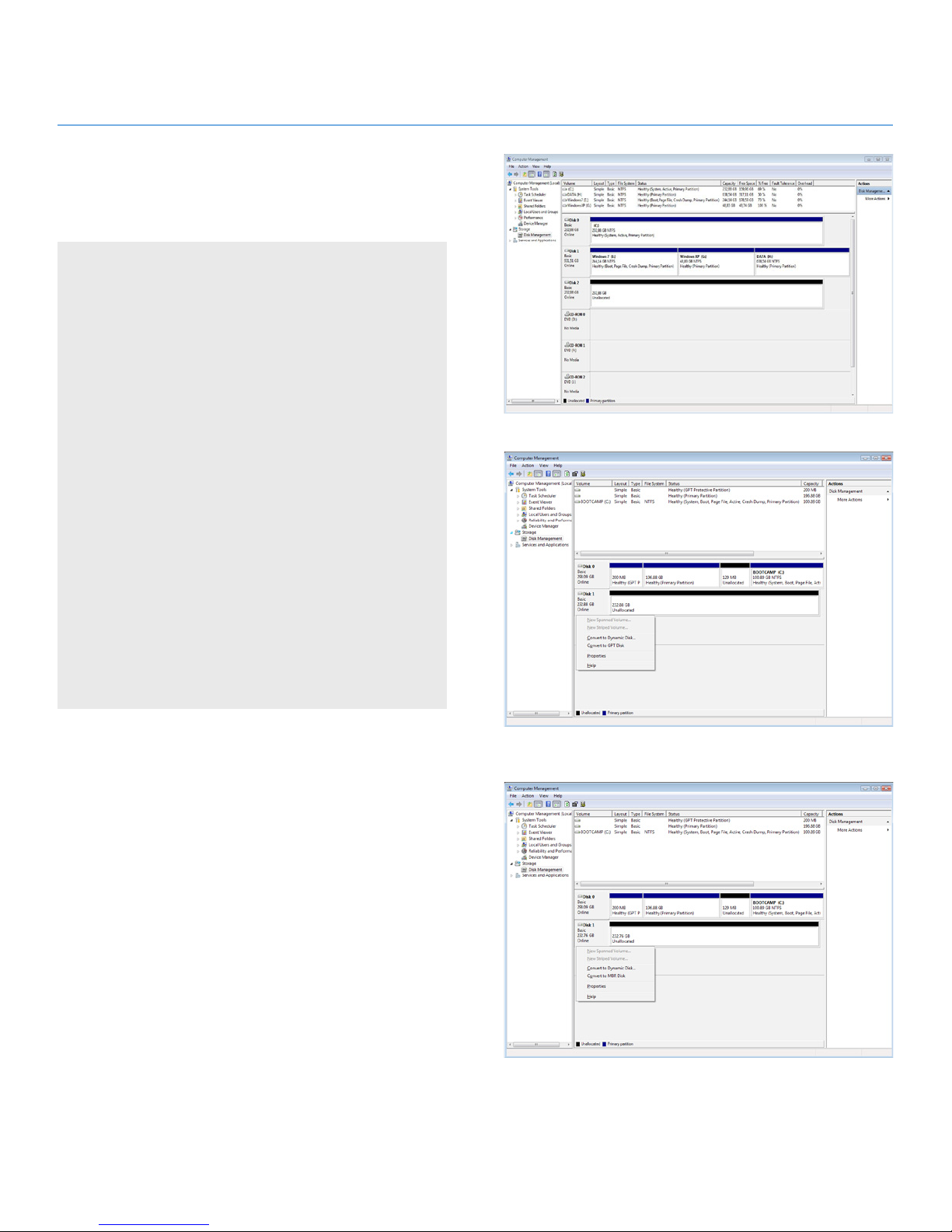
Right-click on My Computer and choose Manage. From the
Manage window select Disk Management and find your LaCie disk drive. Right-click on the disk number to choose GPT
(Fig. 25) or MBR (Fig. 26).
The steps listed below will help you format and partition your disk
drive using Windows XP. Please see 3.4.2. Formatting for Window
XP Users or 3.4.4. Formatting for Mac Users for instructions on
formatting using alternative operating systems. For more information on the optimal file format, go to 3.4.1. File System Formats.
1. Right-click on My Computer and choose Manage. From
the Manage window select Disk Management.
2. From the list of drives in the middle of the Disk Manage-
ment window, right-click on your LaCie hard disk drive.
Select New Simple Volume... (Fig. 24)
continued on the next page>>
Fig. 24
Fig. 25
Fig. 26
Page 27
LaCie 2big USB 3.0 • DESIGN BY NEIL POULTON Formatting
User Manual page 27
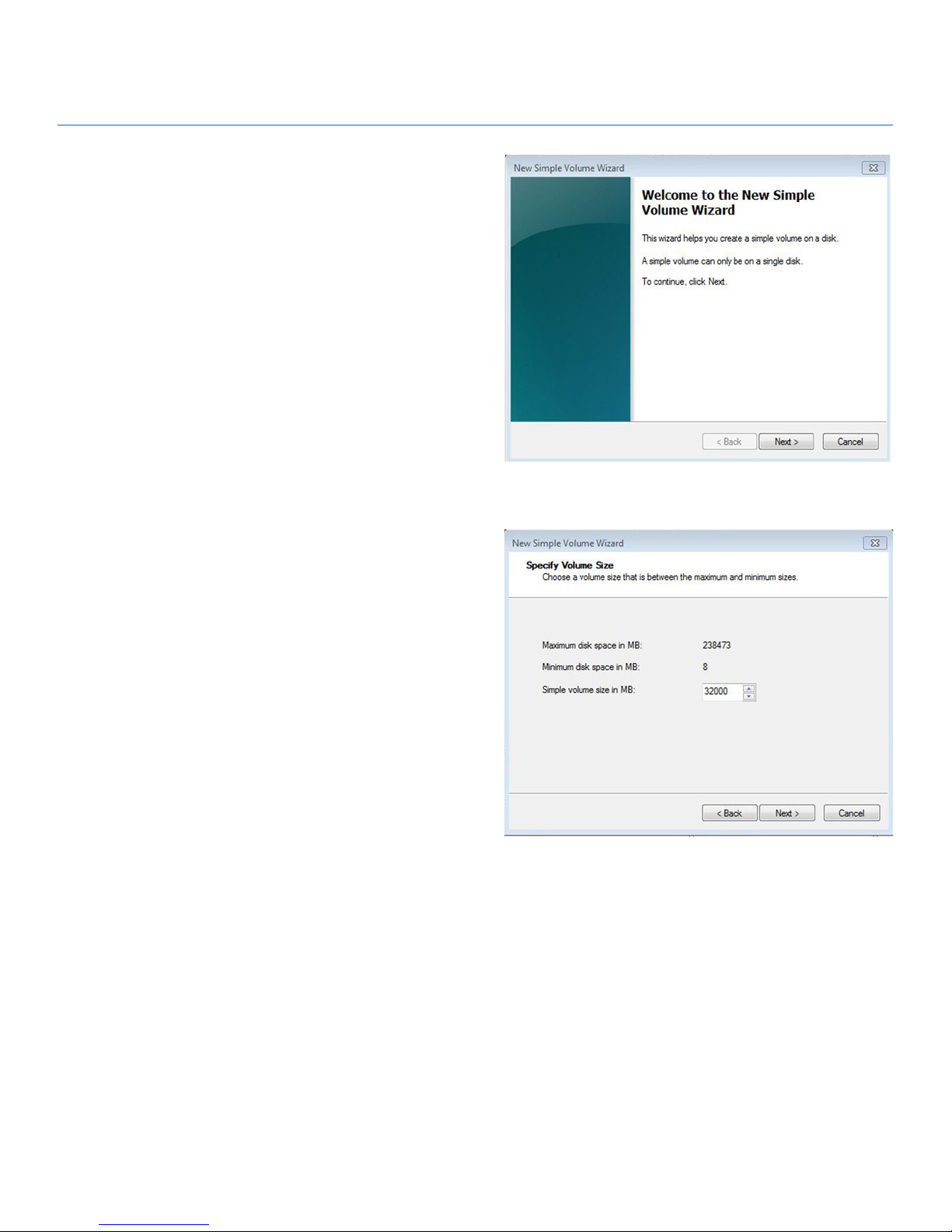
3. The New Simple Volume Wizard will appear. To continue
choose Next. (Fig. 27)
4. This wizard allows you to create volumes, also known as
partitions. You can choose to create a single partition or
many. Type the size of the partition you want to create in
megabytes (MB). For example, a 100GB (gigabyte) partition is 100000MB. If you want to create a FAT32 partition,
the size cannot exceed 32GB (32000MB). (Fig. 28) Once
you have chosen a partition size, select Next.
continued on the next page>>
Fig. 27
Fig. 28
Page 28
LaCie 2big USB 3.0 • DESIGN BY NEIL POULTON Formatting
User Manual page 28
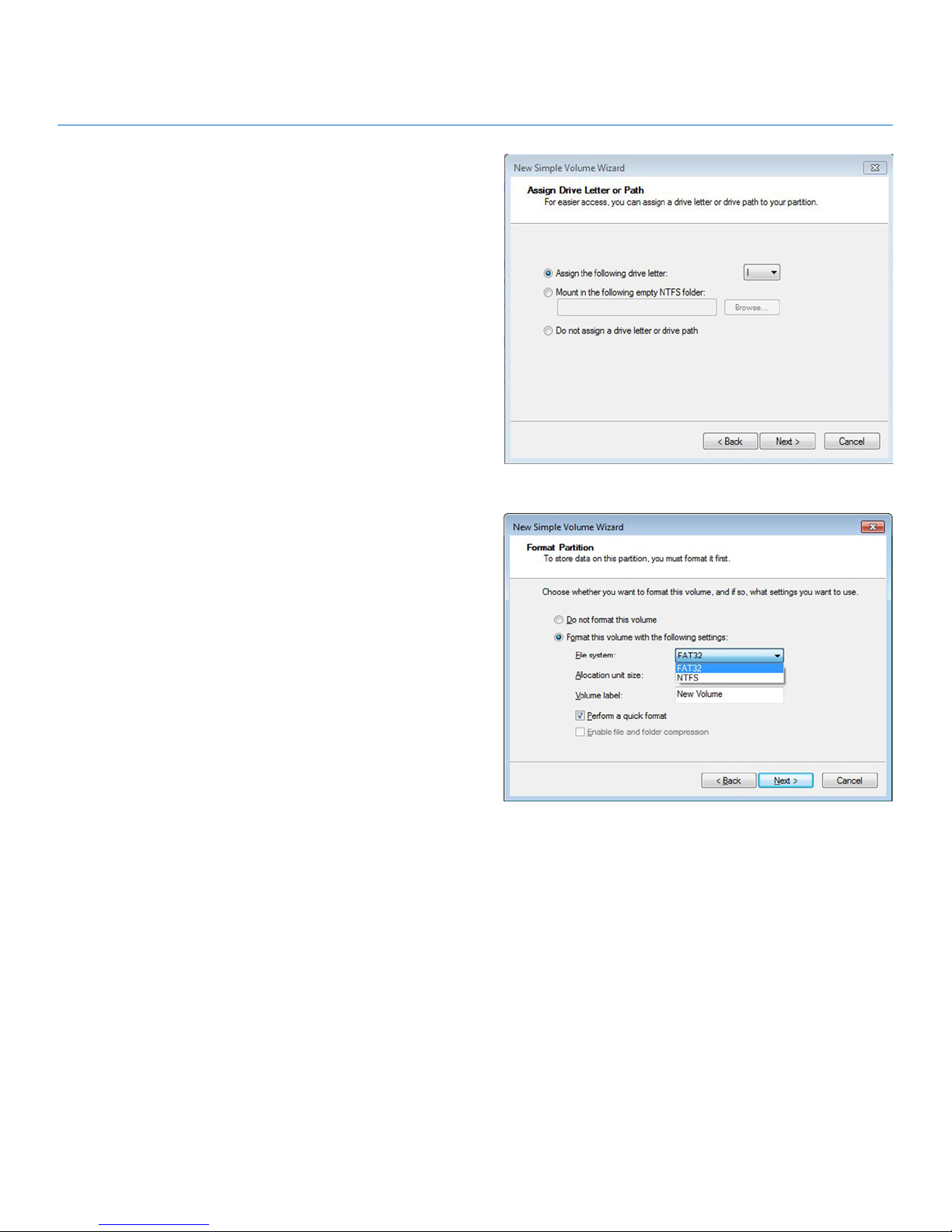
5. Assign a drive letter or accept the default. (Fig. 29) Select
Next.
6. Choose the file system format for the partition. If the partition size is 32GB or less, the choices will include NTFS
and FAT32. Once the format is selected, you may check
Perform a quick format, which allows for a much faster
format. While Disk Management does not check the drive
for errors as extensively with a quick format, the option does
save considerable time. (Fig. 30) Select Next.
continued on the next page>>
Fig. 29
Fig. 30
Page 29
LaCie 2big USB 3.0 • DESIGN BY NEIL POULTON Formatting
User Manual page 29
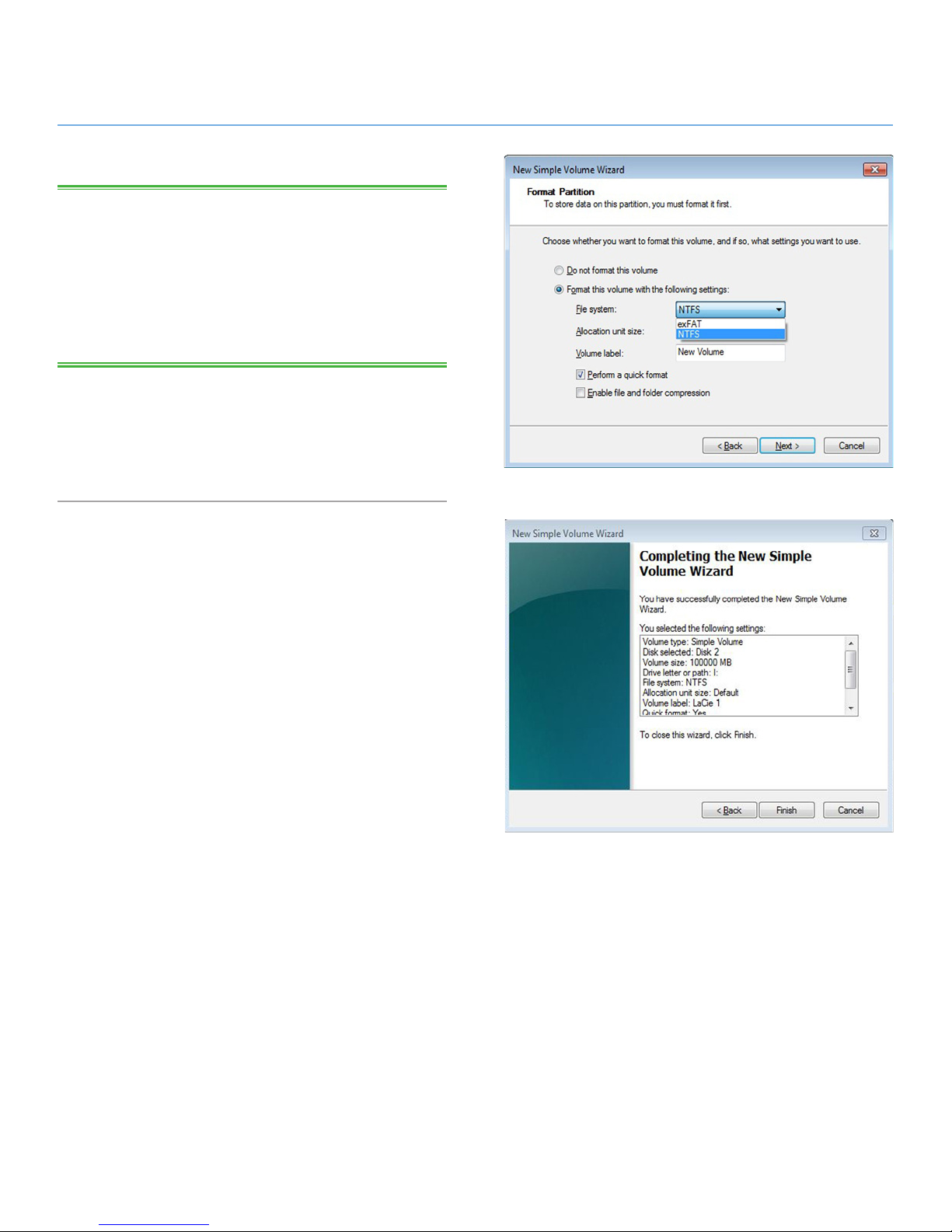
TECHNICAL NOTE: Windows Vista SP1 and Windows 7 offer the
exFAT file system, which is not limited to partitions less than 32GB
(Fig. 31). Used primarily with USB flash drives, the exFAT file system
overcomes many of the limitations of FAT32. In addition to Windows Vista SP1 and Windows 7, the exFAT file system can work on
Windows XP SP2 with a special driver. Mac OS support is questionable, which limits sharing your LaCie drive between Windows and
Apple operating systems.
7. The last window is a summary of the format options you
have just selected. If all looks to be correct, click Finish
for the format to begin or Back to make changes (Fig. 32).
Fig. 31
Fig. 32
Page 30
LaCie 2big USB 3.0 • DESIGN BY NEIL POULTON Formatting
User Manual page 30
3.4.4. Formatting for Mac Users
The steps listed below will help you format and partition your disk
drive using Mac OS X. Please see 3.4.2. Formatting for Window
XP Users or 3.4.3. Formatting for Windows Vista and Windows 7
Users for instructions on formatting using alternative operating
systems. For more information on the optimal file format, go to
3.4.1. File System Formats.
TECHNICAL NOTE: LaCie suggests using the Mac OS Extended
format since it may provide a more familiar experience to Macintosh users.
CAUTION: Following these steps will erase everything from the
2big USB 3.0. Backup all data stored on your LaCie hard disk
drive before formatting it.
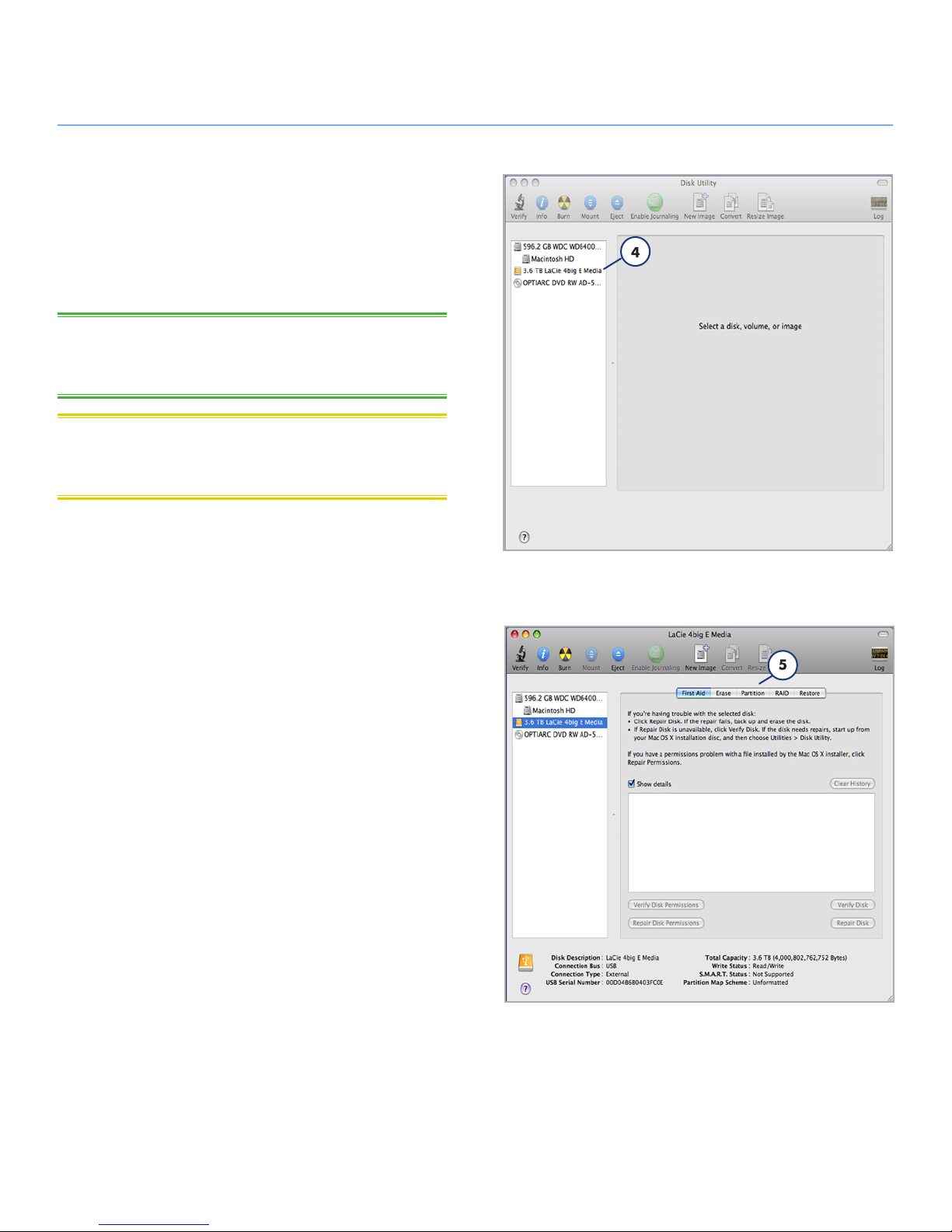
1. Connect the drive to the computer and turn it on.
2. Select Utilities from the Go menu in the Finder menu bar.
3. In the Utilities folder, double-click Disk Utility.
4. The Disk Utility window will open (Fig. 33). Select your LaCie hard disk drive from the list of available hard disks on
the left side of the window.
5. Select the Partition tab (Fig. 34).
continued on the next page>>
Fig. 33
Fig. 34
Page 31
LaCie 2big USB 3.0 • DESIGN BY NEIL POULTON Formatting
User Manual page 31
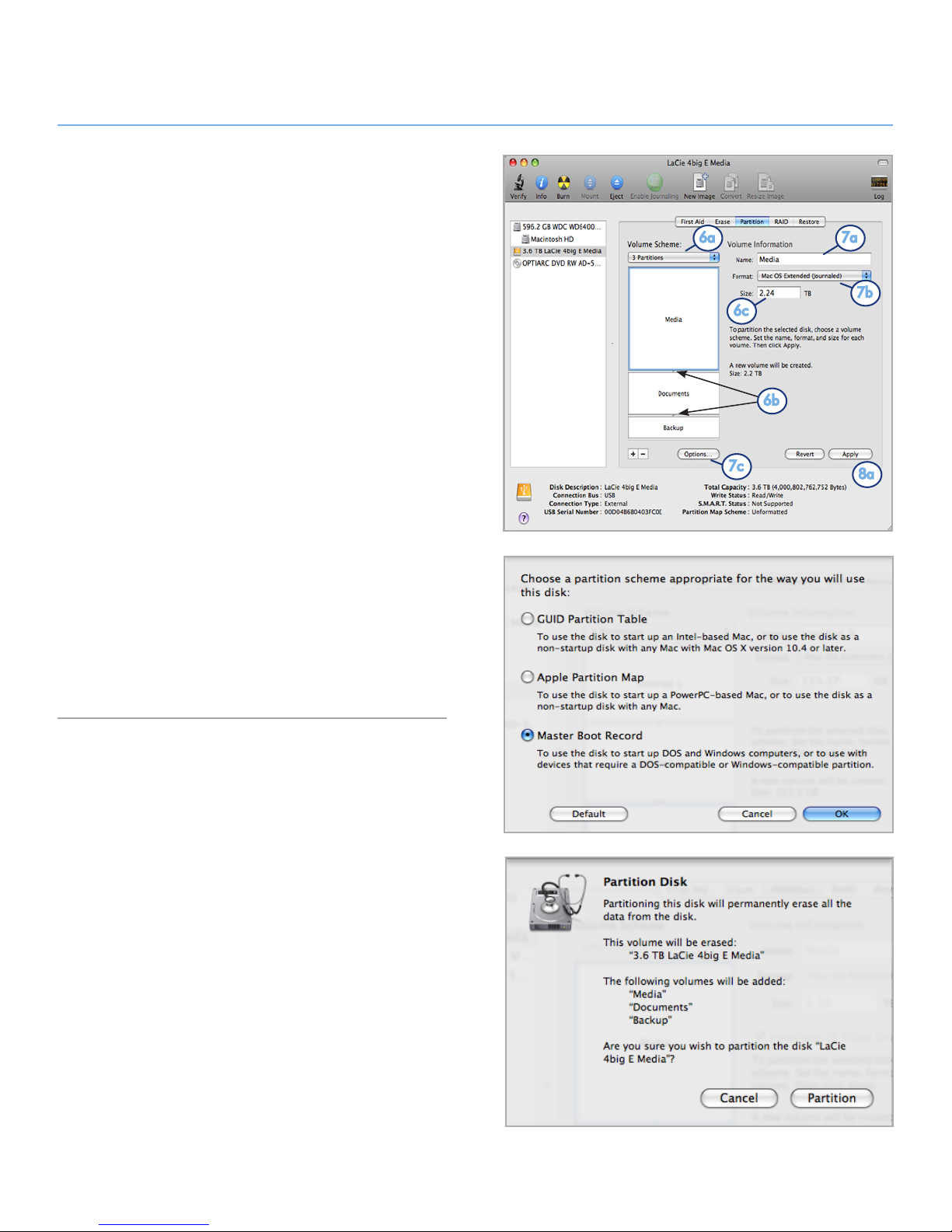
6. From the Volume Scheme: menu, choose the number
of partitions for the disk drive using the pull-down menu
(Fig. 35 (6a) - Mac OS X gives you the option of dividing the
drive into a maximum 16 partitions). You can adjust the size
of each partition using the slide bar between the partitions
in the Volume Scheme: area (Fig. 35 (6b)) or write the size
manually in the Size box. (Fig. 35 (6c)).
7. Click on a volume (partition) in Volume Scheme so that
a name can be entered in the Volume Information section (Fig. 35 (7a)). From the volume Format pull-down list
(Fig. 35 (7b)), select one of the following Mac formats: Mac
OS Extended (Journaled), Mac OS Extended, Mac OS
Extended (Case-sensitive, Journaled), Mac OS Extended (Case-sensitive) or Free Space. To format a partition
FAT32, you must select Options... (Fig. 35 (7c)) below the
list of partitions and choose the radio button for Master
Boot Record (Fig. 36). MS-DOS (FAT) will appear on the
pull-down list of Formats (Fig. 35 (7b)).
8. Once you have finalized the volume options, click Apply
(Fig. 35 (8a)). Click Partition when the alert message appears (Fig. 37).
9. Disk Utility will format and partition the disk according to
your settings. Once finished, the partition(s) will appear on
your desktop, indicating the disk drive is ready for use.
Fig. 35
Fig. 36
Fig. 37
6a
6b
6c
7a
7b
7c
8a
Page 32

LaCie 2big USB 3.0 • DESIGN BY NEIL POULTON Troubleshooting
User Manual page 32
4. Troubleshooting
In the event that your LaCie 2big USB 3.0 is not working correctly,
please refer to the following checklist to find out where the problem
is coming from. If you have gone through all of the points on the
checklist and your drive is still not working correctly, please have
a look at the FAQs that are regularly published on our Web site
– www.lacie.com. One of these FAQs may provide an answer to
your specific problem. You can also visit the drivers pages, where
the most recent software updates are available.
If you need further assistance, please contact your LaCie reseller
or LaCie Technical Support (see section 5. Contacting Customer
Support for details).
Manual Updates
LaCie is constantly striving to give you the most up-to-date,
comprehensive User Manuals available on the market.
It is our goal to provide a friendly, easy-to-use format that will
help you quickly install and utilize the many functions of your new
device. If your manual does not reflect the configuration of the
product that you purchased, please check our Web site for the
most current version available.
www.lacie.com
Page 33
LaCie 2big USB 3.0 • DESIGN BY NEIL POULTON Troubleshooting
User Manual page 33
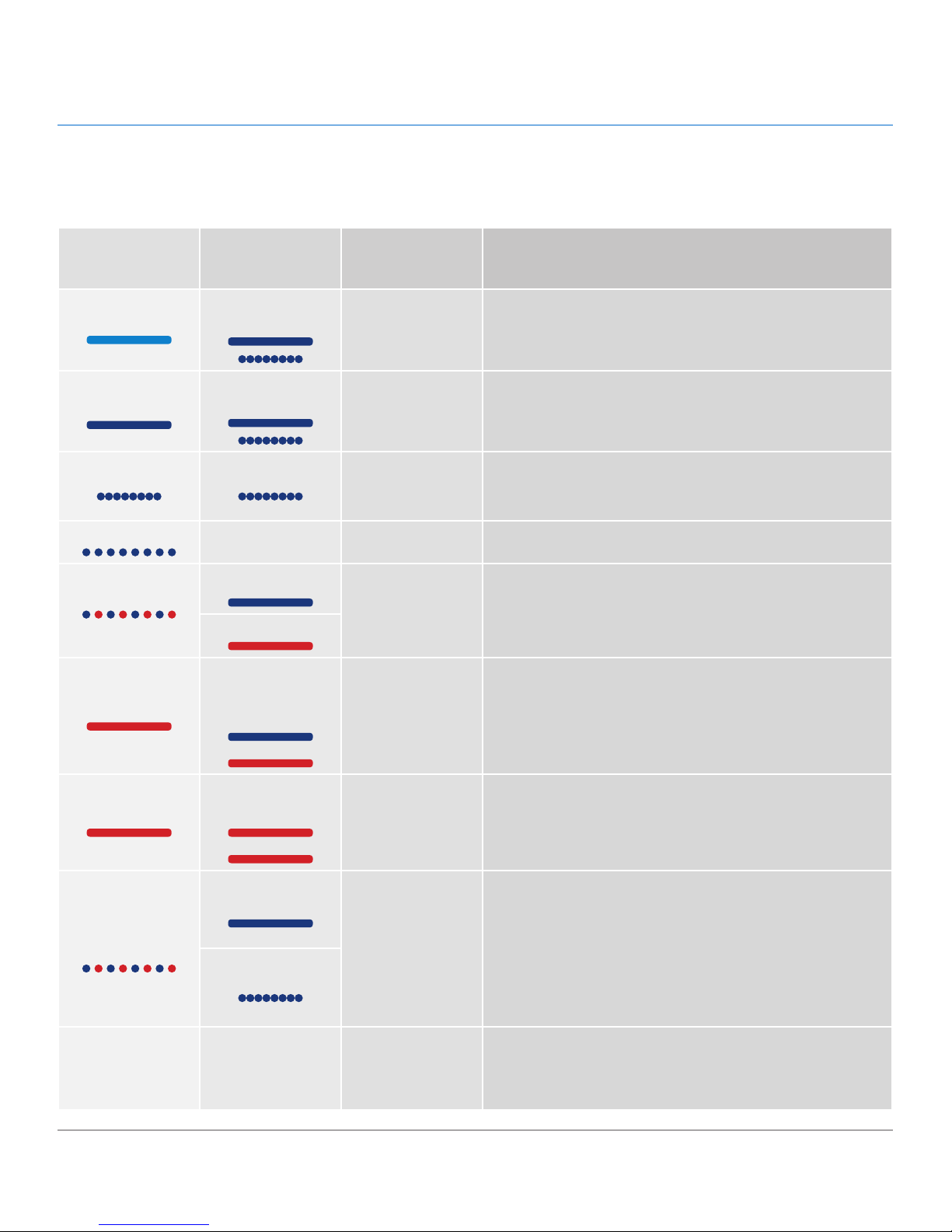
* LED dims for 5 seconds and then remains at a low intensity.
4.1. LED Status Indicators
Use the front and rear LEDs and the chart below as a reference to determine the status of your 2big USB 3.0:
If the front
LED is:
And the rear
LEDs are:
And the RAID
mode is:
Then:
Light blue
Strong or Blinking
blue
All
The 2big USB 3.0 is connected to a USB 2.0 interface. The disks’
LEDs will blink when it is accessing or writing data.
Strong blue
Strong or Blinking
blue
All
The 2big USB 3.0 is connected to a USB 3.0 interface. The disks’
LEDs will blink when it is accessing or writing data.
Blinking blue Blinking blue
All
✦ All: The 2big USB 3.0 is starting up. The front LED and the
LEDs of functional disks become solid blue when initialized.
✦ RAID 1 only: Rebuild
Blinking blue
Off All The hard drives have been idle for over 30 minutes
Blinking blue and
red
Strong blue
RAID 1 & JBOD
One hard drive has failed
Solid red
Solid red
Solid red (failed
disk) and solid blue
(functional disk)
RAID 0
One drive has failed or is improperly inserted. RAID is not functional.
Solid red
Solid red on both
disks
All Both drives have failed or are improperly inserted.
Blinking blue and
red
Strong blue
All
Temperature alert. To prevent system overheating and potential data loss, shut the 2big off so that it may cool down. Make
certain that airflow is not blocked and that the room environment
is not too hot.
Blinking blue
Off Off All
The 2big USB 3.0 is: turned off; or, has been in standby mode
for more than 30 minutes; or, experiencing a system or electronic
board failure, such as overheating. In the last case, contact LaCie
Customer Support.
Page 34
LaCie 2big USB 3.0 • DESIGN BY NEIL POULTON Troubleshooting
User Manual page 34
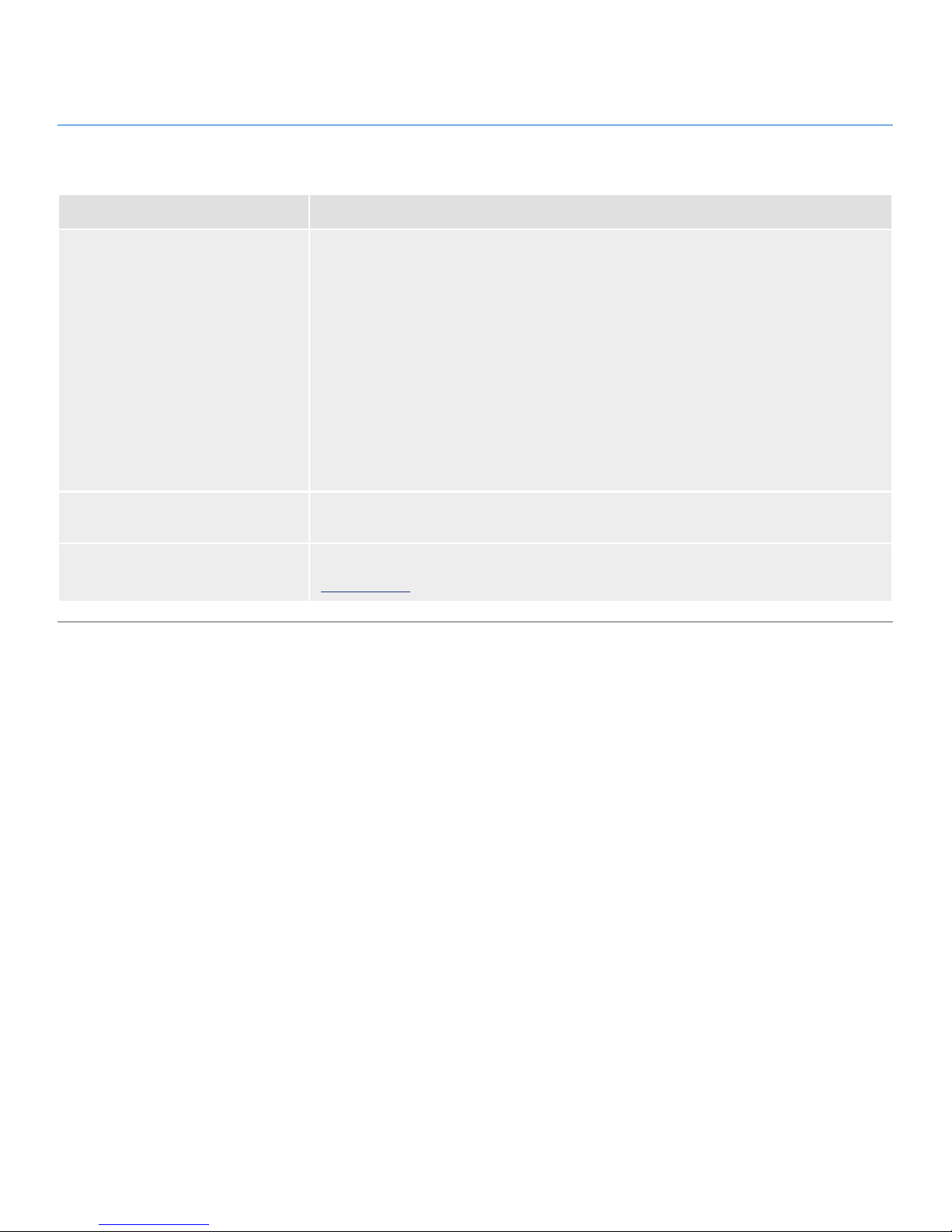
4.2. Basic Troubleshooting Topics
Problem Solutions
The 2big USB 3.0 is not recognized
by the computer.
If there is no icon for the 2big USB 3.0 on the desktop (Mac users) or in My Computer (Windows users):
✦ Check the interface cable connection. Check both ends of the USB cable to make sure
that they are fully seated in their respective ports. Try disconnecting the cables, waiting
10 seconds, and then reconnecting them. If the drive is still not recognized, restart your
computer and try again.
✦ Make sure your computer meets the minimum system requirements for compatibility with
the 2big USB 3.0. See section 1.1. Minimum System Requirements for more information.
✦ Check that all power connections are working: the 2big USB 3.0 power supply (see sec-
tion 2.2. Turn the Drive On); the power outlet; and the on/off LED button on the face of
the drive.
✦ Make sure that the drive has been properly formatted. Please see section 3.4. Formatting
and Partitioning.
The 2big USB 3.0 is working slowly.
If other USB devices are connected to the same port or hub, disconnect them to see if the
2big USB 3.0’s performance improves.
Power supply failure.
Replacement power supplies can be purchased from LaCie at:
www.lacie.com
Page 35

LaCie 2big USB 3.0 • DESIGN BY NEIL POULTON Contacting Customer Support
User Manual page 35
Before You Contact Technical Support
1. Read the manuals and review section 4. Troubleshooting.
2. Try to isolate the problem. If possible, isolate the drive as the only external device on the CPU, and make sure that all of the cables are
correctly and firmly attached.
If you have asked yourself all of the pertinent questions in the troubleshooting checklist, and you still can’t get your LaCie drive to work
properly, contact us at www.lacie.com. Before contacting us, make sure that you are in front of your computer and that you have the following
information on hand:
Information Where to Find Information
1. LaCie hard drive serial number Located on a sticker at the back of drive or on the original packaging
3. Macintosh/PC model
Mac users: Click on the Apple icon in the menu bar and select About
This Mac.
Windows users: Right click My Computer and select Properties >
General.
4. Operating system version
5. Processor speed
6. Computer memory
7. The brands and models of other internal and external
peripherals installed on your computer
Mac users: Click on the Apple icon in the finder bar and select About
This Mac. Select More Info... The Apple System Profiler will launch
and will list your internal and external peripherals.
Windows users: Right click My Computer and select Properties >
Hardware.
5. Contacting Customer Support
Page 36
LaCie 2big USB 3.0 • DESIGN BY NEIL POULTON Contacting Customer Support
User Manual page 36
5.1. LaCie Technical Support Contacts
LaCie Asia
http://www.lacie.com/cn/contact/
LaCie Australia
http://www.lacie.com/au/contact/
LaCie Belgium
http://www.lacie.com/be/contact/ (Dutch)
http://www.lacie.com/befr/contact/ (French)
LaCie Brazil
http://www.lacie.com/us/contact
LaCie Canada
http://www.lacie.com/ca/contact/ (English)
http://www.lacie.com/cafr/contact/ (French)
LaCie Denmark
http://www.lacie.com/dk/contact
LaCie Finland
http://www.lacie.com/fi/contact/
LaCie France
http://www.lacie.com/fr/contact/
LaCie Germany
http://www.lacie.com/de/contact/
LaCie Ireland
http://www.lacie.com/ie/contact/
LaCie Italy
http://www.lacie.com/it/contact/
Japan - Elecom CO., LTD
http://www.lacie.jp/
LaCie Korea
http://www.lacie.com/kr/contact
LaCie Latin America
http://www.lacie.com/la/contact/
LaCie Netherlands
http://www.lacie.com/nl/contact/
LaCie Norway
http://www.lacie.com/no/contact/
LaCie Portugal
http://www.lacie.com/pt/contact/
LaCie Singapore
http://www.lacie.com/asia/contact/
LaCie Southeast Asia
http://www.lacie.com/sea/contact
LaCie Spain
http://www.lacie.com/es/contact/
LaCie Sweden
http://www.lacie.com/se/contact
LaCie Switzerland
http://www.lacie.com/ch/contact (German)
http://www.lacie.com/chfr/contact/ (French)
http://www.lacie.com/chit/contact/ (Italian)
LaCie UK
http://www.lacie.com/uk/contact
LaCie USA
http://www.lacie.com/us/contact/ (English)
http://www.lacie.com/uses/contact (Spanish)
LaCie Grand Export
http://www.lacie.com/intl/contact/
Page 37

LaCie 2big USB 3.0 • DESIGN BY NEIL POULTON Warranty Information
User Manual page 37
LaCie warrants your LaCie 2big USB 3.0 against any defect in
material and workmanship, under normal use, for the period designated on your warranty certificate. In the event this product is
found to be defective within the warranty period, LaCie will, at its
option, repair or replace the defective LaCie 2big USB 3.0.
In the event of a drive failure please contact your LaCie reseller or
LaCie customer support for drive replacement procedure.
This warranty is void if:
✦ The LaCie 2big USB 3.0 was operated/stored in abnormal
use or maintenance conditions;
✦ The LaCie 2big USB 3.0 is repaired, modified or altered,
unless such repair, modification or alteration is expressly
authorized in writing by LaCie;
✦ The LaCie 2big USB 3.0 was subjected to abuse, neglect,
lightning strike, electrical fault, improper packaging or ac-
cident;
✦ The LaCie 2big USB 3.0 was installed improperly;
✦ The serial number of the LaCie 2big USB 3.0 or an indi-
vidual Drive Bay is defaced or missing;
✦ The broken part is a replacement part such as a pickup
tray, etc.
✦ The tamper seal on the LaCie 2big USB 3.0 or an individual
Drive Bay casing is broken.
✦ One or two of the hard disks have been removed and re-
placed by any hard disk other than a drive provided by La-
Cie. For drive removal/replacement process, see section
3.3. Removing and Installing Drives.
LaCie and its suppliers accept no liability for any loss of data
during the use of this device, or for any of the problems caused
as a result.
LaCie will not, under any circumstances, be liable for direct, special or consequential damages such as, but not limited to, damage or loss of property or equipment, loss of profits or revenues,
cost of replacement goods, or expense or inconvenience caused
by service interruptions.
Any loss, corruption or destruction of data while using a LaCie
drive is the sole responsibility of the user, and under no circumstances will LaCie be held liable for the recovery or restoration of
this data.
Under no circumstances will any person be entitled to any sum
greater than the purchase price paid for the drive.
To obtain warranty service, call LaCie Technical Support. You will
be asked to provide your LaCie product’s serial number, and you
may be asked to furnish proof of purchase to confirm that the
drive is still under warranty.
All systems returned to LaCie must be securely packaged in their
original box and shipped with postage prepaid.
IMPORTANT INFO: Register online at www.lacie.com/register
for free online technical support.
6. Warranty Information
 Loading...