

Lacie 5BIG NETWORK, 2BIG DUAL, 4BIG QUADRA, 2BIG QUADRA, 2BIG TRIPLE 2-DISK RAID User Manual
Page 1
RAID Technology White Paper
As specialists in data storage, LaCie recognizes that almost all computer users will need a storage or backup solution and that
people use and store data in different ways. Depending on their requirements, some people may prioritize performance and capacity, whereas others may be more interested in security and speed. In order to meet the storage needs of a wide range of users,
LaCie’s professional storage devices utilize RAID technology.
RAID (Redundant Array of Independents Disks) is a simple technology that improves the performance of external storage solutions. RAID allows you to choose the best way to use your device to fit your needs. Simply put, RAID technology either divides or
duplicates the task of one hard disk between many (or as few as two) disks to either improve performance or create data redundancy
in case of a drive failure. You can decide how the device handles data by setting its RAID mode.
This document describes the different RAID levels used in LaCie professional storage devices, and the characteristics used by each
mode to optimize the speed, security or storage capacity of the hard drives in the RAID array.
Important:
No RAID configuration will protect data reliability from software or file system corruption. As a result, LaCie recommends that
regular backups should always be performed to protect data.
RAID Terms
To better understand how RAID works, first familiarize yourself with the terms below:
Striping ✦ is the splitting of data between multiple drives. Striped RAID arrays generally aim to merge maximum capacity
into one single volume.
Mirroring ✦ is the copying of data to more than one disk. Mirrored RAID arrays typically allow the failure of at least one disk
in the array without any data loss, depending on the RAID level of the array.
Fault Tolerance ✦ allows a RAID array to continue working (i.e. the data stored in the array is still available to the user) in
the event of a disk failure. Not all mirrored RAID arrays are user friendly. For instance, some RAID devices must be shut
down before a failed disk is replaced, whereas LaCie RAID devices feature “hot-swappaple” disk replacement that allows
the device to remain on, and the data accessible, while the failed disk is replaced.
Page 2
LaCie RAID Technology White Paper
A1
B1
C1
D1
A2
B2
C2
D2
A3
B3
C3
D3
A4
B4
C4
D4
RAID 0
Disk 1 Disk 2 Disk 3 Disk 4
STANDARD RAID LEVELS
RAID 0
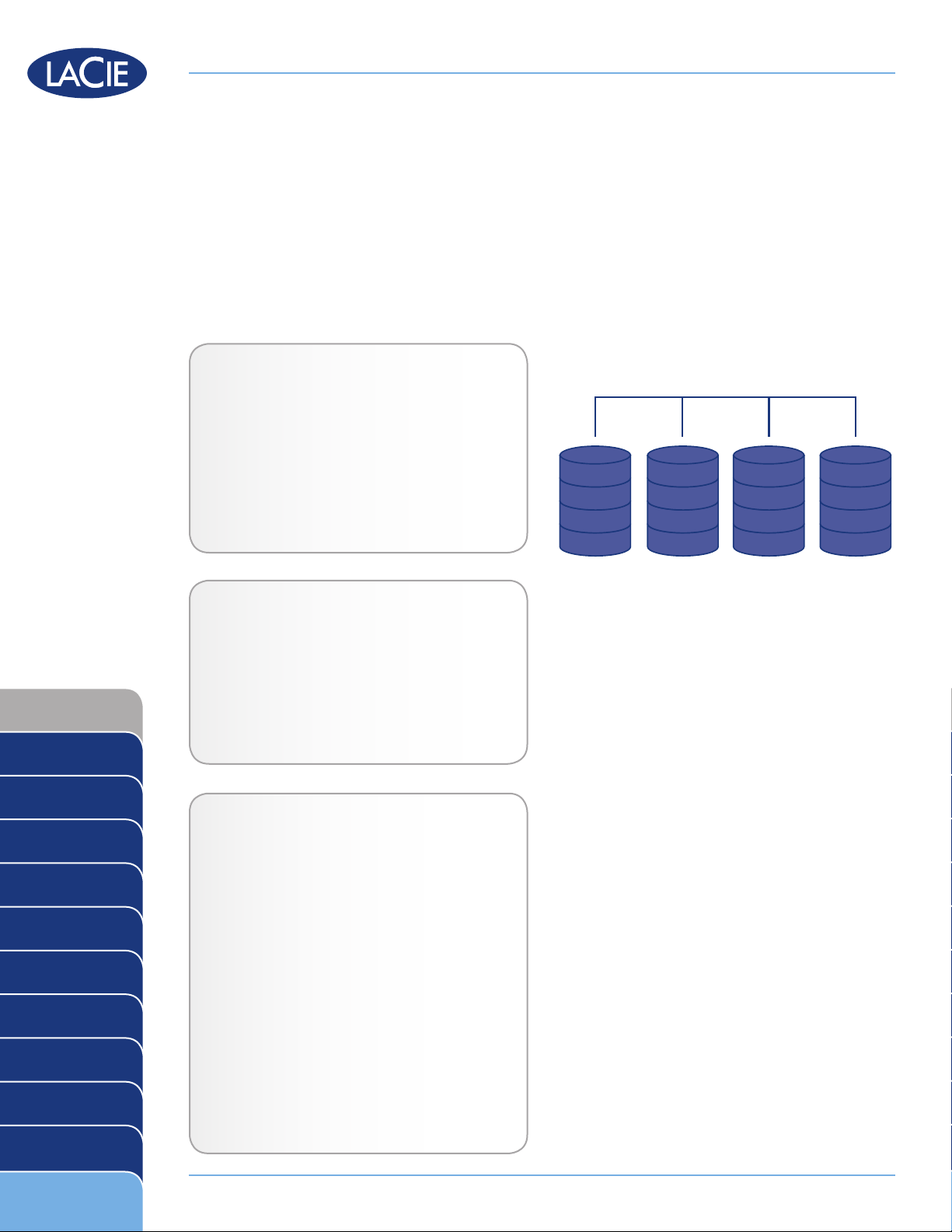
RAID 0 (also called FAST mode in some LaCie devices), is the fastest RAID mode. Requiring at least 2 drives,
RAID 0 stripes data onto each disk. The available capacities of each disk are added together so that one logical
volume mounts on the computer.
If one physical disk in the array fails, the data of all disks becomes inaccessible because parts of the data have
been written to all disks.
Applications
RAID 0 is ideal for users who need maximum
speed and capacity. Video editors working with
very large files may use RAID 0 when editing multiple streams of video for optimal playback performance. A RAID 0 array is more suited for actively
working with files (editing video, for example) and
should not be used as a single storage backup
solution or on mission critical systems.
RAID 0
RAID 1
RAID 3
RAID 3+Spare
RAID 5
RAID 5+Spare
RAID 6
RAID 0+1
LaCie Products with RAID 0
LaCie 2big quadra ✦
LaCie 4big quadra ✦
LaCie big disk quadra (built-in) ✦
LaCie little big disk quadra (built-in) ✦
LaCie 5big network ✦
How RAID 0 Capacity Is Calculated
Each disk in a RAID 0 system should have the
same capacity.
Storage capacity in a RAID level 0 configuration
is calculated by multiplying the number of drives
by the disk capacity, or C = n*d, where:
C = available capacity
n = number of disks
d = disk capacity
RAID 10
Concatenation
JBOD
RAID Selection
For example, in a RAID 0 array with four drives
each with a capacity of 1000GB, the total capacity of the array would be 4000GB:
C = (4*1000)
Page 2
Page 3
LaCie RAID Technology White Paper
RAID 1
A1
B1
C1
D1
E1
A1
B1
C1
D1
E1
RAID 1
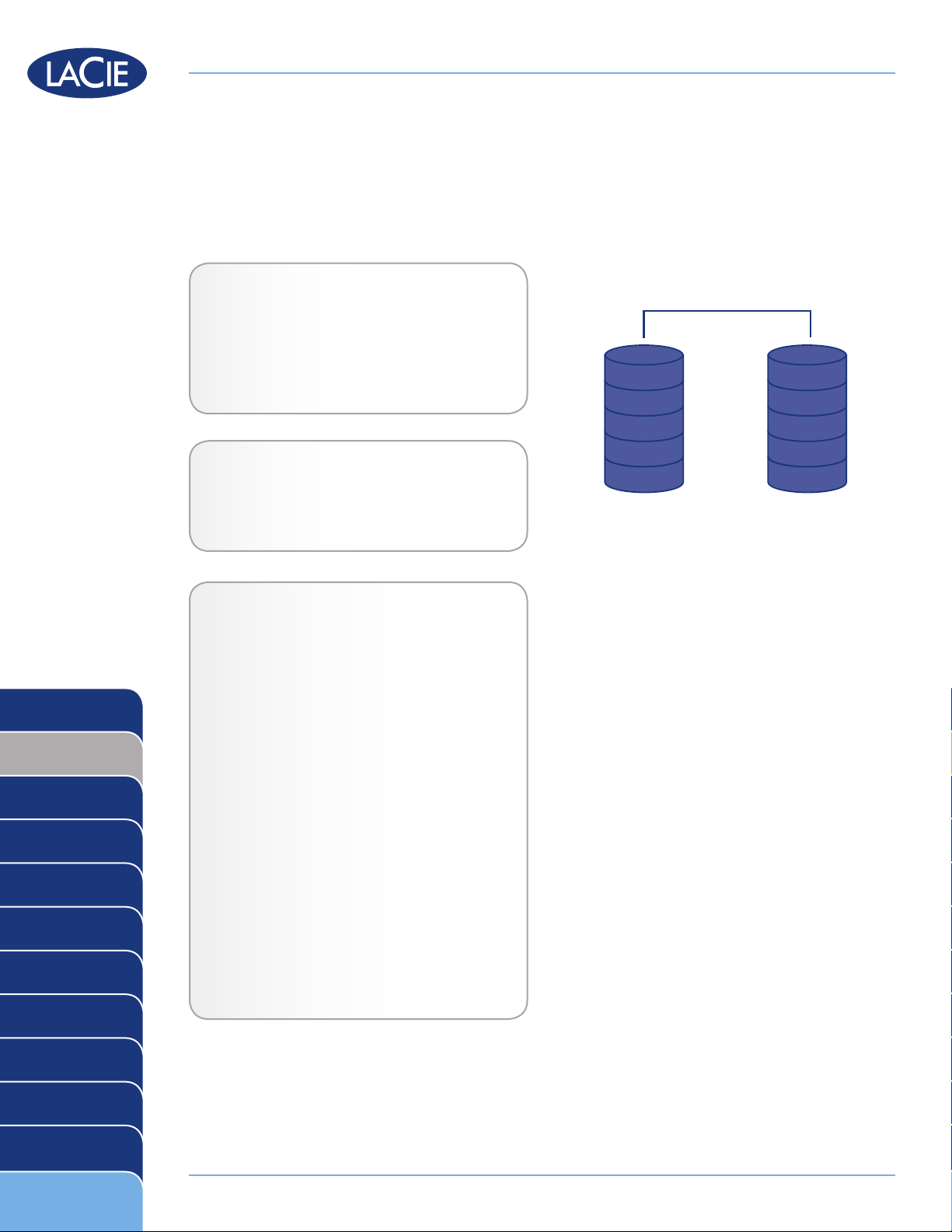
RAID 1 (also called SAFE mode in some LaCie devices) is a secure RAID mode that requires at least 2 drives
and works with pairs of drives. One logical volume mounts on the computer and the combined available
capacity of both drives is limited to the capacity of the lowest-capacity disk. If one physical disk fails, the data
is available immediately on the second disk. No data is lost if one disk fails.
Applications
RAID 1 provides maximum data safety in the
event of a single disk failure, but because data
is written twice, performance is reduced slightly when writing. RAID 1 is a good choice when
safety is more important than speed.
LaCie Products with RAID 1
LaCie 2big quadra ✦
RAID 0
RAID 1
RAID 3
RAID 3+Spare
RAID 5
RAID 5+Spare
RAID 6
LaCie 2big network ✦
How RAID 1 Capacity Is Calculated
Each disk in a RAID 1 system should have the
same capacity.
Storage capacity in a RAID level 1 configuration
is calculated by multiplying the number of drives
by the disk capacity and dividing by 2, or
C = n*d/2
where:
C = available capacity
n = number of disks
d = disk capacity
For example, in a RAID 1 array with four drives
each with a capacity of 1000GB, the total capacity of the array would be 2000GB:
C = (4*1000)/2
RAID 0+1
RAID 10
Concatenation
JBOD
RAID Selection
Page 3
Page 4
LaCie RAID Technology White Paper
A1
A4
B1
B4
C1
C4
A2
A5
B2
B5
C2
C5
A3
A6
B3
B6
C3
C6
Ap(1-3)
Ap(4-6)
Bp(1-3)
Bp(4-6)
Cp(1-3)
Cp(4-6)
RAID 3
Disk 1 Disk 2 Disk 3 Disk 4
RAID 3
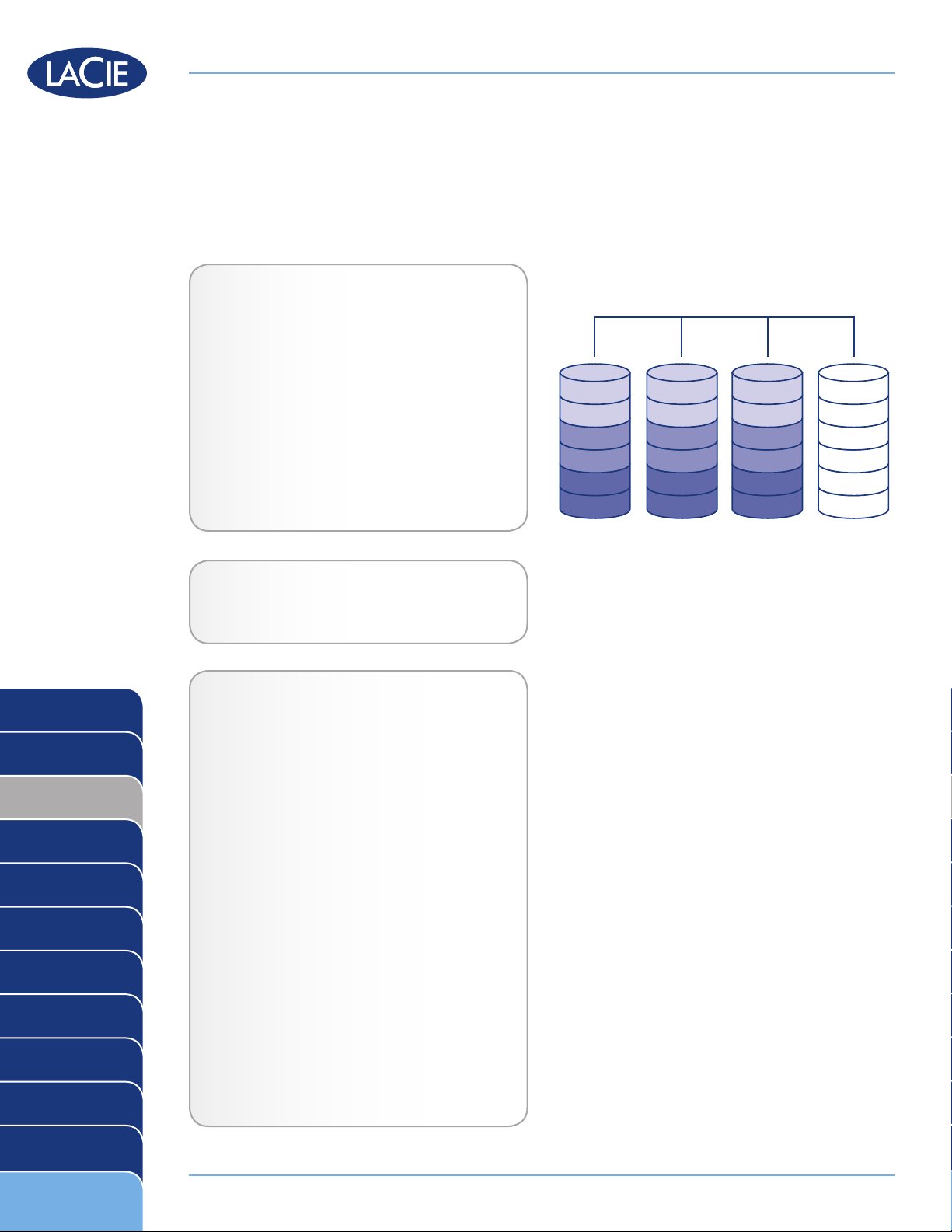
RAID 3 uses byte-level striping with a dedicated parity disk (Disk 4 in the illustrations, right) so that one volume
mounts on the computer. A RAID 3 array can tolerate a single disk failure without data loss. If one physical disk
fails, the data from the failed disk can be rebuilt onto a replacement disk. If a second disk fails before data can
be rebuilt to a replacement drive, all data in the array will be lost.
Applications
RAID 3 provides good data safety for environments where long, sequential files are being
read, such as video files. Disk failure does not
result in a service interruption because data is
read from parity blocks. RAID 3 is useful for
people who need performance and constant
access to their data, like video editors. RAID
3 is not recommended for intensive use with
nonsequential files because random read performance is hampered by the dedicated parity
disk.
LaCie Products with RAID 3
LaCie 4big quadra ✦
How RAID 3 Capacity Is Calculated
RAID 0
RAID 1
RAID 3
RAID 3+Spare
RAID 5
RAID 5+Spare
RAID 6
RAID 0+1
RAID 10
Concatenation
JBOD
RAID Selection
Each disk in a RAID 3 system should have the
same capacity.
Storage capacity in a RAID level 3 configuration is calculated by subtracting the number
of drives by one and multiplying by the disk
capacity, or
C = (n-1)*d
where:
C = available capacity
n = number of disks
d = disk capacity
For example, in a RAID 3 array with four drives
each with a capacity of 1000GB, the total capacity of the array would be 3000GB:
C = (4-1)*1000
Page 4
Page 5
LaCie RAID Technology White Paper
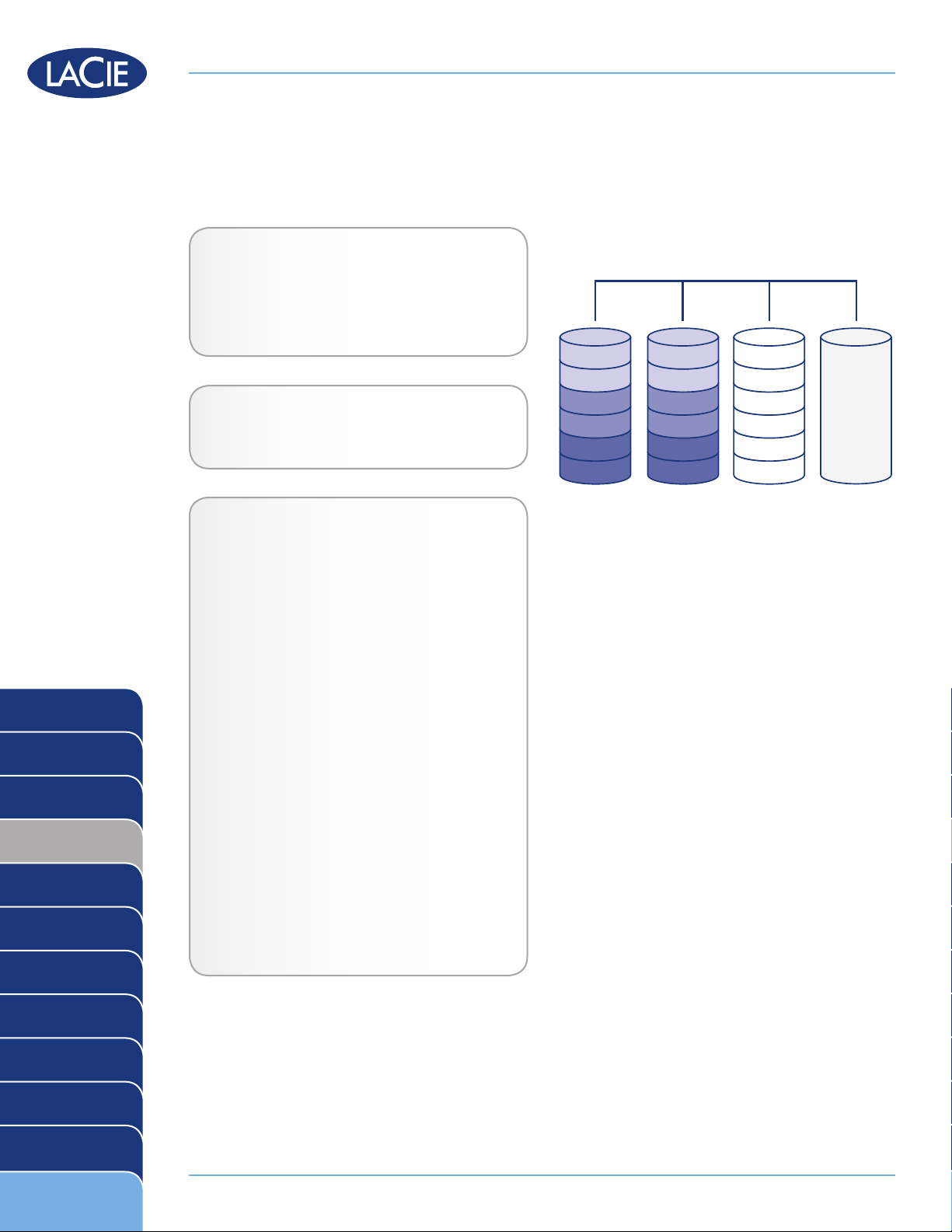
RAID 3+ Spare
Disk 1 Disk 2 Disk 3 Disk 4
A1
A3
B1
B3
C1
C3
A2
A3
B2
B4
C2
C4
Ap(1-2)
Ap(3-4)
Bp(1-2)
Bp(3-4)
Cp(1-2)
Cp(3-4)
Spare
RAID 3+Spare
In RAID 3+Spare, one disk in the array is left empty. If a drive in the array fails, the data from the failed disk is
automatically rebuilt to the empty or “spare” disk.
Applications
In RAID 3+Spare disk failure does not require
immediate attention because the system rebuilds itself using the hot spare, but the failed
disk should be replaced as soon as possible.
LaCie Products with RAID 3+Space
LaCie 4big quadra ✦
RAID 0
RAID 1
RAID 3
RAID 3+Spare
RAID 5
RAID 5+Spare
RAID 6
How RAID 3+Space Capacity Is
Calculated
Each disk in a RAID 3+Spare system should
have the same capacity.
Storage capacity in a RAID 3+Spare configuration is calculated by subtracting the number
of drives by two and multiplying by the disk
capacity, or
C = (n-2)*d
where:
C = available capacity
n = number of disks
d = disk capacity
For example, in a RAID 3+Spare array with four
drives each with a capacity of 1000GB, the total capacity of the array would be 2000GB:
C = (4-2)*1000
RAID 0+1
RAID 10
Concatenation
JBOD
RAID Selection
Page 5
Page 6
LaCie RAID Technology White Paper
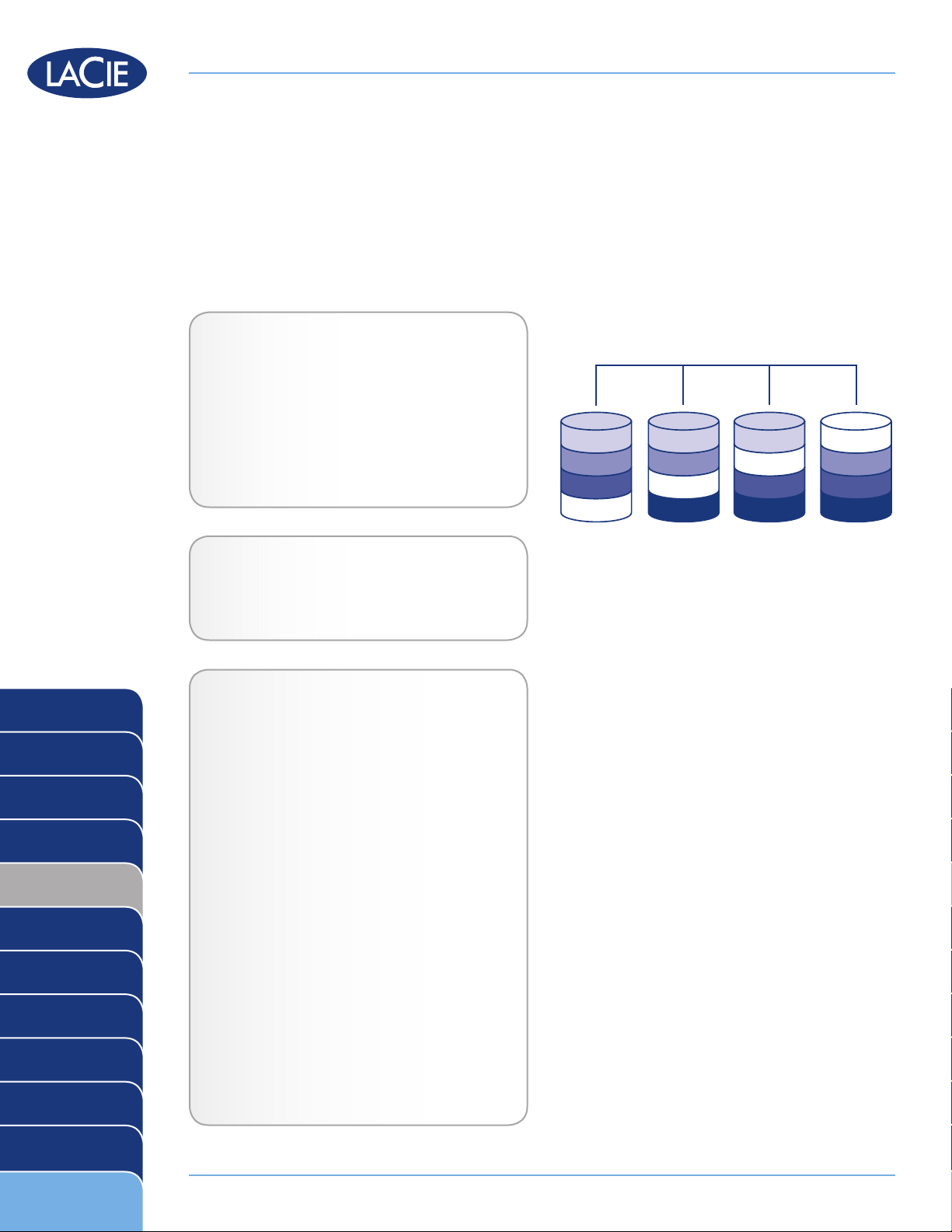
RAID 5
Disk 1 Disk 2 Disk 3 Disk 4
Ap
B3
C3
D3
A3
C2
D2
Bp
A2
B2
D1
Cp
A1
B1
C1
Dp
RAID 5
RAID 5 combines the striping of RAID 0 with data redundancy in an array with a minimum of three disks.
The difference between RAID 3 and RAID 5 is that a RAID 3 configuration will offer better performance at the
expense of slightly less overall capacity. Data is striped across all disks and a parity block (P) for each data
block is written on the same stripe. If one physical disk fails, the data from the failed disk can be rebuilt onto a
replacement disk. No data is lost in the case of a single disk failure, but if a second disk fails before data can
be rebuilt to a replacement drive, all data in the array will be lost.
Applications
RAID 5 combines data safety with efficient use
of disk space. Disk failure does not result in a
service interruption because data is read from
parity blocks. RAID 5 is useful for archiving
and for people who need performance and
constant access to their data, like video editors.
RAID 0
RAID 1
RAID 3
RAID 3+Spare
RAID 5
RAID 5+Spare
RAID 6
RAID 0+1
RAID 10
LaCie Products with RAID 5
LaCie 4big quadra ✦
LaCie 5big network ✦
How RAID 5 Capacity Is Calculated
Each disk in a RAID 5system should have the
same capacity.
Storage capacity in a RAID level 5 configuration is calculated by subtracting the number
of drives by one and multiplying by the disk
capacity, or
C = (n-1)*d
where:
C = available capacity
n = number of disks
d = disk capacity
For example, in a RAID 5 array with four drives
each with a capacity of 1000GB, the total capacity of the array would be 3000GB:
C = (4-1)*1000
Concatenation
JBOD
RAID Selection
Page 6
Page 7
LaCie RAID Technology White Paper
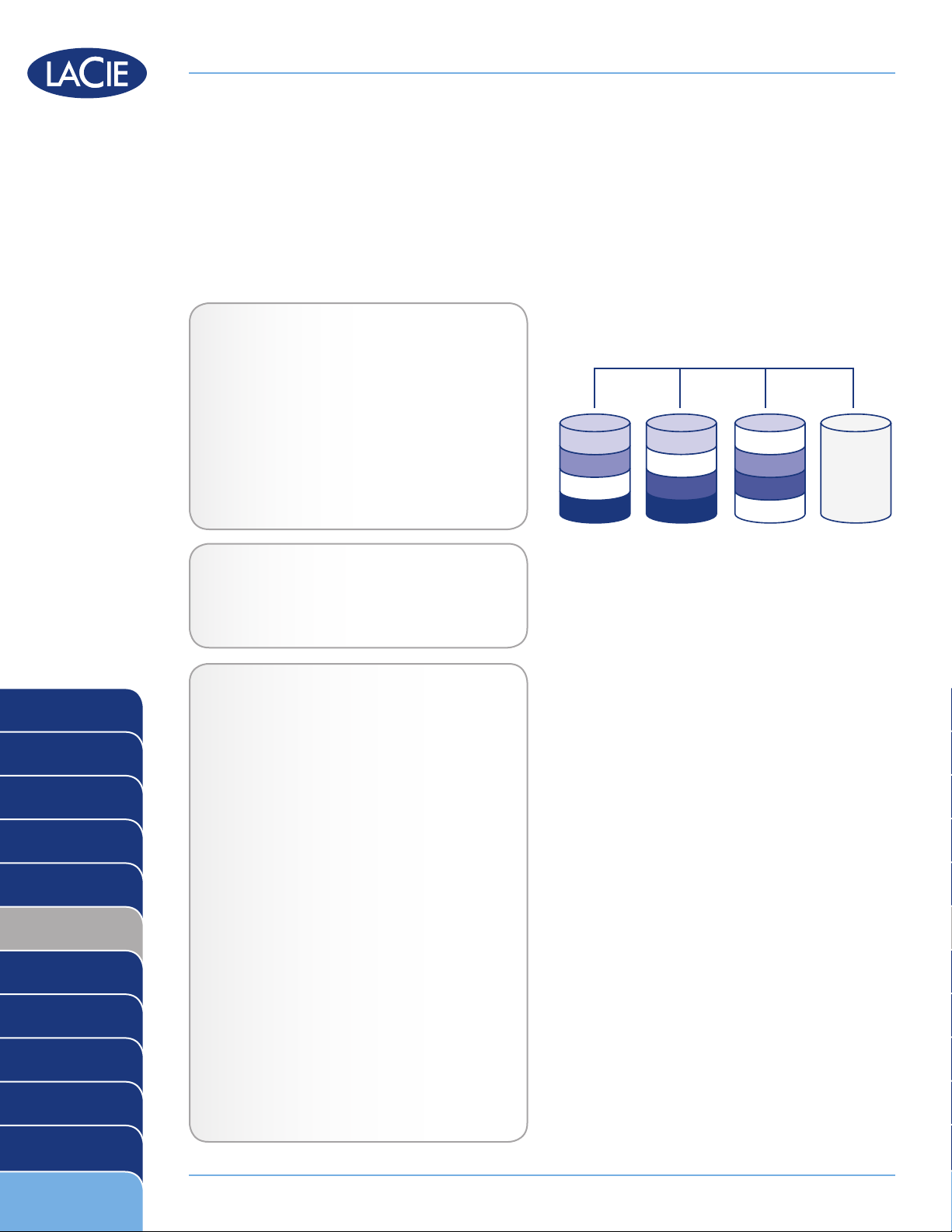
RAID 5+Spare
Disk 1 Disk 2 Disk 3 Disk 4
Spare
A2
D2
C1
Bp
A1
B1
D1
Cp C2
B2
Ap
Dp
RAID 5+Spare
RAID 5+Spare, is a RAID 5 array in which one disk is used as spare to rebuild the system as soon as a disk
fails. At least four disks are required.
If one physical disk fails, the data remains available because it is read from the parity blocks. Data from a failed
disk is rebuilt onto the hot spare disk. When a failed disk is replaced, the replacement becomes the new hot
spare. No data is lost in the case of a single disk failure, but if a second disk fails before the system can rebuild
data to the hot spare, all data in the array will be lost.
Applications
The main advantage of RAID 5+Spare is that users can continue to access data even while the
data is rebuilt to the spare drive. RAID 5+Spare
has good data safety but disk space is limited by
the presence of the hot spare which is not used until one of the other disks fails. Disk failure does not
require immediate attention because the system
rebuilds itself using the hot spare, but the failed
disk should be replaced as soon as possible.
RAID 0
RAID 1
RAID 3
RAID 3+Spare
RAID 5
RAID 5+Spare
RAID 6
RAID 0+1
RAID 10
LaCie Products with RAID 5+Spare
LaCie 4big quadra ✦
LaCie 5big network ✦
How RAID 5+Space Capacity Is
Calculated
Each disk in a RAID 5+Spare system should
have the same capacity.
Storage capacity in a RAID 5+Spare configuration is calculated by subtracting the number
of drives by two and multiplying by the disk
capacity, or
C = (n-2)*d
where:
C = available capacity
n = number of disks
d = disk capacity
For example, in a RAID 5+Spare array with four
drives each with a capacity of 1000GB, the total capacity of the array would be 2000GB:
Concatenation
JBOD
RAID Selection
C = (4-2)*1000
Page 7
Page 8
LaCie RAID Technology White Paper
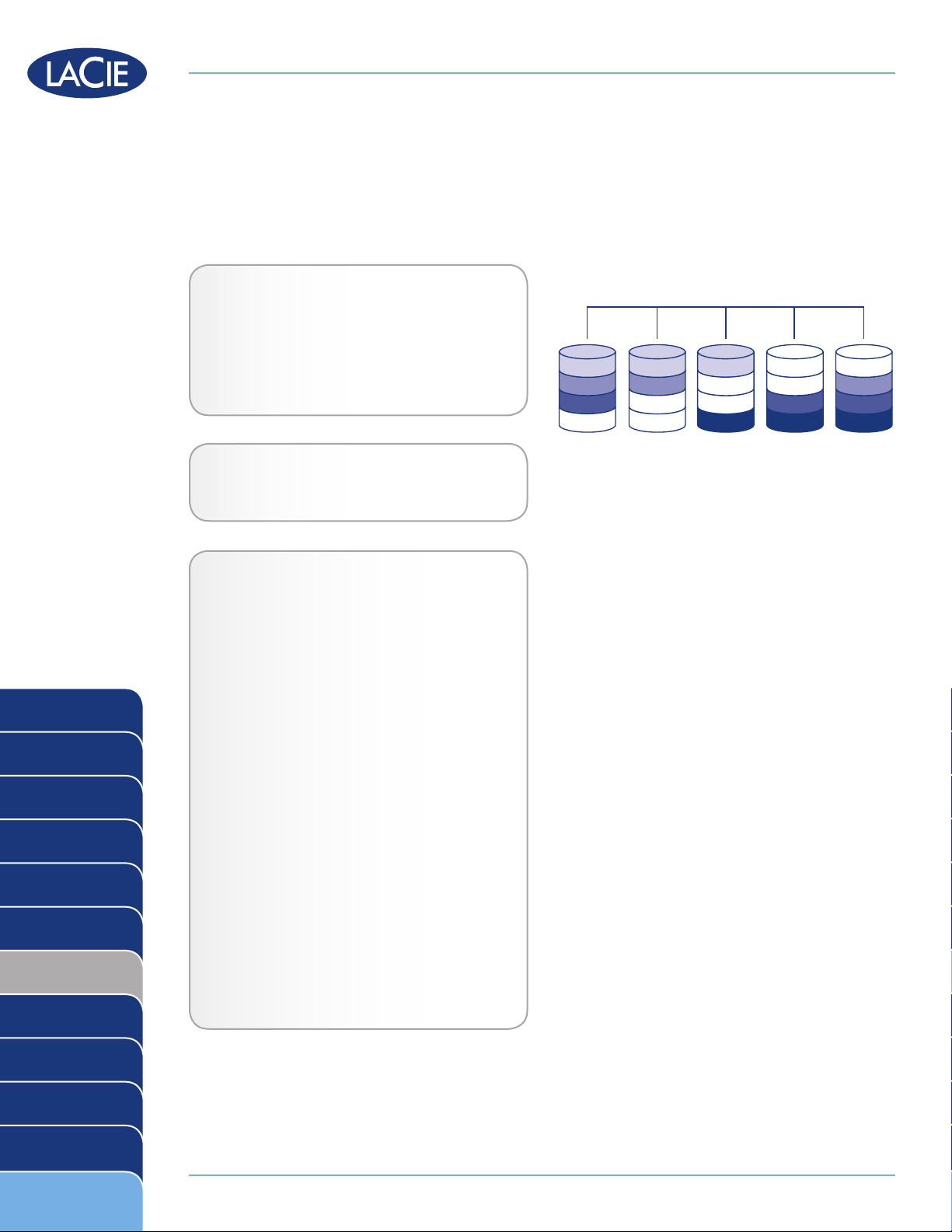
RAID 6
Disk 1 Disk 2 Disk 3 Disk 4 Disk 5
Ap
Bq
C3
D3
Aq
B3
C3
D3
A3
Cq
D2
Bp
A2
B2
Dq
Cp
A1
B1
C1
Dp
RAID 6
In RAID 6, data is striped across all disks (minimum of four) and a two parity blocks for each data block (p and
q in the diagram at right) is written on the same stripe. If one physical disk fails, the data from the failed disk
can be rebuilt onto a replacement disk. This Raid mode can support up to two disk failures with no data loss.
RAID 6 provides for faster rebuilding of data from a failed disk.
Applications
RAID 6 provides data reliability with the addition of efficient rebuilding in the case of a failed
drive. RAID 6 is therefore useful for people who
need serious security with less of an emphasis
on performance.
LaCie Products with RAID 6
LaCie 5big network ✦
RAID 0
RAID 1
RAID 3
RAID 3+Spare
RAID 5
RAID 5+Spare
RAID 6
RAID 0+1
RAID 10
How RAID 6 Capacity Is Calculated
Each disk in a RAID 6 system should have the
same capacity.
Storage capacity in a RAID 6 configuration is
calculated by subtracting the number of drives
by two and multiplying by the disk capacity,
or
C = (n-2)*d
where:
C = available capacity
n = number of disks
d = disk capacity
For example, in a RAID 6 array with five drives
each with a capacity of 1000GB, the total capacity of the array would be 3000GB:
C = (5-2)*1000
Concatenation
JBOD
RAID Selection
Page 8
Page 9
LaCie RAID Technology White Paper
RAID0 RAID0
RAID 0+1
A B
A2
B2
C2
D2
A1
C1
D1
B1
A2
B2
D2
C2
A1
B1
C1
D1
Disk 1 Disk 2 Disk 3 Disk 4
RAID1
NESTED RAID LEVELS
RAID 0+1
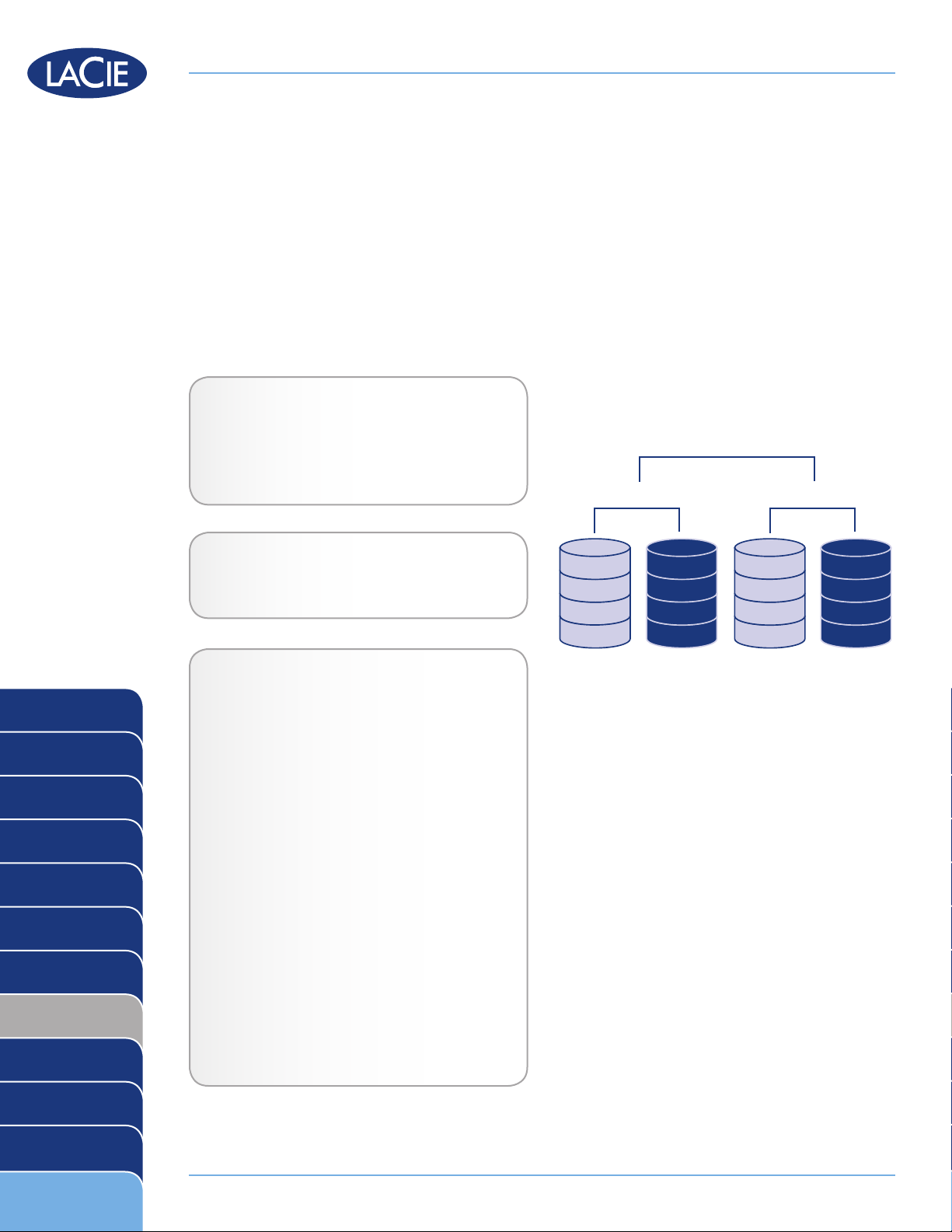
RAID 0+1 is a secure RAID mode that is composed of a mirror of striped sets. RAID 0+1 arrays should have
disks in multiples of four. For LaCie products with five disks, in a RAID 0+1 array, the fifth disk will either be a
spare or will be unused. In the diagram, at right, array B is a mirror of array A.
Up to two disks can fail in a RAID 0+1 array without loss of data, as long as the failed disks are not part of different RAID 0 pairs. In reference to the diagram, disk 1 and disk 2 could fail and the data would be preserved
on disks 3 and 4.
Applications
RAID 0+1 provides good speeds because of
RAID 0 striping, but cuts the available capacity
of a device in half (assume all disks in the array
have the same capacity).
RAID 0
RAID 1
RAID 3
RAID 3+Spare
RAID 5
RAID 5+Spare
RAID 6
RAID 0+1
RAID 10
LaCie Products with RAID 0+1
Currently, no LaCie products ✦
How RAID 0+1 Capacity Is Calculated
Each disk in a RAID 0+1 system should have
the same capacity.
Storage capacity in a RAID 0+1 configuration
is calculated by multiplying the number of drives
by the disk capacity and dividing by 2, or
C = n*d/2
where:
C = available capacity
n = number of disks
d = disk capacity
For example, in a RAID 0+1 array with four
drives each with a capacity of 1000GB, the
total capacity of the array would be 2000GB:
C = (4*1000)/2
Concatenation
JBOD
RAID Selection
Page 9
Page 10
LaCie RAID Technology White Paper
RAID 1 RAID 1
RAID 0
A2
A4
A6
A8
RAID 10
A2
A6
A8
A4
A1
A3
A7
A5
A1
A3
A5
A7
Disk 1 Disk 2 Disk 3 Disk 4
RAID 10
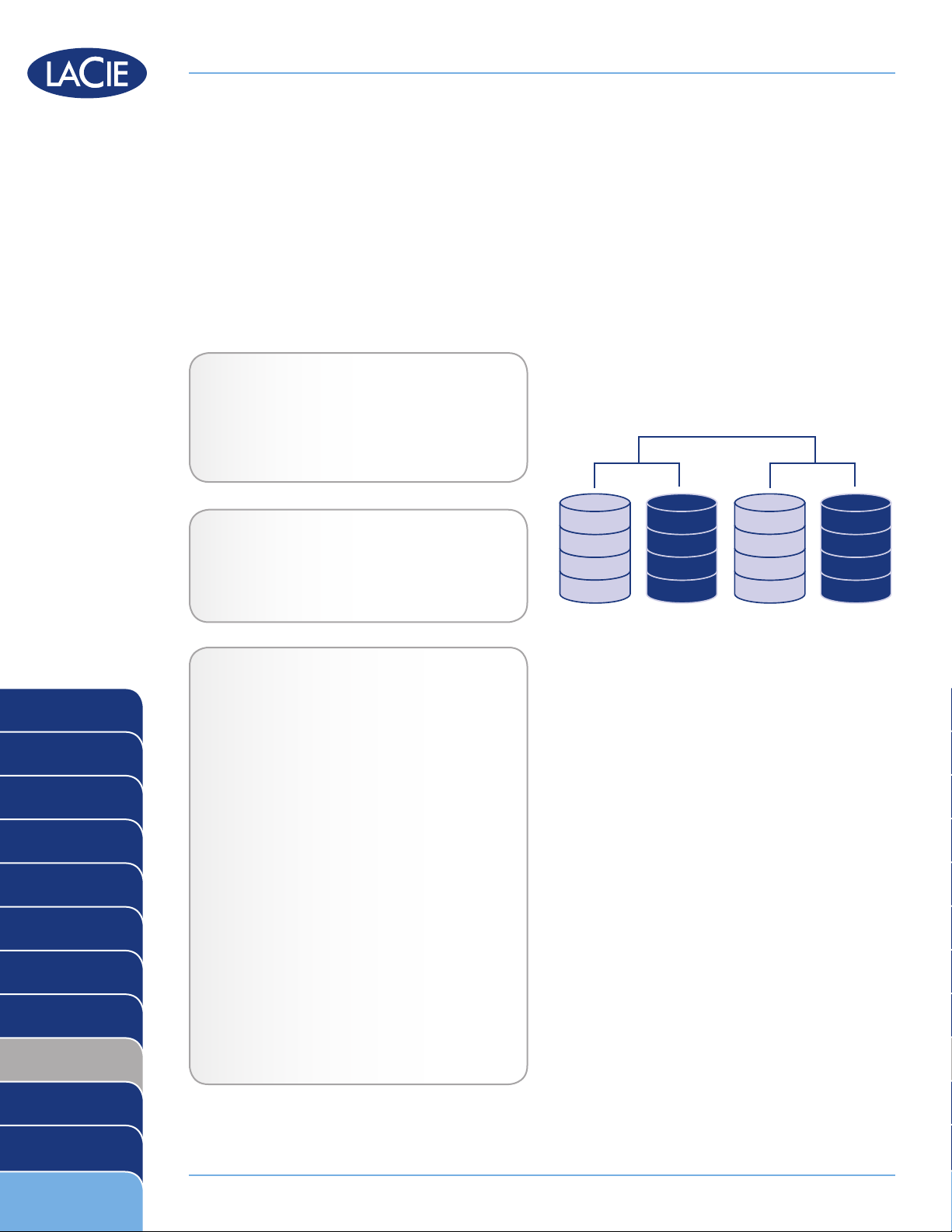
RAID 10 (also called RAID 1+0) is another RAID level that combines the attributes of other levels, specifically
RAID 1 and RAID 0. It is a “stripe of mirrored sets”, meaning that data is striped across two mirrored arrays.
The Striping occurs between arrays and the mirroring occurs within the same array, which makes the rebuilding
very fast. RAID 10 arrays should have disks in multiples of four. For LaCie products with five disks, in a RAID
10 array, the fifth disk will either be a spare or will be unused. See the diagram at right.
In a RAID 10 array, one disk from each mirrored pair can fail with no data loss. However, the working disk in
an array with a failed disk becomes a weak point for the entire array. If the second disk in a mirrored pair fails,
the entire array is lost.
Applications
RAID 10 provides good speeds because of
RAID 0 striping, but cuts the available capacity
of a device in half (assuming all disks in the
array have the same capacity).
RAID 0
RAID 1
RAID 3
RAID 3+Spare
RAID 5
RAID 5+Spare
RAID 6
RAID 0+1
LaCie Products with RAID 10
LaCie 4big quadra ✦
LaCie 5big network ✦
How RAID 10 Capacity Is Calculated
Each disk in a RAID 10 system should have the
same capacity.
Storage capacity in a RAID 10 configuration is
calculated by multiplying the number of drives
by the disk capacity and dividing by 2, or
C = n*d/2
where:
C = available capacity
n = number of disks
d = disk capacity
For example, in a RAID 10 array with four
drives each with a capacity of 1000GB, the
total capacity of the array would be 2000GB:
RAID 10
Concatenation
JBOD
RAID Selection
C = (4*1000)/2
Page 10
Page 11
LaCie RAID Technology White Paper
Concatenation
A
B
C
D
E
F
G
H
I
J
K
L
M
N
O
P
Disk 1 Disk 2 Disk 3 Disk 4
OTHER CONFIGURATIONS
Concatenation
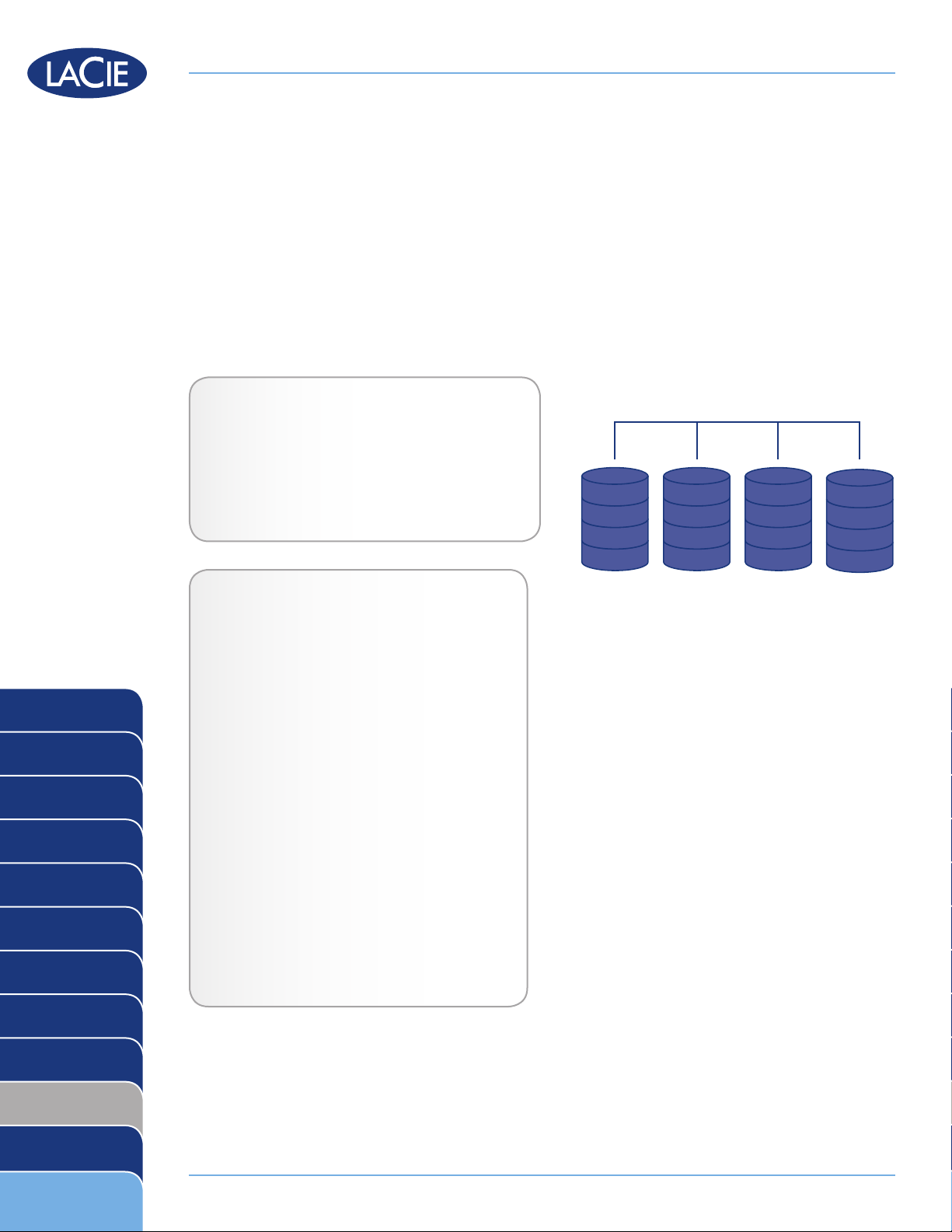
When disks are concatenated, their capacities are combined and data is written to the primary disk in the array
until is it full and then to successive disks. Concatenation provides no performance advantage or added measure of data safety. It is simply a method of combining two physical disks into one volume for greater overall
capacity.
Concatenation allows full use of the capacity of all disks in the array and most data can survive a disk failure.
Only data on the failed disk and data that is partially written on the failed disk and an operative disk is lost.
LaCie Products with Concatenation Mode
LaCie 2big network ✦
LaCie Ethernet Disk ✦
LaCie 2big quadra ✦
RAID 0
RAID 1
RAID 3
RAID 3+Spare
RAID 5
RAID 5+Spare
LaCie 4big quadra
✦
How Concatenation Capacity Is
Calculated
Storage capacity in a concatenation configuration is calculated by multiplying the number of
drives by the disk capacity, or C = n*d
where:
C = available capacity
n = number of disks
d = disk capacity
For example, in a concatenation array with four
drives each with a capacity of 1000GB, the total capacity of the array would be 4000GB:
C = (4*1000)
RAID 6
RAID 0+1
RAID 10
Concatenation
JBOD
RAID Selection
Page 11
Page 12
LaCie RAID Technology White Paper
JBOD
A
B
C
D
E
F
G
H
I
J
K O
L P
M
N
Disk 1 Disk 2 Disk 3 Disk 4
JBOD
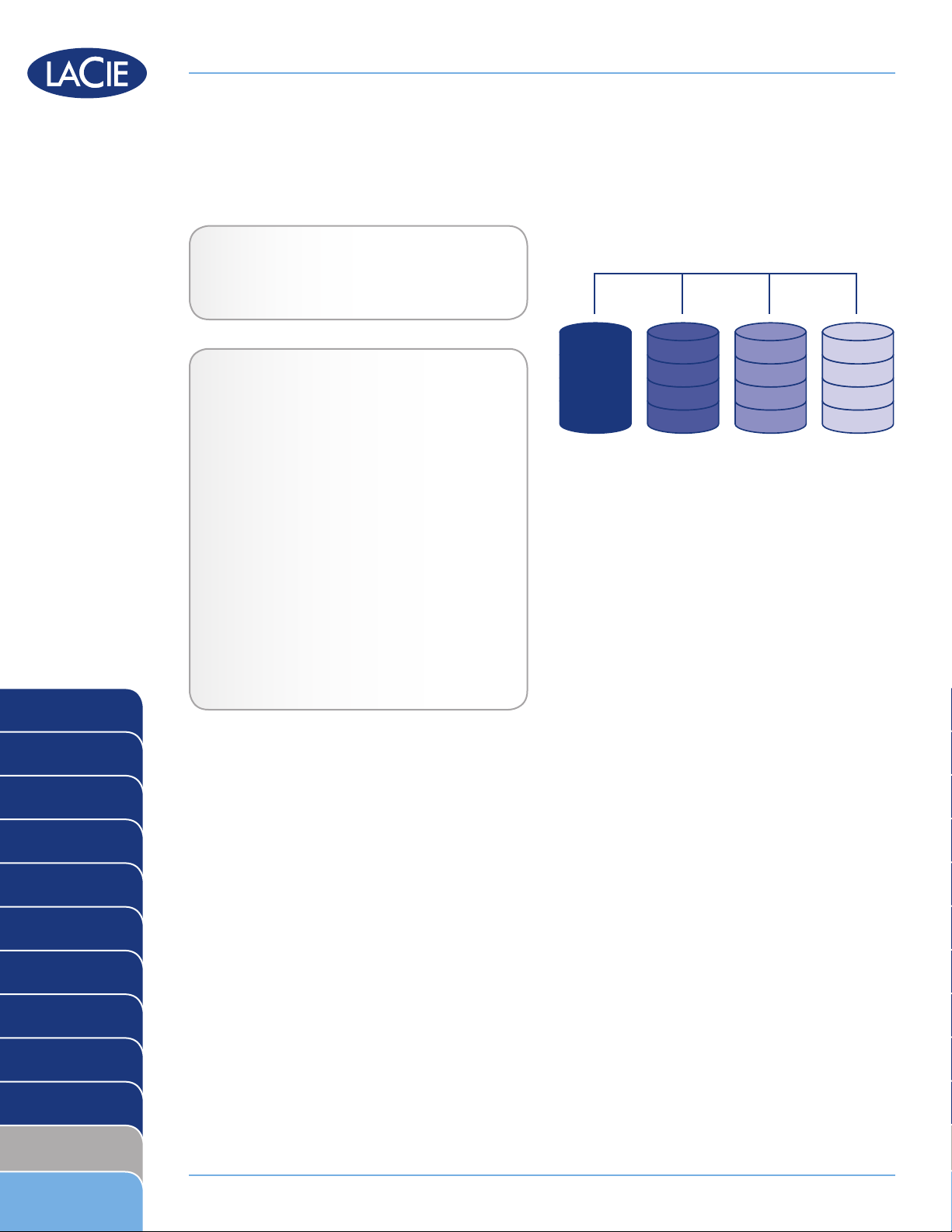
JBOD stands for Just a Bunch of Disks. Each disk in the array, whether part of separate devices or the same
device, mounts on the computer as a separate disk.
LaCie Products with JBOD Mode
Currently, no LaCie products ✦
How JBOD Capacity Is Calculated
The total capacity of a JBOD array is the sum of
the capacities of each of its disks, or
C = n*d
where:
RAID 0
RAID 1
RAID 3
RAID 3+Spare
RAID 5
RAID 5+Spare
C = available capacity
n = number of disks
d = disk capacity
For example, in a JBOD array with four drives
each with a capacity of 1000GB, the total capacity of the array would be 4000GB:
C = (4*1000)
RAID 6
RAID 0+1
RAID 10
Concatenation
JBOD
RAID Selection
Page 12
Page 13
LaCie RAID Technology White Paper
RAID 0
RAID 1
RAID 3
RAID 3+Spare
RAID 5
RAID 5+Spare
RAID 6
RAID0
RAID1
RAID3
RAID3+Spare
RAID5
RAID5+Spare
RAID6
RAID0+1
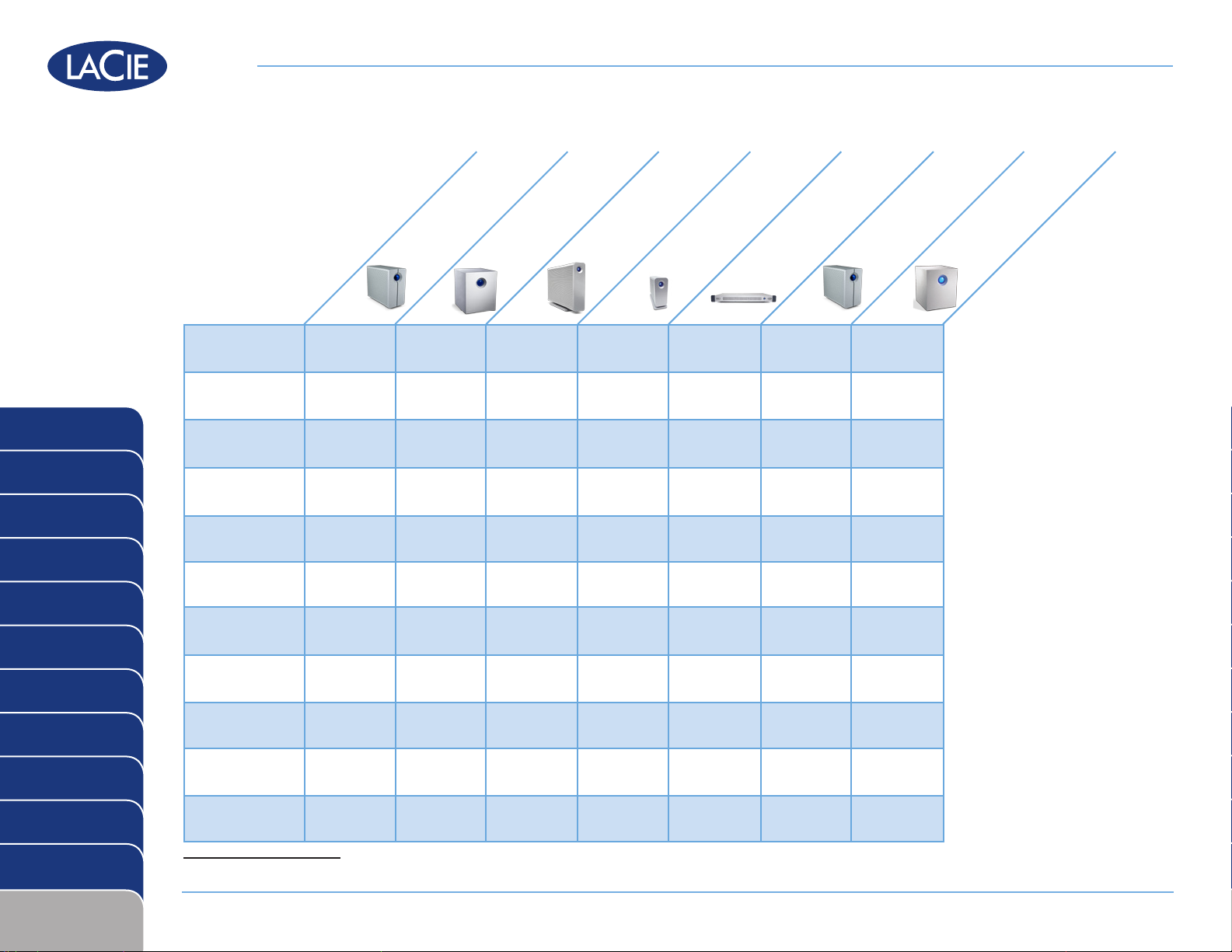
LaCie 2big quadra
H H
LaCie 4big quadra
LaCie big disk quadra
H * H *
LaCie little big disk quadra
LaCie Ethernet Disk
H H
H
H
H H
H H
LaCie 2big network
LaCie 5big network
H
H
RAID 0+1
RAID 10
Concatenation
JBOD
RAID Selection
RAID10
Concatenation
JBOD
* Built-in
H H
H H H H
Page 13
Page 14
ABOUT LACIE
Through a combination of cutting-edge engineering and a rich history of unique design aesthetics, LaCie has earned
an excellent reputation for producing products that are the perfect synthesis of form and function. Our hard disks, network and RAID solutions, optical drives, displays, and accessories are created to enhance and expand your computing
environment, no matter its platform or configuration.
Featuring the exclusive styles of world-renowned designers such as Neil Poulton, Ora-Ïto, Karim Rashid and Sam
Hecht, LaCie’s award-winning products look stunning and perform with unparalleled reliability and versatility. LaCie
is a global leader in manufacturing top-of-the-line tools that are often first-to-market, constantly raising the bar and
re-establishing industry standards.
Please visit our website: www.lacie.com, for up-to-date product specifications—available in multiple languages for
worldwide accessibility. Use it to purchase items online, contact our excellent technical support or locate the sales office
or reseller nearest you.
www.lacie.com
While reasonable efforts have been made in the preparation of this document to assure its accuracy, LaCie
assumes no liability resulting from errors or omissions in this document, or from the use of the information
contained herein.
 Loading...