

Page 1

KRAMER ELECTRONICS LTD.
USER MANUAL
MODEL:
VP-481
DVI to 3G HD-SDI Scaler
P/N: 2900-300008 Rev 4
Page 2
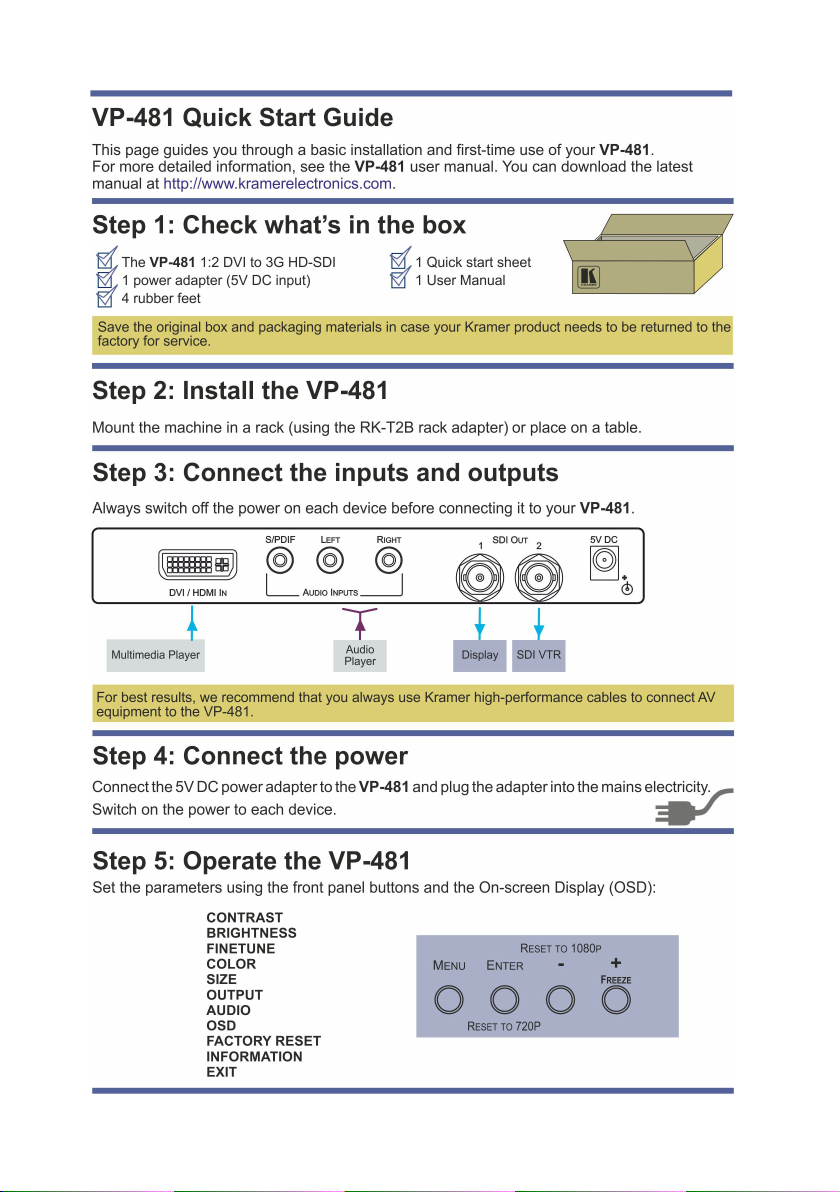
Page 3

Contents
1 Introduction 1
2 Getting Started 2
2.1 Achieving the Best Performance 2
3 Overview 3
4 Defining the VP-481 DVI to 3G HD-SDI Scaler 4
5 Connecting the VP-481 DVI to 3G HD-SDI Scaler 6
6 Operating the VP-481 DVI to 3G HD-SDI Scaler 7
6.1 Using the Front Panel Buttons 7
6.2 Using the OSD 7
7 Technical Specifications 11
Figures
UFigure 1: VP-481 DVI to 3G HD-SDI Scaler Front PanelU 4
UFigure 2: VP-481 DVI to 3G HD-SDI Scaler Rear PanelU 5
UFigure 3: Connecting the VP-481 DVI to 3G HD-SDI ScalerU 6
VP-481 – Contents i
Page 4

1
1 Introduction
Welcome to Kramer Electronics! Since 1981, Kramer Electronics has been
providing a world of unique, creative, and affordable solutions to the vast range of
problems that confront the video, audio, presentation, and broadcasting
professional on a daily basis. In recent years, we have redesigned and upgraded
most of our line, making the best even better!
Our 1,000-plus different models now appear in 11 groups that are clearly defined
by function: GROUP 1: Distribution Amplifiers; GROUP 2: Switchers and Matrix
Switchers; GROUP 3: Control Systems; GROUP 4: Format/Standards Converters;
GROUP 5: Range Extenders and Repeaters; GROUP 6: Specialty AV Products;
GROUP 7: Scan Converters and Scalers; GROUP 8: Cables and Connectors;
GROUP 9: Room Connectivity; GROUP 10: Accessories and Rack Adapters and
GROUP 11: Sierra Products.
Congratulations on purchasing your Kramer VP-481 DVI to 3G HD-SDI Scaler
which is ideal for the following typical applications:
• Broadcast studios for scaling and conversion from DVI sources
• Scaling to 3G HD-SDI for rental and staging events
• Format conversion and scaling
VP-481 - Introduction 1
Page 5
i
!
2 Getting Started
We recommend that you:
• Unpack the equipment carefully and save the original box and packaging
materials for possible future shipment
• Review the contents of this user manual
• Use Kramer high performance high resolution cables
Go to http://www.kramerelectronics.com to check for up-to-date
user manuals, application programs, and to check if firmware
upgrades are available (where appropriate).
2.1 Achieving the Best Performance
To achieve the best performance:
• Use only good quality connection cables to avoid interference, deterioration
in signal quality due to poor matching, and elevated noise levels (often
associated with low quality cables)
• Avoid interference from neighboring electrical appliances that may adversely
influence signal quality
• Position your Kramer VP-481 away from moisture, excessive sunlight and
dust
Caution: No operator serviceable parts inside the unit
Warning:
Warning:
2 VP-481 - Getting Started
Use only the Kramer Electronics input power wall
adapter that is provided with the unit
Disconnect the power and unplug the unit from the wall
before installing
 Loading...