

Page 1

Kramer Electronics, Ltd.
USER MANUAL
Model:
VP-418
Video to HDMI Scaler
Page 2

Contents
i
Contents
1 Introduction 1
2 Getting Started 1
2.1 Quick Start 1
3 Overview 3
3.1 About HDMI 3
3.2 Recommendations for Best Performance 4
4 Your VP-418 Video to HDMI Scaler 5
5 Connecting the VP-418 Video to HDMI Scaler 6
5.1 Connecting the Contact Closure Remote Control PINs 8
6 Technical Specifications 8
Figures
Figure 1: VP-418 Video to HDMI Scaler – Front and Rear View 5
Figure 2: Connecting the VP-418 Video to HDMI Scaler 7
Figure 3: Connecting the Contact Closure Remote Control PINs 8
Tables
Table 1: Front Panel Features and Functions of the VP-418 Video to HDMI Scaler 5
Table 2: Rear Panel Features and Functions of the VP-418 Video to HDMI Scaler 5
Table 3: Technical Specifications of the VP-418 Video to HDMI Scaler 8
Page 3

Introduction
1
1 Introduction
Welcome to Kramer Electronics (since 1981): a world of unique, creative and
affordable solutions to the infinite range of problems that confront the video,
audio and presentation professional on a daily basis. In recent years, we have
redesigned and upgraded most of our line, making the best even better! Our
500-plus different models now appear in 8 Groups1, which are clearly defined
by function.
Congratulations on purchasing your Kramer VP-418 Video to HDMI Scaler.
This product is ideal for:
Projection systems in conference rooms, boardrooms, hotels and churches
Home theater up-scaling
The package includes the following items:
VP-418
Video to HDMI Scaler
Power adapter (12V DC input)
This user manual2
2 Getting Started
We recommend that you:
Unpack the equipment carefully and save the original box and packaging
materials for possible future shipment
Review the contents of this user manual
Use Kramer high performance high resolution cables3
2.1 Quick Start
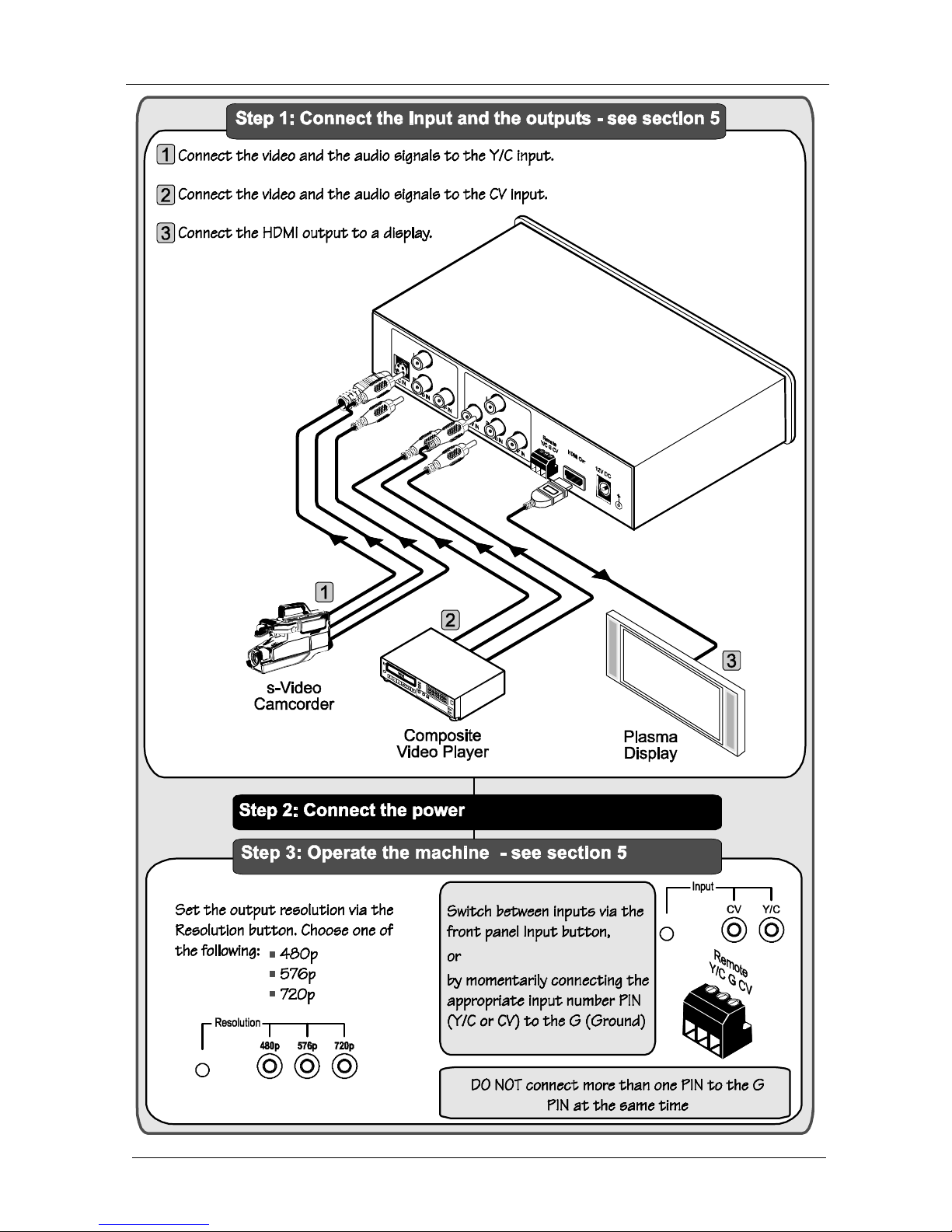
This quick start chart summarizes the basic setup and operation steps.
1 GROUP 1: Distribution Amplifiers; GROUP 2: Video and Audio Switchers, Matrix Switchers and Controllers; GROUP 3:
Video, Audio, VGA/XGA Processors; GROUP 4: Interfaces and Sync Processors; GROUP 5: Twisted Pair Interfaces;
GROUP 6: Accessories and Rack Adapters; GROUP 7: Scan Converters and Scalers; and GROUP 8: Cables and Connectors
2 Download up-to-date Kramer user manuals from the Internet at this URL: http://www.kramerelectronics.com
3 The complete list of Kramer cables is on our Web site at http://www.kramerelectronics.com
Page 4
KRAMER: SIMPLE CREATIVE TECHNOLOGY
Getting Started
2
Page 5

Overview
3
3 Overview
The Kramer VP-418 is a high quality video to HDMI scaler. It accepts one of
two inputs: either s-Video on a 4p connector, or composite video on an RCA
connector (selected via a front panel selector button or via the remote contact
closure connector), as well as separate sets of digital audio (S/PDIF) and
analog unbalanced stereo audio signals on RCA connectors. It scales the
video, embeds the audio, and outputs the signal to the HDMI output.
The VP-418 Video to HDMI Scaler:
Is HDTV compatible and the resolution can be scaled up to 480p, 576p or
720p via a front panel selector button
Has both analog and digital (S/PDIF) audio inputs for each video input
Automatically detects and selects the analog/digital audio source. Default
selection is S/PDIF – if this is not present, then the machine uses the
audio from the analog inputs
Has a non-volatile memory that retains the last settings used
Is housed in a desktop sized enclosure and is 12VDC fed
Control your VP-418:
Directly, via the front panel push buttons
Remotely, from the remote contact closure connector
3.1 About HDMI
High-Definition Multimedia Interface (HDMI) is an uncompressed all-digital
1
audio/video interface, widely supported in the entertainment and home cinema
industry. It delivers the highest high-definition image and sound quality. Note that
Kramer Electronics Limited is an HDMI Adopter2 and an HDCP Licensee3.
In particular, HDMI:
Provides a simple4 interface between any audio/video source, such as a
set-top box, DVD player, or A/V receiver and video monitor, such as a
digital flat LCD / plasma television (DTV), over a single lengthy5 cable
1 Ensuring an all-digital rendering of video without the losses associated with analog interfaces and their unnecessary digitalto-analog conversions
2 See http://www.hdmi.org/about/adopters_founders.asp
3 See http://www.digital-cp.com/list/
4 With video and multi-channel audio combined into a single cable, the cost, complexity, and confusion of multiple cables
currently used in A/V systems is reduced
5 HDMI technology has been designed to use standard copper cable construction at up to 15m
Page 6

KRAMER: SIMPLE CREATIVE TECHNOLOGY
Overview
4
Supports standard, enhanced, high-definition video, and multi-channel
digital audio
1
on a single cable
Transmits all ATSC HDTV standards and supports 8-channel digital audio,
with bandwidth to spare to accommodate future enhancements and
requirements
Benefits consumers by providing superior, uncompressed digital video
quality via a single cable2, and user-friendly connector
Is backward-compatible with DVI (Digital Visual Interface)
Supports two-way communication between the video source (such as a
DVD player) and the digital television, enabling new functionality such as
automatic configuration and one-button play
HDMI has the capacity to support existing high-definition video formats
(720p, 1080i, and 1080p/60), standard definition formats such as NTSC or
PAL, as well as 480p and 576p.
3.2 Recommendations for Best Performance
To achieve the best performance:
Connect only good quality connection cables, thus avoiding interference,
deterioration in signal quality due to poor matching, and elevated noiselevels (often associated with low quality cables)
Avoid interference from neighboring electrical appliances and position
your Kramer VP-418 away from moisture, excessive sunlight and dust
Caution – No operator-serviceable parts inside unit.
Warning – Use only the Kramer Electronics input power
wall adapter that is provided with this unit3.
Warning – Disconnect power and unplug unit from wall
before installing or removing device or servicing unit.
1 HDMI supports multiple audio formats, from standard stereo to multi-channel surround-sound. HDMI has the capacity to
support Dolby 5.1 audio and high-resolution audio formats
2 HDMI provides the quality and functionality of a digital interface while also supporting uncompressed video formats in a
simple, cost-effective manner
3 For example: model number AD2512C, part number 2535-000251
Page 7
Your VP-418 Video to HDMI Scaler
5
4 Your VP-418 Video to HDMI Scaler
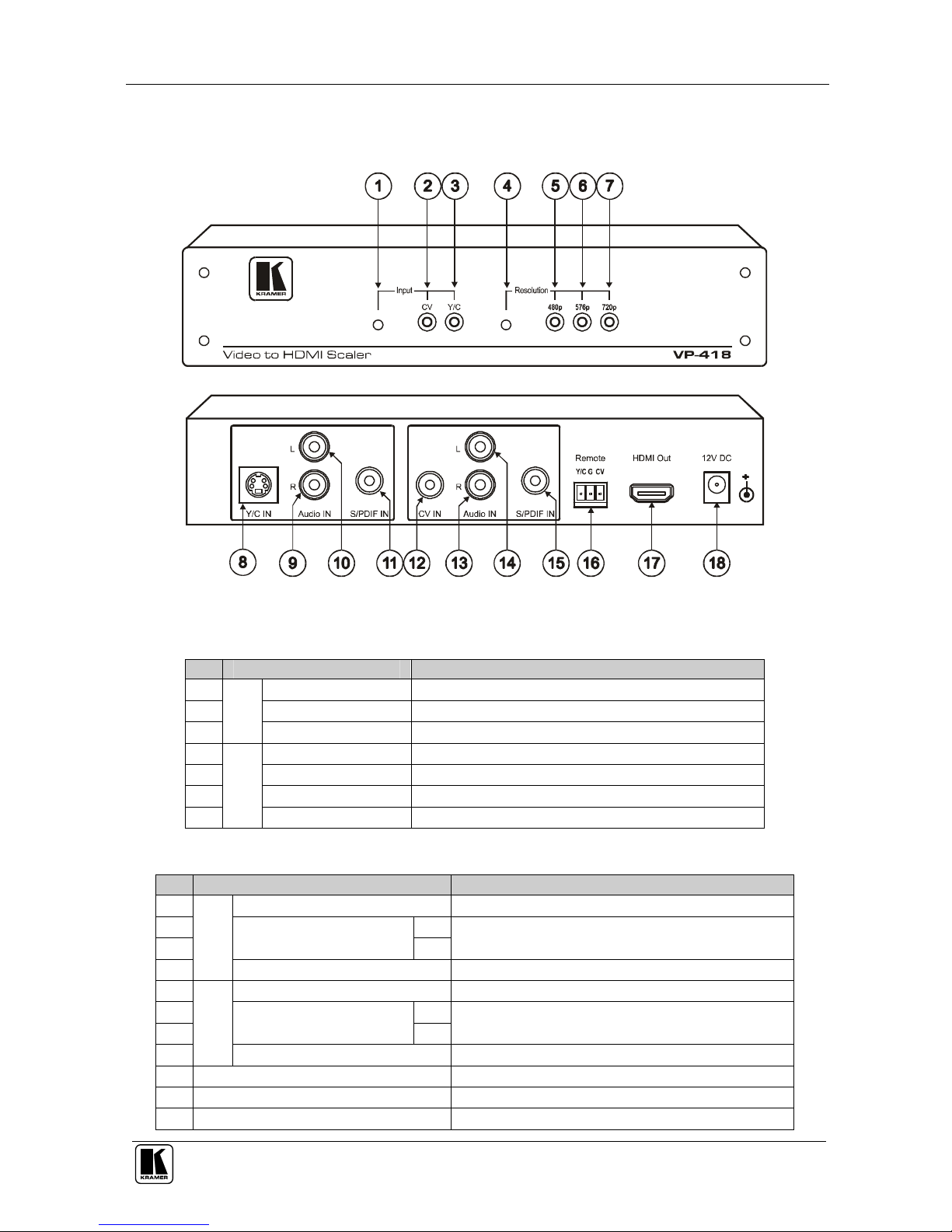
Figure 1, Table 1 and Table 2 define the VP-418 Video to HDMI Scaler:
Figure 1: VP-418 Video to HDMI Scaler – Front and Rear View
Table 1: Front Panel Features and Functions of the VP-418 Video to HDMI Scaler
# Feature Function
1 Selector Button Press to select the CV input or the Y/C input
2 CV Indicator LED Lights when the CV input is selected
3
Input
Y/C Indicator LED Lights when the Y/C input is selected
4 Selector Button Press to select the resolution: 480p, 576p or 720p
5 480p Indicator LED Lights when the 480p resolution is selected
6 576p Indicator LED Lights when the 576p resolution is selected
7
Resolution
720p Indicator LED Lights when the 720p resolution is selected
Table 2: Rear Panel Features and Functions of the VP-418 Video to HDMI Scaler
# Feature Function
8 Y/C IN 4p Connector Connect to the s-Video source
9 R
10
Audio IN RCA Connector
L
Connect to the right and left analog unbalanced stereo
audio source (of the Y/C source)
11
Y/C
S/PDIF IN RCA Connector Connect to the digital audio source
12 CV IN RCA Connector Connect to the composite video source
13 R
14
Audio IN RCA Connector
L
Connect to the right and left analog unbalanced stereo
audio source (of the CV source)
15
CV
S/PDIF IN RCA Connector Connect to the digital audio source
16 Remote Terminal Block Connects to a dry contact switch (see section 5.1)
17 HDMI Out Connector Connects to the HDMI acceptor
18 12V DC +12V DC connector for powering the unit
Page 8

KRAMER: SIMPLE CREATIVE TECHNOLOGY
Connecting the VP-418 Video to HDMI Scaler
6
5 Connecting the VP-418 Video to HDMI Scaler
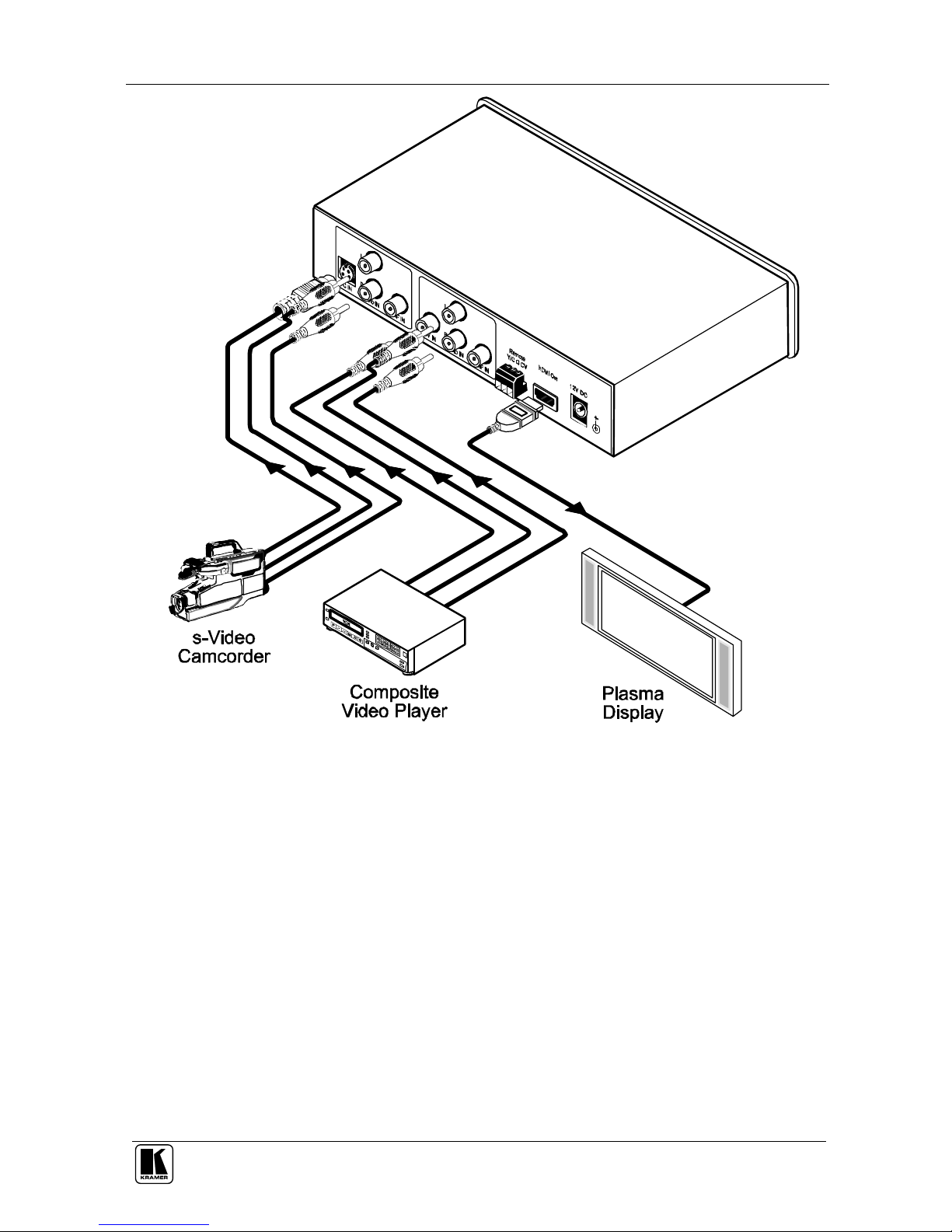
To connect your VP-418, as the example in Figure 2 illustrates1, do the
following2:
1. Connect an s-Video source (for example, an s-Video camcorder) to the
Y/C IN 4p connector.
2. Connect the analog unbalanced stereo audio signal of the s-video source to
the L and R RCA connectors in the Y/C area3.
3. Connect a composite video source (for example, a composite video player)
to the CV IN RCA connector.
4. Connect the analog unbalanced stereo audio signal of the CV source to the
L and R RCA connectors in the CV area3.
5. Connect the HDMI Out connector to an HDMI acceptor4 (for example, a
plasma display).
6. Connect the 12V DC power adapter to the power socket and connect the
adapter to the mains electricity (not shown in Figure 2).
1 You do not have to connect both inputs
2 Switch OFF the power on each device before connecting it to your VP-418. After connecting your VP-418, switch on its
power and then switch on the power on each device
3 Alternatively, you can connect the digital audio source to the S/PDIF RCA connector
4 After connecting the power, if required, press the Resolution button to set the scaled output resolution
Page 9
Connecting the VP-418 Video to HDMI Scaler
7
Figure 2: Connecting the VP-418 Video to HDMI Scaler
Page 10
KRAMER: SIMPLE CREATIVE TECHNOLOGY
Technical Specifications
8
5.1 Connecting the Contact Closure Remote Control PINs
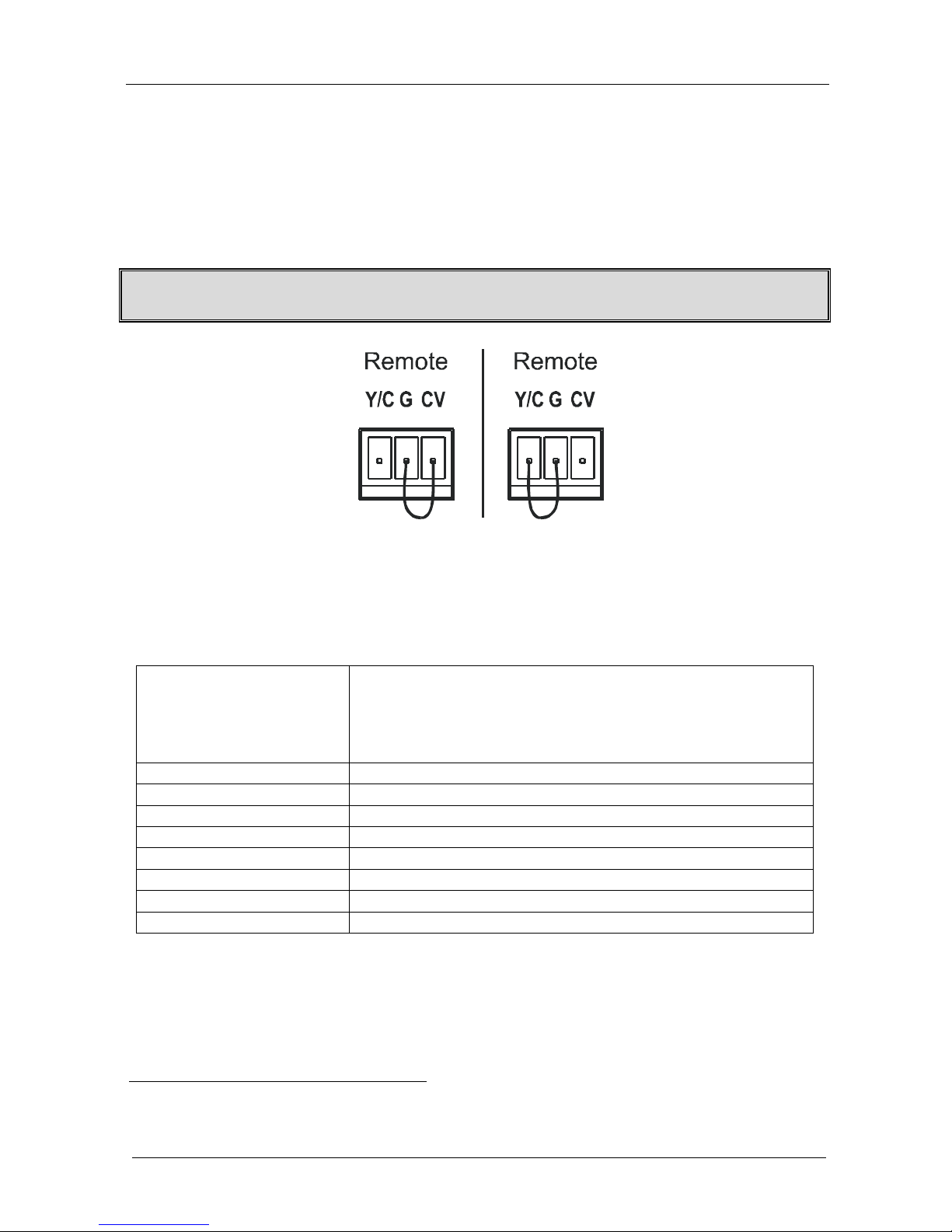
The contact closure remote control pins operate in a similar way to the Input
selector button. Using the contact closure remote control you can select the
Y/C or the CV input. To do so, connect the required input
1
pin on the
REMOTE terminal block connector to the G (Ground) pin, as Figure 3
illustrates.
DO NOT Connect more than one PIN to the Ground PIN at the same time
To select CV,
connect the CV
PIN to PIN G
To select Y/C,
connect the Y/C
PIN to PIN G
Figure 3: Connecting the Contact Closure Remote Control PINs
6 Technical Specifications
Table 3: Technical Specifications2 of the VP-418 Video to HDMI Scaler
INPUTS:
1 CV on an RCA connector 1Vpp/75
1 s-Video on a 4p connector 1Vpp/75 (Y); 0.3Vpp/75 (C)
2 analog unbalanced stereo audio (left and right) on RCA connectors,
1 Vpp/24k
2 S/PDIF digital audio on RCA connectors
OUTPUT: 1 HDMI connector
OUTPUT RESOLUTIONS: 480p, 576p, 720p
CONTROLS: Input selector button, resolution selector button, contact closure
POWER SOURCE: 12VDC, 550mA
DIMENSIONS: 21.46 cm x 16.25 cm x 4.36 cm (8.45" x 6.4" x 1.72") W, D, H
WEIGHT: 1.1kg (2.4lb.) approx.
ACCESSORIES: Power supply
OPTIONS: Rack adapter
1 Y/C or CV
2 Specifications are subject to change without notice
Page 11

9
LIMITED WARRANTY
WHO IS PROTECTED?
WHAT IS COVERED AND WHAT IS NOT COVERED
WHAT WE WILL PAY FOR AND WHAT WE WILL NOT PAY FOR
HOW YOU CAN GET WARRANTY SERVICE
LIMITATION OF IMPLIED WARRANTIES
EXCLUSION OF DAMAGES
CAUTION!
Kramer Electronics (hereafter ) warrants this product free from defects in material and workmanship under the
following terms.
Kramer
HOW LONG IS THE WARRANTY
Labor and parts are warranted for seven years from the date of the first customer purchase.
Only the first purchase customer may enforce this warranty.
We will pay labor and material expenses for covered items. We will not pay for the following:
The liability of Kramer for any effective products is limited to the repair or replacement of the product at our option. Kramer shall
not be liable for:
This warranty gives you specific legal rights, and you may also have other rights, which vary from place to place.
All products returned to Kramer for service must have prior approval. This may be obtained from your dealer.
This equipment has been tested to determine compliance with the requirements of:
EN-50081: "Electromagnetic compatibility (EMC);
generic emission standard.
Residential, commercial and light industry"
EN-50082: "Electromagnetic compatibility (EMC) generic immunity standard.
Part 1: Residential, commercial and light industry environment".
CFR-47: FCC Rules and Regulations:
Part 15: “Radio frequency devices
Subpart B Unintentional radiators”
Except as below, this warranty covers all defects in material or workmanship in this product. The following are not covered
by the warranty:
1. Any product which is not distributed by Kramer, or which is not purchased from an authorized Kramer dealer. If you are
uncertain as to whether a dealer is authorized, please contact Kramer at one of the agents listed in the Web site
www.kramerelectronics.com.
2. Any product, on which the serial number has been defaced, modified or removed.
3. Damage, deterioration or malfunction resulting from:
i) Accident, misuse, abuse, neglect, fire, water, lightning or other acts of nature
ii) Product modification, or failure to follow instructions supplied with the product
iii) Repair or attempted repair by anyone not authorized by Kramer
iv) Any shipment of the product (claims must be presented to the carrier)
v) Removal or installation of the product
vi) Any other cause, which does not relate to a product defect
vii)Cartons, equipment enclosures, cables or accessories used in conjunction with the product
1. Removal or installations charges.
2. Costs of initial technical adjustments (set-up), including adjustment of user controls or programming. These costs are the
responsibility of the Kramer dealer from whom the product was purchased.
3. Shipping charges.
1. To obtain service on you product, you must take or ship it prepaid to any authorized Kramer service center.
2. Whenever warranty service is required, the original dated invoice (or a copy) must be presented as proof of warranty
coverage, and should be included in any shipment of the product. Please also include in any mailing a contact name,
company, address, and a description of the problem(s).
3. For the name of the nearest Kramer authorized service center, consult your authorized dealer.
All implied warranties, including warranties of merchantability and fitness for a particular purpose, are limited in duration to
the length of this warranty.
1. Damage to other property caused by defects in this product, damages based upon inconvenience, loss of use of the product, loss
of time, commercial loss; or:
2. Any other damages, whether incidental, consequential or otherwise. Some countries may not allow limitations on how long an
implied warranty lasts and/or do not allow the exclusion or limitation of incidental or consequential damages, so the above
limitations and exclusions may not apply to you.
Servicing the machines can only be done by an authorized Kramer technician. Any user who makes changes or
modifications to the unit without the expressed approval of the manufacturer will void user authority to operate the
equipment.
Use the supplied DC power supply to feed power to the machine.
Please use recommended interconnection cables to connect the machine to other components.
NOTE:
Part 1:
Page 12

Kramer Electronics, Ltd.
Web site: www.kramerelectronics.com
E-mail: [email protected]
P/N: 2900-000261 REV 2
For the latest information on our products and a list of Kramer
distributors, visit our Web site: www.kramerelectronics.com,
where updates to this user manual may be found.
We welcome your questions, comments and feedback.
Caution
Safety Warning:
Disconnect the unit from the power supply before
opening/servicing.
 Loading...