

Page 1

Kramer Electronics, Ltd.
USER MANUAL
Model:
VA-1H
UXGA Sync Shifter
Page 2

Contents
Contents
1
Introduction 1
2
Getting Started 1
2.1 Quick Start 2
3
Overview 3
4
Your VA-1H UXGA Sync Shifter 4
5
Connecting the VA-1H UXGA Sync Shifter 5
6
Operating the VA-1H 6
6.1 Resetting the Memory 6
7
Technical Specifications 7
Figures
Figure 1: VA-1H UXGA Sync Shifter Functions 4
Figure 2: Connecting the VA-1H UXGA Sync Shifter 5
Tables
Table 1: VA-1H UXGA Sync Shifter Functions 4
Table 2: VA-1H Technical Specifications 7
i
Page 3

Introduction
1 Introduction
Welcome to Kramer Electronics! Since 1981, Kramer Electronics has been
providing a world of unique, creative, and affordable solutions to the vast
range of problems that confront the video, audio, presentation, and
broadcasting professional on a daily basis. In recent years, we have
redesigned and upgraded most of our line, making the best even better! Our
1,000-plus different models now appear in 11 groups1 that are clearly
defined by function.
Thank you for purchasing the Kramer TOOLS VA-1H UXGA Sync Shifter,
which is ideal for home-entertainment, multimedia, and presentation
applications.
Each package includes the following items:
The VA-1H UXGA Sync Shifter
Power adapter (5V DC input)
This user manual2
2 Getting Started
We recommend that you:
Unpack the equipment carefully and save the original box and
packaging materials for possible future shipment
Review the contents of this user manual
Use Kramer high-performance high-resolution cables3
1 GROUP 1: Distribution Amplifiers; GROUP 2: Switchers a nd Matrix Switchers; GROUP 3: Control Systems;
GROUP 4: Format/Standards Converters; GROUP 5: Range Extenders and Repeaters; GROUP 6: Specialty AV Products;
GROUP 7: Scan Converters and Scalers; GROUP 8: Cables and Connectors; GROUP 9: Room Connectivity;
GROUP 10: Accessories and Rack Adapters; GROUP 11: Sierra Products
2 Download up-to-date Kramer user manuals from our Web site at http://www.kramerelectronics.com
3 The complete list of Kramer cables is on our Web site at http://www.kramerelectronics.com
1
Page 4
Getting Started
2.1 Quick Start
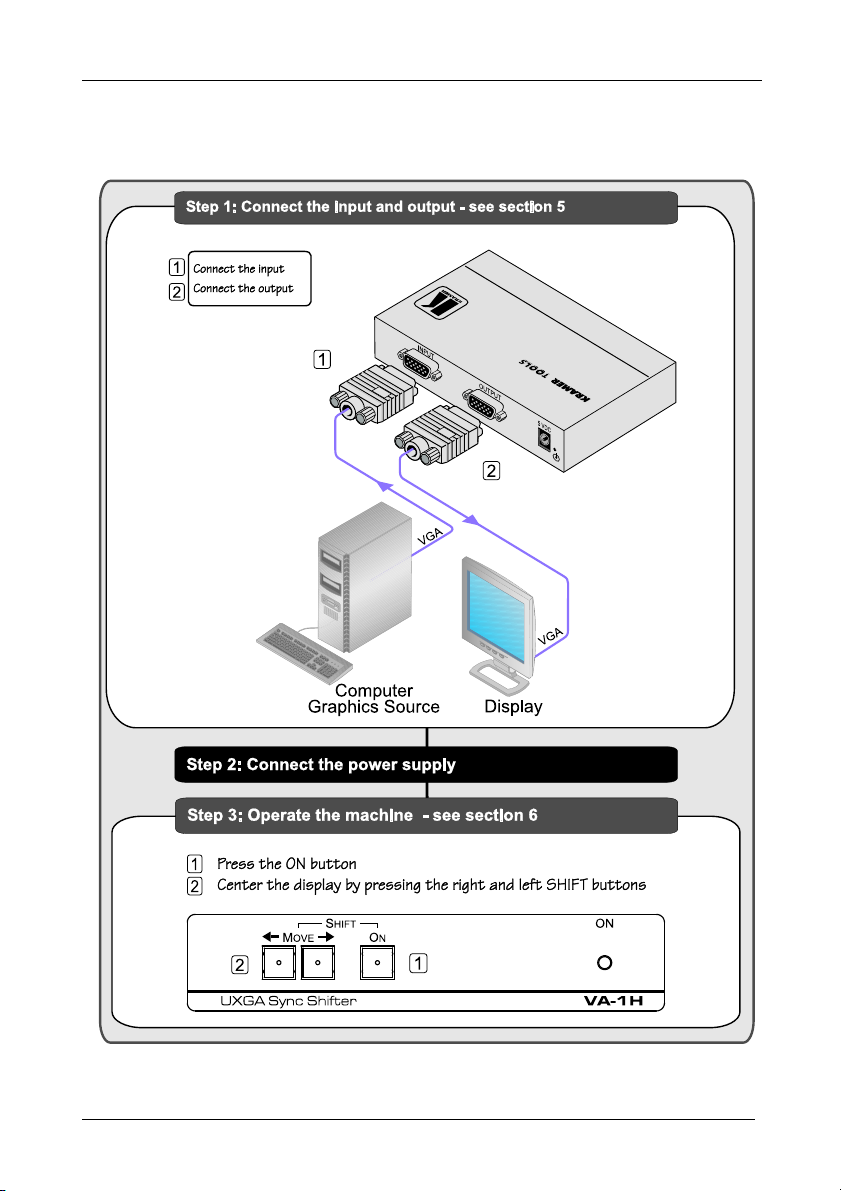
This quick start chart summarizes the basic setup and operation steps.
2
KRAMER: SIMPLE CREATIVE TECHNOLOGY
Page 5
Overview
3 Overview
The Kramer VA-1H UXGA Sync Shifter is a high-performance sync delay
corrector that can be used for any computer graphics video signal from
VGA to UXGA.
When sending a computer graphics video signal from a PC to a monitor via
a long-distance display cable, the delay between the picture information and
the sync may cause a horizontal shift on the display. The VA-1H
compensates by shifting the sync accordingly, so that the picture is properly
displayed.
To achieve the best performance:
Use only good quality connection cables1 to avoid interference,
deterioration in signal quality due to poor matching, and elevated
noise levels (often associated with low-quality cables).
Avoid interference from neighboring electrical appliances that
may adversely influence signal quality and position your Kramer
VA-1H away from moisture, excessive sunlight and dust
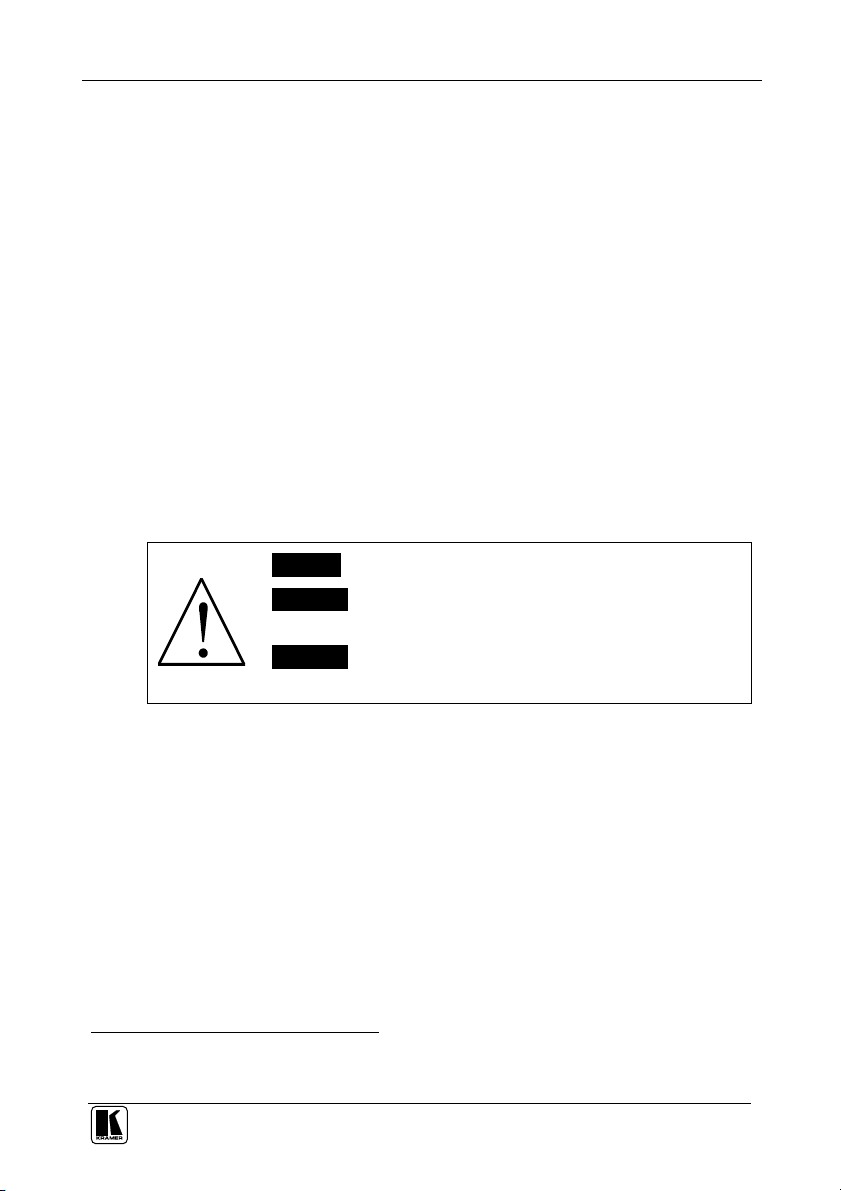
Caution – No operator-serviceable parts inside unit.
Warning – Use only the Kramer Electronics input power
wall adapter that is provided with this unit2.
Warning – Disconnect power and unplug unit from wall
before installing or removing device or servicing unit.
1 Available from Kramer Electronics on our Web site at http://www.kramerelectronics.com
2 For example, part number 2535-052002
3
Page 6
Your VA-1H UXGA Sync Shifter
4 Your VA-1H UXGA Sync Shifter
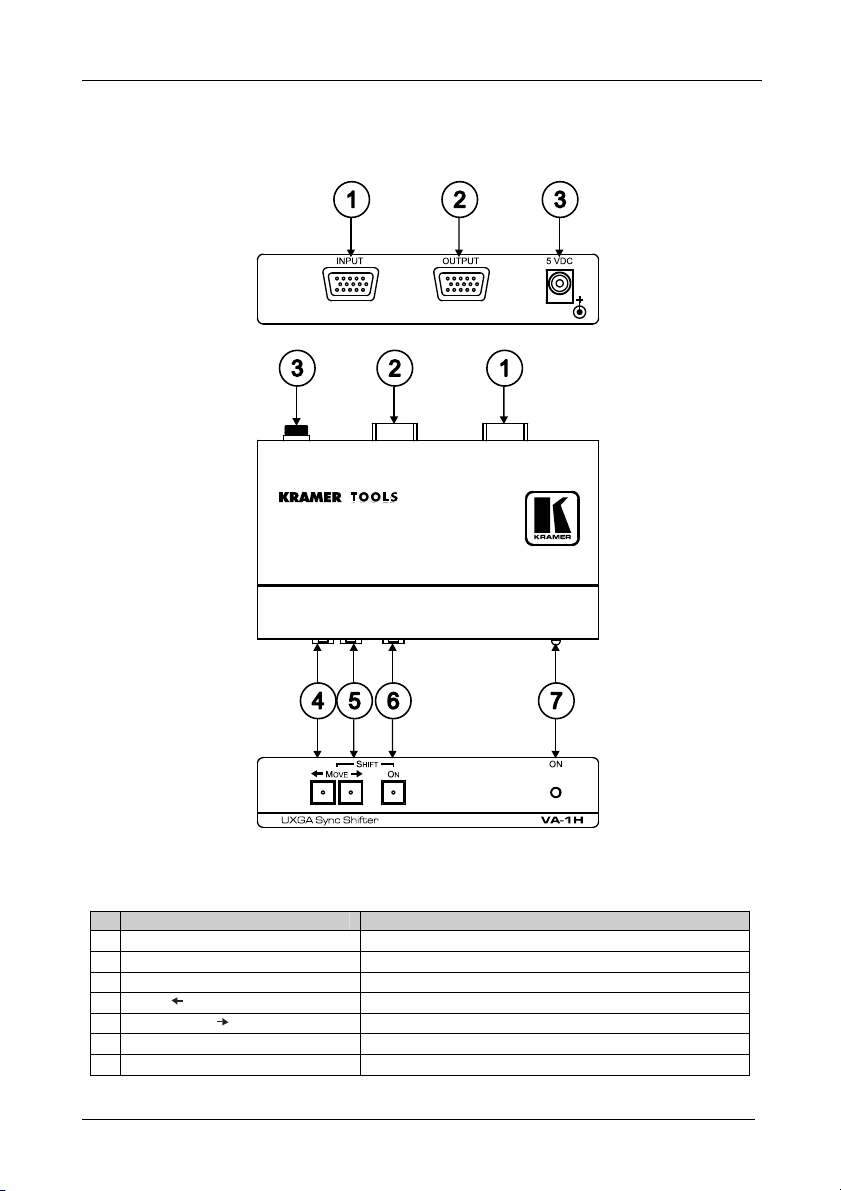
Figure 1 and Table 1 define the VA-1H.
Figure 1: VA-1H UXGA Sync Shifter Functions
Table 1: VA-1H UXGA Sync Shifter Functions
# Feature Function
1 INPUT 15-pin HD (F) Connector Connects to the computer graphics video signal source
2 OUTPUT 15-pin HD (F) Connector Connects to the display acceptor
3 5V DC Connector +5V DC for powering the unit
4 SHIFT MOVE Button Push to move the image on the display to the left
5 SHIFT MOVE Button Push to move the image on the display to the right
6 ON Button Push to enable image shifting
7 ON LED Illuminates when the unit is powered ON
4
KRAMER: SIMPLE CREATIVE TECHNOLOGY
Page 7
Connecting the VA-1H UXGA Sync Shifter
5 Connecting the VA-1H UXGA Sync Shifter
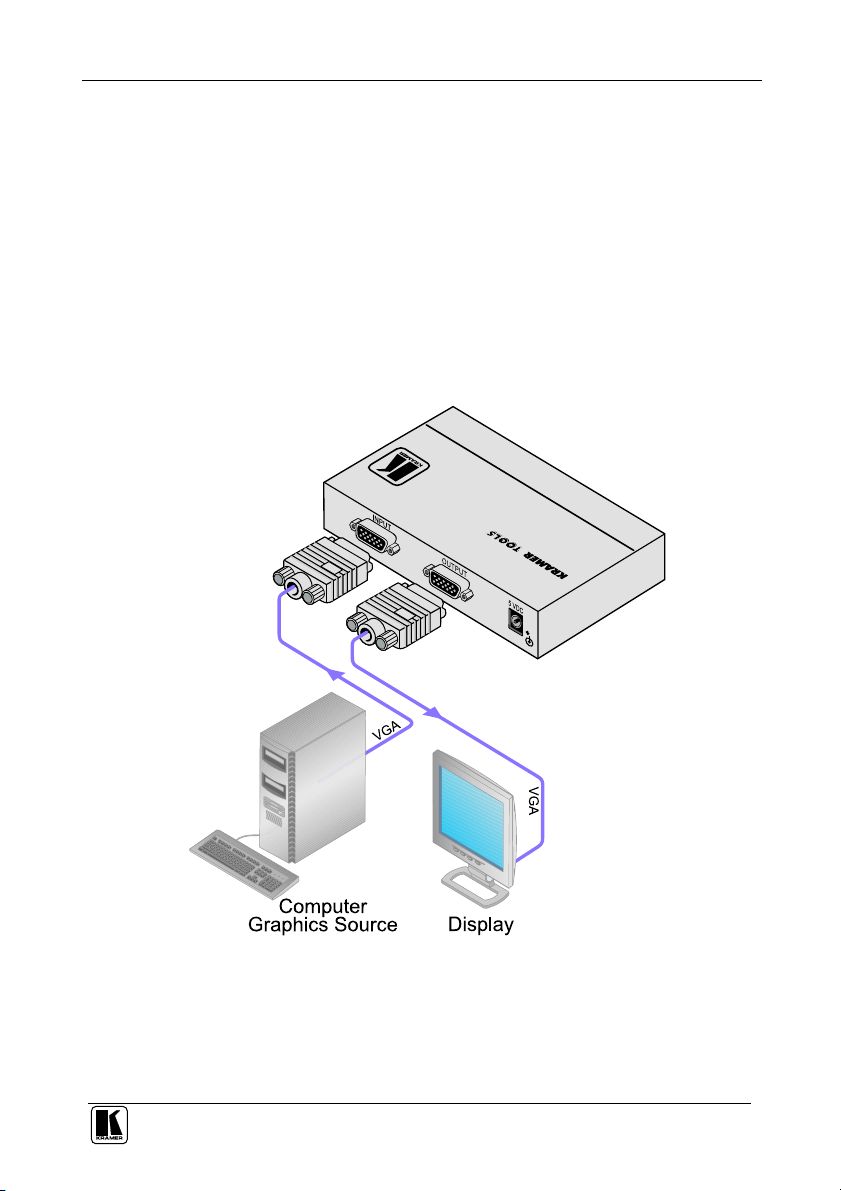
To connect the VA-1H, as the example in Figure 2 illustrates, do the
following:
1. Turn OFF the power on all devices.
2. Connect the computer graphics video signal cable to the INPUT connector
on the VA-1H.
3. Connect the OUTPUT connector to the acceptor display.
4. Connect the 5V DC power adapter to the power socket and connect the
adapter to the mains electricity (not shown in the illustration).
5. Turn ON the power on all devices.
Figure 2: Connecting the VA-1H UXGA Sync Shifter
5
Page 8

Operating the VA-1H
6 Operating the VA-1H
To operate your VA-1H:
1. Press the ON button.
2. While observing the display, press the right or left SHIFT buttons as needed
to center the picture. Depending on the resolution, the image can be shifted
up to about 1/3 of the screen in either direction.
Note: To increase the correction speed, press and hold the SHIFT button for
more than 3 seconds.
3. The setting is saved in non-volatile memory 5 seconds after the last
press/correction.
4. When the VA-1H is turned OFF and ON after a correction is made, the ON
button lights weakly to indicate a stored value.
Note: If, when the VA-1H unit is turned ON, the ON button lights brightly
and stays lit, there is a problem reading from non-volatile memory. Contact
Customer Support.
6.1 Resetting the Memory
To erase the contents of the non-volatile memory, perform the following:
1. Unplug and replug the power supply to turn the unit OFF and ON.
2. Press the left and right SHIFT buttons simultaneously for a short time.
3. When the ON button lights brightly, the operation was successful.
4. Unplug and replug the unit again to resume normal operation.
The ON button does not illuminate since there is no stored value.
6
KRAMER: SIMPLE CREATIVE TECHNOLOGY
Page 9
Technical Specifications
7 Technical Specifications
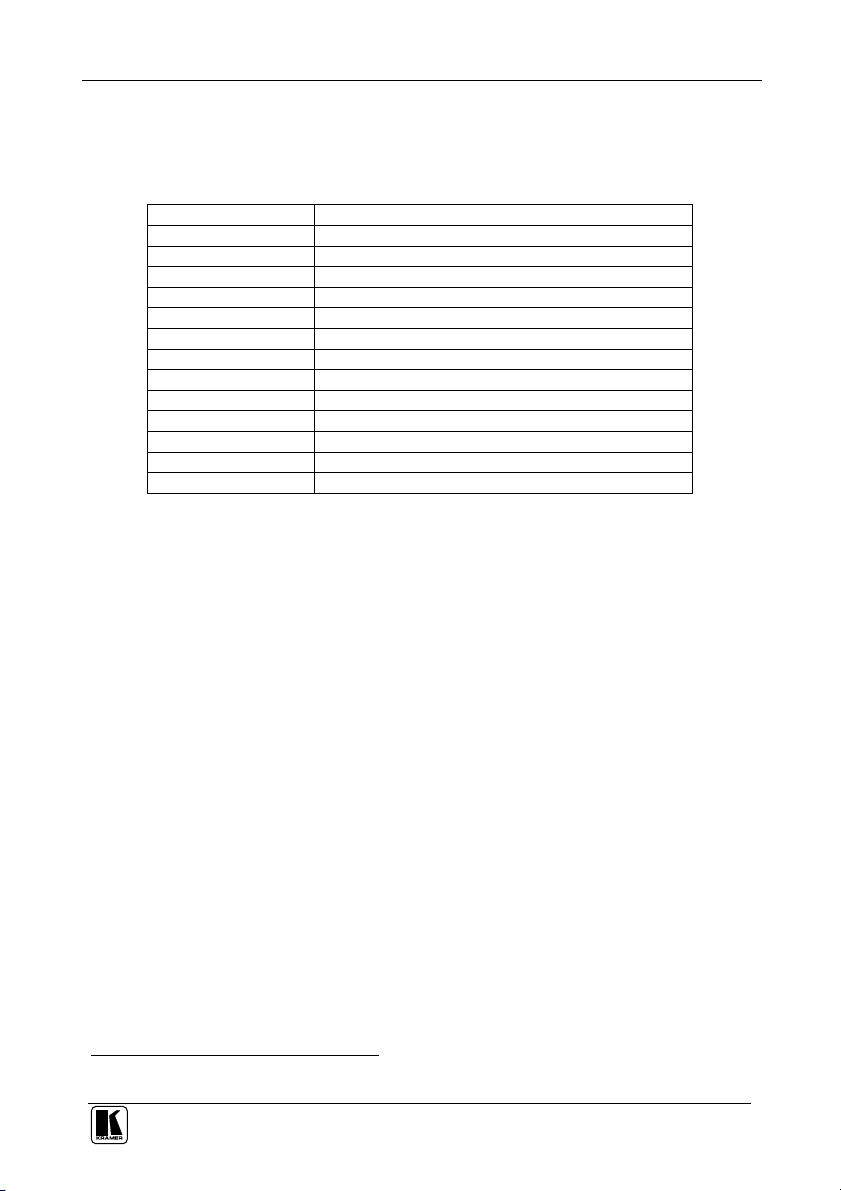
The VA-1H technical specifications are shown in Table 2:
Table 2: VA-1H Technical Specifications1
INPUT: 1 computer graphics video on 15-pin HD (F) connector
OUTPUT: 1 computer graphics video on 15-pin HD (F) connector
BANDWIDTH (-3dB): 1GHz
DIFF. GAIN: 0.03%
DIFF. PHASE: 0.03Deg
K-FACTOR: <0.05%
S/N RATIO: 73dB @5MHz
CONTROLS: Front panel SHIFT MOVE and SHIFT ON
COUPLING: DC
POWER SOURCE: 5V DC, 100mA
DIMENSIONS: 12cm x 7.2cm x 2.4cm (4.7" x 2.8" x 1.0") W, D, H
WEIGHT: 0.3kg (0.7lbs)
ACCESSORIES: Power supply
OPTIONS: 19” rack adapter
1 Specifications are subject to change without notice
7
Page 10
8
KRAMER: SIMPLE CREATIVE TECHNOLOGY
Page 11
For the latest information on our products and a list of Kramer
distributors, visit our Web site: www.kramerelectronics.com
where updates to this user manual may be found.
We welcome your questions, comments and feedback.
Safety Warning:
Disconnect the unit from the power supply before
opening/servicing.
Caution
Kramer Electronics, Ltd.
Web site: www.kramerelectronics.com
E-mail: [email protected]
P/N: 2900-000493 REV 1
 Loading...