

Page 1
P/N:
29 00 - 3 00888
Rev:
2
Installation Instructions
MODEL:
TS-1WUS Dual Insert US Power Socket Module
for Inner Frame, Modular Pop-up, and UTBUS
SAFETY WARNING
Disconnect the unit from the power supply before opening and servicing
For the latest information on our products and a list of Kramer distributors, visit our Web site where
updates to these installation instructions may be found.
We welcome your questions, comments, and feedback.
www.KramerAV.com
[email protected]
Page 2
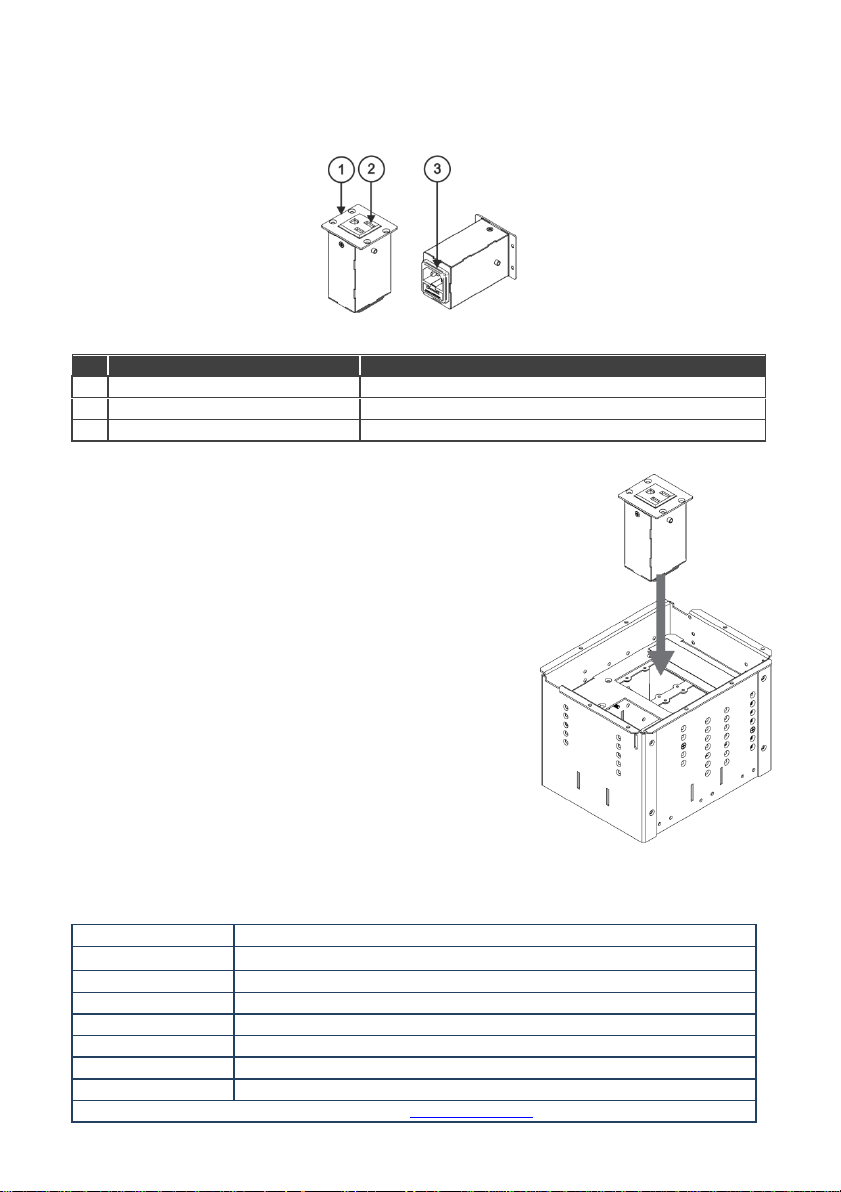
#
Feature
Function
1
Front plate
Attach to TBUS frame with four screws.
2
Power output socket
Connect to device for power supply.
3
Power input socket
Connect to mains electricity.
Installing the TS-1WUS
The Kramer TS-1WUS fits into a dual insert opening.
To install the TS-1WUS:
1. Place the TS-1WUS into the dual insert opening of a
frame.
2. Fasten the front panel of TS-1WUS to the frame using
the four M3x5 screws (supplied with the package).
3. Connect the power input socket on the back of the
module to the mains electricity.
Figure 2: Installing TS-1WUS
Ports:
1 US power connector
Power:
100-120V AC, 50/60Hz, maximum 5A
Dimensions:
4.7cm x 8.2cm x 5.0cm (1.8” x 3.2” x 2.0”) W, D, H
Shipping Dimensions:
14.5cm x 9.6cm x 6.2cm (5.7” x 3.8” x 2.4”) W, D, H
Weight:
0.2kg (0.4lbs) approx.
Shipping Weight:
0.23kg (0.5lbs) approx.
Included Accessories:
4 M3x5 screws
Power Cord Option:
6ft/110V (North America), C-AC/US (110V) (P/N 91-000099)
Specifications are subject to change without notice at www.kramerav.com
Dual Insert US Power Socket Module
Congratulations on purchasing your Kramer TS-1WUS dual insert US power socket module for
Inner Frame, Modular Pop-up, and UTBUS.
Figure 1: TS-1WUS
Technical Specifications
 Loading...