

Page 1

KD 60T8СУШИЛЬНАЯ МАШИНА
Page 2

Поздравляем Вас с приобретением продукции KÖRTING!
Перед использованием новой техники внимательно изучите Руководство Пользователя. Соблюдение
правил безопасности, эксплуатации и профилактики, обеспечит длительный срок использования
прибора, а также позволит сэкономить Ваше время и деньги.
Пожалуйста, сохраните данное Руководство Пользователя, и используйте в течение всего срока
службы.
Нам очень важно Ваше мнение о нашем продукте.
Мы будем признательны, если Вы пришлете свои наблюдения по работе, качеству исполнения и
удобству пользования купленного Вами товара на адрес: [email protected]
ВНИМАНИЕ! ДАННЫЙ ПРИБОР ПРЕДНАЗНАЧЕН ТОЛЬКО ДЛЯ ИСПОЛЬЗОВАНИЯ В
ДОМАШНИХ УСЛОВИЯХ И НЕ ПРЕДНАЗНАЧЕН ДЛЯ ИСПОЛЬЗОВАНИЯ В ИНЫХ, В ТОМ
ЧИСЛЕ, КОММЕРЧЕСКИХ ЦЕЛЯХ И ПУБЛИЧНЫХ МЕСТАХ. ГАРАНТИЯ СОХРАНЯЕТСЯ
ТОЛЬКО ПРИ СЛЕДОВАНИИ ЭТИМ УСЛОВИЯМ.
ВНИМАТЕЛЬНО ОЗНАКОМЬТЕСЬ С ДАННЫМ РУКОВОДСТВОМ ПО ЭКСПЛУАТАЦИИ,
ПРЕЖДЕ ЧЕМ ПРИСТУПИТЬ К ИСПОЛЬЗОВАНИЮ ДАННОГО ПРИБОРА. В ДАННОМ
РУКОВОДСТВЕ СОДЕРЖИТСЯ ВАЖНАЯ ИНФОРМАЦИЯ О ТЕХНИКЕ БЕЗОПАСНОСТИ
ВО ВРЕМЯ УСТАНОВКИ, ЭКСПЛУАТАЦИИ, РЕМОНТА, УХОДА, А ТАКЖЕ ПЕРЕМЕЩЕНИЯ
ДАННОГО ПРИБОРА.
ИНФОРМАЦИЯ О ПРИБОРЕ
ВНИМАНИЕ! НА ПРИБОРЕ ИМЕЕТСЯ СЕРВИСНАЯ ТАБЛИЧКА, ИНФОРМАЦИЯ ИЗ
КОТОРОЙ МОЖЕТ ПОНАДОБИТЬСЯ ПРИ СЕРВИСНОМ ОБРАЩЕНИИ. НЕ ОТРЫВАЙТЕ
ЕЁ.
Сервисная линия KÖRTING может уточнить у вас информацию:
Название модели
Серийный номер прибора
Артикульный номер прибора
2
Page 3
ОБЩИЕ РЕКОМЕНДАЦИИ
Символ перечеркнутого контейнера для отходов на изделии означает, что после
истечения его срока службы утилизация осуществляется отдельно от бытовых отходов; изделие необходимо сдать в специализированный пункт сбора электрических и электронных приборов с истекшим сроком службы или передать дилеру во
время приобретения нового аналогичного прибора.
Во время утилизации пользователь несет ответственность за сдачу устройства на
соответствующий пункт сбора. Невыполнение этого условия повлечет санкции,
предусмотренные действующим законодательством по утилизации отходов. Раздельная утилизация необходима для того, чтобы вышедший из строя или
реработки, обработки и разборки, во избежание возможного отрицательного воздействия на
окружающую среду или угрозы здоровью, а также для повторного использования составляющих
материалов.
Более подробную информацию об имеющихся системах сбора можно получить в местных службах
по утилизации или в торговой точке, где прибор был приобретен.
ВНИМАНИЕ! ПРОИЗВОДИТЕЛЬ НЕ НЕСЕТ ГРАЖДАНСКОЙ ИЛИ УГОЛОВНОЙ
ОТВЕТСТВЕННОСТИ В СЛУЧАЕ НЕКАЧЕСТВЕННОЙ ИЛИ НЕПРАВИЛЬНОЙ
УСТАНОВКИ ПРИБОРА.ПРОИЗВОДИТЕЛЬ ОСТАВЛЯЕТ ЗА СОБОЙ ПРАВО НА
ВНЕСЕНИЕ ВСЕХ НЕОБХОДИМЫХ И ПОЛЕЗНЫХ ИЗМЕНЕНИЙ В СВОИ ИЗДЕЛИЯ БЕЗ
ПРЕДВАРИТЕЛЬНОГО УВЕДОМЛЕНИЯ.
Упаковочные материалы утилизируются в соответствии с действующими местными стандартами.
Перед установкой или эксплуатацией прибора следует внимательно ознакомиться с данной инструкцией для получения всей необходимой информации по установке, техническому обслуживанию и эксплуатации.
Данную инструкцию следует хранить вместе с прибором в течение всего срока его службы, а также
на случай передачи прибора другим пользователям.
Данный прибор предназначен только для бытового использования. Прочее применение, отличное
от указанного в данном руководстве, считается некорректным и – как следствие – опасным.
устаревший прибор можно было передать для экологически безопасной пе-
3
Page 4

ОБЩИЕ ПРАВИЛА БЕЗОПАСНОСТИ
ВНИМАНИЕ! ДАННЫМ ПРИБОРОМ НЕЛЬЗЯ ПОЛЬЗОВАТЬСЯ ЛЮДЯМ (ДЕТЯМ
МЛАДШЕ 8 ЛЕТ), С ОГРАНИЧЕННЫМИ ФИЗИЧЕСКИМИ И МЕНТАЛЬНЫМИ ВОЗМОЖНОСТЯМИ ИЛИ ЛЮДЯМ, НЕ ИМЕЮЩИМ ДОСТАТОЧНОГО ОПЫТА И ЗНАНИЙ,
ЕСЛИ ОНИ НЕ НАХОДЯТСЯ ПОД ПРИСМОТРОМ ЛЮДЕЙ, ДАВШИХ ИМ НЕОБХОДИМЫЕ ИНСТРУКЦИИ ПО ИСПОЛЬЗОВАНИЮ ИЗДЕЛИЯ И ОТВЕЧАЮЩИХ ЗА ИХ
БЕЗОПАСНОСТЬ. ДЕТЯМ МЛАДШЕ 3 ЛЕТ ЗАПРЕЩАЕТСЯ НАХОДИТЬСЯ РЯДОМ С
ПРИБОРОМ, ЕСЛИ ВЗРОСЛЫЕ НЕ ОБЕСПЕЧИВАЮТ ЗА НИМИ ПОСТОЯННЫЙ НАДЗОР.
Храните все упаковочные материалы вне досягаемости детей и утилизируйте материалы над-
лежащим образом. Храните моющие средства вне досягаемости детей. Не подпускайте детей и
домашних животных к прибору, когда его дверца открыта.
Запрещается сушить в сушильной машине нестиранные вещи. Сушильная машина
предназначена только для сушки чистого, выстиранного в воде белья. Запрещается сушить
в сушильной машине белье, вычищенное или выстиранное с использованием взрывчатых
веществ (например, бензина, трихлорэтилена и т. п.).
Опасность взрыва! Белье с пятнами пищевого масла, ацетона, спирта, бензина, пятновыводителей,
скипидара, воска и средства для удаления воска перед сушкой в сушильной машине необходимо
выстирать в стиральной машине в горячей воде с дополнительным количеством стирального
средства.
Предметы, подверженные воздействию масла, могут самовозгораться, особенно при
воздействии источников тепла, таких как сушильная машина. Предметы становятся теплыми,
вызывая реакцию окисления в масле. Окисление создает тепло. Такое белье может стать
достаточно горячим, чтобы загореться.
Запрещается сушить в сушильной машине изделия из пенорезины, латекса, шапочки для душа
и бассейна, водонепроницаемый текстиль, прорезиненные изделия или одежду и подушки
с поролоновым наполнителем. При использовании кондиционеров для белья и подобных
средств следуйте указаниям их изготовителя.
Вставляйте вилку сетевого кабеля в розетку только по окончании процесса установки прибора.
Проверьте, чтобы после установки был обеспечен доступ к вилке сетевого шнура.
Воздух в помещении, где установлена сушильная машина, не должен быть пыльным.
Не устанавливайте прибор за дверью, запираемой на замок, за раздвижной дверью или за
дверью с петлями, расположенными на противоположной стороне по отношению к петлям на
дверце прибора, что могло бы помешать полному открыванию дверцы прибора.
Обеспечьте хорошую вентиляцию в помещении, где установлен прибор, чтобы избежать
обратного притока нежелательных газов в помещение, создаваемого устройствами, в которых
происходит сгорание газа или других видов топлива (включая камины).
Вентиляционное отверстие в днище не должно перекрываться ковровым покрытием, ковриком,
подставкой или любым иным напольным покрытием.
Не тяните за шнур питания силой, чтобы вытащить из сети. Не подключайте / не вынимайте
вилку из розетки мокрыми руками. Не повредите шнур питания и вилку.
Смягчители ткани или аналогичные продукты следует использовать согласно рекомендации
производителя, указанной на упаковке по смягчению ткани.
Не используйте прибор без фильтра. Фильтр необходимо постоянно очищать. Не позволяйте
ворсу скапливаться вокруг прибора.
Во время чистки и обслуживания, пожалуйста, не забудьте вытащите вилку из розетки и не
мойте сушилку напрямую с водой.
Отработанный воздух не должен выходить в дымоход, который используется для отвода паров
от горящего газа прибора или другого топлива.
Не кладите больше нагрузки, чем рекомендуется. Соблюдайте максимум объем загрузки. См.
Соответствующую главу в руководстве пользователя.
4
Page 5

Удалите все предметы из карманов, таких как зажигалки, спички, ключи и прочие предметы.
ВНИМАНИЕ! НЕ ОСТАНАВЛИВАЙТЕ СУШИЛЬНУЮ МАШИНУ ДО ОКОНЧАНИЯ
ЦИКЛА СУШКИ. ЕСЛИ ВЫ ВСЕ ЖЕ ПРЕРВАЛИ СУШКУ, СРАЗУ ЖЕ ИЗВЛЕКИТЕ БЕЛЬЕ
И ОХЛАДИТЕ ЕГО В РАСПРАВЛЕННОМ ВИДЕ. ПРИ ЭТОМ БУДЬТЕ ОСТОРОЖНЫ:
СУЩЕСТВУЕТ ОПАСНОСТЬ ОЖОГОВ!
Не устанавливайте сушильную машину на стиральную машину без специального комплекта
крепежей. Если существует потребность установки сушильной машины на стиральную машину,
пожалуйста, приобретите установочный комплект, обратившись в авторизованный сервисный
центр или в представительство компании.
ТЕХНИКА БЕЗОПАСНОСТИ
ВНИМАНИЕ! В СЛУЧАЕ ПОВРЕЖДЕНИЯ ПРИБОРА ПУТЕМ МЕХАНИЧЕСКОГО,
ЭЛЕКТРИЧЕСКОГО ВОЗДЕЙСТВИЯ ИЛИ В ПРОЦЕССЕ УСТАНОВКИ, ГАРАНТИЯ
МОЖЕТ БЫТЬ ОТОЗВАНА.
Не пользуйтесь сетевыми тройниками, переходниками и удлинителями.
Сушильная машина оснащена электрическим кабелем с заземлением. Убедитесь в том, что
Ваша электросеть имеет заземление. В случае его отсутствия, обратитесь к квалифицированным
специалистам.
ВНИМАНИЕ! В СЛУЧАЕ ПОВРЕЖДЕНИЯ ИЛИ НЕОБХОДИМОСТИ ЗАМЕНЫ ЭЛЕК-
ТРОКАБЕЛЯ, ОБРАТИТЕСЬ В АВТОРИЗОВАННЫЙ СЕРВИСНЫЙ ЦЕНТР. ЭКСПЛУА-
ТАЦИЯ ПРИБОРА БЕЗ ПОДКЛЮЧЕНИЯ ЗАЗЕМЛЕНИЯ ЗАПРЕЩЕНА!
При отключения от электросети сушильной машины не тяните за провод электропитания.
ВНИМАНИЕ! В СЛУЧАЕ НЕИСПРАВНОСТИ СУШИЛЬНОЙ МАШИНЫ, ОТКЛЮЧИТЕ
ЕЕ ОТ ЭЛЕКТРОСЕТИ. НЕ ПЫТАЙТЕСЬ ПОЛЬЗОВАТЬСЯ ПРИБОРОМ! ОБРАТИТЕСЬ
В АВТОРИЗОВАННЫЙ СЕРВИСНЫЙ ЦЕНТР.
Не подвергайте прибор воздействию дождя, прямых солнечных лучей и прочих погодных влияний.
Не подвергайте прибор замораживанию.
При транспортировке не держите прибор за ручки управления, отсек диспенсера и загрузочный
люк. Перемещайте прибор вдвоем.
5
Page 6
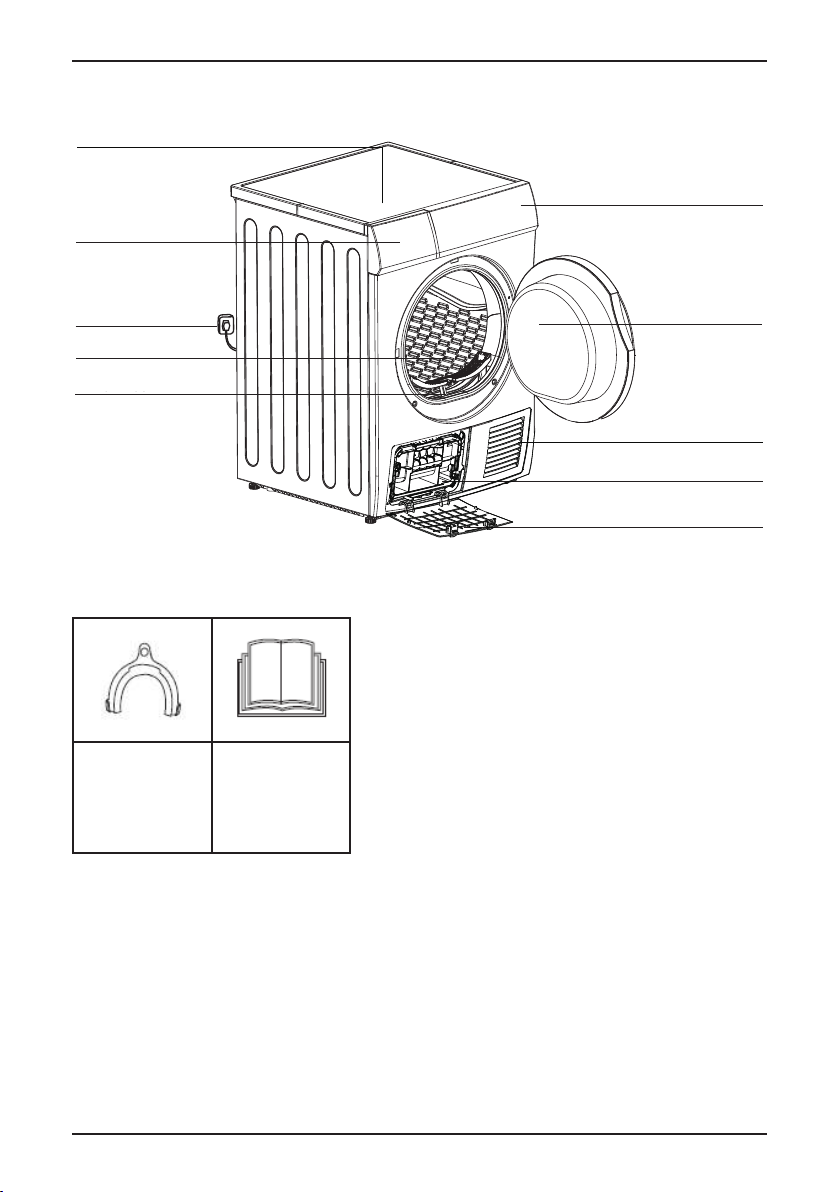
ОПИСАНИЕ ПРИБОРА
Container
Control Panel
Door
Drum
Power Cord
Handle
Maintenance cover
Air inlet
Top board
Lint filter
Держатель
шланга (опция)
Руководство по
эксплуатации
Держатель
шланга (опция)
Руководство по
эксплуатации
Верхняя крышка
Резервуар
Панель управления
Вилка и провод
электропитания
Барабан
Фильтр
КОМПЛЕКТУЮЩИЕ
конденсата, в комплект
Держатель сливного
шланга
(Для моделей с
возможностью слива
не входит)
Руководство по
эксплуатации
Дверца
Вентиляционное
отверстие
Теплообменник
Ревизионная крышка теплообменника
6
ВНИМАНИЕ! ПРОИЗВОДИТЕЛЬ ОСТАВЛЯЕТ ЗА СОБОЙ ПРАВО НА ИЗМЕНЕНИЕ
КОМПЛЕКТАЦИИ ПРИБОРА.
Page 7
УСТАНОВКА
INSTALLATION
Transport
Move cautiously. Do not grasp any salient parts of machine. The machine
door can not be used as the handle for delivery.
Installation Position
1.It is recommended that, for your convenience, the machine is positioned close
your washing machine.
2.The tumble dryer must be installed in a clean place, where dirt does not build up.
Air must be able to circulate freely all round the appliance. Do not obstruct the
front air inlet or the air intake grilles at the back of the machine.
3.To keep vibration and noise to a minimum when the dryer is in use, it should be
placed on a firm and level surface.
4.The feet must never be removed. Do not restrict the floor clearance through
deep pile carpets, strips of wood or similar. This might ca
use heat built-up which
would interfere with the operation of the appliance.
to
Перед установкой убедитесь, что в помещение подведена электроэнергия. Убедитесь в целостности
шлангов (для моделей с возможностью слива конденсата) и электрокабеля. Температура в помещении не должна опускаться ниже 3°C.
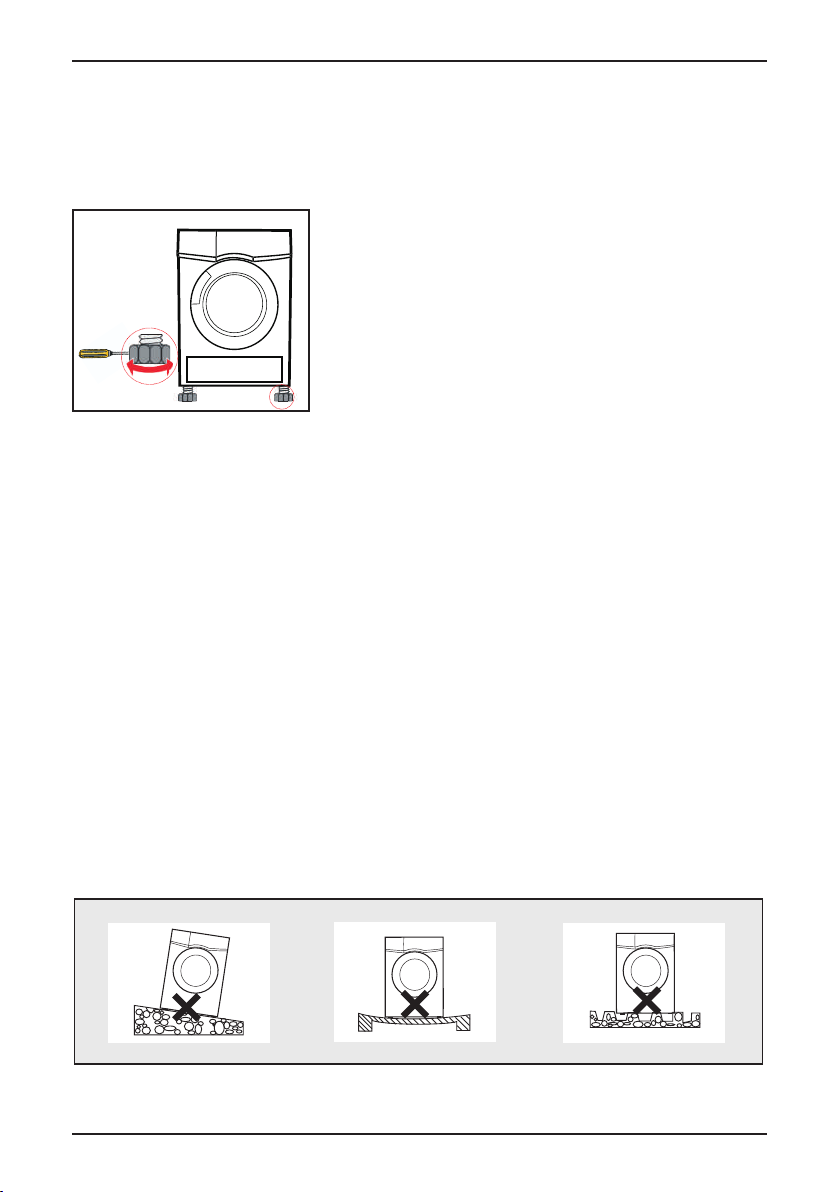
УСТАНОВКА И РЕГУЛИРОВКА НОЖЕК
После того как прибор будет установлен в место
предполагаемого использования, отрегулируйте его по
уровню с помощью инструмента, затем зафиксируйте
положение. Сушильную машину следует устанавливать на
твердой и ровной поверхности.
Разместите сушильную машину вблизи места ее использования удалив упаковочный материал.
ВНИМАНИЕ! ПОСЛЕ УСТАНОВКИ СУШИЛЬНОЙ МАШИНЫ НЕОБХОДИМО ПРОВЕ-
РИТЬ РОВНОСТЬ ЕЕ ПОЛОЖЕНИЯ И УСТОЙЧИВОСТЬ. ДЛЯ ЭТОГО НУЖНО НАДА-
ВИТЬ НА КАЖДЫЙ УГОЛ МАШИНЫ И УБЕДИТЬСЯ, ЧТО ОНА НЕ КАЧАЕТСЯ НИ НА
ОДНОМ ИЗ УГЛОВ.
ВНИМАНИЕ! СУШИЛЬНАЯ МАШИНА ДОЛЖНА БЫТЬ УСТАНОВЛЕНА В ЧИСТОМ
МЕСТЕ, ГДЕ НЕ СКАПЛИВАЕТСЯ ГРЯЗЬ ИЛИ ПЫЛЬ. ВОЗДУХ ДОЛЖЕН СВОБОДНО
ЦИРКУЛИРОВАТЬ. УБЕДИТЕСЬ, ЧТО ВЕНТИЛЯЦИОННЫЕ ОТВЕРСТИЯ НА ПЕРЕД-
НЕЙ СТЕНКЕ И РЕШЕТКА ВОЗДУХОЗАБОРНИКА НА ЗАДНЕЙ ЧАСТИ МАШИНЫ НЕ
ПЕРЕКРЫВАЮТСЯ ПОСТОРОННИМИ ПРЕДМЕТАМИ.
ВНИМАНИЕ! СУШИЛЬНАЯ МАШИНА ДОЛЖНА БЫТЬ РАЗМЕЩЕНА НА ТВЕРДОЙ И
РОВНОЙ ПОВЕРХНОСТИ, ЧТОБЫ СВЕСТИ К МИНИМУМУ ВИБРАЦИЮ И ШУМ В
ПРОЦЕССЕ ЭКСПЛУАТАЦИИ.
ВНИМАНЕНИЕ! НЕ СНИМАЙТЕ НОЖКИ СУШИЛЬНОЙ МАШИНЫ. НЕ УСТАНАВЛИ-
ВАЙТЕ ЕЕ НА КОВРОВОЕ ПОКРЫТИЕ С ДЛИННЫМ ВОРСОМ, НА ДЕРЕВЯННЫЕ ДО-
СКИ И ТОМУ ПОДОБНОЕ. ЭТО МОЖЕТ ПРИВЕСТИ К ПЕРЕГРЕВУ, ЧТО ПОВЛЕЧЕТ
ЗА СОБОЙ ПРОБЛЕМЫ С ЭКСПЛУАТАЦИЕЙ ПРИБОРА.
ВНИМАНИЕ! ПОСЛЕ УСТАНОВКИ И ПОДКЛЮЧЕНИЯ СУШИЛЬНАЯ МАШИНА
ДОЛЖНА БЫТЬ РАСПОЛОЖЕНА ТАКИМ ОБРАЗОМ, ЧТОБЫ РОЗЕТКА БЫЛА ЛЕГКО-
ДОСТУПНОЙ.
7
Page 8

ПОДКЛЮЧЕНИЕ К ЭЛЕКТРОСЕТИ
install
Hose holder(optional)
Condensing drain
hose(optional)
Container
Control Panel
Door
Drum
Power Cord
Handle
Maintenance cover
Air inlet
Top board
Product Description
Max .120 cm
200 cm
Installation
Lint filter
ВНИМАНИЕ! УБЕДИТЕСЬ ЧТО ПАРАМЕТРЫ ЭЛЕКТРОСЕТИ СООТВЕТСТВУЮТ ПА-
РАМЕТРАМ ВАШЕЙ ЭЛЕКТРОСЕТИ.
Прибор должен быть заземлен. Включайте прибор только в установленную надлежащим образом электророзетку с защитным контактом. Убедитесь, что указанные на табличке с техническими
данными параметры электропитания соответствуют параметрам электросети. В противном случае
обратитесь к электрику. Не используйте тройники и удлинители. Позаботьтесь о том, чтобы не повредить вилку и сетевой кабель. В случае необходимости замены сетевого шнура она должна быть
выполнена авторизованным сервисным центром. Вставляйте вилку сетевого кабеля в розетку только по окончании установки прибора. Убедитесь, что после установки прибора к вилке электропитания имеется свободный доступ. Не беритесь за кабель электропитания или за его вилку мокрыми
руками. Для отключения прибора от электросети не тяните за кабель электропитания. Всегда беритесь за саму вилку.
ПОДКЛЮЧЕНИЕ (ДЛЯ МОДЕЛЕЙ С ВОЗМОЖНОСТЬЮ СЛИВА КОНДЕНСАТА)
Сушильная машина должна быть установлена таким образом, чтобы сливной шланг не был зажат и
не имели перегибов. Не опускайте конец сливного шланга слишком глубоко в водосток.
1. Используйте плоскогубцы, чтобы отсоединить сливной шланг.
2. Вставьте внешний сливной шланг.
3. Подключите гофрированный сливной шланг к сливу. Сливной шланг должен быть подключен к
сливу на высоте до 120 см от пола.
При подключении слива сушильной машины непосредственно в канализацию, выход должен быть
снабжён гидрозатвором для предотвращения самослива!
Если в качестве слива используется раковина, гофрированный сливной шланг должен быть
расположен над отверстием перелива для предотвращения скопления воды. Для более надежного
крепления на борту раковины используйте изогнутый держатель.
ЭКСПЛУАТАЦИЯ
ВНИМАНИЕ! В ПРОЦЕССЕ ПРОИЗВОДСТВА И ТРАНСПОРТИРОВКИ В СУШИЛЬНОЙ
МАШИНЕ МОГУТ ОСЕДАТЬ ПЫЛЬ И СМАЗОЧНЫЕ СРЕДСТВА, ПОЭТОМУ
ВО ИЗБЕЖАНИЕ ЗАГРЯЗНЕНИЯ БЕЛЬЯ, ПЕРЕД ПЕРВЫМ ЦИКЛОМ СУШКИ,
ПОЖАЛУЙСТА, ВЫПОЛНИТЕ СЛЕДУЮЩИЕ ДЕЙСТВИЯ:
■ ПОЛОЖИТЕ НЕСКОЛЬКО ЧИСТЫХ ЛОСКУТОВ ТКАНИ В БАРАБАН.
■ ПОДКЛЮЧИТЕ ПРИБОР К ЭЛЕКТРОСЕТИ.
■ ВЫБЕРИТЕ ПРОГРАММУ «БЫСТРАЯ», ЗАТЕМ НАЖМИТЕ КНОПКУ «СТАРТ/
»
ПАУЗА
■ ПОСЛЕ ЗАВЕРШЕНИЯ ПРОГРАММЫ СЛЕДУЙТЕ ИНСТРУКЦИИ НА СТРАНИЦЕ
«
ОБСЛУЖИВАНИЕ», ЧТОБЫ ОЧИСТИТЬ ФИЛЬТР И ВОЗДУШНЫЙ РЕЗЕРВУАР.
8
Page 9

ПЕРЕД КАЖДОЙ СУШКОЙ
Control Panel
Control Panel
Control Panel
Control Panel
Control Panel
Dry
Normal
Do not dry
Not tumble dry normal
Control Panel
Normal
Do not dry
Not tumble dry normal
Control Panel
Do not dry
Control Panel
Control Panel
Dry
Drip dry
Normal
Do not dry
In the shade
Dry flat
Not tumble dry normal
Control Panel
Drip dry
Normal
Do not dry
In the shade
Dry flat
Not tumble dry normal
Control Panel
Do not dry
In the shade
Dry flat
Control Panel
OPERATIONS
1.Before drying, thoroughly spin the laundry in washing machine. High spin speed can
the drying time and save energy consumption.
2.For uniform drying result, sort the laundry according to fabric type and drying programme.
3.Before drying, please close zips, hooks and eyelets, button up, tie fabric belts, etc.
4.Do not over dry the clothes, because over dried clothes can easily get creases.
5.Do not dry the articles containing rubber or similar elastic materials.
6.The door can be opened only after the programme of the drying machine finishes to
from being scalded by hot steam or over heated drying machine.
7.Clean the lint filter and empty container after each use to avoid extension of drying time
and energy consumption.
8.Do not dry these clothes after dry-clean process.
reduce
prevent human skin
The reference weight of dry clothes (each)
Before Each Drying
Attention!
Before the first cycle, the dust and grease may remain in this dryer during the
period of manufacture and transportation, to avoid contaminating your clothes,
please follow these steps:
• Put some clean rags into the drum.
• Plug the power.
• Select the “Quick” Programme, press “Start/Pause” button.
• After finishing this programme, please follow the “Cleaning And Care” to clean
the lint filter and air condenser on page 19.
1. Тщательно отожмите белье в стиральной машине перед сушкой. Это сократит время сушки и
уменьшит потребление электроэнергии.
2. Для достижения качественного результата сортируйте белье по типам тканей и выбирайте
программы сушки, максимально соответствующие данному типу ткани.
3. Застегните все молнии, крючки, пуговицы на петли, завяжите тканевые пояса и тому подобное
перед сушкой.
4. Не допускайте пересушивания белья, так как это может легко привести к усадке и порче тканей.
5. Не сушите в машине предметы, имеющие в своем составе резину и другие эластичные материалы.
6. Не открывайте дверцу до полного окончания программы сушки, так как это может привести к
ожогу, а также к перегреву машины.
7. После каждой сушки осуществляйте чистку фильтра и слив воды из резервуара для сбора
конденсата, чтобы избежать в последующем увеличения времени сушки и потребления
электроэнергии.
8. Не сушите вещи после химчистки.
Приблизительный вес сухой одежды
одежда из
Mixed-fabric clothes
смешанных
тканей
(about 800g)
(около 800 г)
односпальная
простыня
Single bedsheet
(около 600 г
(about 600g cotton)
хлопка)
футболка
(около 180 г
Short sleeve shirt
хлопка)
(about 180g cotton)
Jacket
куртка
(около 800 г
(about 800g cotton)
хлопка)
рабочая одежда
Work clothes
(около 1120 г)
(about 1120g)
нижнее белье
(около 70 г
Short pants
хлопка)
(about 70g cotton)
Jeans
джинсы
(около 800 г)
(about 800g)
пижама
Sleepwear
(около 200 г)
(about 200g)
носки
Socks
(около 50 г
(about 50g
смешанная
ткань)
mixed-weave)
ВНИМАНИЕ!
■ НИКОГДА НЕ ЗАГРУЖАЙТЕ В МАШИНУ БЕЛЬЯ БОЛЬШЕ МАКСИМАЛЬНО
РЕКОМЕНДУЕМОГО КОЛИЧЕСТВА.
■ НЕ ЗАГРУЖАТЬ БЕЛЬЕ, С КОТОРОГО КАПАЕТ ВОДА. ЭТО МОЖЕТ ПРИВЕСТИ К
ПОЛОМКЕ УСТРОЙСТВА. ИЛИ ДАЖЕ СПРОВОЦИРОВАТЬ ВОЗГОРАНИЕ.
■ НЕ ПОДХОДИТ ДЛЯ ШЕЛКА ИЛИ ШЕРСТЯНЫХ ТКАНЕЙ.
При использовании сушильной машины, обратите внимание, на маркировку:
можно сушить
сушить в развешенном виде
на воздухе
химчистка химчистка запрещена сухая чистка + растворитель
обычный режим сушки нельзя выжимать и сушить в
сушка без отжима
машине
сушка на оризонтальной
поверхности
сухая чистка + бензиновый
полотенце
Towel quilt
(около 900 г
хлопка)
(about 900g cotton)
рубашка с
Long sleeve shirt
длинным рукавом
(около 300 г
(about 300g cotton)
хлопка)
не сушить
сушить в тени
растворитель
9
Page 10

БЫСТРЫЙ СТАРТ
OPERATIONS
Quick Start
Before using, please make sure it's installed properly.
Note!
1.Before drying, thoroughly spin the laundry in washing machine. High spin speed can
OPERATIONS
OPERATIONS
Drying
Quick Start
Before using, please make sure it's installed properly.
Note!
1
plug in
2
load
3
close door
1.Before drying, thoroughly spin the laundry in washing machine. High spin speed can
the drying time and save energy consumption.
2.For uniform drying result, sort the laundry according to fabric type and drying programme.
3.Before drying, please close zips, hooks and eyelets, button up, tie fabric belts, etc.
4.Do not over dry the clothes, because over dried clothes can easily get creases.
5.Do not dry the articles containing rubber or similar elastic materials.
6.The door can be opened only after the programme of the drying machine finishes to
reduce
OPERATIONS
OPERATIONS
After Drying
Drying
Buzzer beep or ":00"on display.0
Quick Start
Before using, please make sure it's installed properly.
Note!
1
plug in
2
load
3
close door
start
on
select program
select function
or default
1.Before drying, thoroughly spin the laundry in washing machine. High spin speed can
the drying time and save energy consumption.
2.For uniform drying result, sort the laundry according to fabric type and drying programme.
3.Before drying, please close zips, hooks and eyelets, button up, tie fabric belts, etc.
4.Do not over dry the clothes, because over dried clothes can easily get creases.
5.Do not dry the articles containing rubber or similar elastic materials.
6.The door can be opened only after the programme of the drying machine finishes to
from being scalded by hot steam or over heated drying machine.
7.Clean the lint filter and empty container after each use to avoid extension of drying time
and energy consumption.
8.Do not dry these clothes after dry-clean process.
reduce
prevent human skin
The reference weight of dry clothes (each)
OPERATIONS
ВНИМАНИЕ! ПЕРЕД ИСПОЛЬЗОВАНИЕМ, УБЕДИТЕСЬ, ЧТО УСТРОЙСТВО
УСТАНОВЛЕНО ПРАВИЛЬНО.
1
подключить к сети
plug in
электропитания
СУШКА
загрузить
load
белье
включить
on
ЗАВЕРШЕНИЕ СУШКИ
Прозвучит звуковой сигнал и на дисплее появится «0:00».
выбрать
select program
программу
12345
открыть дверцу и
достать белье
ВНИМАНИЕ! ЕСЛИ ВЫ ИСПОЛЬЗУЕТЕ РОЗЕТКУ С ВЫКЛЮЧАТЕЛЕМ, ПОЖАЛУЙСТА,
НАЖМИТЕ ВЫКЛЮЧАТЕЛЬ, ЧТОБЫ ОТКЛЮЧИТЬ ЭЛЕКТРОПИТАНИЕ.
извлечь
резервуар
ОБСЛУЖИВАНИЕ
выбрать доп.
select function
функцию или по
умолчанию
Перед тем как выполнять любые операции по уходу за прибором, убедитесь в том, что прибор
остыл и электропитание отключено.
Внешние корпусные элементы прибора и пластиковые части следует очищать мягкой и влажной
тканью.
ВНИМАНИЕ! НЕ ИСПОЛЬЗУЙТЕ ХИМИЧЕСКИ АГРЕССИВНЫЕ, АБРАЗИВНЫЕ
ВЕЩЕСТВА, А ТАКЖЕ СПИРТ, МЫЛО, БЕНЗИН И ДРУГИЕ РАСТВОРИТЕЛИ ДЛЯ
УХОДА ЗА ПРИБОРОМ. ЭТО МОЖЕТ ПРИВЕСТИ К ВЫХОДУ ПРИБОРА ИЗ СТРОЯ И
НАРУШЕНИЮ ВНЕШНЕГО ВИДА ПРИБОРА.
10
2
слить
конденсат
закрыть
close door
дверцу
старт
start
очистить
фильтр
3
отключить от сети
электропитания
Page 11

ОЧИСТКА ФИЛЬТРА
MAINTENANCEMAINTENANCE
Empty the water container
1.Hold and pull out the water container with two hands.
2.Tilt the water container, pour out the condensate water.
3.Insert the water container.
MAINTENANCEMAINTENANCE
Empty the water container
1.Hold and pull out the water container with two hands.
2.Tilt the water container, pour out the condensate water.
3.Insert the water container.
Warning!
!
MAINTENANCEMAINTENANCE
Empty the water container
1.Hold and pull out the water container with two hands.
2.Tilt the water container, pour out the condensate water.
3.Insert the water container.
MAINTENANCEMAINTENANCE
Trouble Shooting
Empty the water container
1.Hold and pull out the water container with two hands.
2.Tilt the water container, pour out the condensate water.
3.Insert the water container.
•
Empty the water container after each use, the programme will be paused and
the “ ” icon will light if the water container is full during the drying process.
After the container is emptyed, the dryer can be restarted by pressing
【Start/Pause】 button.
•
Do not drink the condensate water.
•
Do not use the dryer without the water container.
Warning!
!
“ ”E30
“ ”E32
“ ”E33
Alarm ProblemAlarm ReasonRelease
Heating problem
Humidity sensor error
Temprature sensor error
P lease contact your local service
center
if the problem persists.
Убедитесь что сушильная машина остыла и электропитание отключено.
1. Откройте дверцу.
2. Потяните фильтр вверх и извлеките его.
3. Очистите фильтр; удалите скопившиеся волокна ткани на фильтре рукой или промойте водой и
тщательно высушите.
4. Установите фильтр обратно.
ВНИМАНИЕ! НАКОПИВШИЙСЯ НА ФИЛЬТРЕ ВОРС ПЕРЕКРОЕТ ЦИРКУЛЯЦИЮ
ВОЗДУХА, ЧТО ПРИВЕДЕТ К УВЕЛИЧЕНИЮ ЭНЕРГОПОТРЕБЛЕНИЯ И ВРЕМЕНИ
СУШКИ; ФИЛЬТР С ВОРСОМ СЛЕДУЕТ ОЧИЩАТЬ ПОСЛЕ КАЖДОГО ИСПОЛЬЗО-
ВАНИЯ.
■ ПЕРЕД ОЧИСТКОЙ ОТСОЕДИНЯЙТЕ ШНУР ЭЛЕКТРОПИТАНИЯ!
■ НЕ ИСПОЛЬЗУЙТЕ СУШИЛЬНУЮ МАШИНУ БЕЗ ФИЛЬТРА ДЛЯ ВОРСА!
ОЧИСТКА ТЕПЛООБМЕННИКА
Убедитесь что сушильная машина остыла и электропитание отключено.
Оставшаяся вода может вытечь, разместите рядом хорошо впитывающую ткань под ревизионную
крышку.
1. Откройте ревизионную крышку теплообменника.
2. Полностью откройте ревизионную крышку.
3. Поверните оба фиксирующих рычага по направлению друг к другу.
4. Вытащите теплообменник.
5. Тщательно промойте теплообменник и тщательно просушите.
6. Очистите уплотнители.
7. Вставьте теплообменник, нажмите на кнопку!
8. Открутите оба фиксирующих рычага.
9. Закройте ревизионную крышку так, чтобы она зафиксировалась.
ВНИМАНИЕ! ОЧИЩАЙТЕ ТЕПЛООБМЕННИК ПРИМЕРНО РАЗ В 3
МЕСЯЦА, ЕСЛИ ЧАСТО ИСПОЛЬЗУЕТЕ ПРИБОР. НЕ ПОВРЕДИТЕ ТЕ-
ПЛООБМЕННИК! ПРОМЫВАЙТЕ ТОЛЬКО ВОДОЙ; НЕ ИСПОЛЬЗУЙТЕ
ТВЕРДЫЕ И ОСТРЫЕ ПРЕДМЕТЫ!
■ НЕ ИСПОЛЬЗУЙТЕ СУШИЛЬНУЮ МАШИНУ БЕЗ ТЕПЛООБМЕННИ-
КА!
■ ВО ВРЕМЯ СУШКИ ВОДА МОЖЕТ НАКАПЛИВАТЬСЯ МЕЖДУ ОК-
НОМ И УПЛОТНИТЕЛЕМ, НО ЭТО НЕ ВЛИЯЕТ НА РАБОТУ ВАШЕЙ
МАШИНЫ!
11
Page 12

ОЧИСТКА РЕЗЕРВУАРА
MAINTENANCEMAINTENANCE
Technical Specifications
Rated capacity
Rated frequency
Dimension(L*W*H)
Rated input power
Rated voltage
Weight of product
Parameter
Ambient temperature
please check if you have dealt with the
Warning!
Problem
Solution
on
• Check if the power supply works.
• Check if the mains plug is inserted.
• Check the selected programme .
• Press the 【On/Off】button.
• Empty water container.
MAINTENANCEMAINTENANCE
• The rated capacity is the maximum capacity, make sure that the dry clothes which are
Technical Specifications
Rated capacity
Rated frequency
Dimension(L*W*H)
Rated input power
Rated voltage
Weight of product
Parameter
Ambient temperature
Note!
please check if you have dealt with the
Warning!
Problem
Solution
on
• Check if the power supply works.
• Check if the mains plug is inserted.
• Check the selected programme .
• Press the 【On/Off】button.
• Empty water container.
• If the light is still on, please call the service.
• Clean heat exchanger.
1. Извлекая резервуар держите его двумя руками.
2. Наклоните резервуар и вылейте воду.
3. Установите резервуар обратно.
ВНИМАНИЕ! СЛИВАЙТЕ ВОДУ ИЗ РЕЗЕРВУАРА ПОСЛЕ
КАЖДОГО ПРОЦЕССА СУШКИ; ПРОГРАММА БУДЕТ ПРИО-
СТАНОВЛЕНА И ПОЯВИТСЯ СИМВОЛ « », ЕСЛИ ЕМКОСТЬ
ДЛЯ ВОДЫ ЗАПОЛНИТСЯ ВО ВРЕМЯ ПРОЦЕССА СУШКИ.
ПОСЛЕ ОПУСТОШЕНИЯ РЕЗЕРВУАРА СУШИЛЬНАЯ МАШИ-
НА МОЖЕТ БЫТЬ ЗАНОВО ЗАПУЩЕНА НАЖАТИЕМ КНОП-
КИ «СТАРТ/ПАУЗА».
ВНИМАНИЕ!
■ НЕ ПЕЙТЕ ВОДНЫЙ КОНДЕНСАТ!
■ НЕ ИСПОЛЬЗУЙТЕ СУШИЛЬНУЮ МАШИНУ БЕЗ КОНДЕНСАТОСБОРНИКА!
УСТРАНЕНИЕ НЕИСПРАВНОСТЕЙ
Проблема Возможные решения
Проверьте, включена ли электроэнергия.
Не работает дисплей
светится на дисплее
светится на дисплее
Прибор не запускается
Результаты сушки
неудовлетворительны
ВНИМАНИЕ! ЕСЛИ ВЫШЕУКАЗАННЫЕ РЕКОМЕНДАЦИИ НЕ ПОМОГЛИ,
ВЫКЛЮЧИТЕ ПРИБОР КНОПКОЙ «ВКЛ/ВЫКЛ», ОТКЛЮЧИТЕ ПРИБОР ОТ
ЭЛЕКТРОПИТАНИЯ И ОБРАТИТЕСЬ В АВТОРИЗОВАННЫЙ СЕРВИСНЫЙ ЦЕНТР.
12
Проверьте, подключена ли вилка электропитания прибора.
Проверьте, выбранную программу.
Нажмите кнопку «Вкл/Выкл».
Слейте воду из резервуара.
Если символ продолжается светится, обратитесь в авторизованный
сервисный центр.
Очистите теплообменник.
Очистите фильтр.
Проверьте, закрыта ли дверца.
Проверьте, правильно ли выбрана программа.
Проверьте, нажата ли кнопка «Старт/Пауза».
Очистите ворсовый фильтр.
Слейте воду из резервуара.
Проверьте сливной шланг
(для моделей с возможностью слива конденсата).
Маленький объем помещения где установлен прибор.
Очистите вентиляционные отверстия.
Измените программу на более интенсивную или увеличьте время сушки.
Page 13

ВНИМАНИЕ! ЕСЛИ НЕИСПРАВНОСТИ БЫЛИ ВЫЗВАНЫ ФАКТОРАМИ,
НАХОДЯЩИМИСЯ ВНЕ ПОСТАВЛЯЕМОЙ ПРОДУКЦИИ, ПРИ НЕПРАВИЛЬНОМ
ИСПОЛЬЗОВАНИИ ИЛИ В РЕЗУЛЬТАТЕ НАРУШЕНИЯ ПРАВИЛ ПО ЭКСПЛУАТАЦИИ,
ГАРАНТИЙНЫЕ ОБЯЗАТЕЛЬСТВА МОГУТ БЫТЬ АННУЛИРОВАНЫ.
Код ошибки Причина Возможные решения
E 30 Перегрев
Обратиться в авторизованный сервисный центр.E 32 Ошибка датчика влажности
E 33 Ошибка датчика температуры
ПАНЕЛЬ УПРАВЛЕНИЯ
1 2 3 4 5
1. Программатор
Можно выбрать программу сушки в соответствии с потребностями пользователя для достижения
наиболее эффективного результата сушки.
2. Дисплей
Показывает текущие настройки, ориентировочное оставшееся время до окончания сушки,
служебные сообщения о состоянии прибора.
3. Дополнительные функции
Кнопки используются для настройки дополнительных функций
4. Кнопка «Вкл/Выкл»
(Устройство включено или выключено)
5. Кнопка «Старт/Пауза»
Нажмите эту кнопку, чтобы запустить или поставить на паузу цикл сушки.
ВНИМАНИЕ! СИМВОЛЫ И ОБОЗНАЧЕНИЯ НА КОНТРОЛЬНОЙ ПАНЕЛИ ПРИВЕДЕ-
НЫ В КАЧЕСТВЕ ПРИМЕРА И МОГУТ РАЗЛИЧАТЬСЯ В ЗАВИСИМОСТИ ОТ МОДЕЛИ
СУШИЛЬНОЙ МАШИНЫ.
РУКОВОДСТВУЙТЕСЬ ИНФОРМАЦИЕЙ, УКАЗАННОЙ НА САМОМ ИЗДЕЛИИ.
13
Page 14

Фильтр
Programme selector
The drum will keep rotating after the programme starts, the st
display area will flash in sequence, the remaining time displayed will change
automatically.
1.Press the【On/Off 】 button ,when the LED display screen brightens up, rotate
the programme knob to select the desired programme.
2.Select the【Delay】,【Time】,【Intensity】,【Speed Dry】,【Signal】or
【Anti-Crease】 functions for additional option.
3.Press the【Start/Pause】button.
Programme start
Fliter
On/Off
Product is switched on or off.
Start/Pause
the button to start or pause the
drying cycle.
Press
Specialty function
These buttons are used for setting
additional functions.
Display
This display shows the setting, estimated
remaining time and status messages of
your dryer.
4
Programmes
Different Dryer cycle can be selected
according to the user's needs to make the
clothes have more effective drying results.
5
Programme selector
1.The drum will stop running after the programme ends,
the display will show " ", last cycle phase status light will flash. The
the
The drum will keep rotating after the programme starts, the st
display area will flash in sequence, the remaining time displayed will change
automatically.
1.Press the【On/Off 】 button ,when the LED display screen brightens up, rotate
the programme knob to select the desired programme.
2.Select the【Delay】,【Time】,【Intensity】,【Speed Dry】,【Signal】or
【Anti-Crease】 functions for additional option.
3.Press the【Start/Pause】button.
Programme start
Programme end
Fliter
Please clean the filter when the“ ” is lighting, after the dryer stops.
Tank
On/Off
Product is switched on or off.
Start/Pause
the button to start or pause the
drying cycle.
Press
Specialty function
These buttons are used for setting
additional functions.
Display
This display shows the setting, estimated
remaining time and status messages of
your dryer.
4
Programmes
Different Dryer cycle can be selected
according to the user's needs to make the
clothes have more effective drying results.
5
Programme selector
1.The drum will stop running after the programme ends,
the display will show " ", last cycle phase status light will flash. The
dryer will start Anti-creaseif user doesn’t remove the load in
1 minute (refer to page 15). Please presskey to cut off power and
the buzzer will beep,
the
【】function
【On/Off】
The drum will keep rotating after the programme starts, the st
ate light in the
display area will flash in sequence, the remaining time displayed will change
automatically.
1.Press the【On/Off 】 button ,when the LED display screen brightens up, rotate
the programme knob to select the desired programme.
2.Select the【Delay】,【Time】,【Intensity】,【Speed Dry】,【Signal】or
【Anti-Crease】 functions for additional option.
3.Press the【Start/Pause】button.
Programme start
Programme end
Fliter
Please clean the filter when the“ ” is lighting, after the dry er stops.
Tank
Please empty the container when the“ ” is lighting , after the dryer stops.
On/Off
Product is switched on or off.
Start/Pause
the button to start or pause the
drying cycle.
Press
Specialty function
These buttons a re used f or sett ing
add ition al func tions.
Display
This display shows the setting, estimated
remaining time and status messages of
your dryer.
4
Programmes
Different Dryer cycle can be selected
according to the user's needs to make the
clothes have more effective drying results.
5
Delay start
MAINTENANCEMAINTENANCE
Technical Specifications
Rated capacity
Rated frequency
Dimension(L*W*H)
Rated input power
Rated voltage
Weight of product
Parameter
Ambient temperature
please check if you have dealt with the
Warning!
Problem
Solution
on
• Check if the power supply works.
• Check if the mains plug is inserted.
• Check the selected programme .
• Press the 【On/Off】button.
• Empty water container.
MAINTENANCEMAINTENANCE
• The rated capacity is the maximum capacity, make sure that the dry clothes which are
Technical Specifications
Rated capacity
Rated frequency
Dimension(L*W*H)
Rated input power
Rated voltage
Weight of product
Parameter
Ambient temperature
Note!
please check if you have dealt with the
Warning!
Problem
Solution
on
• Check if the power supply works.
• Check if the mains plug is inserted.
• Check the selected programme .
• Press the 【On/Off】button.
• Empty water container.
• If the light is still on, please call the service.
• Clean heat exchanger.
Programme selector
1.The drum will stop running after the programme ends,
the display will show " ", last cycle phase status light will flash. The
dryer will start Anti-creaseif user doesn’t remove the load in
1 minute (refer to page 15). Please presskey to cut off power and
pull the plug out.
the buzzer will beep,
the
【】function
【On/Off】
The drum will keep rotating after the programme starts, the st
ate light in the
display area will flash in sequence, the remaining time displayed will change
automatically.
1.Press the【On/Off 】 button ,when the LED display screen brightens up, rotate
the programme knob to select the desired programme.
2.Select the【Delay】,【Time】,【Intensity】,【Speed Dry】,【Signal】or
【Anti-Crease】 functions for additional option.
3.Press the【Start/Pause】button.
Programme start
Programme end
Fliter
Please clean the filter when the“ ” is lighting, after the dry er stops.
Tank
Please empty the container when the“ ” is lighting , after the dryer stops.
On/Off
Product is switched on or off.
Start/Pause
the button to start or pause the
drying cycle.
Press
Specialty function
These buttons a re used f or sett ing
add ition al func tions.
Display
This display shows the setting, estimated
remaining time and status messages of
your dryer.
4
Programmes
Different Dryer cycle can be selected
according to the user's needs to make the
clothes have more effective drying results.
5
Delay start
Time
OPERATIONSOPERATIONS
Programme selector
1.The drum will stop running after the programme ends,
the display will show " ", last cycle phase status light will flash. The
dryer will start Anti-creaseif user doesn’t remove the load in
1 minute (refer to page 15). Please presskey to cut off power and
pull the plug out.
2.Deal with the problem accroding to “Malfunction display and solutions, if
there is a unexpected stop during the drying procedure and the dryer show
the buzzer will beep,
the
【】function
【On/Off】
The drum will keep rotating after the programme starts, the st
ate light in the
display area will flash in sequence, the remaining time displayed will change
automatically.
1.Press the【On/Off 】 button ,when the LED display screen brightens up, rotate
the programme knob to select the desired programme.
2.Select the【Delay】,【Time】,【Intensity】,【Speed Dry】,【Signal】or
【Anti-Crease】 functions for additional option.
3.Press the【Start/Pause】button.
Programme start
Programme end
Fliter
Please clean the filter when the“ ” is lighting, after the dry er stops.
Tank
Please empty the container when the“ ” is lighting , after the dryer stops.
On/Off
Product is switched on or off.
1
1
Start/Pause
the button to start or pause the
drying cycle.
Press
1
2
Specialty function
These buttons a re used f or sett ing
add ition al func tions.
3
Display
This display shows the setting, estimated
remaining time and status messages of
your dryer.
4
Programmes
Different Dryer cycle can be selected
according to the user's needs to make the
clothes have more effective drying results.
5
Delay start
Child lock
Time
OPERATIONSOPERATIONS
Programme selector
1.The drum will stop running after the programme ends,
the display will show " ", last cycle phase status light will flash. The
dryer will start Anti-creaseif user doesn’t remove the load in
1 minute (refer to page 15). Please presskey to cut off power and
pull the plug out.
2.Deal with the problem accroding to “Malfunction display and solutions, if
there is a unexpected stop during the drying procedure and the dryer show
information(refer to page 20 ).
the buzzer will beep,
the
【】function
【On/Off】
The drum will keep rotating after the programme starts, the st
ate light in the
display area will flash in sequence, the remaining time displayed will change
automatically.
1.Press the【On/Off 】 button ,when the LED display screen brightens up, rotate
the programme knob to select the desired programme.
2.Select the【Delay】,【Time】,【Intensity】,【Speed Dry】,【Signal】or
【Anti-Crease】 functions for additional option.
3.Press the【Start/Pause】button.
Programme start
Programme end
Fliter
Please clean the filter when the“ ” is lighting, after the dry er stops.
Tank
Please empty the container when the“ ” is lighting , after the dryer stops.
On/Off
Product is switched on or off.
1
1
Start/Pause
the button to start or pause the
drying cycle.
Press
1
2
Specialty function
These buttons a re used f or sett ing
add ition al func tions.
3
Display
This display shows the setting, estimated
remaining time and status messages of
your dryer.
4
Programmes
Different Dryer cycle can be selected
according to the user's needs to make the
clothes have more effective drying results.
5
Delay start
Child lock
Remaining Time indicator/Error message
Time
Programme selector
Other Functions
1.The drum will stop running after the programme ends,
the display will show " ", last cycle phase status light will flash. The
dryer will start Anti-creaseif user doesn’t remove the load in
1 minute (refer to page 15). Please presskey to cut off power and
pull the plug out.
2.Deal with the problem accroding to “Malfunction display and solutions, if
there is a unexpected stop during the drying procedure and the dryer show
information(refer to page 20 ).
the buzzer will beep,
the
【】function
【On/Off】
”
The drum will keep rotating after the programme starts, the st
ate light in the
display area will flash in sequence, the remaining time displayed will change
automatically.
1.Press the【On/Off 】 button ,when the LED display screen brightens up, rotate
the programme knob to select the desired programme.
2.Select the【Delay】,【Time】,【Intensity】,【Speed Dry】,【Signal】or
【Anti-Crease】 functions for additional option.
3.Press the【Start/Pause】button.
Programme start
Programme end
• Instructions of the 【Delay】 function
Fliter
Please clean the filter when the“ ” is lighting, after the dry er stops.
Tank
Please empty the container when the“ ” is lighting , after the dryer stops.
On/Off
Product is switched on or off.
Start/Pause
the button to start or pause the
drying cycle.
Press
Specialty function
These buttons a re used f or sett ing
add ition al func tions.
Display
This display shows the setting, estimated
remaining time and status messages of
your dryer.
4
Programmes
Different Dryer cycle can be selected
according to the user's needs to make the
clothes have more effective drying results.
5
Delay start
Child lock
Remaining Time indicator/Error message
Cycle phase status
Time
OPERATIONSOPERATIONS
Programme selector
Other Functions
1.The drum will stop running after the programme ends,
the display will show " ", last cycle phase status light will flash. The
dryer will start Anti-creaseif user doesn’t remove the load in
1 minute (refer to page 15). Please presskey to cut off power and
pull the plug out.
2.Deal with the problem accroding to “Malfunction display and solutions, if
there is a unexpected stop during the drying procedure and the dryer show
information(refer to page 20 ).
the buzzer will beep,
the
【】function
【On/Off】
The drum will keep rotating after the programme starts, the st
ate light in the
display area will flash in sequence, the remaining time displayed will change
automatically.
1.Press the【On/Off 】 button ,when the LED display screen brightens up, rotate
the programme knob to select the desired programme.
2.Select the【Delay】,【Time】,【Intensity】,【Speed Dry】,【Signal】or
【Anti-Crease】 functions for additional option.
3.Press the【Start/Pause】button.
Programme start
Programme end
• Instructions of the 【Delay】 function
This function is used for delaying clothes drying time within 24 hours.
means the programme
The delay time
will start after x hours. When the delay programme starts, the
Fliter
Please clean the filter when the“ ” is lighting, after the dry er stops.
Tank
Please empty the container when the“ ” is lighting , after the dryer stops.
On/Off
Product is switched on or off.
1
1
Start/Pause
the button to start or pause the
drying cycle.
Press
1
2
Specialty function
These buttons a re used f or sett ing
add ition al func tions.
3
Display
This display shows the setting, estimated
remaining time and status messages of
your dryer.
4
Programmes
Different Dryer cycle can be selected
according to the user's needs to make the
clothes have more effective drying results.
5
Delay start
Child lock
Remaining Time indicator/Error message
Cycle phase status
Clean filters (warning)
Time
OPERATIONSOPERATIONS
Programme selector
Other Functions
1.The drum will stop running after the programme ends,
the display will show " ", last cycle phase status light will flash. The
dryer will start Anti-creaseif user doesn’t remove the load in
1 minute (refer to page 15). Please presskey to cut off power and
pull the plug out.
2.Deal with the problem accroding to “Malfunction display and solutions, if
there is a unexpected stop during the drying procedure and the dryer show
information(refer to page 20 ).
the buzzer will beep,
the
【】function
【On/Off】
The drum will keep rotating after the programme starts, the st
ate light in the
display area will flash in sequence, the remaining time displayed will change
automatically.
1.Press the【On/Off 】 button ,when the LED display screen brightens up, rotate
the programme knob to select the desired programme.
2.Select the【Delay】,【Time】,【Intensity】,【Speed Dry】,【Signal】or
【Anti-Crease】 functions for additional option.
3.Press the【Start/Pause】button.
Programme start
Programme end
• Instructions of the 【Delay】 function
This function is used for delaying clothes drying time within 24 hours.
means the programme
time starts to decrease on the
Steps in details
The delay time
will start after x hours. When the delay programme starts, the
display and the delay icon blinks.
Fliter
Please clean the filter when the“ ” is lighting, after the dry er stops.
Tank
Please empty the container when the“ ” is lighting , after the dryer stops.
On/Off
Product is switched on or off.
1
1
Start/Pause
the button to start or pause the
drying cycle.
Press
1
2
Specialty function
These buttons a re used f or sett ing
add ition al func tions.
3
Display
This display shows the setting, estimated
remaining time and status messages of
your dryer.
4
Programmes
Different Dryer cycle can be selected
according to the user's needs to make the
clothes have more effective drying results.
5
Delay start
Child lock
Remaining Time indicator/Error message
Cycle phase status
Clean filters (warning)
Empty water container (warning)
Time
Programme selector
Other Functions
1.The drum will stop running after the programme ends,
the display will show " ", last cycle phase status light will flash. The
dryer will start Anti-creaseif user doesn’t remove the load in
1 minute (refer to page 15). Please presskey to cut off power and
pull the plug out.
2.Deal with the problem accroding to “Malfunction display and solutions, if
there is a unexpected stop during the drying procedure and the dryer show
information(refer to page 20 ).
the buzzer will beep,
the
【】function
【On/Off】
”
The drum will keep rotating after the programme starts, the st
ate light in the
display area will flash in sequence, the remaining time displayed will change
automatically.
1.Press the【On/Off 】 button ,when the LED display screen brightens up, rotate
the programme knob to select the desired programme.
2.Select the【Delay】,【Time】,【Intensity】,【Speed Dry】,【Signal】or
【Anti-Crease】 functions for additional option.
3.Press the【Start/Pause】button.
Programme start
Programme end
• Instructions of the 【Delay】 function
This function is used for delaying clothes drying time within 24 hours.
means the programme
time starts to decrease on the
Steps in details
1. Load your laundry and make sure the machine door is closed.
2. Press the 【On/Off】button,then to turn the programme selector knob and select a
desired programme.
The delay time
will start after x hours. When the delay programme starts, the
display and the delay icon blinks.
Fliter
Please clean the filter when the“ ” is lighting, after the dry er stops.
Tank
Please empty the container when the“ ” is lighting , after the dryer stops.
On/Off
Product is switched on or off.
Start/Pause
the button to start or pause the
drying cycle.
Press
Specialty function
These buttons a re used f or sett ing
add ition al func tions.
Display
This display shows the setting, estimated
remaining time and status messages of
your dryer.
4
Programmes
Different Dryer cycle can be selected
according to the user's needs to make the
clothes have more effective drying results.
5
Delay start
Child lock
Remaining Time indicator/Error message
Cycle phase status
Clean filters (warning)
Empty water container (warning)
Dryness level (four grades)
Time
OPERATIONSOPERATIONS
Spe ed dry in dicator
Programme selector
Other Functions
1.The drum will stop running after the programme ends,
the display will show " ", last cycle phase status light will flash. The
dryer will start Anti-creaseif user doesn’t remove the load in
1 minute (refer to page 15). Please presskey to cut off power and
pull the plug out.
2.Deal with the problem accroding to “Malfunction display and solutions, if
there is a unexpected stop during the drying procedure and the dryer show
information(refer to page 20 ).
the buzzer will beep,
the
【】function
【On/Off】
The drum will keep rotating after the programme starts, the st
ate light in the
display area will flash in sequence, the remaining time displayed will change
automatically.
1.Press the【On/Off 】 button ,when the LED display screen brightens up, rotate
the programme knob to select the desired programme.
2.Select the【Delay】,【Time】,【Intensity】,【Speed Dry】,【Signal】or
【Anti-Crease】 functions for additional option.
3.Press the【Start/Pause】button.
Programme start
Programme end
• Instructions of the 【Delay】 function
This function is used for delaying clothes drying time within 24 hours.
means the programme
time starts to decrease on the
Steps in details
1. Load your laundry and make sure the machine door is closed.
2. Press the 【On/Off】button,then to turn the programme selector knob and select a
desired programme.
3. You can select the 【Anti-Crease】 or 【Signal】functions according to your need.
4. To press the 【Delay】 key.
The delay time
will start after x hours. When the delay programme starts, the
display and the delay icon blinks.
Fliter
Please clean the filter when the“ ” is lighting, after the dry er stops.
Tank
Please empty the container when the“ ” is lighting , after the dryer stops.
On/Off
Product is switched on or off.
1
1
Start/Pause
the button to start or pause the
drying cycle.
Press
1
2
Specialty function
These buttons a re used f or sett ing
add ition al func tions.
3
Display
This display shows the setting, estimated
remaining time and status messages of
your dryer.
4
Programmes
Different Dryer cycle can be selected
according to the user's needs to make the
clothes have more effective drying results.
5
Delay start
Child lock
Remaining Time indicator/Error message
Cycle phase status
Clean filters (warning)
Empty water container (warning)
Dryness level (four grades)
Time
Spe ed dry in dicator
Programme selector
Other Functions
1.The drum will stop running after the programme ends,
the display will show " ", last cycle phase status light will flash. The
dryer will start Anti-creaseif user doesn’t remove the load in
1 minute (refer to page 15). Please presskey to cut off power and
pull the plug out.
2.Deal with the problem accroding to “Malfunction display and solutions, if
there is a unexpected stop during the drying procedure and the dryer show
information(refer to page 20 ).
the buzzer will beep,
the
【】function
【On/Off】
The drum will keep rotating after the programme starts, the st
ate light in the
display area will flash in sequence, the remaining time displayed will change
automatically.
1.Press the【On/Off 】 button ,when the LED display screen brightens up, rotate
the programme knob to select the desired programme.
2.Select the【Delay】,【Time】,【Intensity】,【Speed Dry】,【Signal】or
【Anti-Crease】 functions for additional option.
3.Press the【Start/Pause】button.
Programme start
Programme end
• Instructions of the 【Delay】 function
This function is used for delaying clothes drying time within 24 hours.
means the programme
time starts to decrease on the
Steps in details
1. Load your laundry and make sure the machine door is closed.
2. Press the 【On/Off】button,then to turn the programme selector knob and select a
desired programme.
3. You can select the 【Anti-Crease】 or 【Signal】functions according to your need.
4. To press the 【Delay】 key.
5. Continue to press the 【Delay】to select the delay time.
The delay time
will start after x hours. When the delay programme starts, the
display and the delay icon blinks.
Fliter
Please clean the filter when the“ ” is lighting, after the dry er stops.
Tank
Please empty the container when the“ ” is lighting , after the dryer stops.
On/Off
Product is switched on or off.
Start/Pause
the button to start or pause the
drying cycle.
Press
Specialty function
These buttons a re used f or sett ing
add ition al func tions.
Display
This display shows the setting, estimated
remaining time and status messages of
your dryer.
4
Programmes
Different Dryer cycle can be selected
according to the user's needs to make the
clothes have more effective drying results.
5
Delay start
Child lock
Remaining Time indicator/Error message
Cycle phase status
Clean filters (warning)
Empty water container (warning)
Dryness level (four grades)
Signal indicator
Time
Spe ed dry in dicator
Programme selector
Other Functions
1.The drum will stop running after the programme ends,
the display will show " ", last cycle phase status light will flash. The
dryer will start Anti-creaseif user doesn’t remove the load in
1 minute (refer to page 15). Please presskey to cut off power and
pull the plug out.
2.Deal with the problem accroding to “Malfunction display and solutions, if
there is a unexpected stop during the drying procedure and the dryer show
information(refer to page 20 ).
the buzzer will beep,
the
【】function
【On/Off】
The drum will keep rotating after the programme starts, the st
ate light in the
display area will flash in sequence, the remaining time displayed will change
automatically.
1.Press the【On/Off 】 button ,when the LED display screen brightens up, rotate
the programme knob to select the desired programme.
2.Select the【Delay】,【Time】,【Intensity】,【Speed Dry】,【Signal】or
【Anti-Crease】 functions for additional option.
3.Press the【Start/Pause】button.
Programme start
Programme end
• Instructions of the 【Delay】 function
This function is used for delaying clothes drying time within 24 hours.
means the programme
time starts to decrease on the
Steps in details
1. Load your laundry and make sure the machine door is closed.
2. Press the 【On/Off】button,then to turn the programme selector knob and select a
desired programme.
3. You can select the 【Anti-Crease】 or 【Signal】functions according to your need.
4. To press the 【Delay】 key.
5. Continue to press the 【Delay】to select the delay time.
6. After the 【Start/Pause】 button is pushed, the dryer is at the run condition. The
drying procedure will be automatically performed when the delay time is over.
The delay time
will start after x hours. When the delay programme starts, the
display and the delay icon blinks.
Fliter
Please clean the filter when the“ ” is lighting, after the dry er stops.
Tank
Please empty the container when the“ ” is lighting , after the dryer stops.
On/Off
Product is switched on or off.
Start/Pause
the button to start or pause the
drying cycle.
Press
Specialty function
These buttons a re used f or sett ing
add ition al func tions.
Display
This display shows the setting, estimated
remaining time and status messages of
your dryer.
4
Programmes
Different Dryer cycle can be selected
according to the user's needs to make the
clothes have more effective drying results.
5
Delay start
Child lock
Remaining Time indicator/Error message
Cycle phase status
Clean filters (warning)
Empty water container (warning)
Dryness level (four grades)
Signal indicator
Anti-crease mode
Time
Spe ed dry in dicator
Programme selector
Other Functions
1.The drum will stop running after the programme ends,
the display will show " ", last cycle phase status light will flash. The
dryer will start Anti-creaseif user doesn’t remove the load in
1 minute (refer to page 15). Please presskey to cut off power and
pull the plug out.
2.Deal with the problem accroding to “Malfunction display and solutions, if
there is a unexpected stop during the drying procedure and the dryer show
information(refer to page 20 ).
the buzzer will beep,
the
【】function
【On/Off】
The drum will keep rotating after the programme starts, the st
ate light in the
display area will flash in sequence, the remaining time displayed will change
automatically.
1.Press the【On/Off 】 button ,when the LED display screen brightens up, rotate
the programme knob to select the desired programme.
2.Select the【Delay】,【Time】,【Intensity】,【Speed Dry】,【Signal】or
【Anti-Crease】 functions for additional option.
3.Press the【Start/Pause】button.
Programme start
Programme end
• Instructions of the 【Delay】 function
This function is used for delaying clothes drying time within 24 hours.
means the programme
time starts to decrease on the
Steps in details
1. Load your laundry and make sure the machine door is closed.
2. Press the 【On/Off】button,then to turn the programme selector knob and select a
desired programme.
3. You can select the 【Anti-Crease】 or 【Signal】functions according to your need.
4. To press the 【Delay】 key.
5. Continue to press the 【Delay】to select the delay time.
6. After the 【Start/Pause】 button is pushed, the dryer is at the run condition. The
drying procedure will be automatically performed when the delay time is over.
7. If you push the【Start/Pause】button again, the delay function will be paused.
8. If you want to cancel the “Delay” function, please press the 【On/Off】button.
The delay time
will start after x hours. When the delay programme starts, the
display and the delay icon blinks.
Fliter
Please clean the filter when the“ ” is lighting, after the dry er stops.
Tank
Please empty the container when the“ ” is lighting , after the dryer stops.
On/Off
Product is switched on or off.
Start/Pause
the button to start or pause the
drying cycle.
Press
Specialty function
These buttons a re used f or sett ing
add ition al func tions.
Display
This display shows the setting, estimated
remaining time and status messages of
your dryer.
4
Programmes
Different Dryer cycle can be selected
according to the user's needs to make the
clothes have more effective drying results.
5
Delay start
Child lock
Remaining Time indicator/Error message
Cycle phase status
Clean filters (warning)
Empty water container (warning)
Dryness level (four grades)
Signal indicator
Anti-crease mode
Time
My cycle
В случае прекращения цикла работы сушильной машины почистите фильтр, когда
появится символ .
Резервуар
В случае прекращения цикла работы сушильной машины опустошите резервуар,
когда появится символ .
Отложенный старт
Время
Защита от детей (блокировка)
Индикатор оставшегося времени (сообщение об ошибке)
Состояние фазы цикла
Почистить фильтр (предупреждение)
Опустошить резервуар с конденсатом (предупреждение)
Уровень сушки (4 уровня)
Турбо режим
Звуковой сигнал
ПРОГРАММАТОР
1. Нажмите кнопку «Вкл/Выкл», когда включится цифровой дисплей, поверните программатор,
чтобы выбрать нужную программу.
2. Выберите функцию «Отложенный старт», «Время сушки», «Уровень сушки», «Турбо режим», «Откл.
сигнал», «Защита от сминания» в качестве дополнительной опции.
3. Нажмите кнопку «Старт/Пауза».
ЗАПУСК ПРОГРАММЫ
После запуска программы барабан продолжит вращаться, индикатор состояния на дисплее будет
последовательно мигать, оставшееся время на дисплее автоматически поменяется.
ЗАВЕРШЕНИЕ ПРОГРАММЫ
После завершения программы барабан остановится, прозвучит сигнал, на дисплее отобразится
«0:00», начнет мигать индикатор стадии последнего цикла сушки. Сушильная машина запустит
функцию «Защита от сминания», если пользователь не выгрузит белье в течение 1 минуты. Нажмите
кнопку «Вкл/Выкл», чтобы отключить питание, и вытащите вилку электропитания.
Если произошла неожиданная остановка в процессе сушки, и сушильная машина показывает ошибку
(см. стр. 13). Устраните проблему согласно инструкции из раздела «Устранение неисправностей».
14
Защита от сминания
Моя программа
Page 15

ДОПОЛНИТЕЛЬНЫЕ ФУНКЦИИ
Функция «Отложенный старт»
Данная функция используется для того, чтобы отсрочить запуск процесса сушки белья в пределах 24
часов. Отложенное время означает, что программа запустится по истечении установленного времени.
Когда функция отложенного запуска активируется, время на дисплее начинает уменьшаться, а
значок отложенного старта начинает мигать.
Пошаговая последовательность действий:
1. Загрузите белье в сушильную машину и убедитесь, что дверь закрыта.
2. Нажмите кнопку «Вкл/Выкл», при помощи программатора выберите нужную программу.
3. Вы можете выбрать функцию «Откл. сигнала» или «Защита от сминания» по вашему желанию.
4. Нажмите кнопку «Отложенный старт», чтобы выбрать время отложенного запуска.
6. Прибор находится в рабочем состоянии после нажатия кнопки «Старт/Пауза».
Процесс сушки начнется автоматически по истечении установленного времени.
7. Если вы снова нажмете кнопку «Старт/Пауза», функция отложенного старта будет приостановлена.
8. Если вы хотите отменить функцию «Отложенный старт», нажмите кнопку «Вкл/Выкл».
Функция «Время сушки»
Данная функция используется для программирования времени сушки шагом в 10 минут, когда
выбрана одна из следующих функций: «Теплый обдув», «Холодный обдув» или «Освежить».
Функция «Уровень сушки»
Данная функция используется для программирования степени сухости белья. Данная функция
имеет четыре уровня. Время сушки увеличивается на 3 минуты при установке следующего уровня.
1. Функция «Уровень сушки» может быть активирована только перед запуском программы.
2. Нажмите кнопку «Уровень сушки» несколько раз, чтобы выбрать время сушки.
3. Можно использовать со всем программами, за исключением программ: «Хлопок: Под утюг»,
«Быстрая», «Синтетика: «Под утюг», «Детское белье», «Теплый обдув», «Холодный обдув», «Освежить».
Функция «Турбо режим»
Для сокращения времени сушки в программах «Хлопок: Экстра сушка», «Хлопок: В шкаф»,
«Смешанные ткани», «Джинсы» можно использовать данную функцию.
Функция «Откл. сигнала»
Включение или выключение звукового сигнала. В обычном состоянии звуковой сигнал включен.
Нажмите на кнопку, если необходимо. Когда звуковой сигнал включен:
1. Прозвучит соответствующий сигнал, если нажать дополнительные функциональные кнопки.
2. Когда программа сушки завершится, звуковой сигнал также напомнит пользователю об этом.
Если во время работы машины, повернуть программатор, прозвучит звуковой сигнал, который
сообщит, что выбор невозможен.
Функция «Защита от сминания»
После завершения сушки время программы составляет 30 минут (по умолчанию) или до 120 минут
(по выбору).
Эта функция предотвращает сминание белья. Световой индикатор программы «Защита от
сминания» светиться, когда выбрана данная функция. Можно использовать со всем программами,
за исключением программ: «Холодный обдув», «Освежить» и «Детское белье».
15
Page 16

Функция «Моя программа»
Данная функция используется для сохранения ваших любимых программ, которые используются
чаще всего.
1. Используйте программатор для выбора программы, кнопки для выбора доп. функций сушки.
2. Нажмите и одновременно удерживайте кнопки «Уровень сушки» и «Турбо режим» в течение 3
секунд, пока не прозвучит звуковой сигнал; нужная программа будет сохранена.
3. Вы можете запустить свою любимую программу, повернув регулятор программ в позицию «Моя
программа».
Если вы хотите изменить настройки программы «Моя программа», повторите шаги 1 и 2.
Функция «Защита от детей» (блокировка)
1. В машину встроена специальная защита от детей, которая предотвратит неосторожное нажатие
на кнопки и защитит от поломок.
2. Когда сушильная машина находится в рабочем состоянии, кроме режима ожидания, нажмите и
удерживайте одновременно кнопки «Защита от сминания» и «Откл. сигнал» в течение 3 секунд,
чтобы запустить функцию защиты от детей.
3. Когда установлена функция защиты от детей, на дисплее отобразится символ блокировки от
детей, и ни одна кнопка не будет активна, кроме клавиши «Вкл/Выкл». В режиме блокировки от
детей нажмите и удерживайте более 3 секунд кнопки «Защита от сминания» и «Откл. сигнал», чтобы
снять блокировку.
16
Page 17

ПРОГРАММЫ СУШКИ
Программа
Экстра сушка
Хлопок
Быстрая Быстрая 3 кг.
Синтетика
Детское белье Детское белье 1 кг
Специальные
Моя программа Моя программа - Настраивается пользователем. Да 3:02
Сушка по времени
В шкаф
Под утюг
Для вещей из синтетических, смесовых тканей или хлопка, не предназначенных для глаженья
Экстра сушка
В шкаф
Под утюг
Джинсы 5 кг
Смешанные ткани 3.5 кг
Спорт 3 кг
Рубашки 1 кг
Теплый обдув -
Холодный обдув -
Освежить 1 кг
Макс.
загрузка
Для цветных вещей, вещей из хлопка или вещей из льна
Для сушки одежды из хлопка.
Степень сушки: полностью сухое белье.
Для сушки одежды из хлопка.
8 кг
Степень сушки: в шкаф.
Для сушки одежды из хлопка.
Степень сушки: пригодна для глаженья.
Для белья, которое нужно быстро высушить, например,
из акриловых волокон или соответствующего набора
белья состоящего из предметов небольшого размера.
Также подходит для последующей сушки.
Для сушки плотных или многослойных изделий из
синтетики.
Степень сушки: полностью сухое белье.
3.5 кг
Для сушки плотных изделий, не сминаемых тканей,
таких как носки, скатерти, рубашки и детские вещи.
Для сушки тонких синтетических вещей, пригодных
для глаженья, таких как трикотаж, рубашки.
Для сушки деликатных детских вещей при более
низкой температуре.
Для сушки джинсов, которые можно отжимаются на
высоких оборотах в стиральной машине.
Если вы не можете определить тип ткани, выберите
программу для смешанного типа.
Для сушки спортивной одежды, тонких тканей,
одежды из полиэстера, которые не предназначены
для глаженья.
Для вещей из несминаемых типов тканей (рубашки
и блузки). Положите одежду в барабан, так что бы
между вещами оставалось достаточно свободного
места. После окончания сушки рекомендуем
повесить одежду на вешалку.
Нагрев одежды минимум 10 минут.
Максимум – 120 минут.
(с шагом увеличения времени в 10 минут)
Охлаждение одежды без использования горячего
воздуха.
Минимум – 10 мин. Макс. – 30 мин.
(с шагом увеличения времени в 10 минут)
Освежить одежду, которая хранилась в закрытых
помещениях долгое время.
Минимум – 20 мин. Макс. – 150 мин.
(с шагом увеличения времени в 10 минут).
Применение / Свойства
Отлож.
старт
Да
- 0:50
- 1:20
Да
Да 0:25
Да
Да
Время
3:22
3:02
2:40
1:10
0:50
3:20
1:40
2:00
1:00
0:10
0:10
0:20
ВНИМАНИЕ! ВРЕМЯ СУШКИ В ТАБЛИЦЕ УКАЗАНО ОРИЕНТИРОВОЧНО И МОЖЕТ
ОТЛИЧАТЬСЯ ОТ РЕАЛЬНОГО В ЗАВИСИМОСТИ ОТ РАЗЛИЧНЫХ УСЛОВИЙ, ВРЕ-
МЯ СУШКИ МОЖЕТ НАСТРАИВАЕТСЯ АВТОМАТИЧЕСКИ В ПРОЦЕССЕ ВЫПОЛНЕ-
НИЯ ЦИКЛА.
17
Page 18
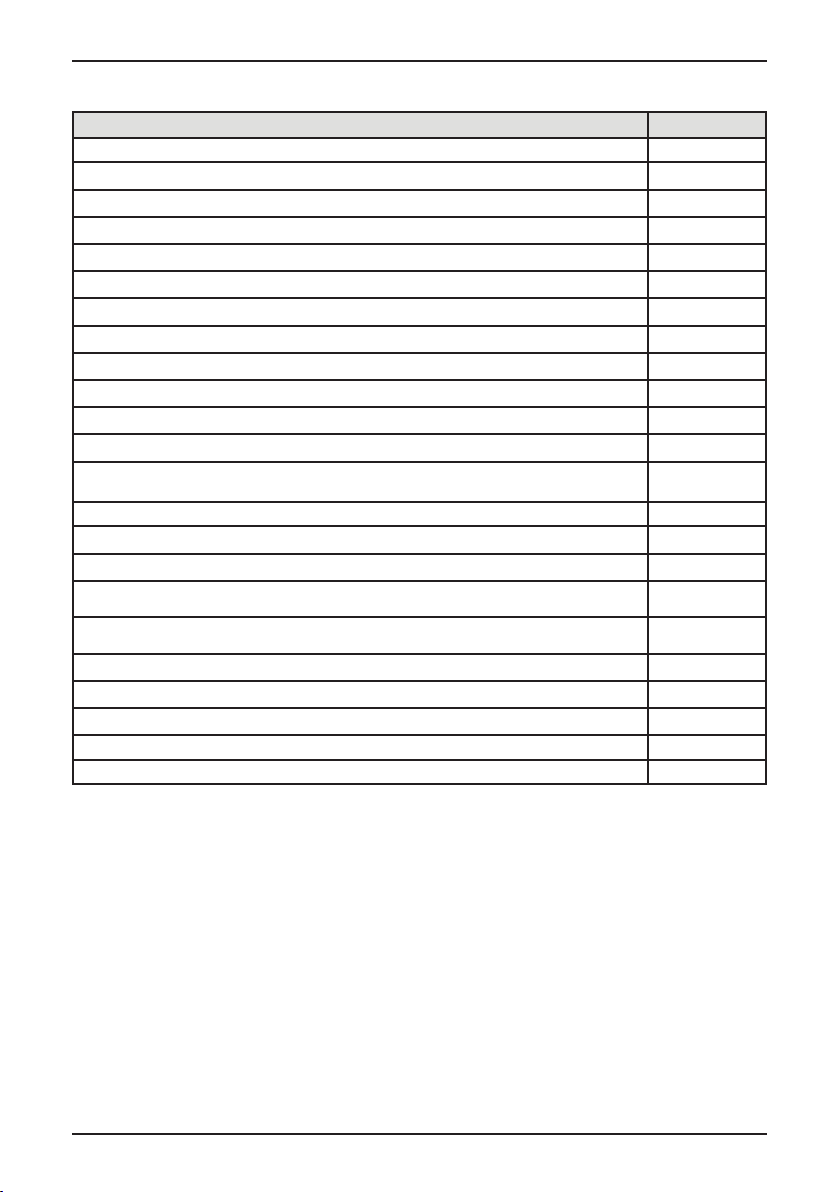
ТЕХНИЧЕСКИЕ ПАРАМЕТРЫ
Основные характеристики KD 60T8
Цвет корпуса Белый
Вес загрузки, кг 8
Тип управления Электронный
LED-индикаторы Да
Цифровой дисплей Да
Класс энергопотребления В
Класс сбора конденсированной влаги В
Уровень шума при полной загрузке, дБ 69
Потребление мощности в отключенном состоянии, Вт 0.28
Потребление мощности в режиме ожидания, Вт 0.8
Длительность режима ожидания, минут 10
Энергопотребление при использовании стандартной программы для хлопка при полной загрузке, кВт/ч 4.74
Энергопотребление при использовании стандартной программы для хлопка при частичной загрузке,
кВт/ч
Время работы стандартной программы для хлопка при частичной и полной загрузке, минут 112
Время работы стандартной программы для хлопка при полной загрузке, минут 114
Время стандартной программы для хлопка при частичной загрузке, минут 90
Средняя эффективность сбора конденсированной влаги, программа Хлопок: В шкаф, при частичной
загрузке, %
Средняя эффективность сбора конденсированной влаги, программа Хлопок: В шкаф, при полной
загрузке, %
Размеры, ВхШхГ, мм 845x595x615
Вес нетто, кг 41
Мощность подключения, В 220-240
Напряжение, В / частота, Гц 50/60
Номинальная мощность, Вт 2700
2.56
80.1
80.1
Годовое энергопотребление из расчета 160 циклов сушки с использованием стандартной
программы для хлопка («В шкаф») при полной и частичной загрузке и потреблении, рассчитанном
для энергосберегающих режимов. Фактическое потребление энергии в цикле будет зависеть от
того, как используется сушильная машина. Хлопок «В шкаф», используемая при полной и частичной
загрузке, - это стандартная программа сушки, к которой относится информация на этикетке и в
листе технических данных изделия, что эта программа подходит для сушки обычного влажного
хлопкового белья и что она является наиболее эффективной в плане энергопотребления.
ВНИМАНИЕ! ДАННЫЕ ПО УРОВНЮ ШУМА, РАСХОДУ ЭЛЕКТРОЭНЕРГИИ, МОГУТ
ОТЛИЧАТЬСЯ ОТ РЕАЛЬНЫХ В ЗАВИСИМОСТИ ОТ РАСПОЛОЖЕНИЯ ПРИБОРА,
КОЛИЧЕСТВА ЗАГРУЖЕННЫХ В БАРАБАН ВЕЩЕЙ И ПРОЧЕЕ.
18
Page 19

ИНФОРМАЦИЯ ОТ ПРОИЗВОДИТЕЛЯ
Изготовитель KÖRTING®
Тип продукции Сушильная машина
Модель KD 60T8
Производитель (Фабрика)
Поставщик на территории РФ,
уполномоченный на принятие претензий
WUXI LITTLE SWAN COMPANY LIMITED
NO.18 SOUTH CHANGJIANG ROAD, NEW DISTRICT,
WUXI, JIANGSU, KHР
ООО «Кёртинг РУС», 125252, г. Москва, ул.
Гризодубовой, д. 4, к. 3, этаж 1, пом. 1, комн. 2.
тел. +7 (495) 150-64-14
[email protected]
www.korting.ru
Импортер
Гарантийный срок 12 месяцев
Срок службы 10 лет
Серийный номер:
Серийный номер указан на стикере прибора.
ООО «Кёртинг РУС», 125252, г. Москва, ул.
Гризодубовой, д. 4, к. 3, этаж 1, пом. 1, комн. 2.
Серийный номер состоит из:
С/Н: АААА-BB-CCCCC
(А) - год производства
(В) - неделя
(С) - производственный номер
UM KD 60T8 Ver.1
19
Page 20

Сервисная поддержка
Список авторизованных сервисных центров, осуществляющих гарантийный ремонт, указан на
официальном сайте в разделе «Поддержка»: https://korting.ru/support/
По вопросам работы техники и качества работы авторизованных региональных сервисных центров обращайтесь на горячую линию клиентской поддержки по телефону:
Москва и Московская область: +7(495)150-64-14
Регионы России: 8(800)500-68-92
Гарантийный срок на продукцию Körting составляет 12 месяцев кроме специальной серии «1889»
с гарантийным сроком 36 месяцев.
Гарантийное обслуживание является бесплатным (включая стоимость работ материалов и, при не-
обходимости и с учетом действующего законодательства, доставки) на дому у потребителя или в
мастерской на усмотрение сервисного центра, и распространяется только на изделия, использующиеся в личных, семейных, бытовых целях, не связанных с предпринимательской деятельностью.
Обслуживание действительно на территории РФ и распространяется на производственный или
конструкционный дефект изделия.
Гарантийное обслуживание не распространяется на:
1. Комплектующие изделия (которые могут быть сняты с основного изделия без применения какихлибо инструментов, а именно: полки, ящики, корзины, насадки, решетки, трубки, шланги и другие
подобные комплектующие);
2. Недостатки изделий, вызванные несоблюдением прилагаемой инструкции по эксплуатации,
транспортными повреждениями, неправильной установкой, перепадами напряжения питания, небрежным обращением или плохим уходом, неправильным использованием (включая перегрузку);
3. Недостатки, вызванные независящими от продавца причинами, такими как: явления природы и
стихийные бедствия, пожар, действия домашних или диких животных, а также насекомых, грызунов,
попадание внутрь изделия посторонних предметов (в том числе жидкостей) и другими подобными
причинами;
4. Недостатки, возникшие в результате внесения конструктивных изменений или ремонта изделия
потребителем или неавторизованным сервисным центром;
5. Расходные материалы: лампы освещения, фильтры, элементы питания и прочие элементы по
уходу за изделием, которые описаны в инструкции по эксплуатации;
6. Внешние и внутренние загрязнения, потертости, царапины, возникшие в процессе эксплуатации,
установки, регулировки, чистке изделия, замене расходных материалов (ламп освещения, фильтров,
элементов питания и др.) и прочему ухода за изделием, который описан в инструкции по эксплуатации.
Любые претензии по качеству товара изделия рассматриваются только после предварительной
проверки качества изделия представителем авторизованного сервисного центра.
Компания Körting оставляет за собой право по своему усмотрению расширить свои обязательства
перед потребителем по сравнению с требованиями закона и указанными в настоящем документе
обязательствами.
20
Page 21

Перед установкой и использованием изделия обязательно внимательно прочтите инструкцию по
эксплуатации.
Для установки (подключения) техники мы рекомендуем обращаться в авторизованные сервисные
центры. Вы можете воспользоваться услугами любых других квалифицированных специалистов или
выполнить это самостоятельно, воспользовавшись рекомендациями инструкции по эксплуатации,
однако изготовитель (продавец) не несет ответственности за возникшие дефекты в следствие неправильной установки.
Специалисты, осуществляющие подключение (установку), делают отметку в соответствующем разделе гарантийного талона.
(заполняется только для приборов, подлежащих установке)
СВЕДЕНИЯ ОБ УСТАНОВКЕ ПРИБОРА
Дата установки: Мастер:
Организация установщик: Работу принял. Подпись заказчика:
Фирма производитель оставляет за собой право без предварительного предупреждения вносить
изменения в конструкцию, дизайн, комплектацию или технологию изготовления без смены основных характеристик изделия.
ТАЛОН НА ГАРАНТИЙНОЕ ОБСЛУЖИВАНИЕ
(изымается мастером)
Модель:__________________________________________________________
Серийный номер:_______________________________________________
Дата приобретения:____________________________________________
Вид дефекта:____________________________________________________
__________________________________________________________________
__________________________________________________________________
Проведенные работы:__________________________________________
__________________________________________________________________
__________________________________________________________________
Ф.И.О. потребителя:_____________________________________________
__________________________________________________________________
Адрес:___________________________________________________________
__________________________________________________________________
Телефон:_________________________________________________________
Дата ремонта:___________________________________________________
Мастер:__________________________________________________________
__________________________________________________________________
(вырезать по пунктиру)
ТАЛОН НА ГАРАНТИЙНОЕ ОБСЛУЖИВАНИЕ
(изымается мастером)
Модель:__________________________________________________________
Серийный номер:_______________________________________________
Дата приобретения:____________________________________________
Вид дефекта:____________________________________________________
__________________________________________________________________
__________________________________________________________________
Проведенные работы:__________________________________________
__________________________________________________________________
__________________________________________________________________
Ф.И.О. потребителя:_____________________________________________
__________________________________________________________________
Адрес:___________________________________________________________
__________________________________________________________________
Телефон:_________________________________________________________
Дата ремонта:___________________________________________________
Мастер:__________________________________________________________
__________________________________________________________________
Место штампа
Место штампа
21
Page 22

Page 23

По всем вопросам сервисного и гарантийного обслуживания техники Körting обращайтесь в авторизованный
сервисный центр Вашего города. Подробную информацию и адрес сервисных центров Вы можете найти на
офицальном сайте korting.ru
Сервисный отдел Körting:
Тел.: +7 (495) 150-64-14
Email: [email protected]
Информационная линия Körting:
Тел.: +7 (495) 150-64-14 (Москва и МО)
Тел.: 8 (800) 500-68-92 (Регионы России)
Email: [email protected]
1
 Loading...