

Page 1

www.konicaminolta.eu
Print Pool Manager
Print Pool Manager
Maximising printing efficiency
Page 2

Print Pool Manager
Print smarter
Get more out of
the workday
Print Pool Manager software is ideal for any company looking to manage print jobs
more effectively.
As well as interacting seamlessly with a variety of digital office systems, Print Pool
Manager handles all types of continuous high-volume print jobs leaving companies to
get more out of the workday.
Handle high volumes more efficiently
Put simply, Print Pool Manager (PPM) maximises
the potential of entire printing networks. By grouping disparate printing systems into “clusters”,
it coordinates queued print jobs – from start to
finish.
Instead of occupying a single print system,
this cost-efficient software automatically
splits and forwards jobs to the next available
printer.
It recognises output capacities and individual
specifications to distribute print loads evenly.
With the print job complete, PPM sends you
an automated email, telling you which printer
has your printout, when it was printed and
even which room the printer is in. Of course
in the unlikely event of a fault, it immediately
keeps you posted.
PPM also makes it easy to track jobs and
manage entire print queues with clear over views of the available clusters and printers.
You can even store and retrieve PPM activity
in the log file.
How you benefit
Boost productivity. And spend less time
managing resources. PPM organises decen tralised digital printing systems for you.
All that’s left for you to do is submit the job.
Peak times? No longer an issue. Specifically
designed to cope with high volumes, PPM
splits and forwards each job within each clus ter to print the documents you need, when
you need it, where you can find it.
No new hardware necessary. Straightforward
installation. PPM software installs easily, let ting you configure clusters any way you like.
Page 3
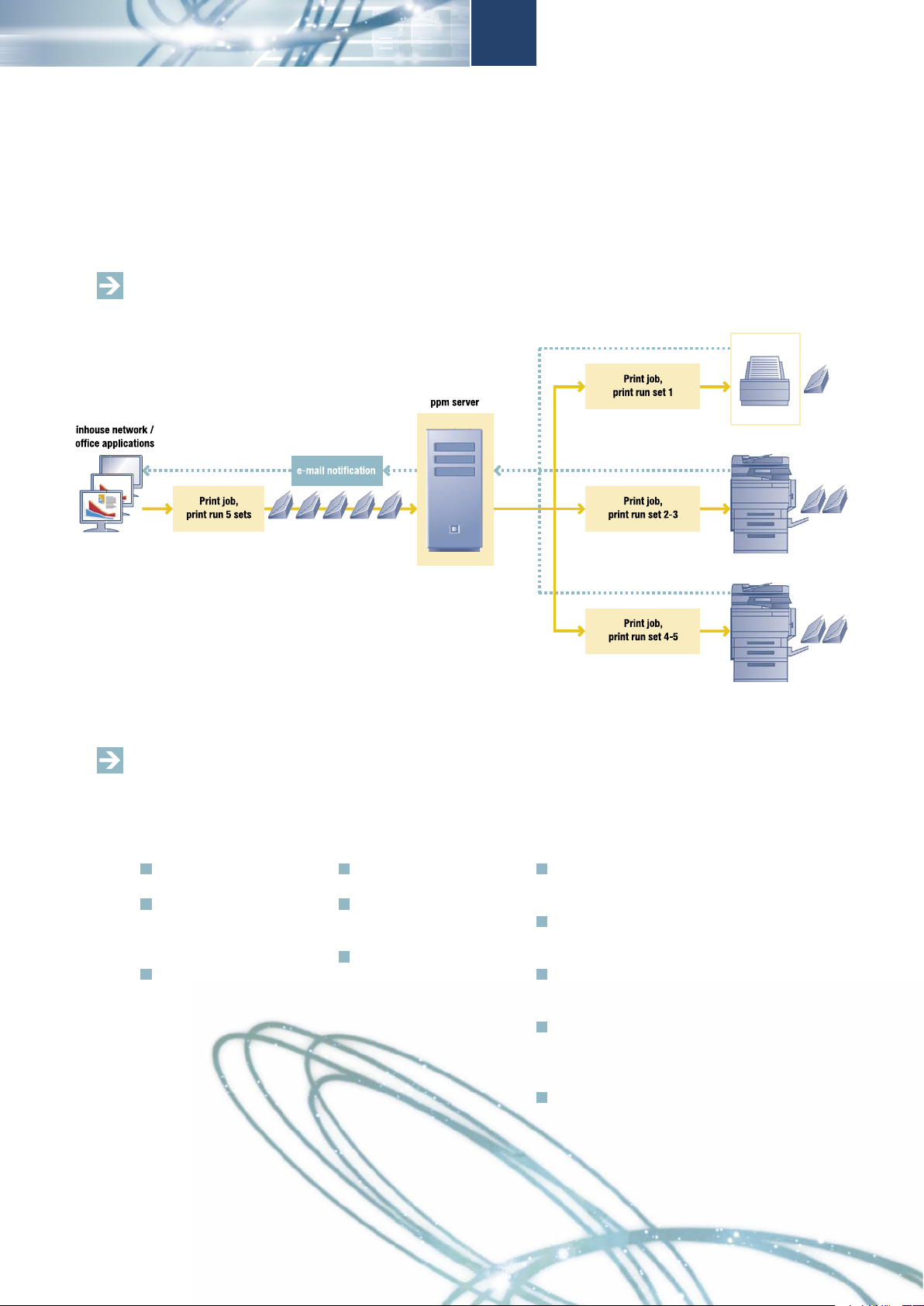
The flow of information with PPM
Example: printing five brochures at once
A host of features – for consistent and reliable productivity
The whole idea of Print Pool Manager is to keep your workday productive and make print
jobs simple to monitor and manage.
Simple monitoring
No extra or costly hard ware needed to install
Clear, intuitive interfaces:
lists of printers, each
clusters, and all PPM
activities
Users work with standard,
familiar print drivers
Flexible setup
Controls up to 15 Post Script-capable systems
10 cluster capacity with
up to 5 output systems
per cluster
Configures a variety of
PostScript-capable sys tems to a virtual machine
Managing jobs
Clusters organise printers
to handle high-volume
jobs more efficiently
Splits and forwards auto matically to each availab le printer
Distributes jobs between
printers to balance capa city
Emails users on comple ting print jobs, used out put devices and potential
problems
Banner pages for sorting
high-volume jobs
Page 4

Technical specifications
Print Pool Manager
PPM system requirements:
PPM server
PPM server requires computers with the following features.
Minimum system requirements for the server computer:
PostScript printer driver that is supplied with your Konica Minolta Controllers
Windows 2000, XP SP1, 98, or NT 4.0 with minimum Service Pack 4
100 MB of free hard disk space, Pentium compatible processor
Network card, CD-ROM drive, Free USB port
Recommended system requirements for the server computer:
PostScript printer driver that is supplied with your Konica Minolta Controllers
Windows 2000 Server* or Windows XP SP1 or Windows NT 4.0 Server*.
1 GB of free hard disk space, Pentium processor III
128 MB RAM, Network card, CD-ROM drive, Free USB port
* These PPM Server platforms are required when you plan to use Macintosh
computers as PPM clients. On the PPM server computer the Macintosh printing
system must be installed.
PPM clients
Minimum system requirements for the client computers:
Windows 2000, XP SP1, 98 or NT 4.0 computer with Konica Minolta PostScript printer driver
Network connection to PPM server
Macintosh Computer with MacOS 8.1 or higher and Adobe PS 4.5 printer driver
Maximum number of clusters and printers
The numbers apply to one server.
Number of clusters: 10
Number of printers in each cluster: 5
Number of printers in all clusters (total number of printers):15
Data format of incoming job data
PostScript Level 1, PostScript Level 2, PostScript 3
Konica Minolta
Business Solutions Europe GmbH
Europaallee 17 • D-30855 Langenhagen
Tel.: +49 (0) 511 74 04-0
Fax: +49 (0) 511 74 10 50
Your Konica Minolta Business Solutions Partner:
51016200313/08-06/Buchheister
 Loading...