

Page 1
26800MAH POWERBANK (118W)
WITH PD AND QUICK CHARGE 3.0
KAPB26800HC & KAPB26800HD
Page 2

Page 3

SAFETY & WARNINGS
Handle with care and inspect regularly to ensure product is in good working order. If this
product, power supply cord or plug shows any signs of damage: stop use, unplug the
product and contact Kogan.com support.
• Read all of the following instructions before use. Keep this user guide for future
reference.
• This device contains small parts which are not intended for use by persons
(including children) with reduced physical, sensory or mental capabilities, or lack of
experience and knowledge, unless they have been given supervision or instruction
concerning use of the device by a person responsible for their safety. This device is
not suitable for children under 5 years of age.
• Do not put the device into fire or water, as this will destroy it and may pose an
electrical hazard.
• Do not use in high-temperature or high-humidity environments
• Do not disassemble, squeeze, or puncture the device.
• This appliance contains no user-serviceable parts. If it suffers any failure or
damage, cease usage and contact Kogan.com
• Fully charge the power bank once before first use.
• To ensure the durability of the battery during irregular use, charge and discharge
the power bank once every three months.
• Charging by unsupervised, short circuit, or mechanical damage may cause
overheating and fire risk.
• Handle with care. Any impacts, vibrations, or falls from a height may damage the
product.
• Modifying or dismantling the product may pose a safety risk.
Page 4

• Powerbank
• Type-C to Type-C Cable
• User Manual
Page 5
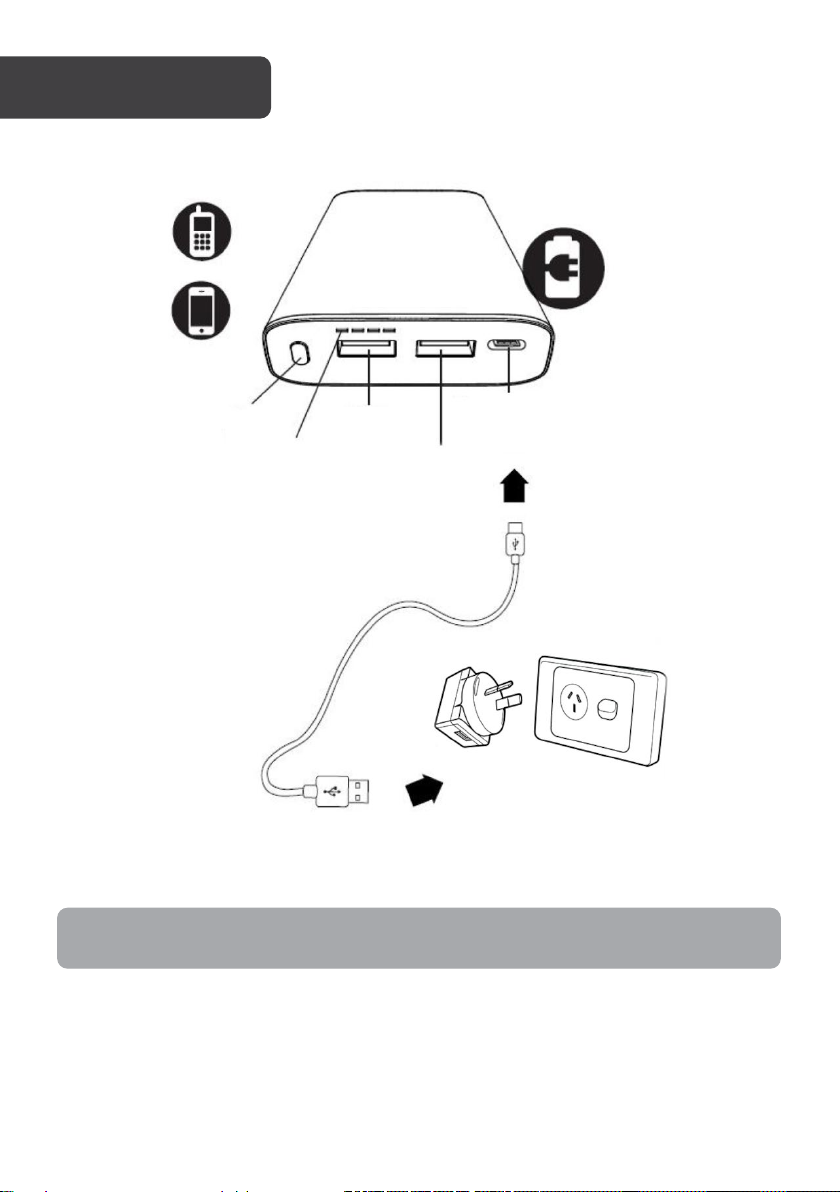
Power Button
LEDs
OUT
OUT
Up to 20V IN & OUT
OVERVIEW
Note: The adaptor is not included, it is intended for demonstration purposes only.
Page 6
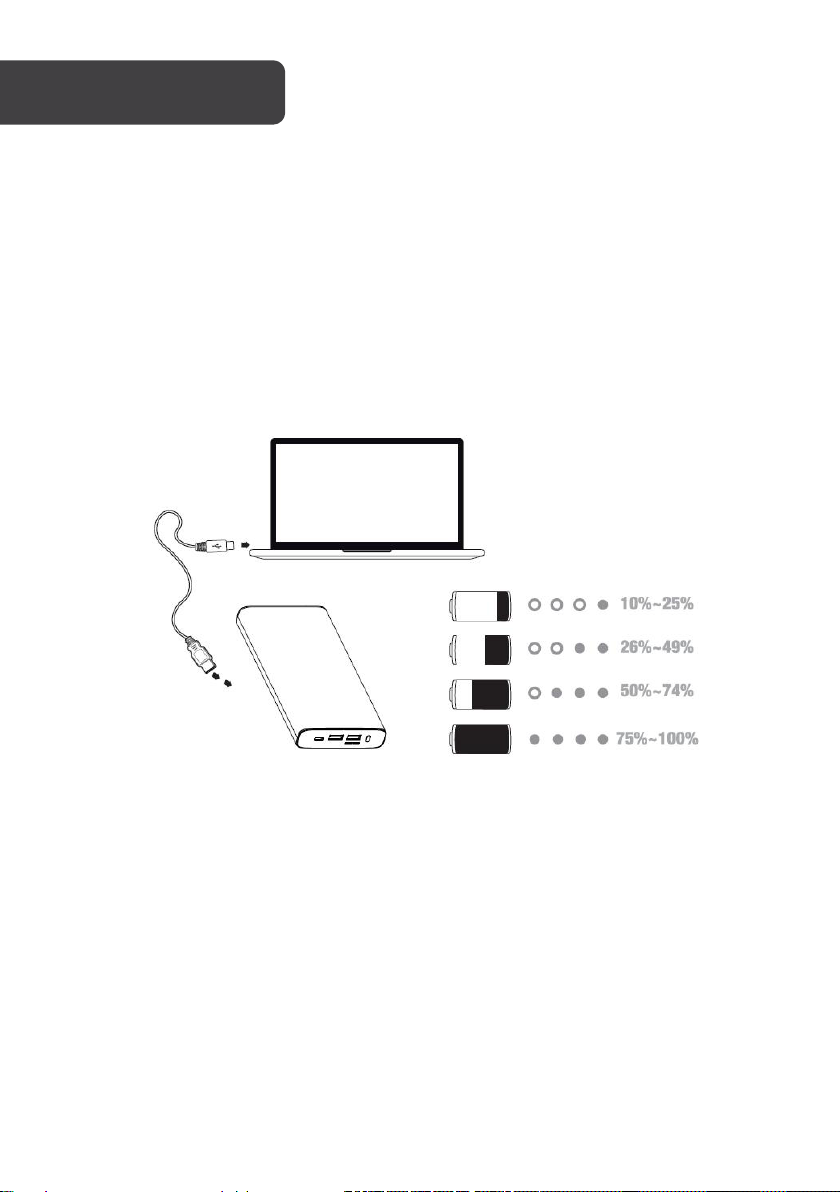
To charge the power bank
1. Connect the included USB-C charging cable to a USB power supply, such as an
AC charger or computer USB port.
2. The LEDs will blink while charging.
3. When fully charged, all indicator LEDs will be illuminated.
To charge other devices
1. Connect a compatible USB cable from your device to the power bank and press
the power button.
2. Charging will commence once the power bank is powered on.
3. LED status indicates battery percentage as shown in the image.
Page 7
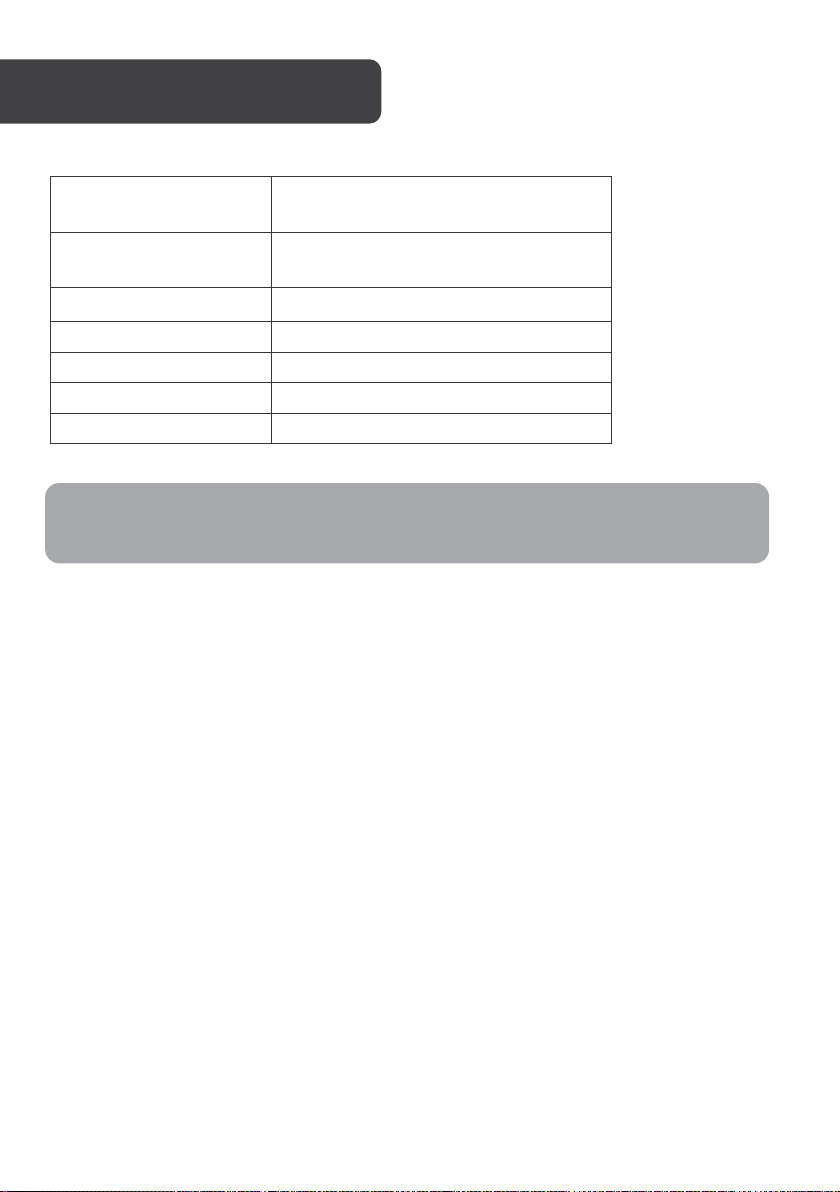
5V⎓3A, 9V⎓3A, 12V⎓3A
15V⎓3A, 20V⎓3A (Max 60W)
5V⎓3A, 9V⎓3A, 12V⎓3A
15V⎓3A, 20V⎓5A (Max 100W)
Output Quick Charge 3.0
5V⎓3A, 9V⎓2A, 12V⎓1.5A (Max 18W)
Total Max Output
118W
Battery Capacity
3.6V 26,800mAh 96.5Wh
Dimensions
189.6 x 87.4 x 23.5mm
Weight
Approx. 670g
Input USB Type-C
Output USB Type-C
Note: When the battery level is lower than 50% or the battery temperature exceeds
45°C, Type-C output will be limited to PD 60W maximum.
Page 8

Need more information?
We hope that this user guide has given you
the assistance needed for a simple set-up.
For the most up-to-date guide for your product,
as well as any additional assistance you may require,
head online to help.kogan.com
 Loading...