

Page 1
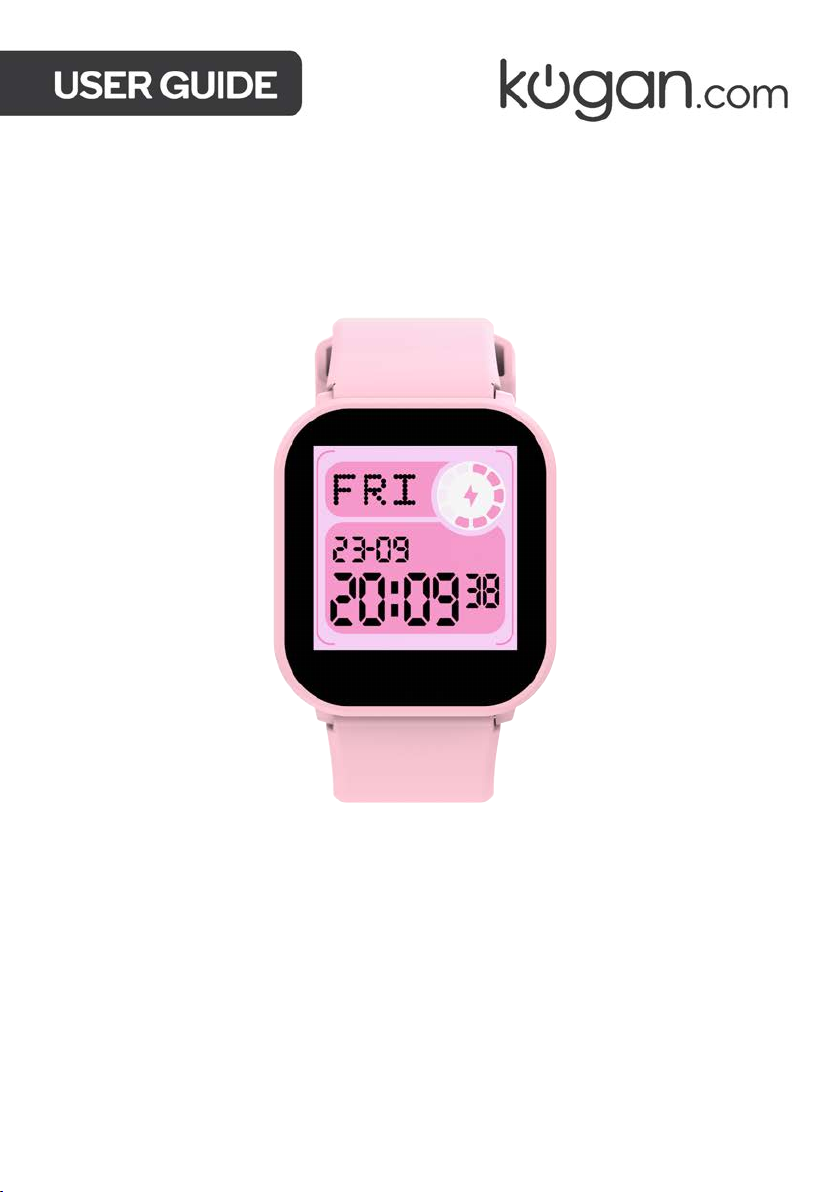
KOGAN PLAY 2 KIDS
SMART WATCH
KAKIDSMWTBA & KAKIDSMWTPA
Page 2

Page 3

SAFETY & WARNINGS
Ensure to read all instructions and warnings in this user guide prior to first use. Retain this
user guide for future reference.
• This watch must be charged for at least 3 hours before first use.
• Misuse of batteries can lead to them bursting, causing a fire, or chemical burns.
• Do not disassemble this watch.
• Do not crush or expose the battery to shock or force (for example, dropping or stepping
on it).
• Do not short circuit the watch.
• Do not expose the watch to high temperatures or place it near heat sources (fires,
stoves, heaters).
• Do not expose the watch to direct sunlight.
• Do not expose the watch to high moisture areas, and do not allow it to touch or
submerge in water or any other liquid.
• If the battery within the watch is damaged or leaking, stop use immediately and
contact help.Kogan.com for assistance.
• Keep the battery dry and out of the reach from children.
• If the watch is damaged, stop use immediately and contact help.Kogan.com for
assistance.
• Charging should only be performing by an adult.
• The battery within cannot be disposed in normal waste. If disposing, follow local
regulations.
Care Instructions for Waterproof and Dustproof Features
The watch is waterproof and dustproof. Follow the below guidelines to maintain the
waterproof and dustproof function. Otherwise, your device may be damaged.
• Do not use the watch under high pressure water.
• Do not use the watch when diving, snorkelling or other sports in turbulent water.
• Do not use the watch in sauna rooms. The waterproof function may be impacted.
• Always dry your hands and watch fully before operating.
• If the watch is exposed to water, dry it fully with soft cloth. If it is exposed to other
liquids (such as salt water, pool water, soapy water, oil, perfume, sunscreen, hand
sanitizer) or chemicals, wash it with clean water and dry it completely with a soft cloth.
• If the watch is dropped or hit, the waterproof and dustproof function may be impacted.
Page 4

• Do not disassemble your watch. The waterproof and dustproof function may be
damaged.
• Do not use the watch in extremely high or low temperature environments.
• Do not use blowers or heating equipment to dry the watch.
Cleaning and Maintenance
Follow the below points to ensure that the watch operates normally and continues to look
good. Failure to do so may cause skin irritations.
• Protect the watch from dust, sweat, ink, oil and chemical products (cosmetics,
antibacterial sprays, sanitizers and insecticides etc.). Otherwise, the internal and
external parts may be damaged or causes performance degradation.
• If the watch becomes stained, clean it with lint-free soft cloth.
• When cleaning the watch, do not use soap, detergent, abrasive materials, compressed
air, ultrasonic waves or external heat sources. Otherwise, the watch may be damaged.
Soap, detergent, hand sanitizer or detergent residue may cause skin irritation.
• After exercising or excessive sweating, clean your wrist and watch strap. Use water to
clean the watch. A small amount of alcohol can be used to wipe the watch. Allow the
watch to dry thoroughly.
• If the watch is stained, use a wet soft toothbrush to clean it.
Allergies and Skin Irritations
• This watch has been tested for hazardous materials both internally and externally,
including testing of all materials that contacts skin, skin toxicity testing and wear
testing.
• This watch contains nickel. If your skin is very sensitive or you are allergic to the
materials used in the watch, take necessary precautions.
• The watch contains a small amount of nickel. The content is lower than the reference
value of European REACH regulations. You will not be exposed to the nickel in the
watch. However, if you are allergic to nickel, use this watch with caution.
• All materials used in the watch comply with relevant inspection standards such as
REACH and RoHS.
Page 5
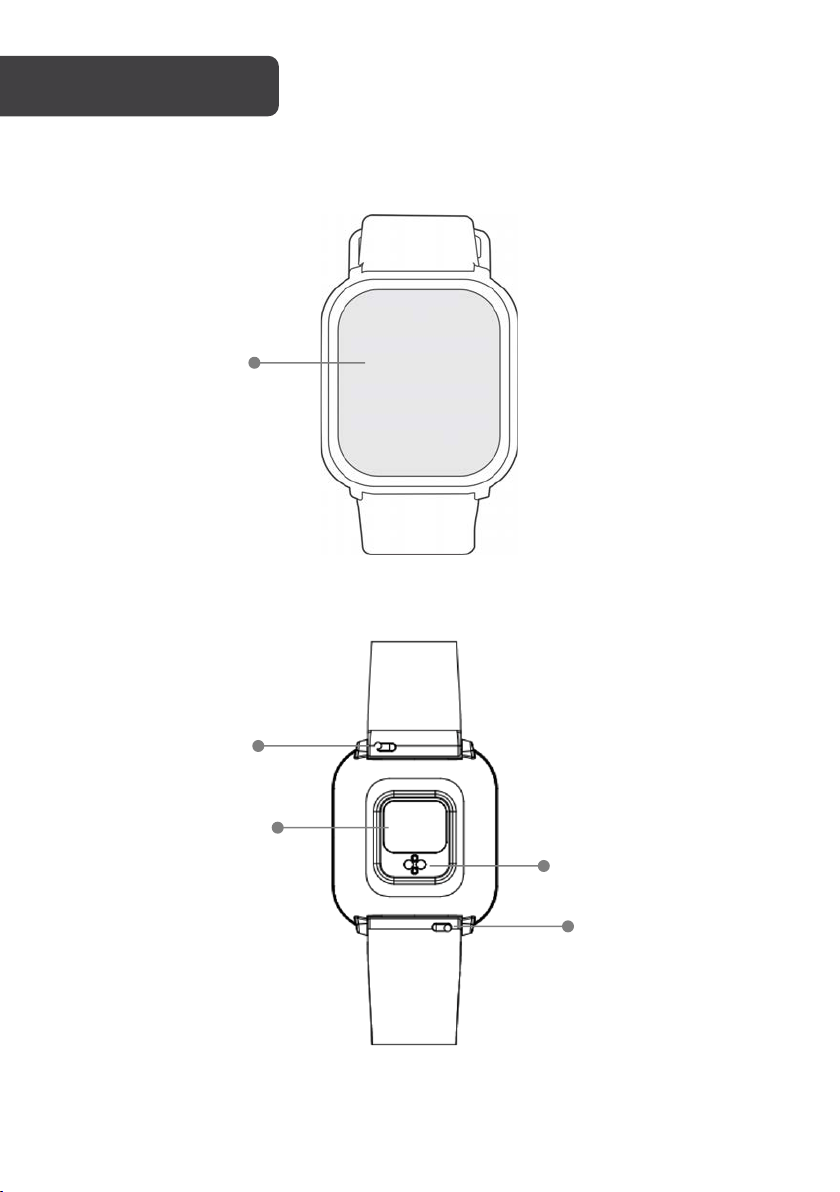
Touch screen
Quick release
Heart sensor
Magnetic
charging contact
Quick release
Page 6
Notes:
Do not use a charger exceeding 5V/2A for charging.
COMPONENTS
OPERATION
Note:
Ensure the smart watch is charged fully before first use.
• Smart Watch
• User Guide
• Charging cable
Charging
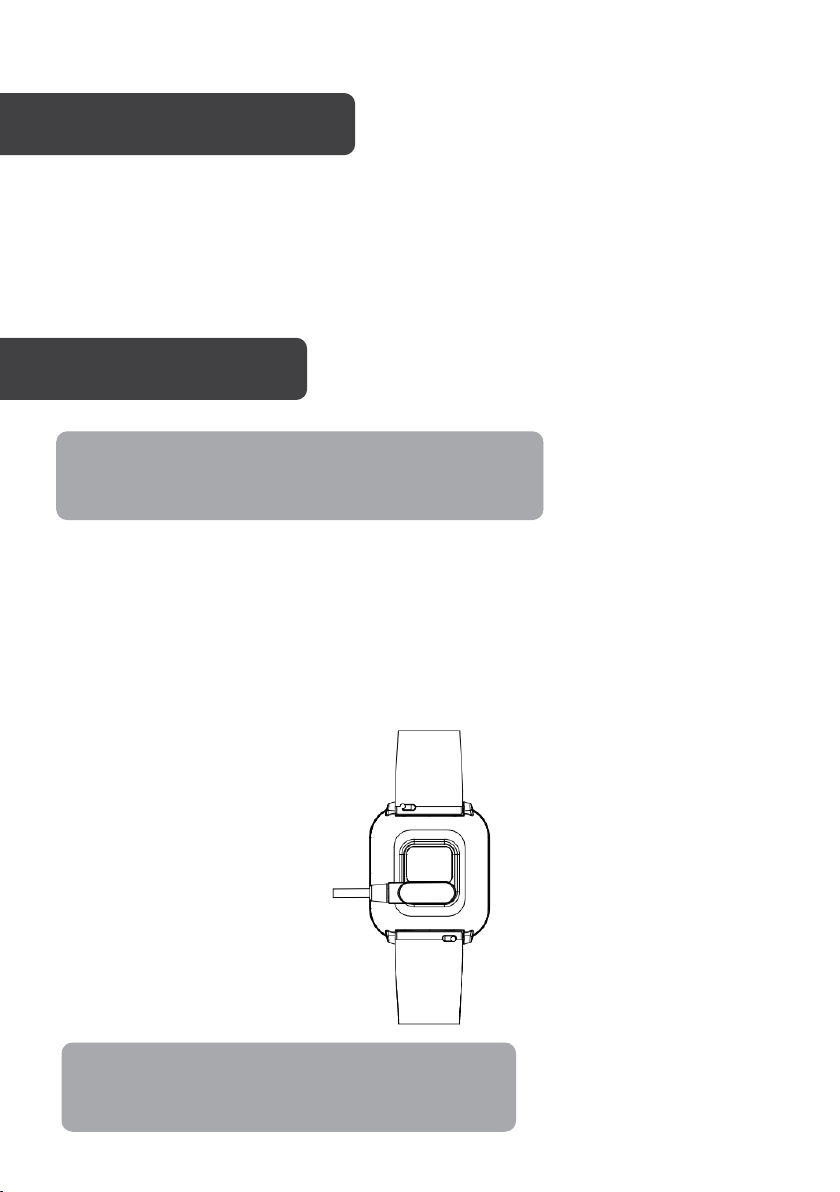
The watch automatically turns on once it has been charging for at least 30 minutes. To
charge, attached the supplied magnetic charging cable to the magnetic charging contacts
on the back of the smart watch.
Attach the opposite end of the cable into a USB power adapter (not supplied). Ensure the
adapter meets the specified voltage and current (5V/2A).
Page 7
Quick release
Wearing
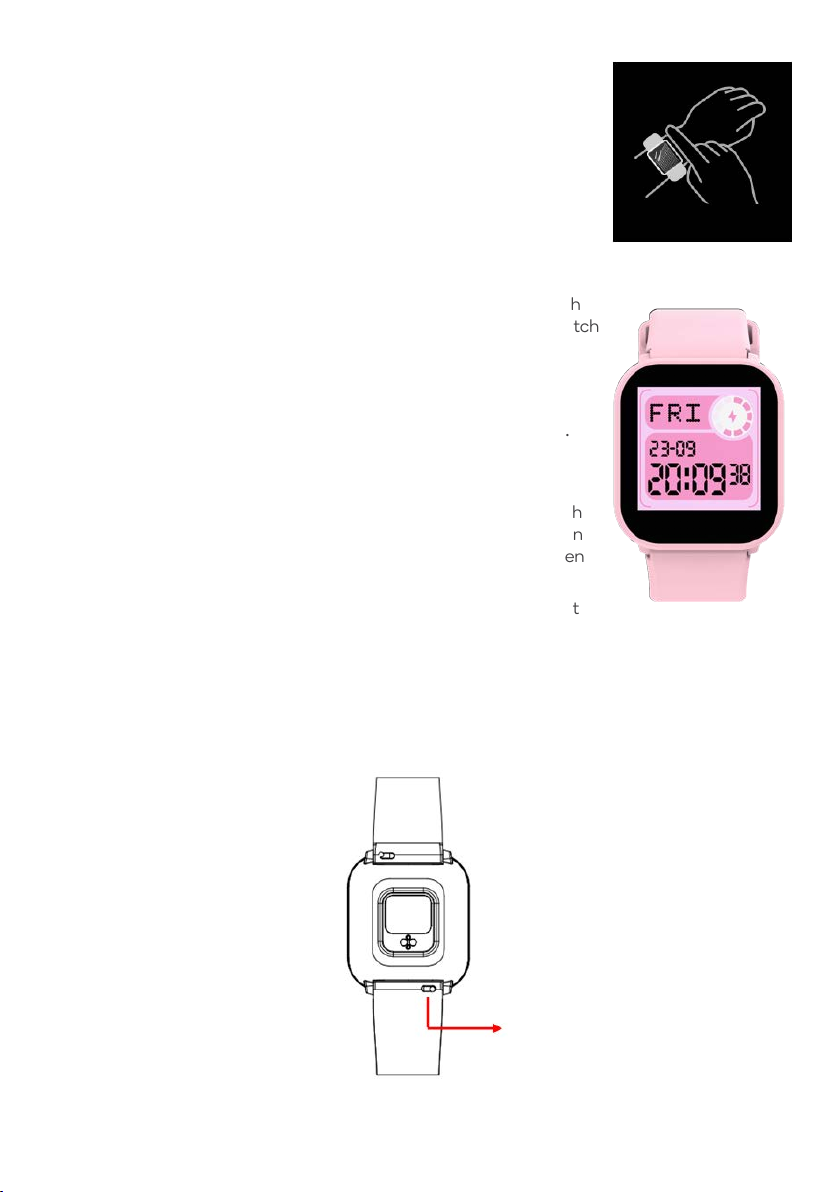
Wear it correctly: make sure that the bottom sensor is properly
attached to the skin and the strap shall be one finger away from the
wrist.
Operating the Watch
• Powering on: When the watch is off, press and hold the touch
screen for 5 seconds to turn it on. The home screen of the watch
will be displayed.
• Touch screen operation: From the home screen;
o Swipe to the left to access the menu, then tap the
function icon to enter the corresponding sub-menu.
o Swipe to the right to the games list menu, then
choose one to play (“3 to win” & “Racing Car”).
• Wake up screen: When the watch screen is off, you can touch
the screen to wake up the screen. If the gesture control button
has been enabled in the app, you can also wake up the screen
by turning your wrist.
• Shutdown: Swipe down, click the setting icon and then select
“System à Shut down”. Tap the green tick to confirm and shut down.
Removing the Strap
To remove the straps from the watch, slide the quick release towards the outside of the
watch and pull the strap away from the watch.
Page 8
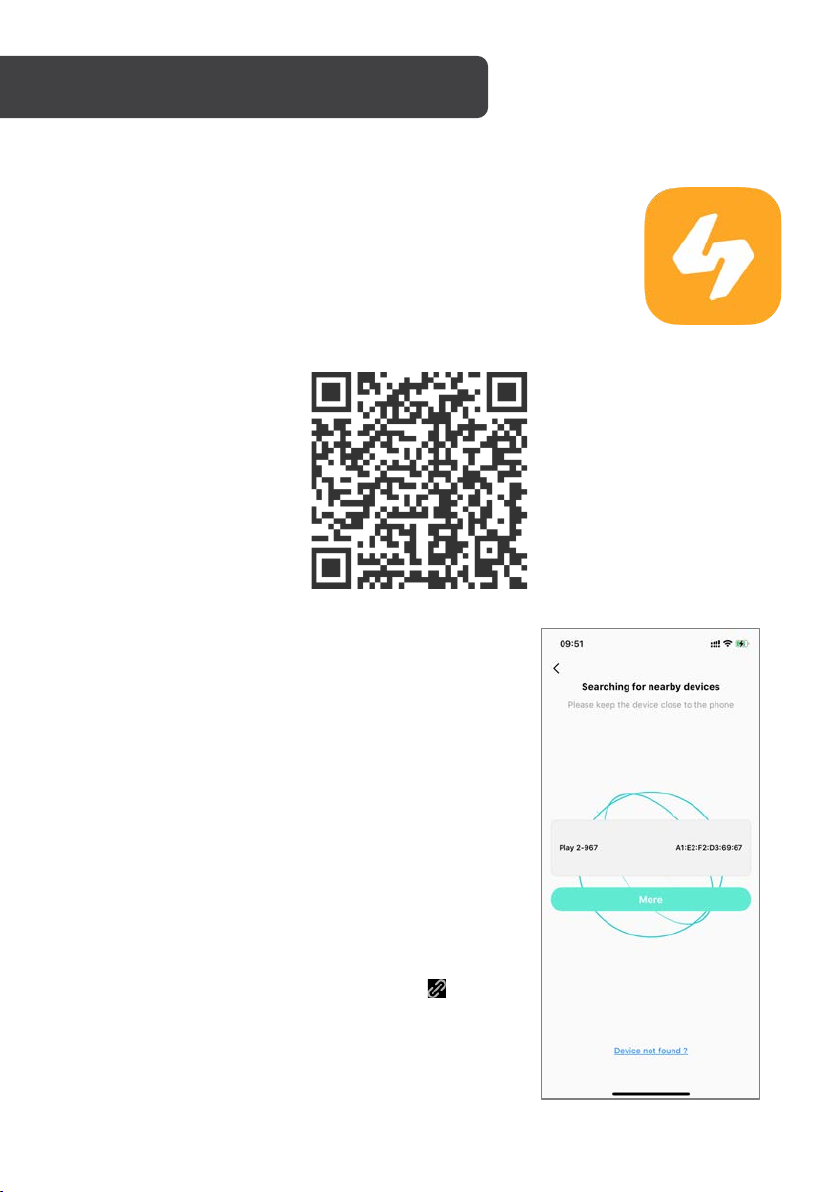
For Android users, open Google Play Store on your smartphone.
For iOS users, open app Store on your iPhone.
Search for “HitFit Pro” and download the app.
Alternatively, scan this QR code on your device to open the appropriate
store for your device and go straight to the app download page.
Bluetooth Connection
1. Ensure Bluetooth and GPS has been enabled on your
phone.
2. Install and open the "HitFit Pro" app.
3. In the home screen, press "Personal centre à Device"
to begin searching for nearby devices.
4. You will see a list of devices. Select the watch and
continue with the pairing process.
5. Light up the smart watch screen and bring it close to
your phone.
6. In "Setting" menu on the watch, select "System à
System version" to confirm the watch’s Bluetooth
name.
7. If connected successfully, the paired icon “ ” will be
displayed in the watch’s status bar.
Page 9
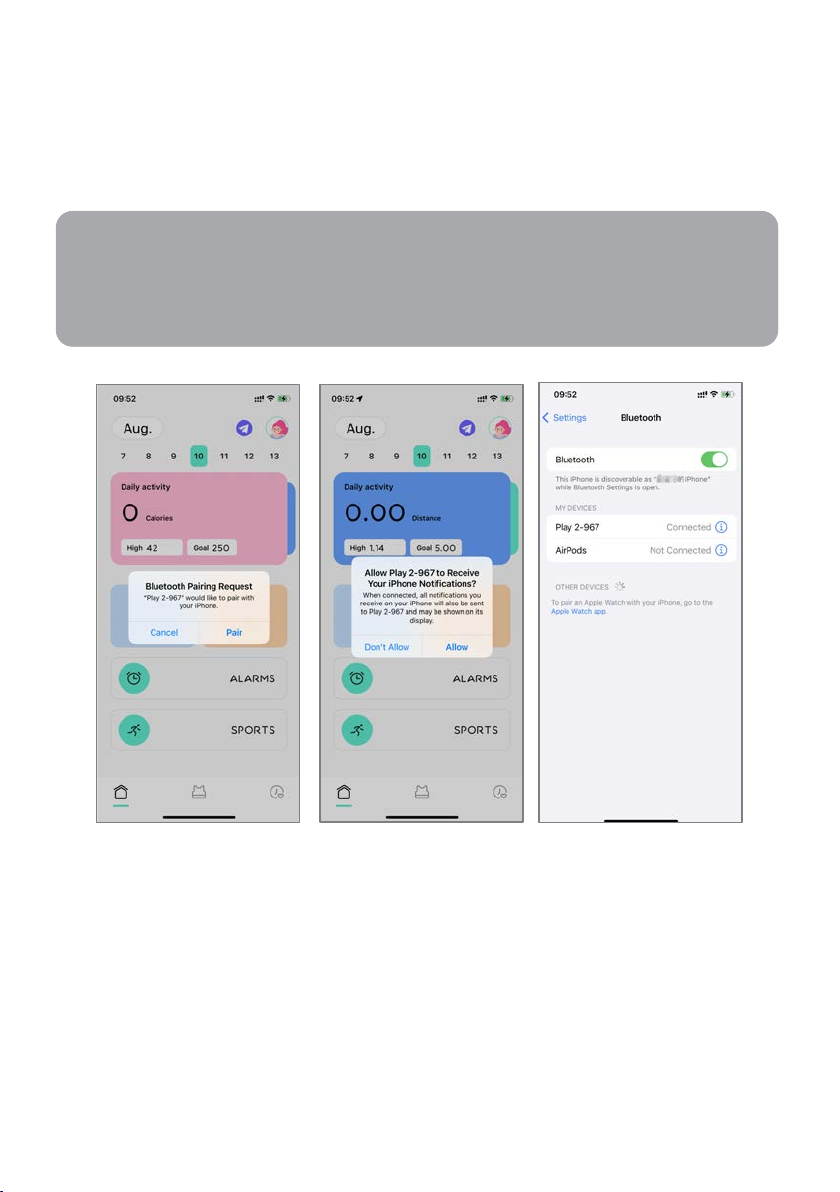
8. During the pairing process, you will be prompted to enable GPS and Bluetooth and
Notes:
For iOS devices, it's necessary to agree to pair your phone with the Smart Watch in
order to display iPhone notifications. The successful connection of the Smart Watch
will be indicated in the Bluetooth menu of the phone interface, as shown below.
authorize "HitFit Pro" to get access to the GPS on your mobile phone. Agree to all the
permission prompts.
9. In order for iOS devices order to receive notifications or information from the watch, you
need to first establish a Bluetooth connection by pairing the watch with your phone's
built-in Bluetooth after the initial binding process.
Page 10
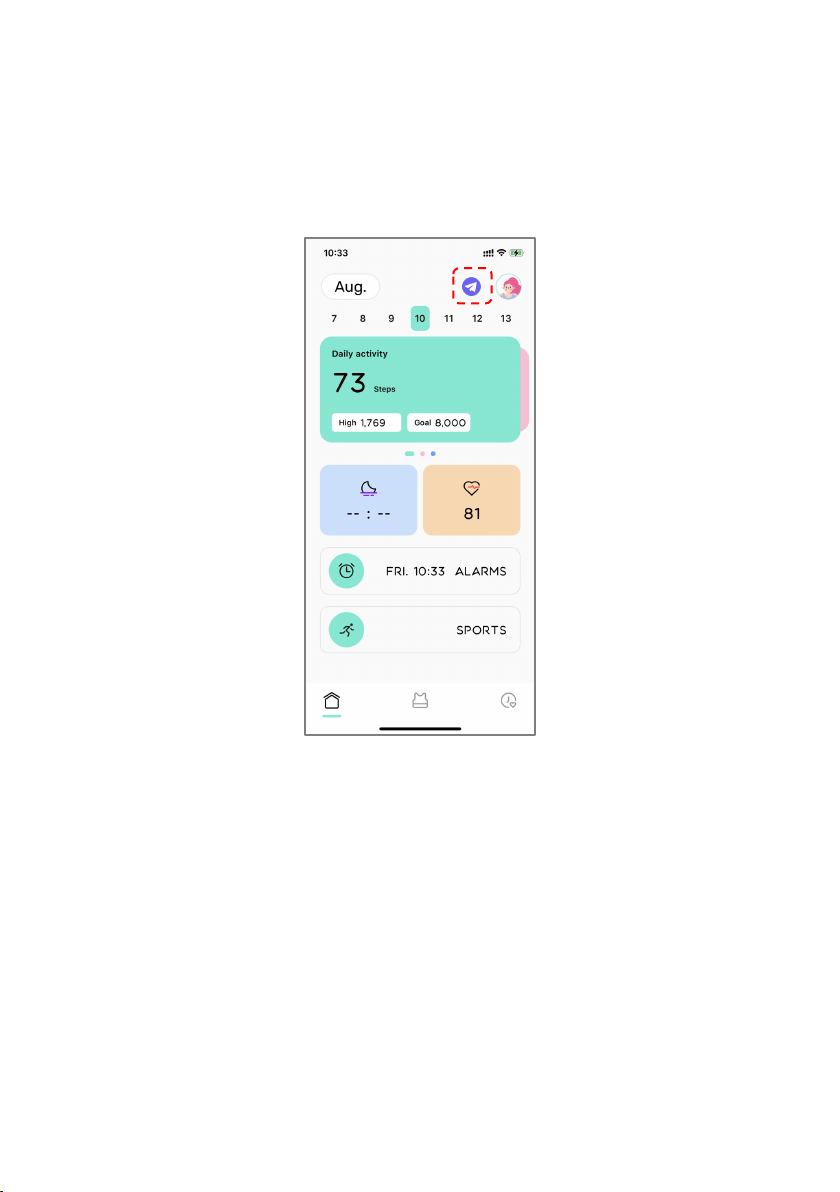
Synchronizing Data
Ensure you have paired your watch with the "HitFit Pro" app.
Open the app, in the home page screen, swipe down on the screen and release or click the
Sync icon in the upper right to synchronize data. Your data will be shown on the App
accordingly.
Tips:
• Do not pair the watch directly from the Bluetooth menu in your mobile phone’s settings.
Always use the “HitFit Pro” app to pair the watch to your phone.
• While clearing software in the background or closing background applications, avoid
disabling the Bluetooth notification service, as doing so can impact the synchronization
between the watch and the phone.
• If you want your watch to receive third-party notifications, you will need to turn on the
respective notification permissions.
Page 11
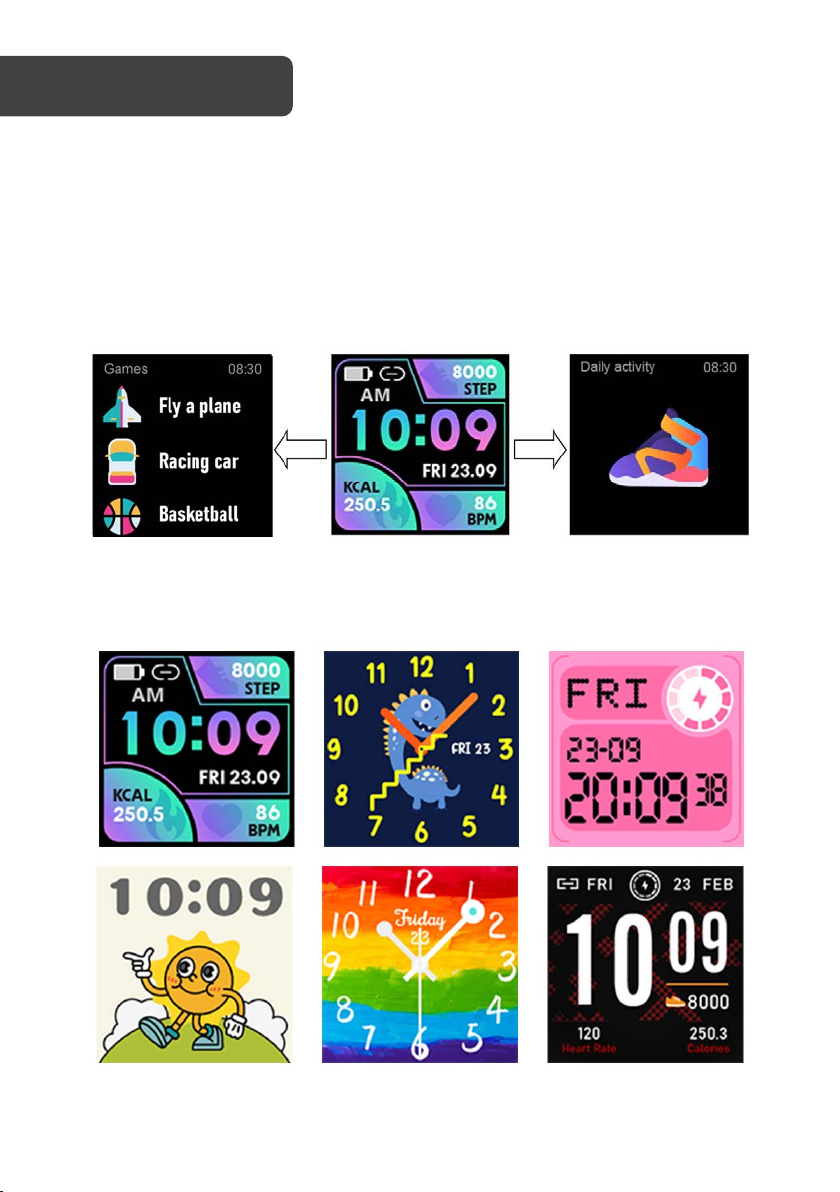
1. Swipe right: Display the games list (3 to win, Racing car).
2. Swipe down: Display Battery, Bluetooth, Time, Date, Brightness, Timer, Alarms,
Setting.
3. Swipe up: Messages, Heart rate monitoring, Daily activity.
4. Swipe left: Select from one of the features “Daily activity, Sports, Sports record,
Alarms, Heart rate, Sleep, Weather, Settings” tap to enter the corresponding
function, swipe right to return to the previous level.
Watch Faces
Press and hold the touchscreen to select the one of the six available watch faces.
Page 12
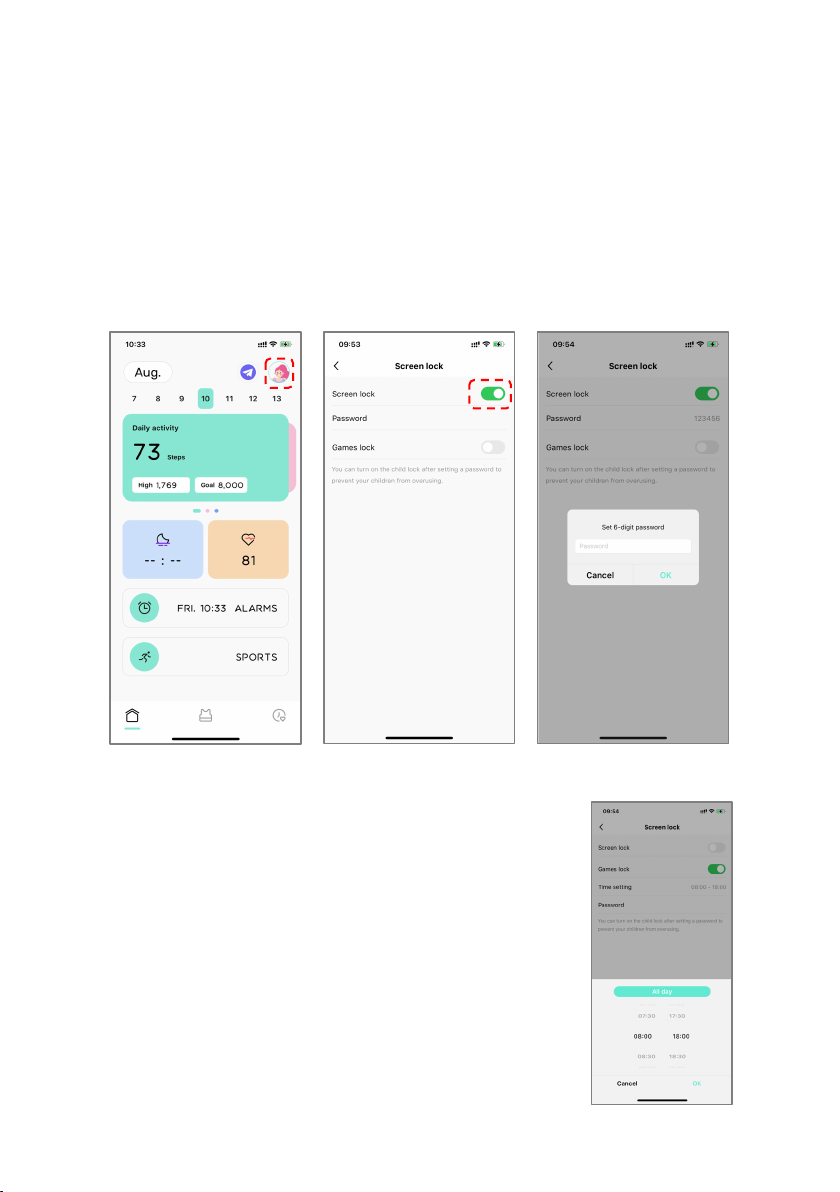
Screen Lock
You can turn on the Screen lock or Games lock after setting a password to prevent your
child from overusing. If the Screen lock is enabled, a password will be required to unlock the
watch.
1. Tap the profile icon in the upper left corner of the app’s home screen.
2. Select “Screen lock” and tap the toggle to enable it.
3. Tap “Password”, select a 6-digit password and tap “OK” to confirm.
4. Synchronise your watch.
Games Lock
You enable a game lock to limit the times your child can access
the games on their watch.
1. Tap the profile icon in the upper left corner of the app’s
home screen.
2. Select “Games lock” and tap the toggle to enable it.
3. Tap “Time setting” to select the time restrictions and
tap “OK” to confirm.
4. Tap “Password”, select a 6-digit password and tap
“OK” to confirm.
5. Synchronise your watch.
Page 13
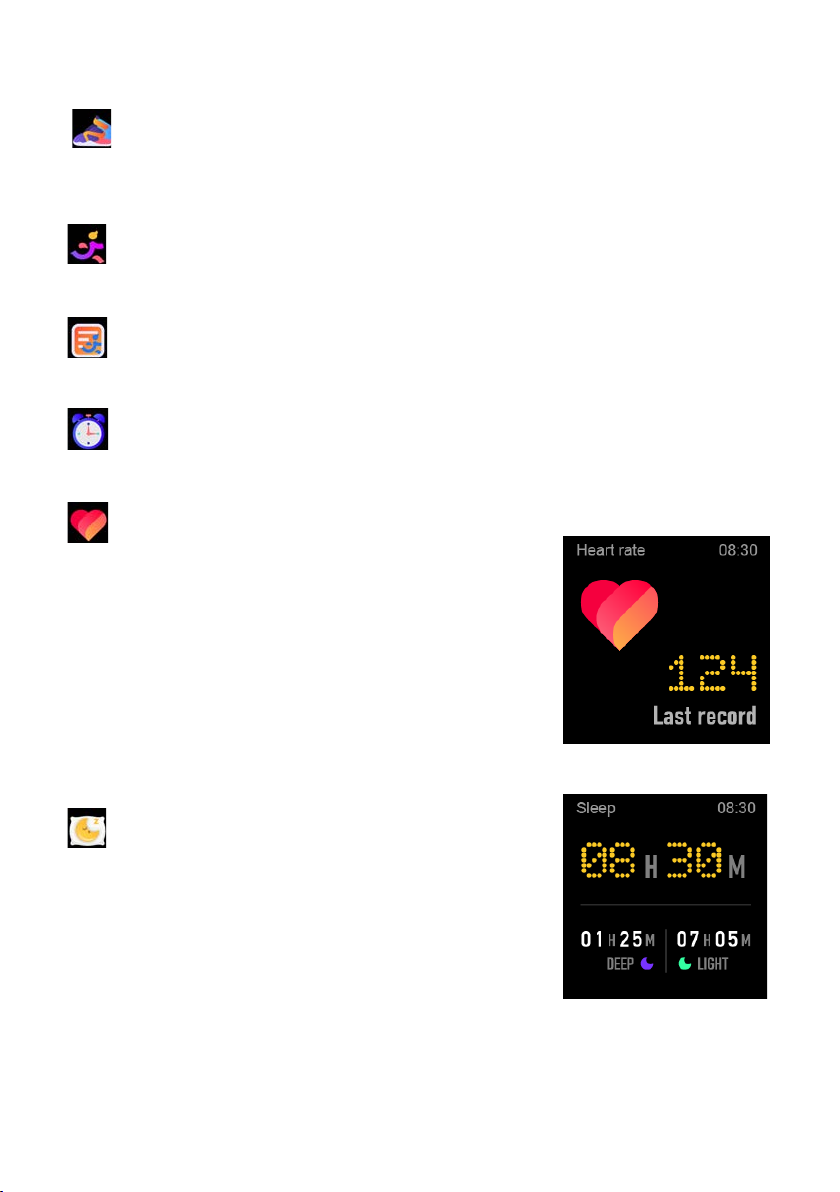
Basic Functions
Daily activity
The watch will display the user's total number of steps on the day, walking
distance, calories burned on the same day and the data will be cleared at 0
o'clock (midnight) every day.
Sports
In sports mode: the single-point function icon allows you to enter sports modes
such as Walking, Running, Climbing, Riding, Basketball and Free sports.
Sports record
If you have done any sports and saved the data, in this function will show the
information of sports record.
Alarms
You can set alarms in the app. The watch will show the alarm details. When the
alarm time is up, the watch will pop up as a reminder.
Heart rate
Function introduction: The watch will measure
the user's heart rate using the heart rate sensor.
After the test is completed, the watch will display
the result. If there is no user input, the screen will
automatically turn off.
Operating instructions: Swipe to the left on the
main interface and click the heart rate icon. Once
the interface is entered, the measurement will
start. During the measurement, the interface value
will be zero. After the measurement is completed,
the value will be displayed.
Sleep
Function introduction: The watch will display the
user's sleep time the night before. (Sleep
measurement time 21:30 - 12:00 next day)
Operation instructions: Swipe the main interface
left and right, click sleep to switch to the sleep
interface, you can view the sleep time of the
previous day.
Page 14
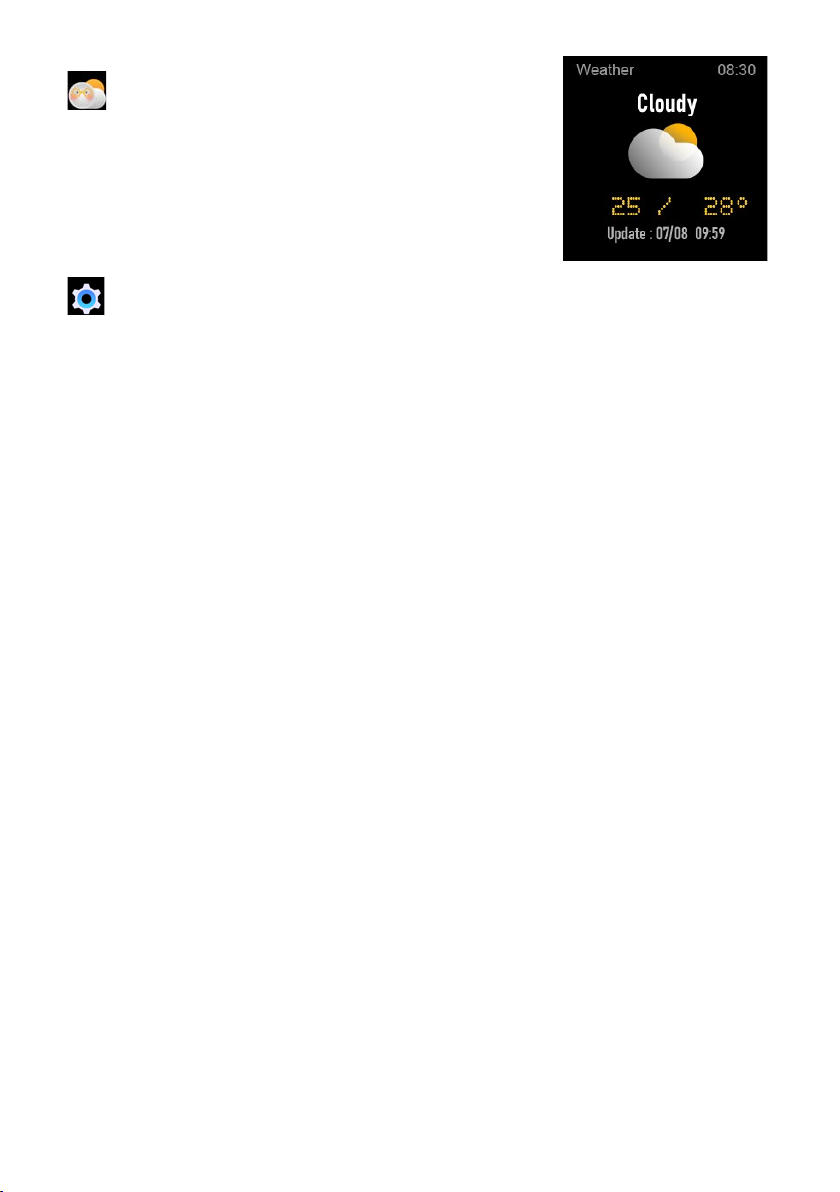
Weather
After connected with “HitFit Pro” app, the watch
will show local weather and the updated time.
Settings
• Language: Select different languages.
• Screen display: Change dial, Brightness, Screen time, Turn wrist wake
setting.
• Do not disturb: Enable/disable “Do not disturb” mode.
• Vibration: Set vibration intensity.
• Time: Set the time.
• Date: Set the date.
• Time display: Choose the time display mode.
• System: System version, Shutdown, Reset settings.
Page 15

CPU
RTL8762CK
ARM
Cortex-M0 53MHz
Memory
RAM 128KB + ROM 128Mb
Capacitive touch screen
1.4” IPS
240x240 screen
Bluetooth version
5.0
Battery
Lithium-ion 3.7V/180mAh
Function
IP68 waterproof, Games, Heart Rate, Sleep, Daily activity,
Sports, Stylish Dials Push, DIY favourite dial customized,
Weather, Notification (Ins/Facebook/Skype/WhatsApp
etc.)
Other features
Timer, do not disturb mode, Screen lock,
Alarms, show time setting, multi-Languages supported,
replaceable strap
Page 16

Need more information?
We hope that this user guide has given you
the assistance needed for a simple set-up.
For th e most up-to-date guide for your product,
as well as any additional assistance you may require,
head online to help.kogan.com
 Loading...