

Page 1
Smart Phone Holder User Manual
This is a Multi-functional mounting bracket/clip designed
for smart phones and other portable devices. It includes a
Cell phone mount, audio amplifier and FM Transmitter.
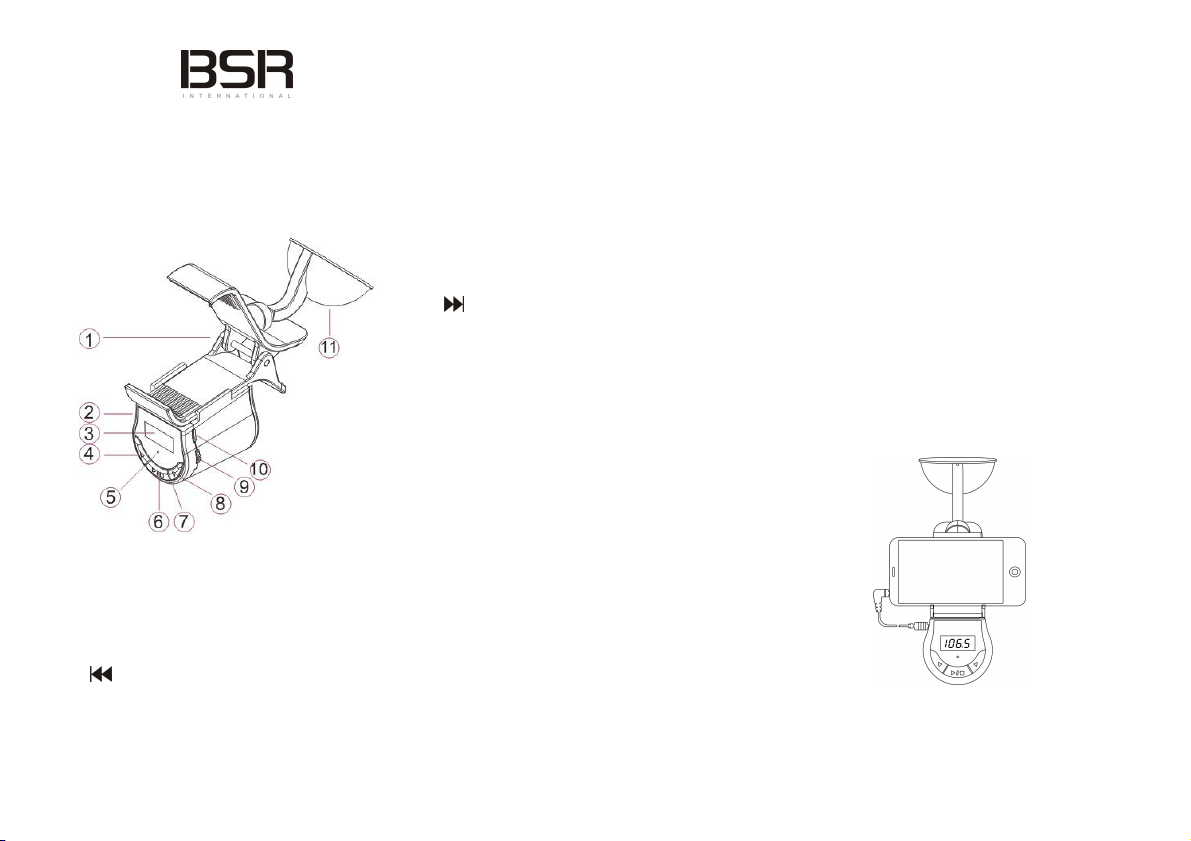
1. Overview
1: Cell phone fixing bracket clip
2: 3.5mm AUX input jack
3: LCD Display
4: Button – functions as follows:
A: In FM Transmit mode: Short press to adjust frequency
down by 0.1MHz increments. Long press for 1MHz
increments.
B: In Speaker (SP) mode: Press once: Back 1 track
5: Microphone
6: Long press: switch between SP mode / FM transmit.
Short press: mirrors an external headset, button will
answer/hang up phone call, or play/pause music.
7: LED Indicator: Blue: working; red: charging
8: Button – functions as follows:
A: In FM Transmit mode: Short press to adjust frequency
up by 0.1MHz increments. Long press for 1MHz
increments.
B: In Speaker (SP) mode: Press once: Skip 1 track
9: Power switch
10: DC5V - MICRO USB charger jack
11: Suction Cup
Product features
1: Universal connection suitable for all kinds of mobile
phones, tablets, GPS and other mobile de vices
2: Suitable for home/office/in-car use
3: Hands-free functionality
4: Ideal for navigation, in-car audio or DVR
5: Transmit music from cell phone to car audio
6: Dual mode: Built-in speaker or FM transmitter
7: Digitally Displays FM transmission frequency
8: Automatic power-saving mode
9: Stable suction-cup design
10: Built-in low consumption, rechargeable lithium battery
Operating Instructions
1: Attach the suction cup in desired position on glass
2: Clip in the cell phone and adjust to a suitable angle
3. Connect the provided audio cable with one end into
phone’s earphone jack, the other into 3.5mm input jack
4. Switch power on; the blue LED indicator lights up
5: When LCD screen displays "SP", it means switched to
Page 2

speaker mode status
6: When digital display shows a numeric value (fro m
88.1-107.9) it means FM transmitter mode is selected.
Ensure car’s FM radio is also turned on.
7: Press and hold the button to switch from SP mode
to FM transmit mode, or to control volume on cell phone
8: During a call, using the FM transmitter mode can achieve
better call results
A: Adjust the FM transmitter frequency:
1: Decrease 0.1MHz by per short pressing Decrease
1MHz by per long pressing.
2: Increase 0.1MHz by per short pressing
Increase 1MHz by per long pressing.
3: Adjust frequency on car radio as required
(Note: For best results try to select an empty or weak
frequency on car radio, for better performance.)
B: Control
1: Short-pressing the button will either Play/Pause or
Answer/Hang-up
C: Power-saving mode, automatically activates under
the following conditions:
1: No operation after 30 seconds on work mode
2: No audio input within 30 seconds on FM mode
3: Press any key to wake
D: Recharging the device
1. Recharge via the provided MICRO USB cable
3: The Red charging indicator light will illuminate while
charging; full charge time is about 2-3 hours.
4: The device can also be charged while in use; if so,
indicator light turns pink
5: The provided car charger can also be used with other
devices requiring DC5V 1A
Specifications
1: 3.5mm standard audio input jack
2: Speaker output power: 4 ohms / 2W
3: FM transmission frequency: 88.1 ~ 107.9MHz
4: Built-in lithium battery capacity: 300mAh
5: Charge: DC5V 1A
6: Maximum phone width supported: 10c m
7: Operating temperature -10 to 60ºC
8: Storage temperature -20 to 70ºC
9: Product size: 16cm (L) x 5.6cm (W) x 8cm (H)
10: N.W: 108g
Accessories
1: Standard 3.5mm audio cable (compatible with most
portable music devices)
2: Car Charger
3: MICRO USB charge cable
4: Manual
Our goods come with guarantees that cannot be excluded un
der the Australian Consumer Law. You are entitled to a rep
lacement or refund for a major failure and compensation for
any other reasonably foreseeable loss or damage. You are
also entitled to have the goods repaired or replaced if the go
ods fail to be of acceptable quality and the failure does not a
mount to a major failure.
 Loading...