

Page 1
Page 2
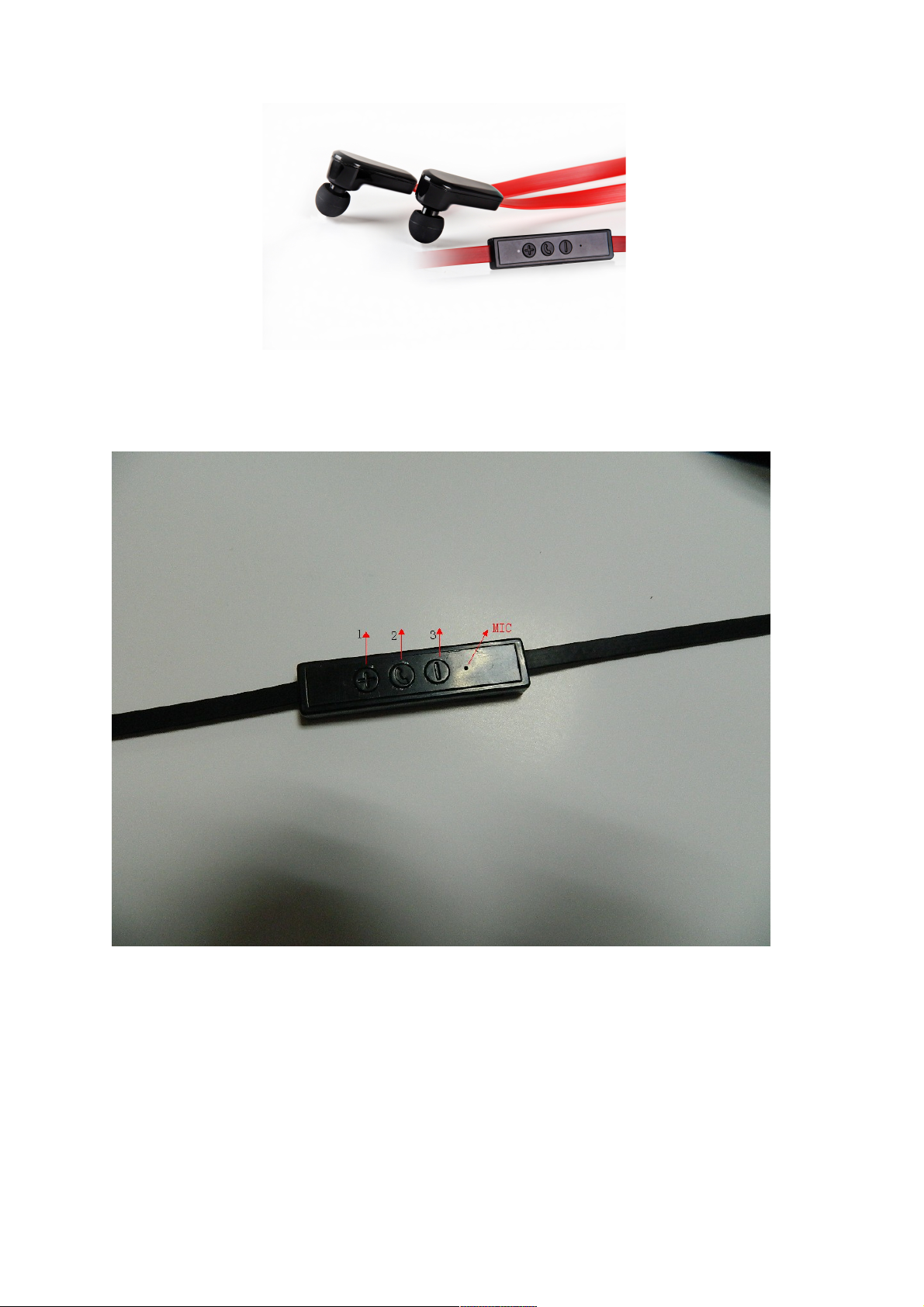
Button usage :(See attached picture
)
1.
Volume up / previous
2.
Power button
3.
Volume down / Next
Page 3

■Basic Specification
Cable Length : 610mm
Weight :14. 3g(bare unit without packaging
)
Charging interface :Micro USB
Button : three (previous/volume up + next/volume down + power button
)
Battery Specification:3.7V/55mAh*2
Charging specs:Micro USB
Charging input :5V/1.0A
Charging indication : Red LED light is on all the time
Charging time: around 2 hours.
Successive talking time : about 5-6 hours
Volume control:16 ranks, 3dB variation in each rank
Battery indication during working period: 100%-15%: blue LED light indicates the working status;
15%-5%: Red LED light indicates working status; Below 5%: Red LED light blinks quickly.
Working temperature: -20~70℃ during charging period.
Storage temperature :-40~80℃
■ Speaker and MIC
Speaker diameter:Φ10mm
Impedance: 32Ω
S.P.L:110dB S.P.L.at 1KHz
Rated power: 100mW
Frequency Response: 100Hz-9000Hz
MIC type : Capacitive
Microphone Unit:Φ4*1.5mm
Sensitivity :S.P.L:-42±3dB
Impedance:≤2.2KΩ
Frequency Response: 30-16,000HZ
Operating voltage: 4.5V
Page 4

■ Bluetooth part:
Bluetooth chip :CSR 8645
Bluetooth protocol version : Ver.4.0
Profile:HSP1.2/HFP1.6
Remote control to the player
:
Volume up/down, Previous /Next
Device name:KABTHFCBLKA
Pairing code :0000
RF transmit:+4dBm(Max)
Receiving sensitivity:-90dBm
Transmission Range (Hz) 20 - 20,000
Communication distance:about 10m
■Mechanical Reliability
Press button
:
200,000 times
Micro USB interface: 5000 times in and out
LED: brightness/light-leakage/luminosity must be the same
■Operation
Power ON: Press and hold the on/off button for 2 seconds, the red and blue LED light blinks in turn
and there will be ascending prompt tone from the headphone.
Power OFF: Press and hold the on/off button for 3s, red and blue LED light will be on simultaneously
and there will be descending prompt tone from the headphone.
Pairing: In the state of power-off, press and hold the on/off button for 3s, red and blue light will blink in
turn and the headset enters in pairing mode.
Answering calls: Press the on/off button to answer a phone call.
Ending calls: Press the on/off button during the phone call process.
Rejecting the phone number: Press and hold the on/off button for 2s when call is coming in.
Redial last phone number: Double click the on/off button, the headphone will dial last phone number
automatically and one Prompt tone will be heard from the headphone.
Volume control: In either music or conversation mode, hold the volume up or down button to increase
or decrease the volume continuously.
Previous/Next: In music mode, click the volume-up button once to skip to the previous song, or click
the volume-down button once to skip to the next song.
Pause/Play : In the state of music mode, click the on/off button to pause the music, then click again to
recommence playing.
Page 5

■LED Light indication
:
Charging – Red LED light on when charging. Blue LED light on when charging finished.
Standby – Blue light quickly blinks twice every 2 seconds.
Talking – Blue light blinks continuously.
Music mode – Blue light blinks twice every 1 second.
Power shortage – Red light blinks with prompt tone.
Pairing mode – Red and Blue lights blink in turn.
 Loading...