

Page 1
Elite Mounting Kit for Smartphone Action Cases
Quick Start Guide
KAACTCSACCA
With the Elite Mounting Kit, you can now take your smartphone to even more places. The kit allows you to
securely attach your smartphone Kogan Action Case to your helmet, surfboard, skateboard, snowboard,
bicycle, motorbike and more so you never miss a moment.
Product Checklist
The following items are included:
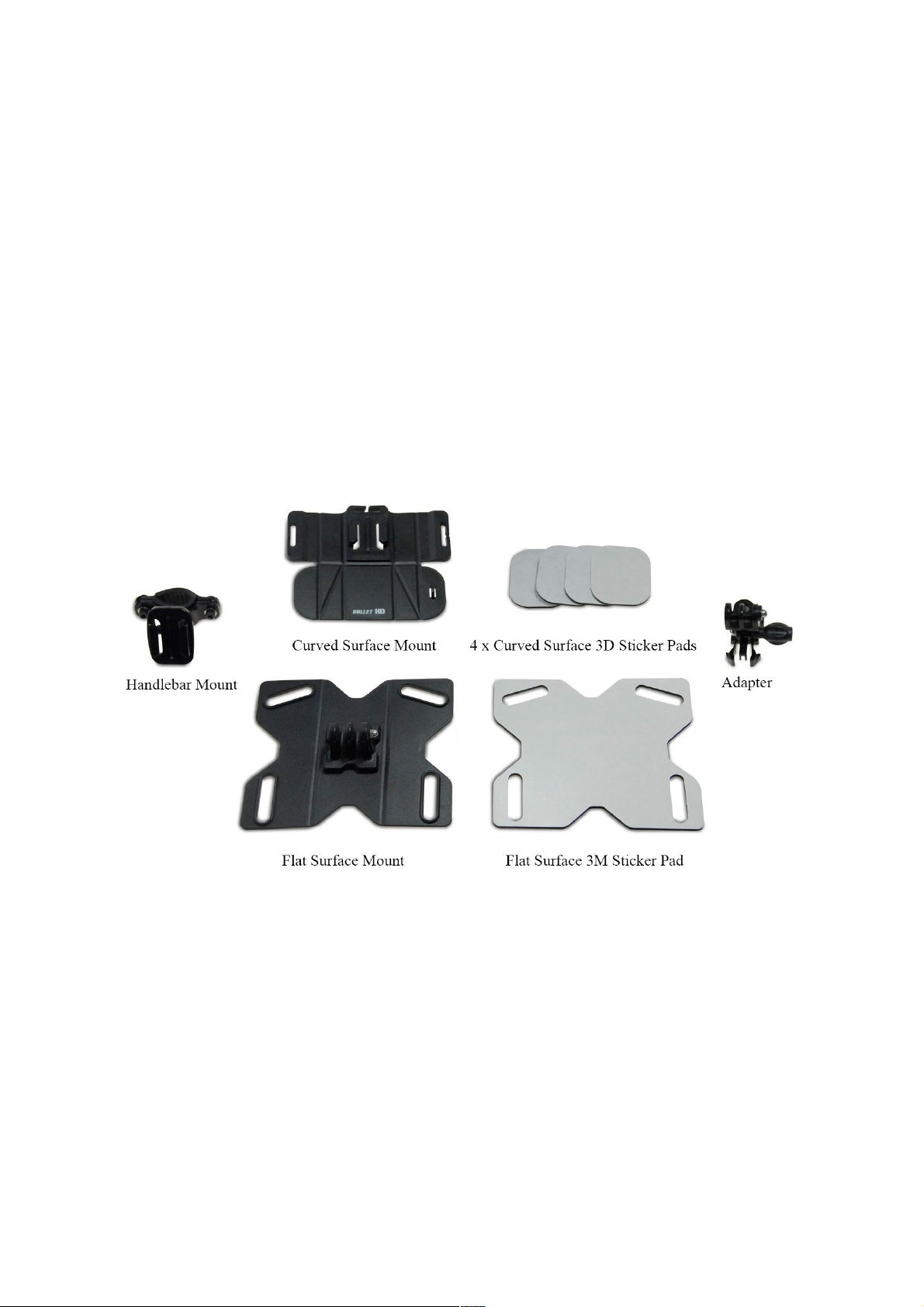
- Curved Surface Mount w/ 3M Sticker Pad (x4)
- Flat Surface Mount w/ 3M Sticker Pad
- Handlebar Mount
- Adapter
- Screws
- Washers
- 1 x Allen Key
Getting Started
Using the Flat Surface Mount
1. Firstly, prepare the surface you wish to use with the Flat Surface Mount by wiping it clean and then
drying it thoroughly.
2. Take the Flat Surface 3M Sticker Pad and peel one side. Place the now-revealed adhesive surface
upon the Flat Surface Mount in the corresponding manner. (i.e. see above. The sticker and the
mount should align perfectly)
3. Next, peel the remaining side of the flat surface 3M Sticker Pad, leaving the Flat Surface Mount with
an adhesive base. This will allow you to fasten the Flat Surface Mount to a surface of your choice.
4. Having secured the Flat Surface Mount, you are now ready to attach your Smart Phone Action case.
Simply align the corresponding segments of the objects and mesh the two objects together. Secure
the Smart Phone Action case to the Flat Surface Mount using the screws and tools provided.
NOTE: You do not require the use of the Adapter or Handlebar Mount to use the Flat Surface Mount with
your Smart Phone Action case.
Page 2

Using the Curved Surface Mount
1. Firstly, prepare the surface you wish to use with the Curved Surface Mount by wiping it clean and
then drying it thoroughly.
2. Take a Curved Surface 3M Sticker Pad and peel one side. Place the now-revealed adhesive surface
upon the Curved Surface Mount in the corresponding manner. (i.e. see above. The sticker and the
mount should align perfectly)
3. Repeat the second step, until each of the 3M Sticker Pads are attached to the Curved Surface
Mount.
4. Now you will need to reveal the unpeeled adhesive surfaces of each of the 3M Sticker Pads, leaving
the Curved Surface Mount with an adhesive base. This will allow you to fasten the Curved Surface
Mount to a curved surface of your choice.
5. Connect the Adapter with the corresponding port located on top of the Curved Surface Mount. You
may need to pinch the ends of the adapter to allow it to mesh with the mount. It should click into
place, fastened to the mount.
6. You are now ready to attach your Smart Phone Action case. Simply align the corresponding
segments of the case and the adaptor and mesh the two objects together. Secure the Smart Phone
Action case to the adapter using the screws and tools provided.
Using the Handlebar Mount
1. Firstly, take the Handlebar Mount. Loosen the screws locking the rubber handlebar grip into place.
2. Once a certain aperture is available, you will be able to enclose the Handlebar Mount around a
handlebar. Hold the handlebar mount in place, return the screws to their original placement and
fasten.
3. Connect the Adapter with the corresponding port located on the Handlebar Mount. You may need to
pinch the ends of the adapter to allow it to mesh with the mount. It should click into place, secured to
the mount.
4. You are now ready to attach your Smart Phone Action case. Simply align the corresponding
segments of the case and the adaptor and mesh the two objects together. Secure the Smart Phone
Action case to the adapter using the screws and tools provided.
Warnings / Disclaimers
• Contents include small parts and potential choking hazards.
• Do not disassemble the product.
• Please ensure all screws and parts are secure before use with Smartphone Action Case. In the
event of product misuse, Kogan will not be responsible for damage or injury if applicable.
• If you believe this kit requires repair/maintenance, please refrain from attempting to repair it yourself.
Refer all servicing matters to qualified personnel, or contact the Kogan Customer Support Team.
 Loading...