

Page 1

QUICK START GUIDE
43”
SERIES 8 JU8400
(KALED43JU8400VA)
4K UHD HDR LED TV
Page 2

Page 3
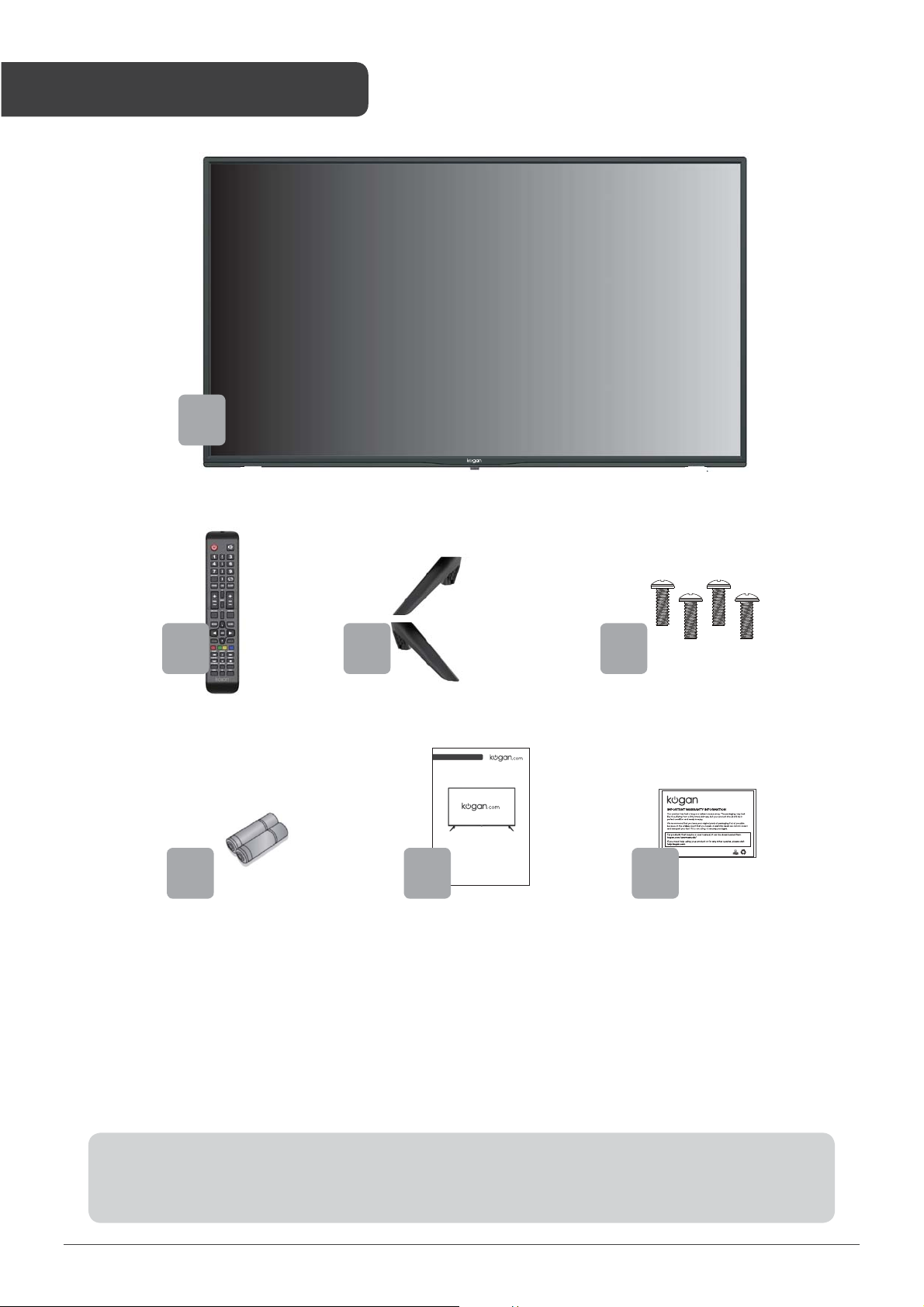
COMPONENTS
A
B C D
QUICK START GUIDE
50”
4K UHD HDR LED TV
SERIES 8 JU8300
E
A Kogan 43” 4K UHD HDR
LED TV
B Remote control
C Stand (x2)
F
(KALED50JU8300VA)
D M4 x 18mm screw (x4)
E AAA battery (x2)
F Quick-start guide
G Warranty card
G
NOT INCLUDED
Phillips head screwdriver, antenna cable, broadband internet connection.
3
Page 4
1
2
3
4
5
6
8
7
9
10
12
13
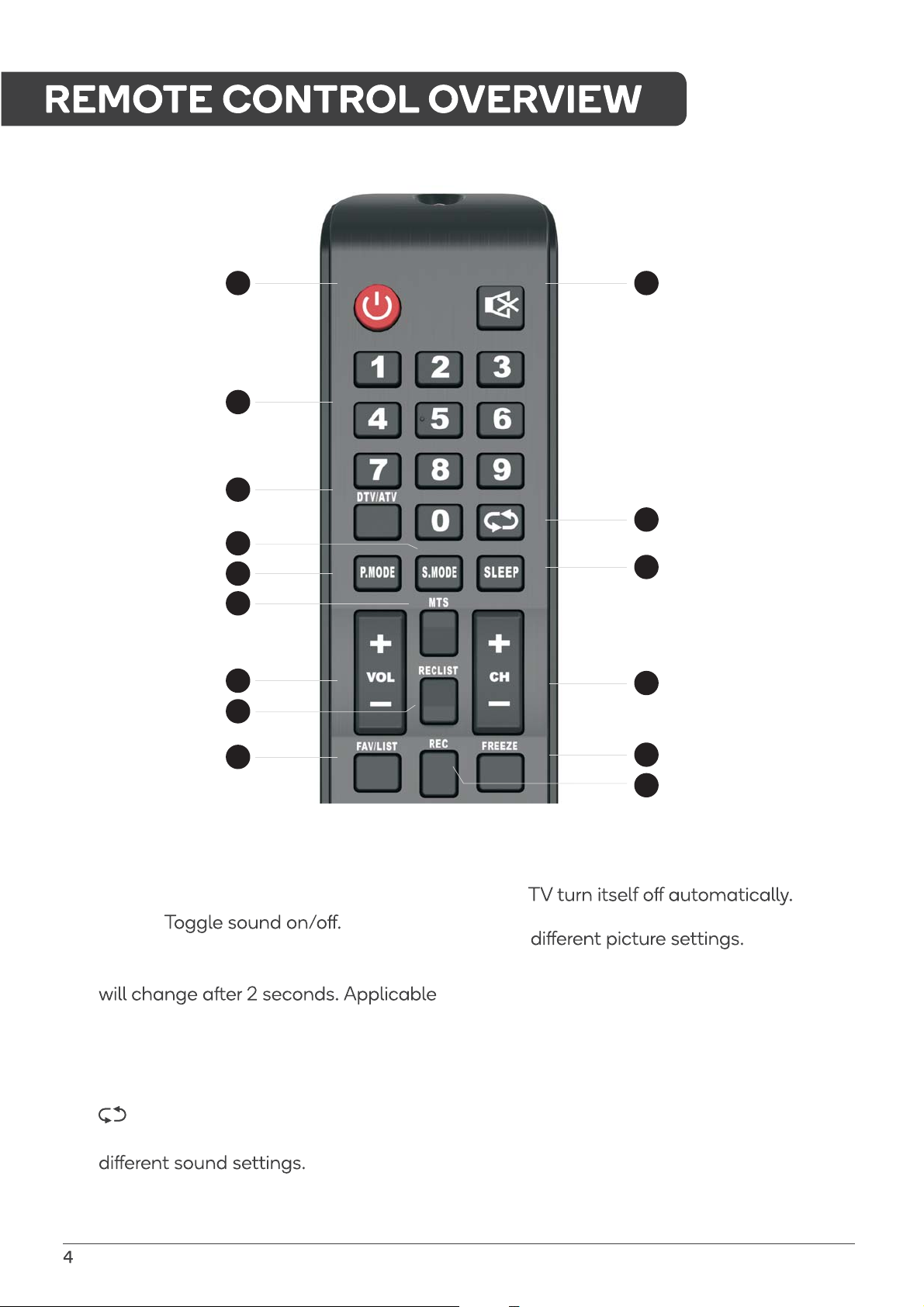
POWER: Set your TV to power on or
1
standby mode.
MUTE:
2
0-9: Press 0-9 to select a TV Channel
3
directly while watching TV. The channel
for entering page number in teletext
mode and so on.
DTV/ATV: Switch between Analog
4
and Digital TV.
: Return to the previous viewed program.
5
S.MODE: Press to cycle through the
6
11
14
15
SLEEP: Select amount of time before
7
P. MODE: Press to cycle through the
8
MTS: Press to search the NICAM modes.
9
VOL+/VOL-: Press to increase/decrease
10
the sound level.
CH+/CH-: Press to scan through channels.
11
RECLIST: Show the recorded list.
12
FAV/LIST: Press to open the favorite list.
13
Then you can select the favorite channel.
FREEZE: Press to freeze the picture.
14
15
REC: Record begin in PVR mode.
Page 5
16
18
17
19
21
22
25
26
29
31
32
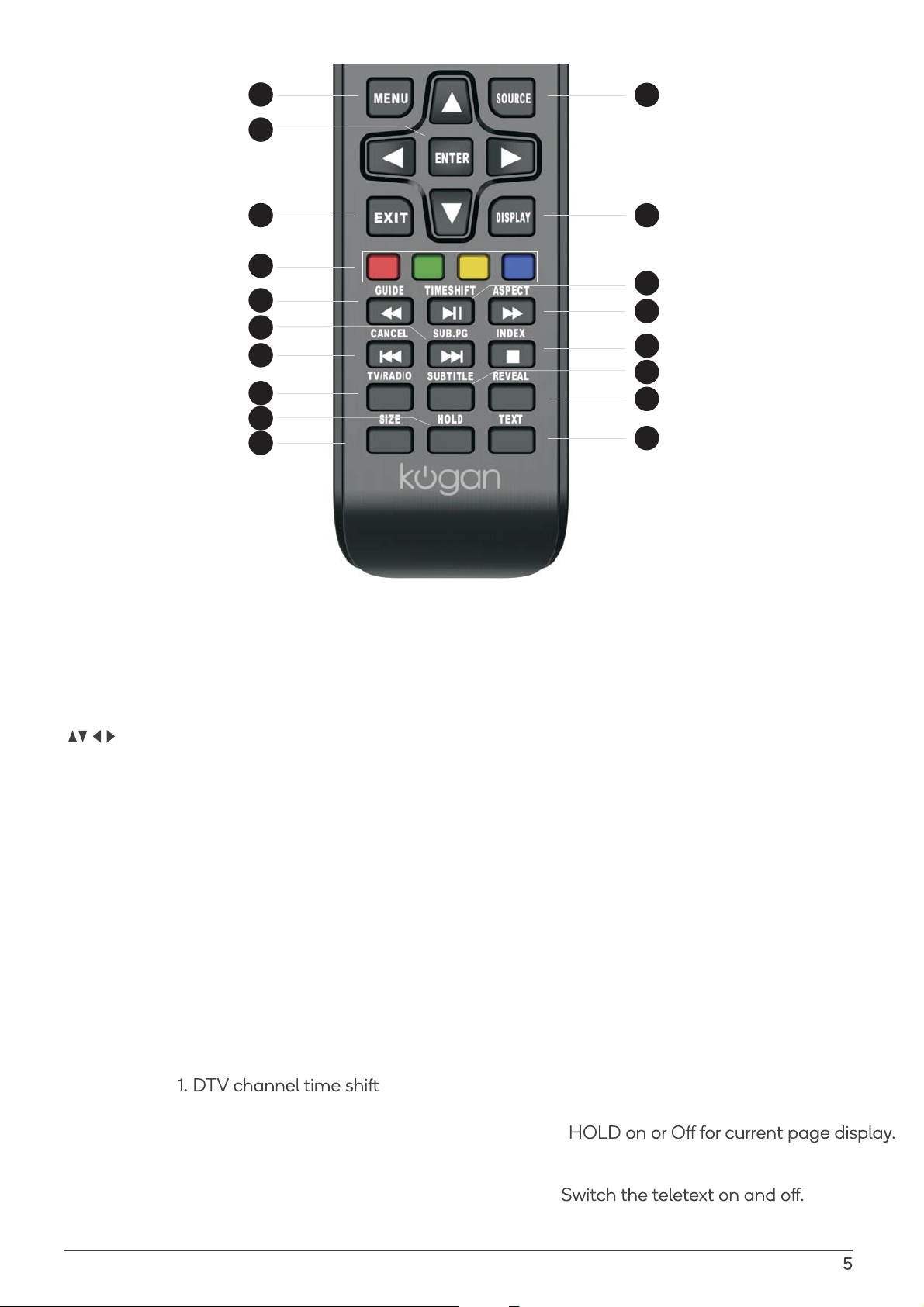
MENU: Allow you to navigate the
16
on-screen menus.
SOURCE: Open the main menu, press
17
to list the sources.
ENTER: Allow you to navigate
18
the on-screen menus and adjust the
system settings to your reference.
19
EXIT: Exit from the menu or sub-menu
and cancel the function in process
(if possible).
02
DISPLAY: Press to display the source
and channel’s info.
21
COLOUR BUTTONS: Teletex switch of the
analog parts, the items selection in the
menu of the digital parts and the practice
of the MHEG5 in the DVB MENU.
GUIDE: 1. Launches the EPG(Electronic
22
Program Guide)
2. Fast reverse in PVR or Media Player mode.
23
TIME SHIFT:
Function.
2. Play on PVR or Media Player mode.
24
ASPECT: 1. Select picture scale.
2. Fast forward in PVR or Media Player
mode.
20
23
24
27
28
30
33
SUB.PG: 1. Press to access sub page.
25
2. Next chapter in PVR or Media Player mode.
26
CANCEL: 1. When a page is selected in the
mode of text, it may take some time before
becomes available, pressing the CANCEL
it
Key will return to the TV Mode. When the
required page is found, the page number
will appear at the top of the TV Picture,
press the CANCEL Key to return to the
mode of text for you to browse this page.
2. Previous chapter in PVR or Media Player
mode.
27
INDEX: 1. Request the Index page in Teletext
mode.
2. Exit the playing function in PVR or Media
Player mode.
28
SUBTITLE: To show and set the language of
current DTV.
TV/RADIO: When watching channel, allows
29
you to switch between TV and Radio modes.
30
REVEAL: Reveal or Hide the hidden words.
31
HOLD:
32
SIZE: Change the size of display in Teletext
mode.
33
TEXT:
Page 6
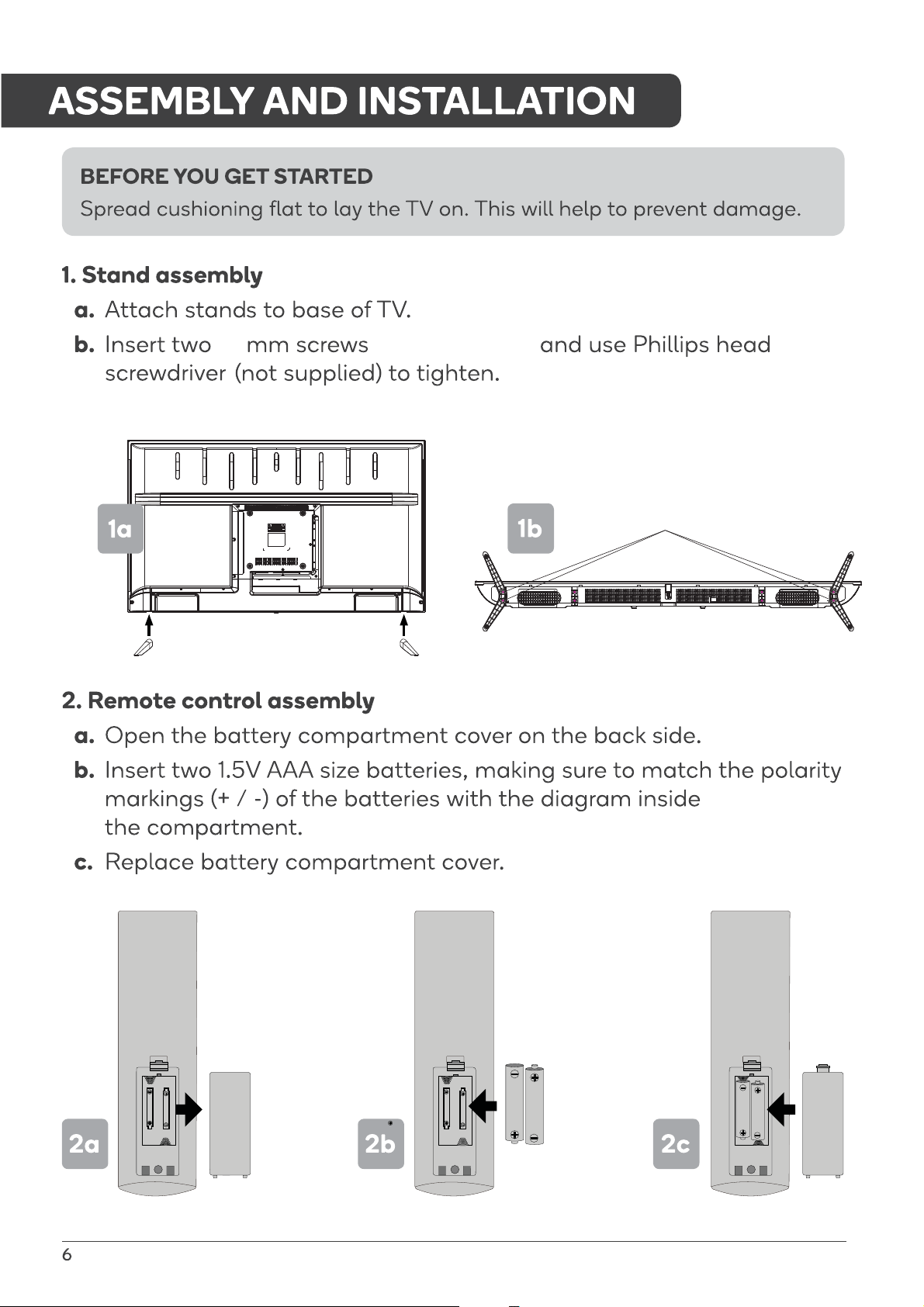
18
for each stand,
BB4X18 (4 PCS)
Page 7
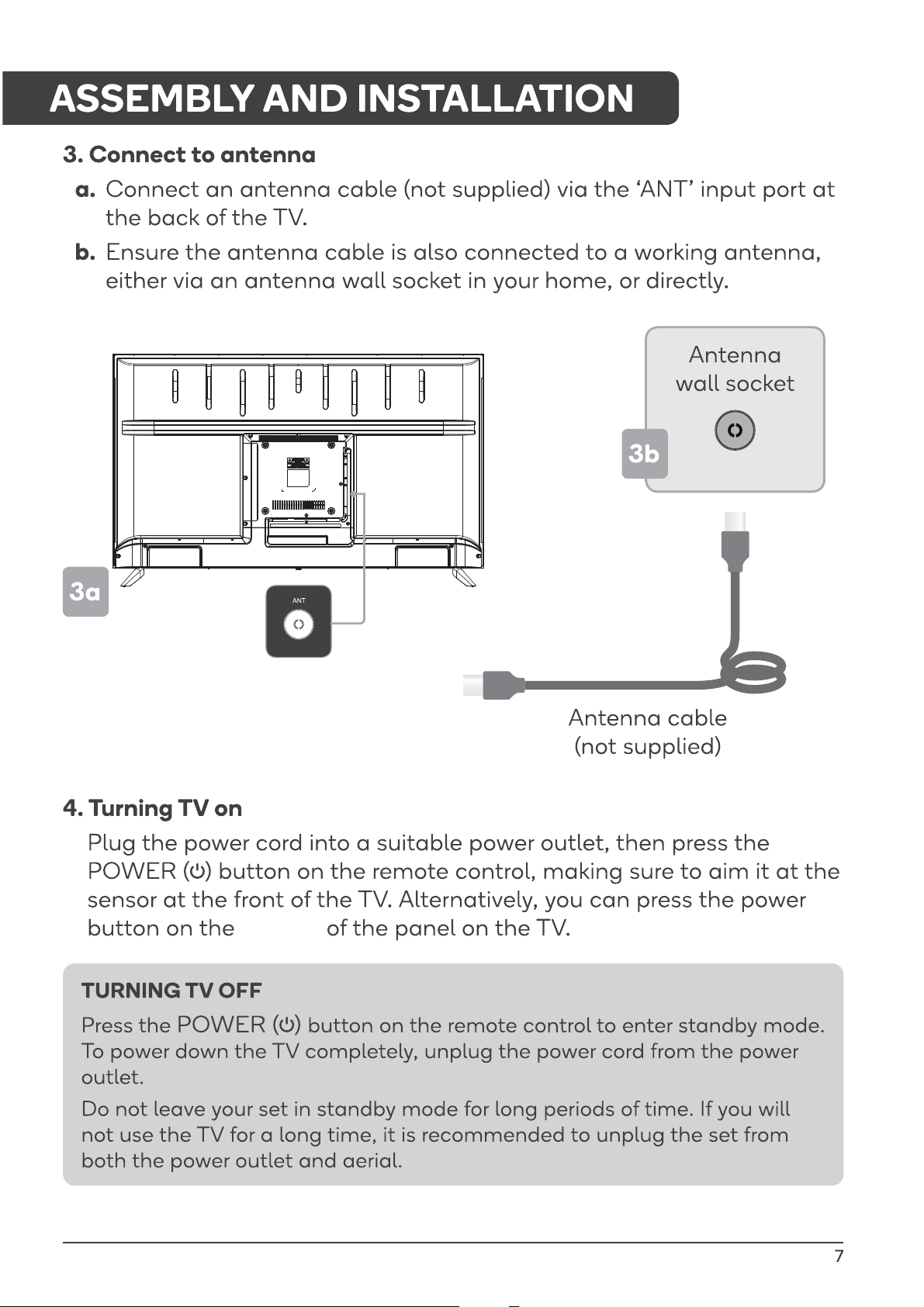
bottom
Page 8
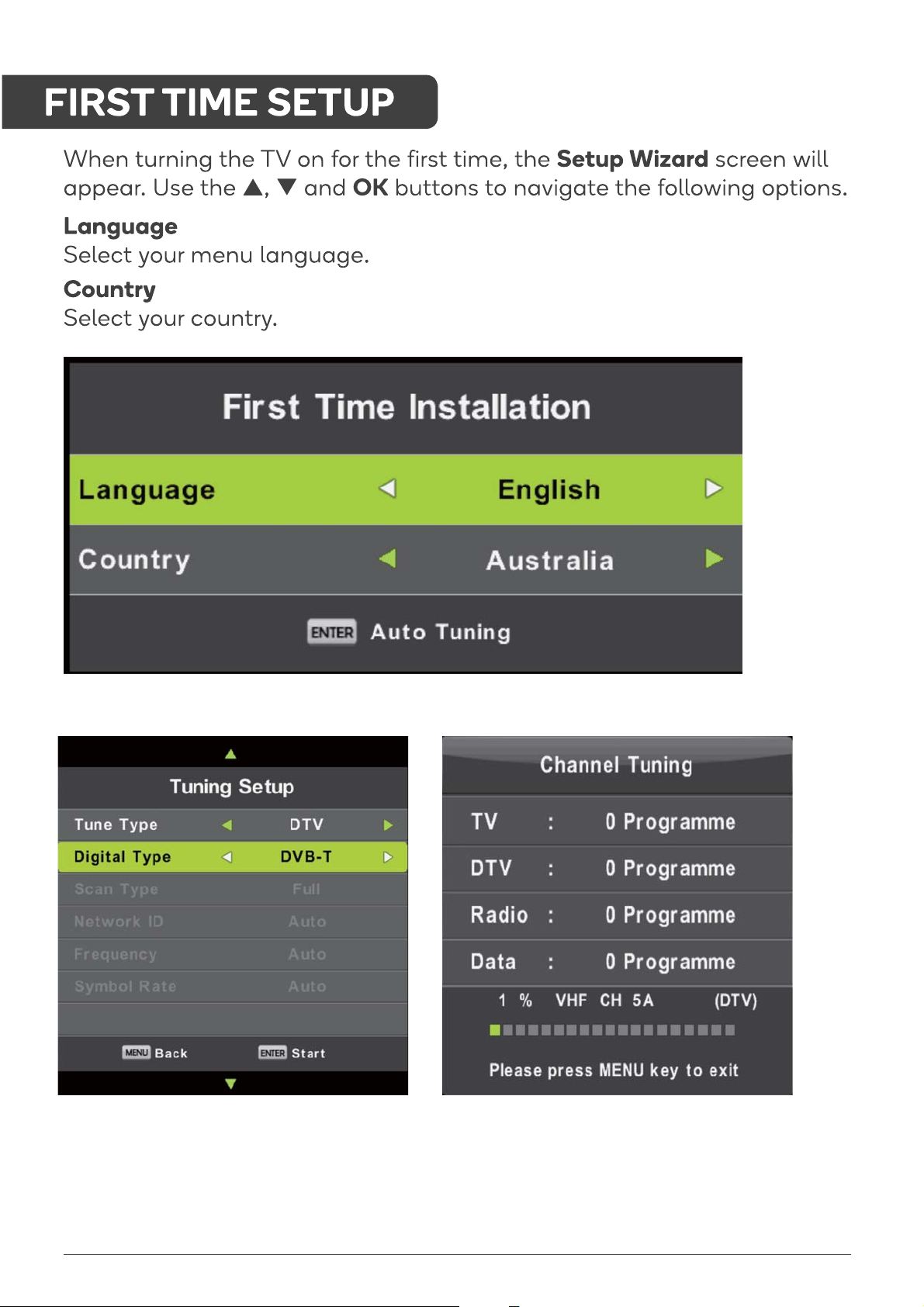
8
Page 9

BASIC TROUBLESHOOTING
Poor picture and sound quality
Ŋ Try a dierent channel
Ŋ Adjust the antenna
Ŋ Check all connections
No picture or sound in TV status
Ŋ Try another channel
Ŋ Press the TV/AV button
Ŋ Make sure TV is plugged in
Ŋ Check the antenna connection
No sound or sound is too low at
maximum volume
Ŋ Check the volume settings on any
external speakers connected to your
television
Ŋ Adjust the TV volume accordingly
Ŋ Check another channel or input
Ŋ Check that MUTE hasn’t been
turned on
Remote control malfunctions
Ŋ Replace remote control batteries
Ŋ Check battery terminals
Ŋ Remote is out of range, move closer
to TV
Ŋ Remove any obstructions between
remote and IR sensor of TV
Ŋ Make sure the power cord to your TV
is plugged in and turned on
Image is not centred on the screen
Ŋ Adjust the horizontal and vertical
position
“No Signal” on HDMI source
Ŋ Test the device with a dierent HDMI
cable
Ŋ Plug the device into ano
port
Ŋ Try a dierent device connected to
the same cable and port
ther HDMI
No colour, wrong colour or tints
Ŋ Make sure the program itself is
broadcast in colour
Ŋ Select the picture menu, then adjust
the colour and tint submenus
Picture rolls vertically
Ŋ
Check all connections
Blurred or snowy picture, distorted
sound
Ŋ Check direction, location and
connections to your antenna
Ŋ Issues may be caused by the use of
an indoor antenna (poor signal)
Ŋ Perform a factory reset on your TV
For our full TV troubleshooting guide
and extended User Manual for this
TV, head online to help.kogan.com
Page 10
Page 11

Need more information?
This is a Quick Start Guide, and while we hope that this
has given you the assistance needed for a simple set-up,
a full user guide outlining all of this product’s instructions
and features can be found online at help.kogan.com
 Loading...