

Page 1

KMCP-40, KMCP-60, KMCP-100
Coffee Percolators
This manual contains important information regarding your
KM Kitchen Monkey unit. Please read this manual thoroughly prior to
equipment set-up, operation and maintenance. Failure to comply
with regular maintenance guidelines outlined in this manual may
void the warranty. PLEASE READ!
Page 2

WARNINGS
Do not touch any hot surfaces
Do not immerse unit, cord or plug in liquid at any time
Unplug cord from outlet when not in use and before cleaning
Plug only into a 3-hole grounded electrical outlet
Do not operate unattended
Do not use this unit for anything other than intended use
Do not use outdoors
Always use on a firm, dry and level surface at least 12” from walls or any other obstruction
Do not use if unit has a damaged cord or plug, in the event the appliance malfunctions, or has been damaged in
any manner
Keep children and animals away from unit
Any incorrect installation, alterations, adjustments and/or improper maintenance can lead to property loss and
injury. All repairs should be done by authorized professionals only
Ensure that the designated power supply is adequate for continual usage and the voltage is correct
Scalding may occur if the lid is removed during the brewing cycle.
TO USE
1. Clean the filter basket, cover, percolator tube and the inside of the tank with a non- abrasive
detergent.
2. Pour cool water into the urn to fill at least half of the total capacity of the urn.
3. Cover the filter basket with the basket cover.
4. Center the percolator tube into the basket and tray. Make sure that the base of the tube is positioned
securely in the well of the urn.
5. Center the filter basket into the percolator tube and place ground coffee in the basket. Put the
basket cover back on and put the cover on the urn.
6. Plug the cord into your electrical outlet and turn the power switch on. The switch will light up.
7. When the indicator lamp lights up the brewing process is complete.
8. The second heating system will start to operate automatically to keep the coffee warm.
9. When there are only about 3 cups of coffee left in the urn, turn the power switch off and unplug the
cord from the outlet.
10. To reheat cold coffee in the urn, there must be at least 12 cups of coffee in the tank to reheat. Simply
re-plug the cord back into the electrical outlet and turn the power switch on.
SEDIMENT REMOVAL
*On areas of the heating element, hard water will cause chalk and limestone to accumulate over time. It is
recommended that you clean the percolator and remove the residue.
1. Pour 100 ml. of fresh lemon juice into the urn body
2. Wait 5-6 minutes to allow the lemon juice to run through the sediments
3. You can use a soft bristle brush to clean the heating element
4. Repeat steps 1-3 until limestone is removed
5. Use a dry cloth to wipe the residual liquid
6. Pour clean water into the urn until and rinse until lemon smell is gone
Page 3
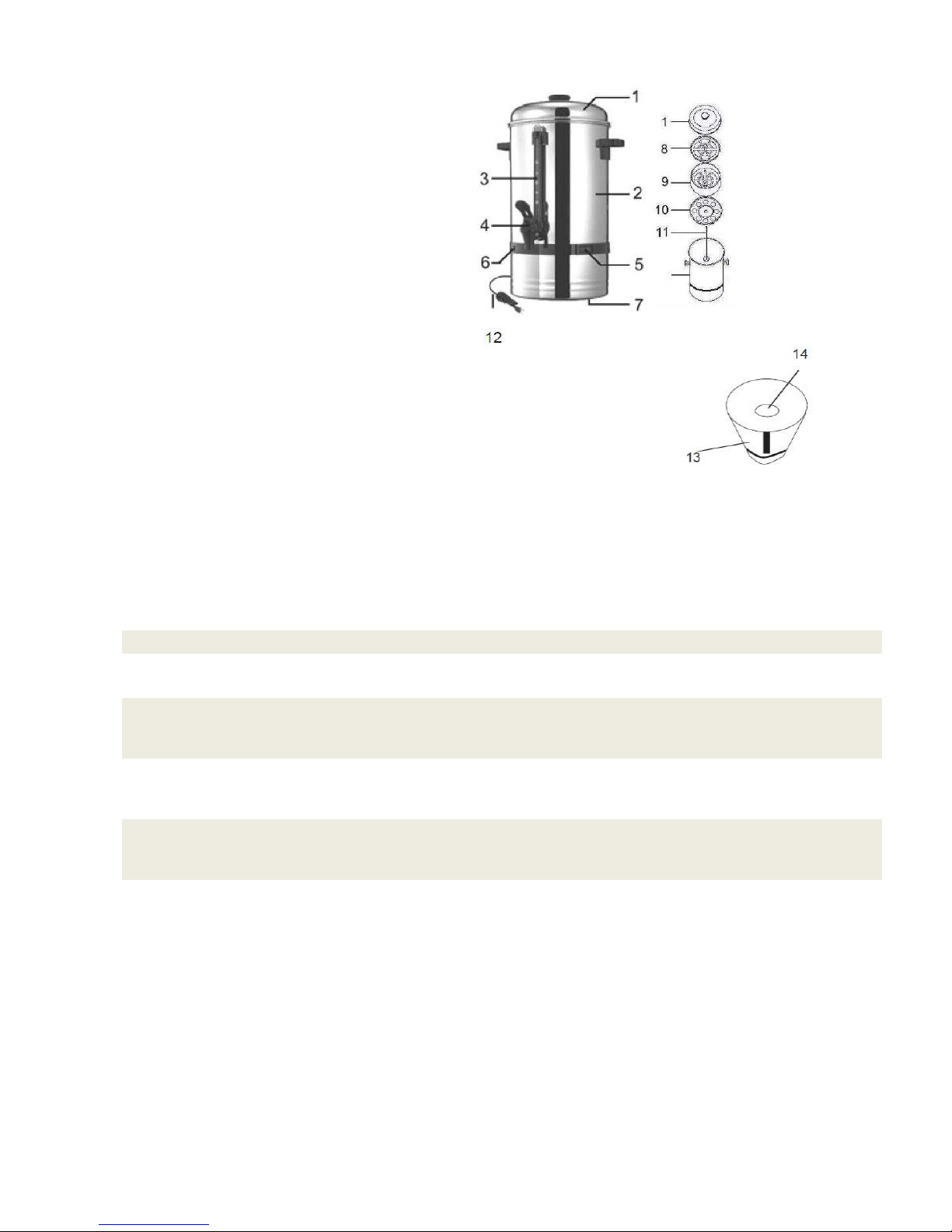
Parts – please check prior to installation
Problem
Cause
Solution
Not working as well as
expected
Unit is not on a dedicated circuit
Unplug unit, plug into a dedicated line and
retry
Leaking from the area where
the spigot attaches to the
urn
Nut/bolt is loose
Inside the urn, there is a nut/bolt that may
loosen over time. Tighten the nut/bolt and
leaking will stop.
Leaking from the area where
the spigot attaches to the
graduation
The fitting under the graduation
water indicator has become loose
Tighten the small black fitting underneath
the water indicator and the leaking will
stop.
Leaking from the area where
the spigot lever and spout
meet
The area is loose
Twist the lever to tighten and the leaking
will stop.
1. Cover
2. Urn
3. Level Indicator
4. Faucet
5. Power Switch
6. Indicator Lamp
7. Urn Base
8. Basket Cover
9. Filter Basket
10. Basket Tray – not included on CP-40
11. Percolator Tube
12. Cord
13. Bottom of Urn
14. Heating Element
TROUBLESHOOTING - Troubles listed are for reference. If any fault occurs, please discontinue use. Do not attempt
to repair yourself. This will void the warranty.
UNDER NO CIRCUMSTANCES SHOULD THIS UNIT BE OPERATED DRY.
IT IS ALSO NOT INTENDED TO SIMPLY BOIL WATER.
Page 4
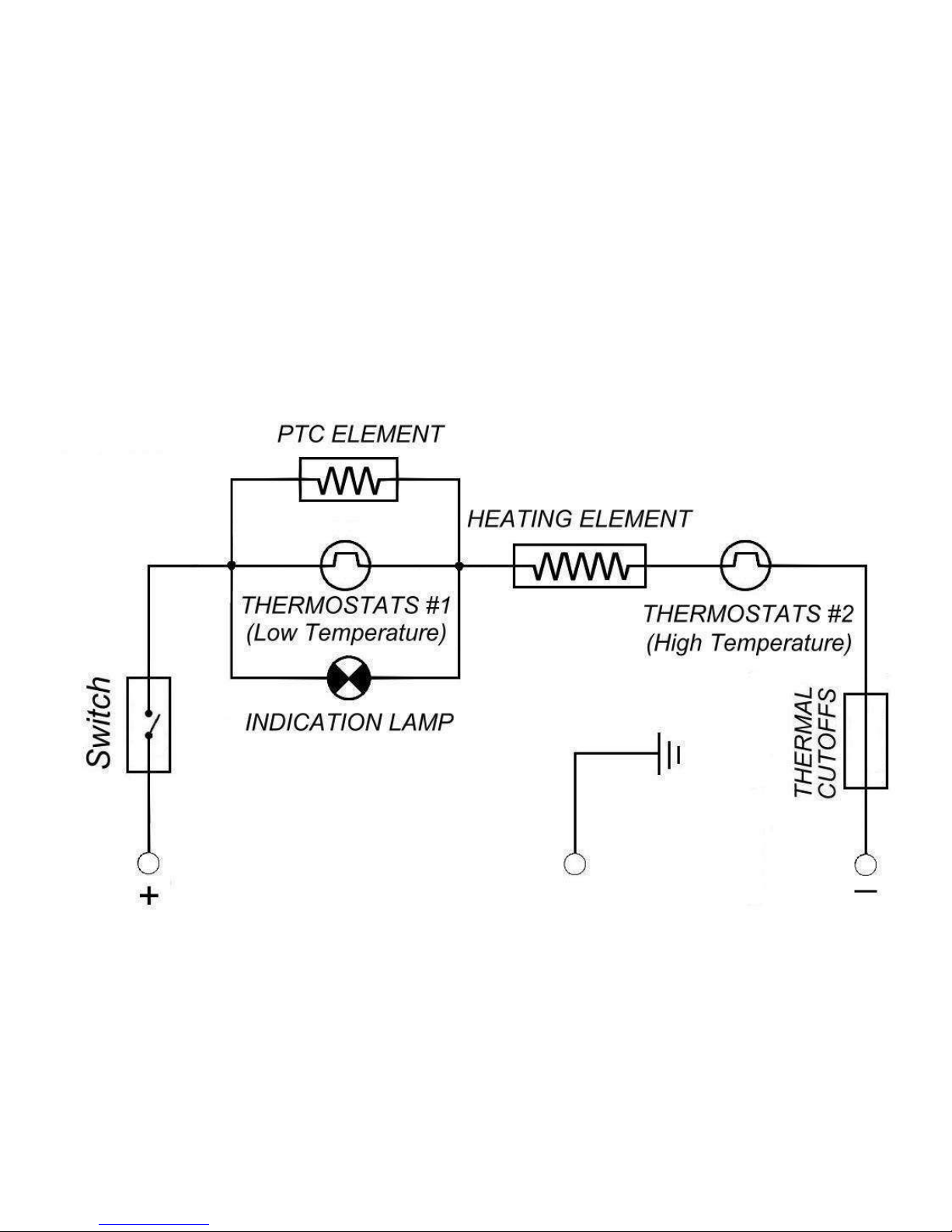
CP-40CP-40
VER811
VER811
KMCP-40
Page 5
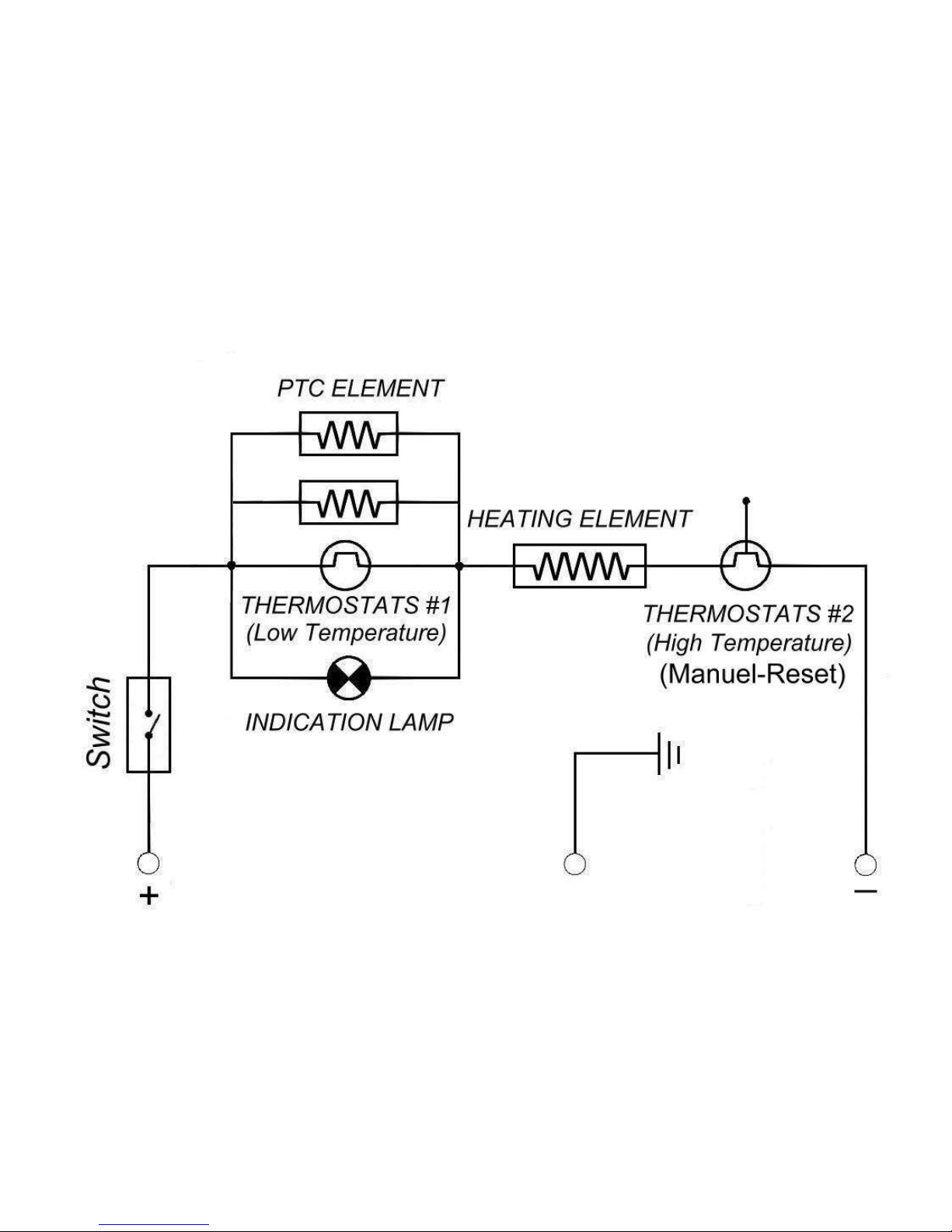
CP-60
CP-100
CP-60
CP-100
VER811VER811
KMCP-60
KMCP-100
Page 6
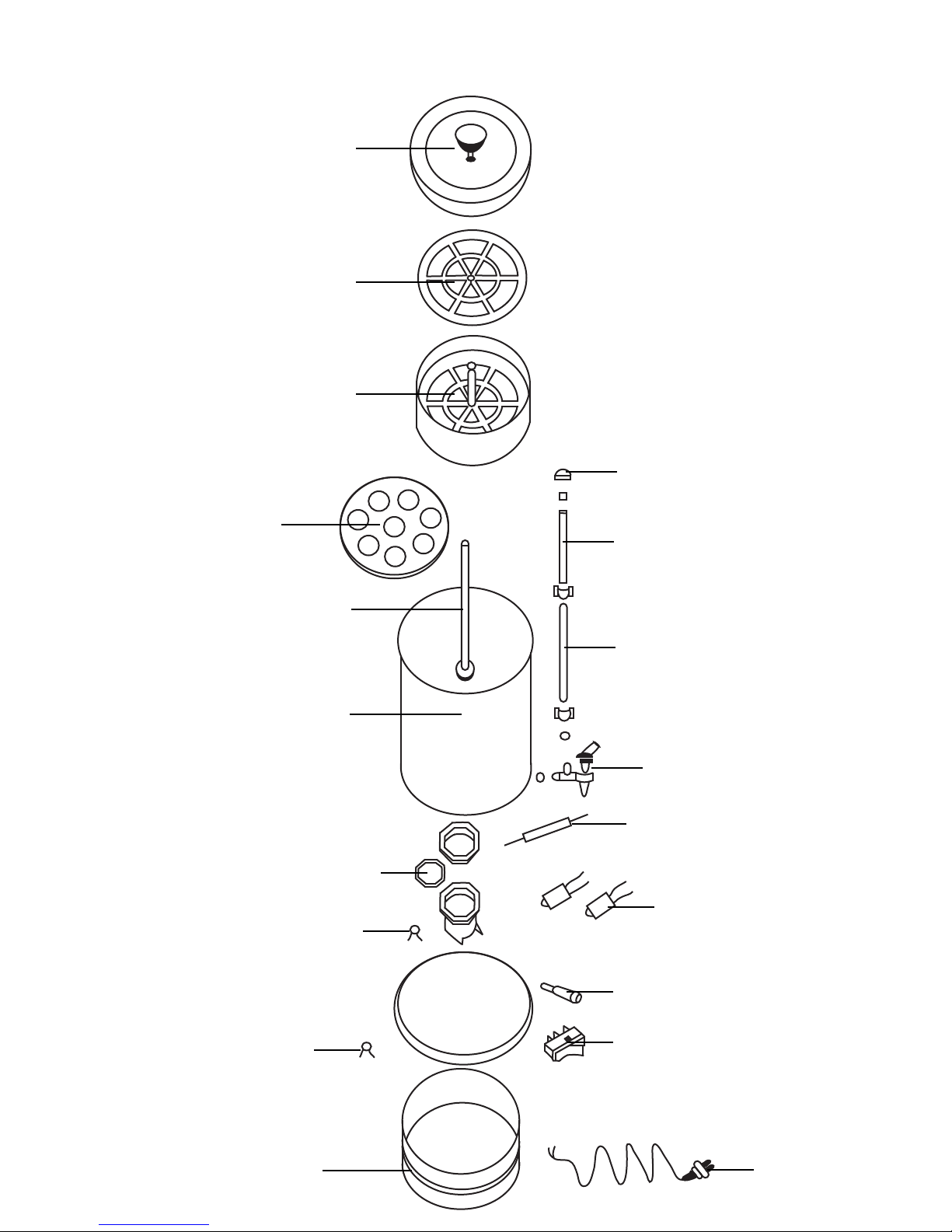
CP-40
CP-60
CP-100
VER811
1
2
3
4
11
18
12
13
14
17
15
16
19
5
6
7
8
9
10
KMCP-40
KMCP-60
KMCP-100
Page 7
Coffee Perculators - KMCP-40, KMCP-60, KMCP-100
Reference Number
KMCP-40
Part Number
KMCP-60
Part Number
KMCP-100
Part Number
Description
1 CP4-1 CP-01 CP-01 Cover with Knob
2 CP4-2 CP-02 CP-02 Basket Cover
3 CP4-3 CP-03 CP-03 Basket
4 CP4-4 CP-04 CP-04 Basket Base
5 CP4-5 CP6-5 CP1-5 Stem
14 CBCP-6 CBCP-6 CBCP-6 Indicator Light - Red
7 CP-7 CP-7 CP-7 High Heat Element
8 CP-8 CP-8 CP-8 Low Heat Element
9 CP-9 CP-9 CP-9 Thermostat High Temp
10 CP-10 CP-10 CP-10 Thermostat Low Temp
11 CP4-11 CP6-11 CP1-11 Glass Graduation
12 CP4-12 CP6-12 CP1-12 Sleeve for Graduation
13 CP-13 CP-13 CP-13 Spigot
15 CP-15C CP-15C CP-15C Power Cord and Strain Relief
16 na na na Base
17 CP-17 CP-17 CP-17 Lighted Switch - Red
18 CP-18 CP-18 CP-18 Screwcap for Sleeve
19 CP-19 CP-19 CP-19 Thermal Cutoff
VER811
Page 8

Kitchen Monkey Equipment warrants its equipment against defects in materials and workmanship, subject to the
following conditions:
Kitchen Monkey Equipment is warranted for one year, effective from the date of purchase by the original owner. A copy
of the original receipt or other proof of purchase is required to obtain warranty coverage. This warranty applies to the
original owner only, and is not assignable.
Should any product fail to function in its intended manner under normal use within the limits defined in this warranty, at
Kitchen Monkey Equipment's discretion, such product will be repaired, replaced with a refurbished unit, or replaced
with a new unit by Kitchen Monkey Equipment, after defective unit has been inspected and defect has been confirmed.
Kitchen Monkey Equipment does not assume any liability for extended delays in replacing any item beyond its control.
This warranty does not apply to rubber and non-metallic synthetic parts that may need to be replaced due to normal usage,
wear or lack of preventative maintenance.
This warranty covers products shipped into the 48 contiguous United States, Hawaii, and metropolitan areas of Alaska
and Canada. Warranty coverage on products used outside the 48 contiguous United States, Hawaii and metropolitan
areas of Alaska and Canada may vary.
The following conditions are not covered by warranty:
• Equipment failure relating to improper installation, improper utility connection or supply and problems due to improper
ventilation.
• Equipment that has not properly been maintained, damage from improper cleaning, and water damage to controls.
• Equipment that has not been used in an appropriate manner, or has been subject to misuse, neglect, abuse, accident,
alteration, negligence, damage during transit, delivery or installation, fire, flood, riot, or act of God.
• Equipment that has the model number or serial number removed or altered.
• Equipment on which the security seal has been broken.
Kitchen Monkey Equipment One Year Limited Warranty
If the equipment has been changed, altered, modified, or repaired without express written permission from ACE, then the
manufacturer shall not be liable for any damages to any person or to any property, which may result from the use of this
equipment thereafter.
This equipment is intended for commercial use only and this warranty is void if equipment is used in other than a
commercial application.
For warranty and non-warranty related issues, technical support, purchase replacement parts and warranty registration
visit www.kitchen-monkey.com. Please have your model number, serial number and proof of purchase ready. It is not
necessary to contact the place where you originally purchased your product from.
“THE FOREGOING WARRANTY IS IN LIEU OF ANY AND ALL WARRANTIES EXPRESSED OR IMPLIED
INCLUDING ANY IMPLIED WARRANTY OF MERCHANTABILTY OR FITNESS FOR PARTICULAR
PURPOSES AND CONSTITUES THE ENTIRE LIABILITY OF ACE. IN NO EVENT DOES THE LIMITED
WARRANTY EXTEND BEYOND THE TERMS STATED HEREIN.”
 Loading...