

Page 1
OPERATING GUIDE
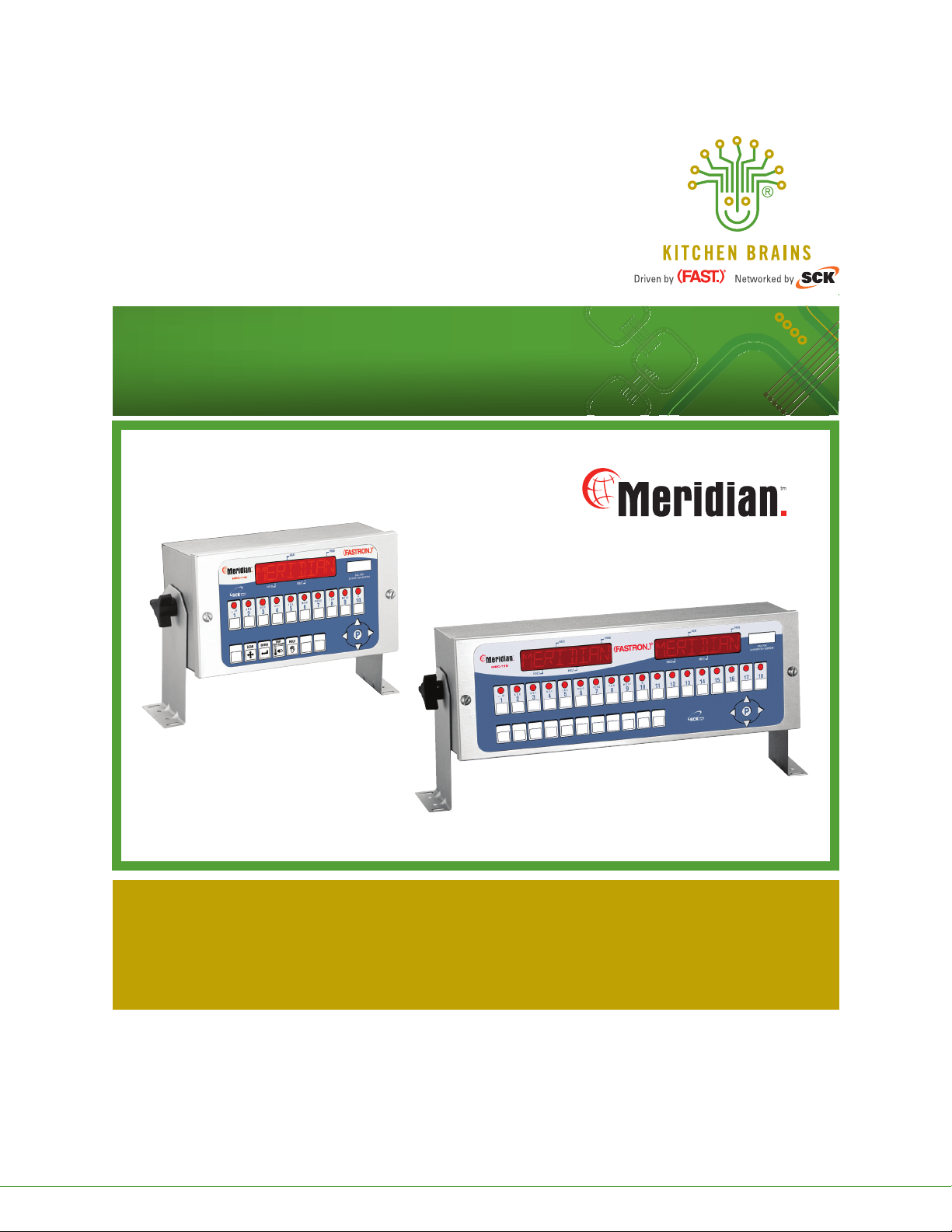
(FASTRON.)® MERIDIAN Series Freestanding Cooking Computers
Operating (FASTRON.)® MERIDIAN Series Freestanding Cooking Computers:
•MEC-110 (10 Product Keys)
•MEC-118 (18 Product Keys)
Save the instructions
for future reference.
www.KitchenBrains.com
This document contains confidential information. The dissemination, publication, copying, or duplication of this document or the software described herein without prior written authorization is strictly prohibited.
Kitchen Brains © 2012 | www.KitchenBrains.com | 229-51331 E
24/7 Toll-Free Technical Support
1-800-243-9271
(from the U.S., Canada and the Caribbean)
Page 1 of 12
Page 2

Operating 10 & 18 Product Key (FASTRON)® MERIDIAN Freestanding Cooking Computers
NOTICES
Before you start, please read entire manual.
Kitchen Brains is not liable for any use of product not
in accordance with Kitchen Brains’ installation and
operation instructions.
Before using this equipment, or for any questions on
the operations of the appliance, consult and follow all
instructions and safety warnings found in the appliance
operator’s manual supplied from the manufacturer of
the appliance.
Not all features are available on some models.
COOKING COMPUTER OPERATING
ENVIRONMENT
The solid state components in this timer are designed to
operate reliably in a temperature range up to 158°F/70°C.
Before installing this timer, it should be verified that the
ambient temperature at the mounting location does not
exceed 158°F/70°C.
CLEANING THE COOKING COMPUTER
Using a clean damp cloth, wipe down your computer daily
using a commercial quality foodservice-approved detergent.
Do not allow oil to build up on any part of the computer.
Required Tools Prior to Starting Installation:
• Straight Screwdriver
• Power Drill
• #29 High-Speed Drill Bit
• 10/32 Tap
• Center Punch
• Hammer
INSTALLATION
1. Turn appliance power OFF.
2. Choose your mounting location.
3. Attach 2 mounting brackets to the Meridian Cooking
Computer using the 2 wing nuts provided. Be sure
to put 1 star washer on each side of the mounting
bracket.
4. Hold the computer against your mounting surface.
5. Mark 4 mounting holes.
6. Drill and tap the mounting holes.
7. Secure the Meridian Cooking Computer to the
mounting surface using the 4 screws provided.
NEVER use chemical or abrasive cleaners on
your computer. The computer’s overlay may
be damaged.
This document contains confidential information. The dissemination, publication, copying, or duplication of this document or the software described herein without prior written authorization is strictly prohibited.
Kitchen Brains © 2012 | www.KitchenBrains.com | 229-51331 E
Page 2 of 12
Page 3
Operating 10 & 18 Product Key (FASTRON)® MERIDIAN Freestanding Cooking Computers
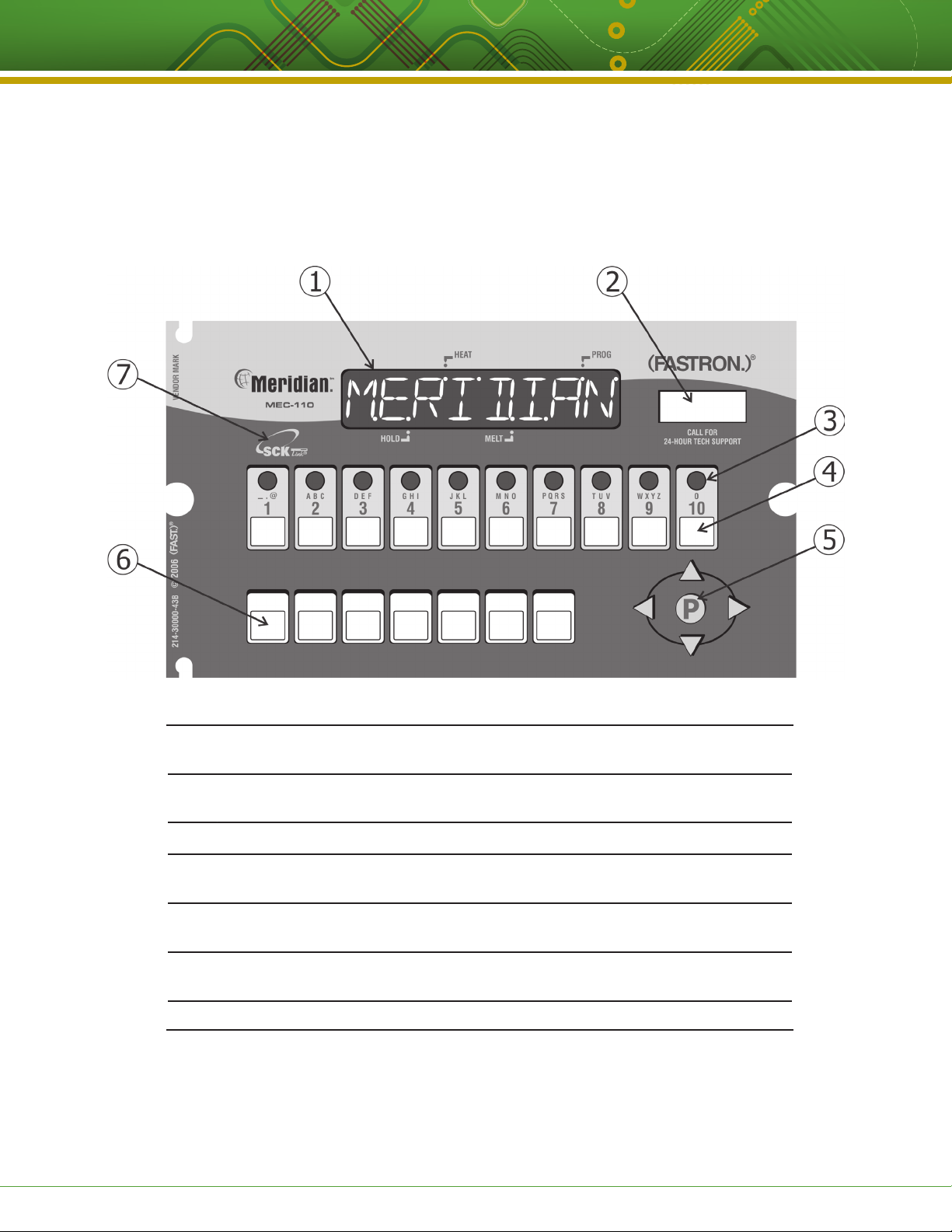
(FASTRON.)® MERIDIAN COOKING COMPUTER FEATURES
Programming codes
Product Programming 1 7 2 4
System Programming 3 2 2 8
1 LARGE LED DISPLAY: 8-character, 14-segment. Displays programming and cook
cycle information.
2 SERVICE WINDOW: Locate the computer’s serial number and tech support phone
number easily.
3 INDICATOR LIGHTS: Lit when there’s an active cook cycle and in programming mode.
4 PRODUCT KEYS: Press to start a cook cycle. Also used in programming.
REPLACEABLE MENU STRIP: Make menu changes quickly and easily.
TM
5 PROGRAMMING CENTER: (FAST.Nav)
— Easy mobile phone-like programming with
predictive text. Access programming mode and change cooking parameters.
6 FEATURE KEYS: Used to access programming functions and computer features;
keys will vary by model.
7 SCK Link®: Signifies that your control is communications-capable.
This document contains confidential information. The dissemination, publication, copying, or duplication of this document or the software described herein without prior written authorization is strictly prohibited.
Kitchen Brains © 2012 | www.KitchenBrains.com | 229-51331 E
Page 3 of 12
Page 4
Operating 10 & 18 Product Key (FASTRON)® MERIDIAN Freestanding Cooking Computers
FEATURES EXPLAINED
Programmable Action Alarms
Up to three action alarms can be programmed for each
product key. An action alarm alerts the operator to perform
some action at a pre-programmed time.
Fahrenheit or Celsius Temperature Display
The computer can be configured to display the temperature
in degrees Fahrenheit or Celsius (accessible through
System Programming mode).
Programmable (FAST.Flex)TM Timing Mode
To insure consistent, high-quality food product, flex time
will adjust the actual cook time taking into consideration
the temperature variation due to load size, initial product
temperature, product moisture content, and other factors
affecting the cycle.
OPERATING THE COMPUTER
Programmable Hold Time Linking
Each product key can be linked to an independent hold timer,
or multiple product keys can be linked to a single hold timer.
Programmable Hold Times
Product key hold times can be programmed to track product
quality through a specified holding period. The computer will
sound an alarm when the product’s hold time has expired
alerting the operator to discard the product.
Automatic Least Hold Display
Product with the least amount of hold time remaining will
be shown in the display. Pressing and holding the HOLD key
allows you to view each active product’s remaining hold time.
Programmable Operating Mode
The computer can be programmed to operate as either a
computer or timer.
Start a Cook Cycle
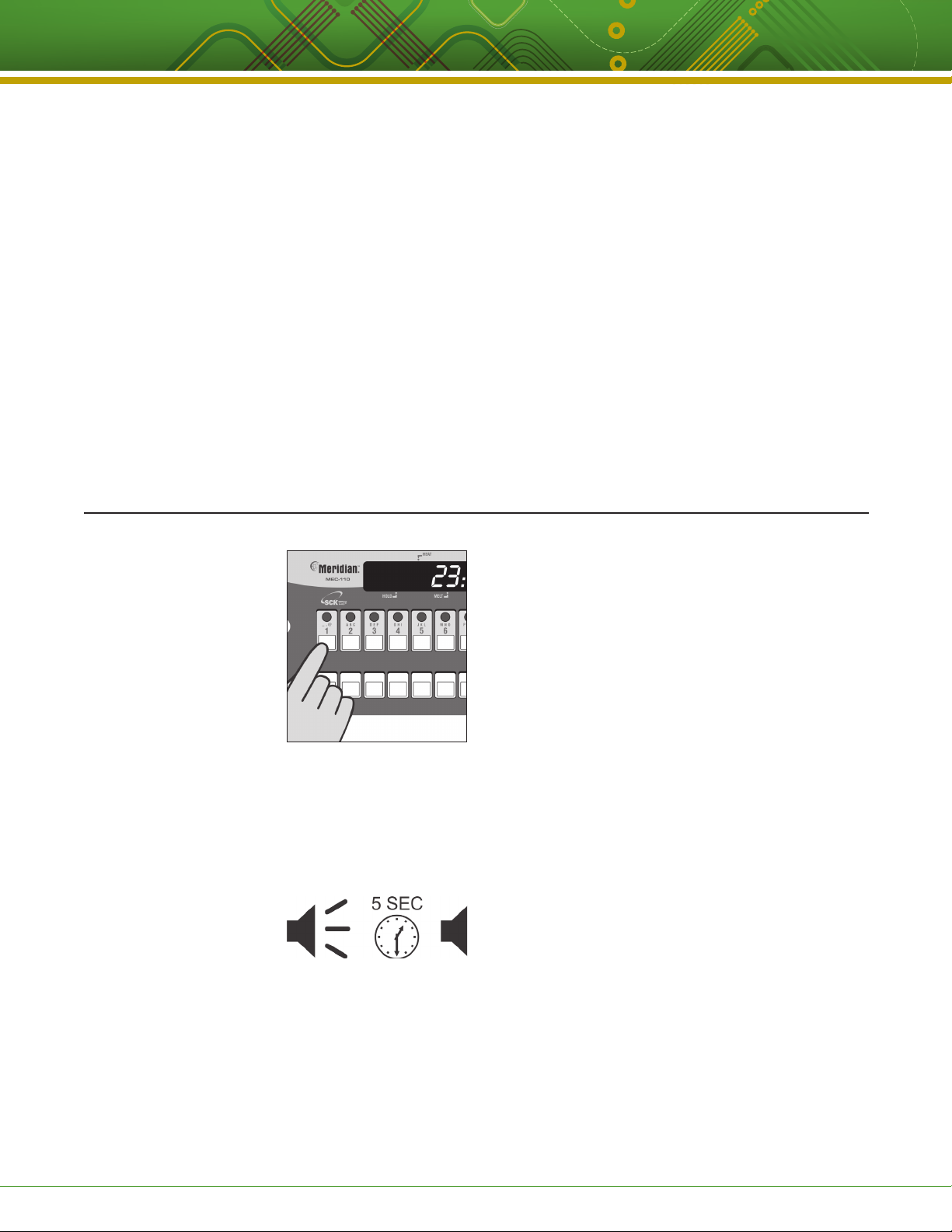
Press any product key to start a cook cycle. If the key is
programmed, the correct cooking time will be displayed
and will immediately start to count down in minutes and
seconds. DONE will display when the cook cycle has
ended.
If DONE is displayed immediately and the unit starts to
signal, the product key being pressed is not programmed.
Stop a Cook Cycle
Press and hold an active product key for 3 seconds.
Timing will stop.
Respond to a DONE Alarm
Cancel the signal by pressing the same product key used
to start the cook cycle.
Action Alarms
If the computer is programmed for action alarms, they
will signal at a preset time during the cooking cycle. The
signal, a dual-rhythm beeping, will last 5 seconds and
then self-cancel. The display will flash the action alarm
time and the computer will start counting toward 0:00.
This document contains confidential information. The dissemination, publication, copying, or duplication of this document or the software described herein without prior written authorization is strictly prohibited.
Kitchen Brains © 2012 | www.KitchenBrains.com | 229-51331 E
Page 4 of 12
Page 5
Operating 10 & 18 Product Key (FASTRON)® MERIDIAN Freestanding Cooking Computers
OPERATING THE (FASTRON.)® MERIDIAN COOKING COMPUTER
Holding Timers
When there are active hold times, the HOLD indicator light
will be lit.
To View All Active Hold Times, press and hold the HOLD
key. Upon expiration, the computer will display HOLD and
pulse with an audible tone. Acknowledge time by pressing
the HOLD key.
To Cancel a Hold, press the TOGGLE/CLEAR key, followed
by the HOLD key, then the key you want to cancel.
DISPLAY DESCRIPTIONS
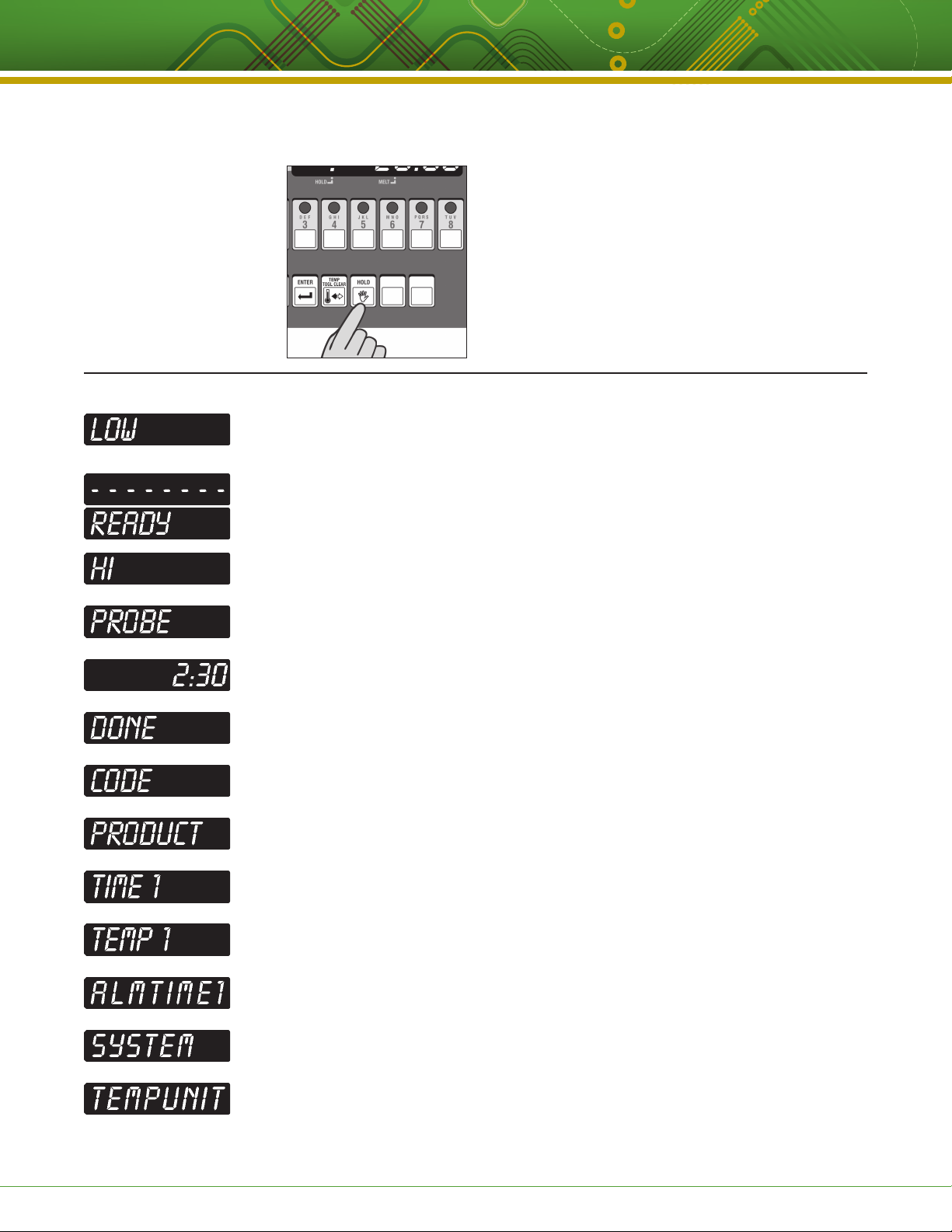
Computer is in Operating Mode. Actual vat temperature is more than 10 degrees below the
programmed vat temperature.
Computer is in Operating Mode. Actual vat temperature is within the proper cooking
temperature range. The vat is ready to start a cook cycle.
Computer is in Operating Mode. The actual vat temperature is more than 40 degrees above
the highest programmed vat temperature. A continuous audible alarm will sound.
Computer’s probe is either open or shorted. Display will be accompanied with an audible
alarm if shorted. Check or replace the probe.
Computer is in Operating Mode and a cook cycle is in progress.
Computer is in Operating Mode and a cook cycle has been completed.
Computer is waiting for a pass code to be entered.
Computer is in Product Key Programming Standby mode.
Stage cooking time is displayed.
Stage cooking temperature is displayed.
Action alarm status is displayed.
Computer is in System Programming Standby Mode.
Computer is in Fahrenheit or Celsius Programming Mode.
This document contains confidential information. The dissemination, publication, copying, or duplication of this document or the software described herein without prior written authorization is strictly prohibited.
Kitchen Brains © 2012 | www.KitchenBrains.com | 229-51331 E
Page 5 of 12
Page 6
Operating 10 & 18 Product Key (FASTRON)® MERIDIAN Freestanding Cooking Computers
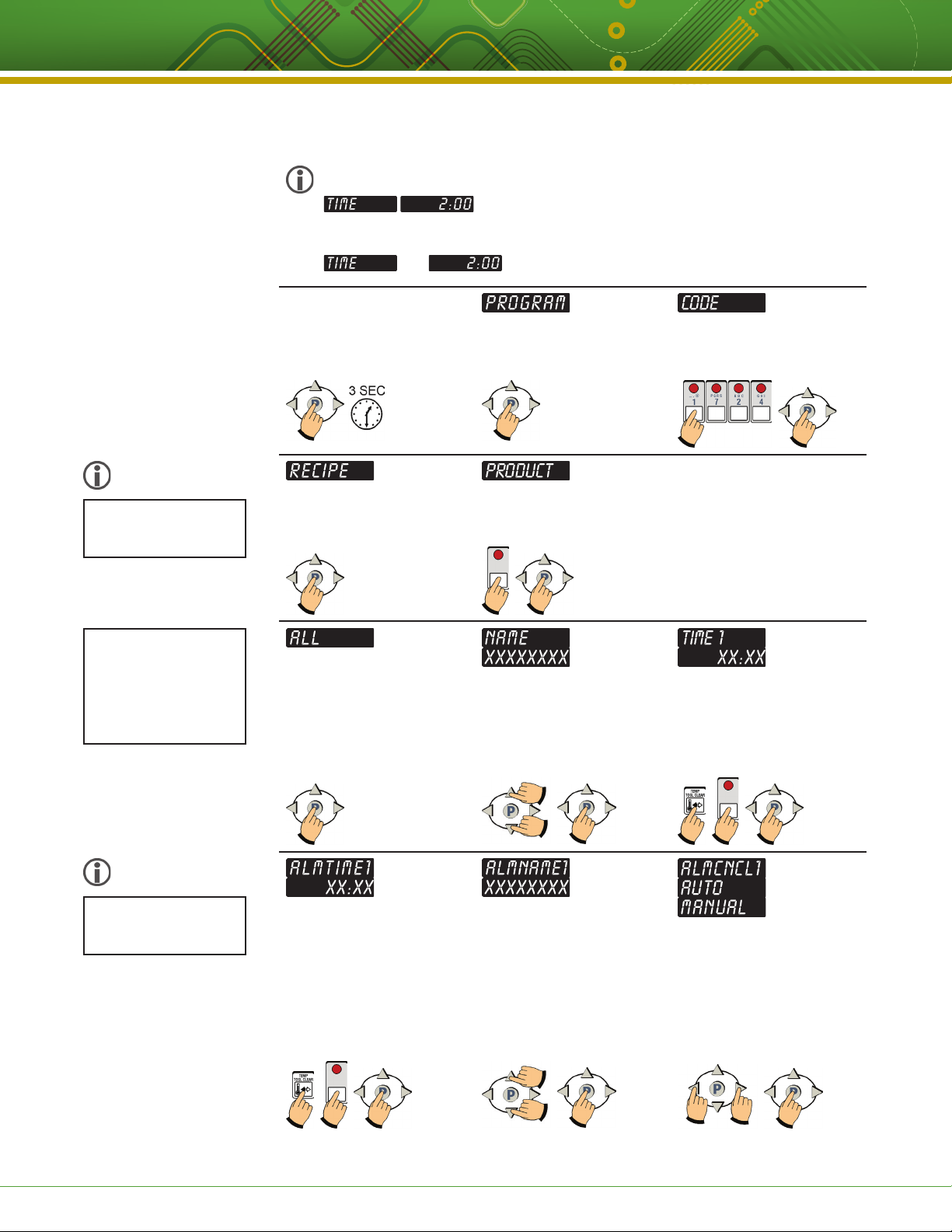
PROGRAMMING THE (FASTRON.)® MERIDIAN COMPUTER (STORE EMPLOYEE)
Product Key
Programming
RECIPE 1724
STORE EMPLOYEE
18 button computers have two displays that show a full line of information;
for example:
10 button controllers have a single, dual-purpose display that will alternate information;
for example:
ENTER PROGRAMMING MODE.
Press and hold the P key for
3 seconds.
then
Press the P key. Type in 1 7 2 4 using the product
keys. Press the P key.
Some computers
may have different
options listed.
Depending on model,
you can either press
the P key to change all
programmable settings
or you can scroll using
the arrow keys to any of
the specific options.
Some models have up
to 3 action alarms.
Press the P key. All product key
LEDs will light up.
PROGRAM A PRODUCT KEY.
Press the product key you want
to program. Press the P key.
Press the P key. SET PRODUCT DISPLAY
NAME. Name will be displayed
then the actual product name.
Use the up and down arrow keys
to scroll through the library. Press
the P key to lock in your choice.
SET ACTION ALARM. Actual
alarm time 1 will be displayed.
To change, press toggle clear to
change the time to zero. Type in
a new time using the product
keys. Press the P key.
SET ACTION ALARM NAME.
ALMNAME1 will be displayed,
then the actual action alarm
name. Use the up and down
arrow keys to scroll through the
library. Press the P key to either
go to next action alarm name, or
continue through programming.
SET COOK TIME. Actual set
time will be displayed. To
change, press toggle clear to
change the time to zero. Type in
a new time using the product
keys. Press the P key.
SET ALARM CANCEL. Use
the left and right arrow keys to
change from AUTO or MANUAL
cancel. Then press the P key.
This document contains confidential information. The dissemination, publication, copying, or duplication of this document or the software described herein without prior written authorization is strictly prohibited.
Kitchen Brains © 2012 | www.KitchenBrains.com | 229-51331 E
Page 6 of 12
Page 7
Operating 10 & 18 Product Key (FASTRON)® MERIDIAN Freestanding Cooking Computers
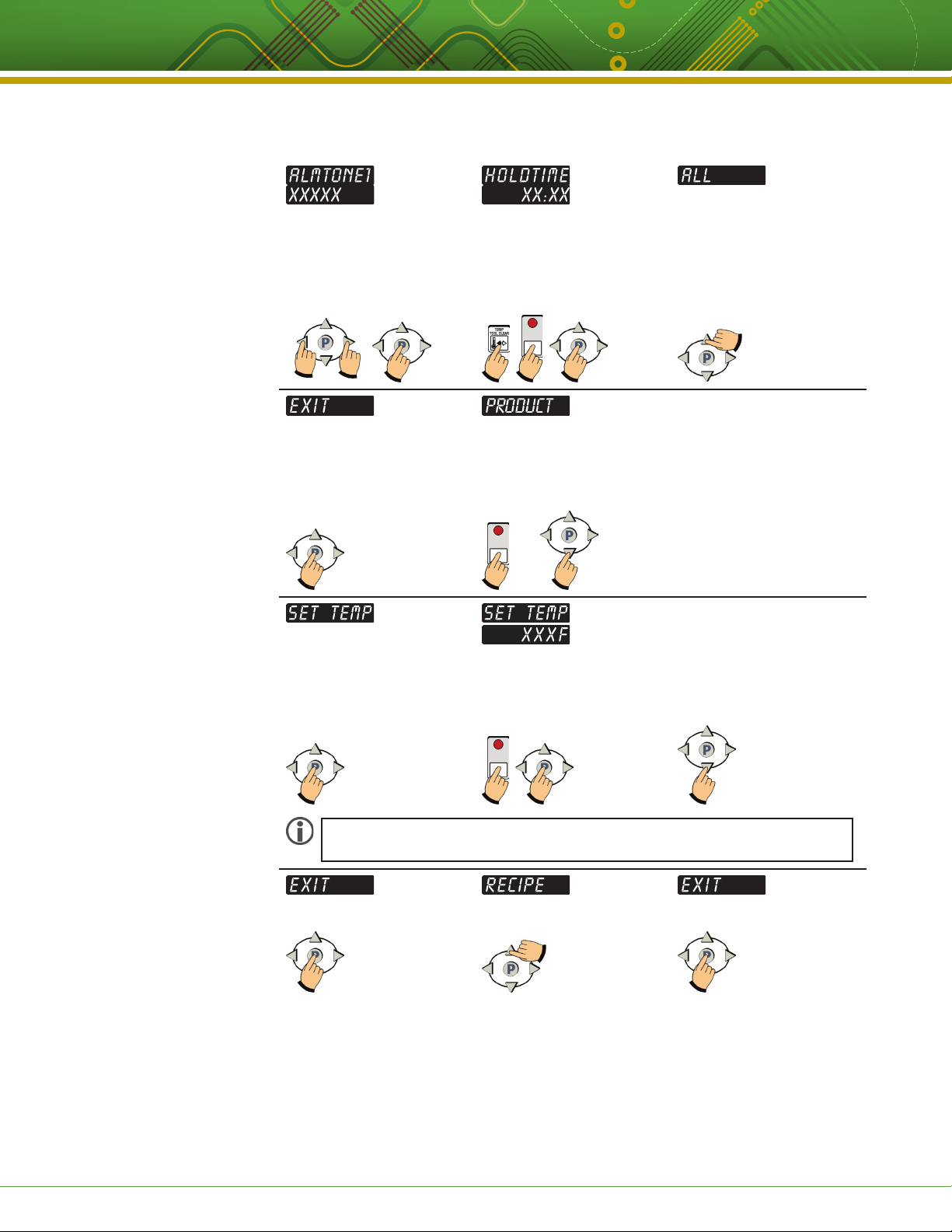
PROGRAMMING THE (FASTRON.)® MERIDIAN COMPUTER (STORE EMPLOYEE) (CONTINUED)
SET ALARM TONE. Use the left
or right arrow keys to choose
NONE, SHORT, MEDIUM,
LONG, DOUBLE or LONG SHT
as the alarm tone. Then press
the P key.
Press the P key. Either press another product
SET HOLD TIME. Actual hold
time will be displayed. To change,
press toggle clear to change the
time to zero. Type in a new time
using the product keys. Press
the P key.
key to program and repeat the
programming instructions, or
continue by pressing the down
arrow key.
OR
Press the up arrow key.
Press the P key. SET TEMP, then Actual Temp
NOTE: If you have a two-probe unit, the display will show SETTEMPL (Left) and then
SETTEMPR (Right). You will have the option to change the temperature on both sides.
Press the P key. Press the up arrow key. Press the P key.
will be displayed. To change, use
the number keys and then press
the P key.
To Exit, press the down
arrow key.
You are now out of programming
mode and ready to use your
Meridian Computer
This document contains confidential information. The dissemination, publication, copying, or duplication of this document or the software described herein without prior written authorization is strictly prohibited.
Kitchen Brains © 2012 | www.KitchenBrains.com | 229-51331 E
Page 7 of 12
Page 8
Operating 10 & 18 Product Key (FASTRON)® MERIDIAN Freestanding Cooking Computers
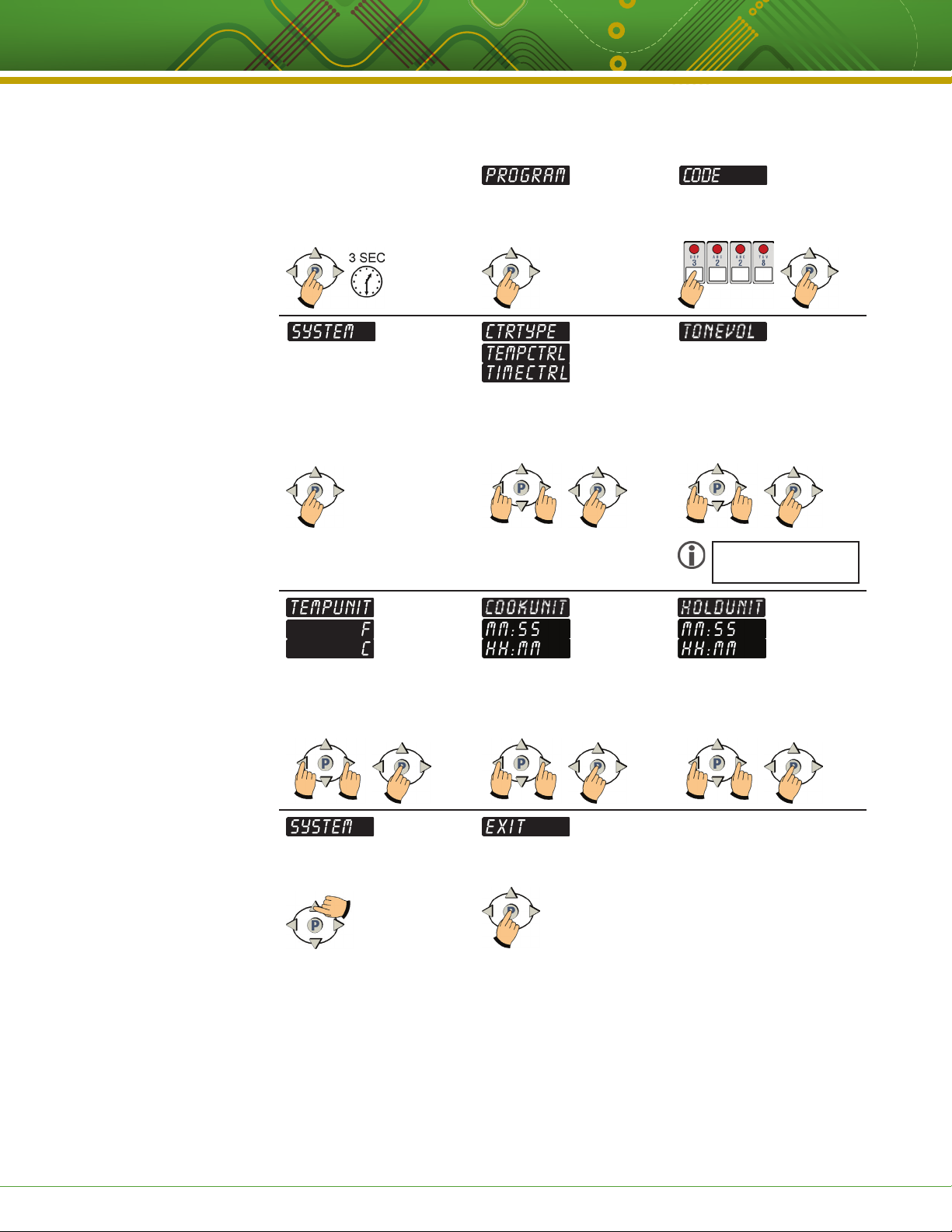
PROGRAMMING THE (FASTRON.)® MERIDIAN COMPUTER (STORE MANAGER)
System Programming
SYSTEM 3228
STORE MANAGER
ENTER SYSTEM
PROGRAMMING MODE.
Press and hold the P key for 3
seconds.
Press the P key. Type in 3 2 2 8 using the product
keys. Press the P key.
Press the P key SET CONTROL TYPE. Use the
SET TEMPERATURE SCALE.
Use the left and/or right arrow
keys to choose Fahrenheit (F) or
Celsius (C). Press the P key.
left and/or right arrow keys to
choose Temperature or Time
Control. Press the P key.
SET TIME UNIT. Use the left
and/or right arrow keys to
choose Minutes/Seconds or
Hours/Minutes. Press the P key.
SET TONE VOLUME. Use the
left and/or right arrow keys to
choose 1, 2, 3, 4 or NONE.
Press the P key.
Not all models have
this feature.
SET HOLD UNIT. Use the
left and/or right arrow keys to
choose Minutes/Seconds or
Hours/Minutes. Press the P key.
EXIT SYSTEM PROGRAMMING
MODE. Press the up arrow key.
This document contains confidential information. The dissemination, publication, copying, or duplication of this document or the software described herein without prior written authorization is strictly prohibited.
Kitchen Brains © 2012 | www.KitchenBrains.com | 229-51331 E
Press the P key.
Page 8 of 12
Page 9
Operating 10 & 18 Product Key (FASTRON)® MERIDIAN Freestanding Cooking Computers
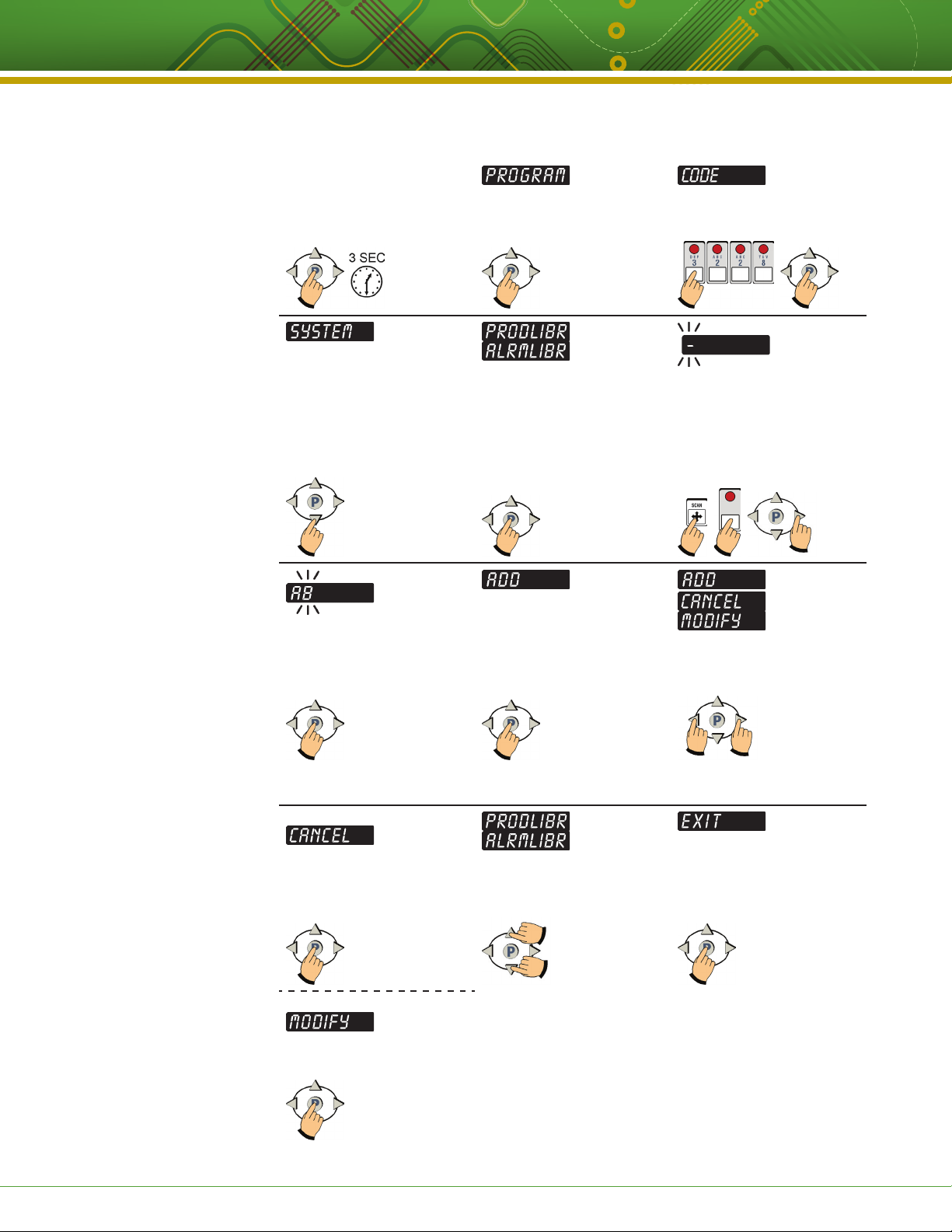
PROGRAMMING THE (FASTRON.)® MERIDIAN COMPUTER (STORE MANAGER) (CONTINUED)
Programming Custom
Product and Action Alarm
Names to the Library
SYSTEM 3228
STORE MANAGER
ENTER LIBRARY
PROGRAMMING MODE.
Press and hold the P key for
3 seconds.
Press the P key. Type in 3 2 2 8 using the product
keys. Press the P key.
Press the down arrow key to
select either PRODLIBR OR
ALRMLIBR.
Continue spelling the word.
When done, press the P key.
IF YOU CHOOSE CANCEL:
Choose either PRODLIBR
(Product Library) or ALRMLIBR
(Action Alarm Library) by
pressing the P key.
TO SAVE WORD, press P again.
Skip to Exit Library Programming.
TO CANCEL OR MODIFY, see
next step.
A flashing dash will be displayed.
Press the SCAN key and use
the product keys to spell a new
word. Press the right arrow key
to advance to the next character
position.
TO CANCEL OR MODFY WORD,
press the left or right arrow keys
to select CANCEL or MODIFY.
Press the P key to EXIT and
cancel the word.
IF YOU CHOOSE MODIFY:
Press the SCAN key to go back
and modify the word.
This document contains confidential information. The dissemination, publication, copying, or duplication of this document or the software described herein without prior written authorization is strictly prohibited.
EXIT LIBRARY PROGRAMMING.
Press the up or down arrow keys
until display reads EXIT.
Kitchen Brains © 2012 | www.KitchenBrains.com | 229-51331 E
Press the P key.
Page 9 of 12
Page 10
Operating 10 & 18 Product Key (FASTRON)® MERIDIAN Freestanding Cooking Computers
HELPFUL INFO: TROUBLESHOOTING
PROBLEM CAUSE SOLUTION
No Power Circuit breaker OFF Check and reset.
Applicance not plugged in Plug in cord.
Defective 24/VAC transformer Replace transformer.
Replace computer.
No Sound Inoperable speaker Replace computer.
Button Problem Frozen key Unplug computer. Hold down the
TOGGLE/CLEAR key as you plug
computer back in.
Inoperable key Replace computer.
PROBE Is Displayed Defective temperature probe Replace temperature probe.
Probe not plugged in Plug in probe.
Reading Wrong Temperature Defective temperature probe Replace temperature probe.
Not Heating Defective element, relay, contactor or
gas valve
Defective computer Replace computer.
Replace defective part.
PARTS & ACCESSORIES
DESCRIPTION KITCHEN BRAINS™ PART NUMBER
Sheet Metal Bezel (Black) 214-50291
Sheet Metal Bezel (Stainless Steel) 214-50593
Slotted Round Head Screw, Black, 1/4-20 x 3/4” 150-10202
Slotted Round Head Screw, Stainless Steel, 1/4-20 x 3/4” 150-10188R
Mounting Kit 213-50432-01
This document contains confidential information. The dissemination, publication, copying, or duplication of this document or the software described herein without prior written authorization is strictly prohibited.
Kitchen Brains © 2012 | www.KitchenBrains.com | 229-51331 E
Page 10 of 12
Page 11

Operating 10 & 18 Product Key (FASTRON)® MERIDIAN Freestanding Cooking Computers
INDEX
Cleaning the Cooking Computer .......................................................................................................................................... 2
Display Descriptions .............................................................................................................................................................. 5
Features
Cooking Computer ........................................................................................................................................................... 3
Explained .......................................................................................................................................................................... 4
Installation ............................................................................................................................................................................. 3
Notices .................................................................................................................................................................................. 2
Operating the Cooking Computer
Action Alarms ................................................................................................................................................................... 4
Done Alarm ...................................................................................................................................................................... 4
Holding Timers .................................................................................................................................................................. 5
View All Active Hold Times ........................................................................................................................................ 5
Start a Cook Cycle ............................................................................................................................................................ 4
Stop a Cook Cycle ............................................................................................................................................................ 4
Programming Codes.............................................................................................................................................................. 3
Programming: (LIBRARY)
Enter Library Programming .............................................................................................................................................. 9
Exit Library Programming ................................................................................................................................................. 9
Programming: (PRODUCT) Store Employee
Action Alarm ..................................................................................................................................................................... 6
Action Alarm Name .......................................................................................................................................................... 6
Alarm Cancel .................................................................................................................................................................... 6
Alarm Tone ........................................................................................................................................................................ 7
Cook Time ......................................................................................................................................................................... 6
Enter Programming Mode ................................................................................................................................................ 6
Hold Time ......................................................................................................................................................................... 7
Product Display Name ...................................................................................................................................................... 6
Product Key ...................................................................................................................................................................... 6
Programming: (SYSTEM) Store Manager
Control Type ...................................................................................................................................................................... 8
Cook Unit .......................................................................................................................................................................... 8
Enter System Programming ............................................................................................................................................. 8
Exit System Programming ................................................................................................................................................ 8
Temperature Scale ............................................................................................................................................................ 8
Tone Volume ..................................................................................................................................................................... 8
Support
Customer Service and Technical Assistance..................................................................................................................... 12
Free Program for Service Exchanges ............................................................................................................................... 12
Parts & Accessories ......................................................................................................................................................... 10
Troubleshooting ................................................................................................................................................................ 10
Warranty ........................................................................................................................................................................... 12
This document contains confidential information. The dissemination, publication, copying, or duplication of this document or the software described herein without prior written authorization is strictly prohibited.
Kitchen Brains © 2012 | www.KitchenBrains.com | 229-51331 E
Page 11 of 12
Page 12

Operating 10 & 18 Product Key (FASTRON)® MERIDIAN Freestanding Cooking Computers
Want to learn more about
™
Kitchen Brains
products?
Visit our website:
www.KitchenBrains.com
SCK Link® is a registered trademark
of Technology Licensing Corporation
and use is subject to the appropriate
license agreement.
Customer Service and Technical Assistance
Our customer service department is available for orders and
questions Monday through Friday between the hours of 8 AM and
5 PM EST. Call us toll-free at 1-800-FASTRON (800-327-8766) if you’re in
the US, Canada or the Caribbean, or at 203-378-6860 if you’re outside
of these areas.
Toll-free technical assistance is available 24 hours a day, 365 days
a year by calling 1-800-243-9271 (from the U.S., Canada and the
Caribbean) when help is needed immediately.
You can also send an instant email message to a Kitchen Brains™
technician, Monday through Friday, 8am-5pm EST, by going to
www.KitchenBrains.com, selecting the ‘Support’ link at the top
of the page, and clicking on ‘Contact Tech Support.’
Free Program for Service Exchanges
Kitchen Brains provides an Exchange Program, at no extra cost,
if a unit should fail. In the event of failure, you have the option of (1)
receiving a replacement product from our factory, freight prepaid;
(2) exchanging the failed product for a replacement product at
one of our authorized local service centers; or (3) selecting on-site
repair or replacement of the failed unit by one of our authorized
local service centers.
To take advantage of this program, simply call our toll-free
customer service number, 1-800-243-9271. If you elect to receive
an exchange unit from the factory, a replacement unit will be sent
immediately. Upon receipt of the replacement unit, simply return
the failed unit to the factory, freight prepaid, using the same carton
and packing material in which the replacement unit was shipped.
The unit will be replaced free of charge, if still under warranty, and
if the product shows no evidence of abuse or alteration. If the unit
is not under warranty, you will pay repair charges and shipping
costs to and from the factory.
Food Automation - Service Techniques, Inc.
905 Honeyspot Road, Stratford, CT 06615-7147 USA
Phone: +1-203-377-4414
Sales: 1-800-FASTRON
Fax: +1-203-377-8187
International Callers: +1-203-378-6860
www.KitchenBrains.com
Toll-free technical support 24/7 from the U.S.,
Canada, and Caribbean: 1-800-243-9271
Any minor adjustment or calibration and any labor costs for the
replacement of probes will be made at your expense.
The Kitchen Brains™ Exchange Program is available to any Domestic
Customer whose account is current, and applies to all Kitchen
Brains™ Timers, Computers and Controllers.
International offices are located in the
United Kingdom, China and Singapore:
Europe, Middle East, Africa, South Asia
31 Saffron Court Southfields Business Park
Basildon, Essex SS15 6SS ENGLAND
Phone: +44 0 1268544000
Asia Pacific
1803, 18F, No 922 Hengshan Rd
Shanghai 200030, CHINA
Phone: +8613916 854 613
15-101, Block 290G, Bukit Batok St. 24
SINGAPORE 65629
Phone: +65 98315927
WARRANTY
Kitchen Brains warrants all new timers, computers,
and controllers for 1 year from the date of purchase
including computers, controllers, and timers. Kitchen
Brains warrants all other items for a period of 90 days
unless otherwise stated at the time of purchase.
PATENTS
The products manufactured by Kitchen Brains
are protected under one or more of the following
U.S. Patents:
5,331,575 5,539,671 5,711,606 5,723,846
5,726,424 5,875,430 6,142,666 6,339,930
6,401,467 6,581,391 7,015,433 7,650,833
7,877,291 8,060,408
Plus foreign patents and patents pending. Plus licensed
patent 5,973,297
This document contains confidential information. The dissemination, publication, copying, or duplication of this document or the software described herein without prior written authorization is strictly prohibited.
Kitchen Brains © 2012 | www.KitchenBrains.com | 229-51331 E
Page 12 of 12
 Loading...