

Page 1

MODELS: KUCC151 and KCCC151
9871628B
For questions about features, operation/performance, parts accessories or service, call: 1-800-422-1230
In Canada, call for assistance: 1-800-461-5681, for installation and service call:1-800-807-6777 or visit our website at...
www.kitchenaid.com or www.kitchenaid.com/canada
COMPACTORS
Table of Contents............2
Page 2

2
TABLE OF
CONTENTS
Compactor Safety ..........................................................3
Electrical Requirements ................................................4
How Your Compactor Works ........................................4
Parts and Features..........................................................5
Installing Your Compactor ............................................6
Unpacking Your Compactor..........................................6
Space Requirements ....................................................6
Freestanding and
Undercounter Installation ..................7
Adjusting the Toe Plate..................................................9
Changing the Decorative Panel ....................................9
Using Your Compactor ................................................10
Using the Charcoal Air Filter........................................10
Starting Your Compactor ............................................11
Using Solid (Locked) Cycle ........................................11
Removing a Filled Bag ................................................12
Installing a New Bag ....................................................12
Caring for Your Compactor..........................................13
Changing the Charcoal Air Filter ................................13
Cleaning Your Compactor ..........................................13
Troubleshooting ............................................................14
Assistance or Service ..................................................15
Warranty ........................................................................16
Page 3
3
You can be killed or seriously injured if you don't
immediately follow instructions.
You
can be killed or seriously injured if you don't
follow instructions.
All safety messages will tell you what the potential hazard is, tell you how to reduce the chance of injury, and tell you
what can
happen if the instructions are not followed.
Your safety and the safety of others are very important.
We have provided many important safety messages in this manual and on your appliance. Always read and obey all
safety messages.
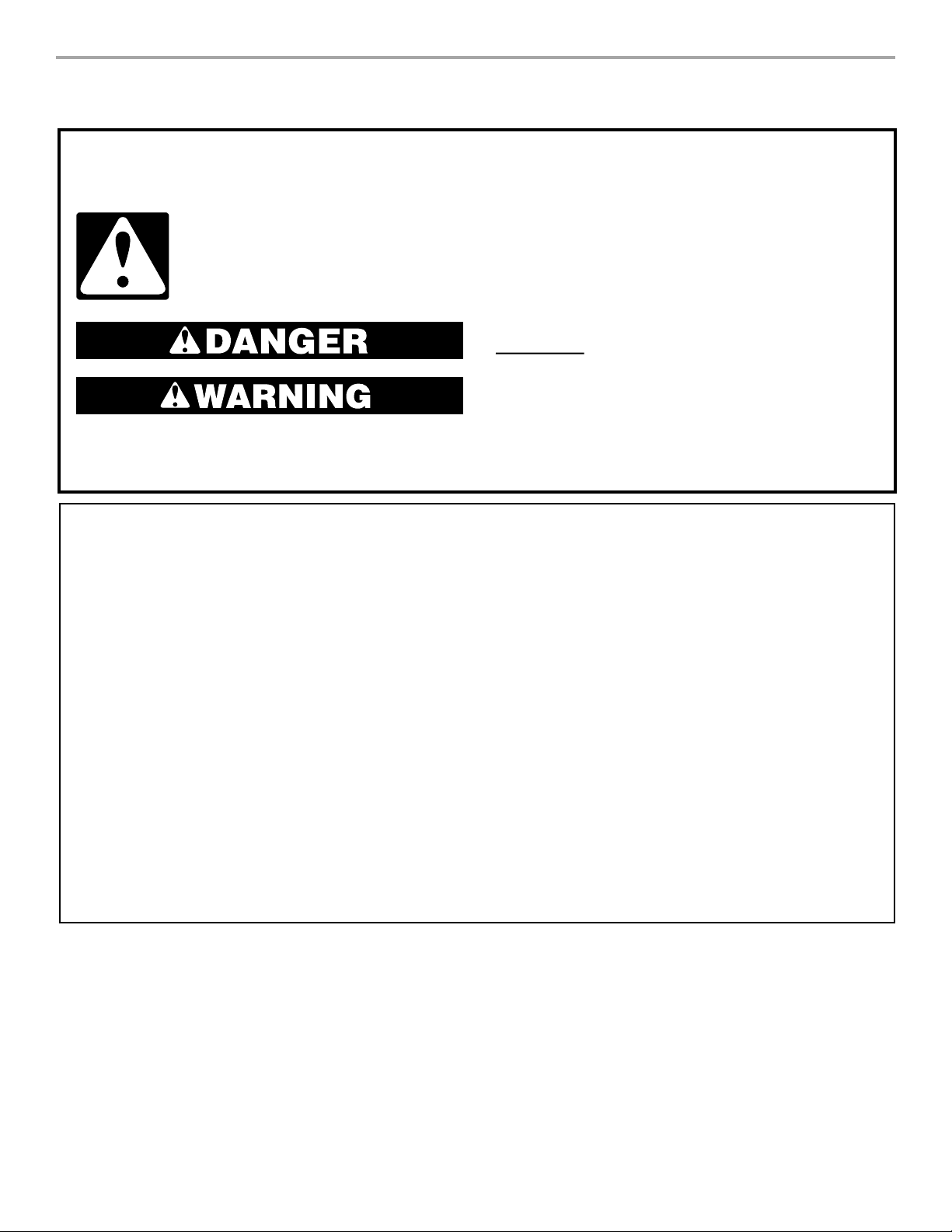
This is the safety alert symbol.
This symbol alerts you to potential hazards that can kill or hurt you and others.
All safety messages will follow the safety alert symbol and either the word “DANGER” or
“WARNING.” These words mean:
COMPACTOR SAFETY
IMPORTANT SAFETY INSTRUCTIONS
WARNING: When using an electrical appliance, basic precautions should always be followed, including the
following:
Do not compact toxic or volatile flammable material
Read all instructions before using the compactor.
■
Close supervision is necessary when used by or
■
near children. Do not allow to be used as a toy, or
to run unattended at any time. Lock Key Switch
when not in use and store key out of reach of
children.
■
Do not touch moving parts.
■
such as oily rags and insect sprays. Do not compact
lighted cigarettes, cigars, or other hot or burning
items. Do not overload the compactor.
Do not take apart the compactor. Incorrect
■
reassembly can cause electric shock when
subsequently used.
Handle a loaded trash bag with care. Sharp objects
Do not operate with a damaged cord set, plug,
■
motor, or after damage in any manner. Have the
compactor examined, repaired or adjusted by an
authorized serviceperson.
Use only for intended use as described in this
■
manual. Do not use other than manufacturer's
recommended attachments.
SAVE THESE INSTRUCTIONS
■
can pierce the bag and cause injury. Do not
overload trash bag with heavy material such as
glass.
■ This compactor is intended for household use only.
Page 4
4
Electrical Requirements
This compactor must be grounded while in use to reduce
the risk of electric shock.The compactor is equipped with
a three-conductor cord and three-prong grounding-type
plug to fit the proper grounding-type receptacle.The green
(or green and yellow) conductor in the cord is the grounding wire. Never connect the green (or green and yellow)
wire to a live terminal.The outlet should be properly
installed and grounded in accordance with the National
Electrical Code and local codes and ordinances. No
adapter should be used with this appliance.
Recommended Grounding Method
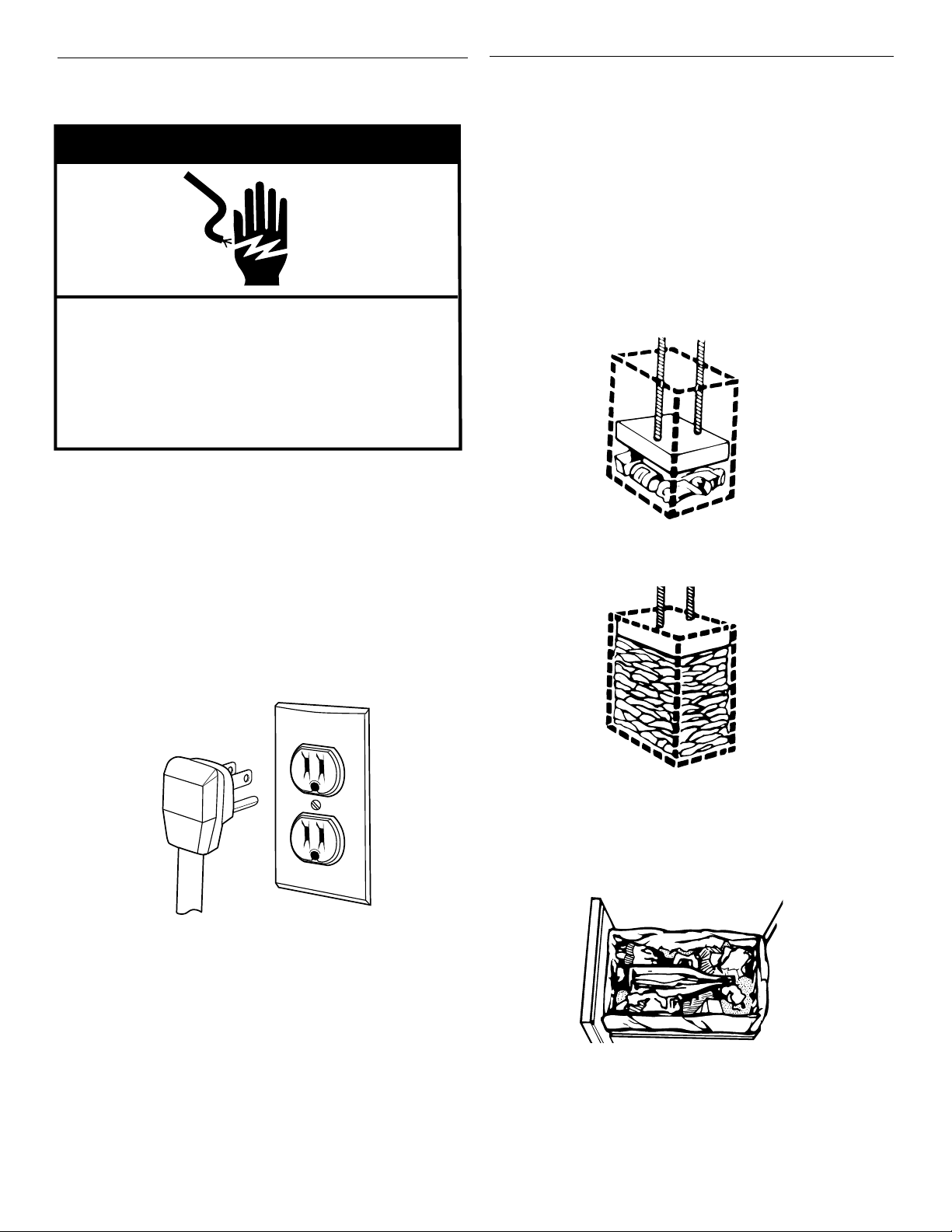
This compactor is for use on a single phase, 115-volt, 60
Hz, AC only 15 or 20 ampere fused and properly grounded circuit and is equipped with a grounding plug as shown
below.Time delay fuse or circuit breaker is recommended.
It is recommended that a separate circuit serving only this
appliance be provided. In the event of an electrical short
circuit, grounding reduces the risk of electric shock by
providing an escape wire for the electric current. Do not
modify the plug attached to the compactor; use only with
a grounded receptacle.
wWARNING
Electrical Shock Hazard
Plug into a grounded 3 prong outlet.
Do not remove ground prong.
Do not use an adapter.
Failure to follow these instructions can result in
death, fire, or electrical shock.
How Your
Compactor Works
The compacting ram is the part of the compactor which
compresses the trash.The compacting ram does not go
to the bottom of the drawer.You will not see compacting
of trash the first few times you load the compactor.
NOTE: The compactor drawer should be about 1/2 full
before the compactor can begin to compress the load.
You may hear a noise when glass breaks. Strong glass
bottles may not break at all.
The trash in a full compactor bag will be about 1⁄4 the size
of its original bulk.
Load bulky trash, bottles, and cans in the center of the
drawer. Bottles or cans not placed in the center may
become caught between the ram and the drawer.The
drawer monitor switch senses a “misload” and causes the
ram to return to the “up” position without compacting.
Page 5
5
PARTS AND FEATURES
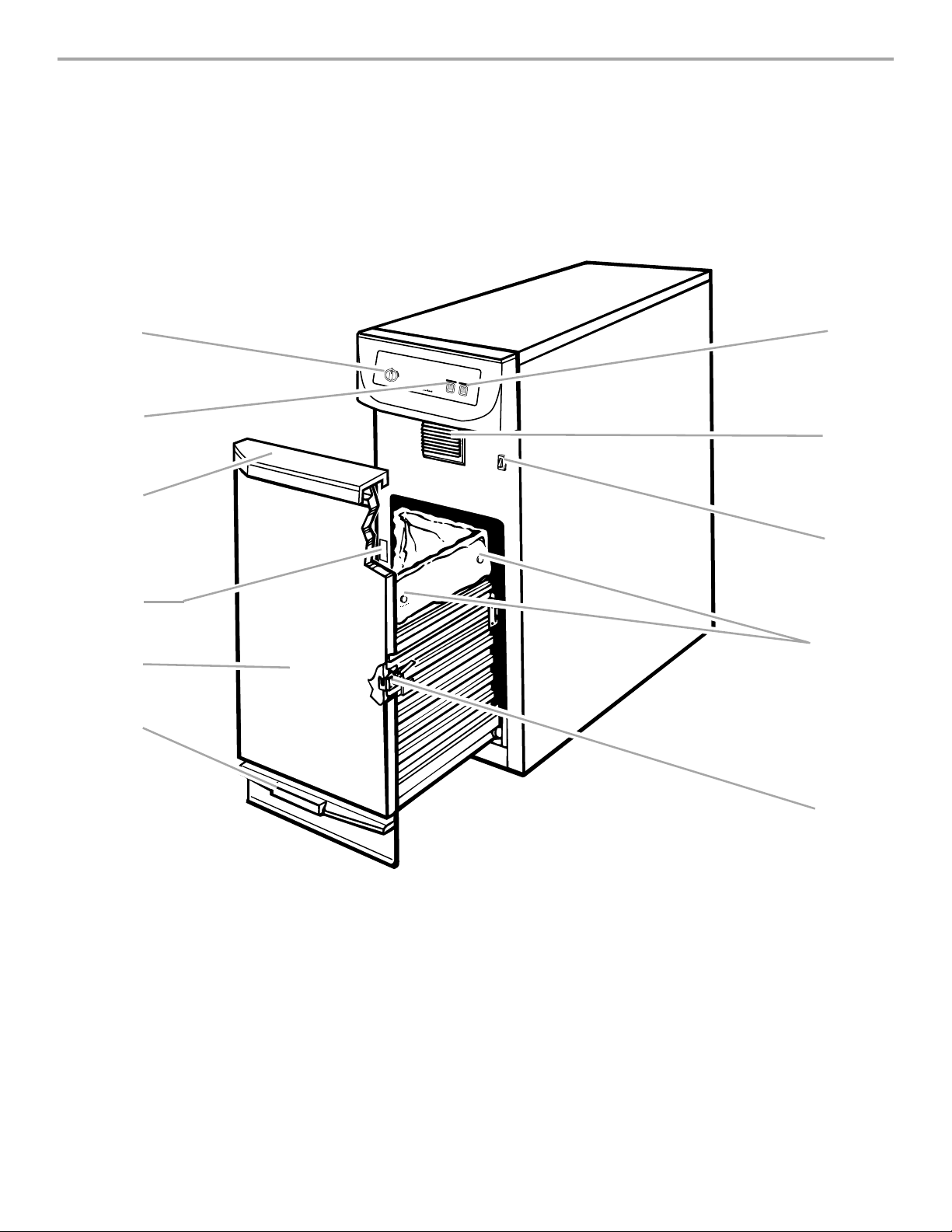
1. Key-knob start switch
2. Charcoal air filter switch
3. Drawer handle
4. Model and serial number
label
5. Wraparound panel
6. Touch-toe bar drawer opener
7. Compact switch
8. Activated charcoal air filter
9. Drawer monitor switch
10. Bag retainer buttons
11. Lever-action lock
7
8
9
10
11
1
2
3
4
5
6
O
F
F
O
N
S
T
A
R
T
A
IR
F
IL
TE
R
O
N
C
O
M
PA
C
T
S
O
L
I
D
(
L
O
C
K
E
D
)
O
F
F
N
O
R
M
(
A
A
D
L
D
T
R
A
S
H
)
Page 6

INSTALLING
YOUR
COMPACTOR
leveling legs
4. Place the other two corner posts on the floor to the
side of the compactor.Grasp the sides of the compactor cabinet and put compactor on its side on top of
the corner posts. Remove the shipping base from the
bottom of compactor.
3. Place two cor ner posts from carton on floor near compactor.Open compactor drawer and remove any shipping
materials or other items shipped in the drawer. Do not
remove the compactor bag (if installed).Grasp the handle
and raise the front of drawer until it clears the drawer
stops. Grasp sides of drawer and lift drawer out of
compactor.Place the drawer on the two corner posts.
IMPORTANT:
Installer: Leave Use and Care Guide with the homeowner.
Homeowner: Keep Use and Care Guide for future reference
and for local electrical inspector’s use, if required.
6
Space Requirements
Check the location where your compactor will be
installed.The cabinet opening should be square.You
should be able to fully open the compactor drawer. Six
inches (15.2 cm) of clearance is needed on the right side
of compactor drawer to be able to remove compactor bag.
Allow 23 inches (58.4 cm) in front of the compactor to
remove drawer.
341⁄8"
(86.7 cm)
24"
(61 cm)
15"
(38.1 cm)
The overall look of your compactor may vary.
Product dimensions
Unpacking Your
Compactor
IMPORTANT:
• Do not grasp console to move compactor.
• Begin in the room where the compactor will be
located.
1. Remove compactor from shipping carton. Remove
all protective packaging materials such as tape and
shipping pads. Remove waxy residue caused by protective shipping material with a mild solution of liquid
household cleaner and water.
2. Check that power supply cord is attached to the cord
clip on the rear of the compactor.
cord
clip
wWARNING
Excessive Weight Hazard
Use two or more people to move and install
compactor.
Failure to do so can result in back or other
injury.
Page 7

1. Use pliers to lower leveling legs away from cabinet.
Place level inside on the floor of the cabinet.Check that
the compactor is level from front to back and side to
side. Adjust the leveling legs until the compactor is
level.
Freestanding installation:
7
2. Move the compactor close to its final position. Plug
the power supply cord into a 3-prong grounded outlet.
3. Carefully move compactor into its final position.
Check that compactor is still level. Repeat step 1
if necessary.
4. Grasp sides of compactor drawer and place bottom
of drawer into tracks. Lift at the handle so drawer will
go over drawer stops. Close drawer. Check if drawer
opens freely. If the toe plate rubs against floor, see
“Adjusting the Toe Plate” for further instructions.
Freestanding and Undercounter Installation
NOTE: Proper installation is your responsibility. Make sure
you have everything necessary for correct installation. It is
the personal responsibility and obligation of the customer
to contact a qualified installer to assure that electrical
installation meets all national and local codes and ordinances.
Tools and materials needed for installation:
Level
Pliers
Scissors
Phillips screwdriver
Flat-Blade screwdriver
Utility knife
Measuring tape
5
⁄16" (8 mm)-Box-end wrench
Gloves
IMPORTANT:
• Do not grasp console to move compactor.
• Slide compactor onto cardboard or hardboard
before moving compactor across floor to prevent
damaging floor covering.
• Do not allow the rear frame of the compactor to
touch the floor covering when lifting or moving compactor.
18" min.
(45.7 cm)
24" min.
(61 cm)
Grounded
electrical outlet
must be
3" (7.6 cm) min.
from either side
wall.
6" (15.2 cm)
clearance to the
nearest vertical
wall on the right
side of compactor
is needed to
remove bag.
23" (58.4 cm) clearance in
front of the compactor is
needed to fully open or
remove compactor drawer.
151⁄4" min.
(38.7 cm)
341⁄4" min.
(87 cm)
Cutout dimensions
Clearance dimensions
Page 8

8
Undercounter installation:
NOTE: Installation hardware is not provided with full
cabinet models.
1. Measure the height of your cabinet opening.The top of
the compactor should be at least 1⁄8" (3 mm) from the
top of the cabinet opening.
The rear wheels are preset for a cabinet opening
height of 341⁄4" (87 cm) (Position “A”).
To adjust for other cabinet opening heights, loosen
screw just enough to clear stud from hole in position
“A”. Move the rear wheel and stud to position “B” or “C”
as needed for your cabinet opening measurement:
Position B: 341⁄4" to 347⁄16" (87 to 87.5 cm)
Position C: 347⁄16" to 345⁄8" (87.5 to 88 cm)
Tighten screw. Repeat for other rear wheel.
A
cabinet
locating stud
self-tapping
screw (pivot)
wheel
bracket
assembly
B
C
Countertop mounting
mounting
screw
retaining
bracket
6. Grasp sides of compactor drawer and place bottom
of drawer into tracks. Lift at the handle so drawer will go
over drawer stops. Close drawer. Check if drawer opens
freely. If the toe plate rubs against floor, see “Adjusting
the Toe Plate” for further instr uctions.
Cabinet-front mounting
mounting
screw
retaining
bracket
mounting
clip
2. Use pliers to lower leveling legs away from cabinet.
Adjust legs so there will be a 1⁄8" (3 mm) to 1⁄4" (6.4 mm)
space between the top of the compactor and the top of
the cabinet opening. Stand the compactor upright.
3. For model with cabinet, remove the plastic plugs from the
compactor cabinet top.
4. Determine if you want the compactor frame or drawer
front flush with the cabinet front.
Using the two #8 -18 x 5⁄16" (8 mm) screws, install the
retaining brackets to cabinet top as needed:
If the compactor frame is to be flush with the cabinet
front, place retaining bracket screws through “A”.
If the compactor drawer front is to be flush with the
cabinet front, place retaining bracket screws through “C”.
If the compactor is to be midway between “A” and
“C”, place retaining bracket screws through “B”.
5. Carefully lift the front slightly and roll compactor into
the cabinet opening.
B
A
retaining
bracket
C
countertop
Using the two #8 -18 x 1⁄2" (12 mm) screws, fasten the
retaining brackets to the underside of the countertop
with the mounting screws.
If brackets cannot be attached to the underside of
countertop, attach mounting clips to brackets.Fasten
compactor to cabinet front with mounting screws
through mounting clips.
Page 9

9
Changing the
Decorative Panel
2313⁄16
"
(60.5 cm)
145⁄8"
(37.2 cm)
Raised panel: The outer section of panel must be 7⁄32"
(5.6 mm) thick to fit into trim. Raised panel dimensions as
shown above.
Custom-made panel dimensions
Adjusting the Toe Plate
If the toe plate rubs the floor covering, the toe plate
clearance may be changed as follows:
1. Mark on each side of the toe plate the amount of toe
plate that rubs the floor covering.
2. Remove the drawer from the unit.(See step 3 in the
“Unpacking Your Compactor” section.)
3. Use a ruler and a pencil or chalk to draw a line
between the marks on each side of toe plate.
4. Use scissors or utility knife to cut toe plate along line.
5. Replace drawer.If toe plate still rubs floor covering,
repeat steps 1-4.
Flat panel: A 7⁄32" (5.6 mm) thick panel is required.This is
the same thickness as a standard
1
⁄4" plywood or paneling.
Trim for decorative panel
Order trim for installation of a custom-made panel through
your KitchenAid dealer or by calling the KitchenAid
Consumer Assistance Center at 1-800-422-1230. In
Canada, call 1-800-807-6777.
Tr im for custom-made panels available are:
Part No.9871381 (Brushed stainless steel)
Part No.9871382 (White)
Part No.9871383 (Black)
Part No.9871384 (Almond)
Part No.9871600 (Biscuit)
7
⁄32"
(5.6 mm)
1
1
⁄4"
(32 mm)
5
⁄16"
(8 mm)
both sides
5
⁄16"
(8 mm)
outer section
of panel
raised
panel or
decorative
trim
145⁄8"
(37.2 cm)
2313⁄16"
(60.5 cm)
Page 10

10
USING YOUR
COMPACTOR
Open the drawer
Lift and pull the handle or press the drawer opener to
open the drawer.
wWARNING
Explosion Hazard
Do not compact any container, aerosol cans, or
cloths which might contain insecticide, hair
spray, engine starting fluid, paints, liquids,
thinners, or any other poisonous or explosive
products.
Doing so can result in death, explosion, or fire .
wWARNING
Cut Hazard
Do not push items down into compactor with
hands or feet.
Doing so can result in cuts.
OR
Put in the trash
NOTE: You will not see compacting of trash the first
few times you load the compactor. The compactor
drawer should be about 1/2 full before the compactor
can begin to compress the load.
1. Wrap or cover wet or messy trash.
2. Load bottles or cans on their sides in the center of the
drawer.
3. Do not load bottles in an upr ight position in drawer as
shown here.
4. Do not compact items that may develop offensive odors
such as raw meat, fish, grapefruit rinds, disposable diapers, or personal hygiene items.
Close the drawer
Push drawer in until it stops.
Using the Charcoal Air Filter
The fan-powered Charcoal Air Filter absorbs and minimizes odor.The degree of odor in the compactor
depends on the type of trash placed in it.The length of
time before the filter needs to be replaced varies with the
type of trash compacted. Under normal use the filter
should be replaced once or twice per year.
ON
OFF
AIR FILTER
Indicator
To use the filter
1. Set the Charcoal Air Filter switch to ON. The Air Filter
indicator lights up.The fan creates air movement in the
compactor for odor removal.
NOTE: The Charcoal Air Filter works even when the
Key-Knob is in the OFF position.
2. Set the Charcoal Air Filter switch to OFF to turn off the
fan.
Page 11

Starting Your Compactor
1. Set Compact switch to NORMAL
(ADD TRASH).
2. Tur n the Key-knob to START and then release the Keyknob.
3. Compactor stops after completing cycle.
NOTE: When the compacting cycle is done, turn the Key-
knob to OFF. Remove the Key-knob and store it out of
children’s reach.
11
SOLID
(LOCKED)
NORMAL
(ADD TRASH)
COMPACT
ON
START
OFF
ON
START
OFF
To use Solid (Locked) cycle
1. Set Compact switch to SOLID (LOCKED).
2. Turn the Key-Knob to START and then release the Key-
Knob.
NOTE: The indicator on the Compact switch shows
when the Solid (locked) cycle is in use.
3. After 30 minutes or more, set the Compact switch to
NORMAL (ADD TRASH) or turn the Key-Knob to
START to raise the compacting ram.
NOTE: When the compacting cycle is done, turn the Keyknob to OFF. Remove the Key-knob and store it out of
children’s reach.
SOLID
(LOCKED)
NORMAL
(ADD TRASH)
COMPACT
SOLID
(LOCKED)
NORMAL
(ADD TRASH)
COMPACT
Using Solid (Locked) Cycle
The Solid (locked) cycle extends the use of a bag by
putting constant pressure on the trash to keep it from
springing back. Regular use of the Solid (locked) cycle
can increase bag capacity up to 25%.
During the Solid (locked) cycle, the ram will stay in the
down position for extra compacting.While the Solid
(locked) cycle is operating, an indicator shows on the
Compact switch.The drawer is locked and cannot be
opened when the ram is down. For best results, use the
Solid (locked) cycle for at least 30 minutes at a time.
ON
START
OFF
ON
START
OFF
OR
Indicator
Page 12

Installing a New Bag
Before installing a new bag, be sure:
1. The drawer side is securely locked.
2. The container is clean and free of shar p debr is that
may have punctured the bag.
Do not use any kind of bag other than those designed
especially for use in your compactor.
Order replacement compactor bags through your local
KitchenAid dealer or by calling the KitchenAid Consumer
Assistance Center at 1-800-422-1230. In Canada, call
1-800-807-6777.
12
Cut Hazard
Do not touch sharp objects that have cut through
the bag.
Doing so can result in cuts.
wWARNING
When the trash is compacted to the top of the drawer,
remove the bag.If the bag is too heavy, compact less
trash before emptying in the future.
Removing a Filled Bag
1. Place folded bag into the drawer.Open bag and pull top
edges over the drawer top.
2. Lock bag in place by pulling the four prepunched holes
over the bag retainer buttons. Holes will expand over
the buttons without damaging the bag.
3. Press inside of bag against the drawer bottom, sides
and corners for a smooth fit.
1. Pull the drawer completely open.
2. Remove top of bag from retainer buttons. Pull up all
four bag cuffs.
3. Close bag provided with twist tie.
4. Push side-lock latch down and tilt drawer side open.
5. Lift out bag.
Page 13

Your new compactor is designed to give you many years
of dependable service. However, there are a few things
you are expected to do in order to maintain your compactor properly.This section will tell you how to clean and
care for your compactor.
Changing the Charcoal
Air Filter
1. Insert finger tips in the Air Filter Cover and pull until the
side cover tabs release.Lift cover to release the bottom
tabs.
2. Remove the Air Filter by pulling the top edge of the
filter.The filter should pull out easily. Throw away used
filter.
3. To replace, push the replacement filter into place. Insert
the bottom tabs of the Air Filter Cover, then snap the
side tabs into place.
To order replacement charcoal filters (part number
4151750), call the KitchenAid Consumer Assistance
Center at 1-800-422-1230. In Canada, call
1-800-807-6777.
13
CARING FOR
YOUR
COMPACTOR
Before cleaning the compactor, turn the Key-Knob (or
Key-Switch) to the OFF position and remove.If you will
be away for more than a couple of days, remove the
compactor bag. Remove the Key-Knob (or Key-Switch)
and store it out of children's reach.
NOTE: Any services other than those outlined in this
section should be performed by a designated service
representative.
Cleaning Your Compactor
Cleaning exterior surfaces:
1. Wipe with war m, sudsy water and a damp cloth.
Rinse. Dry with a soft cloth.
2. Wipe up spills r ight away. Some foods can damage the
finish if left on the compactor surface.
Cleaning inside the drawer:
1. Wear protective gloves.There may be bits of glass in
the drawer.
2. Remove the bag. (See “Removing a Filled Bag” section.)
3. Press lever-action lock (or Side-Lock latch) down.
4. Hold lever-action lock and tilt side of drawer until the
lock clears the drawer front.
NOTE: If desired, drawer side can be removed by tilting it
up, then lifting out.
5. Wash with a damp cloth using warm, soapy water.
Rinse and dry with a soft cloth.
6. If drawer side was removed, slide it back into the tilted
position.
7. Press the lever-action lock (or Side-Lock latch) down
while pressing the side to the upright position.
8. Latch the drawer side by pushing up the lever-action lock
(
or Side-Lock latch)
.
Cleaning inside the cabinet:
1. Wear protective gloves.There may be bits of glass in
the cabinet.
2. Pull the drawer out until it stops.
Page 14

TROUBLE-
SHOOTING
First try the solutions suggested here and
possibly save the cost of a service call.
Your compactor won’t operate.
• Is the power supply cord unplugged?
Firmly plug the cord into a live outlet with the proper
voltage.
• Has a household fuse or circuit breaker tripped?
Replace the fuse or reset the circuit breaker.
• Is the drawer completely closed?
Close the drawer firmly and start the compactor again.
• Is the Key-Knob turned all the way to START?
Tur n Key-Knob fully to START and release.
Trash is not compacting.
• Is the drawer less than 1/2 full?
Drawer must be at least 1/2 full before compactor
will compact.
• Is the drawer loaded properly?
If anything gets between the ram and the drawer, the
ram will return to the “up” position without compacting.
The drawer won’t open.
• Is the ram all the way up?
Drawer will open only when ram is fully raised.
• To raise the ram:
Tur n the Key-Knob to START and release.
There is not enough compaction or force.
• Do you use the compacting cycle frequently
enough?
Compacting works best when only a few items are
loaded.
Bottles don’t break.
• How often do you notice this?
Not all bottles break every time, depending on the bottle
and the trash load below it.
9. Wash, rinse, and dry inside.
Replacing the drawer
1. Grasp the drawer sides.
2. Insert the drawer rollers onto the tracks.
3. Lift the drawer to clear stop tabs, push the drawer in.
Cleaning the ram
1. Wear protective gloves.There may be bits of glass on
the ram cover.
2. Wipe glass particles off ram cover with a cloth or
paper towels.
3. Use war m, sudsy water to remove foods.Rinse and
dry with a soft cloth.
14
3. Note the tracks in which the drawer rollers move.
4. Lift the front to clear the drawer stops.
5. Grasp the drawer on the sides.
6. Pull it out the rest of the way.
7. Set it down gently.
8. Vacuum inside of cabinet.Liquid spills or wet trash
should be cleaned up by hand, or use a vacuum
designed to pick up liquids.
Page 15

15
IN CANADA
1. If the problem is not due to one of the
items listed in the “Troubleshooting”
section*…
Contact the dealer from whom you purchased your
appliance, or call the KitchenAid Canada Consumer
Assistance Centre toll free, 8:30 a.m. – 6 p.m. (EST), at
1-800-461-5681.
If you prefer, write to:
Consumer Relations Department
KitchenAid Canada
1901 Minnesota Court
Mississauga, Ontario L5N 3A7
Please include a daytime phone number in your
correspondence.
2. If you need service* …
Contact your nearest KitchenAid designated servicer
from anywhere in Canada at
1-800-807-6777.
*When asking for help or service:
Please provide a detailed description of the problems,
your appliance’s complete model and serial numbers, and
the purchase date. (See the "Warranty" section.) This
information will help us respond quickly to your request.
Before calling for assistance or service, please check the
“Troubleshooting” section.It may save you the cost of a ser-
vice call. If you still need help, follow the instructions below.
IN THE U.S.A.
1. If the problem is not due to one of the items
listed in the “Troubleshooting” section…
Call the KitchenAid Consumer Assistance Center toll
free at 1-800-422-1230. Our consultants are available to
assist you.
When calling, please know the purchase date and the
complete model and serial number of your appliance
(see the “Warranty”section).This information will help
us better respond to your request.
Our consultants provide assistance with:
• Features and specifications on our full line of appliances.
• Installation information.
• Use and maintenance procedures.
• Accessory and repair par ts sales.
• Specialized customer assistance (Spanish speaking, hear-
ing impaired, limited vision, etc.).
• Referrals to local dealers, service companies, and repair
parts distributors.
KitchenAid designated service technicians are trained to
fulfill the product warranty and provide after-warranty service, anywhere in the United States.
To locate the KitchenAid designated ser vice company in
your area, you can also look in your telephone directory
Yellow Pages.
2. If you need replacement parts…
We recommend that you only use factory specified par ts.
Factory specified parts will fit right and work right because
they are made to the same exacting specifications used to
build every new KITCHENAID®appliance.
To locate factory specified parts in your area, call our
Consumer Assistance Center telephone number or your
nearest designated service center.
3. For further assistance...
You can write to KitchenAid with any questions or
concerns at:
Consumer Assistance Center
KitchenAid
2000 North M-63
Benton Harbor, MI 49022-2692
Please include a daytime phone number in your
correspondence.
ASSISTANCE OR
SERVICE
Page 16

9871628B
© 1999. All rights reserved ® Registered Trademark /TM Trademark of KitchenAid, U.S.A.KitchenAid Licensee in Canada Printed in U.S.A.
12/99
KITCHENAID®COMPACTOR
WARRANTY
KITCHENAID
WILL PAY FOR:
Replacement parts and repair labor to correct defects in materials or workmanship.
Service must be provided by an designated KitchenAid servicing outlet.
KITCHENAID
WILL NOT PAY FOR:
A. Ser vice calls to:
1. Correct the installation of the compactor.
2. Instr uct you how to use the compactor.
3. Replace house fuses or correct house wir ing.
B. Repairs when compactor is used in other than nor mal single family household use.
C. Damage resulting from accident, alteration, misuse, abuse, fire, flood, acts of God, improper installation, or instal-
lation not in accordance with local electrical and plumbing codes.
D. Replacement parts or repair labor costs for units operated outside the United States or Canada.
E. Pickup and delivery.This product is designed to be repaired in the home.
F. Repairs to parts or systems caused by unauthorized modifications made to the appliance.
G. Charcoal Filter
LENGTH OF
WARRANTY:
ONE-YEAR FULL
WARRANTY
FROM DATE OF PURCHASE
KITCHENAID AND KITCHENAID CANADA DO NOT ASSUME ANY RESPONSIBILITY FOR INCIDENTAL OR
CONSEQUENTIAL DAMAGES. Some states and provinces do not allow the exclusion or limitation of incidental or
consequential damages, so this exclusion or limitation may not apply to you.This warranty gives you specific legal rights,
and you may also have other rights which vary from state to state or province to province.
Outside the 50 United States and Canada, this warranty does not apply. Contact your authorized KitchenAid dealer to
determine if another warranty applies.
If you need service, first see the “Troubleshooting” section of this book. After checking “Troubleshooting,”additional help
can be found by checking the “Assistance or Service” section, or by calling our Consumer Assistance Center telephone
number, 1-800-422-1230, from anywhere in the U.S.A. In Canada, for assistance contact the Consumer Assistance
Centre at 1-800-461-5681 (toll-free) between 8:30 a.m. and 6 p.m EST.
5/99
 Loading...