

Page 1
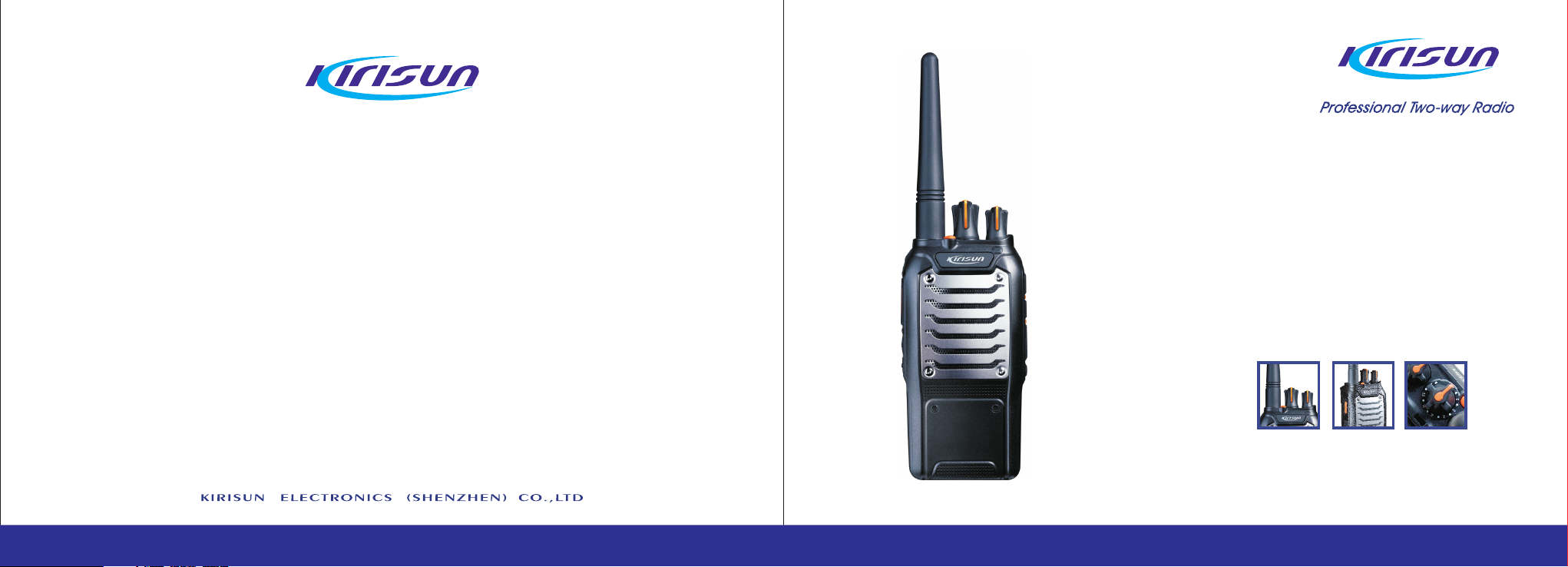
PT578
FM HANDHELD TRANSCEIVER
INSTRUCTION MANUAL
Page 2
INSTRUCTION MANUAL
PT578
FM HANDHELD TRANSCEIVER
We are very grateful for your purchasing brand two-way radios
produced by Shenzhen Kirisun Electronics Co., Ltd.
We believe two-way radio, which always incorporates the latest
technology, can bring great convenience to your life and work;
We also believe that the quality and function of two-way radio can
meet your demands for reliable communication.
Page 3
Notice to the User:
*
Gov ernment laws prohibit radio commu nication
without permission in areas dominated by the government.
* Illegal operation is subject to punishme nt by fin e
and/or imprisonment.
* Refer service to the well-trained professional technicians only.
Safety
It is important that user is aware of and unders tands
hazards common to the operation of any radios.
Warning!
Turn off your radio before entering any area with a potentially explosive atmosphere (where the air contains
gas, dust and smog, etc.), such as while taking on fuel,
or while parking at a gasoline service station.
Precautions in Use
Please comply with the following attentions to avoid
fire, bodily injury and damage to the radio.
* The radio is recommended to transmit for 1 minute
and receive for 4 minutes. Long time transmitting or continuous working in high power mode will make the rear
side of the radio generate heat.
* Please do not disassemble or assemble the radio under any circumstances.
* Please do not expose the radio to direct sunlight for a
long time; do not pla ce the ra dio near any heating devices, either.
* Please do not put the radio in extremely dusty, moist or
dabbling places; do not place it on any unstable surface,
either.
* If the radio emits smoke or strange odors, turn it off and
remove the battery from the radio and contact your local
authorized Kirisun dealer without delay.
Page 4
Content
1. Unpacking and Checking......................................1
2. Preparation...........................................................2
2.1 Charging the Battery........................................2
2.2 Installing/Removing the Battery.......................4
2.3 Installing the Antenna......................................5
2.4 Installing the External Speaker/Microphone....5
2.5 Installing the Belt Clip......................................5
3. Radio Overview....................................................5
4. Basic Operation...................................................6
5. Functions of Programmable Buttons....................8
6. Auxiliary Functions.............................................10
7. Wired Clone Mode.............................................14
8. Troubleshooting..................................................15
9. Specifications.....................................................16
10. FCC Notice......................................................17
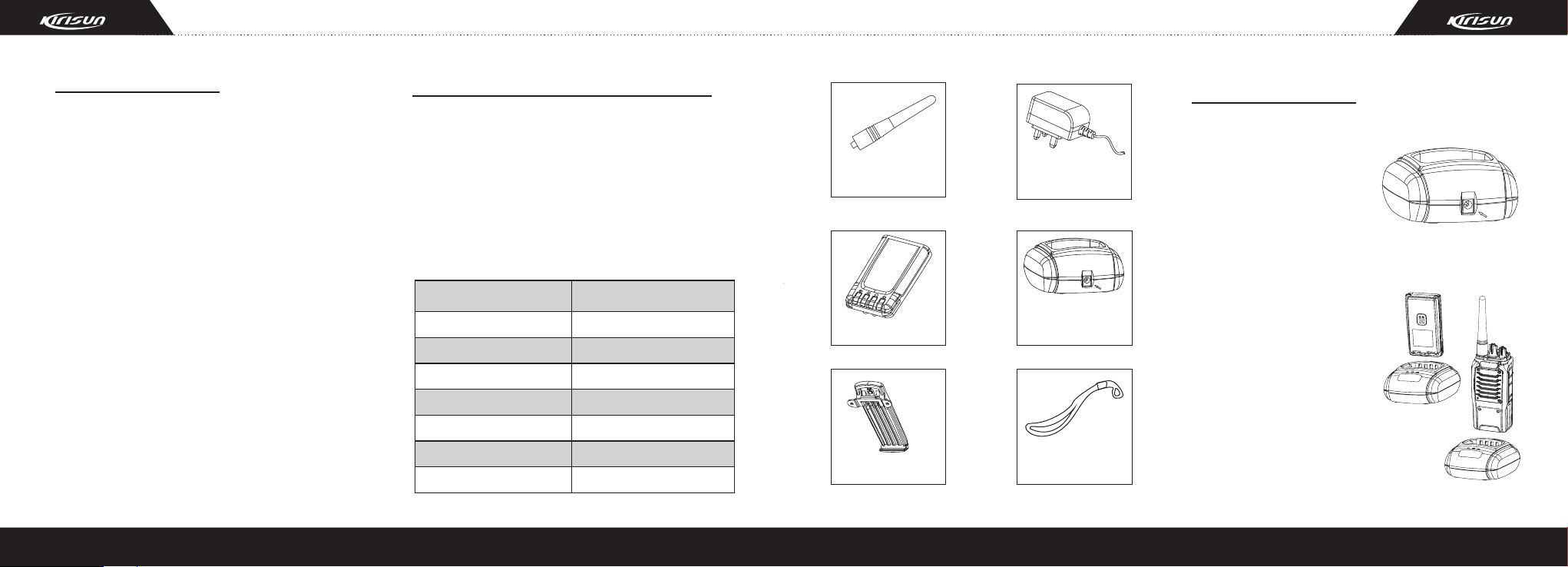
1. Unpacking and Checking
Unpack the radio carefully. We recommend that
you check the radio and the supplied accessories
listed in the following table before discarding the
packing material. If any damage or loss has occurred
during shipment, please contact the dealer without
delay.
Supplied Accessories
Item
Antenna
Battery
Belt Clip
Charger
Power Adapter
Hand Stra p
Instruc tion Manu al
Quantity
1
1
1
1
1
1
1
Antenna
Battery
Belt Clip
Power
Adapter
Charger
Hand Strap
2. Preparation
2.1 Charging the Battery
Plug the adapter into an
applicable AC outlet and
connect the power adapter
to the battery charger. The
green LED will light up.
Place the battery or radio
into the charger slot, and
make sure the radio has
been turned off.
Make sure the battery is
well connected with the
charger. Then the red LED will
light up, and the green LED
will be out, which indicates
that the charging starts.
1
2
Page 5
After about 3~4 hours of charging, the red LED will
be out, and the green LED will light up, which
indicates that the battery is fully charged, then you
can remove the battery from the charger.
The charger will enter the protection mode if the
temperature or the circuit is abnormal, and the LED
will flash yellow. Do not charge the battery by force at
this moment, just remove the battery and cut off the
power of the charger.
Note:
* The radio battery is not fully charged in the factory.
Before the initial use, please charge the new battery.
* KB-56B Li-poly battery of the company is applicable to
this radio.
* When charging the battery for the first time after purchase
or long-time storage (over 2 months), please repeat
charging several times for the battery to achieve normal
capacity. Meanwhile, please make sure the battery is
charged at least once every three months.
Do not recharge the battery if it has been fully charged
*
or the radio is not in the low battery alarm state; otherwise,
it will have bad effects on the battery's service life and
performance. Remove the battery from the charger
after charging.
* When the radio is in the low battery alarm state, please
recharge the battery before use. Do not turn the radio
power on by force; otherwise, it will have bad effects
on its service life and performance.
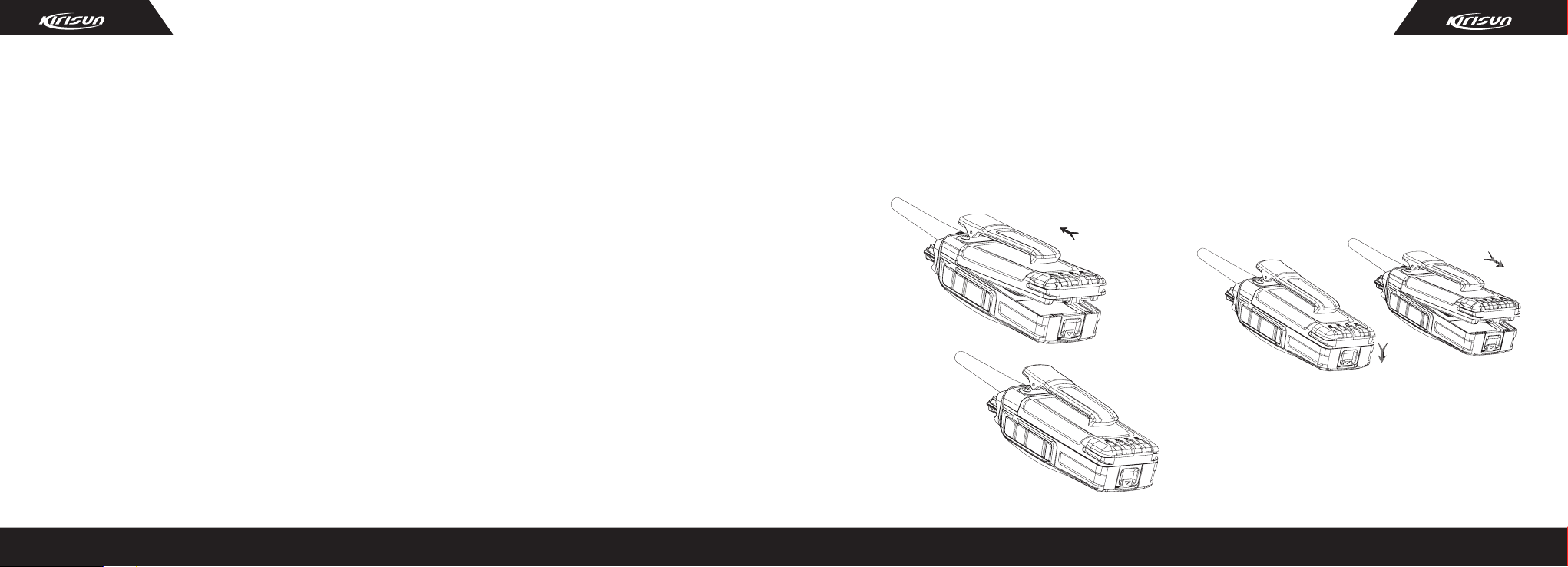
2.2 Installing/Removing the Battery
Installing the Battery:
Match the two bulges at the upper end of the
battery with the corresponding grooves on the top of
the radio and insert the battery.
Firmly press
the battery pack
downwards until
the battery latch
locks.
Removing the Battery:
To remove the battery pack, push the release latch
in the bottom of the radio forwards, the battery will
bounce up automatically. Then loose the belt clip
slightly and remove the battery pack away from the
radio.
Note:
* Do not short-circuit the battery terminals or dispose
battery in fire.
* Do not disassemble the battery casing by yourself.
3
4
Page 6

2.3 Installing the Antenna
Hold the bottom of the
antenna and turn the antenna
clockwise into the connector
on the top of the radio until
secure.
2.4 Installing the External
Speaker/Microphone
Open the cover for external
speaker/microphone jack, and
then ins er t the e xt ernal
speaker/microphone plug into
the jack on the radio.
2.5 Installing the Belt Clip
Match the two holes of the
belt clip with those on the rear
of the radio, and then fix the
belt clip to the radio with two
2.5x8.0 screws. Loose the
fixing screws to remove the
belt clip.
3. Radio Overview
A. LED Indicator
Lights red while transmitting; lights green while
receiving; flashes red when the radio is in low
power.
B. On/Off/Volume Control Knob
Turn clockwise until you hear a click to turn the
radio power on. Turn counterclockwise until you
hear a click to turn it off.
Rotate it to adjust the volume after turning on the
radio.
C. Channel Selector Knob
Rotate to select channel 1-16.
D. Antenna
E. Top Button (programmable button)
F. PTT (Push-To-Talk) Button
Press and hold the PTT button and speak into the
microphone, your voice can be sent to the
recipient. Release the PTT button to receive.
G. Side Button 1 (programmable button)
H. Side Button 2 (programmable button)
I. Microphone
J. External Speaker/Microphone Jack
External speaker/microphone can be connected to
the radio through this jack.
4. Basic Operation
4.1. Switch On
Switch on the radio by turning the On/Off/Volume
control knob clockwise until a click is heard. If
programmed, a beep tone will be heard.
5 6
Page 7

4.2 Adjust Volume
Press the preprogrammed
“Squelch Off ” button to hear
bac kgr ou nd n ois e. T hen
ro tate the On /Off/Volum e
control knob to adjust the
volume.
4.3 Select a Channel
Rotate the channel selector
knob to select the required
channel. You will hear voice
from t he spea k e r w h ile
receiving valid signals.
4.4 Make a Call
To make a call, select
the desir ed c hannel,
press and hold the PTT
button, and speak to the
microphone in normal
voice. Please keep your
mouth 5-10cm away from
the microphone.
4.5 Receive a Call
Release the PTT button to receive a call.
Your dealer can set CTCSS/DCS signaling on your
radio channels by PC software. If you select a
channel that has been preset with the signaling, you
will not hear other calls except those from your own
system.
5. Functions of
Programmable Buttons
The dealer can assign one of the following
auxiliary functions to the top button, side button 1 or
side button 2.
Function
No.
0
None
Voice
1
Annunciation
Talkaround
2
No function is assigned.
Pr es s the pr ep ro gr am med
“Voice Annunciation” button to
change the language an d
mode of voice annunciation,
meanwhile, the current channel
number can be heard.
Wh en the preprogramme d
“Talkaround” button is pressed,
the next transmission will be at
the same frequency as at
which it is received.
Description
No.
Lone Worker
3
Emergency
4
Alarm
Emergency
5
Alarm Off
Scan
6
Function
Description
Pr es s the pr ep ro gr am med
“Lo ne Wo r ker ” b utt on to
start/stop lone working.
Pr ess the preprogram me d
“Emergency Alarm” button to
make an alarm tone according
to t he s e t t i n g of the pro-
gramming software or send
your ID or background sound
to your partner or the system.
Pr es s the pr ep ro gr am med
“Emergency Alarm Off” button
to quit the Emergency Alarm
Mode.
Pr es s the pr ep ro gr am med
“Scan” button to start/stop
scanning.
7 8
Page 8

Function Function
No. No.
If the radio stays at a noise
Nuisance
7
Delete
(temporary)
High/Low
8
Power
Switch
Momentary
9
Monitor
Monitor
10
channel while scanning, press
the preprogrammed “Nuisance
Delete” button to delete the
noise channel temporarily.
Pr es s the pr ep ro gr am med
“Hi gh/ Low P owe r Swi tch”
button to switch between high
and low transmitting power of
the radio.
Press and hold the
grammed “Momentary Monitor”
button to disable CTCSS, DCS
signaling, and release the
butto n to resum e no rma l
operation.
Pr es s the pr ep ro gr am med
“Monitor” button to disable
CTCSS, DCS signaling, and
Description Description
10
11
prepro-
12
13
Monitor
Momentary
Squelch Off
Squelch Off
Lone Worker
Reset
you can receive signals that
cannot be heard under normal
operation. Press it again to
resume normal operation.
Press and hold the prepro-
grammed “Momentary Squelch
Of f” bu tton to open squelch;
release it to resume normal
operation.
Pr ess th e preprogr ammed
“Squelch Off ” button to open
squelch. Press it again to
resume operation.
Pr ess th e preprogr ammed
“Lone Worker Reset” button
while the radio is in Lone
Worker Mode to reset the lone
worker timer, and the timer
starts again.
6. Auxiliary Functions
6.1 TOT (Time-Out-Timer)
1) TOT Function
a) The time-out-timer can prevent the user from
continuously talking overlong and occupying one
certain channel for an extended period of time, and
prevent the radio from heating due to continuous
transmitting.
b) The radio is set with a continuous transmitting
limit. If the radio is continuously transmitting longer
than the time preset by the dealer, the radio will
make alarm and stop transmitting.
2) TOT Rekey Time
a) A period in which the radio is forbidden to
transmit after its overtime activity.
b) During the period, if the PTT button is pressed,
an alert tone will be sounded, and the transmission is
forbidden.
3) TOT Pre-alert
a) The pre-alert will sound before the TOT action.
b) After the pre-alert tone, the timer will action
when the transmitting time has gone beyond the limit.
4) TOT Reset Time
a) The time delay from releasing the PTT button to
the resetting of the timer is limited.
b) The countdown will go on if the time after
releasing the PTT key is shorter than the reset time.
6.2 Battery Saving
The dealer can set the power saving mode by
programming.
If this function is enabled, and the radio hasn't
receive any signal or no operation is being acted for
10 seconds, the radio will enter Battery Saving Mode.
When a signal is received or any operation occurs, it
will exit the Battery Saving Mode automatically.
There are four types for battery saving: 1:1, 1:2,
1:4 and Off.
The automatic battery saving function can reduce
power consumption of the radio.
9 10
Page 9

6.3 Low Battery Warning
When the battery voltage drops too low, the LED
will flash. When the battery voltage drops too low
while transmitting, the LED flashes red and then the
radio stops transmitting. You need to recharge or
change the battery.
6.4 Voice Annunciation
This function can be enabled or disabled by the
dealer. There are two languages available: Chinese
and English. After selecting a channel by turning the
channel selector knob, the channel number will be
annunciated.
6.5 CTCSS/DCS
The dealer can set CTCSS/DCS tones on radio
channels, which enables you to ignore (not hear)
calls from other irrelevant parties who are using the
same channel. When you receive a signal that has a
tone different from the one set on your radio, you will
no t hear the si gn al . Likewise, s ig nals that you
transmit will only be received by parties whose
CTCSS/DCS tones are the same as yours.
Note:
* Using a CTCSS/DCS channel doesn't mean your
calls are private. If other parties' CTCSS/DCS tones
are identical with yours, they can hear your calls.
* Set the battery saving mode to be “O f f” or “1:1” if
the CTCSS/DCS decoding time is long.
6.6 Talkaround
You can expand the communication range of your
network through a repeater. If the radio is out of the
communication range, you can connect with other
radios through “Talkaround” mode.
Press the preprogrammed “Talkaround” button to
switch between “Talkaround” mode and “Repeater”
mode.
6.7 Scan Function
In order to receive calls from many different
channel s, the radio c an be programmed to scan
these channels.
6.7.1 Starting/Stopping Scan
a) Press the button set as “Scan” to start scanning.
While in scanning, the radio checks every channel in
the scan list and stops on which a signal is detected
until that signal disappears. If interval between signal
disappearing and continuing scanning has been
preset, the radio will remain on that channel.
b) Priority Scan:
One channel in the scan list can be set as the
priority channel, which enables it to have the highest
priority during scanning. The radio will scan a non-
priority channel firstly, then the priority channel, and
then the next non-priority channel, and then the
priority channel again, and the scan goes on like this.
If the priority channel and the “lookback time” have
been set for the scan list, when the radio is receiving
signals on a non-priority channel, and the scanning is
paused, the radio will check the priority channel at the
preset intervals. If there are signals in the priority
channel, it will stay at the priority channel; if there is
no signal, it will return to the original channel.
c) The revert channel (Tx channel) during the scan
can be designated by the dealer. There are following
options available:
Selected Channel: When pressing the PTT button,
the radio will transmit from the first channel of the
scan list.
Selected Channel + Currently Working Channel:
When pressing the PTT button during scanning, the
radio will always transmit from the first channel in the
scan list. When pressing the PTT button during the
scanning pause, the radio will always transmit from
the currently working channel.
Priority Channel: The radio will transmit from the
priority channel in the scan list when pressing the
PTT button.
Priority Channel + Currently Working Channel:
When pressing the PTT button during scanning, the
radio will always transmit from the priority channel.
11 12
Page 10

When pressing the PTT button during the scanning
pause, the radio will transmit from the currently
working channel.
Last Called Channel: When pressing the PTT
button, the radio will transmit from the last channel
that received a call.
Last Used + Currently Working Channel: When
pressing the PTT button during the scanning, the
radio will transmit from the last channel that
transmits signals. When pressing the PTT button
during the scanning pause, the radio will transmit
from the currently working channel.
6.7.2 Nuisance Delete
During scanning, if a channel continually
generates unwanted noise or interference, you can
press the preprogrammed “Nuisance Delete” button
to remove the channel from the scan list
temporarily.
Note:
* The priority channel and the last channel in the
scan list cannot be deleted.
* Quit the scan mode and enter it again, the deleted
channel will be added to the scan list again.
6.8 Lone Worker
If lone worker function is enabled by PC software,
you can press the button set as lone worker to start
lone working. This mode is to ensure the safety of the
user while using the radio separately. The lone
w o r k e r t i m e r s t a r t s u p on p r e s sin g t h e
preprogrammed “Lone Worker” button. If the preset
lone worker time expires, the radio will make an alert
tone. If the preset remind time expires, the radio will
enter Emergency Mode and make alarm.
In the Lone Worker Mode, press the prepro-
grammed “Lone Worker” button again to quit Lone
Worker Mode.
In the Lone Worker Mode, press the prepro-
grammed “Lone Worker Reset” button (if a button is
de signated as the lone worker timer reset
button) or any button (if any button is designated as
the lone worker timer reset button) to restart the lone
worker timer.
6.9 Emergency Alarm
Press the preprogrammed “Emergency Alarm”
button (the pressing time should be longer than the
debounce time of the emergency alarm switch) to
enter the Emergency Alarm Mode. You can give the
warning tone according to the programming software,
or send the background sound to your partner or the
system.
Press the preprogrammed “Emergency Alarm Off ”
button to quit the Emergency Alarm Mode, the radio
stops the alert and resumes normal operation.
7. Wired Clone Mode
If the wired clone function is enabled by PC
software, after entering the Wired Clone Mode, the
radio needs to be restart to return to user mode.
The operating steps go as follows:
1. Press and hold side button 2 while turning the
radio power on to enter Clone Mode. If the wired
clone function is disabled, the radio will enter User
Mode.
2. Connect the slave radio with the master radio
by a clone cable. Then switch on the slave radio.
3. Press side button 1 of the master radio, the
cloning starts. During the data transmission process,
the master radio will light red, and the slave radio will
light green. When the cloning is finished, the red LED
of the master radio will be off, and the slave radio will
restart automatically.
4. You can continue to clone data according to
step 3.
Note: The wired clone function can be enabled or
disabled by the PC programming software. Once the
wired clone function is disabled, the radio cannot
enter Wired Clone Mode.
13 14
Page 11

8. Troubleshooting
No.
1
2
3
4
Problem
The radio cannot
be switched on or
no d isplay aft er
being switched on.
Phase l ock lo op
unlocked (Beeping)
Cannot transmit
No signal
Causes and Solutions
A. The battery and the radio are not reliably connected. Please reinstall the battery.
B. The fuse of the power supply is burnt out. Please change it.
C. The power switch is in failure. Please change it.
D. The battery is out of power, please recharge it or change it.
E. The CPU is broken, please change it.
A. The channel frequency setting is out of range, please reset the channel data.
B. The crystal oscillator of phase lock loop is broken, please change it.
C. The oscillating tube is broken, please change it.
D. The phase lock loop IC is broken, please change it.
A. The frequencies of both users are not the same. Please select the same
frequency channel again.
B. The CTCSS/DCS signals of both users are not the same. Please reset it.
C. The radio is out of effective communication range.
A. The antenna is in poor contact. Please fasten the antenna head.
B. The HF amplifier is broken, please change it.
C. The squelch level is so high that the squelch cannot be opened. Please reset the
No.
4
5
6
Problem
No signal
The tra nsm it tin g
red light is on, but
no voice is heard.
The receiving green
light is on, but no
voice is heard.
9. Specifications
General Specification
Frequency
Number of channels
Causes and Solutions
squelch level.
D. The mixer tube is broken, please change it.
E. The FM processing IC is broken, please change it.
A. The power module is broken, so there is no power output. Please change it.
B. The microphone is broken, please change it.
A. The speaker is broken, please change it.
B. The audio amplifier is broken, please change it.
PT578
136-174MHz, VHF
400-450MHz, UHF
420-470MHz. UHF
16
15 16
Page 12

General Specification
Channel spacing
Dimension(H×W×D)
Weight
Operating temperature
Receiving sensitivity
Frequency stability
Tx power
Max. frequency
deviation
Max. audio power
Power supply
PT578
25kHz(W)/12.5kHz(N)
114mm×53.5mm×33.5mm
25 0g (i nc lu di ng b at te ry
and antenna)
-25℃ +55℃
≤ 0.28μV
2.5ppm
4W (UHF), 5W(VHF)
±5KHz(W)/±2.5KHz(N)
≥1000mW
DC7.4V
10. FCC Notice
Your KIRISUN radio generates RF
ele c t rom a gnet i c ener g y d uri n g
transmit mode. This radio is designed
WAR NING
only during the course of employment by individuals
aware of the hazards, and the ways to minimize such
hazards. This radio is NOT intended for use by the
“General Population” in an uncontrolled environment.
This radio has been tested and complies with the
FCC RF exposure limits for “Occupational Use Only”.
In addition, your KIRISUN radio complies with the
following Standards and Guidelines with regard to RF
energy and electromagnetic energy levels and
evaluation of such levels for exposure to humans:
FCC OET Bulletin 65 Edition 97-01 Supplement C,
Evaluating Compliance with FCC Guidelines for
Human Exposure to Radio Frequency Electromag-
for and classified as “Occupational
Use Only”, meaning it must be used
netic Fields.
American National Standards Institute (C95.1-
1992), IEEE Standard for Safety Levels with Respect
to Huma n E x posu r e t o R adio Freq u ency
Electromagnetic Fields, 3 kHz to 300 Ghz.
American National Standards Institute (C95.3-
1992), IEEE Recommended Practice for the
Measure ment of Potentially H a z a r d o u s
Electromagnetic Fields– RF and Microwave.
The forementioned accessories are authorized for
use with this product. Use of accessories other than
those (listed in the instruction) specified may result in
RF exposure levels exceeding the FCC requirements
for wireless RF exposure.
To ensure that your expose to
RF electromagnet ic energ y is
within the FCC allowable limits for
CAUTION
occupational use, always adhere to
the following guidelines
DO NOT operate the radio without a proper antenna
attached, as this may damaged the radio and may
also cause you to exceed FCC RF exposure limits.
A proper antenna is the antenna supplied with this
radio by the manufacturer or antenna specifically
authorized by the manufacturer for use with this
radio.
DO NOT transmits for more than 50% of total radio
use time (“50%duty cycle”). Transmitting more than
50% of the time can cause FCC RF exposure
compliance requirements to be exceeded. The radio
is transmitting when the “TX indicator” lights red.
You can cause the radio to transmit by pressing the
“PTT” switch.
ALWAYS keep the antenna at least 2.5 cm (1 inch)
away from the body when transmitting and only use
the KIRISUN belt-clip which is listed in instructions
when attaching the radio to your belt, etc., to ensure
FCC RF exposure compliance requirements are not
ex ceeded. To pr ov ide the re ci pi ents of your
17 18
Page 13

transmission
antenna at least 5 cm (2 inches) from your mouth,
and slightly off to one side.
The information listed above provides the user
with the information needed to make him or her
aware of RF exposure, and what to do to assure that
this radio operates with the FCC RF exposure limits
of this radio.
El ectromagnetic Interferen ce /Compatibilit y
Du ring transmiss io ns, your KIRISUN radio
generates RF energy that can possibly cause
interference with other devices or systems. To avoid
such interference, turn off the radio in areas where
signs are posted to do so.
DO NOT operate the transmitter in areas that are
sensitive to electromagnetic radiation such as
hospitals, aircraft, and blasting sites.
Occupational/Controlled Use The radio transmitter
is used in situations in which persons are exposed
as consequence of their employment pr ovid ed
the best sound quality, hold the
those persons are fully aware of the potential for
exposure and can exercise control over their
exposure.
IMPORTANT
READ ALL INS TRUCT ION S c arefu lly a nd
completely before using the transceiver
SAVE TH IS INSTRUCT IO N MANUAL - Th is
instruction manual contains important operating
instructions for the Two-Way Radio
EXPLICIT DEFINITIONS
WORD
WARNING
CAUTION
NOTE
Personal injury,fire hazard or electric
shock may occur.
Equipment damage may occur.
If disregarded,inconvenience only.No
risk of personal injury,fire or electric
shock.
DEFINIT ION
OPERATING NOTES
When transmitting with a portable radio, hold the
radio in a vertical position with its microphone 5 to 10
cm (2 to 4 inches) away from your mouth. Keep the
antenna at least 2.5 cm (1 inch) from your head and
body.
If you wear a portable two-way radio on your body,
ensure that the antenna is at least 2.5 centimeters (1
inch) from your body when transmitting.
PRECAUTIONS WARNING!
NEVER hold the transceiver so that the antenna is
very close to, or touching exposed parts of the body,
especially the face or eyes, while transmitting. The
transceiver will perform best if the microphone is 5 to
10 cm (2 to 4 inches) away from the lips and the
transceiver is vertical.
WARNING!
NEVER operate the transceiver with a headset or
other audio accessories at high volume levels.
CAUTION!
NEVER short the terminals of the battery pack.
NEVER connect the transceiver to a power source
other than the Battery listed above. Such a connection
will ruin the transceiver.
DO NOT push the PTT when not actually desiring to
transmit.
AVOID using or placing the transceiver in direct
sunlight or in areas with temperatures below –30°C
(–22°F) or above +60°C (+140°F).
DO NOT modify the transceiver for any reason.
MAKE SURE the flexible antenna and battery pack
are securely attached to the transceiver, and that the
antenna and battery pack are dry before attachment.
Exposing the inside of the transceiver to water will
result in serious damage to the transceiver.
FCC CAUTION: Changes or modifications to this
device, not expressly approved by KIRISUN, could
void your authority to operate this transceiver under
FCC regulations.
19 20
Page 14

DE CL ARAT ION
OF C ONF ORM ITY
We, Shenzhen Kirisun Electronics Co., Ltd.
3-6Flrs,ROBETA Building, No. 1, QiMin Road, Song Ping
Shan Area, Science & Industry Park,Nanshan District
Shenzhen 518057 P.R.China
Declare on our sole responsibility that this equipment
complies with the essential requirements of the Radio and
Telecommunication Terminal Equipment
Directive,1999/5/EC,and that any applicable Essential Test
Suits measurement have been performed.
Description of equipment: FM Handheld Transceiver
Model No.: PT578
This compliances is based on conformity with the
following harmonised standards or documents:
(1). ETSI EN301 489-1
(2). ETSI EN301 489-5
(3). ETSI EN300 086-1
(4). ETSI EN300 086-2
(5). EN60950
Shenzhen, 10 Dec 2008
Place and date of issue
WenLiang, Fu
General Manager
NOTE:
NOTE:
NOTE:
Signature
Kirisun Electronics Co., Ltd
402-E13 00A-RD7 A
11 1221 22
 Loading...