

Page 1

KILL A WATT P3
USER MANUAL
For more information visit our website @ www.secpa.com
Page 2
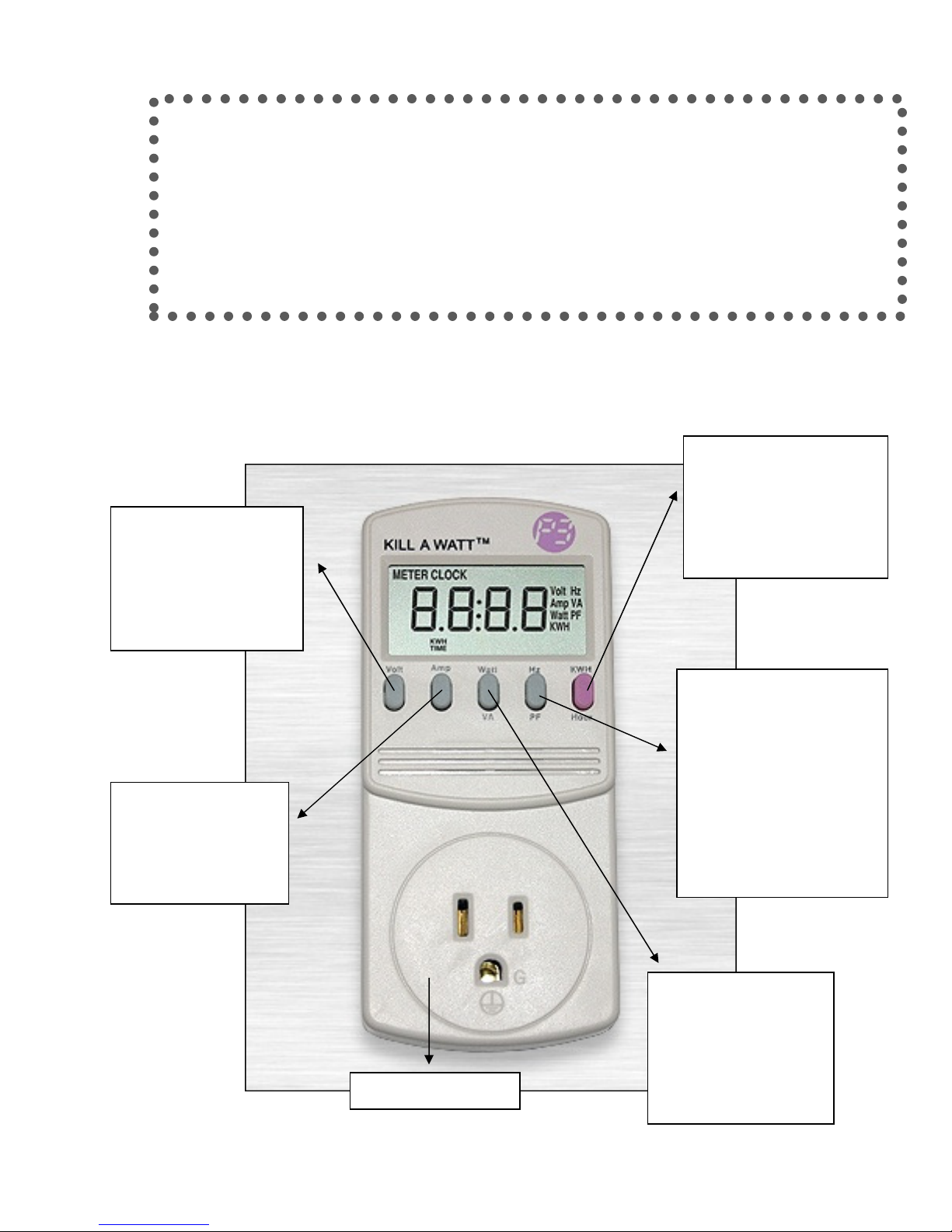
KWH “Money Button”
–
Hz/PF
-
Watt
-
Volts
-
Amps
-
AC Power
Members, so we have created this easy-to-use manual to help you better
understand energy consumption in your household. You will learn how to
identify appliances that are "Power Hogs" and what might be a "Vampire",
slowly using energy when not in use. We hope this will help you decide
what appliances need to be replaced and what might need to be
Southeast Colorado Power Association likes having well informed
unplugged as it sits idle. This in turn, should cut down on your power bill.
This should read
something close to
120.0, the standard
voltage in US electrical
outlets.
Press this button to
measure the flow rate
of electric current.
KILL A WATT
Press this button once to
see electricity used since
monitoring started. Push
button again to view time
elapsed
60 hertz (cycles per
second) alternating
current in US electrical
outlets (PF stands for
Power Factor). The Volt,
Amp, and Hz buttons are
of lesser relevance to
testing appliances for
electrical efficiency.
Press this button to
see how many watts
the appliance is
drawing at the
moment.
Page 3

Using the KILL A WATT P3
Plug the Kill A Watt into the wall, then plug the appliance into the socket on the front of the Kill A
Watt. Next turn on the appliance or equipment.
• Suggestion: When monitoring a refrigerator or freezer, use an extension cord to position
the “Kill A Watt” in a location convenient for reading.
• Before testing the appliance find the “name plate” that tells you how many volts, watts, etc.
the appliance should pull when in use.
• For example if a toaster’s “name plate” says it should be pulling 1800 watts, when its
plugged in press the watt button on the “Kill A Watt”, it should read 1800 watts or less.
Another example: If your coffee maker is pulling 7.4 amps and the rating on the name plate
was 7.5, this is good because it is reading correctly.
• When you first use the “Kill A Watt” the time is displayed in minutes and hours (00:00), but
after 99 hours have gone by, the display will switch to show only hours (up to 9999). Once
the time limit is reached, it will start over again at zero.
Press the “Watt” button to read the power usage in watts.
• For some appliances the reading may vary depending on what the appliance is doing. For
example, a printer will use more power when printing than when idle.
• Try turning the appliance off, and see if the power usage goes to zero. Many appliances
continue to use power even when turned “off” – this is referred to as a power hog, vampire
or phantom, and it can add up over time since the power is being used 24/7. Appliances
that use power when turned off can be unplugged or plugged into a power strip and the
user can turn the power strip to “off”.
• An appliance that uses 20 watts even when turned off will use 176 kilowatt-hours of energy
in a year – costing you about $18 annually.
Press the purple KWH/Hour “MONEY BUTTON” once for KWH usage and twice for time elapsed.
• The final button is the “MONEY BUTTON”. Use this button to toggle back and forth
between the number of hours over which the equipment was monitored, and the kilowatt
hours of electricity used over that period. Record the numbers for both hours and kwh on
the worksheet provided before disconnecting the Kill A Watt monitor from the wall.
• The accumulated kwh data will be “lost” when the meter is disconnected because this is
how the Kill A Watt resets itself.
Determining the cost of running appliances or equipment.
• SECPA recommends that you keep your appliance or equipment plugged in for at least 12
hours to gather and record sufficient data.
• Now take the kwh use and the amount of hours recorded, and plug that data into the
attached worksheet’s formula columns.
• The more items you test, the more you will see where you can save on your electric bill.
Page 4
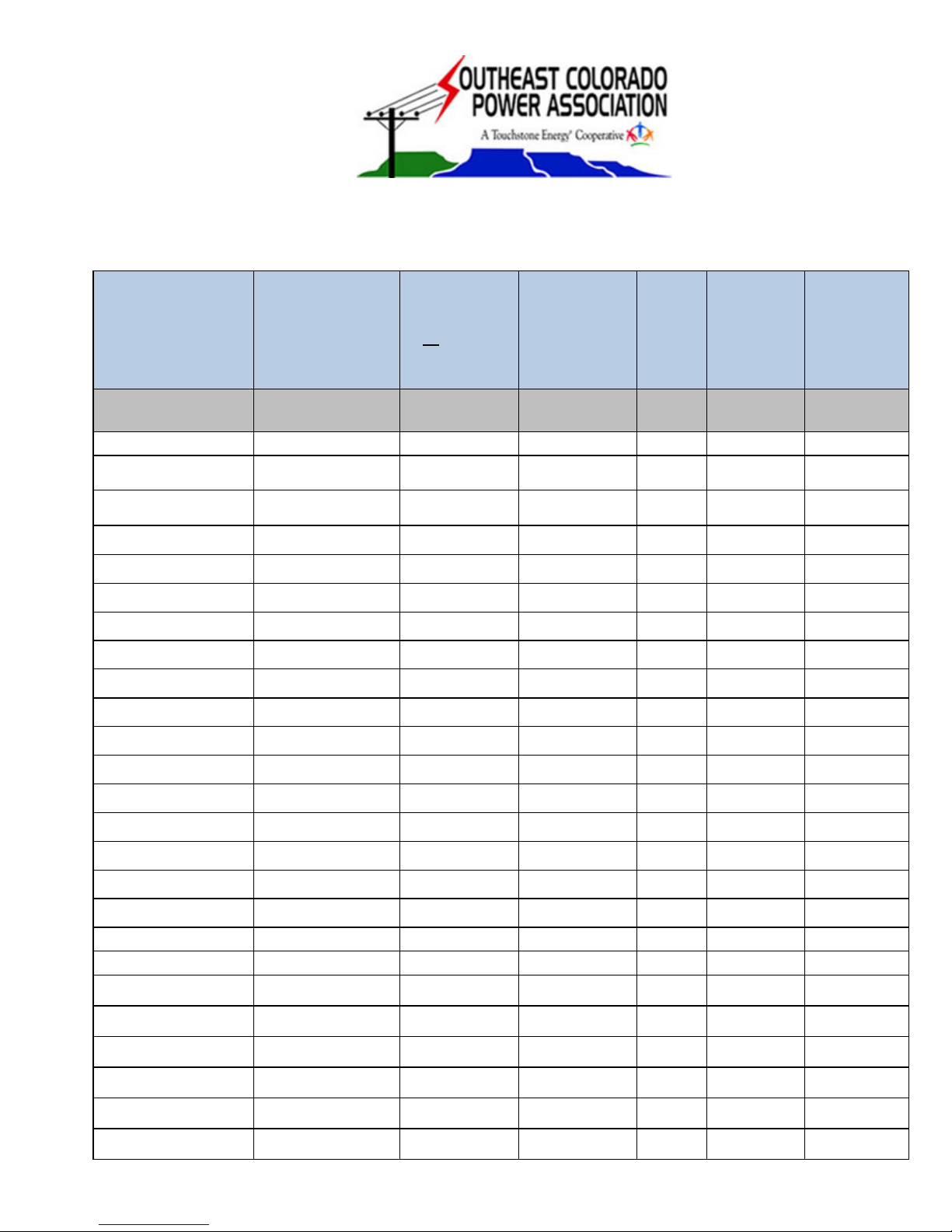
(D)
B x C x E x
KILL A WATT WORKSHEET
Appliance/Equipment
(A)
Kilowatt-hours
(KWH)
of Electricity per
Hour
(B)
Average
number
of Hours
on each day
(C)
Cost per Day @
$0.12 per KWH
Number
of Units
in
House
(E)
Total KWH
Consumed
per Year
(F)
Total Cost
per Year
(G)
(from Kill A Watt)
B x C x $0.12
365 F x $0.12
example:
Older computer w/ CRT
monitor
ENERGY STAR computer
w/ LCD monitor
0.30 24 $0.87 1 2628 $315.36
0.10 24 $0.29 1 876 $105.12
Page 5
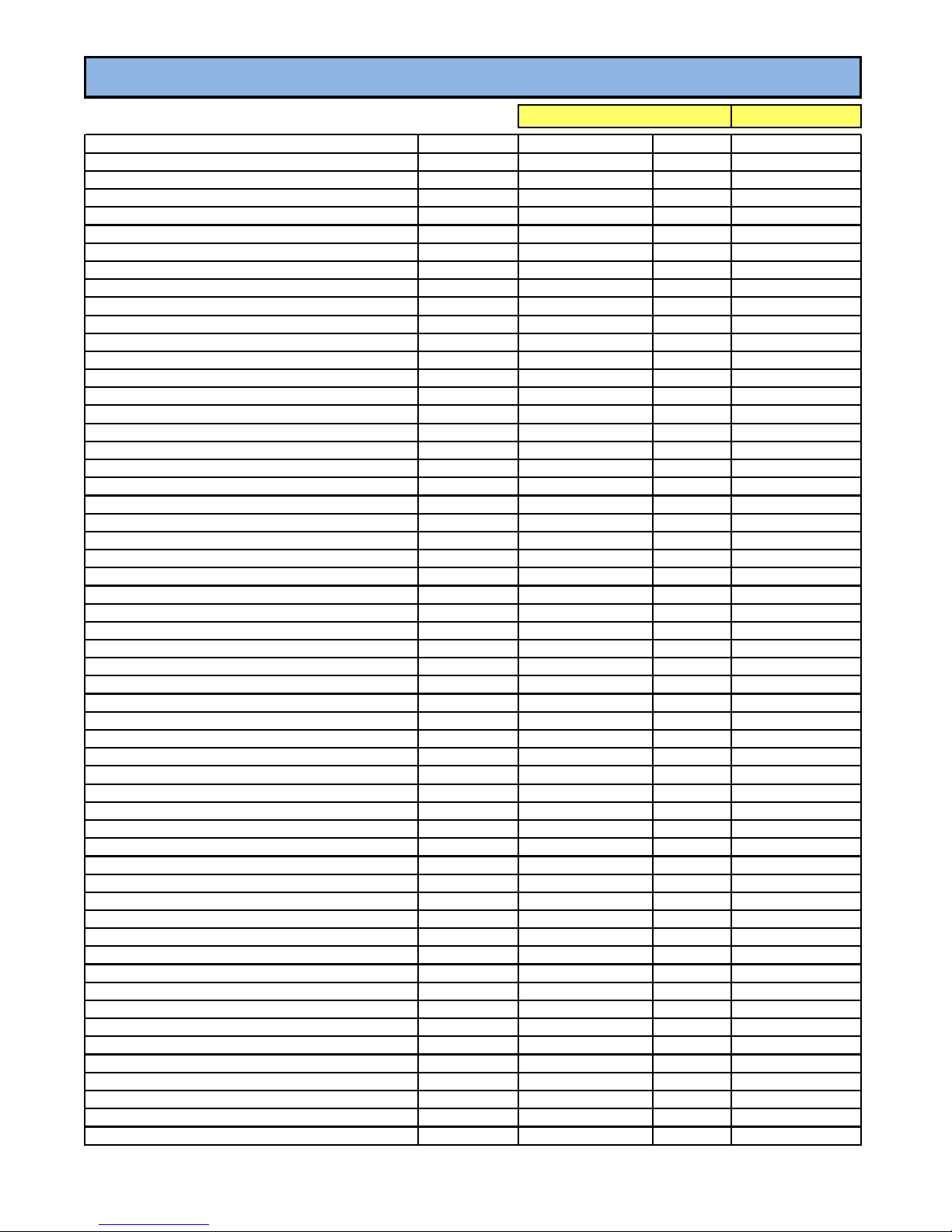
Est. Wattage
Est. Hours/month
Est. KWH
Est. Monthly Cost
Aquarium (Small)
150
730
110
$13.49
Audio Entertainment System
250
60
15
$1.85
Blender
385
2
1
$0.09
Clock
3
730
2
$0.27
Clothes Dryer
6,000
17
102
$12.57
Coffee Maker
1,200
30
36
$4.44
Compactor
400
10
4
$0.49
Computer, monitor, printer
365
75
27
$3.37
Convection Oven
1,500
8
12
$1.48
Curling Iron
1,500
5
8
$0.92
Dehumidifier (20 Pints, Summer)
450
360
162
$19.96
Dishwasher - Drying
1,200
25
30
$3.70
Dishwasher - Washing
250
35
9
$1.08
Garbage Disposal
420
60
25
$3.10
Electric Blanket
175
180
32
$3.88
Electric Pet Fence
15
730
11
$1.35
Fan - Attic Ventilation
400
71
28
$3.50
Fan - Paddle
80
150
12
$1.48
Fan - Window
125
100
13
$1.54
Freezer - Frost Free
440
334
147
$18.11
Fry Pan
1,200
10
12
$1.48
Garage Door Opener
350
3
1
$0.13
Hair Dryer - Portable
1,000
10
10
$1.23
Heat Lamp
250
5
1
$0.15
Heat Tape (30ft., Winter)
180
720
130
$15.97
Heater (Auto Engine, Winter)
1,000
180
180
$22.18
Heater (Portable)
1,500
40
60
$7.39
Heating System (Warm Air Fan)
312
288
90
$11.07
Humidifier (Winter)
177
230
41
$5.02
Clothes Iron
1,000
5
5
$0.62
Ice Maker
200
333
67
$8.21
Jacuzzi - 2 Person
1,500
93
140
$17.19
Lighting (Compact Fluorescent)
18
100
2
$0.22
Lighting (Fluorescent)
40
100
4
$0.49
Lighting (Incandescent)
75
100
8
$0.92
Lighting (Outdoor Floor)
120
90
11
$1.33
Microwave Oven
1,500
11
17
$2.03
Mixer, Hand
100
10
1
$0.12
Pool Pump (1.5 HP)
2,000
250
500
$61.60
Power Tools (Circular Saw)
1,800
1
2
$0.22
Radio
71
101
7
$0.88
Range (Oven)
2,660
20
53
$6.55
Range (Self Cleaning Cycle)
2,500
3
8
$0.92
Refrigerator/Freezer
250
333
83
$10.26
Satellite Dish and Receiver
360
183
66
$8.12
Sump Pump (1/2 HP)
500
20
10
$1.23
Television (Color, Solid State)
200
183
37
$4.51
Toaster
1,400
3
4
$0.52
Vacuum Cleaner
1,500
6
9
$1.11
Waffle Iron
1,200
4
5
$0.59
Washer
512
17
9
$1.07
Waterbed Heater
375
256
96
$11.83
Water Heater
4,500
91
410
$50.45
Window Air Conditioner - 12,000 BTU
1,500
200
300
$36.96
Window Air Conditioner - 6,000 BTU
825
200
165
$20.33
Appliance Operating Cost Estimator
Appliance
SECPA Cost per KWH
0.1232
 Loading...