

Page 1

Keysight U3401A 4 1/2 Digit
Dual Display Multimeter
Quick Start Guide
Page 2

Notices
CAUTION
WARNING
Copyright Notice
© Keysight Technologies 2009—2017
No part of this manual may be
reproduced in any form or by any
means (including electronic storage
and retrieval or translation into a
foreign language) without prior
agreement and written consent from
Keysight Technologies, Inc. as
governed by United States and
international copyright laws.
Manual Part Number
U3401-90019
Edition
Edition 2, June 1, 2017
Printed in:
Printed in Malaysia
Published by:
Keysight Technologies
Bayan Lepas Free Industrial Zone,
11900 Penang, Malaysia
Warranty
The material contained in this
document is provided “as is,” and is
subject to being changed, without
notice, in future editions. Further, to
the maximum extent permitted by
applicable law, Keysight disclaims all
warranties, either express or implied,
with regard to this manual and any
information contained herein, including
but not limited to the implied
warranties of merchantability and
fitness for a particular purpose.
Keysight shall not be liable for errors or
for incidental or consequential
damages in connection with the
furnishing, use, or performance of this
document or of any information
contained herein. Should Keysight and
the user have a separate written
agreement with warranty terms
covering the material in this document
that conflict with these terms, the
warranty terms in the separate
agreement shall control.
Technology Licenses
The hardware and/or software
described in this document are
furnished under a license and may be
used or copied only in accordance with
the terms of such license.
Safety Information
A CAUTION notice denotes a hazard. It
calls attention to an operating
procedure, practice, or the like that, if
not correctly performed or adhered to,
could result in damage to the product
or loss of important data. Do not
proceed beyond a CAUTION notice
until the indicated conditions are fully
understood and met.
A WARNING notice denotes a hazard. It
calls attention to an operating
procedure, practice, or the like that, if
not correctly performed or adhered to,
could result in personal injury or death.
Do not proceed beyond a WARNING
notice until the indicated conditions are
fully understood and met.
Restricted Rights Legend
U.S. Government Restricted Rights.
Software and technical data rights
granted to the federal government
include only those rights customarily
provided to end user customers.
Keysight provides this customary
commercial license in Software and
technical data pursuant to FAR 12.211
(Technical Data) and 12.212 (Computer
Software) and, for the Department of
Defense, DFARS 252.227-7015
(Technical Data - Commercial Items)
and DFARS 227.7202-3 (Rights in
Commercial Computer Software or
Computer Software Documentation).
2 Keysight U3401A Quick Start Guide
Page 3

Table of Contents
The Front Panel at a Glance . . . . . . . . . . . . . . . . . . . . . . . . . . . . . . . .5
The Display at a Glance . . . . . . . . . . . . . . . . . . . . . . . . . . . . . . . . . . . .6
Getting Started . . . . . . . . . . . . . . . . . . . . . . . . . . . . . . . . . . . . . . . . . .9
Keysight U3401A Quick Start Guide 3
Page 4

THIS PAGE HAS BEEN INTENTIONALLY LEFT BLANK.
4 Keysight U3401A Quick Start Guide
Page 5

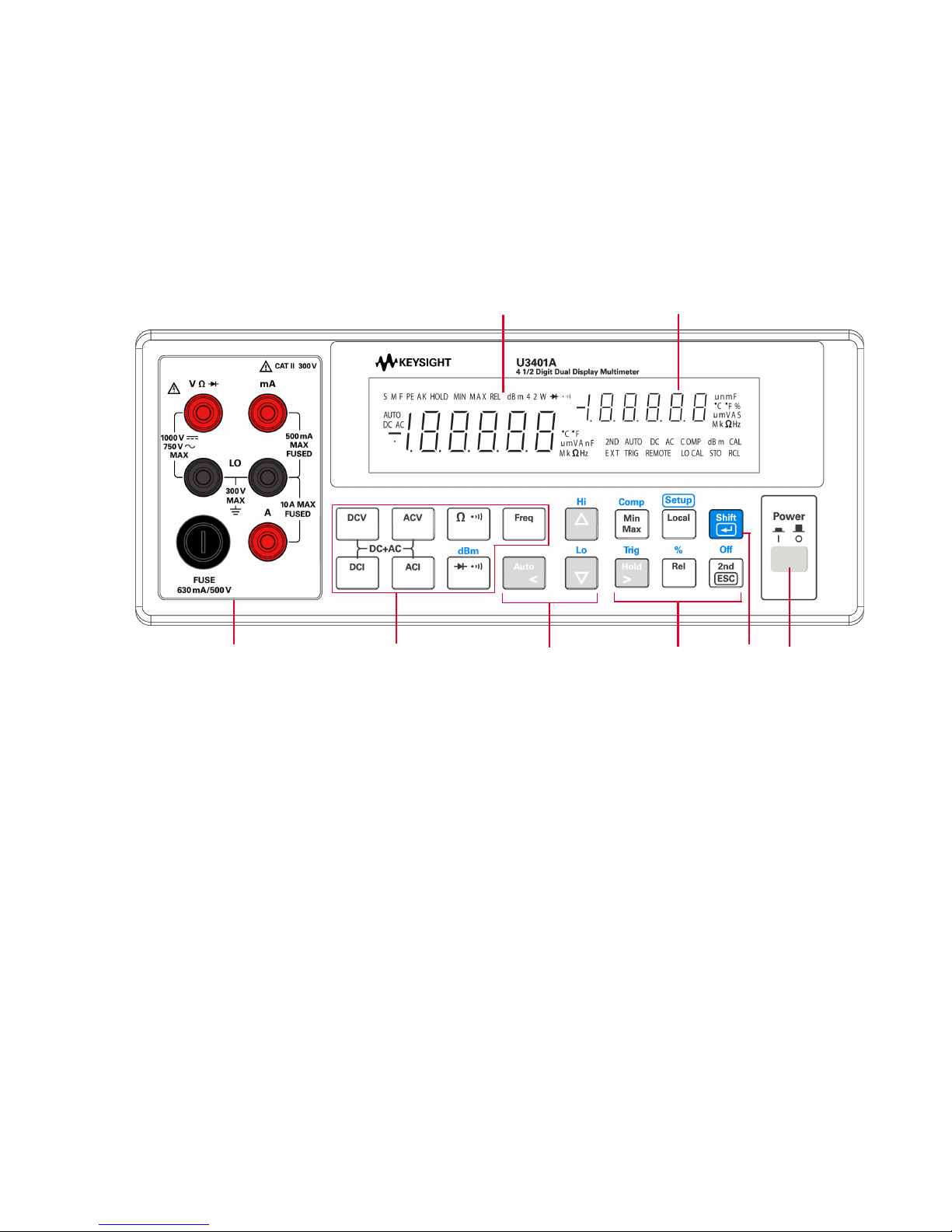
The Front Panel at a Glance
Measurement
function
keypads
Secondary display
Input terminals
and current fuse
Autoranging,
manual range,
and comparator
operation
Power
on/off
switch
Math
operation
keypads
Shift
Primary display
Getting Started 1
Keysight U3401A Quick Start Guide 5
Page 6

1 Getting Started
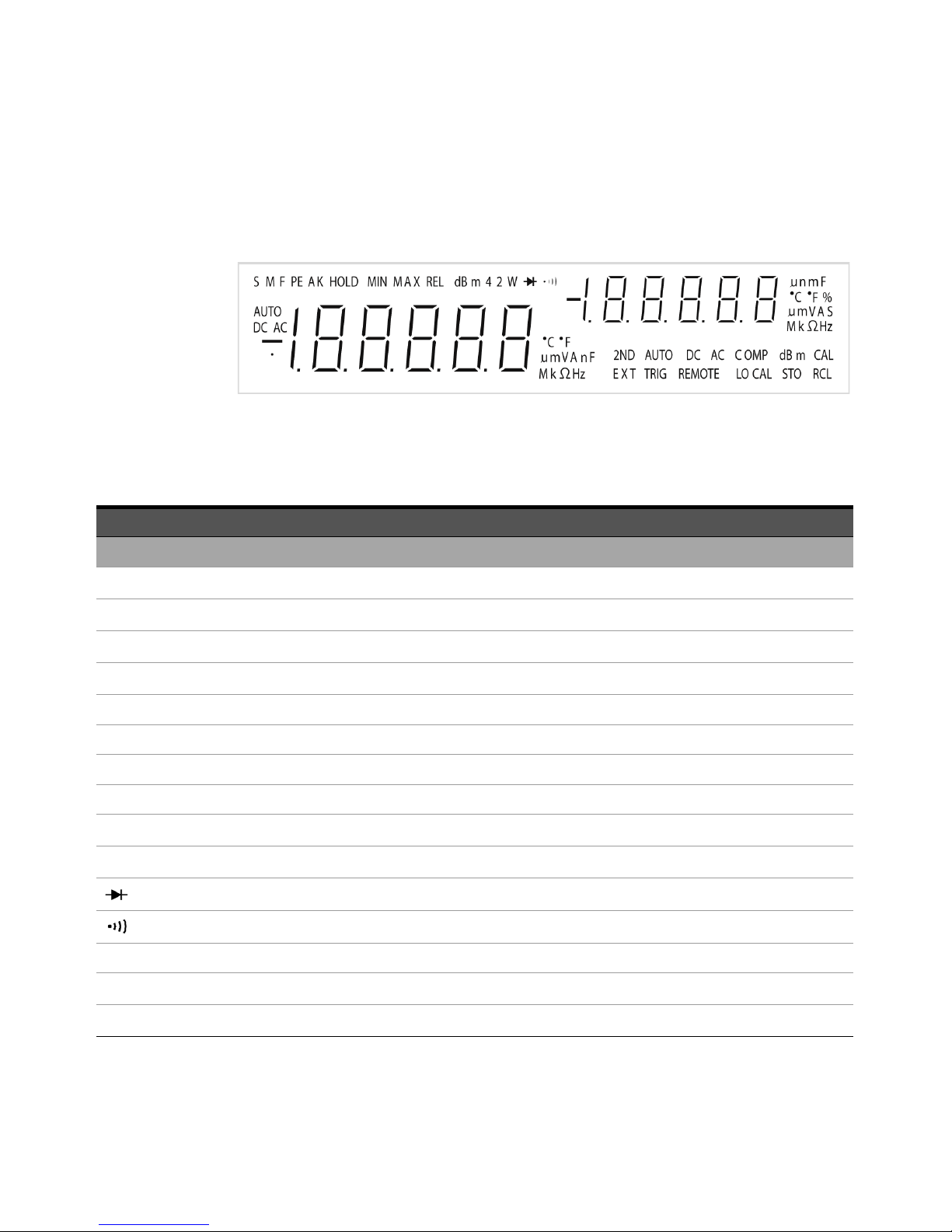
The Display at a Glance
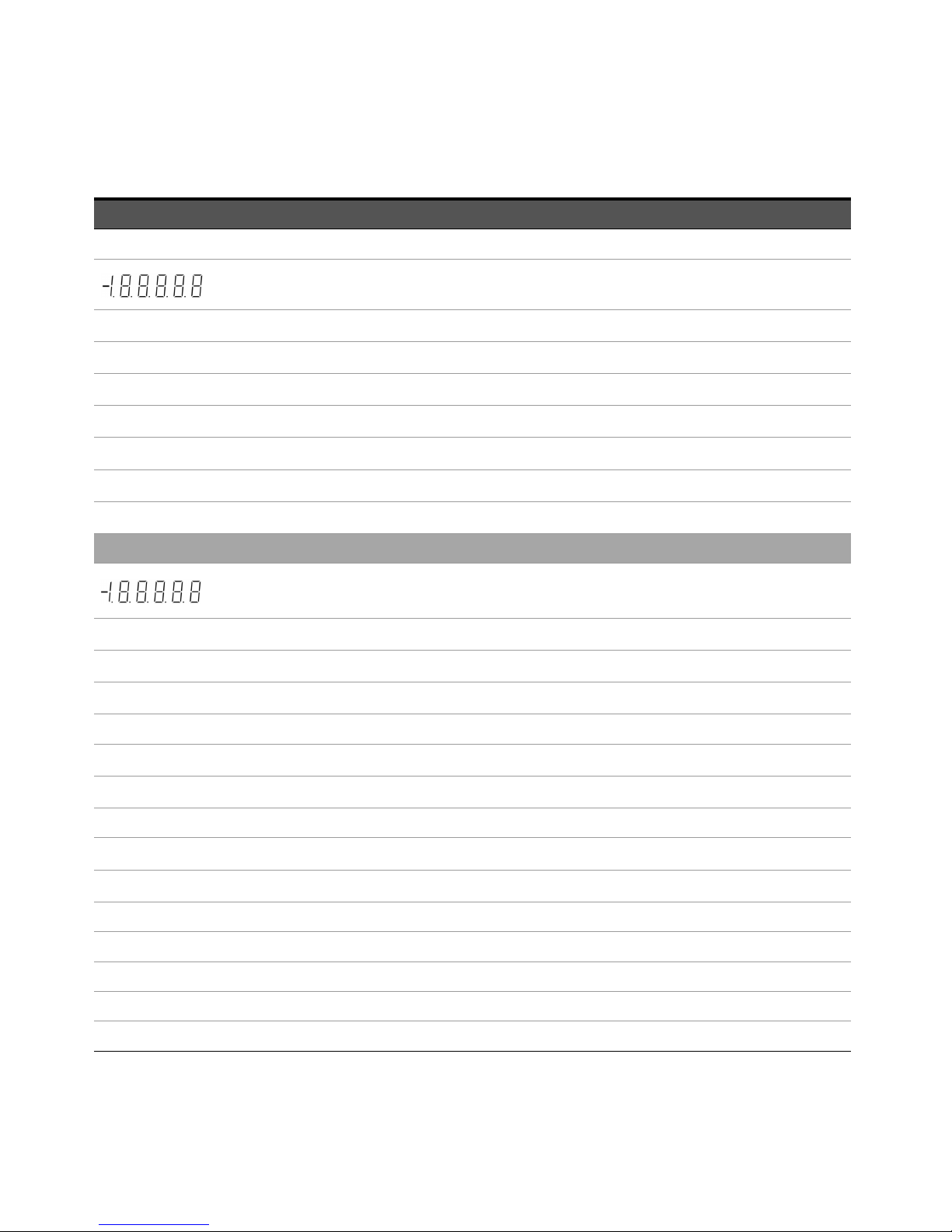
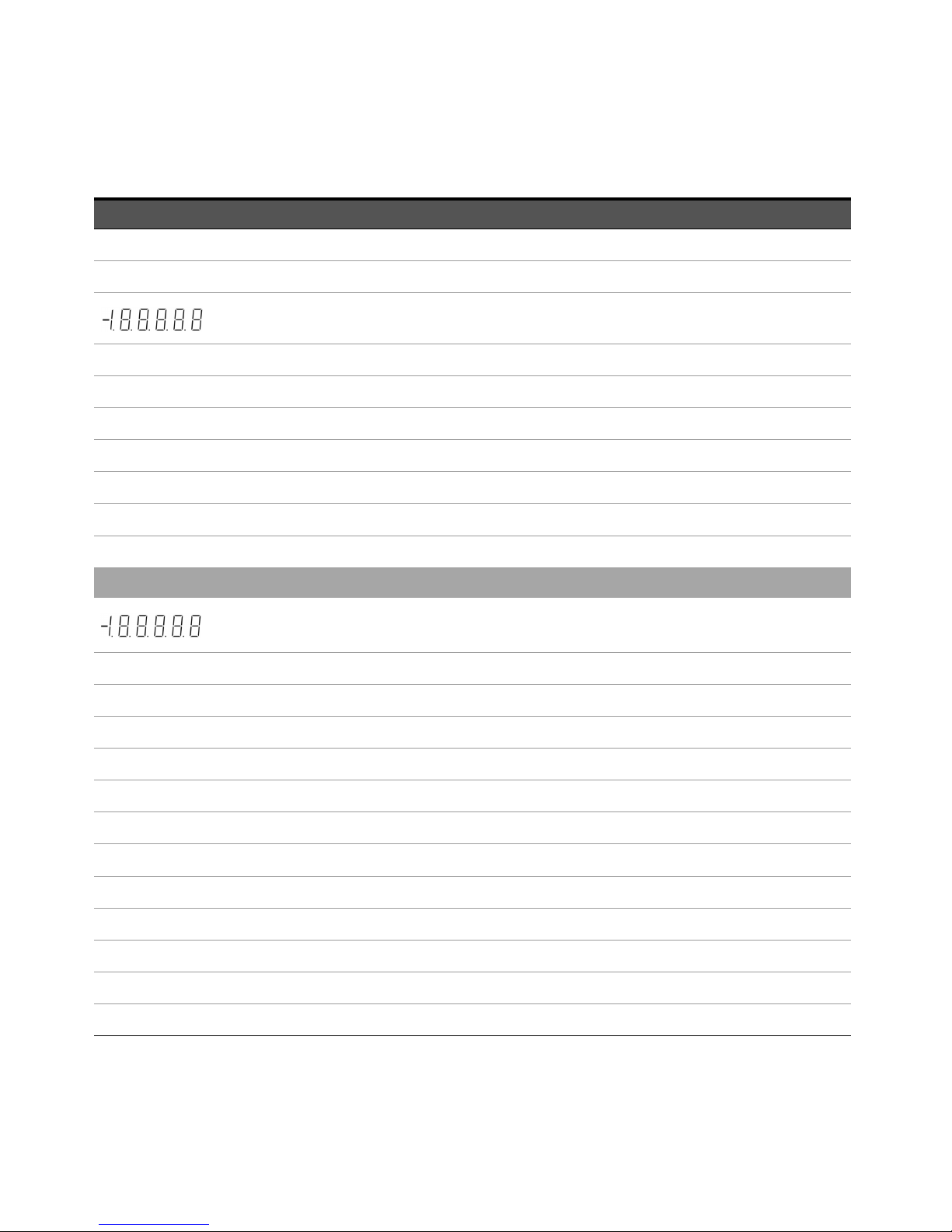
Figure 1-1 VFD full display with all segments illuminated
The highly visible vacuum fluorescent display (VFD) annunciators are described in
the following table:
Annunciator Description
Primary display
S Reading rate: Slow. Not applicable for the U3401A.
M Reading rate: Medium. Not applicable for the U3401A.
F Reading rate: Fast. Not applicable for the U3401A.
PEAK Peak measurement. Not applicable for the U3401A.
HOLD Data hold
MIN MinMax math operation: Minimum value shown on the primary display
MAX MinMax math operation: Maximum value shown on the primary display
REL Relative value
dBm Decibel unit relative to 1 mW
4 2 W 4-wire/2-wire resistance. Not applicable for the U3401A.
Diode test
Audible continuity test for resistance
AUTO Autoranging
DC Direct current
AC Alternating current
6 Keysight U3401A Quick Start Guide
Page 7

Annunciator Description
DCAC AC + DC
Polarity, digits, and decimal points for primary display
°C Celcius temperature unit. Not applicable for the U3401A.
°F Fahrenheit temperature unit. Not applicable for the U3401A.
mV Voltage unit: mV, V
μmA Current unit: μA, mA, A
μmnF Capacitance unit: μF, nF, mF
MkΩ Resistance unit: Ω, kΩ, MΩ
MkHz Frequency unit: Hz, kHz, MHz
Secondary display
Polarity, digits, and decimal points for primary display
Getting Started 1
μmnF Capacitance unit: μF, nF, mF
°C Celcius temperature unit. Not applicable for the U3401A.
°F Fahrenheit temperature unit. Not applicable for the U3401A.
% Duty cycle measurement
mV Voltage unit: mV, V
μmA Current unit: μA, mA, A
S Shift mode
MkΩ Resistance unit: Ω, kΩ, MΩ
2ND Secondary display is enabled. Not applicable for the U3401A.
AUTO Autoranging
DC Direct current
AC Alternating current
DCAC AC + DC
COMP Compare operation
Keysight U3401A Quick Start Guide 7
Page 8

1 Getting Started
Annunciator Description
dBm Decibel unit relative to 1 mW
CAL Calibration mode
EXT External. Not applicable for the U3401A.
TRIG Trigger mode
REMOTE Remote interface control. For calibration use only.
LOCAL Local mode
STO Store instrument state. Not applicable for the U3401A.
RCL Recall stored instrument state. Not applicable for the U3401A.
8 Keysight U3401A Quick Start Guide
Page 9

Getting Started
NOTE
This section describes the basic step-by-step procedures on how to operate the
multimeter.
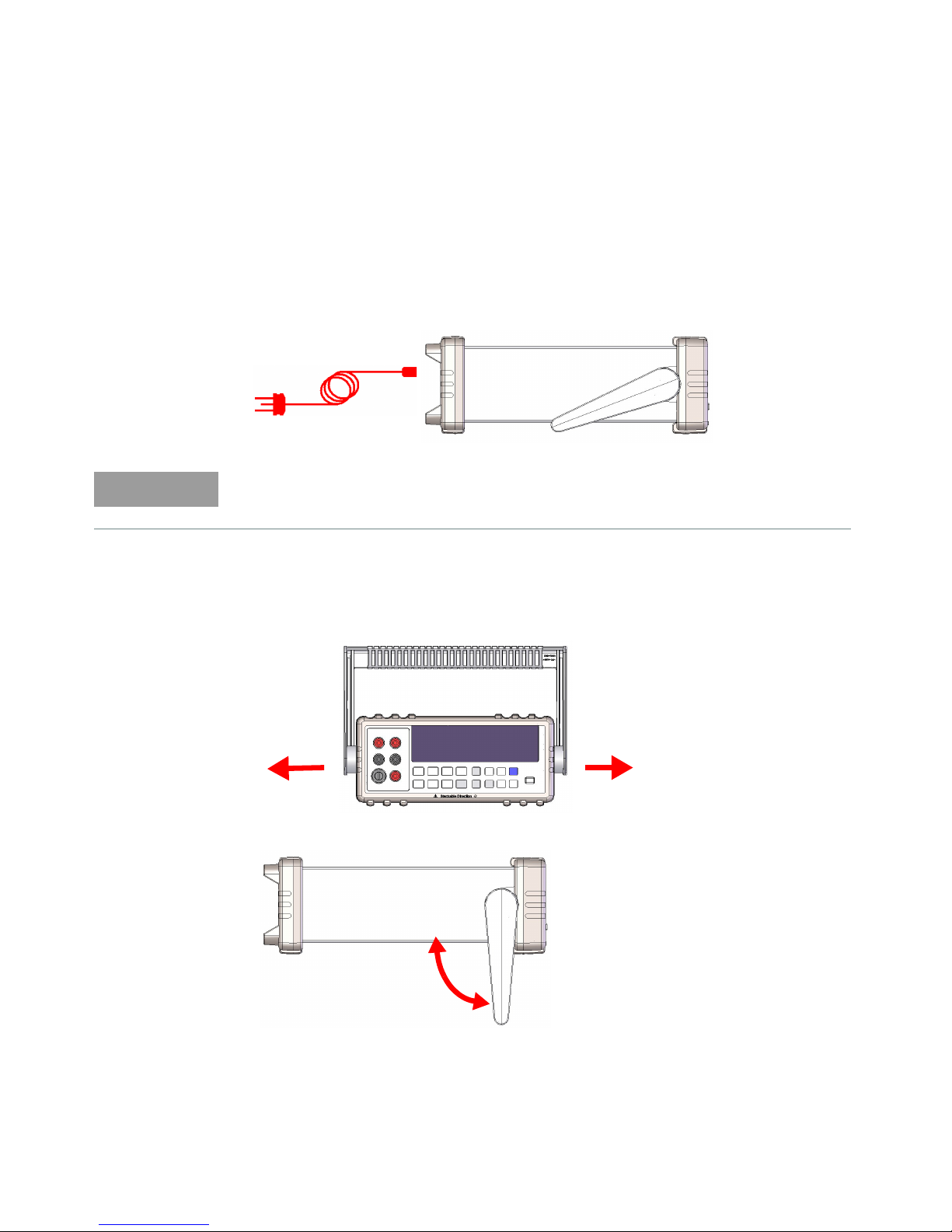
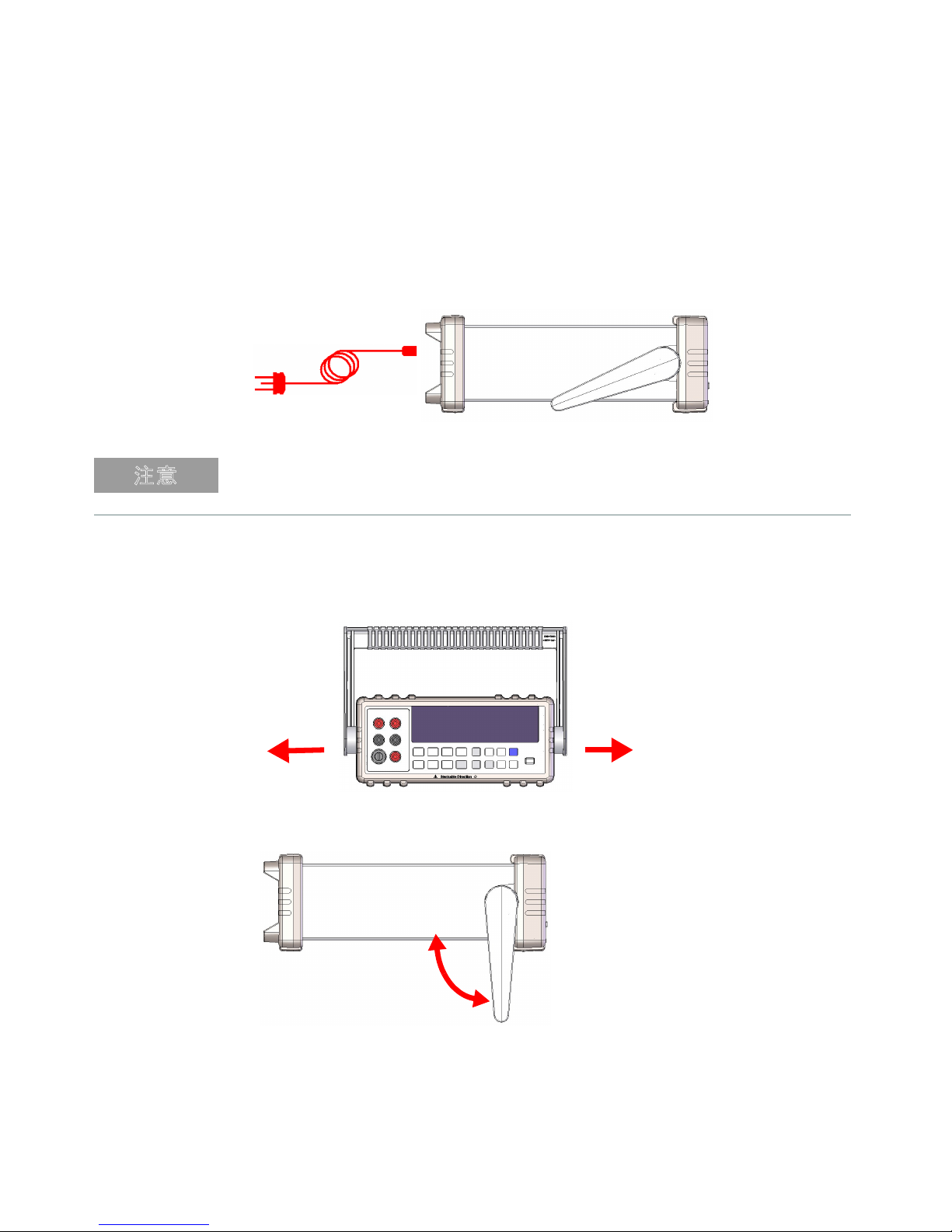
1 Connect the power cord
The line voltage switch and fuse are set at the factory according to the country
of destination.
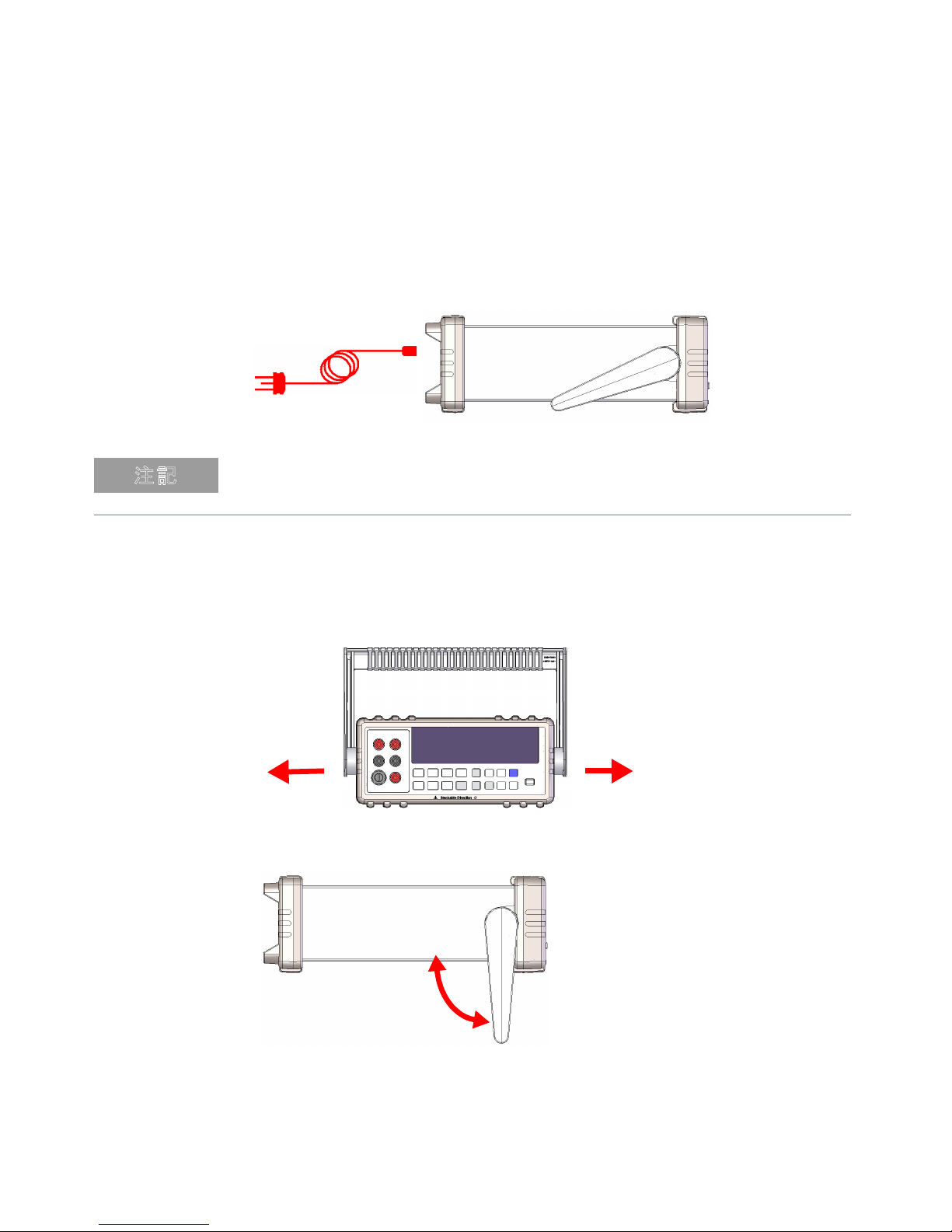
2 Adjust the carrying handle
Getting Started 1
Grasp the handle by the sides and pull outward as indicated by the red arrows
below.
Then, adjust the handle to the desired position.
Keysight U3401A Quick Start Guide 9
Page 10

1 Getting Started
+
–
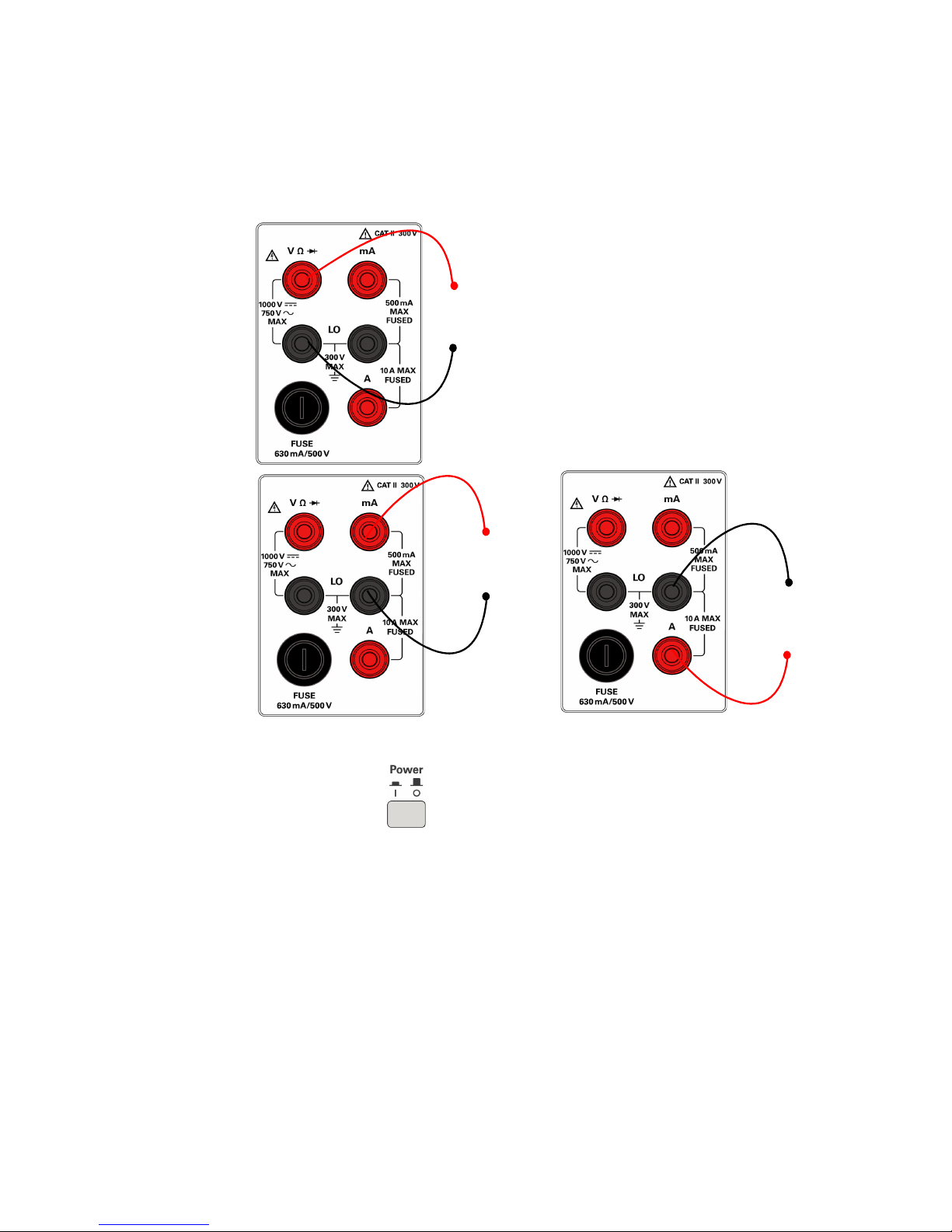
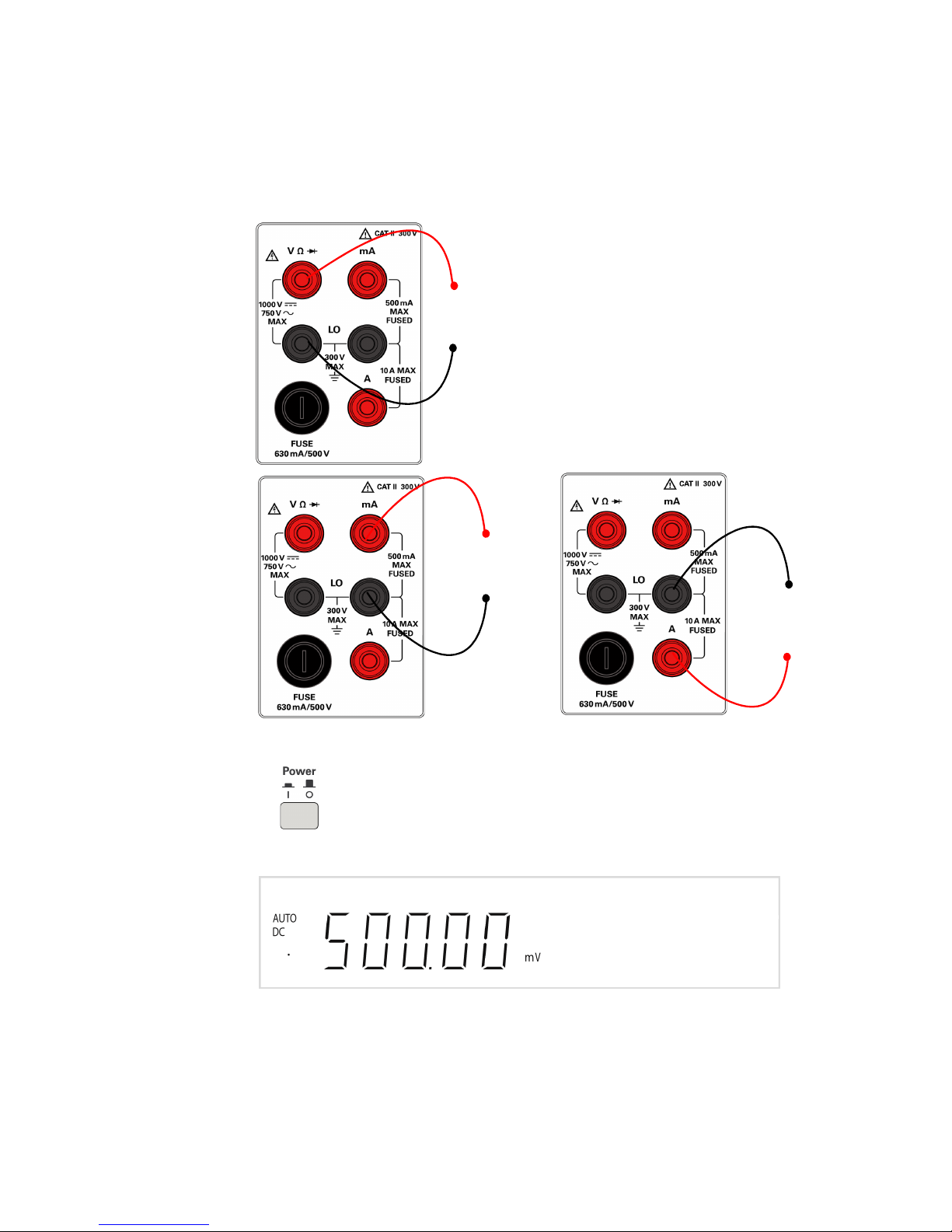
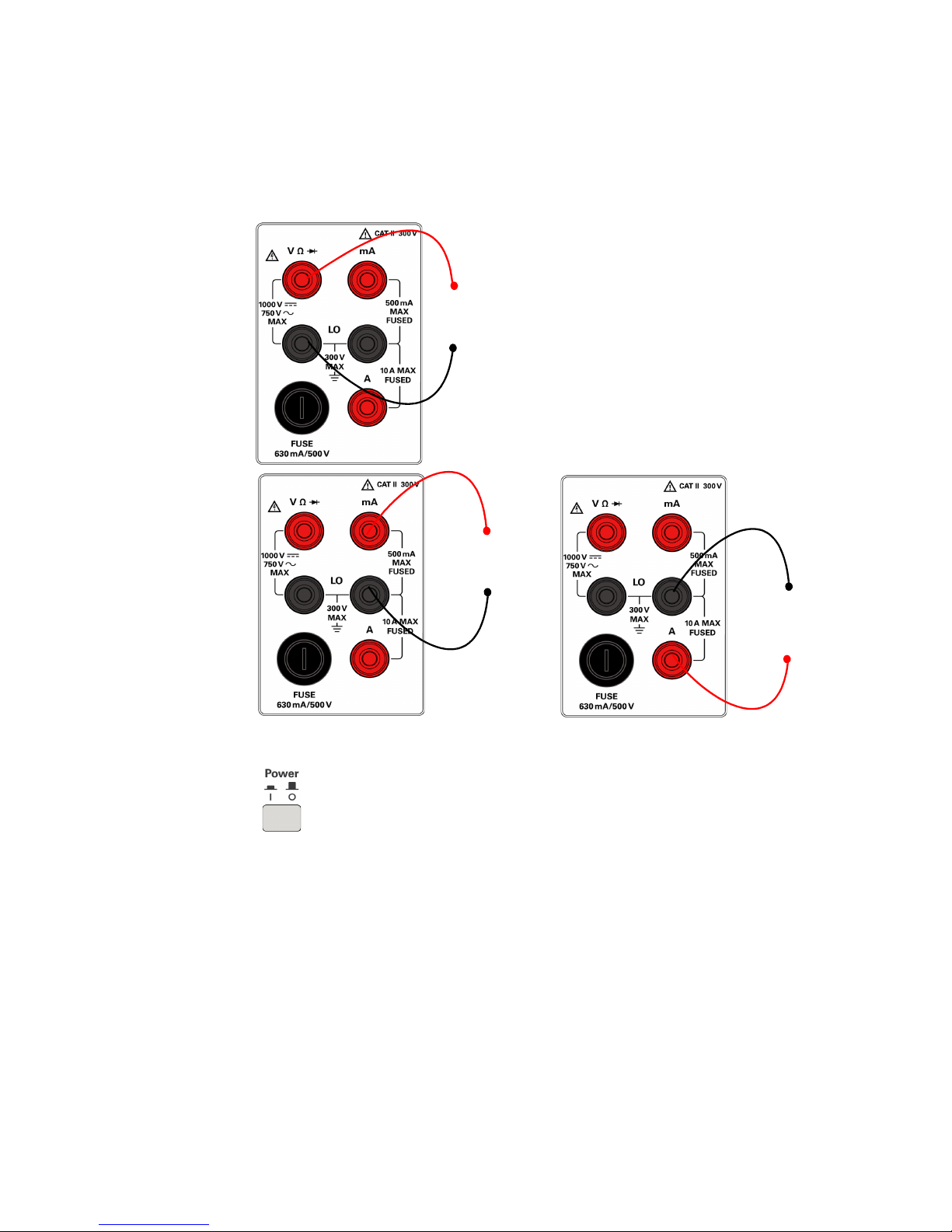
AC or DC voltage, frequency, or resistance measurement
and diode or continuity test.
+
–
AC or DC current
up to 10 A RMS
+
–
AC or DC current
3 Connect the test leads to the input terminals
4 Turn on the multimeter
Push to turn on the multimeter. The front-panel display illuminates
while the multimeter performs its power-on self-test.
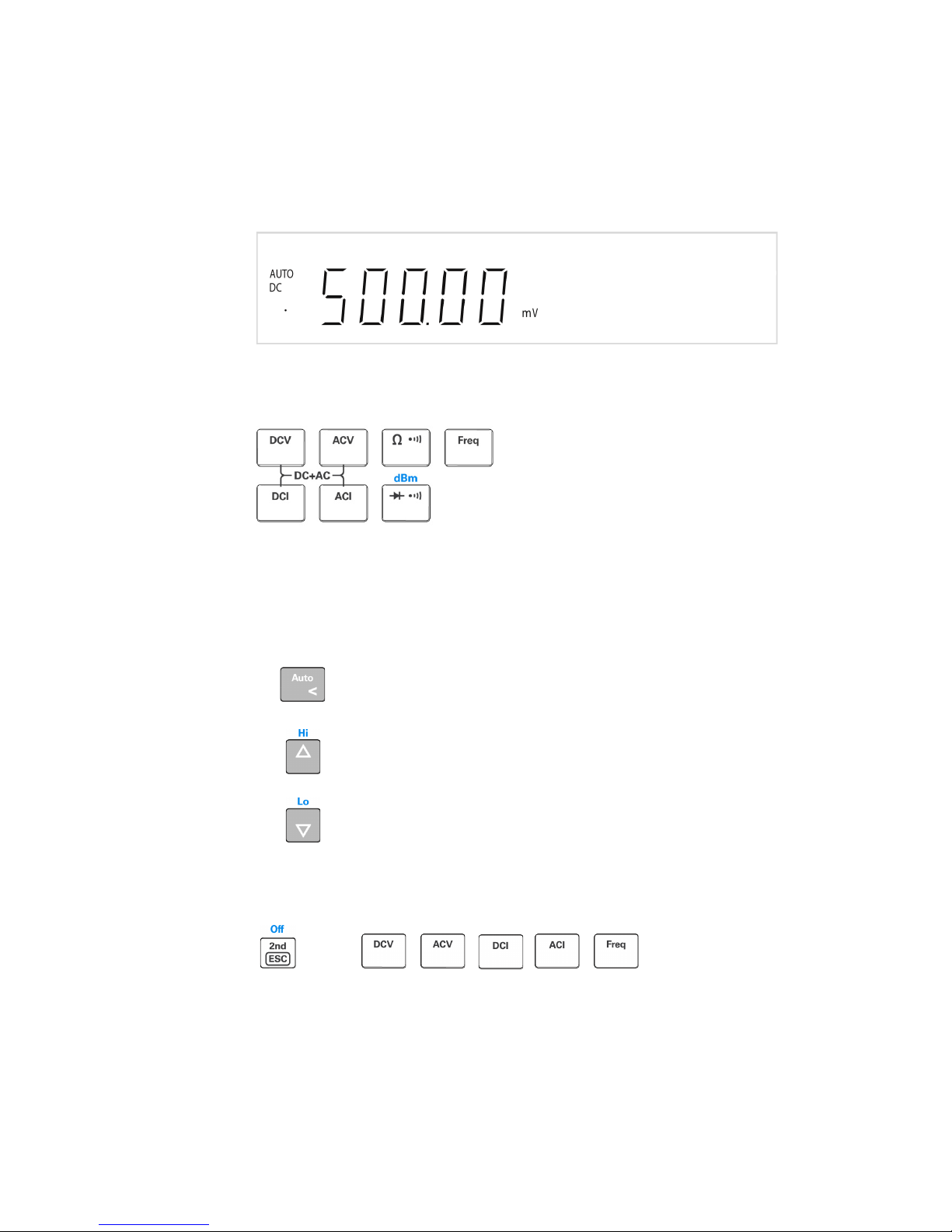
The multimeter powers up in the DC voltage function with autoranging
enabled. Typical display :
10 Keysight U3401A Quick Start Guide
Page 11

Getting Started 1
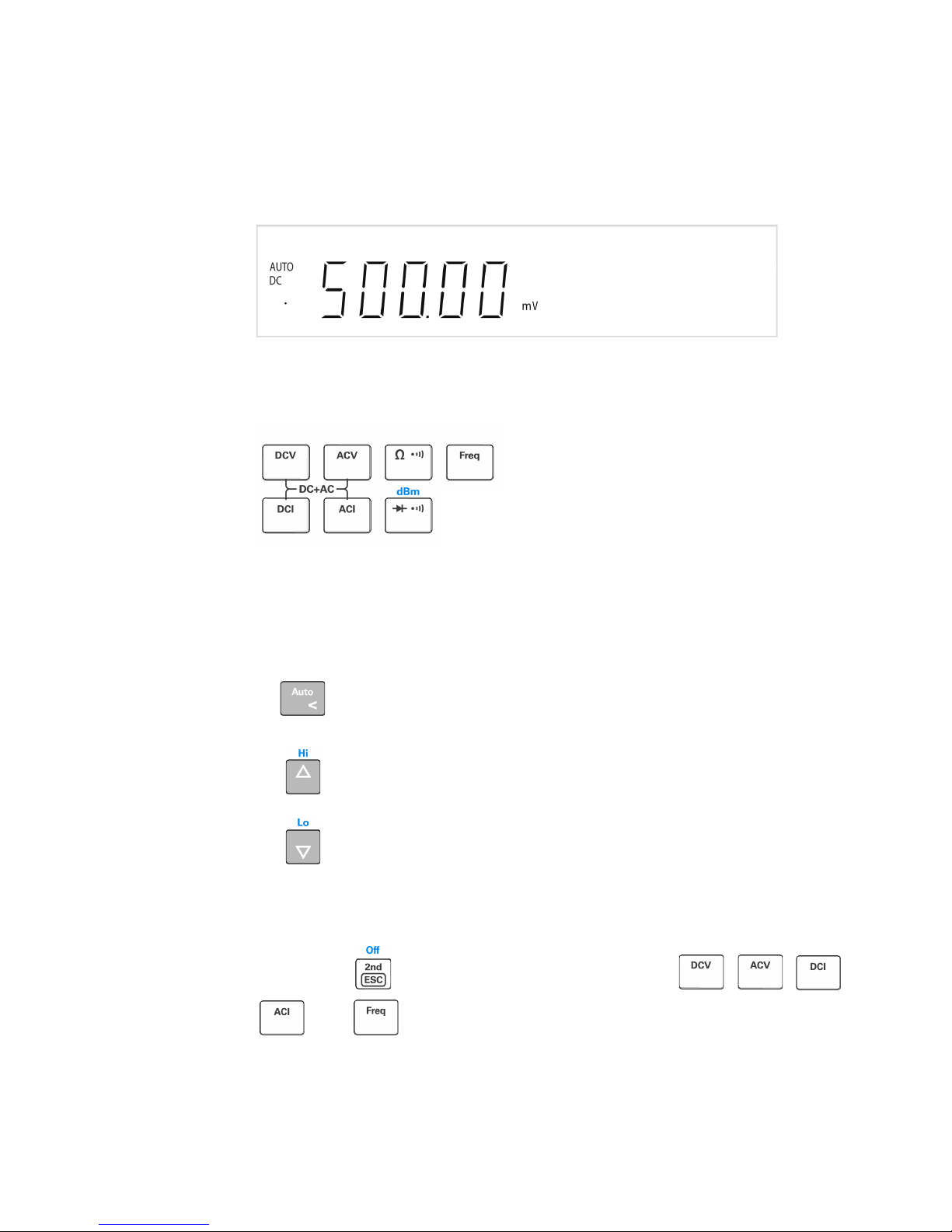
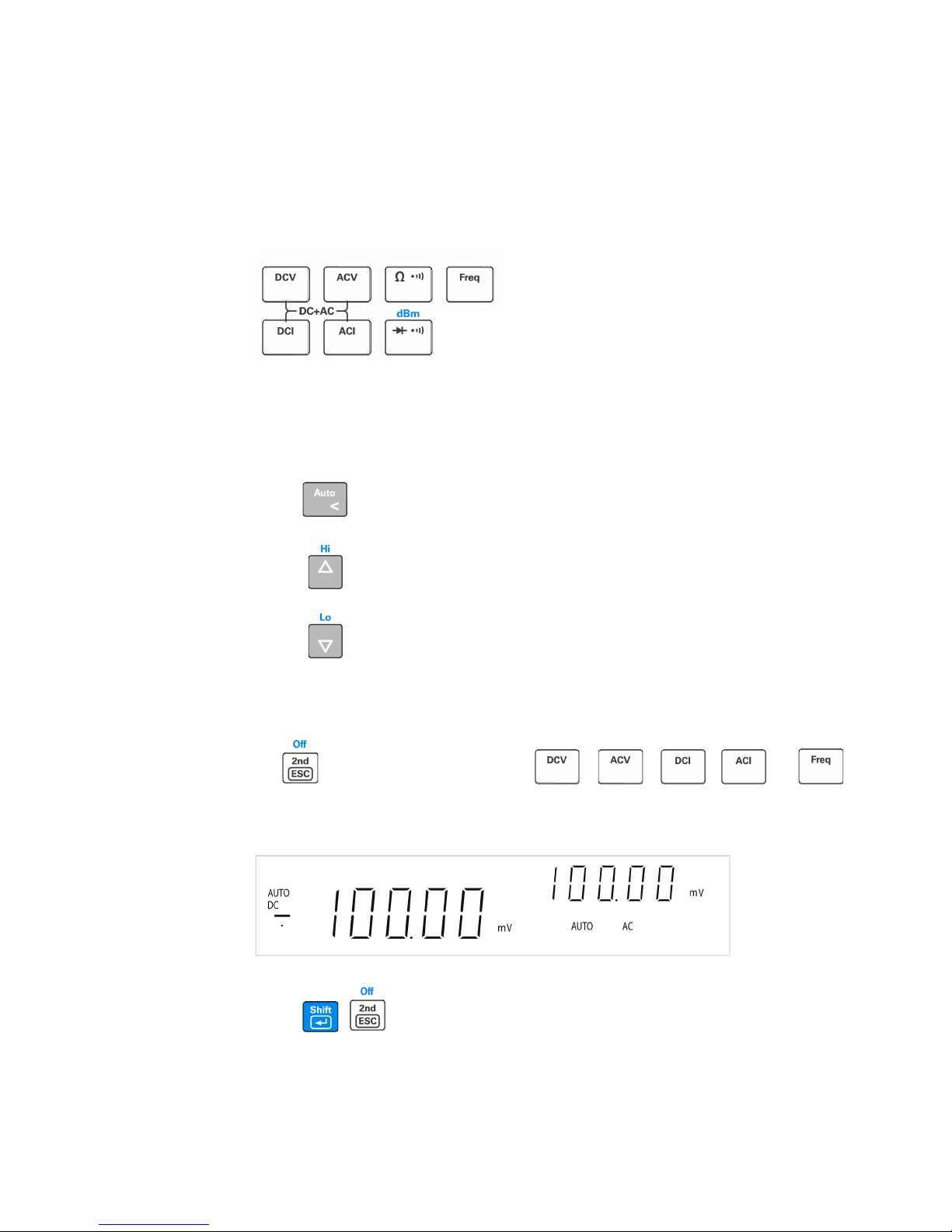
5 Select a function
Press one of the following keys to select a measurement function.
6 Set the range
For most measurement functions, you can allow the multimeter to select the
range automatically by using the autoranging function, or you can select a
fixed range using manual ranging. The AUTO annunciator is displayed when
the autoranging function is selected.
Selects autoranging and disables manual ranging. Press to
toggle between the manual ranging and autoranging.
Selects a higher range and disable autoranging.
Selects a lower range and disable autoranging.
7 Using the secondary display
Press followed by a specified function keys such a , , ,
or to enable the secondary display mode.
Keysight U3401A Quick Start Guide 11
Page 12

1 Getting Started
NOTE
The multimeter has an increased key response time (0.6 s to 1 s) when in dual
display mode. You may need to press the selected key until the multimeter
responses.
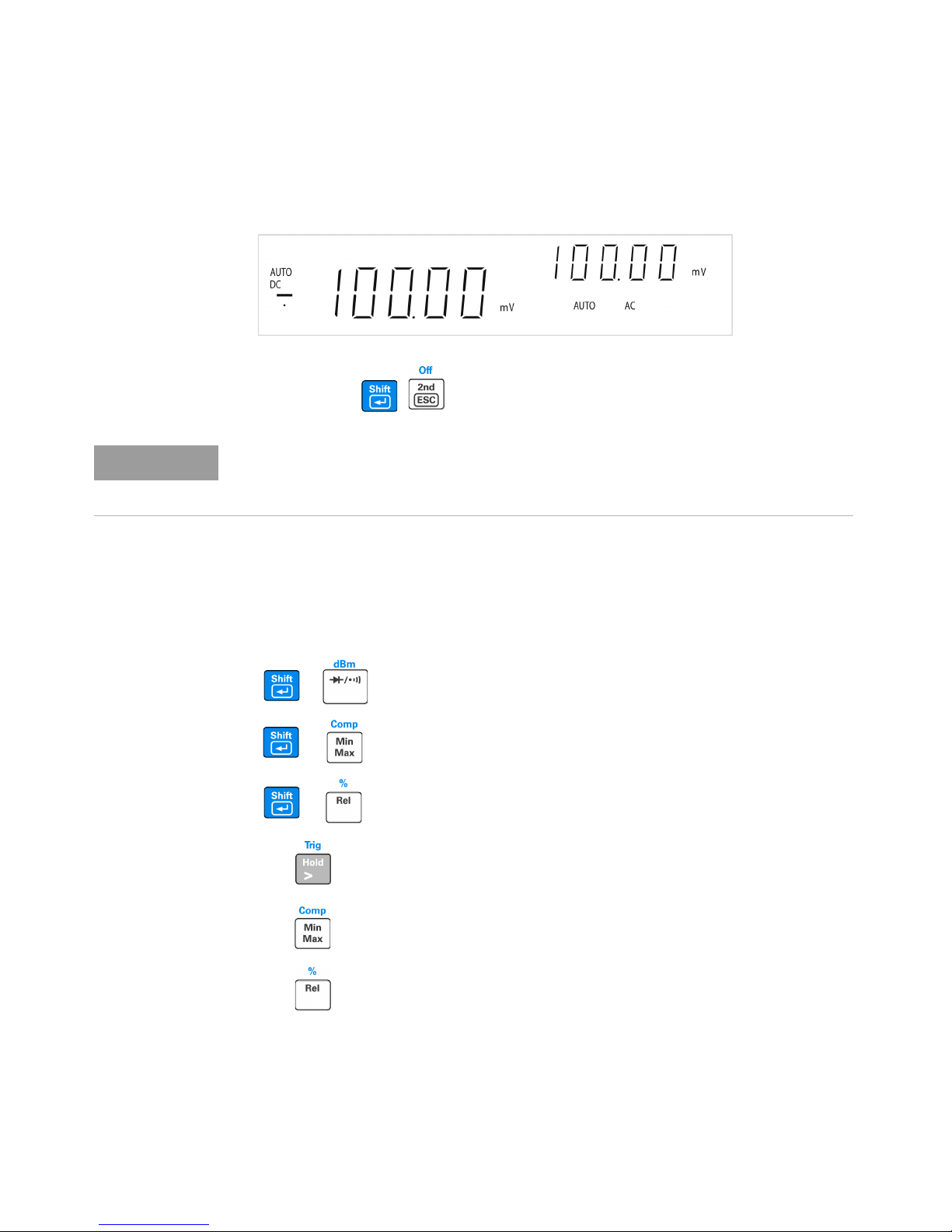
8 Math operation
Press , to disable the secondary display.
The U3401A has six math operations — dBm, Rel (relative), MinMax, Comp
(compare), Hold and Percentage (%).
+
+
+
Press to select dBm measurement.
Press to select Comp math operation.
Press to enable Percentage math operation.
Press to enable Hold math operation.
Press to enable the MinMax math operation.
Press to select the Rel math operation.
12 Keysight U3401A Quick Start Guide
Page 13

Getting Started 1
The following table presents a summary of the math operations that can be
used with each measurement function.
Measurement functions
DCV
DCI
Resistance
ACV
ACI
Frequency
Diode/Continuity
Allowed math operations
dBm Rel Min Max Comp Hold %
✔✔✔✔✔ ✔ ✔
-
--
✔✔ ✔✔ ✔ ✔
✔✔✔ ✔ ✔
✔✔✔✔✔ ✔ ✔
-
-
--
✔✔ ✔✔ ✔ ✔
✔✔ ✔✔ ✔ ✔
✔✔✔ ✔ ✔
For a detailed operation procedure of each math operation, refer to the
Keysight U3401A User’s and Service Guide.
9 For more information
The Keysight U3401A User’s and Service Guide contains more detailed
information on the front panel, measurement functions, math operations, and
the setup menu (allows you to customize the instrument settings). It also
contains product specifications, rack mounting instructions, and replaceable
parts information.
Keysight U3401A Quick Start Guide 13
Page 14

1 Getting Started
THIS PAGE HAS BEEN INTENTIONALLY LEFT BLANK.
14 Keysight U3401A Quick Start Guide
Page 15

Multimètre double affichage
4 1/2 chiffres Keysight
U3401A
Guide de mise
en route
Page 16

Avertissements
ATTENTION
Copyright Notice
© Keysight Technologies 2009-2017
Conformément aux lois internationales
relatives à la propriété intellectuelle,
toute reproduction, tout stockage
électronique et toute traduction de ce
manuel, totaux ou partiels, sous
quelque forme et par quelque moyen
que ce soit, sont interdits sauf
consentement écrit préalable de la
société Keysight Technologies.
Référence du manuel
U3401-90011
Édition
Édition 3, 1 juin, 2017
Imprimé en :
Imprimé en Malaisie
Publié par :
Keysight Technologies
Bayan Lepas Free Industrial Zone,
11900 Penang, Malaysia
Licences technologiques
Le matériel et les logiciels décrits dans
ce document sont protégés par un
accord de licence et leur utilisation ou
reproduction est soumise aux termes et
conditions de ladite licence.
Déclaration de conformité
Il est possible de télécharger la
déclaration de conformité pour ces
produits et d'autres produits Keysight
sur le Web. Allez à http://
www.keysight.com/go/conformity.
Pour pouvez alors exécuter une
recherche par numéro de produit pour
trouver la dernière déclaration de
conformité.
Droit gouvernementaux des
Etats-Unis
Le logiciel fait l'objet d'une licence en
tant que « logiciel informatique
commercial » tel que défini dans la
réglementation FAR (Federal Acquisition
Regulation) 2.101. Conformément à la
règlementation FAR 12.212 et 27.405-3
et à l'addenda FAR du Ministère de la
Défense (« SDFARS ») 227.7202, le
gouvernement des États-Unis acquiert
le logiciel informatique commercial
selon les mêmes conditions
habituellement utilisées pour la livraison
du logiciel au public. De ce fait, Keysight
fournit le Logiciel aux clients du
gouvernement des États-Unis sous la
licence commerciale standard, incluse
dans son contrat de licence d'utilisateur
final (EULA). Vous trouverez une copie
de ce contrat sur le site http://
www.keysight.com/find/sweula. La
licence exposée dans l'EULA représente
le pouvoir exclusif par lequel le
gouvernement des Etats-Unis peut
utiliser, modifier, distribuer ou divulguer
le Logiciel. L'EULA et la licence
mentionnées dans les présentes,
n'imposent ni n'autorisent, entre autres,
que Keysight : (1) fournisse des
informations techniques relatives au
logiciel informatique commercial ni à la
documentation du logiciel informatique
commercial non habituellement fournies
au public ; ou (2) Abandonne, ou fournit,
des droits gouvernementaux dépassant
les droits habituellement fournis au
public pour utiliser, reproduire,
communiquer, exécuter, afficher ou
divulguer le logiciel informatique
commercial ou la documentation du
logiciel informatique commercial.
Aucune exigence gouvernementale
autres que celles établies dans l'EULA
ne s'applique, sauf dans la mesure où
ces conditions, droits ou licences sont
explicitement requis de la part de tous
les prestataires de logiciels
informatiques commerciaux
conformément au FAR et au DFARS et
sont spécifiquement établis par écrit
quelque part dans l'EULA. Keysight n'est
tenu par aucune obligation de mettre à
jour, réviser ou modifier de quelque
manière que ce soit le Logiciel. En ce qui
concerne toute donnée technique, tel
que défini par la réglementation FAR
2.101, conformément à FAR 12.211 et
27.404.2 et à DFARS 227.7102, le
gouvernement des États-Unis recevra
des droits limités tels que définis dans la
réglementation FAR 27.401 ou DFAR
227.7103-5 (c), applicables à toutes les
données techniques.
Garantie
Les informations contenues dans ce
document sont fournies « en l’état » et
pourront faire l’objet de modifications
sans préavis dans les éditions
ultérieures. Dans les limites de la
législation en vigueur, Keysight exclut
en outre toute garantie, expresse ou
implicite, concernant ce manuel et les
informations qu’il contient, y compris,
mais non exclusivement, les garanties
de qualité marchande et d’adéquation
à un usage particulier. Keysight ne
saurait en aucun cas être tenu pour
responsable des erreurs ou des
dommages incidents ou consécutifs,
liés à la fourniture, à l’utilisation ou à
l’exactitude de ce document ou aux
performances de tout produit Keysight
auquel il se rapporte. Si Keysight et
l’utilisateur ont passé un contrat écrit
distinct, stipulant, pour le produit
couvert par ce document, des
conditions de garantie qui entrent en
conflit avec les présentes conditions,
les conditions de garantie du contrat
distinct remplacent les conditions
énoncées dans le présent document.
Avertissements de sécurité
La mention ATTENTION signale un
danger pour le matériel. Si la
manœuvre ou la procédure
correspondante n’est pas exécutée
correctement, il peut y avoir un risque
d’endommagement de l’appareil ou de
perte de données importantes. En
présence de la mention ATTENTION, il
convient de s’interrompre tant que les
conditions indiquées n’ont pas été
parfaitement comprises et satisfaites.
AVERTISSEMENT
La mention AVERTISSEMENT signale
un danger pour la sécurité de
l’opérateur. Si la manœuvre ou la
procédure correspondante n’est pas
exécutée correctement, il peut y avoir
un risque grave, voire mortel pour les
personnes. En présence d’une mention
AVERTISSEMENT, il convient de
s’interrompre tant que les conditions
indiquées n’ont pas été parfaitement
comprises et satisfaites.
2 Keysight U3401A Guide de mise en route
Page 17

Table des matières
La face avant . . . . . . . . . . . . . . . . . . . . . . . . . . . . . . . . . . . . . . . . . . . . 5
L'écran d'un coup d'œil . . . . . . . . . . . . . . . . . . . . . . . . . . . . . . . . . . . .6
Mise en route . . . . . . . . . . . . . . . . . . . . . . . . . . . . . . . . . . . . . . . . . . . .9
Keysight U3401A Guide de mise en route 3
Page 18

CETTE PAGE EST BLANCHE INTENTIONNELLEMENT.
4 Keysight U3401A Guide de mise en route
Page 19

La face avant
Touches des
fonctions de
mesure
Affichage secondaire
Bornes d'entrée et
fusible
Sélection
automatique
de plage,
plage
manuelle et
opération du
comparateur
Commutateur
de marche/
arrêt
Touches des
opérations
mathématiques
Décalage
Affichage principal
Keysight U3401A Guide de mise en route 5
Page 20

L'écran d'un coup d'œil
Figure 1-1 Affichage complet VFD avec rétroéclairage de tous les segments
Les avertisseurs très visibles de l'écran à affichage fluorescent à vide (VFD) sont
décrits dans le tableau suivant :
Avertisseur Description
Affichage principal
S Vitesse de lecture : Slow (lente). Sans objet pour le U3401A.
M Vitesse de lecture : Medium (moyenne). Sans objet pour le U3401A.
F Vitesse de lecture : Fast (rapide). Sans objet pour le U3401A.
PEAK Mesure de crête. Sans objet pour le U3401A.
HOLD Gel des données
MIN Opération mathématique MinMax : valeur minimum apparaissant sur l'affichage
MAX Opération mathématique MinMax : valeur maximum apparaissant sur l'affichage
REL Valeur relative
dBm Décibel par rapport à 1 mW
4 2 W Résistance 4 fils/2 fils. Sans objet pour le U3401A.
Test de diodes
Test sonore de continuité relatif à la résistance
Courant continu Sélection automatique de plage
DC Courant continu
Courant alternatif Courant alternatif
6 Keysight U3401A Guide de mise en route
Page 21

Avertisseur Description
DCAC Courant alternatif + continu
Polarité, chiffres et points décimaux de l'affichage principal
°C Température en degrés Celsius. Sans objet pour le U3401A.
°F Température en degrés Fahrenheit. Sans objet pour le U3401A.
mV Unité de tension : mV, V
μmA Unité d'intensité : μA, mA, A
μmnF Unité de capacité : μF, nF, mF
MkΩ Unité de résistance : Ω, kΩ, MΩ
MkHz Unité de fréquence : Hz, kHz, MHz
Affichage secondaire
Polarité, chiffres et points décimaux de l'affichage principal
μmnF Unité de capacité : μF, nF, mF
°C Température en degrés Celsius. Sans objet pour le U3401A.
°F Température en degrés Fahrenheit. Sans objet pour le U3401A.
% Mesure de rapport cyclique
mV Unité de tension : mV, V
μmA Unité d'intensité : μA, mA, A
S Mode de décalage
MkΩ Unité de résistance : Ω, kΩ, MΩ
2ND L'affichage secondaire est activé. Sans objet pour le U3401A.
AUTO Sélection automatique de plage
Courant continu Courant continu
Courant alternatif Courant alternatif
DCAC Courant alternatif + continu
COMP Opération de comparaison
Keysight U3401A Guide de mise en route 7
Page 22

Avertisseur Description
dBm Décibel par rapport à 1 mW
CAL Mode d'étalonnage
EXT Externe. Sans objet pour le U3401A.
TRIG Mode de déclenchement
REMOTE Télécommande d'interface. Pour l’étalonnage uniquement.
LOCAL Mode local
STO Mémorisation de l'état de l'instrument. Sans objet pour le U3401A.
RCL Récupération de l'état de l'instrument mémorisé. Sans objet pour le U3401A.
8 Keysight U3401A Guide de mise en route
Page 23

Mise en route
REMARQUE
Cette section décrit étape par étape les principales procédures permettant de
faire fonctionner le multimètre.
1 Branchez le cordon d'alimentation
Le commutateur et le fusible de tension secteur sont réglés en usine en fonction
des spécifications dictées par le pays de destination de l'appareil.
2 Réglage de la poignée de transport
Saisissez la poignée par les côtés et tirez vers l'extérieur tel qu'indiqué par les
flèches rouges ci-après.
Réglez ensuite la poignée dans la position souhaitée.
Keysight U3401A Guide de mise en route 9
Page 24

3 Raccordement des cordons de test aux bornes d'entrée
+
-
Tension CA ou CC, fréquence ou mesure de résistance
et test de diode ou test de continuité.
+
-
+
-
Intensité
CA ou CC
Intensité efficace
CA ou CC jusqu'à
10 A
4 Mise sous tension du multimètre
Appuyez sur pour mettre le multimètre sous tension. Le panneau avant
s'allume pendant que le multimètre réalise un auto-test de mise sous tension.
Au démarrage, le multimètre active la fonction de tension continue
et la sélection automatique de plage. Affichage typique:
10 Keysight U3401A Guide de mise en route
Page 25

5 Sélection d'une fonction
Appuyez sur une des touches suivantes pour sélectionner une fonction de
mesure.
6 Définition de la plage
Pour la plupart des fonctions de mesure, vous pouvez permettre au multimètre
de sélectionner la plage automatiquement (en utilisant la fonction de sélection
automatique de plage) ou vous pouvez sélectionner une plage fixe
manuellement. L'avertisseur AUTO s'affiche lorsque la fonction de sélection
automatique de plage est sélectionnée.
Sélectionne la sélection automatique de plage et désactive la
sélection manuelle de plage. Appuyez pour passer de la
sélection automatique de plage à la sélection manuelle de
plage.
Sélectionne une plage supérieure et désactive la sélection
automatique de plage.
Sélectionne une plage inférieure et désactive la sélection
automatique de plage.
7 Utilisation de l'affichage secondaire
Appuyez sur puis sur une touche de fonction spécifique telle que ,
, , ou pour activer le mode d'affichage secondaire.
Keysight U3401A Guide de mise en route 11
Page 26

Appuyez sur , pour désactiver l'affichage secondaire.
REMARQUE
Le temps de réponse des touches du multimètre est supérieur (0,6 s à 1 s) en
mode double affichage. Vous devez parfois appuyer sur la touche sélectionnée
jusqu'à ce que le multimètre réponde.
8 Opération mathématique
Le U3401A a six opérations mathématiques — dBm, Rel (valeur relative),
MinMax, Comp (comparaison), Hold et Percentage (%).
+
Appuyez pour sélectionner la mesure de dBm.
Appuyez pour sélectionner l'opération mathématique
+
Comp.
Appuyez pour activer l'opération mathématique
+
Percentage.
Appuyez pour activer l'opération mathématique
Hold.
Appuyez pour activer l'opération mathématique
MinMax.
Appuyez pour sélectionner l'opération mathématique
Rel.
12 Keysight U3401A Guide de mise en route
Page 27

Le tableau suivant présente un récapitulatif des opérations mathématiques
pouvant être utilisées avec chaque fonction de mesure.
Fonctions de mesure
V CC
I CC -
Résistance - -
V CA
I CA -
Fréquence -
Diode/Continuité - -
dBm Rel Min Max Comp Hold %
✔✔✔✔✔ ✔ ✔
✔✔✔✔✔ ✔ ✔
Pour connaître la procédure de fonctionnement détaillée de chaque opération
mathématique, consultez le document Keysight U3401A User’s and Service
Guide.
9 Pour de plus amples informations
Le document Keysight U3401A User’s and Service Guide contient
des informations plus détaillées sur le panneau avant, les fonctions de mesure,
les opérations mathématiques et le menu de configuration (ce dernier vous
permet de personnaliser les paramètres de l'instrument). Il comprend
également les spécifications du produit, les instructions de montage en baie et
les pièces remplaçables.
Opérations mathématiques autorisées
✔✔ ✔✔ ✔ ✔
✔✔✔ ✔ ✔
✔✔ ✔✔ ✔ ✔
✔✔ ✔✔ ✔ ✔
✔✔✔ ✔ ✔
Keysight U3401A Guide de mise en route 13
Page 28

CETTE PAGE EST BLANCHE INTENTIONNELLEMENT.
14 Keysight U3401A Guide de mise en route
Page 29
Keysight U3401A 4 ½ Digit
Sekundäranzeige-Multimeter
Schnellstarthandbuch
Page 30

Hinweise
VORSICHT
WARNUNG
Copyright
© Keysight Technologies 2009-2017
Kein Teil dieses Handbuchs darf in
irgendwelcher Form oder mit
irgendwelchen Mitteln (einschließlich
Speicherung und Abruf auf
elektronischem Wege sowie
Übersetzung in eine fremde Sprache)
ohne vorherige Zustimmung und
schriftliche Einwilligung von Keysight
Technologies gemäß der
Urheberrechtsgesetzgebung in den
USA und international reproduziert
werden.
Handbuchteilenummer
U3401-90013
Ausgabe
3. Auflage, 1. Juni 2017
Gedruckt in:
Gedruckt in Malaysia
Veröffentlicht von:
Keysight Technologies
Bayan Lepas Free Industrial Zone,
11900 Penang, Malaysia
Technologielizenzen
Die in diesem Dokument beschriebene
Hardware und/oder Software wird
unter einer Lizenz geliefert und darf nur
entsprechend den Lizenzbedingungen
genutzt oder kopiert werden.
Konformitätserklärung
Die Konformitätserklärungen für dieses
Produkt und andere Keysight Produkte
können im Internet heruntergeladen
werden. Gehen Sie zu http://
www.keysight.com/go/conformity.
Dann können Sie mithilfe der
Produktnummer die aktuelle
Konformitätserklärung suchen.
U.S. Government Rights
(eingeschränkte Rechte der
US-Regierung)
Die Software ist „kommerzielle
Computersoftware“ gemäß Definition in
der Federal Acquisition Regulation
(„FAR“) 2.101. Gemäß FAR 12.212 und
27.405-3 sowie Department of Defense
FAR Supplement („DFARS“) 227.7202
erwirbt die US-Regierung kommerzielle
Computersoftware unter denselben
Bedingungen, unter denen die Software
üblicherweise öffentlich verkauft wird.
Demzufolge stellt Keysight die Software
US-Regierungskunden mit einer
standardmäßigen kommerziellen Lizenz
zur Verfügung, die in der
Endbenutzerlizenzvereinbarung (EULA)
beschrieben ist, deren Kopie Sie unter
http://www.keysight.com/find/sweula
finden. Die in der EULA beschriebene
Lizenz stellt die exklusive Berechtigung
dar, der zufolge die US-Regierung die
Software nutzen, ändern, verteilen oder
offen legen darf. Die EULA und die darin
beschriebene Lizenz verlangen bzw.
erlauben unter anderem nicht, dass
Keysight: (1) technische Informationen
zu kommerzieller Computersoftware
bzw. Dokumentation zu kommerzieller
Computersoftware bereitstellt, die
üblicherweise nicht öffentlich
bereitgestellt werden; oder (2) Rechte an
die Regierung abtritt oder der Regierung
anderweitig einräumt, die diese
üblicherweise öffentlich bereitgestellten
Rechte zum Nutzen, Ändern,
Reproduzieren, Freigeben, Ausführen,
Anzeigen oder Offenlegen von
kommerzieller Computersoftware bzw.
Dokumentation zu kommerzieller
Computersoftware übertreffen. Es gelten
keine Anforderungen der Regierung, die
über die in der EULA ausgeführten
Anforderungen hinausgehen,
ausgenommen in dem Umfang, in dem
solche Bedingungen, Rechte oder
Lizenzen explizit von allen Anbietern
kommerzieller Computersoftware gemäß
FAR und DFARS verlangt werden und
ausdrücklich schriftlich an anderer Stelle
in der EULA ausgeführt sind. Keysight ist
nicht zu Aktualisierung, Überarbeitung
oder sonstiger Änderung der Software
verpflichtet. Hinsichtlich beliebiger
technischer Daten laut Definition in FAR
2.101, gemäß FAR 12.211 und 27.404.2
und DFARS 227.7102, erwirbt die
US-Regierung keine weitergehenden
Rechte als die begrenzten Rechte laut
Definition in FAR 27.401 oder DFAR
227.7103-5 (c), wie für beliebige
technische Daten geltend.
Garantie
DAS IN DIESEM DOKUMENT
ENTHALTENE MATERIAL WIRD IM
VORLIEGENDEN ZUSTAND ZUR
VERFÜGUNG GESTELLT UND KANN IN
ZUKÜNFTIGEN AUSGABEN OHNE
VORHERIGE ANKÜNDIGUNG GEÄNDERT
WERDEN. DARÜBER HINAUS
ÜBERNIMMT KEYSIGHT IM GESETZLICH
MAXIMAL ZULÄSSIGEN RAHMEN KEINE
GARANTIEN, WEDER AUSDRÜCKLICH
NOCH STILLSCHWEIGEND, BEZÜGLICH
DIESES HANDBUCHS UND BELIEBIGER
HIERIN ENTHALTENER INFORMATIONEN,
INKLUSIVE ABER NICHT BESCHRÄNKT
AUF STILLSCHWEIGENDE GARANTIEN
HINSICHTLICH MARKTGÄNGIGKEIT UND
EIGNUNG FÜR EINEN BESTIMMTEN
ZWECK. KEYSIGHT ÜBERNIMMT KEINE
HAFTUNG FÜR FEHLER, DIE IN DIESEM
DOKUMENT ENTHALTEN SIND, UND FÜR
ZUFÄLLIGE SCHÄDEN ODER
FOLGESCHÄDEN IM ZUSAMMENHANG
MIT DER LIEFERUNG,
INGEBRAUCHNAHME ODER
BENUTZUNG DIESER DOKUMENTATION.
FALLS ZWISCHEN KEYSIGHT UND DEM
BENUTZER EINE SEPARATE
SCHRIFTLICHE VEREINBARUNG MIT
GARANTIEBEDINGUNGEN BEZÜGLICH
DES IN DIESEM DOKUMENT
ENTHALTENEN MATERIALS BESTEHT,
GELTEN DIE GARANTIEBEDINGUNGEN IN
DER SEPARATEN VEREINBARUNG.
Sicherheitsinformationen
Ein Hinweis mit der Überschrift
VORSICHT weist auf eine Gefahr hin. Er
macht auf einen Betriebsablauf oder ein
Verfahren aufmerksam, der bzw. das bei
unsachgemäßer Durchführung zur
Beschädigung des Produkts oder zum
Verlust wichtiger Daten führen kann.
Setzen Sie den Vorgang nach dem
Hinweis VORSICHT nicht fort, wenn Sie
die darin aufgeführten Hinweise nicht
vollständig verstanden haben und
einhalten können.
Eine WARNUNG weist auf eine Gefahr hin.
Sie macht auf einen Betriebsablauf oder
ein Verfahren aufmerksam, der bzw. das
bei unsachgemäßer Durchführung zu
Verletzungen oder zum Tod führen kann.
Setzen Sie den Vorgang nach einem
Hinweis mit der Überschrift WARNUNG
nicht fort, wenn Sie die darin aufgeführten
Hinweise nicht vollständig verstanden
haben und einhalten können.
2 Keysight U3401A Schnellstarthandbuch
Page 31

Inhaltsverzeichnis
Das vordere Bedienfeld auf einen Blick . . . . . . . . . . . . . . . . . . . . . . . .5
Die Anzeige auf einem Blick . . . . . . . . . . . . . . . . . . . . . . . . . . . . . . . .6
Erste Schritte . . . . . . . . . . . . . . . . . . . . . . . . . . . . . . . . . . . . . . . . . . . .9
Keysight U3401A Schnellstarthandbuch 3
Page 32

DIESE SEITE WURDE ABSICHTLICH LEER GELASSEN.
4 Keysight U3401A Schnellstarthandbuch
Page 33
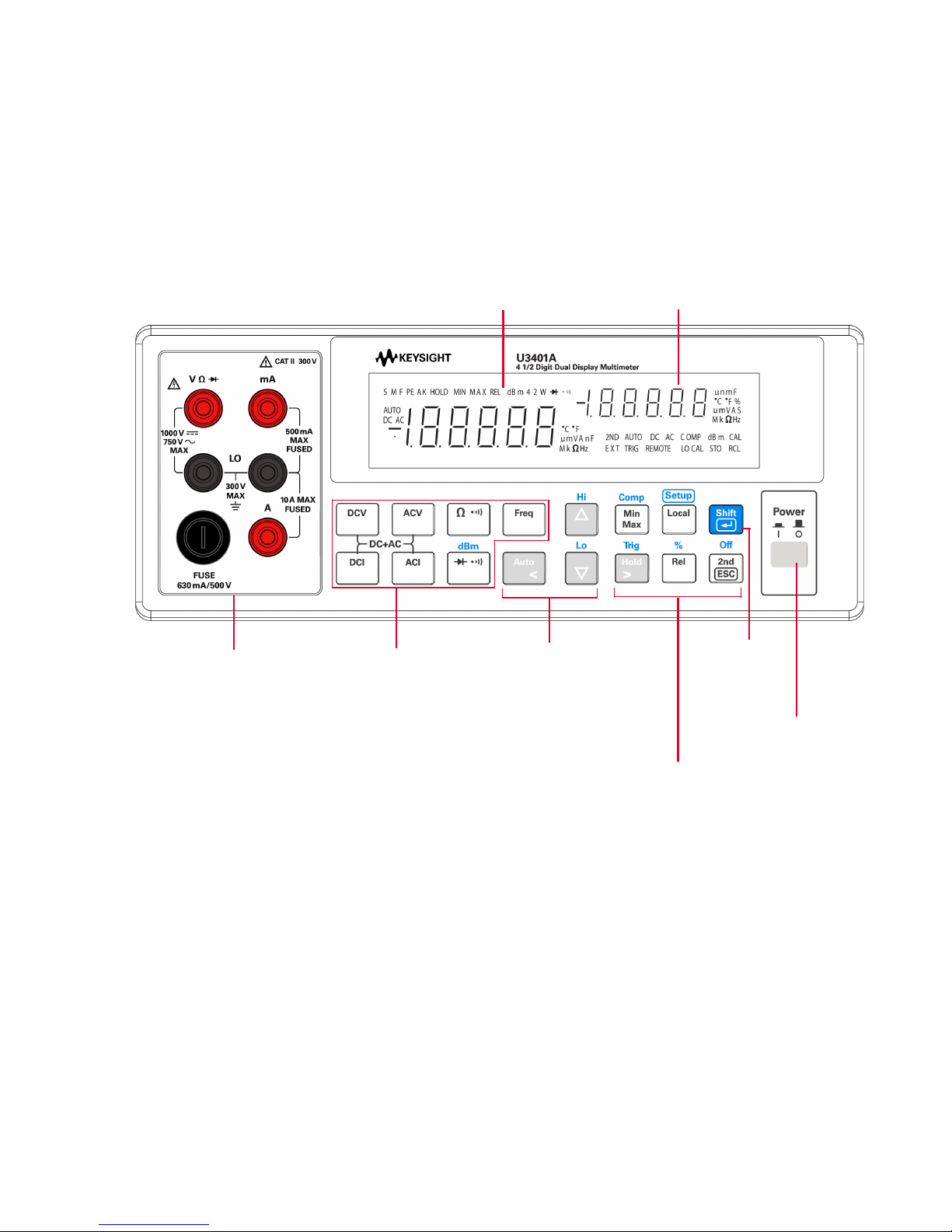
Das vordere Bedienfeld auf einen Blick
Tastenfelder für
Messfunktionen
Sekundäranzeige
Eingangsanschlüsse
und Stromsicherung
Automatische
Bereichswahl,
manuelle
Bereichswahl und
Vergleichsoperation
Ein-Ausschalter
Tastenfelder für
math.
Operationen
Um-schalten
Primäranzeige
Keysight U3401A Schnellstarthandbuch 5
Page 34
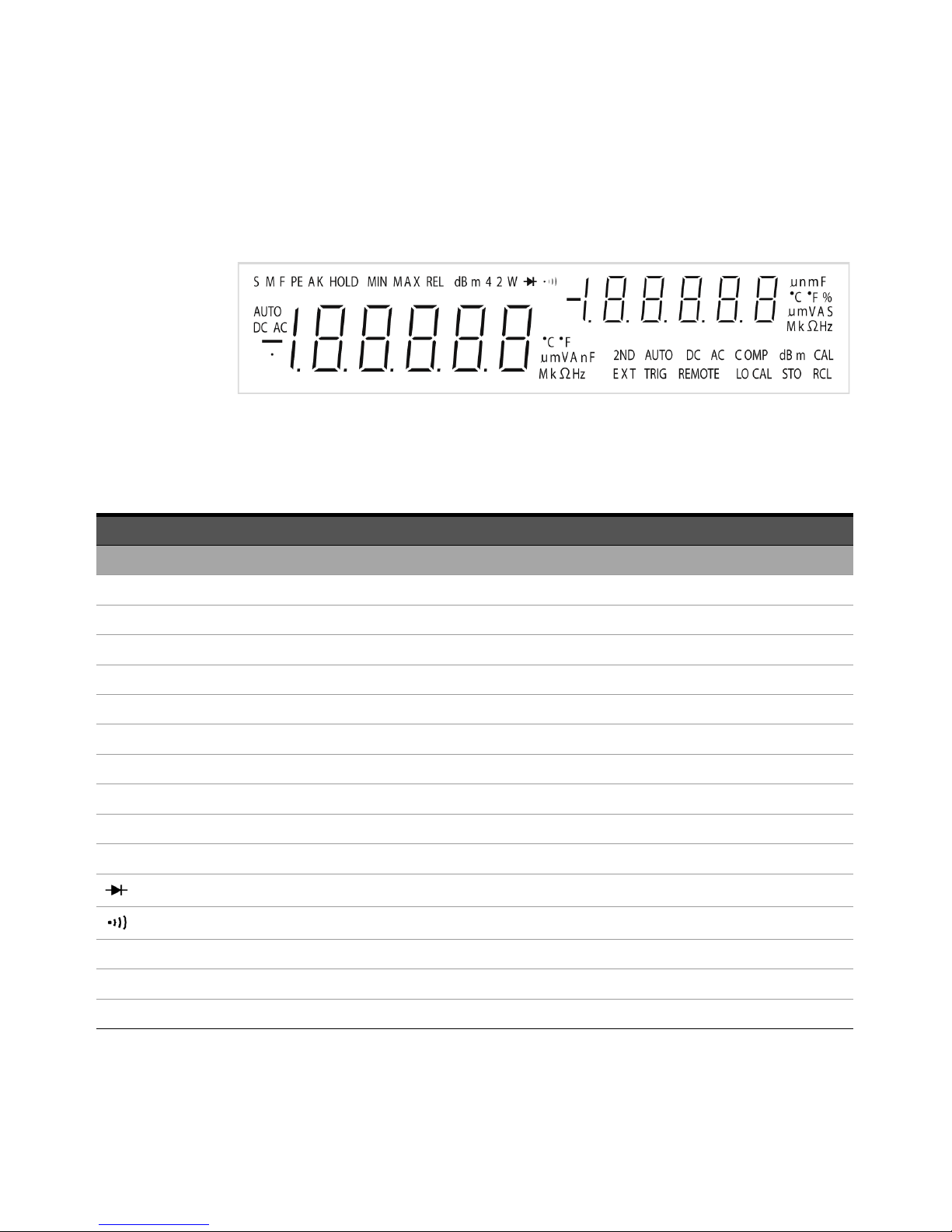
Die Anzeige auf einem Blick
Abbildung1-1 VFD-Vollanzeige, wobei alle Segmente beleuchtet sind
Die sehr gut sichtbaren Elemente der Vakuumfluoreszenzanzeige (VFD) werden in
der folgenden Tabelle beschrieben:
Melder Beschreibung
Primäranzeige
S Leserate: Langsam. Gilt nicht für U3401A.
M Leserate: Mittel. Gilt nicht für U3401A.
F Leserate: Schnell. Gilt nicht für U3401A.
PEAK Spitzenmessung Gilt nicht für U3401A.
HOLD Datenhalten
MIN Math. MinMax-Operation: Auf primärer Anzeige angezeigter minimaler Wert
MAX Math. MinMax-Operation: Auf primärer Anzeige angezeigter maximaler Wert
REL Relativer Wert
dBm Dezibeleinheit relativ zu 1 mW
4 2 W 4-Draht-/2-Drahtwiderstand Gilt nicht für U3401A.
Diodentest
Akustischer Widerstands-Durchgangstest
AUTO Automatische Bereichsauswahl
DC Gleichstrom
AC Wechselstrom
6 Keysight U3401A Schnellstarthandbuch
Page 35
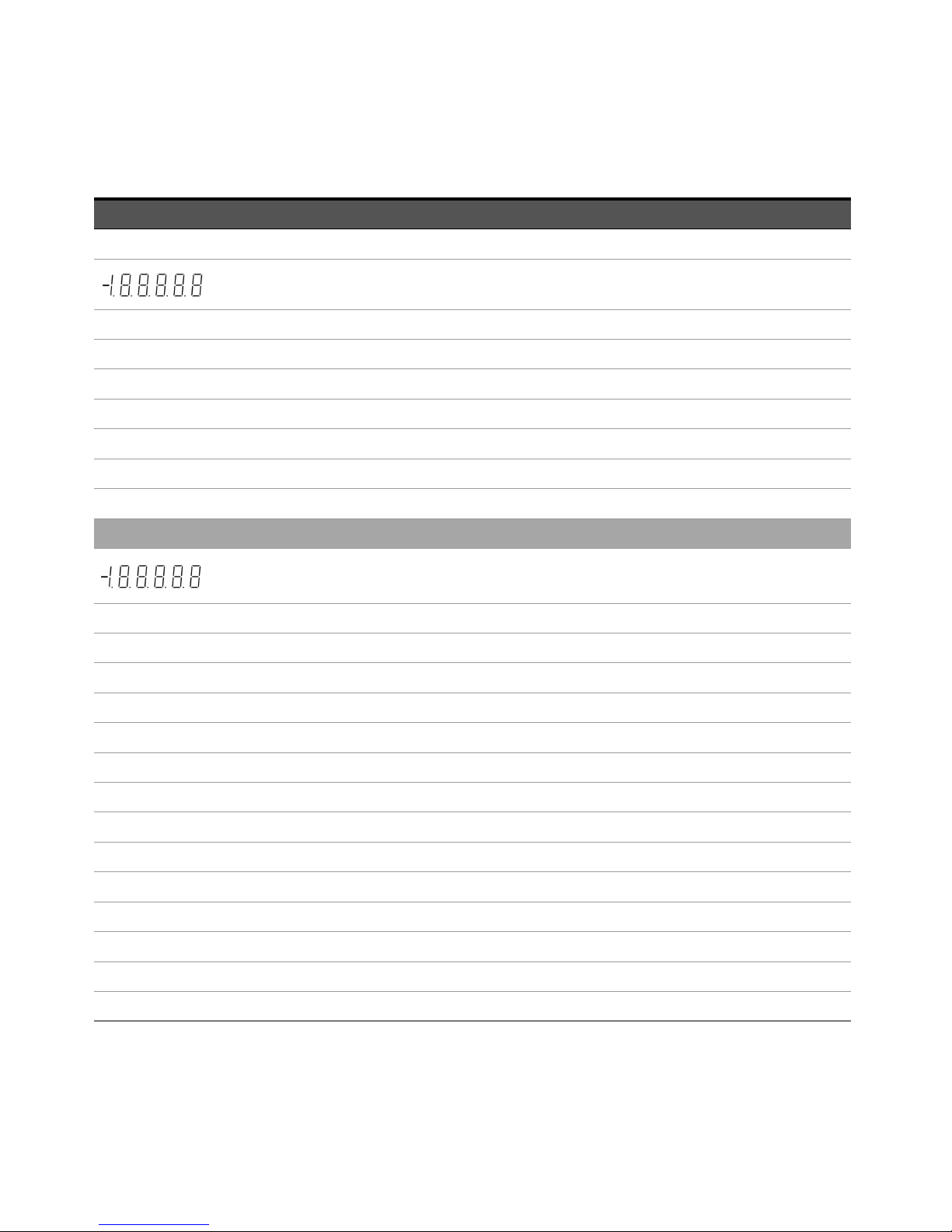
Melder Beschreibung
DCAC AC+DC
Polarität, Ziffern und Dezimalpunkte für Primäranzeige
°C Temperatur in Celsius. Gilt nicht für U3401A.
°F Temperatur in Fahrenheit. Gilt nicht für U3401A.
mV Spannungseinheit: mV, V
μmA Stromstärkeeinheit: μA, mA, A
μmnF Kapazitätseinheit: μF, nF, mF
MkΩ Widerstandseinheit: Ω, kΩ, MΩ
MkHz Frequenzeinheit: Hz, kHz, MHz
Sekundäranzeige
Polarität, Ziffern und Dezimalpunkte für Primäranzeige
μmnF Kapazitätseinheit: μF, nF, mF
°C Temperatur in Celsius. Gilt nicht für U3401A.
°F Temperatur in Fahrenheit. Gilt nicht für U3401A.
% Arbeitszyklusmessung
mV Spannungseinheit: mV, V
μmA Stromstärkeeinheit: μA, mA, A
SUmschaltmodus
MkΩ Widerstandseinheit: Ω, kΩ, MΩ
2ND Sekundäranzeige ist aktiviert. Gilt nicht für U3401A.
AUTO Automatische Bereichsauswahl
DC Gleichstrom
AC Wechselstrom
DCAC AC+DC
COMP Vergleichsoperation
Keysight U3401A Schnellstarthandbuch 7
Page 36

Melder Beschreibung
dBm Dezibeleinheit relativ zu 1 mW
CAL Kalibrierungsmodus
EXT Extern. Gilt nicht für U3401A.
TRIG Triggermodus
REMOTE Remoteschnittstellensteuerung. Nur zu Kalibrierungszwecken.
LOCAL Lokalmodus
STO Speichern des Instrumentenstatus. Gilt nicht für U3401A.
RCL Abrufen des gespeicherten Instrumentenstatus Gilt nicht für U3401A.
8 Keysight U3401A Schnellstarthandbuch
Page 37
Erste Schritte
HINWEIS
In diesem Abschnitt werden die grundlegenden Verfahrensschritte bei der
Verwendung des Multimeters beschrieben.
1 Anschließen des Netzkabels
Leitungsspannungswahlschalter und Sicherung sind werksseitig dem Zielland
gemäß eingestellt.
2 Anpassen des Tragegriffs
Fassen Sie den Griff an den Seiten und ziehen Sie ihn in Richtung der roten
Pfeile.
Bringen Sie den Griff dann in die gewünschte Position.
Keysight U3401A Schnellstarthandbuch 9
Page 38
3 Anschließen der Testleitungen an die Eingangsanschlüsse
+
-
AC- oder DC-Spannung, Frequenz oder
Widerstandsmessung und Dioden- oder Durchgangstest.
+
-
AC- oder
DC-Stromstärke
bis zu 10 A RMS
+
-
AC- oder
DC-Stromstärke
4 Einschalten des Multimeters
Drücken Sie auf , um das Multimeter einzuschalten. Die Anzeige auf der
Vorderseite ist beleuchtet, während das Multimeter seinen
Einschalt-Selbsttest duchführt.
Das Multimeter fährt in der DC-Spannungsfunktion mit aktivierter
automatischer Bereichswahl hoch. Typische Anzeige:
10 Keysight U3401A Schnellstarthandbuch
Page 39
5 Auswählen einer Funktion
Drücken Sie auf eine der folgenden Tasten, um eine Messfunktion
auszuwählen.
6 Einstellen des Bereichs
Bei den meisten Messfunktionen können Sie die automatische Bereichswahl
nutzen oder Sie wählen einen festen Bereich mithilfe der manuellen
Bereichswahl. Das Signal AUTO wird angezeigt, wenn die automatische
Bereichswahl aktiviert ist.
Auswahl der automatischen Bereichswahl und Deaktivieren der
manuellen Bereichswahl. Zum Umschalten zwischen
manueller und automatischer Bereichswahl drücken.
Auswahl eines höheren Bereichs und Deaktivieren der
automatischen Bereichswahl.
7 Verwenden der Sekundäranzeige
Drücken Sie , gefolgt von einer Funktionstaste wie , , ,
oder , um die Sekundäranzeige zu aktivieren.
Keysight U3401A Schnellstarthandbuch 11
Auswahl eines niedrigeren Bereichs und Deaktivieren der
automatischen Bereichswahl.
Page 40
Drücken Sie , um die Sekundäranzeige zu aktivieren.
HINWEIS
Im Sekundäranzeigemodus weist das Multimeter eine längere
Tastenreaktionszeit auf (0,6 s bis 1 s). Drücken Sie die Taste, bis das Multimeter
reagiert.
8 Math. Operation
Das U3401A bietet fünf math. Operationen – dBm, Rel (relativ), MinMax, Comp
(Vergleich) und Hold und Percentage (&).
+
dBm-Messung auswählen.
Math. Operation Comp auswählen.
+
Math. Operation Percentage auswählen.
+
Math. Operation Hold auswählen.
Math. Operation MinMax auswählen.
Math. Operation Rel auswählen.
12 Keysight U3401A Schnellstarthandbuch
Page 41

Die folgende Tabelle enthält eine Zusammenfassung der math. Operationen,
die mit den einzelnen Messfunktionen verwendet werden können.
Messfunktionen
DCV
DCI -
Widerstand - -
ACV
ACI -
Frequenz -
Diode/Durchgang - -
dBm Rel Min Max Comp Hold %
✔✔✔✔✔ ✔ ✔
✔✔✔✔✔ ✔ ✔
Ausführliche Verfahrensbeschreibungen für jede math. Operation finden Sie im
Keysight U3401A Benutzer- und Servicehandbuch.
9 Weitere Informationen
Das Keysight U3401A Benutzer- und Servicehandbuch enthält ausführlichere
Informationen zu vorderem Bedienfeld, Messfunktionen, math. Operationen und
Einrichtungsmenü (ermöglicht die Anpassung der Instrumenteneinstellungen).
Außerdem enthält es auch Informationen zu Produktspezifikationen,
Rack-Montageanleitungen, und Ersatzteilen.
Zulässige math. Operationen
✔✔ ✔✔ ✔ ✔
✔✔✔ ✔ ✔
✔✔ ✔✔ ✔ ✔
✔✔ ✔✔ ✔ ✔
✔✔✔ ✔ ✔
Keysight U3401A Schnellstarthandbuch 13
Page 42

DIESE SEITE WURDE ABSICHTLICH LEER GELASSEN.
14 Keysight U3401A Schnellstarthandbuch
Page 43
Keysight U3401A 4 1/2 位數
雙顯示器萬用電表
快速入門指南
Page 44
聲明
ᘜา
⨸ب
著作權聲明
© Keysight Technologies 2009-2017
本手冊受美國與國際著作權法之規範,
因此未經 Keysight Technologies 事先
協議及書面同意,不得以任何形式或方
式 ( 包括以電子形式儲存、擷取或翻譯
為外國語言 ) 複製本手冊的任何部分。
手冊零件編號
U3401-90016
版本
第 3 版 , 2017 年 6 月 1 日
印製地點:
馬來西亞印製
發佈者:
Keysight Technologies
Bayan Lepas Free Industrial Zone,
11900 Penang, Malaysia
技術授權
此文件中所述的硬體及 / 或軟體係依授
權提供,且僅可以依據此類授權之條款
予以使用或複製。
符合標準聲明
本產品和其他 Keysight 產品的符合標準
聲明可從 Web 進行下載。前往 http://
www.keysight.com/go/conformity。然
後,可以按產品編號搜尋,找到最新的
符合標準聲明。
美國政府權利
本軟體係聯邦收購法規 (「FAR」) 2.101
所界定之 「商業電腦軟體」。根據 FAR
12.212 和 27.405-3 以及國防部補充條
款 (「DFARS」) 227.7202,美國政府依
據向公眾提供商業電腦軟體的一般條款
獲得本軟體。同樣,Keysight 根據其標
準商業授權向美國政府客戶提供本軟
體,該授權包含在其使用者授權合約
(EULA) 中,可於下列位置找到該授權合
約的副本:http://www.keysight.com/
find/sweula。EULA 中所述的授權表示
美國政府在使用、修改、散佈或揭露本
軟體方面的專屬授權。除了其他事項以
外,EULA 及其所述的授權不要求或不
允許 Keysight:(1) 提供通常不會向公眾
提供的與商業電腦軟體或商業電腦軟體
文件相關的技術資訊;或者 (2) 讓與或
以其他方式提供的政府權利超過通常向
公眾提供的有關使用、修改、重現、發
佈、執行、顯示或揭露商業電腦軟體或
商業電腦軟體文件方面的權利。EULA
中未涉及的其他政府要求不適用,除非
根據 FAR 和 DFARS 的規定明確要求所
有商業電腦軟體供應商提供這些條款、
權利或授權,並且 EULA 中的其他地方
有專門的書面說明。Keysight 不承擔更
新、修訂或修改本軟體的責任。關於 FAR
2.101 所界定之任何技術資料,根據
FAR 12.211 和 27.404.2 以及 DFARS
227.7102,在適用於任何技術資料的情
況下,美國政府使用者所獲取的權利,
不得超過依據 FAR 27.401 或 DFAR
227.7103-5 (c) 所界定之「有限權利」。
保固
本文件所含內容係以 「原狀」提供,未
來版本若有變更,恕不另行通知。此外,
在相關法律所允許之最大範圍內,
KEYSIGHT 不承擔任何瑕疵責任擔保與
條件,不論其為明示或暗示者,其中包
括 ( 但不限於 ) 適售性、適合某特定用途
以及不侵害他人權益之暗示擔保責任。
對於因提供、使用或運用本文件或其中
所含的任何內容,以及所衍生之任何損
害或所失利益或錯誤,KEYSIGHT 皆不負
擔責任。若 KEYSIGHT 與使用者就本文
件所含材料保固條款簽訂其他書面協
議,其中出現與上述條款相牴觸之部分,
以個別合約條款為準。
安全資訊
「注意」通知代表危險狀況。它提醒您
注意,如果沒有正確執行或遵守操作程
序、作法或相關說明,可能會導致產品
毀損或重要資料遺失。除非已經完全瞭
解和滿足所指定的條件,否則請不要在
出現 「注意」通知的狀態下繼續進行。
「警告」通知代表發生危險狀況。它提
醒您注意,如果沒有正確執行或遵守操
作程序、作法或相關說明,可能會導致
人員受傷或死亡。 除非已經完全了解和
滿足所指定的狀況,否則請不要在出現
「警告」通知的狀態下繼續進行。
2 Keysight U3401A 快速入門指南
Page 45

目錄
前端面板概覽 . . . . . . . . . . . . . . . . . . . . . . . . . . . . . . . . . . . . . . . . . . . . . . . . 5
顯示器一瞥 . . . . . . . . . . . . . . . . . . . . . . . . . . . . . . . . . . . . . . . . . . . . . . . . . . 6
入門 . . . . . . . . . . . . . . . . . . . . . . . . . . . . . . . . . . . . . . . . . . . . . . . . . . . . . . . . 8
Keysight U3401A 快速入門指南 3
Page 46

本頁預留空白。
4 Keysight U3401A 快速入門指南
Page 47
前端面板概覽
量測功能鍵台
次要顯示器
輸入端子與電流
保險絲
自動設定範圍、
手動設定範圍與
比較運算
電源
開關
數學運算
鍵台
Shift
主要顯示器
Keysight U3401A 快速入門指南 5
Page 48
顯示器一瞥
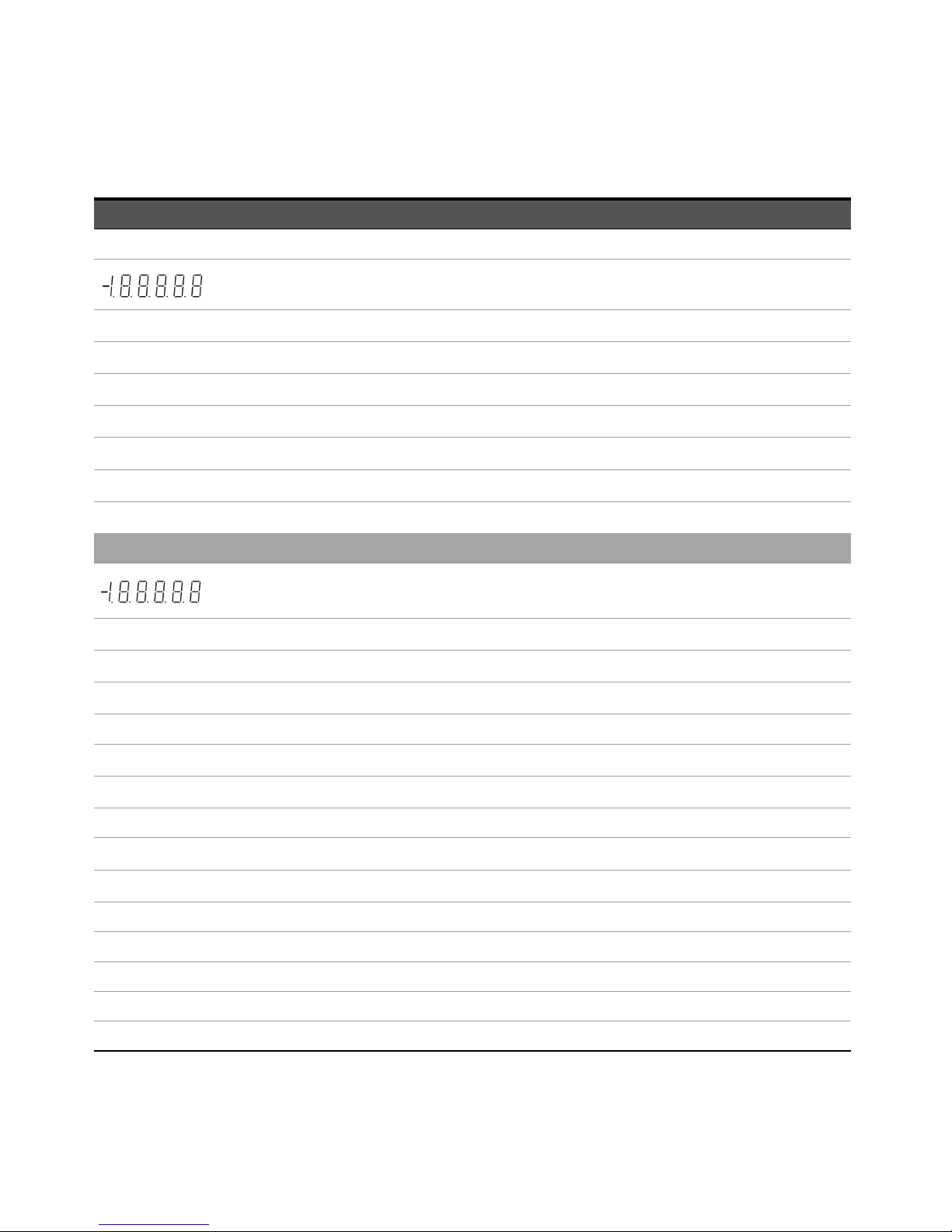
圖 1-1
下表說明高度可見的真空螢光顯示器 (vacuum fluorescent display, VFD) 信號器:
信號器 說明
主要顯示器
S
M
F
PEAK
HOLD
MIN
MAX
REL
dBm
4 2 W
讀取速率:慢。不適用於 U3401A。
讀取速率:中。不適用於 U3401A。
讀取速率:快。不適用於 U3401A。
峰值量測。不適用於 U3401A。
資料保持
數學運算最小最大值:主要顯示器上顯示的最小值
數學運算最小最大值:主要顯示器上顯示的最大值
相對值
相對於 1 mW 的分貝單位
四線式 / 兩線式電阻。不適用於 U3401A。
照明所有區段的 VFD 全顯示器
二極體測試
電阻的蜂鳴聲導通測試
AUTO
DC
AC
自動設定範圍
直流電
交流電
6 Keysight U3401A 快速入門指南
Page 49
信號器 說明
DCAC AC+DC
主要顯示器的極性、數字和小數點
ºC
ºF
mV
µmA
µmnF
MkΩ
MkHz
次要顯示器
µnmF
ºC
ºF
%
mV
攝氏溫度單位。不適用於 U3401A。
華氏溫度單位。不適用於 U3401A。
電壓單位:mV、V
電流單位:µA、mA、A
電容量單位: µF、 nF、mF
電阻單位:Ω、kΩ、MΩ
頻率單位:Hz、kHz、MHz
主要顯示器的極性、數字和小數點
電容量單位: µF、 nF、mF
攝氏溫度單位。不適用於 U3401A。
華氏溫度單位。不適用於 U3401A。
週期量測
電壓單位:mV、V
µmA
S
MkΩ
2ND
AUTO
DC
AC
電流單位:µA、mA、A
切換模式
電阻單位:Ω、kΩ、MΩ
已啟用次要顯示器。不適用於 U3401A。
自動設定範圍
直流電
交流電
DCAC AC+DC
COMP
比較運算
Keysight U3401A 快速入門指南 7
Page 50

信號器 說明
dBm
CAL
EXT
TRIG
REMOTE
LOCAL
STO
RCL
相對於 1 mW 的分貝單位
校正模式
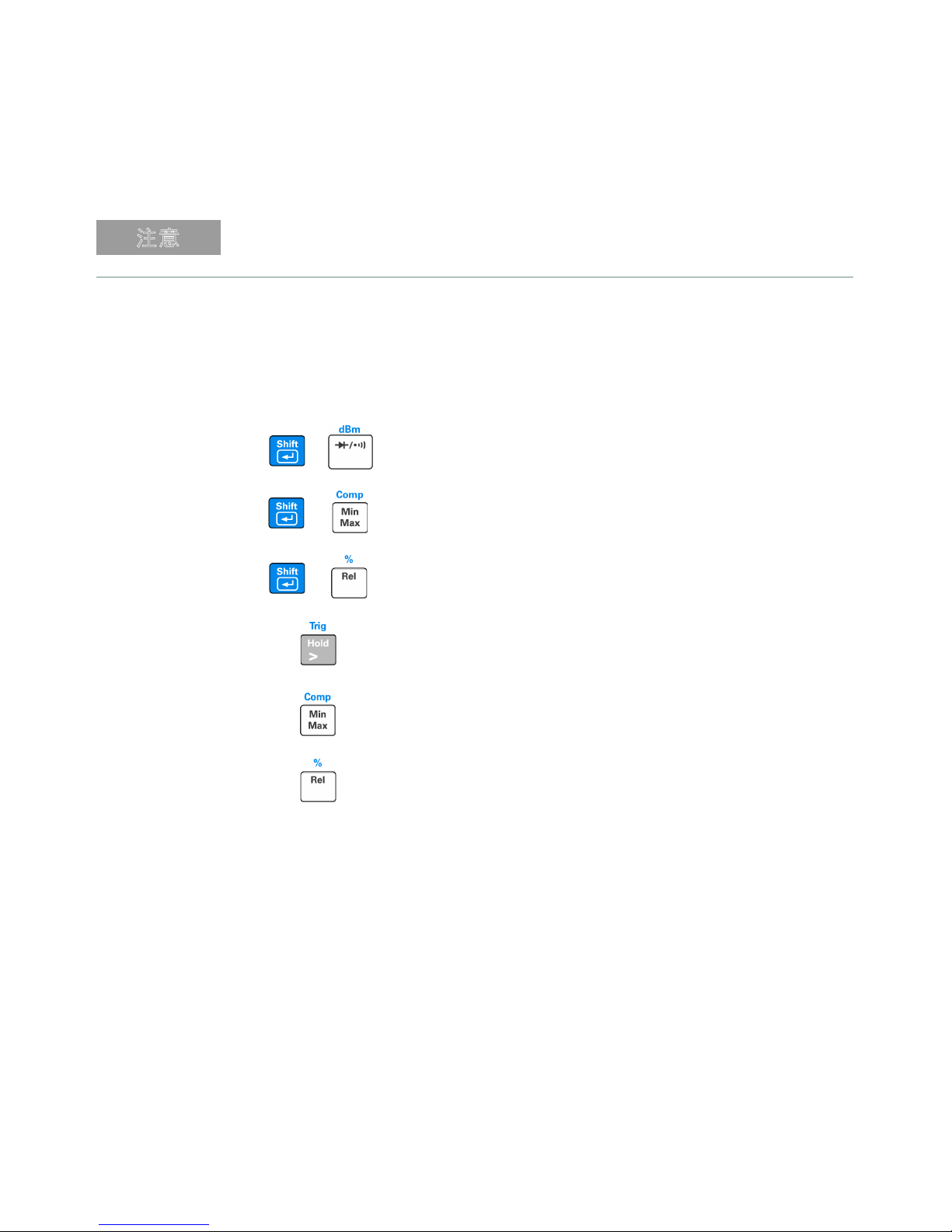
外接式。不適用於 U3401A。
觸發模式
遠端介面控制。僅供校正使用。
本地模式
儲存儀器狀態。不適用於 U3401A。
恢復儲存的儀器狀態。不適用於 U3401A。
8 Keysight U3401A 快速入門指南
Page 51
入門
え⥘
本節說明如何操作萬用電表的基本逐步過程。
1
連接電源線
線路電壓開關與保險絲的出廠值根據目的地國家 / 地區設定。
2
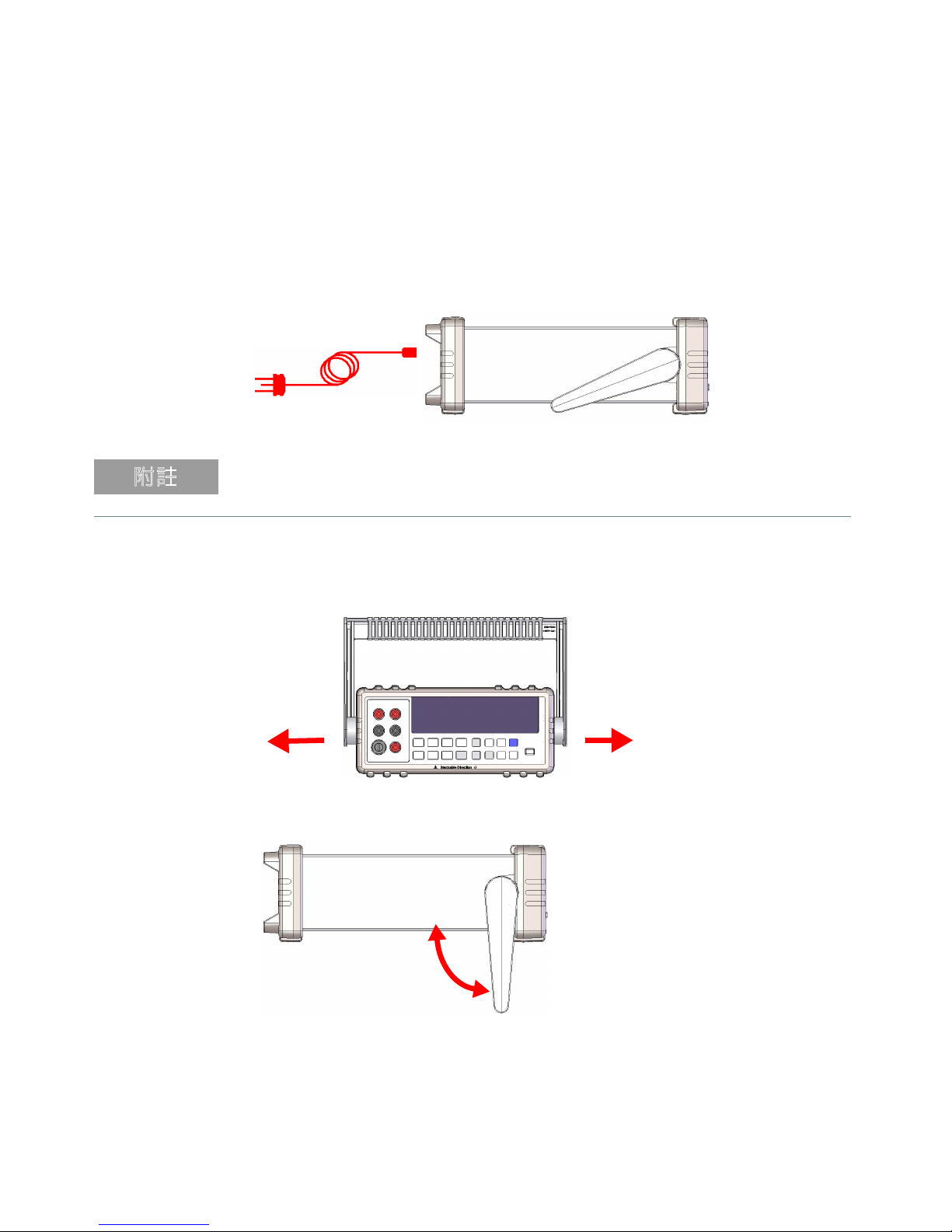
調節手提握柄
抓住握柄的兩側並向外拉,如下方的紅色箭頭所示。
然後,將握柄調節到所需位置。
Keysight U3401A 快速入門指南 9
Page 52
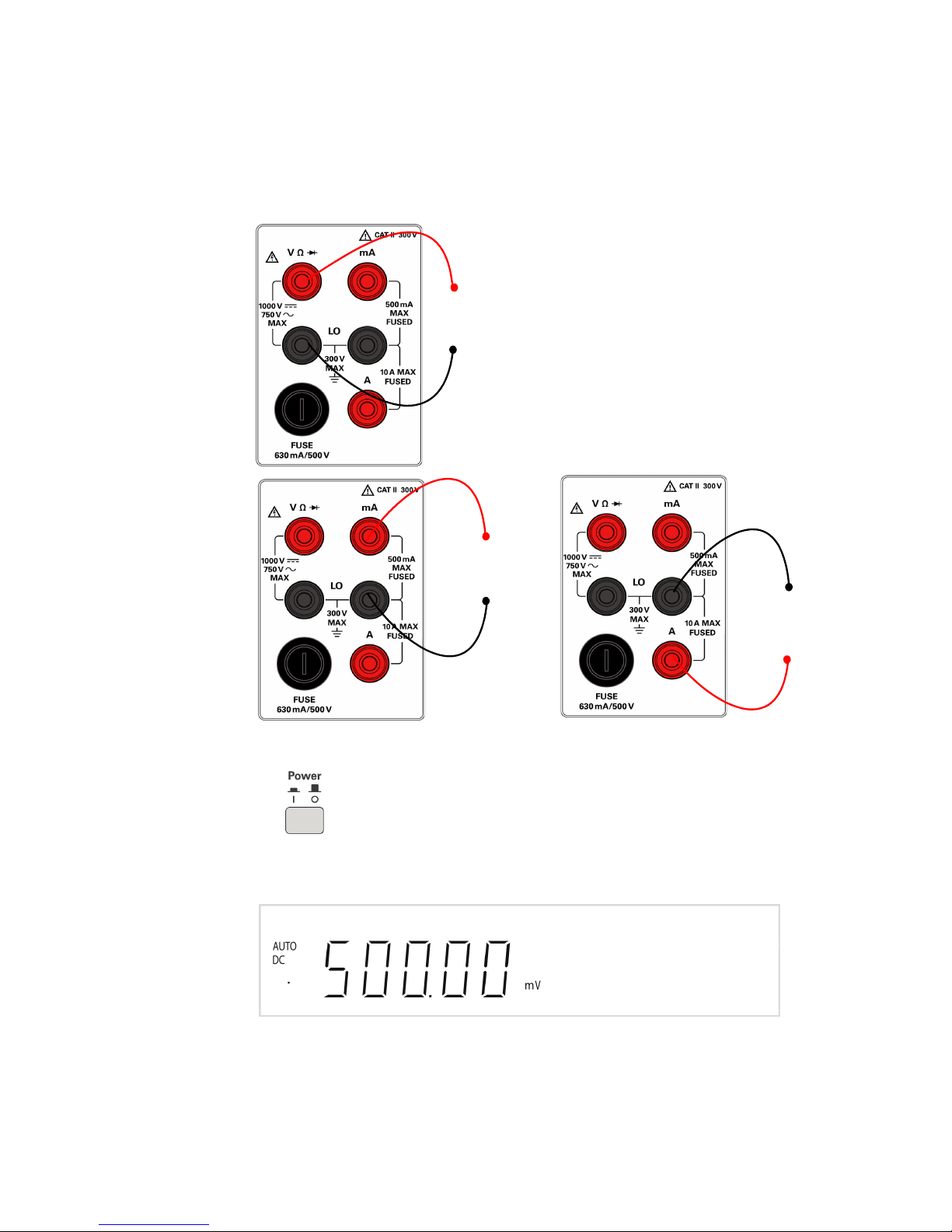
3
+
-
AC 或 DC 電壓、頻率或電阻量測,以及二極體或導通
測試。
+
-
AC 或 DC 電流,
最大 10 A RMS
+
-
AC 或 DC 電流AC 或 DC 電流
將測試引線連接至輸入端子
4
開啟萬用電表
按 開啟萬用電表。當萬用電表執行開機自我測試時,前端面板顯示器
會照明。
萬用電表以 DC 電壓開啟,同時啟用自動設定範圍功能。通常顯示為:
10 Keysight U3401A 快速入門指南
Page 53
5
選取功能
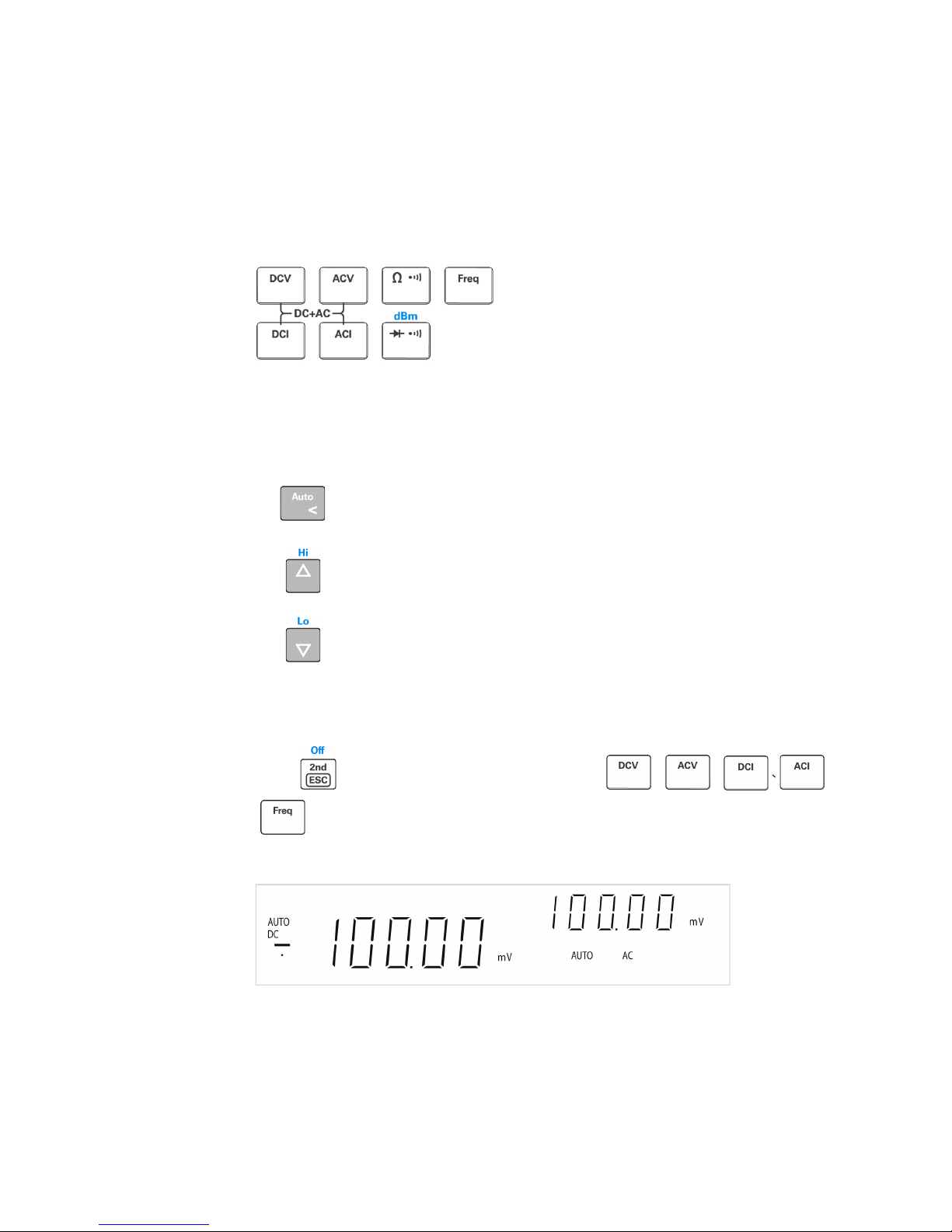
按下列其中一個鍵以選取量測功能。
6
設定範圍
對於大多數的量測功能,您可以使用自動設定範圍功能以允許萬用電表自動選
取範圍,或者使用手動設定範圍選取固定範圍。選取自動設定範圍功能時,顯
示
AUTO
信號器。
選取自動設定範圍,並停用手動設定範圍。按下以在手動設定
範圍與自動設定範圍之間切換。
選取較高的範圍,並停用自動設定範圍。
選取較低的範圍,並停用自動設定範圍。
7
使用次要顯示器
按下 ,緊接著按下指定的功能鍵 ( 例如 、、、 或
),啟用次要顯示器模式。
Keysight U3401A 快速入門指南 11
Page 54
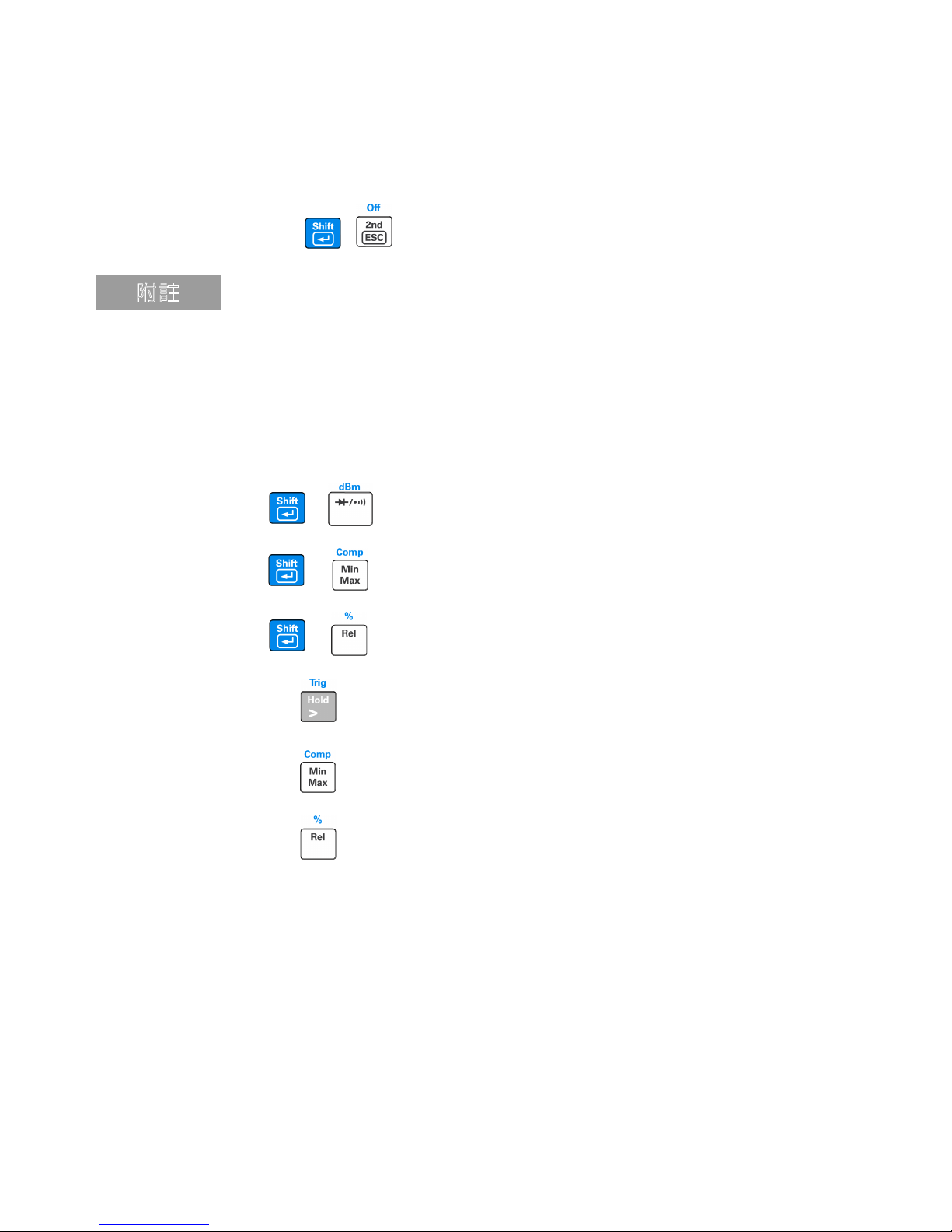
按下 、 以停用次要顯示器。
え⥘
萬用電表的鍵回應時間會增加 (0.6 秒至 1 秒 )。您可能需要按下所選鍵直至萬用
電表回應。
8
數學運算
U3401A 包含六種數學運算 — dBm、Rel ( 相對 )、MinMax、Comp ( 比較 )、
Hold 與百分比 (%)。
+
+
+
按下以選取 dBm 量測。
按下以選取 Comp 數學運算。
按下以啟用百分比數學運算。
按下以啟用 Hold 數學運算。
按下以啟用 MinMax 數學運算。
按下以選取 Rel 數學運算。
12 Keysight U3401A 快速入門指南
Page 55

下表概述了可以與每個量測功能配合使用的數學運算。
量測功能
DCV
DCI -
電阻
ACV
ACI -
頻率
二極體 / 導通
如需每個數學運算的詳細運算過程,請參閱
指南》
9
有關詳細資訊
《
Keysight U3401A
運算與設定功能表 ( 允許您自訂儀器設定 ) 的詳細資訊。它還包含產品規格、
機架安裝說明與可更換的零件資訊。
允許的數學運算
dBm Rel Min Max Comp Hold %
✔✔✔✔✔ ✔ ✔
✔✔ ✔✔ ✔ ✔
--
✔✔✔ ✔ ✔
✔✔✔✔✔ ✔ ✔
✔✔ ✔✔ ✔ ✔
-
--
✔✔ ✔✔ ✔ ✔
✔✔✔ ✔ ✔
《
Keysight U3401A
使用者及維修
。
使用者及維修指南》
包含有關前端面板、量測功能、數學
Keysight U3401A 快速入門指南 13
Page 56

本頁預留空白。
14 Keysight U3401A 快速入門指南
Page 57
Keysight U3401A 4 1/2 位
双重显示万用表
快速入门指南
Page 58

声明
ቅᗹ
䆜
版权声明
© Keysight Technologies 2009-2017
根据美国和国际版权法,未经 Keysight
Technologies 事先允许和书面同意,不
得以任何形式(包括电子存储和检索或
翻译为其他国家或地区语言)复制本手
册中的任何内容。
手册部件号
U3401-90015
版本
第 3 版 , 2017 年 6 月 1 日
印刷地区:
马来西亚印刷
发布者:
Keysight Technologies
Bayan Lepas Free Industrial Zone,
11900 Penang, Malaysia
技术许可
本文档中描述的硬件和 / 或软件仅在得
到许可的情况下提供并且只能根据此类
许可的条款进行使用或复制。
符合性声明
可以从 Web 上下载本产品以及其他
Keysight 产品的符合性声明。请访问
http://www.keysight.com/go/conformity
然后,可以按产品编号进行搜索,查找
最新的符合性声明。
。
美国政府权利
本软件属于联邦政府采购法规(“FAR”)
2.101 定义的 “ 商用计算机软件 ”。按 照
FAR 12.212 和 27.405-3 以及国防部
FAR 补充条款 (“DFARS”) 227.7202,
美国政府根据向公众提供商用计算机软
件的一般条款获得本软件。同样,
Keysight 根据其标准商业许可证向美国
政府客户提供本软件,该许可证包含在
其最终用户许可协议 (EULA) 中,可以
在以下位置找到该许可协议的副本:
http://www.keysight.com/find/sweula
EULA 中所述的许可证阐述了美国政府
在使用、修改、分发或披露本软件方面
的专属权利。除了其他事项之外,EULA
及其所述的许可证不要求或不允许
Keysight:(1) 提供通常不会向公众提供
的与商用计算机软件或商用计算机软件
文档相关的技术信息;或者 (2) 让与或
以其他方式提供的政府权利超过通常向
公众提供的有关使用、修改、复制、发
布、执行、显示或披露商用计算机软件
或商用计算机软件文档方面的权利。
EULA 中未涉及的其他政府要求不适
用,除非按照 FAR 和 DFARS 的规定明
确要求所有商用计算机软件提供商提供
这些条款、权利或许可证,并且 EULA
中的其他地方有专门的书面说明。
Keysight 不承担更新、修订或修改本软
件的责任。关于 FAR 2.101 所定义的技
术数据,根据 FAR 12.211 和 27.404.2
以及 DFARS 227.7102,美国政府获得
的权利不超过 FAR 27.401 或 DFAR
227.7103-5 (c) 中定义的有限权利,这
适用于任何技术数据。
。
担保
本文档中包含的材料 “ 按原样 ” 提供,
如有更改,恕不另行通知。此外,在适
用法律允许的最大范围内,Keysight 不
承诺与本手册及其包含的任何信息相关
的任何明示或暗示的保证,包括但不限
于对特定目的的适销性和适合性的暗示
担保。对于因提供、使用或运用本文档
或其包含的任何信息所导致的错误或者
意外或必然损害, Keysight 概不负责。
如果 Keysight 和用户另有书面协议,并
且其中的某些担保条款涉及了本文档中
与这些条款冲突的资料,则以此协议中
的担保条款为准。
安全信息
“ 小心 ” 标志表示存在危险。它要求重视
操作程序、做法等。如果不正确地执行
或不遵守此类操作规程,则可能导致产
品损坏或重要数据丢失。在没有完全理
解指定的条件且不满足这些条件的情况
下,请勿继续执行小心声明所指示的任
何操作。
“ 警告 ” 标志表示有危险。它要求在执
行操作步骤时必须加以注意,如果不正
确地执行操作或不遵守操作步骤,则可
能导致人身伤亡。在没有完全理解指定
的条件且不满足这些条件的情况下,请
勿继续执行 “ 警告 ” 标志所指示的任何
操作。
2 Keysight U3401A 快速入门指南
Page 59

目录
前面板外观 . . . . . . . . . . . . . . . . . . . . . . .5
显示屏一览 . . . . . . . . . . . . . . . . . . . . . . .6
入门 . . . . . . . . . . . . . . . . . . . . . . . . . .9
Keysight U3401A 快速入门指南 3
Page 60

本页特意留为空白。
4 Keysight U3401A 快速入门指南
Page 61
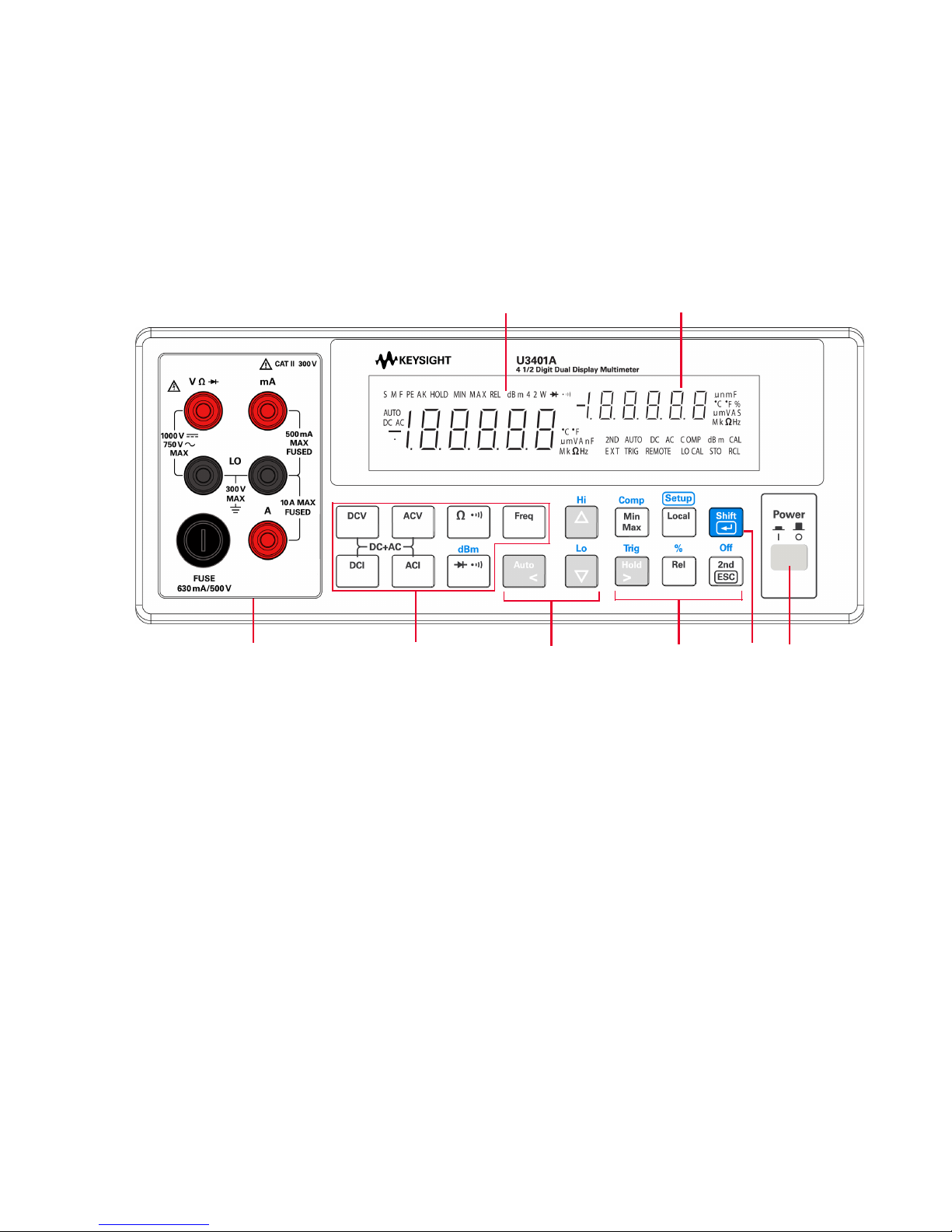
前面板外观
测量功能键盘
副显示屏
输入终端和电流
保险丝
自动量程、手动
量程和比较运算
打开 /
关闭开关
数学运算
键盘
Shift
主显示屏
Keysight U3401A 快速入门指南 5
Page 62
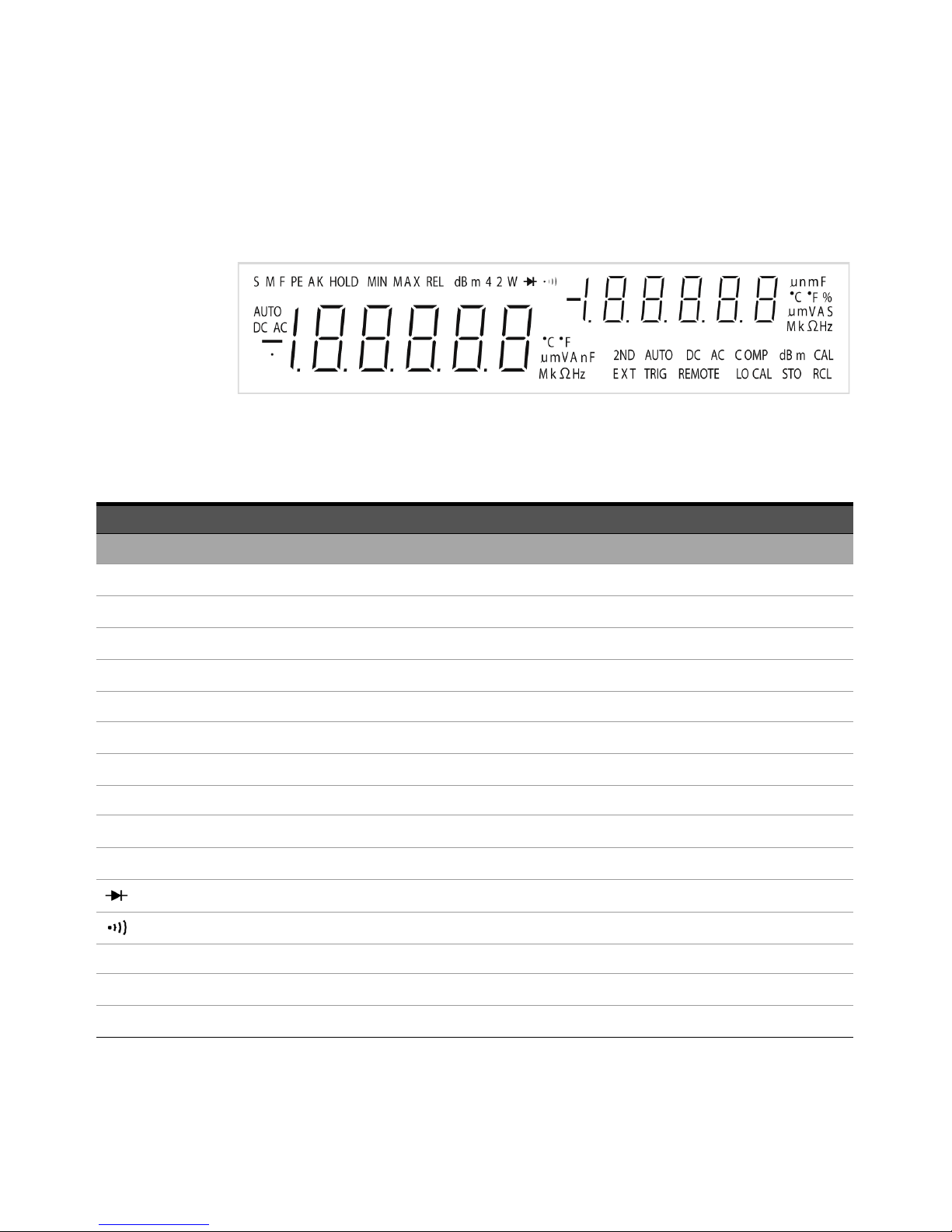
显示屏一览
图 1-1 VFD 全屏显示时,所有组件均会亮起
下表详细说明高度可视的真空荧光显示屏 (VFD) 信号器:
信号器 说明
主显示屏
S
M
F
PEAK
HOLD
MIN
MAX
REL
dBm
4 2 W
AUTO
DC
AC
读取速率:慢。不适用于 U3401A。
读取速率:中。不适用于 U3401A。
读取速率:快。不适用于 U3401A。
峰值测量。不适用于 U3401A。
数据保持
MinMax 数学运算:主显示屏上显示最小值
MinMax 数学运算:主显示屏上显示最大值
相对值
与 1 mW 相关的分贝单位
四线 / 二线电阻。不适用于 U3401A。
二极管测试
电阻的有声通断测试
自动量程
直流电
交流电
6 Keysight U3401A 快速入门指南
Page 63
信号器 说明
DCAC AC+DC
主显示屏的极性、位数和小数点
ºC
ºF
mV
µmA
µmnF
MkΩ
MkHz
副显示屏
µnmF
ºC
ºF
%
mV
摄氏温度单位。不适用于 U3401A。
华氏温度单位。不适用于 U3401A。
电压单位:mV、 V
电流单位:µA、 mA、 A
电容单位:µF、 nF、 mF
电阻单位:Ω、 kΩ、 MΩ
频率单位:Hz、 kHz、 MHz
主显示屏的极性、位数和小数点
电容单位: µF、 nF、 mF
摄氏温度单位。不适用于 U3401A。
华氏温度单位。不适用于 U3401A。
占空比测量
电压单位:mV、 V
µmA
S
MkΩ
2ND
AUTO
DC
AC
电流单位:µA、 mA、 A
转换模式
电阻单位:Ω、 kΩ、 MΩ
已启用副显示屏。不适用于 U3401A。
自动量程
直流电
交流电
DCAC AC+DC
COMP
比较运算
Keysight U3401A 快速入门指南 7
Page 64

信号器 说明
dBm
CAL
EXT
TRIG
REMOTE
LOCAL
STO
RCL
与 1 mW 相关的分贝单位
校准模式
外部。不适用于 U3401A。
触发模式
远程界面控制。不适用于 U3401A。
本地模式
存储仪表状态。不适用于 U3401A。
回读存储的仪表状态。不适用于 U3401A。
8 Keysight U3401A 快速入门指南
Page 65
入门
⌞ᝅ
本节介绍有关如何操作万用表的分步式基本步骤。
1 连接电源线
线路电压开关和保险丝的出厂设置取决于目的地国家 / 地区的规定。
2 调整手提柄
根据下方的红色箭头指示,抓住两侧的手柄向外拉。
然后将手柄调整到所需的位置。
Keysight U3401A 快速入门指南 9
Page 66
3 将仪表笔线连接到输入终端
+
-
AC 或 DC 电压、频率或电阻测量和二极管或通断
测试。
+
-
AC 或 DC 电流,
最大电流为 10 A
RMS
+
-
AC 或 DC 电流
4 打开万用表
按 可以打开万用表。当万用表执行通电自检时,前面板显示屏会亮起。
万用表将在直流电压功能中通电,并启用自动量程。常用显示屏:
10 Keysight U3401A 快速入门指南
Page 67
5 选择一种功能
按下面任一按键以选择一种测量功能。
6 设置范围
对于大多数测量功能,可以使用自动量程功能让万用表自动选择范围,也可
以使用手动量程功能选择固定范围。选中自动量程功能后,会显示 AUTO 信
号器。
选择自动量程并禁用手动量程。按下此键可在手动量程和自动
量程之间切换。
选择较高的范围并禁用自动量程。
选择较低的范围并禁用自动量程。
7 使用副显示屏
按 ,然后按特定的功能键,如 、、、 或
以启用副显示屏模式。
按下 以禁用副显示屏。
Keysight U3401A 快速入门指南 11
Page 68
⌞ᝅ
万用表的按键响应时间会变长 (0.6 秒至 1 秒 )。您可能需要按住选定键,直到万
用表作出响应为止。
8 数学运算
U3401A 有六种数学运算方法 — dBm、 Rel (相对)、 MinMax、 Comp (比
较)、 Hold 和百分比 (%)。
+
+
+
按住此组合键以选择 dBm 测量。
按住此组合键以选择 Comp 数字运算。
按住此键以选择百分比数字运算。
按住此键以选择 Hold 数字运算。
按住此键以选择 MinMax 数字运算。
按住此键以选择 Rel 数字运算。
12 Keysight U3401A 快速入门指南
Page 69

下表显示每种测量功能可以使用的数学运算汇总表。
测量功能
DCV
DCI -
电阻
ACV
ACI -
频率
二极管 / 通断
有关各种数学运算的详细操作过程,请参阅
指南》
9 有关更多信息
《
Keysight U3401A
和设置菜单的更多详细信息(您可以根据这些信息自定义仪表设置)。该文档
还包含产品规格、机架安装说明、和可更换零件等信息。
允许的数字运算
dBm Rel Min Max Comp Hold %
✔✔✔✔✔ ✔ ✔
✔✔ ✔✔ ✔ ✔
--
✔✔✔ ✔ ✔
✔✔✔✔✔ ✔ ✔
✔✔ ✔✔ ✔ ✔
-
--
✔✔ ✔✔ ✔ ✔
✔✔✔ ✔ ✔
《
Keysight U3401A
用户及维修
。
用户及维修指南》
包含有关前面板、测量功能、数学运算
Keysight U3401A 快速入门指南 13
Page 70

本页特意留为空白。
14 Keysight U3401A 快速入门指南
Page 71
Keysight U3401A 4 1/2 桁
デュアル・ディスプレイ・
マルチメータ
クイック・ス
タート・ガイド
Page 72

ご注意
ὀព
㆙࿌
著作権に関するご注意
© Keysight Technologies 2009-2017
米国および国際著作権法の規定に基づ
き、Keysight Technologies による事前
の同意と書面による許可なしに、本書
の内容をいかなる手段でも(電子的記
憶および読み出し、他言語への翻訳を
含む)複製することはできません。
マニュアルパーツ番号
U3401-90018
版
第 3 版 、2017 年 6 月 1 日
印刷:
Printed in Malaysia
出版者:
Keysight Technologies
Bayan Lepas Free Industrial Zone,
11900 Penang, Malaysia
テクノロジーライセンス
本書に記載されたハードウエア及び
ソフトウエア製品は、ライセンス契
約条件に基づき提供されるものであ
り、そのライセンス契約条件の範囲
でのみ使用し、または複製すること
ができます。
適合宣言書
本製品およびその他の Keysight 製品
の適合宣言書はウェブサイトからダ
ウンロードできます。
http://www.keysight.co.jp/go/
conformity にアクセスして、製品番
号で検索して、最新の適合宣誓書を
ご確認ください。
米国政府の権利
本ソフトウェアは、連邦調達規則
("FAR")2.101 に定められている「商用
コンピューターソフトウェア」です。
FAR 12.212 および 27.405-3、国防総
省 FA R 補足 ("DFARS")227.7202 に従
い、米国政府の商用コンピューターソ
フトウェアの入手条件は、本ソフト
ウェアを一般エンドユーザーに提供す
る際に通例適用される条件と同じで
す。したがって、Keysight は自社の標
準商用ライセンスに従って、本ソフト
ウェアを米国政府のユーザーに提供し
ます。標準商用ライセンスは、以下の
ウェブサイトで提供されている、使用
許諾契約書 (EULA) に具体的に示され
ています。http://www.keysight.co.jp/
find/sweula。EULA に定められている
ライセンスは、米国政府の排他的権限
を表し、米国政府はそれに従って本ソ
フトウェアを使用、変更、配布または
開示することができます。EULA およ
びそこに定められているライセンス
は、なかんずく、以下のことを
Keysight に要求または許可するもので
はありません。(1) 一般エンドユー
ザーに通例提供されていない商用コン
ピューターソフトウェアまたは商用コ
ンピューターソフトウェアのドキュメ
ントに関連する技術情報を提供する、
または (2) 一般エンドユーザーに通例
付与されている商用コンピューターソ
フトウェアまたは商用コンピューター
ソフトウェアのドキュメントを使用、
変更、複製、公開、実行、表示、また
は開示する権利の範囲を超えて、政府
に権利を譲渡、または別の方法で提供
する。政府が課す要件は、EULA に定
められている要件に限られます。ただ
し、それらの条件、権利、またはライ
センスが、FAR および DFARS に従っ
て、すべての商用コンピューターソフ
トウェアのメーカーから明示的に求め
られている場合、あるいは EULA の他
の箇所に特に明記されている場合を除
きます。Keysight は、本ソフトウェア
をアップデート、修正、あるいはその
他の形で変更する義務を負わないもの
とします。FAR 12.211/27.404.2 およ
び DFARS 227.7102 に従って、FAR
2.101 によって定義されている技術
データに関しては、米国政府に付与さ
れる権利は、あらゆる技術データに関
して、FAR 27.401 または DFAR
227.7103-5 (c) に定義されている制限
付き権利の範囲に限定されます。
保証
本書の内容は「現状のまま」で提供さ
れており、改訂版では断りなく変更さ
れる場合があります。また、キーサイ
トは、法律の許す限りにおいて、本書
およびここに記載されているすべての
情報に関して、特定用途への適合性や
市場商品力の黙示的保証に限らず、一
切の明示的保証も黙示的保証もいたし
ません。キーサイトは本書または本書
に記載された情報の適用、実行、使用
に関連して生じるエラー、間接的およ
び付随的損害について責任を負いませ
ん。キーサイトとユーザーが別途に締
結した書面による契約の中で本書の情
報に適用される保証条件が、これらの
条件と矛盾する場合は、別途契約の保
証条件が優先されるものとします。
安全情報
注意の表示は、危険を表します。ここ
に示す操作手順や規則などを正しく実
行または遵守しないと、製品の損傷ま
たは重要なデータの損失を招くおそれ
があります。指定された条件を完全に
理解し、それが満たされていることを
確認するまで、注意の指示より先に進
まないでください。
警告の表示は、危険を表します。ここ
に示す操作手順や規則などを正しく実
行または遵守しないと、怪我または死
亡のおそれがあります。指定された条
件を完全に理解し、それが満たされて
いることを確認するまで、警告の指示
より先に進まないでください。
2 Keysight U3401A クイック・スタート・ガイド
Page 73

目次
フロント・パネルの概要 . . . . . . . . . . . . . . . . .5
ディスプレイの概要 . . . . . . . . . . . . . . . . . . .6
使用前の準備 . . . . . . . . . . . . . . . . . . . . . .9
Keysight U3401A クイック・スタート・ガイド 3
Page 74

これは空白のページです。
4 Keysight U3401A クイック・スタート・ガイド
Page 75
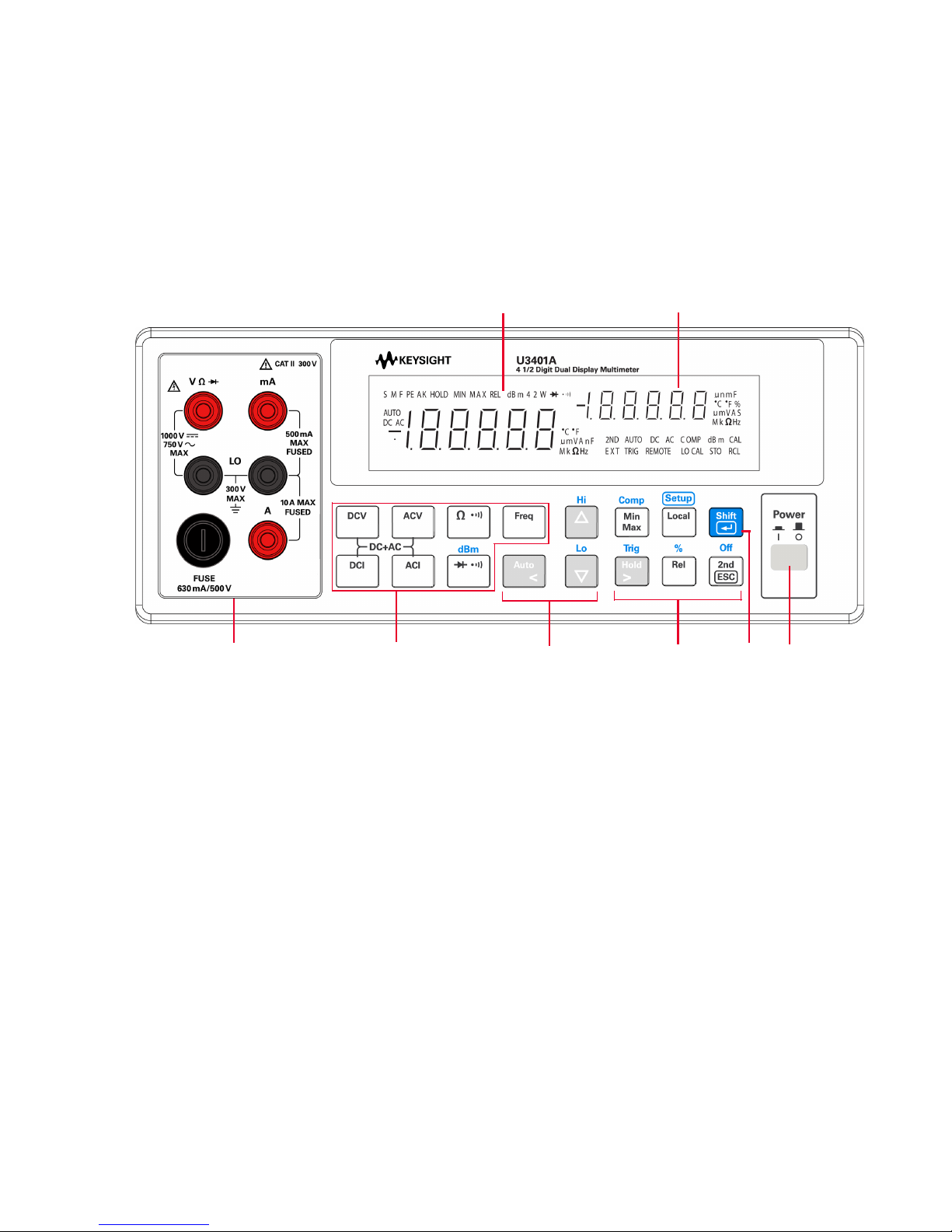
フロント・パネルの概要
測定機能
キーパッド
セカンダリ・ディスプレイ
入力端子と
電流ヒューズ
オートレンジ、
手動レンジ、
コンパレータ操作
パワー・
オン/オフ・
スイッチ
演算機能
キーパッド
シフト
プライマリ・ディスプレイ
Keysight U3401A クイック・スタート・ガイド 5
Page 76
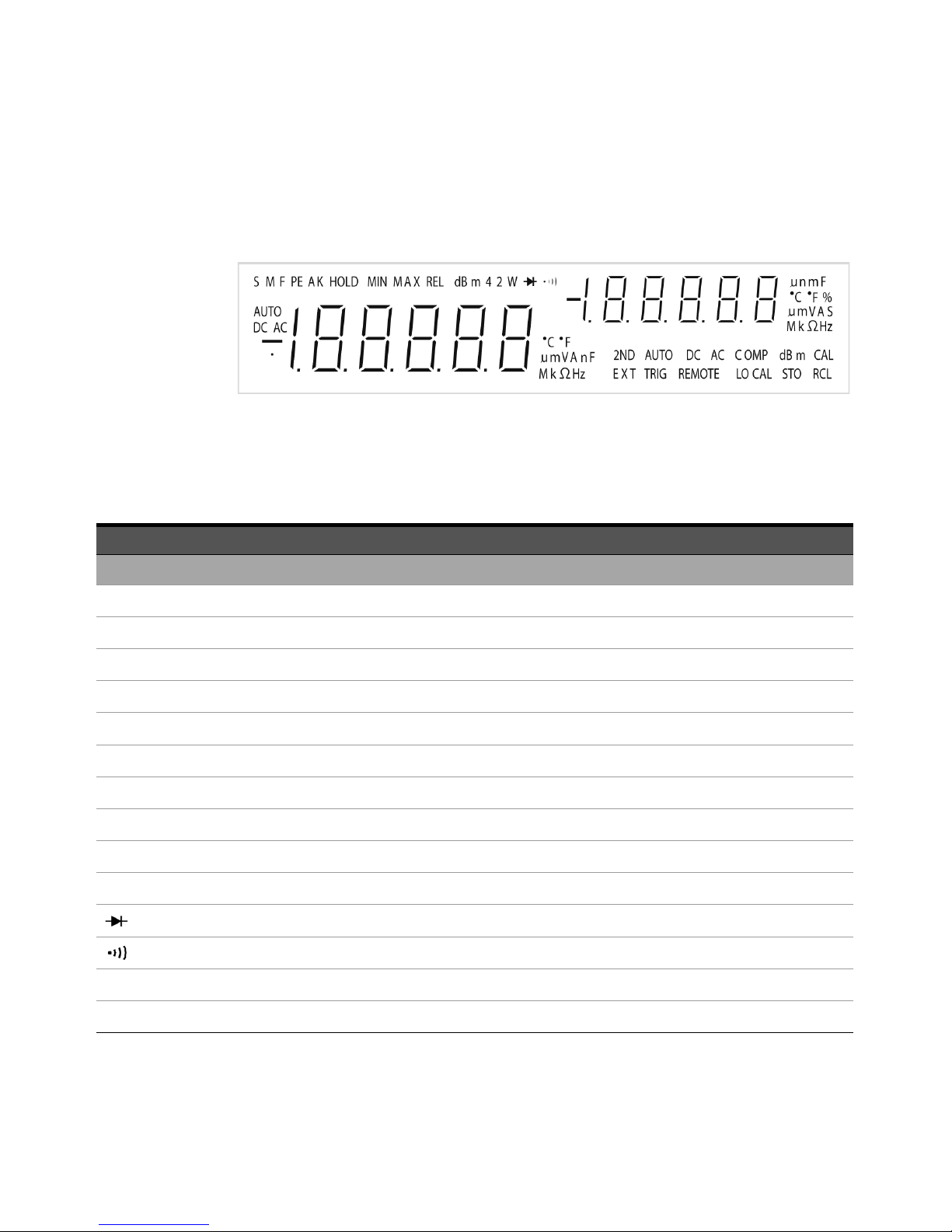
ディスプレイの概要
図 1-1 すべてのセグメントが点灯した状態の VFD フル表示
真空蛍光ディスプレイ(VFD)の非常に見やすいインジケータについては、以
下の表で説明します。
インジケータ 概要
プライマリ・ディスプレイ
S 測定速度:低速。U3401A には適用されません
M 測定速度:中速。U3401A には適用されません
F 測定速度:高速。U3401A には適用されません
PEAK ピーク測定。U3401A には適用されません
HOLD
MIN MinMax 演算機能:プライマリ・ディスプレイに表示される最小値
MAX MinMax 演算機能:プライマリ・ディスプレイに表示される最大値
REL
dBm 1 mW を基準にしたデシベル単位
4 2 W 4 端子 /2 端子抵抗。U3401A には適用されません
AUTO
DC 直流
データ・ホールド
相対値
ダイオード・テスト
抵抗の可聴導通テスト
オートレンジ
6 Keysight U3401A クイック・スタート・ガイド
Page 77
インジケータ 概要
AC 交流
DCAC AC+DC
プライマリ・ディスプレイの極性、桁、小数点
°C 摂氏温度単位。U3401A には適用されません
°F 華氏温度単位。U3401A には適用されません
mV 電圧単位:mV、V
μmA 電流単位:μA、mA、A
μmnF キャパシタンス単位: μF、nF、mF
MkΩ 抵抗単位:Ω、kΩ、MΩ
MkHz 周波数単位:Hz、kHz、MHz
セカンダリ・ディスプレイ
プライマリ・ディスプレイの極性、桁、小数点
μmnF キャパシタンス単位:μF、nF、mF
°C 摂氏温度単位。U3401A には適用されません
°F 華氏温度単位。U3401A には適用されません
%
デューティ・サイクル測定
mV 電圧単位:mV、V
μmA 電流単位:μA、mA、A
S
シフト・モード
MkΩ 抵抗単位:Ω、kΩ、MΩ
2ND セカンダリ・ディスプレイがオン U3401A には適用されません
AUTO
DC
AC
オートレンジ
直流
交流
Keysight U3401A クイック・スタート・ガイド 7
Page 78

インジケータ 概要
DCAC AC+DC
COMP
比較操作
dBm 1 mW を基準にしたデシベル単位
CAL
校正モード
EXT 外部。U3401A には適用されません
TRIG
REMOTE
LOCAL
トリガ・モード
リモート・インタフェース制御。校正専用
ローカル・モード
STO 機器ステートを保存。U3401A には適用されません
RCL 保存されている機器ステートをリコール。U3401A には適用されません
8 Keysight U3401A クイック・スタート・ガイド
Page 79
使用前の準備
ὀグ
ここでは、マルチメータの操作方法の基本手順について詳細に説明します。
1 電源コードを接続します
電源電圧スイッチとヒューズは、出荷先の国に合わせて工場で設定されてい
ます。
2 持ち運び用ハンドルを調整します
ハンドルの側面をつかんで、外側(下の赤い矢印で示す方向)にひっぱり
ます。
次に、ハンドルを必要な位置まで動かします。
Keysight U3401A クイック・スタート・ガイド 9
Page 80
3 テスト・リードを入力端子に接続します
+
AC または DC 電圧、周波数、抵抗測定および
ダイオード/導通テスト
_
+
_
最大 10 A RMS
の AC または DC
電流
+
_
AC または DC
電流
4 マルチメータをオンにします
を押してマルチメータをオンにします。マルチメータがパワー・オ
ン・セルフテストを実行しているあいだ、フロント・パネル・ディスプレ
イが明るくなります。
マルチメータの電源投入直後は、DC 電圧機能に設定され、オートレンジが
オンの状態になっています。代表的なディスプレイを示します。
10 Keysight U3401A クイック・スタート・ガイド
Page 81
5 機能を選択します
次のキーのいずれかを押して、測定機能を選択します。
6 レンジを設定します
ほとんどの測定機能では、オートレンジ機能を使用すると、マルチメータ
がレンジを自動的に選択します。手動レンジを使用すると、固定レンジを
選択できます。オートレンジ機能を選択している場合は、AUTO インジ
ケータが点灯します。
オートレンジを選択し、手動レンジをオフにします。押す
と、手動レンジとオートレンジが切り替わります。
より高いレンジを選択し、オートレンジをオフにします。
より低いレンジを選択し、オートレンジをオフにします。
7 セカンダリ・ディスプレイの使用
を押し、 、 、 、 、 などの指定されたファン
クション・キーを押して、セカンダリ・ディスプレイ・モードをオンにし
ます。
Keysight U3401A クイック・スタート・ガイド 11
Page 82
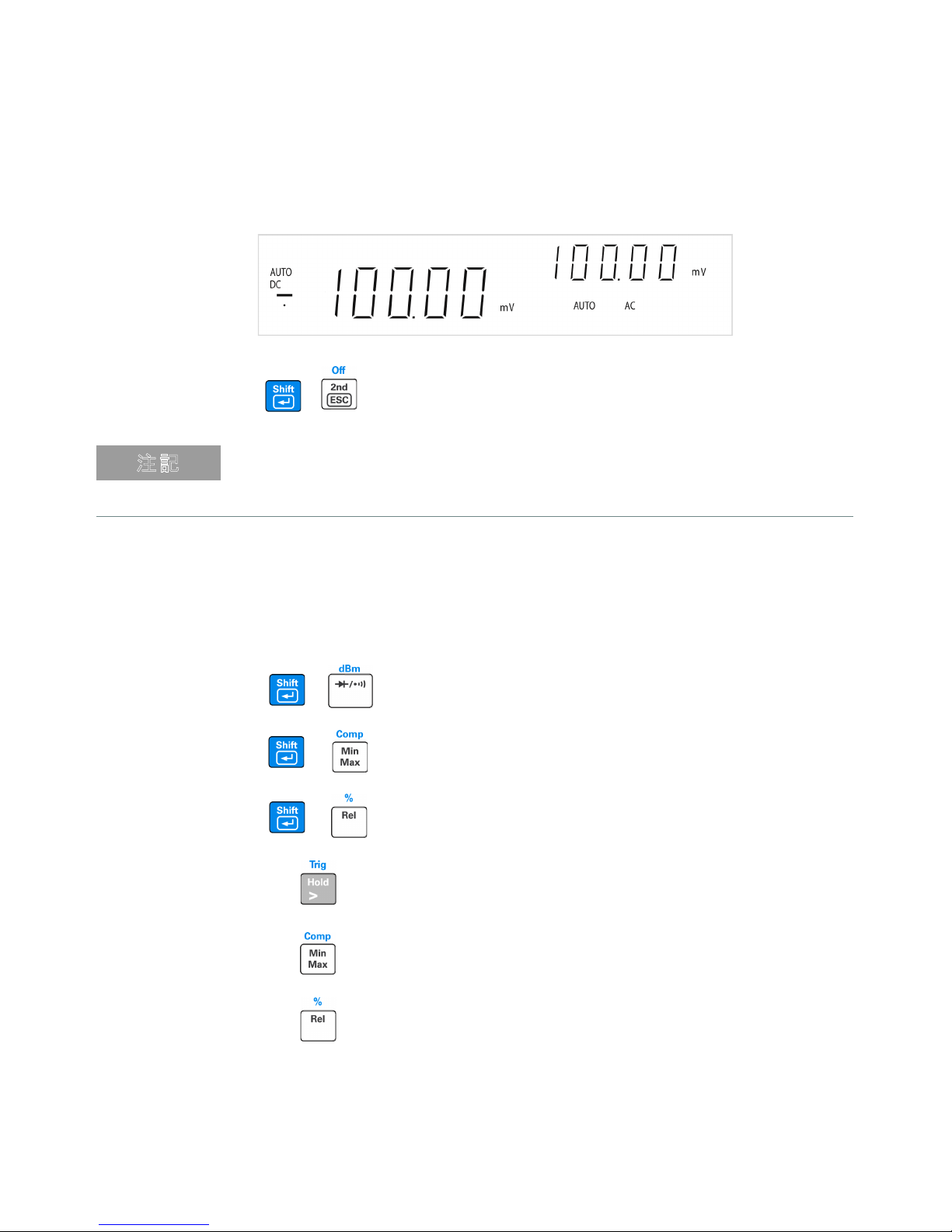
、 を押して、 セカンダリ・ディスプレイをオフにします。
ὀグ
マルチメータがデュアル・ディスプレイ・モードの場合は、キーの応答時間が
長くなります(0.6 s から 1 s)。マルチメータが応答するまで選択したキーを
押し続ける必要があります。
8 演算機能
U3401A には、dBm、Rel(相対)、MinMax、Comp(比較)、Hold、
Percentage(%)の 6 つの演算機能があります。
+
dBm 測定を選択します。
Comp 演算機能を選択します。
+
Percentage 演算機能をオンにします。
+
Hold 演算機能をオンにします。
MinMax 演算機能をオンにします。
Rel 演算機能を選択します。
12 Keysight U3401A クイック・スタート・ガイド
Page 83

以下の表に、各測定機能と一緒に使用できる演算機能のサマリを示します。
測定機能
DCV
DCI
抵抗
ACV
ACI
周波数
ダイオード/導通
使用可能な演算機能
dBm Rel Min Max Comp Hold %
✔✔✔✔✔ ✔ ✔
-
--
✔✔ ✔✔ ✔ ✔
✔✔✔ ✔ ✔
✔✔✔✔✔ ✔ ✔
-
-
--
各演算機能の詳細な操作手順については、
Service Guide
✔✔ ✔✔ ✔ ✔
✔✔ ✔✔ ✔ ✔
✔✔✔ ✔ ✔
『
Keysight U3401A User’s and
』
を参照してください。
9 詳細
『
Keysight U3401A User’s and Service Guide』には、フロント・パネル、測
定機能、演算機能、設定メニュー(測定器の設定をカスタマイズ可能)に
ついての詳細情報が含まれています。製品の仕様、ラック・マウント手
順・インタフェース、交換部品に関する情報もあります。
Keysight U3401A クイック・スタート・ガイド 13
Page 84

This information is subject to change
without notice. Always refer to the
Keysight website for the latest
revision.
© Keysight Technologies 2009—2017
Edition 2, June 1, 2017
Printed in Malaysia
*U3401-90019*
U3401-90019
www.keysight.com
 Loading...