

Page 1
Keysight Technologies
Remote Language Compatibility (RLC) X-Series
Measurement Application N9061A
Technical Overview and Demo Guide
– Seamless ATE system migration to next generation
– Reduce ATE system cost with X-Series analyzers
– Run legacy programming codes using newer
SCPI-based instruments without code modication
Page 2
RLC Measurement Application
In addition to a superior combination of speed, accuracy, flexibility,
and dynamic range, the Keysight
Technology, Inc. X-Series signal
analyzers offer the broadest set of
measurement applications. The RLC
measurement application is an ideal
tool for seamlessly evolving your ATE
system to the next generation.
The RLC measurement application is
just one in a common library of more
than 25 measurement applications in
the Keysight X-Series, an evolutionary approach to signal analysis that
spans instrumentation, measurements, and software. The X-Series
analyzers and MXE EMI receiver,
with upgradeable CPU, memory,
removable solid-state drive, and I/O
ports, enable you to keep your test
assets current and extend instrument
longevity. Proven algorithms, 100%
code-compatibility, and a common
UI across the X-Series create a
consistent measurement framework
for signal analysis that ensures
repeatable results and measurement
integrity so you can leverage your test
system software through all phases
of product development. In addition
to fixed, perpetual licenses for our
X-Series measurement applications,
we also offer transportable licenses
which can increase the value of
your investment by allowing to you
transport the application to multiple
X-Series analyzers.
Try Before You Buy!
Free 30-day trials of X-Series
measurement applications
provide unrestricted use of
each application’s features and
functionality on your X-Series
analyzer. Redeem a trial license
on-line today:
www.keysight.com/find/XSeries_trial
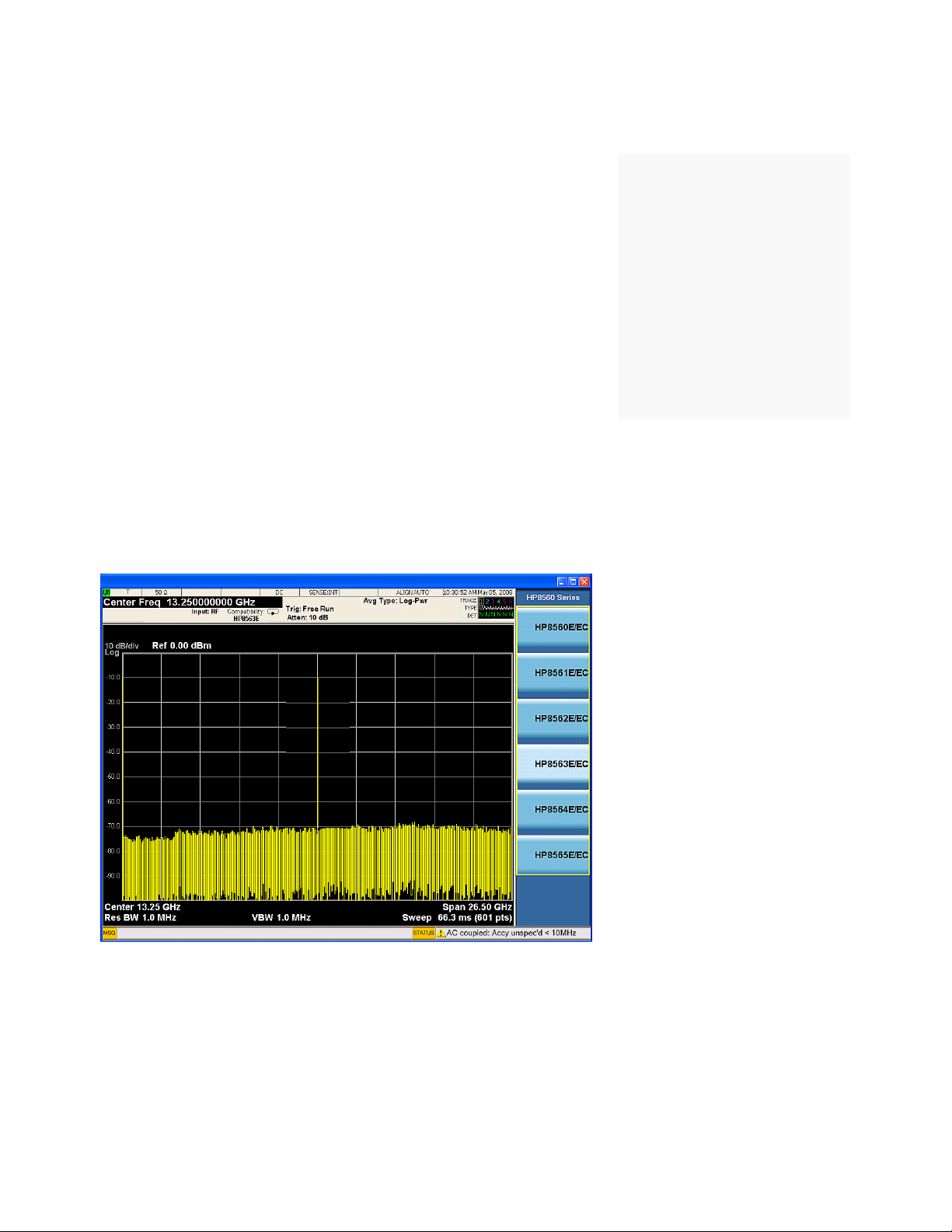
Figure 1. The N9061A GUI allows users to select the 856x model they would like to emulate.
2
Page 3

RLC Overview
You selected HP/Keysight’s legacy
spectrum analyzers, such as the
856xE/EC or 8566/68 family, for your
automatic test equipment (ATE) systems. After decades of success, you
are probably considering transitioning
your ATE system to the next generation, and, as your partner, Keysight is
here to help make that transition as
seamless as possible—so you can
focus on achieving new successes in
mission-critical tasks.
We understand the problems you are
facing when evolving ATE systems.
Some or all of the instruments in
your ATE system racks become
obsolete and some of them are no
longer supported. Those instruments
have to be replaced with the modern
ones. However, ATE systems are very
expensive to develop and certify.
Once the remote test program sets
for these ATE systems have been
certified, changes require recertification which is expensive and timeconsuming.
Finding modern replacement instruments with comparable performance
to the legacy ones may not be so
difficult. However, finding the instruments that can be placed in an ATE
system with minimal disruption to
test program sets, while still meeting
the required specifications, can be a
real challenge.
The X-Series signal analyzers (PXA/
MXA/EXA), Keysight’s next-generation signal analyzers and the fastest
signal analyzers in the industry, offer
a remote language compatibility (RLC)
application (N9061A-2FP) with the
legacy HP/Keysight 856xE/EC spectrum analyzers and N9061A-1FP for
the 8566/68 spectrum analyzers. This
application is an excellent solution to
help you upgrade old ATE systems,
which include 856xE/EC spectrum
analyzers, to those including
Keysight’s next-generation X-Series
signal analyzers. The X-Series
N9061A-2FP RLC application currently
provides as many as 164 supported
programming commands from 856xE/
EC for the most frequently used
spectrum analysis functions in ATE
systems.
Gain competitive edge
with innovative X-Series
signal analyzers
The HP 856xE was launched 16
years ago and the 856xE family was
very well received because of its
unprecedented RF performance and
features. Emerging in the pre-SCPI
(standard commands for programming instruments) era, when an
electronic memory device used inside
the instrument was prohibitively
expensive, the 856xE employed a very
instrument-specific command set for
remote programming.
Eight years later, HP/Keysight
introduced the 856xEC family, which
replaced the spectrum analyzer’s
monochrome CRT tube with a color
LCD display while sharing the same
remote programming language with
its predecessor, the 856xE.
Today, the Keysight X-Series signal
analyzers drive signal analysis to
the next level, with a combination of
Keysight’s technological innovations
and decades of spectrum analyzer
design and manufacturing experiences. The X-Series’ excellent performance provides an ideal hardware
replacement for the 856xE/EC and
8566/68. By replacing your legacy
856xE/EC with an X-Series, you will
take full advantage of the technology
breakthroughs in the X-Series signal
analyzers:
Speed
The X-Series are the industry’s fastest
signal analyzers in their class. At up
to 300% faster than other signal and
spectrum analyzers, the X-Series signal analyzers help you to significantly
reduce test time and increase your
manufacturing throughput.
Performance
The X-Series signal analyzers deliver
outstanding performance. For example, the MXA signal analyzer offers
0.23 dB of typical absolute amplitude
accuracy—over 3 times better than
the 856xE/EC accuracy. The improvement in amplitude accuracy enables
you to set more stringent test criteria
to increase your manufacturing yields.
Cost
The X-Series signal analyzers are
significantly less expensive than the
856xEC. A 26.5 GHz MXA is about
24% less expensive than the 8563EC,
and a 3.6 GHz MXA is about 37% less.
And if the economy-class EXA can
meet your test requirements, you can
save even more.
Like all other modern signal/spectrum analyzers, the X-Series signal
analyzers use SCPI commands for
remote programming. Therefore, a
bridge between the legacy 856xE/
EC or 8566/68 remote language and
the SCPI language that Keysight
X-Series uses becomes necessary
when migrating the 856xE/EC to
the X-Series analyzer in your ATE
system. The X-Series RLC application
(N96061A-2FP/1FP) is that bridge.
It enables an X-Series analyzer to
run most customers’ 856xE/EC or
8566/68 programming codes without
modification.
3
Page 4
Measurement Application Demonstration Guide
How the X-Series RLC
application works
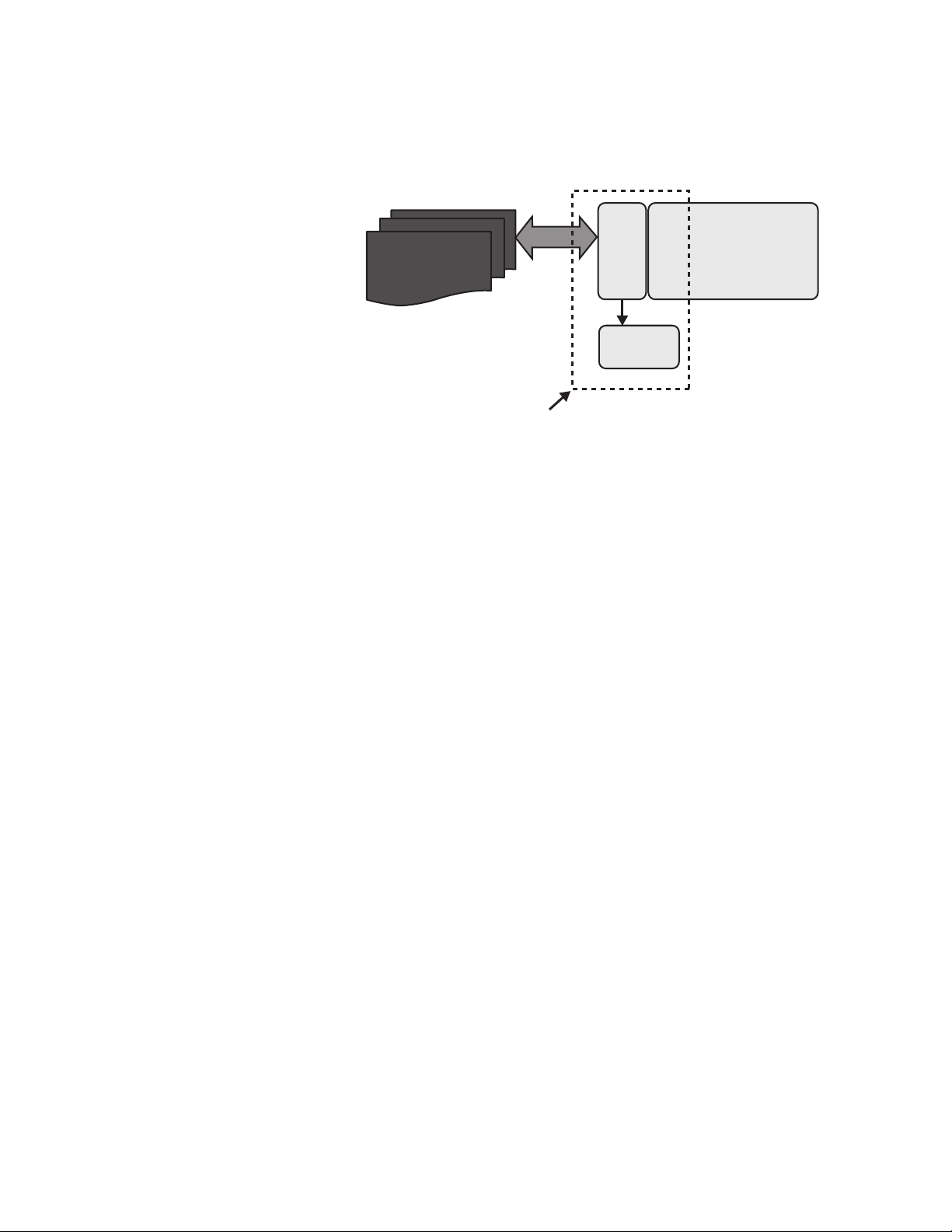
Figure 2 shows a simplified working
block diagram for the X-Series RLC
application, specifically for the
N9061A-2FP/1FP. The X-Series signal
analyzer, using the SCPI commands
for remote user interface (RUI), is
unable to understand the legacy
remote program commands. Likewise,
the instrument-specific, legacy
remote program will not recognize
the responses returned from X-Series
signal analyzers in the form of SCPI
commands.
The N9061A X-Series RLC application
provides an emulation process that
enables the user’s legacy program
and X-Series signal analyzer to
understand each other. As shown
in the simplified block diagram
below, the RLC application installed
on the X-Series signal analyzer,
emulates the behaviors of the
legacy spectrum analyzer (such as
the 856xE/EC or 8566/68). As a
result, the user’s legacy program
considers the X-Series signal analyzer
to be a legacy spectrum analyzer
and controls the X-Series signal
analyzer just the way it did before the
migration.
Figure 2. A simplified working block-diagram for X-Series RLC application
It is important to point out that the
emulation processes, as shown in
the block diagram, are bidirectional.
The purpose of an RLC application
is to enable the X-Series signal
analyzer to emulate the legacy
analyzer. Therefore, not only does the
RLC application make the X-Series
understand the legacy commands
for correct implementations, but
it also makes the responses from
the X-Series signal analyzer, such
as measurement results and query
results, understandable to the legacy
remote program.
User’s
856xE/EC
remote program
X-Series RLC application (N9061A)
X-Series
signal analyzer
Emulator
(MXA/EXA)
Command
error log
Depending on use cases, some legacy
commands may not technically be
possible for the emulation due to
the substantial differences in the
architecture and implementation
between the legacy and X-Series
analyzers. In these instances, the
legacy commands that can’t be
emulated are logged to a command
error log. This error log helps
users understand which legacy
commands are not emulated by the
RLC application, and an appropriate
workaround may be required.
4
Page 5
Starting the RLC application
and selecting the appropriate legacy model to emulate
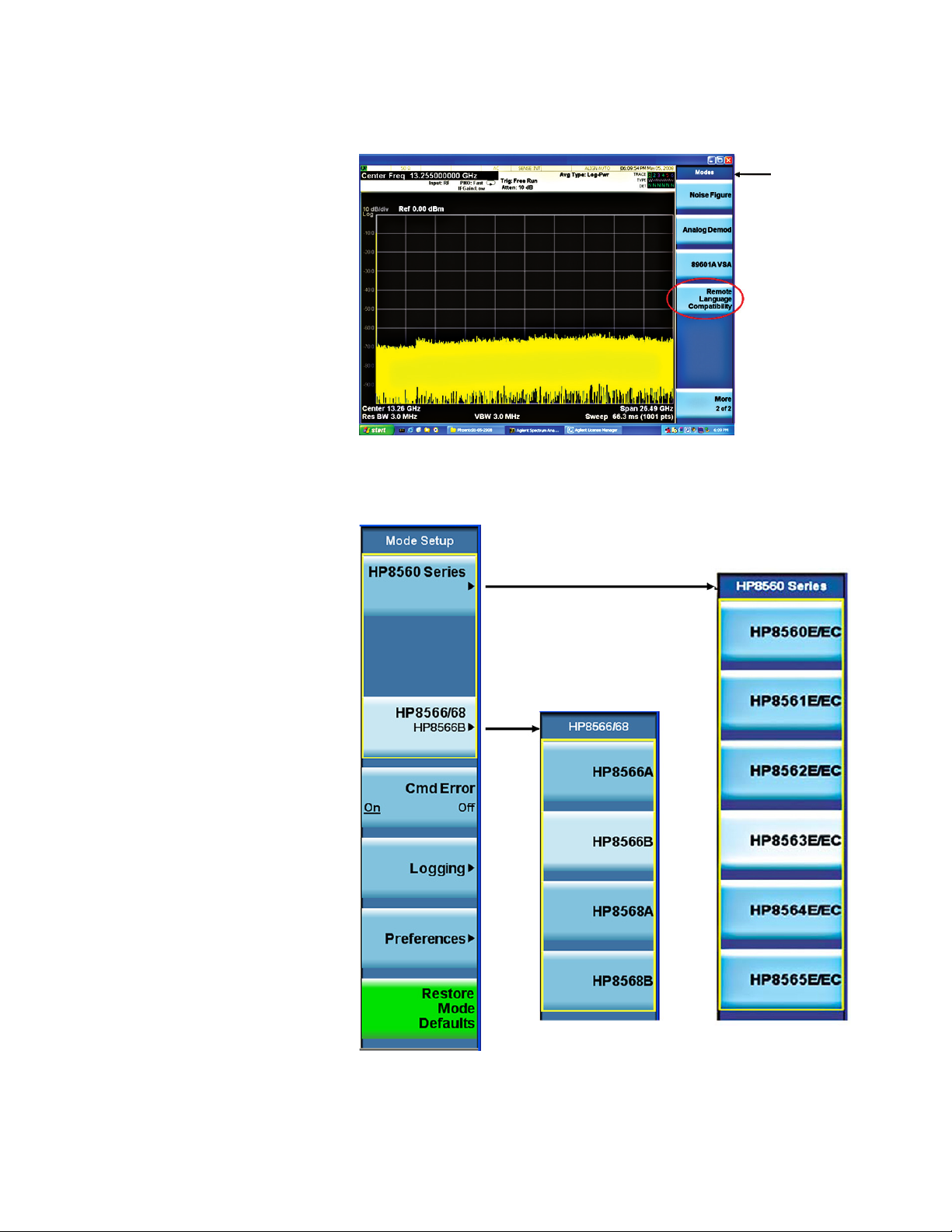
After the RLC application has been
activated, the Remote Language
Compatibility soft key is added to the
Mode menu that allows the user to
switch into an RLC application (see
Figure 3). The specific instrument
to be emulated is selected under
the Mode Setup menu (shown in
Figure 4).
The X-Series RLC application can be
accessed in two ways: 1) from the
front-panel user interface (FPUI), or 2)
via remote user interface (RUI). In the
following demo procedure for FPUI,
keystrokes surrounded by [ ] indicate
front-panel hard keys, whereas those
surrounded by { } indicate soft keys
on the display of the X-Series signal
analyzers to be a legacy spectrum
analyzer and controls the X-Series
signal analyzer just the way it did
before the migration.
Mode
Figure 3. RLC is accessed under the Mode menu, just like other applications
1) FPUI access:
X-Series: [MODE], {Remote
Language Compatibility};
[Mode Setup], {HP8560 series},
{HP856xE/EC} where x = 0
to 5 (for example, if the 8563EC
is to emulate, then select
{HP8563E/EC})
While all the 856xE and 856xEC
share a common set of remote
commands, each model may respond
to the commands quite differently.
For example, when responding to a
FS (Full Span) command, an 8560EC
sets its frequency span to 2.9 GHz,
whereas an 8563EC sets its span to
26.5 GHz.
2) RUI access:
INSTrument:SELect
SYSTem:LANGuage
Figure 4. Mode Setup menu when selecting the legacy model number to emulate
5
Page 6
Troublshooting when the legacy
command is not supported or
has syntactic errors
Rather than hiding the unsupported
legacy commands, the X-Series RLC
application allows you to display the
CMD ERR error messages, which
will appear in the Message bar as
an advisory message. It shows the
error format as: CMD ERR, <string>.
This will occur upon receipt of a
recognized legacy command that is
not supported by the RLC application,
or if either the command syntax or
any of its parameters are incorrectly
formed.
By toggling the CMD Error soft key,
you can enable or disable the display
of the error message.
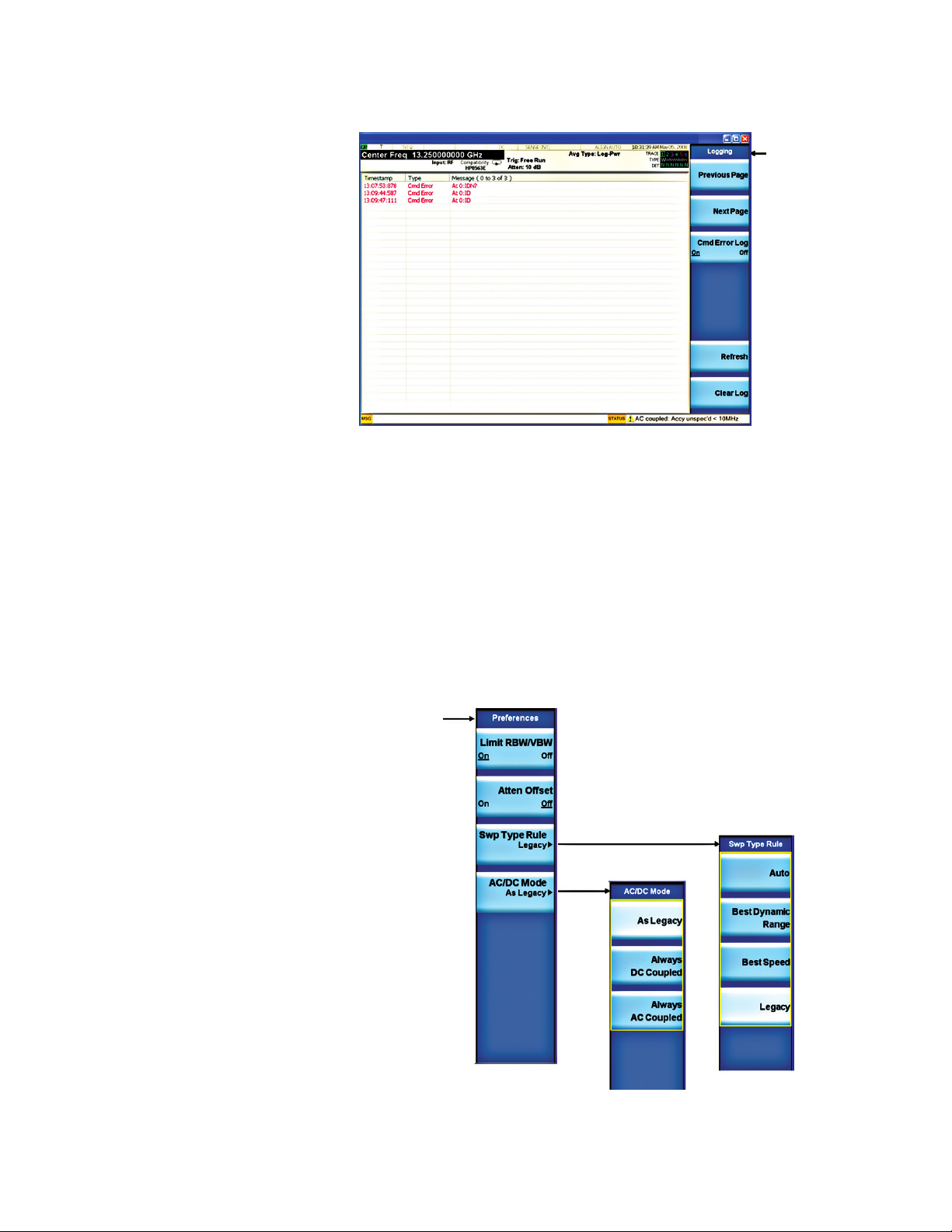
Furthermore, the Logging menu
allows the user to scroll the log
window (Previous Page/Next
Page), to refresh and clear the RLC
command error log (Refresh/Clear
Log)—see Figure 5. The logging menu
is only accessible from the FPUI.
Logging
Figure 5. The Logging menu
Selecting preferences
for your emulation
Preferences allow the user to change
the emulation behavior to gain
usability, speed, or measurement
accuracy. However, the default value
for each parameter in the Preference
menu is the closest emulation of
legacy behavior.
In RLC mode, each preference is a
configurable feature. They can be
selected either via the FPUI or RUI.
Preference settings are persistent.
If they are changed by the user, they
are unaffected by mode switching,
language switching, mode preset,
or even power on. They are only
preset to their default state using
the Restore Mode Defaults key in
the Mode Setup menu via FPUI, or
using the commands, INST:DEF or
SYST:PRES:PERS.
Preferences
Figure 6. Setting preferences for the emulation behavior via the Preferences menu
6
Page 7

Let’s look at two examples for the
preferences setting:
1) Limit RBW/VBW
2) Sweep type rules
Limit RBW/VBW can be used
for limiting the valid resolution
bandwidth (RBW) and video
bandwidth (VBW) values to those
appropriate for the currently selected
remote language. In the case of the
856xE/EC emulation, setting the
RBW/VBW to ON limits the
RBW and VBW values to what the
856xE/EC can have. Setting it to
OFF causes the RBW/VBW filters to
use the X-Series range of values. To
activate this feature:
1) FPUI Access:
[Mode Setup], {Preferences},
{Limit RBW/VBW}
RBW ≥ 300 Hz. By contrast, in the
X-Series signal analyzers, users can
select between Best Dynamic Range
(Swept) and Best Speed (FFT) to fit
their measurement applications. Once
the Legacy is selected, the sweep
mode will be determined by the RBW
selected. To activate this feature:
1) FPUI Access:
[Mode Setup], {Preferences},
{Sweep type rules}
2) RUI Access:
[:SENSe]:RLC:SWEep:RULes
SPEed|DRANge|LEGACY
For a list of supported commands
for the 856xE/EC and 8566/68, refer
to the N9061A Remote Language
Capability User’s and Programer’s
Reference at
(http://cp.literature.keysight.com/
litweb/pdf/N9020-90091.pdf)
2) RUI Access:
[;SENSe]:RLC:BANDwidth:LIMit
ON|OFF|1|0
Sweep type rules determines
when the instrument uses FFT vs.
Swept mode. The FFT mode offers
substantially faster measurements
in some cases. The 856xE/EC family
switches between the FFT and
swept mode based on the RBW
setting—FFT mode when RBW
≤ 100 Hz, and Swept mode when
7
Page 8

Ordering Information
Software licensing
and conguration
Choose from two license types:
– Fixed, perpetual license:
This allows you to run the
application in the X-Series analyzer
in which it is initially installed.
The table below contains information on our fixed, perpetual licenses. For more information, please visit the product
web pages.
N9061A remote language compatibility X-Series measurement application
Try Before You Buy!
Free 30-day trials of X-Series measurement applications provide
unrestricted use of each application’s features and functionality
on your X-Series analyzer. Redeem a trial license on-line today:
www.keysight.com/find/X-Series_trial
Model-Option
Description PXA, MXA, EXA Additional information
Remote language compatibility for 856xE/EC N9061A-2FP No charge if ordered with a new instrument
Remote language compatibility for 8566/68 N9061A-1FP No charge if ordered with a new instrument
Hardware conguration
N9030A PXA signal analyzer
Description Model-Option Additional information
3.6, 8.4, 13.6, 26.5, 43, 44, or 50 GHz frequency
range
N9030A-503, -508, -513, -526, -543, -544,
or -550
One required
N9020A MXA signal analyzer
Description Model-Option Additional information
3.6, 8.4, 13.6, or 26.5 GHz frequency range N9020A-503, -508, -513, or -526 One required
N9010A EXA signal analyzer
Description Model-Option Additional information
3.6, 7.0, 13.6, 26.5, 32, or 44 GHz frequency range N9010A-503, -507, -513, -526, -532, or
-544
For a complete list of specifications refer to the appropriate specifications guide.
One required
PXA: www.keysight.com/find/pxa_specifications
MXA: www.keysight.com/find/mxa_specifications
EXA: www.keysight.com/find/exa_specifications
8
Page 9

09 | Keysight | Remote Language Compatibility (RLC) X-Series Measurement Application N9061A - Technical Overview and Demo Guide
myKeysight
www.keysight.com/find/mykeysight
A personalized view into the information most relevant to you.
www.axiestandard.org
AdvancedTCA® Extensions for Instrumentation and Test (AXIe) is an
open standard that extends the AdvancedTCA for general purpose and
semiconductor test. Keysight is a founding member of the AXIe consortium.
ATCA®, AdvancedTCA®, and the ATCA logo are registered US trademarks of
the PCI Industrial Computer Manufacturers Group.
www.lxistandard.org
LAN eXtensions for Instruments puts the power of Ethernet and the
Web inside your test systems. Keysight is a founding member of the LXI
consortium.
www.pxisa.org
PCI eXtensions for Instrumentation (PXI) modular instrumentation delivers a
rugged, PC-based high-performance measurement and automation system.
Three-Year Warranty
www.keysight.com/find/ThreeYearWarranty
Keysight’s commitment to superior product quality and lower total cost
of ownership. The only test and measurement company with three-year
warranty standard on all instruments, worldwide.
Keysight Assurance Plans
www.keysight.com/find/AssurancePlans
Up to five years of protection and no budgetary surprises to ensure your
instruments are operating to specification so you can rely on accurate
measurements.
www.keysight.com/quality
Keysight Technologies, Inc.
DEKRA Certified ISO 9001:2008
Quality Management System
Keysight Channel Partners
www.keysight.com/find/channelpartners
Get the best of both worlds: Keysight’s measurement expertise and product
breadth, combined with channel partner convenience.
For more information on Keysight
Technologies’ products, applications or
services, please contact your local Keysight
office. The complete list is available at:
www.keysight.com/find/contactus
Americas
Canada (877) 894 4414
Brazil 55 11 3351 7010
Mexico 001 800 254 2440
United States (800) 829 4444
Asia Pacic
Australia 1 800 629 485
China 800 810 0189
Hong Kong 800 938 693
India 1 800 112 929
Japan 0120 (421) 345
Korea 080 769 0800
Malaysia 1 800 888 848
Singapore 1 800 375 8100
Taiwan 0800 047 866
Other AP Countries (65) 6375 8100
Europe & Middle East
Austria 0800 001122
Belgium 0800 58580
Finland 0800 523252
France 0805 980333
Germany 0800 6270999
Ireland 1800 832700
Israel 1 809 343051
Italy 800 599100
Luxembourg +32 800 58580
Netherlands 0800 0233200
Russia 8800 5009286
Spain 0800 000154
Sweden 0200 882255
Switzerland 0800 805353
Opt. 1 (DE)
Opt. 2 (FR)
Opt. 3 (IT)
United Kingdom 0800 0260637
For other unlisted countries:
www.keysight.com/find/contactus
(BP-07-10-14)
This information is subject to change without notice.
© Keysight Technologies, 2013–2014
Published in USA, August 3, 2014
5989-6539EN
www.keysight.com
 Loading...