

Page 1

Keysight
N4960A
Serial BERT
17 and 32 Gb/s
Getting Started
Guide
Page 2

Notices
© Keysight Technologies, Inc. 2012-2019
No part of this manual may be reproduced
in any form or by any means (including
electronic storage and retrieval or
translation into a foreign language) without
prior agreement and written consent from
Keysight Technologies, Inc. as governed by
United States and international copyright
laws.
Manual Part Number
N4960-91011
Edition
Edition 6.0, April 2019
Printed in Germany
Keysight Technologies, Inc.
Keysight Technologies R&D and MarketingGmbH & Co. KG
Herrenberger Str. 130
71034 Böblingen, Germany
Warranty
THE MATERIAL CONTAINED IN THIS
DOCUMENT IS PROVIDED "AS IS," AND IS
SUBJECT TO BEING CHANGED, WITHOUT
NOTICE, IN FUTURE EDITIONS. FURTHER,
TO THE MAXIMUM EXTENT PERMITTED BY
APPLICABLE LAW, KEYSIGHT DISCLAIMS
ALL WARRANTIES, EITHER EXPRESS OR
IMPLIED WITH REGARD TO THIS MANUAL
AND ANY INFORMATION CONTAINED
HEREIN, INCLUDING BUT NOT LIMITED TO
THE IMPLIED WARRANTIES OF
MERCHANTABILITY AND FITNESS FOR A
PARTICULAR PURPOSE. KEYSIGHT SHALL
NOT BE LIABLE FOR ERRORS OR FOR
INCIDENTAL OR CONSEQUENTIAL
DAMAGES IN CONNECTION WITH THE
FURNISHING, USE, OR PERFORMANCE OF
THIS DOCUMENT OR ANY INFORMATION
CONTAINED HEREIN. SHOULD KEYSIGHT
AND THE USER HAVE A SEPARATE
WRITTEN AGREEMENT WITH WARRANTY
TERMS COVERING THE MATERIAL IN THIS
DOCUMENT THAT CONFLICT WITH THESE
TERMS, THE WARRANTY TERMS IN THE
SEPARATE AGREEMENT WILL CONTROL.
Software is subject to Keysight
Technologies’ standard commercial license
terms, and non-DOD Departments and
Agencies of the U.S. Government will
receive no greater than Restricted Rights
as defined in FAR 52.227-19(c)(1-2) (June
1987). U.S. Government users will receive
no greater than Limited Rights as defined in
FAR 52.227-14 (June 1987) or DFAR
252.227-7015 (b)(2) (November 1995), as
applicable in any technical data.
Safety Notices
A CAUTION notice denotes a hazard. It calls
attention to an operating procedure,
practice, or the like that, if not correctly
performed or adhered to, could result in
damage to the product or loss of important
data. Do not proceed beyond a CAUTION
notice until the indicated conditions are
fully understood and met.
Technology Licenses
The hardware and/or software described in
this document are furnished under a
license and may be used or copied only in
accordance with the terms of such license.
Restricted Rights Legend
If software is for use in the performance of
a U.S. Government prime contract or
subcontract, Software is delivered and
licensed as “Commercial computer
software” as defined in DFAR 252.2277014 (June 1995), or as a “commercial
item” as defined in FAR 2.101(a) or as
“Restricted computer software” as defined
in FAR 52.227-19 (June 1987) or any
equivalent agency regulation or contract
clause. Use, duplication or disclosure of
A WARNING notice denotes a hazard. It
calls attention to an operating procedure,
practice, or the like that, if not correctly
performed or adhered to, could result in
personal injury or death. Do not proceed
beyond a WARNING notice until the
indicated conditions are fully understood
and met.
2 Keysight N4960A Serial BERT 17 and 32 Gb/s Getting Started Guide
Page 3

Safety Summary
The following general safety precautions must be observed during all phases of
operation of this instrument. Failure to comply with these precautions or with
specific warnings or operating instructions in the product manuals violates
safety standards of design, manufacture, and intended use of the instrument.
Keysight Technologies assumes no liability for the customer's failure to comply
with these requirements. Product manuals are provided with your instrument
on CD-ROM and/or in printed form. Printed manuals are an option for many
products. Manuals may also be available on the Web. Go to www.keysight.com
and type in your product number in the Search field at the top of the page.
General
This product is a Safety Class 1 instrument (provided with a protective earth
terminal). The protective features of this product may be impaired if it is used in
a manner not specified in the operation instructions.
All Light Emitting Diodes (LEDs) used in this product are Class 1 LEDs as per
IEC 60825-1.
Environment Conditions
This instrument is intended for indoor use in an installation category II, pollution
degree 2 environment. It is designed to operate at a maximum relative humidity
Before Applying Power
Verify that all safety precautions are taken. The power cable inlet of the
instrument serves as a device to disconnect from the mains in case of hazard.
The instrument must be positioned so that the operator can easily access the
power cable inlet. When the instrument is rack mounted the rack must be
provided with an easily accessible mains switch.
Ground the Instrument
To minimize shock hazard, the instrument chassis and cover must be
connected to an electrical protective earth ground. The instrument must be
connected to the ac power mains through a grounded power cable, with the
ground wire firmly connected to an electrical ground (safety ground) at the
power outlet. Any interruption of the protective (grounding) conductor or
disconnection of the protective earth terminal will cause a potential shock
hazard that could result in personal injury.
Do Not Operate in an
Explosive Atmosphere
Do not operate the instrument in the presence of flammable gases or fumes.
Do Not Remove the
Instrument Cover
Operating personnel must not remove instrument covers. Component
replacement and internal adjustments must be made only by qualified
personnel.
Instruments that appear damaged or defective should be made inoperative and
secured against unintended operation until they can be repaired by qualified
service personnel.
of 15 to 85% and at altitudes of up to 2000 meters.
Refer to the specifications tables for the ac mains voltage requirements and
ambient operating temperature range.
Keysight N4960A Serial BERT 17 and 32 Gb/s Getting Started Guide 3
Page 4
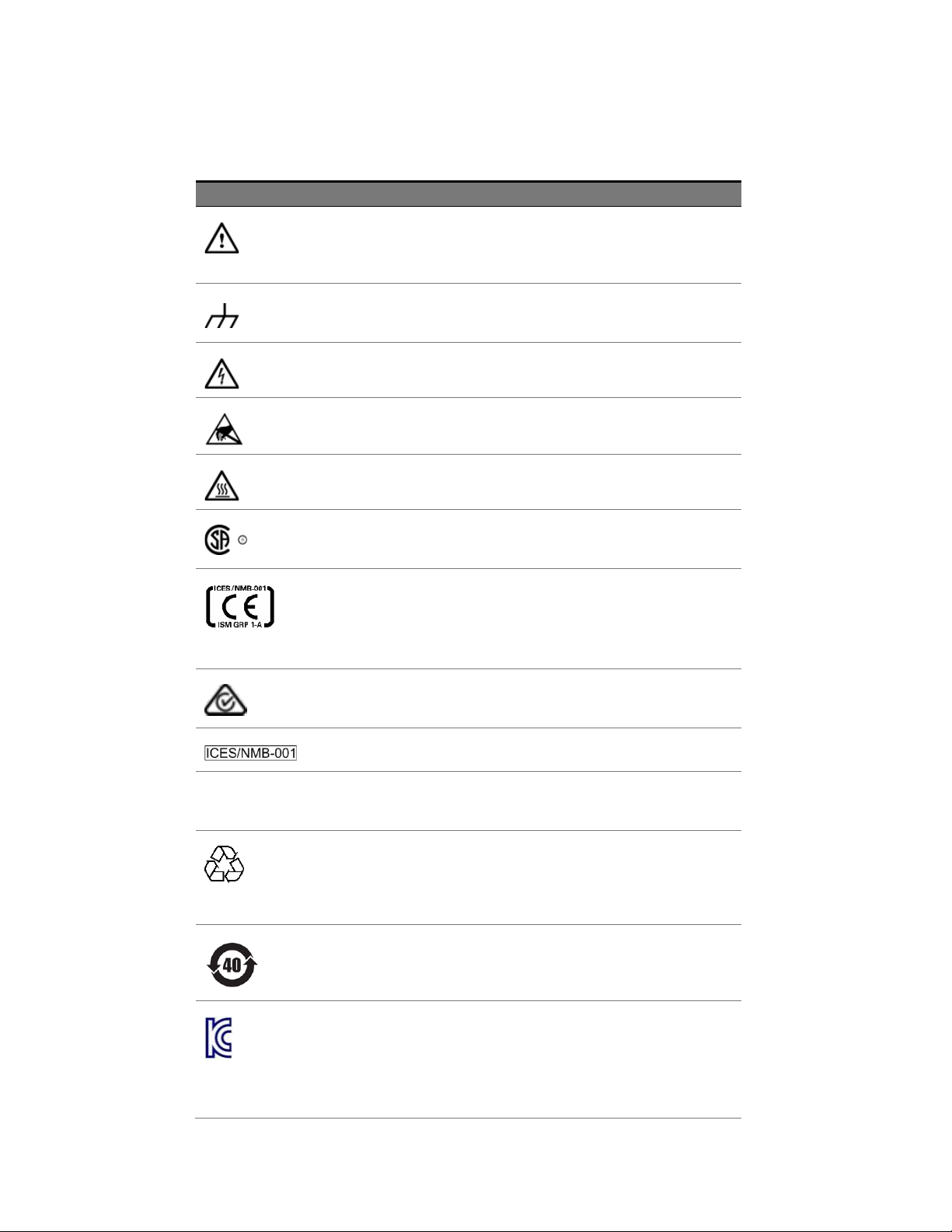
Symbol
Description
Indicates warning or caution. If you see this symbol on a product, you
must refer to the manuals for specific Warning or Caution
information to avoid personal injury or damage to the product.
Frame or chassis ground terminal. Typically connects to the
equipment’s metal frame.
Indicates hazardous voltages and potential for electrical shock.
Indicates that antistatic precautions should be taken.
Indicates hot surface. Please do not touch.
CSA is the Canadian certification mark to demonstrate compliance
with the Safety requirements.
CE compliance marking to the EU Safety and EMC Directives.
ISM GRP-1A classification according to the international EMC
standard. ICES/NMB-001 compliance marking to the Canadian EMC
standard.
The RCM mark indicates that this product meets EMS/Product Safety
Requirements and may be imported to Australia and New Zealand.
This mark indicates compliance with the Canadian EMC regulations.
ISM 1-A
This text denotes the instrument is an Industrial Scientific and
Medical Group 1 Class A product.
China RoHS regulations include requirements related to packaging,
and require compliance to China standard GB18455-2001. This
symbol indicates compliance with the China RoHS regulations for
paper/fiberboard packaging.
Indicates the time period during which no hazardous or toxic
substance elements are expected to leak or deteriorate during
normal use. Forty years is the expected useful life of the product.
The South Korean Class A EMC declaration (KC) mark indicates that
this product is Class A suitable for professional use and is for use in
electromagnetic environments outside of the home.
The KC mark includes the marking’s identifier code that has up to 26
digits and follows this format: KCC-VWX-YYY-ZZZZZZZZZZZZZ.
Safety Symbols
Table 1. Safety Symbol
4 Keysight N4960A Serial BERT 17 and 32 Gb/s Getting Started Guide
Page 5
Safety Symbol
Description
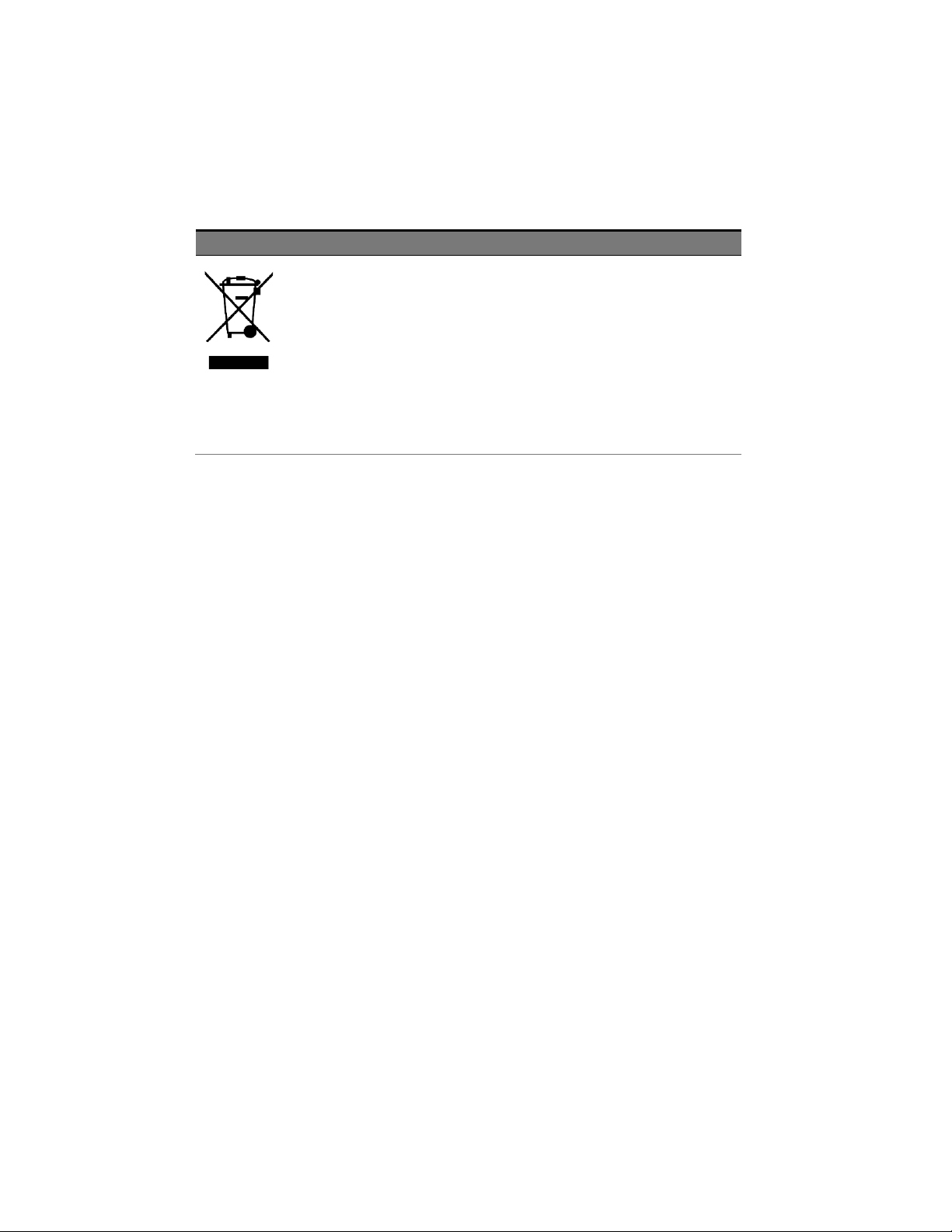
This product complies with WEEE Directive (2002/96/EC) marking
requirements. The affixed label indicates that you must not discard
this electrical/electronic product in domestic household waste.
Product Category: With reference to the equipment types in WEEE
Directive Annex I, this product is classed as a “Monitoring and
Control instrumentation” product.
Do not dispose in domestic household waste.
To return unwanted products, contact your local Keysight office for
more information.
Compliance and Environmental Information
Table 2. Compliance and Environmental Information
Keysight N4960A Serial BERT 17 and 32 Gb/s Getting Started Guide 5
Page 6

6 Keysight N4960A Serial BERT 17 and 32 Gb/s Getting Started Guide
Page 7

Contents
1 N4960A Getting Started Guide ...............................................................9
1.1 Introduction ................................................................................... 9
1.2 Support ....................................................................................... 10
1.3 General Specifications ................................................................ 10
1.4 Safety and Regulatory ................................................................ 12
1.5 Unpacking ................................................................................... 13
1.6 Important Notes .......................................................................... 13
1.7 Installation ................................................................................... 13
1.8 Connector Care ........................................................................... 15
1.9 Returning the N4960A to Keysight Technologies ...................... 16
Keysight N4960A Serial BERT 17 and 32 Gb/s Getting Started Guide 7
Page 8

N4960A Getting Started Guide
8 Keysight N4960A Serial BERT 17 and 32 Gb/s Getting Started Guide
Page 9
N4960A Getting Started Guide
1 N4960A Getting Started Guide
1.1 Introduction
Welcome to the Keysight Technologies N4960A serial BERT 17 and
32 Gb/s getting started guide. This guide will help you identify the
contents of the shipping package, perform a quick functional check of
the product, and guide you on where to find more information and
support for the N4960A serial BERT 17 and 32 Gb/s.
The N4960A serial BERT controller 17 and 32 Gb/s is shipped in a
protective box. Each shipping box contains:
N4960A-CJ0 or N4960A-CJ1 serial BERT controller.
AC power cord.
CD-ROM, which includes:
o N4960A Serial BERT 17 and 32 Gb/s user guide
o N4960A Serial BERT 17 and 32 Gb/s getting started guide
o N4960A Serial BERT 17 and 32 Gb/s datasheet
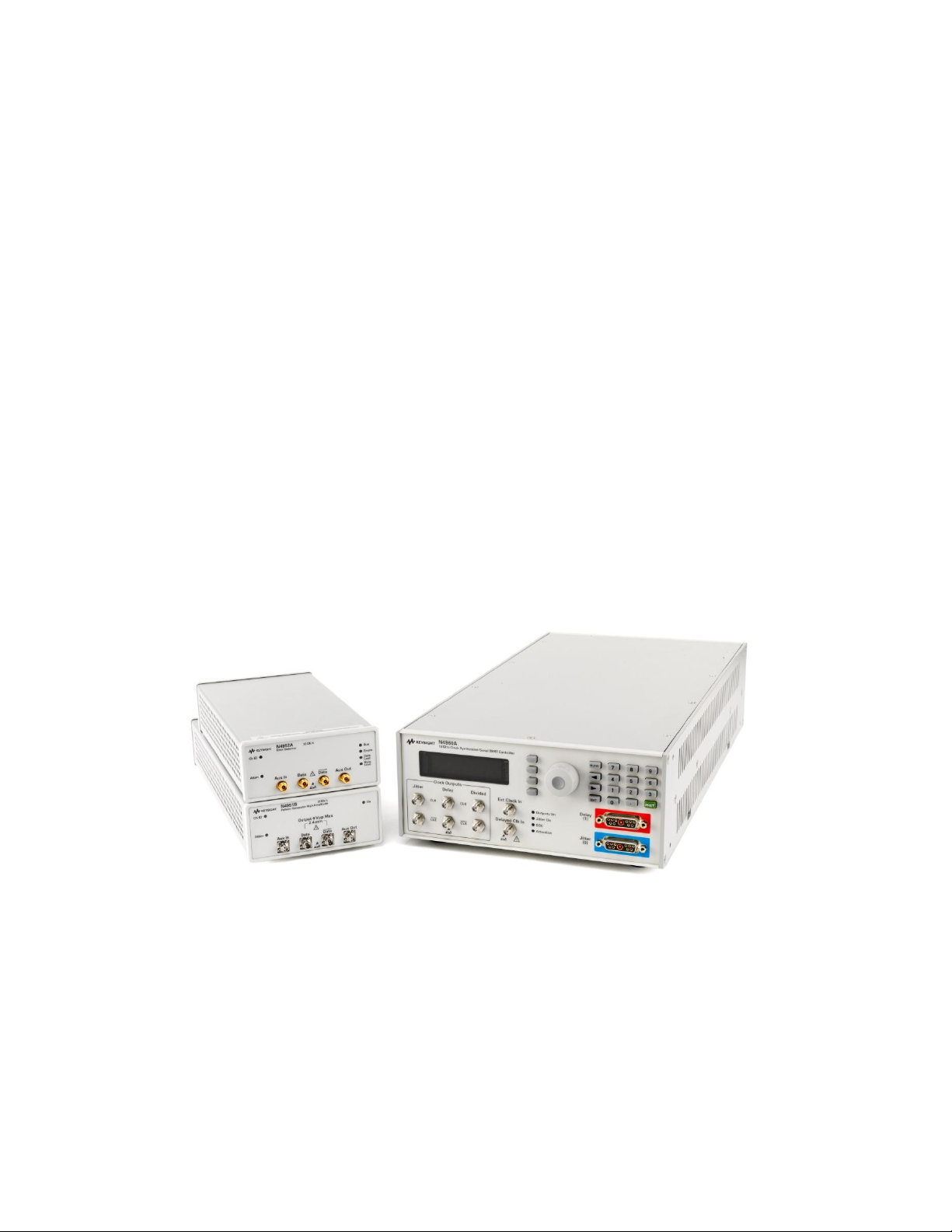
Figure 1. N4960A Serial BERT
Keysight N4960A Serial BERT 17 and 32 Gb/s Getting Started Guide 9
Page 10

N4960A Getting Started Guide
Parameter
Specification
Connector Type
Controller
All signals except 10 MHz In/Out
10 MHz In/Out
N4951A and N4952A
N4951B
SMA
BNC
2.92 mm female
2.4 mm female (data connectors), SMA female (auxiliary
connectors)
Remote Control Interface
USB2.0 and IEEE-488 (GPIB)
Operating Temperature
+10 ºC to +40 ºC
Storage Temperature
–40 ºC to +70 ºC
1.2 Support
The N4951A, N4951B, and N4952A are shipped with all the accessories
required for operation. Each package contains:
N4951A, N4951B, or N4952A with remote head controller cable.
CD-ROM, which includes:
o N4960A Serial BERT 17 and 32 Gb/s user guide
o N4960A Serial BERT 17 and 32 Gb/s getting started guide
o N4960A Serial BERT 17 and 32 Gb/s datasheet
For more information on the operation and features of the N4960A
Serial BERT 17 and 32 Gb/s, please refer to N4960A Serial BERT 17 and
32 Gb/s User Guide on the CD or the product webpage at
http://www.Keysight.com/find/N4960A.
Technical Support information:
http://www.Keysight.com/find/techsupport
1.3 General Specifications
Before installing the N4960A serial BERT, review the specifications in
Table 3.
Table 3. Specification considerations before installation
10 Keysight N4960A Serial BERT 17 and 32 Gb/s Getting Started Guide
Page 11

N4960A Getting Started Guide
Parameter
Specification
Line Power
Voltage
100 to 240 VAC 10% autoranging
Frequency
50/60 Hz
Power
170 Watts MAX
Fuse
250 V 2 A 5x20 mm (p/n 12260-002)
Always replace instrument fuse with one of the same type
and rating.
Dimensions (Height, Width, and
Depth)
N4960-CJ0
100 mm (3.9 in) x 214 mm (16.7 in) x 425 mm (16.7 in)
N4951A/N4952A
50 mm (1.9 in) x 109 mm (4.3 in) x 222 mm (8.7 in)
N4951B
50 mm (1.9 in) x 109 mm (4.3 in) x 273 mm (10.75 in)
N4951A/N4951B/N4952A remote
head controller cable length
1.0 m (39.7 in)
Weight
N4960-CJ0
3.2 kg (7.0 lbs)
N4951A/N4952A (with cable)
0.86 kg (30.3 oz)
N4951B (with cable)
1.0 kg (35.3 oz)
EMC
Complies with European EMC Directive
2004/108/EC
IEC/EN 61326-1
CISPR Pub 11 Group 1, class A
AS/NZS CISPR 11
ICES/NMB-001
This ISM device complies with Canadian ICES-001.
Cet appareil ISM est conforme a la norme NMB-001 du
Canada.
Safety
Complies with European Low Voltage Directive
2006/95/EC
IEC/EN 61010-1, 2nd Edition
Canada: CSA C22.2 No. 61010-1
USA: UL std no. 61010-1, 2nd Edition
Acoustic noise emission Geraeuschemission
LpA <70 dB LpA <70 dB
Operator position Am Arbeitsplatz
Normal position Normaler Betrieb
Per ISO 7779 Nach DIN 45635 t.19
Keysight N4960A Serial BERT 17 and 32 Gb/s Getting Started Guide 11
Page 12

N4960A Getting Started Guide
Do not remove instrument covers. There are no user serviceable parts within.
Operation of the instrument in a manner not specified by Keysight
Technologies may result in personal injury or loss of life.
For continued protection against fire hazard, replace fuses, and or circuit
breakers only with same type and ratings. The use of other fuses, circuit
breakers or materials is prohibited.
To prevent electrical shock, disconnect instrument from mains before
cleaning. Use a dry cloth or one slightly dampened with water to clean the
external case parts. Do not attempt to clean internally.
The Mains wiring and connectors shall be compatible with the connector used
in the premise electrical system. Failure, to ensure adequate earth grounding
by not using the correct components may cause product damage, and serious
injury.
Before switching on this instrument, make sure the supply voltage is in the
specified range.
1.4 Safety and Regulatory
This product has been designed and tested in accordance with
accepted industry standards, and has been supplied in a safe condition.
The documentation contains information and warnings that must be
followed by the user to ensure safe operation and to maintain the
product in a safe condition.
12 Keysight N4960A Serial BERT 17 and 32 Gb/s Getting Started Guide
Page 13
N4960A Getting Started Guide
If this product is not used as specified, the protection provided by the equipment
could be impaired. This product must be used in a normal condition (in which all
means for protection are intact) only.
1.5 Unpacking
Carefully remove the N4960A Serial BERT 17 and 32 Gb/s components
from the case in an ESD-safe environment.
1.6 Important Notes
Use ESD protection at all times when using the instrument.
Before connecting any cable to the instrument, discharge the cable
by shorting the center and outer connectors of the cable together to
ground momentarily.
Install the instrument on a flat surface away from heat sources.
Do not block the fans, or the exhaust vents on the rear and side
panels (3” min. clearance).
Use a 8 lbf-in (90 N-cm) torque wrench when attaching connectors.
1.7 Installation
1. Plug the AC power cord into the N4960A-CJ0 or N4960A-CJ1
serial BERT controller rear panel power socket.
2. Plug the other end of the AC power cord into a suitable wall
socket. (100-240 VAC, 50/60 Hz).
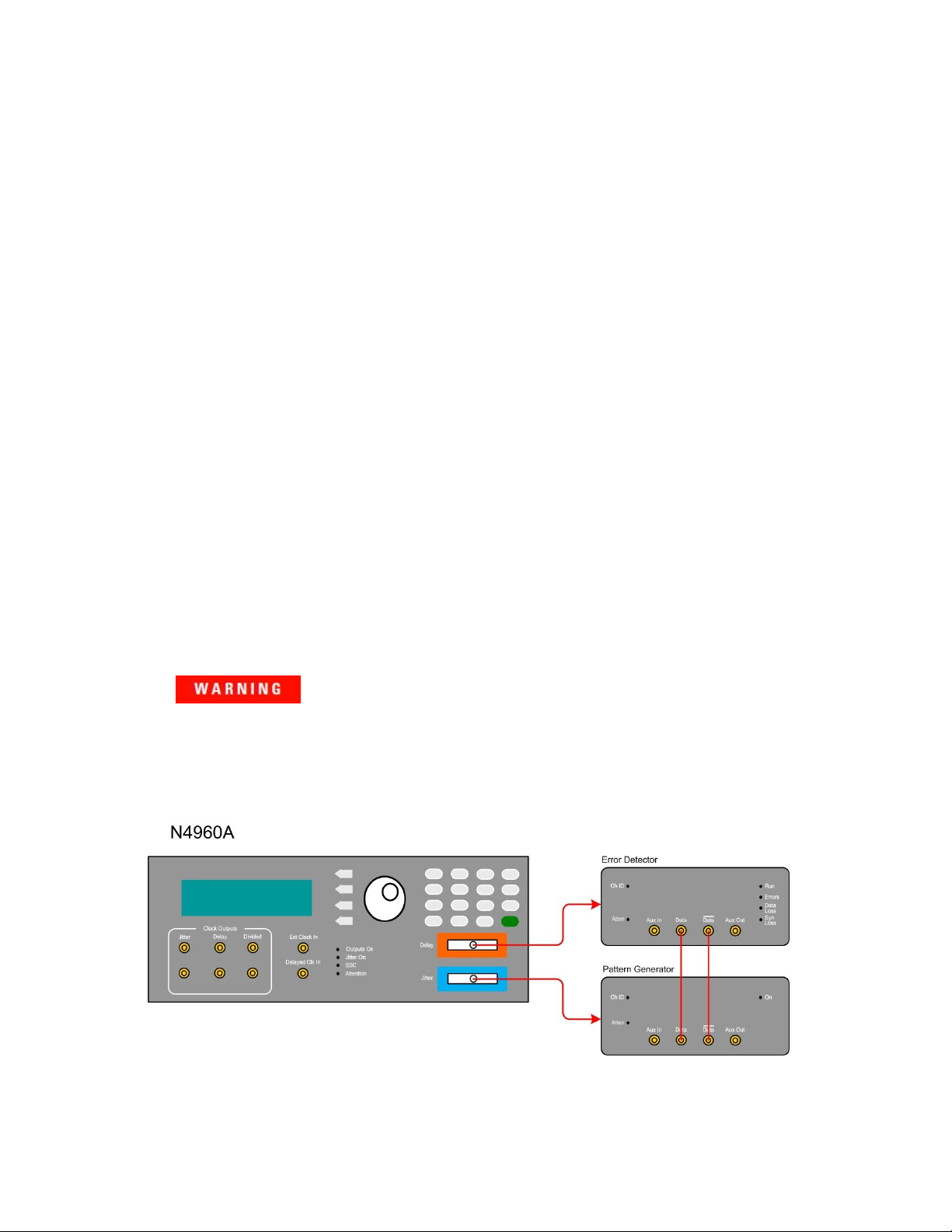
3. Interconnect the equipment as shown in Figure 2.
Figure 2. Test Setup
Keysight N4960A Serial BERT 17 and 32 Gb/s Getting Started Guide 13
Page 14

N4960A Getting Started Guide
This instrument has autoranging line voltage input. Be sure the supply voltage is
within the specified range.
4. In the MAIN menu position the arrow next to the Pat Gen-Jit
Menu label then press the softkey corresponding to the SEL
label.
5. In the Pat Gen-Jit Menu position the arrow next to the Data
Output Menu label then press the softkey corresponding to the
SEL label.
6. In the Data Output Menu position the arrow next to the Enable
label then press the softkey corresponding to the EDIT label.
7. Use the rotary knob to set Enable to ON.
8. Press the softkey corresponding to the SEL label to accept the
entry and return to the Data Output Menu.
9. Press the softkey corresponding to the BACK label until the
MAIN menu is displayed.
10. In the MAIN menu position the arrow next to the Err Det Menu
label then press the softkey corresponding to the SEL label.
11. In the Err Det Menu position the arrow next to the AutoAlign
Menu label then press the softkey corresponding to the SEL
label.
12. Position the arrow next to the Perform AutoAlign label then
press the softkey corresponding to the EXEC label. A small clock
appears in the display. When the clock disappears, ensure that
the Errors, Data Loss, and Sync Loss LEDs on the front panel of
the error detector are off.
13. Press the softkey corresponding to the BACK label to return to
the Err Det Menu.
14. In the Err Det Menu position the arrow next to the Accumulation
Menu label then press the softkey corresponding to the SEL
label.
15. Position the arrow next to the Start Accum label then press the
softkey corresponding to the START label. The Run LED on the
front panel of the error detector should be lit.
16. After 15 to 30 seconds, press the softkey corresponding to the
STOP label.
17. Position the arrow next to the Results label then press the
softkey corresponding to the SEL label.
18. Ensure that Errs reads 0.000e0.
14 Keysight N4960A Serial BERT 17 and 32 Gb/s Getting Started Guide
Page 15

N4960A Getting Started Guide
Excessive mating of low quality SMA components to 2.92 mm female
receptacles may degrade the 2.92 mm female receptacle.
1.8 Connector Care
The N4960A serial BERT controller features high-quality SMA
connectors for the front and rear panel input and output connections
while the N4951A pattern generator and N4952A error detector use
2.92 mm. The N4951B pattern generators use type 2.4 mm connectors
for data output and 2.92 mm for auxiliary input/output connectors.
Connector damage will degrade signal fidelity.
Use high quality connectors/adapters on ports. Always leave dust
jackets on unused ports.
Refer to the N4960-90030 N495xA through N498xA Connector Care
Reference Guide at www.Keysight.com/find/N4951A.
Inspect the connectors for the following:
Worn or damaged threads
Scratches to mating surface
Burrs and loose metal particles
Ensure that female contacts are straight and aligned
Clean the connectors as described in the following procedure. Cleaning
connectors with alcohol shall only be done with the instruments power
cord removed, and in a well-ventilated area. Allow all residual alcohol
moisture to evaporate, and the fumes to dissipate prior to energizing the
instrument.
1. Remove any loose particles using a low-pressure air source.
2. Moisten a lint-free swab with isopropyl alcohol. Do not saturate
the swab.
3. Minimize the wicking of the alcohol into the connector structure.
4. Clean the mating plane surfaces and threads.
5. Allow alcohol to evaporate, and then use a low-pressure air
source to blow surfaces clean.
6. Make sure no particles or residue remains.
7. Inspect connector for damage.
Keysight N4960A Serial BERT 17 and 32 Gb/s Getting Started Guide 15
Page 16

N4960A Getting Started Guide
1.9 Returning the N4960A to Keysight Technologies
If the N4960A fails system verification and you cannot correct the
problem, return the N4960A to Keysight Technologies for repair
following the steps shown below.
1. Record all symptoms.
2. Contact Keysight Technologies at
http://www.Keysight.com/find/assist.
3. Use the original packing material or similar packing material to
ship the instrument to Keysight Technologies.
16 Keysight N4960A Serial BERT 17 and 32 Gb/s Getting Started Guide
Page 17

Page 18

This information is subject to change without notice.
© Copyright Keysight Technologies 2012-2019
Edition 6.0, April 2019
www.keysight.com
 Loading...