

Page 1

N4865A GPIB-to-LAN Adapter
Quick Start Guide—Connecting to a Keysight 7000
or 9000 Series Oscilloscope
The N4865A GPIB-to-LAN adapter provides a GPIB interface for VXI-11.3
compatible LAN-based oscilloscopes such as the Keysight 7000 and 9000 Series.
Using the N4865A, GPIB applications running on a computer can transparently
interface to a LAN-based VXI-11.3 instrument as if it were a GPIB device.
The general procedure for connecting the GPIB-to-LAN adapter to an oscilloscope
and PC is the following:
• Configure the IP address on your oscilloscope before turning on the N4865A or
connecting any cables. This process will be different depending on whether you
have an Infiniium 9000 Series or an InfiniiVision 7000 Series oscilloscope.
• Infiniium 9000 Series: Minimize the oscilloscope application. Click Start >
Control Panel > Network Connections > Local Area Connections > Properties. Then
uncheck all of the boxes in the This Connection Uses the Following Items field.
Next, check the Internet Protocol (TCP/IP) box and press the Properties button.
Check the Use the Following IP Address button and then set the IP address and
subnet mask. (See next page for details on the default values for these
fields.)
• InfiniiVision 7000 Series: Click the Utilities button on the front panel. Then
press the I/O softkey followed by the LAN Reset softkey in the subsequent
menu. The oscilloscope will connect automatically. (It may take up to 180
seconds for the configuration to occur.)
Page 2
1
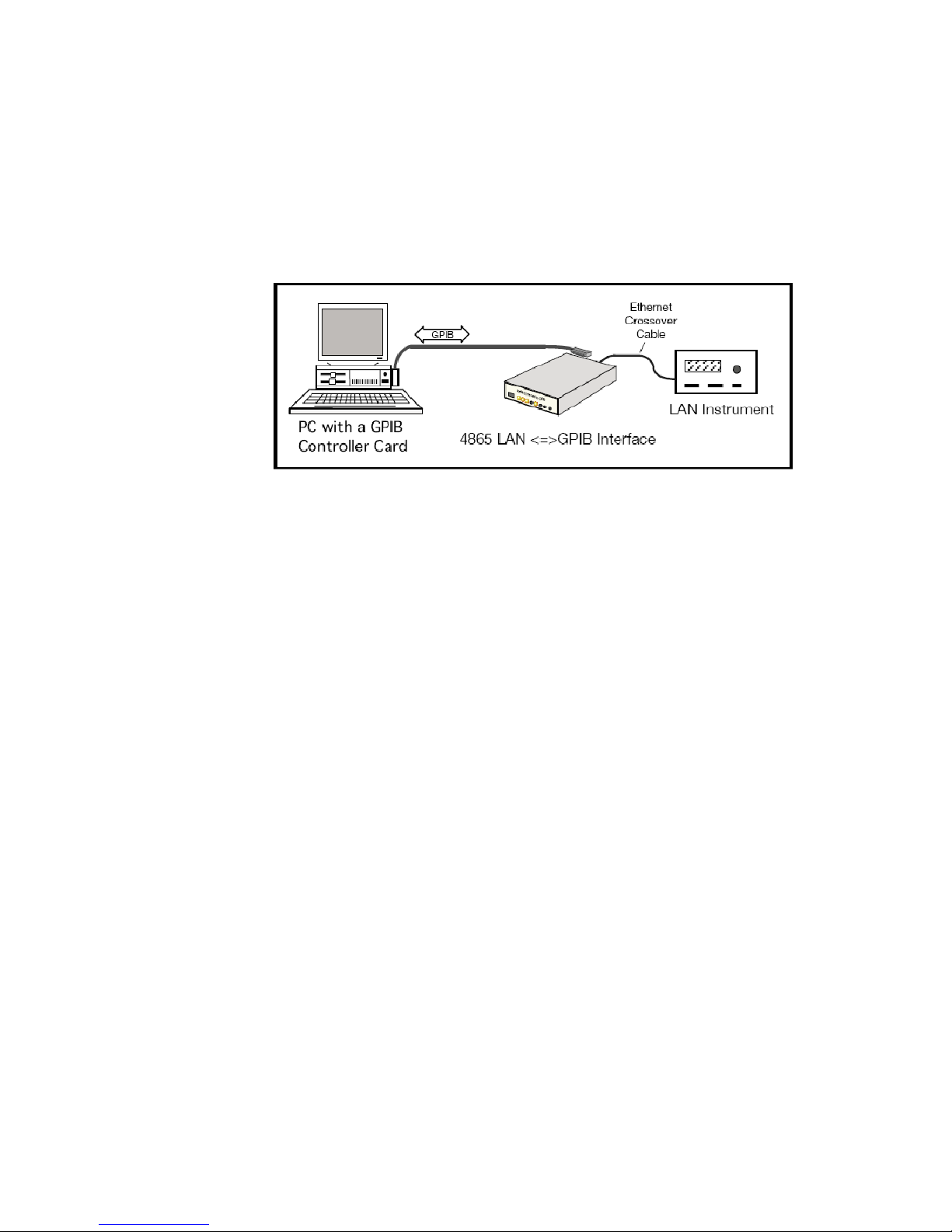
• Connect the oscilloscope (LAN instrument), GPIB-to-LAN adapter, and PC
using the GPIB and Ethernet Crossover cables as shown in the diagram below.
Plug the Ethernet Crossover cable into the RJ-45 receptacle on the N4865A’s
rear panel and to the oscilloscope’s RJ-45 connector. Use the GPIB connector
to connect the N4865 to the GPIB controller.
• Connect the USB power cord to the GPIB-to-LAN adapter and to a USB 1.0 or
2.0 port on the oscilloscope or PC. If this USB power cord becomes damaged,
contact your local Service Center.
• Switch the N4865A power switch to the On position.
• If the IP addresses are changed on either instrument, you should power down
the N4865A and oscilloscope and start them back up again.
The default IP address for the GPIB-to-LAN adapter is 169.254.48.65. (For detailed
instructions on changing the IP address of the N4865A, please see section 2.5.1 of
the full manual included on the documentation CD.) The oscilloscope’s IP address
must be in the same B range (meaning it must have the form 169.254.XX.XX where
XX can be any number between 0 and 254) unless the subnet mask is changed.
The default subnet mask is 255.255.0.0. For the InfiniiVision 7000 Series
oscilloscopes, you can also set both the adapter and the oscilloscope to use Auto
IP (not DHCP) addresses.
The default GPIB address for the N4865A is 4. For detailed instructions on
changing the GPIB address of the N4865A, please see section 2.5.1 of the full
manual included on the documentation CD.
For problems involving the connection of the N4865A GPIB-to-LAN adapter to a
Keysight oscilloscope or with the functionality of the N4865A, please contact
Keysight’s technical support or your local Service Center. You can determine this
contact information by visiting www.keysight.com.
This information is subject to change without notice.
© Keysight Technologies, Inc. 2009
Printed in USA
June 2009
*N4865-97001*
N4865-97001
www.keysight.com
N4865A GPIB-to-LAN Adapter Quick Start Guide
 Loading...