

Page 1

Agilent N2739A
1000 Series Oscilloscope
Rack Mount Kit
Installation Guide
Agilent Technologies
Page 2

Notices
© Agilent Technologies, Inc. 2008
No p art o f this manu al may be re produce d in
any form or by any means (including electronic storage and retrieval or translation
into a foreign language) without prior agreement and written consent from Agilent
Technologies, Inc. as governed by United
States and international copyright laws.
Manual Part Number
N2739-92000
Edition
First edition, July 2008
Printed in Malaysia
Agilent Technologies, Inc.
1900 Garden of the Gods Road
Colorado Springs, CO 80907 USA
Warranty
The material contained in this document is provided “as is,” and is subject to being changed, without notice,
in future editions. Further, to the maximum extent permitted by applicable
law, Agilent disclaims all warranties,
either express or implied, with regard
to this manual and any information
contained herein, including but not
limited to the implied warranties of
merchantability and fitness for a particular purpose. Agilent shall not be
liable for errors or for incidental or
consequential damages in connection with the furnishing, use, or performance of this document or of any
information contained herein. Should
Agilent and the user have a separate
written agreement with warranty
terms covering the material in this
document that conflict with these
terms, the warranty terms in the separate agreement shall control.
Technology Licenses
The hardware and/or software described in
this document are furnished under a license
and may be used or copied only in accordance with the terms of such license.
Restricted Rights Legend
If software is for use in the performance of a
U.S. Government prime contract or subcontract, Software is delivered and licensed as
“Commercial computer software” as
defined in DFAR 252.227-7014 (June 1995),
or as a “commercial item” as defined in FAR
2.101(a) or as “Restricted computer software” as defined in FAR 52.227-19 (June
1987) or any equivalent agency regulation or
contract clause. Use, duplication or disclosure of Software is subject to Agilent Technologies’ standard commercial license
terms, and non-DOD Departments and
Agencies of the U.S. Government will
receive no greater than Restricted Rights as
defined in FAR 52.227-19(c)(1-2) (June
1987). U.S. Government users will receive
no greater than Limited Rights as defined in
FAR 52.227-14 (June 1987) or DFAR
252.227-7015 (b)(2) (November 1995), as
applicable in any technical data.
Safety Notices
CAUTION
A CAUTION notice denotes a hazard. It calls attention to an operating procedure, practice, or the like
that, if not correctly performed or
adhered to, could result in damage
to the product or loss of important
data. Do not proceed beyond a
CAUTION notice until the indicated
conditions are fully understood and
met.
WARNING
A WARNING notice denotes a
hazard. It calls attention to an
operating procedure, practice, or
the like that, if not correctly performed or adhered to, could result
in personal injury or death. Do not
proceed beyond a WARNING
notice until the indicated conditions are fully understood and
met.
1000 Series Oscilloscope Rack Mount Kit
Page 3
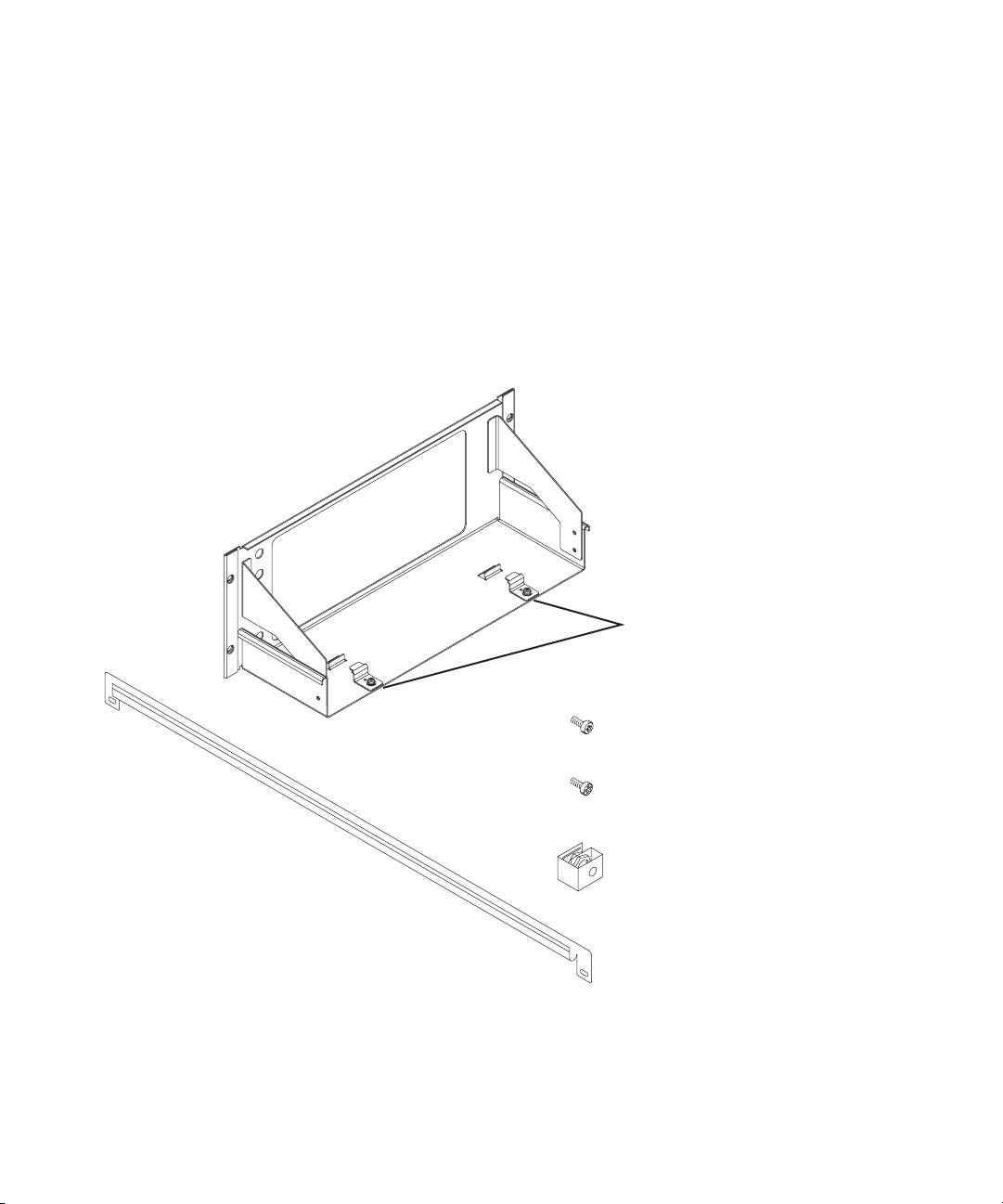
In This Guide…
This guide contains instructions for installing the
1000 Series Oscilloscope Rack Mount Kit. The rack mount kit
provides a support shelf and hardware for mounting Agilent
1000 Series oscilloscopes into Electronic Industries
Association (EIA) standard 19- inch (487- mm) rack cabinets.
The rackmount kit includes the following parts:
Support shelf assembly (1)
(includes pair of retaining
brackets for oscilloscope)
10-32 x 0.625 Phillips dress screw (4)
10-32 x 0.5 Phillips screw (4)
Sheet metal nut (8)
U-rail (2)
1000 Series Oscilloscope Rack Mount Kit 3
Page 4
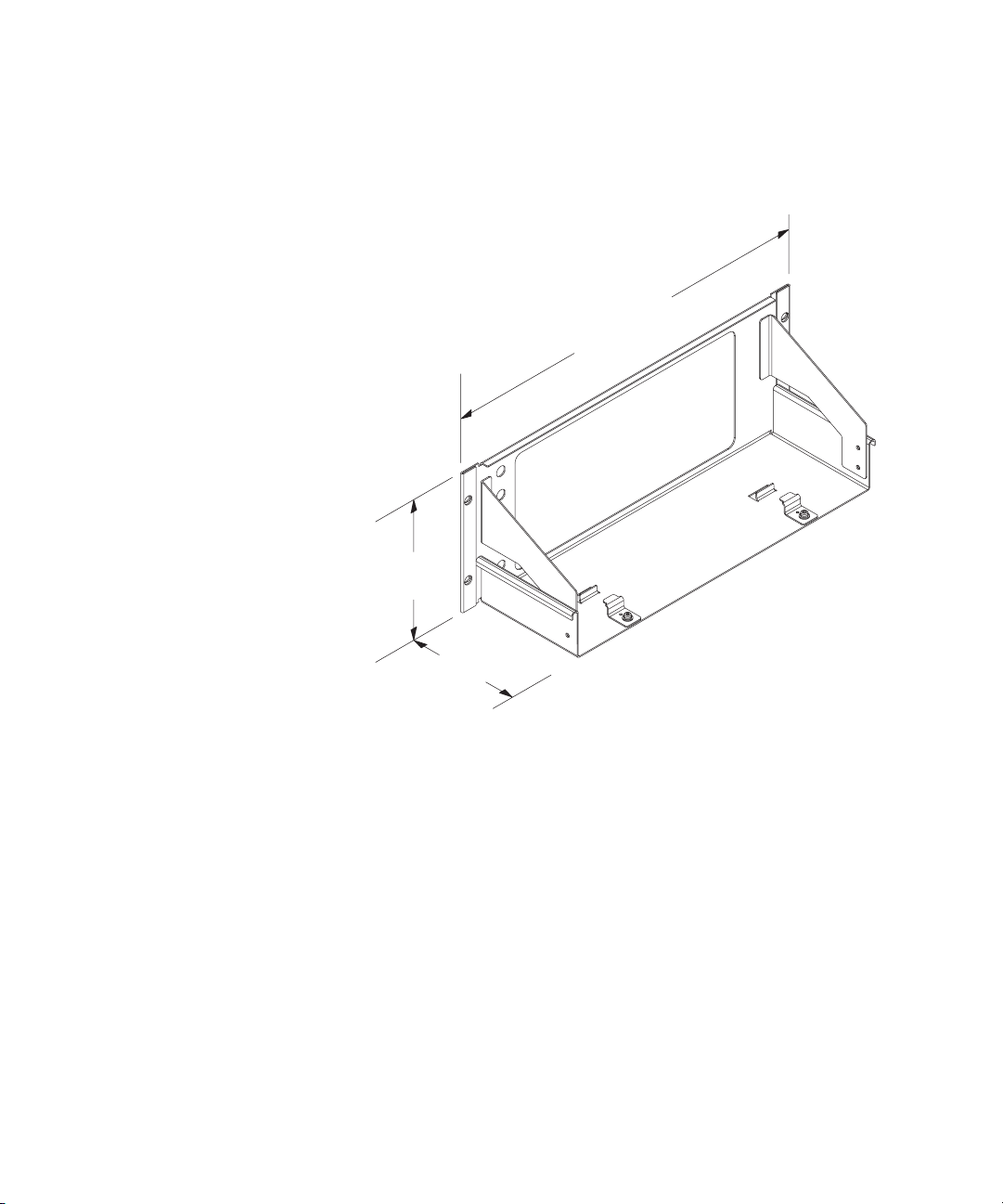
Here are the dimensions of the support shelf.
481.60 mm
18.96 in.
176.25 mm
6.94 in.
146.00 mm
5.75 in.
4 1000 Series Oscilloscope Rack Mount Kit
Page 5

Agilent N2739A 1000 Series Oscilloscope Rack Mount Kit
Installation Guide
Installation
Prepare the support shelf 6
Attach the oscilloscope to the support shelf 7
Install the support shelf 9
You need the following tools to install the rackmount kit:
• T20 TORX driver.
• #2 Phillips screwdriver.
Agilent Technologies
5
Page 6
Installation
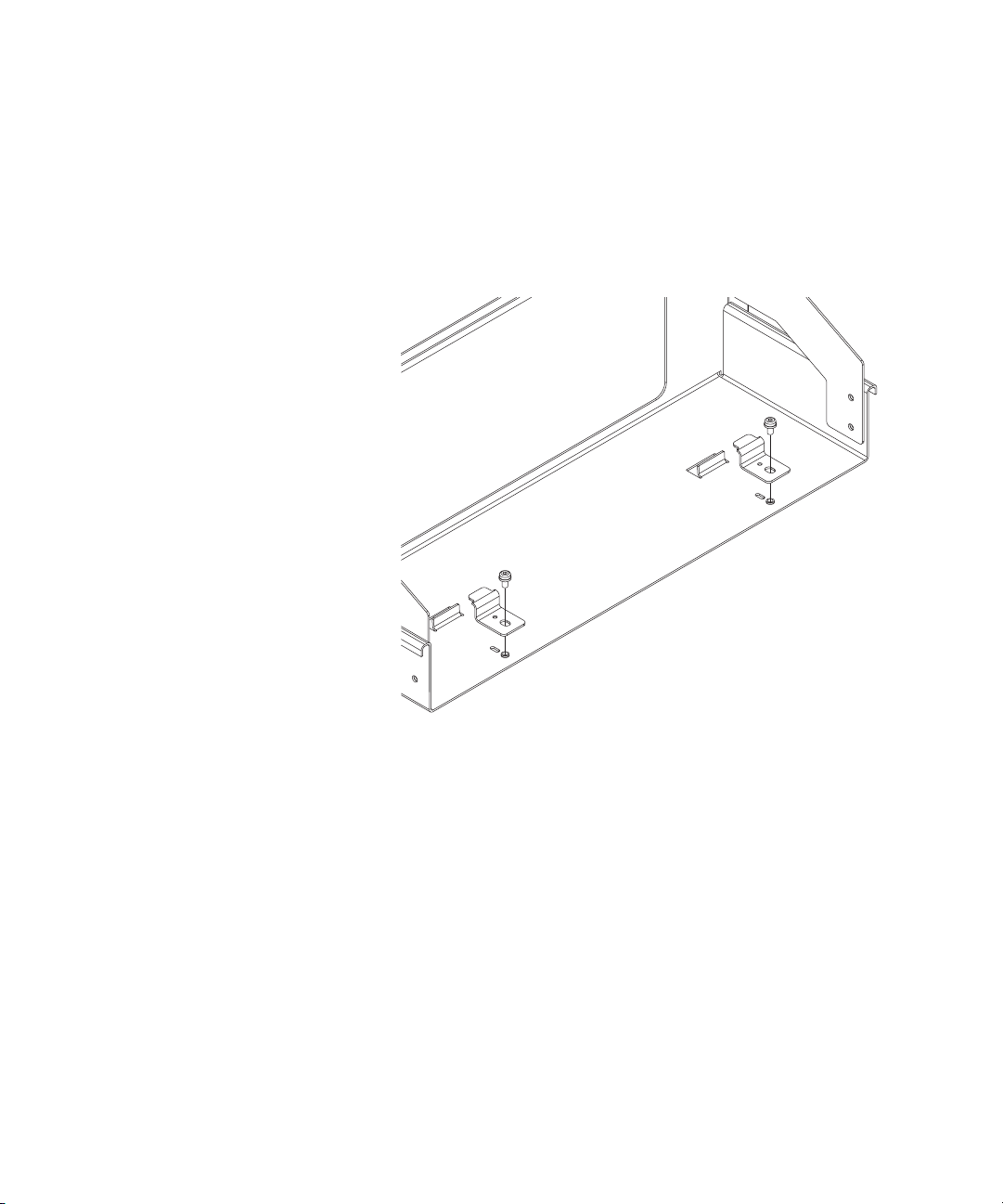
Prepare the support shelf
1 Remove the screws that secure the two retaining brackets.
Set the screws and brackets aside.
6 1000 Series Oscilloscope Rack Mount Kit
Page 7
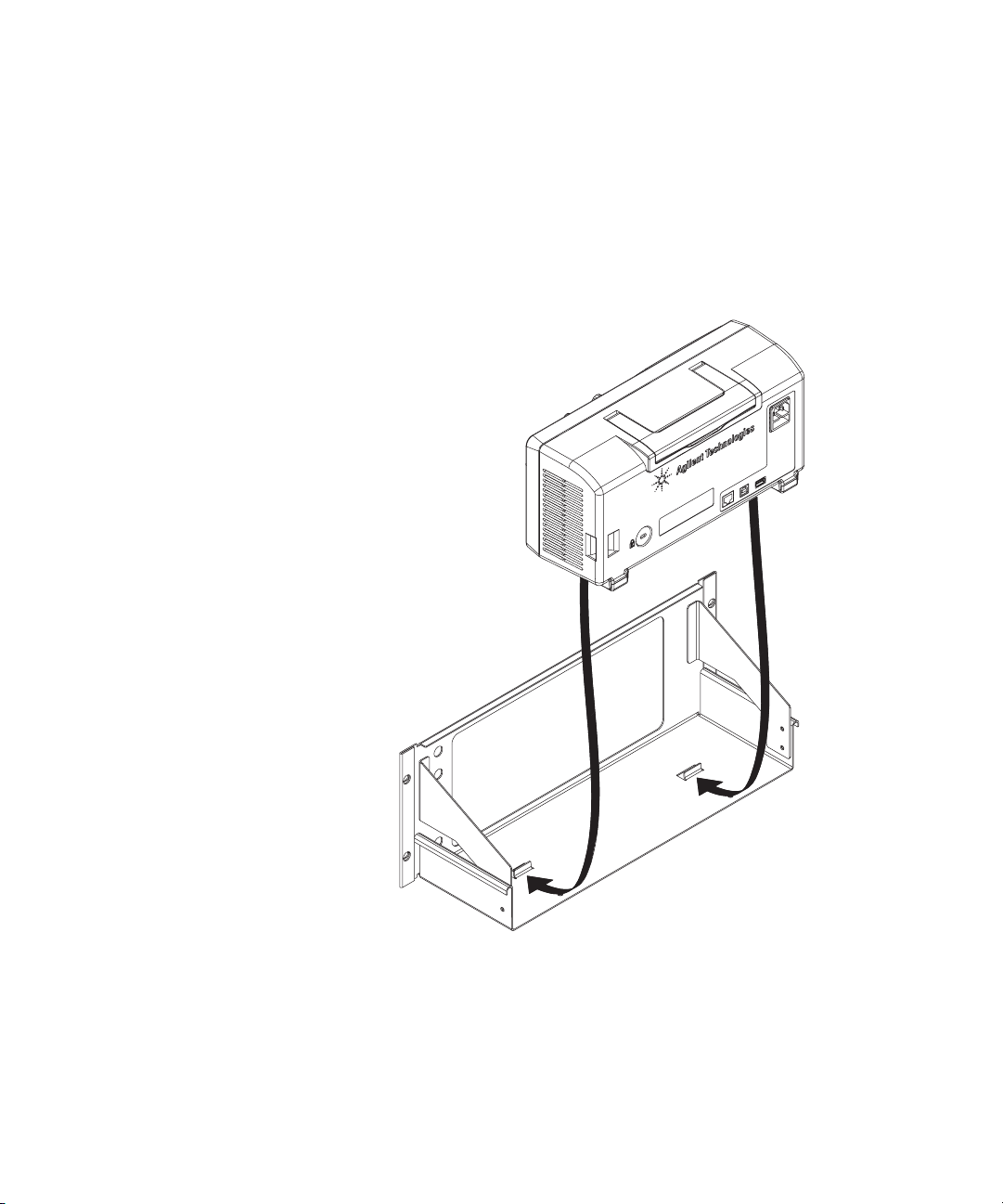
Attach the oscilloscope to the support shelf
1 Place the oscilloscope on the support shelf. Slightly raise
the rear of the oscilloscope and slide it fully forward until
it stops.
Installation
2 Push the oscilloscope fully forward on the support shelf
assembly.
1000 Series Oscilloscope Rack Mount Kit 7
Page 8
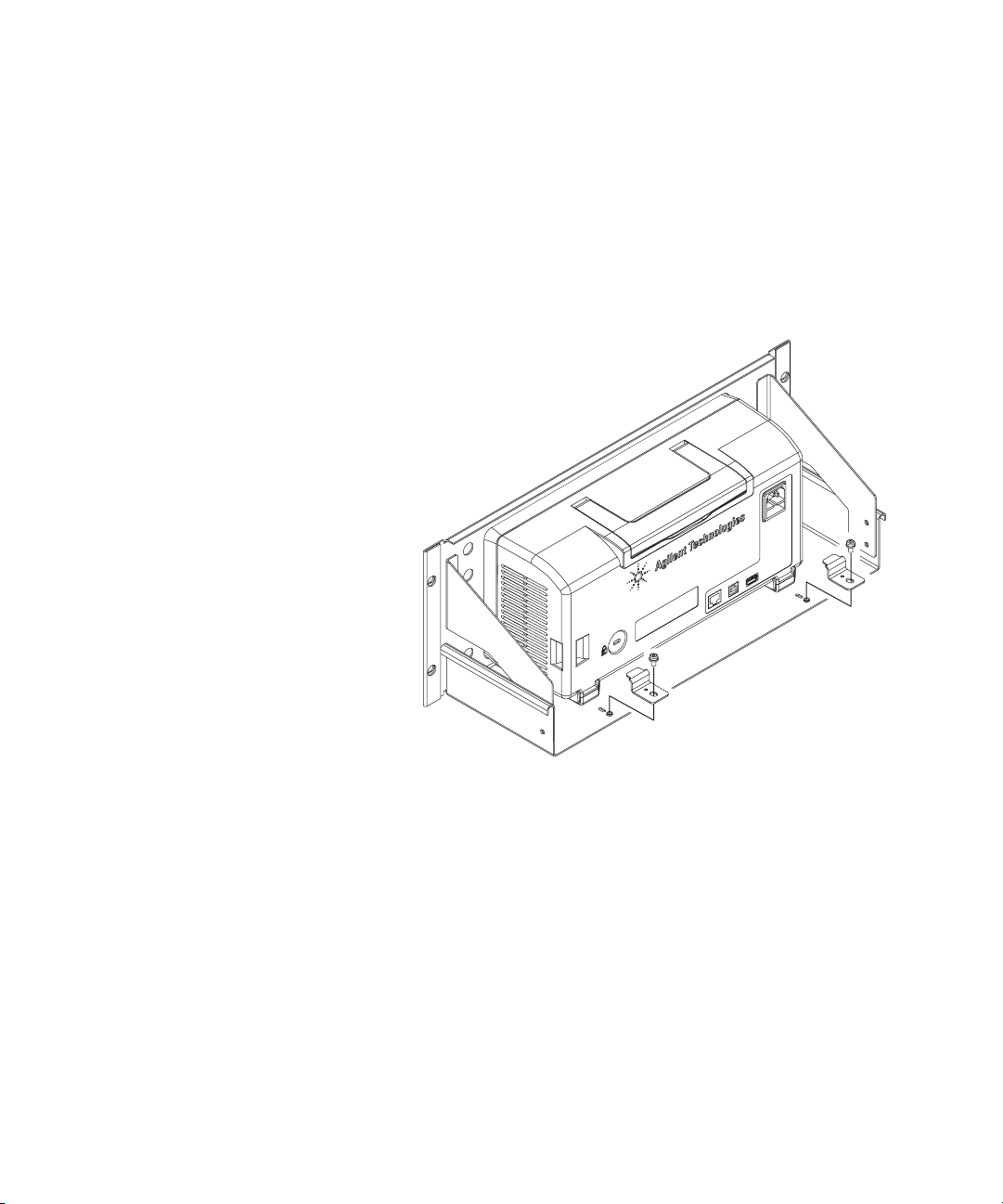
Installation
3 Install the two retaining brackets that you previously
removed:
a Push the brackets fully forward until they stop against
the oscilloscope’s rear feet.
b Secure each bracket using the screw you previously
removed.
8 1000 Series Oscilloscope Rack Mount Kit
Page 9

Install the support shelf
Installation
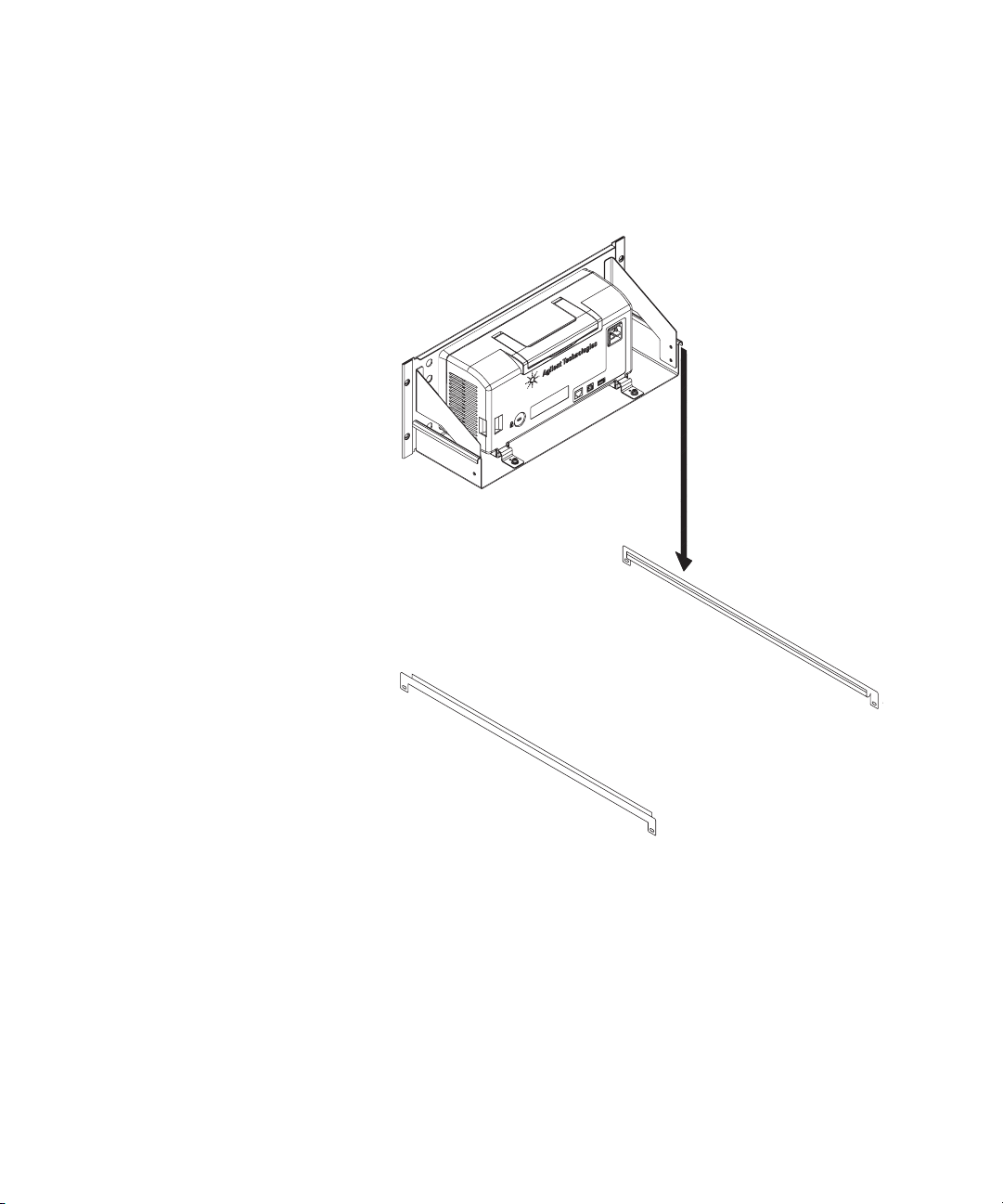
1 Attach the U- rails (with the side flanges down and the
U- channel facing inward) to the rack cabinet.
Secure the rails using two 10- 32 x 0.5 TORX screws and
two sheet metal nuts for each rail.
The sheet metal nuts clip onto the rack cabinet. The
U- channels on each side of the support shelf assembly sit
on the U- rails in the rack cabinet.
1000 Series Oscilloscope Rack Mount Kit 9
Page 10
Installation
2 Set the support shelf, with the oscilloscope attached, on
the U-rails.
3 Fasten the support shelf to the rack cabinet using four
10- 32 dress screws and four sheet metal nuts.
This completes the installation.
10 1000 Series Oscilloscope Rack Mount Kit
Page 11

Page 12

www.agilent.com
Agilent Technologies, Inc. 2008
Printed in Malaysia
First edition, July 2008
*N2739-92000*
N2739-92000
Agilent Technologies
 Loading...