

Page 1
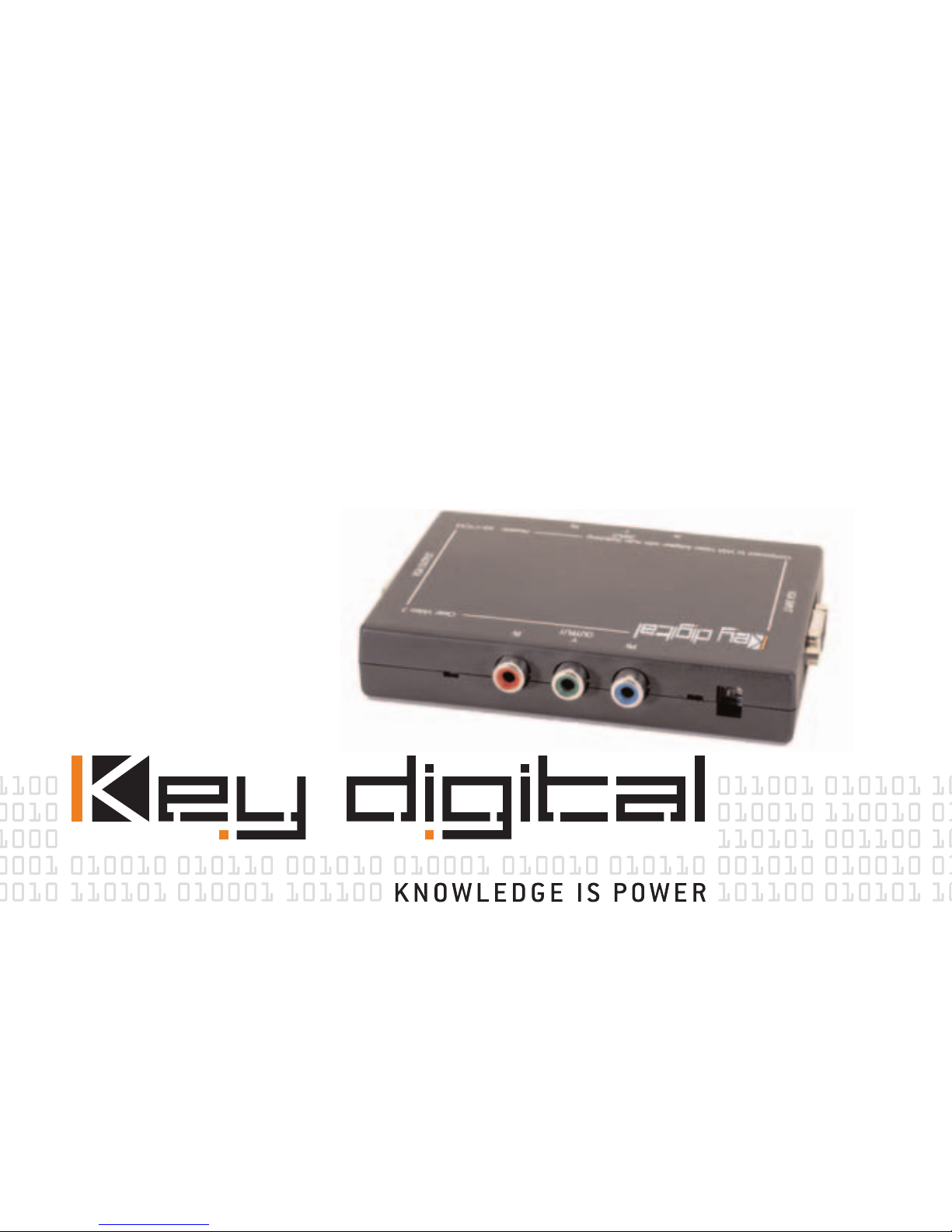
KD-CTCA3
Component Video to VGA Adapter
Page 2

Component Video to VGA Adapter
Model KD-CTCA3
Component Video (YPrPb) input to VGA Video
(RGBHV) output Video Adapter with added features
of Component Video loop-through, auto-sensing
VGA-In to VGA-Out pass-through when Component
Video is inactive, and sync format selections. T
his
KD-CTCA3
Model KD-CTCA3
Page 3
Video Adapter is NOT a Video Scaler or Video
Processor.
Included in this package:
• One KD-CTCA3 ClearVideo3
• One external power supply
• This User/Installer Manual
with included Warranty statement
OPERATING INSTRUCTIONS
Page 4

Product Overview
The KD-CTCA3 ClearVideo3 is the world’s smallest
video adapter on the market to “glue” your
Component Video (YPrPb) devices to VGA monitors
and projectors. ClearVideo3 is the ideal choice to
drive your VGA displays from Component Video
sources like your progressive DVD player, video
KD-CTCA3
Model KD-CTCA3
Page 5
game (like Xbox and Game Cube), or HDTV Set Top
Boxes. ClearVideo3 works with most* video formats,
like 480p, 720p, 1080i/540p, NTSC, PAL, interlaced
or progressive. With your Key Digital cost-effective
ClearVideo3 product, you get crystal-clear processing and you can drive your VGA monitor with cable
lengths up to 50 feet..
OPERATING INSTRUCTIONS
Page 6

*NOTE: To drive VGA monitors, the source video format must be above a 31 kHz scanning rate. The
user should note that a typical VGA monitor
therefore will NOT display formats like 480i/60 and
576i/50 that are in the range of 15.7 kHz.
KD-CTCA3
Model KD-CTCA3
Page 7
Why do you need a Video Adapter?
The video industry has produced many different
products to process, switch, and distribute your
video. In many instances, the video input or output
formats of these products are not compatible. For
example, you may have an application where you
would like your video game with Component Video
(YPrPb) out to drive your VGA (RGBHV) display.
OPERATING INSTRUCTIONS
Page 8

What do you do? One less-palatable option is to
purchase all new equipment that is totally
compatible, which is a significant investment and
limits you for the future to ever consider equipment
that does not conform to the standard you purchased. At Key Digital, we have a better solution for
you. We have designed economical, high-quality
KD-CTCA3
Model KD-CTCA3
Page 9

video adapters, which “glue” your components that
may have been designed to diverging standards:
•
KD-CTCA3 ClearVideo3: Component
Video (YPrPb) to VGA adapter, and more
• KD-CTCA3 ClearColor3: VGA to
Component Video adapter, and more
OPERATING INSTRUCTIONS
Page 10

NOTE THAT A VIDEO ADAPTER DOES NOT PERFORM
VIDEO SCALING, PROCESSING, OR SCAN
CONVERSIONS.
Product Features
KD-CTCA3 ClearVideo3 offers versatility,
convenience, and well thought-out features:
KD-CTCA3
Model -KD-CTCA3
Page 11
• Smallest Component Video (YPrPb) input to VGA
(RGBHV) output Video Adapter on the market today
• Convenient and intelligent Input/Output features:
• Component Video input also has active
pass-through output to simultaneously
drive your Component Video display
• Auxiliary VGA input will automatically pass
through to the VGA output if sync is not
OPERATING INSTRUCTIONS
Page 12

detected on the Y channel of the
Component Video input – a great feature
that lets you permanently hook up
ClearVideo3 to your existing PC and VGA
monitor set-up
• Enables display of:
• Progressive DVD players or Component
Video HDTV Set Top Boxes on VGA monitors
KD-CTCA3
Model KD-CTCA3
Page 13
and projectors
• Xbox and other game consoles at 480p,
720p, and 1080i/540p on standard VGA
monitors and projectors
• Compatible with:
• All Component Video HDTV Set Top Boxes
• All NTSC and PAL interlaced and
progressive formats
OPERATING INSTRUCTIONS
Page 14

• Xbox and Game Cube video games
• Flexible Sync Out options:
• H and V drive (RGBHV), or Composite Sync
on H selection (RGBHcV)
• H and V drive (RGBHV), or Sync-on-Green
selection (RGsB)
KD-CTCA3
Model KD-CTCA3
Page 15
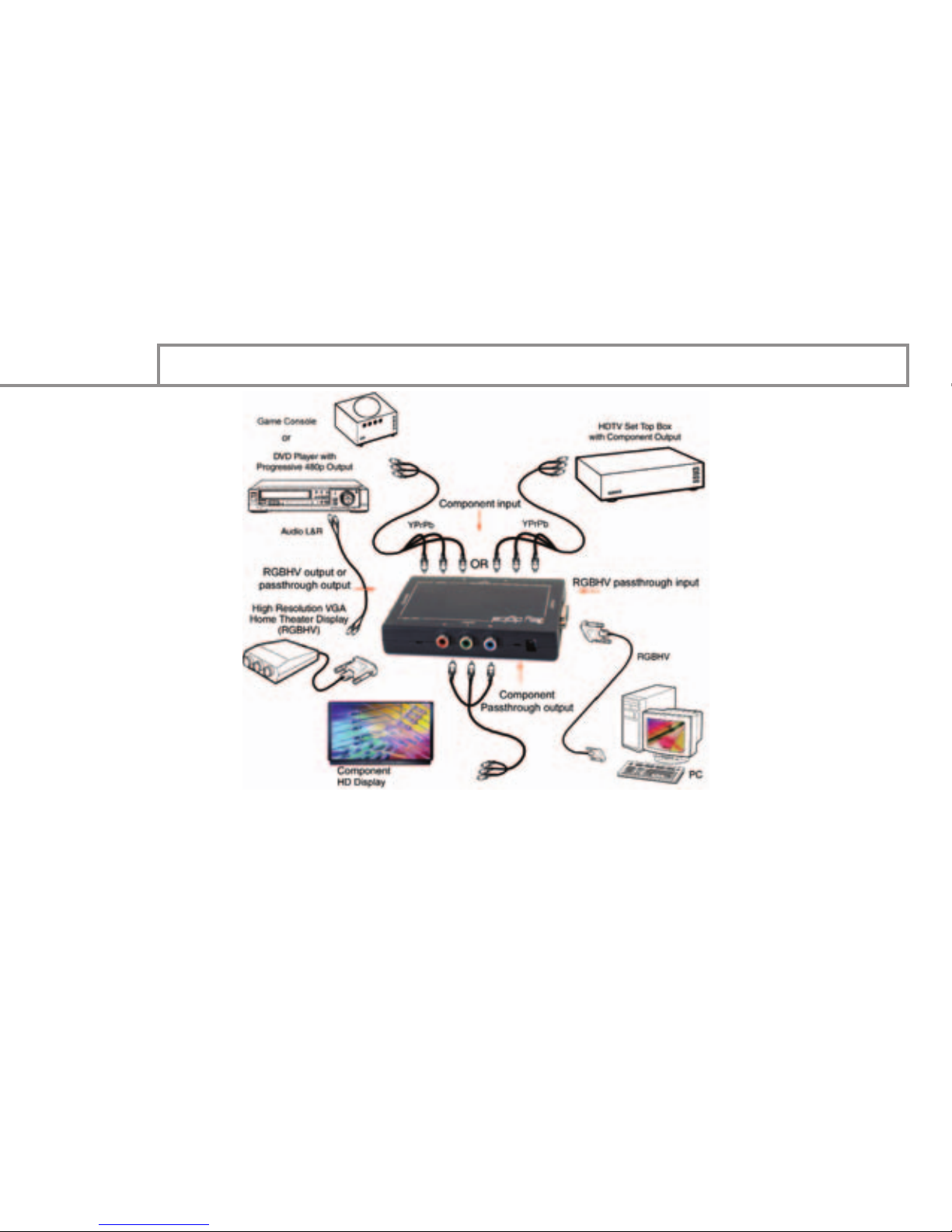
SOME TYPICAL APPLICATION EXAMPLES
Component Video to VGA Adapter
ClearVideo3, Model KD-CTCA3
OPERATING INSTRUCTIONS
Page 16

ClearVideo3 - Video Adapter - Model KD-CTCA3
UL LISTED
Safety Instructions – Please be sure to
follow these instructions for safe operation of your
unit
**************************************************
KD-CTCA3
Model KD-CTCA3
Page 17
1)Read these instructions.
2)Keep these instructions.
3)Heed all warnings.
4)Follow all instructions.
5)Do not use this apparatus near water.
6Clean only with dry cloth.
7)Do not block any ventilation openings. Install in
accordance with the manufacturer’s instructions.
8)Do not install near any heat sources such as radi-
UL LISTED - Model KD-CTCA3
Page 18

ators, heat registers, stoves, or other apparatus
(including amplifiers) that produce heat.
9)Do not defeat the safety purpose of the polarized
or grounding-type plug. A polarized plug has two
blades with one wider than the other. A grounding
type plug has two blades and a third grounding
prong. The wide blade or the third prong are
provided for your safety. If the provided plug does
not fit into your outlet, consult an electrician for
KD-CTCA3
Model KD-CTCA3
Page 19
replacement of the obsolete outlet.
10)Protect the power cord from being walked on or
pinched particularly at plugs, convenience
receptacles, and the point where they exit from the
apparatus.
11)Only use attachments/accessories specified by
the manufacturer.
12Use only with the cart, stand, tripod, bracket, or
table specified by the manufacturer, or sold with the
UL LISTED - Model KD-CTCA3
Page 20
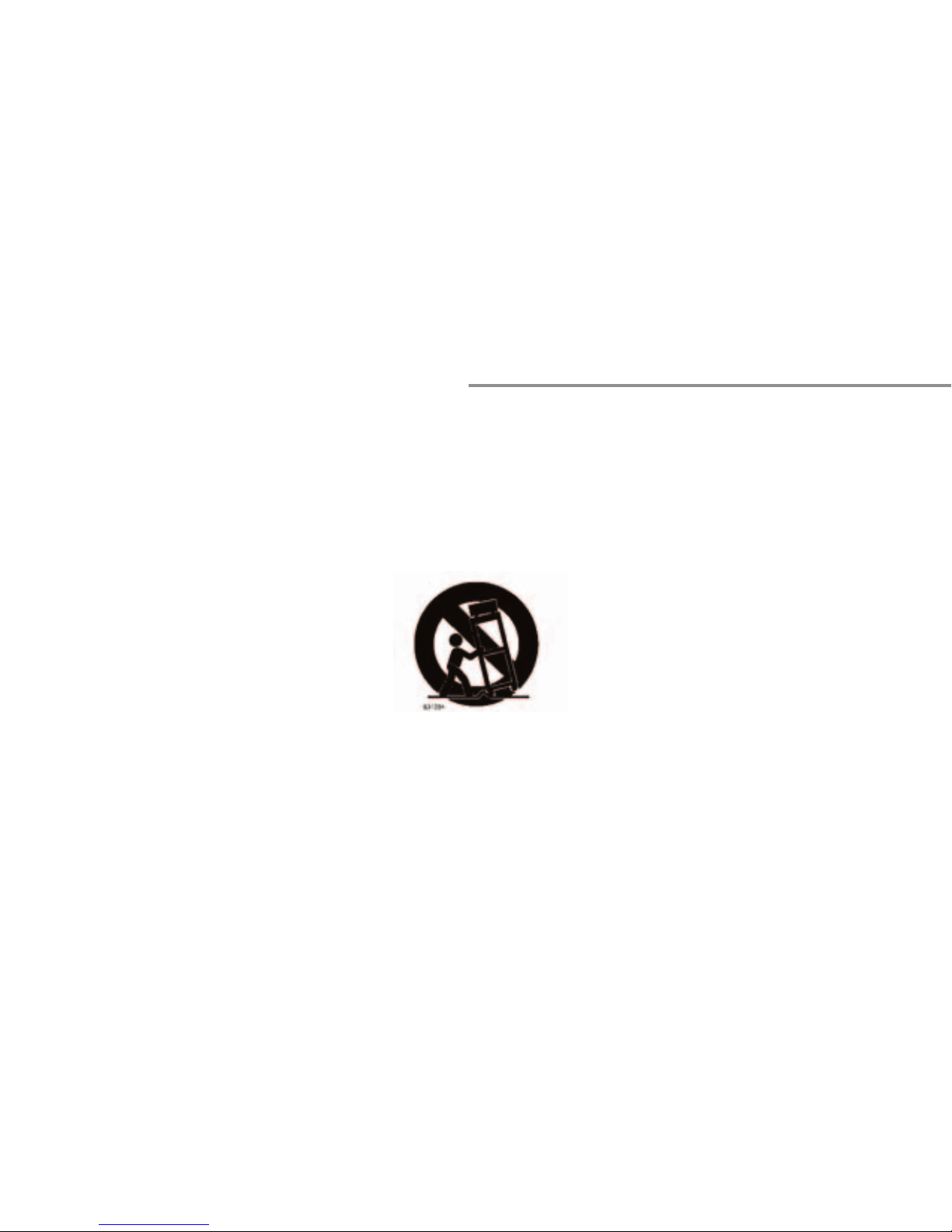
apparatus. When a cart is used, use caution when
moving the cart/apparatus combination to avoid
injury from tip-over.
13)Unplug this apparatus during lightning storms or
when unused for long periods of time.
KD-CTCA3
Model KD-CTCA3
Page 21
Refer all servicing to qualified service personnel.
Servicing is required when the apparatus has been
damaged in any way, such as power-supply cord or
plug is damaged, liquid has been spilled or objects
have fallen into the apparatus, the apparatus has
been exposed to rain or moisture, does not operate
normally, or has been dropped.
******************************************
UL LISTED - Model KD-CTCA3
Page 22

QUICK SET-UP
Connecting and using your KD-CTCA3 ClearVideo3 is
a simple process.
NOTE: Do not attempt to connect power to the unit
until you have completed all Steps 1 – 4.
STEP 1:
Determine your configuration
KD-CTCA3
Model KD-CTCA3
Page 23
requirements. The primary function of the
KD-CTCA3 ClearVideo3 is to convert your Component
Video (YPrPb) signal to VGA (RGB). The unit
automatically adjusts to the input scan format.
There are added bonuses that let you also
simultaneously drive your Component Video
monitor, or even automatically pass-through a VGA
source (like from your PC) to the VGA output when
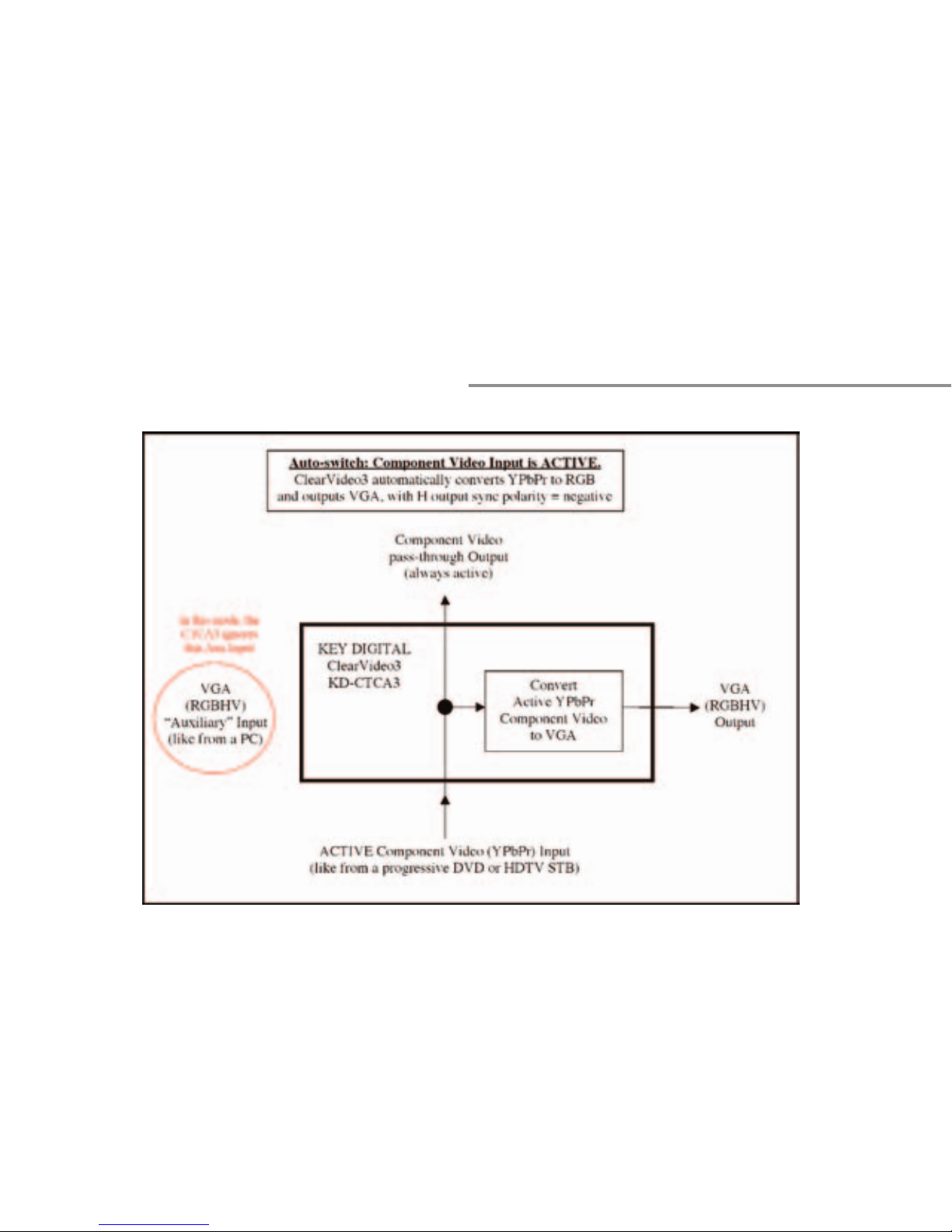
Component Video is Typical configuration with
ACTIVE YPbPr Component
QUICK SET-UP
Page 24
KD-CTCA3
Model KD-CTCA3
Page 25
Input always passing through to the YPbPr loopthrough output, and automatically converted to VGA.
This configuration allows your Component Video
source to SIMULTANEOUSLY drive your Component
Video monitor and VGA monitor.
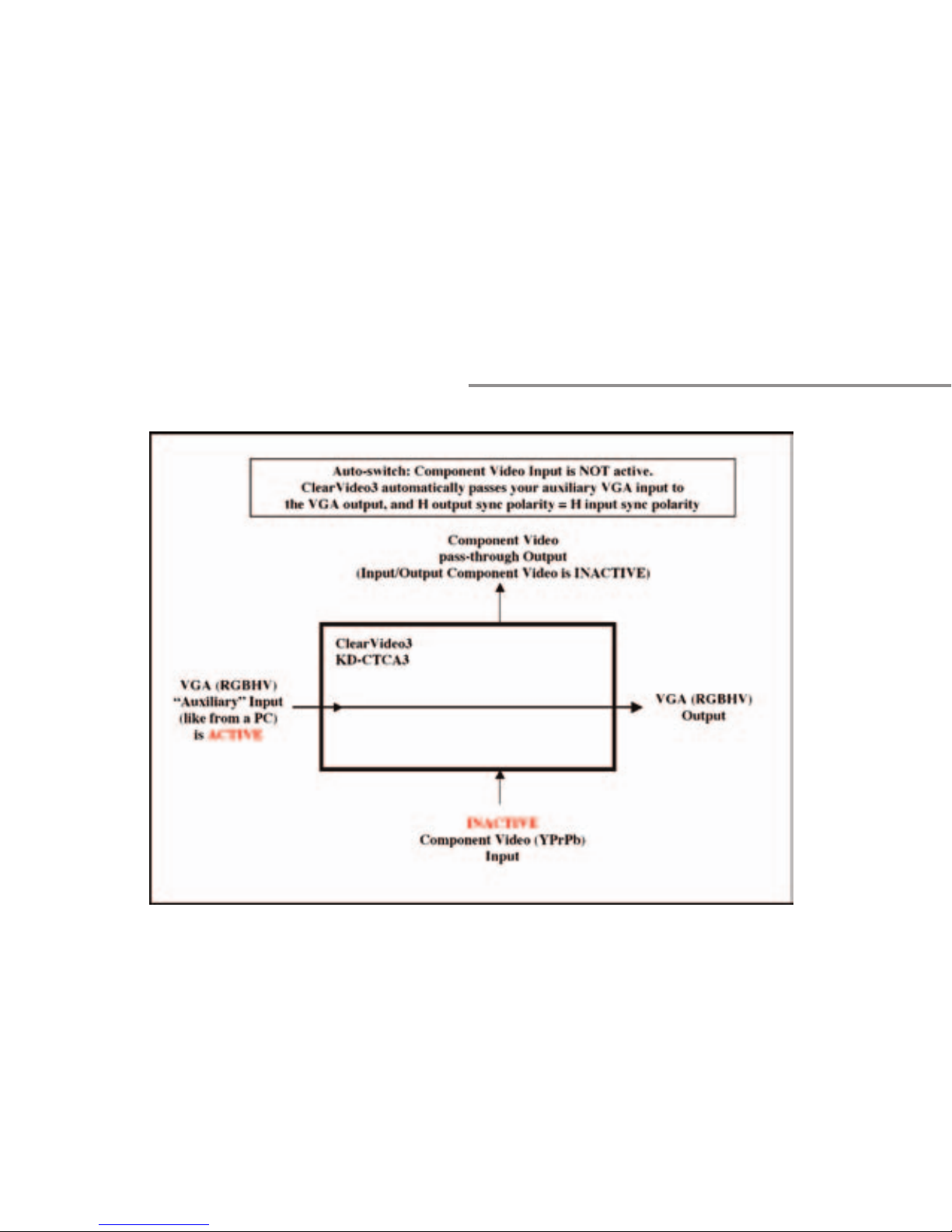
inactive, as demonstrated in the figures below.
Typical configuration with INACTIVE YPbPr
QUICK SET-UP
Page 26
KD-CTCA3
Model KD-CTCA3
Page 27
Component Input, and “Auxiliary” VGA Input passed
on to the VGA output. This configuration allows
your VGA source to be connected to the VGA monitor in cases where the Component Video source is
INACTIVE – perfect for PC applications.
QUICK SET-UP
Page 28

STEP 2: Make your Input Connections:
• One Component Video (YPrPb) input on three RCA
female jacks
• If desired, one “auto switching” VGA (RGBHV) input
will drive the RGBHV output when Component Video
input has no sync on “Y”
STEP 3: Make your Output Connections:
• One VGA Video (RGBHV) output on DB15 connector
KD-CTCA3
Model KD-CTCA3
Page 29
that can drive two monitors with equal cable lengths
up to 50 feet
• If desired, one Component Video (YPrPb)
always-active pass-through output on three RCA
female jacks (be sure to terminate this output at
the end of the runs)
STEP 4: Configure the Sync Output Select Switches
(adjacent to the Component Video input connectors)
to suit your application. H&V polarity out for
Component Video to RGBHV conversion is always
QUICK SET-UP
Page 30

NEGATIVE polarity. H&V polarity out for the case
when the auxiliary VGA input signal (like from a PC)
is switched to the VGA output is always the SAME as
the polarity of H&V on the input VGA signal.
Select between H and V drive sync or Composite
Sync with Switch 1:
• Switch 1 ON (up): H and V drive VGA out (typical
mode, RGBHV)
• Switch 1 OFF (down): Composite Sync out on H,
KD-CTCA3
Model KD-CTCA3
Page 31
and V (RGBHcV)
Select between H and V drive sync or Sync-on-Green
with Switch 2:
• Switch 2 ON (up): H and V drive VGA out (typical
mode, RGBHV)
• Switch 2 OFF (down): Sync-on-Green mode
(RGsB)
STEP 5: Apply power to the unit:
QUICK SET-UP
Page 32

• Use ONLY the external wall-plug power supply
provided with your unit, +5 Volts @ 03.Amps, 100240 VAC, 50-60 Hz
• Connect the 1/8” mini-plug external power supply
connector to your unit, and plug the power supply
into a power outlet
• The green Power-on LED (adjacent to the external
power supply connector) should be ON
STEP 6: Operation of your unit:
KD-CTCA3
Model KD-CTCA3
Page 33
• Your Component Video source should now drive
your VGA display and is also available as an active
Component Video pass-through
• The red LED (adjacent to the external power
supply connector) indicates sync detected on the
Y Component Video input when LED is ON
• If you also have a VGA input connected to the unit,
it should be passed to the VGA output when the red
LED is OFF, indicating the Component Video source is
inactive (Auto-switch feature)
QUICK SET-UP
Page 34

Technical Specifications
ClearVideo3
Model KD-CTCA3
Video Inputs:
• One Component Video (YPrPb) input on three RCA
female jacks
• 1 V p-p @ 75 Ohm terminated
• Composite Sync on “Y”
• One “auto switching” VGA (RGBHV) input
KD-CTCA3
Model KD-CTCA3
Page 35
connected to RGBHV output when Component Video
input has no sync on “Y”
Video Outputs:
• One VGA Video (RGBHV) output on DB15 connector
that can drive one monitor with cable lengths up to
50 feet
• RGB: 0.7 V p-p, 75 Ohm, terminated at the
Technical Specifications
Page 36

source
• One Component Video (YPrPb) always-active
pass-through output on three RCA female jacks
Accepted Scanning Formats:
• Unit adjusts automatically for incoming video
scanning format:
• 50 Hz or 60 Hz refresh
• 480p, 576p, 1080i/540p, 720p
KD-CTCA3
Model KD-CTCA3
Page 37
• Output scanning format is always the SAME as the
input scanning format
Control and Adjustments:
• LED’s (adjacent to the external power supply
connector):
• Green Power-on LED
• Red LED indicates sync detected on the Y
Component Video input when LED is ON
Technical Specifications
Page 38

• Output Sync Select Switches (adjacent to the
Component Video input connectors):
• H and V drive, or Composite Sync:
• Switch 1 ON (up): H and V drive
VGA out (typical mode, RGBHV)
• Switch 1 OFF (down): Composite
Sync out on H (RGBHcV)
• H and V drive, or Composite Sync:
KD-CTCA3
Model KD-CTCA3
Page 39
• Switch 2 ON (up): H and V drive
VGA out (typical mode, RGBHV)
• Switch 2 OFF (down): Sync-onGreen mode (RGsB)
• Output Sync polarity:
• Negative TTL sync for H and V in RGBHV
mode
• Negative Sync-on-Green for RGsB mode
Technical Specifications
Page 40

• Polarity of H&V sync for pass-through
RGBHV is the same as input H and V drive
polarity
Processing:
• HDTV colorimetry matrix
• Video bandwidth -3 dB at 110 MHz, linear-phase
passband, for crystal-clear display
KD-CTCA3
Model KD-CTCA3
Page 41
• Auto switching between VGA (RGB) input and
Component Video (YPrPb) converted to VGA (RGB)
• With active sync on the Y Component
Video input, Composite Video is converted to
VGA at the VGA output connector
• If no sync is present on the Y Component
Video input, the auxiliary VGA input signal
automatically drives the VGA output connector
Technical Specifications
Page 42

• Output RGB sync format processing: RGBHV,
RGBHcV (composite sync on H) or RGsB (composite
sync on Green)
• Outputs can drive cables up to 50 feet
Mechanical:
• Connectors
• RCA (for Component Video)
• DB15 (frequently used for VGA/computer)
KD-CTCA3
Model KD-CTCA3
Page 43
• 1/8” mini-plug external power supply
input
• Size: 2” x 4.75” x 0.75”
• Weight: 1 lbs.
• Enclosure type: Plastic
• External wall-plug power supply provided, +5 Volts
@ 03.Amps, 100-240 VAC, 50-60 Hz
HOW TO CONTACT KEY DIGITAL
Page 44

HOW TO CONTACT KEY DIGITAL
Repairs and Warranty Service:
Should your HD Leeza require warranty service,
please contact Key Digital first to obtain a Returned
Materials Authorization (RMA) number
Please contact us at either:
Toll-free
1-203-778-0295 extension 3#
email [email protected]
KD-CTCA3
Model KD-CTCA3
Page 45
Technical Support:
For technical questions about using our products,
please contact us at either:
1-203-778-0295 or Toll-free 1-888-258-2028
email [email protected]
Customer Support:
For customer support questions about using our
products, please contact us at either:
1-203-778-0295
email [email protected]
HOW TO CONTACT KEY DIGITAL
Page 46
WARRANTY
All Key Digital products are built to high manufa
cturing standards and should provide years of
trouble-free operation. They are backed by a limited
two-year parts and labor warranty.
 Loading...