

Page 1
Operating &
Programming
Instructions
I
M-2000
™
8 Product Cooking Controller
THE UNAUTHORIZED USE OR DUPLICATION OF THE SOFTWARE DESCRIBED HEREIN, OR THIS MATERIAL, IS STRICTLY PROHIBITED.
Computer 0107 09/07
Page 2

NOTE: Not all features are available on all models.NOTE: Not all features are available on all models.
THE UNAUTHORIZED USE OR DUPLICATION OF THE SOFTWARE DESCRIBED HEREIN,
OR THIS MATERIAL IS STRICTLY PROHIBITED.
2
TABLE OF CONTENTS
Introduction.....................................................................................................................................................2
Controller Key Descriptions..............................................................................................................................3
Operating the Controller...............................................................................................................................4-5
Display Descriptions ........................................................................................................................................6
Controller Features..........................................................................................................................................7
Programming the Controller........................................................................................................................8-13
Customer Support and Other Information........................................................................................................15
INTRODUCTION
Thank you for your purchase. You have chosen a product with over 25 years of innovation and quality manufacturing behind it. The IM-2000 Cooking Controller is designed to simplify the operation of your appliance and allow
your foodservice operators to spend more time with the customers and other important responsibilities. Quality
control of your food product is assured through the various features, notification displays and alarms designed into
all SCS Controllers.
There are three modes of operation on the IM-2000 Cooking Controller:
Operating Mode: used to cook the various menu items
Product Programming Mode: used to add or modify menu items
System Programming Mode: used to configure the controller to various applications
NOTE: Not all features are available on all models.
IM 2000 9/03
Page 3

THE UNAUTHORIZED USE OR DUPLICATION OF THE SOFTWARE DESCRIBED HEREIN,
OR THIS MATERIAL IS STRICTLY PROHIBITED.
3
I
M-2000
™
When lit (bright) indicates that
a product hold time is being
tracked.
When lit (bright) indicates the
controller is calling for heat.
When lit (bright)
indicates the controller is in
melt cycle.
Optional “soft” ON/
OFF key switches controller
functions off while leaving
power to the appliance on.
Optional “soft” ON/
OFF key–available
for dual vat fryers.
In “operating” mode, displays the remaining cook
time on every product key currently in a cook
cycle and lights the respective product’s LED for 2
seconds each.
In “programming” mode, steps to the next function to be programmed.
In “operating” mode, displays the actual temperature followed by the programmed or set temperature.
In “programming” mode, allows the user to toggle
between choices in an entry field and clear values
from a data field.
CONTROLLER KEY DESCRIPTIONS
When lit (bright) indicates the
controller is in program mode.
In “operating” mode, allows access to the programming mode. In “programming” mode allows
access to the operating mode.
In “programming” mode, used to accept the information and
“enter” it into the controller’s memory.
I
M-2000
™
In “operating” mode, used to view remaining hold times.
ON
OFF
Page 4
NOTE: Not all features are available on all models.NOTE: Not all features are available on all models.
THE UNAUTHORIZED USE OR DUPLICATION OF THE SOFTWARE DESCRIBED HEREIN,
OR THIS MATERIAL IS STRICTLY PROHIBITED.
4
OPERATING THE CONTROLLER
Starting a Cook Cycle
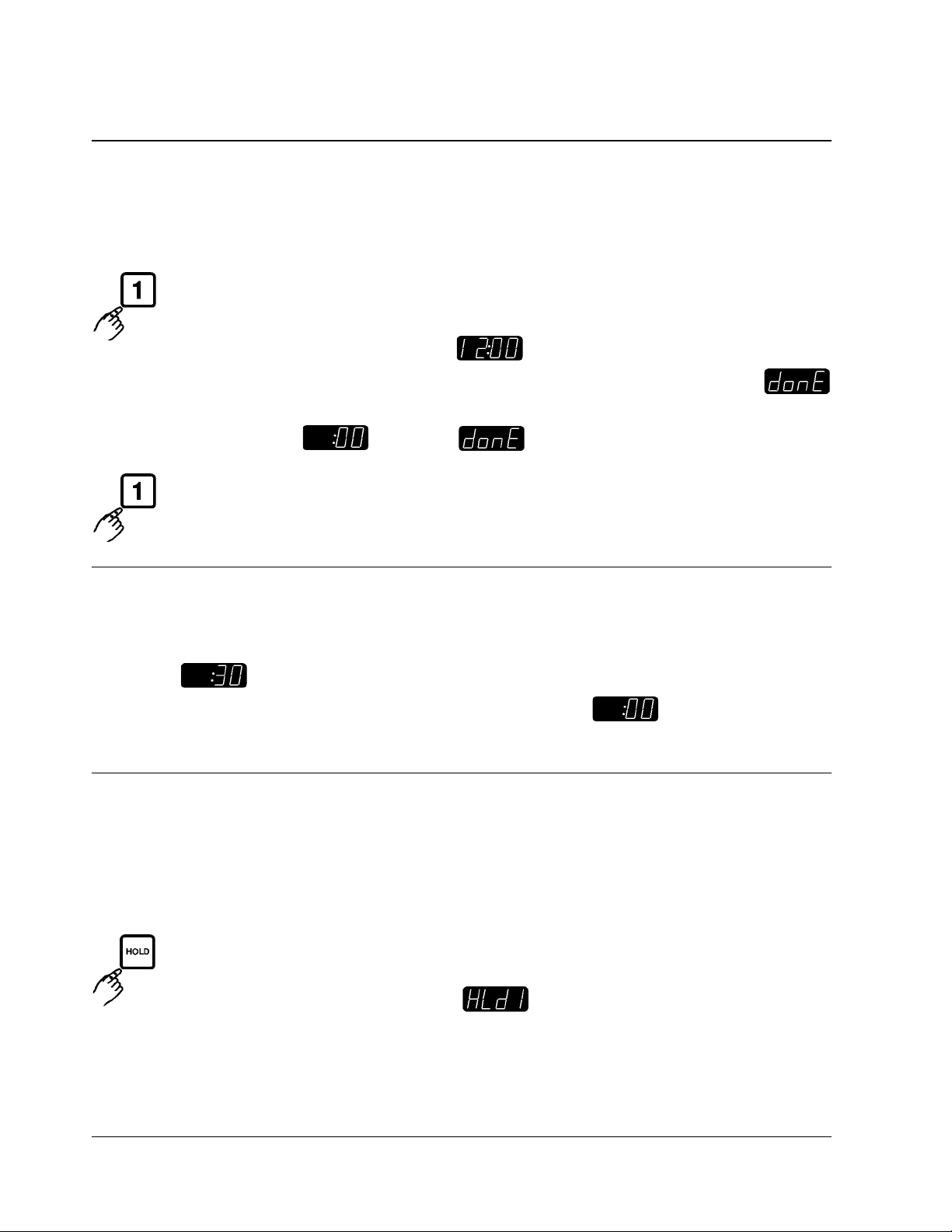
To start a cook cycle, simply press the product key for the product you wish to cook. If the product key
is programmed, the correct cooking time will be displayed (example) and this time will immediately start
to count down in minutes and seconds. The pressure solenoid will also close if programmed to do so. If
is displayed immediately and the unit starts to signal, the key being operated is not programmed. If correctly pro-
grammed, it will count down to followed by and start to signal.
Cancel this signal by pressing the same cycle product key used to start the cook cycle.
Action Alarms
If the unit is programmed with action alarms, the action alarms will signal at a preset time during the cooking cycle;
for example, . This signal, a dual rhythm beeping, will last 5 seconds and then self-cancel. The display
will flash the action alarm time and the unit will then start counting toward .
Holding Timers
If the unit is programmed with holding times, they will automatically start counting upon expiration of the cooking cycle.
When there are active hold times, the HOLD indicator will be lit. To view all active hold times, press and hold the
key. Upon expiration, the timer will display and pulse with an audible tone.
Page 5
THE UNAUTHORIZED USE OR DUPLICATION OF THE SOFTWARE DESCRIBED HEREIN,
OR THIS MATERIAL IS STRICTLY PROHIBITED.
5
I
M-2000
™
OPERATING THE CONTROLLER
Holding Timers, continued
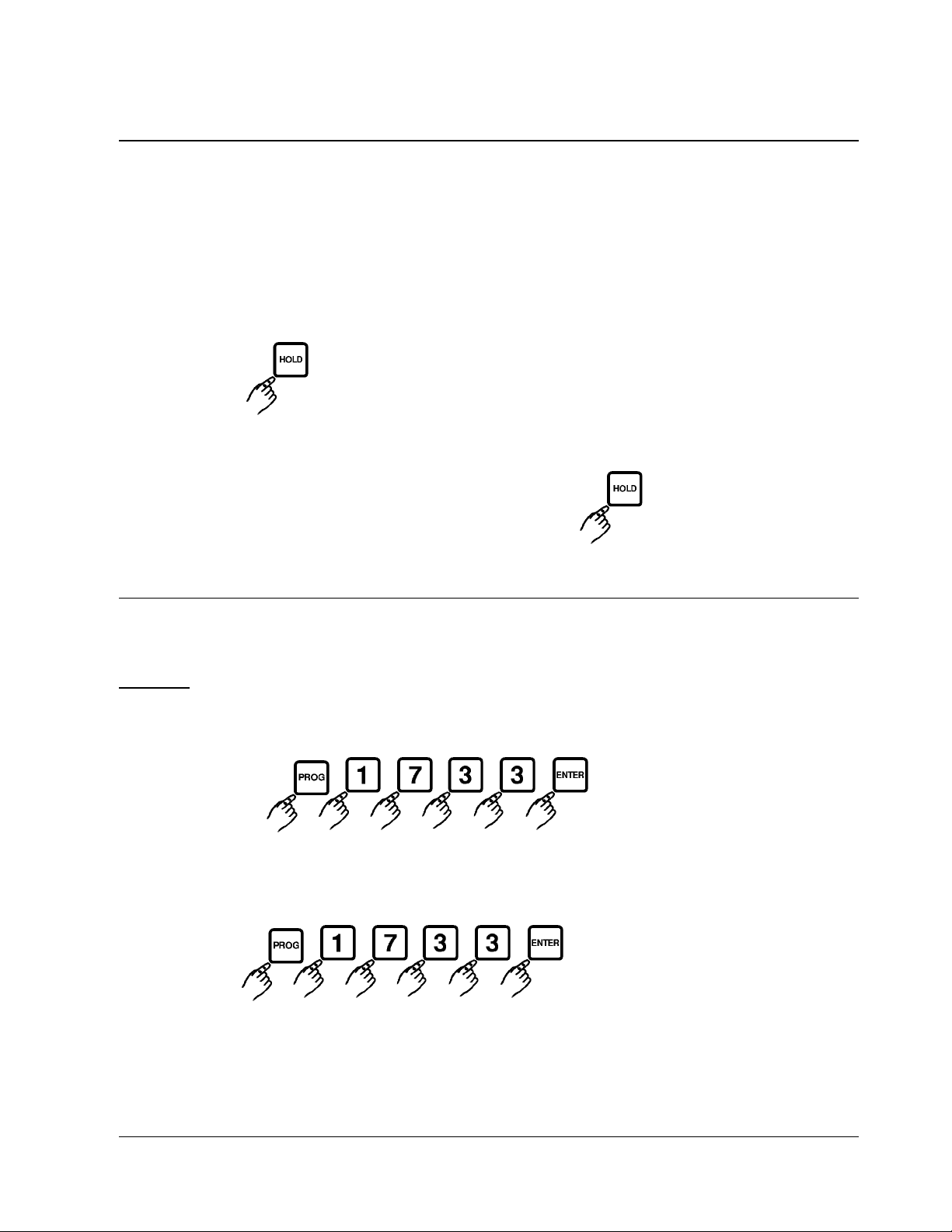
To cancel, press the key.
To view the hold time with the least amount of time remaining, press the key.
Boil
CAUTION:
PLEASE CONSULT AND FOLLOW KEATING’S GUIDELINES FOR CLEANING AND BOILING OF THE FRY
VATS. The boil function accurately maintains the fryer temperature at 190°F (88°C) to assist in the cleaning of fry
vats. To start the boil process, turn the appliance OFF. Empty the fry vat of shortening. Once the vat is emptied
of shortening and refilled with cold water, the controller and fryer may now go into boil.
To Enter Boil Mode:
The fry vat will maintain a temperature of 190°F (88°C) to allow the boil function to be performed.
Note: The fry vat must be below a temperature of _____°F/_____°C to enter the
boil mode.
To Exit Boil Mode:
The controller will no longer have [boiL] in the display. Turn the appliance off.
Empty the water from the vat, wipe all remaining water from the vat. Once dry, refill the vat with shortening.
CAUTION: Refill the vat with shortening ONLY when it
is completely dry.
Page 6
NOTE: Not all features are available on all models.NOTE: Not all features are available on all models.
THE UNAUTHORIZED USE OR DUPLICATION OF THE SOFTWARE DESCRIBED HEREIN,
OR THIS MATERIAL IS STRICTLY PROHIBITED.
6
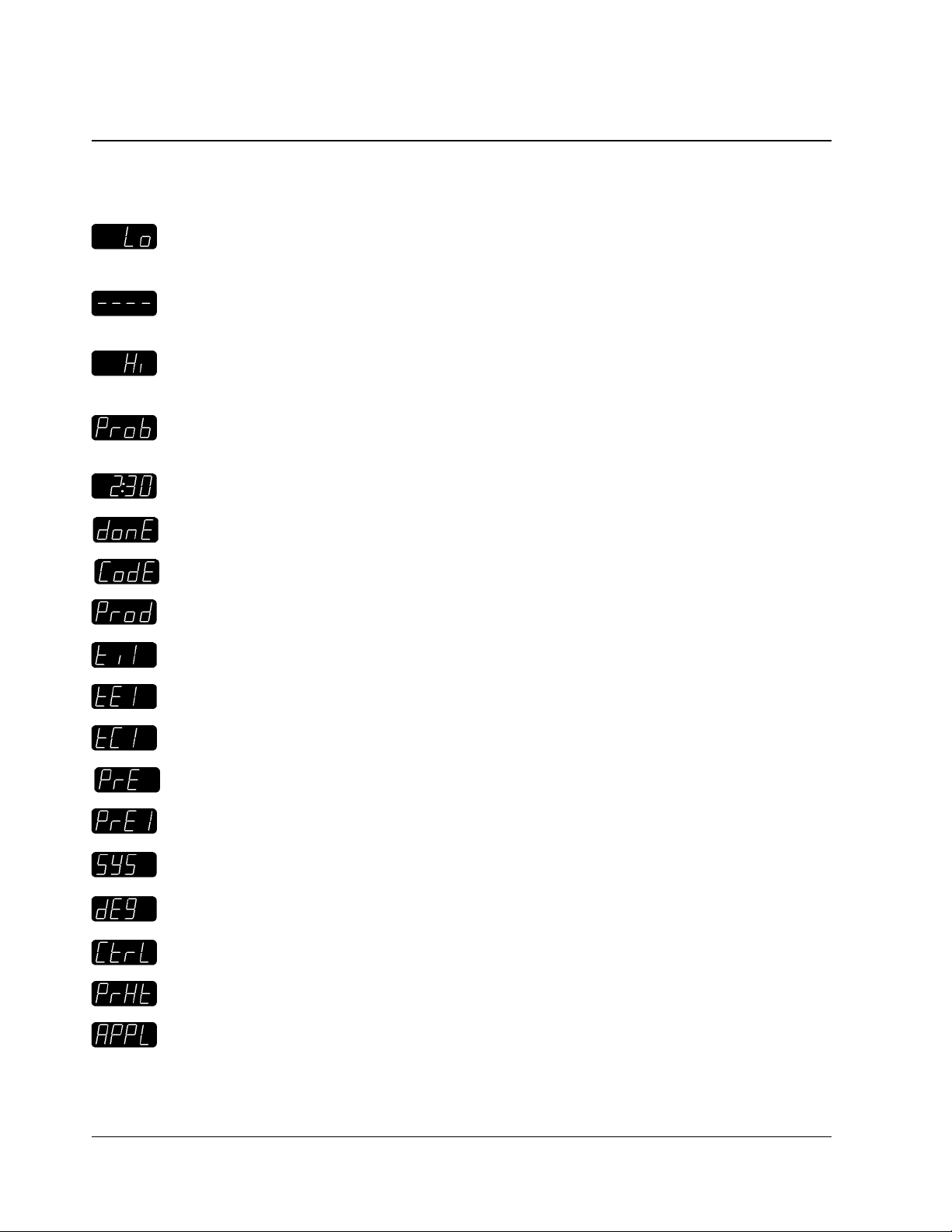
The unit is in the Operating Mode. The actual vat temperature is more than 10 degrees below the programmed vat temperature.
The unit is in the Operating Mode. The actual vat temperature is within the proper cooking temperature
range. The vat is ready to start a cook cycle.
The unit is in the Operating Mode. The actual vat temperature is more than 40 degrees above the programmed vat temperature. An audible alarm sounds simultaneously.
The controller probe is either open or shorted; accompanied with an audible alarm. Check or replace the
probe.
The unit is in the Operating Mode and a cook cycle is in process.
The unit is in the Operating Mode and a cook cycle has been completed.
The unit is waiting for a pass code to be entered.
The unit is in the Product Key Programming Standby Mode.
A cooking time is displayed.
A cooking temperature is displayed.
A timing mode (flex or straight) is displayed.
Product key action alarm programming standby mode.
The action alarm status is displayed.
The unit is in System Programming Standby Mode.
The unit is in Fahrenheit or Celsius Programming mode.
The unit is in Controller Backup Programming mode.
The unit is in Fryer Preheat or Melt Cycle Programming mode.
The unit is in the Appliance Type Programming mode.
DISPLAY DESCRIPTIONS
Page 7

THE UNAUTHORIZED USE OR DUPLICATION OF THE SOFTWARE DESCRIBED HEREIN,
OR THIS MATERIAL IS STRICTLY PROHIBITED.
7
I
M-2000
™
CONTROLLER FEATURES
Fahrenheit or Celsius Temperature Display
The operator will have the ability to configure the controller to display the temperature in degrees
Fahrenheit or Celsius from the System Programming mode.
Melt Cycle
When the computer is ON and the vat temperature is below the Melt Limit Temperature, the controller
will control the melting of the shortening.
Programmable Times
The operator will have the ability to program the cook times for each product key. The controller is programmable in minutes (up to 59) and seconds (up to 59).
Programmable Temperatures
The operator will be able to program cook temperatures for each product key. The valid temperature
range is 250 to 390°F (121 to 199°C).
Programmable (FASTFLEX.)
TM
Timing Mode
The operator will be able to program the timing mode (flex or straight) for each product key. If a product is configured for flex time, the controller will adjust the actual cook time taking into consideration the
temperature variation due to load size, initial product temperature, product moisture content, and other
factors affecting the cook cycle, to insure the controller provides consistent, high-quality product. Under
straight time mode, the controller will cook only for the specified time without adjusting for these variations.
Programmable Action Alarms
The operator will be able to program one action alarm on each product key. An action alarm is an indication to the operator to perform some action at a pre-programmed time.
Page 8
NOTE: Not all features are available on all models.NOTE: Not all features are available on all models.
THE UNAUTHORIZED USE OR DUPLICATION OF THE SOFTWARE DESCRIBED HEREIN,
OR THIS MATERIAL IS STRICTLY PROHIBITED.
8
PROGRAMMING THE CONTROLLER
PROGRAMMING NOTES:
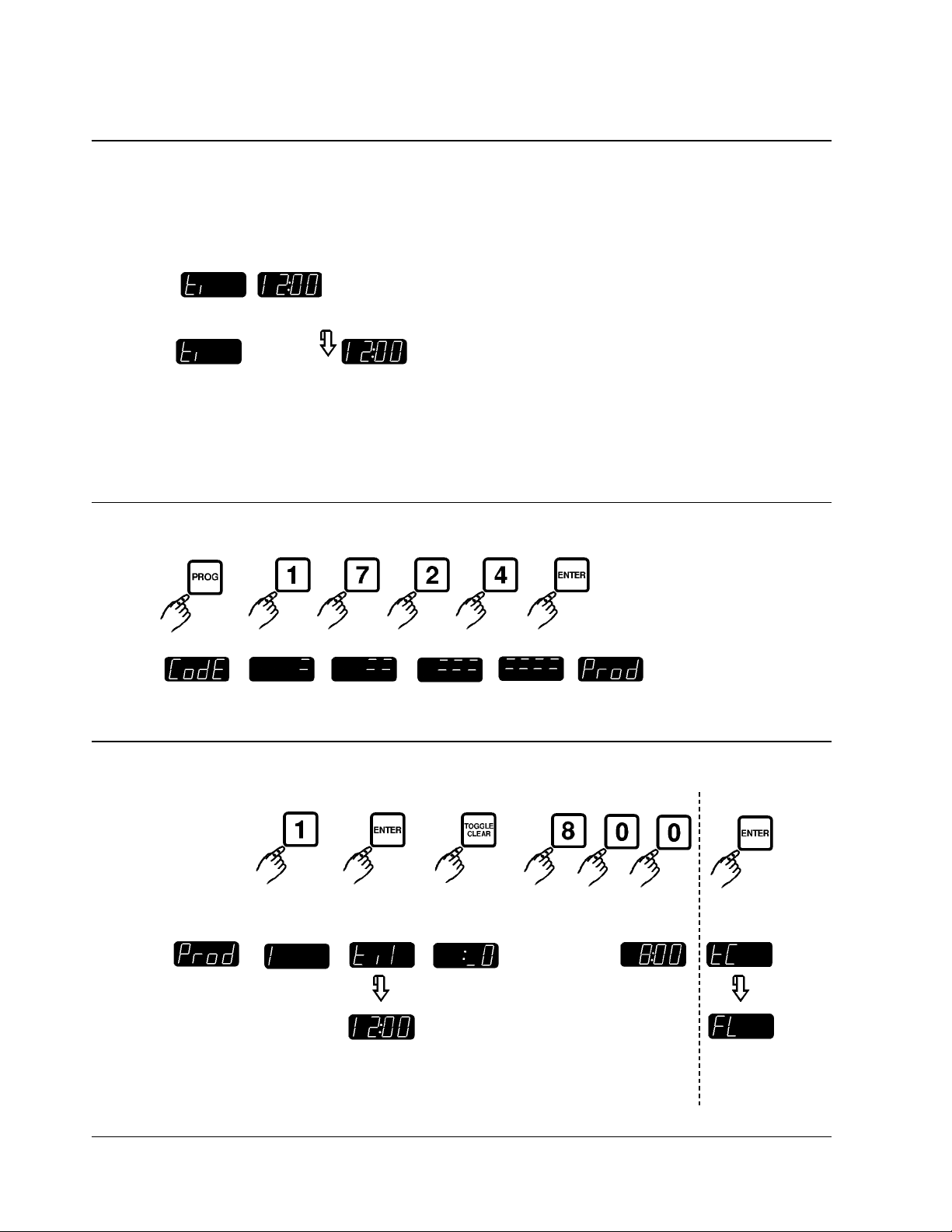
16 button units have 2 displays that show a full line of information;
for example: .
8 button units have a single, dual-purpose display that will alternate information;
for example: (and then) . (This manual shows only 8 button units.)
SCAN advances you to the next setting for the same function. ENTER completes programming for that function and
advances you to the next function.
Entering Programming Mode
Press
Display
• The controller is now in Product Key Programming Standby Mode.
Programming a Product Key Cook Time
Press
Display
☞
☞
select any
product key
currently
programmed time 1
is
displayed
to change
cook time
enter a new
product cook time
New product cook time is entered. You
may now program flex or straight
time operation for that product key.
Page 9
THE UNAUTHORIZED USE OR DUPLICATION OF THE SOFTWARE DESCRIBED HEREIN,
OR THIS MATERIAL IS STRICTLY PROHIBITED.
9
I
M-2000
™
PROGRAMMING THE CONTROLLER
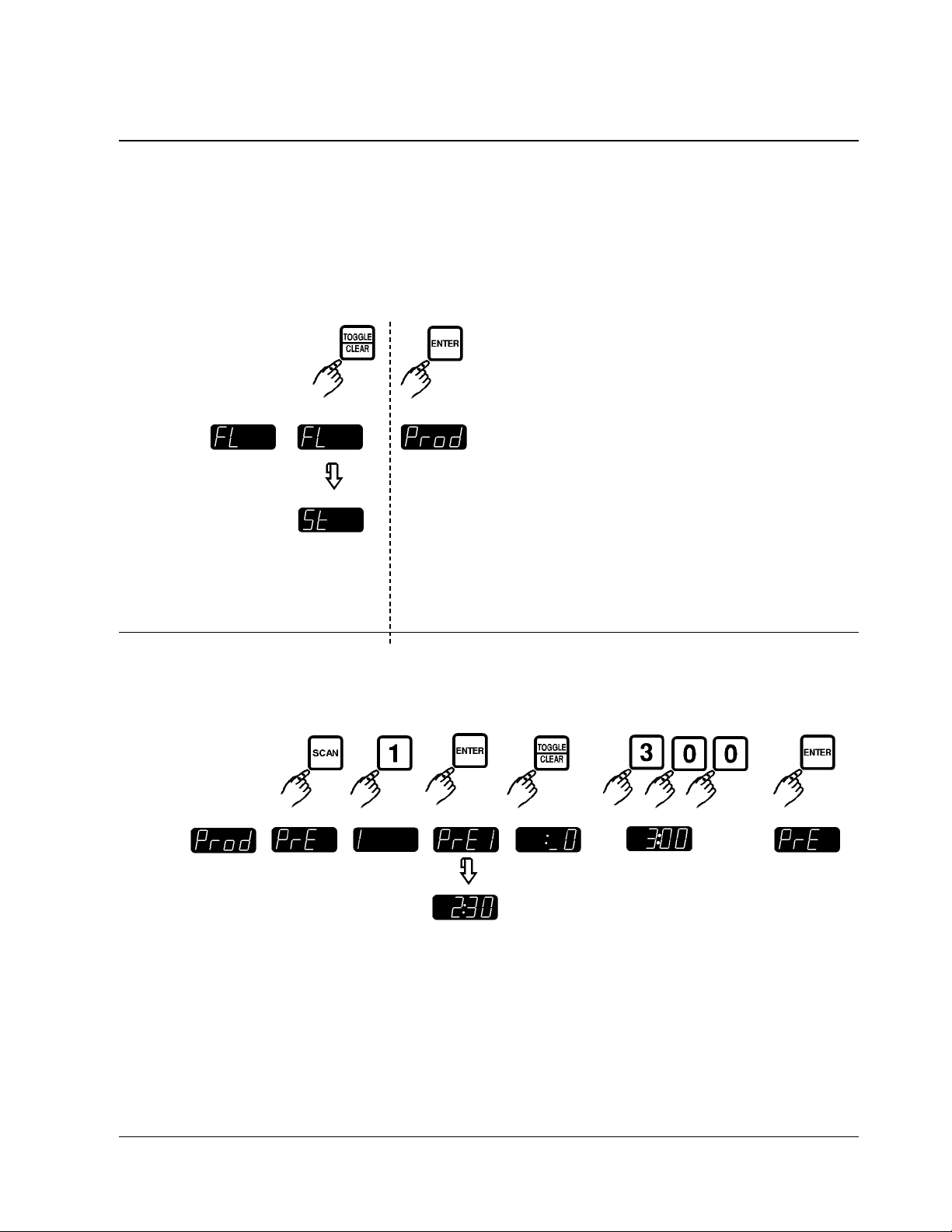
Programming Flex or Straight Time Operation
Press
Display
Programming Action Alarm Times
Press
Display
to toggle
between choices
(See note below
before
continuing.)
Flex or straight time option is now
entered. You may now program
action alarm times.
currently
programmed
action alarm
time is
displayed
to change
action alarm
time
enter new action alarm
time
to keep new
action alarm
time
press any
product key
Page 10
NOTE: Not all features are available on all models.NOTE: Not all features are available on all models.
THE UNAUTHORIZED USE OR DUPLICATION OF THE SOFTWARE DESCRIBED HEREIN,
OR THIS MATERIAL IS STRICTLY PROHIBITED.
10
PROGRAMMING THE CONTROLLER
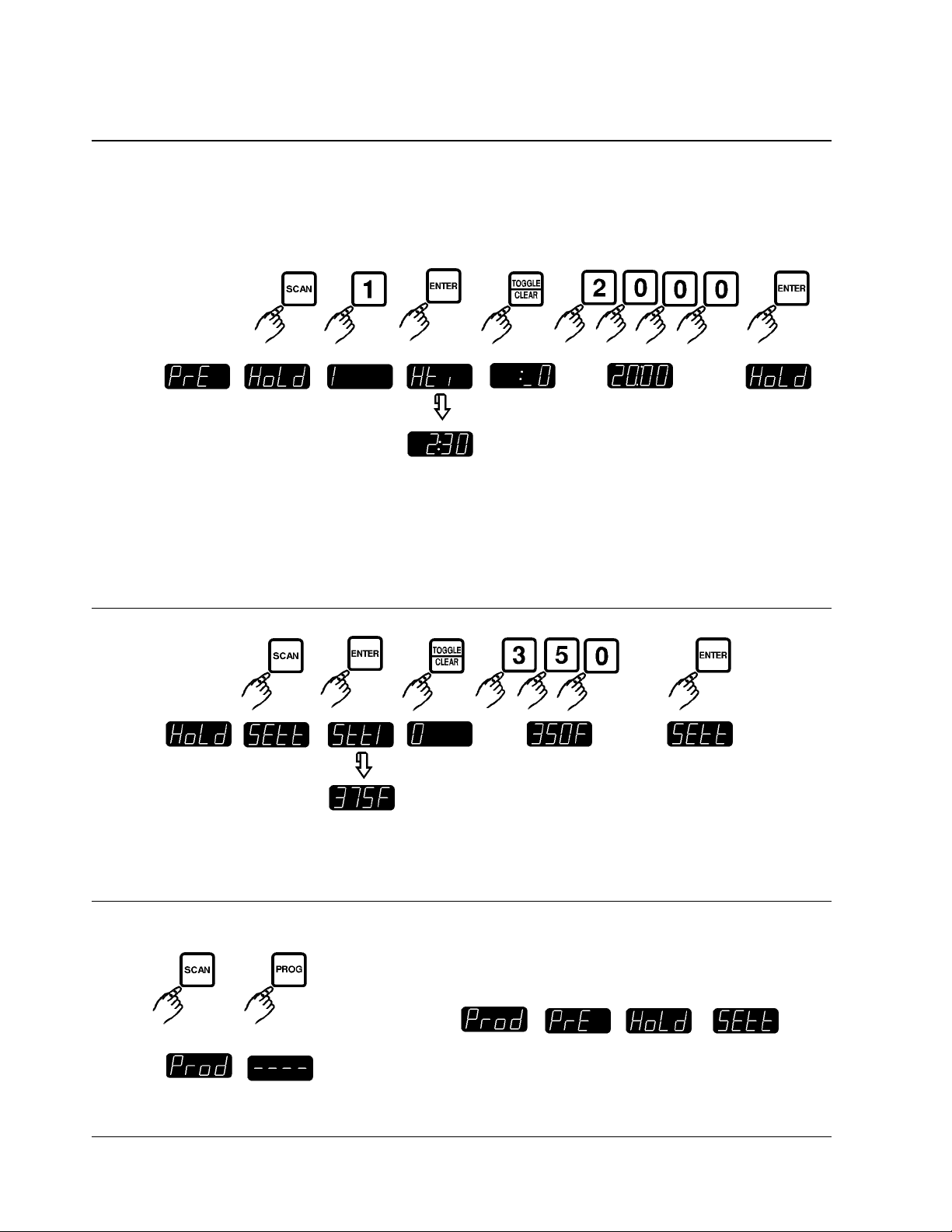
Programming Hold Times
Press
Display
NOTE: Up to 4 hold timers can be programmed per product key on the 8 button controller; up to 8 hold timers can
be programmed per product key on the 16 button controller.
Programming Cook Temperature
Press
Display
Exiting Programming Mode
Press
Display
currently
programmed
hold time is
displayed
to change
hold time
enter a new hold time to keep new
hold time
press any
product key
currently
programmed
temperature
is displayed
to change
set
temperature.
enter a temperature to keep new
temperature
Press PROG when any of these functions are displayed.
Page 11
THE UNAUTHORIZED USE OR DUPLICATION OF THE SOFTWARE DESCRIBED HEREIN,
OR THIS MATERIAL IS STRICTLY PROHIBITED.
11
I
M-2000
™
PROGRAMMING THE CONTROLLER
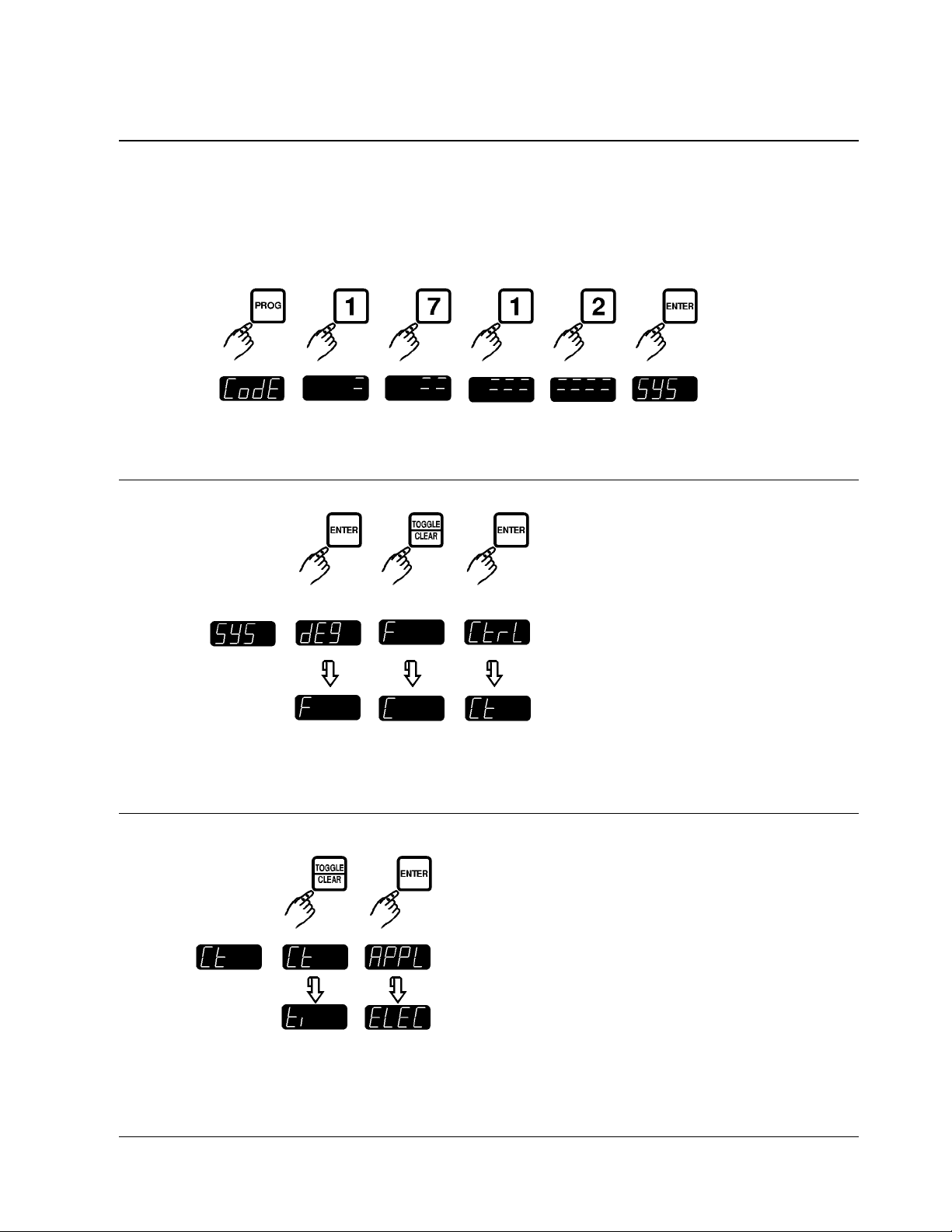
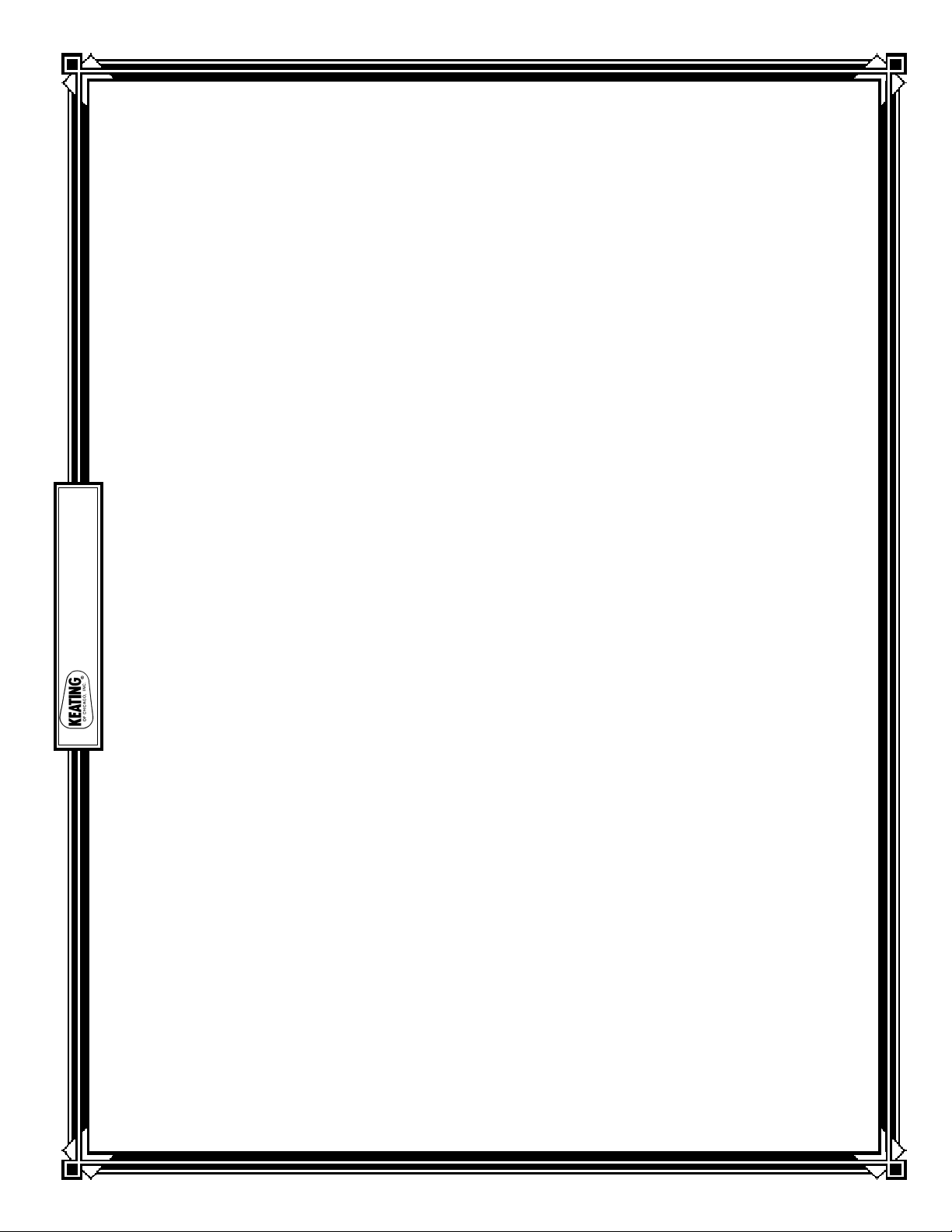
Entering System Programming Mode
Press
Display
• The controller is now in System Programming Standby Mode.
Programming Fahrenheit or Celsius Temperature Display
Press
Display
Programming Operating Mode (Controller or Timer)
Press
Display
toggle
between
Fahrenheit
or Celsius
to keep displayed
before setting;
and advance to
“Programming
Operating Mode”
current
degree
option is
displayed
toggle
between
Controller
and Timer
to keep displayed operating mode;
and advance to “Programming
Appliance Type”
Page 12
NOTE: Not all features are available on all models.NOTE: Not all features are available on all models.
THE UNAUTHORIZED USE OR DUPLICATION OF THE SOFTWARE DESCRIBED HEREIN,
OR THIS MATERIAL IS STRICTLY PROHIBITED.
12
PROGRAMMING THE CONTROLLER
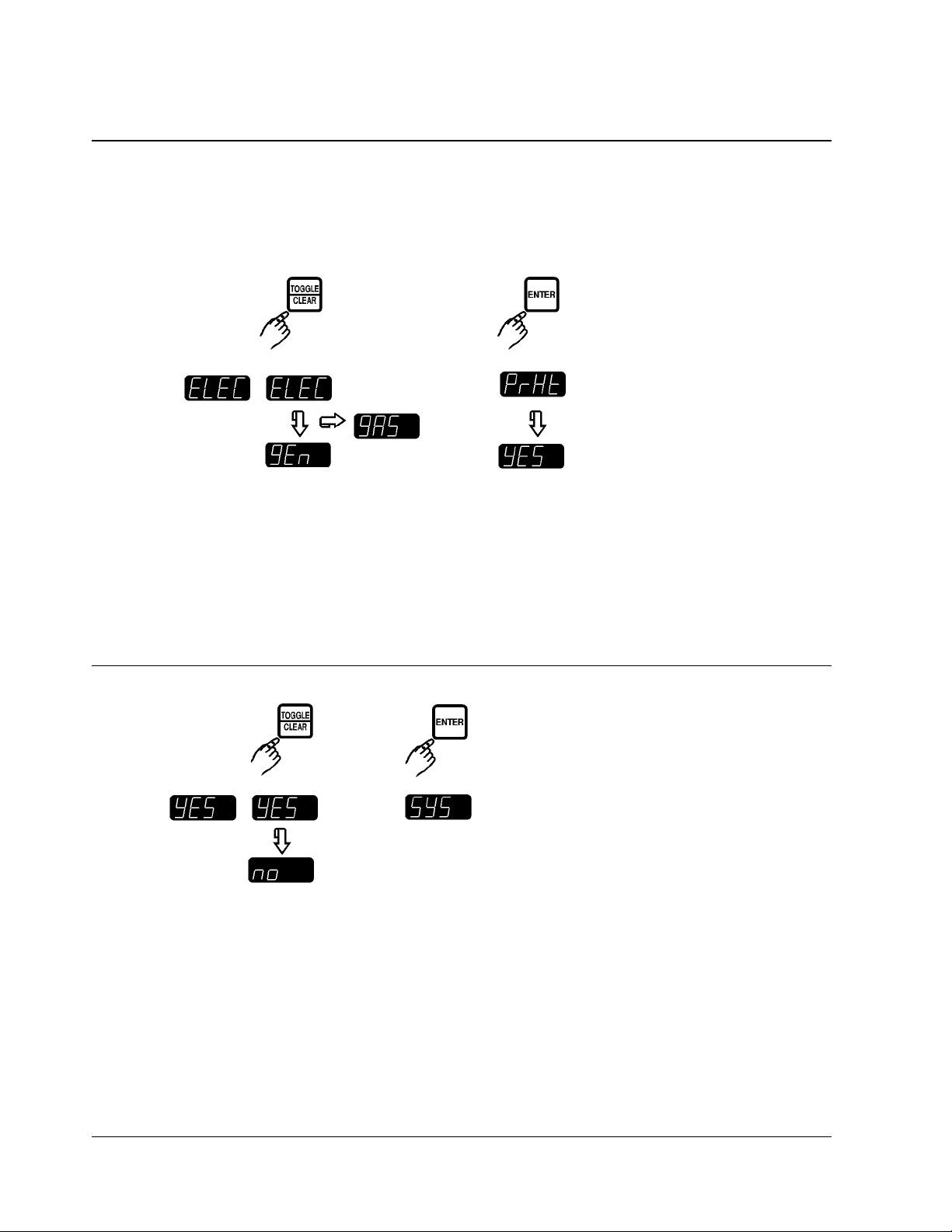
Programming Appliance Type
Press
Display
current toggle to keep
appliance between three appliance configurations displayed
type is for size of fryer or power type; for appliance type;
displayed example: and advance to
ELEC — Electric Fryer “Programming
GAS — Gas Fryer Preheat Option”
GEN — Generic Option Selected*
*This display may differ depending on
custom configuration of the controller.
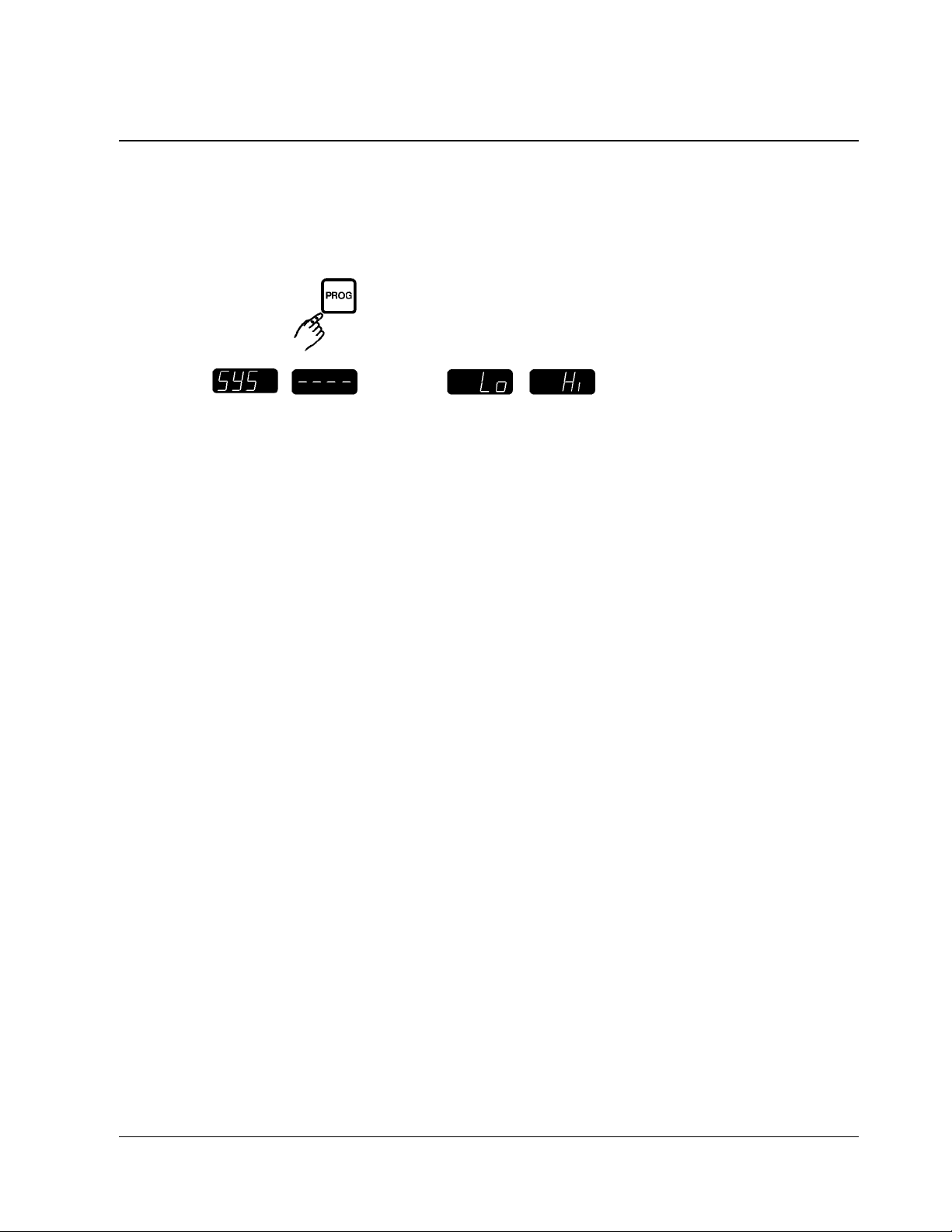
Programming Preheat Option
Press
Display
DANGER: Melt Cycle override should NOT be used with solid shortening. Misuse could result in personal injury.
current
preheat
option is
displayed
toggle
between
YES –
Melt Cycle Enabled, or
NO –
Melt Cycle Override
to keep preheat
option choice
Page 13
THE UNAUTHORIZED USE OR DUPLICATION OF THE SOFTWARE DESCRIBED HEREIN,
OR THIS MATERIAL IS STRICTLY PROHIBITED.
13
I
M-2000
™
PROGRAMMING THE CONTROLLER
Exiting System Programming
Press
One of these displays will appear.
Display
The controller
is now in
Operating
Standby Mode.
Page 14

NOTE: Not all features are available on all models.NOTE: Not all features are available on all models.
THE UNAUTHORIZED USE OR DUPLICATION OF THE SOFTWARE DESCRIBED HEREIN,
OR THIS MATERIAL IS STRICTLY PROHIBITED.
14
NOTES
Page 15

THE UNAUTHORIZED USE OR DUPLICATION OF THE SOFTWARE DESCRIBED HEREIN,
OR THIS MATERIAL IS STRICTLY PROHIBITED.
15
I
M-2000
™
Warranty Statement
Keating of Chicago, Inc. provides a limited one-year
warranty for its products (except probes and hoses
for which the period is 90 days). A copy of the exact
provisions of this warranty and the other terms and
conditions of sale are available upon request.
Controller Operating
Environment
PLEASE NOTE: The solid state components in this controller are designed to operate reliably in a temperature range up to 158°F / 70°C. Before installing this
controller, it should be verified that the ambient temperature at the mounting location does not exceed
158°F / 70°C.
Patents
The products are protected under one or more of the
following U.S. Patents:
4,077,690 4,113,623 4,278,872
4,320,285 4,610,238 4,644,931
4,688,475 4,740,888 4,742,455
4,782,445 4,812,625 4,812,963
4,864,498 4,911,068 4,920,948
4,921,509 4,973,882 5,043,860
5,171,974 5,331,575
Plus foreign patents and patents pending.
Plus licensed patents:
4,437,159 4,549,527 4,663,710
4,858,119
Page 16
LIMITED WARRANTY
Keating Of Chicago, Inc. ("Keating”) warrants to the original purchaser. ("Customer"), all new Keating Fryers, Filter Systems, Griddles, Keep Krisp
®
, Custom Pasta Systems, Top-Side™ Cookers, Computer Timers, Fryer &
Pasta Vessels, and Keating replacement parts ("products") installed after June 1, 1994 to be free to defects in material or workmanship, subject to the following terms and conditions.
LENGTH
OF WARRANTY
All products other than Fryer & Pasta Vessels and replacement parts shall be warranted for a period of one year from the date of original equipment installation. Keating replacement parts are warranted for a period of nine-
ty days from the date of installation. Fryer & Pasta Vessels are warranted as described below.
F
RYER & PASTA VESSEL W
ARRANTY
Fryers purchased after June 1, 1994 carry a prorated vessel warranty on defects in materials or workmanship to the Customer based on the following scale:
Time from Installation Date Fryer Vessel Warranty Credit
13-60 months 100%
61-72 months 80%
73-84 months 60%
85-96 months 40%
97-108 months 20%
109-120 months 10%
The credit for the defective fryer & pasta vessel shall be applied against the cost of the replacement vessel, utilizing Keating's then current price, upon return of the vessel to Keating, (Freight to be paid by Keating within
the first 2 months only), only during the first 60 months as described above, subject to the limitations described below.
L
IMITATIONS
OF LIABILITY
In the event of warranty claim or otherwise, the sole obligation of Keating shall be the repair and/or replacement at the option of Keating of the product or component or part thereof. Such repair or replacement shall be
at the expense of Keating except that the Customer shall pay the following expenses: all freight and labor expense for Keating replacement parts for all other products, mileage exceeding 50 miles or travel more than one
hour, labor costs of more than one person, overtime rates, truck charges, difference between ground and other mode of transportation, and holiday charges. Any repair or replacement under this Limited Warranty does not
constitute an extension of the original warranty for any period for the product or for any component or part thereof. Parts to be replaced under this Limited Warranty will be repaired at the option of Keating with new or
functionally operative parts. Keep Krisps and Computer Timers must be returned to Keating for warranty repair or replacement. Field repairs of those items are not authorized.
THE LIABILITY OF KEATING ON ANY CLAIM OF ANY KIND, INCLUDING CLAIMS BASED ON WARRANTY, EXPRESSED OR IMPLIED, CONTRACT, NEGLIGENCE, STRICT LIABILITY OR ANY
OTHER THEORIES SHALL BE SOLELY AND EXCLUSIVELY THE REPAIR OR REPLACEMENT OF THE PRODUCT AS STATED HEREIN, AND SUCH LIABILITY SHALL NOT INCLUDE, AND CUSTOMER
SPECIFICALLY RENOUNCES ANY RIGHTS TO RECOVER, SPECIAL, INCIDENTAL, CONSEQUENTIAL OR OTHER INJURIES TO PERSONS OR DAMAGE TO PROPERTY, LOSS OF PROFITS OR
ANTICIPATED PROFITS, OR LOSS OF USE OF THE PRODUCT.
If any oral statements have been made regarding the Keating products, such statements do not constitute warranties and are not part of the contract sale. This Limited Warranty constitutes the complete, final and exclu-
sive statement with regard to warranties.
THIS LIMITED WARRANTY IS EXCLUSIVE AND IS IN LIEU OF ALL OTHER WARRANTIES WHETHER WRITTEN, ORAL, STATUTORY OR IMPLIED, INCLUDING BUT NOT LIMITED TO ANY WAR-
RANTY OF MERCHANTABILITY OR FITNESS FOR PARTICULAR PURPOSE OR WARRANTY AGAINST LATENT DEFECTS.
EXCLUSIONS
The warranties provided by Keating of Chicago, Inc. do not apply in the following instances:
1. Defects arising out of or resulting from improper installation or maintenance, abuse, misuse, modification or alteration by unauthorized service personnel, or any other condition not attributable to a defect in material or
workmanship. Proper installation and maintenance are the responsibility of the installer and Customer, respectively. Proper installation and maintenance procedures are prescribed by the Keating Service Manual.
2. In the event that the product was damaged after leaving the factory due to flood, fire, other acts of God or accident, damage during shipment should be reported to the carrier and is not the responsibility of Keating.
3. In the event the serial number or rating plate has been removed from the product or altered.
4. On parts which would normally be worn or replaced under normal conditions, including but not limited to electric bulbs, fuses, interior and exterior finishes, gaskets and radiants.
5. With regard to adjustments and calibrations such as leveling, tightening of fasteners or plumbing connections, improper gas pressure or improper electrical supply, the checking of and changes in adjustment and
calibrations are the responsibility of the installer. Proper installation procedures are prescribed by the Keating Service Manual.
6. In the event of unauthorized repairs or alterations to the Keating product.
7. With the use of sodium chloride in pasta vessels or harsh chemicals in fryer or pasta vessels.
OTHER TERMS AND CONDITIONS
The Customer must provide proof of purchase from Keating.
This Limited Warranty is valid in the 50 United States, its territories, and Canada, and is void elsewhere.
Keating products are sold for commercial use only. If any Keating product is sold as a component of another product or used as a consumer product, such Keating product is sold As Is without any warranty.
If any provision of this Limited Warranty is held to be unenforceable under the law of any jurisdiction, such provision shall be inapplicable in such jurisdiction, and the remainder of the warranty shall remain unaffected.
Further in such event, the maximum exclusion or limitation allowable under applicable law shall be deemed substituted for the unenforceable provision.
This Limited Warranty shall be governed by and construed in accordance with the laws of the State of Illinois.
TO SECURE WARRANTY SERVICE
All repair services under this Limited Warranty must be authorized by Keating or performed at Keating. Authorization may be obtained by calling 1-800-KEATING within the Continental United States, Alaska, Hawaii,
Puerto Rico and Canada during normal business hours (8 a.m. through 5 p.m. Central Time, Monday through Friday). When calling, please have the following information available: (1) name, address and
telephone number of the Customer; (2) location of product, if different; (3) name, model number and serial number of the product; (4) installation date; and (5) description of defect. Keating will then issue a service autho-
rization work order number to one of its approved independent servicing organizations, or request the product or part be shipped to Keating for repair or replacement, as appropriate. Any defective part subject to a claim
under this Limited Warranty must be shipped freight prepaid to Keating for testing and examination. Keating's decision as to the cause and nature of any defect under this Limited Warranty shall be final.
KEATING
KEATING OF CHICAGO, INC., 1-800-KEATING WWW.KEATINGOFCHICAGO.COM
REFILE/warranty 8/07
WARRANTY
Page 17

Literature Part #229-51017 Rev. A
THE UNAUTHORIZED USE OR DUPLICATION OF THE SOFTWARE DESCRIBED HEREIN,
OR THIS MATERIAL IS STRICTLY PROHIBITED.
17
I
M-2000
™
KEATING OF CHICAGO, INC.
8901 W. 50th Street, McCook, Illinois 60525-6001
Phone: (708) 246-3000 FAX: (708) 246-3100
Toll Free 1-800-KEATING (In U.S. and Canada)
www.keatingofchicago.com
THE AUTHORIZED USE OR DUPLICATION OF THE
SOFTWARE HEREIN, OR THIS MATERIAL, IS STRICTLY
PROHIBITED.
Specifications subject to change without notice.
Printed in the U.S.A.
©SCS 1994, 1997 970409
 Loading...