

Page 1

1
Kata S60 User manual
Page 2

2
CONTENTS
I. SAFETY AND PRECAUTIONS ...……………………………………………………………………………3
II. CELL PHONE OUTLINE ...…………………………………………………………………………………5
III. PREPARATIONS…………………………………………………………………………………………….5
IV. DESCRIPTION OF CELL PHONE ...….…………………………………………………………………11
V. BASIC OPERATION OF CELL
PHONE..………….. .……………………………………………………15
VI. OPERATION MENU FUNCTION. .….. .…………………………………………………………………19
VII. OPERATING INSTRUCTIONS OF
EDITOR...…………………………………………………………41
VIII. APPLICATION OF USB STORAGE
FUNCTION…..…………………………………………………42
IX. APPENDIX 1...………………………………………………………………………………………………42
X. APPENDIX
2...……………………………………………...……………………………………………...…45
Page 3

3
I. Safety and Precautions
To use your cell phone safely and effectively, please read the following information before use:
Please turn off your phone when you are near a chemical plant, a gas station, an oil depot or other
explosives.
Please keep your phone out of the reach of children.
To ensure safety, please use earphone during driving; Otherwise, unless emergency, you should make a call
after parking your car by the roadside. Do NOT use the phone during driving at high speed.
Do NOT use your cell phone while in a plane. Please check whether Auto Power On is set or not before
board.
Do not use your cell phone in a hospital to avoid interference with the normal operation of medical
equipment which may result in a medical accident. If the cell phone is used near a pacemaker, audiphone
and some medical electronic equipment, you should pay special attention to that the cell phone may
interfere with these devices.
Auxiliaries and accessories not provided by us are excluded from the guarantee.
Do not dismantle your cell phone by yourself. In case of a failure, please contact the service station
specified by us.
Do NOT charge your phone with no battery. Please turn off your phone before removing the battery;
otherwise, the phone memory may be damaged.
The phone should be charged in the environment which is well-ventilated, and should be kept away from
Page 4

4
the inflammables and explosives.
To avoid demagnetization, please keep your phone away from magnetic substances, such as magnetic disk,
credit card, etc.
Please be sure the phone isn't exposed to any liquid. If this situation occurs, please remove the battery and
contact the service station specified by us.
Please use your phone in the environment which is neither too hot nor too cold, and do not expose your
phone to the strong sunlight or use in high-humidity environment.
Do NOT use liquid or wet cloth with strong detergent to clean your phone.
Your cell phone has photo and record functions, so please use these functions following the related laws and
regulations. You may violate the law and regulation if taking photo and record without authorization.
Do not throw, drop or hit the cell phone during use to avoid damage to the housing or the elements inside
the phone.
Do NOT dispose the worn battery as common domestic rubbish. Please dispose the worn battery according
to the specified instructions where the disposal of a worn battery is clearly specified.
〈Note〉: 1. The Company won't undertake any responsibility for any consequences caused by failure to
observe the above-mentioned suggestions or improper applications.
2. The provided cables are only applicable to this type of mobile phone and the provided charge;
you can also connect the phone to the PC by a USB cable to charge the phone. Do not charge the phone by
any other mode.
If any content described in this manual goes against that of your cell phone, please subject to the real cell
phone.
The original factory is entitled to modify the manual at any time without further notice.
Page 5

5
II. Cell Phone Outline
The following is the view of the phone:
Page 6

6
III. Preparations
Installation of your SIM card
You can apply for two different numbers offered by two network providers and get two SIM cards (users
identify cards).
With those two SIM cards, you can use various functions of this cell phone. Many parameters required for
communications are stored in the SIM cards. Personal data, including the PIN (personal identification number),
phonebook, SMS and other extra system services can also be stored in the SIM cards.
Warning:Do NOT twist or scratch the SIM card and expose it to static electricity, dust or water. If you lost
your SIM card, please contact your network operator for help.
To install your SIM cards, please turn off your cell phone first, remove the back cover, and insert the SIM
cards into the SIM card slots at the back of the phone.
Please install the SIM cards as shown below:
Page 7

7
Note:The SIM card is a small object, please keep the card out of the reach of the child to avoid swallowing
the card by accident!
Installation of memory card
The phone supports T-FLASH card as to expand the memory space. Please install or take out the memory card
as per the following picture after shutting down the phone.
Note: The T-FLASH card is a small object, please keep the T-FLASH card out of the reach of the child to
avoid swallowing the card by accident!
Tip:The phone supports a memory card with capacity up to 8GB. It is recommended that only the attached
standard TF card and other TF cards of well-known brand like SanDisk and Kingston are used. Other TF cards
may be not compatible with the phone.
Page 8

8
Installation of battery
Please use the original-packaging battery and accessories. Store the battery well if it is not used.
Please install the battery at shut down status.
Note:Please follow the correct procedures as shown in the figure to prevent damage to the battery contact
points.
Charge the battery
The new battery must be fully charged and discharged for several times to reach its best performance.
Charge as soon as possible when the power is used up as over-discharge will damage your battery.
Disconnect the charger and the power supply and then disconnect the mobile phone when the battery is
fully charged.
Connect your phone to the charger as per the drawing.
Page 9

9
When charging, if the phone is switched on, the power quantity icon at the top right corner of the screen
will twinkle and will stop twinkling and fully display when the battery is fully charged. If the phone is switch off,
an icon will appear at the screen to show the battery is in charging.
Note:A little heating while charging is normal.
Use of battery
The performance of the battery is affected by multiple factors including your wireless loading network
configuration, signal intensity and temperature when using the phone, the function or settings you selected, the
accessories adopted for cell phone and other applied program modes.
Page 10

10
To optimize the performance of the battery, please do as following regulations:
New battery or a battery is left unused for a long time should be charged for a long time;
Keep the temperature at or near room temperature when charging;
The battery may require longer time to be full charged after being used for a long time and this is
normal. If the call time becomes too short, you may need to buy a new battery produced by original
factory or authorized by our company. Unqualified battery or accessories may damage your phone and
even cause danger!
If the battery is left unused for a long time or the power is too low, it may require longer time for the
charging interface to appear, please wait patiently.
Note: For your safety and environment, please do not throw away the battery everywhere.
Warning: Explosion, fire or personal injury may be caused by any type of battery short-circuit!
PIN
PIN1 code: Personal identification code used to enter SIM card and to prevent others to use the SIM card
without your permission. If PIN1 code safeguard function of your cell phone has already been started, the system
will display “Enter SIM card 1/2 PIN” to enter when switching on the phone. * will be displayed instead of the
PIN1 you entered. You can get PIN1 from your network provider together with the SIM card.
PIN2: The personal identification number use for special functions such as charging function provided by
the network.
PUK and PUK2 (8 digits)
A PUK is required to change the PIN. To change the PIN2, you need to use PUK2 (personal unlock code).
If PUK is not provided together with the SIM card, please ask for it from your network provider.
〈Warning〉:If the PIN code is entered continuously three times, the SIM card will be locked in. Please
consult the network supplier right away to look for deciphering. Unauthorized deciphering may cause permanent
failure to the SIM card.
Page 11

11
IV、Description of Cell Phone
Dialing key
Make or answer calls from SIM 1.
Short pressing the dialing key can enter SIM 1 call log under standby status.
Hang-up key & on/off key
Hang-up or reject a call.
Long press the key to switch off the phone under standby status.
Long press the key to switch on the phone when the phone is switched off.
Direction keys
Move the bar or cursor.
Enter appointed shortcut under standby status.
OK Key
Confirm an operation in menus.
Number keys
Input numbers or characters.
Long press the number keys 1to 9 to quick-dial while standby.
Long press the # key to mute and quit mute under standby mode.
Short press the * key repeatedly or long press it to enter “P”, “+” or “W” characters under dialing interface.
Icons on screen in standby status
SIM card 1 Antenna
SIM card 2 Antenna
Alarm clock activated
SIM card 1 SMS
SIM card 2 SMS
Page 12

12
SIM card 1 MMS
SIM card 2 MMS
Battery
Ringing
Vibration then ring
Vibration and ring
Vibration
Missed calls in SIM card 1
Missed calls in SIM card 2
SIM card 1 GPRS
SIM card 2 GPRS
Bluetooth
Call divert activated in SIM card 1
Call divert activated in SIM card 2
Keypad lock
Languages & Input Methods
English input method is provided in your phone. For details, please refer to chapters related to language
editing, where you can learn different input methods and how to switch between them.
Incoming Call alert method
The built-in vibrating motor and buzzer in your phone provides the following alerting modes:
Ring
Vibrating
Vibrating and ringing
Page 13

13
Vibrating then ringing
Descriptions of nouns
Making a national call
The simplest way to make a domestic call is to input a phone number by numeral keys and press the
dialing key. If the both SIM cards are inserted and dual SIM open, SIM card 1 dial or SIM card 2 dial
would be selected by pressing dialing keys of SIM 1 or SIM 2.
Note: Enable the function of LSK dialing function in the menu “Call center / General call settings/
SIM card 2 call settings”. Then you could dial from SIM 1 by pressing the calling key, and dial from SIM 2
by pressing LSK.
The screen displays animation of dialing. If dialing from SIM card 1, the screen will display “SIM Card
1 Dialing”, and if dialing from SIM card 2, the screen will display “SIM Card 2 Dialing”.
Call status will display on the screen when the call is answered.
Press the hang-up key to end the call.
Make domestic calls: zone number + phone number + dialing key.
Making an international call
To make an international call, long press or repeatedly short press the * key until the symbol “+” is
displayed on the screen. This allows you to make an international call without knowing the prefix number
of that country (e.g. China is +86).
Then input the country code and the complete phone number. The country code is subject to
convention, e.g. Germany is 49, Britain is 44 and Sweden is 46, etc.
Make international calls: + country code + complete phone number + dialing key.
Call extension of a fixed phone
Extensions of some fixed phones are not accessible directly, in such case, you need to dial the host
number and then the extension number. Simply insert the letter “P” between the host number and the
Page 14

14
extension number and you can call the extension. You can input a “P” by long pressing or repeatedly short
pressing the * key.
Call extension of a fixed phone: phone number + P + extension number + dialing key.
Make emergency calls
In any country where digital GSM is used, you can make an emergency call if your phone is covered
by the network (you can know about this by checking the signal strength indicator bar at the upper corner
of the display of the cell phone). If your network operator does not provide roaming service in that area, the
screen will display "EMERGENCY CALLS ONLY", telling you that you can make this kind of call only.
If you are in the coverage of the network, you can make emergency calls even if your SIM card is not
inserted in.
In some areas, the 112 (emergency call)service is provided by the network operator. If there is anything
abnormal, contact your network operator!
IMEI
International Mobile Equipment Identity. You can see the bar code label printed with this number at the
back of the cell phone after you have turned off the cell phone and remove the battery. This number is also
stored in the cell phone, and can be displayed when you enter "*#06#" on the screen dial interface.
Page 15

15
V、Basic operation of cell phone
Switch on
Press and hold on “ON/OFF” to start up the cell phone. If no password settings are given for the SIM card
and cell phone, the phone will search for a network automatically, and when the cell phone registers a network,
the name of the network supplier will be shown on the screen. You can now answer or make a call.
If the display indicates “Insert SIM card 1”or”Insert SIM card 2” after the start-up, please power off your
phone, and check whether your opposite SIM cards have been installed correctly or hasn't yet been installed or
not.
After plugging into a SIM card, the phone will automatically check SIM card for availability, then the
display screen will indicate the following prompts in sequence:
1) “Enter phone lock password” ―― if you have started up the phone lock (default password: 1122.)
2) “Enter SIM card 1/2 PIN” ―― if you have started up the SIM card 1/2 lock.
3) “No service” ―― it represents the register network failure, and you can't call at this time.
4) “Emergency Call” ―― it allows to call 112.
5) “Search” ―― the phone is searching a network, until it finds out a suitable service network.
6) The screen displays the network operator name – it represents the network register success.
If only SIM 1 card is installed and the current mode is “SIM card 1 only”, the screen will display the name
of SIM card 1 provider only and that “SIM card 2 is off”; if only SIM card 2 is installed, the screen displays in
reverse. If only SIM card1 is installed and the current mode is “two cards on”, the screen will display the name
of SIM card 1 provider only and that “Please insert SIM card 2”; if only SIM card 2 is installed, the screen
displays in reverse.
Switch off
If you want to shut down the cell phone, please long press ON/OFF key, and after the screen displays the
power off animation, the cell phone will shut down. Please don’t shut down the phone directly by dismantling
Page 16

16
the battery, and if you do like this, it is easy to damage SIM card and may cause loss of some information.
Making a call
Enter the phone number in standby status, and press the calling key to call. If you want to hang up or cancel
the call, please press the hook up/cancel key;When the phone is connected, you can see the holding time on
the screen.
Use the phonebook to make a call: Search the name/phone number saved in the phonebook, and press the
calling key to call.
Redial the latest phone number:Press the calling key in standby status to search the latest list of phone
number or name. Roll over to the number or name, then press the calling key.
Adjusting the receiver volume
During a call, you can press side keys to adjust the receiver volume.
Answering a call
When there is a coming call, it will indicate in a mode of ring, vibration, vibration and ring,ring after
vibration or lighting according to the setup of cell phone.
To answer a call, press the calling key.
To reject a call, press on/off key.
If you have applied for calling number identification service, the calling number will show on the screen. If
this number has already stored in the phonebook, the corresponding name of this number then will show on the
screen.
If the call is to SIM card 1, “Call to SIM Card 1” will display in front of the number or name.
If the call is to SIM card 2, “Call to SIM Card 2” will display in front of the number or name.
Speed dial
The phone provides 8 speed buttons, and you can define the phone numbers corresponding to these buttons.
So, as long as you long press [2 to 9] keys in standby status, you can call speedily; [1] key is specially used for
Page 17

17
the speed dial of voice mailbox number.
<Note>: To speed dial, you have to press and hold on/press a key for 2 seconds and above, and if you
haven’t designated the speed dial function for that key, then you can't be successful for the call.
Sending DTMF signal
When you have set up the DTMF signal sending function, if you press the digit key and * and # key of the
keypad during the period of conversation, it will be sent out in the form of DTMF signal to the other party. If
you don't start up this function, you can't carry out the extension number calling, etc. functions probably.
Call Hold
If you have applied for the value adding of call waiting, the following function menu may appear when you
click an entry during conversation:
Hold: Temporarily suspend the current conversation, but the conversation channel still under connection.
End: End the current connection.
New conversation: Enter the dial interface, and make another call.
Phonebook: You can enter a phonebook directory.
Information: You can enter messages directory.
Record:You can record the current calling contents.
Background tone:Enable or disable the background tone.
Mute/resume: You can switch on/off microphone.
Dual-tone multi-frequency, DTMF: You can set up whether to send out a DTMF signal.
Note:Some menu entries just appear under the specific condition, or they need support from the local
network, such as: “Hold” and “New conversation”, etc., for detail, please consult the network supplier.
Non-response event
When the cell phone has new unread messages and missed call etc. events, the cell phone will have the
corresponding picture or icon prompt, please search these messages in time.
Page 18

18
Connecting to voice mailbox
Your cell phone allows you to divert the incoming call to the voice mailbox, then, you will receive a notice
concerning the voice messages (the center number of voice mailbox should be set up properly in advance).
Page 19

19
VI、Operation menu function
1 Message
The SMS function is a network service. You may need to apply to the network operator first before you can
send and receive a short message.
Your cell phone supports the short message sending function. Short messages are sent to network SMS
center first and then sent to subscribers. If the subscriber does not turn on the phone or cannot receive messages
(storage is full), the network will keep this message temporarily. The keeping period will be determined jointly
by the message sending user's setting and the service operator.
By using the SMS, the phone can send and receive long messages. Sending long messages may affect the
charge for the messages. For details, please contact your service operator.
If the memory for message is full, a twinkling icon will remind you on the screen. You mobile phone
support dual SIM card so messages in SIM card 1 and 2 are separately stored. The reminders for full memory of
SIM card 1 and 2 will also be given separately. In such case, you need to delete at least one message in the
memory of the corresponding SIM card to receive new message.
Note:When you send a short message through SMS network, "Message sent" will be displayed on the
screen. That is to say, the phone has sent the message to the message center mailbox set by your phone. But that
isn't to say, the specified user has received the message. For more detailed information about SMS, please
contact your network operator.
1.1 Write message
You can create a message in this menu.
The phone supports sending a long message having over 160 characters (character number restriction for
common text messages). If a message has more than 160 characters, the message will be divided into two or
more messages and sent.
The following menu option functions by using left key are provided when you are writing a short message:
Page 20

20
Send to:
Enter recipient
Add from Phonebook
Input method: To select the input method for edition of a message.
Add picture: To insert an image to the message.
Add sound: To insert an audio file to the message from phone or memory card.
Add video: To insert a video file to the multimedia message.
Add subject: You can add a subject for the current message.
Slide options:
Add slide behind:To insert a new slide behind the current slide.
Add slide before:To insert a new slide ahead of the current slide.
Switch to MMS
Advanced:
1. Insert text Template: Select frequently used phases from the template and insert into message editing
interface.
2. Insert attachment: Insert ring tones, picture and images animations.
3. Insert contact name and number: Enter contacts and insert the found name and number.
4. Bookmark:Enter the bookmark interface, insert the selected bookmark.
Save: You can save the current message into Drafts or as a template.
Details: You can check the character of the message
1.2 Inbox
The received messages are saved in Inbox. You can view all received messages in Inbox. The messages of
SIM card 1/2 are separately saved. You can perform the following operations:
◈ View: View the content of the message.
Page 21

21
◈ Reply: To replay a received short message.
◈ Call sender: Make a call to the sender.
◈ Forward: To forward the current message to the other subscriber.
◈ Delete: To delete the current message.
◈ Delete all: To delete all messages Inbox.
◈ Save to Phonebook: To save the sender number to SIM1/2 or Phone.
◈ Move to Archive: Move the current message to archive.
◈ Mark several: You can mark several messages, then edit these messages the same operation.
1.3 Drafts
Select “Save” when you want to send a short message, then the message will be stored in draft box. The
message failed to send will be also stored in drafts box, and relative operations can be implemented.
1.4 Outbox
If you fail to send some messages which will be stored in Outbox.
1.5 Sent messages
The messages that have been sent successfully are stored in SentBox, and you can implement the relative
operations of the messages.
◈ View: View the content of the message.
◈ Forward: To forward the current message to the other subscriber.
◈ Delete: To delete the current message.
◈ Delete all: To delete all messages sentbox.
◈ Mark several: You can mark several messages, then edit these messages the same operation.
◈ Advanced
1. Copy to phone: To copy the current short message to phone.
Page 22

22
2. Move to phone: You can the current message to phone storage.
3. Copy all: To copy messages between phone and SIM card.
4. Move all: To move messages between phone and SIM card.
1.6 Archive
You can implement the relative operations to the messages moved in archive.
1.7 Delete messages
You can delete all messages of Inbox, Drafts, Outbox, Sent messages and Archive.
1.8 Sim Search
You can enter the content to search the messages which includes this content.
1.9 fix time SMS
You can edit a message in advanced and set the time to send it.
1.10 Sign
You can enable/disable the sign status and edit the sign content which will be used at the end of your sent
messages.
1.11 Broadcast message
Cell broadcast is a service provided by the network operator to send messages such as weather forecast,
traffic status, etc. to all GSM subscribers in a specific area.
Note: The realization of the cell broadcast function needs the support of the network. For details, please
contact the network operator.
【Receive mode】: To enable/disable the Broadcast Message.
【Read message】:When the Broadcast Message has been enabled, the received message can be read after
Page 23

23
the corresponding server has been enabled.
【Languages】:To enable/disable the all languages of messages received.
【Channel settings】: To select, add, edit or delete channel numbers.
1.12 Templates
Include the templates of SMS and MMS.
1.13 Message settings
1.13.1 Text message
1.13.1.1 Message setting of SIM card 1/2:
You can set some parameters of messages in this menu. Parts of setting menu of SIM card 1/2 are separate.
【Profile setting】: To set the name of a profile, SMS center number, message validity period, and message
type. To send a message, the SMS center number shall be provided.
Note:The number of the SMS center is provided by the network operator. For details, please contact the
network operator.
【Voicemail server】:
Voice mail server is a network service. You may apply for this service beforehand. For detailed information
and voice mail server number, please contact your network operator.
SIM card 1/2 voice mail server:
Call voicemail:To dial the voice mail server number stored in your voice mail server number list.
Edit:To edit voice mail name and server number. Press OK to store your number.
Tip: Under the standby condition, you can call the voice mailbox number by long pressing the key "1" after
you have set the voice mailbox number.
【Common settings】: Enable or disable delivery report and reply directory.
Page 24

24
Delivery report:The network reports whether the opposite side has received the message and the time
received.
Reply path:To transfer the reply path to the network terminal. This function requires the support of
message center.
Save sent message: Set the sent message stored in Sentbox.
【Memory Status】: Check memory space use of SIM card or mobile phone.
【Preferred Storage】: Appoint the directory to save the message (SIM cards or mobile phone).
1.13.1.2 Message Firewall: Enable or disable the blacklist function. You can enter a number in the
blacklist. When the function is enable, you phone will reject the messages form the number.
1.13.2 Multimedia message
You can set parameters for MMS or view the memory status in this menu. For detailed information on
MMS parameters, please contact your network operator.
Profiles:Set the current profiles.
Common settings:
Compose:
【Slide time】: Set play time of each page.
【Compose mode】: Select the compose mode.
【Picture resizing】: Enable or disable resizing of picture.
【Auto signature】: Enable or disable auto signature.
【Signature】: Input signature.
Sending:
【Validity period】: Set valid time of the message in Message Center.
【Delivery report】: Enable/disable delivery report.
【Read report】: Enable/disable read report.
Page 25

25
【Priority】: Set priority to be sent of the multimedia messages.
【Delivery time】: Set storage time of the message in Message Center. This setting depends on your
network provider and your setting.
Retrieve:
【Home network】: Immediate, reject, postponed.
【Roaming】: Same with main network, postponed, reject.
【Filter】: Set “Anonymous sender” and “Advertisement” to allow no return messages.
【Read report】: Send, do not send, inquire.
【Delivery report】: Enable/disable delivery report.
Memory status: You can check the phone used rate, used and unused space.
2 Phonebook
2.1 Phonebook
Each contact saved in your phone contains the following useful information: three phone numbers(mobile
phone number, home number and office number), company name, email, fax number, birthday, photo, ring tone,
video connect and group(providing five mode: family, friend, important, colleague and others); each contact save
in the SIM card only contains name and phone number.
You can input at most 1000 contacts in the contacts saved in the mobile phone,for volume of Contacts
saved in SIM card, it depends on the SIM card.
2.2 Edit
You can delete, copy and move all the contacts in phonebook.
2.3 Caller group
You can edit the caller group and the content of it such as caller ringtone, caller picture and caller video.
Page 26

26
2.4 Phonebook settings
【Preferred storage】: To select the storage directory of the current number.
【My number】: To implement the edit and sending operation.
【Extra number】: To view and edit the own number
【Memory status】: To view the service condition of the phone book storage.
3 Call history
SIM card 1/2 calling record, including:
【Missed calls】:To view the list of missed calls (requiring network service support).
【Dialed calls】:To view the list of calls you dialed or tried to dial.
【Received calls】:To view the list of 20 answered calls (requiring network service support)
【Delete call log】:To delete call history. You can select to delete all numbers in call history, or only delete
the numbers listed in Missed Calls, Dialed Calls or Answered Calls.
【Call time】:
Last call time:To view the duration of the last call.
Total sent:To view the duration of all dialed calls.
Total received:To view the duration of all answered calls.
Reset all time:To reset duration of all calls.
Note: The actual call and service time in the service operator's bill may vary. It depends on such factors as
network function, accounting rounding-off and tax. For details, please contact your network operator.
【Call cost】:Requires the support of the network operator.
Last call cost:To view the cost of the last call.
Total cost:To view the total cost of all calls.
Reset cost:To reset cost record of all calls. (Please enter PIN2 for this function.)
Max cost: To limit the cost within specified amount of pricing unit or currency unit. PIN2 is required for
Page 27

27
setting the call cost.
Price per unit:This function is supported by your network. For details, please contact your network
operator.
【SMS counter】:View the quantity record of sent and received message.
【GPRS counter】:
Last sent:To view the volume of data sent in last linkage.
Last received:To view the volume of data received in last linkage.
All sent:To view the volume of data sent in all linkages.
All received:To view the volume of data received in all linkages.
Reset counter:To reset the GPRS counter.
4 Settings
4.1 general setting
4.1.1 Shortcuts Function:
4.1.1.1 Shortcuts:
Select any one shortcuts and press the left soft key<option>, the following operations can be implement:
◈ Add: To add a new shortcut menu.
◈ Edit:Set one function from the function list to replace the selected shortcut.
◈ Delete:To delete the selected shortcut menu.
◈ Delete all: To delete all shortcut menus set.
◈ Disable: To close all selected shortcut menus.
◈ Change order: To change the order of shortcut menus.
4.1.1.2 Dedicated key:
You can appoint the shortcuts of direction keys. Press a key to use the corresponding function under standby
interface.
Page 28

28
4.1.2 User profiles:
Various profiles are provided for your phone. Personalize your phone according to your preference, and
then start a profile desired. The profiles available are General, Meeting, Outdoor, Indoor, Headset, Bluetooth and
Saving.
Note: The phone automatically switches to the Headset mode when the headset is plugged, and it restores
to the previous mode when the headset is unplugged. The phone automatically switches to the Bluetooth mode
when the Bluetooth device is connected, and it restores to the previous mode when the device is unconnected.
Long press the "#" key when the phone is in the standby state to switch the phone to the Mute mode. Long press
it again will restore to the previous mode.
4.1.3 Phone settings:
4.1.3.1 Dual SIM switch: Set the dual SIM switch mode.
4.1.3.2 Dual SIM settings:
Dual cards enable:Open card 1 and card 2
Only SIM card 1: Open card 1
Only SIM card 2: Open card 2
Flight mode
4.1.3.3 Time and date:To set the current time, date and the display format.
Set the city:To set the home city.
Note: This option needs application together with the auto time renewal, and needs the network support for
the operation of auto time and date renewal.
Set time/date: To set the current time and date.
Set format: To set the time and date display format.
Note:It is required to reset the time again when you load battery again or switch on the phone again after
charging the battery if you remove the battery from the cell phone or if the battery has already been exhausted
Page 29
29
for a very long period.
4.1.3.4 Schedule power on/off:Set the designated phone On/Off time.
Caution: In particular area (such as airplane compartment) forbidding the use of a cell phone, you shall
confirm that the Schedule Power On/Off function is disabled to avoid an accident.
4.1.3.5 Language: To select the used language for the phone.
4.1.3.6 Preferred input methods:To set the default input method according to your operation habit.
4.1.3.7 Auto update of date and time: Enable or disable auto updating of date and time.
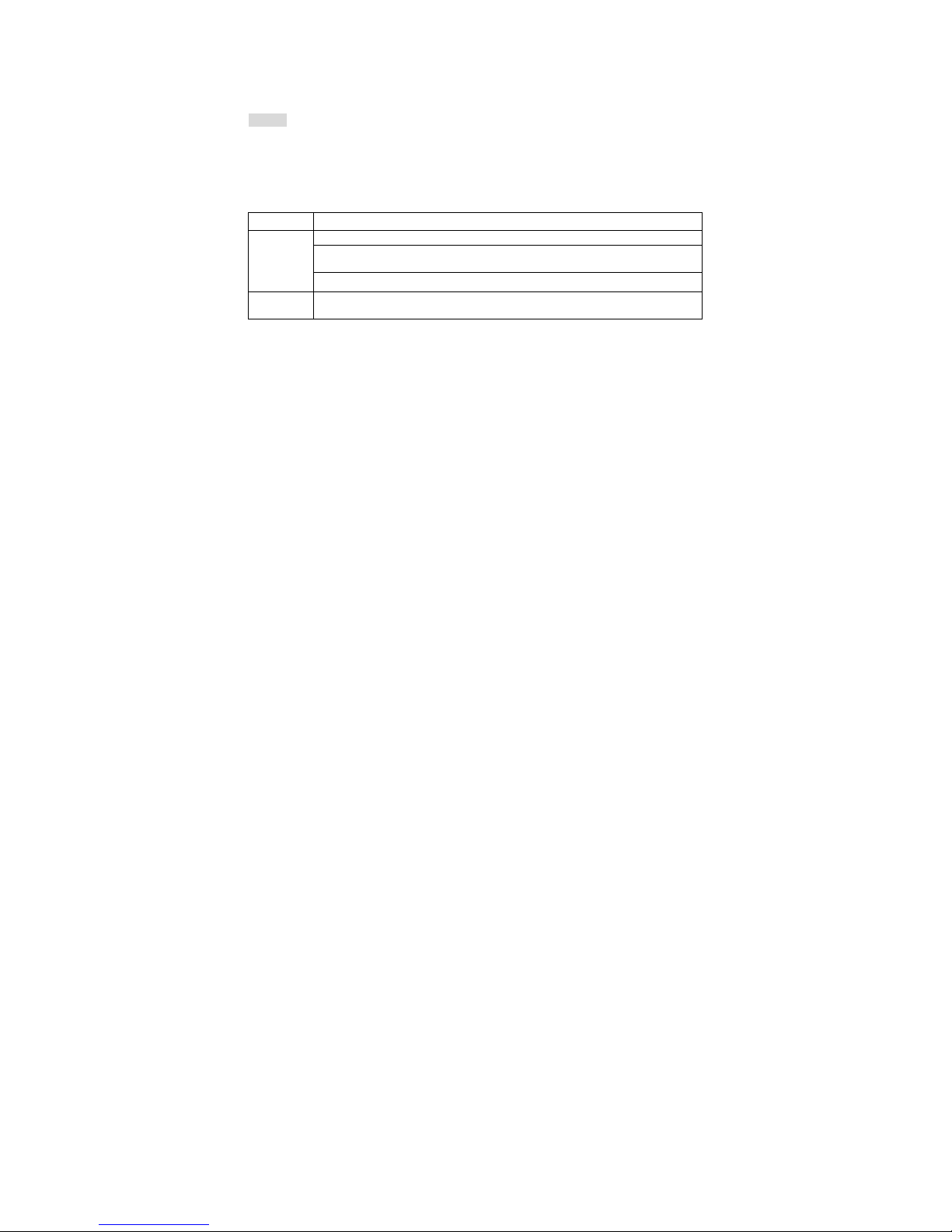
4.1.4 Network setup
SIM card 1/2 Network Setup
Name
Description
Network
selection
New Search: To search the network again.
Select network: The phone only load the appointing network. When the network
can’t work, the phone won’t register other network
Search mode: Auto/Manual.
Preferred
network
To select the preferred network.
4.1.5 Bluetooth
【Power】: Activate/deactivate Bluetooth.
【Visibility】: Set the visibility of Bluetooth device.
【My device】: Display device model when connected.
【Search audio device】: Display the model of online device.
【My name】: Edit the Bluetooth device’s name.
【Advanced】: Setting the parameters when Bluetooth is connected.
Page 30

30
Audio path: Set voice to the phone or to handsfree device.
Storage: Set the path of transmission.
Sharing permission: Set the permission as only reading or full control.
My address: Display the information of the Bluetooth device.
4.1.6 Restore Factory Settings
You can restore some settings of the phone to factory settings. To restore the factory settings, enter the password.
The default password is “1122”.
4.2 sound setting
You can set one of the following options:
Tone setup:To set the tone for incoming calls of SIM card 1/2, alarm, power-on (except Bluetooth
mode), power-off, messages of SIM card 1/2 and key press.
Volume:To set the volume of ring tone and key tone.
Alert type:Includes Ring, Vibrate, Vibrate and Ring, Vibrate then Ring
Ring type:To set the ring type, including Single, Repeated and Ascending.
Extra tone:Includes four types, Warning, Error, Camp-on, and Connect.
Answer mode: You can choose the answer mode as Cover answer or Any key.
4.3 Display Setup
4.3.1 Display
◈ Wallpaper:Set the background picture in standby screen interface
◈ Screen saver:Set Standby on / off screen, and start the waiting time.
◈ Power on display:Select the system picture and user defined picture as your power on display.
◈ Power off display:Select the system picture and user defined picture as your power off display.
◈ Show date and time: Enable/disable to display the date and time.
Page 31

31
◈ Show owner number: Enable/disable to display the owner number.
4.3.2 Greeting text
State:Set the greetings text on the main screen when the phone powers on.
Greeting text:Press <edit> to edit the greeting text.
4.3.3 Misc. settings
Set the Signal LED and the brightness and time of LCD backlight.
4.4 Call settings
4.4.1 SIM card 1 call settings:
【Caller ID】:Includes Set by Network, Hide ID, and Send ID.
Set by network:The number of the phone will be sent as per the default mode when a call is initiated.
Hide ID: The number of the phone will not be sent when a call is initiated. If the system doesn't support
this function, it may not make a call.
Send ID:The number of the phone will be sent when a call is initiated.
Note: This function requires the network support. For details, please contact the network operator.
【Call waiting】:To set functions like activate/deactivate and enquiry call waiting. During call holding and
making multi-party calls, this function should be activated first, and network support is required for the specific
implementation of the function.
【Call divert】:It is a network function that can only be used when you apply for this service of the
network operator. The function can divert calls that satisfy the conditions to the other caller's phone number you
have designated.
Name
Description
Diver all voice calls
Network will divert unconditionally all your incoming calls.
Divert if unreachable
To divert an incoming calls when your phone cannot be reached
(the phone is either switched off or out of network coverage).
Page 32

32
Divert if no answer
To divert an incoming call after a certain time period during
which the call is not answered.
Divert if busy
To divert an incoming call when you have an active call or other
operation is busy.
Divert all data calls
Network will divert call incoming calls (requiring support of
network).
Cancel all divert
Cancel all the divert functions.
【Call barring】
1 Outgoing calls
All calls:To restrict all outgoing calls.
International calls:To restrict international outgoing calls.
International calls except to home PLMN:While you are abroad, you can only call the numbers of
the country (where you are) and your home country (at which your service supplier is located).
2 Incoming calls:
All calls:To restrict all incoming calls.
When roaming:To restrict all incoming calls except the numbers from your local service area.
3 Cancel all:For canceling call barring. (Password for barring is required.)
4 Change barring password:Apply to the network for changing the password for call barring.
【Line switching】: To choose Line 1 or Line 2.
4.4.2 Advance settings
4.4.2.1 Blacklist
【Mode】:Open or close the blacklist or red list .
【Black List numbers】: You can add some numbers into blacklist.
4.4.2.2 Auto redial:
Page 33

33
To set the auto redial as “On” or “Off”. When your dial doesn't succeed, up to 10 redials for you to try to
connect a phone number.
4.4.2.3 Speed dial:
To switch on the speed dial function, and edit the corresponding speed dial number. If the speed dial is "On",
then you can long press the corresponding key (2-9) to dial the number designated to the key through the standby
interface.
4.4.2.4 Background sound:Set the background sound when dialing.
4.4.2.5 Call time setting:
Call time display: Display the lapsed time during a call.
Call time reminder: During a call, a sound or a periodic tone sounds every minute to keep you informed
of the call duration.
Auto quick end: You can set a limit time. If this function is enabled, the phone will hang up
automatically when the call time reaches the set time limit.
4.4.2.6 Reject by SMS:
Enable this function, when you have a coming call, enter “option” choosing “reject by SMS”, cell phone
can send the default message to caller.
4.5 Security setup:
4.5.1 SIM card 1/2 security setup
4.5.1.1 SIM card 1/2 lock: To unlock or lock SIM(PIN).
4.5.1.2 Change password: Change the PIN/PIN2 password of SIM card 1. PIN(PIN1) and PIN2 code can be
get from your network operator.
4.5.2 Phone lock:This function allows you to lock/unlock your phone. Note: the default password is “1122”.
4.5.3 Auto keypad lock: To unlock or lock the keypad. The time for locking keypad can be set.
4.5.4 Change Password: The default password “1122” of phone, message, phonebook, calling records and
Page 34

34
privacy protection can be changed as the desired password of 4 to 8 digits.
4.5.5 SIM Hide: Enable or disable SIM 1/2 hide.
4.5.6 Privacy protect: Includes protection for phone book, message and call history. If this function is enabled,
corresponding menu or content will be locked. For access, enter the password. The default password is
“1122”. You can change the password in the menu of changing password.
5 Music Zone
The operating system above WIN2000 do not need to install the drivers. You need not power-off the phone
when download songs. When the phone is connected to PC, it will display USB setting interface. Press the
option of “Storage device”, then the PC display the message of found new hardware and update one mobile Disc.
The selected MP3 need be copied into “My Music” root directory, if it is copied into other directory it can’t be
played.
6 Multimedia
6.1 Camera
With this function, you can use the built-in camera of the phone to take a photo, or adjust the camera
settings. Photos generated by the camera are in JPG format. If they have been downloaded to your PC, view
them with the right software!
When the phone has insufficient memory space for new photos, you should delete some old photos or other
files in the "File Manager" function list to release memory space for new pictures.
◈ 【to photos】: To view a saved photo.
◈ 【Effect settings】: Setting the special effect for photo shooting.
◈ 【wb setting】: Adjust the white balance.
◈ 【con shut】: Choose the continuous shut times.
◈ 【night mode】: To set the night mode as Auto or Night.
◈ 【quality setting】: Set the quality as low , normal or good.
Page 35

35
◈ 【Image size settings】: To set the corresponding parameters of the photo to be shot.
◈ 【ev setting】: To set the EV level when you take photo.
◈ 【shot sound】: Setting the different shot sound.
◈ 【Banding】: To set the frequencies when you take photo.
◈ 【shut delay】: Setting the delay time when you take photo.
◈ 【Storage】: To set the storage directory for photos.
◈ 【reset】: To restore the settings of camera to factory settings.
6.2 radio
6.2.1 FM Radio
You can receive the FM Radio channel just when plugging earphone.
6.2.2 Schedule FM record
Record the appointed frequency audio at the appointed time.
6.3 Image viewer
The shot photos are stored in the image viewer.
Descriptions of image viewer options:
◈ View: To view a photo.
◈ Slide show: View all the photos in slide show.
◈ Browse style: To select the mode for browsing photos.
◈ Send: To send a photo to the desired application.
◈ Use as: To use the current picture as wallpaper, screen saver, power on/off display or caller picture.
◈ Rename: To rename the selected image or photo.
◈ Delete: To delete the selected photo.
◈ Sort by: To sort photos by the desired method.
◈ Delete all files: To delete all photos.
Page 36

36
◈ Storage: To set the storage directory for photos.
6.4 Video player
Support video such as 3gp etc. format. The following operation can be performed to the selected video file:
◈ Play: To play a video file.
◈ Send: To send a video file to the desired application.
◈ Rename: To rename a video file.
◈ Delete: To delete the selected video file.
◈ Delete all files: To delete all video files.
◈ Sort by: To sort video files by desired method.
◈ Storage: To select the storage directory (cell phone or memory card) for a video file.
6.5 Video recorder
Press the red icon bottom of the screen or press OK key to start or pause video recording. The recording
time is limited by the volume of the memory of the phone or the memory card. Enter the option, you can make
the following settings:
◈ Camcorder settings:Setting the related parameters of the recorder.
◈ Video settings:Set the parameters of the video to be recorded.
◈ White balance: Set the parameter of white balance.
◈ Effect settings:Set special effect to be applied when recording.
◈ Storage:It is able to choose the saving route of record file (cell phone or memory card).
◈ Restore default:Resume the consumer settings for recording to the original plant default.
6.6 Sound recorder
To make an audio record, select the “Audio Recorder”. Select the "Options" for the selected record file to
perform the following operation.:
◈ Record: To make a audio record.
Page 37

37
◈ Play: To play a selected record file.
◈ Append: Append a record to the designated files in the upper directory. (You can only append a
record file in .AMR and .AWB format.)
◈ Rename: To rename the selected record file.
◈ Delete: To delete the selected record file.
◈ Delete all: To delete all record files.
◈ Use as: Use the current file to user profile
◈ Send:Send a sound file to a relevant application.
◈ Settings: To set the Preferred Storage, File Format and Quality for record files.
6.7 Slide show
Play the selected picture by slide.
7 Organizer
7.1 File manager
Phone:Support memory of about 5.8M.
Folders or files in the memory card or the phone can be managed by the files management template.
7.2 Alarm
The time format of the alarm clock is the tame with the format in the clock. The alarm clock can work even if
the phone is switched off as long as there is enough power in the battery. Alarm time, snooze time-out and alarm
tone can be set independently for every alarm. The phone will alarm when the time reaches the set time and
current time and date will display on the screen. Press Stop to stop the alarm; press Sleep, the alarm will pause
and alarm again at the snooze time-out.
Note: Your phone support alarm clock when switching off.
7.3 Calendar
With this function, you can view the calendar and schedule, and you can schedule with the scheduler to set
Page 38

38
the schedule and alert. Move the cursor to the desired date with direction keys, and the date will be highlighted
in light blue frame. If a memo has been set in the schedule of some date, the date bottom adds displaying of
schedule icon. To view all memos of a day, move the cursor to the date. In this case, the following operation can
be performed:
7.4 Calculator
Eight operators, i.e. “+”, “-”, “×”, “÷”, “m+”, “m-”, “mc”, and "mr”, are provided.
Choose the Clear or press the right soft key to clear items entered. Long press the Clear or long press the
right soft key to clear all content. Press the “Ok” to show the result of calculation.
Note: The accuracy of this calculator is limited, and the calculator can only be used in simple calculation.
7.5 E-Book Reader
E-book application can help you to read a file that stored in phone or memory card in .txt format.
Open: To open an E-book.
Update: To Update an E-book.
System presetting: To set the attributes of an E-book.
Information: To view the attributes of a text.
Delete: To delete a text.
Delete all: To delete all texts.
Sort: To sort E-books in a folder.
Apply: To apply the settings.
Help: To open E-book help description.
7.6 BackUp
You can backup the items in phonebook and the SMS. You need to insert a good memory card then to
implement the operation under this menu.
7.7 Tasks
Page 39

39
For creating a new memo or viewing the memos set in the schedule. You can also perform View, Add,
Edit, Delete Entry, Delete All and Transfer Date book, etc. If the alarm reminder is set up for the memo, the
cell phone will remind you with ring once the time is up, and it will display the contents of the memo settings.
7.8 World clock
View the corresponding to the time zone of countries in the world by the direction keys.
7.9 Stop watch
Your phone supports ordinary stopwatch and multifunctional stopwatch. You can time, time by lap and
view records, etc.
8 Service
8.1 STK
STK is a value added service provided by your network provider.
The display of function menu may differ according to different SIM cards.
8.2 WAP
This function allows you to acquire or visit diversified services on the Internet through message or network.
The services may include entertainment, weather forecast, news, financial information, ring tone download,
stock market and other useful information. Some functions are provided by the network provider. You will see
different menus according to the services provided by the SIM card. Please contact your network provider for
more information.
【Homepage】: Enable WAP connection and visit the home page..
【Bookmarks】: Visit or edit the bookmark.
【Recent pages】: Record the recently visited web addresses.
【Offline pages】: View the saved web pages.
【Input address】: Provide user-defined inputting web address.
【Service inbox】: Save the PUSH messages received by the phone.
Page 40

40
【Settings】: Set parameters of WAP browser. Please consult your network provider for details of the
parameters.
Select SIM:Those options include “always inquire, SIM card 1 and SIM card 2”.
Edit profile: To edit and enable the profile function.
Browser options: To set the wait time and whether to show images. Display the address list and select
image can be performed.
Service message settings: Enable or disable.
Clear cache: It may reduce speed of internet connection when there are too much data stored in the cache.
Clear cookies: Delete all personal information.
Trusted certificates: To view the trusted certificates provided by the system.
8.3 Data account:
GSM data——Some account data will be provided by GSM data
GPRS——Using GSM data will provide some account information
9 Fun& Games
9.1 Games
Provide you interesting and classical games. Please refer to help of the game for specific operation.
Game settings: You can set some sound and vibration effect when you play games.
9.2 Java
You can play Java games which has been installed in your mobile phone. And you can also download new
Java games to play. Set the data account of downloading Java games in the menu of Java setting.
Page 41

41
VII. Operating instructions of editor
Your phone provides you with different input methods for the convenience of using other function. You can
enter texts by keypad at anywhere requiring entering texts. Enter function setting > Phone setting > Default input
method to choose a default input method.
Input interface key function
Press corresponding key under input interface, for example of writing message.
Numeral 1 to 9 is used to edit text contents.
Direction keys:Control the movement of cursor.
# key:Switch the input method.
* key:Enter the selecting of symbol.
Hang-up key:Retreat from the edit interface.
Smart English input
Press the numeral keys 2 to 9, the letters contained in the number and the corresponding number will appear on
the screen.
Enter a word
Under smart English input method, continuously press 2 to 9 keys for twice or more, the corresponding word
will appear on the screen.
For example, if you want to enter “book”, press the numeral keys “2665”, and then select the word “book”. You
can press the 0 key to enter a space when you need.
English letters and figure input
You can input English letters such as A , a and digit 1 by choosing different input method “ABC、abc、
123” .
Symbol input
Press * key to into the interface of inputting symbol, when the phone not under the interface of symbol.
Page 42

42
Transfer direction keys to move the cursor to desired symbol, press OK key to select it.
VIII. Application of USB storage function
Precautions before using
Please maintain correct operation of USB equipment connection and disconnection.
Please don't use windows formatting command to carry on the format operation to the mobile disk of cell
phone; otherwise, it will result in the damage that can't be repaired any more.
USB operation environment:
◈ Windows2000 / XP.
◈ For other operating systems, it may require the installation of USB driver before successfully creating
the connection of PC and cell phone.
Page 43
43
IX. Appendix 1
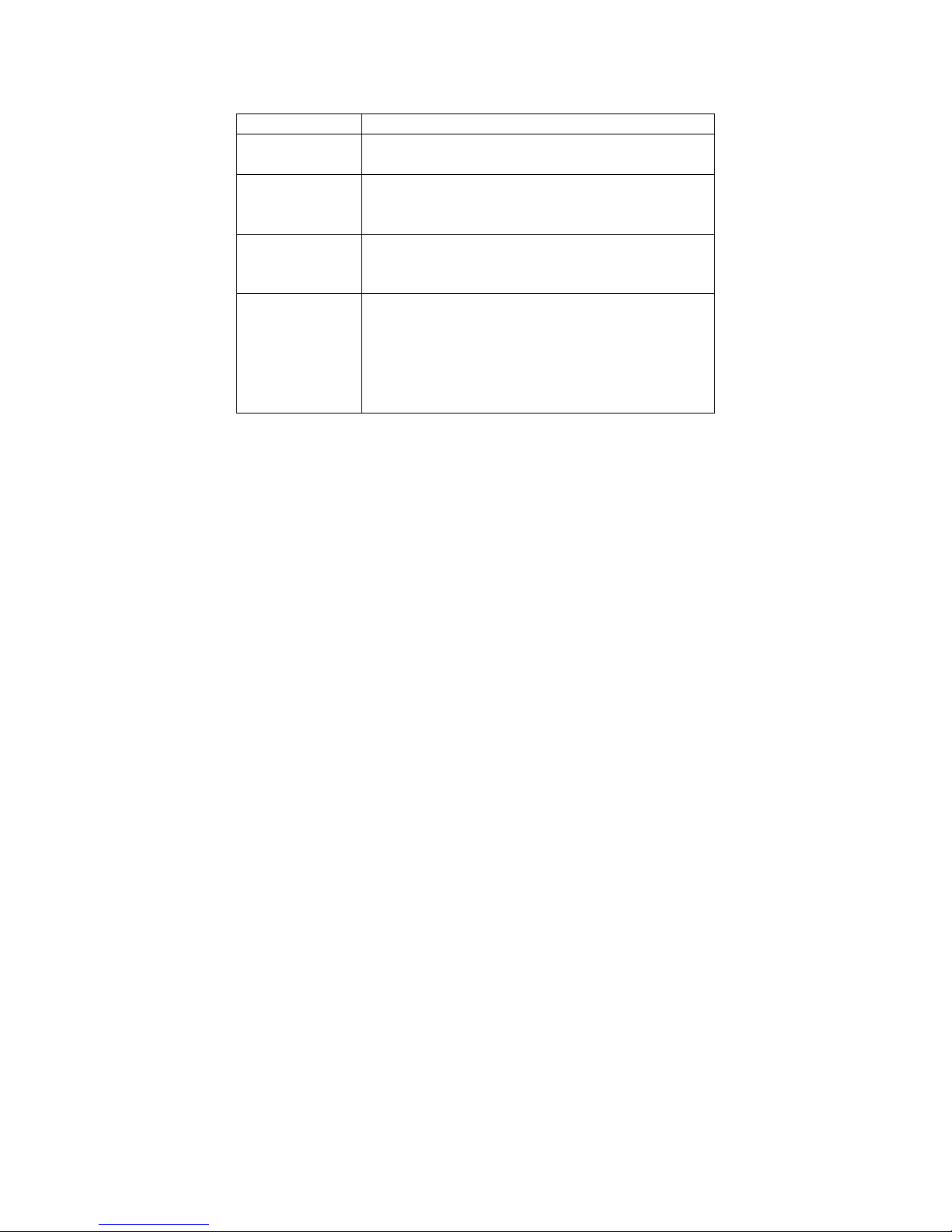
Troubleshooting
Failure
Possible cause
The phone fail to power
on
1! Check that the battery is charged;
2! Check that the battery is installed correctly.
SIM card error
1! Check whether the SIM card is dirty. If the card is dirty, clean it;
2! Reinstall the SIM card;
3! If the SIM card is damaged, replace the SIM card.
Weak signal
Check that the signal intensity indicator on the screen. 4 bars indicate a
strong signal, and 2 bars or less indicate a weak signal.
Call initiation fails
1、You may set the Hide Caller ID but the network operator does not
support this service;
2、A strong signal interference may exist;
3、You may activate the Call Barring function;
4、You may activate Line 2 but the network operator does not support this
service.
Page 44
44
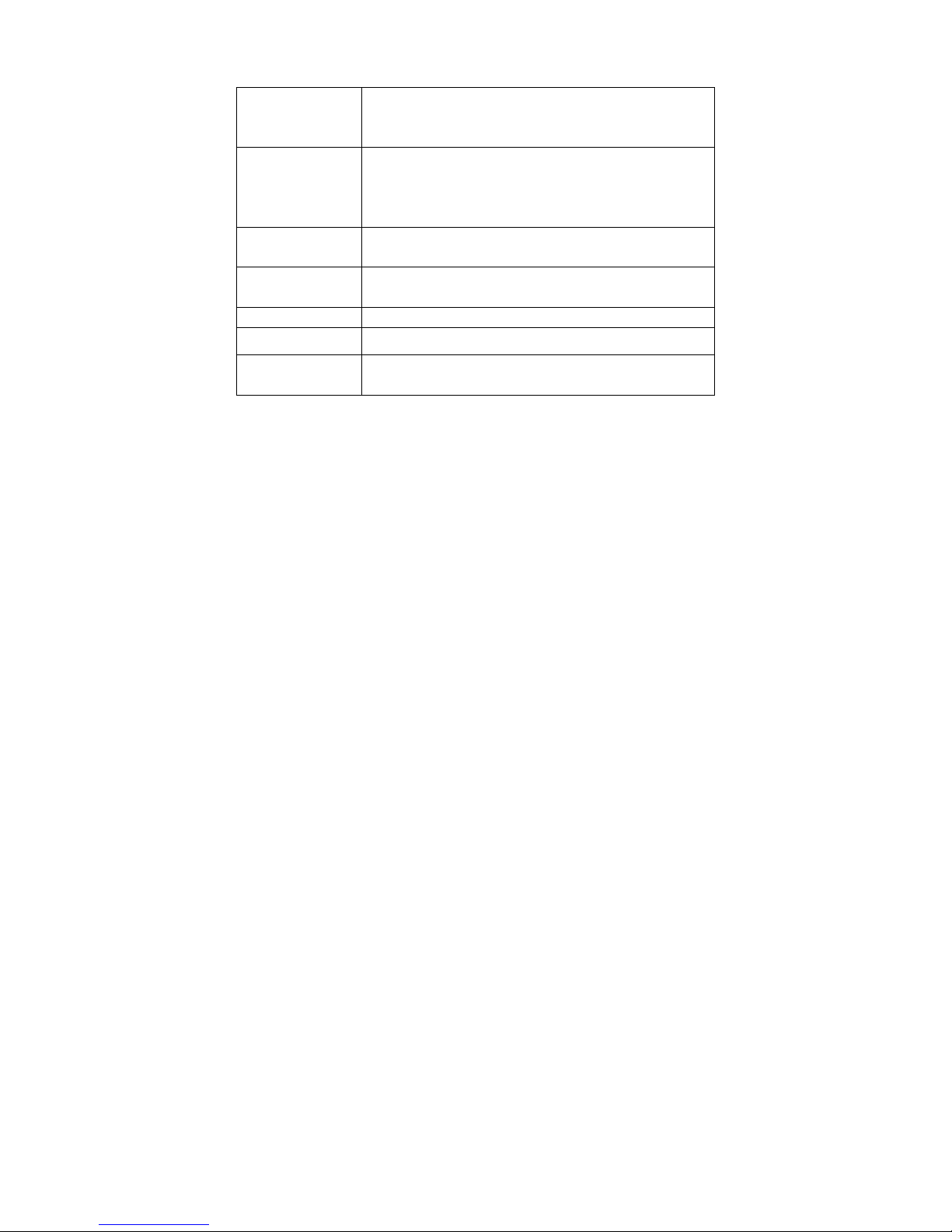
Battery charge fails
1、The battery may have been excessively discharged. To charge the battery,
it is necessary to connect it to a charger for a certain period of time;
2、The battery may be deteriorated.
Cannot connect to the
network
1、Check whether the signal is too week or wireless interference exists
around;
2、Check whether the SIM card is installed correctly, poor connection exists,
or the SIM card is damaged. If the SIM card is damaged, please contact the
network operator.
Photos shot too dark
1、The brightness is set too low;
2、The ambient light is too dark.
Photos shot too blurred
1、The object shot is moving;
2、Your hand shakes when the shutter is pressed.
Photos shot is distorted
The object shot is too near to the lens.
Cannot access the
service menu
The SIM card may not support the service.
The standby picture
can’t be displayed
integrally.
Maybe the picture is extra of the size.
Page 45

45
X. Appendix 2
Abbreviations
SMS
Short Message Service
EMS
Enhanced Message Service
SIM
Subscriber Identity Module
GSM
Global System for Mobile Communication
PIN
Personal Identity Number
PUK
PIN Unblocking Key
IMEI
International Mobile Equipment Identity
CB
Cell Broadcast
GPRS
General Packet Radio Service
MMS
Multimedia Message service
 Loading...