

Page 1
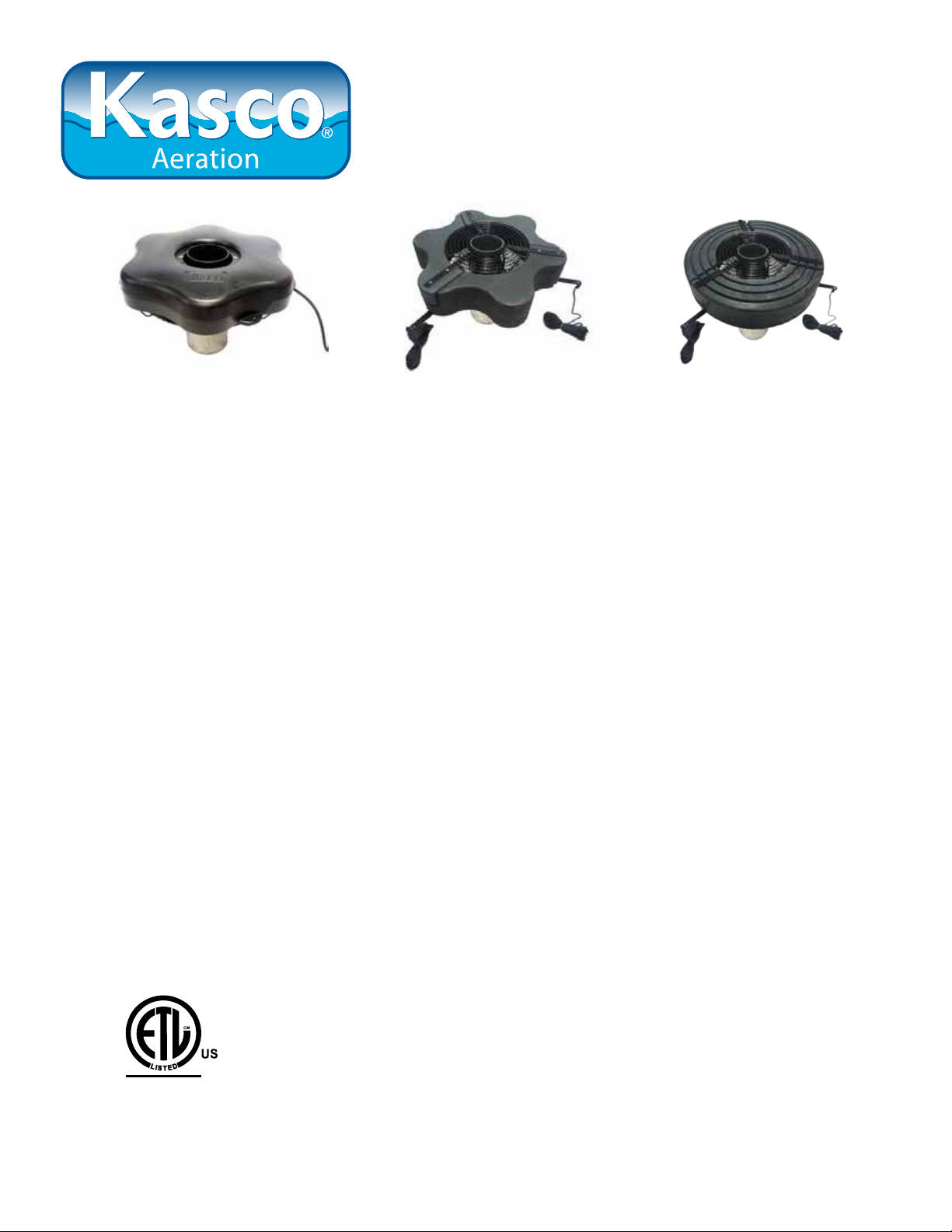
Owners Manual
VFX Series Decorative Aerators
Contents
Important Safety Instructions. . . . pg2
General Owner’s Instructions. . . . pg2
Unit Specs. . . . pg3
VX Pattern Sizes. . . . pg3
2400VFX, 3400(H)VFX, 4400(H)VFX Parts Included. . . . pg4
2400VFX, 3400(H)VFX, 4400(H)VFX Assembly. . . . pg4
8400VFX, 2.3(H)VFX, 5.1VFX, 5.3(H)VFX Parts. . . . pg6
8400VFX, 2.3(H)VFX, 5.1VFX, 5.3(H)VFX Assembly. . . . pg6
Mesh Screen Attachment. . . . pg8
VFX Installation Instructions. . . . pg9
Control Panel Installation. . . . pg10
C-25 Timer Control Instructions. . . . pg11
C85 / C95 non-metallic Wiring Diagram. . . . pg12
3 Phase Startup Procedure. . . . pg13
C85 / C95 non-metallic and 3 Phase Control Panel Timer. . . . pg14
2400, 3400, 4400 Parts Diagram. . . . pg15
8400VFX, 2.3(H)VFX Replacement Parts. . . . pg16
5.1VFX, 5.3(H)VFX Replacement Parts. . . . pg17
Maintenance Recommendations. . . . pg18
Warranty Policy. . . . pg19
Troubleshooting Tips. . . . pg20
Customer Repair Form. . . . pg22
Registration Information. . . . pg24
C
Inter tek
3020379
ANSI/UL 778, 5th Ed. 2010
CAN/CSA C22.2 No. 108-M89
UL 50, 11th Ed. 1995
Kasco Marine, Inc.
800 Deere Rd.
Prescott, WI 54021
PH (715) 262-4488
FAX (715) 262-4487
www.kascomarine.com
Rev. 11/07/13
Page 2

THANKS
We at Kasco Marine, Inc. would like to both thank and
congratulate you on your purchase of the VFX model
aerator. We appreciate you choosing Kasco and for
your purchase. Your decision to purchase Kasco’s
VFX model Aerator will not disappoint you. The VFX
model Aerator will be a great addition to your body
of water. It will help improve the water quality by
adding much needed oxygen and circulation. It will
also enhance the aesthetics of the pond or lake with a
beautiful pattern. The lighting package (if purchased)
will illuminate your aerator for beauty at night. We
thank you for choosing Kasco for your aerator needs
and want you to be completely satised with your
purchase.
Important Safety Instructions
Please read and follow these extremely important
safety and handling instructions for your Kasco equipment. Following these instructions will help ensure
your safety and the quality performance of your equipment.
nal grounding conductor and/or a grounding-type
attachment plug. To reduce the risk of electrical
shock, be certain the aerator is properly connected
to the Kasco supplied control panel. (refer to the
C-25, C-85 & C-95 Control instructions)
• 3 phase aerators (2.3VFX, 5.3VFX) require a
startup test after wiring to ensure proper rotation of
the propeller. If the propeller is rotating in the opposite direction, the unit will not perform properly
and internal damage to the unit may occur. (See 3
phase startup procedure)
• Control panels must be installed a minimum of
5ft(3m in Canada) from the inside wall of the
pond, unless separated from the body of water by
a fence wall, or other permanent barrier that will
make the unit inaccessible to persons in the water.
• Control panels must be installed by a qualied
electrician.
• Ground Fault Circuit Interrupters (GFCI) should
be tested upon each installation and every month
thereafter to ensure proper operation.
General Owner’s Instructions
• Under NO circumstances should anyone enter the
water with the electrical equipment plugged in
and/or in operation. All Kasco equipment is ETL
approved to UL and CSA standards for safety in
water. However, it is NEVER recommended to
enter the water with the equipment in operation.
• Caution should be used when dealing with any
electrical equipment with moving parts.
• NEVER run the unit out of water. It will damage
the seals and create a dangerous situation for the
operator.
• Extreme caution should be used around water,
especially cold water, such as in Spring, Fall, and
Winter, which poses a hazard in and of itself.
• NEVER lift or drag the aerator by the power or
light cord. If you need to pull the unit to the side
of the pond, use the anchoring ropes.
• Do not use waders in deep ponds/lakes or ponds/
lakes with drop-offs, drastic slopes, or soft bottom
material.
• Do not use boats that tip easily for aerator installation, such as a canoe, and follow all boating safety
rules and regulations, including wearing a PFD.
(Personal Flotation Device)
• Single phase aerators are supplied with an inter-
INSPECT THE SHIPMENT
Immediately inspect your Kasco Aerator shipment for
any visible damages. Also cross reference the parts
supplied with the Parts Included sheet to check for
shortages. Shortages should be reported immediately
to your Kasco Marine distributor or representative and
damages reported to your carrier and Kasco Marine.
CAUTION
WARNING: Under NO circumstances should anyone
enter the water with the unit in operation. Always
operate the unit in the water and keep people and objects clear of the propeller. Do not lift or pull the unit
by the electrical cord. Always use extreme caution
around electrical equipment and water situations.
ASSEMBLY & INSTALLATION
Please see the proper Assembly and Installation In-
structions enclosed in this manual. Each is specic
for your model and size of aerator. Note: Use a nylon
tie to help keep the power cords for the unit and lights
free of the propeller by tying each cord to either side
of the oat. If you have a light kit, make sure that the
unit cord is tied to one side of the oat and the light
cord to the other for balance. Note: It is extremely
2
Page 3
important to test the GFI breaker in the control panel
upon each installation/reinstallation of the unit to ensure proper functioning.
WARRANTY
Kasco aerators are the result of over 35 years of design
and engineering. Kasco products are built to withstand the toughest conditions. Kasco Marine backs
each VFX model aerator with either a 2 Year or 3 Year
Warranty depending on the model. This warranty covers any and all manufacturers defects within the warranty period from the date of purchase (See Warranty
Section). Please register your aerator online at:
www.kascomarine.com (under the technical tab)
USE AND OPERATION
Kasco aerators are designed and engineered for continuous duty, such as on sh farms or other aquaculture applications, or on-demand use, as needed in a
recreational water feature.
During otation operation, the water is pulled from
O
360
around the unit and from below the unit. The
water is pulled upward and thrust through the otation
collar into the air.
Your Kasco Marine aerator is ready for immediate use
(after installation). Make sure to keep the motor housing clean from hard water deposits and/or algae. (See
Maintenance Recommendations.)
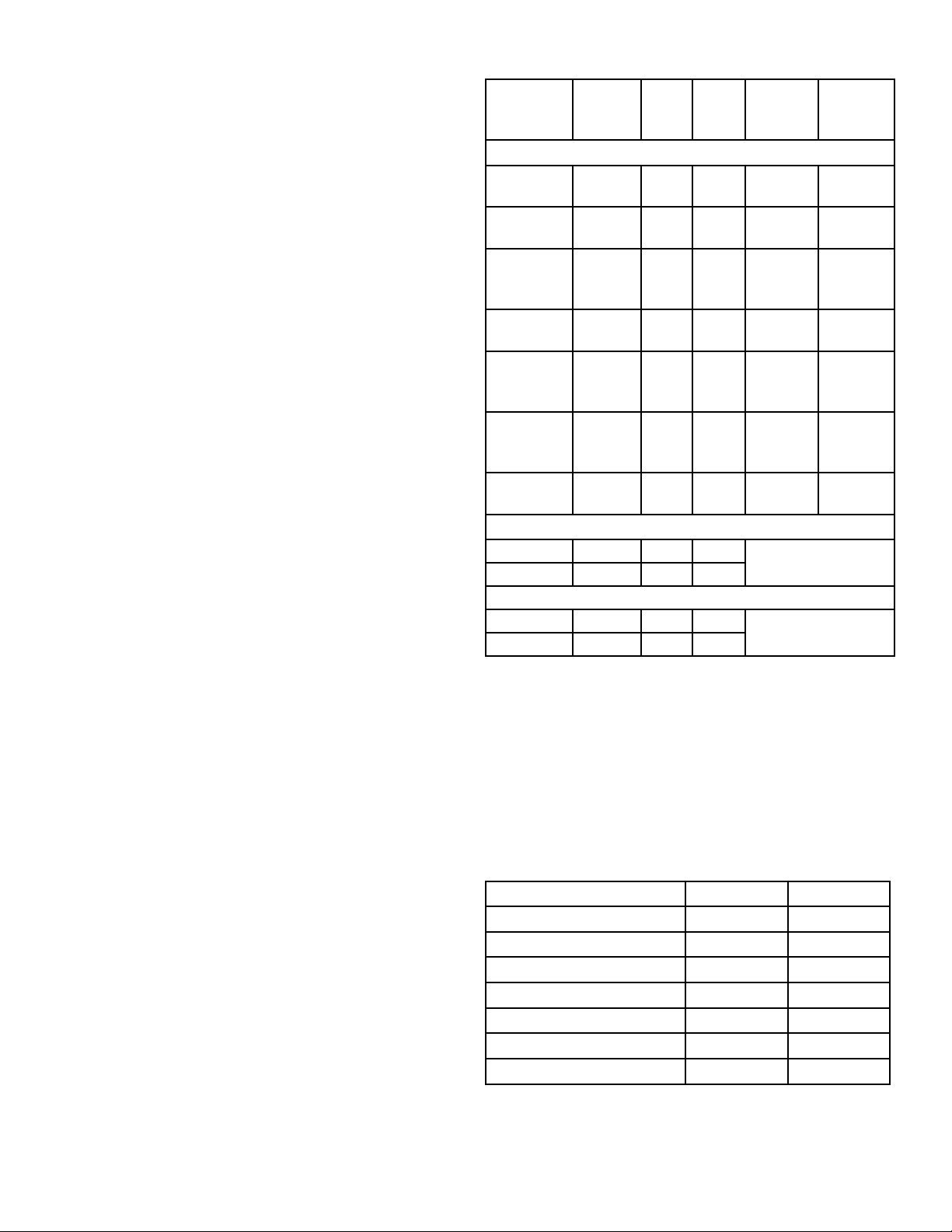
Unit Specs
Model Voltage Amps Lock
rotor
amps
single phase
2400VFX 110-120 5.6 12 C-25
3400VFX 110-120 7.3 18 C-25
3400HVFX 208-240 3.7 9 Hardwire
4400VFX 110-120 11.3 40 C-25
4400HVFX 208-240 5.7 20 Hardwire
8400VFX 208-240 11 40 Hardwire
5.1VFX 208-240 20 97 Hardwire
3 phase
2.3VFX 208 7.5 40 see your control
5.3VFX 208 16.0 100
2.3HVFX 460 3.6 24 see your control
5.3HVFX 460 7.8 49
aerators
aerators
Control
box con-
nection
plug in
plug in
C-85
plug in
C-85
C-85
C-95
panel instructions
panel instructions
Aerator
connec-
Plug into
C-25
Plug into
C-25
plug into
or hard-
wire C85
Plug into
C-25
plug into
or hard-
wire C85
plug into
or hard-
wire C85
hardwire
tion
C95
VX Pattern Sizes
It is extremely important that proper and sufcient
voltage is supplied to the aerator motor. Unit should
be protected by a GFCI. Control panels must be
installed by a qualied electrician. (See Installation
instructions).
Kasco aerators are lightweight, energy efcient, and
easy to install and operate. We strive to produce products that exceed customer expectations. We hope you
enjoy your Kasco aerator.
UNIT STORAGE
When storing units during the offseason, it is important to store them upside down if they are going to be
sitting for long periods of time. Units that sit upright
on a shelf for many months, or even years have a
greater likelihood of seals drying out. Storing upside
down will ensure oil is lubricating the seals and prevent drying.
NOTE: Pattern sizes listed are approximate. Variations in voltage caused by regional electrical differences or voltage drop due to long power cords may result
in reduced pattern sizes.
Model Height Width
2400VFX 5’ 15’
3400VFX 5.5’ 21’
3400HVFX 5.5’ 21’
4400VFX 8’ 26’
4400HVFX 8’ 26’
8400VFX / 2.3(H)VFX 8’ 32’
5.1VFX / 5.3(H)VFX 10’ 34’
3
Page 4
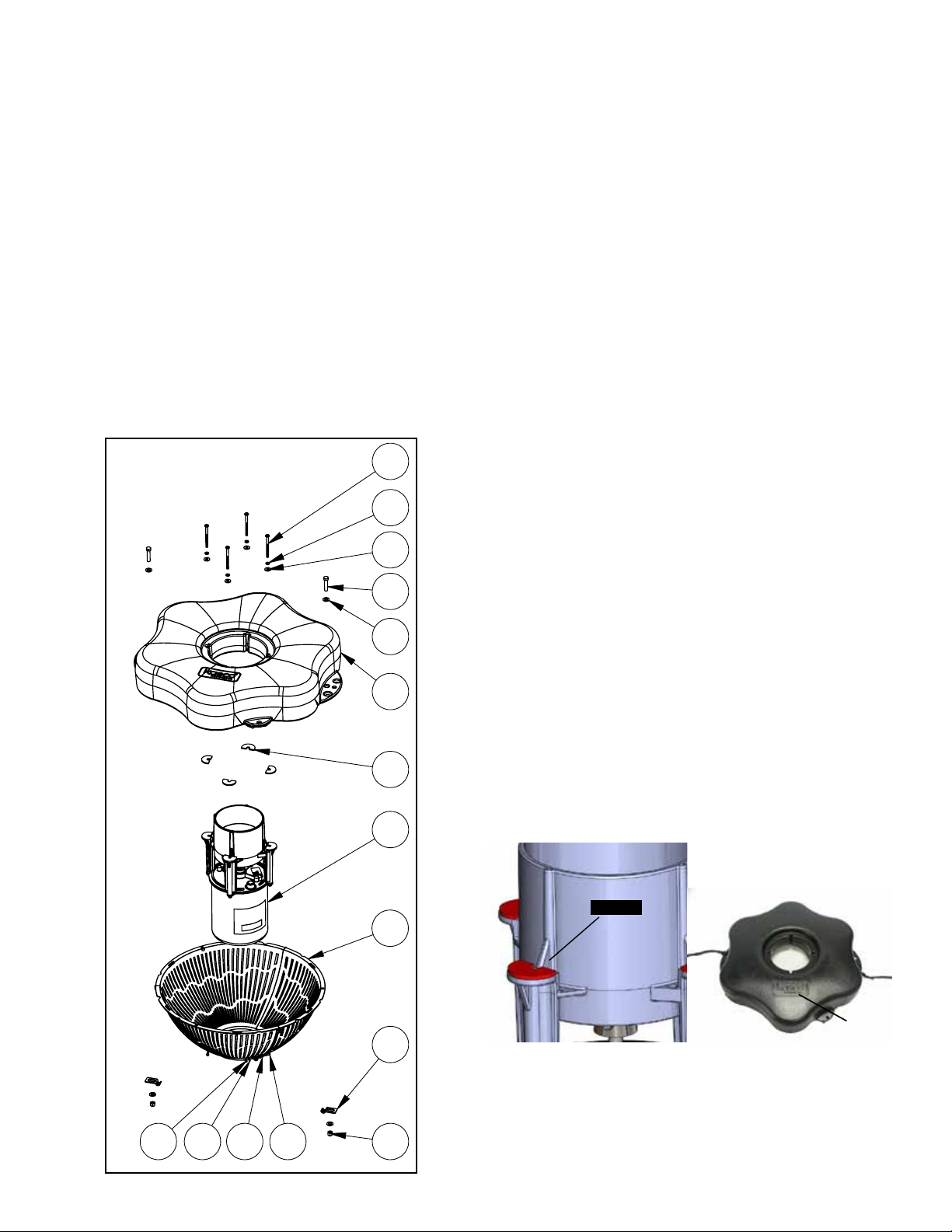
2400VFX, 3400(H)VFX, 4400(H)VFX Parts
REV.
ECO#
DESCRIPTION
1
INITIAL RELEASE
DO NOT SCALE DRAWING
X
UNLESS OTHERWISE SPECIFIED
DIMENSIONS ARE IN INCHES.
MATERIAL:
Included
1. Aerator (Unit w/cord or unit with Disconnect (1)
2. Float (with two 50’ mooring ropes attached) (1)
3. 1/4-20 x 3 1/2” Phillips Pan Head Screw (4)
4. 1/4” split washers (4)
5. 1/4” (3/4” outer diameter) Flat Washer (4)
6. 3/8”-16 x 1-3/4” Hex Head Bolt (2)
7. 3/8” Flat Washer (4)
8. Cushions for Legs (4)
9. Bottom Screen Section (3)
10. Bottom Screen Clips (2)
11. 3/8”-16 Nylon Lock Nut (2)
12. #8 nut (6)
13. #8 at washer (12)
14. #8 lock washer (6)
15. #8 x 1/2” Screw (6)
3
4
Also Included:
• Mesh screen(1) and cable ties(10)
• Cord in separate box (1) (depending on size of
cord)
• Control Box (C-25 for 120V units in Float box
or C-85 for 240V units in separate box) (1) (Not
Pictured)
TOOLS & SUPPLIES NEEDED
• Anchors or stakes for installing unit (2)
• # 2 Phillips head screw driver
• 120V or 240V Electrical Supply near pond on a
post with room for mounting the C-25 or C-85
• Two 12” pieces of 1” galvanized pipe for weighting ropes (optional)
• #10 x 1” long or longer screw(s) for mounting the
C-25 (3) or C-85 (4)
• 9/16” Socket and Ratchet
• 9/16” Wrench
• 11/32” wrench (for #8 fasteners)
5
6
2400VFX, 3400(H)VFX, 4400(H)VFX
Assembly
1. Make sure you have all the parts needed. If any
7
2
8
1
9
shortages are found, contact your Kasco representative
immediately.
2. Set motor housing upright (stainless steel can down) on
a at surface.
3. Peel off the adhesive on one of the Cushions for the
aerator housing legs (Part 8). Stick to the top of the aerator
housing leg and repeat for the other three cushions. Rest
the oat on the 4 legs of the housing making sure logo on
oat is up.
cushion
logo
10
4. Ensure correct alignment by twisting the oat gently
around the motor housing until the power cord guide lines
up with the cord. See diagram below of bottom side of
12
4
1113 14 15
oat. The 4 bolt holes in the oat should line up with bolt
receptacles on unit.
Page 5
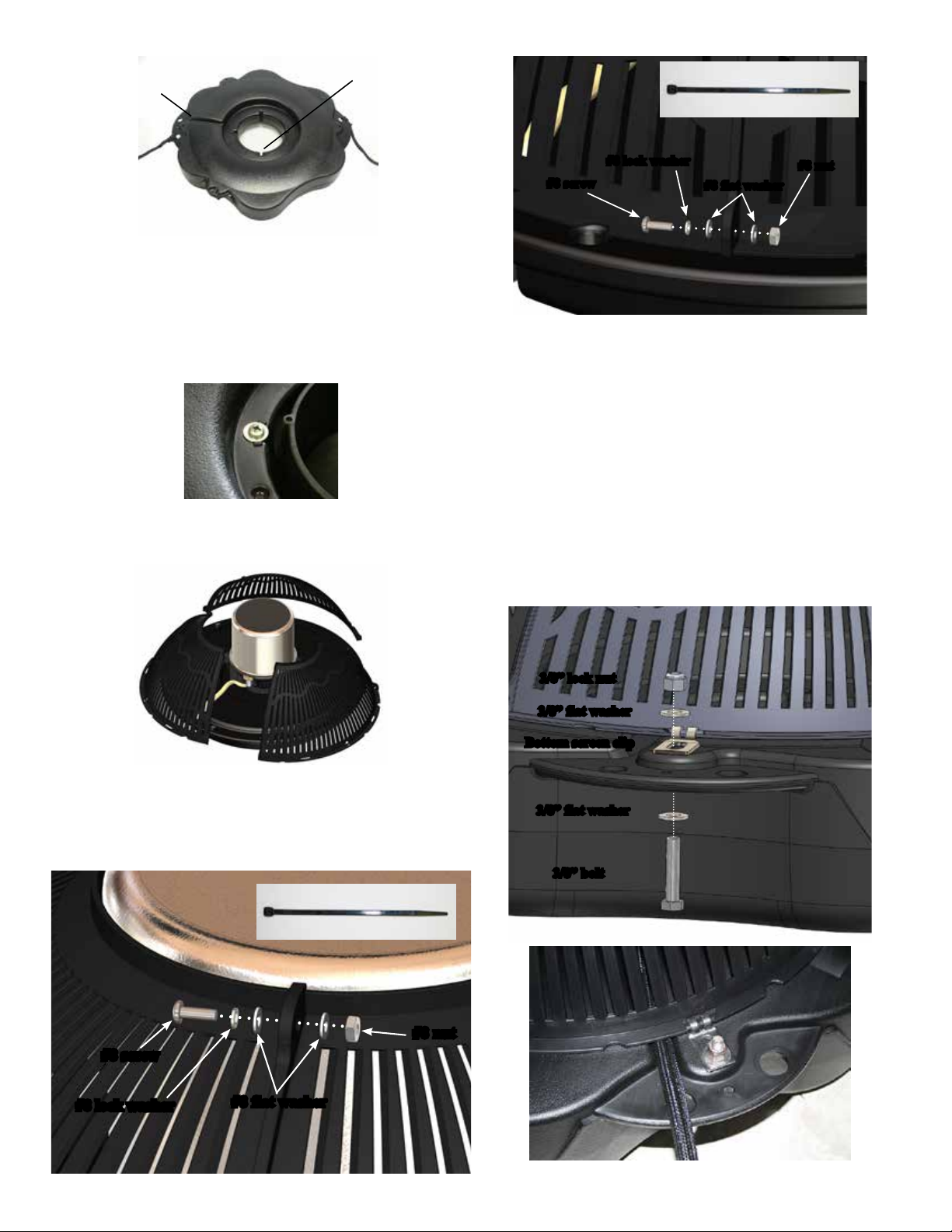
power cord
guide
Bolt holes
For quicker assembly:
Use cable tie instead
5. Use one of the 1/4”-20 x 3-1/2” Phillips Pan Head
Screws (Part 3), one 1/4” split washer (Part 4), and a 1/4”
Flat Washer (Part 5) to secure the oat. Make sure the split
washer goes between the bolt head and the at washer.
Insert screw with washers through bolt hole in oat
Tighten until snug with a Phillips Head screw driver and
repeat for 3 remaining screws.
6. Turn secured assembly upside down so the top of the
oat (logo side) is face down on the at surface. Bring the
3 bottom screen sections (part 9) together.
#8 screw
#8 lock washer
#8 flat washer
#8 nut
8. Make sure the cord is coming out of the power cord
guide in the oat before attaching the screen to the oat.
9. Use a stainless steel Bottom Screen Clip, 3/8”-16 x
1-3/8” Bolt, two 3/8” Flat Washer, and 3/8”-16 Nylon Lock
Nut to secure the screen to the oat. Align a clip so the two
prongs overlap the rim of the screen as seen in the picture.
Insert bolt with washer so the top of the bolt is facing the
top of oat (now in down position). Place the second
washer and the locking nut with nylon insert on the end of
the bolt and tighten using the 9/16” (14mm) Socket and
Ratchet on the nut end and the 9/16” (14mm) Wrench on
the bolt end. Tighten until snug and repeat with remaining
clip.
7. Secure the 3 sections of the screen together in 6 places
using #8 screw (Part 15), #8 lock washer (part 14), two
#8 at washers (part 13), and #8 nut (part 12). Do not
overtighten. Alternately, use cable ties instead of hardware
for a quicker assembly of the screen.
For quicker assembly:
Use cable tie instead
#8 nut
#8 screw
#8 lock washer
#8 flat washer
3/8” lock nut
3/8” flat washer
Bottom screen clip
3/8” flat washer
3/8” bolt
5
Page 6
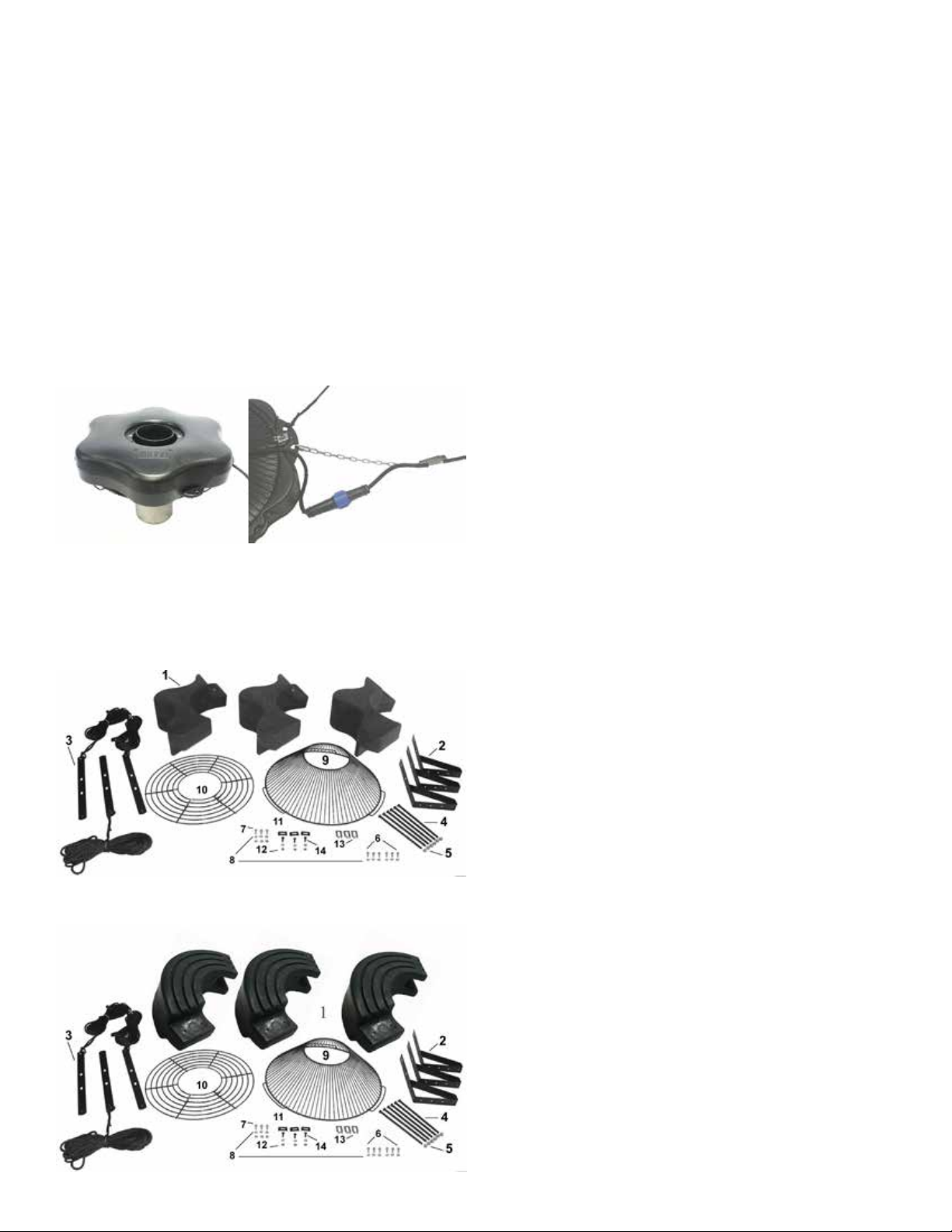
10. Turn the assembly upright again. At this time, if
the cord contains a metal strain relief, you can use the
chain connector and attach it in one of the opening at
the rope placement. The chain connector will easily t
if installed from the bottom or top side of the opening.
It will not t if installed from side of opening. Use the
Nylon Cable Tie included to secure the power cord to
a molded hole in the oat to prevent cord damage if
there is no strain relief on the cord. If a Strain Relief
is present on the cord, you may disregard the Nylon
Tie. On cords with a Quick Disconnect, the disconnect should be tightened properly to avoid leaking.
If installing a new Quick Disconnect, refer to Quick
Disconnect Instructions.
A. Aerator (Unit with cord or unit with Disconnect)
(1)
A1. Cord in separate box (1) (depending on size of
cord)
B. Float in separate box (1) (Diagram to Right)
1. 3 Float Sections (1)
2. Top Float Bracket (3)
3. Bottom Float Bracket w/ 50’ rope (3)
4. 9” x 3/8” Black Coated Bolt (6)
5. 3/8” Lock Nut (6)
6. 1/4” x 1” Bolt (6)
7. 1/4” x 3/4” Bolt (3)
8. 1/4” Lock Washer (12)
9. Bottom Screen (1)
10. Top Screen (1)
11. Top Screen Clip (3)
12. 1/4” Nut (6)
13. Bottom Screen Clip (3)
14. 1/4-20 x 3/4” Brass Screw (3)
15. Mesh screen (1)
16. Cable ties (10)
C-85 Control Panel in separate box (1) for 8400VFX
C-95 Control Panel in separate box (1) for 5.1VFX
8400VFX, 2.3(H)VFX, 5.1VFX, 5.3(H)VFX
Parts
8400VFX, 2.3VFX PARTS INCLUDED
5.1VFX, 5.3VFX PARTS INCLUDED
NOTE: Extra hardware may be included.
TOOLS & SUPPLIES NEEDED
• Anchors or stakes for installing unit (3)
• Philips head screw driver for mounting C-85
• 240V Electrical Supply near pond on a post with
room for mounting the C-85
• Three 12” long galvanized 1” diameter pipe for
weighting ropes (optional)
• #10 x 1” long or longer screw(s) for mounting the
C-85 (4)
• 7/16” Socket & Wrench (1)
• 7/16” Wrench (1)
• 9/16” Socket & Wrench (1)
• 9/16” Wrench or adjustable crescent wrench (1)
• Flat head screw driver (1)
8400VFX, 2.3(H)VFX, 5.1VFX, 5.3(H)VFX
Assembly
1. Remove all contents from package and place on
a clean, at surface. Inspect the shipment for any
damages. If damages are found, immediately notify
your carrier and your Kasco Marine, Inc. representative. Next, cross reference the parts included in the
shipment with the Parts Included section in this man-
6
Page 7
ual. Make sure you have all the parts needed. If any
shortages are found, contact your Kasco representative
immediately.
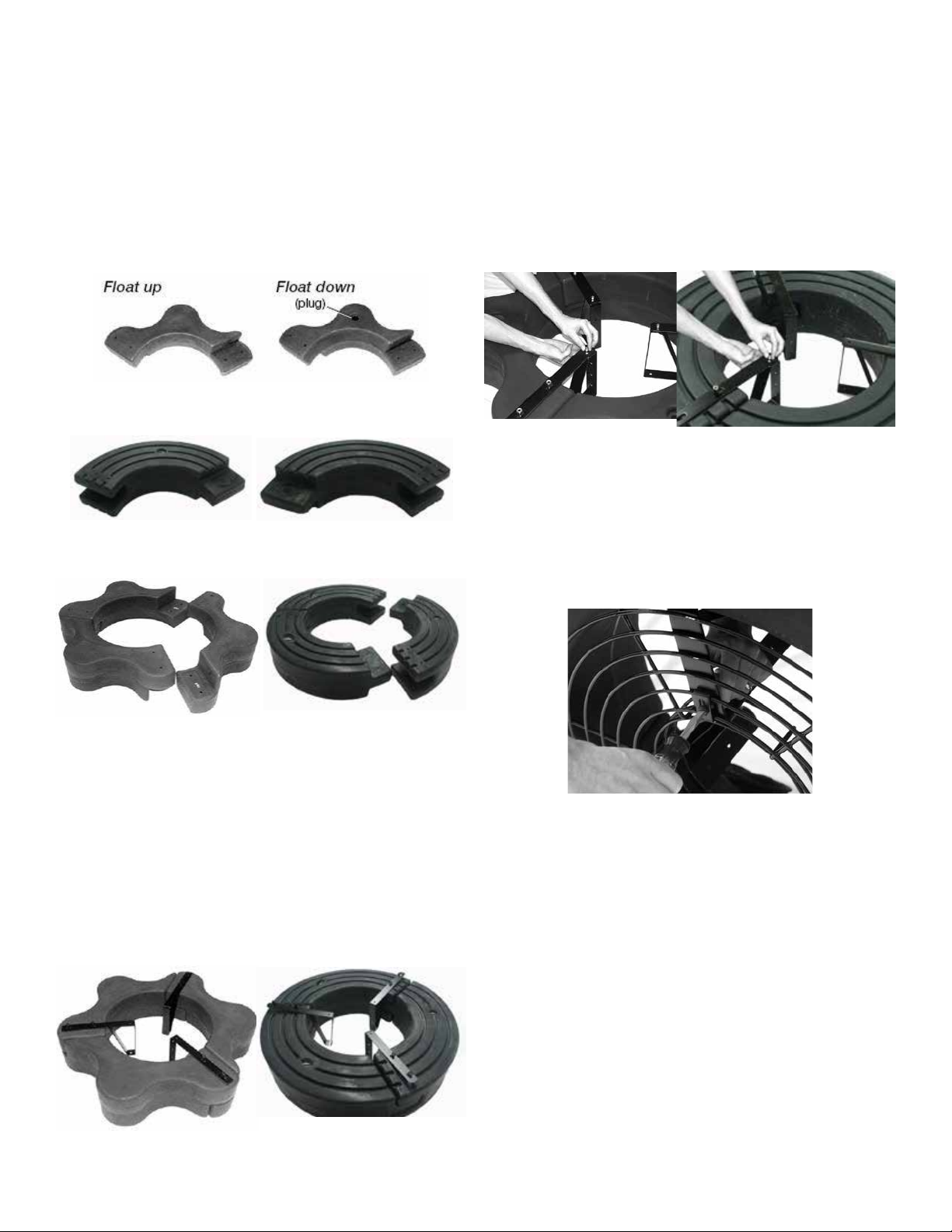
2. Arrange the three Float Sections (Part #B1) upright
(plug on bottom) so the overlap of one section aligns
with the next section and loosely push the three sections together to form a continuous ring.
8400, 2.3
4. Turn the assembly upside down and place the Bot-
tom Float Brackets (Part #B3) over the bolts, the ends
of which should now be extending through the assembly. Loosely install the six 3/8” Lock Nuts (Part #B5)
on the ends of the bolts (do not tighten yet). Connect
the Top and Bottom Float Brackets using three 1/4” x
3/4” Bolts (Part #B7) with three 1/4” Lock Washers
(Part #B8) and three 1/4” Nuts (Part #B12) and tighten
using the 7/16” wrench and socket.
8400, 2.3
5.1, 5.3
Float Up (plug) Float Down
8400, 2.3 5.1, 5.3
5.1, 5.3
3. Position one Top Float Bracket (Part #B2) so that
the bolt holes in the bracket align with the bolt holes
in the two adjoined oat sections and insert two 9”
Coated Bolts (Part #B4) through the assembly. This
may require some minor repositioning of the oat sections as you push the bolt all the way through. Do not
force the bolt through. Repeat for the remaining two
joints.
8400, 2.3 5.1, 5.3
5. Stand the assembly on its side and center the Top
Screen (Part #B10) inside the three Top Float Brackets. Attach the screen by spanning each Top Screen
Clip (Part #B11) across the two innermost rings on the
screen and the hole in the oat bracket. Insert the 3/4”
Brass Screws (Part #B14) and attach with 1/4” Lock
Washers and 1/4” Nuts to secure the screen to the oat
assembly.
6. Return the assembly to the upside down position
and place the motor assembly (Stainless Steel can side
up, black tube down) in the center of the oat. Align
the 3 taller legs of the black aerator tube with the 3
oat brackets. Attach the motor to the oat using the
1/4” x 1” bolts (Part #B6). Attach to the oat bracket
using the two middle holes of the oat bracket. Tight-
en using the 1/4” x 1” Bolts with 1/4” Lock Washers
using the 7/16” socket and wrench. The 1” bolts will
screw directly into the legs of the black aerator tube.
7
Page 8
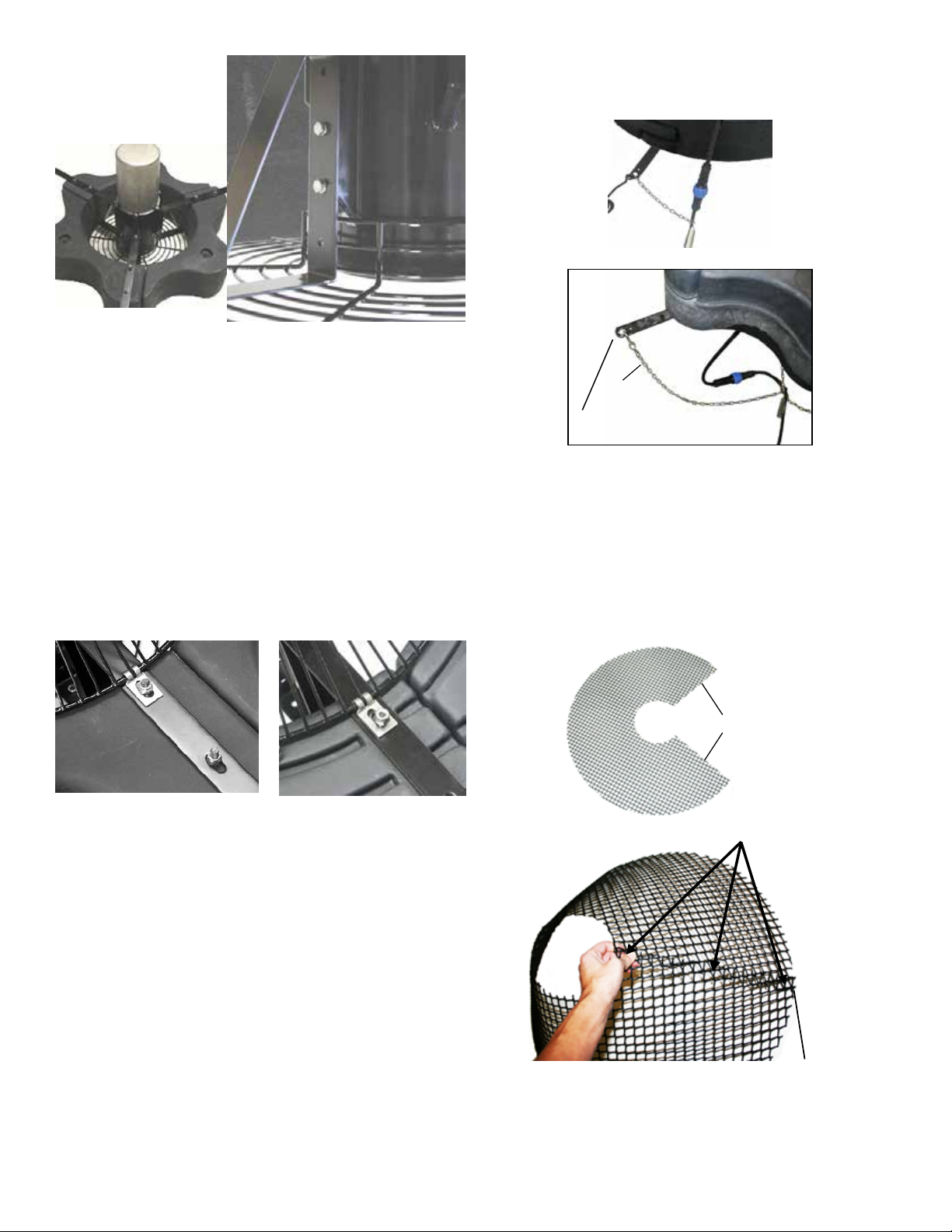
Step 6
7. See “Mesh Screen Attachment” section before
connecting the bottom screen to the oat. Position the
Bottom Screen (Part #B9) over the oat so the motor
housing (can) passes through the large hole in the center of the screen. Remove the center three 3/8” Lock
Nuts from the 9” Bolts and place the Bottom Screen
Clips (Part #B13) over the bolts as shown. The power
cord can be slid under the bottom screen between the
oat and screen where two oat sections come together before the 3/8” Lock Nuts are replaced. Replace the
three inside Lock Nuts and tighten all 3/8” Lock Nuts
using the 9/16” wrench and socket.
8400, 2.3
5.1, 5.3
If installing a new Quick Disconnect, please refer to
Quick Disconnect instructions. Also, at this time,
lights can be installed if purchased.
1 chain strain relief
Chain
Bottom Float Bracket
3 chain strain relief
Mesh Screen Attachment
1. Take at mesh pattern and wrap into cone shape
by overlapping both vertical edges by approximately
1 inch and aligning top and bottom edges of mesh.
Secure mesh vertical seam at the top, bottom and
middle using (3) cable ties.
Note: Extra hardware may be included
8. On power cord lengths of 100 feet or longer with
the watertight Quick Disconnect, the power cord is
shipped separately. It should now be attached to the
stub cord by lining up the male and female halves of
the disconnect and hand tightening the blue collar. On
these cords, the Additional Strain Relief should be
attached to one of the lower oat brackets as pictured.
If you receive a 3 chain strain relief (6 or 8 gauge
cord), attach one chain to each of the three lower oat
brackets. If there is not Strain Relief, use the Nylon
Cable Tie provided to secure the cord to a rope to
prevent damage by the propeller. Double check the
Quick Disconnect to make sure the threaded collar has
not come loose in shipping before placing in the water.
Overlap vertical edges
Attach 3 cable ties
1 inch overlap
8
Page 9

2. Insert existing stainless steel screen centered inside
mesh cone with approximately 2 inches of mesh
overlap to the top ring of the screen. Attach mesh
to the top ring of the screen in (3) equally spaced
locations using cable ties.
Attach 3 cable ties
to top ring equally spaced
VFX Installation Instructions
Before installing 3 phase units (2.3, 5.3) into the pond,
please refer to 3 phase startup procedure.
Use the ropes to position the aerator in the desired
location in the pond/lake. Anchor the ropes or secure
them to the shoreline so the ropes are free of slack, but
not tight. To prevent twisting of the unit due to torque,
you should place the anchor at least 3 feet from the
oat for each foot of depth (Ex. A 6 foot deep pond
would require an anchor 18 feet horizontally from the
oat.)
2 inch overlap
3. Flip mesh and screen assembly over and use
remaining cable ties to secure mesh to small bottom
diameter of the stainless steel ring.
Attach 2 cable ties
to bottom ring equally spaced
ALTERNATE INSTALLATION
In ponds where the water level uctuates signicantly,
you may need to suspend a small weight (12” of 1”
galvanize pipe works well) at the mid-point of the
rope to take up any slack as the water level drops. The
weight should be light enough so the aerator can rise
as the water level rises. This can also help hide ropes
by sinking them further below the surface.
4. Clip off excess cable tie material once mesh is
secured into place. Go back to assembly instructions
to continue with connecting the bottom screen to the
oat.
9
Page 10

Control Panel Installation
STEP ONE
Inspect the panel for any damage and any components that
may have loosened during shipping.
Control panel must be installed a minimum of 5ft (3m in
Canada) from the inside wall of the pond, unless separated
from the body of water by a fence wall, or other permanent
barrier that will make the unit inaccessible to persons in the
water.
This control panel requires a 240V or 208V - 4 wire service
(L1, L2, N, & G) and must be fed with a power circuit
protected by a circuit breaker or a fused disconnect switch
to provide circuit protection and a disconnection means.
C-85 panel requires at least a 30amp protected circuit
feeding the panel.
C-95 panel requires at least a 40amp protected circuit
feeding the panel.
Connect your power feed as detailed in the wiring diagram
provided with this panel.
Install the control panel to a post structure, side of a
building, or other reliable means. This structure must
support the panel and prevent movement/exing of the
panel. Use #10 x 1” or longer screws in the mounting
points of the control panel to secure to the post structure.
NOTE: The control panel must be hung upright in order to
be waterproof. It is also advised to mount the panel out of
direct sunlight if possible. Mounting the panel in a North
direction will prevent heat buildup inside the panel. Also,
mount the panel above the potential ood plain to prevent
water entry during a possible ood event.
STEP TWO
Set Timer in the control panel to desired ON and OFF times
per the Instructions for each specic timer.
STEP THREE
Follow all local and national electrical codes for this
installation and Consult a qualied electrician or service
person if needed.
(For 120V Installations)
Plug the aerator cord into the C-25 outlet labeled “UNIT”.
If lights are included, plug the Transformer cord into the
C-25 outlet labeled “LIGHT”. Now you are ready to plug
the C-25 into the 120V power supply on the post and ENJOY YOUR NEW KASCO AERATOR!
3 Phase: (2.3, 5.3)
Refer to your 3 phase control panel instructions
Single Phase: (3400H, 4400H, 8400, 5.1)
STEP THREE (For 240V Installation)
All electrical connections to this panel must be made
with proper strain relief cord grip ttings or with conduit
connections as required by local and national electric codes.
The bottom of the enclosure is reserved for eld installation
of these connections.
L1 connects to Terminal #1
L2 connects to Terminal #2
N connects to Terminal N
G connects to Terminal GROUND - located on
chassis plate
Be sure to provide adequate sized power conductors
to prevent excessive voltage drop. Consult with your
electrician to properly size power feed conductors. Use
copper conductors only.
Aerator power cord connection:
Your aerator (pump) will be provided with a exible power
cord for connection to this control panel. If the power cord
has a plug, you will need to cut it off. The power cord
conductors (black, white, green) will need to be stripped
back 1/2”. The outer black jacket should be stripped
back at least 3inches. Follow the connection diagram for
terminating these three wires to the terminal blocks in the
control panel.
Black connects to Terminal #4
White connects to Terminal #5
Green connects to Terminal G
Light Kit connection:
If you purchased a Kasco light kit(s) for your aerator,
follow the light kit installation instructions for mounting
the light kit(s) to the aerator oat.
This control panel requires a hardwire connection for
the light kit(s). To connect the light kit(s) you will need
to cut off the power cord plug that is molded to the light
kit power cord. Strip back the black outer jacket of the
light kit power cord at least 3inches to reveal the three
internal wires of the power cord. (black, white, and green
conductors). These three wires will need to be stripped
back 1/2”. Follow the connection diagram for terminating
these three wires to the terminal blocks in the control panel.
C85 / C95 non-metallic control panel:
Incoming power connection: (Power feed)
10
Light kit connections:
Black connects to Terminal #6
Page 11

White connects to Terminal #7
Green connects to Terminal G
STEP FOUR:
Test the GFCB with the test button now and every 30
days.
If lights are installed, they can now be installed per Instructions included with the lights.
Once completed, power can be restored to the panel.
Record the following data while the Aerator is operating
in the water under load:
Voltage:
L1-L2 ________
L1-N _________
L2-N _________
Amperage:
L1 __________
L2 __________
Date installed _____/_____/_____
Any unauthorized modications to this control panel will
void the UL listing and the Kasco warranty.
C-25 Timer Control Instructions
IMPORTANT
This portable timer is designed for CONTROLLING the
connected equipment only. Unplug timer before servicing the unit or the equipment it controls. THE MANUAL
OVERRIDE KNOB IS NOT TO BE USED AS A POWER
DISCONNECT! For maximum protection against electrical shock hazard, perform test procedure on G.F.C.I. at least
once a month. Mount at least 5 ft. from open water.
2. If the G.F.C.I. tests okay, restore power by
pushing the RESET button back in. THE RESET BUTTON MUST BE PUSHED FIRMLY AND FULLY INTO
PLACE UNTIL IT LOCKS AND RE-MAINS DEPRESSED AFTER PRESSURE HAS BEEN REMOVED.
DANGER: IF RESET BUTTON DOES NOT
POP OUT, IF TEST LAMP REMAINS LIT WHEN
RESET BUTTON DOES POP OUT, OR IF THE G.F.C.I.
FAILS TO RESET PROPERLY, DO NOT USE TIMER!
CONTACT A QUALIFIED SERVICE TECHNICIAN!
Failure to use the C-25 with Kasco aerators will void the
warranty and cause the aerator to not be listed to UL and
CSA standards via ETL.
UNDER NO CIRCUMSTANCES SHOULD ANYONE
ENTER THE WATER WHEN A UNIT IS IN OPERATION!
TIMER-OPERATION INSTRUCTIONS
C-25 Control Box will turn the aerator ON & OFF with the
TIMER. Kasco lights will turn ON with the PHOTO EYE
and OFF with TIMER. C-25 Control Box is to be used
with Kasco Approved Lights ONLY!
• Insert “ON” (GREEN) and “OFF” (RED) trippers into
dial at desired ON and OFF times.
• Turn dial clockwise one or more revolutions until
correct time-of-day (AM or PM) in window is aligned
with the arrow.
• Plug aerator cord into the RIGHT hand outlet (labeled
UNIT).
• Plug transformer light cord into LEFT hand outlet
(labeled LIGHT).
FOR TEMPORARY MANUAL OPERATION
Rotate MANUAL knob counter-clockwise to desired ON or
OFF position. Timer will follow next automatic operation.
G.F.C.I. TEST PROCEDURE
The G.F.C.I. should be checked every month to make sure
that it is operating properly. Just follow the simple instructions below. It is recommended to maintain a maintenance
diary of your monthly safety check.
1. Push TEST button, RESET button should pop
out from inner surface. This should result in power being
OFF at the outlet protected by the G.F.C.I. Verify by
plugging a test lamp into the outlet. Be sure the timer is in
the ON position.
11
Page 12

C85 / C95 non-metallic Wiring Diagram
* C95 uses 30 Amp
breaker
12
Page 13

3 Phase Startup Procedure
If a Kasco Control Panel is not provided, please refer
to the following warnings:
When inherent overheating protection is not provided:
use with approved motor control that matches motor
input in full load amperes with overload element(s)
selected or adjusted in accordance with control
instructions.
Utiliser un démarreur approuvé convenant au courant
à pleine charge du moteur et dont les éléments
thermiques sont réglés ou choisis conformément aux
instructions qui l’accompagnent.
When inherent overheating protection is provided:
use with approved motor control that matches motor
input in full load amperes. See table below.
Utiliser un démarreur approuvé convenant au courant
à pleine charge du moteur.
Note: The motor input in full load amperes is the
marked value or the service factor amperes, shown on
the namplate.
3 phase 208-
230 Volt
Full load amps 7.5 16
3 phase 460
Volt
Full load amps 3.6 7.8
Control panels must be installed by a qualied electrician.
2.3VFX 5.3VFX
2.3HVFX 5.3HVFX
2. Verify the electrical service (voltage and Phase)
matches the control panel and
ratings. Refer to the control panel instructions and
schematics for installation details.
3. Verify all switches, circuit breakers, and motor starters
are in the OFF position
4. Connect electrical service to this control panel as
shown in the electrical schematic that came with the
panel.
5. Connect the
in the electrical schematic.
6. Set the motor starter overload to the FLA rating on the
aerator power cord to this panel as shown
aerator nameplates
aerator nameplate.
7. Pump rotation: The pump rotation is clockwise
when looking down at the propeller. Apply power to
the control panel. Turn on the 15amp control circuit
breaker, and motor starter.
8. Momentarily turn the Hand-Off-Auto switch to Hand.
This will run the
more than a few seconds on shore. If the rotation is
not correct. Disconnect and lock out power from the
control panel. Swap any two of the
wires in the panel. This will cause the motor to reverse
direction. Reapply power to the panel and verify the
rotation is clockwise.
9. Once rotation is veried, with the power disconnected
and locked out again, continue with installation of the
aerator. Do not run the aerator for
aerator power cord
aerator as detailed in the aerator owner’s manual.
Record the following data while the unit is operating
in the water under load:
Voltage: Amperage:
L1-L2 ____________ L1_______________
L1-L3 ____________ L2_______________
If unit is connected to a circuit protected by a fuse, use
a time-delay fuse with this pump.
You must verify motor rotation before installing
the unit in the water.
3phase Kasco units will run in a clockwise rotation
when looking down at the propeller. Stand clear of the
propeller while verifying rotation. If a Kasco 3 phase
panel is supplied, follow the intructions with the panel.
Also follow the steps below.
Electrician:
1. Verify all screw terminal connections are tightened to
specied torque setting prior to energizing the panel.
L2-L3 ____________ L3_______________
Current unbalance should not exceed 5% at full load
13
Page 14

PROGRAMMING WITH MANUAL
OVERRIDE SWITCH
AUTOMATIC MODE
In order to operate the time switch module in the automatic
mode, the manual switch must be in the center position (auto-
matic) - see diagram.
MANUAL MODE
With the manual switch selector lever the selected programs
can be overridden. In the lower position, marked “O”, termi-
nals 3 and 5 are permanently closed. In the upper position,
marked “I”, terminals 3 and 4 are permanently closed (see
diagram).
Dimensions
FM/1 synchronous/quartz
ON
AUTO
C85 / C95 non-metallic and 3 Phase
Control Panel Timer
minutes for each tripper on the 24-Hour dial. When
the tripper is pushed to the inside, the switch is in the
“OFF” position.
TIME CLOCK SETTING
To set the current time, turn the inner dial clockwise.
Do not set the time by rotating “outer” dial.
Turn the minute hand or small plastic inner dial clockwise until the time of day on the outer dial is aligned
with the triangle marker on the inner dial (two o’clock
position).
Example for 10:00 AM. Turn the minute hand clockwise until 10:00 AM is aligned with the triangle on
the inner dial. The hour and the minute dial will show
exactly 10:00.
Captive trippers
Triangle marker
(in the on position)
PROGRAMMING WITH MANUAL OVERRIDE
SWITCH
Your Timer may have a 3-way manual switch or a
2-way manual switch.
AUTOMATIC MODE
In order to operate the time clock in the automatic
mode, the manual switch must be in the automatic
postion- see diagram.
MANUAL MODE
For the 3-way switch, with the manual override switch
in the lower position, marked “O”, the time clock
output will remain Permanently OFF. In the upper
position, marked “I”, the time clock output will remain
permanently ON.
For the 2-way switch, with the manual override switch
in the lower position, marked “ON” the time clock
output will remain permanently ON.
PROGRAMMING
The 24-Hour dial has quarter-hour divisions and AM/
PM indications.
The time switch is programmed by pushing the captive
trippers to the outer ring position for the entire pe-
riod that the aerator is to be turned “ON”, i.e., fteen
14
Override Mode
3-way manual
override switch
Overide Mode
2-way manual ON - Permanently ON
overide switch AUTO - automatic
I = permanent ON
= automatic
0 = permanent OFF
Page 15

2400VFX, 3400VFX, 3400HVFX, 4400VFX, 4400HVFX
REPLACEMENT PARTS
12
2400, 3400, 4400 Parts Diagram
13
6
5
11
10
1
ITEM NO.
1 241005
2
3
4
5A
5B
5C
6A
6B
6C
7
8
10 990275
11 243475
12 243405
13 241024
18 990410
PART NO.
140312
840537
251250
240595
340595
440600
241025
241035
241045
990281
990280
18
8
DESCRIPTION
V TUBE WITH LEGS
RETAINING CLIP
LOCK WASHER, 1/4"
#14 X 1-1/4" LONG HEX WASHER HEAD
PROP, 2400VFX
PROP, 3400VFX
PROP, 4400VFX, 4400HVFX
TOP DISK, 2400VFX
TOP DISK, 3400VFX, 3400HVFX
TOP DISK, 4400VFX, 4400HVFX
O RING
SEALING PLUG
O RING, CORD
ZINC ASSEMBLY
1/2-20 X 3/4 LONG HEX HEAD BOLT
WASHER, 1/2IN, BRONZE, INTERNAL
TOOTH LOCK
DEBRIS FLINGER, .500 DIA. SHAFT
7
Replacement
Parts/QTY.
1
4
4
4
1
1
1
1
1
1
1
1
1
1
1
1
1
2
3
4
15
Page 16

ITEM
NO.
1 990275
2
3
4
5
6
7
8
9
10 821120
11 821095
14 821114
15 241024
16 840510
PART
NO.
990280
990281
840475
140312
840537
584692
475642
821100
DESCRIPTION
O RING, CORD
SEALING PLUG
O RING
ZINC ASSEMBLY
RETAINING CLIP
LOCK WASHER, 1/4"
1/4-20 X 1-3/8" BOLT
WASHER, 1/2"
TOP DISK, 8400VFX
8400VFX TUBE
1/2-20 HEX NUT, LEFT
HAND THREADED
PROP ASSEMBLY, 6
BLADE
WASHER, 1/2IN, BRONZE,
INTERNAL TOOTH LOCK
DEBRIS FLINGER, .625
DIA. SHAFT
8400
/QTY.
1
1
1
1
6
6
6
1
1
1
1
1
1
1
8400VFX, 2.3(H)VFX Replacement Parts
8400VFX REPLACEMENT PARTS
11
15
9
14
8
4
16
1
5
10
2
3
16
6
7
Page 17

ITEM
NO.
PART NO.
1 990290
2
3
4
5
6
7
8
9
10 821095
11 510250
12 510200
13 241024
14 840510
990280
990281
840475
140312
840537
584692
475642
821124
DESCRIPTION
O RING
SEALING PLUG
O RING
ZINC ASSEMBLY
RETAINING CLIP
LOCK WASHER, 1/4"
1/4-20 X 1-3/8" BOLT
WASHER, 1/2"
PROP ASSEMBLY, 6
BLADE
1/2-20 HEX NUT, LEFT
HAND THREADED
5.1VFX TUBE
TOP DISK, 5.1VFX
WASHER, 1/2IN,
BRONZE, INTERNAL
TOOTH LOCK
DEBRIS FLINGER, .625
DIA. SHAFT
5.1VFX
PARTS
LIST/QTY.
1
1
1
1
6
6
6
1
1
1
1
1
1
1
5.1VFX, 5.3(H)VFX Replacement Parts
5.1VFX REPLACEMENT PARTS
10
13
12
9
8
4
11
14
1
2
3
5
6
7
17
Page 18

Maintenance Recommendations
** Under No Circumstances should anyone enter the
water while a aerator is operating. **
** Please keep the original box for maintenance shipping. **
The following maintenance procedures can be utilized to ensure many years of quality performance
from your Kasco aerator and reduce the need for more
costly repair work.
However, when the water is thrust into the air, it is exposed to the colder air temperatures longer and can actually make ice thicker on the pond/lake. Storage over
winter is best in a location that is out of the sun and
cool, but above 32
O
F. When storing units during the
offseason, it is important to store them upside down
if they are going to be sitting for long periods of time.
Units that sit upright on a shelf for many months, or
even years have a greater likelihood of seals drying
out. Storing upside down will ensure oil is lubricating
the seals and prevent drying.
PROPER INSTALLATION: Proper installation of
Kasco equipment will include a power source with
ground fault interruption (GFI). For aerator models,
the C-25 control (120V) or C-85 (240/208V) included
with the unit have built-in ground fault interrup-
tion that is sufcient. Ground fault interrupters are
a safety feature that can also alert you to electrical
leaks in the equipment. It is extremely important to
test the GFI upon installation, each reinstallation, and
monthly thereafter to ensure proper operation. If you
have repeat, consistent trips on your ground fault, the
equipment should be disconnected and removed from
the water. The power cord should be inspected for
damage and you should call Kasco Marine at 715262-4488 for further instructions or email Kasco at
returns@kascomarine.com.
OBSERVATION: Operating equipment should be
observed on a regular basis (daily, if possible) for any
reduction or variation in performance. If a change
in performance is observed, the equipment should be
disconnected from power and inspected for any material that may have clogged the system or wrapped
around the shaft of the motor, especially plastic bags
and shing line. Even though Kasco Aerators and
aerators are among the most clog-resistant on the
market, it is impossible to protect against all items that
can clog equipment and still maintain a ow of water.
These materials can be very damaging to the equipment under continued operation and must be removed
as soon as possible. ALWAYS UNPLUG THE UNIT
BEFORE ATTEMPTING TO REMOVE CLOGS.
CLEANING: Aerators should be removed from the
water at least once per year (at the end of the season
in cold climates) to clean the exterior of the system,
especially the stainless steel motor housing (can). The
motor housing is the surface that dissipates heat into
the water and any algae, calcium, etc. build-up will become an insulator that blocks heat transfer. In warmer
regions it is recommended that the motor is removed
and cleaned at least two to three times per year depending on conditions. In most cases a power washer
will be sufcient if the unit and algae are still wet.
SEAL AND OIL REPLACEMENT: This is a sealed
motor assembly and seals will wear out over time
(similar to brake pads on a car). Replacement of the
seals and a change of oil after three years may add
longevity to the operation of the motor, saving you
the cost of more expensive repairs. In warmer climates where the aerator runs most or all of the year,
it is a good idea to replace seals more regularly than
you would need to in colder climates where the unit is
removed from the water for several months.
ZINC ANODE: A Sacricial Zinc Anode is supplied
on the shaft of all VFX Model aerators for protection
of the equipment from corrosion and electrolysis. The
zinc anode should be updated (replaced) if reduced to
half the original size or if white in color. Corrosion
from electrolysis is more commonly associated with
saltwater or brackish water, but as a matter of precaution, it is important to periodically check the zinc
anode in all installations (at least every two to three
months).
WINTER STORAGE: In regions where there is sig-
nicant freezing in the wintertime, the aerators should
be removed from the water to protect them from the
expansion pressure of the ice. In many areas, aerators
will keep some amount of ice open through the winter.
18
Seal replacement and all other repair services should
be performed by Kasco Marine or a Kasco trained
Authorized Repair Center. Any alterations or changes
made to Kasco units by an unauthorized source will
Page 19

void the warranty. This includes tampering with the
unit, power cord, and/or control box. Please contact
Kasco Marine, Inc. at 715-262-4488 for your nearest
Authorized Repair Center.
Warranty Claim Procedure:
The best method for establishing warranty period is by
keeping your original receipt. Also register the aerator
online at:
www.kascomarine.com
Warranty Policy
Warranty Period:
Models: 2400VFX, 3400(H)VFX, 4400(H)VFX
- 2 years
Models: 8400VFX, 2.3(H)VFX, 5.1VFX,
5.3(H)VFX - 3 years
Kasco® Marine, Inc. warrants this aerator to be free
from defects in material or workmanship (except for
the ropes, power cord, and propeller) under normal
use and service. The Kasco Marine, Inc. obligation
under this warranty is limited to replacing or repairing
free of charge any defective part within the warranty
period from the date of shipment. Customer shall pay
shipping charges for returning the unit to Kasco or an
Authorized Repair Center.
THIS WARRANTY IS IN LIEU OF ANY
OTHER WARRANTIES, EXPRESSED OR IMPLIED, AND ANY OTHER OBLIGATION OR LIABILITY WHATEVER ON THE PART OF KASCO
MARINE, INC. AND IN NO EVENT SHALL KASCO MARINE, INC. BE LIABLE FOR ANY SPECIAL OR CONSEQUENTIAL DAMAGES.
Once the warranty coverage has been established, the
unit may be sent to any Kasco Authorized Repair Center for evaluation and repair. Please call Kasco Marine
at 715-262-4488 prior to shipping.
Kasco Marine, Inc.
800 Deere Rd.
Prescott, WI 54021
Attn: Repairs
Or call Kasco Marine at 715-262-4488 to locate your
nearest Authorized Repair Center. You can also email
Kasco at returns@kascomarine.com
Note: Only complete motor assemblies will be accepted for warranty repair. The power cord and all
other components must be returned with the motor
as originally assembled. Any missing parts will be
replaced at the customer’s expense and, if determined
to have caused the failure, could void the entire warranty. Some parts are essential for structural support
during shipping and others, such as the power cord,
are essential to properly diagnose potential causes of
failure. It is not necessary to return the control box or
oat with the motor assembly.
Warranty is void if:
• The aerator is not maintained properly according
to the Maintenance Recommendations supplied in
this Owners Manual.
• The aerator is returned for repair without the
power cord or if the unit, control box, or power
cord are altered in any way from original shipment. Cuts in the power cord are not covered
under warranty.
• The aerator is damaged by unauthorized tampering.
• The Sacricial Zinc Anode around the propeller
shaft shows signicant deterioration. (The Anode
must be inspected periodically and replaced if
necessary.)
Please include the Repair Form received from Kasco
Marine or your local distributor with the shipment. If
no Repair Form is available, include your name and
physical address for return delivery of the repaired
unit and a daytime phone number and/or e-mail address for correspondence regarding the warranty
claim.
Any expedited shipping method for the return of the
unit is at the customer’s expense. Kasco Marine will
return units repaired under warranty at our expense via
ground freight within the continental United States.
Other Repairs:
Most failed equipment can be repaired at substantially
lower costs than replacement with new. Please ship
according to the instructions in the previous section.
Again, it is best to call ahead for a Return Authori-
19
Page 20

zation Number and/or Repair Form so we know the
repair is coming.
Kasco Marine does estimates on repairs at the request
of the customer. The request for estimate should be
included in the letter that accompanies the returned
unit and must include a daytime phone number and/or
e-mail address. Estimate options are as follows:
We will contact the customer with a total after the unit
has been evaluated, but before the work is performed.
We will repair the unit only if repair costs are under a
stated dollar amount. Example: “Please repair if total
is under $150.00 before shipping charges.”
All estimates that are rejected for repair will be destroyed unless otherwise directed by the customer. If
the customer would like the unit returned, the unit will
be restored as closely as possible to the condition in
which it was received and shipped at the customer’s
expense for shipping and handling charges.
Fault Interrupter (GFI) breaker that trips can indicate an electrical service problem, water contamination in the unit and/or cord, bad breaker, control
box problems, motor problems, etc. Try to nd out the
answers to these questions before you contact
Kasco to narrow down the problem.
• How long does it take to trip the breaker?
• Does it always take the same amount of time to
trip?
• How many times has it tripped?
• Has there been any electrical problems in the area
recently?
“My Aerator seems to run slowly.”
This can also be a symptom of several possible
problems. There could be an electrical problem where
the unit is not getting the proper voltage. This could
also indicate a problem with the motor of the unit,
which needs to be looked at by an Authorized Repair
Center. Check that the unit is receiving the proper
voltage, and, if so, contact Kasco for further steps.
Billing:
All non-warranty repairs will be returned to the customer prepaid with Visa or Mastercard or shipped
C.O.D. with C.O.D. charges unless otherwise directed.
Kasco Marine will contact for credit card information upon completion of the estimate at the customer’s
request.
All other warranty and repair inquiries should be directed to Kasco Marine, Inc. at 715-262-4488 or
returns@kascomarine.com
Troubleshooting Tips
Below are some helpful troubleshooting tips. If a
problem occurs, please double check the assembly and
installation instructions as well as the instructions for
the proper control panel. More troubleshooting tips
can be found at www.kascomarine.com (under the
technical tab)
“My Aerator trips the ground fault interrupter in the
C-25, C-85, or C-95.”
This is the most common symptom of several
possible problems. To correctly diagnose the problem,
you will need to collect more information. A Ground
“My Aerator hums, but will not start. When I spin
the prop with a stick, it starts up.” (single phase units
only)
This indicated a problem with the Starting
Capacitor. Each Kasco aerator is equipped with a
Starting Capacitor to get the unit going when it is rst
plugged in. If it is operating, but not spinning and can
be started by spinning the prop with a stick, the Starting capacitor needs to be replaced by an Authorized
Repair Center.
“My Aerator turns itself off and back on without the
timer and without tripping the GFI breaker.” (single
phase units only)
Each Kasco aerator has a Thermal Overload
built in that will turn the unit off when it overheats.
Once the unit has cooled down, it will start back up. If
you are noticing these symptoms, the unit should be
unplugged immediately because the Thermal Overload
will continue to turn on and off until it burns out and
damages the motor. The unit should be unplugged and
taken out of the water to nd the cause of the problem.
The problem could be one of many, such as, low water
levels, build-up on the unit to prevent heat dissipation,
something inhibiting the free rotation of the shaft, etc.
If something is caught in the unit or there is a build-up
of algae, calcium or organic matter on the unit, remove
the debris and, if caught early enough, the unit should
20
Page 21

be ne. Contact a Kasco representative before restarting the unit.
“My Aerator ow seems to uctuate and/or be less
than usual.”
This can occur because of a few different reasons. Most of the time, this symptom is caused from
unit being clogged with debris. A mat of weeds, many
leaves, plastic bags, etc. can clog up the unit and cause
it to be starved of water. If the unit does not have the
proper amount of water, the ow or pattern will uctuate up and down and look sporadic. If you are seeing these symptoms, unplug the unit and clean away
the debris that is clogging up the screen. Another
possibility if these symptoms are noticed, is a chipped
or damaged prop that is causing the unit to wobble and
not pump properly. When the unit is unplugged, check
the prop for damages and replace if damage is found.
“The GFI breaker trips randomly and sporadically.
Sometimes it is a few hours of operation, other times it
can be days or weeks.”
This is referred to as a Nuisance Trip. This
usually occurs where the unit is installed a great
distance from the initial electric service on the property where the ground stake is placed. It is caused by
either induced current in the ground wire or a base
voltage difference due to soil pH levels. To resolve
the problem, contact an electrician and install a local
grounding stake. This may eliminate the induced current and any base voltage differences. This problem
can also be caused by a bad breaker or receptacle or
having unbalanced incoming voltage lines.
21
Page 22

800 Deere Rd.
Prescott, WI 54021
Phone: 715-262-4488 - Fax: 715-262-4487
www.KascoMarine.com Sales@KascoMarine.com
Customer Repair Form
* Important Reminders *
• All repairs sent in MUST be accompanied by a copy of this completed sheet!
• Routine maintenance consists of checking the zinc anode regularly and replacing if necessary, keeping the
unit clean, keeping the stainless steel can clean, and having the seals and oil replaced every 3 years depending on use.
• Address your Repair to Kasco Marine, Attn: Repairs (or to your Authorized Repair Center).
• Shipping to Kasco or an Authorized Repair Center is paid for by the customer.
• You must include the power cord and cage assembly/fountain housing with each unit sent in for repair to be
considered for warranty and for proper repair and shipping protection!
• Do not ship the oat and/or control box with the unit for repair, unless otherwise instructed.
Today’s Date:___________________
Customer Information
Name: _________________ Phone Number: _____________________
Address: __________________________ Alternate Number: ___________________
City: ____________________ Email Address: ______________________
State: _____________________
Zip Code: ______________________
Unit Information:
Model # (Ex. 1400JFL): ____________________
Serial # (Ex. 7001JL14025): ____________________
Date Purchased: ________________________
Purchased From: _________________________
Earliest Date of Problem: _______________________
Description of Problem:
Comments:
22
Page 23

23
Page 24

Registration Information
Please register your aerator online at:
www.kascomarine.com
Also ll in the information below and keep for your records.
Model # (Ex. 5.1VX)_______________________________
Serial # (Ex. 8001VX511725)______________________________
Purchase Date:_____________________
Purchased From:___________________________________
Registration Date: ___________________________
24
Kasco Marine, Inc.
800 Deere Rd.
Prescott, WI 54021
Phone (715) 262-4488 • Fax (715) 262-4487
www.kascomarine.com • sales@kascomarine.com
884170
 Loading...