

Page 1
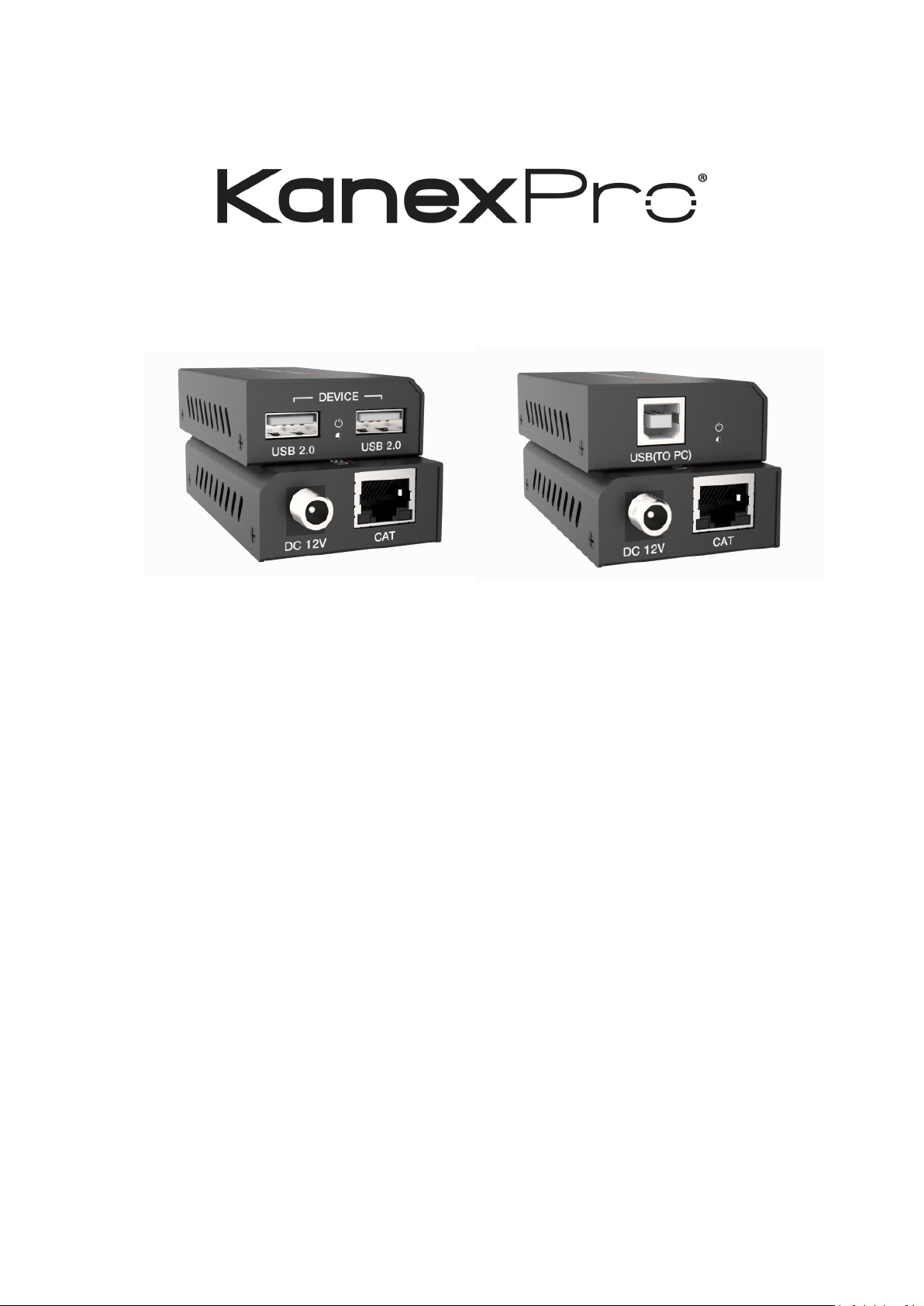
USB 2.0 Extender over Cat6 100 Meters
All Right Reserved
MPN: EXT-USB2100M
VER 1.0
Page 2

2
SAFETY PRECAUTIONS
Please read all instructions before attempting to unpack, install or operate this equipment and before
connecting the power supply. Please keep the following in mind as you unpack and install this
equipment:
• Always follow basic safety precautions to reduce the risk of fire, electrical shock and injury
to persons.
• To prevent fire or shock hazard, do not expose the unit to rain, moisture or install this
product near water.
• Never spill liquid of any kind on or into this product.
• Never push an object of any kind into this product through any openings or empty slots in
the unit, as you may damage parts inside the unit.
• Do not attach the power supply cabling to building surfaces.
• Use only the supplied power supply unit (PSU). Do not use the PSU if it is damaged.
• Do not allow anything to rest on the power cabling or allow any weight to be placed upon it
or any person walk on it.
• To protect the unit from overheating, do not block any vents or openings in the unit housing
that provide ventilation and allow for sufficient space for air to circulate around the unit.
Table of Contents
1. Introduction
2. Features
3. Package Contents
4. Specifications
5. Operation Controls and Functions
5.1 Front Panel
5.2 Rear Panel
6. Connection diagram
................................................................................................................
.......................................................................................................................
........................................................................................................
..............................................................................................................
.........................................................................................................
..........................................................................................................
...................................................................................................
.............................................................................
3
3
3
4
5
5
6
7
Page 3

3
1. Introduction
The KanexPro EXT-USB2100M extender is a compact USB 2.0 transmitter - receiver
set designed to extend USB 2.0 (480Mbps) signals from a Printer, touch screen, USB
hub, USB camera or Human Interface Device (HID) to a Host PC remotely located 328
feet away. The system is simple, plug and play and it’s ready to go. No drive and
setting installation required.
2. Features
☆ Supports USB 2.0 protocol, transmission rate up to 480Mbps
☆ Supports extend distance up to 100 meters / 328ft via CAT 5e/6 cable
☆ Supports one USB-B port input in transmitter
☆ Supports two USB 2.0 ports output in receiver
☆ Supports PoC function, it means that either transmitter or receiver is
connected powered supply by 12V/1A power adapter, the other doesn’t
need power supply.
☆ Simple plug and play, no drive and setting installation required
☆ Compact design for easy and flexible installation
3. Package Contents
① 1×USB 2.0 Extender (Transmitter)
② 1×USB 2.0 Extender (Receiver)
③ 1×USB cable (USB-B male head to USB-A male head, one meter )
④ 1×12V/1A Locking Power Adapter
Page 4
4
⑤ 1×User Manual
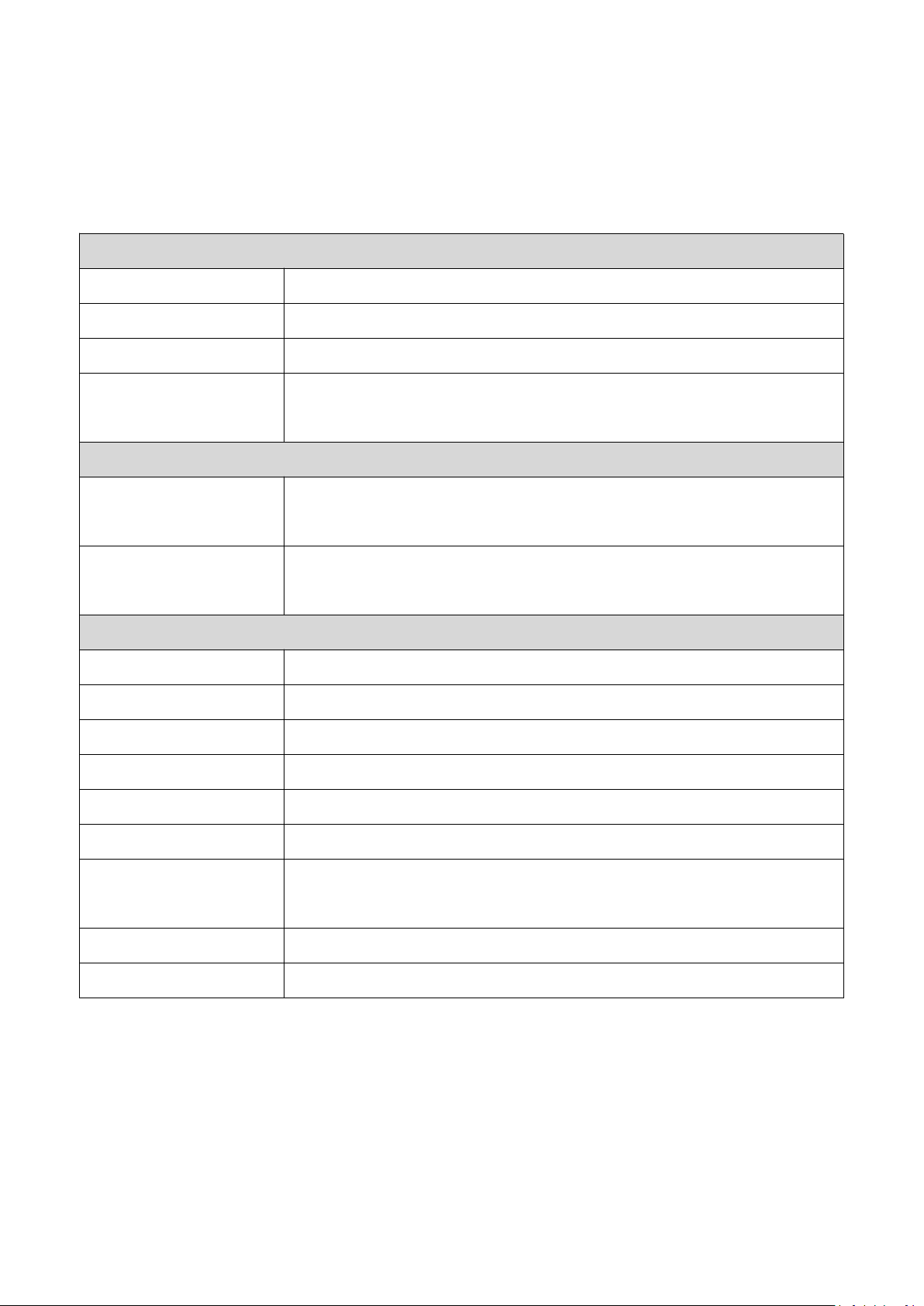
Technical
USB protocol
USB 2.0
Transmission rate
Up to 480Mbps
Transmission distance
100M (328ft)
ESD Protection
Human-body Model:±8kV (Air-gap discharge) ,
±
4kV (Contact discharge)
Connections
Transmitter
Input port: 1×USB [USB-B, female]
Output port: 1×CAT [RJ45, female]
Receiver
Input port: 1×CAT [RJ45, female]
Output port: 2×USB [USB-A, female]
Mechanical
Housing
Metal Enclosure
Color
Black
Dimensions
Transmitter / Receiver: 82mm (W)×49mm (D)×20mm (H)
Weight
Transmitter / Receiver: 100g
Power Supply
Input: AC100~240V 50/60Hz, Output: DC 12V/1A
Power Consumption
Transmitter: 1.3W, Receiver: 2.3W
Operating
Temperature
0°C ~ 40°C / 32°F ~ 104°F
Storage Temperature
-20°C ~ 60°C / -4°F ~ 140°F
Relative Humidity
20~90% RH (non-condensing)
4. Specifications
Page 5
5
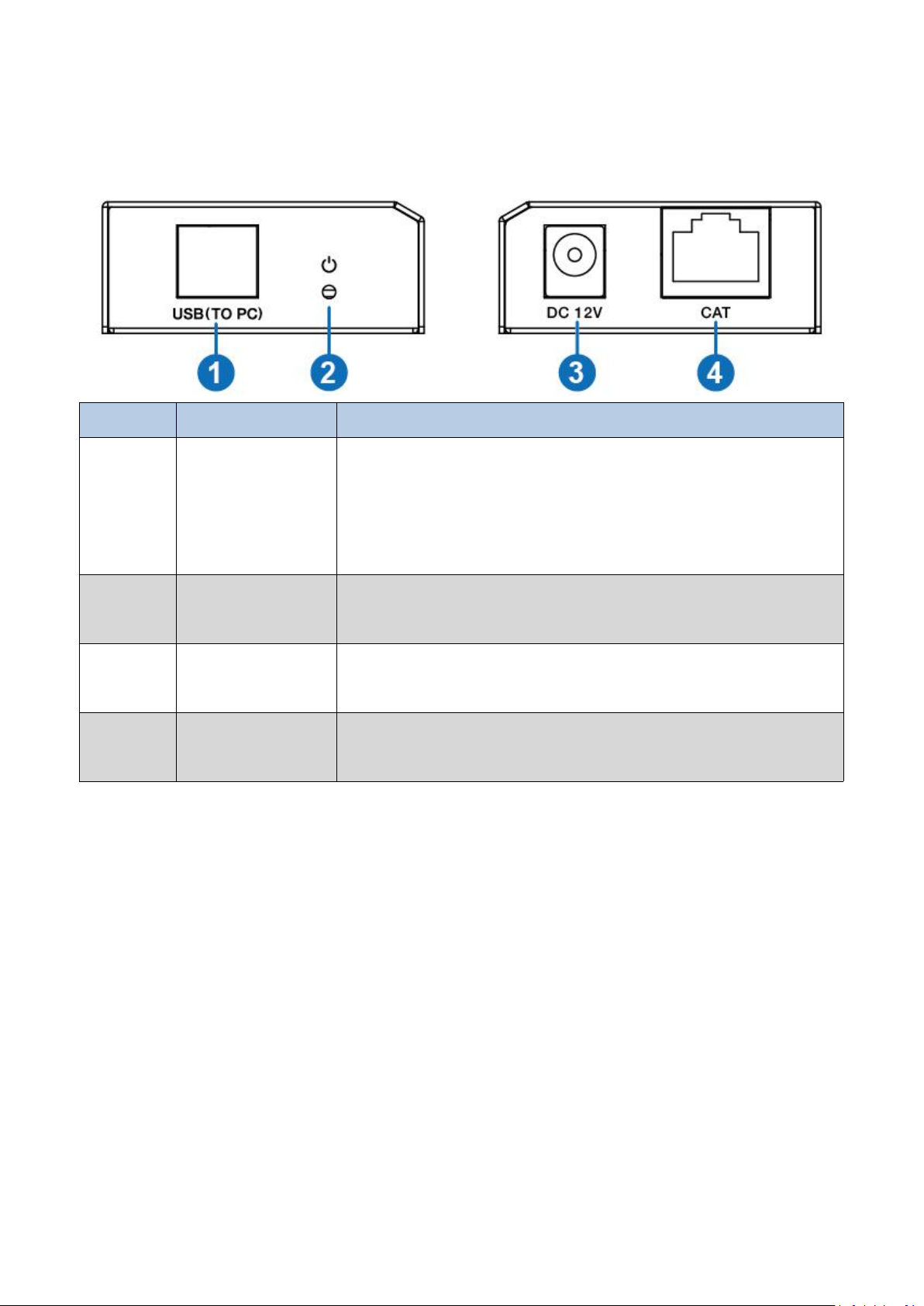
5. Operation Controls and Functions
Number
Name
Function description
1
USB port
Use USB-B male head to USB-A male head wire to
connect USB port of a PC.
Note: The PC can control USB ports’ device of the
receiver.
2
POWER LED
Power LED indicator. The green LED will illuminate when
transmitter is provided power supply.
3
DC 12V
Plug DC 12V/1A power supply into the unit and connect
the adapter to an AC outlet.
4
CAT port
The CAT port is connected receiver’s CAT port by CAT
5e/6 cable.
5.1 Front Panel
Page 6
6
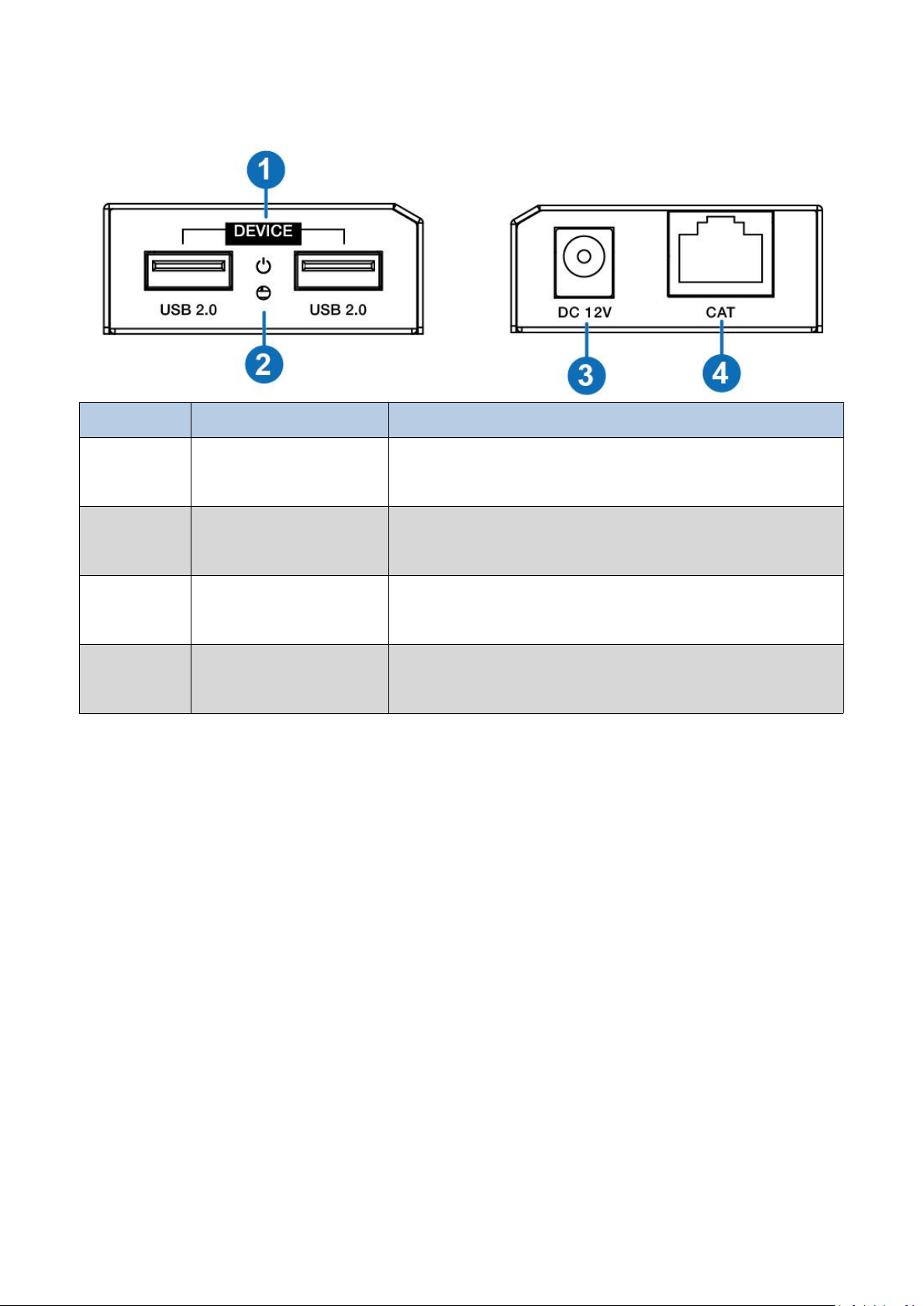
5.2 Rear Panel
Number
Name
Function description
1
USB 2.0 port
Connect to a device with USB port such as printer or U
disk, etc.
2
POWER LED
Power LED indicator. The green LED will illuminate when
the receiver is connected power supply.
3
DC 12V
Plug 12V/1A DC power supply into the unit and connect
the adapter to an AC outlet.
4
CAT port
The CAT port is connected transmitter’s CAT port by CAT
5e/6 cable.
Page 7
7
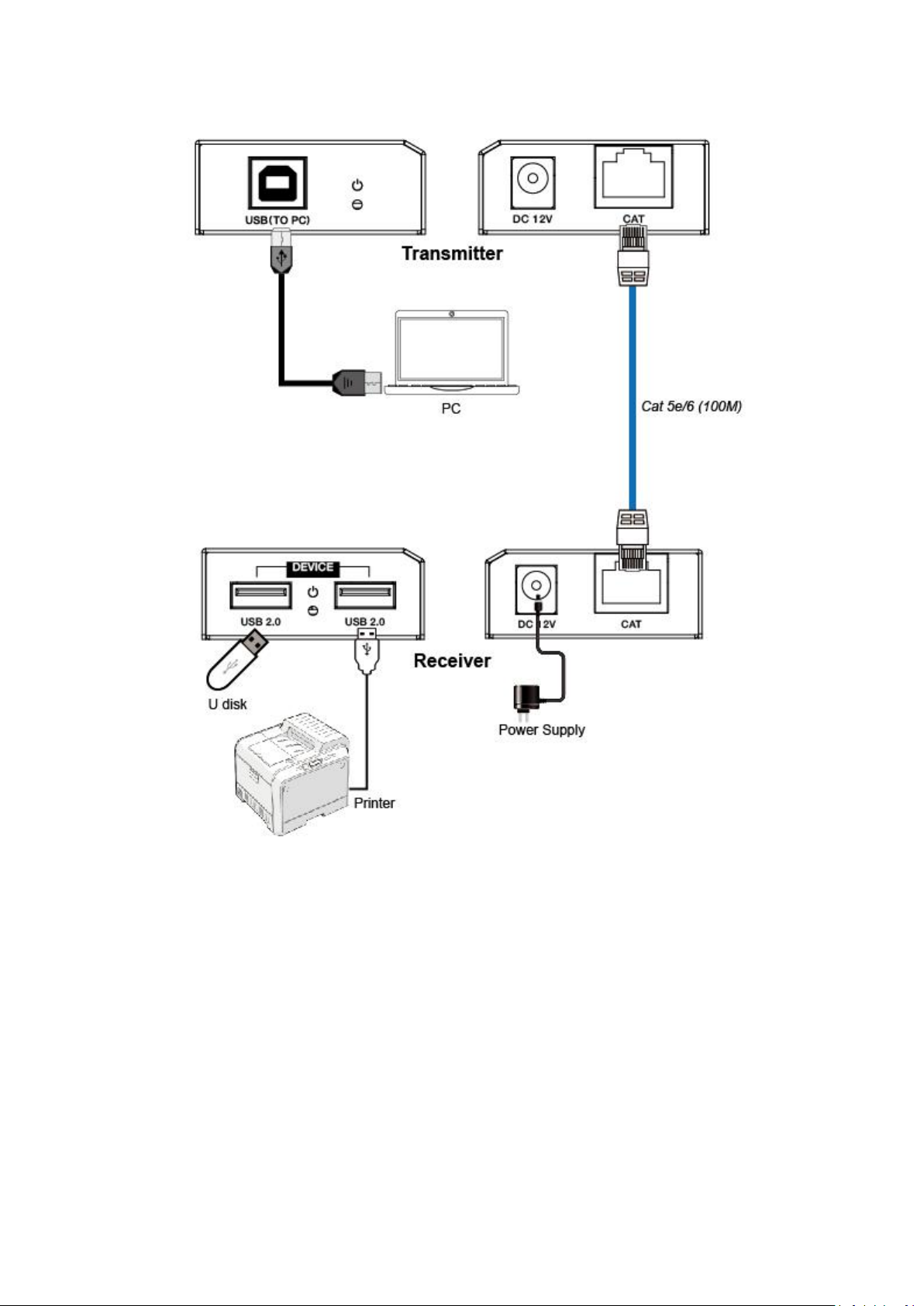
6. Connection diagram
7. Customer Service
The return of a product to our Customer Service implies the full agreement of the terms and
conditions hereinafter. There terms and conditions may be changed without prior notice.
① Warranty
The limited warranty period of the product is fixed 3 (three) years.
② Scope
These terms and conditions of Customer Service apply to the customer service provided for the
products or any other items sold by authorized distributor only.
③ Warranty Exclusions:
Page 8

8
Warranty expiration.
Factory applied serial number has been altered or removed from the product. Damage,
deterioration or malfunction caused by:
Normal wear and tear.
✓
Use of supplies or parts not meeting our specifications.
✓
No certificate or invoice as the proof of warranty.
✓
The product model showed on the warranty card does not match with the model of the
✓
product for repairing or had been altered.
Damage caused by force majeure.
✓
Servicing not authorized by distributor.
✓
Any other causes which does not relate to a product defect. Shipping fees, installation or
✓
labor charges for installation or setup of the product.
④ Documentation:
Customer Service will accept defective product(s) in the scope of warranty coverage at the sole
condition that the defeat has been clearly defined, and upon reception of the documents or copy of
invoice, indicating the date of purchase, the type of product, the serial number, and the name of
distributor.
Remarks: For further assistance or solutions, please contact your local distributor, or email directly
to us at [email protected]
 Loading...