

Page 1
PDF provided by Conference Room AV
KanexPro CON-AUDXTRACT HDMI Audio Decoder with Dolby, 4K 60Hz - HDCP 2.2
Page 2
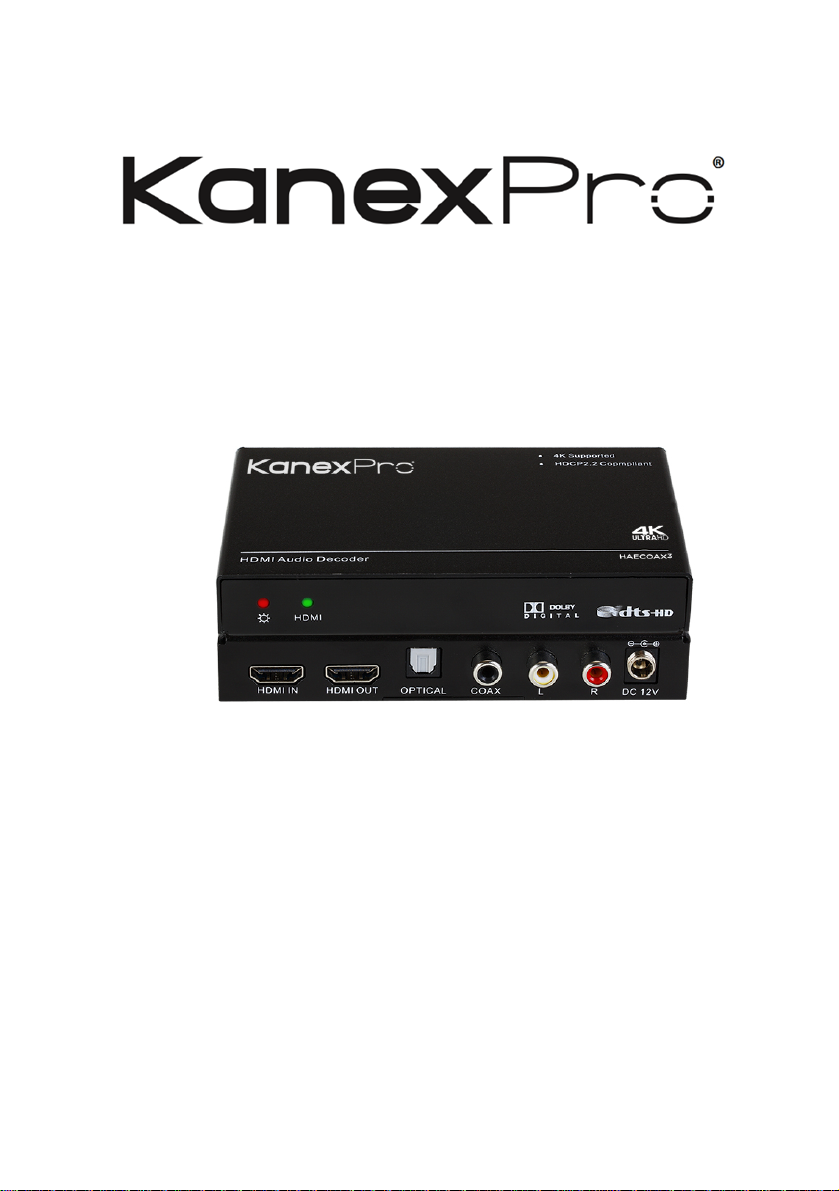
CON-AUDXTRACT
USER MANUAL
Extract multi-channel audio from HDMI
All Rights Reserved
Version: CON-AUDXTRACT_2016V1.2
Page 3

KANEXPRO CON-AUDXTRACT
2 | Page
Preface
Read this user manual carefully before using this product. Pictures shown in this manual
is for reference only, different model and specifications are subject to real product.
This manual is only for operation instruction only, not for any maintenance usage. The
functions described in this version are updated till June 2016. Any changes of functions
and parameters since then will be informed separately. Please refer to the dealers for
the latest details.
All product function is valid till 2016-6-2.
Trademarks
Product model and logo are trademarks. Any other trademarks mentioned in this
manual are acknowledged as the properties of the trademark owner. No part of this
publication may be copied or reproduced without the prior written consent.
FCC Statement
This equipment generates, uses and can radiate radio frequency energy and, if not
installed and used in accordance with the instructions, may cause harmful interference
to radio communications. It has been tested and found to comply with the limits for a
Class B digital device, pursuant to part 15 of the FCC Rules. These limits are designed
to provide reasonable protection against harmful interference in a commercial
installation.
Operation of this equipment in a residential area is likely to cause interference, in which
case the user at their own expense will be required to take whatever measures may be
necessary to correct the interference
Any changes or modifications not expressly approved by the manufacture would void
the user’s authority to operate the equipment.
Page 4

KANEXPRO CON-AUDXTRACT
3 | Page
SAFETY PRECAUTIONS
To insure the best from the product, please read all instructions carefully before using
the device. Save this manual for further reference.
l Unpack the equipment carefully and save the original box and packing material for
possible future shipment
l Follow basic safety precautions to reduce the risk of fire, electrical shock and injury
to persons.
l Do not dismantle the housing or modify the module. It may result in electrical shock
or burn.
l Using supplies or parts not meeting the products’ specifications may cause damage,
deterioration or malfunction.
l Refer all servicing to qualified service personnel.
l To prevent fire or shock hazard, do not expose the unit to rain, moisture or install this
product near water.
l Do not put any heavy items on the extension cable in case of extrusion.
l Do not remove the housing of the device as opening or removing housing may
expose you to dangerous voltage or other hazards.
l Install the device in a place with fine ventilation to avoid damage caused by
overheat.
l Keep the module away from liquids.
l Spillage into the housing may result in fire, electrical shock, or equipment damage. If
an object or liquid falls or spills on to the housing, unplug the module immediately.
l Do not twist or pull by force ends of the optical cable. It can cause malfunction.
l Do not use liquid or aerosol cleaners to clean this unit. Always unplug the power to
the device before cleaning.
l Unplug the power cord when left unused for a long period of time.
l Information on disposal for scrapped devices: do not burn or mix with general
household waste, please treat them as normal electrical wastes.
Page 5

KANEXPRO CON-AUDXTRACT
4 | Page
Table of Contents
1. Introduction .................................................................................................................. 5!
1.1 Introduction to CON-AUDXTRACT .................................................................... 5!
1.2 Features ............................................................................................................. 5!
1.3 Packing List ........................................................................................................ 6!
2. Panel Description ........................................................................................................ 6!
3. System Connection ..................................................................................................... 7!
3.1 Usage Precautions ............................................................................................. 7!
3.2 System Diagram ................................................................................................. 7!
3.3 Connection Procedure ....................................................................................... 8!
4. Specification ................................................................................................................ 9!
5. Panel Drawing ........................................................................................................... 10!
6. Troubleshooting & Maintenance ................................................................................ 11!
7. After-sales Service .................................................................................................... 12!
8. Warranty .................................................................................................................... 13!
Page 6

KANEXPRO CON-AUDXTRACT
5 | Page
1. Introduction
1.1 Introduction to CON-AUDXTRACT
The KanexPro CON-AUDXTRACT is our next generation of audio converter designed to
extract the encoded multi-channel LPCM, Dolby Digital 5.1, DTS-HD 5.1 from HDMI
sources to optical audio output and decode to 2 CH’s analog stereo audio via RCA (L/R)
and COAX outputs without any other external AV equipment.
Licensed by Dolby Labs, this audio extractor is HDCP 2.2 compliant and also supports
4K pass-through resolutions when connected to a 4K sources and display.
Content from multi-channel sources such as Blu-ray players, set-top boxes and game
consoles can be spread to multi-channel and two-channel-capable zones
simultaneously, ensuring compatibility, reducing system complexity and eliminating the
expense of separate dedicated sources for each zone and you can listen to digital audio
sources such as DVD and CD players or digital computer audio on your legacy analog
sound system, preserving your current investment in AV systems.
1.2 Features
l De-embeds HDMI audio output simultaneously to Stereo and S/PDIF
l Converts 2CH from 24-bit up to 192 kHz audio
l HDCP 2.2 and HDMI2.0 compliant
l Supports 3D & CEC pass-through
l Supports selectable audio through switching
l Audio: 2.0CH/5.1CH selection through
l HD resolution to full 1080p/60
l Supports data rates up to 6.75Gbps
l Automatic cable input equalization
l Supports Color Depth up to 12-bit per channel (36-bit all channels)
l Supports uncompressed audio such as LPCM
l Supports compressed audio such as DTS Digital, Dolby Digital
Page 7
KANEXPRO CON-AUDXTRACT
6 | Page
1.3 Packing List
l 1 x HDMI Audio Decoder
l 2 x Mounting ears(with 4 Screws)
l 1 x Power adapter (DC 12V 1A)
l 1 x User manual
Notes: If you find any defective or missing parts, please contact your local dealer.
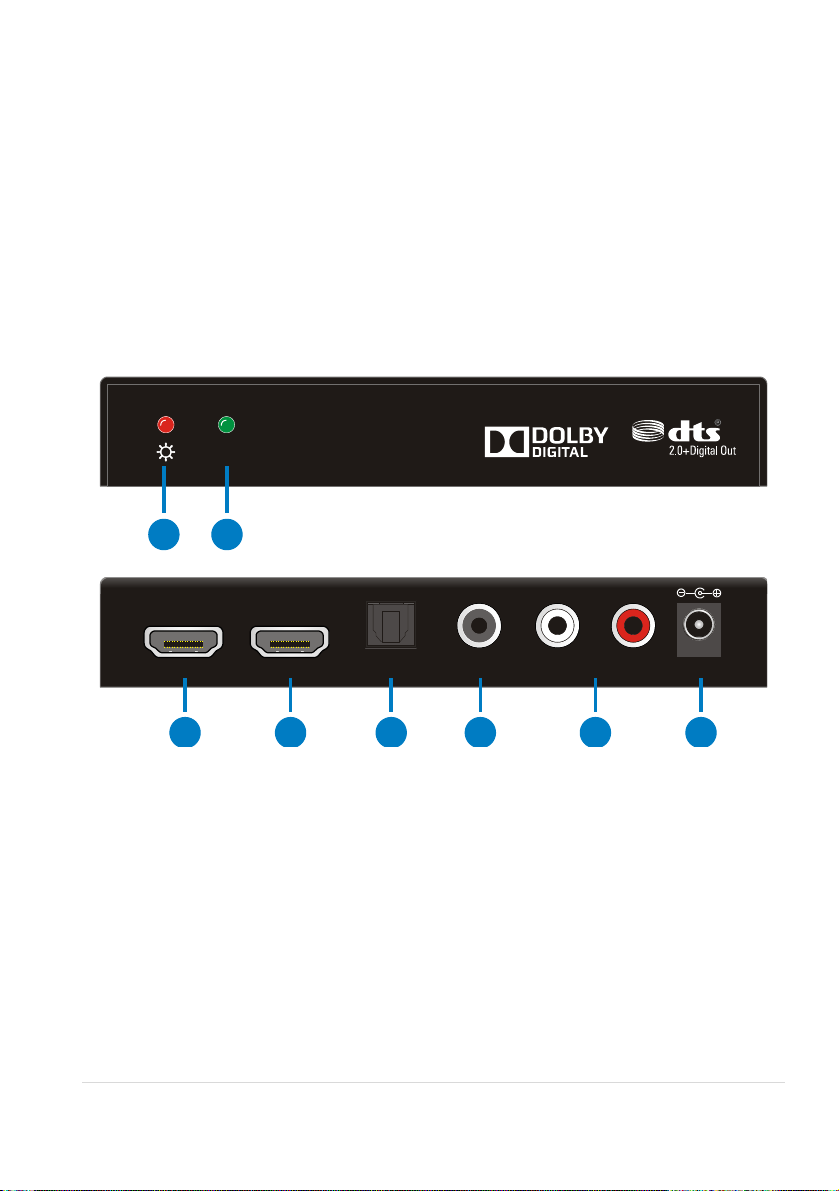
2. Panel Description
① Power LED
② HDMI Activity LED
③ HDMI Input
④ HDMI Output
⑤ Optical Audio Output
⑥ Coaxial Audio Output
⑦ RCA (L/R) Audio Output
⑧ 12V DC Input
& Pictures shown in this manual are only for reference.
HDMI
HDMI OUT OPTICAL COAX
L RHDMI IN DC 12V
1
3
4
5 6
7
8
2
Page 8
KANEXPRO CON-AUDXTRACT
7 | Page
3. System Connection
3.1 Usage Precautions
1) System should be installed in a clean environment and has a proper temperature
and humidity.
2) All of the power switches, plugs, sockets and power cords should be insulated and
safe.
3) All devices should be connected before power on.
4) System Diagram shown in this manual is for reference only, more specific schemes
depend on real-time applications.
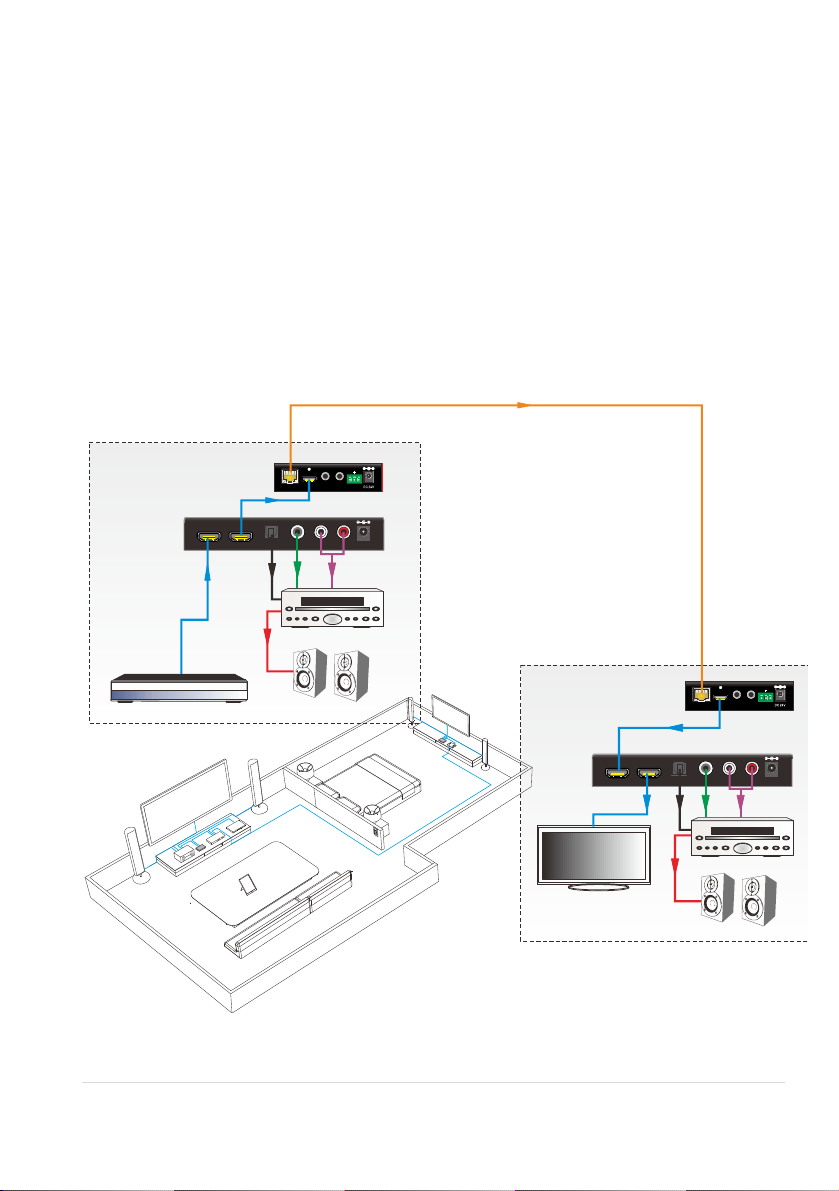
3.2 System Diagram
Tx Rx
HDMI OUTHDBT IN RS232IR IN IR OUT
PoC
HDMI OUT OPTICAL COAX L RHDMI IN DC 12V
HDMI OUT OPTICAL COAX L RHDMI IN DC 12V
HDTV
AV A mpl ifie r
AV A mpl ifie r
Blu -Ray DV D
HDBaseT Transmitter
HDB aseT Re ceive r
Livin g Roo m
Bed Roo m
HDMI INHDBT OUT
Tx Rx
RS232IR IN IR OUT
PoC
HDM I Aud io Deco der 2
HDM I Aud io Deco der 1
Speakers
Speakers
L
i
v
i
n
g
R
o
o
m
B
e
d
R
o
o
m
Page 9

KANEXPRO CON-AUDXTRACT
8 | Page
3.3 Connection Procedure
Step1. In the living room, connect a HDMI signal cable between the HDMI source and
the HDMI IN port of CON-AUDXTRACT-1.
Step2. Connect an optical audio cable between the AV Amplifier and OPTICAL port of
CON-AUDXTRACT-1.
Step3. Connect a coaxial audio cable between the AV Amplifier and COAX port of
CON-AUDXTRACT-1.
Step4. Connect a RCA audio cable between the AV Amplifier and L/R port of
CON-AUDXTRACT-1.
Step5. Connect a HDMI signal cable between the HDMI IN port of HDBaseT transmitter
and HDMI OUT port of CON-AUDXTRACT-1.
Step6. Connect a Network cable between the HDBT OUT port of HDBaseT Transmitter
and the HDBT IN port of HDBaseT Receiver.
Step7. Connect a HDMI signal cable between the HDMI OUT port of HDBaseT Receiver
and the HDMI IN port of CON-AUDXTRACT-2.
Step8. Connect a HDMI signal cable between the HDTV and the HDMI OUT port of
CON-AUDXTRACT-2.
Step9. Connect an optical audio cable between the AV Amplifier and OPTICAL port of
CON-AUDXTRACT-2.
Step10. Connect a coaxial audio cable between the AV Amplifier and COAX port of
CON-AUDXTRACT-2.
Step11. Connect a RCA audio cable between the AV Amplifier and L/R port of
CON-AUDXTRACT-2.
Step12. Plug power adaptors.
Page 10
KANEXPRO CON-AUDXTRACT
9 | Page
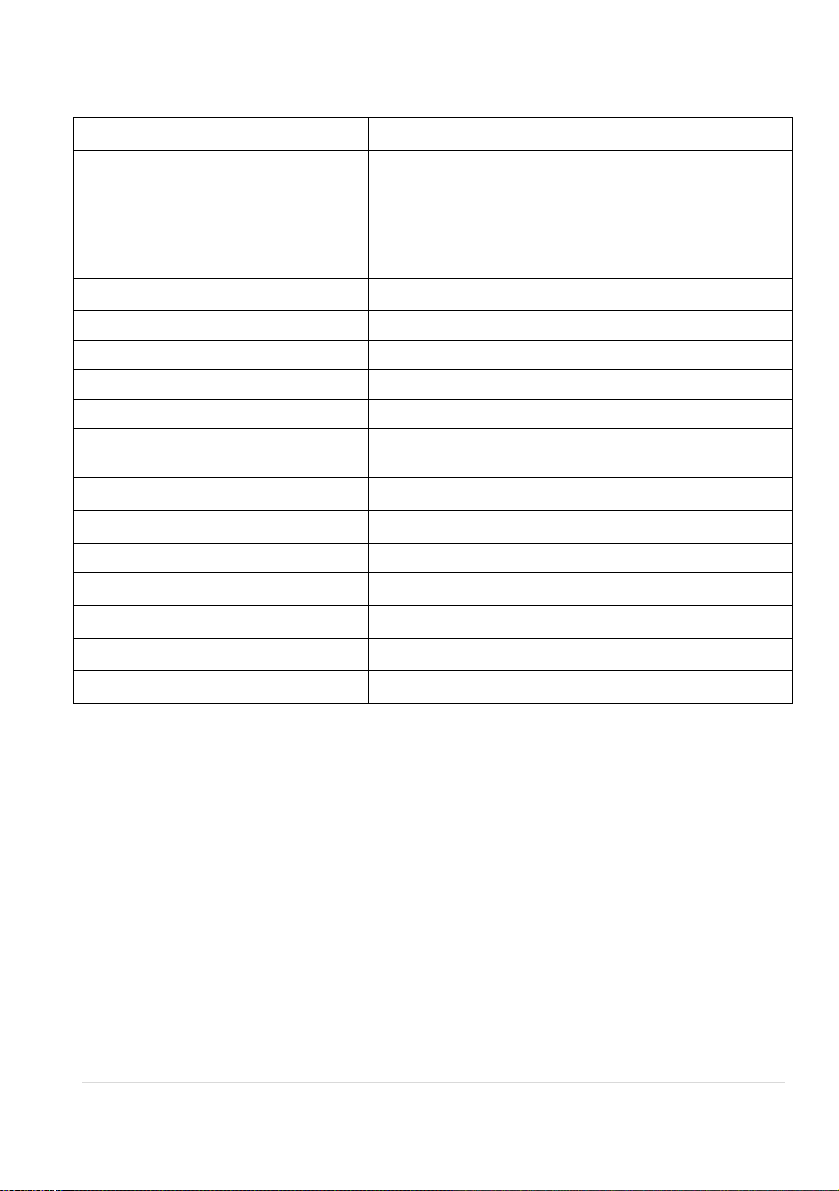
4. Specification
Input Signal
1 × HDMI(Type A Receptacle)
Output Signal
1 × HDMI(Type A Receptacle)
1 × OPTICAL(Toslink Receptacle)
1 × COAX(Black RCA Receptacle)
1 × L/R(Red & White RCA Receptacle)
Maximum Video Compatibility
Deep Color 8/10/12/16 Bit at 1080p and 2160p/60
HDMI Resolution
Up to 4Kx2K@60Hz
HDMI Embedded Audio
PCM, Dolby Digital, Dolby TrueHD, DTS, DTS-HD
Decoded Audio
PCM2.0
HDMI Cable
≤50ft AWG24 HDMI standard cable
Power Supply
Input: AC (50HZ, 60HZ) 100V-240V;
Output: DC12V/1A
Maximum Power Consumption
4.5W
Operating Temperature
-10 ~ +55℃
Storage Temperature
-20 ~ 70℃
Operating Humidity
10 ~ 90%
Storage Humidity
10 ~90%
Dimensions (W x H x D)
5.1 X 0.86 X 3.03 Inches
Weight
6.06 oz.
NOTE: All nominal levels are at ±10%.
Page 11
KANEXPRO CON-AUDXTRACT
10 | Page
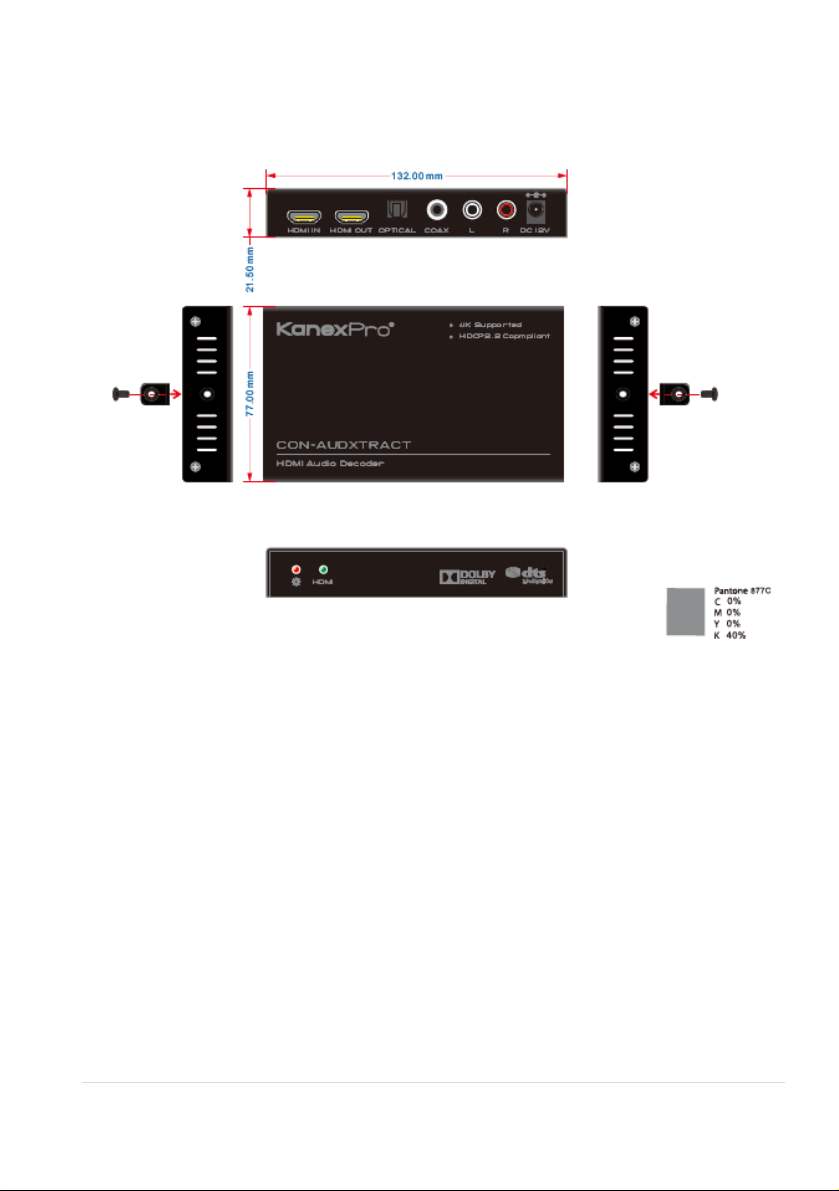
5. Panel Drawing
Page 12
KANEXPRO CON-AUDXTRACT
11 | Page
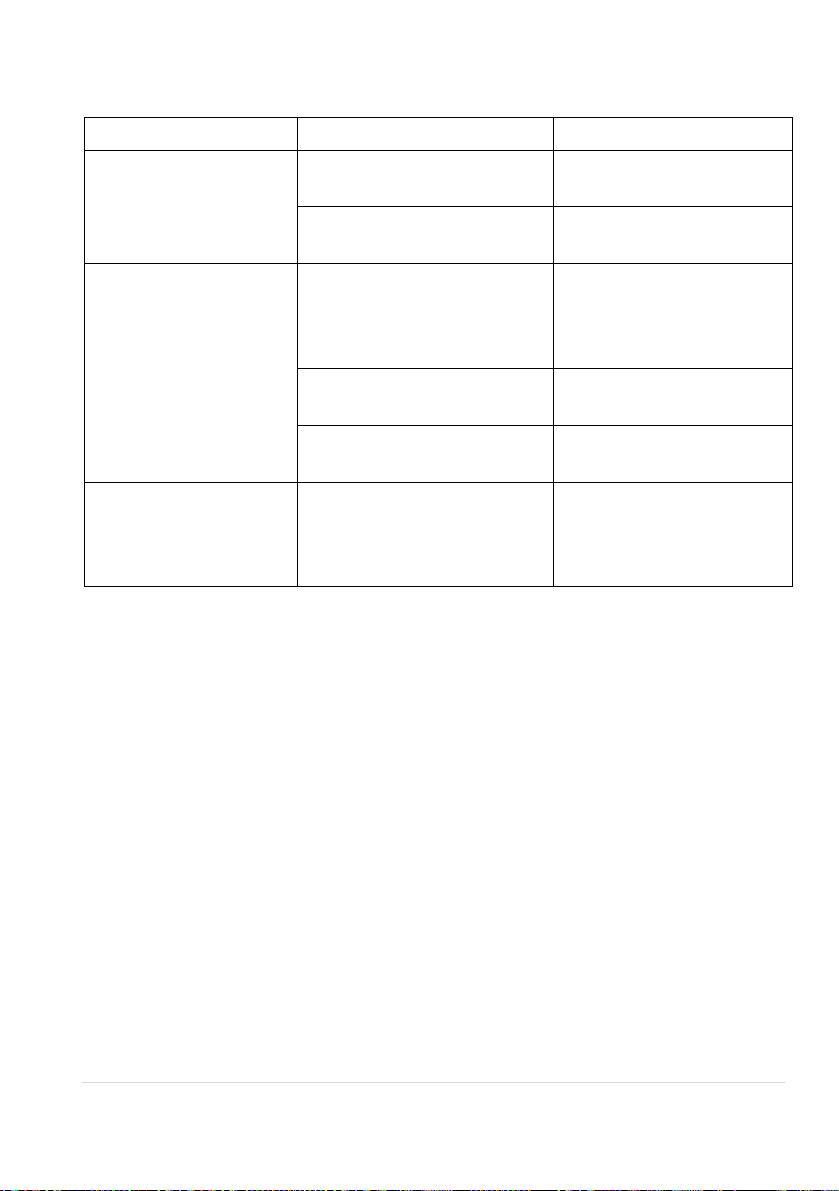
6. Troubleshooting & Maintenance
Problems
Causes
Solutions
Output images in
display show with ghost
Incorrect setting on the
display
Check the display’s setting
A cable of bad quality
Try another high quality
connection cable
No output image when
switching
No signal at the input / output
end
Check with oscilloscope or
multimeter if there is any
signal at the input / output
end.
Fail or loose connection
Make sure the connection
is good
The extender is broken
Send it to authorized
dealer for repairing.
Static becomes
stronger when
connecting the video
connectors
Bad grounding
Check the grounding and
make sure it is connected
well.
If your problem persists after following the above troubleshooting steps, seek further
help from authorized dealer or our technical support.
Page 13

KANEXPRO CON-AUDXTRACT
12 | Page
7. After-sales Service
If there appear some problems when running the device, please check and deal with the
problems reference to this user manual. Any transport costs are borne by the users
during the warranty.
1) Product Limited Warranty: We warrants that its products will be free from defects
in materials and workmanship for Two years, which starts from the first day the
product leaves warehouse (check the SN mark on the product).
Proof of purchase in the form of a bill of sale or receipted invoice must be presented
to obtain warranty service.
2) What the warranty does not cover:
l Warranty expiration.
l Factory applied serial number has been altered or removed from the product.
l Damage, deterioration or malfunction caused by:
l Normal wear and tear
l Use of supplies or parts not meeting our specifications
l No certificate or invoice as the proof of warranty.
l The product model showed on the warranty card does not match with the
model of the product for repairing or had been altered.
l Damage caused by force majeure.
l Servicing not authorized
l Any other causes which does not relate to a product defect
l Delivery, installation or labor charges for installation or setup of the product
3) Technical Support: Email to our after-sales department or make a call, please
inform us the following information about your cases.
l Product version and name.
l Detailed failure situations.
l The formation of the cases.
Remarks: For any questions or problems, please try to get help from your local
distributor or contact kanexpro.com or call us at 888-975-1368 for further support.
Page 14

13 | Page
8. Warranty
A. LIMITED WARRANTY
KanexPro ™ warrants that (a) its products (the “Product”) will perform greatly in
agreement with the accompanying written materials for a period of 36 months (3 full
years) from the date of receipt and (b) that the product will be free from defects in
materials and workmanship under normal use and service for a period of 3 years.
B. CUSTOMER REMEDIES
KanexPro’s entire liability and Customer’s exclusive remedy shall be, at KanexPro
option, either return of the price paid for the product, or repair or replacement of the
Product that does not meet this Limited Warranty and which is returned to KanexPro
with a copy of customers’ receipt. This Limited Warranty is void if failure of the Product
has resulted from accident, abuse, or misapplication. Any replacement Product will be
warranted for the remainder of the original warranty period of 3 years, whichever is
longer.
C. NO OTHER WARRANTIES
To the maximum extent permitted by applicable law, KanexPro disclaims all other
warranties, either express or implied, including, but not limited to implied warranties of
merchantability and fitness for a particular purpose, with regard to the product and any
related written materials. This limited warranty gives customers specific legal rights.
Customers may have other rights depending on the jurisdiction.
D. NO LIABILITY FOR DAMAGES
To the maximum extent permitted by applicable law, in no event shall KanexPro be
liable for any damages whatsoever (including without limitation, special, incidental,
consequential, or indirect damages for personal injury, loss of business profits, business
interruption, loss of business information, or any other pecuniary loss) arising out of the
use of or inability to use this product, even if KanexPro has been advised of the
possibility of such damages.
Page 15

14 | Page
1405 pioneer street
Brea, CA 92821
 Loading...