

Page 1

KAM KXPRO AMPLIFIER
professional power amplifier
INSTRUCTION MANUAL
www.kam.co.uk
www.kam.co.uk
Page 2
KXPro 1000 and 1600 amplifiers require speakers with a minimum Impedance rating of 2 Ohm.
KXPro 2400 requires speakers with a minimum Impedance rating of 4 Ohm. They will work just
as well with speakers rated at 8 Ohm but the volume achieved from your speakers will be
different for 4 and 8 Ohm speakers. The chart below tells you the power output ratings for
KXR amplifiers at 2, 4 and 8 Ohms.
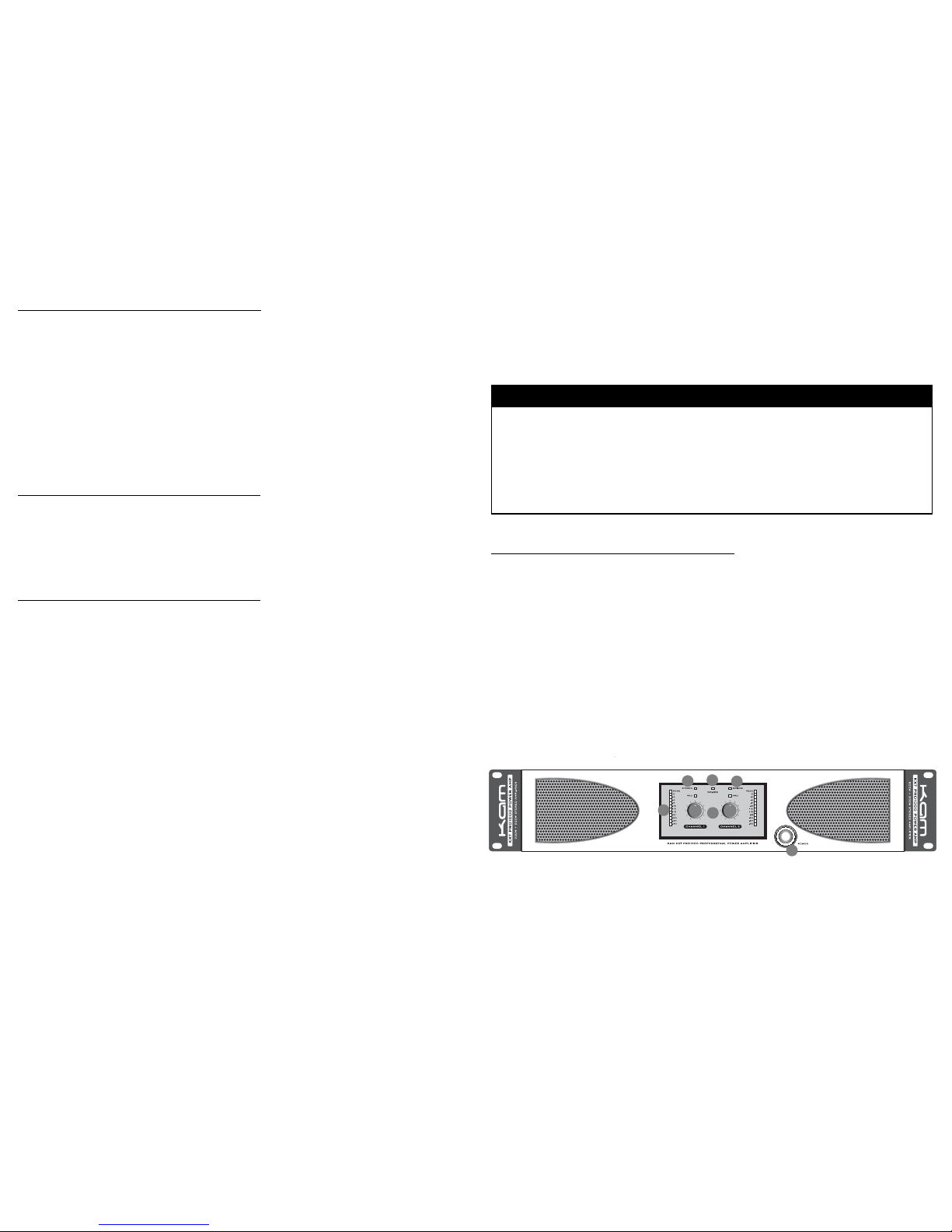
FRONT PANEL CONTROLS
[1] Mains Power switch - use this to switch the mains power on/off.
[2] Power LED - when the power is on the blue power LED will light.
[3] Volume controls - used to adjust overall volume for each channel.
[4] Channel Level Meters - each channel has a 12 point LED Level meter. AnoPtimum signal level
should cause these level meters to peak at between -6dB and 0dB.If the red 'Peak' indicator LED
lights, signal levels are excessive and you should reduce the volume.
[5] Stereo LED - this green LED illuminates when the KXPro is operating in standard stereo mode
(IE the Bridge Mode switch [11] is set to STEreo.
[6] Bridge LED - this green LED illuminates when the KXPro is operating in Bridge Mode(IE the
Bridge Mode switch [11] is set to BRidge.
OVERVIEW
Your KXPro Amplifier is a high quality, high power professional PA amplifier with a wealth of
features usually restricted to products with much higher price tags. It features built in adjustable
Crossovers to facilitate use in complex audio systems and a robust design that makes realistic use
of the dedicated Bridge mode connection a sensible proposition. We know you're itching to get it
fired up but bear with us and we'll run through a few things you should know that will help you get
the best from your new amplifier and ensure that it lasts as long as you want it to.
There are three models in the KXPro Amplifier range
KXPro1000 2 x 500W RMS amplifier
KXPro1600 2 x 800W RMS amplifier
KXPro2400 2 x 1200W RMS amplifier
SAFETY NOTE
ALWAYS turn off the mains power before making any connections to KX Pro amplifiers. Large PA
amplifiers are capable of sending potentially lethal amounts of electricity to their outputs so you
should always ensure that any amplifier has its power turned off (and preferably disconnected)
before making connections. NEVER attempt to connect a microphone to the speaker outputs
of an amplifier.
WHICH SPEAKERS ARE RIGHT FOR YOUR AMPLIFIER?
Power & Impedance
It is important to ensure that you match the power that your speakers can handle with the power
that your amplifier can produce. A set of speakers has two stated ratings.
They should have a 'Power' handling capacity that is measured in Watts (EG 300W). This tells
you how much power the speaker can handle from the amplifier before the sound distorts and
damage begins to occur. This is often stated as two different ratings; 'RMS' which means how
much power can be handled constantly… and 'Peak' which as the name suggests means an
amount of power it can handle for a short period of time.
A speaker will also have what we call an 'Impedance' rating. Impedance is a term we use to
define the amount of resistance your speaker presents to your amplifier and it is measured in
'Ohms'. Most speakers have an Impedance rating of 8 Ohms but ratings of 4 Ohms are not
uncommon and sometimes you may encounter 16 Ohm or even 2 Ohm. A speaker that is rated
at 8 Ohm presents a larger amount of resistance to the amplifier than one that is rated at 4
Ohm. As you can see from the chart below this means that a particular amplifier will deliver
greater power to a pair of 4 Ohm speakers than it would to a pair of 8 Ohm speakers.
NOTE: Connecting multiple speakers to a single amplifier alters the impedance rating of the
speakers. For guidance on this visit www.kam.co.uk/tuition.
KXPro1000
KXPro1600
KXPro2400
KXPro1000 Bridged
KXPro1600 Bridged
KXPro2400 Bridged
650W per channel
1000W per channel
n/a
n/a
n/a
n/a
500W RMS per channel
800W RMS per channel
1200W RMS per channel
1200W RMS
2000W RMS
n/a
300W RMS per channel
500W RMS per channel
750W RMS per channel
950W RMS
1400W RMS
2400W RMS
2 Ohm
4 Ohm speaker 8 Ohm speaker
1
2
3
4
5
6
Page 3
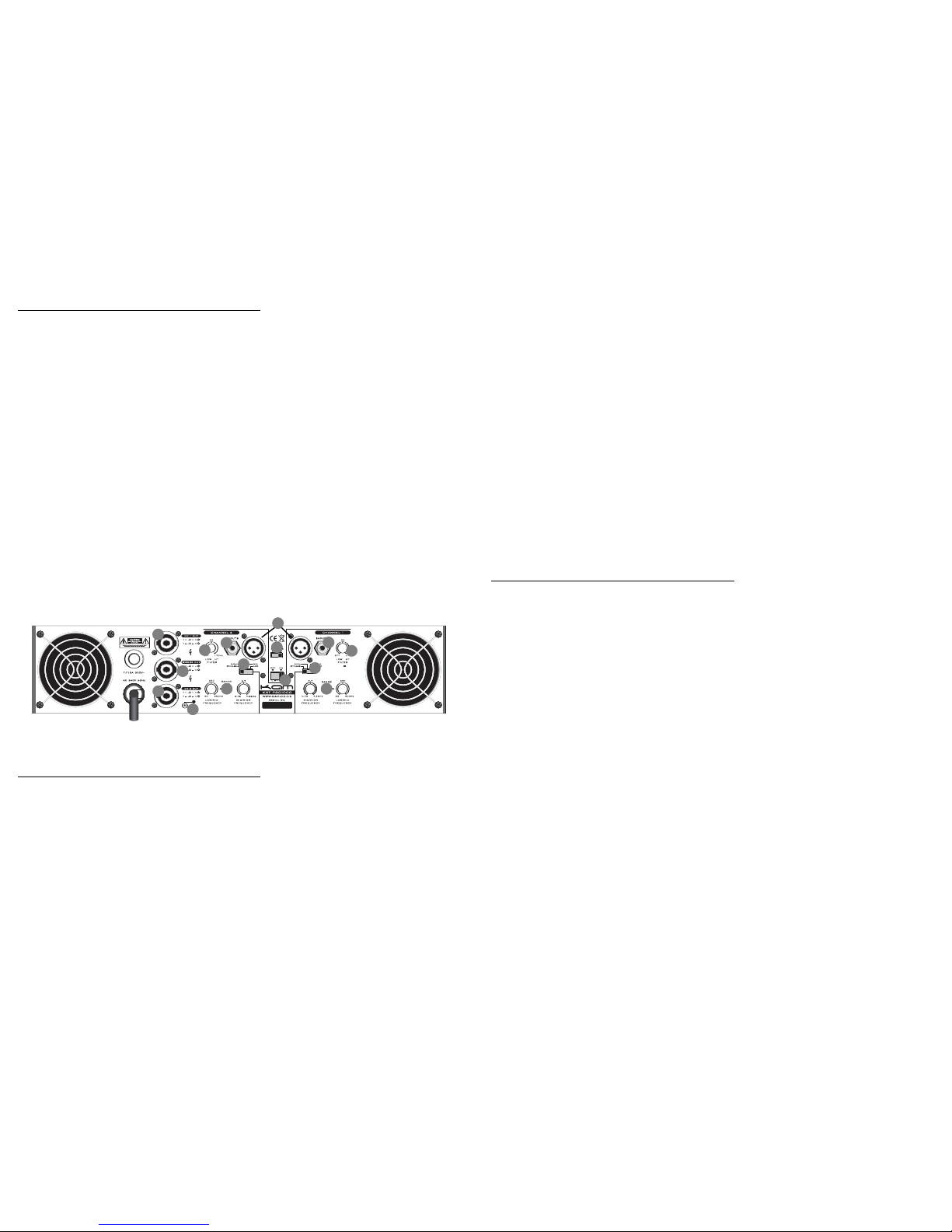
REAR PANEL CONTROLS
[7] Balanced XLR audio inputs - use these balanced XLR line level audio inputs to connect any line
level audio device such as a DJ Mixer, Mixing Console, CD player etc. For more information on
the advantages of using balanced audio connections visit www.kam.co.uk/tuition.
[8] Unbalanced 1/4” Jack audio inputs - use these unbalanced 1/4” Jack line level audio inputs to
connect any line level audio device such as a DJ Mixer, Mixing Console, CD player etc.
[9] Channel A&B speaker outputs - use these Speakon Type connectors to attach your speakers in
normal stereo mode. KX Pro Speakon terminals are wired in a +2/-2 configuration.
[10] Bridge Mode output - use this single (red) Speakon type connector to attach your speakers in
Bridge Mode. Please read the 'Bridge Mode' section below before attempting to use Bridge
Mode.
[11] BR/STE switch - use this switch to choose between standard stereo operation (STE) and
Bridge Mode operation. Please read the 'Bridge Mode' section below before attempting to use
Bridge Mode.
[12] Limiter switch - use this to switch the built in Limiter circuit on/off. When in the on position
the audio signal will be automatically prevented from exceeding the maximum signal level beyond
which clipping (distortion) will occur and the Peak LED will light.
[13] Low Cut Filter controls - each channel features an adjustable Low Cut Filter designed to
remove low frequency rumble etc to deliver an uncluttered low/mid sonic response.
These controls are used to adjust the Cutoff Frequency and everything below the Cutoff Frequency
is removed. The range is Off to 170Hz.
About Crossovers
The idea of a 'two way' speaker (which is what most 'full range' speakers are) is usually that the
speaker cabinet houses two separate actual speaker drivers. It is common for one to be
dedicated to reproducing High frequencies and the other to be dedicated to reproducing Low and
Mid range frequencies. In order to make this work it is necessary to split the incoming audio
signal in such a way that only High frequencies are sent to the High Frequency tweeter and only
Low/Mid frequencies arrive at the Low/Mid driver. The device used to split the signal is called a
'Crossover'. It is common when assembling a more powerful PA system to have either a 'three
way' system consisting of 3 separate speaker cabinets (1 each for Low, Mid & High frequencies)
or a two way system where several full range speaker cabinets are augmented by an additional
Sub or Bass speaker. In such set ups it is also necessary to employ Crossovers to divide audio
signals so that the right PA system components receive only the right audio frequencies.
[14] Crossover Mode switches - the KXPro built in Crossovers are designed to be as versatile as
possible and this Mode switch enables the selection of the correct configuration.
Once the correct Mode has been chosen the Cutoff Frequencies are adjusted via the Crossover
Frequency controls [15]. There are four Mode switch positions;
BYPASS - the Crossover is inactive.
HIGH - both Crossover Controls act as High Pass Filters so all frequencies above the selected
Cutoff Frequencies are passed onwards to your speakers. Use this Mode when you wish to
connect only a HF speaker. You may also wish to use the 'x10' switch [] to set the range of
the Low /Mid Control to 500Hz-5kHZ.
MID - The Low/Mid Control acts as a High Pass Filter. The Mid/High Control acts as a Low Pass
Filter. Use this when you wish to connect a Mid range speaker cabinet.
LOW - both Crossover Controls act as Low Pass Filters so all frequencies below the selected
Cutoff Frequencies are passed onwards to your speakers. Use this Mode when you wish to
connect only a LF speaker.
[15] Crossover Frequency Controls - each channel has two controls that enable you to adjust the
Cutoff Frequencies of the Crossover. Their function is determined by the setting of the Crossover
Mode switches.
[16] Ground Terminal - using an M4 screw to attach a ground cable from other equipment to
this terminal can sometimes help eliminate 'ground loop' problems.
About Bridge Mode
Bridge mode is a professional feature that can seem simple but is actually fairly complex.
Bridge mode devotes the entire power output capacity of the amp to the Channel A input,
That may sound simple but the way in which the amplifier achieves this is not so simple.
If you understand how a balanced audio connection works you'll know that it provides three
wires within an audio cable; one of them is simply an earth, the other two each carry half of the
audio signal - one carries the positive half of the signal and the other carries the negative half.
When you place an amplifier in bridge mode, it uses channel A to amplify the positive half of the
signal and uses channel B to amplify the negative half of the signal.
So the first thing to understand about bridge mode is that you can't use it with an Unbalanced audio
input… so you can only use Bridge Mode when using the balanced XLR input connection to
channel A.
The next really important thing to know about Bridge Mode is that it can require a very unusual
method of speaker connection with many amplifiers. Fortunately the KXPro provides a dedicated
Bridge Mode Speakon output [10] so if you wish to use Bridge Mode connect your speaker to the
red Bridge Mode output but do not connect any speakers to the stereo channel A&B outputs.
If you require additional advice on using Bridge Mode with models of amplifier which do not
feature a dedicated Bridge Mode output you will find it online at www.kam.co.uk/tuition.
You also need to be aware that bridge mode potentially delivers considerably more power to your
speakers. In much the same way that attempting to use an over powered amplifier to drive an
under sized speaker is obviously a recipe for trouble… so is trying to use bridge mode to coax
more volume from low impedance speakers. Bridge mode can be useful for using an amplifier to
drive a speaker with a higher impedance than usual (perhaps driving a single 16 Ohm speaker
with an amplifier you might use to drive a pair of 8 Ohm speakers).
C
C
8
9
9
10
11
12
13
13
14
14
15
15
16
7
8
Page 4

But this has it's own problems because a higher impedance speaker will actually demand more
power from your amplifier (even at lower volumes) than it is used to delivering to a lower
impedance speaker… and that can over strain your amplifier. The KXPro has been designed to be
happy in Bridge Mode providing you do not attempt to use a 4 Ohm speaker.
NOTE The Minimum speaker impedance for use with the KXPro in Bridge Mode is 8 Ohm.
About Thermal Protection Relay
KXPro amplifiers feature a thermally efficient central heat sink design and dual speed, dual fan
cooling. They are designed to operate in the kind of relatively high environmental temperatures
found in some venues and we feel that they perform extremely well in such hostile conditions.
However, because extremely high environmental temperatures are always a hazard to high power
amplifiers, all KXR amplifiers also feature a Thermal Protection Relay. If the amplifier becomes
too hot, it will temporarily go into a 'standby' mode where the audio circuitry (but not the fans!) is
switched off. This gives the circuitry time to cool down. If this happens the amber LEDs marked
'Protect' (found on the front panel above the volume controls) will illuminate. If this happens you
should turn the volume controls to zero immediately and wait. When the Protect LEDs stop being
illuminated you can gradually return the volume controls to the desired listening level. Under such
circumstances it is advisable to return the volume controls to a slightly lower listening level than
that set prior to the engagement of the Thermal Protection Relay. The more power output you
demand from your amplifier, the higher the internal operating temperature is liable to be… so a
lower listening level will decrease the chances of the Relay engaging once more.
You will find loads more advice and information about setting up Kam audio equipment within the
Tuition area at www.kam.co.uk.
Thank you for reading these guidelines and enjoy your Kam KXPro amplifier!
KXPro1000 power amplifier
Amplifier power output 500W RMS per channel @ 4 Ohms
300W RMS per channel @ 8 Ohms
Input connections Balanced XLR, unbalanced jack
Output connections Speakon
Minimum impedance 2 Ohms
Frequency response 20Hz - 30KHz (±1dB)
S/N Ratio 85dB
THD 0.01%
Soft Start
AC/DC Protection
Limiter Circuit
Short Circuit Protection
Thermal Protection
2 x dual speed cooling fans
Min input sensitivity 770mv/0dB
Input impedance 20k Ohm balanced & 10k Ohm unbalanced
Dimensions 482 x 473 x 88mm
Weight 19.5Kg
KXPro1600 power amplifier
Amplifier power output 800W RMS per channel @ 4 Ohms
500W RMS per channel @ 8 Ohms
Input connections Balanced XLR, unbalanced jack
Output connections Speakon
Minimum impedance 2 Ohms
Frequency response 20Hz - 30KHz (±1dB)
S/N Ratio 85dB
THD 0.01%
Soft Start
AC/DC Protection
Limiter Circuit
Short Circuit Protection
Thermal Protection
2 x dual speed cooling fans
Min input sensitivity 770mv/0dB
Input impedance 20k Ohm balanced & 10k Ohm unbalanced
Dimensions 482 x 473 x 88mm
Weight 21.5Kg
KXPro2400 power amplifier
Amplifier power output 1200W RMS per channel @ 4 Ohms
750W RMS per channel @ 8 Ohms
Input connections Balanced XLR, unbalanced jack
Output connections Speakon
Minimum impedance 4 Ohms
Frequency response 20Hz - 30KHz (±1dB)
S/N Ratio 85dB
THD 0.01%
Soft Start
AC/DC Protection
Limiter Circuit
Short Circuit Protection
Thermal Protection
2 x dual speed cooling fans
Min input sensitivity 770mv/0dB
Input impedance 20k Ohm balanced & 10k Ohm unbalanced
Dimensions 482 x 473 x 88mm
Weight 23.5Kg
 Loading...