

Page 1

KT SPEAKER SERIES
instruction manual
KT
Speaker Series
KT
Speaker Series
Model
LF Driver
HF Driver
Continuous Power
Peak Power
Impedance
Frequency Response
Senisitivity
Dimensions
Weight
KT8
8”
1” Compression
150W RMS
300W
8 Ohm
55-20kHz (+/-3dB)
96dB (1W/1m)
450 x 280 x 270mm
12kg each
KT10
10”
1” Compression
200W RMS
400W
8 Ohm
55-20kHz (+/-3dB)
97dB (1W/1m)
475 x 305 x 280mm
13.4kg each
Model
LF Driver
HF Driver
Continuous Power
Peak Power
Impedance
Frequency Response
Senisitivity
Dimensions
Weight
KT12
12”
1” Compression
250W RMS
500W
8 Ohm
55-20kHz (+/-3dB)
98dB (1W/1m)
590 x 365 x 360mm
18.5kg each
KT15
15”
1” Compression
300W RMS
600W
8 Ohm
55-20kHz (+/-3dB)
99dB (1W/1m)
695 x 450 x 435mm
29.8kg each
Model
LF Driver
LF Amplifier
HF Amplifier
Impedance
Frequency Response
T.H.D.
Senisitivity
Input Impedance
Dimensions
Weight
KT12 Sub
12”
350W
2 x 150W RMS
8 Ohm
30Hz - 350Hz
0.05%
98dB (1W/1m)
10 kOhm
605 x 580 x 490mm
58 kg
KT15 Sub
15”
350W RMS
2 x 200W RMS
8 Ohm
30Hz - 350Hz
0.05%
98dB (1W/1m)
10 kOhm
790 x 650 x 510mm
63 kg
SPECIFICATIONS
Kam is manufactured and Distributed by Lamba Plc
www.lambaplc.com
Specifications are subject to change without notice.
Page 2
OVERVIEW
Kam believe in giving you products with the features and performance you
want at a price you can afford and the KT Speaker series is living proof of
our commitment to meeting that goal. The KT Speaker Series is a
combination of passive full range professional speaker enclosures and
active Sub bass speakers. The Sub Speakers have enough amplification on
board to power the full range speakers. The full range speakers stack on
top of the Subs (which have heavy duty wheels) to form a convenienient,
high quality portable PA system.
There are seven products in the KT series:
KT8 150W RMS passive full range speaker
KT10 200W RMS passive full range speaker
KT12 250W RMS passive full range speaker
KT15 300W RMS passive full range speaker
KT12 Sub 2 x 150W + 350W RMS active sub bass cabinet with
integrated additional amplification for satellite speakers
KT15 Sub 2 x 200W + 350W RMS active sub bass cabinet with
integrated additional amplification for satellite speakers
KT8, KT10, KT12 & KT15
These are all two way, full frequency passive loudspeakers and they need to
be connected to an external amplifier. They are ideal for use in conjunction
with a KT Sub but can be used with any suitably powered amplifier.
What sort of amplifier is right for your speakers?
So that you get the best sound and avoid unnecessary damage to your KT
Sereis speakers it is important that you only use them with an appropriate
amplifier.
Your speakers have a maximum power rating;
KT8 can tolerate a 150W Continuous or 300W Peak signal @ 8 Ohms.
KT10 can tolerate a 200W Continuous or 400W Peak signal @ 8 Ohms.
KT12 can tolerate a 250W Continuous or 500W Peak signal @ 8 Ohms.
KT15 can tolerate a 300W Continuous or 600W Peak signal @ 8 Ohms.
These figures are there to guide you in your choice of amplifier. If you use
an amplifier which is too powerful or not powerful enough you could
damage either your amplifier or your speakers so you need to find an
amplifier with a stated maximum power output that is just right for your
speakers.
HOW TO CONNECT YOUR KT8, KT10, KT12 & KT15 SPEAKERS TO
YOUR AMPLIFIER
Connection types
Your speakers have two ‘Speakon’ type connection sockets (pro multi-pole
speaker sockets) on the back. One is marked ‘input’ - this is the one you
use to connect the speakers to your amplifier. The second socket is
marked ‘through’ - this one is used for connecting several sets of KT
speakers ‘in series’ to the same amplifier.
On the back of your amplifier you will find a set of connections marked
either ‘speakers’ or ‘output’. The type of connections you will find will vary
according to the type of amplifier you have. You may need to consult your
amplifier’s user manual to find out what type of speaker output connections
your amplifier has and how you should connect your speakers to it. You will
need an appropriate speaker cable (there is a free cable in the box) to
connect your speakers to your amplifier. Each cable will need to have a pro
multi-pole speaker plug correctly attached at one end and the appropriate
connection type for your amplifier at the other.
• The Speakon type connections on your KT Sereies speakers are all
wired +1/-1. This is the industry standard Speakon wiring configuration.
It is important that you use cable that is configured in this way.
• Always ensure that the amplifier has its volume controls turned to
zero and that it’s mains power is switched off when making connections.
1. Place your amplifier and speakers where you want them but ensure that
you can access the connections.
2. Connect one end of each cable to the speaker output connections on
your amplifier and the other end of each cable to the ‘input’ sockets on your
speakers.
3. Make sure you follow the rules of stereo connection; If you are using a
professional Power Amplifier you should find that if you look at the front of
the amplifier the left channel is marked ‘A’ and the right channel is marked
‘B’. If you look at the back of the amplifier you should find that the speaker
output connections are also marked ‘A’ and ‘B’. Connect the left speaker to
channel ‘A’ and the right speaker to channel ‘B’.
4. Once you have connected your speakers, ensure that you have made the
right connection between your amplifier and the rest of your set up… DJ
mixer, CD player etc. You may need to consult your other equipment’s user
manuals for help with this.
Page 3
Always turn on your equipment in the following order;
1. Turntables, CD players etc - but don’t start playing any
music yet
2. DJ mixer (if you use one) - but make sure that the output
volume is at zero
3. Amplifier
A good way to set optimum listening levels;
1. Put on a record, slide in a CD etc and start it playing
2. If you use a mixer, use it to set up optimum input and
output signal levels - the level meter should be peaking at
around zero dB
3. Slowly turn up the volume control(s) on your amplifier - if you
have used the right cables and made all of your connections
correctly you should clearly hear music.
4. If you do not hear any music or it sounds all wrong, even at
low volumes, check all your connections and cables.
5. When the music reaches the desired/maximum listening
level, stop turning up the amplifiers volume controls.
6. This set up method ensures that when the meters on your
mixer are peaking at zero dB your amplifier and speakers are
playing at the desired sound level. This method helps to
prevent damage to your speakers because it is all about
setting a maxmum playback volume that suits your speakers. It
is part of a Sound Engineers job to ensure that the PA system
does not sound distorted and is not damaged. So it is an old
Sound Engineers trick to set the Gain controls on their
amplifiers at a low level that guarantees, that even with the
mixer output level meters peaking at +6dB or more, the
system will not distort.
7. Your KT speakers are designed to deliver high quality sound
reproduction and plenty of power but it is possible to overload
them. If your sound becomes distorted at very high listening
levels you probably need to turn down your amplifier or mixer.
THE KT12 Sub & KT15 Sub
KT Sub speakers are active... meaning they have built in amplification. They
actually have two built in amplifiers so are able to power not only their own
bass driver but two additional passive speakers delivering mid and high
frequencies… so are ideal for use with a pair of KT passive speakers.
CONNECTIONS
What follows is a set up procedure for use of your KT Sub with any
appropriate passive full range speakers.
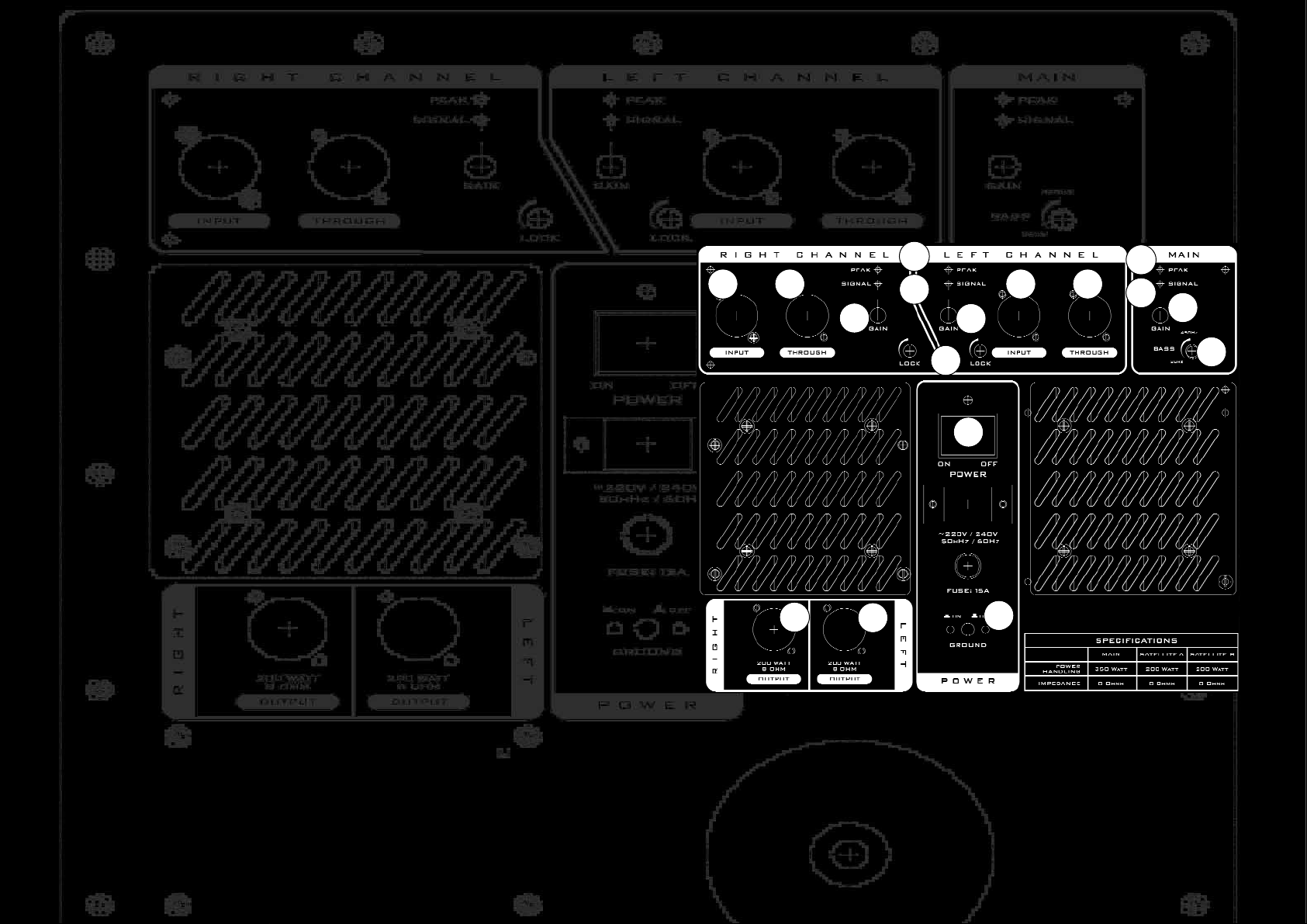
NOTE Pictured above is the rear panel of the KT12 Sub.We have
numbered this image and referred to it when describing the various
controls below.
The physical layout of the KT15 Sub is different... but all of the controls
are there and we are vey sure you’ll find them!
4
4
6
6
2
5
1
7 5 7
3
8
10
11
12
13
9
Page 4

1. Ensure the mains power [1] is switched off.
2. Turn both the ‘Lock’ screws [2] fully anti clockwise. When turned fully
clockwise these two ‘anti tamper’ screws disable the KT Sub volume
controls.
3. Turn the MAIN Gain control
[3] to zero.
4. Turn both LEFT CHANNEL & RIGHT CHANNEL Gain controls
[4] to
zero.
5. Connect your line level music source (mixer etc) to the LEFT & RIGHT
balanced XLR line level Audio Inputs
[5] .
6. Connect your speakers to the LEFT & RIGHT Speakon Type Speaker
Outputs
[6].
7. If you wish to use your KT Sub in conjunction with a pair of active full
range speakers you will need to connect an audio cable between the
balanced XLR line level Through sockets
[7] and the input of your active
speakers.
SETTING LEVELS
8. Turn on the Power [1].
9. Turn the Frequency Crossover Control [8] fully clockwise so it is set at
450Hz. This control selects which frequencies will be handled by which
speakers. Everything below the frequency selected here will be handled by
the KT Sub... everything above the selected frequency will be sent to the full
range speakers. We will come back to actually setting this up in a minute...
10. Start your sound source playing and if it is a mixer ensure that it’s
output level meter is peaking at around zero dB.
11. Slowly turn up the MAIN Gain Control
[3]. Before long you should see
the MAIN Signal LED
[9] light up to show you that the Bass amplifier is
receiving a signal and you should be hearing sound (bass ONLY). Continue
increasing the MAIN Gain Control until you see the MAIN Peak LED [10]
light very occassionally. It’s OK for a Peak LED to illuminate occasionally
but if it lights up continuously you should turn down the Gain Control.
12. Slowly turn up the LEFT & RIGHT Gain Controls
[4]. You should see
the LEFT & RIGHT Signal LEDs
[8] light up and hear sound. Continue
increasing the LEFT & RIGHT Gain Controls until you see the LEFT &
RIGHT Peak LEDs [10]
light very occassionally. It’s OK for a Peak LED to
illuminate occasionally but if it lights up continuously you should turn
down the Gain Control.
SETTING THE CROSSOVER FREQUENCY
By now you should be hearing full range sound at substantial volume.
13. Slowly turn the MAIN Crossover Control
[8] anti clockwise and listen
to the result. As you turn you should hear the amount of bass being
handled by the full range speakers increase. This is because the Crossover
setting of 450Hz we set at step 9 means that all frequencies BELOW
450Hz will be sent to the KT Sub and everything above will be sent to the
full range speakers. In effect this means the KT Sub is actually having to
produce mid range frequencies... when it is designed to reproduce bass.
You will also find with experience that many venues have an unpleasant
resonant mid range frequency that makes the low mid somewhat over
pronounced. By adjusting this Crossover Frequency Control you should be
able to find the optimum sound for each venue and for the combination of
models of KT Sub and full range satellite speaker you are using. Practise
this adjustment.
EARTH HUM
The KT Sub has a Ground Switch
[13] that can be used to temporarily
disconnect the mains Earth connection. Too many Earth Connections in a
PA system can cause hum.
When you have finished setting up your PA system, turn both Lock screws
[2] fully clockwise to prevent any mischievous setting changes.
You will find loads more useful tips, tricks and general
information about setting up and using your equipment at
www.kam.co.uk/tuition
 Loading...