

Page 1

M A D E I N C H I N A
Due to continuous product development, please ensure that you have downloaded
the latest instruction manual for this product from the Kam website at www.kam.co.uk
M A N U A L V E R S I O N 1 . 0
2 1 / 0 5 / 1 2
For the latest updates and information on the entire Kam range visit:
www.kam.co.uk
Kam products are manufactured by: Lamba plc, Unit 1, Southfields Road, Dunstable, Bedfordshire, United Kingdom LU6 3EJ
Telephone: (+44) (0)1582 690600 • Fax: (+44) (0)1582 690400 • Email: [email protected] • Web: www.lambaplc.com
Due to continuous product development, specifications and appearance are subject to change. © Copyright Lamba plc 2012. E&OE.
Kompact 12 Pro
Active satellite speaker & sub speaker system
Page 2

Thank you for purchasing this Kam product, we are sure that it will serve you for many years to come.
To optimise the performance of this product, please read these operating instructions carefully to familiarise
yourself with the basic operations of this unit. Please retain them for future reference.This unit has been tested at
the factory before being shipped to you.
To prevent or reduce the risk of electrical shock or fire, do not expose the unit to rain or moisture. To prevent a fire
hazard, do not expose the unit to any naked flame sources. Unplug this apparatus during lightning storms or if it is
unlikely to be used for long periods of time.
When installing the unit, please ensure you leave enough space around the unit for ventilation. Slots and openings
in the unit are provided for ventilation to ensure reliable operation of the product and to protect it from overheating.
To prevent fire hazard, the openings should never be blocked or covered.
If the unit is powered by the mains, always handle the power cable by the plug. Never pull out the plug by pulling
on the cable. Never touch the power cable when your hands are wet as this could cause an electric shock. Do not
tie a knot in the cable. The power cable should be placed such that it is not likely to be stepped on. A damaged
power cable can cause a fire or give you an electrical shock. Checkthe power cord periodicaly, if you ever find that
it is damaged, replace it before using the unit again. Contact your retailer for a replacement.
The voltage of the available power supply differs according to country or region. Be sure that the power supply
voltage of the area where this unit is to be used meets the required written on the unit.
The lightning flash symbol inside a triangle is to alert the user to the presence high voltage within the
unit’s enclosure that may be of sufficient power to constitute a risk of electrical shock to persons.
Caution: to prevent the risk of electric shock, do not attempt to open the unit. No user-serviceable parts
inside. Refer all servicing to qualified service personnel.
The exclamation mark inside a triangle is intended to alert the user to the presence of important operating
and maintenance instructions in the literature accompanying the appliance.
Select the installation location of your unit carefully. Avoid placing it in direct sunlight or locations subject to
vibration and excessive dust. Do not use the unit where there are extremes in temperature (below 41ºF / 5ºC or
exceeding 95ºF / 35ºC).
Unpacking and safety Please unpack your new product carefully. Your new product should reach you in perfect
condition. Please check that no damage has occurred during transit. If any damage is found, do not operate your
unit. Please contact the retailer you purchased it from immediately. If there is any damage to the mains cable do
not use the device. Always disconnect the unit from the mains supply when carrying out any cleaning of the unit.
Manufacturer declarations
In compliance with the following requirements: RoHS Directive (2002/95/EU) and WEEE Directive (2002/96/EU).
If this product is ever no longer functional please take it to a recycling plant for environmentally friendly disposal.
CE declaration of conformity
R&TTE Directive (1999/5/EU), EMC Directive (2004/108/EU), Low Voltage Directive (2006/95/EU).
The declarations are available on application from [email protected]
Before putting the devices into operation, please observe the respective country-specific regulations.
Page 3
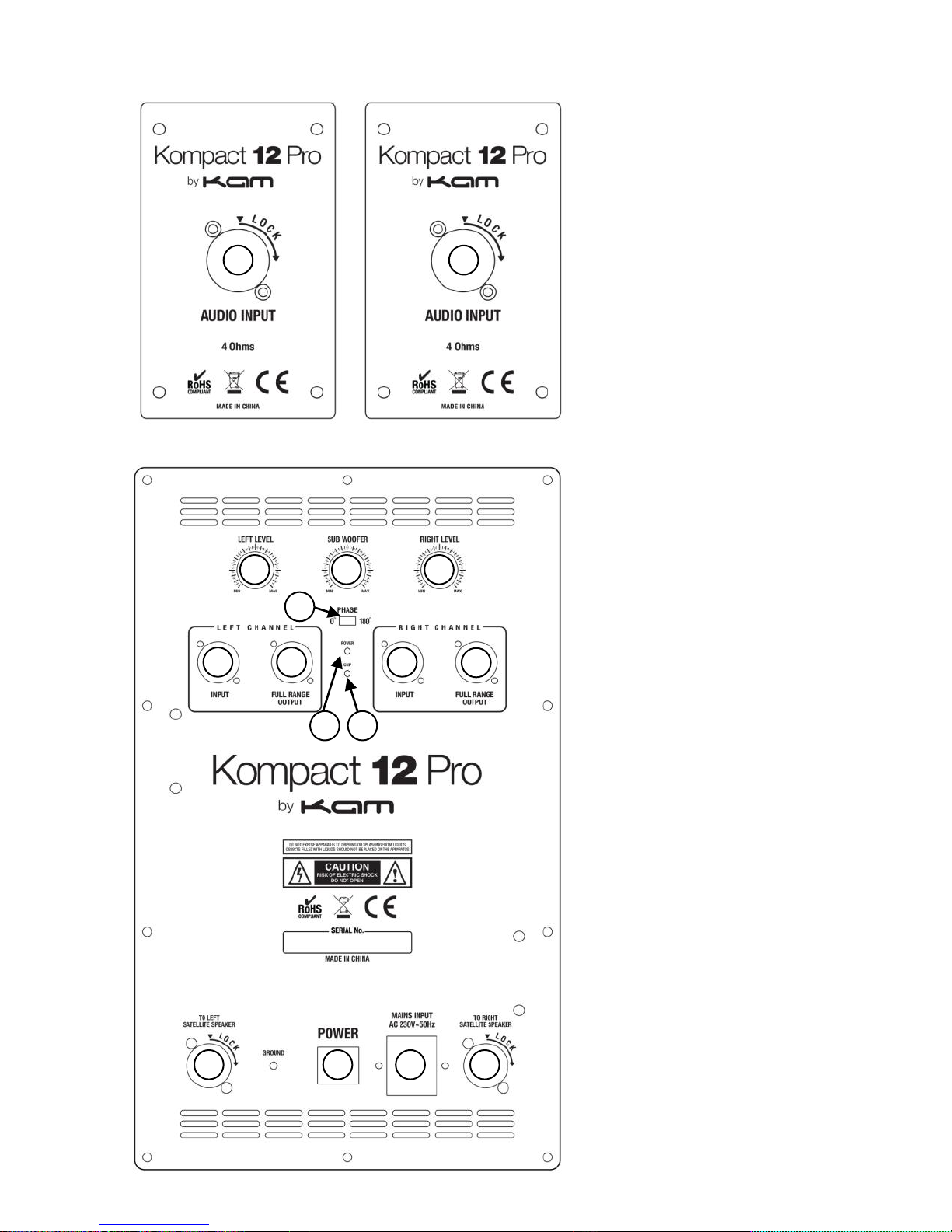
Satellite speaker rear panel
Sub speaker rear panel
5 1 2 3 4 6 7 8 9
10
7 3 1
2
3
3
Page 4

1. Left and right outputs
Output signal - this supplies a full range output signal to connect an additional full range active cabinet or
Kompact 12 Pro system.
2. Left and right channel XLR / jack line inputs
Connect your input source via jack / XLR from your mixer or other line level audio source (CD / radio / etc)
3. Left and right amplified outputs
Connect to the left and right satellite speakers using the speakeron cables supplied. Insert the speakeron
plug and then turn clockwise to click and locate the plug correctly. To remove the speakeron plug slide back
the silver metal catch, then turn anti-clockwise to release the plug.
4. On / Off power switch
Press to power the speaker cabinet on / off.
5. Subwoofer volume control
Adjust the volume control to the desired level, make sure the unit is not driven in clip mode.
6. Phase
The phase switch electrically reverses the polarity of the subwoofer and thus changes the phase angle by
180 degrees, reversing + and – input signal. This is sometimes useful in cases where the subwoofer output
is electrically out of phase with the mid-high speaker outputs. Let your ear be the judge as to which position
allows your subwoofer and speakers to perform optimally. Usually there is a drastic and obvious difference
between both settings. If you hear no difference, then keep the switch set at “normal”.
7. Satellite volume controls
Use these to adjust the volume of the left and right satellite speakers.
8. Power LED
When illuminated shows the sub unit is powered from the mains.
9. Clip indicator LED
If this LED is lit it means your signal is clipping. To stop the signal from clipping, lower the volume to the
point where the LED is blinking along with the bass beat.
10. AC power
Connect a suitable mains supply, check the voltage selector switch is in the correct position for your mains
voltage supply. DO NOT TURN THE UNIT ON UNLESS THE VOLTAGE IS CORRECT.
Technical specification
650w Powerful and portable PA speaker system
Includes 2 x satellite speakers and active subwoofer
Satellite speakers
Full range passive speaker box
Power handling: 2 x 150w continuous RMS
2 x 300w program power | 2 x 600w peak power
6.5 inch driver diameter
Compression tweeter
Frequency response: 80Hz-20 kHz
Sensitivity: 93dB 1W/1M
Impedance: 8 Ohms
Connection: 2 x Speakeron
35mm pole mount
Dimensions (WxHxD): 200 x 410 x 200mm each
Weight: 6Kgs each
Active subwoofer speaker
Power handling: 350w continuous RMS
700w program power | 1400w peak power
Connection: XLR male & female / 1/4 inch jack
Audio input connection: XLR
Audio output connection: Speakeron
Audio thru: XLR
Steel woofer chassis
Frequency response: 30Hz-120Hz
Sensitivity: 94dB (1m/1w)
Fuse rating: 20mm, 6.3A
Rated voltage: AC 115V-230V Switched
Leads supplied: UK/Euro IEC
Dimensions (WxHxD):400 x 450 x 415mm
Weight: 24Kgs
 Loading...