

Page 1
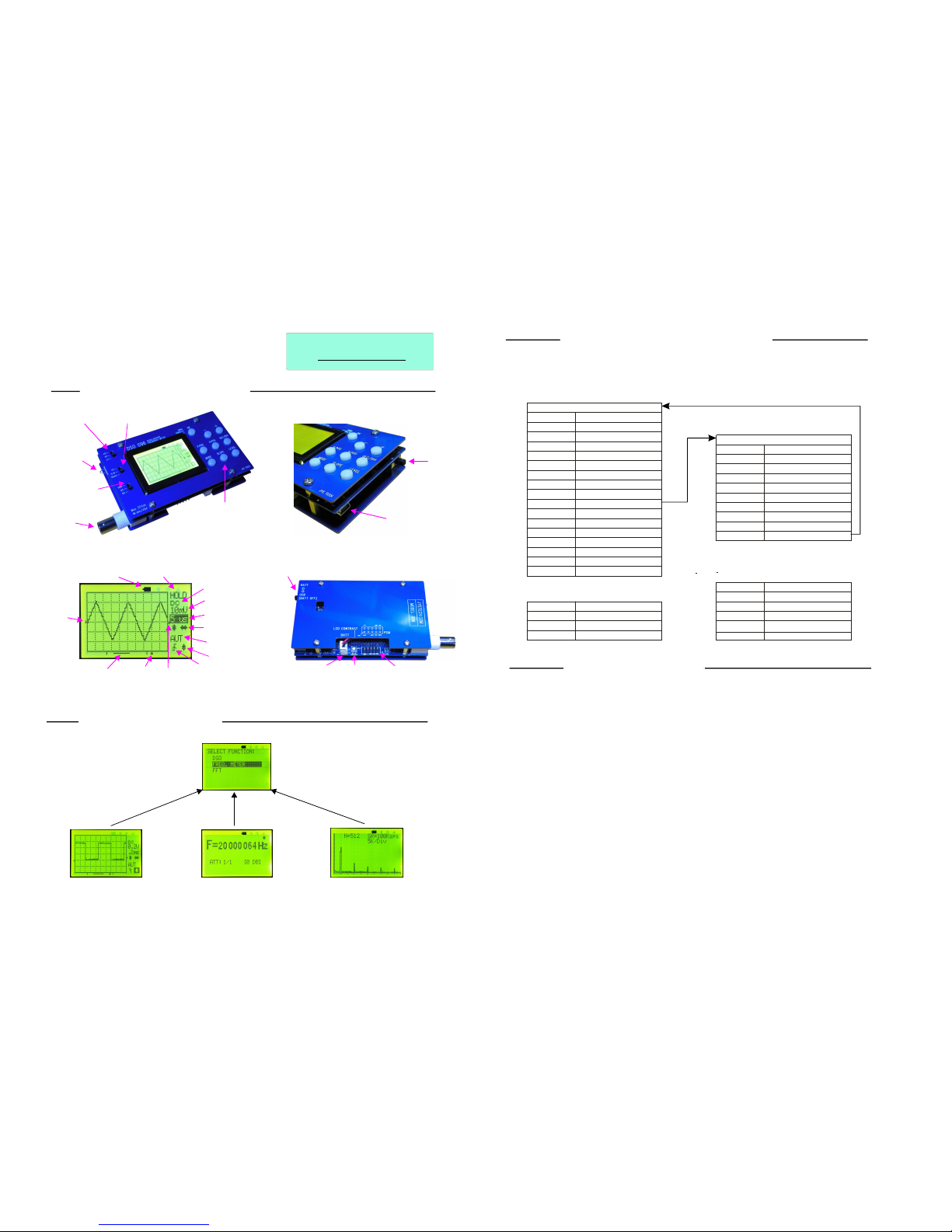
Button&SW
RUNState
1.OscilloscopeMode
2.FrequencyMeterMode
3.FFTMode
ButtonFunctionSummary
Fordetaileddocumentsplease
visit
www.jyetech.com
QuickUseGuide
ApplicableModel:09601,09602
DSO096Oscilloscope
Panel&Connectors
ModeNavigating
VerticalSensitivity
Switch1
VerticalSensitivity
Switch2
Test
Signal
Output
CoupleSelect
Switch
Signal
Input
Connector
ControlButtons
USBConnector
Power
Switch
Vertical
Position
Indicator
BatteryIndicator
HOLDstate
Couple
Vertical
Sensitivity
TimeBase
Vertical&Horizontal
PositionAdjustment
TriggerMode
TriggerLevel
Adjustment
TriggerSlope
Trigger
Level
Indicator
TrigPoint
Indicator
Horizontal
Position
Indicator
Power
Switch
Battery
Connector
LCD
Contrast
Adjustment
Programming
Header
Oscilloscope
Mode(default)
FrequencyMeter
Mode
FFT
Mode
Scrollhighlightbartofunctinwanted
andpress[OK]button
ModeSelectMenu
Hold[MODE]
for3seconds
Press[MODE]
Press[MODE]
Functions
[VPOS]
[HPOS]
[SEC/DIV]
[MODE]
[SLOPE]
[LEVEL]
[VPOS]hold
[MODE]hold
[SLOPE]hold
[LEVEL]hold
[+]
[-]
[OK]
[OK]hold
V.Sen1&V.Sen2
Couple
SelectVPOS
SelectHPOS
SelectTIME-BASE
Selecttriggermode
Selecttriggerslope
Selecttriggerlevel
Adjusttheselectedparam.
EnterHOLDstate
VPOSalignment
EnterFunctionSelectmenu
TurnLCDbacklighton/off
EnterSettingSelectmenu
Turnoffdevice
Changeverticalsensitivity
Adjusttheselectedparam.
Changecouplemethod
Button&SW
HOLDState
Functions
[VPOS]
[HPOS]
[SEC/DIV]
[MODE]
[SLOPE]
[LEVEL]
[+]
[-]
[OK]
SelectVPOS
SelectHPOS
Savewaveformtobuffer
Selecttriggermode
Displaybuffer
Sendscreen
Adjusttheselectedparam.
ExitHOLDstate
Adjusttheselectedparam.
Button&SW Functions
[MODE]
V.Sen1&V.Sen2
Couple
Changesensitivity
Changecouplemethod
EnterFunctionSelectmenu
Button&SW Functions
[MODE]
V.Sen1&V.Sen2
Couple
Changesensitivity
Changecouplemethod
EnterFunctionSelectmenu
[+]or[-]
[HPOS]
Changesamplingrate
ChangeFFTsize
Rev.02
(1KHz5Vpp)
(V/Div)
(Sec/Div)
Pleasenotethatbuttonfunctionsaremodeandstatedependent.Thefollowing
chartslistbuttonfunctionsundervariousmodesandstates.
BasicOperations
1.PoweringON/OFFtheUnit
2.SettingParameters
1)Ifbatteryisconnectedandexternalpowersupply(USB)isnotusedsettingpowerswitchto"BATT"position
willturntheoscilloscopeon.Settingtheswitchto"USB"positionwillturntheunitoff.
2)IfUSBisconnectedALWAYSkeepthepowerswitchat"USB"positionanduseplugging/unpluggingto
poweron/offtheunit.
3)Ifyouun-intentionallyplacedtheswitchat"BATT"positionwhileUSBisconnectedyoumayfindtheunitcan
notbepoweronnomatterbytheswitchorbyplugginginUSBcable.InthiscaseunplugUSBcableandsetthe
switchto"USB"position.Waitfor10-30secondsorlongerthenturnitonbyswitchorplugginginUSBcable.
[Note:Thissituationwon'thappenifthebulit-inbatterychargerwasdisconnected.Forhowtodisconnect
batterychargerpleaseseeexplanationbelow]
1)Vertical-,,andSensitivityPositionCoupling
Ø
Usethetoptwoslideswitchestosetsensitivity
Ø
Use[VPOS]and[+][-]buttonstochangewaveformverticalposition
Ø
Usethebottomslideswitchestoselectcoupling
2)Horizontal-andTimebasePosition
Ø
Use[Sec/Div]and[+][-]buttonstosettimebase
Ø
Use[HPOS]and[+][-]tochangewaveformhorizontalposition
3)Trigger-,,andModeSlopeLevel
Ø
Use[MODE]and[+][-]buttonstoselecttriggermode
Ø
Use[SLOPE]and[+][-]buttonstoselecttriggerslope
Ø
Use[LEVEL]and[+][-]buttonstochangetriggerlevel
Page 2
3.BacklightON/OFF
Holdingdown[SLOPE]buttonfor2-3secondswilltoggleLCDbacklightONorOFF.
AdvancedOperations
RollingMode
WhenTimebaseissetto0.1s/DivorslowerDSO096enterdisplaymode.
Inthismodethetraceshiftsfromrighttoleft,simulatingtimeelapsing.
rolling
Equivalent-TimeSampling(ETS)
Whentime-baseissetto2us/DIVorfasterEquivalent-TimeSampling(ETS)
techniqueisautomaticallyused.ByETSthedisplayedwaveformsareactually
re-constructedfromsamplestakenatmultiplecycles.InordertomakeETSwork
thefollowingtwoconditionsmustbemet.
1)Thesignaltobeobservedmustbeperiodical.
2)Trigmustbegenerated.Thisisbecausethetrigpointsserveasthereference
forre-constructingwaveforms.
Asaresultifyoudon'tseewaveformupdateswhentimebaseissetto2us/DIVor
fasteryoushouldtrytoadjusttriggerlevelsothattrigcanbegeneratedandwaveform
displayupdates..
PleasenotethatunderETSthetriggerpointindicatordoesnothavemeaning.
VerticalPositionAlignment
Sometimesyoumayfindtheverticalpositionindicatorisnotalignedto0Vleveltrace.
Thisdifferencecanberemovedby:
1)SetcoupleswitchtoGNDposition.
2)Press[VPOS]andholditdownforabout3seconds.
Whenthebuttonisreleasedyoushouldlsee0Vlineisalignedtotheverticalindicator.
YoumayneedtodothealignmentbyplacingV.Sen.2switchatX1,X2,andX5
respectively.
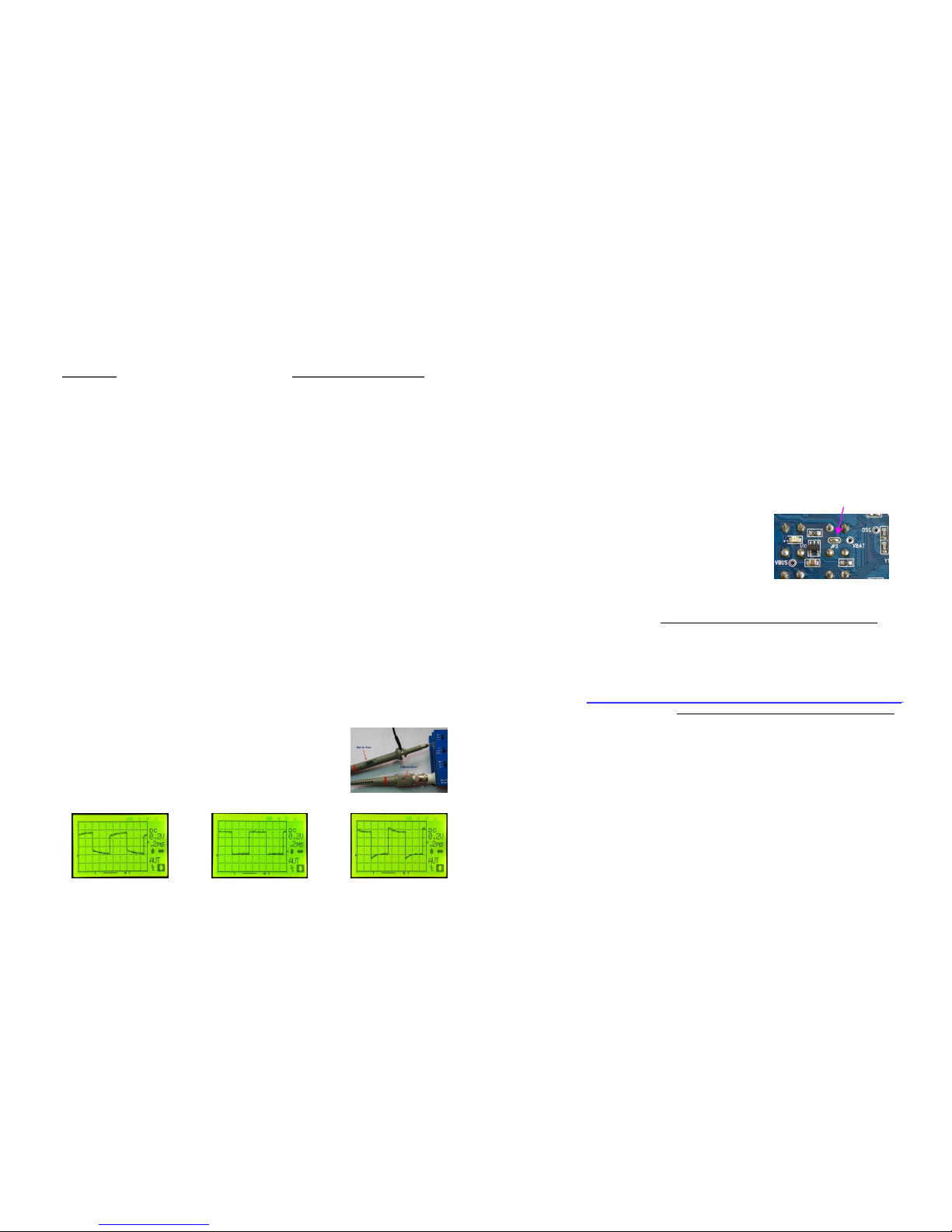
10XProbeCalibration
Inordertocorrectlydisplaysignalsthe10Xprobeneedstobecalibrated.Thiscanbe
doneusingthebuilt-in1KHztestsignal.
1)Placeprobehandleswitchat"10X"position
2)Setoscilloscopetimebaseto0.2ms/Divandsensitivityto
0.2V/Div
3)Placeprobetipontothetestsignalterminalring(see
photoatright).Ifdisplayisnotstableadjusttriggerlevel
tomakeitstable
4)TunethecaptrimmerclosetoBNCconnectorwithasmall
screwdriveruntilwaveformsimilartothecenterphoto
belowisobtained.
.
Notenough Right
Toomuch
AlternativeBatteryandRunningTime
TheBuilt-inBatteryCharger
HowtoDisconnectBatteryCharger
FirmwareUpgrade
Thestandardconfigurationof096usesone3.7V1200mAhLi-ionbattery,whichcan
runtheunitcontinuouslyforabout4hourswhenfullycharged.
Since096canacceptbatteryvoltagefrom2V-5Valternativebatteriescanbeused.
Twocellsof1.2VAAsizeNi-MHbatteries,forexample,areidealfortheunit.Two
cells2000mAhNi-MHbatteriescanruntheunitforabout5hourscontinuouslyif
fullycharged.
Thebuilt-inchargerisspecificallyfor3.7VLi-ionbattery.Thechargecurrentis
programmedtoabout100mA.Asaresulttofullychargea1200mAhbattery12hours
arerequired.
YoumaywanttodisconnectthechargerifbatteriesotherthanLi-ionareused.Please
seebelowforhowtodisconnectthecharger.
Fromtimetotimeyoumayneedtoupgradefirmwarefornewfunctionsorimproved
performance.Thiscanbedonebythebuilt-inbootloader.Forhowthebootloaderworks
andhowtouseitpleasereferto www.jyetech.com/Products/LedScope/e096.php
Ifhardwareprogrammerisusedtore-programtheMCUpleaseseethecomplete
manualfordetails.(Fusebitdefaultfactorysetting:,
)
extendedbyte-0x03highbyte-
0xC0,lowbyte-0xAE
DisconnectJP3
WhenbatteriesotherthanLi-ionisusedthecharger
canbedisconnected.Thereisajumper(JP3)between
thechargerandbattery.RemovingthesolderonJP3
withaironwilldisconnectthecharger(seephoto).
USBConnction
TouseUSBconnectionPCdriverforCP2102needstobeinstalled.Thedrivercanbe
downloadedat
www.jyetech.com/Products/LedScope/e096.php.
www.silabs.com/products/mcu/pages/usbtouartbridgevcpdrivers.aspx.
Windowsdriverisalsoavailableat
SaveCapturedWaveform
EnterHOLDstateandpress[SEC/DIV]button.Followscreeninstructions.
RecallSavedWaveform
EnterHOLDstateandpress[SLOPE]button.Followscreeninstructions.
SendScreenasBitmapFile
1)ConnectUSBcable.RunaPCapplicationthatcanhandleXModemProtoco.Set
communicationformatto38400bps,8databits,1stopbit,noparity,noflow
controlandmakeitreadytoreceivefiles.
2)EnterHOLDstate.Adjustwaveformpositionsothatinterestedportionisonscreen.
3)Press[LEVEL]buttonandfollowscreeninstructions.
RestoreFactoryDefaultSettings
Holddown[LEVEL]buttonfor3secondstoenterSettingSelectmenu.Select
"RESTOREDEFAULT"andpress[OK].
 Loading...