

Page 1
Page 2
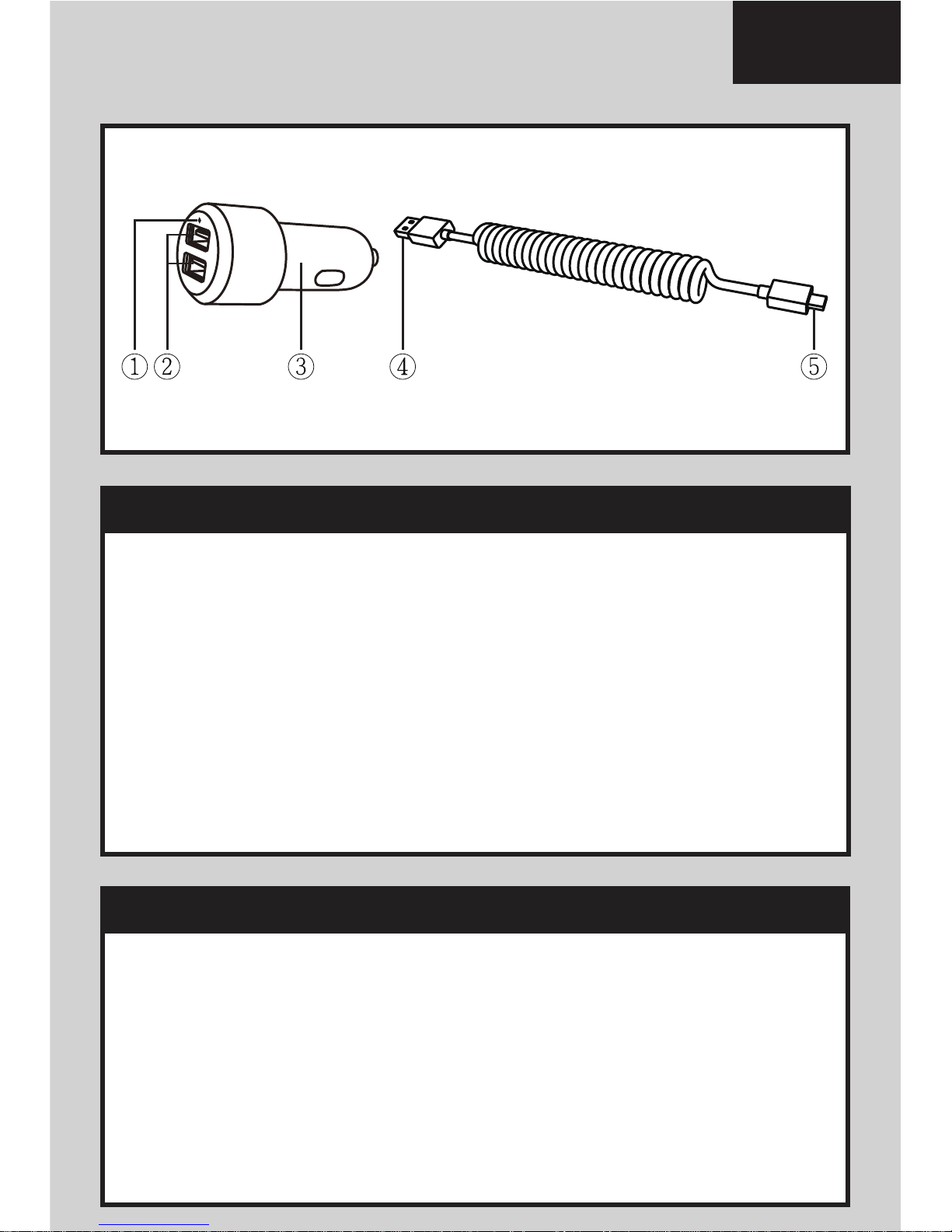
1. Insert the USB plug (refer to 4) of the USB cable
into the USB port (refer to 2)
2. Attach the Micro-USB connecter (refer to 5)
to the device.
3. Insert the power plug (refer to 3) into the
vehicle’s auxiliary power outlet.
4. The LED indicator (refer to 1) illuminates once
the Just Mobile Highway Max
™ is working.
1. Disconnect the device from the Just Mobile
Highway Max
™.
2. Disconnect the Just Mobile Highway Max
™ from
the auxiliary power outlet.
3. Disconnect all cables from the device and from
the Just Mobile Highway Max
™.
Charging your device
Disconnecting your device
English
Just Mobile Highway Max™ User Manual
Page 3
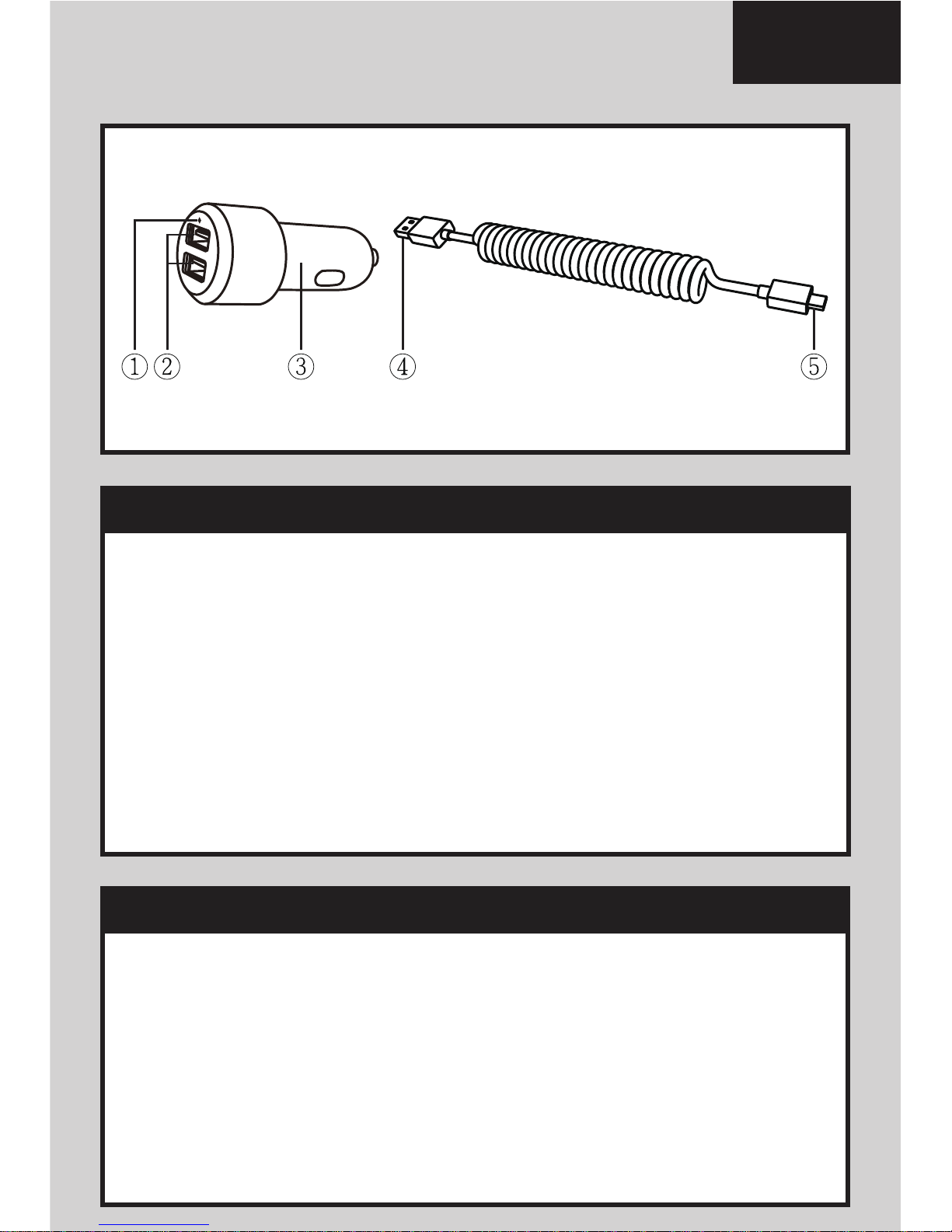
1. Insérez la prise USB (voir 4) du câble USB dans
le port USB (voir 2)
2. Branchez le connecteur Micro-USB (voir 5) à
votre appareil.
3. Insérez le chargeur (voir 3) dans la prise
d'alimentation auxiliaire du véhicule.
4. L’indicateur LED (voir 1) s’allume une fois que le
Highway Max
™ de Just Mobile est en marche.
1. Débranchez l'appareil du Highway Max
™ de
Just Mobile.
2. Débranchez le Highway Max
™ de Just Mobile
de la prise d'alimentation auxiliaire.
3. Débranchez tous les câbles de votre appareil et
du Highway Max
™ de Just Mobile.
Chargement de votre appareil
La déconnexion du périphérique
Français
Just Mobile Highway Max™ Manuel d’utilisation
Page 4
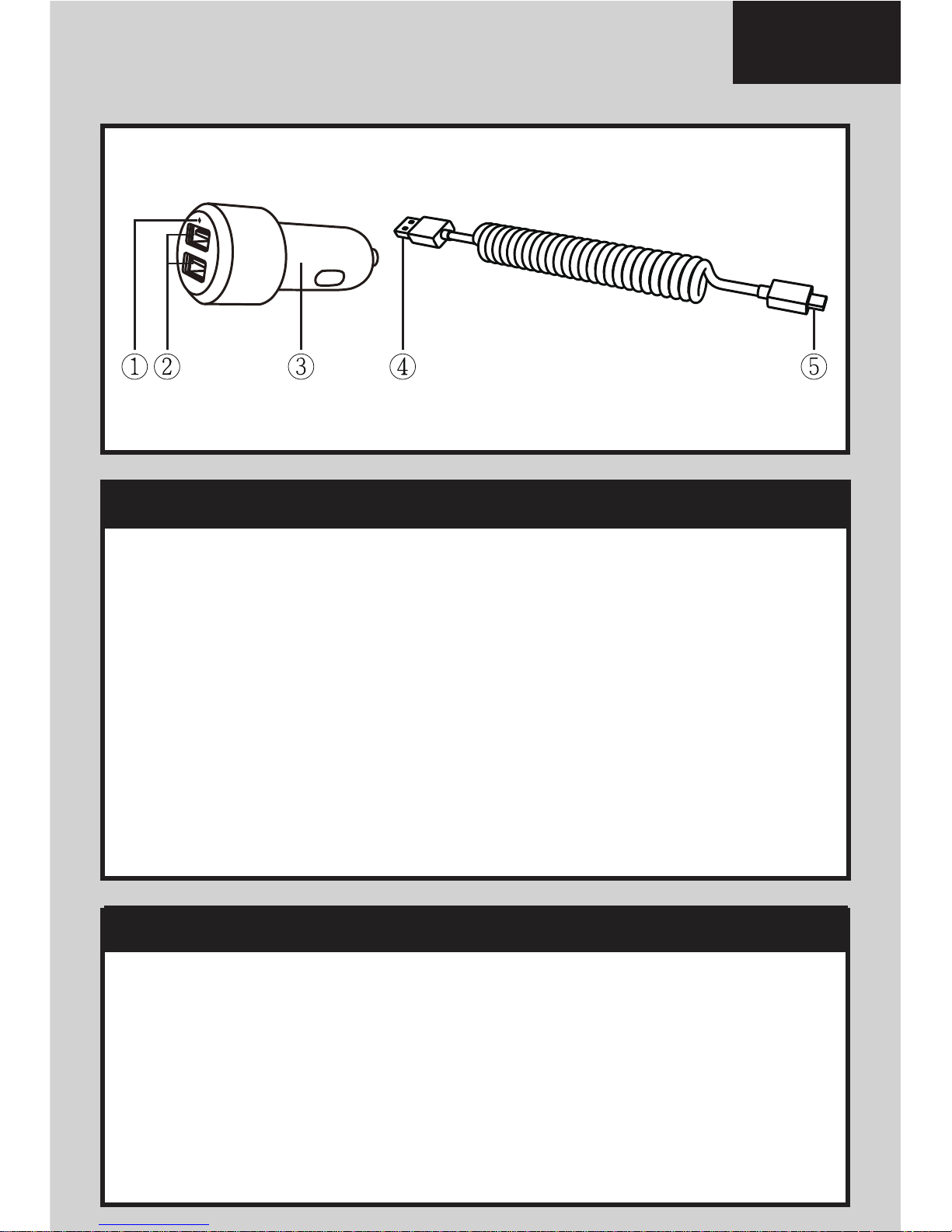
1. Stecken Sie den USB-Stecker (siehe 4) des
USB-Kabels in einen USB-Port (siehe 2) des
Just Mobile Highway Max™.
2. Verbinden Sie den Micro-USB-Stecker (siehe 5)
mit Ihrem Gerät.
3. Stecken Sie den KFZ-Netzadapter (siehe 3) in
eine KFZ-Steckdose.
4. Die grüne LED Kontrollleuchte (siehe 1) zeigt an,
ob die Steckdose unter Spannung steht.
1. Entfernen Sie das Gerät vom Just Mobile
Highway Max™.
2. Entfernen Sie den Just Mobile Highway Max™
von der KFZ-Steckdose.
3. Entfernen Sie alle Kabel vom Ihrem Gerät und
vom Just Mobile Highway Max™.
Aufladen der Geräte
Entfernen der Geräte
Deutsch
Just Mobile Highway Max™ Bedienungsanleitung
Page 5

1. Inserire il connettore USB (fare riferimento a 4)
del cavo USB nella porta USB (fare riferimento
a 2)
2. Collegare il connettore micro USB (fare
riferimento a 5) al dispositivo.
3. Inserire il connettore di alimentazione (fare
riferimento a 3) nella porta di uscita ausiliaria
del veicolo.
4. L’indicatore LED (fare riferimento a 1) si illumina
non appena Just Mobile Highway Max
™ è in
1. Disconnettere il dispositivo da Just Mobile
Highway Max
™.
2. Disconnettere Just Mobile Highway Max
™
dall’uscita ausiliaria.
3. Disconnettere tutti i cavi dal dispositivo e da Just
Mobile Highway Max
™.
Per caricare il vostro dispositivo
Per disconnettere il vostro dispositivo
Italiano
Just Mobile Highway Max™ Manuale dell’utente
Page 6

1. Ligue a ficha USB (indicada como 4) do cabo
USB na porta USB (indicada como 2)
2. Ligue o conector Micro-USB (indicado como 5)
ao seu equipamento.
3. Insira a ficha do carregador (indicada como 3)
na tomada de isqueiro do carro.
4. O indicador LED (indicado como 1) ilumina-se
assim que o Just Mobile Highway Max
™
começa a funcionar.
1. Retire o equipamento do Just Mobile Highway
Max
™.
2. Retire o Just Mobile Highway Max
™ da tomada
de isqueiro.
3. Retire todos os cabos do seu equipamento e do
Just Mobile Highway Max
™.
Carregar o seu equipamento
Desligar o seu equipamento
Português
Just Mobile Highway Max™ Manual do Utilizador
Page 7

1. Inserte la conexión USB (referencia 4) A la
entrada de puerto USB (referencia 2)
2. Conecte el cable Micro-USB (referencia 5) a tu
dispositivo.
3. Inserte el conector de batería (referencia 3) en
el cargador auxiliar del vehículo (Mechero)
4. El indicador de LED (referencia 1) se iluminará
una vez que Just Mobile Highway Max
™ esté
funcionando.
1. Desconecte el dispositivo de Just Mobile
Highway Max
™.
2. Desconecte Just Mobile Highway Max
™ del
cargador auxiliar del vehículo (Mechero)
3. Desconecte todos los cables del dispositivo y
de Just Mobile Highway Max
™.
Carga tu dispositivo
Desconectando tu dispositivo
Español
Just Mobile Highway Max™ Manual de uso
Page 8

1. Csatlakoztassa az USB csatlakozót(4) a töltő USB
aljzatába (2) Fontos! Az autós töltőt csak azt
követően csatlakoztassa az autó 12V-os aljzatába,
miután az autó motorját elindította, ezzel elkerülhető
a túlfeszültség okozta meghibásodás.
2. Csatlakoztassa a Micro-USB csatlakozót (5) a
készülékébe. Amennyiben készülékéhez eltérő
típusú csatlakozó szükséges, akkor használja a
készülékéhez kapott USB töltőkábelt.
3. Csatlakoztassa a töltőt (3) gépjárművének 12V-os
aljzatába (szivargyújtó).
4. A működést jelző LED lámpa (1) folyamatos világítása
jelzi, a Just Mobile Highway Max
™ működését.
1. Húzza ki a töltőkábelt a Just Mobile Highway Max
™
autós töltőből.
2. Vegye ki a Just Mobile Highway Max
™ autós töltőt a
gépjármű 12V-os aljzatából (szivargyújtó).
3. Húzzon ki menden kábelt a mobil készülékéből, és a
Just Mobile Highway Max
™ autós töltőből is.
Mobil készülék töltése
Mobil készülék töltésének befejezése
Magyar
Just Mobile Highway Max™ Használati utasítás
Page 9

1. Podłącz wtyczkę USB (4), przewodu USB do
wolnego portu w ładowarce (2)
2. Połącz wtyczkę Micro-USB (5) z portem
Micro-USB urządzenia
3. Wsuń ładowarkę (3) do gniazda zapalniczki
samochodowej
4. Dioda LED (1) zaświeci się, oznacza to że
ładowarka Just Mobile Highway Max
™ jest
podłączona do zasilania.
1. Odłącz urządzenie od ładowarki Just Mobile
Highway Max
™.
2. Wciągnij ładowarkę Just Mobile Highway Max
™
z gniazda zapalniczki
3. Odłącz przewody zarówno od urządzeń
mobilnych jak i od ładowarki Just Mobile
Highway Max
™.
Ładowanie urządzeń
Odłączanie urządzeń
Polski
Just Mobile Highway Max™ Podręcznik użytkownika
Page 10

Page 11

Page 12

 Loading...