

Page 1
SH-35N
(°F)
and SH-36N
SUPERHEAT and SUBCOOLING GAUGE
OPERATING INSTRUCTIONS
Only a properly charged unit will provide the owner
with the design SEER for maximum energy efficiency.
(°C)
SUPERHEAT
SUPERHEAT, TEMPERATURE,
SUBCOOLING AND PRESSURE
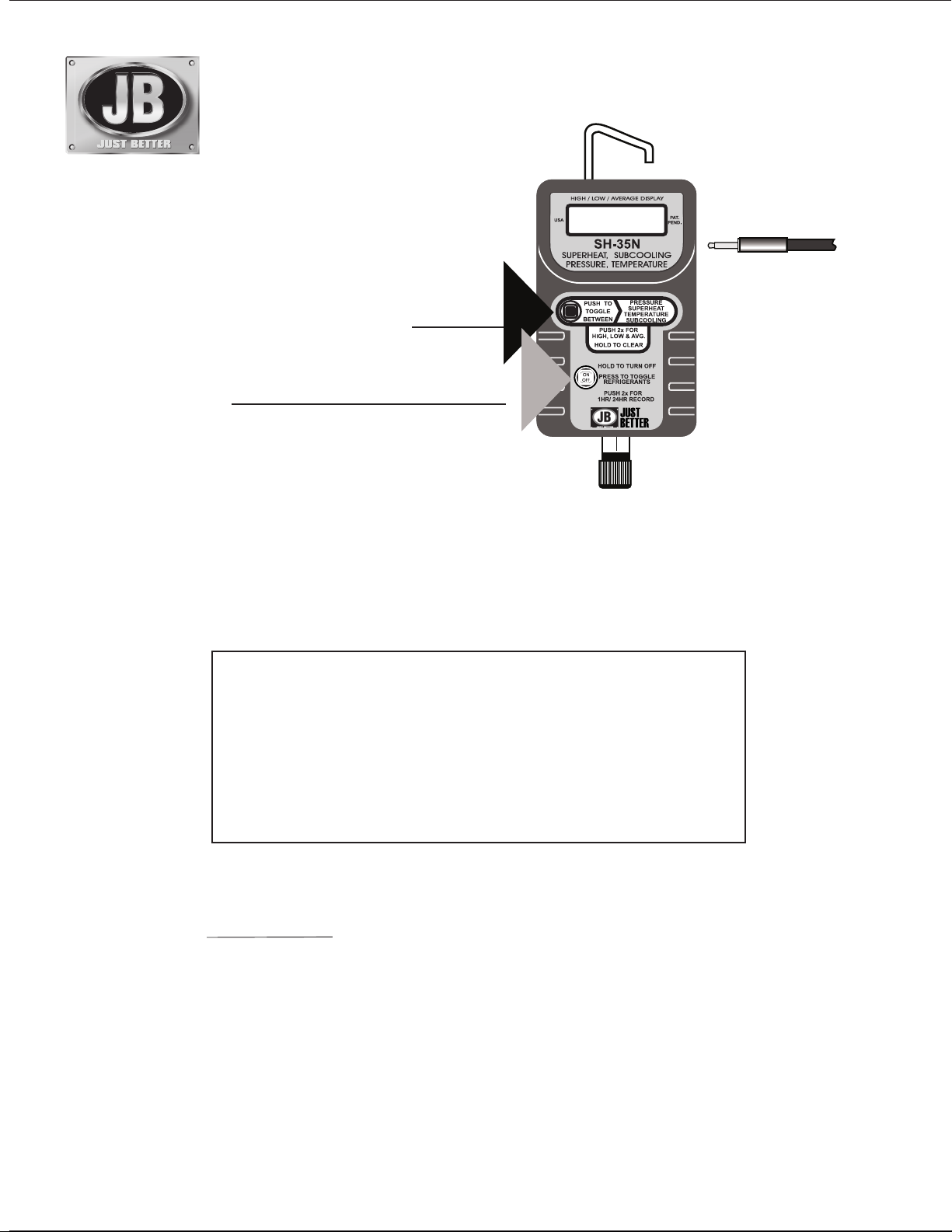
PUSH once to toggle between displays
PUSH 2 times to recall High, Low & Average
Hold down to clear memory.
ON/OFF
PUSH once to “Turn On”
Display shows LAST refrigerant used.
HOLD down to "Turn Off"
PUSH 2 times to select 1 hour or 24 hour auto-off mode
REFRIGERANT SELECTION
PRESS once at any time to display current refrigerant.
Continue pressing to scroll the refrigerant list.
(See list of refrigerants on page 4.)
Not intended for use on hazardous or corrosive fluids
GAUGE SPECIFICATIONS:
Pressure display range: 29 InHg to 600 psig (-98kPa to 4134 kPa)
(+/- 1 PSI to 200 psi, 0.5% to 600 psi)
Temperature display range: -40°F to 200°F (-40°C to 93°C)
Operating temperature: -10°F to 120°F (-12°C to 49°C)
(+/- 1°F * 32°F/120°F, +/- 1.5°F * -10°F/32°F)
Maximum overpressure: 800 psig (5512 kPa)
Battery life and type: 100 hours/ 9vAlkaline battery
Auto-shutoff time: 60 minutes (extended 60 minutes by upper button action)
Refrigerant data source: NIST REFRPRO software and manufacturers data
TEMPERATURE
SENSOR
2
1
EXTENDING
AUTO-SHUTOFF TIME
Extend time by 60 minutes by
pressing upper button.
Uses one 9v Alkaline battery
(not included)
APPLICATION TIPS:
Allow the manifold to Zero at Turn-On:
The manifold displays will zero (CAL) each time the
manifold is turned on open to atmosphere. Zeroing the gauge
compensates the Pressure display for changes in (1) Altitude
and (2) Barometric pressure.
Pressure Calibration
Don’t be alarmed if your manifold gauge does not agree
with your mechanical gauges. The digital manifold is
calibrated with a very accurate pressure and is not affected
by vibration, motion or position.
Extending On-Time
The digital manifold will turn off automatically after 60
minutes to save battery life.
If any button is touched the digital manifold will stay on for
another 60 minutes.
Over/Under-Range Indicator
Pressures or temperatures below or above the rated
ranges will cause a “1” to be displayed.
Low Battery Indicator
Low batteries will be indicated by a blinking display.
Batteries For Low Temperature Applications
Using the gauge in a low temperature conditions will
shorten battery life. Change to the 9 volt Lithium battery
(Radio Shack 23-665) to solve this problem.
Page 2
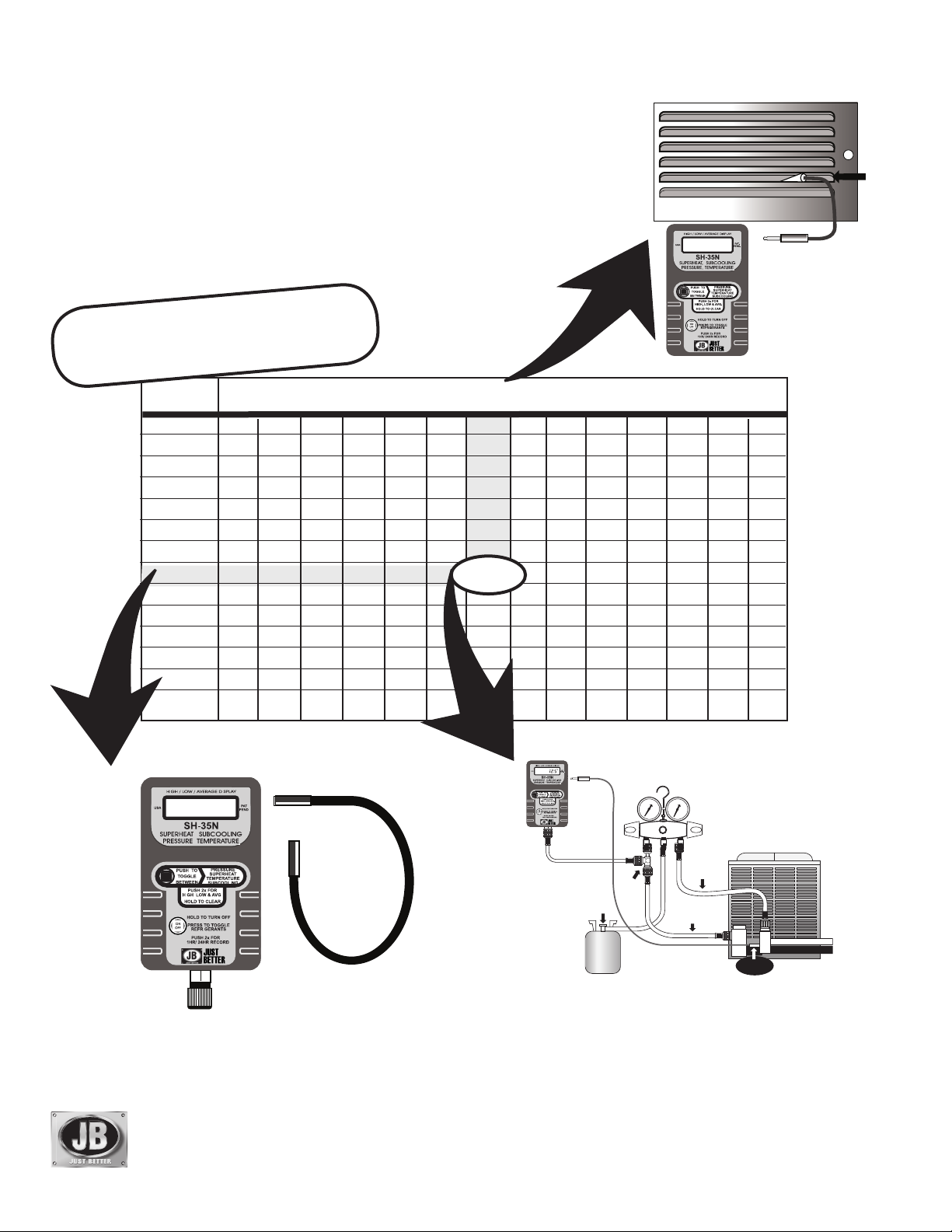
OBTAINING TARGET SUPERHEAT VALUE
A
WET BULB TEMPERATURE OF EVAPORATOR ENTERING AIR
1. Open to atmosphere. Gauge will automatically calibrate to
“Zero” for altitude and atmospheric pressure changes.
2. Wet the sock with water and slip on to sensor. Mount on the
building return air grill or air return line of blower to measure the
Indoor Wet Bulb temperature.
3. Turn on the furnace fan to create a flow of air across the wet sock
for 5 minutes. The final number will be your Wet Bulb Temperature.
Sample Superheat Chart
(Located on condensing unit- for
older models contact manufacturer.)
OUTDOOR
TEMP °F
50
55
60
65
70
75
80
85
90
95
100
105
110
9
7
EVAPORATOR ENTERING AIR- F° Wet Bulb Temperature
52
12
10
56
54
14
12
6
10
6
17
15
13
10
58
20
18
16
13
6
9
5
60
23
21
19
16
12
8
12.5
62 64
26.9
24.3
21.9
19.6
16.2
29
27
24
21
18
15
66
32
30
27
24
21
18
1
15
13
9
10
6
8
5
68
35
33
30
27
24
21
19
16
14
12
WET
SOCK
IN AIR
FLOW
SUPERHEAT
70
72 74
37
40
38
35
36
33
33
30
31
28
25
28
26
22
24
20
22
18
20
15
9
6
13
11
17
15
42
40
38
36
34
31
30
27
25
23
22
20
TEMPERATURE
SENSOR
76
45
43
41
39
37
35
33
31
29
27
26
25
115
SUPERHEAT
TEMPERATURE
SENSOR
8
14
SUPERHEAT
TEMPERATURE
SENSOR
18
23
BC
OUTDOOR TEMPERATURE
1. Remove sock and measure the
Outdoor Air Temperature.
JB INDUSTRIES
AURORA, IL 60507 USA
Technical service:
E-Mail: sales@jbind.com
Web Site: www.jbind.com
800-323-0811
TARGET
SUPERHEAT VALUE
QC RESTRICTOR
FITTING
A34000
1/4” SAE TEE
W/ SWIVEL COUPLER
REFRIGERANT
TANK
1. Find the outdoor temperature and evaporator entering air wetbulb temperature on chart. The target superheat value is at the
intersection of the two.
If you have to do repairs, recheck your temperatures.
2. Make your connections and toggle the gauge to show SUPERHEAT.
For system refrigerants other than R22, scroll to select Refrigerant.
3. Very slowly add or refrigerant to lower superheat or remove
refrigerant to raise superheat until the gauge displays the target
value.
TO
LIQUID LINE
SERVICE VALVE
TO SUCTION
SERVICE VALVE
TEMPERATURE
SENSOR
LIQUID LINE
SUCTION LINE
Page 3

CHARGING
BY THE SUBCOOLING METHOD
APPLICATIONS
Refrigeration Systems
High Efficiency Residential
Large Commercial A/C Rooftop
Packages Up To And Over 100 Tons
1. Connect the gauge to the A34000 tee fitting on
the high (liquid) side of the manifold as shown.
2. Install the Temperature Sensor on the liquid line
next to the liquid service valve and plug into
gauge.
3. For system refrigerants other than R-22, scroll
to the matching Refrigerant.
4. Toggle the gauge display to show
SUBCOOLING.
5. Very slowly add or remove refrigerant until the
gauge displays the required Subcooling value.
Contact manufacturer or wholesaler for specific temperatures.
QC RESTRICTOR
FITTING
TO SUCTION
SERVICE VALVE
REFRIGERAN T
TANK
Systems With TXV And No Receiver
A34000
1/4” SAE TEE
W/SWIVEL
COUPLER
Average Subcooling Value is 10°–12°.
SUBCOOL
SUPERHEAT
TEMPERATURE
SENSOR
CONDENSING
UNIT
TO
LIQUID LINE
SERVICE VALVE
TEMPERATURE
SENSO R
LIQUID LINE
SUCTION LINE
LIQUID
LINE
LIQUID
LINE
SUPERHEAT
SUPERHEAT
EXPANSION
VALV E
EXPANSION
VALV E
TEMPERATURE
SENSOR
TO SUCTION
SERVICE VALVE
SUPERHEAT TEST
CONDENSING UNIT
SUCTION LINE
TEMPERATURE
SENSOR
EVAPORATOR
EVAPORATOR
LIQUID LINE
TEMPERATURE
TEMPERATURE
SENSO R
SENSO R
SUPERHEAT
SUPERHEAT
MULTI KEY
SUPERHEAT
SUPERHEAT
TEMPERATURE
SENSOR
TEMPERATURE
SENSOR
SUCTION LINE
SUCTION LINE
TESTING FOR CHARGE
SUBCOOLING TEST
SUBCOOL
SUPERHEAT
TEMPERATURE
SENSOR
LIQUID
LINE
TEMPERATURE
SENSOR
EXPANSION
VALVE
CONDENSING UNI T
LIQUID LINE
SUCTION LINE
EVAPORATOR
TEMPERATURE
SENSOR
SUBCOOL
SUPERHEAT
TEMPERATURE
SENSOR
TO LIQUID
SERVICE
VALV E
SUCTION LINE
1. Turn on the gauge.
2. For refrigerants other than R-22, scroll to
Refrigerant.
2. Plug in the Temperature Sensor and mount the
sensor as shown.
3. Toggle the display to show Superheat or
Subcooling.
Page 4
REFRIGERATION APPLICATIONS
TEMPERATURE
SETTING FOR THERMOSTAT
CONTROLLED CASES AND
SUPERHEAT
TEMP
SENSOR
COOLERS
Without plug-ins, turn on the gauge
and zero the display by holding
the lower button. Plug in the
Temperature Sensor only and toggle
to “Temperature.”
A/C & REFRIGERATION APPLICATIONS
Contact your TXV manufacturer for the exact superheat adjust rate.
CHECKING TXV SETTING
The objectives of the TXV superheat setting is to prevent
liquid refrigerant floodback to the compresor and to
optimize system operation by the use of a selected setting.
The two temperature method of measuring superheat
is not recommended because it can produce a wrong
superheat measurement, due to the effect of temperature
glide of the blended refrigerants and variations in
evaporator pressure drop.
NEW RESIDENTIAL A/C SYSTEMS
For new installations of residential A/C systems, the precharge will not provide an accurate amount of refrigerant
charge because of the variation in the length of liquid and
suction line connecting to the “A” coil.
SETTING FOR THERMOSTAT
CONTROLLED CASES AND
COOLERS
Without plug-ins, turn on the gauge
and zero the display by holding the
lower button. Attempts to zero the
gauge with pressure applied will
result in (Err) display.
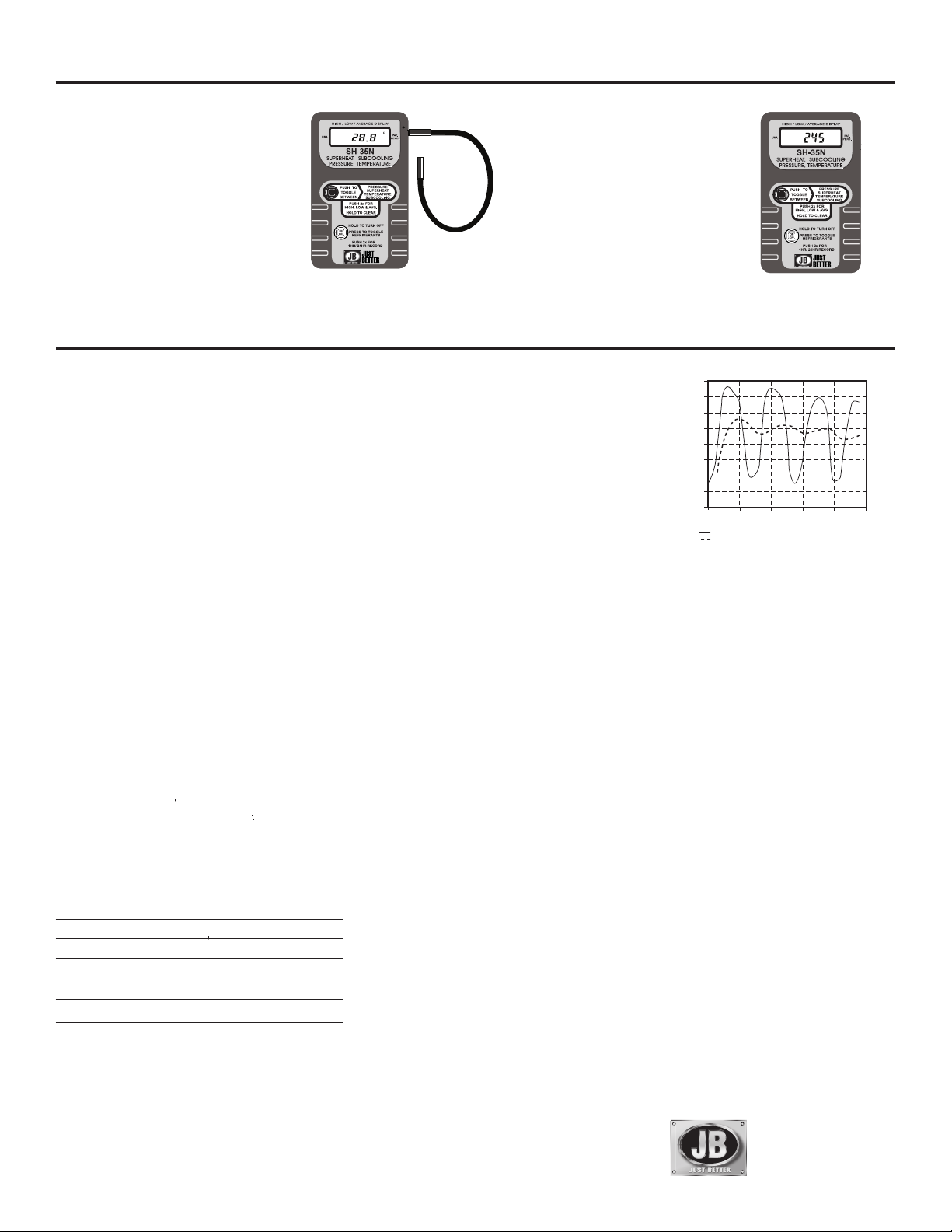
SET SUPERHEAT FOR
“HUNTING” TXV VALUES
ϒF
In refrigeration and air
conditioning systems, the
Superheat
expansion valve often
operates to produce an
evaporator superheat
which constantly swings up
and down in value, called
“hunting.” The SH-35N
provides the “Average”
superheat value for TXV
valve adjustment.
PSI
SUPERHEAT
20
18
16
14
12
10
8
6
4
0 5 10 15 20 25
Expansion Valve Superheat
SH-35N Average Superheat
Time in Minutes
Hussmann RHF A 4 Door FF Case
1Ton Lo w Temp. TXV
-2 F Case T emperature
40% Heater Load
RETROFITTING SYSTEMS
Retrofitting systems to a new refrigerant can change the
TXV superheat setting. The superheat setting should
be checked before and after retrofitting to be sure the
superheat is right for the equipment.
REPLACEMENT ITEMS
PART NO. DESCRIPTION
A34000 1/4" QC x 1/4" Access Branch Tee
SH-54 6' Temperature Sensor
SH-55 Plastic Carrying Case
SH-56 Socks (5)
ACCESSORIES
SH-51 28' Temperature Sensor Extension
Technical service: 800-323-0811
E-Mail:sales@jbind.com
Web Site:www.jbind.com
KEY REFRIGERANT LIST
R12
R134a
R290
R401A
R401B
R402A
R402B
R403B
R404A
R406A
R407A
R407B
R407C
R408A
R409A
R410A
R411C
R413A
R414B
R416A
R422A
R422B
R422C
R422D
R427A
R428A
R438A
R502
R507
R508B
R417A
Fahrenheit and Celsius Keys are not interchangeable
JB INDUSTRIES
630.851.9444
Printed in USA
Part No. 10737-308
© 2011 J/B Industries Inc.
 Loading...