

Juniper SECURITY THREAT RESPONSE MANAGER 2008.2 - SNMP AGENT GUIDE REV 1, Security Threat Response Manager User Manual
Page 1

Security Threat Response Manager
SNMP Agent Guide
Release 2008.2
Juniper Networks, Inc.
1194 North Mathilda Avenue
Sunnyvale, CA 94089
USA
408-745-2000
www.juniper.net
Part Number: 530-025621-01, Revision 1
Page 2

Copyright Notice
Copyright © 2008 Juniper Networks, Inc. All rights reserved. Juniper Networks and the Juniper Networks logo are registered trademarks of Juniper
Networks Inc. in the United States and other countries. All other trademarks, service marks, registered trademarks, or registered service marks in this
document are the property of Juniper Networks or their respective owners. All specifications are subject to chang e without notice. Juniper Networks
assumes no responsibility for any inaccuracies in this document or for any obligation to update information in this document. Juniper Networks reserves
the right to change, modify, transfer, or otherwise revise this publicati on without notice.
FCC Statement
The following information is for FCC compliance of Class A devices: This equipment has been tested and found to comply with the limits for a Class A
digital device, pursuant to part 15 of the FCC rules. These limits are designed to provide reasonable protection against harmful interference when the
equipment is operated in a commercial environment. The equipment generates, uses, and can radiate radio-frequency energy and, if not installed and
used in accordance with the instruction manual, may cause harmful interference to radio communications. Operation of this equipment in a residential
area is likely to cause harmful interference, in which case users will be required to correct the interference at their own expense. The following
information is for FCC compliance of Class B devices: The equipment described in this manual generates and may radiate radio-frequency energy. If it
is not installed in accordance with NetScreen’s installation instructions, i t may cause interference wi th radio and tele vision reception. This equip ment has
been tested and found to comply with the limits for a Class B digital device in accordance with the specifications in part 15 of the FCC rules. These
specifications are designed to provide reasonable protection against such interference in a residential installation. However, there is no guarantee that
interference will not occur in a particular installation. If this equipmen t does cause harmful interference to radio or television reception, which can be
determined by turning the equipment off and on, the user is encouraged to try to correct the interference by one or more of the following measures:
Reorient or relocate the receiving antenna. Increase the separation between the equipme nt and receive r. Consult t he dealer o r an experienced ra dio/TV
technician for help. Connect the equipment to an outlet on a circuit different from that to which the receiver is connected.
Caution: Changes or modifications to this product could void the user's warrant y and authority to operate this device.
Disclaimer
THE SOFTWARE LICENSE AND LIMITED WARRANTY FOR THE ACCOMPANYING PRODUCT ARE SET FORTH IN THE INFORMATION PACKET
THAT SHIPPED WITH THE PRODUCT AND ARE INCORPORATED HEREIN BY THIS REFERENCE. IF YOU ARE UNABLE TO LOCATE THE
SOFTWARE LICENSE OR LIMITED WARRANTY, CONTACT YOUR JUNIPER NETWORKS REPRESENTATIVE FOR A COPY.
STRM SNMP Agent Guide
Release 2008.2
Copyright © 2008, Juniper Networks, Inc.
All rights reserved. Printed in USA.
Revision History
June 2008—Revision 1
The information in this document is current as of the date listed in the revision history.
2
Page 3

CONTENTS
ABOUT THIS GUIDE
Conventions 3
Technical Documentation 3
Documentation Feedback 3
Requesting Support 4
1 ABOUT THE EMBEDDED SNMP AGENT
About the SNMP Agent 5
Accessing the SNMP Agent 6
2 USING THE SNMP-LINUX-MIB
Processor Details 7
Disk Space Details 8
Mount Details 8
System Performance Details 9
Processes Table Details 10
Processor Performance Details 10
Page Details 11
Service Details 11
Boot Log Details 12
Cron Log Details 13
Secure Log Details 13
IDE Details 14
Module Details 14
PCI Details 15
SCSI Details 16
Slab Details 16
3 USING THE RFC1213-MIB
System Details 19
Interfaces 21
Address Translation 23
IP Details 23
System Details 26
IP Address Table Details 27
IP Route Table Details 28
Page 4

IP Net to Media Table Details 30
ICMP Table Details 31
TCP Details 33
TCP Connection Details 35
UDP Details 36
UDP Table Details 36
SNMP Details 37
4 USING THE HOST-RESOURCES-MIB
System Details 41
Storage Details 42
Device Details 43
Processor Table Details 45
Network Table Details 45
Printer Table Details 45
Disk Storage Details 46
Partition Details 47
File System Details 48
Software Run Details 49
Software Run Performance Details 50
HR Software Installed Table Details 51
A SNMP OVERVIEW
About SNMP 53
What Is an Agent? 53
Who Is a Manager? 54
Manager and Agent Relationship 54
What is a MIB (Management Information Base)? 55
What Are MIB Groups? 56
MIB Data types Available 57
MIB Constructs Available 60
Supported Textual Conventions 61
Nodes 62
Object Identifiers 62
Relative and Absolute Object Identifiers 62
Specifying Object Identifiers Symbolically 62
Object Identifier with Instance Indexes 63
Scalar and Tabular Objects 63
How an Agent Works 64
Traps 64
Specifying SNMP Variables in GET Requests 65
Page 5

ABOUT THIS GUIDE
The STRM SNMP Agent Guide provides you with information on using the
embedded SNMP Agent and viewing MIB information.
Conventions Table 1 lists conventions that are used throughout this guide.
Table 1 Icons
Icon Type Description
Information note Information that describes important features or
instructions.
Caution Information that alerts you to potential loss of
data or potential damage to an application,
system, device, or network.
Warning Information that alerts you to potential personal
injury.
Technical
Documentation
Documentation
Feedback
You can access technical documentation, technical notes, and release notes
directly from the Juniper networks Support Web site at
www.juniper.net/support/.
http://
We encourage you to provide feedback, comments, and suggestions so that we
can improve the documentation. Send your comments to
[email protected], or fill out the documentation feedback form at
http://www.juniper.net/techpubs/docbug/docbugreport.html. If you are using e-mail, be
sure to include the following information with your comments:
• Document name
• Document part number
• Page number
• Software release version
STRM SNMP Agent Guide
Page 6

4 ABOUT THIS GUIDE
Requesting
Support
• Open a support case using the Case Management link at
http://www.juniper.net/support/ or call 1-888-314-JTAC (from the United States,
Canada, or Mexico) or 1-408-745-9500 (from elsewher e).
STRM SNMP Agent Guide
Page 7

1
ABOUT THE EMBEDDED SNMP
A
GENT
The STRM Embedded SNMP Agent is a service that runs on STRM appliances to
monitor system performance and usage metrics such as CPU utilization, memory
usage, disk space usage, and network interface statistics. The SNMP Agent
allows STRM to monitor system health and enables integration with other existing
network management products, such as, HP Openview or IBM Tivoli for system
health monitoring. This chapter provides information regarding the Embedded
SNMP Agent including:
• About the SNMP Agent
• Accessing the SNMP Agent
About the SNMP
Agent
The SNMP Agent provides real-time information on the follo wing Management
Information Bases (MIBs):
• SNMP-LINUX-MIB. For more informat ion , see Chapter 2 Using the
SNMP-Linux-MIB.
• RFC1213-MIB. For more information, see Chapter 3 Using the RFC12 13 - MIB.
• HOST-RESOURCES-M IB. For more information, see Chapter 4 Using the
Host-Resources-MIB.
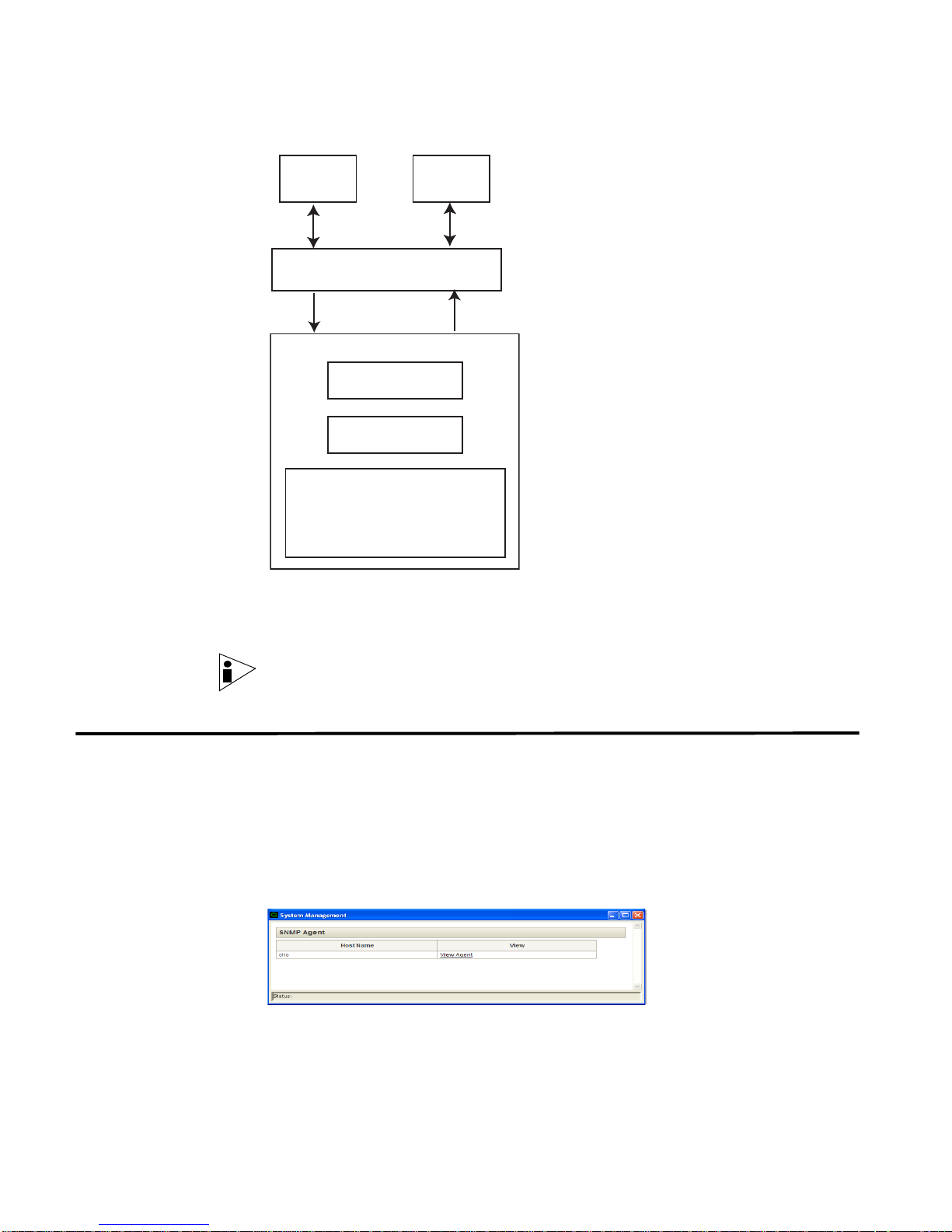
These MIBs enable SNMP manageability for your Linux systems. The figure below
the architecture for the SNMP Agent.
STRM SNMP Agent
Page 8
6 ABOUT THE EMBEDDED SNMP AGENT
Web
Console
SNMP
Manager
SNMP Agent for Linux
System Details
Process Details
Details relating to
HOST-RESOURCES-MIB,
RFC-1213-MIB,
and SNMP-LINUX-MIB
Linux
Accessing the
SNMP Agent
The SNMP Agent gathers all the information from your Linux system pertaining to
SNMP-LINUX-MIB, HOST-RESOURCES-MIB, and RFC-1213-MIB and exposes
that information using the STRM interface and SNMP managers.
Note: For information on configuring SNMP Agent ports, see the Managing STRM
chapter in the STRM Administration Guide.
To access the embedded SNMP Agent:
Step 1 In the Administration Console, click the System Configuration tab.
The System Configuration panel appears.
Step 2 Click the System Management icon.
The System Management window appears.
Step 3 In the View Agent column, click View Agent for the SNMP agent you wish to
access.
STRM SNMP Agent
Page 9

2
USING THE SNMP-LINUX-MIB
The SNMP-Linux-MIB is a pre-defined MIB that retrieve s information from your
system. This MIB retrieves the following information:
• Processor Details
• Disk Space Details
• Mount Details
• System Performance Details
• Service Details
• Boot Log Details
• Cron Log Details
• Secure Log Details
• IDE Details
• Module Details
• PCI Details
• SCSI Details
• Slab Details
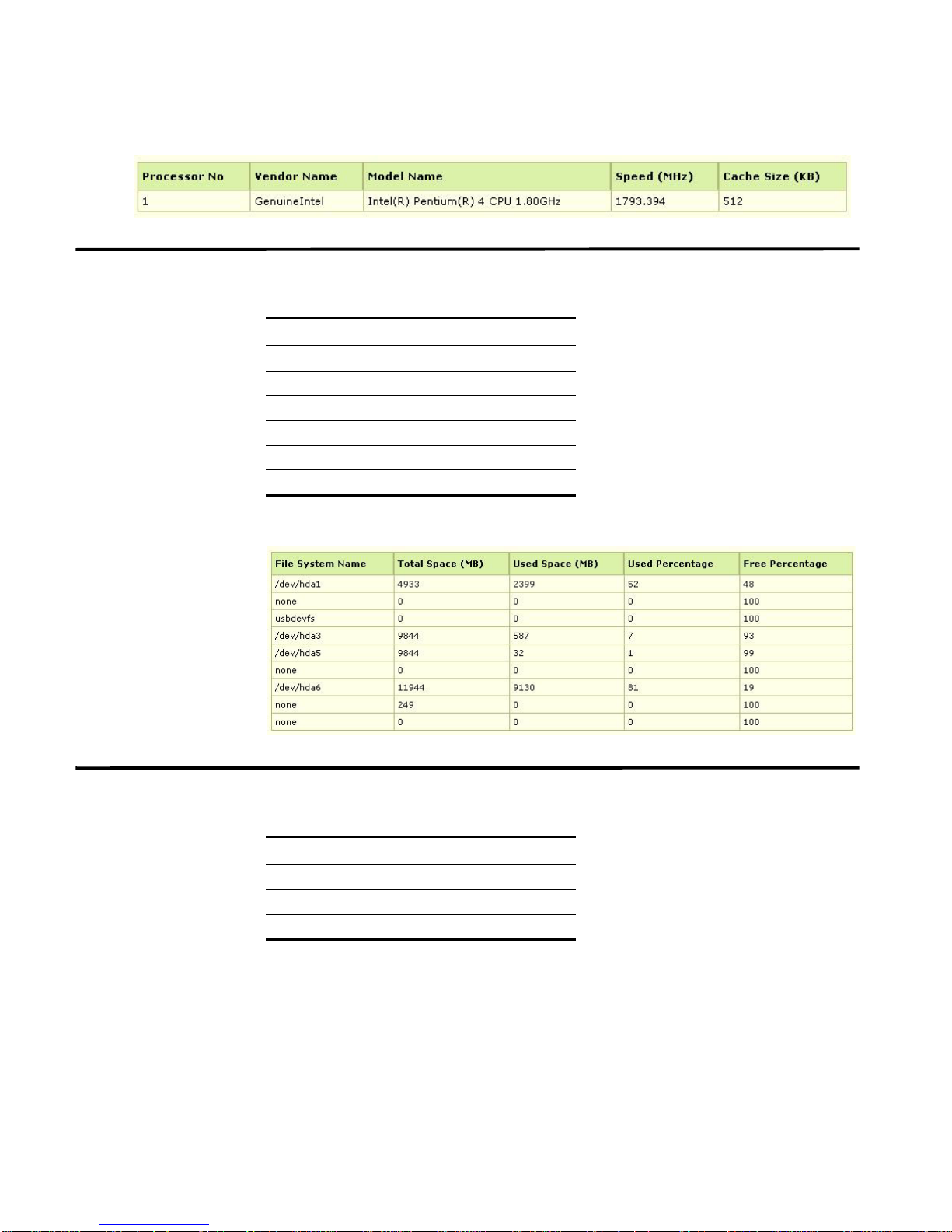
Processor Details The process details includes:
Table 2-1 Processor Details
S.No Processor Details
1. Processor Vendor Name
2. Processor Model Name
3. Processor Speed in Mega Hertz
4. Processor Cache Size in KB
For example, sample output may include:
STRM SNMP Agent
Page 10
8 USING THE SNMP-LINUX-MIB
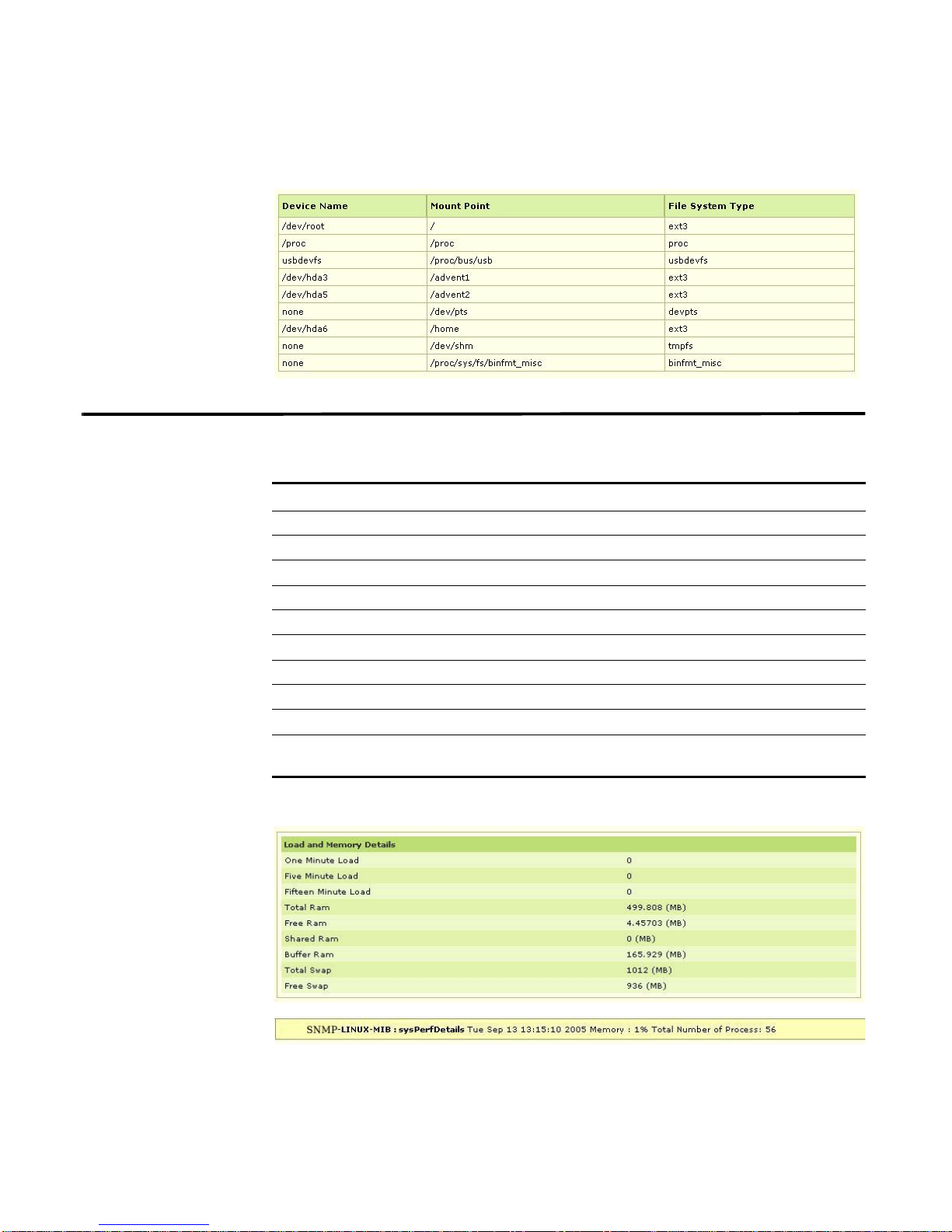
Disk Space Details The disk space details includes:
Table 2-2 Disk Space Details
S.No Disk Space Details
1. File System Type
2. Total Disk Space in MegaBytes
3. Used Space in MegeBytes
4. Percentage of Free Space
5. Percentage of Used Space
6. The Mount Point of the Device
For example, sample output may include:
Mount Details The mount details includes:
Table 2-3 Mount Details
S.No Mount Details
1. Device Name
2. Mount Point of the Device
3. File System Type
STRM SNMP Agent
Page 11
For example, sample output may include:
System Performance Details 9
System
Performance
Details
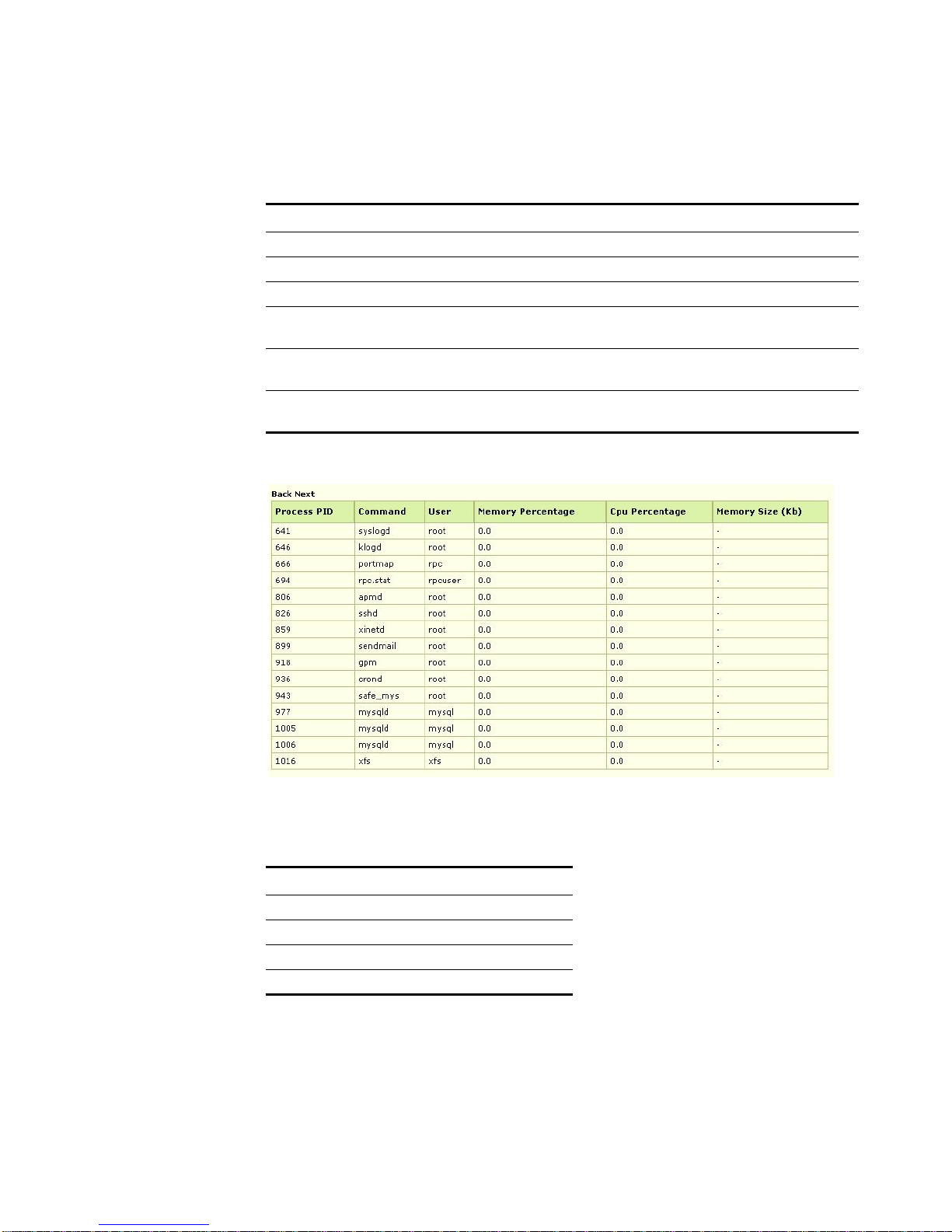
The system performance details includes:
Table 2-4 System Performance Details
S.No System Performance Details Description
1. One Minute Load CPU Utilization of the last one minute
2. Five Minute Load CPU Utilization of the last five minutes
3. Fifteen Minute Load CPU Utilization of the last fifteen minutes
4. Total RAM Total RAM size in bytes
5. Free RAM Free RAM in bytes
6. Shared RAM Shared RAM in bytes
7. Buffer RAM Buffer RAM in bytes
8. Total Swap Total Swap size in bytes
9. Free Swap Free Swap size in bytes
10. No. of Current Processes Specifies the number of current processes
running in the system
For example, sample output may include:
STRM SNMP Agent
Page 12
10 USING THE SNMP-LINUX-MIB
Processes Table
Details
The process table details includes:
Table 2-5 Process Details
S.No Process Table Details Description
1. Process ID (PID) Specifies the Process Identification Number.
2. Process Command Specifies the name of the process.
3. Process User Specifies the user that started the process.
4. Memory Percentage Specifies the percentage of memory used by the
process.
5. CPU Percentage Specifies the percentage of CPU used by the
process.
6. Memory Size Specifies the memory taken by the process in
KiloBytes.
For example, sample output may include:
Processor
The processor performance details includes:
Performance Details
Table 2-6 Processor Details
S.No Processor Details
1. Processor Vendor Name
2. Processor Model Name
3. Processor Speed in Mega Hertz
4. Processor Cache Size in KB
STRM SNMP Agent
Page 13
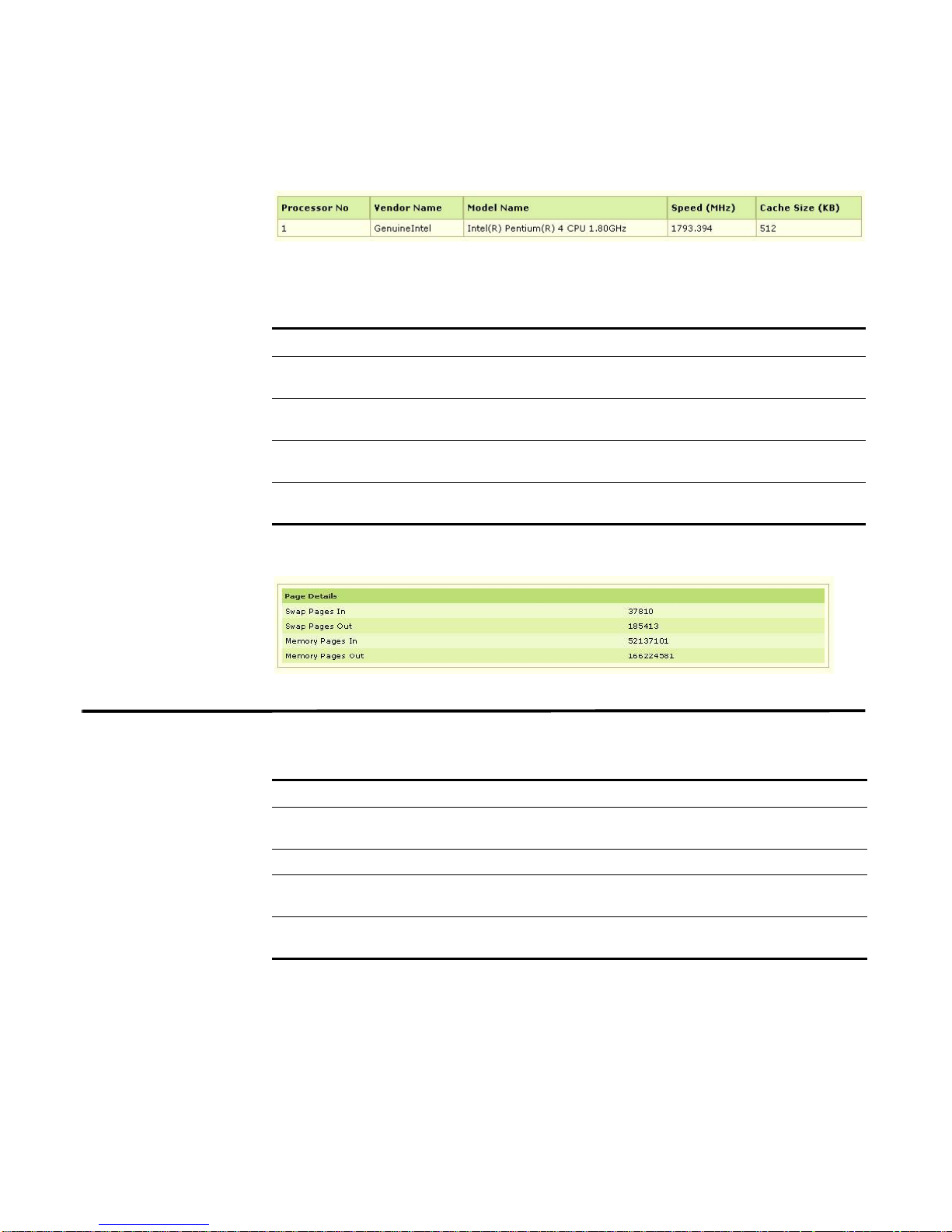
For example, sample output may include:
Page Details The page details includes:
Table 2-7 Processor Details
S.No Processor Details Description
1. Swap Pages In Specifies the number of swap pages the system has
2. Swap Pages Out Specifies the number of swap pages the system has
3. Memory Pages In Specifies the number of memory pages the system
4. Memory Pages Out Specifies the number of memory pages the system
For example, sample output may include:
Service Details 11
brought in.
brought out.
has written in.
has written out to the disk.
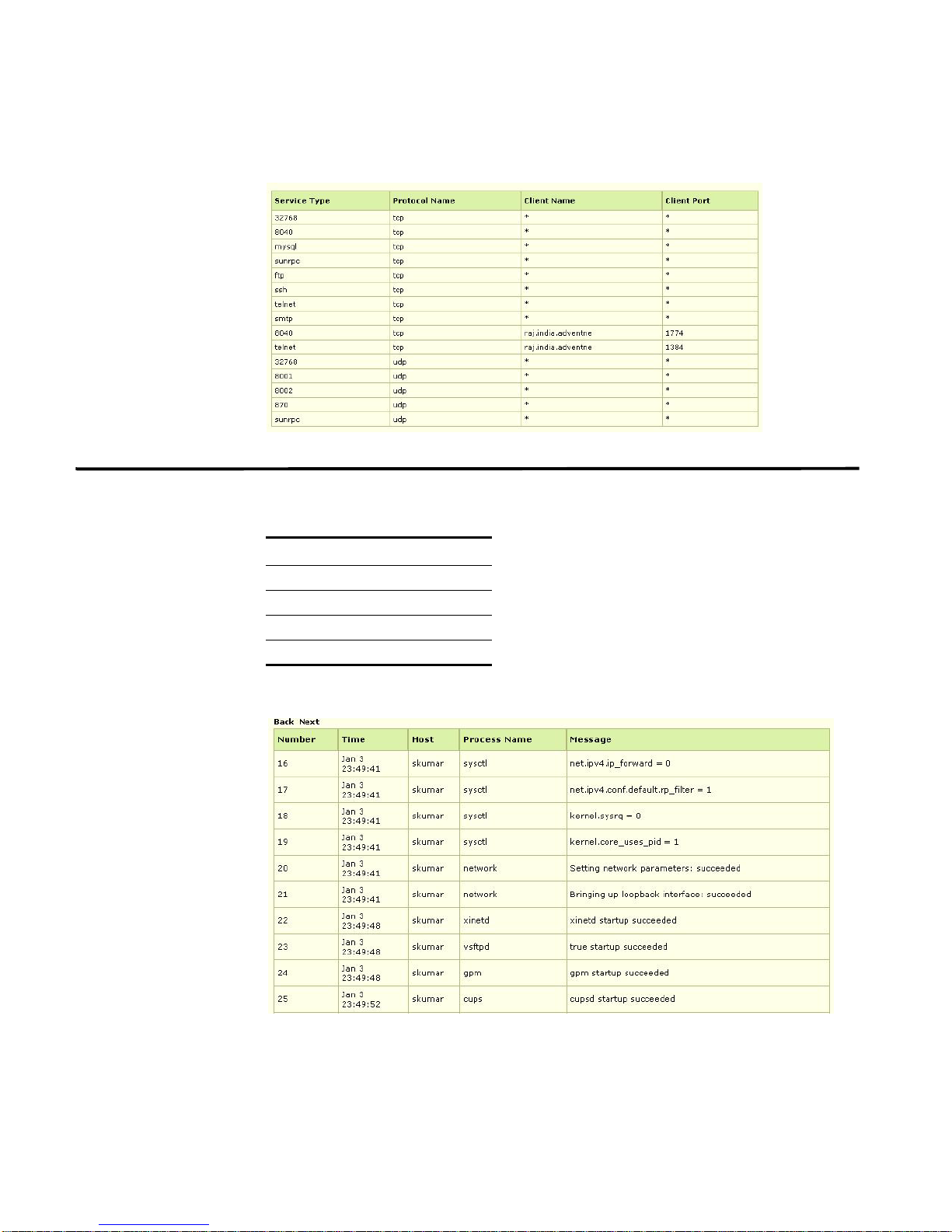
Service Details The service details includes:
Table 2-8 Service Details
S.No Service Details Description
1. Service Type Specifies the service name (such as, Telnet or FTP) or
2. Protocol Name Specifies the protocol used for the service.
3. Client Name Specifies the name of the client using the service. If
4. Client Port Specifies the port number used by the client using the
STRM SNMP Agent
the port number if no entry exists in the /etc/services file.
there is no client using the service, this field indicates *.
service.
Page 14
12 USING THE SNMP-LINUX-MIB
For example, sample output may include:
Boot Log Details The boot log details includes:
Table 2-9 Boot Log Details
S.No Boot Log Details
1. Time Boot
2. Host Name
3. Process Name
4. Message
For example, sample output may include:
STRM SNMP Agent
Page 15
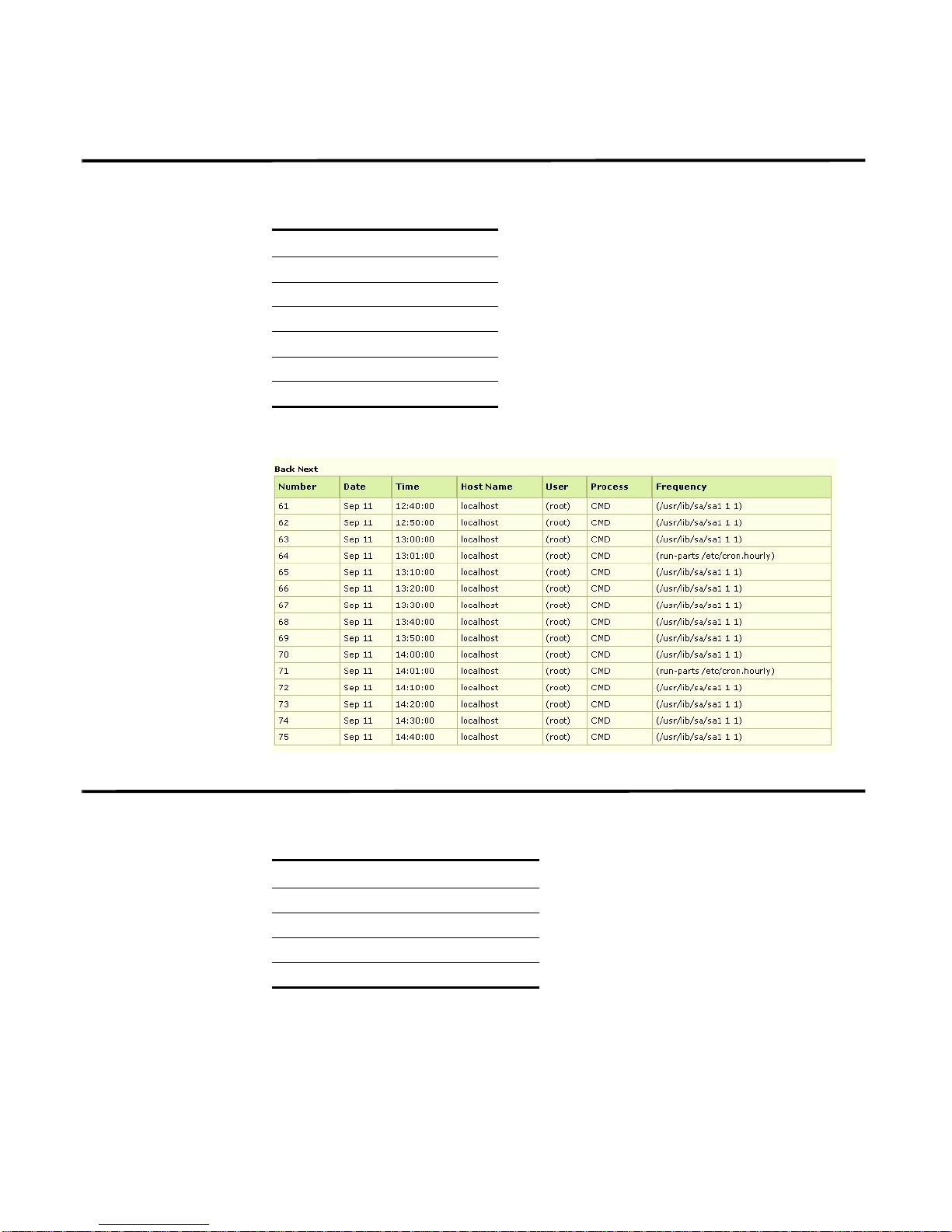
Cron Log Details The boot log details includes:
Table 2-10 Cron Log Details
S.No Cron Log Details
1. Cron Date
2. Cron Time
3. Cron Host Name
4. Cron User
5. Cron Process
6. Cron Frequency
For example, sample output may include:
Cron Log Details 13
Secure Log Details The secure log details includes:
Table 2-11 Secure Log Details
S.No Secure Log Details
1. Secure Date
2. Secure Time
3. Secure Protocols
4. Secure From Address
STRM SNMP Agent
Page 16

14 USING THE SNMP-LINUX-MIB
For example, sample output may include:
IDE Details The IDE details includes:
Table 2-12 IDE Details
S.No IDE Details Description
1. IDE Cache Specifies the cache size of the IDE.
2. IDE Driver Specifies the driver details of IDE.
3. IDE Model Specifies the model of the IDE devices.
4. IDE Capacity Specifies the capacity of the IDE device.
5. Physical Geometry Specifies the physical geometry of the device.
6. Logical Geometry Specifies the logical geometry of the device.
For example, sample output may include:
Module Details The module details includes:
Table 2-13 Module Details
S.No Module Details Description
1. Module Name Specifies the name of the module.
2. Module Size Specifies the page (typically 4K) memory
occupied by the module.
STRM SNMP Agent
Page 17
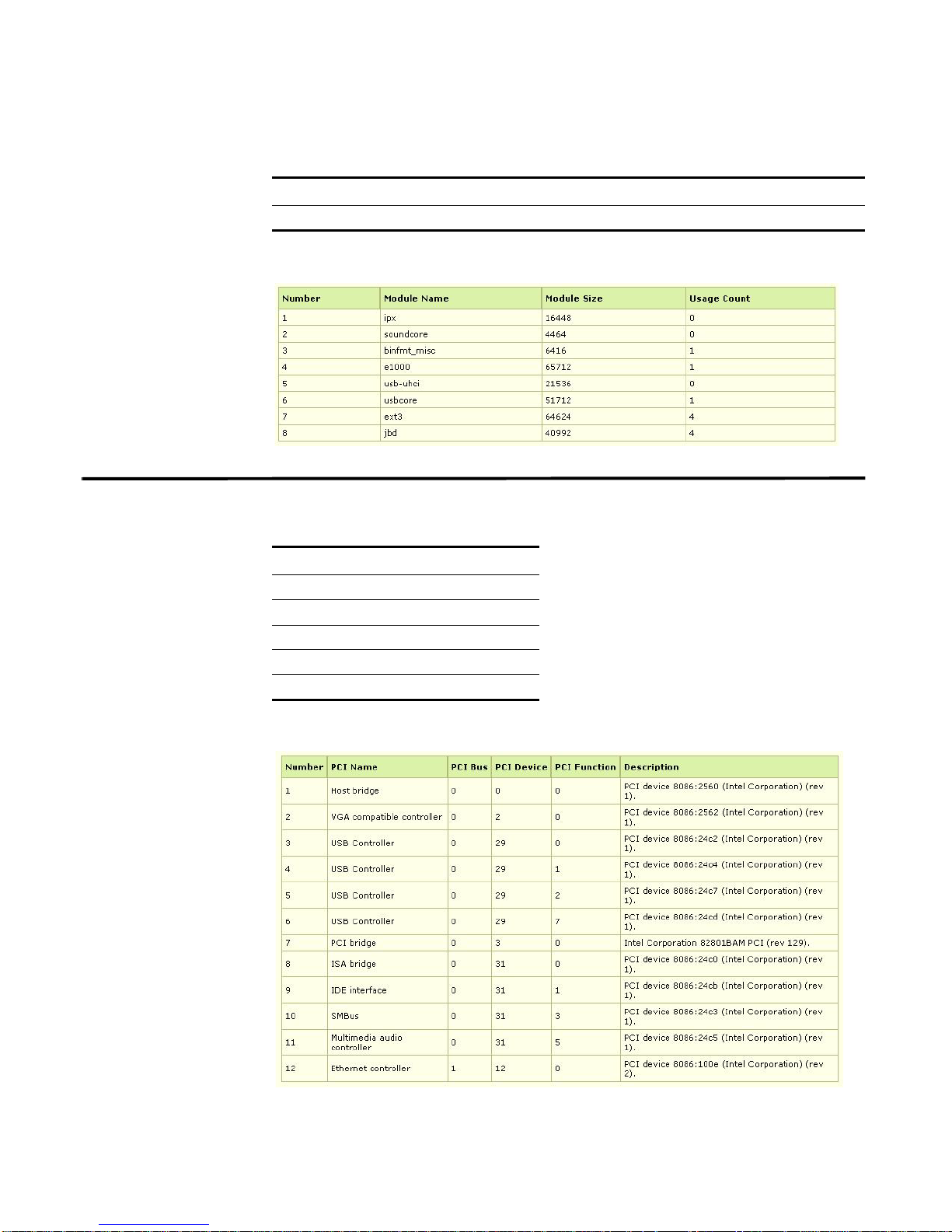
Table 2-13 Module Details (continued)
S.No Module Details Description
3. Module Usage Count Specifies the module usage count.
For example, sample output may include:
PCI Details The PCI details includes:
Table 2-14 PCI Details
PCI Details 15
S.No PCI Details
1. PCI Name
2. PCI Bus
3. PCI Device
4. PCI Function
5. PCI Description
For example, sample output may include:
STRM SNMP Agent
Page 18
16 USING THE SNMP-LINUX-MIB
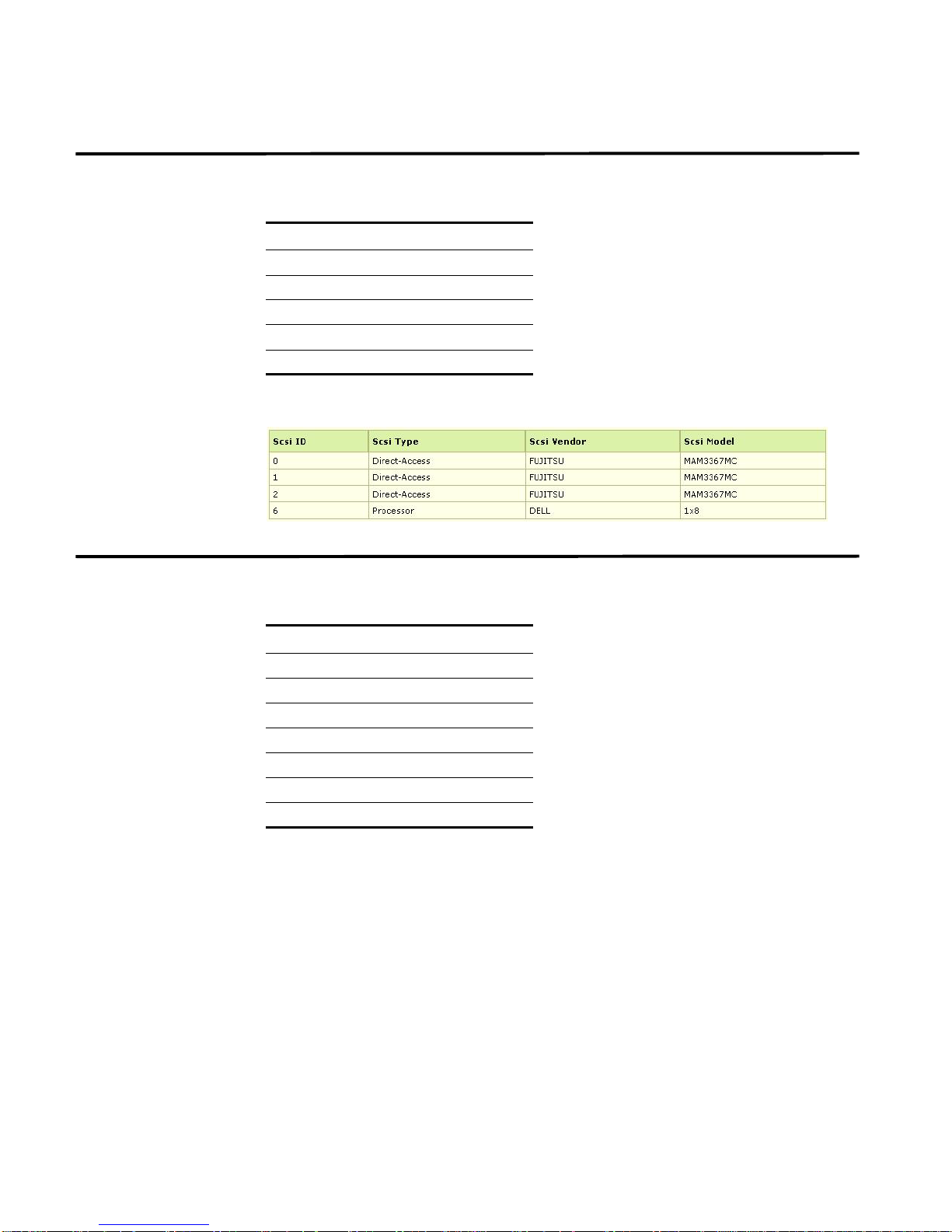
SCSI Details The SCSI details includes:
Table 2-15 SCSI Details
S.No SCSI Details
1. SCSI Index
2. SCSI ID
3. SCSI Type
4. SCSI Model
5. SCSI Vendor
For example, sample output may include:
Slab Details The Slab details includes:
Table 2-16 Slab Details
S.No Slab Details
1. Cache Name
2. Active Objects
3. Total Object
4. Object Size
5. Active Slabs per Object
6. Slabs per Object
7. Pages per Slab
STRM SNMP Agent
Page 19
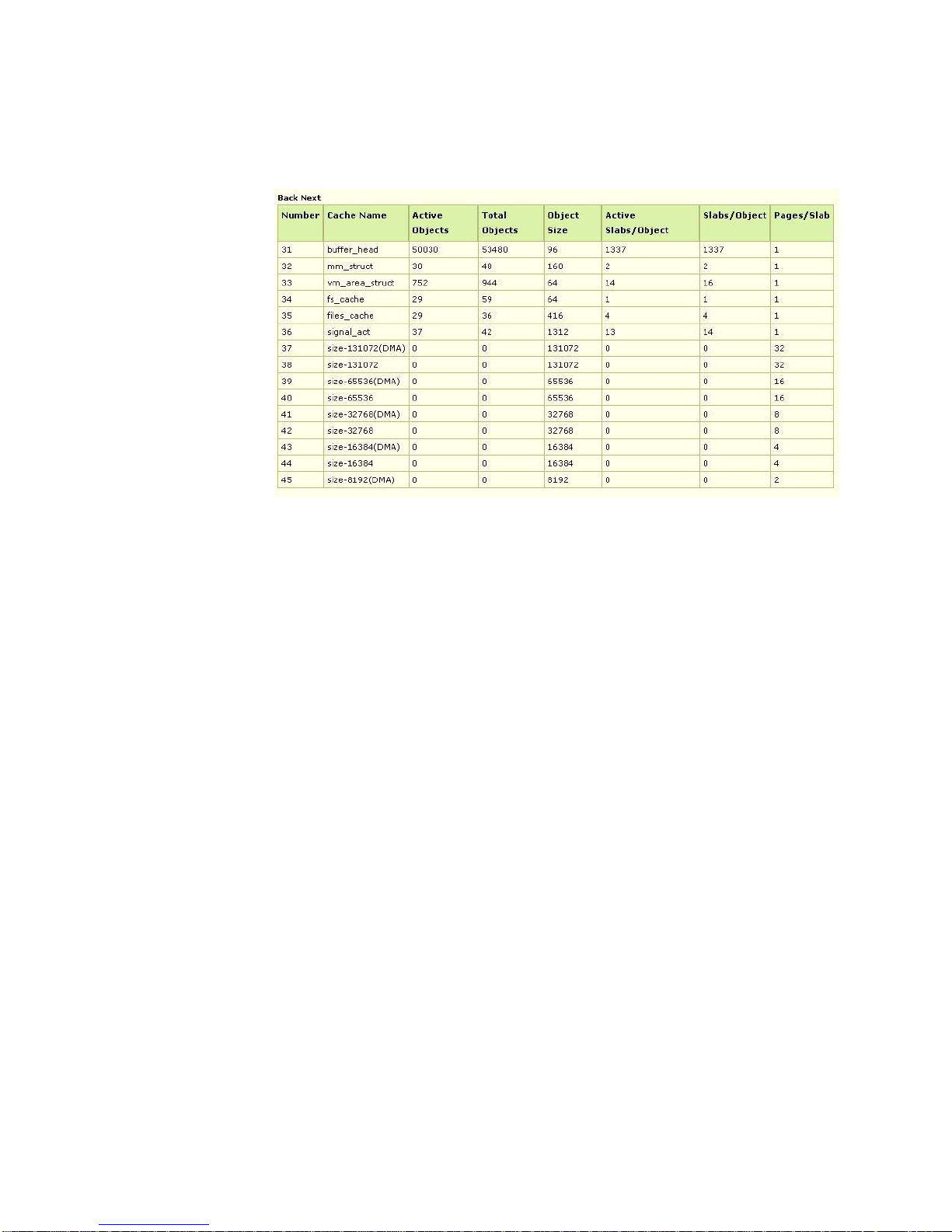
For example, sample output may include:
Slab Details 17
STRM SNMP Agent
Page 20

Page 21

3
USING THE RFC1213-MIB
The RFC1213-MIB supports network management protocols for TCP/IP-based
networks. The SNMP Agent uses RFC1213-MIB, which includes the following
nodes:
• System Details
• Interfaces
• Address Translation
• IP Details
• ICMP Table Details
• TCP Details
• UDP Details
• SNMP Details
The SNMP Agent does not support the following MIB objects:
• ifLastChange, ifInNUcastPkts, ifInUnknowProto, and ifOutNUcastPkts of IfT able
are not supported. Values are static (0).
• ifIndex value is static (1) in AtTable,ipAddrTable, ipRouteTable, and
ipNetToMediaTable.
• ipAdEntReasmMaxSize of ifAddrTable is not supported. Its value is static (0).
• ipRoutingDiscards of ip group is not supported. Its value is static (0).
System Details The systems details includes:
Table 3-1 System Details
S.No System Details Description
1. SyDescr Specifies a description of the entity. This value should
include the full name and version identification of the
system's hardware type, software operating-system, and
networking software. It is mandatory that this only contain
printable ASCII characters.
STRM SNMP Agent
Page 22

20 USING THE RFC1213-MIB
Table 3-1 System Details (continued)
S.No System Details Description
2. SysObjectId Specifies the vendor's authoritative identification of the
network management subsystem contained in the entity.
This value is allocated in the SMI enterprises subtree
(1.3.6.1.4.1) and provides information on the type of
system being managed. For example, if your company is
assigned the subtree 1.3.6.1.4.1.4242, you could assign
the identifier 1.3.6.1.4.1.4242.1.1 to router1.
3. SysUpTime Specifies the time, in hundredths of a second, since the
network management portion of the system re-initialized.
4. SysContact Specifies the contact information for the individual
responsible for this managed node.
5. SysName Specifies the name assigned to this managed node. By
convention, this is the node's fully-qualified domain name.
6. SysLocation Specifies the physical location of this node, for example,
the telephone closet, 3rd floor.
7. SysServices Specifies the set of services that this entity offers. The
value is a sum. By default, this sum is initially zero (0).
Then, for each layer, L, in the range 1 through 7, that this
node performs transactions for, 2 raised to (L - 1) is
added to the sum. For example, a node which performs
primarily routing functions would have a value of 4
(2^(3-1)). In contrast, a node which is a host offering
application services would have a value of 72 (2^(4-1) +
2^(7-1)). Note that in the context of the Internet suite of
protocols, values should be calculated accordingly:
Layer functionality:
1 - Physical, for example, repeaters.
2 - Datalink/subnetwork, for example, bridges.
3 - Internet, for example, IP gateways.
4 - End-to-end, for example, IP hosts.
7 - Applications, for example, mail relays.
For systems including OSI protocols, laye rs 5 an d 6 ma y
also be counted."
For example, sample output may include:
STRM SNMP Agent
Page 23

Interfaces The interfaces include:
Table 3-2 Interface Details
S.No Interface Details Description
1. ifNumber Specifies the number of network interfaces (regardless
2. ifDescr Specifies a description about the interface. This string
3. ifType Specifies the type of interface. This indicates the
4. ifMtu Specifies the size of the largest datagram that can be
5. ifSpeed Specifies an estimate of the interface's current
6. ifPhysAddress Specifies th e inte rf ac e's ad d re ss at the pr ot oc ol laye r
7. ifAdminStatus Specifies the desired state of the interface. The
8. ifOperStatus Specifies the current operational state of the interface.
9. ifLastChange Specifies the value of sysUpTime at the time the
10. ifInOctets Specifies the total number of octets received on the
11. ifInUcastPkts Specifies the number of subnetwork unicast packets
12. ifInNUcastPkts Specifies the number of non-unicast (for example,
Interfaces 21
of their current state) present on this system.
should include the name of the manufacturer, the
product name, and the version of the hardware
interface.
physical/link protocol(s) below the network laye r in the
protocol stack.
sent or received on the interface, specified in octets.
For interfaces that transmit network datagrams, this is
the size of the largest network datagram that can be
sent on the interface.
bandwidth in bits per second. For interfaces that do not
vary in bandwidth or for those where no accurate
estimation can be made, this object should contain the
nominal bandwidth.
immediately below the network layer in the protocol
stack. For interfaces that do not have such an address
(for example, a serial line), this object should co nta in
an octet string of zero length.
testing(3) state indicates that no operational packets
can be passed.
The testing(3) state indicates that no operational
packets can be passed.
interface entered its current operational state. If the
current state was entered prior to the last reinitialization of the local network management
subsystem, then this object indicates zero.
interface, including framing characters.
delivered to a higher-layer protocol.
subnetwork broadcast or subnet wo rk M ultic as t)
packets delivered to a higher-layer protocol.
STRM SNMP Agent
Page 24

22 USING THE RFC1213-MIB
Table 3-2 Interface Details (continued)
S.No Interface Details Description
13. ifInDiscards Specifies the number of inbound packets that were
chosen to be discarded even though no errors had
been detected to prevent their being deliverable to a
higher-layer protocol. One possible reason for
discarding such a packet could be to free up buffer
space.
14. ifInErrors Specifies the number of inbound packets th at
contained errors preventing them from being
deliverable to a higher layer protocol.
15. ifInUnknownProtos Specifies the number of packets received through the
interface that were discarded because of an unknown
or unsupported protocol.
16. ifOutOctets Specifies the total number of octets transmitted out of
the interface, including framing characters.
17 ifOutUcastPkts Specifies the total number of packets that higher level
protocols requested be transmitted to a
subnetwork-unicast address, including those that were
discarded or not sent.
18. ifOutNUcastPkts Specifies the total number of packets that higher level
protocols requested be transmitted to a non-unicast (for
example, a subnetwork broadcast or subnetwork
Multicast) address, including those that were discarded
or not sent.
19 ifOutDiscards Specifies the number of outbound packets that were
chosen to be discarded even though no errors had
been detected to prevent their being transmitted. One
possible reason for discarding such a packet could be
to free up buffer space.
20. ifOutErrors Specifies the number of outbound packets that could
not be transmitted because of errors.
21. ifOutQLen Specifies the length of the output packet queue (in
packets).
22. ifSpecific Specifies the reference to MIB definitions specific to the
particular media being used for the interface. For
example, if the interface is Ethernet, then the value of
this object refers to a document defining objects
specific to Ethernet. If this information is not present, its
value should be set to the OBJECT IDENTIFIER { 0 0 },
which is a valid object identifier, and any valid
implementation of ASN.1 and BER must be able to
generate and recognize this value.
STRM SNMP Agent
Page 25
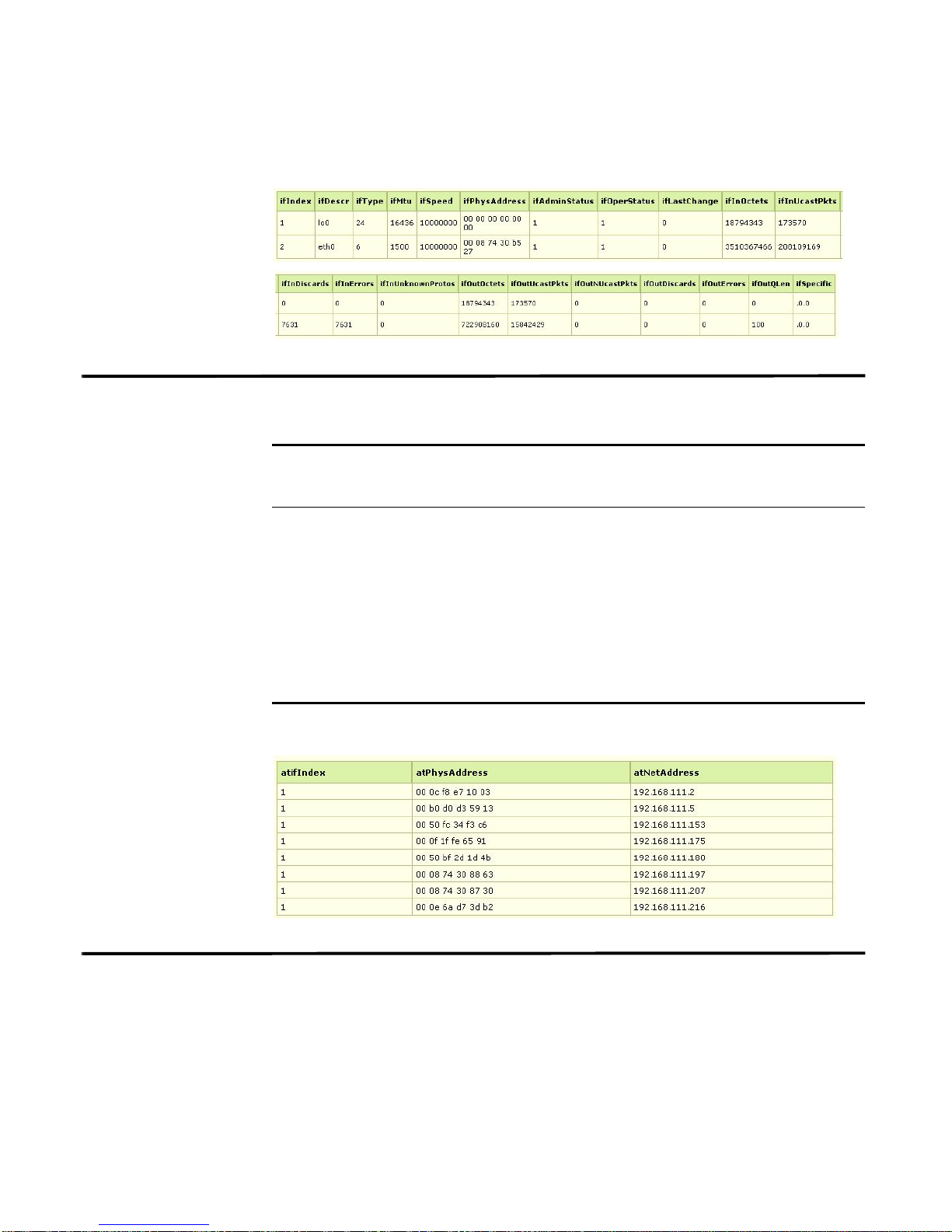
For example, sample output may include:
Address Translation 23
Address
Translation
The address translation details include:
Table 3-3 Address Translation Details
Address
Translation
S.No
1. atPhysAddress Specifies the media-dependent physical address. Setting
Table Details
Description
this object to a null string (one of zero length) invalidates
the corresponding entry in the atTable object, which
disassociates the interface identified with the entry from
the associated entry. It is an implementation-specific
matter as to whether the agent removes an inva lida te d
entry from the table. Accordingly, management stations
must be prepared to receive tabular information from
agents that corresponds to entries not currently in use.
Proper interpretation of such entries requires
examination of the relevant atPhysAddress object.
For example, sample output may include:
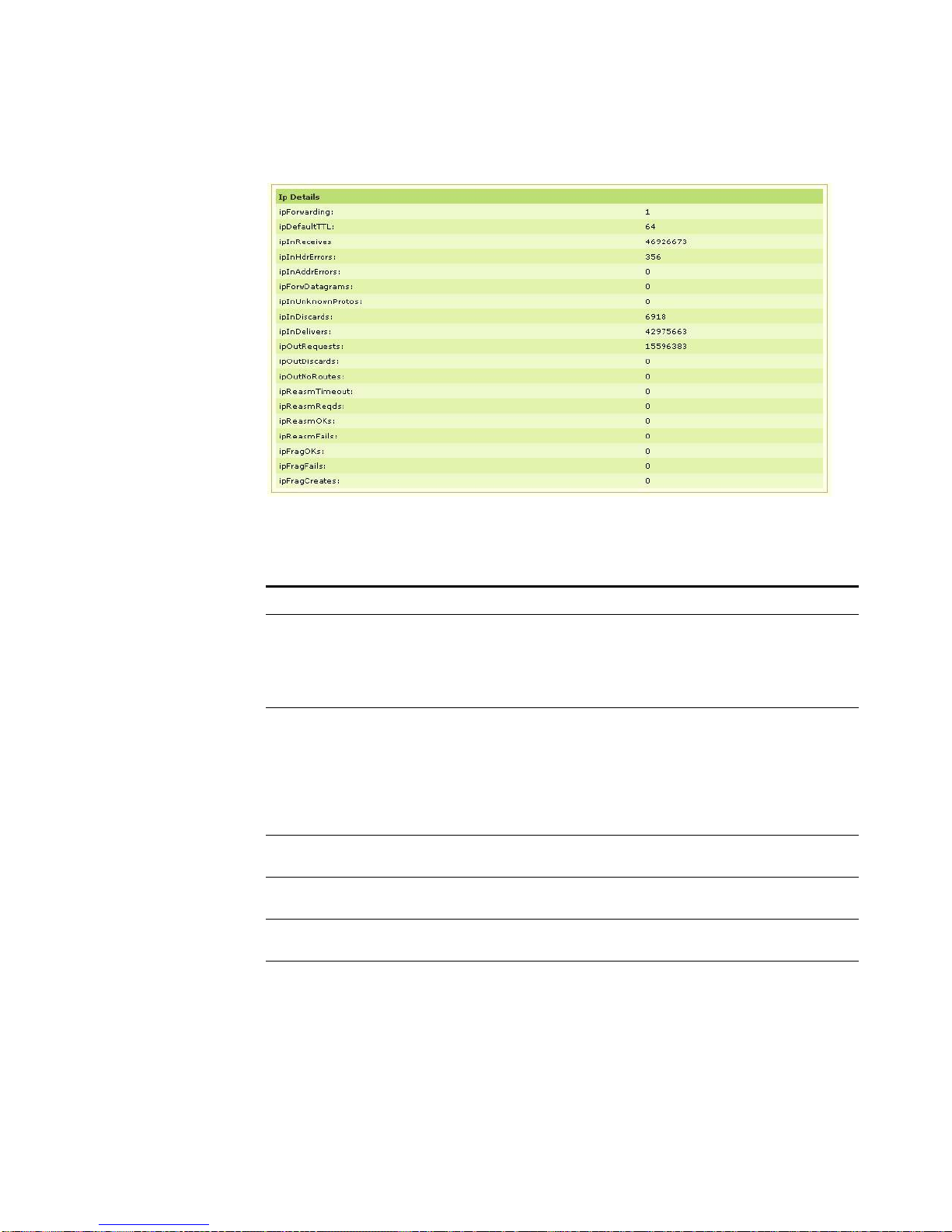
IP Details The IP details include:
STRM SNMP Agent
Page 26

24 USING THE RFC1213-MIB
Table 3-4 IP Details
S.No IP Details Description
1. ipForwarding Specifies whether this entity is acting as an IP gateway
when forwarding datagrams received by, but not
addressed to, this entity. Note that for some managed
nodes, this object may take on only a subset of the
values possible. Accordingly, it is appropriate for an
agent to return a badValue response if a management
station attempts to change this object to an inappropriate
value.
2. ipDefaultTTL Specifies the default value included in the Time-To-Live
field of the IP header of datagrams originated at this
entity, whenever a TTL value is not supplied by the
transport layer protocol.
3. ipInReceives Specifies the total number of input datagrams received
from interfaces, including those received in error.
4. ipInHdrErrors Specifies the number of input datagrams discarded due
to errors in their IP headers, such as, bad checksums,
version number mismatch, other fo rm a t err or s,
time-to-live exceeded or errors discovered in processing
their IP options.
5. ipInAddrErrors Specifies the number of input datagrams discarded
because the IP address in their IP header's destination
field was an invalid address to be received at this entity.
This count includes invalid addresses and addresses of
unsupported classes (such as, Class E). For entities that
are not IP gateways and do not forward datagrams, this
counter includes datagrams discarded because the
destination address was not a local address.
6. ipForwDatagrams Specifies the number of input datagrams for this entity
was not directly sent to the final IP destination, as a result
of which an attempt was made to find an alternate route.
In entities that do not act as IP gateways, this counter
include only those packets that were source-routed
through this entity, and the source route option
processing was successful
7. ipInUnknownProtos Specifies the number of locally addressed datagrams
received successfully but discarded because of an
unknown or unsupported protocol.
8. ipInDiscards Specifies the number of input IP datagrams for which no
problems were encountered to prevent their continued
processing, but which were discarded (e.g., for lack of
buffer space). Note that this counter does not include any
datagrams discarded while awaiting re-as sem b l y.
9. ipInDelivers Specifies the total number of input datagrams
successfully delivered to IP user-protocols (including
ICMP).
STRM SNMP Agent
Page 27

IP Details 25
Table 3-4 IP Details (continued)
S.No IP Details Description
10. ipOutRequests Specifies the total number of IP datagrams that local IP
user protocols (including ICMP) supplied to IP address in
requests for transmission.
Note: This counter does not include any datagrams
counted in ipForwDatagrams.
11. ipOutDiscards Specifies the number of output IP datagrams for which
no problem was encountered to prevent their
transmission to their destination, but which were
discarded (for example, for lack of buffer space).
Note: This counter includes datagrams counted in
ipForwDatagrams if any such packets met this
(discretionary) discard criterion.
12. ipOutNoRoutes Specifies the number of IP datagrams discarded
because no route could be found to transmit them to their
destination.
Note: This counter includes any packets counted in
ipForwDatagrams which meet the no-route criteria. This
includes any datagrams that a host cannot route because
all of its default gateways are down.
13. ipReasmTimeout Specifies the maximum number of seconds that received
fragments are held while they are awaiting reassembly at
this entity.
14. ipReasmReqds Specifies the number of IP fragments received that
needed to be reassembled at this entity
15. ipReasmOKs Specifies the number of IP datagrams successfully reassembled.
16. ipReasmFails Specifies the number of failures detected by the IP
reassembly algorithm.
Note: This may not be a count of discarded IP fragments
since some algorithms (notably the algorithm in RFC
815) can lose of the number of fragments by combining
them as they are received.
17. ipFragOKs Specifies the number of IP datagrams that have been
successfully fragmented at this entity.
18. ipFragFails Specifies the number of IP datagrams that have been
discarded because they failed to be fragmented at this
entity.
19. ipFragCreates Specifies the number of IP datagram fragments that have
been generated as a result of fragmentation at this entity.
STRM SNMP Agent
Page 28
26 USING THE RFC1213-MIB
For example, sample output may include:
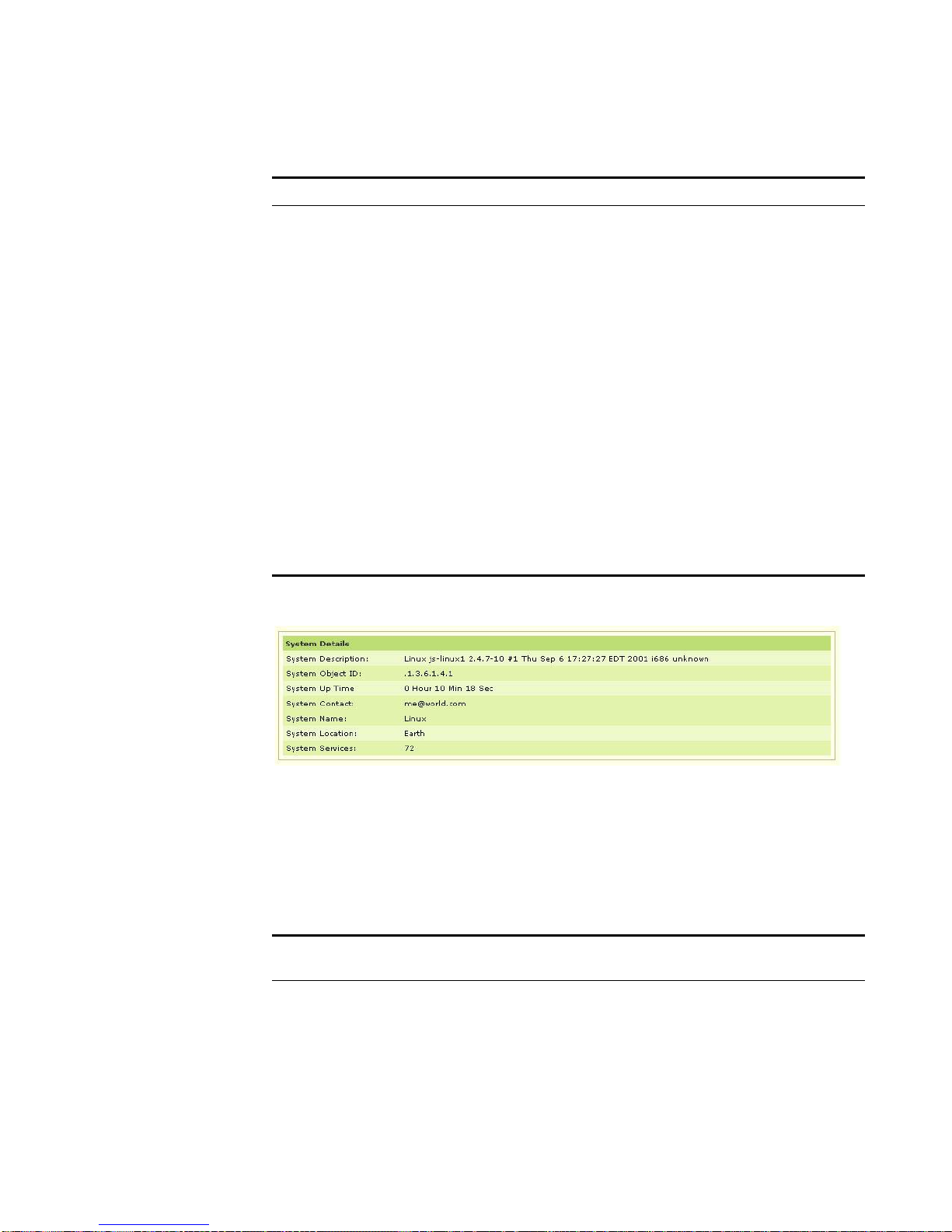
System Details The systems details includes:
Table 3-1 System Details
S.No System Details Description
1. SyDescr Specifies a description of the entity. This value should
include the full name and version identification of the
system's hardware type, software operating-system, and
networking software. It is mandatory that this only contain
printable ASCII characters.
2. SysObjectId Specifies the vendor's authoritative identification of the
network management subsystem contained in the entity.
This value is allocated in the SMI enterprises subtree
(1.3.6.1.4.1) and provides information on the type of
system being managed. For example, if your company is
assigned the subtree 1.3.6.1.4.1.4242, you could assign
the identifier 1.3.6.1.4.1.4242.1.1 to router1.
3. SysUpTime Specifies the time, in hundredths of a second, since the
network management portion of the system re-initialized.
4. SysContact Specifies the contact information for the individual
responsible for this managed node.
5. SysName Specifies the name assigned to this managed node. By
convention, this is the node's fully-qualified domain name.
6. SysLocation Specifies the physical location of this node, for example,
the telephone closet, 3rd floor.
STRM SNMP Agent
Page 29
IP Details 27
Table 3-1 System Details (continued)
S.No System Details Description
7. SysServices Specifies the set of services that this entity offers. The
value is a sum. By default, this sum is initially zero (0).
Then, for each layer, L, in the range 1 through 7, that this
node performs transactions for, 2 raised to (L - 1) is
added to the sum. For example, a node which performs
primarily routing functions would have a value of 4
(2^(3-1)). In contrast, a node which is a host offering
application services would have a value of 72 (2^(4-1) +
2^(7-1)). Note that in the context of the Internet suite of
protocols, values should be calculated accordingly:
Layer functionality:
1 - Physical, for example, repeaters.
2 - Datalink/subnetwork, for example, bridges.
3 - Internet, for example, IP gateways.
4 - End-to-end, for example, IP hosts.
7 - Applications, for example, mail relays.
For systems including OSI protocols, layers 5 and 6 may
also be counted."
IP Address Table
Details
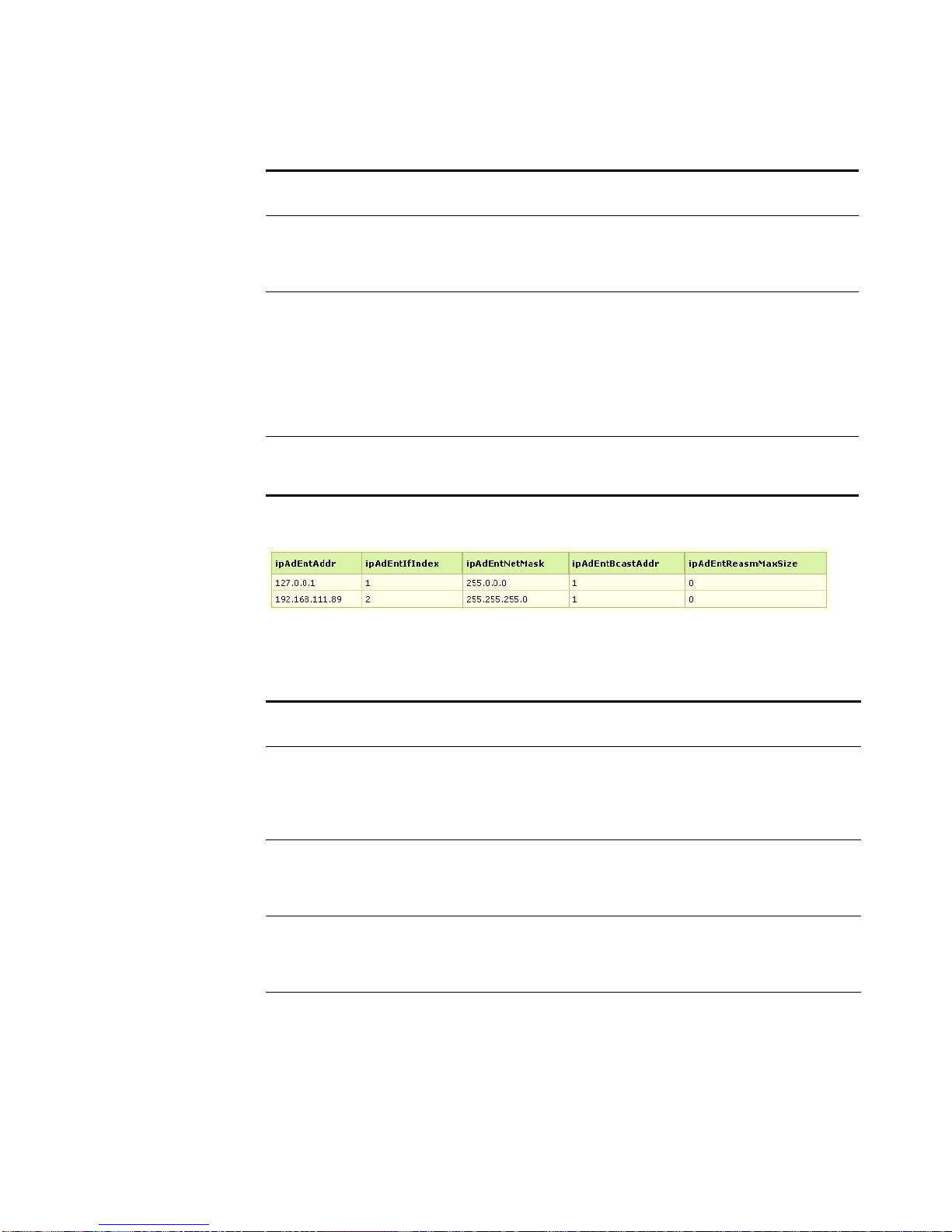
For example, sample output may include:
The IP address table details includes:
Table 3-2 IP Address Table Details
IP Address Table
S.No
Details
Description
1. ipAdEntIfIndex Specifies the index value that uniquely identifies the
interface to which this entry is applicable. The
interface identified by a particular value of this index
is the same interface as identified by the same value
of ifIndex.
STRM SNMP Agent
Page 30
28 USING THE RFC1213-MIB
Table 3-2 IP Address Table Details (continued)
For example, sample output may include:
IP Address Table
S.No
Details
Description
2. ipAdEntNetMask Specifies the subnet mask associated with the IP
address of this entry. The value of the mask is an IP
address with all the network bits set to 1 and all the
hosts bits set to 0.
3. ipAdEndBcastAddr Specifies the value of the least-significant bit in the
IP broadcast address used for sending datagrams
on the (logical) interface associated with the IP
address of this entry. For example, when the
Internet standard all ones broadcast address is
used, the value will be 1. This value applies to both
the subnet and network broadcasts addresses used
by the entity on this (logical) interface.
4. ipAdEntReasmMaxSize Specifies the size of the largest IP datagram that
this entity can reassemble from incoming IP
fragmented datagrams received on this interface.
IP Route Table
Details
The IP Route table details includes:
Table 3-3 IP Address Table Details
IP Address
S.No
Table Details
Description
1. ipRouteIfIndex Specifies the index value that uniquely identifies the local
interface through which the next hop of this r oute should be
reached. The interface identified by a particular value of this
index is the same interface as identified by the same value
of ifIndex.
2. ipRouteMetric1 Specifies the primary routing metric for this route. The
semantics of this metric are determined by the routing
protocol specified in the route's ipRouteProto value. If this
metric is not used, set the value to -1.
3. ipRouteMetric2 Specifies an alternate routing metric for this route. The
details of this metric are determined by the routing protocol
specified in the route's ipRouteProto value. If this metric is
not used, set the value to -1.
4. ipRouteMetric3 Specifies an alternate routing metric for this route. The
details of this metric are determined by the routing protocol
specified in the route's ipRouteProto value. If this metric is
not used, set the value to -1.
STRM SNMP Agent
Page 31

IP Details 29
Table 3-3 IP Address Table Details (continued)
IP Address
S.No
Table Details
Description
5. ipRouteMetric4 Specifies an alternate routing metric for this route. The
details of this metric are determined by the routing protocol
specified in the route's ipRouteProto value. If this metric is
not used, set the value to -1.
6. ipRouteNextHop Specifies the IP address of the next hop of this route. If
route is bound to an interface that is sent throug h broadcast
media, the value of this field is the agent's IP address on
that interface.
7. ipRouteType Specifies the type of route. The values direct(3) and
indirect(4) refer to the notion of direct and indirect routing in
the IP architecture. Setting this object to the value invalid(2)
invalidates the corresponding entry in the ipRouteTable
object. You must configure management stations to receive
tabular information from agents that corr es po nd s to entr ies
not currently in use. Proper interpretation of such entries
requires examination of the relevant ipRouteType object.
8. ipRouteProto Specifies the routing mechanism through which this route
was learned. Inclusion of values for gateway routing
protocols is not intended to imply that hosts should support
those protocols.
9. ipRouteAge Specifies the number of seconds since this route was last
updated or otherwise determined to be correct.
Note: No semantics of too old can be implied except
through knowledge of the routing protocol by which the
route was learned.
10. ipRouteMask Specify the mask to be logical ANDed with the destination
address before being compared to the value in the
ipRouteDest field. For those systems that do not support
arbitrary subnet masks, an agent constructs the value of the
ipRouteMask by determining whether the value of the
correspondent ipRouteDest field belong to a class-A, B, or
C network, and then using one of:
mask network
255.0.0.0 class-A
255.255.0.0 class-B
255.255.255.0 class-C
If the value of the ipRouteDest is 0.0.0.0 (a default route),
then the mask value is also 0.0.0.0. It should be noted that
all IP routing subsystems implicitly use this mechanism.
11. ipRouteMetric5 Specifies an alternate routing metric for this route. The
semantics of this metric are determined by the
routing-protocol specified in the route's ipRouteProto value.
If this metric is not used, set this value to -1.
STRM SNMP Agent
Page 32
30 USING THE RFC1213-MIB
Table 3-3 IP Address Table Details (continued)
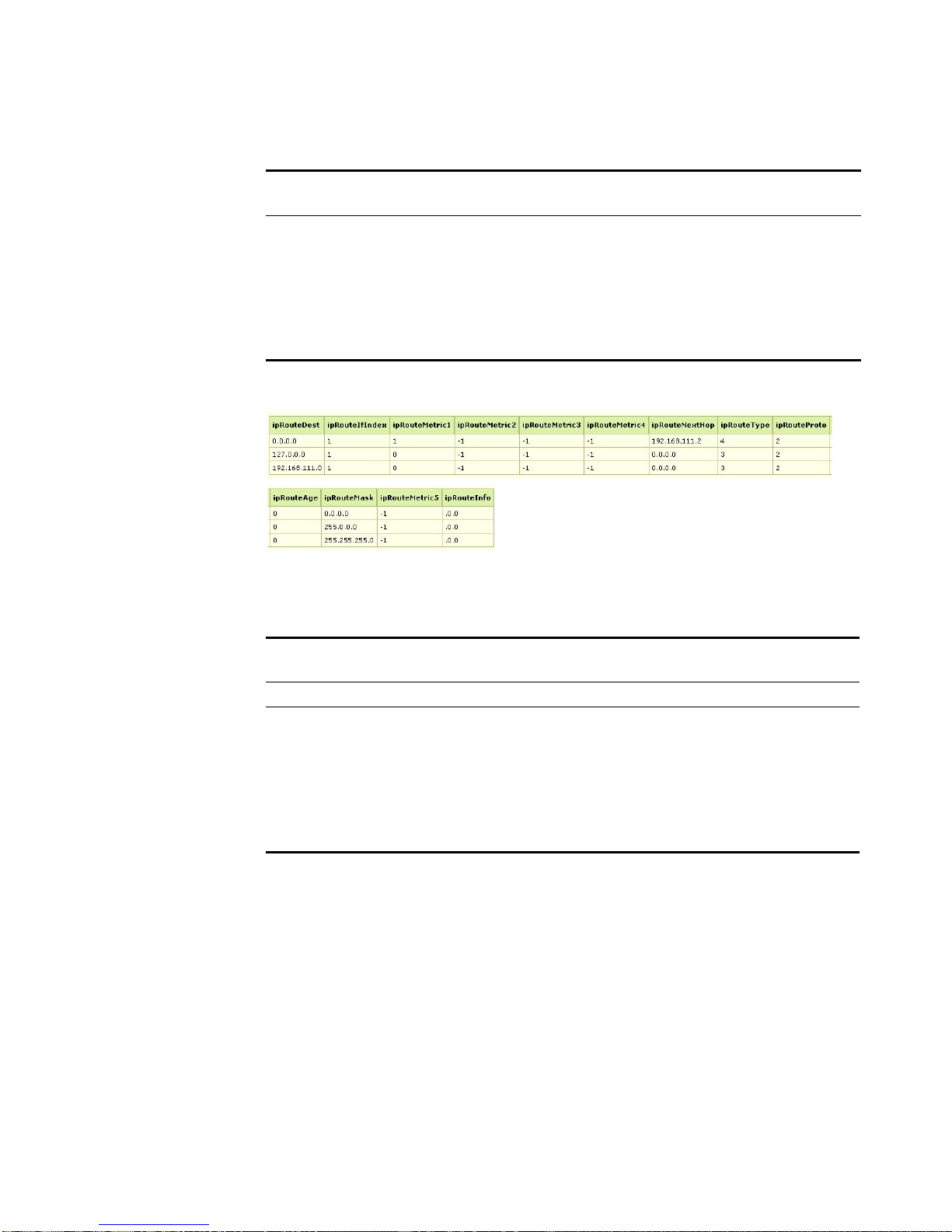
For example, sample output may include:
IP Address
S.No
Table Details
Description
12. ipRouteInfo Specifies a reference to MIB definitions specific to the
particular routing protocol that is responsible for this route,
as determined by the value specified in the route's
ipRouteProto value. If this information is not present, set
this value to the OBJECT IDENTIFIER { 0 0 }, which is a
syntatically valid object identifier, and any valid
implementation of ASN.1 and BER must be able to
generate and recognize this value.
IP Net to Media Table
Details
The IP net to media table details includes:
Table 3-4 IP Net to Media Table Details
IP Net to Media Table
S.No
Details
Description
1. ipNetToMediaPhysAddress Specifies the physical address of the media.
2. ipNetToMediaType Specifies the type of mapping. If you configure
this value to invalid(2), the corresponding entry
is invalidated in the ipNetToMediaTable. YOu
must also configure management stations to
receive tabular information from agents that
corresponds to entries not currently in use.
Proper interpretation of such entries requires
examination of the relevant ipNetToMediaType.
STRM SNMP Agent
Page 33
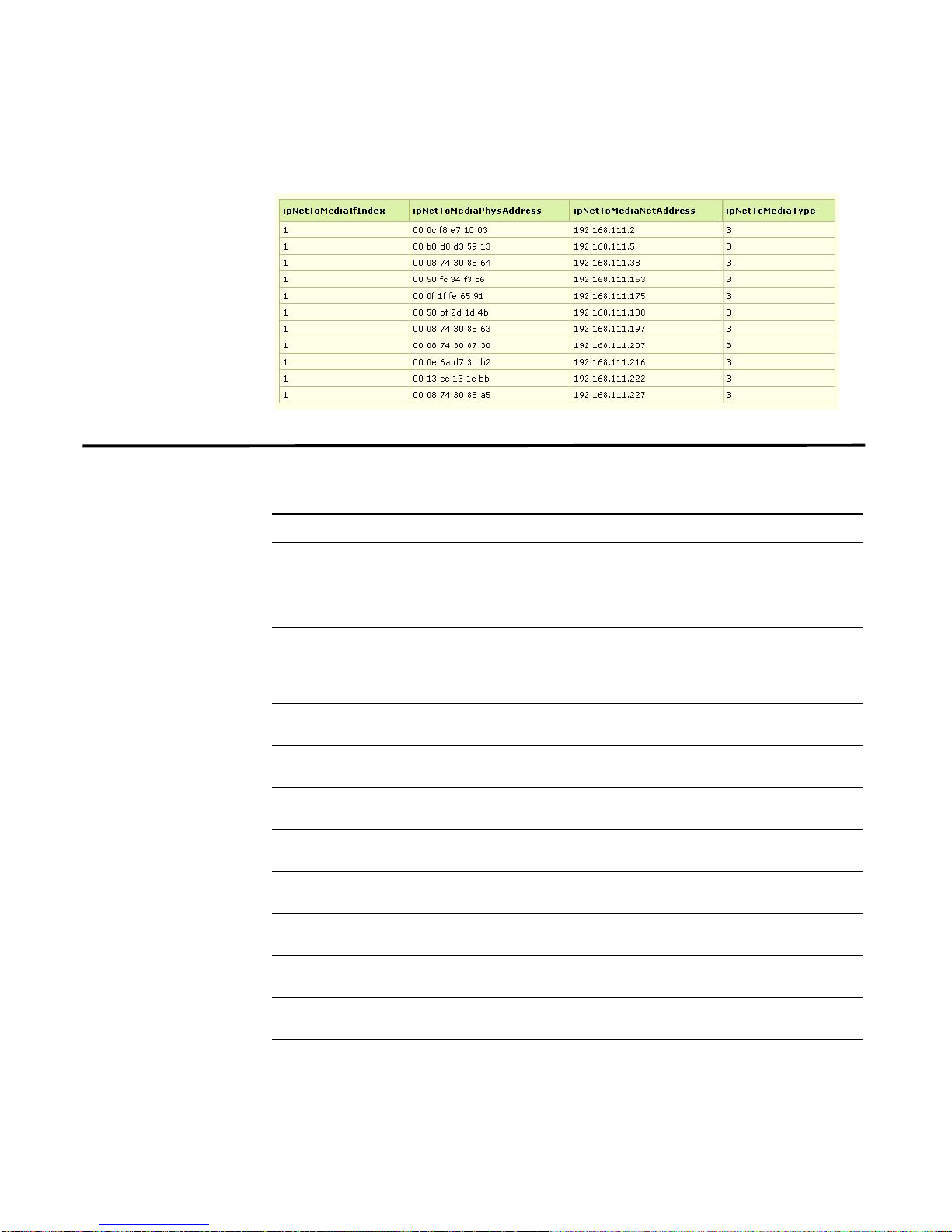
For example, sample output may include:
ICMP Table Details The ICMP table details includes:
Table 3-5 ICMP Table Details
S.No ICMP Table Details Description
1. icmpInMsgs Specifies the total number of ICMP messages that
2. icmpInErrors Specifies the number of ICMP messages that the
3. icmpInDestUnreachs Specifies the number of ICMP Destination
4. icmpInTimeExcds Specifies the number of ICMP Time Exceeded
5. icmpInParmProbs Specifies the number of ICMP Parameter Problem
6. icmpInSrcQuenchs Specifies the number of ICMP Source Quench
7. icmpInRedirects Specifies the number of ICMP Redirect messages
8. icmpInEchos Specifies the number of ICMP Echo (request)
9. icmpInEchoReps Specifies the number of ICMP Echo Reply
10. icmpInTimeStamps Specifies the number of ICMP Timestamp
11. icmpInTimeStampReps Specifies the number of ICMP Timestamp
ICMP Table Details 31
the entity received.
Note: This counter includes all those counted by
icmpInErrors.
entity received but determined as having
ICMP-specific errors, such as, bad ICMP
checksums, or bad length.
Unreachable messages received.
messages received.
messages received.
messages received.
received.
messages received.
messages received.
(request) messages received.
(request) messages received.
STRM SNMP Agent
Page 34

32 USING THE RFC1213-MIB
Table 3-5 ICMP Table Details (continued)
S.No ICMP Table Details Description
12. icmpInAddrMasks Specifies the number of ICMP Address Mask
Request messages received.
13. icmpInAddrMaskReps Specifies the number of ICMP Address Mask
Reply messages received.
14. icmpOutMsgs Specifies the total number of ICMP messages that
this entity attempted to send.
Note: This counter includes all those counte d by
icmpOutErrors.
15. icmpOutErrors Specifies the number of ICMP messages that this
entity did not send due to problems discovered
within ICMP such as a lack of buffers. This value
should not include errors discovered outside the
ICMP layer such as the inability of IP to route the
resultant datagram. In some implementations
there may be no types of error that contribute to
this counter's value.
16. icmpOutDestUnreachs Specifies the number of ICMP Destination
Unreachable messages sent.
17. icmpOutTimeExcds Specifies the number of ICMP Time Exceeded
messages sent.
18. icmpOutParmProbs Specifies the number of ICMP Parameter Problem
messages sent
19. icmpOutSrcQuenchs Specifies the number of ICMP Source Quench
messages sent
20. icmpOutRedirects Specifies the number of ICMP Redirect messages
sent. For a host, this object is zero, since hosts do
not send redirects
21. icmpOutEchos Specifies the number of ICMP Echo (request)
messages sent.
22. icmpOutEchoReps Specifies the number of ICMP Echo Reply
messages sent
23. icmpOutTimeStamps Specifies the number of ICMP Timestamp
(request) messages sent.
24. icmpOutTimeStampReps Specifies the number of ICMP Timestamp Reply
messages sent.
25. icmpOutAddrMasks Specifies the number of ICMP Address Mask
Request messages sent
26. icmpOutAddrMaskReps Specifies the number of ICMP Address Mask
Reply messages sent.
STRM SNMP Agent
Page 35
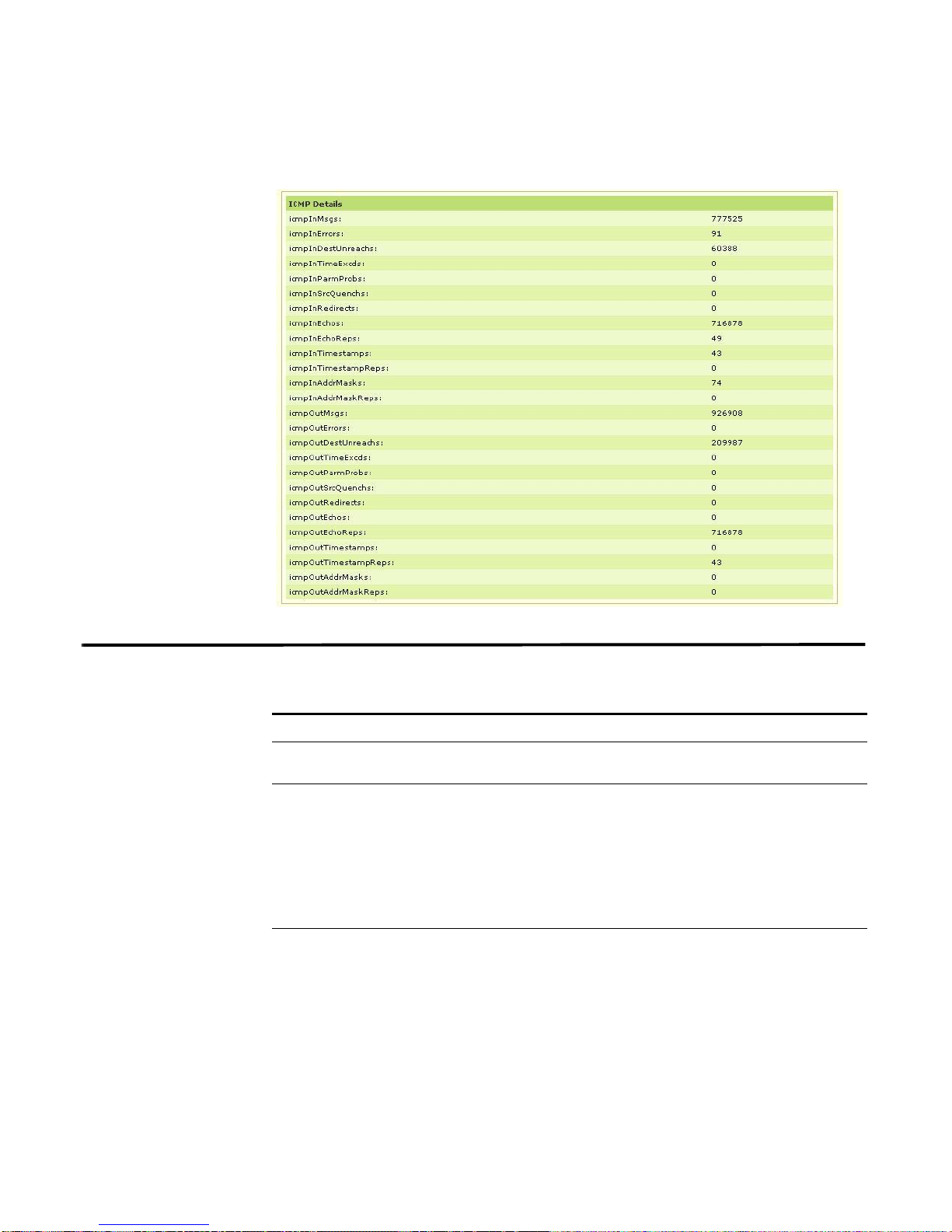
For example, sample output may include:
TCP Details 33
TCP Details The TCP details includes:
Table 3-6 TCP Details
S.No TCP Table Details Description
1. tcpRtoAlgorithm Specifies the algorithm to determine the timeout value
2. tcpRtoMin Specifies the minimum value permitted by a TCP
3. tcpRtoMax Specifies the maximum value permitted by a TCP
used for retransmitting unacknowledged octets.
implementation for the retransmission timeout,
measured in milliseconds. More refined semantics for
objects of this type depend upon the algorithm used to
determine the retransmission timeout. When the timeout
algorithm is rsre(3), an object of this type has the
semantics of the LBOUND quantity described in RFC
793.
implementation for the retransmission timeout,
measured in milliseconds. The details of this object type
depends upon the algorithm used to determine the
retransmission timeout. When the timeout algorithm is
rsre(3), an object of this type has the semantics of the
UBOUND quantity described in RFC 793.
STRM SNMP Agent
Page 36

34 USING THE RFC1213-MIB
Table 3-6 TCP Details (continued)
S.No TCP Table Details Description
4. tcpMaxConn Specifies the limit on the total number of TCP
connections the entity can support. In entities where the
maximum number of connections is dynamic, set this
this object to value -1.
5. tcpActiveOpens Specifies the number of times TCP connections have
made a direct transition to the SYN-SENT state from the
CLOSED state.
6. tcpPassiveOpens Specifies the number of times TCP connections have
made a direct transition to the SYN-RCVD state from the
LISTEN state.
7. tcpAttemptFails Specifies the number of times TCP connections have
made a direct transition to the CLOSED state from either
the SYN-SENT state or the SYN-RCVD state, plus the
number of times TCP connections have made a direct
transition to the LISTEN state from the SYN-RCVD
state.
8. tcpEstabResets Specifies the number of times TCP connections have
made a direct transition to the CLOSED state from either
the ESTABLISHED state or the CLOSE-WAIT state.
9. tcpCurrEstab Specifies the number of TCP connections for which the
current state is either ESTABLISHED or CLOSE-WAIT.
10. tcpInSegs Specifies the total number of segments received,
including those received in error. This count includes
segments received on currently established
connections.
11. tcpOutSegs Specifies the total number of segments sent, including
those on current connections but excluding those
containing only retransmitted octets.
12. tcpRetransSegs Specifies the total number of segments retransmitted,
the number of TCP segments transmitted containing one
or more previously transmitted octets
13. tcpInErrs Specifies the total number of segments received in error,
for example, bad TCP checksums.
14. tcpOutRsts Specifies the number of TCP segments sent containing
the RST flag.
STRM SNMP Agent
Page 37
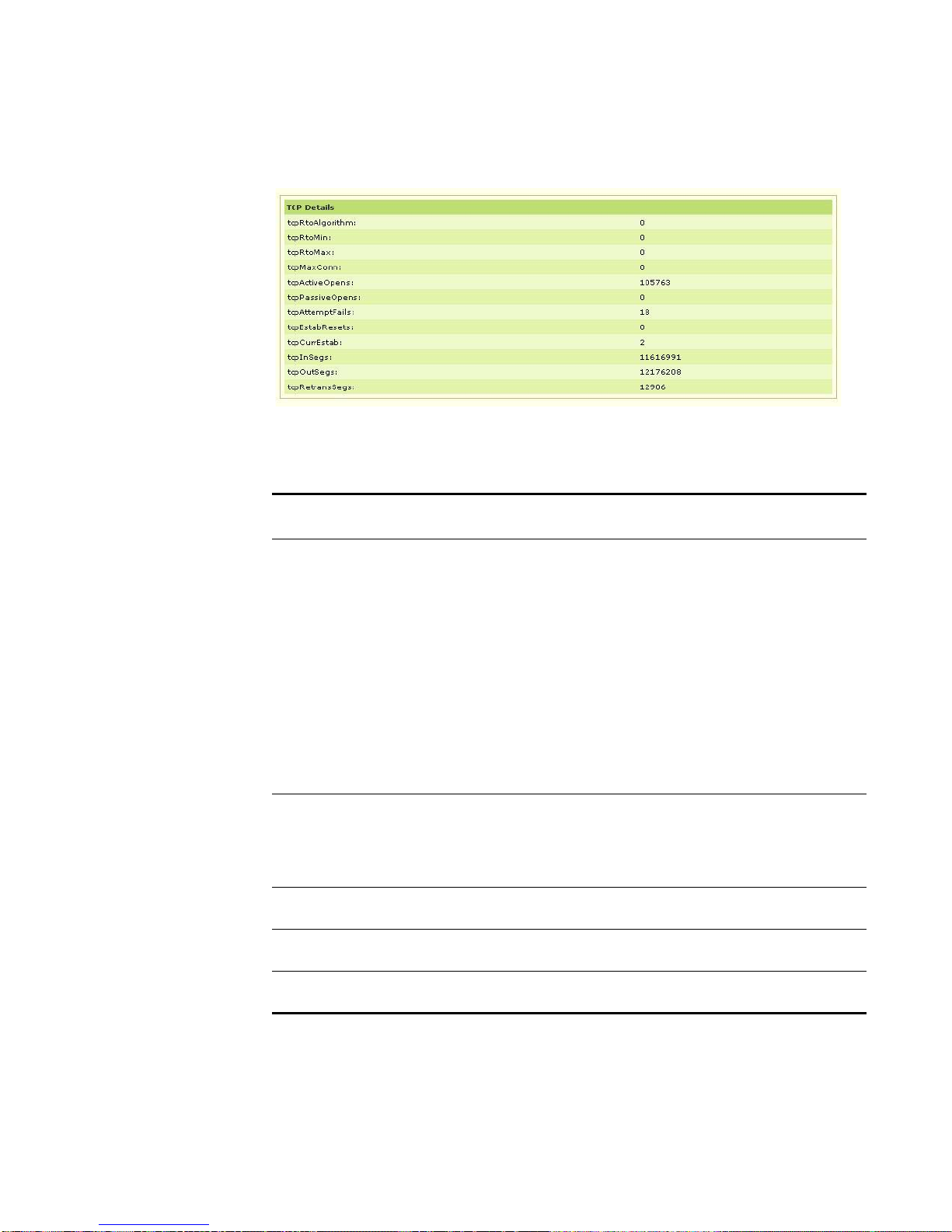
For example, sample output may include:
TCP Details 35
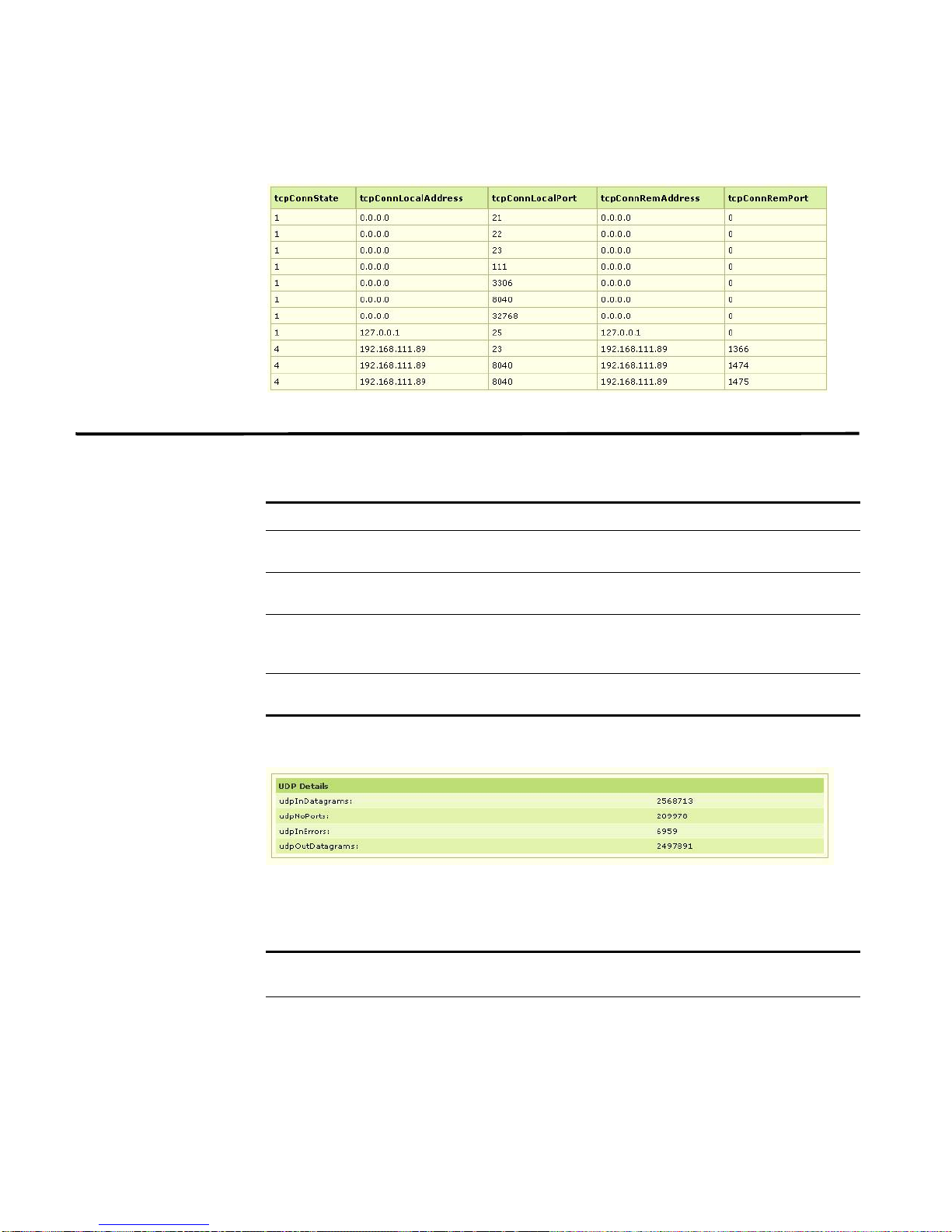
TCP Connection
Details
The TCP connection details includes:
Table 3-7 TCP Connection Details
TCP Connection
S.No
Details
Description
1. tcpConnState Specifies the state of this TCP connection. The only
value that is configurable using a management station
is deleteTCB(12). Accordingly, it is appropriate for an
agent to return a badValue response if a
management station attempts to set this object to any
other value.
If a management station sets this object to the value
deleteTCB(12), the TCB (as defined in RFC 793) of
the corresponding connection on the managed node
is deleted, resulting in immediate termination of the
connection. As an implementation-specific option, a
RST segment may be sent from the managed node to
the other TCP endpoint (note however that RST
segments are not sent reliably).
2. tcpConnLocal Address Specifies the local IP address for this TCP
connection. In the case of a connection in the listen
state that is willing to accept connections for any IP
interface associated with the node, the value 0.0.0.0
is used
3. tcpConnLocalPort Specifies the local port number for this TCP
connection.
4. tcpConnRemAddress Specifies the remote IP address for this TCP
connection
5. tcpConnRemPort Specifies the remote port number for this TCP
connection.
STRM SNMP Agent
Page 38
36 USING THE RFC1213-MIB
For example, sample output may include:
UDP Details The UDP details includes:
Table 3-8 U D P Details
S.No UDP Details Description
1. udpInDatagrams Specifies the total number of UDP datagrams delivered to
2. udpNoPorts Specifies the total number of received UDP datagrams for
3. udpInErrors Specifies the number of received UDP datagrams that
4. udpOutDatagrams Specifies the total number of UDP datagrams sent from
UDP users.
which there was no application at the destination port.
could not be delivered for reasons other than the lack of
an application at the destination port.
this entity.
For example, sample output may include:
UDP Table Details The UDP T a ble details includes:
Table 3-9 UDP Table Details
UDP Table
S.No
Details
Description
1. udpLocalAddress Specifies the local IP address for this UDP listener. If a
UDP listener is willing to accept datagrams for any IP
interface associated with the node, the value 0.0.0 .0 is
used.
STRM SNMP Agent
Page 39
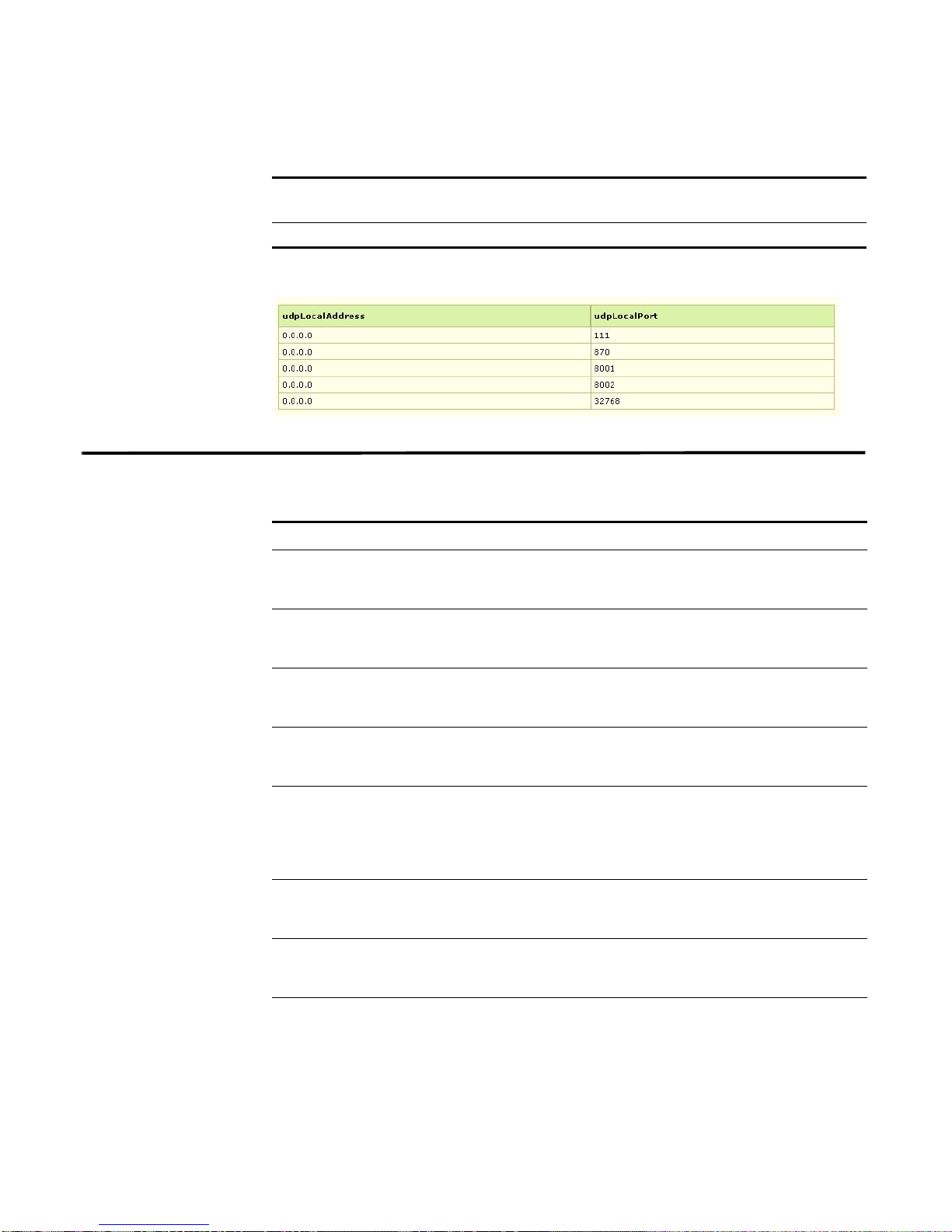
Table 3-9 UDP Table Details (continued)
UDP Table
S.No
Details
2. udpLocalPort Specifies local port number for this UDP listener.
For example, sample output may include:
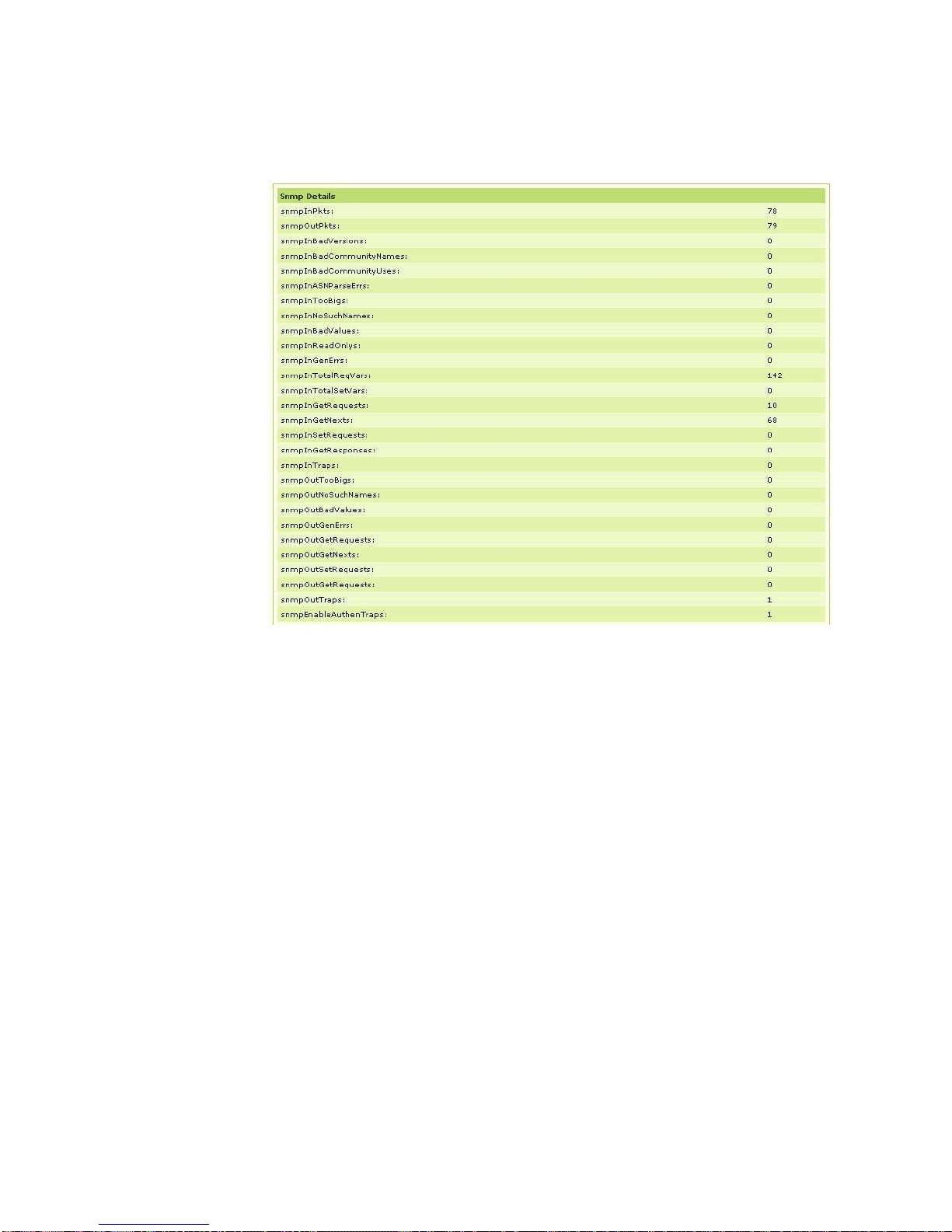
SNMP Details The SNMP details includes:
Table 3-10 SNMP Details
S.No SNMP Details Description
1. snmpInPkts Specifies the total number of SNMP messages
2. snmpOutPkts Specifies the total number of SNMP messages that
3. snmpInBadVersions Specifies the total number of SNMP messages that
4. snmpInBadCommunity
Names
5. snmpInBadCommunity
Uses
6. snmpInASNParseErrs Specifies the total number of ASN.1 or BER errors
7. snmpInTooBigs Specifies the total number of SNMP PDUs that were
8. snmpInNoSuchNames Specifies the total number of SNMP PDUs that were
SNMP Details 37
Description
delivered to the SNMP entity from the transport
service.
were passed from the SNMP protocol entity to the
transport service.
were delivered to the SNMP protocol entity and
were for an unsupported SNMP version.
Specifies the total number of SNMP messages
delivered to the SNMP protocol entity that used a
SNMP community name not known to entity.
Specifies the total number of SNMP messages
delivered to the SNMP protocol entity that
represented an SNMP operation that was not
allowed by the SNMP community specified in the
message.
encountered by the SNMP protocol entity when
decoding received SNMP messages.
delivered to the SNMP protocol entity and for which
the value of the error-status field is tooBig.
delivered to the SNMP protocol entity and for which
the value of the error-status field is noSuchName.
STRM SNMP Agent
Page 40

38 USING THE RFC1213-MIB
Table 3-10 SNMP Details (continued)
S.No SNMP Details Description
9. snmpInBadValues Specifies the total number of SNMP PDUs that were
delivered to the SNMP protocol entity and for which
the value of the error-status field is badValue.
10. snmpInReadOnlys Specifies the total number of valid SNMP PDUs that
were delivered to the SNMP protocol entity and for
which the value of the error-status field is
readOnly. This a protocol error to generate an
SNMP PDU that contains the value readOnly in
the error-status field, as such this object is provided
as a means of detecting incorrect implementations
of the SNMP.
11. snmpInGenErrs Specifies the total number of SNMP PDUs that were
delivered to the SNMP protocol entity and for which
the value of the error-status field is genErr.
12. snmpInTotalReqVars Specifies the total number of MIB objects that have
been retrieved successfully by the SNMP protocol
entity as the result of receiving valid SNMP
Get-Request and Get-Next PDUs.
13. snmpInTotalSetVars Specifies the total number of MIB objects that have
been altered successfully by the SNMP protocol
entity as the result of receiving valid SNMP
Set-Request PDUs.
14. snmpInG etRequests Specifies the total number of SNMP Get-Request
PDUs that have been accepted and processed by
the SNMP protocol entity.
15. snmpInG etNexts Specifies the total number of SNMP Get-Next PDUs
that have been accepted and processed by the
SNMP protocol entity.
16. snmpInSetRequests Specifies the total number of SNMP Set-Request
PDUs that have been accepted and processed by
the SNMP protocol entity
17. snmpInGetResponses Specifies the total number of SNMP Get-Response
PDUs that have been accepted and processed by
the SNMP protocol entity.
18. snmpInTraps Specifies the total number of SNMP Trap PDUs that
have been accepted and processed by the SNMP
protocol entity.
19. snmpOutTooBigs Specifies the total number of SNMP PDUs that were
generated by the SNMP protocol entity and for
which the value of the error-status field is tooBig.
20. snmpOutNoSuch
Names
Specifies the total number of SNMP PDUs that were
generated by the SNMP protocol entity and for
which the value of the error-status is noSuchName.
STRM SNMP Agent
Page 41

SNMP Details 39
Table 3-10 SNMP Details (continued)
S.No SNMP Details Description
21. snmpOutBadValues Specifies the total number of SNMP PDUs that were
generated by the SNMP protocol entity and for
which the value of the error-status field is
badValue.
22. snmpOutGenErrs Specifies the total number of SNMP PDUs that were
generated by the SNMP protocol entity and for
which the value of the error-status field is genErr.
23. snmpOutGetRequests Specifies the total number of SNMP Get-Request
PDUs that have been generated by the SNMP
protocol entity.
24. snmpOutGetNexts Specifies the total number of SNMP Get-Next PDUs
that have been generated by the SNMP protocol
entity.
25. snmpOutSetRequests Specifies the total number of SNMP Set-Request
PDUs that have been generated by the SNMP
protocol entity.
26. snmpOutGetResponses Specifies the total number of SNMP Get-Response
PDUs that have been generated by the SNMP
protocol entity.
27. snmpOutTraps Specifies the total number of SNMP Trap PDUs that
have been generated by the SNMP protocol entity.
28. snmpEnableAuthen
Traps
Specifies whether the SNMP agent process is
permitted to generate authentication-failure traps.
The value of this object overrides any configuration
information; as such, it provides a means whereby
all authentication-failure traps may be disabled. We
recommended that this object be stored in
non-volatile memory so that it remains constant
between re-initialization of the network management
system.
STRM SNMP Agent
Page 42
40 USING THE RFC1213-MIB
For example, sample output may include:
STRM SNMP Agent
Page 43

4
USING THE HOST-RESOURCES-MIB
The Host Resources MIB defines objects that are useful for the management of
host systems. This MIB provides real-time information about the system, disk
storage details, partition details, file system details, processor details, network
details, printer details, software running details, and the installed software details
based on the following nodes:
• System Details
• Storage Details
• Device Details
• Processor Table Details
• Network Table Details
• Printer Table Details
• Disk Storage Details
• Partition Details
• File System Details
• Software Run Details
• Software Run Performance Details
• HR Software Installed Table Details
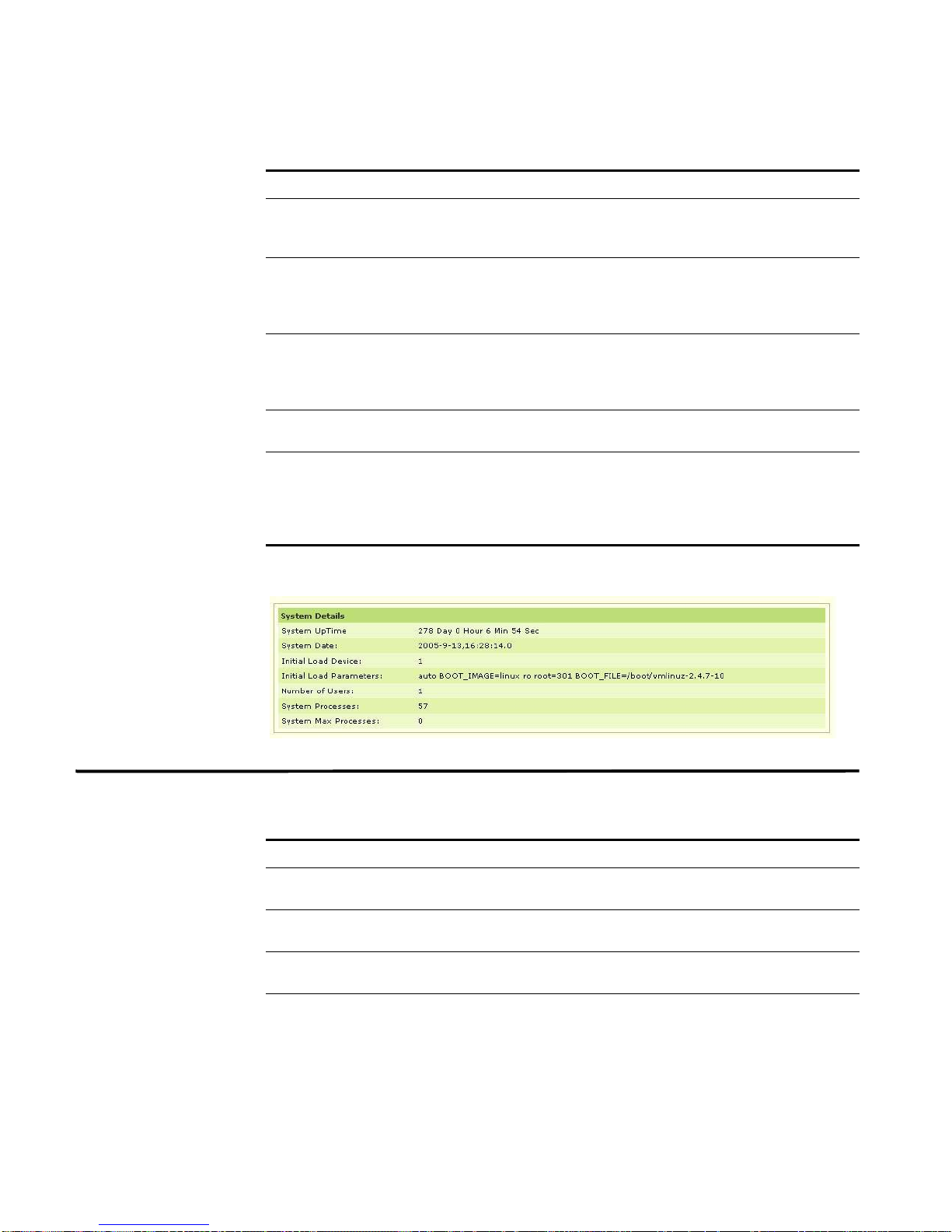
System Details The systems details includes:
Table 4-1 System Details
S.No System Details Description
1. HR System
Uptime
2. HR System
Date
Specifies the amount of time since this host was last
initialized.
Note: This is different from sysUpTime in MIB-II [3] since
the sysUpTime is the uptime of the network management
portion of the system.
Specifies the host's notion of the local date and time.
STRM SNMP Agent
Page 44
42 USING THE HOST-RESOURCES-MIB
Table 4-1 System Details (continued)
S.No System Details Description
3. HR System
Initial Load
Device
4. HR System
Initial Load
Parameters
5. HR System Num
Users
6. HR System
Processes
7. HR System Max
Processes
Specifies the index of the hrDeviceEntry for the device from
which this host is configured to load its initial operating
system configuration.
Specifies the object containing the parameters (for example,
a pathname and parameter) supplied to the load device
when requesting the initial operating system configuration
from that device.
Specifies the number of user sessions for which this host is
storing state information. A session is a collection of
processes requiring a single act of user authentication and
possibly subject to collective job control.
Specifies the number of process contexts currently loaded
or running on this system.
Specifies the maximum number of process contexts this
system can support. If there is no fixed maximum, the value
should be zero. On systems that have a fixed maximum,
this object can help diagnose failures that occur when this
maximum is reached.
For example, sample output may include:
Storage Details The storage details includes:
Table 4-2 Storage Details
S.No Storage Details Description
1. HR Memory
Size
2. HR Storage
Type
3. HR Storage
Description
4. HR Storage
Allocation Units
Specifies the amount of physical main memory contained by
the host.
Specifies the description of the type and instance of the
storage described by this entry.
Specifies the description of the type and instance of the
storage described by this entry.
Specifies the size, in bytes, of the data objects allocated
from this pool. If this entry is monitoring sectors, blocks,
buffers, or packets, for example, the value of this object is
greater than one. Otherwise, the value of this object is 1.
STRM SNMP Agent
Page 45
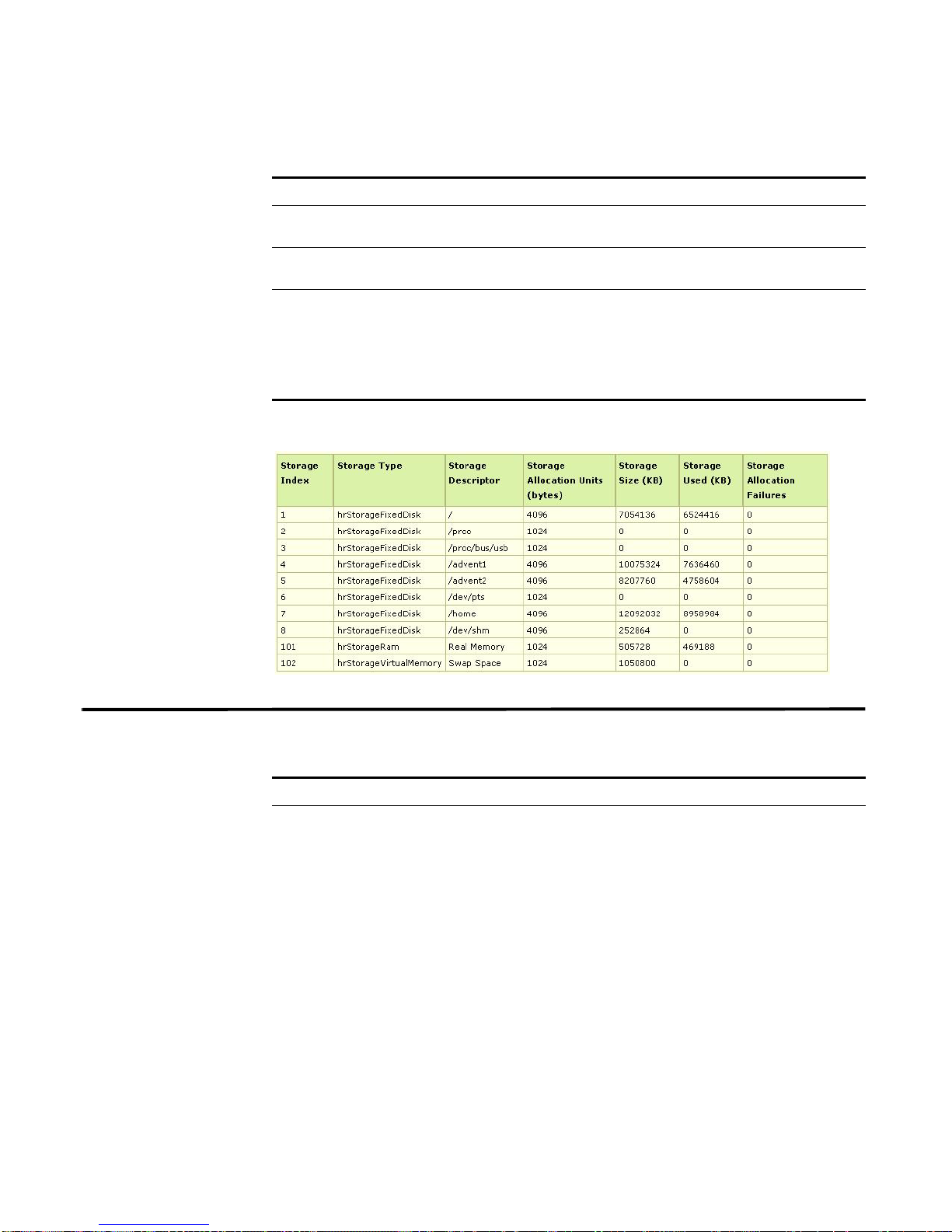
Table 4-2 Storage Details (continued)
S.No Storage Details Description
5. HR Storage
Size
6. HR Storage
Used
7. HR Storage
Allocation
Failures
Specifies the size of the storage represented by this entry,
in units of hrStorageAllocationUnits.
Specifies the amount of the storage represented by this
entry that is allocated, in units of hrStorageAllocationUnits.
Specifies the number of requests for storage represented by
this entry that could not be honored because of insufficient
storage. It should be noted that as this object has a
SYNTAX of Counter, that it does not have a defined initial
value. However, we recommend that you set this object to
zero.
For example, sample output may include:
Device Details 43
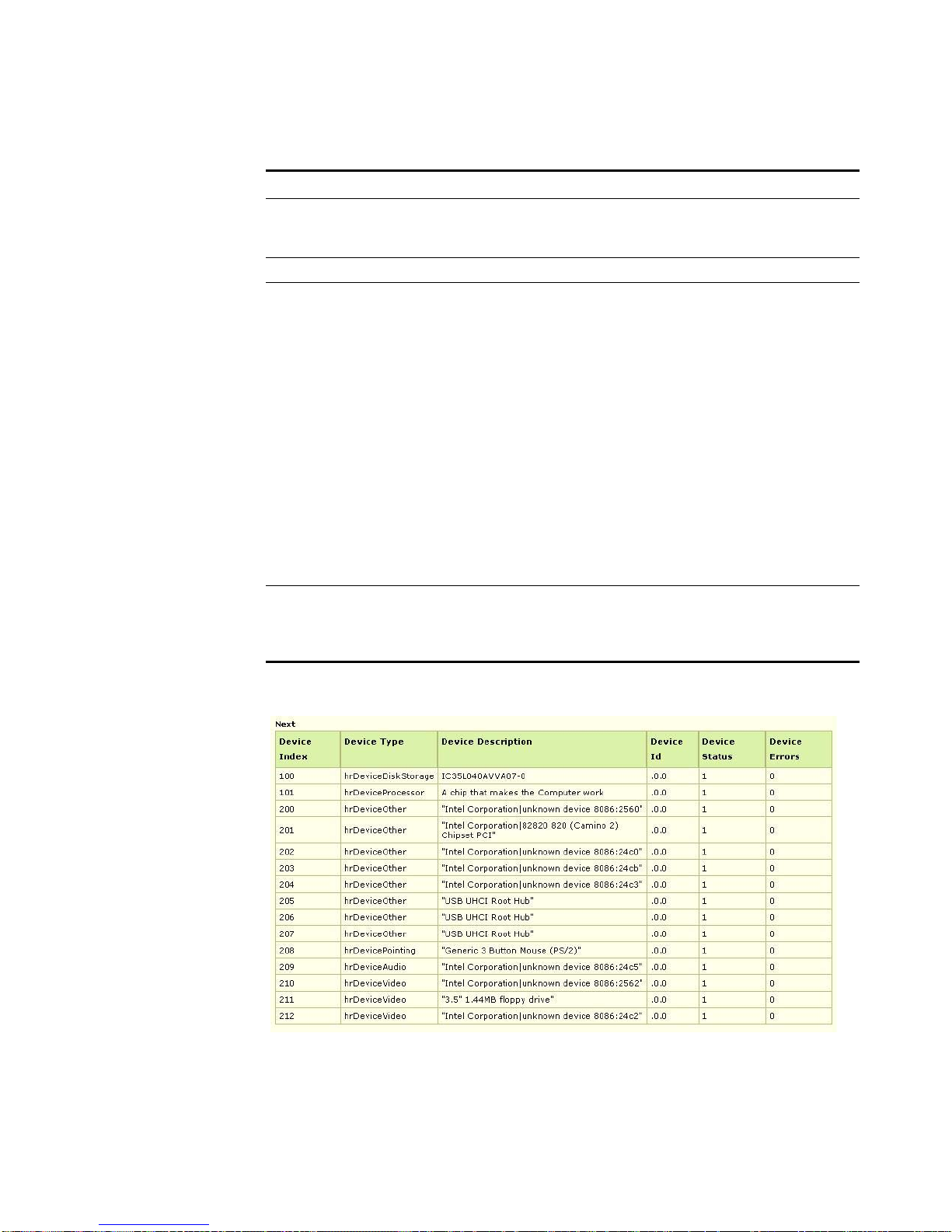
Device Details The device details includes:
Table 4-3 Device Details
S.No Device Details Description
1. HR Device Type Specifies an indication of the type of device.
If this value is hrDeviceProcessor { hrDeviceTypes
3}, then an entry exists in the hrProcessorTable that
corresponds to this device.
If this value is hrDeviceNetwork { hrDeviceTypes 4
}, then an entry exists in the hrNetworkTable that
corresponds to this device.
If this value is hrDevicePrinter { hrDeviceTypes
5}, then an entry exists in the hrPrinterTable that
corresponds to this device.
If this value is hrDeviceDiskStorage
{hrDeviceTypes 6 }, then an entry exists in the
hrDiskStorageTable that corresponds to this device.
STRM SNMP Agent
Page 46
44 USING THE HOST-RESOURCES-MIB
Table 4-3 Device Details (continued)
S.No Device Details Description
2. HR Device
Descr
3. HR Device ID Specifies the product ID for this device.
4. HR Device
Status
5. HR Device
Errors
Specifies a textual description of this device, including the
device's manufacturer and revision, and optionally, its serial
number.
Specifies the current operational state of the device
described by this row of the table.
• unknown(1) - Specifies that the current state of the
device is unknown.
• running(2) - Specifies that the device is up and running
and that no unusual error conditions are known.
• warning(3) - Specifies that the agent has been informed
of an unusual error condition by the operational software
(for example, a disk device driver) but that the device is
still operational. For example, a high number of soft
errors on a disk.
• testing(4) - Specifies that the device is not available for
use because it is in the testing state.
• down(5) - Specifies that the e agent has been informed
that the device is not available for any use.
Specifies the number of errors detected on this device. It
should be noted that as this object has a SYNTAX of
Counter, that it does not have a defined initial value. We
recommend that this object be initialized to zero.
For example, sample output may include:
STRM SNMP Agent
Page 47
Processor Table Details 45
Processor Table
Details
Network Table
Details
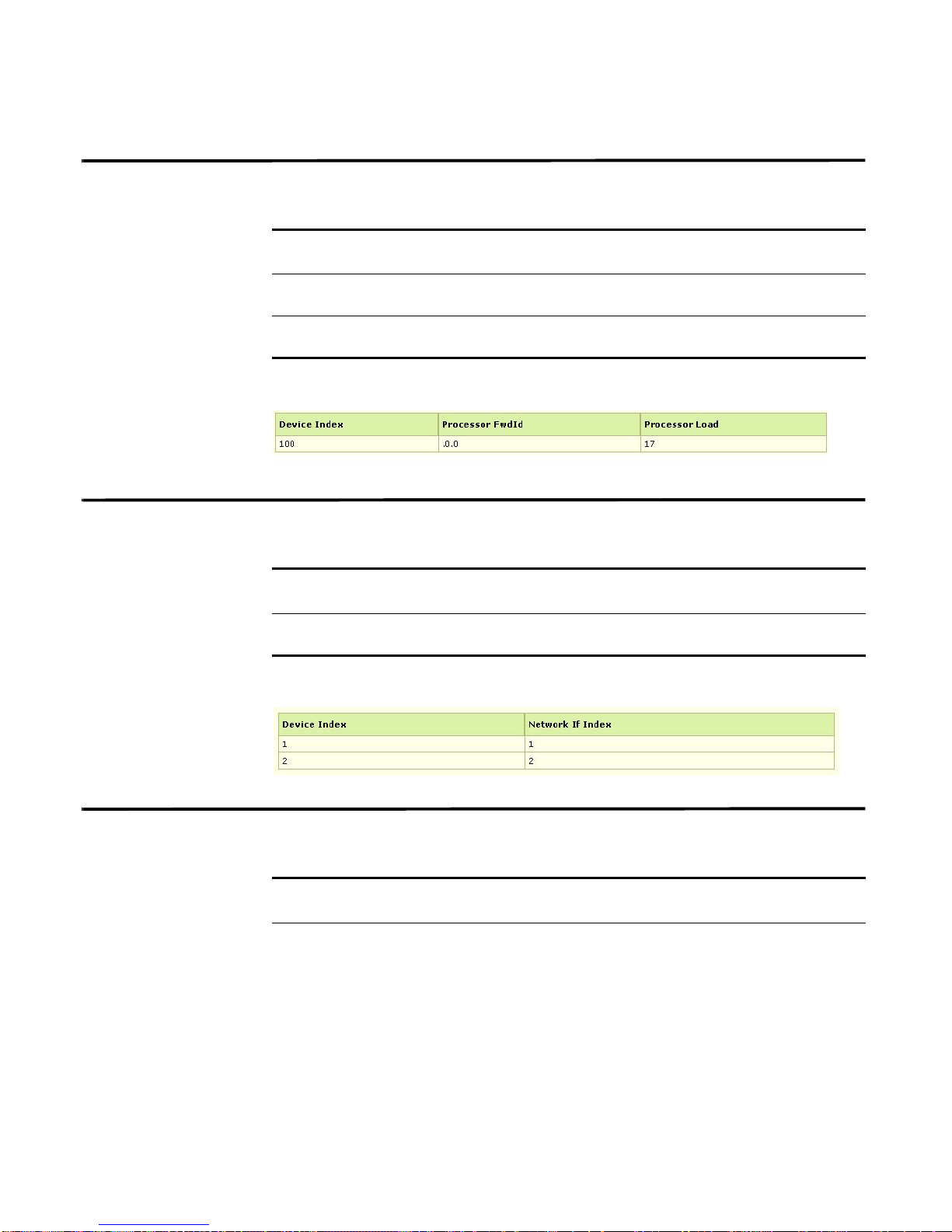
The processor details includes:
Table 4-4 Processor Table Details
Processor
S.No
1. HR Processor
2. HR Processor
Table Details
FRW ID
Load
Description
Specifies the product ID of the firmware associated with the
processor.
Specifies the average, over the last minute, of the
percentage of time that this processor was not idle.
For example, sample output may include:
The network table details includes:
Table 4-5 Network Table Details
Network Table
S.No
1. HR Network
Details
IfIndex
Description
Specifies the value of ifIndex that corresponds to this
network device.
Printer Table
Details
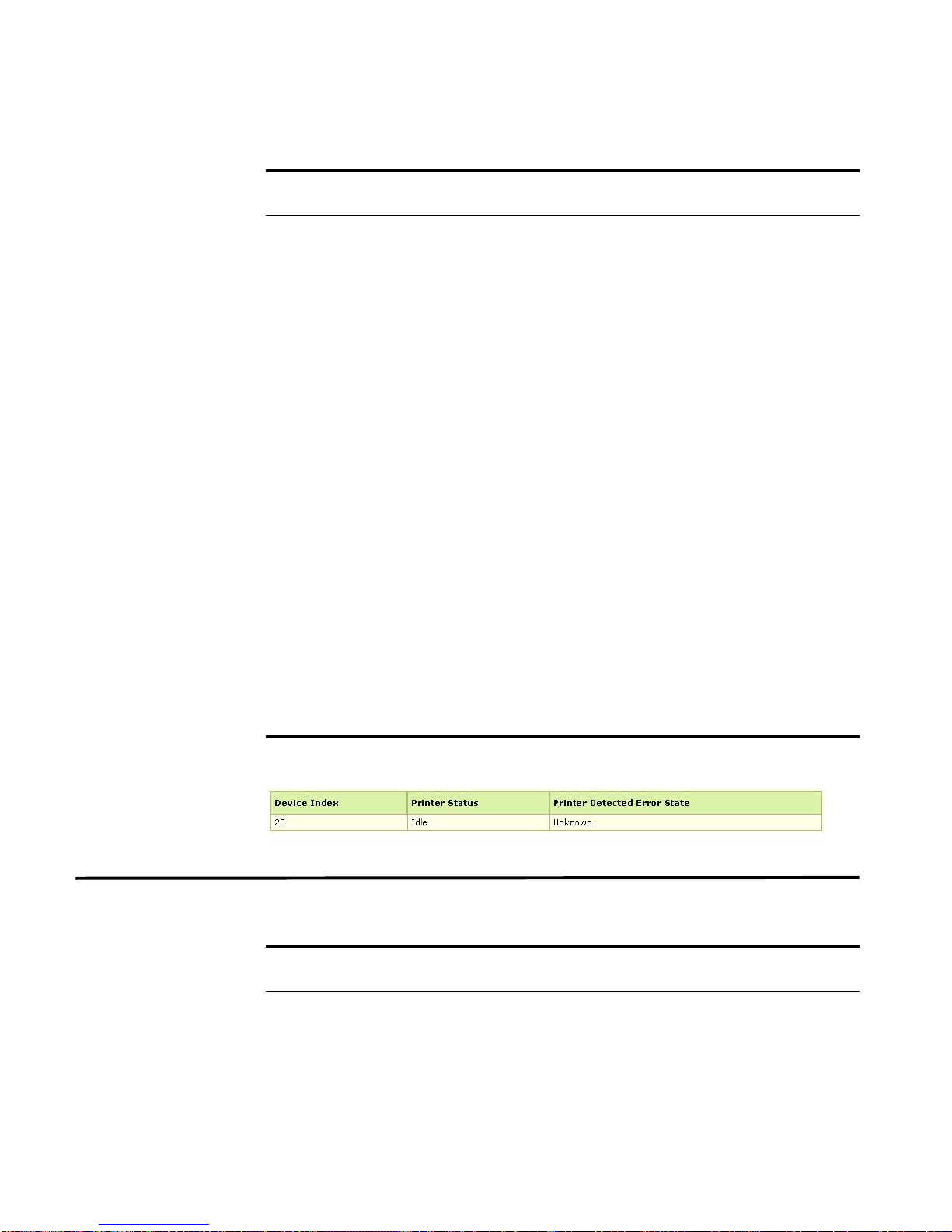
For example, sample output may include:
The printer table details includes:
Table 4-6 Printer Table Details
Printer Table
S.No
1. HR Printer
Details
Status
Description
Specifies the current status of this printer device. When in
the idle(1), printing(2), or warmup(3) state, the
corresponding hrDeviceStatus should be running(2) or
warning(3). When in the unknown state, the corresponding
hrDeviceStatus should be unknown(1).
STRM SNMP Agent
Page 48
46 USING THE HOST-RESOURCES-MIB
Table 4-6 Printer Table Details (continued)
Printer Table
S.No
Details
2. HR Printer
Detected Error
State
Description
Specifies any error conditions detected by the printer. The
error conditions are encoded as bits in an octet string, with
the following definitions:
Condition Bit # hrDeviceStatus
lowPaper 0 warning(3)
noPaper 1 down(5)
lowToner 2 warning(3)
noToner 3 down(5)
doorOpen 4 down(5)
jammed 5 down(5)
offline 6 down(5)
serviceRequested 7 warning(3)
If multiple conditions are currently detected and the
hrDeviceStatus is unknown(1) or testing(4), the
hrDeviceStatus corresponds to the most severe state,
where down(5) is more severe than warning(3), which is
more severe than running(2).
Bits are numbered starting with the most significant bit of
the first byte of bit 0, the least significant bit of the first byte
being bit 7, the most significant bit of the second byte being
bit 8, and so on. A one bit encodes that the condition was
detected, while a zero bit encodes that the condition was
not detected. This object is useful for alerting an operator to
specific warning or error conditions that may occur,
especially those requiring human intervention.
Disk Storage
Details
For example, sample output may include:
The disk storage details includes:
Table 4-7 Disk Storage Details
Disk Storage
S.No
1. HR Disk
Details
Storage Access
Description
Specifies if this long-term storage device is readable and
writable or only readable. This should reflect the media type,
any write-protect mechanism, and any device configuration
that affects the entire device.
STRM SNMP Agent
Page 49
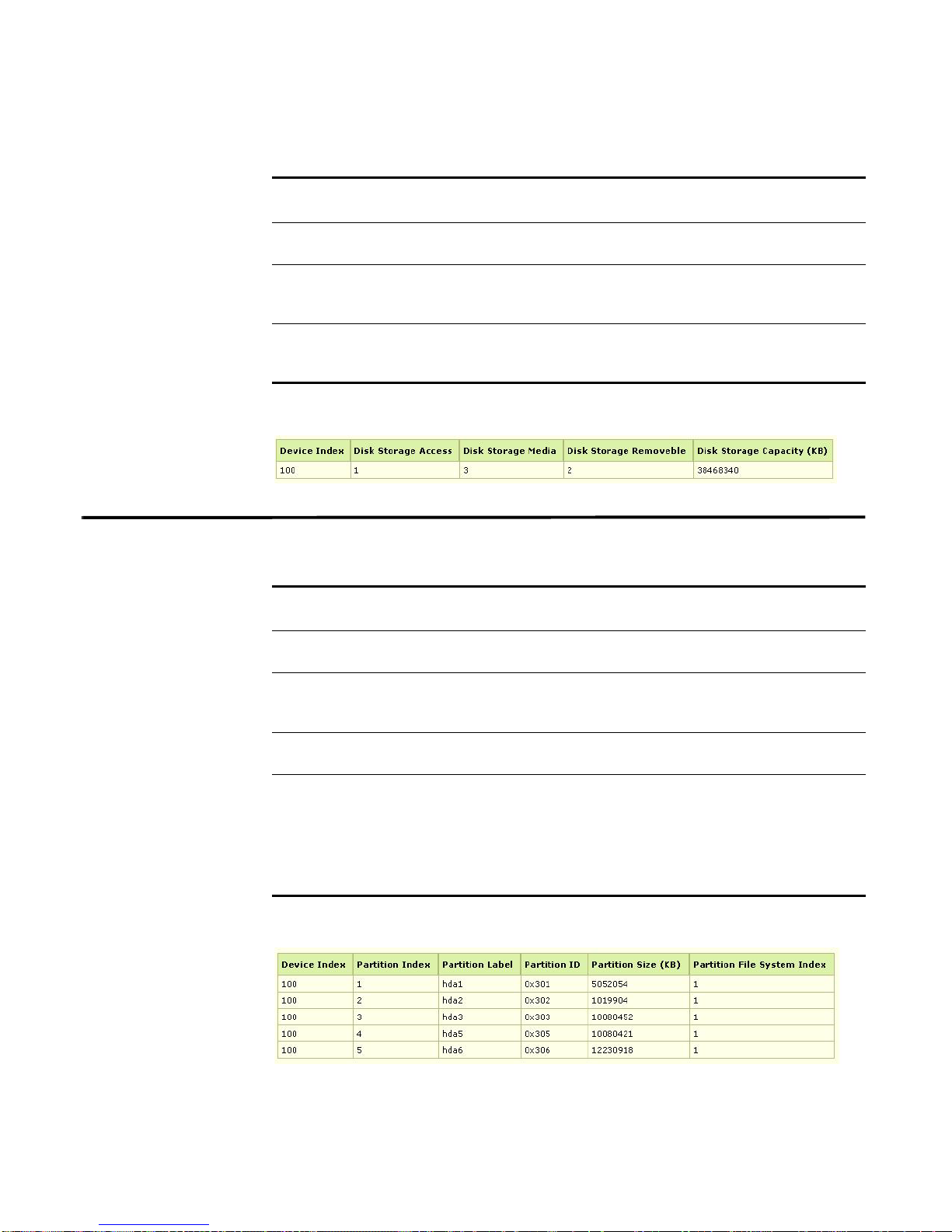
Table 4-7 Disk Storage Details (continued)
Disk Storage
S.No
2. HR Disk
3. HR Disk
Details
Storage Media
Storage
Description
Specifies the type of media used in this long-term storage
device.
Specifies whether or not the disk media may be removed
from the drive.
Removable
4. HR Disk
Specifies the total size for this long-term storage device.
Storage
Capacity
For example, sample output may include:
Partition Details The partition table details includes:
Partition Details 47
Table 4-8 Partition Table Details
Partition Table
S.No
1. HR Partition
Details
Description
Specifies a textual description of this partition
Label
2. HR Partition Id Specifies a descriptor that uniquely represents this partition
to the responsible operating system. On some systems, this
might take on a binary representation.
3. HR Partition
Specifies the size of this partition.
size
4. HR Partition FS
Index
Specifies the index of the file system mounted on this
partition. If no file system is mounted on this partition, then
this value is zero.
Note: Multiple partitions may point to one file system,
denoting that file system resides on those partitions.
Multiple file systems may not reside on one partition.
For example, sample output may include:
STRM SNMP Agent
Page 50

48 USING THE HOST-RESOURCES-MIB
File System Details The file system table details includes:
Table 4-9 File System Table Details
Partition Table
S.No
1. HR File System
2. HR File System
3. HR File System
4. HR File System
5. HR File System
6. HR File System
7. HR File System
8. HR File System
Details
mount point
Remote mount
point
Type
Access
Bootable
Storage Index
Last Full Backup
Date
Last Partial
Backup Date
Description
Specifies path name of the root of this file system.
Specifies a description of the name and/or address of the
server that this file system is mounted from. This may also
include parameters such as the mount point on the remote
file system. If this is not a remote file system, this string
should have a length of zero.
Specifies the value of this object identifies the type of this
file system.
Specifies an indication if this file system is logically
configured by the operating system to be readable and
writable or only readable. This does not represent any local
access-control policy, except one that is applied to the file
system as a whole.
Specifies a flag indicating whether this file system is
bootable.
Specifies the index of the hrStorageEntry that represents
information about this file system. If there is no such
information available, this value is zero. The relevant
storage entry is useful for tracking the percent usage of this
file system and diagnosing errors that may occur when it
runs out of space.
Specifies the last date at which this complete file system
was copied to another storage device for backup. This
information is useful for ensuring that backup s ar e be ing
performed regularly. If this information is not known, then
this variable shall have the value corresponding to January
1, year 0000, 00:00:00.0, which is encoded as (hex)00 00
01 01 00 00 00 00.
Specifies the last date at which a portion of this file system
was copied to another storage device for backup. This
information is useful for ensuring that backup s ar e be ing
performed regularly. If this information is not known, then
this variable shall have the value corresponding to January
1, year 0000, 00:00:00.0, which is encoded as (hex)'00 00
01 01 00 00 00 00'.
STRM SNMP Agent
Page 51
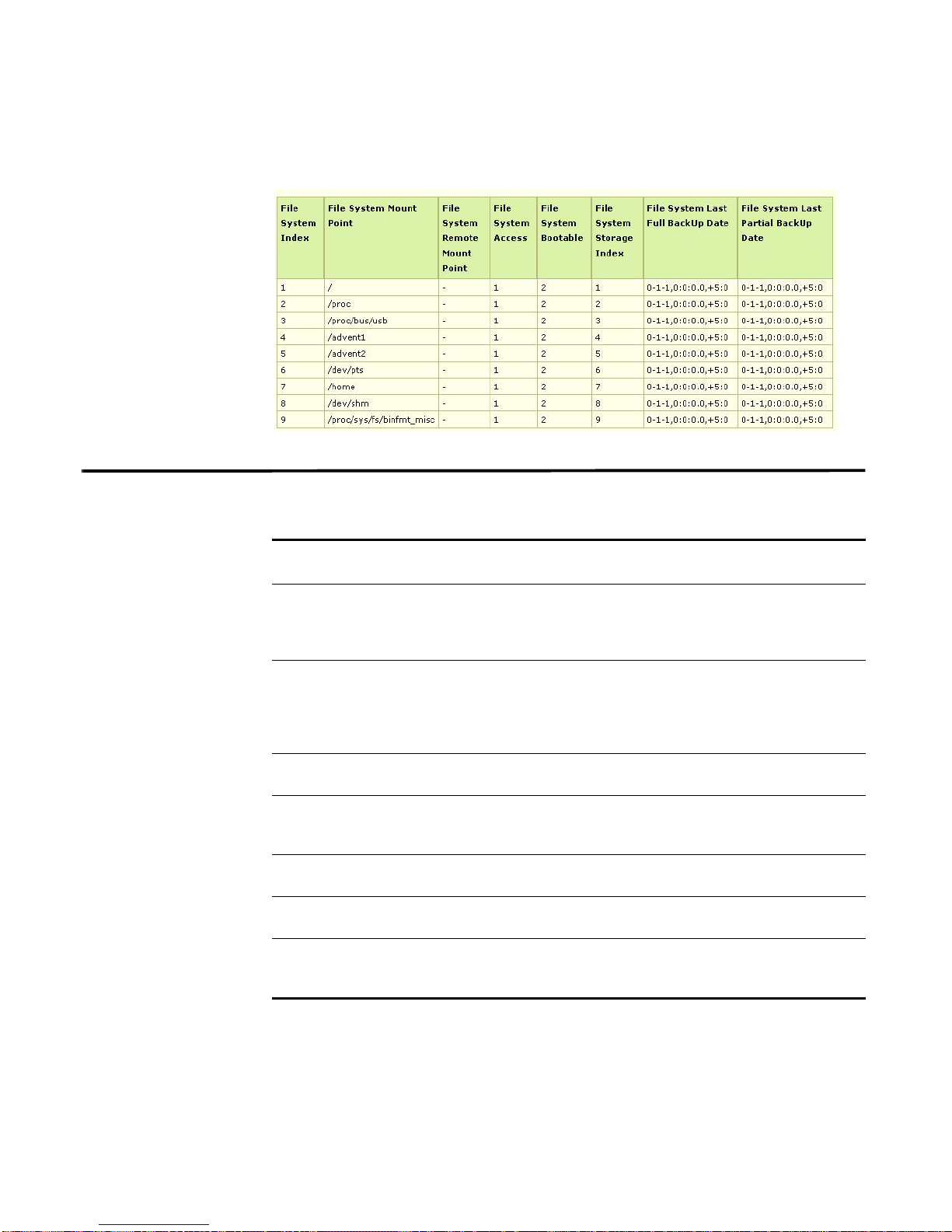
For example, sample output may include:
Software Run Details 49
Software Run
Details
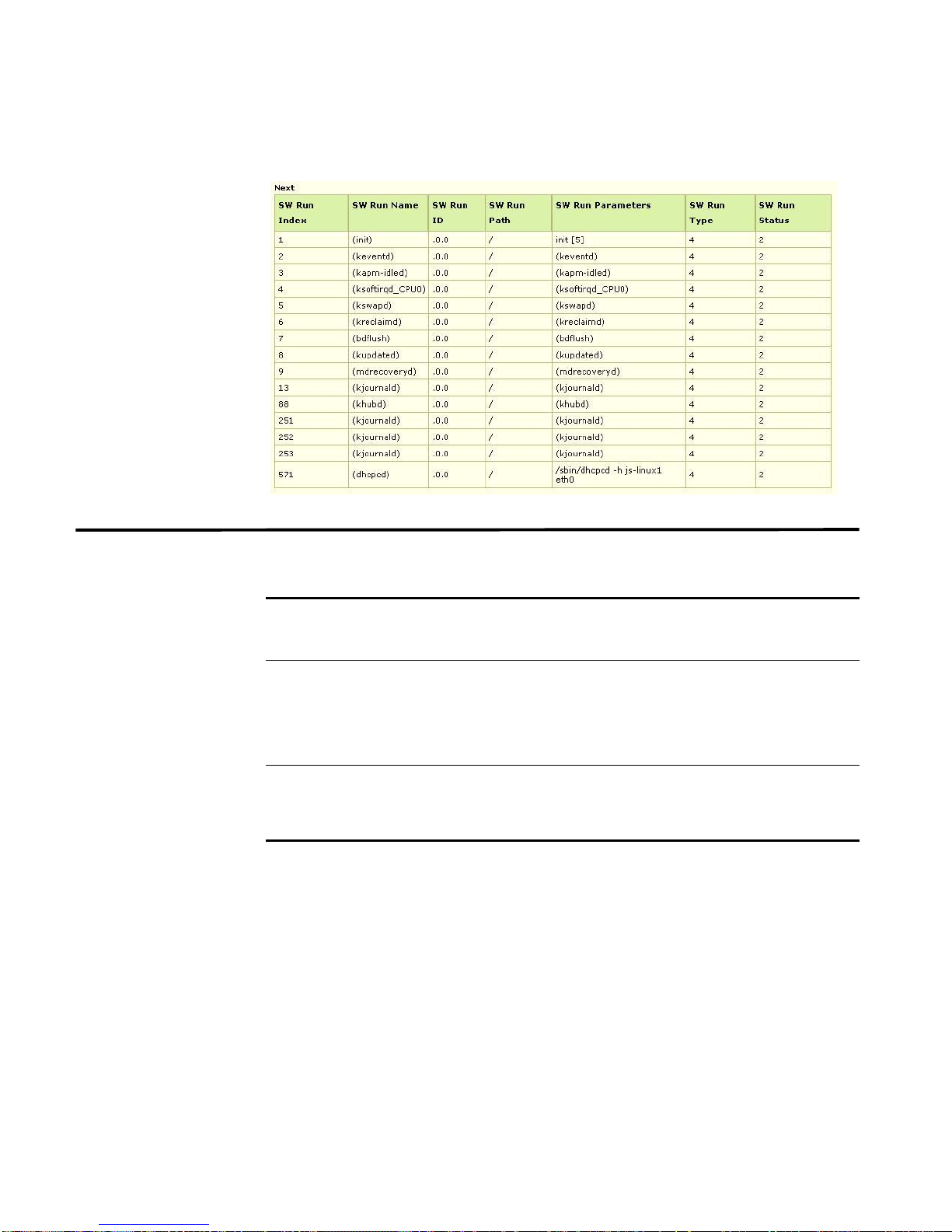
The software run table details includes:
Table 4-10 Software Run Table Details
Software Run
S.No
1. HR Software OS
Table Details
Index
Description
Specifies the value of the hrSWRunIndex for the
hrSWRunEntry that represents the primary operating
system running on this host. This object is useful for
identifying that primary operating system.
2. HR Software
Run Name
Specifies a textual description of this running piece of
software, including the manufacturer, revision, and the
name by which it is commonly known. If this software was
installed locally, this should be the same string as used in
the corresponding hrSWInstalledName.
3. HR Software
Specifies the product ID of the software.
Run Id
4. HR Software
Run Path
Specifies a description of the location on long-term storage
(for example, a disk drive) from which this software was
loaded.
5. HR Software
Run Parameters
6. HR Software
Specifies a description of the parameters supplied to this
software when it was initially loaded.
Specifies the type of this software.
Run Type
7. HR Software
Run Status
Specifies the status of this running piece of software.
Setting this value to invalid(4) shall cause this software to
stop running and to be unloaded.
STRM SNMP Agent
Page 52
50 USING THE HOST-RESOURCES-MIB
For example, sample output may include:
Software Run
Performance
Details
The software run performance details includes:
Table 4-11 Software Run Performance Details
Software Run
Performance
S.No
1. HR Software
2. HR Software
Details
Run
Performance
CPU
Run
Performance
Memory
Description
Specifies the number of centi-seconds of the total system's
CPU resources consumed by this process.
Note: For a multi-processor system, this value may
increment by more than one centi-second in one
centi-second time.
Specifies the total amount of real system memory allocated
to this process.
STRM SNMP Agent
Page 53
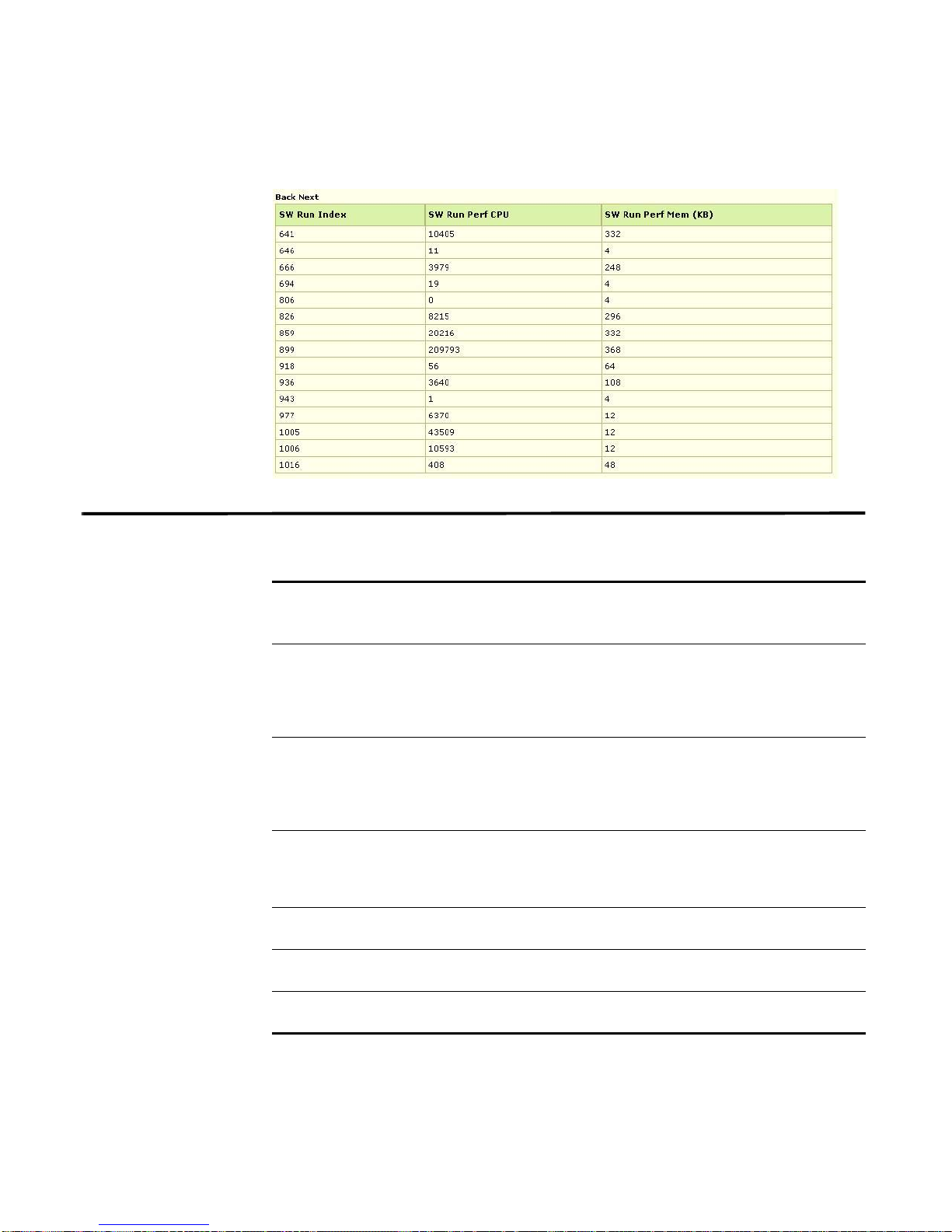
For example, sample output may include:
HR Software Installed Table Details 51
HR Software
Installed Table
Details
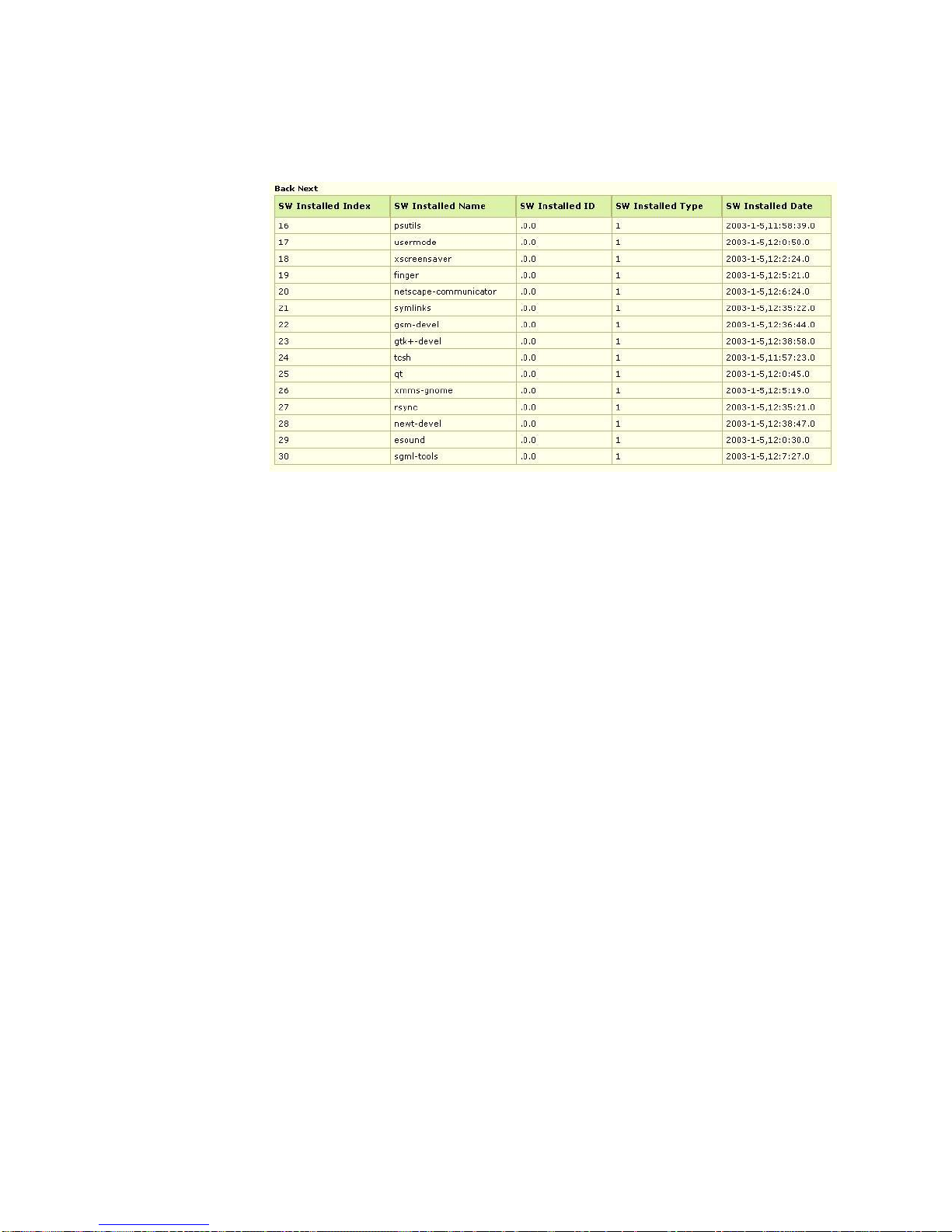
The HR software installed table details includes:
Table 4-12 HR Software Installed Table Details
HR Software
Installed Table
S.No
1. HR Software
2. HR Software
3. HR Software
4. HR Software
5. HR Software
6. HR Software
Details
Installed Last
Change
Installed Last
Update Time
Installed Name
Installed Id
Installed Type
Installed Date
Description
Specifies the value of sysUpTime when an entry in the
hrSWInstalledTable was last added, renamed, or deleted.
Because this table is likely to contain many entries, polling
of this object allows a management station to determine
when re-downloading of the table might be useful.
Specifies the value of sysUpTime when the
hrSWInstalledTable was last completely updated. Retrieval
of this object allows a management station to obtain a
guarantee that no data in this table is older than the
indicated time.
Specifies a textual description of this installed piece of
software, including the manufacturer, revision, the name by
which it is commonly known, and optionally, its serial
number.
Specifies the product ID of this installed piece of software.
Specifies the type of this software.
Specifies the last-modification date of this application as it
would appear in a directory listing.
STRM SNMP Agent
Page 54
52 USING THE HOST-RESOURCES-MIB
For example, sample output may include:
STRM SNMP Agent
Page 55

A
SNMP OVERVIEW
This chapter provides an overview of Simple Network Management Protocol
(SNMP) including:
• About SNMP
• What is a MIB (Management Information Base)?
• What Are MIB Groups?
• Object Identifiers
• Scalar and Tabular Objects
• How an Agent Works
• Traps
• Specifying SNMP Variables in GET Requests
About SNMP SNMP is the dominant protocol in network management. You can easily implement
SNMP, which is a basic network management tool, to meet your network
management needs. You can implement SNMP management in a networked
device more easily than other standard or non-standard approaches to network
management. There are different versions of SNMP including SNMP V1, SNMP
V2c, and SNMP V3.
The SNMP set of standards provides a framework for the definition of
management information along with a protocol for the exchange of information.
The SNMP model assumes the existence of Managers and Agents. This section
provides information on Managers and Agents including:
• What Is an Agent?
• Who Is a Manager?
• Manager and Agent Relationship
What Is an Agent? An Agent is a program that facilitates communication between the Manager an d
the device or application. The Agent forms a part of the device or application to
maintain device or application information.
The Agent is a software module located in the device, which is responsible for
maintaining local management information and delivering that information to a
STRM SNMP Agent
Page 56

54 SNMP OVERVIEW
manager using SNMP. A management information exchange can be initiated by
the manager (through polling) or by the agent (through a trap). An Agent functions
as a device that gathers and sends data about the managed resource in response
to a request from a manager. UDP ports 161 and 162 are the default ports
reserved for SNMP.
The Agent monitors for requests and replies using port 161 and reports
asynchronous traps on port 162, unless configured to use different ports. SNMP
accommodates resources that do not implement the SNMP software using
proxies. A proxy is an SNMP agent that maintains information on behalf of one or
more non-SNMP devices.
Who Is a Manager? A Manager manages one or more agents from a remote location. For example, if
your organization includes four office locations with more than 200 computers, 5
printers, and 3 system administrators. To manage these devices, the system
administrators must travel between the physical locations. However, if your
organization is using SNMP Managers, the system administrators can manage all
devices from their location. The system administrators can query the agent from
the Manager to determine the status of the device. If the Agent automatically
informs the Manager when a problem is about to occur (for example, the paper tray
in a printer includes less than 50 sheets of paper), then the system administrator
can make the necessary changes to prevent the problem from occurring.
Manager and Agent
Relationship
SNMP facilitates communication between a managed device (a device with an
SNMP agent, for example, a router) and an SNMP Manager or management
application (represents a user of network management). The SNMP agent on the
managed device provides access to data (managed objects) stored on the
managed device. The SNMP manager or management application uses this
access to monitor and control the managed device.
Communication is processed using SNMP Protocol Data Units (PDUs) that are
typically encapsulated in UDP packets, and five kinds of operations are permitted
between managers and agents (managed device) including:
• The manager can perform a get (or read) to obtain information from the agent
about an attribute of a managed object.
• The manager can perform a get-next to do the same for the next object in the
tree of objects on the managed device.
• The manager can perform a get-bulk to obtain information about a group of data
from the agent. This is not possible using SNMP V1.
• The manager can perform a set (or write) to set the value of an attribute of a
managed object.
• The agent can send a trap, or asynchronous notification, to the manager
regarding an event on the managed device.
To specify to the SNMP agent which managed objects you wish to consider, the
SNMP manager or management application uses a well-defined naming syntax.
STRM SNMP Agent
Page 57

What is a MIB (Management Information Base)? 55
iso(1)
org(3)
dod(6)
internet(1)
mgmt(2)
mib-2(1)
private(4)
enterprise(1)
Q1 Labs(20212)
Object names in this syntax are called object identifiers (object IDs, or OIDs), and
are a series of numbers that uniquely identifies an object to an SNMP agent.
What is a MIB
(Management
Information Base)?
A Management Information Base (MIB) provides a description for a set of network
objects. For example, if your organization wishes to develop an application and
you wish that application to be remotely managed, then the architects will create a
MIB. The MIB contains information, such as the variables that should be relayed to
the Manager, variable descriptions, or the value that each variable represents.
Each variable is assigned a unique identifier in SNMP that is called an object
identifier (OID). The OID is a unique ID. The format of OID is a sequence of
numbers including two roots for object identifiers (iso (.1) and ccit (.0)). Most object
identifiers start with .1.3.6.1 (where 1 = iso, 3 = org, 6 = dod, 1 = internet). From
internet, there are two branches, mgmt and private.
All standard MIBs reside under mgmt (.1.3.6.1.2). The distinction between the
standard and private MIBs is the control over the object definitions (that is, defining
the variables ). Standard MIBs are approved by the Internet Activities Board (IAB).
MIBs defined unilaterally by equipment and software vendors are initially defined
as private MIBs under private. en terprises. A branch within the private.enterprises
sub-tree is allocated to each vendor that registers for an enterprises OID. Q1 Labs
has the enterprise OID 20212. Therefore, all the variables defined for Q1 Labs are
included under .1.3.6.1.4.1.20212. (.iso.org.dod.internet.private.enterprise.Q1
Labs).
For example, if a company wished to develop a printer, they would need to
configure variables, such as, NoOfPapers or inkLevel. This would allow system
STRM SNMP Agent
Page 58

56 SNMP OVERVIEW
administrators to know how many sheets of paper were available in the printer
without physically moving to the printer. The system administrators would install
the Manager in these machines and query the printer agent to obtain this
information.
Y o u can use the standard MIBs. For example, RFC1213-MIB is a standard MIB for
managing the system that each operating system implements. This MIB contains
information regarding the system and the number of interfaces. SNMP agents for
different types of devices provide access to objects that are specific to the type of
device.
To enable the SNMP manager or management application to operate intelligently
on the data available on the device, the Manager must know the names and types
of objects on the managed device. This is possible using MIB modules, which are
specified in MIB files provided with managed devices. For example, rfc1213-MIB
(also known as MIB-II) is a MIB module that is typically supported by all SNMP
agents on TCP/IP enabled devices or systems. This MIB file contains a description
of the object hierarchy on the managed device and the name (OID), syntax, and
access privileges for each variable in the MIB. For example, when the MIB module
is loaded in a MIB browser, the label of the variable, such as, sysDescr, can be
used to identify the variable, since the MIB browser can use the MIB module to
translate this label to an OID.
What Are MIB
Groups?
Only the types of objects on the managed device are specified by the MIB, and not
the specific objects (or instances). For example, ifInOctets in rfc1213-MIB specifies
a type of object for number of input octets on an interface, but the specific objects
or instances of that type are specified as ifInOctets.1or ifInOctets.2, depending on
the number of interfaces. When specifying an object to the SNMP agent, a proper
OID that includes the instance needs to be used by the manager. When not
properly specified, the agent responds with a
No such variable error.
A MIB group is a collection of managed objects, and is represented by the name or
OID of a node in the OID tree. Groups may contain other groups. For example, bea
is a MIB group that is a member of the private.enterprises MIB group. The nodes in
the OID tree that are not groups - the base level of the OID tree - are the leaves of
the OID tree. For example, in the following diagram:
• MIB group x contains a group of objects, a, b, and c.
• MIB group y contains a group of objects, d, e, and f.
STRM SNMP Agent
Page 59

Q1 Labs(20212)
What Are MIB Groups? 57
MIB Data types
Available
x
a
c
b
y
d
f
e
The following table provides the supported MIB data types and constructs:
Table A-1 SNMP V1 Data Types
Data Type Name Description
INTEGER Specifies a value whose range may include both positive and
negative numbers. Valid range is -2e31 to 2e31 - 1 (SMIv1 does
not specify minimum or maximum values for the range).
For example:
INTEGER(0..127) - Corresponds to an unsigned 8-bit int
INTEGER(0..40 | 50 | 65 | 90..100)
INTEGER(-2147483648..2147483647) - Corresponds to a
signed 32-bit int
INTEGER
(enumerated
integer)
Gauge Specifies a non-negative integer that may increase or decrease,
Counter Specifies a value that represents a count. Range is 0 to
TimeTicks Specifies the elapsed time between two events, in units of
OCTET STRING Specifies octets of binary or textual information. While SMIv1
Specifies a list of labeled integer values. In SMIv1, the values
should be greater than 0. SMIv2 allows any values in the range
(-2e31 to 2e31- 1).
For example, INTEGER {true(1), false(2)}
but which holds at the maximum or minimum value specified in
the range when the actual value goes over or below the range,
respectively.
4294967295.
hundredth of a second. Range is 0 to 2e32 - 1.
does not limit the number of octets, SMIv2 specifies a limit of
65535 octets. A size may be specified that can be fixed, varying,
or multiple ranges.
For example:
OCTET STRING - Length can vary from 0 to 65535 bytes.
OCTET STRING (SIZE(0..255))
OCTET STRING (SIZE(4)) - Fixed length of 4 bytes.
OCTET STRING (SIZE(0 | 4 | 6)) - Varying with 0, 4, or 6 bytes.
STRM SNMP Agent
Page 60

58 SNMP OVERVIEW
Table A-1 SNMP V1 Data Types (continued)
Data Type Name Description
OBJECT
Specifies a type that has an assigned object identifier value.
IDENTIFIER
IpAddress Specifies an IPv4 address as a string of 4 octets.
NetworkAddress Allows a network address of any type. However, it is now
obsolete. A value of this type is an IPv4 address. SMIv2 supports
this type through the IpAddress type.
Opaque Specifies octets of binary information. SMIv2 specifies a limit of
65535 octets while there is no limit in SMIv1. A size may be
specified which can be fixed, varying, or multiple ranges. A value
of this type must be an encapsulation of ASN.1 BER encoded
value.
For example:
Opaque - Length can vary from 0 to 65535 bytes.
Opaque (SIZE(0..255))
Opaque (SIZE(4)) -- Fixed length of 4 bytes.
Opaque (SIZE(0 | 4 | 6)) - Varying with 0, 4, or 6 bytes.
The following table provides the supported SNMP V2 data types:
Table A-2 SNMP V2 Data Types
Data Type Name Description
Integer32 Specifies a value whose range may include both positive and
negative numbers. Range = -2e31 to 2e31 - 1 (SMIv1 does not
specify minimum or maximum values for the range).
For example:
Integer32(0..127) - corresponds to an unsigned 8- bit int
Integer32
Integer32(-2147483648..2147483647)
Integer32(0..40 | 50 | 65 | 90..100)
INTEGER
(enumerated
integer)
Specifies a list of labeled integer values. In SMIv1, the values
should be greater than 0. SMIv2 allows any values in the range
(-2e31 to 2e31- 1).
For example:
INTEGER { true(1), false(2) }
INTEGER { lessThan(-1), equal(0), greaterThan(1) }
STRM SNMP Agent
Page 61

What Are MIB Groups? 59
Table A-2 SNMP V2 Data Types (continued)
Data Type Name Description
Unsigned32 Specifies a range including only non-negative integer s (0 to 2e31
- 1).
For example:
Unsigned32 - Same as Unsigned32(0..4294967295)
Unsigned32(0..65535) - Corresponds to an unsigned 16 bit int
Unsigned32(0..10 | 50 | 65 | 90..100)
Gauge32 Specifies a non-negative integer that may increase or decrease,
but holds at the maximum or minimum value specified in the
range when the actual value goes over or below the range,
respectively.
Counter32 Specifies a value that represents a count. The range is 0 to
4294967295.
Counter64 Similar to Counter32, except the range is 0 to 2e64 -1. This type
may only be used when a 32-bit counter rollover could occur in
less than an hour. Otherwise, the Counter32 type must be used.
Since this type is not available in SNMPv1, it may only be used
when backwards compatibility is not a requirement.
TimeTicks Specifies the elapsed time between two events, in units of
hundredth of a second. Range is 0 to 2e32 - 1.
OCTET STRING Specifies octets of binary or textual information. SMIv1 does not
limit the number of octets. SMIv2 specifies a limit of 65535
octets. A size may be specified that can be fixed, varying, or
multiple ranges.
For example:
OCTET STRING - Length can vary from 0 to 65535 bytes.
OCTET STRING (SIZE(0..255))
OCTET STRING (SIZE(4)) - Fixed length of 4 bytes.
OCTET STRING (SIZE(0 | 4 | 6)) - Varying with 0, 4, or 6 bytes
OBJECT
Specifies a type that has an assigned object identifier value.
IDENTIFIER
IpAddress Specifies an IPv4 address as a string of 4 octets.
Opaque Specifies octets of binary information. SMIv2 specifies a limit of
65535 octets while there is no limit in SMIv1. A size may be
specified that can be fixed, varying, or multiple ranges. A value of
this type must be an encapsulation of ASN.1 BER encoded
value.
For example:
Opaque - length can vary from 0 to 65535 bytes.
Opaque (SIZE(0..255))
Opaque (SIZE(4)) - fixed length of 4 bytes.
Opaque (SIZE(0 | 4 | 6)) - varying with 0, 4, or 6 bytes
STRM SNMP Agent
Page 62

60 SNMP OVERVIEW
Table A-2 SNMP V2 Data Types (continued)
Data Type Name Description
BITS Specifies a collection of labeled bits. It provides a way to label
individual bits in an octet (an extension of OCTET STRING type).
For example:
BITS { 1 (TCP), 2(Netware), 3(NetBIOS)
MIB Constructs
Available
The following tables describe the supported constructs and the mandatory
elements that must be defined if the construct is created/edited:
Table A-3 MIB Constructs Available
SNMPv1
Constructs
SNMPv2 Constructs
TRAP-TYPE MODULE-IDENTITY
TEXTUAL CONVENTION
OBJECT-IDENTITY
Constructs Used Both in
SNMPv1 and SNMPv2
OBJECT-IDENTIFIER
OBJECT-TYPE (SCALAR)
OBJECT-TYPE (TABLE)
OBJECT-GROUP
NOTIFICATION-TYPE
NOTIFICATION-GROUP
The following table provides the mandatory and optional fields for the various
constructs:
Table A-4 Mandatory and Optional Fields
Construct Name Mandatory Fields Optional Fields
OBJECT-
-- COMMAND-TYP
IDENTIFIER
(v1 and v2 Construct)
OBJECT-TYPE
(SCALAR)
SYNTAX
MAX-ACCESS STATUS
DESCRIPTION REFERENCE
DEFVAL COMMAND TYPE
(v1 and v2 Construct)
OBJECT-TYPE
(TABLE)
(v1 and v2 Construct)
MODULE-IDENTITY
(v2 Construct)
SYNTAX SEQUENCE OF
MAX-ACCESS STATUS
LAST-UPDATED
ORGANIZATION
CONTACT-INFO
DESCRIPTION
REFERENCE
COMMAND TYPE
REVISION REV-DESCRIPTION
DESCRIPTION
TEXTUALCONVENTION
(v2 Construct)
STATUS
DESCRIPTION
SYNTAX
DISPLAY-HINT REFERENCE
STRM SNMP Agent
Page 63

What Are MIB Groups? 61
Table A-4 Mandatory and Optional Fields (continued)
Construct Name Mandatory Fields Optional Fields
OBJECT-IDENTITY
(v2 Construct)
OBJECT-GROUP
(v2 Construct)
STATUS
DESCRIPTION
OBJECTS
STATUS
REFERENCE
REFERENCE
DESCRIPTION
NOTIFICATIONTYPE
STATUS
DESCRIPTION
OBJECTS REFERENCE
(v2 Construct)
NOTIFICATION-
GROUP
(v2 Construct)
TRAP-TYPE
(v1 Construct)
NOTIFICATIONS
REFERENCE
STATUS
DESCRIPTION
ENTERPRISE VARIABLES
DESCRIPTION REFERENCE
Supported Textual
Conventions
The set of supported SNMPv2 textual conventions are:
• DisplayString
• PhyAddress
• MacAddress
• Truth Va lue
• TestAndIncr.
• Autonomous Type
• Variable Pointer
• Row Pointer
• RowStatus
• TimeStamp *
• TimeInterval *
• DateAndTime
• Storage Type
• TDomain
• TAddress
Note: The Agent Compiler supports these textual conventions but the relevant
functionalities are not handled in the SNMP API.
STRM SNMP Agent
Page 64

62 SNMP OVERVIEW
Nodes The following list provides the nodes present in SNMPv2-SMI MIB:
• org OBJECT IDENTIFIER ::= {iso 3}
• dod OBJECT IDENTIFIER ::= {org 6}
• internet OBJECT IDENTIFIER ::= {dod 1}
• directory OBJECT IDENTIFIER ::= {internet 1}
• mgmt OBJECT IDENTIFIER ::= {internet 2}
• mib-2 OBJECT IDENTIFIER ::= {mgmt 1}
• transmission OBJECT IDENTIFIER ::= {mib-2 10}
• experimental OBJECT IDENTIFIER ::= {internet 3}
• private OBJECT IDENTIFIER ::= {internet 4}
• enterprises OBJECT IDENTIFIER ::= {private 1}
• security OBJECT IDENTIFIER ::= {internet 5}
• snmpV2 OBJECT IDENTIFIER ::= {internet 6}
• snmpDomains OBJECT IDENTIFIER ::= {snmpV2 1}
• snmpProxys OBJECT IDENTIFIER ::= {snmpV2 2}
• snmpModules OBJECT IDENTIFIER ::= {snmpV2 3}
Object Identifiers This section provides information on object identifiers including:
• Relative and Absolute Object Identifiers
• Specifying Object Identifiers Symbolically
• Object Identifier with Instance Indexes
Relative and
Absolute Object
Identifiers
Specifying Object
Identifiers
Symbolically
As previously discussed, you can access a variable using the root of the OID tree.
For example, the Q1 Labs object identifier .1.3.6.1.4.1.20212 specifies the path
from the root of the tree. These are called absolute OIDs. However, a path to the
variable may be specified relative to some node in the OID tree. For example,
2.1.1.7 specifies the sysContact object in the system group, relative to the internet
(.1.3.6.1) node in the OID tree. This is called a relative OID.
You can describe an OID using integers separated by dots, such as,
.1.3.6.1.4.1.20212. However, you can also express an OID symbolically, or by a
combination of both integers and textual symbols. A symbolic OID uses mnemonic
keywords to specify the managed object, for example,
gmt.mib-2.system.sysDescr.
The following numeric OID uses integers to specify the same managed object:
2.1.1.1
STRM SNMP Agent
Page 65

Scalar and Tabular Objects 63
Note that this example is a relative OID. An OID may combine both symbolic and
numeric representations of individual nodes of the OID tree, for example,
gmt.mib-2.1.sysDescr.
Absolute OID names must always begin with a dot and specify every node of the
OID tree from the top-most node to the specific managed object. For example:
.iso.org.dod.internet.mgmt.mib.system.sysDescr
.1.3.6.1.2.1.1.1
.iso.3.dod.1.mgmt.mib-2.1.sysDescr
Object Identifier with
Instance Indexes
Scalar and Tabular
Objects
To obtain values of objects from the manager, you must specify the instance of the
object. The instance of an object is specified by appending an instance index to the
object identifier. For example, the last 0 in: .iso.3.dod.1.mgmt.mib.1.sysUpTime.0
is the instance index. An instance index of 0 specifies the first instance and 1
specifies the second instance. Since sysUpTime is a scalar object, it has only one
instance. Therefore, an instance index of 0 is always specified when retrieving the
value of a scalar object. An instance index higher than 0 can only be used in the
case of columnar objects, which can have multiple instances.
A managed object has both a type (defined in ASN.1) and a value. For example,
the SNMP system group variable sysLocation (as defined in RFC1213-MIB ) has
the type, DisplayString may have the value STRM.
Managed objects, in SNMP, are of two types: scalar objects and tabular objects. A
managed object with a single instance is called a scalar object. Tabular objects
have multiple instances, such as the rows of a table. For example, the MIB II
system group has seven leaf variables included. Each of these objects is a scalar
object. For example, the value of sysUpTime is the duration of time since
re-initialization of the network management software (SNMP agent), measured in
hundredths of a second.
Tables in SNMP are two-dimensional objects defined as an ASN.1 type called
SEQUENCE OF, which allows 0 or more members. Each element of the sequence
is an entry (row) in the table, which is a sequence of scalar-valued objects. SNMP
does not allow tables to be nested within tables. For example, the MIB II at group
contains one tabular object, the atTable, which contains one row for each of a
system's physical interfaces. Each row in the table is an instance of the object
atEntry. Each row contains instances of the scalar-valued leaf objects atIfIndex,
atPhysAddress, and atNetAddress. The leaf objects are called columnar objects
since the instances of each such object constitute one column in the table.
Although these objects have scalar-valued instances, they are not scalar objects
because they can have multiple instances.
STRM SNMP Agent
Page 66

64 SNMP OVERVIEW
How an Agent
Works
An Agent facilitates communication with an SNMP Manager and the device or
application (managed resource ). The SNMP Manager sends an SNMP PDU to the
Agent. This PDU contains an encoded request (such as a request to GET the
value, or SET the value, of a specific managed object).
When the Agent receives the request, it parses the SNMP PDU (ASN.1 decoding)
to determine the type of request (for example, GET or SET) and the MIB group,
and then invokes the appropriate access function corresponding to the object
within the MIB group.
The access function retrieves the object's current value (for a GET request) or
modifies the object's value (for a SET request). The method used to perform the
GET or SET depends on where the managed object resides (for example, UNIX
kernel, shared memory, file, or in another process) and does not involve SNMP. If
the object resides in another process, you can use shared memory or a proprietary
protocol, such as Sun RPC/XDR or DCE RPC.
Depending on the value received from the access function, th e SNMP Agent
returns one of the following responses to the agent core:
• A value from a GET function
• An OK from a SET function
• An ERROR, if an error occurred
The Agent core receives the response from the Agent hoo k and builds the SNMP
PDU (ASN.1 encoding). The Agent then sends the response PDU to the SNMP
Manager.
Traps In addition to retrieving data from the managed resource in response to requests
from a management station, Agents also send unsolicited messages to Managers
when a significant event is detected. This is called a trap notificatio n. The fields
that comprise the SNMP trap PDU occur in the order shown below:
PDU Type enterprise agent
address
The fields include:
• PDU type identifies the packet as a trap notification.
• Enterprise is the vendor identification (OID) for the network management
sub-system that generated the trap (.1.3.6.1.4.1.20212).
• Agent address is the IP address of the node where the trap was generated.
• Generic trap type is an integer in the range of 0 to 6. These values have the
meanings indicated in Table A-5.
generic
trap type
specific
trap type
time
stamp
variable
bindings
STRM SNMP Agent
Page 67

Specifying SNMP Variables in GET Requests 65
• Specific trap type is a number that further specifies the nature of the event that
generated the trap in the case of traps of generic type 6 (enterpriseSpecific).
The interpretation of this code is vendor-specific.
• Timestamp is the duration between the last re-initialization of the agent that
issued the trap and the time at which the trap was issued.
• V ariable bindings provide additional information pertaining to the trap. This field
consists of name/value pairs. The significance of this field is vendor-specific.
The following table provides the generic trap types:
Table A-5 Generic Trap Types
Generic Trap
Number
0 coldStart The agent that sends this trap re-initializes
1 warnStart The agent that sends this trap re-initializes
2 inkDown One of the communication links on the agent
3 inkUp One of the communication links on the agent
4 authenticationFailure The agent is reporting that it has received a
5 egpNeighborLoss: The agent is reporting that the peer
6 enterpriseSpecific The sending agent has detec te d an
Name of Trap Type Interpretation
when the system reboots.
due to a normal restart.
node has failed. The first element in the
variable bindings contains the name and value
of the ifIndex instance for the interface that is
no longer functioning.
node has started. The first element in the
variable bindings is the name and value of the
ifIndex instance for the affected interface.
request with an invalid community
specification or a community with insufficient
permissions to complete the request.
relationship between an External Gateway
Protocol (EGP) neighbor and an EGP peer no
longer exists.
enterprise-specific event. The value of the
specific trap type field indicates the nature of
the event.
Specifying SNMP
Variables in GET
Requests
The basic operation in SNMP is GET, which is an operation where the Manager
requests the Agent for the value of a particular OID. To specify an object to an
SNMP agent, both the Object Name or ID (which defines the type of object) and
the instance (the specific object of the given type) must be provided. From the MIB,
you obtain the OID to which an instance needs to be added. For non-tabular (or
scalar) objects, this is simply an instance of 0 (such as, sysDescr .0). For t abular
objects, the instance is defined by the MIB, and is a sequence of one or more
STRM SNMP Agent
Page 68

66 SNMP OVERVIEW
variables (such as, ifInOctets.2 or
tcpConnState.179.74.15.126.1192.225.226.126.197.80).
To GET and SET SNMP va riables, you must specify the OID plus the instance.
However, you can use GETNEXT and specify the OID from the MIB (such as,
sysDescr), and get the first instance of that type from the SNMP agent. This works
for all types of objects.
Possible actions include:
• SET - If you specify an OID and request the agent to set the value, the agent
sets the value or sends an error.
• GETNEXT - If you do not know the OID of a variable, you must navigate the
agent by using the GETNEXT function until you obtain the variable of interest.
• TRAP - All the above are requests sent from a Manager to the Agent. You can
use a TRAP, which requires the agent to send to the manager if it detects an
errors.
STRM SNMP Agent
 Loading...