

Juniper JUNOSE SOFTWARE FOR E SERIES 11.3.X - MULTICAST ROUTING CONFIGURATION GUIDE 2010-10-07, JUNOSE 11.3 Configuration Manual
Page 1

JunosE™ Software
for E Series™ Broadband
Services Routers
Multicast Routing Configuration Guide
Release
11.3.x
Published: 2010-10-07
Copyright © 2010, Juniper Networks, Inc.
Page 2

Juniper Networks, Inc.
1194 North Mathilda Avenue
Sunnyvale, California 94089
USA
408-745-2000
www.juniper.net
Juniper Networks, Junos, Steel-Belted Radius, NetScreen, and ScreenOS are registered trademarks of Juniper Networks, Inc. in the United
States and other countries. The Juniper Networks Logo, the Junos logo, and JunosE are trademarks of Juniper Networks, Inc. All other
trademarks, service marks, registered trademarks, or registered service marks are the property of their respective owners.
Juniper Networks assumes no responsibility for any inaccuracies in this document. Juniper Networks reserves the right to change, modify,
transfer, or otherwise revise this publication without notice.
Products made or sold by Juniper Networks or components thereof might be covered by one or more of the following patents that are
owned by or licensed to Juniper Networks: U.S. Patent Nos. 5,473,599, 5,905,725, 5,909,440, 6,192,051, 6,333,650, 6,359,479, 6,406,312,
6,429,706, 6,459,579, 6,493,347, 6,538,518, 6,538,899, 6,552,918, 6,567,902, 6,578,186, and 6,590,785.
JunosE™ Software for E Series™ Broadband Services Routers Multicast Routing Configuration Guide
Release 11.3.x
Copyright © 2010, Juniper Networks, Inc.
All rights reserved. Printed in USA.
Writing: Mark Barnard, Diane Florio, Bruce Gillham, Sarah Lesway-Ball, Brian Wesley Simmons, Fran Singer, Sairam Venugopalan
Editing: Benjamin Mann
Illustration: Nathaniel Woodward
Cover Design: Edmonds Design
Revision History
October 2010—FRS JunosE 11.3.x
The information in this document is current as of the date listed in the revision history.
YEAR 2000 NOTICE
Juniper Networks hardware and software products are Year 2000 compliant. The Junos OS has no known time-related limitations through
the year 2038. However, the NTP application is known to have some difficulty in the year 2036.
Copyright © 2010, Juniper Networks, Inc.ii
Page 3

END USER LICENSE AGREEMENT
READ THIS END USER LICENSE AGREEMENT (“AGREEMENT”) BEFORE DOWNLOADING, INSTALLING, OR USING THE SOFTWARE.
BY DOWNLOADING, INSTALLING, OR USING THE SOFTWARE OR OTHERWISE EXPRESSING YOUR AGREEMENT TO THE TERMS
CONTAINED HEREIN, YOU (AS CUSTOMER OR IF YOU ARE NOT THE CUSTOMER, AS A REPRESENTATIVE/AGENT AUTHORIZED TO
BIND THE CUSTOMER) CONSENT TO BE BOUND BY THISAGREEMENT. IF YOU DO NOTOR CANNOT AGREE TO THE TERMSCONTAINED
HEREIN, THEN (A) DO NOT DOWNLOAD, INSTALL, OR USE THE SOFTWARE, AND (B) YOU MAY CONTACT JUNIPER NETWORKS
REGARDING LICENSE TERMS.
1. The Parties. The parties to this Agreement are (i) Juniper Networks, Inc. (if the Customer’s principal office is located in the Americas) or
Juniper Networks(Cayman)Limited(if the Customer’s principaloffice is locatedoutside the Americas) (such applicable entity beingreferred
to herein as“Juniper”), and (ii)the person ororganizationthat originally purchased from Juniperor an authorized Juniper reseller the applicable
license(s) for use of the Software (“Customer”) (collectively, the “Parties”).
2. The Software. In this Agreement, “Software” means the program modules and features of the Juniper or Juniper-supplied software, for
which Customer has paid the applicable license or support fees to Juniper or an authorized Juniper reseller, or which was embedded by
Juniper in equipment which Customer purchased from Juniper or an authorized Juniper reseller. “Software” also includes updates, upgrades
and new releases of such software. “Embedded Software” means Software which Juniper has embedded in or loaded onto the Juniper
equipment and any updates, upgrades, additions or replacements which are subsequently embedded in or loaded onto the equipment.
3. License Grant. Subject to payment of the applicablefeesand the limitations andrestrictions set forthherein, Juniper grantsto Customer
a non-exclusive and non-transferable license, without right to sublicense, to use the Software, in executable form only, subject to the
following use restrictions:
a. Customer shall use Embedded Software solely as embedded in, and for execution on, Juniper equipment originally purchased by
Customer from Juniper or an authorized Juniper reseller.
b. Customer shall use the Software on a single hardware chassis having a single processing unit, or as many chassis or processing units
for which Customer has paid the applicable license fees; provided, however, with respect to the Steel-Belted Radius or Odyssey Access
Client software only, Customer shall use such Software on a single computer containing a single physical random access memory space
and containing any number of processors. Use of the Steel-Belted Radius or IMS AAA software on multiple computers or virtual machines
(e.g., Solaris zones) requires multiple licenses, regardless of whether such computers or virtualizations are physically contained on a single
chassis.
c. Product purchase documents, paper or electronic user documentation, and/or the particular licenses purchased by Customer may
specify limitstoCustomer’suse ofthe Software.Such limitsmay restrict use toa maximum number of seats, registeredendpoints, concurrent
users, sessions, calls, connections, subscribers, clusters, nodes, realms, devices, links, ports or transactions, or require the purchase of
separate licenses to use particular features, functionalities, services, applications, operations, or capabilities, or provide throughput,
performance, configuration, bandwidth, interface, processing, temporal, or geographical limits. In addition, such limits may restrict the use
of the Software to managing certain kinds of networks or require the Software to be used only in conjunction with other specific Software.
Customer’s use of the Software shall be subject to all such limitations and purchase of all applicable licenses.
d. For any trial copy of the Software, Customer’s right to use the Software expires 30 days after download, installation or use of the
Software. Customer may operate the Software after the 30-day trial period only if Customer pays for a license to do so. Customer may not
extend or create an additional trial period by re-installing the Software after the 30-day trial period.
e. The Global Enterprise Edition of the Steel-Belted Radius software may be used by Customer only to manage access to Customer’s
enterprise network. Specifically, service provider customers are expressly prohibited from using the Global Enterprise Edition of the
Steel-Belted Radius software to support any commercial network access services.
The foregoing license is not transferable or assignable by Customer. No license is granted herein to any user who did not originally purchase
the applicable license(s) for the Software from Juniper or an authorized Juniper reseller.
4. Use Prohibitions. Notwithstanding the foregoing, the license provided herein does not permit the Customer to, and Customer agrees
not to and shall not: (a) modify, unbundle, reverse engineer, or create derivative works based on the Software; (b) make unauthorized
copies of the Software (except as necessary for backup purposes); (c) rent, sell, transfer, or grant any rights in and to any copy of the
Software,in anyform, to anythird party; (d)removeany proprietary notices, labels,or marks on or in any copyof the Software or anyproduct
in which the Software is embedded; (e) distribute any copy of the Software to any third party, including as may be embedded in Juniper
equipment sold in thesecondhandmarket;(f) use any‘locked’ orkey-restricted feature,function, service, application,operation,or capability
without first purchasing the applicable license(s) and obtaining a valid key from Juniper, even if such feature, function, service, application,
operation, or capability is enabled without a key; (g) distribute any key for the Software provided by Juniper to any third party; (h) use the
iiiCopyright © 2010, Juniper Networks, Inc.
Page 4

Software in any manner that extends or is broader than the uses purchased by Customer from Juniper or an authorized Juniper reseller; (i)
use Embedded Software on non-Juniper equipment; (j) use Embedded Software (or make it available for use) on Juniper equipment that
the Customer did not originally purchase from Juniper or an authorized Juniper reseller; (k) disclose the results of testing or benchmarking
of the Software to any third party without the prior written consent of Juniper; or (l) use the Software in any manner other than as expressly
provided herein.
5. Audit. Customer shall maintain accurate records as necessary to verify compliance with this Agreement. Upon request by Juniper,
Customer shall furnish such records to Juniper and certify its compliance with this Agreement.
6. Confidentiality. The Parties agree that aspects of the Software and associated documentation are the confidential property of Juniper.
As such, Customer shall exercise all reasonable commercialefforts to maintain the Software and associated documentation in confidence,
which at a minimum includes restrictingaccess to the Software to Customer employees and contractors havinga need to use the Software
for Customer’s internal business purposes.
7. Ownership. Juniper and Juniper’s licensors, respectively, retain ownership of all right, title, and interest (including copyright) in and to
the Software, associated documentation, and all copies of the Software. Nothing in this Agreement constitutes a transfer or conveyance
of any right, title, or interest in the Software or associated documentation, or a sale of the Software, associated documentation, or copies
of the Software.
8. Warranty, Limitation of Liability, Disclaimer of Warranty. The warranty applicable to the Software shall be as set forth in the warranty
statementthataccompaniesthe Software (the “Warranty Statement”). Nothing inthis Agreement shallgive rise to anyobligation tosupport
the Software. Support services may be purchased separately. Any such support shall be governed by a separate, written support services
agreement. TO THE MAXIMUM EXTENT PERMITTED BY LAW, JUNIPER SHALL NOT BE LIABLE FOR ANY LOST PROFITS, LOSS OF DATA,
OR COSTS ORPROCUREMENT OFSUBSTITUTE GOODSOR SERVICES,OR FORANYSPECIAL,INDIRECT, ORCONSEQUENTIALDAMAGES
ARISING OUTOF THIS AGREEMENT,THE SOFTWARE,OR ANY JUNIPEROR JUNIPER-SUPPLIED SOFTWARE. IN NOEVENT SHALL JUNIPER
BE LIABLE FOR DAMAGES ARISING FROM UNAUTHORIZED OR IMPROPER USE OF ANY JUNIPER OR JUNIPER-SUPPLIED SOFTWARE.
EXCEPT AS EXPRESSLY PROVIDED IN THE WARRANTY STATEMENT TO THE EXTENT PERMITTED BY LAW, JUNIPER DISCLAIMS ANY
AND ALL WARRANTIES IN AND TO THE SOFTWARE (WHETHER EXPRESS, IMPLIED, STATUTORY, OR OTHERWISE), INCLUDING ANY
IMPLIED WARRANTY OF MERCHANTABILITY, FITNESS FOR A PARTICULAR PURPOSE, OR NONINFRINGEMENT. IN NO EVENT DOES
JUNIPER WARRANT THAT THE SOFTWARE, OR ANY EQUIPMENT OR NETWORK RUNNING THE SOFTWARE, WILL OPERATE WITHOUT
ERROR OR INTERRUPTION, OR WILL BE FREE OF VULNERABILITY TO INTRUSION OR ATTACK. In no event shall Juniper’s or its suppliers’
or licensors’ liability to Customer, whether in contract, tort (including negligence), breach of warranty, or otherwise, exceed the price paid
by Customer for the Software that gave rise to the claim, or if the Software is embedded in another Juniper product, the price paid by
Customer for such other product. Customer acknowledges and agrees that Juniper has set its prices and entered into this Agreement in
reliance upon the disclaimers of warranty and the limitations of liability set forth herein, that the same reflect an allocation of risk between
the Parties (including the risk that a contract remedy may fail of its essential purpose and cause consequential loss), and that the same
form an essential basis of the bargain between the Parties.
9. Termination. Any breach of this Agreement or failure by Customer to pay any applicable fees due shall result in automatic termination
of the license granted herein. Upon such termination, Customer shall destroy or return to Juniper all copies of the Software and related
documentation in Customer’s possession or control.
10. Taxes. All license fees payable under this agreement are exclusive of tax. Customer shall be responsible for paying Taxes arising from
the purchase of the license, or importation or use of the Software. If applicable, valid exemption documentation for each taxing jurisdiction
shall be provided to Juniper prior to invoicing, and Customer shall promptly notify Juniper if their exemption is revoked or modified. All
payments made by Customer shall be net of any applicable withholding tax. Customer will provide reasonable assistance to Juniper in
connection with such withholding taxes by promptly: providing Juniper with valid tax receipts and other required documentation showing
Customer’s payment of any withholding taxes; completing appropriate applications that would reduce the amount of withholding tax to
be paid; and notifying and assisting Juniper in any audit or tax proceeding related to transactions hereunder. Customer shall comply with
all applicable tax laws and regulations, and Customer will promptly pay or reimburse Juniper for all costs and damages related to any
liability incurred by Juniper as a result of Customer’s non-compliance or delay with its responsibilities herein. Customer’s obligations under
this Section shall survive termination or expiration of this Agreement.
11. Export. Customer agrees to comply with all applicable export laws and restrictions and regulations of any United States and any
applicable foreign agency or authority, and not to export or re-export the Software or any direct product thereof in violation of any such
restrictions, laws or regulations, or without all necessary approvals. Customer shall be liable for any such violations. The version of the
Software supplied to Customer may contain encryption or other capabilities restricting Customer’s ability to export the Software without
an export license.
Copyright © 2010, Juniper Networks, Inc.iv
Page 5

12. Commercial Computer Software. The Software is “commercial computer software” and is provided with restricted rights. Use,
duplication, or disclosure by the United States government is subject to restrictions set forth in this Agreement and as provided in DFARS
227.7201 through 227.7202-4, FAR 12.212, FAR 27.405(b)(2), FAR 52.227-19, or FAR 52.227-14(ALT III) as applicable.
13. Interface Information. To the extent required by applicable law, and at Customer's written request, Juniper shall provide Customer
with the interface information needed to achieve interoperability between the Software and another independently created program, on
payment of applicable fee, if any. Customer shall observe strict obligations of confidentiality with respect to such information and shall use
such information in compliance with any applicable terms and conditions upon which Juniper makes such information available.
14. Third Party Software. Any licensor of Juniper whose software is embeddedin the Software and any supplier of Juniper whose products
or technology are embedded in (or services are accessed by) the Software shall be a third party beneficiary with respect to this Agreement,
and such licensor or vendor shallhave theright to enforce this Agreement in its own nameas if it were Juniper. In addition, certain third party
software may be provided with the Software and is subject to the accompanying license(s), if any, of its respective owner(s). To the extent
portions of the Software are distributed under and subject to open source licenses obligating Juniper to make the source code for such
portions publicly available (such as the GNU General Public License (“GPL”) or the GNU Library General Public License (“LGPL”)), Juniper
will make such source code portions (including Juniper modifications, as appropriate) available upon request for a period of up to three
years from the date of distribution. Such request can be made in writing to Juniper Networks, Inc., 1194 N. Mathilda Ave., Sunnyvale, CA
94089, ATTN: General Counsel. You may obtain a copy of the GPL at http://www.gnu.org/licenses/gpl.html, and a copy of the LGPL
at http://www.gnu.org/licenses/lgpl.html .
15. Miscellaneous. This Agreement shall be governed by the laws of the State of California without reference to its conflicts of laws
principles. The provisions of the U.N. Convention for the International Sale of Goods shall not apply to this Agreement. For any disputes
arising under this Agreement, the Parties hereby consent to the personal and exclusive jurisdiction of, and venue in, the state and federal
courts within Santa Clara County, California. This Agreement constitutes the entire and sole agreement between Juniper and the Customer
with respect to the Software, and supersedes all prior and contemporaneous agreements relating to the Software, whether oral or written
(including any inconsistent terms contained in a purchase order), except that the terms of a separate written agreement executed by an
authorized Juniper representative and Customer shall govern to the extent such terms are inconsistent or conflict with terms contained
herein. No modification to this Agreement nor any waiver of any rights hereunder shall be effective unless expressly assented to in writing
by the party to be charged. If any portion of this Agreement is held invalid, the Parties agree that such invalidity shall not affect the validity
of the remainder of this Agreement. This Agreement and associated documentation has been written in the English language, and the
Parties agree that the English version will govern. (For Canada: Les parties aux présentés confirment leur volonté que cette convention de
même que tous les documents y compris tout avis qui s'y rattaché, soient redigés en langue anglaise. (Translation: The parties confirm that
this Agreement and all related documentation is and will be in the English language)).
vCopyright © 2010, Juniper Networks, Inc.
Page 6

Copyright © 2010, Juniper Networks, Inc.vi
Page 7

Abbreviated Table of Contents
About the Documentation . . . . . . . . . . . . . . . . . . . . . . . . . . . . . . . . . . . . . . . . . xix
Part 1 Internet Protocol Version 4
Chapter 1 Configuring IPv4 Multicast . . . . . . . . . . . . . . . . . . . . . . . . . . . . . . . . . . . . . . . . . . 3
Chapter 2 Configuring IGMP . . . . . . . . . . . . . . . . . . . . . . . . . . . . . . . . . . . . . . . . . . . . . . . . . 43
Chapter 3 Configuring PIM for IPv4 Multicast . . . . . . . . . . . . . . . . . . . . . . . . . . . . . . . . . . 79
Chapter 4 Configuring DVMRP . . . . . . . . . . . . . . . . . . . . . . . . . . . . . . . . . . . . . . . . . . . . . . . 123
Part 2 Internet Protocol Version 6
Chapter 5 Configuring IPv6 Multicast . . . . . . . . . . . . . . . . . . . . . . . . . . . . . . . . . . . . . . . . 143
Chapter 6 Configuring Multicast Listener Discovery . . . . . . . . . . . . . . . . . . . . . . . . . . . . 179
Chapter 7 Configuring PIM for IPv6 Multicast . . . . . . . . . . . . . . . . . . . . . . . . . . . . . . . . . . 211
Part 3 Index
Index . . . . . . . . . . . . . . . . . . . . . . . . . . . . . . . . . . . . . . . . . . . . . . . . . . . . . . . . . . . 239
viiCopyright © 2010, Juniper Networks, Inc.
Page 8

JunosE 11.3.x Multicast Routing Configuration Guide
Copyright © 2010, Juniper Networks, Inc.viii
Page 9

Table of Contents
About the Documentation . . . . . . . . . . . . . . . . . . . . . . . . . . . . . . . . . . . . . . . . . xix
E Series and JunosE Documentation and Release Notes . . . . . . . . . . . . . . . . . . . . xix
Audience . . . . . . . . . . . . . . . . . . . . . . . . . . . . . . . . . . . . . . . . . . . . . . . . . . . . . . . . . . xix
E Series and JunosE Text and Syntax Conventions . . . . . . . . . . . . . . . . . . . . . . . . xix
Obtaining Documentation . . . . . . . . . . . . . . . . . . . . . . . . . . . . . . . . . . . . . . . . . . . . xxi
Documentation Feedback . . . . . . . . . . . . . . . . . . . . . . . . . . . . . . . . . . . . . . . . . . . . xxi
Requesting Technical Support . . . . . . . . . . . . . . . . . . . . . . . . . . . . . . . . . . . . . . . . xxi
Self-Help Online Tools and Resources . . . . . . . . . . . . . . . . . . . . . . . . . . . . . . xxii
Opening a Case with JTAC . . . . . . . . . . . . . . . . . . . . . . . . . . . . . . . . . . . . . . . . xxii
Part 1 Internet Protocol Version 4
Chapter 1 Configuring IPv4 Multicast . . . . . . . . . . . . . . . . . . . . . . . . . . . . . . . . . . . . . . . . . . 3
IPv4 Multicast Overview . . . . . . . . . . . . . . . . . . . . . . . . . . . . . . . . . . . . . . . . . . . . . . . 3
Reverse-Path Forwarding . . . . . . . . . . . . . . . . . . . . . . . . . . . . . . . . . . . . . . . . . . 4
Multicast Packet Forwarding . . . . . . . . . . . . . . . . . . . . . . . . . . . . . . . . . . . . . . . 5
Platform Considerations . . . . . . . . . . . . . . . . . . . . . . . . . . . . . . . . . . . . . . . . . . . . . . 5
References . . . . . . . . . . . . . . . . . . . . . . . . . . . . . . . . . . . . . . . . . . . . . . . . . . . . . . . . . 6
Before You Begin . . . . . . . . . . . . . . . . . . . . . . . . . . . . . . . . . . . . . . . . . . . . . . . . . . . . 6
Configuring the Switch Fabric Bandwidth . . . . . . . . . . . . . . . . . . . . . . . . . . . . . . . . . 6
Enabling IP Multicast . . . . . . . . . . . . . . . . . . . . . . . . . . . . . . . . . . . . . . . . . . . . . . . . . 6
Defining Static Routes for Reverse-Path Forwarding . . . . . . . . . . . . . . . . . . . . . . . . 7
Displaying Available Routes for Reverse-Path Forwarding . . . . . . . . . . . . . . . . . . . . 7
Enabling and Disabling RPF Checks . . . . . . . . . . . . . . . . . . . . . . . . . . . . . . . . . . . . . 9
Using Unicast Routes for RPF . . . . . . . . . . . . . . . . . . . . . . . . . . . . . . . . . . . . . . . . . . 9
Defining Permanent IP Multicast Forwarding Entries . . . . . . . . . . . . . . . . . . . . . . . 10
Defining a Multicast Bandwidth Map . . . . . . . . . . . . . . . . . . . . . . . . . . . . . . . . . . . . 10
Using the Autosense Mechanism . . . . . . . . . . . . . . . . . . . . . . . . . . . . . . . . . . . . 11
How Adaptive Mode Works . . . . . . . . . . . . . . . . . . . . . . . . . . . . . . . . . . . . . . . . 11
Multicast Bandwidth Map Example . . . . . . . . . . . . . . . . . . . . . . . . . . . . . . . . . 13
Configuring Multicast QoS Adjustment . . . . . . . . . . . . . . . . . . . . . . . . . . . . . . . . . . 15
Multicast OIF Mapping Case . . . . . . . . . . . . . . . . . . . . . . . . . . . . . . . . . . . . . . . 15
Multicast Traffic Receipt Without Forwarding . . . . . . . . . . . . . . . . . . . . . . . . . 16
Activating Multicast QoS Adjustment Functions . . . . . . . . . . . . . . . . . . . . . . . . . . . 17
Configuring Hardware Multicast Packet Replication . . . . . . . . . . . . . . . . . . . . . . . . 17
Supported Modules and Encapsulations . . . . . . . . . . . . . . . . . . . . . . . . . . . . . 20
Relationship with OIF Mapping . . . . . . . . . . . . . . . . . . . . . . . . . . . . . . . . . . . . . 21
Hardware Multicast Packet Replication Considerations . . . . . . . . . . . . . . . . . 21
Configuring Hardware Multicast Packet Replication . . . . . . . . . . . . . . . . . . . . 22
Configuring Hardware Multicast Packet Replication with OIF-Mapping . . . . 24
ixCopyright © 2010, Juniper Networks, Inc.
Page 10

JunosE 11.3.x Multicast Routing Configuration Guide
Monitoring Hardware Multicast Packet Replication . . . . . . . . . . . . . . . . . . . . 24
Port Statistics . . . . . . . . . . . . . . . . . . . . . . . . . . . . . . . . . . . . . . . . . . . . . . 24
IP and VLAN Statistics . . . . . . . . . . . . . . . . . . . . . . . . . . . . . . . . . . . . . . . . 25
IGMP Statistics . . . . . . . . . . . . . . . . . . . . . . . . . . . . . . . . . . . . . . . . . . . . . . 25
Blocking and Limiting Multicast Traffic . . . . . . . . . . . . . . . . . . . . . . . . . . . . . . . . . . 25
Blocking Mroutes . . . . . . . . . . . . . . . . . . . . . . . . . . . . . . . . . . . . . . . . . . . . . . . . 25
Limiting Interface Admission Bandwidth . . . . . . . . . . . . . . . . . . . . . . . . . . . . . 26
Enabling Interface Admission Bandwidth Limitation . . . . . . . . . . . . . . . . 26
OIF Interface Reevaluation Example . . . . . . . . . . . . . . . . . . . . . . . . . . . . . 26
Creating Mroute Port Limits . . . . . . . . . . . . . . . . . . . . . . . . . . . . . . . . . . . . . . . 27
Limiting Port Admission Bandwidth . . . . . . . . . . . . . . . . . . . . . . . . . . . . . . . . . 27
Enabling Port Admission Bandwidth Control . . . . . . . . . . . . . . . . . . . . . . 28
OIF Port Reevaluation Example . . . . . . . . . . . . . . . . . . . . . . . . . . . . . . . . 29
Deleting Multicast Forwarding Entries . . . . . . . . . . . . . . . . . . . . . . . . . . . . . . . . . . 29
Monitoring IP Multicast Settings . . . . . . . . . . . . . . . . . . . . . . . . . . . . . . . . . . . . . . . 30
Support for Multicast Router Information . . . . . . . . . . . . . . . . . . . . . . . . . . . . 39
BGP Multicasting . . . . . . . . . . . . . . . . . . . . . . . . . . . . . . . . . . . . . . . . . . . . . . . . . . . 39
Investigating Multicast Routes . . . . . . . . . . . . . . . . . . . . . . . . . . . . . . . . . . . . . . . . 40
Chapter 2 Configuring IGMP . . . . . . . . . . . . . . . . . . . . . . . . . . . . . . . . . . . . . . . . . . . . . . . . . 43
IGMP Overview . . . . . . . . . . . . . . . . . . . . . . . . . . . . . . . . . . . . . . . . . . . . . . . . . . . . . 44
Group Membership Queries . . . . . . . . . . . . . . . . . . . . . . . . . . . . . . . . . . . . . . . 44
Group Membership Reports . . . . . . . . . . . . . . . . . . . . . . . . . . . . . . . . . . . . . . . 45
Leave Group Membership Messages . . . . . . . . . . . . . . . . . . . . . . . . . . . . . . . . 45
Platform Considerations . . . . . . . . . . . . . . . . . . . . . . . . . . . . . . . . . . . . . . . . . . . . . 45
References . . . . . . . . . . . . . . . . . . . . . . . . . . . . . . . . . . . . . . . . . . . . . . . . . . . . . . . . 46
Before You Begin . . . . . . . . . . . . . . . . . . . . . . . . . . . . . . . . . . . . . . . . . . . . . . . . . . . 46
Configuring Static and Dynamic IGMP Interfaces . . . . . . . . . . . . . . . . . . . . . . . . . 46
Enabling IGMP on an Interface . . . . . . . . . . . . . . . . . . . . . . . . . . . . . . . . . . . . . . . . 48
Configuring IGMP Settings for an Interface . . . . . . . . . . . . . . . . . . . . . . . . . . . . . . . 49
Specifying Multicast Groups . . . . . . . . . . . . . . . . . . . . . . . . . . . . . . . . . . . . . . . . . . 52
Assigning a Multicast Group to an Interface . . . . . . . . . . . . . . . . . . . . . . . . . . . . . . 53
Configuring Group Outgoing Interface Mapping . . . . . . . . . . . . . . . . . . . . . . . . . . . 53
Configuring Access Node Control Protocol for IGMP . . . . . . . . . . . . . . . . . . . . . . . 54
Configuring SSM Mapping . . . . . . . . . . . . . . . . . . . . . . . . . . . . . . . . . . . . . . . . . . . . 54
Limiting the Number of Accepted IGMP Groups . . . . . . . . . . . . . . . . . . . . . . . . . . . 55
Including and Excluding Traffic . . . . . . . . . . . . . . . . . . . . . . . . . . . . . . . . . . . . . . . . 57
Configuring Explicit Host Tracking . . . . . . . . . . . . . . . . . . . . . . . . . . . . . . . . . . . . . . 58
Accepting IGMP Reports from Remote Subnetworks . . . . . . . . . . . . . . . . . . . . . . 59
Disabling and Removing IGMP . . . . . . . . . . . . . . . . . . . . . . . . . . . . . . . . . . . . . . . . 60
Monitoring IGMP . . . . . . . . . . . . . . . . . . . . . . . . . . . . . . . . . . . . . . . . . . . . . . . . . . . . 61
IGMP Proxy Overview . . . . . . . . . . . . . . . . . . . . . . . . . . . . . . . . . . . . . . . . . . . . . . . . 71
Configuring IGMP Proxy . . . . . . . . . . . . . . . . . . . . . . . . . . . . . . . . . . . . . . . . . . . . . . 72
Establishing the IGMP Proxy Baseline . . . . . . . . . . . . . . . . . . . . . . . . . . . . . . . . . . . 74
Monitoring IGMP Proxy . . . . . . . . . . . . . . . . . . . . . . . . . . . . . . . . . . . . . . . . . . . . . . . 74
Copyright © 2010, Juniper Networks, Inc.x
Page 11

Table of Contents
Chapter 3 Configuring PIM for IPv4 Multicast . . . . . . . . . . . . . . . . . . . . . . . . . . . . . . . . . . 79
Overview . . . . . . . . . . . . . . . . . . . . . . . . . . . . . . . . . . . . . . . . . . . . . . . . . . . . . . . . . 80
PIM Dense Mode . . . . . . . . . . . . . . . . . . . . . . . . . . . . . . . . . . . . . . . . . . . . . . . . 80
Overriding Prunes . . . . . . . . . . . . . . . . . . . . . . . . . . . . . . . . . . . . . . . . . . . . 81
Preventing Duplication . . . . . . . . . . . . . . . . . . . . . . . . . . . . . . . . . . . . . . . . 81
PIM Sparse Mode . . . . . . . . . . . . . . . . . . . . . . . . . . . . . . . . . . . . . . . . . . . . . . . 82
Joining Groups . . . . . . . . . . . . . . . . . . . . . . . . . . . . . . . . . . . . . . . . . . . . . . 84
Timers . . . . . . . . . . . . . . . . . . . . . . . . . . . . . . . . . . . . . . . . . . . . . . . . . . . . 84
PIM Sparse Mode Bootstrap Router . . . . . . . . . . . . . . . . . . . . . . . . . . . . . . . . 84
PIM Sparse-Dense Mode . . . . . . . . . . . . . . . . . . . . . . . . . . . . . . . . . . . . . . . . . 85
PIM Source-Specific Multicast . . . . . . . . . . . . . . . . . . . . . . . . . . . . . . . . . . . . . 85
Platform Considerations . . . . . . . . . . . . . . . . . . . . . . . . . . . . . . . . . . . . . . . . . . . . . 86
References . . . . . . . . . . . . . . . . . . . . . . . . . . . . . . . . . . . . . . . . . . . . . . . . . . . . . . . . 86
Before You Begin . . . . . . . . . . . . . . . . . . . . . . . . . . . . . . . . . . . . . . . . . . . . . . . . . . . 87
Enabling PIM on a VR . . . . . . . . . . . . . . . . . . . . . . . . . . . . . . . . . . . . . . . . . . . . . . . . 87
Disabling PIM on a VR . . . . . . . . . . . . . . . . . . . . . . . . . . . . . . . . . . . . . . . . . . . . . . . 87
Enabling PIM on an Interface . . . . . . . . . . . . . . . . . . . . . . . . . . . . . . . . . . . . . . . . . 88
Setting a Priority to Determine the Designated Router . . . . . . . . . . . . . . . . . . . . . 88
Configuring the PIM Join/Prune Message Interval . . . . . . . . . . . . . . . . . . . . . . . . . 89
Configuring an RP Router for PIM Sparse Mode and PIM Sparse-Dense Mode . . 90
Configuring a Static RP Router . . . . . . . . . . . . . . . . . . . . . . . . . . . . . . . . . . . . 90
Configuring an Auto-RP Router for PIM Sparse Mode . . . . . . . . . . . . . . . . . . 90
Configuring an Auto-RP Router for PIM Sparse-Dense Mode . . . . . . . . . . . . 90
Configuring BSR and RP Candidates for PIM Sparse Mode . . . . . . . . . . . . . . . . . . 92
Migrating to BSR from Auto-RP . . . . . . . . . . . . . . . . . . . . . . . . . . . . . . . . . . . . . . . 93
Switching to an SPT for PIM Sparse Mode . . . . . . . . . . . . . . . . . . . . . . . . . . . . . . . 94
Creating Multicast VPNs . . . . . . . . . . . . . . . . . . . . . . . . . . . . . . . . . . . . . . . . . . . . . 94
Creating Multicast VPNs Using the Default MDT . . . . . . . . . . . . . . . . . . . . . . 94
Multicast VPN Configuration Example . . . . . . . . . . . . . . . . . . . . . . . . . . . 95
Creating Multicast VPNs Using the Data MDT . . . . . . . . . . . . . . . . . . . . . . . . . 98
Data MDT Sources . . . . . . . . . . . . . . . . . . . . . . . . . . . . . . . . . . . . . . . . . . . 98
Data MDT Receivers . . . . . . . . . . . . . . . . . . . . . . . . . . . . . . . . . . . . . . . . . 99
Establishing a Data MDT Using ASM or SSM . . . . . . . . . . . . . . . . . . . . . . 99
Configuring the Default MDT . . . . . . . . . . . . . . . . . . . . . . . . . . . . . . . . . . 100
Configuring Data MDTs . . . . . . . . . . . . . . . . . . . . . . . . . . . . . . . . . . . . . . . 101
Using PIM Sparse Mode Join Filters . . . . . . . . . . . . . . . . . . . . . . . . . . . . . . . . . . . . 105
Configuring PIM SSM . . . . . . . . . . . . . . . . . . . . . . . . . . . . . . . . . . . . . . . . . . . . . . . 105
Configuring the BFD Protocol for PIM . . . . . . . . . . . . . . . . . . . . . . . . . . . . . . . . . . 106
Removing PIM . . . . . . . . . . . . . . . . . . . . . . . . . . . . . . . . . . . . . . . . . . . . . . . . . . . . . 108
Resetting PIM Counters and Mappings . . . . . . . . . . . . . . . . . . . . . . . . . . . . . . . . . 108
Monitoring PIM . . . . . . . . . . . . . . . . . . . . . . . . . . . . . . . . . . . . . . . . . . . . . . . . . . . . 109
Monitoring PIM Events . . . . . . . . . . . . . . . . . . . . . . . . . . . . . . . . . . . . . . . . . . 109
Monitoring PIM Settings . . . . . . . . . . . . . . . . . . . . . . . . . . . . . . . . . . . . . . . . . . 110
Chapter 4 Configuring DVMRP . . . . . . . . . . . . . . . . . . . . . . . . . . . . . . . . . . . . . . . . . . . . . . . 123
Overview . . . . . . . . . . . . . . . . . . . . . . . . . . . . . . . . . . . . . . . . . . . . . . . . . . . . . . . . . 124
Identifying Neighbors . . . . . . . . . . . . . . . . . . . . . . . . . . . . . . . . . . . . . . . . . . . . 124
Advertising Routes . . . . . . . . . . . . . . . . . . . . . . . . . . . . . . . . . . . . . . . . . . . . . . 124
Platform Considerations . . . . . . . . . . . . . . . . . . . . . . . . . . . . . . . . . . . . . . . . . . . . . 125
xiCopyright © 2010, Juniper Networks, Inc.
Page 12

JunosE 11.3.x Multicast Routing Configuration Guide
References . . . . . . . . . . . . . . . . . . . . . . . . . . . . . . . . . . . . . . . . . . . . . . . . . . . . . . . 126
Before You Begin . . . . . . . . . . . . . . . . . . . . . . . . . . . . . . . . . . . . . . . . . . . . . . . . . . . 126
Enabling DVMRP on a VR . . . . . . . . . . . . . . . . . . . . . . . . . . . . . . . . . . . . . . . . . . . . 126
Activating DVMRP on an Interface . . . . . . . . . . . . . . . . . . . . . . . . . . . . . . . . . . . . . 127
Configuring DVMRP Limits . . . . . . . . . . . . . . . . . . . . . . . . . . . . . . . . . . . . . . . . . . . 127
Filtering DVMRP Reports . . . . . . . . . . . . . . . . . . . . . . . . . . . . . . . . . . . . . . . . . . . . 128
Configuring DVMRP Summary Addresses . . . . . . . . . . . . . . . . . . . . . . . . . . . . . . . 129
Changing the Metric for a Route . . . . . . . . . . . . . . . . . . . . . . . . . . . . . . . . . . . . . . 130
Importing Routes from Other Protocols . . . . . . . . . . . . . . . . . . . . . . . . . . . . . . . . 130
Specifying Routes to Be Advertised . . . . . . . . . . . . . . . . . . . . . . . . . . . . . . . . . . . . 131
Preventing Dynamic Route Distribution . . . . . . . . . . . . . . . . . . . . . . . . . . . . . . . . . 132
Exchanging DVMRP Unicast Routes . . . . . . . . . . . . . . . . . . . . . . . . . . . . . . . . . . . . 132
Disabling and Removing DVMRP . . . . . . . . . . . . . . . . . . . . . . . . . . . . . . . . . . . . . . 133
Clearing DVMRP Routes . . . . . . . . . . . . . . . . . . . . . . . . . . . . . . . . . . . . . . . . . . . . . 134
Configuring DVMRP Tunnels . . . . . . . . . . . . . . . . . . . . . . . . . . . . . . . . . . . . . . . . . 134
Monitoring DVMRP . . . . . . . . . . . . . . . . . . . . . . . . . . . . . . . . . . . . . . . . . . . . . . . . . 134
Part 2 Internet Protocol Version 6
Chapter 5 Configuring IPv6 Multicast . . . . . . . . . . . . . . . . . . . . . . . . . . . . . . . . . . . . . . . . 143
IPv6 Multicast Overview . . . . . . . . . . . . . . . . . . . . . . . . . . . . . . . . . . . . . . . . . . . . . 143
Reverse-Path Forwarding . . . . . . . . . . . . . . . . . . . . . . . . . . . . . . . . . . . . . . . . 144
Multicast Packet Forwarding . . . . . . . . . . . . . . . . . . . . . . . . . . . . . . . . . . . . . . 145
Platform Considerations . . . . . . . . . . . . . . . . . . . . . . . . . . . . . . . . . . . . . . . . . . . . . 145
References . . . . . . . . . . . . . . . . . . . . . . . . . . . . . . . . . . . . . . . . . . . . . . . . . . . . . . . 145
Before You Begin . . . . . . . . . . . . . . . . . . . . . . . . . . . . . . . . . . . . . . . . . . . . . . . . . . . 146
Configuring the Switching Fabric Bandwidth . . . . . . . . . . . . . . . . . . . . . . . . . . . . 146
Enabling IPv6 Multicast . . . . . . . . . . . . . . . . . . . . . . . . . . . . . . . . . . . . . . . . . . . . . 146
Defining Static Routes for Reverse-Path Forwarding . . . . . . . . . . . . . . . . . . . . . . 146
Displaying Available Routes for Reverse-Path Forwarding . . . . . . . . . . . . . . . . . . 147
Enabling and Disabling RPF Checks . . . . . . . . . . . . . . . . . . . . . . . . . . . . . . . . . . . 148
Using Unicast Routes for RPF . . . . . . . . . . . . . . . . . . . . . . . . . . . . . . . . . . . . . . . . 149
Defining Permanent IPv6 Multicast Forwarding Entries . . . . . . . . . . . . . . . . . . . . 149
Defining a Multicast Bandwidth Map . . . . . . . . . . . . . . . . . . . . . . . . . . . . . . . . . . . 150
Using the Auto-Sense Mechanism . . . . . . . . . . . . . . . . . . . . . . . . . . . . . . . . . 150
How Adaptive Mode Works . . . . . . . . . . . . . . . . . . . . . . . . . . . . . . . . . . . . . . . 151
Multicast Bandwidth Map Example . . . . . . . . . . . . . . . . . . . . . . . . . . . . . . . . 153
Configuring Multicast QoS Adjustment . . . . . . . . . . . . . . . . . . . . . . . . . . . . . . . . . 154
Multicast OIF Mapping Case . . . . . . . . . . . . . . . . . . . . . . . . . . . . . . . . . . . . . . 154
Multicast Traffic Receipt Without Forwarding . . . . . . . . . . . . . . . . . . . . . . . . 155
Activating Multicast QoS Adjustment Functions . . . . . . . . . . . . . . . . . . . . . . . . . 156
Configuring Hardware Multicast Packet Replication . . . . . . . . . . . . . . . . . . . . . . . 156
Supported Modules and Encapsulations . . . . . . . . . . . . . . . . . . . . . . . . . . . . 159
Relationship with OIF Mapping . . . . . . . . . . . . . . . . . . . . . . . . . . . . . . . . . . . . 160
Hardware Multicast Packet Replication Considerations . . . . . . . . . . . . . . . . 160
Configuring Hardware Multicast Packet Replication . . . . . . . . . . . . . . . . . . . . 161
Monitoring Optimized Multicast Packet Replication . . . . . . . . . . . . . . . . . . . 163
Port Statistics . . . . . . . . . . . . . . . . . . . . . . . . . . . . . . . . . . . . . . . . . . . . . . 163
IP and VLAN Statistics . . . . . . . . . . . . . . . . . . . . . . . . . . . . . . . . . . . . . . . 163
Copyright © 2010, Juniper Networks, Inc.xii
Page 13

Table of Contents
MLD Statistics . . . . . . . . . . . . . . . . . . . . . . . . . . . . . . . . . . . . . . . . . . . . . 164
Blocking and Limiting Multicast Traffic . . . . . . . . . . . . . . . . . . . . . . . . . . . . . . . . . 164
Blocking Mroutes . . . . . . . . . . . . . . . . . . . . . . . . . . . . . . . . . . . . . . . . . . . . . . . 164
Limiting Interface Admission Bandwidth . . . . . . . . . . . . . . . . . . . . . . . . . . . . 164
Enabling Interface Admission Bandwidth Limitation . . . . . . . . . . . . . . . 165
OIF Interface Reevaluation Example . . . . . . . . . . . . . . . . . . . . . . . . . . . . 165
Creating Mroute Port Limits . . . . . . . . . . . . . . . . . . . . . . . . . . . . . . . . . . . . . . 166
Limiting Port Admission Bandwidth . . . . . . . . . . . . . . . . . . . . . . . . . . . . . . . . 166
Enabling Port Admission Bandwidth Control . . . . . . . . . . . . . . . . . . . . . 167
OIF Port Reevaluation Example . . . . . . . . . . . . . . . . . . . . . . . . . . . . . . . . 167
Deleting Multicast Forwarding Entries . . . . . . . . . . . . . . . . . . . . . . . . . . . . . . . . . . 168
Monitoring IPv6 Multicast Settings . . . . . . . . . . . . . . . . . . . . . . . . . . . . . . . . . . . . 168
BGP Multicast . . . . . . . . . . . . . . . . . . . . . . . . . . . . . . . . . . . . . . . . . . . . . . . . . . . . . 177
Chapter 6 Configuring Multicast Listener Discovery . . . . . . . . . . . . . . . . . . . . . . . . . . . . 179
Overview . . . . . . . . . . . . . . . . . . . . . . . . . . . . . . . . . . . . . . . . . . . . . . . . . . . . . . . . . 180
Multicast Listener Queries . . . . . . . . . . . . . . . . . . . . . . . . . . . . . . . . . . . . . . . 180
Multicast Listener Reports . . . . . . . . . . . . . . . . . . . . . . . . . . . . . . . . . . . . . . . . 181
Multicast Listener Done Messages . . . . . . . . . . . . . . . . . . . . . . . . . . . . . . . . . 181
Platform Considerations . . . . . . . . . . . . . . . . . . . . . . . . . . . . . . . . . . . . . . . . . . . . . 181
References . . . . . . . . . . . . . . . . . . . . . . . . . . . . . . . . . . . . . . . . . . . . . . . . . . . . . . . 182
Before You Begin . . . . . . . . . . . . . . . . . . . . . . . . . . . . . . . . . . . . . . . . . . . . . . . . . . . 182
Configuring Static and Dynamic MLD Interfaces . . . . . . . . . . . . . . . . . . . . . . . . . . 182
Enabling MLD on an Interface . . . . . . . . . . . . . . . . . . . . . . . . . . . . . . . . . . . . . . . . 183
Configuring MLD Settings for an Interface . . . . . . . . . . . . . . . . . . . . . . . . . . . . . . . 184
Specifying Multicast Groups . . . . . . . . . . . . . . . . . . . . . . . . . . . . . . . . . . . . . . . . . . 187
Assigning a Multicast Group to an Interface . . . . . . . . . . . . . . . . . . . . . . . . . . . . . 188
Configuring Group Outgoing Interface Mapping . . . . . . . . . . . . . . . . . . . . . . . . . . 188
Configuring SSM Mapping . . . . . . . . . . . . . . . . . . . . . . . . . . . . . . . . . . . . . . . . . . . 189
Limiting the Number of Accepted MLD Groups . . . . . . . . . . . . . . . . . . . . . . . . . . 190
Including and Excluding Traffic . . . . . . . . . . . . . . . . . . . . . . . . . . . . . . . . . . . . . . . . 191
Configuring Explicit Host Tracking . . . . . . . . . . . . . . . . . . . . . . . . . . . . . . . . . . . . . 192
Disabling and Removing MLD . . . . . . . . . . . . . . . . . . . . . . . . . . . . . . . . . . . . . . . . 194
Monitoring MLD . . . . . . . . . . . . . . . . . . . . . . . . . . . . . . . . . . . . . . . . . . . . . . . . . . . 194
MLD Proxy Overview . . . . . . . . . . . . . . . . . . . . . . . . . . . . . . . . . . . . . . . . . . . . . . . 204
Configuring MLD Proxy . . . . . . . . . . . . . . . . . . . . . . . . . . . . . . . . . . . . . . . . . . . . . 205
Setting the MLD Proxy Baseline . . . . . . . . . . . . . . . . . . . . . . . . . . . . . . . . . . . . . . 206
Monitoring MLD Proxy . . . . . . . . . . . . . . . . . . . . . . . . . . . . . . . . . . . . . . . . . . . . . . 207
Chapter 7 Configuring PIM for IPv6 Multicast . . . . . . . . . . . . . . . . . . . . . . . . . . . . . . . . . . 211
Overview . . . . . . . . . . . . . . . . . . . . . . . . . . . . . . . . . . . . . . . . . . . . . . . . . . . . . . . . . . 211
PIM Sparse Mode . . . . . . . . . . . . . . . . . . . . . . . . . . . . . . . . . . . . . . . . . . . . . . . 212
Joining Groups . . . . . . . . . . . . . . . . . . . . . . . . . . . . . . . . . . . . . . . . . . . . . . 212
Timers . . . . . . . . . . . . . . . . . . . . . . . . . . . . . . . . . . . . . . . . . . . . . . . . . . . . 212
PIM Sparse Mode Bootstrap Router . . . . . . . . . . . . . . . . . . . . . . . . . . . . . . . . 213
PIM Source-Specific Multicast . . . . . . . . . . . . . . . . . . . . . . . . . . . . . . . . . . . . 213
Platform Considerations . . . . . . . . . . . . . . . . . . . . . . . . . . . . . . . . . . . . . . . . . . . . . 214
References . . . . . . . . . . . . . . . . . . . . . . . . . . . . . . . . . . . . . . . . . . . . . . . . . . . . . . . . 214
Before You Begin . . . . . . . . . . . . . . . . . . . . . . . . . . . . . . . . . . . . . . . . . . . . . . . . . . . 215
Enabling and Disabling PIM on a VR . . . . . . . . . . . . . . . . . . . . . . . . . . . . . . . . . . . 215
xiiiCopyright © 2010, Juniper Networks, Inc.
Page 14

JunosE 11.3.x Multicast Routing Configuration Guide
Enabling PIM on an Interface . . . . . . . . . . . . . . . . . . . . . . . . . . . . . . . . . . . . . . . . . 216
Setting a Priority to Determine the Designated Router . . . . . . . . . . . . . . . . . . . . . 216
Configuring the PIM Join/Prune Message Interval . . . . . . . . . . . . . . . . . . . . . . . . . 217
Configuring an RP Router for PIM Sparse Mode . . . . . . . . . . . . . . . . . . . . . . . . . . 218
Configuring BSR and RP Candidates for PIM Sparse Mode . . . . . . . . . . . . . . . . . 218
Switching to an SPT for PIM Sparse Mode . . . . . . . . . . . . . . . . . . . . . . . . . . . . . . 220
Configuring PIM Sparse Mode Remote Neighbors . . . . . . . . . . . . . . . . . . . . . . . . 220
Using PIM Sparse Mode Join Filters . . . . . . . . . . . . . . . . . . . . . . . . . . . . . . . . . . . . 222
Configuring PIM SSM . . . . . . . . . . . . . . . . . . . . . . . . . . . . . . . . . . . . . . . . . . . . . . . 223
Configuring the BFD Protocol for PIM . . . . . . . . . . . . . . . . . . . . . . . . . . . . . . . . . . 224
Removing PIM . . . . . . . . . . . . . . . . . . . . . . . . . . . . . . . . . . . . . . . . . . . . . . . . . . . . . 225
Resetting PIM Counters and Mappings . . . . . . . . . . . . . . . . . . . . . . . . . . . . . . . . . 226
Monitoring PIM . . . . . . . . . . . . . . . . . . . . . . . . . . . . . . . . . . . . . . . . . . . . . . . . . . . . 226
Monitoring PIM Events . . . . . . . . . . . . . . . . . . . . . . . . . . . . . . . . . . . . . . . . . . . 227
Monitoring PIM Settings . . . . . . . . . . . . . . . . . . . . . . . . . . . . . . . . . . . . . . . . . 227
Part 3 Index
Index . . . . . . . . . . . . . . . . . . . . . . . . . . . . . . . . . . . . . . . . . . . . . . . . . . . . . . . . . . . . 239
Copyright © 2010, Juniper Networks, Inc.xiv
Page 15

List of Figures
Part 1 Internet Protocol Version 4
Chapter 1 Configuring IPv4 Multicast . . . . . . . . . . . . . . . . . . . . . . . . . . . . . . . . . . . . . . . . . . 3
Figure 1: Example of Adaptive IPv4 Multicast Bandwidth Detection . . . . . . . . . . . . 12
Figure 2: Multicast OIF Mapping . . . . . . . . . . . . . . . . . . . . . . . . . . . . . . . . . . . . . . . . 16
Figure 3: Multicast Traffic Receipt Without Forwarding . . . . . . . . . . . . . . . . . . . . . . 17
Figure 4: Packet Flow Without Hardware Multicast Packet Replication . . . . . . . . . 18
Figure 5: Packet Flow with Hardware Multicast Packet Replication . . . . . . . . . . . . 19
Chapter 2 Configuring IGMP . . . . . . . . . . . . . . . . . . . . . . . . . . . . . . . . . . . . . . . . . . . . . . . . . 43
Figure 6: Static and Dynamic IGMP Interfaces . . . . . . . . . . . . . . . . . . . . . . . . . . . . 47
Figure 7: Upstream and Downstream Interfaces . . . . . . . . . . . . . . . . . . . . . . . . . . . 72
Chapter 3 Configuring PIM for IPv4 Multicast . . . . . . . . . . . . . . . . . . . . . . . . . . . . . . . . . . 79
Figure 8: Source-Rooted Tree . . . . . . . . . . . . . . . . . . . . . . . . . . . . . . . . . . . . . . . . . 80
Figure 9: PIM Dense Mode Operation . . . . . . . . . . . . . . . . . . . . . . . . . . . . . . . . . . . . 81
Figure 10: Detecting Duplication . . . . . . . . . . . . . . . . . . . . . . . . . . . . . . . . . . . . . . . 82
Figure 11: PIM Sparse Mode Operation . . . . . . . . . . . . . . . . . . . . . . . . . . . . . . . . . . 83
Figure 12: Shared Tree Versus SPT . . . . . . . . . . . . . . . . . . . . . . . . . . . . . . . . . . . . . . 83
Figure 13: Multicast VPNs . . . . . . . . . . . . . . . . . . . . . . . . . . . . . . . . . . . . . . . . . . . . . 95
Part 2 Internet Protocol Version 6
Chapter 5 Configuring IPv6 Multicast . . . . . . . . . . . . . . . . . . . . . . . . . . . . . . . . . . . . . . . . 143
Figure 14: Example of Adaptive IPv6 Multicast Bandwidth Detection . . . . . . . . . . 151
Figure 15: Multicast OIF Mapping . . . . . . . . . . . . . . . . . . . . . . . . . . . . . . . . . . . . . . 155
Figure 16: Multicast Traffic Receipt Without Forwarding . . . . . . . . . . . . . . . . . . . . 156
Figure 17: Packet Flow Without Hardware Multicast Packet Replication . . . . . . . 157
Figure 18: Packet Flow with Optimized Multicast Packet Replication . . . . . . . . . 158
Chapter 6 Configuring Multicast Listener Discovery . . . . . . . . . . . . . . . . . . . . . . . . . . . . 179
Figure 19: Static and Dynamic MLD Interfaces . . . . . . . . . . . . . . . . . . . . . . . . . . . 182
Figure 20: Upstream and Downstream Interfaces . . . . . . . . . . . . . . . . . . . . . . . . 205
Chapter 7 Configuring PIM for IPv6 Multicast . . . . . . . . . . . . . . . . . . . . . . . . . . . . . . . . . . 211
Figure 21: Source-Rooted Tree . . . . . . . . . . . . . . . . . . . . . . . . . . . . . . . . . . . . . . . . 212
Figure 22: Network on Which to Configure PIM SSM . . . . . . . . . . . . . . . . . . . . . . 223
xvCopyright © 2010, Juniper Networks, Inc.
Page 16

JunosE 11.3.x Multicast Routing Configuration Guide
Copyright © 2010, Juniper Networks, Inc.xvi
Page 17

List of Tables
About the Documentation . . . . . . . . . . . . . . . . . . . . . . . . . . . . . . . . . . . . . . . . . xix
Table 1: Notice Icons . . . . . . . . . . . . . . . . . . . . . . . . . . . . . . . . . . . . . . . . . . . . . . . . . xx
Table 2: Text and Syntax Conventions . . . . . . . . . . . . . . . . . . . . . . . . . . . . . . . . . . . xx
Part 1 Internet Protocol Version 4
Chapter 1 Configuring IPv4 Multicast . . . . . . . . . . . . . . . . . . . . . . . . . . . . . . . . . . . . . . . . . . 3
Table 3: Function of Multicast Protocols on a Router . . . . . . . . . . . . . . . . . . . . . . . . 4
Table 4: Adaptive Mode Algorithm Values . . . . . . . . . . . . . . . . . . . . . . . . . . . . . . . . 13
Chapter 2 Configuring IGMP . . . . . . . . . . . . . . . . . . . . . . . . . . . . . . . . . . . . . . . . . . . . . . . . . 43
Table 5: IGMP Commands . . . . . . . . . . . . . . . . . . . . . . . . . . . . . . . . . . . . . . . . . . . . 47
Chapter 4 Configuring DVMRP . . . . . . . . . . . . . . . . . . . . . . . . . . . . . . . . . . . . . . . . . . . . . . . 123
Table 6: Sample Routing Table for a DVMRP Router . . . . . . . . . . . . . . . . . . . . . . . 125
Table 7: Sample DVMRP (S,G) Pair Table . . . . . . . . . . . . . . . . . . . . . . . . . . . . . . . 125
Part 2 Internet Protocol Version 6
Chapter 5 Configuring IPv6 Multicast . . . . . . . . . . . . . . . . . . . . . . . . . . . . . . . . . . . . . . . . 143
Table 8: Function of Multicast Protocols on a Router . . . . . . . . . . . . . . . . . . . . . . 144
Table 9: Adaptive Mode Algorithm Values . . . . . . . . . . . . . . . . . . . . . . . . . . . . . . . 152
Chapter 6 Configuring Multicast Listener Discovery . . . . . . . . . . . . . . . . . . . . . . . . . . . . 179
Table 10: Static MLD Commands . . . . . . . . . . . . . . . . . . . . . . . . . . . . . . . . . . . . . . 183
xviiCopyright © 2010, Juniper Networks, Inc.
Page 18

JunosE 11.3.x Multicast Routing Configuration Guide
Copyright © 2010, Juniper Networks, Inc.xviii
Page 19

About the Documentation
•
E Series and JunosE Documentation and Release Notes on page xix
•
Audience on page xix
•
E Series and JunosE Text and Syntax Conventions on page xix
•
Obtaining Documentation on page xxi
•
Documentation Feedback on page xxi
•
Requesting Technical Support on page xxi
E Series and JunosE Documentation and Release Notes
For a list of related JunosE documentation, see
http://www.juniper.net/techpubs/software/index.html .
If the information in the latest release notes differs from the information in the
documentation, follow the JunosE Release Notes.
To obtain the most current version of all Juniper Networks®technical documentation,
see the product documentation page on the Juniper Networks website at
http://www.juniper.net/techpubs/.
Audience
This guide is intended for experienced system and network specialists working with
Juniper Networks E SeriesBroadband Services Routers in an Internet access environment.
E Series and JunosE Text and Syntax Conventions
Table 1 on page xx defines notice icons used in this documentation.
xixCopyright © 2010, Juniper Networks, Inc.
Page 20
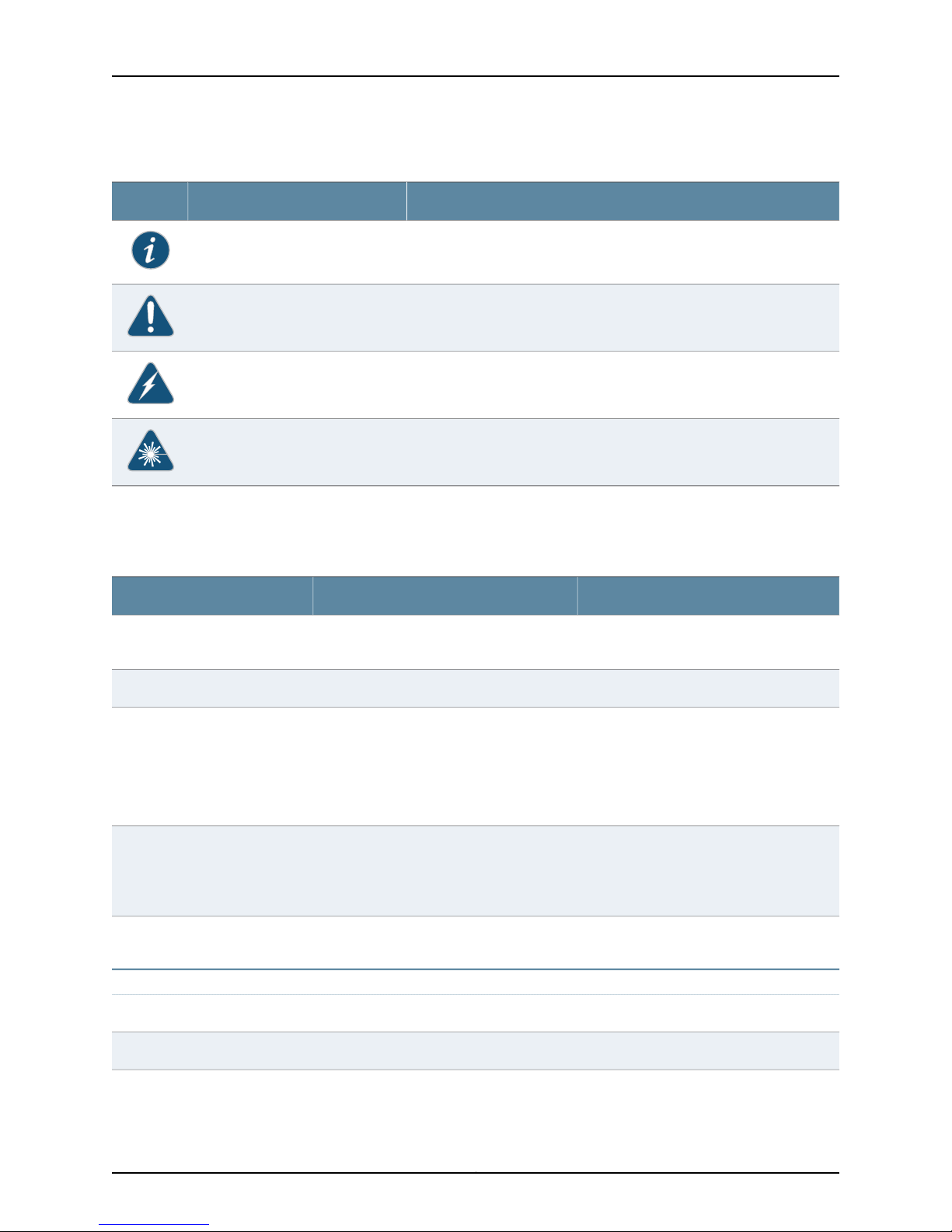
JunosE 11.3.x Multicast Routing Configuration Guide
Table 1: Notice Icons
Table 2 on page xx defines text and syntax conventions that we use throughout the
E Series and JunosE documentation.
DescriptionMeaningIcon
Indicates important features or instructions.Informational note
Indicates a situation that might result in loss of data or hardware damage.Caution
Alerts you to the risk of personal injury or death.Warning
Alerts you to the risk of personal injury from a laser.Laser warning
Table 2: Text and Syntax Conventions
Representscommandsand keywordsin text.Bold text like this
Fixed-width text like this
Italic text like this
Plus sign (+) linking key names
Syntax Conventions in the Command Reference Guide
Representsinformationas displayedon your
terminal’s screen.
•
Emphasizes words.
•
Identifies variables.
•
Identifies chapter, appendix, and book
names.
keys simultaneously.
ExamplesDescriptionConvention
•
Issue the clock source command.
•
Specify the keyword exp-msg.
host1(config)#traffic class low-loss1Represents text that the user must type.Bold text like this
host1#show ip ospf 2
Routing Process OSPF 2 with Router
ID 5.5.0.250
Router is an Area Border Router
(ABR)
•
There are two levels of access: user and
privileged.
•
clusterId, ipAddress.
•
Appendix A, System Specifications
Press Ctrl + b.Indicates that you must press two or more
terminal lengthRepresents keywords.Plain text like this
mask, accessListNameRepresents variables.Italic text like this
Copyright © 2010, Juniper Networks, Inc.xx
Page 21

Table 2: Text and Syntax Conventions (continued)
About the Documentation
ExamplesDescriptionConvention
| (pipe symbol)
or variable to the left or to the right of this
symbol. (The keyword or variable can be
either optional or required.)
[ ]* (brackets and asterisk)
that can be entered more than once.
Represent required keywords or variables.{ } (braces)
Obtaining Documentation
To obtain the most current version of all Juniper Networks technical documentation, see
the Technical Documentation page on the Juniper Networks Web site at
http://www.juniper.net/.
To download complete sets of technical documentation to create your own
documentation CD-ROMs or DVD-ROMs, see the Portable Libraries page at
http://www.juniper.net/techpubs/resources/index.html
diagnostic | lineRepresents a choice to select one keyword
[ internal | external ]Represent optional keywords or variables.[ ] (brackets)
[ level1 | level2 | l1 ]*Represent optional keywords or variables
{ permit | deny } { in | out }
{ clusterId | ipAddress }
Copies of the Management Information Bases (MIBs) for a particular software release
are available for download in the software image bundle from the Juniper Networks Web
site athttp://www.juniper.net/.
Documentation Feedback
We encourage you to provide feedback, comments, and suggestions so that we can
improve the documentation to better meet your needs. Send your comments to
techpubs-comments@juniper.net, or fill out the documentation feedback form at
https://www.juniper.net/cgi-bin/docbugreport/. If you are using e-mail, be sure to include
the following information with your comments:
•
Document or topic name
•
URL or page number
•
Software release version
Requesting Technical Support
Technical productsupport isavailable through theJuniper NetworksTechnical Assistance
Center (JTAC). If you are a customer with an active J-Care or JNASC support contract,
xxiCopyright © 2010, Juniper Networks, Inc.
Page 22

JunosE 11.3.x Multicast Routing Configuration Guide
or are covered under warranty, and need post-sales technical support, you can access
our tools and resources online or open a case with JTAC.
•
JTAC policies—For a complete understanding of our JTAC procedures and policies,
review the JTAC User Guide located at
http://www.juniper.net/us/en/local/pdf/resource-guides/7100059-en.pdf .
•
Product warranties—For product warranty information, visit
http://www.juniper.net/support/warranty/ .
•
JTAC hours of operation—The JTAC centers have resources available 24 hours a day,
7 days a week, 365 days a year.
Self-Help Online Tools and Resources
For quick and easy problem resolution, Juniper Networks has designed an online
self-service portal called the Customer Support Center (CSC) that provides you with the
following features:
•
Find CSC offerings: http://www.juniper.net/customers/support/
•
Search for known bugs: http://www2.juniper.net/kb/
•
Find product documentation: http://www.juniper.net/techpubs/
•
Find solutions and answer questions using our Knowledge Base: http://kb.juniper.net/
•
Download the latest versions of software and review release notes:
http://www.juniper.net/customers/csc/software/
•
Search technical bulletins for relevant hardware and software notifications:
https://www.juniper.net/alerts/
•
Join and participate in the Juniper Networks Community Forum:
http://www.juniper.net/company/communities/
•
Open a case online in the CSC Case Management tool: http://www.juniper.net/cm/
To verifyservice entitlement by product serialnumber, use our Serial Number Entitlement
(SNE) Tool: https://tools.juniper.net/SerialNumberEntitlementSearch/
Opening a Case with JTAC
You can open a case with JTAC on the Web or by telephone.
•
Use the Case Management tool in the CSC at http://www.juniper.net/cm/ .
•
Call 1-888-314-JTAC (1-888-314-5822 toll-free in the USA, Canada, and Mexico).
For international or direct-dial options in countries without toll-free numbers, see
http://www.juniper.net/support/requesting-support.html .
Copyright © 2010, Juniper Networks, Inc.xxii
Page 23

PART 1
Internet Protocol Version 4
•
Configuring IPv4 Multicast on page 3
•
Configuring IGMP on page 43
•
Configuring PIM for IPv4 Multicast on page 79
•
Configuring DVMRP on page 123
1Copyright © 2010, Juniper Networks, Inc.
Page 24

JunosE 11.3.x Multicast Routing Configuration Guide
Copyright © 2010, Juniper Networks, Inc.2
Page 25

CHAPTER 1
Configuring IPv4 Multicast
IPv4 multicast enables a device to send packets to a group of hosts rather than to a list
of individual hosts. This chapter describes how to configure IP multicast on the E Series
router; it contains the following sections:
•
IPv4 Multicast Overview on page 3
•
Platform Considerations on page 5
•
References on page 6
•
Before You Begin on page 6
•
Configuring the Switch Fabric Bandwidth on page 6
•
Enabling IP Multicast on page 6
•
Defining Static Routes for Reverse-Path Forwarding on page 7
•
Displaying Available Routes for Reverse-Path Forwarding on page 7
•
Enabling and Disabling RPF Checks on page 9
•
Using Unicast Routes for RPF on page 9
•
Defining Permanent IP Multicast Forwarding Entries on page 10
•
Defining a Multicast Bandwidth Map on page 10
•
Configuring Multicast QoS Adjustment on page 15
•
Activating Multicast QoS Adjustment Functions on page 17
•
Configuring Hardware Multicast Packet Replication on page 17
•
Blocking and Limiting Multicast Traffic on page 25
•
Deleting Multicast Forwarding Entries on page 29
•
Monitoring IP Multicast Settings on page 30
•
BGP Multicasting on page 39
•
Investigating Multicast Routes on page 40
IPv4 Multicast Overview
IPv4 defines three types of addresses: unicast, broadcast, and multicast. Each type of
address enables a device to send datagrams to selected recipients:
•
A unicast address enables a device to send a datagram to a single recipient.
3Copyright © 2010, Juniper Networks, Inc.
Page 26

JunosE 11.3.x Multicast Routing Configuration Guide
•
A broadcastaddress enables adevice to senda datagram to allhosts ona subnetwork.
•
A multicast address enables a device to send a datagram to a specified set of hosts,
known as a multicast group, in different subnetworks.
Multicast IP packets contain a class D address in the Destination Address fields of their
headers. Aclass D address is the IP address of a multicast group. See “Configuring IGMP”
on page 43 and JunosE IP, IPv6, and IGP Configuration Guide, for information about class
D addresses.
IP multicast improves network efficiency by enabling a host to transmit a datagram to
a targeted group of receivers. For example, for a host to send a large video clip to a group
of selected recipientswouldbe time-consumingto unicast the datagram to each recipient
individually. If the host broadcasts the video clip throughout the network, network
resources are not available for other tasks. The host uses only the resources it needs
when multicasting the datagram.
Routers use multicast routing algorithms to determine the best route and transmit
multicast datagrams throughout the network. E Series routers support a number of IP
multicast protocols on virtual routers (VRs). Each VR handles the interoperability of IP
multicast protocols automatically. To start multicast operation on a VR, you access the
context for that VR and configure the desired protocols on the selected interfaces. Table
3 on page 4 describes the function of each protocol that the router supports.
Table 3: Function of Multicast Protocols on a Router
ProtocolIndependent Multicast Protocol (PIM)
Distance Vector Multicast Routing Protocol
(DVMRP)
BGP Multicasting Protocol
The router supports up to 16,384 multicast forwarding entries (multicast routes) at any
time.
Reverse-Path Forwarding
IP multicasting uses reverse path forwarding (RPF) to verify that a router receives a
multicast packet on the correct incoming interface. The RPF algorithm enables a router
to accept a multicast datagram only on the interface from which the router sends a
unicast datagram to the source of the multicast datagram.
When the router receives a multicast datagram from a source for a group, the router
verifies that the packet was received on the correct RPF interface. If the packet was not
FunctionProtocol
Discovers hosts that belong to multicast group.Internet Group Membership Protocol (IGMP)
Discovers other multicast routers to receive
multicast packets.
Routes multicast datagrams within
autonomous systems.
Routes multicast datagrams between
autonomous systems.
Copyright © 2010, Juniper Networks, Inc.4
Page 27

received on the correct interface, the router discards the packet. Only packets received
on the correct RPF interface are considered for forwarding to downstream receivers.
When operating in sparse-mode, the routers perform an RPF lookup to identify the
upstream router from which to request the data and then send join messages for the
multicast stream only to that router.
When operating in dense-mode, routers that have multiple paths to the source of the
multicast stream initially receive the same stream on more than one interface. In this
case, the routers perform an RPF lookup to identify multicast data streams that are not
arriving on the best path and send prune messages to terminate these flows.
The RPF lookup need not always be towards the source of the multicast stream. The
lookup is done towards the source only when the router is using a source-rooted tree to
receive the multicast stream. If the router uses a shared tree instead, the RPF lookup is
toward a rendezvous point and not toward the source of the multicast stream.
Multicast Packet Forwarding
Multicast packet forwarding is based on the source (S) of the multicast packet and the
destination multicast group address (G). Foreach (S,G) pair, the router accepts multicast
packetson an incoming interface(IIF), whichsatisfies the RPF check (RPF-IIF). The router
drops packets received on IIFs other than the RPF-IIF and notifies the routing protocols
that a packet was received on the wrong interface.
Chapter 1: Configuring IPv4 Multicast
The router forwards packets receivedon theRPF-IIF to alist of outgoing interfaces (OIFs).
The list of OIFs is determined by the exchange of routing information and local group
membership information. The router maintains mappings of (S,G, IIF) to {OIF1, OIF2…}
in the multicast routing table.
You can enable two or more multicast protocols on an IIF. However, only one protocol
can forward packets on that IIF. The protocol that forwards packets on an IIF owns that
IIF.A multicast protocol that owns anIIF also owns the (S,G) entry in the multicast routing
table.
Platform Considerations
For information about modules that support IP multicasting on the ERX7xx models,
ERX14xx models, and the Juniper Networks ERX310 Broadband Services Router:
•
See ERX Module Guide, Table 1, Module Combinations for detailed module specifications.
•
See ERX Module Guide, Appendix A, Module Protocol Support for information about the
modules that support IP multicasting.
For information about modules that support IP multicasting on the Juniper Networks
E120 and E320 Broadband Services Routers:
•
See E120 and E320 Module Guide, Table 1, Modules and IOAs for detailed module
specifications.
•
See E120 and E320 Module Guide, Appendix A, IOA Protocol Support for information
about the modules that support IP multicasting.
5Copyright © 2010, Juniper Networks, Inc.
Page 28

JunosE 11.3.x Multicast Routing Configuration Guide
References
For more information about IP multicast, see the following resources:
•
A “traceroute” Facility for IPMulticast—draft-ietf-idmr-traceroute-ipm-07.txt(January
2001 expiration)
•
RFC 2858—Multiprotocol Extensions for BGP-4 (June 2000)
•
RFC 2932—IPv4 Multicast Routing MIB (October 2000)
•
RFC 3292—General Switch Management Protocol (GSMP) V3 (June 2002)
NOTE: IETF drafts are valid for only 6 months from the date of issuance.
They must be considered as works in progress. Refer to the IETF Web site
at http://www.ietf.org for the latest drafts.
Before You Begin
You can configure multicasting on IPv4 and IPv6 interfaces.
For information about configuring IP and IPv6 interfaces, see JunosE IP, IPv6, and IGP
Configuration Guide.
For information about configuring multicast on IPv6 interfaces, see “Configuring IPv6
Multicast” on page 143.
Configuring the Switch Fabric Bandwidth
By default, the switch fabric for the Juniper Networks ERX1440, ERX310, E120, and E320
Broadband Services Routers uses a bandwidth weighting ratio of 15:2 for
multicast-to-unicast weighted round robin(WRR). In the absence of strict-prioritytraffic,
and when both unicast and multicast traffic compete for switch fabric bandwidth, the
switch fabric allocates15/17ths of the available bandwidth to multicasttraffic and 2/17ths
of the available bandwidth to unicast traffic.
You can use the fabric weights command to change the ratio for multicast-to-unicast
traffic on the router switch fabric. For more information about the fabric weights
command, see JunosE System Basics Configuration Guide.
Enabling IP Multicast
In thisimplementation,IP multicast works on virtual routers (VRs).By default,IP multicast
is disabled on a VR. To enable IP multicast on a VR, access the context for a VR, and then
issue the ip multicast-routing command.
ip multicast-routing
Copyright © 2010, Juniper Networks, Inc.6
Page 29

• Use to enable IP multicast routing on the VR.
• By default, IP multicast is disabled on the VR. In the disabled state, all multicast
protocols are disabled, and the VR forwards no multicast packets.
• Example
host1(config)#ip multicast-routing
• Use the no version to disable IP multicast routing on the VR (the default).
• See ip multicast-routing.
Defining Static Routes for Reverse-Path Forwarding
Use the ip rpf-route command to define reverse-path forwarding (RPF) to verify that a
router receives a multicast packet on the correct incoming interface.
ip rpf-route
• Use to customize static routes that the router may use for RPF.
Chapter 1: Configuring IPv4 Multicast
• Specify the IP address and subnet mask of the destination network.
• Specify eithera next-hop IPaddressor aninterfacetype and specifier, such as atm 3/0.
For details about interface types and specifiers, see Interface Types and Specifiers in
JunosE Command Reference Guide.
• Optionally, specify the distance (number of hops) to the next-hop address.
• Optionally, specify a route's tag number to identify a particular route in the routing
table.
• Example
host1(config)#ip rpf-route 11.1.0.0 255.255.0.0 atm4/1.1 56 tag 25093
• Use the no version to remove the static route.
• See ip rpf-route.
Displaying Available Routes for Reverse-Path Forwarding
Use the show ip rpf-route command to display all available routes, only the routes to a
particular destination, orroutes associatedwith a specific unicast protocol that therouter
can use for Reverse-Path Forwarding (RPF).
show ip rpf-route
• Use to display routes that the router can use for RPF.
• Specify the IP address and the network mask toview routes to a particular destination.
• Specify a unicast routing protocol to view routes associated with that protocol.
• Field descriptions
7Copyright © 2010, Juniper Networks, Inc.
Page 30

JunosE 11.3.x Multicast Routing Configuration Guide
• Prefix—Value of the logical AND of the IP address of the destination network and
the subnet address
• Length—Length of the subnet mask in bits
• Type—Protocol type for the interface
• Connect—Subnet directly connected to the interface
• Static—Static route
• protocol-name—Route learned through the named protocol
• Next Hop—IP address of the next hop for this route
• Dist—Distance configured for this route
• Met—Learned or configured cost associated with this route
• Intf—Type of interface and interface specifier for the next hop. For details about
interfacetypes and specifiers,seeInterface Types andSpecifiersin JunosECommand
Reference Guide.
• Example 1
host1#show ip rpf-route
Protocol/Route type codes:
I1- ISIS level 1, I2- ISIS level2,
I- route type intra, IA- route type inter, E- route type external,
i- metric type internal, e- metric type external,
O- OSPF, E1- external type 1, E2- external type2,
N1- NSSA external type1, N2- NSSA external type2
L- MPLS label, V- VR/VRF, *- indirect next-hop
Prefix/Length Type Next Hop Dist/Met Intf
------------- ---- -------- -------- ------
10.10.0.112/32 Static 192.168.1.1 1/1 fastEthernet0/0
10.1.1.0/24 Connect 10.1.1.1 0/1 atm3/0.100
25.25.25.25/32 Connect 25.25.25.25 0/1 loopback0
• Example 2
host1#show ip rpf-route static
Protocol/Route type codes:
I1- ISIS level 1, I2- ISIS level2,
I- route type intra, IA- route type inter, E- route type external,
i- metric type internal, e- metric type external,
O- OSPF, E1- external type 1, E2- external type2,
N1- NSSA external type1, N2- NSSA external type2
L- MPLS label, V- VR/VRF, *- indirect next-hop
Prefix/Length Type Next Hop Dist/Met Intf
------------- ---- -------- -------- --------------
10.10.0.112/32 Static 192.168.1.1 1/1 fastEthernet0/0
• See show ip rpf-route.
Copyright © 2010, Juniper Networks, Inc.8
Page 31

Enabling and Disabling RPF Checks
By default, the router accepts multicast packets for each Source, Group (S,G) pair on an
incoming interface (IIF), whichsatisfies the RPF check (RPF-IIF).When therouter performs
RPF checks, only the interface that first accepts traffic for an (S,G) pair accepts
subsequent traffic for that pair. If trafficstops arrivingon thatinterfaceand startsarriving
on another interface, the router does not accept or forward the traffic.
Some network configurations require the router to accept traffic on any interface. To do
so, you can disable the RPF check on a specified set of (S,G) pairs by issuing the ip
multicast-routing disable-rpf-check command.
When you disable RPF checks, the router accepts multicast packets for (S,G) pairs on
any incoming interface. When the router has added the new route to its multicast routing
table, it then accepts multicast packets for these pairs on any interface in the virtual
router and forwards them accordingly. Multicast routes established before you issue this
command are not affected.
Chapter 1: Configuring IPv4 Multicast
ip multicast-routing disable-rpf-check
• Use to disable RPF checks for specified (S,G) pairs.
• Specify a standard IP access list that defines the (S,G) pairs.
• Example
host1(config)#ip multicast-routing disable-rpf-check boston-list
• Use the no version to restore the default, in which the router performs RPF checks for
all (S,G) pairs.
• See ip multicast-routing disable-rpf-check.
Using Unicast Routes for RPF
You can specify that IS-IS, OSPF, or RIP routes be available for RPF. Routes available for
RPF appear in the multicast view of the routing table.
ip route-type
• Use to specify whether IS-IS, OSPF, or RIP routes are available only for unicast
forwarding, only for multicast RPF checks, or for both.
• Use the show ip rpf-routes command to view the routes available for RPF.
• By default, IS-IS, OSPF, and RIP routes are available both for unicast forwarding and
multicast reverse-path forwarding checks.
• Example
host1(config)#router ospf
host1(config-router)#ip route-type multicast
9Copyright © 2010, Juniper Networks, Inc.
Page 32

JunosE 11.3.x Multicast Routing Configuration Guide
• There is no no version.
• See ip route-type.
Defining Permanent IP Multicast Forwarding Entries
An mroute is a multicasttraffic flow (a (Source, Group) entry usedfor forwarding multicast
traffic). By default, forwarding mroutes (with a valid RPF incoming interface) are timed
out if data for them is not received for 210 seconds. However, you can specify an mroute
as permanent by using the ip multicast-routing permanent-mroute command.
ip multicast-routing permanent-mroute
• Use to specify that any newly created mroutes that match the specified access-list
do not time out.
• Using this command does not change existing mroutes.
• Permanent mroutes are removed if a topology change occurs that affects the mroute.
• Permanent mroutes may be removed due to certain protocol actions (for example,
PIM sparse-mode switching from shared to shortest-path tree).
• Outgoing interface lists of permanent mroutes may change due to protocol actions.
• Example
host1(config)#ip multicast-routing permanent-mroute routes1
• Use the no version to prevent any new mroutes from becoming permanent. To remove
existing permanent mroutes, use the clear ip mroute command.
• See ip multicast-routing permanent-mroute.
Defining a Multicast Bandwidth Map
Multicast interface-level admission control, port-level admission control, and QoS
adjustment all use a single multicast bandwidth map. The multicast bandwidth map is
a route map that uses the set admission-bandwidth, set qos-bandwidth, set
admission-bandwidth adaptive, or set qos-bandwidth adaptive commands. The
adaptive commands configure an autosense mechanism for measuring the multicast
bandwidth.
NOTE: Even though you can include any of the preceding commands several
times in a route map entry, only the last admission-bandwidth command or
qos-bandwidth command in the bandwidth map is used. In other words, if
you included the set qos-bandwidth command first and then the set
qos-bandwidth adaptive command, the bandwidth map uses the set
qos-bandwidth adaptive command.
Interface-level and port-level admission controlis performed when anOIF onthe interface
or port is added to the mroute for a given (S,G) multicast data stream and the multicast
Copyright © 2010, Juniper Networks, Inc.10
Page 33

Chapter 1: Configuring IPv4 Multicast
bandwidth map contains a set admission-bandwidth or set admission-bandwidth
adaptive action for that (S,G).
QoS adjustmentis performed onthe joininginterface when anOIF isadded to themroute
for a given (S,G) data stream and the multicast bandwidth map contains a set
qos-bandwidth or set qos-bandwidth adaptive action for that (S,G).
You can prioritize the traffic by configuring a priority value for the <S, G> data stream on
a physical port by issuing the set priority command. Dynamicmulticast admissioncontrol
enables only prioritized groups to join the interface after the configured priority limit is
reached on the physical port. The system records the priority when a new <S, G> entry
is created. For more information, see “Enabling Port Admission Bandwidth Control” on
page 28 .
NOTE: You can create a single route map with the set admission-bandwidth
command, the set qos-bandwidth command, or both. However, creating an
entry with only one of these set commands enables only that specific function
for the matched address (that is, only multicast traffic admission control or
only QoS adjustment). The same is true for the adaptive commands.
Using the Autosense Mechanism
Video bandwidth is typically considered to be a constant rate—2 Mbps for standard
definition television (SDTV) and 10 Mbps for high definition television (HDTV). However,
in reality, and depending on achievable video compression, the bit rate can vary. For
example, HDTV streams (using MPEG4 or WM9 encoding) can vary between 6 Mbps
(for low-action programs) to 10 Mbps (for a fast-paced, high-action programs). The
autosense mechanism causes the bandwidth value, used for admission control and QoS
adjustment, to be the actual measured rate of the stream. Using this feature to measure
the actual bandwidthavoids the needto configure arbitrary bandwidth limitsand enables
a channel to be reassigned to a different (S, G) without requiring a bandwidth map to
be changed.
How Adaptive Mode Works
You configure the auto-sense mechanism in the multicast bandwidth using the set
admission-bandwidth adaptive command, set qos-bandwidth adaptive command, or
both. For example:
host1(config)#route-map mcast-bandwidths permit 10
host1(config-route-map)#match ip address sdtv
host1(config-route-map)#set admission-bandwidth adaptive
host1(config-route-map)#set qos-bandwidth adaptive
host1(config-route-map)#end
In this example, any stream with an (S,G) that matches the sdtv access list performs
adaptive bandwidth detection for admission control and QoS adjustment.
A rate measurement mechanism runs on the ingress line card that polls the forwarding
controller (FC) to obtain statistics for each mroute. This mechanism then reports the
rate measurement to the SRP to update the bandwidth map. By computing the average
11Copyright © 2010, Juniper Networks, Inc.
Page 34

JunosE 11.3.x Multicast Routing Configuration Guide
bandwidth over a relatively short sampling period (T1; 5 seconds), the measurement
approximates the peak bandwidth of the multicast stream.
As an example, assume that a new mroute (S1, G1) is added to the interface controller
(IC) at time t0.
Figure 1: Example of Adaptive IPv4 Multicast Bandwidth Detection
To calculatethe measured bandwidth ofa stream, therouteruses the following equation:
R = (N
– Nt) / 5
t+5
Where
R = Calculated bandwidth of the stream during each sampling interval
Nt= Bytes measured at the start of each sampling period (t seconds)
N
= Bytes measured at the end of each sampling period (t+5 seconds)
t+5
NOTE: When the mroute is first installed in the FC (at t = 0), R0is
undetermined. For multicast admission control no joins are admitted until
the first bandwidth measurement is computed (that is, for admission control,
R0 is considered to be infinite). Similarly,no QoS adjustment occurs until the
first bandwidth measurement is computed (that is, for QoS adjustment, R0
is considered to be zero [0]).
Using the previous graph as a reference, the first bandwidth rate (R10) and at time t5(N5)
and the bytes received values are subtracted and divided by the sampling period T1to
yield the average rate. This process is repeated every sampling interval, T2, to yield rates
R1, R2, R3, and so on.
The first two sampling interval calculations are as follows:
R1= (N5- N0)/5
R2= (N
#+5
- N#)/5
Copyright © 2010, Juniper Networks, Inc.12
Page 35

Chapter 1: Configuring IPv4 Multicast
The router maintains a history of bandwidth measurements (H) for each mroute, up to
a maximum of M measurements. The actual rate, R, reportedto the SRP is themaximum
rate measured in those H samples.
To minimize the IC to SRP traffic generated by the rate measurements, the IC reports a
bandwidth change only when a newly computed rate (R#) differs from the current rate
by a specified threshold. When Rsis computed at time t = 5 seconds, R is set to R1. A rate
update occurs whenever anewly calculated rate (R) differs from R1by at least a threshold
value (specified as a percentage, P) of the measured peak bandwidth. This calculation
is as follows:
R = Rt, if and only if the absolute value of (R - Rt) > P * R.
Table 4 on page 13 lists values assigned to variables associated with this algorithm.
Table 4: Adaptive Mode Algorithm Values
DescriptionUnitsValueVariable
Sampling period; the time in which a sample is takenSeconds5T1
Multicast Bandwidth Map Example
The following example creates a multicast bandwidth map for both multicast traffic
admission control and QoS adjustment:
NOTE: In this example, you can replace the set admission-bandwidth
command and set qos-bandwidth command with their adaptive command
counterparts.
1. Define a route-map using the set admission-bandwidth and set qos-bandwidth
commands. You can optionally issue the set priority command.
Seconds0T2
Samples12H
Percent1P
Sampling interval; zero (0) seconds indicatescontinuous
sampling
Number of history samples over which to compute
measurement
Maximum number of samples maintained in historySamples12M
Threshold value; percent difference by which a newly
calculated rate must differ from the measured peak
bandwidth before a rate update occurs
host1(config)#route-map mcast-bandwidths permit 10
host1(config-route-map)#match ip address sdtv
host1(config-route-map)#set admission-bandwidth 2000000
host1(config-route-map)#set qos-bandwidth 2000000
host1(config-route-map)#set priority 100
host1(config-route-map)#route-map mcast-bandwidths permit 20
host1(config-route-map)#match ip address hdtv
13Copyright © 2010, Juniper Networks, Inc.
Page 36

JunosE 11.3.x Multicast Routing Configuration Guide
host1(config-route-map)#set admission-bandwidth 10000000
host1(config-route-map)#set qos-bandwidth 10000000
host1(config-route-map)#set priority 200
host1(config-route-map)#end
2. Define the access list for use by the match ip address command to match (S,G) and
(*,G) entries.
host1(config)#access-list sdtv permit ip host 31.0.0.1 232.0.0.0 0.0.0.255
host1(config)#access-list hdtv permit ip host 32.0.0.1 232.0.0.0 0.0.0.255
host1(config)#access-list hdtv permit ip host 32.0.0.2 232.0.0.0 0.0.0.255
host1(config-route-map)#end
NOTE: You can also define a prefix-list or a prefix-tree for use by the match
ip address command to match (S,G) and (*,G) entries.
For additionalinformationabout configuring QoS adjustment, see “Configuring Multicast
QoS Adjustment” on page 15.
set admission-bandwidth
set priority
For additional information about configuring interface-level and port-level admission
control, see “Blocking and Limiting Multicast Traffic” on page 25.
For additionalinformationabout creating route maps,see JunosE IP Services Configuration
Guide .
• Use to set a multicast bandwidth for admission control.
• Use the adaptive keyword to definethe bandwidthas adaptive (automatically sensed).
• Example
host1(config-route-map)#set admission-bandwidth 2000000
• Use the no version to remove the set clause from a route map.
• See set admission-bandwidth.
• Use to configure a priority value for the <S, G> data stream on a physical port.
• Dynamic multicast admission control enables only prioritized groups to jointhe interface
after the configured priority limit is reached on the physical port. The system records
the priority when a new <S, G> entry is created.
• Example
host1(config-route-map)#set priority 100
• Use the no version to remove the priority value.
• See set priority.
set qos-bandwidth
Copyright © 2010, Juniper Networks, Inc.14
Page 37

• Use to set a multicast bandwidth for QoS adjustment.
• Use the adaptive keyword to definethe bandwidthas adaptive (automatically sensed).
• Example
host1(config-route-map)#set qos-bandwidth 10000000
• Use the no version to remove the set clause from a route map.
• See set qos-bandwidth.
Configuring Multicast QoS Adjustment
When the router uses multicast OIF mapping, any multicast streams that a subscriber
receivesbypassany configured QoS treatment for that subscriber interface. TheMulticast
QoS adjust feature provides a way in which the router can account for this multicast
traffic.
NOTE: For additional information about how to configure OIF mapping, see
“Configuring Group Outgoing Interface Mapping” on page 53.
Chapter 1: Configuring IPv4 Multicast
The following sections provide two possible configuration cases for using multicast QoS
adjustment.
Multicast OIF Mapping Case
Multicast OIF mapping enables the router to decrease the inefficiencies associated with
replicatingstreams of multicast traffic. Using OIF maps, IGMP joins thatthe router receives
on asubscriber interfacecan bemapped to a special interfacefor forwarding. This special
interface can be on a different physical port or line module from that of the join interface.
Using this mapping function, the router can send a single copy of each multicast stream
over the special interface and the access nodes are configured to perform any final
replication to the subscribers and merge unicast and multicast data flows onto the
subscriber interfaces as necessary. See Figure 2 on page 16.
NOTE: For additional information about QoS adjustment, see IP Multicast
Bandwidth Adjustment for QoS Overview .
15Copyright © 2010, Juniper Networks, Inc.
Page 38

JunosE 11.3.x Multicast Routing Configuration Guide
Figure 2: Multicast OIF Mapping
One disadvantage to using multicast OIF mapping is that the multicast traffic bypasses
any QoS treatment that is applied to subscriber interfaces. Configuring QoS adjustment
resolves this problem. (See Parameter Definition Attributes for QoS Administrators
Overview for additional information about configuring QoS adjustment.) With QoS
adjustment configured, when a subscriber requests to receive a multicast stream (or,
more appropriately, when an OIF is added to the mroute), the router reduces the unicast
QoS bandwidth applied to the subscriber interface (that is, the join interface) by the
amount of bandwidth for that multicast stream.
Multicast Traffic Receipt Without Forwarding
In this case, the router is not given the responsibility of forwarding multicast streams.
Instead, the service provider arranges for the router to receive the multicast streams so
the routercan detect the flow and perform QoS adjustment. An OIF map is installed that
maps the traffic streams to a loopback interface configured for IGMP version passive.
This means that when the traffic is received, a null mroute is installed (that is, an mroute
with an empty OIF list) and the router applies the QoS adjustment to the join interface.
See Figure 3 on page 17.
NOTE: Ensure that PIM-SM (or any other upstream multicast protocol) is
informed of the group (or source-group) interest.
Copyright © 2010, Juniper Networks, Inc.16
Page 39

Chapter 1: Configuring IPv4 Multicast
Figure 3: Multicast Traffic Receipt Without Forwarding
Activating Multicast QoS Adjustment Functions
The ip multicast-routing bandwidth-map command activates the specified bandwidth
map. By activating the bandwidth map, this command also activates the multicast QoS
adjustment function contained in the bandwidth map.
CAUTION: To activate multicast QoS adjustment, you must first create a
bandwidth map. See “Defining a Multicast Bandwidth Map” on page 10 for
details.
ip multicast-routing bandwidth-map
• Use to activate the QoS adjust function on the router.
• Example
host1(config)#ip multicast-routing bandwidth-map mcast-bandwidths
• Use the no version to disable the multicast QoS adjustment function on the router.
• See ip multicast-routing bandwidth-map.
Configuring Hardware Multicast Packet Replication
You can configure IPv4 multicast to replicate packets to optimized hardware on a logical
port instead of using the forwarding controller (FC) on the router.
17Copyright © 2010, Juniper Networks, Inc.
Page 40

JunosE 11.3.x Multicast Routing Configuration Guide
The bandwidth betweenthe linemodule and the I/O module or IOA onthe ESeries router
is limited. A high-density Ethernet moduleprovideseight physical ports thatcan consume
the bandwidth between the line module and the I/O module or IOA before providing
enough traffic to support egress line rate for all of these ports.
Figure 4 on page 18displays how multicasttraffic is typically replicatedon theline module.
Each of these replicated packets is transmitted from the line module to the I/O module
or IOA.
Figure 4: Packet Flow Without Hardware Multicast Packet Replication
The hardware multicast packet replication feature enables you to configure multicast
traffic for a VLAN or S-VLAN to be replicated on the I/O module or IOA so that only one
copy of the packet is transmitted from the line module to the I/O module or IOA.
Replication for each of the ports is performed on the I/O module or IOA.
Configuring hardware multicast packet replication for high-density Ethernet is useful
when you want to provide the same multicast stream out of some or all of the ports,
such as for IPtelevision(IPTV). Configuring hardware multicast packet replication enables
you to:
Copyright © 2010, Juniper Networks, Inc.18
Page 41

•
Reduce the number of packets sent from the FC to the module.
•
Reduce the CPU consumed by the FC processing each elaboration of the packet.
You can use the additional bandwidth to increase the bandwidth of multicast traffic out
of each of the Gigabit Ethernet ports.
Figure 5 on page 19 displays the flow of a multicast packet using the hardware multicast
packet feature.
Figure 5: Packet Flow with Hardware Multicast Packet Replication
Chapter 1: Configuring IPv4 Multicast
Each high-density Ethernet module has eight physical ports, numbered 0–7. A logical
port is available for the hardware multicast packet replication feature, numbered port
8.
JunosE tracks the OIFs in an mroute that have been redirected to use the hardware
multicast packet replication hardware. The system accepts only egress multicast traffic
to traverse the interface stack on the enabled port. The system drops unicast traffic that
is routed to this port.
19Copyright © 2010, Juniper Networks, Inc.
Page 42

JunosE 11.3.x Multicast Routing Configuration Guide
Each port on the I/O module or IOA displayed in Figure 5 on page 19 has two queues.
These queues arefurther down theegresspath than thequeues found on theline module
and populated by the FC.
The low-priority queue is dedicated to packets that are received from the line module
queues that are dedicated to thephysicalports. This queue blocks when full and provides
backpressure to the line module. This queue services unicast and multicast traffic that
is not using the hardware multicast packet replication feature.
The high-priority queue is dedicated to packets that are received from the line module
queue for port 8. This queue is serviced at a higher prioritythan the first queue, and drops
packets when full.
For more information about high-density Ethernet, see Configuring Ethernet Interfaces in
the JunosE Physical Layer Configuration Guide.
Supported Modules and Encapsulations
You can enable hardware multicast packet replication on port 8 of the following
high-density Ethernet modules:
•
GE-8 I/O module (pairs with the GE-HDE line module)
•
ES2-S1 GE-8 IOA (pairs with the ES2 4G LM and the ES2 10G LM)
When enabled, the hardware multicast packet replication feature defines the
encapsulationof theegressmulticastpacket.The following encapsulationsare supported:
•
IPv4 over Gigabit Ethernet
•
IPv4 over VLAN
•
IPv4 over S-VLAN
NOTE: 802.3ad link aggregation group (LAG) bundles do not support
hardware multicast packet replication.
The hardware multicast packet replication feature also provides an interface over which
you can configure the following:
•
IP MTU
•
Ethernet MTU
•
Egress IP policy
•
Egress VLAN policy
•
QoS
Copyright © 2010, Juniper Networks, Inc.20
Page 43

Relationship with OIF Mapping
Multicast OIF mapping enables the router to decrease the inefficiencies associated with
replicatingstreams of multicast traffic. Using OIF maps, IGMP joins thatthe router receives
on a subscriber interface can be mapped to a dedicated multicast VLAN.
The hardware multicast packet replication feature enables you to redirect each of the
IP interfaces on a line module over a dedicated multicast VLAN to a single IP interface
over port 8. The FC is only required to send a single packet per dedicated multicast VLAN
to the I/Omodule or IOA.The module thenreplicates thispacketto the appropriate ports.
For more information about configuring OIF mapping, see “Configuring Group Outgoing
Interface Mapping” on page 53 in “Configuring IGMP” on page 43.
Hardware Multicast Packet Replication Considerations
When configuring hardware multicast packet replication, the following considerations
apply.
•
Do not configure or transmit routing protocols over port 8. The FC drops traffic routed
to an IP interface stacked over port 8.
Chapter 1: Configuring IPv4 Multicast
•
We recommend that you configure the IP address of the IP interface over port 8 to be
unnumbered.
•
We recommend that you configure an IP interface over aVLAN over one of the physical
ports to reference the IP interface over the same VLAN over port 8.
You cannot create the following configurations:
•
When two IP interfaces configured over a port reference the same IP interface over
port 8. The system does not accept this configuration attempt because you typically
configure the hardware multicast packet replication feature to redirect multicast
traffic over one VLAN, then redirect it to the same VLAN on port 8.
•
When the IP interface configured with the hardware multicast packet replication
attribute is not installed on a line module that supports hardware multicast packet
replication.
•
When the IP interface designated by the hardware multicast packet replication
attribute is not installed on a line module that supports hardware multicast packet
replication.
•
When the IP interface designated by the hardware multicast packet replication
attribute is not on the same line module as the IP interface configured with this
attribute.
•
When you configure a unique source MAC address for VLANs on port 8, the hardware
multicast packet replication hardware stamps the source MAC address on the VLAN,
overwriting any MAC address that you configured.For moreinformation,see Configuring
Ethernet Interfaces in the JunosE Physical Layer Configuration Guide.
•
The regular multicast implementation utilizes interface stackingthat provides aunique
IP attachment point for each elaboration of the egress multicast packet.
21Copyright © 2010, Juniper Networks, Inc.
Page 44

JunosE 11.3.x Multicast Routing Configuration Guide
For the hardware multicast packet replication feature, you must attach policies to an
interfacestack over port8 that defines theencapsulationof theegress multicast traffic.
The system supports policies over port 8 just as it is above any of the other ports on
this line module.
Policies applied to the interface stack over port 8 affect the packets traversing this
stack whether or not the packet is destined for one port or all of the physical ports.
Therefore, you cannot apply different egress policies to multicast traffic for the
interfaces stacked above different ports, or rate limit on an individual interface over a
port. You also cannot monitor policy statistics on individual interfaces over a port.
Instead, you can apply egress policy to an interface stacked over port 8. The system
applies the policy before the packet has been elaborated for each of the ports.
•
The JunosE QoS component provides hierarchical egress scheduling and shaping on
Gigabit Ethernet ports 0–7. The regular multicast implementation replicates packets
on the FC, with each replicated packet placed on a line module queue destined for a
single physical port. The line module queue can also receive QoS behavior specific to
that queue.
For the hardware multicast packet replication feature, the FC does not replicate the
packet for each of the individual ports. Instead, it places the packet on a special queue
destined for port 8.
You can configure QoS on the packetsflowing through port8, butthis haslimited value
because each packet passed through this port can betransmittedthrough oneof more
of the physical ports. Therefore, the packets placed on this special queue might not
receive the same QoS behavior as ports 0–7.
We recommend that you configure the network so the I/O or IOA queues are not
oversubscribed. The traffic transmittedby the physical port isa combination of packets
from the twoI/O or IOA queues. When thesum of the packets in thesequeues is greater
than line rate, the system can drop traffic that is not using hardware multicast packet
replication.
When you configure a traffic shaperon aphysicalport andconfigure hardware multicast
packet replication, the packets created using the feature avoid the traffic shaper for
that port. To control this, you can use traffic shaper on the physical port and port 8.
The sum of the traffic shapers must be less than or equal to the line rate of the port.
A traffic shaper on port 8 can result in the overall utilization of egress bandwidth for
any one port being less the line rate because the packets being replicated might not
be transmitted to every port. Packets destined to some of the ports contribute to the
traffic shaping for all of the ports on the I/O module or IOA.
Configuring Hardware Multicast Packet Replication
To configure hardware multicast packet replication:
1. Configure port 8 on a high-density Ethernet module to accept redirected egress
multicast traffic.
a. Specify the Gigabit Ethernet interface on port 8.
b. Create a VLAN major interface.
Copyright © 2010, Juniper Networks, Inc.22
Page 45

Chapter 1: Configuring IPv4 Multicast
c. Create a VLAN subinterface.
d. Assign a VLAN ID.
e. Configure an unnumbered IP interface.
f. Enable IGMP on the interface with only multicast-data-forwarding capability.
host1(config)#interface gigabitEthernet 2/8
host1(config-if)#encapsulation vlan
host1(config-if)#interface gigabitEthernet 2/8.1
host1(config-if)#vlan id 1
host1(config-if)#ip unnumbered loopback 0
host1(config-if)#ip igmp version passive
2. Configure an IP interface to redirect egress multicast traffic to port 8.
a. Create a VLAN subinterface.
b. Assign a VLAN ID.
c. Assign an IP address.
encapsulation vlan
ip igmp version
d. Configure the interface to redirect egress multicast traffic to port 8.
host1(config)#interface gigabitEthernet 2/0.101
host1(config-if)#vlan id 1
host1(config-if)#ip address 10.1.1.1 255.255.255.0
host1(config-if)#ip multicast ioa-packet-replication gigabitEthernet 2/8.1
• Use to configure VLAN as the encapsulation method for the interface.
• Example
host1(config-if)#encapsulation vlan
• Use the no version to disable VLAN on an interface.
• See encapsulation vlan.
• Use to set the IGMP version (1, 2, or 3) for the interface or specify a passive interface
with only multicast-data-forwarding capability (passive).
• Example
host1:boston(config-if)#ip igmp version passive
• Use the no version to set the version to the default, IGMPv2.
• See ip igmp version.
ip multicast ioa-packet-replication
• Use to configure hardware multicast packet replication on port 8 of a high-density
Ethernet module.
• Example
23Copyright © 2010, Juniper Networks, Inc.
Page 46

JunosE 11.3.x Multicast Routing Configuration Guide
host1(config-if)#ip multicast ioa-packet-replication gigabitEthernet 3/8.1
• Use the no version to disable hardware multicast packet replication.
• See ip multicast ioa-packet-replication.
ip unnumbered
• Use to configure an unnumbered IP interface.
• This command enables IP processing on an interface without assigning an explicit IP
address to the interface.
• You must specify an interface location, which is the identifier of another interface on
which the router has an assigned IP address. This interface cannot be another
unnumbered interface.
• Example
host1(config-if)#ip unnumbered loopback 10
• Use the no version to disable IP processing on the interface.
• See ip unnumbered.
Configuring Hardware Multicast Packet Replication with OIF-Mapping
This section describes how to configure hardware multicast packet replication with
OIF-mapping.
1. Configure port 8 on a supported high-density Ethernet module to accept redirected
egress multicast traffic. For the procedure see “ConfiguringHardware MulticastPacket
Replication” on page 22. For information about supported high-density Ethernet
modules see “Supported Modules and Encapsulations” on page 20.
2. Use OIF maps to map the subscriber IGMP interfaces (C-VLANs) to the dedicated
multicast VLAN (M-VLAN). The dedicated M-VLAN should be located on the line
module containing the IOA replication interface. The C-VLAN and M-VLAN can either
be on the same or different line modules. For information about configuring OIF
mapping see “Configuring Group Outgoing Interface Mapping” on page 53.
3. Configure the dedicated M-VLAN to redirect egress multicast traffic to port 8. For the
procedure see “Configuring Hardware Multicast Packet Replication” on page 22.
Monitoring Hardware Multicast Packet Replication
This section describes how to monitor hardware multicast packet replication.
Port Statistics
Use the show interfaces gigabitEthernet command to display port statistics for port 8.
For port 8, queue statistics have no direct relationship to any of the 8 ports because each
packet transmitting through the queue can be sent through 1 or more of the 8 physical
ports. For more information, see Monitoring Ethernet Interfaces in the JunosE Physical
Layer Configuration Guide.
Copyright © 2010, Juniper Networks, Inc.24
Page 47

Chapter 1: Configuring IPv4 Multicast
IP and VLAN Statistics
Use the show vlan subinterface command to display statistics for a VLAN interface
configured over port 8. For more information, see Monitoring Ethernet Interfaces in the
JunosE Physical Layer Configuration Guide.
Use the show ip interface command to display statistics for an IP interface configured
over port 8. For more information, see Monitoring IP in the JunosE IP, IPv6, and IGP
Configuration Guide.
Multicast traffic redirected by the hardware multicast packet replication feature is
displayed in the statistics for the IP or VLAN interface over port 8, not the original IP or
VLAN interface over the physical port.
The statistics for the IP or VLAN interface over port 8 reflect the number of packets that
passed through this interface destined for the hardware multicast packet replication
hardware. These statistics have no direct correlation to the number of packets being
transmitted from any of the physical ports.
IGMP Statistics
Use the show ip igmp interface command to display statistics, including hardware
multicast packet replication configuration, for an IP interface stacked over port 8. For
more information, see “Monitoring IGMP” on page 61 in “Configuring IGMP” on page 43.
Blocking and Limiting Multicast Traffic
You can either block mroute creation, limit the multicast bandwidth admitted on an
outgoing interface, or limit outgoing interface creation on a port.
Blocking Mroutes
By default, when an interface that is configured with one or more multicast protocols
(for example, PIM or IGMP) receives multicast traffic, even when the scope of that traffic
exceeds link-local, the virtual router creates an mroute. You can use the ip
block-multicast-sources command to block allmulticasttrafficwith a scope larger than
link-local (for example, global) and prevent mroute creation under these conditions.
NOTE: Issuing this command does not affectreception of link-local multicast
packets.
ip block-multicast-sources
• Use to prevent mroute creation by blocking multicast traffic that has a scope larger
than link-local (for example, global).
• Example
host1(config-if)#ip block-multicast-sources
25Copyright © 2010, Juniper Networks, Inc.
Page 48

JunosE 11.3.x Multicast Routing Configuration Guide
• Use the no version to restore the default behavior of creating mroutes on received
multicast packets.
• See ip block-multicast-sources.
Limiting Interface Admission Bandwidth
Interface-level multicast admission control is performed when an OIF on the interface
is added to the mroute for a given (S,G) multicast data stream and the multicast
bandwidth map contains a set admission-bandwidth action for that (S,G).
When enabled, the admission-bandwidth fora particular (S,G) is read from the multicast
bandwidth map and recorded in the mroute when the (S,G) mroute is created. When an
OIF is subsequently added to the mroute, the OIF is blocked from forwarding data if the
additional bandwidth contributed by the (S,G) would exceed the admission-bandwidth
limit for the interface.
CAUTION: Before you can limit interface-level admission bandwidth, you
must first create a bandwidth map. See “Defining a Multicast Bandwidth
Map” on page 10 for details.
Enabling Interface Admission Bandwidth Limitation
You can use the ip multicast admission-bandwidth-limit command to enablemulticast
admission control on interfaces (including dynamic IP interfaces) that are configured to
run IGMP. You can also use this command on a PIM (sparse-mode, dense-mode, or
sparse-dense-mode) interface if IGMP is configured on the interface (including the ip
igmp version passive command).
ip multicast admission-bandwidth-limit
• Use to limit bandwidth for an interface that accepts IGMP groups.
• Example
host1:boston(config-if)#ip multicast admission-bandwidth-limit 2000000
• Use the no version to remove the bandwidth limitation for the interface.
• See ip multicast admission-bandwidth-limit.
OIF Interface Reevaluation Example
If you change the admission bandwidth for an interface, all mroutes with that interface
as an OIF are reevaluated as follows:
•
If thebandwidth limitis increased, blocked OIFsmay become unblocked.If theinterface
is a blocked OIF on multiple mroutes, the order in which the mroutes are visited, and
which (S,G) streams become unblocked, is not specified.
•
If the bandwidth limit is decreased, no currently admitted OIFs are blocked. However,
no new OIFs are admitted until the total admitted bandwidth for the interface drops
below the new limit.
Copyright © 2010, Juniper Networks, Inc.26
Page 49

Chapter 1: Configuring IPv4 Multicast
•
If the bandwidth is increased to the point that the bandwidth limit for an interface is
now exceeded, no currently admitted OIFs for the affected mroutes are blocked.
However, no new OIFs are admitted until the total admitted bandwidth drops below
the configured limit.
NOTE: If the multicast bandwidth map that includes the set
admission-bandwidth command is changed, all affected mroutes are
reevaluated in the same manner described previously.
As an example of this function, if the interface has accepted a total bandwidth of
2000000 bps, and you set a limit of 1000000 bps on the interface, the router does not
disconnect any already connected OIFs but prevents the interfaces from accepting any
more groups. Over time, some groups leave the interfaces and, eventually, the interface
limit of 1000000 bps is reached and maintained by the router.
If you set limits for both a port and interfaces on that port, the router uses the lower of
the two limits when determining whether or not an interface can accept any new IGMP
groups. For example, if you specify an admission bandwidth limit of 2000000 bps for
the port and 3000000 bps groups for each interface, additional groups can only be
accepted until the port limit of 2000000 bps is reached.
Creating Mroute Port Limits
When amulticast forwarding entry (thatis, anmroute) is addedwith anoutgoing interface
(OIF) on a port, the OIF count for that port is incremented. If you configure a port limit,
and theOIF count onthe portexceeds that limit,no OIFson that portare added tomroutes
(that is, OIFs are blocked).
mroute port limit
• Use toconfigurea limiton thenumber ofmroute OIFs thatcan be added across different
virtual routers, on a port.
• Example
host1(config)#mroute port 3/0 limit 10
• Use the no version to remove any OIF port limits.
• See mroute port limit.
Limiting Port Admission Bandwidth
Port-level multicast admission control is performed when an OIF on that port is added
to the mroute for a given (S,G) multicast data stream and the multicast bandwidth map
contains a set admission-bandwidth action for that (S,G).
When enabled, the admission-bandwidth fora particular (S,G) is read from the multicast
bandwidth map and recorded in the mroute when the (S,G) mroute is created. If you
configure a port limit and the OIF count on the port exceeds that limit, no OIFs on that
port are added to mroutes (that is, OIFs are blocked).
27Copyright © 2010, Juniper Networks, Inc.
Page 50

JunosE 11.3.x Multicast Routing Configuration Guide
When a multicast forwarding entry (an mroute) is added with an outgoing interface, OIF
is blocked from forwarding data if the additional bandwidth contributed by the (S,G)
would exceed the admission-bandwidth limit for the port on which the interface resides.
CAUTION: Before you can limit port-level admission bandwidth, you must
first create a bandwidth map. See “Defining a Multicast Bandwidth Map” on
page 10 for details.
Enabling Port Admission Bandwidth Control
You can use the mroute port admission-bandwidth-limit command to limit the total
multicastbandwidth that canbe admitted on a port. Theadmittedbandwidth issummed
across all virtual routers with IPv4 and IPv6 mroutes that have OIFs on the port.
NOTE: Admission bandwidth values for a given (S,G) mroute are determined
from the bandwidth map. See “Defining a Multicast Bandwidth Map” on
page 10 for details.
Dynamic Port Admission Bandwidth Control
You can configure the system to dynamically limit the total multicast bandwidth that
can be admitted on a port. The system performs dynamic port-level admission control
when an OIF on that port is added to the mroute for a given <S, G> multicast stream.
After the priority bandwidth limit on the port is reached, OIFs on the prioritized <S, G>
are only allowed to forward thetraffic andunprioritized <S, G> streams are blocked from
forwarding data on the OIF.
To enable a priority value for the <S, G> multicast stream, issue “set priority” on page 14
in the multicast bandwidth map. A priority value of 0 indicates an unprioritized stream
and any value other than 0 indicates a prioritized stream. Currently there is no support
for classification of prioritized streams. For more information about the set priority
command, see “Defining a Multicast Bandwidth Map” on page 10 .
You can configure limits for the bandwidth that is dynamically admitted on the port. The
priority bandwidthlimit controls the priority bandwidth admitted ona port.The hysteresis
limit sets the minimum priority bandwidth limit before the system evaluates mroutes
and admits any blocked OIFs.
mroute port admission-bandwidth-limit
• Use to configure a limit on the total multicast bandwidth that can be admitted on a
port.
• Use the priority-bandwidth-limit keyword to configure the priority bandwidth admitted
on a port.
• Use the hysteresis keyword to configure the minimum priority bandwidth limit before
the system evaluates mroutes and admits any blocked OIFs.
Copyright © 2010, Juniper Networks, Inc.28
Page 51

Chapter 1: Configuring IPv4 Multicast
• Example
host1(config)#mroute port admission-bandwidth-limit 3000000
• Use the no version to remove any OIF admission bandwidth limits.
• See mroute port admission-bandwidth-limit
OIF Port Reevaluation Example
If you change the admission bandwidth for a port, all mroutes with an OIF on that port
are reevaluated as follows:
•
If the bandwidth limit is increased, blocked OIFs can become unblocked. However, the
order in which the mroutes are visited, and which (S,G) streams become unblocked,
is not specified.
•
If the bandwidth limit of a port is decreased, no currently admitted OIFs are blocked.
However, no new OIFs are admitted until the total admitted bandwidth for the port
drops below the new limit.
•
If the bandwidth is increased to the point that the bandwidth limit for an interface is
now exceeded, no currently admitted OIFs for the affected mroutes are blocked.
However, no new OIFs are admitted until the total admitted bandwidth drops below
the configured limit.
NOTE: If the multicast bandwidth map that includes the set
admission-bandwidth command is changed, all affected mroutes are
reevaluated in the same manner described previously.
As an example of this function, if the port has accepted a total bandwidth of 3000000
bps, and you set a limit of 2000000 bps on the port, the router does not disconnect any
already connected OIFs but prevents the interfaces from accepting any more groups.
Over time, some groups leave the interfaces and, eventually, the port limit of 2000000
bps is reached and maintained by the router.
If you set limits for both a port and interfaces on that port, the router uses the lower of
the two limits when determining whether or not an interface can accept any new IGMP
groups. For example, if you specify an admission bandwidth limit of 2000000 bps for
the port and 3000000 bps groups for each interface, additional groups can only be
accepted until the port limit of 2000000 bps is reached.
Deleting Multicast Forwarding Entries
You can clear one or more forwarding entries from the multicast routing table. However,
if you do so, the entries might reappear in the routing table if they are rediscovered.
clear ip mroute
• Use to delete IPv4 multicast forwarding entries.
• If you specify an *, the router clears all IP multicast forwarding entries.
29Copyright © 2010, Juniper Networks, Inc.
Page 52

JunosE 11.3.x Multicast Routing Configuration Guide
• If you specify the IPv4 address of a multicast group, the router clears all multicast
forwarding entries for that group.
• If you specify the IPv4 address of a multicast group and the IPv4 address ofa multicast
source, the router clears the multicast forwarding entry that matches that group and
source.
• Example
host1:boston#clear ip mroute *
• There is no no version.
• See clear ip mroute.
Monitoring IP Multicast Settings
To display general information about the IP multicast configuration on the router, use
the following show commands.
show ip mroute
• Use to display information about all or specified multicast forwarding entries.
• Specify a multicast group IP address or both a multicast group IP address and a
multicastsourceIP address to display information about particularmulticastforwarding
entries.
• Use the summary option to see a summary rather than a detailed description.
• Use the count option to display the number of multicast forwarding entries.
• Use the statistics option to display statistics for packets received through allmulticast
forwarding entries that the router has added to the multicast routing table and
established on the appropriate line modules.
• Use the active option to display the active multicast routes with admission bandwidth
greater than the specified bandwidth threshold. The default is 4000 bps.
• Field descriptions
• (S, G)—IP addresses of the multicast source and the multicast group
• Admission bandwidth—Admission bandwidth per mroute, in bps
• QoS bandwidth—QoS bandwidth per mroute, in bps
• Uptime—Length of time that the (S,G) pair has been active, in days
hours:minutes:seconds format
• Data Rate—Flow rate for the threshold entry, in Kbps
• SPT Threshold—SPT threshold value for the entry, in Kbps
• Threshold—Threshold value for the entry, in Kpbs
Copyright © 2010, Juniper Networks, Inc.30
Page 53

Chapter 1: Configuring IPv4 Multicast
• Expires—Length of time that the (S,G) pair can be active, in days
hours:minutes:seconds format or never
• RPF route—IP address and subnetwork mask of the RPF route
• incoming interface—Type and specifier of the incoming interface for the RPF route
• neighbor address—IP address of the neighbor
• State/Owner—Owner of the route
• Local—Route belonging to the local interface
• Static—Static route
• Other protocols—Route established by a protocol such as RIP or OSPF
• Incoming interface list—List of incoming interfaces on the router. Details include:
• Type of interface and its specifier
• Action that the interface takes with packets: Accept or Discard
• Multicast protocol that owns the interface
• Outgoing interface list—List of outgoing interfaces on the router. Details include:
• Type of interface and its specifier
• Action that the interface takes with packets: Forward or Blocked (port-limit)
• Protocol running on the interface: PIM, DVMRP, or IGMP
• Amount of time that the interface has been active in this multicast forwarding
entry, in days hours:minutes:seconds format
• Length of time that the interface can remain active in this multicast forwarding
entry, in days hours:minutes:seconds format or never
• Counts—Number of types of source group mappings
• (S, G)—Number of (S, G) entries
• (*, G)—Number of (*, G) entries
• Example 1—Constant bandwidth bit rate
host1#show ip mroute
IP Multicast Routing Table
(S, G) uptime d h:m:s
[Data rate: Kbps] [SPT Threshold: Kbps] [Threshold: Kbps]
[Admission bandwidth: bps]
[QoS bandwidth: bps]
RPF route: addr/mask, incoming interface
neighbor address, owner route-owner
Incoming interface list:
Interface (addr/mask), State/Owner [(RPF IIF)]
31Copyright © 2010, Juniper Networks, Inc.
Page 54

JunosE 11.3.x Multicast Routing Configuration Guide
Outgoing interface list:
Interface (addr/mask), State/Owner, Uptime/Expires
(10.0.10.1, 225.1.1.1) uptime 0 00:10:31
Data rate: 2132 Kbps, Threshold 500 Kbps
Admission bandwidth: 2000000 bps
RPF route: 10.0.10.0/24, incoming interface atm5/3.1010
neighbor 10.0.10.8, owner Local
Incoming interface list:
atm5/3.1010 (10.0.10.8/24), Accept/Pim (RPF IIF)
Outgoing interface list:
atm5/1.108 (108.0.8.5/8), Forward/Pim, 0 00:02:52/never
atm5/1.109 (107.0.8.4/8), Forward/Pim, 0 00:10:07/never
(1.1.1.1, 225.1.1.1) uptime 0 00:00:34, never expires
RPF route: 1.0.0.0/8, incoming interface ATM5/1.200
neighbor 2.2.2.2, owner Netmgmt
Incoming interface list:
ATM5/1.200 (2.1.1.1/8), Accept/Igmp (RPF IIF)
Outgoing interface list:
ATM5/1.300 (3.1.1.1/8), Forward/Igmp, 0 00:00:34/never
Counts: 2 (S, G) entries
0 (*, G) entries
NOTE: The (S,G) entry (1.1.1.1, 225.1.1.1) is the permanent mroute.
• Example 2—Adaptive bandwidths enabled
Host1#show ip mroute
IP Multicast Routing Table
(S, G) uptime d h:m:s[, expires d h:m:s]
[Admission bandwidth: bps]
[QoS bandwidth: bps]
RPF route: addr/mask, incoming interface
neighbor address, owner route-owner
Incoming interface list:
Interface (addr/mask), State/Owner [(RPF IIF)]
Outgoing interface list:
Interface (addr/mask), State/Owner, Uptime/Expires
(10.0.1.9, 225.1.1.1) uptime 0 00:00:23
Admission bandwidth: 1998000 bps (adaptive)
QoS bandwidth: 1998000 bps (adaptive)
RPF route: 10.0.0.0/8, incoming interface ATM2/1.200
neighbor 21.1.1.1, owner Netmgmt
Incoming interface list:
ATM2/1.200 (21.2.2.2/8), Accept/Pim (RPF IIF)
Outgoing interface list:
ATM2/1.300 (31.2.2.2/8), Blocked (port-adm-limit)/Pim, 0
00:00:23/never
Counts: 1 (S, G) entries
0 (*, G) entries
• See show ip mroute.
Copyright © 2010, Juniper Networks, Inc.32
Page 55

show ip mroute active
Chapter 1: Configuring IPv4 Multicast
• Use to display the active multicast routes with admission bandwidth greater than the
specified bandwidth threshold.
• The default is 4000 bps.
• Field descriptions
• See the show ip mroute command and the show ip mroute summary command
for descriptions of all fields.
• Example 1—Displays active multicast routes with bandwidth above 10000 bps
host1#show ip mroute active 10000
Active IP Multicast Routes >=10000 bps
(S, G) uptime d h:m:s[, expires d h:m:s]
[Admission bandwidth: bps]
[QoS bandwidth: bps]
RPF route: addr/mask, incoming interface
neighbor address, owner route-owner
Incoming interface list:
Interface (addr/mask), State/Owner [(RPF IIF)]
Outgoing interface list:
Interface (addr/mask), State/Owner, Uptime/Expires
show ip mroute count
(52.0.0.1, 232.0.0.1) uptime 0 00:01:07
Admission bandwidth: 47000 bps (adaptive)
QoS bandwidth: 47000 bps (adaptive)
RPF route: 52.0.0.0/24, incoming interface ATM2/1.17
neighbor 17.0.0.2, owner NetmgmtRpf
Incoming interface list:
ATM2/1.17 (17.0.0.2/24), Accept/Igmp (RPF IIF)
Outgoing interface list:
NULL
Counts: 1 (S, G) entries
0 (*, G) entries
• Example 2—Displays the summary of active multicast routes
host1#show ip mroute summary active
Active IP Multicast Routes >=4000 bps
Group Address Source Address RPF route RPF Iif #Oifs
--------------- --------------- ------------------ --------------- -----
232.0.0.1 51.0.0.1 51.0.0.0/24 ATM3/1.17 0
232.0.0.2 51.0.0.1 51.0.0.0/24 ATM3/1.17 0
232.0.0.3 51.0.0.1 51.0.0.0/24 ATM3/1.17 0
Counts: 3 (S, G) entries
0 (*, G) entries
• See show ip mroute.
• Use to display information about the number of groups and sources.
• Specify a multicast group address or both a multicast group address and a multicast
source address to display information about a particular multicast forwarding entry.
33Copyright © 2010, Juniper Networks, Inc.
Page 56

JunosE 11.3.x Multicast Routing Configuration Guide
• Field descriptions
• Counts—Number of types of source group mappings
• (S, G)—Number of (S,G) entries
• (*, G)—Number of (*,G) entries
• Example
host1#show ip mroute count
IP Multicast Routing Table
Counts: 2 (S, G) entries
0 (*, G) entries
• See show ip mroute.
show ip mroute statistics
• Use to display statistics for packets received through multicast routes that the router
has added to the multicast routing table and established on the appropriate line
modules.
• Specify a multicast group IP address or both a multicast group IP address and a
multicast source IP address to display information about a particular multicast
forwarding entry.
• Field descriptions
• See the show ip mroute command for descriptions of all fields except the Statistics
field.
• Statistics
NOTE: The display shows statisticsafterthe VR has added the multicast
route to the multicast routing table and established the route on the
appropriateline module. Statistics for interactions that take place before
the route is established on the line module are not displayed.
• Received—Number of packets and bytes that the VR received for this multicast
route
• Forwarded—Number of packets and bytes that the VR has forwarded for this
multicast route
• Rcvd on OIF—Number of packets that the VRhas received on theoutgoing interface
(OIF) for this multicast route
• Example
host1#show ip mroute statistics
IP Multicast Routing Table
(S, G) uptime d h:m:s[, expires d h:m:s]
[Admission bandwidth: bps]
Copyright © 2010, Juniper Networks, Inc.34
Page 57

Chapter 1: Configuring IPv4 Multicast
[QoS bandwidth: bps]
RPF route: addr/mask, incoming interface
neighbor address, owner route-owner
Incoming interface list:
Interface (addr/mask), State/Owner [(RPF IIF)]
Outgoing interface list:
Interface (addr/mask), State/Owner, Uptime/Expires
(10.0.1.9, 225.1.1.1) uptime 0 00:00:23
Admission bandwidth: 2000000 bps
QoS bandwidth: 2000000 bps
RPF route: 10.0.0.0/8, incoming interface ATM2/1.200
neighbor 21.1.1.1, owner Netmgmt
Incoming interface list:
ATM2/1.200 (21.2.2.2/8), Accept/Pim (RPF IIF)
Outgoing interface list:
ATM2/1.300 (31.2.2.2/8), Blocked (port-adm-limit)/Pim, 0
00:00:23/never
Statistics:
Received : 23 pkts, 1472 bytes
Forwarded : 0 pkts, 0 bytes
Rcvd on OIF: 0 pkts
Counts: 1 (S, G) entries
0 (*, G) entries
show ip mroute summary
• See show ip mroute.
• See statistics.
• Use to display a summary of all or specified multicast routes.
• Specify a multicast group IP address or both a multicast group IP address and a
multicast source IP address to display information about a particular multicast
forwarding entry.
• Field descriptions
• Group Address—IP address of the multicast group
• Source Address—IP address of the multicast source
• RPF route—IP address and network mask of the RPF route
• RPF Iif —Type and identifier for the incoming interface for the RPF route
• #Oifs—Number of outgoing interfaces
• Counts—Numbers of types of (S,G) pairs
• (S,G)—Number of (S,G) entries
• (*,G)—Number of (*,G) entries
• Example
host1#show ip mroute summary
IP Multicast Routing Table
35Copyright © 2010, Juniper Networks, Inc.
Page 58

JunosE 11.3.x Multicast Routing Configuration Guide
Group Address Source Address RPF route RPF Iif #Oifs
--------------- --------------- --------- ------------- ----
224.0.1.39 52.1.1.1 51.1.1.1/32 Register IIF 0
224.0.1.40 51.1.1.1 51.1.1.1/32 loopback1 1
Counts: 2 (S, G) entries
0 (*, G) entries
• See show ip mroute.
show ip multicast protocols
• Use to display information about multicast protocols enabled on the router.
• Use the brief option to display a summary of information rather than a detailed
description.
• Field descriptions
• Multicast Protocols—Multicast protocols on this router
• Protocol—Name of the multicast protocol
• Type—Mode of the multicast protocol
• For DVMRP—Dense
• For PIM—Sparse, Dense, or Sparse-Dense
• For IGMP—Local
• Interfaces
• registered—Number of interfaces on which the protocol is configured
• owned—Number of interfaces that a protocol owns. If you configure only IGMP on
an interface, IGMP owns the interface. However, if you configure IGMP and either
PIM or DVMRP on the same interface, PIM or DVMRP owns the interface.
• Registered interfaces—Information about interfaces on which the protocol is
configured:
• Types and specifiers ofinterfaces. For details about interface types and specifiers,
see Interface Types and Specifiers in JunosE Command Reference Guide.
• Protocols configured on the interface and the protocol that owns the interface. If
you configure only IGMP on an interface, IGMP owns the interface. However, if you
configure IGMP and PIM or DVMRP on the same interface, PIM or DVMRP owns
the interface.
• Admission-bandwidth—Actualadmission bandwidth/configuredadmission bandwidth
(in bps)
• QoS Adjust—Bandwidth of QoS adjustment, in bps
• Count—Number of multicast protocols on the VR
• Active <S,G> count—Number of active S,G data streams on the interface
Copyright © 2010, Juniper Networks, Inc.36
Page 59

Chapter 1: Configuring IPv4 Multicast
• Blocked <S,G> count—Number of blocked S,G data streams on the interface
• Example
host1#show ip multicast protocols
Multicast protocols:
Protocol Pim
Type: Sparse
Interfaces: 1 registered, 1 owned
Registered interfaces:
ATM2/1.103 (103.0.0.2/24) owner Pim
Protocol Igmp
Type: Local
Interfaces: 1000 registered, 1000 owned
Registered interfaces:
ATM2/0.131 (13.0.0.1/24) local Igmp owner Igmp
Admission-bandwidth 2000000/10000000 bps
QoS Adjust 2000000 bps
Active <S,G> count 15
Blocked <S,G> count 10
ATM2/0.132 (13.0.0.2/24) local Igmp owner Igmp
Admission-bandwidth 0/10000000 bps
QoS Adjust 0 bps
Active <S,G> count 25
Blocked <S,G> count 10
• See show ip multicast protocols.
show ip multicast protocols brief
• Use to display a summary of information about multicast protocols enabled on the
router.
• Field descriptions
• Protocol—Name of the multicast protocol
• Registered Interfaces—Number of interfaces on which the protocol is configured
• Owned Interfaces—Number of interfaces that a protocol owns. If you configure only
IGMP on an interface, IGMP owns the interface. However, if you configure IGMP and
either PIM or DVMRP on the same interface, PIM or DVMRP owns the interface.
• Type—Mode of the multicast protocol
• For DVMRP—Dense
• For PIM—Sparse, dense, or sparse-dense
ATM2/0.133 (13.0.0.3/24) local Igmp owner Igmp
Admission-bandwidth 8000000/10000000 bps
QoS Adjust 0 bps
...
Count: 2 protocols
37Copyright © 2010, Juniper Networks, Inc.
Page 60

JunosE 11.3.x Multicast Routing Configuration Guide
• For IGMP—Local
• Count—Number of multicast protocols on the VR
• Example
host1#show ip multicast protocols brief
Protocol Registered Owned Type
Interfaces Interfaces
--------- ---------- ---------- ------------------Pim 2 2 Sparse Dense
Igmp 1 0 Local
Count: 2 protocols
• See show ip multicast protocols.
show ip multicast routing
Use to display information about the status of IP multicast on the VR.•
• Example
show mroute port count
host1#show ip multicast routing
Multicast forwarding is enabled on this router
Multicast graceful restart is complete (timer 0 seconds) on this router
Multicast cache-miss processing is enabled on this router
• See show ip multicast routing.
• Use to display the mroute port outgoing interface, limits, counts, bandwidth settings,
and bandwidth accepted.
NOTE: This command displays information for mroutes on a port across
all virtual routers.
• Field descriptions
• Port—Slot/port value on the router
• Limit—Port limit value defined for the specified port; -l indicates that no mrout port
limits have been configured for the port
• Count—Number of mroute outgoing interfaces on the specified port
• BW bps—Bandwidth limit, in bits per second
• Priority BW bps—Priority bandwidth limit, in bits per second
• Admitted—Bandwidth admitted on the port, in bits per second
• Example
Copyright © 2010, Juniper Networks, Inc.38
Page 61

host1#show mroute port count
BW Priority
Port Limit Count bps BW bps Hysteresis Admitted
----- ----- ----- ----- -------- ---------- -------1/1/0 None 1 None None 85 0
1/1/1 None 2 15000 10000 85 2000
• See show mroute port count.
Support for Multicast Router Information
When you enable multicast routing on a virtual router, the router acts as a multicast
router information (mrinfo) server. This feature enables the router to respond to mrinfo
requests from othernetwork hosts. Specifically, E Seriesvirtual routers respond to DVMRP
ask neighbors and DVMRP ask neighbors2 requests.
Each virtual router responds to mrinfo requests with a list of multicast interfaces and
their IPaddresses. If appropriate, thevirtual router also supplies the following information
for each interface:
Chapter 1: Configuring IPv4 Multicast
BGP Multicasting
•
Current functional status of the interface (for example, if the interface is down).
•
Information as to whether the interface is disabled and the reason for the interface
being disabled—either because IP is not configured on the interface or because the
interface has been disabled through the software.
•
Whether the interface is performing the IGMP queries for this subnet.
•
Information about PIM neighbors:
If PIM is configured on the interface, the virtual router supplies a list of the interface's
PIM neighbors and indicates which neighbors are leaf neighbors.
•
Information about DVMRP and GRE tunnels:
If the interface is an endpoint of a tunnel, the virtual router specifies the IP address of
the endpoint of the tunnel.
BGP multicasting (MBGP) is an extension of the BGP unicast routing protocol. Many of
the functions available for BGP unicasting are also available for MBGP.
The MBGP extensions specify that BGP can exchange information within different types
of address families. The address families available are unicast IPv4, multicast IPv4, and
VPN-IPv4. When you enable BGP, the router employs unicast IPv4 addresses by default.
We recommend you be thoroughly familiar with BGP before configuring MBGP. See
Configuring BGP Routing in the JunosE BGP and MPLS Configuration Guide for detailed
information about BGP and MBGP.
39Copyright © 2010, Juniper Networks, Inc.
Page 62

JunosE 11.3.x Multicast Routing Configuration Guide
Investigating Multicast Routes
You can use the mtrace command to trace the path that multicast packets take from a
source to a destination through a multicast group address. This command is similar to
the traceroute command for investigating unicast routes.
mtrace
• Use to trace the path that multicast packets take to a destination.
• Specify the unicast IP address of the source for the packets.
• To direct the packets to a particular destination, specify the unicast address for that
destination. If you do not specify a destination, the router traces the route from the
device on which you issue the command.
• To direct the packets through a particular multicast group address, specify that
multicast group address. If you do not specify a multicast group address, the router
traces the route through the MBone audio multicast group.
• To send the trace to a particular device, specify the IP address of that device. If you do
not specify a response address, the router sends the trace to an IP address on the
router.
• To investigate a problem at a particularpoint inthe route, specify the maximum number
of hops for the trace. The default number of hops is 64.
• The trace starts at the destination and works back to the source.
• Field descriptions
• Tracing multicast route from a.a.a.ato b.b.b.bfor group c.c.c.c using response address
d.d.d.d—A description of the trace is as follows:
• a.a.a.a—IP address of the source
• b.b.b.b—IP address of the destination
• c.c.c.c—IP address of the multicast group
• d.d.d.d—IP address of the router to which the router sends the trace
• Received mtrace response packet of length n—Length of the response packet, in
bytes
• Each line of the trace has the following format: hops. ip-address Protocol: protocol
FwdingCode:forwarding code
• hops—Number of hops from the destination to this intermediate router
• ip-address—IP address of the intermediate router
Copyright © 2010, Juniper Networks, Inc.40
Page 63

Chapter 1: Configuring IPv4 Multicast
• protocol—Multicast protocol running on the intermediate router. A value of 12
indicates IGMP; other values comply with A “ traceroute” Facility for IP Multicast
– draft-ietf-idmr-traceroute-ipm-07.txt.
• FwdingCode—Forwarding information or error associated with this hop. For
example, RPF iif indicates that the request arrived on the expected RPF interface
for this source group. For more information about the forwarding information or
error codes, see A “ traceroute” Facility for IP Multicast –
draft-ietf-idmr-traceroute-ipm-07.txt.
• Example
host1#mtrace 100.4.4.4 40.1.1.1 232.1.1.1
Tracing multicast route from 100.4.4.4to 40.1.1.1 for group 232.1.1.1using response address
10.6.129.56
(Press ^c to stop.)
Received mtrace response packet of length 88
1. 40.1.1.1 Protocol: PIM(3) FwdingCode: RPF iif(9)
2. 21.2.2.2 Protocol: PIM(3) FwdingCode: Reached RP(8)
• There is no no version.
• See mtrace.
41Copyright © 2010, Juniper Networks, Inc.
Page 64

JunosE 11.3.x Multicast Routing Configuration Guide
Copyright © 2010, Juniper Networks, Inc.42
Page 65

CHAPTER 2
Configuring IGMP
IP hostsuse Internet Group Management Protocol (IGMP) in IPv4 toreport their multicast
group memberships to neighboring routers. Similarly, multicast routers, suchas an E Series
router, use IGMP to discover which of their hosts belong to multicast groups.
This chapter describes how to configure IGMP for IP multicast on an E Series router; it
contains the following sections:
•
IGMP Overview on page 44
•
Platform Considerations on page 45
•
References on page 46
•
Before You Begin on page 46
•
Configuring Static and Dynamic IGMP Interfaces on page 46
•
Enabling IGMP on an Interface on page 48
•
Configuring IGMP Settings for an Interface on page 49
•
Specifying Multicast Groups on page 52
•
Assigning a Multicast Group to an Interface on page 53
•
Configuring Group Outgoing Interface Mapping on page 53
•
Configuring Access Node Control Protocol for IGMP on page 54
•
Configuring SSM Mapping on page 54
•
Limiting the Number of Accepted IGMP Groups on page 55
•
Including and Excluding Traffic on page 57
•
Configuring Explicit Host Tracking on page 58
•
Accepting IGMP Reports from Remote Subnetworks on page 59
•
Disabling and Removing IGMP on page 60
•
Monitoring IGMP on page 61
•
IGMP Proxy Overview on page 71
•
Configuring IGMP Proxy on page 72
•
Establishing the IGMP Proxy Baseline on page 74
•
Monitoring IGMP Proxy on page 74
43Copyright © 2010, Juniper Networks, Inc.
Page 66

JunosE 11.3.x Multicast Routing Configuration Guide
IGMP Overview
The IPv4 addressscheme assigns class D addressesfor IP multicast. IGMP isthe protocol
that uses these addresses, which can be in the range 224.0.0.0 to 239.255.255.255. The
following addresses have specific functions or are unavailable:
•
224.0.0.0 is reserved—you cannot assign it to a group.
•
224.0.0.1 is the all-hosts address—a packet sent to this address reaches all hosts on
a subnet.
•
224.0.0.2 is the all-routers address—a packet sent to this address reaches all routers
on a subnet.
This implementation of IGMP complies with IGMP versions 1, 2, and 3. IGMPv3 supports
source-specific join and leave messages and is backward compatible with IGMPv1 and
IGMPv2.
IGMPv2 mode interfaces exchange the following types of messages between routers
and hosts:
•
Group membership queries
•
Group membership reports
•
Leave group membership messages
IGMPv3 mode interfaces exchange the following types of messages with IGMPv3 hosts:
•
Group membership queries
•
IGMPv3 group membership reports
Group Membership Queries
A multicast router can be a querier or a nonquerier. Only one querier is on a network at
any time. Multicast routers monitor queries from other multicast routers to determine
the status of the querier. If the querier detects a query from a router with a lower IP
address, it relinquishes its role to that router.
IGMPv1 and IGMPv2 mode interfaces send two types of group membership queries to
hosts on the network:
•
General queries to the all-hosts group address (224.0.0.1)
•
Specific queries to the appropriate multicast group address
IGMPv3 mode interfaces send the following types of queries to IGMPv3 hosts:
•
General queries
•
Group-specific queries
•
Source-specific queries
Copyright © 2010, Juniper Networks, Inc.44
Page 67

The purpose of a group membership query is to discover the multicast groups to which
a host belongs.
IGMPv2 and IGMPv3 group membership queries have a Max Response Time field. This
response time is the maximum amount of time that a host can take to reply to a query.
Group Membership Reports
When a host receives a group membership query, it identifies the groups associated with
the query and determines to which groups the query belongs. The host then sets a timer,
with a value less than the Max Response Time field in the query, for each group to which
it belongs.
When the timer expires, the host sends a group membership report to the group address.
When a multicast router receives a report, it adds the group to the membership list for
the network and sets a timer to the group membership interval. The router calculates the
group membership interval using the following formula of configurable IGMP values:
( query interval x robustness value ) + query maximum response time
Chapter 2: Configuring IGMP
If this timer interval expires before the router receives another group membership report,
the router determines that the group has no members left on the network.
IGMPv3 supports an extended report format you can use to report multiple groups and
source lists in a single report.
Leave Group Membership Messages
When a host leaves a group, it sends a leave group membership message to multicast
routers on the network. A host generally addresses leave group membership messages
to the all-routers group address (224.0.0.2).
Platform Considerations
For information about modules that support IGMP on the ERX7xx models, ERX14xx
models, and the ERX310 Broadband Services Router:
•
See ERX Module Guide, Table 1, Module Combinations for detailed module specifications.
•
See ERX Module Guide, Appendix A, Module Protocol Support for information about the
modules that support IGMP.
For information about modules that support IGMP on the E120 and E320 Broadband
Services Routers:
•
See E120 and E320 Module Guide, Table 1, Modules and IOAs for detailed module
specifications.
•
See E120 and E320 Module Guide, Appendix A, IOA Protocol Support for information
about the modules that support IGMP.
45Copyright © 2010, Juniper Networks, Inc.
Page 68

JunosE 11.3.x Multicast Routing Configuration Guide
References
For more information about IGMP, see the following resources:
•
IGMP-based Multicast Forwarding (“ IGMP Proxying”
)—draft-ietf-magma-igmp-proxy-00.txt (May 2002 expiration)
•
RFC 2236—Internet Group Management Protocol, Version 2 (November 1997)
•
RFC 2933—Internet Group Management Protocol MIB (October 2000)
•
RFC 3292—General Switch Management Protocol (GSMP) V3 (June 2002)
•
RFC 3376—Internet Group Management Protocol (October 2002)
•
GSMP extensions for layer2 control (L2C) Topology Discovery and Line
Configuration—draft-wadhwa-gsmp-l2control-configuration-00.txt (July 2006
expiration)
Before You Begin
You can configure IGMP on IPv4 multicast interfaces.
For information about IPv4 multicasting, see “Configuring IPv4 Multicast” on page 3.
For information about configuring IP interfaces, see Configuring IP in the JunosE IP, IPv6,
and IGP Configuration Guide. For information about configuring IPv6 interfaces, see
Configuring IPv6 in the JunosE IP, IPv6, and IGP Configuration Guide.
For information about configuring multicast on IPv6 interfaces, see “Configuring IPv6
Multicast” on page 143.
Configuring Static and Dynamic IGMP Interfaces
The router supportsstatic and dynamicIGMP interfaces.Unlike static interfaces,dynamic
interfaces are not restored when you reboot the router. For some protocols, dynamic
layers can build on static layers in an interface; however, in a dynamic IGMP interface,
all the layers are dynamic. See Figure 6 on page 47 for examples of static and dynamic
IGMP interfaces.
Copyright © 2010, Juniper Networks, Inc.46
Page 69

Chapter 2: Configuring IGMP
Figure 6: Static and Dynamic IGMP Interfaces
You configure static IGMP interfaces by using software such as the CLI or an SNMP
application; you configure dynamic IGMP interfaces byusing aprofile.A profile constitutes
a setof attributesfor aninterface; aprofilefor dynamicIGMP interfacescontains attributes
for configuring all the layers in the interface.
You define a profile by using the same CLI commands that you use to configure a static
IGMP interface; however, the mode in which you use the commands differs. Use the
commands in Interface Configuration mode to configure a static IGMP interface and in
Profile Configuration mode to define a profile.
When you have defined a profile, you can apply it to an interface or a group of interfaces.
Profilesprovide anefficient method of creating and managing large numbers of dynamic
interfaces. Fordetailed information about creating andassigning profiles, see Configuring
Dynamic Interfaces in the JunosE Link Layer Configuration Guide. When you create a profile
for dynamic IGMP interfaces, specify attributes for configuring all layers in the interface.
You use the following IGMP commands to configure a static IGMP interface. You also
use thesecommands to define the attributes for the IGMP layer when you create a profile
for dynamic IGMP interfaces:
Table 5: IGMP Commands
ip igmp query-max-response-timeip igmp
ip igmp robustnessip igmp access-group
ip igmp ssm-map enableip igmp access-source-group
ip igmp ssm-map staticip igmp apply-oif-map
ip igmp query-intervalip igmp explicit-tracking
ip igmp static-excludeip igmp group limit
ip igmp static-groupip igmp immediate-leave
47Copyright © 2010, Juniper Networks, Inc.
Page 70

JunosE 11.3.x Multicast Routing Configuration Guide
Table 5: IGMP Commands (continued)
ip igmp querier-timeout
The following sections describe the tasks associated with these and other ip igmp
commands.
You can also use various IGMP-specific RADIUS attributes in RADIUS Access-Accept
messagesasan alternative method of configuringcertainvalues.See Configuring RADIUS
Attributesin the JunosE Broadband Access Configuration Guide for additional information.
Enabling IGMP on an Interface
ip igmp static-includeip igmp last-member-query-interval
ip igmp versionip igmp promiscuous
multicast group port limitip igmp querier
ip igmp
You must start IGMP on each interface that you want to use the protocol. You can
configure IGMP and either PIM or DVMRP on the same interface. If you configure only
IGMP on an interface, IGMP owns that interface. If you configure IGMP and either PIM or
DVMRP on an interface, PIM or DVMRP owns the interface.
By enabling IGMP, the router processes incoming multicast packets and creates an entry
in the multicast routing table. If neither PIM nor DVMRP own the interface (for example,
when only IGMP is configured), then the packets are locally routed to other interfaces
on the router. PIM or DVMRP must be configured on the interface for packets to be sent
to other routers.
For networks that use only IGMPv1, you can configure an interface to operate in IGMPv1
mode. However, IGMPv2 and IGMPv3 interfaces support IGMPv1 hosts. In an IGMPv1
network, you must configure one interface to act as a querier. In an IGMPv2 or IGMPv3
network, the querier is the router with the lowest IP address.
To start IGMP, complete the following steps:
1. Enable IGMP on the interface (IGMPv2 is the default version).
2. (IGMPv1 or IGMPv3) Specify the IGMP version for the interface.
3. (IGMPv1 only) Specify that the interface act as the querier for the network.
• Use to enable IGMP on an interface and to set the IGMP version to IGMPv2. Use the ip
igmp version command to specify a different IGMP version.
• Example
host1:boston(config-if)#ip igmp
• Use the no version to disable IGMP on an interface.
• See ip igmp.
Copyright © 2010, Juniper Networks, Inc.48
Page 71

ip igmp querier
ip igmp version
Chapter 2: Configuring IGMP
• Use to specify that this IGMPv1 interface acts as a querier.
NOTE: This command is valid only for interfaces on which you configured
IGMPv1.
• By default, IGMPv1 interfaces act as queriers.
• Example
host1:boston(config-if)#ip igmp querier
• Use the no version to cause the interface to not act as a querier.
• See ip igmp querier.
• Use to set the IGMP version (1, 2, or 3) for the interface or specify a passive interface
with only multicast-data-forwarding capability (passive).
• Example
host1:boston(config-if)#ip igmp version 1
• Use the no version to set the version to the default, IGMPv2.
• See ip igmp version.
Configuring IGMP Settings for an Interface
When you start IGMP on an interface, it operates with the default settings. You can,
however, modify:
•
The method that the router uses to remove hosts from multicast groups (IGMPv2 and
IGMPv3 interfaces only)
•
The query time interval for the querier sends group membership messages
•
The time that a non-querier waits for queries from the current querier before sending
query messages to assume responsibility of querier
•
The time that a new querier waits before sending query messages after it assumes
responsibility from another querier
•
The time that a host can take to reply to a query (maximum response time)
•
The number of times that the router sends each IGMP message from this interface
ip igmp immediate-leave
49Copyright © 2010, Juniper Networks, Inc.
Page 72

JunosE 11.3.x Multicast Routing Configuration Guide
• Use to specify that, when the router receives a leave group membership message from
a host associated with this interface, the router immediately removes that host from
the multicast group.
CAUTION: Issue this command only on IGMPv2 and IGMPv3 interfaces to
which one IGMP host is connected.If more than one IGMP host is connected
to a LAN through the same interface, and one host sends a leave group
message, the router removes all hosts on the interface from the multicast
group. The router loses contact with the hosts that must remain in the
multicast group until they send join requests in response to the router's
next general group membership query.
• Use the IGMP-Immediate-Leave RADIUS attribute (VSA 26-97) in RADIUS
Access-Accept messages as an alternative method of configuring this value. The
RADIUS setting takes precedence over a CLI setting.
• Example
host1:boston(config-if)#ip igmp immediate-leave
• Use the no version to restore the default behavior, in which the router removes a host
from a multicast group if that host does not return a group membership report within
a certain length of time after receiving a group membership query from the router.
• See ip igmp immediate-leave.
ip igmp last-member-query-interval
• Use to specify the last-member-query-interval value, in the range 1–255 tenths of a
second.When the router receives an IGMPv2leave messageor an IGMPv3statechange
report, it sends out a query and expects a response within the time specified by this
value.
• Using a lower value enables members to leave groups more quickly.
• Example
host1:boston(config-if)#ip igmp last-member-query-interval 90
• Use the no version to restore the default, 10-tenths of a second (1 second).
• See ip igmp last-member-query-interval.
ip igmp querier-timeout
• Use to set the time, in the range 1–400 seconds, that the interface waits for queries
from the current querier before sending query messages to assume responsibility of
querier.
• Example
host1:boston(config-if)#ip igmp querier-timeout 200
Copyright © 2010, Juniper Networks, Inc.50
Page 73

• Use the no version to set the time to the default, twice the query interval.
• See ip igmp querier-timeout.
ip igmp query-interval
• Use to specify how often, in the range 1–300 seconds, the interface sends group
membership queries.
• Use theIGMP-Query-IntervalRADIUSattribute(VSA 26-95) in RADIUS Access-Accept
messagesas analternative method of configuring thisvalue. The RADIUS setting takes
precedence over a CLI setting.
• Example
host1:boston(config-if)#ip igmp query-interval 100
• Use the no version to set the polling interval to the default, 125 seconds.
• See ip igmp query-interval.
ip igmp query-max-response-time
Chapter 2: Configuring IGMP
ip igmp robustness
Use tospecify the time in tenths of a second in which the host must respond toa group
•
membership query. The possible period ranges are as follows:
• IGMPv2: 1–255 tenths of a second
• IGMPv3: 1–31744 tenths of a second
• IGMPv2 and IGMPv3 includethis value in IGMP query messages sentout on the interface.
• You cannot set this value on interfaces running IGMPv1.
• Using a lower value enables members to join and leave groups more quickly.
• Use the IGMP-Max-Resp-Time RADIUS attribute (VSA 26-96) in RADIUS
Access-Accept messages as an alternative method of configuring this value. The
RADIUS setting takes precedence over a CLI setting.
• Example
host1:boston(config-if)#ip igmp query-max-response-time 120
• Use the no version to restore the default, 100 tenths of a second (10 seconds).
• See ip igmp query-max-response-time.
• Use to specify the number of times that the router sends each IGMP message from
this interface.
• Use a higher value to ensure high reliability from IGMP.
• Specify a number in the range 1–4.
• Example
host1:boston(config-if)#ip igmp robustness 2
51Copyright © 2010, Juniper Networks, Inc.
Page 74

JunosE 11.3.x Multicast Routing Configuration Guide
• Use the no version to restore the default, 3.
• See ip igmp robustness.
Specifying Multicast Groups
You can usea standard-format or extended-format IP access list to specify the multicast
groups that a host can join.
ip igmp access-group
• Use to restrict hosts on this subnetwork to join only multicast groups that appear on
the specified IP access list.
• When this feature is configured, the access list is queried whenever the router receives
an IGMPv2 report requesting membership of a group, and IGMPv3 ChangeToInclude
or IsExclude reports. The request is rejected if the access list query fails.
• The ip igmp access-group command accepts standard or extended-format access
lists. Because the extended format enables you to specify both the source address
and thedestinationgroup address, thesource address must be set to any.For example,
access-list test permit ip host 224.128.64.32 any.
• Note that in the access list specified when you issue this command, the group is
• Example
• Use the no version to dissociate the interface from an access list and to enable hosts
• See ip igmp access-group.
ip igmp access-source-group
• Use to restrict hosts on this subnetwork to membership in those (S,G) pairs (also
• When this featureis configured,both source and group addresses query the associated
• The ip igmp access-source-group command accepts standard or extended-format
specified before the source.
host1:boston(config-if)#ip igmp access-group boston-list
on the interface to join any multicast group.
known as channels) included on the specified IP access list.
access list whenever the router receives an IGMPv3 report requesting membership of
the (S,G) pairs (that is, the router receives an IGMPv3 ChangeToInclude, IsInclude, or
AllowNewSource group report). The request is rejected if the access list query fails.
access lists. The extended format enables you to specify both the source address and
the destination group address; for example, access-list test permit ip host 10.1.1.1
host 224.128.64.32. Typically, you use the extended-format access list. If you instead
use the standard-format access list, you explicitly specify the source address to create
the access list, but the group address is implicitly assumed to be any,
• Note that in the access list specified when you issue this command, the source is
specified before the group.
• Example
Copyright © 2010, Juniper Networks, Inc.52
Page 75

host1:boston(config-if)#ip igmp access-source-group dallas-list
• Use the no version to remove any access list restriction.
• See ip igmp access-source-group.
Assigning a Multicast Group to an Interface
You can assign an interface to send and receive all traffic for a particular multicast group.
This feature enables you to control the IGMP traffic and to test the behavior of multicast
protocols in the network.
ip igmp static-group
• Use to send and receive all traffic for a multicast group from a specific interface.
• The interface sets no timers for this group.
• Example
host1:boston(config-if)#ip igmp static-group 225.1.2.3
Chapter 2: Configuring IGMP
• Use the no version to stop the interface from sending all traffic for the group.
• See ip igmp static-group.
Configuring Group Outgoing Interface Mapping
You can configure an IGMP interface to use a different outgoing interface (OIF) for
multicast-data-forwarding by applying an OIF map. When you configure an OIF map on
an IGMPinterface, the map is applied to allIGMP membership requests that theinterface
receives.
To configure OIF mapping on an interface:
1. Create an OIF map using the ip igmp oif-map command at the global level.
2. Apply the OIF map to an interface using the ip igmp apply-oif-map command.
To properly configure an interface used in the OIF map for multicast-data-forwarding
capability, you must configure the interface version as passive with the ip igmp version
command. You can either specify a passive interface as the OIF or specify the OIF as self
(to use the IGMP interface as the OIF) in the ip igmp oif-map command.
ip igmp apply-oif-map
• Use to apply the specified outgoing interface (OIF) map to the current interface.
• Example
host1(config-subif)#ip igmp apply-oif-map OIFMAP
• Use the no version to remove the outgoinginterface mapassociationfrom theinterface.
• See ip igmp apply-oif-map.
ip igmp oif-map
53Copyright © 2010, Juniper Networks, Inc.
Page 76

JunosE 11.3.x Multicast Routing Configuration Guide
• Use to create an OIF map.
• Example
host1(config)#ip igmp oif-map OIFMAP atm 3/0.1 232.0.0.1/32 51.0.0.1/32
host1(config)#ip igmp oif-map OIFMAP atm 3/0.2 232.0.0.1/32 51.0.0.2/32
host1(config)#ip igmp oif-map OIFMAP atm 3/0.3 233.0.0.1/32
host1(config)#ip igmp oif-map OIFMAP atm 3/0.4 233.0.0.0/24 51.0.0.1/32
host1(config)#ip igmp oif-map OIFMAP atm 3/0.5 233.0.0.0/24 51.0.0.2/32
host1(config)#ip igmp oif-map OIFMAP self 0.0.0.0/0 51.0.0.0/24
• Use the no version to remove an outgoing interface map attribute.
• See ip igmp apply-oif-map.
ip igmp version
• Use to set the IGMP version (1, 2, or 3) for the interface or specify a passive interface
with only multicast-data-forwarding capability (passive).
• Example
host1:dallas(config-if)#ip igmp version passive
• Use the no version to set the version to the default, IGMPv2.
• See ip igmp version.
Configuring Access Node Control Protocol for IGMP
By using ANCP, IGMP is no longer terminated or proxied at the access node. Instead,
IGMP passes through the access node transparently. B-RAS terminates both the data
PVC and IGMP. After possible userpermission verification, B-RAS may instructthe access
node, by using GSMP, to establish a multicast branch for the subscriber port.
Access Node Control Protocol (ANCP), also known as Layer 2 Control (L2C) works with
a specialIGMP session tocollect OIFmapping events in a scalable manner.For additional
information about configuring ANCP for IGMP, see Configuring ANCP in the JunosE IP
Services Configuration Guide.
For additionalinformationabout OIFmapping, see“Configuring Group Outgoing Interface
Mapping” on page 53 .
Configuring SSM Mapping
Source-specific multicast (SSM) mapping enables the router to determine one or more
source addresses for group G. The mapping effectively translates IGMPv1 or IGMPv2
membership reports to an IGMPv3 report, enabling the router to continue as if it had
initially received an IGMPv3 report. After the router is joined to these groups, it sends out
PIM join messages and continues to enable joining from these groups, as long as it
continues to receive IGMPv1 and IGMPv2 membership reports and no change occurs to
the SSM mapping for the group.
When you statically configure SSM mapping, the router can discover source addresses
from a statically configured table.
Copyright © 2010, Juniper Networks, Inc.54
Page 77

ip igmp ssm-map enable
Chapter 2: Configuring IGMP
The following conditions apply when you configure SSM mapping:
•
When SSM mapping is enabled, and either you have not configured a static SSM map
or the router cannot find any matching access lists, the router continues to accept
(*,G) groups. The PIM SSM range must deny any unacceptable SSM group addresses.
•
When you issue the no ip igmp ssm-map enable command, the router removes all
SSM map (S,G) states and establishes a (*,G) state.
•
You can enter multiple ssm-map static commands for different access lists. Also, you
can enter multiple ssm-map static commands for the same access list, as long as the
access list uses different source addresses.
•
SSM maps do not process statically configured groups.
• Use to enable SSM mapping on the router. SSM mapping statically assigns sources to
IGMPv1 and IGMPv2 groups. You must use SSM mapping for IGMPv1 and IGMPv2 hosts
to interoperate with PIM SSM. SSM mapping enables the router to use a statically
configured list to translate (*,G) memberships to (S,G) memberships.
• Example
host1:boston(config)#ip igmp ssm-map enable
• Use the no version to disable SSM mapping on the router.
• See ip igmp ssm-map enable.
ip igmp ssm-map static
• Use tospecify an access list andsourceaddressfor use inSSM mapping. SSMmapping
statically assigns sources to IGMPv1 and IGMPv2 groups. You must use SSM mapping
for IGMPv1 and IGMPv2 hosts to interoperate with PIM SSM. SSM mapping enables
the router to use a statically configured list to translate (*,G) memberships to (S,G)
memberships.
• Example
host1:boston(config)#ip igmp ssm-map static boston-list 51.0.0.1
• Use the no version to remove the SSM map association.
• See ip igmp ssm-map static.
Limiting the Number of Accepted IGMP Groups
By default, there is no limit on the number of IGMP groups that an IGMP interface can
accept. However, you can managemulticast traffic on the router by restricting the number
of IGMP groups accepted by:
•
A specific port on an I/O module
•
A specific IGMP interface
55Copyright © 2010, Juniper Networks, Inc.
Page 78

JunosE 11.3.x Multicast Routing Configuration Guide
If you set limits for both a port and interfaces on that port, the router uses the lower of
the two limits when determining how many IGMP groups an interface can accept. For
example, if you set a limit of 10 groups for the port and 15 groups for each interface, only
10 groups can be accepted among the interfaces.
However, if you set a limit for a port and that limit is lower than the number of groups
currently accepted by the interfaces on that port, the router does not dissociate the
groups from the interfaces.The router enforces the new limit on the port when the number
of groups associated with the interfaces falls to that limit. For example, if the interfaces
on the port have accepted a total of 15 groups, and you set a limit of 10 groups on the
port, the router does not disconnect any of the groups and prevents the interfaces from
accepting any more groups. Over time, some groups leave the interfaces and, eventually,
a maximum of ten groups remain connected.
ip igmp group limit
• Use to limit the number of IGMP groups that an interface can accept.
multicast group port limit
NOTE: This command is deprecated and might be removed completely in
a future release. The function provided by this command has been replaced
by the updated by limiting bandwidth of multicast streams using the ip
multicast admission-bandwidth-limit command.
• Example
host1:boston(config-if)#ip igmp group limit 5
• Use the no version to restore the default behavior, in which there is no limit on the
number of IGMP groups that an interface can accept.
• See ip igmp group limit.
• Use to limit the number of IGMP groups that a port can accept.
NOTE: This command is deprecated and might be removed completely in
a future release. The function provided by this command has been replaced
by the updated by limiting bandwidth of multicaststreamsusing the mroute
port admission-bandwidth-limit command.
• Specify the identifier forthe portin slot/port format (ERX routers) or in slot/adapter/port
format (E320 router).
• slot—Number of the chassis slot in the range 0–6 (ERX7xx models), 0–13 (ERX14xx
models), or 0–16 (E320)
• adapter—Adapter number on the E320 IOA module
• port—Port number on the I/O or IOA module
Copyright © 2010, Juniper Networks, Inc.56
Page 79

• Specify the maximum number of IGMP groups that interfaces can accept.
• Example 1—ERX models
host1(config)#multicast group port 3/0 limit 5
• Example 2—E320 router
host1(config)#multicast group port 3/1/0 limit 5
• Use the no version to restore the default behavior, in which there is no limit on the
number of IGMP groups that a port can accept.
• See multicast group port limit.
Including and Excluding Traffic
IGMPv3 extends IGMPv2 functionality with the ability to include or exclude specific
multicast traffic sources. That is, with IGMPv3, hosts signal (S,G) pairs to be included or
excluded.
Chapter 2: Configuring IGMP
ip igmp static-exclude
ip igmp static-include
For hosts that cannot signal group membership dynamically, you can use the ip igmp
static-include or ip igmp static-exclude command to statically include or exclude
multicast traffic, respectively.
IGMPv3 is the industry-designated standard protocol for hosts to signal channel
subscriptions in SSM. For additional information about SSM, see “PIM Source-Specific
Multicast” on page 85.
• Use to statically exclude the IGMP (S,G) membership for a host that is not capable of
dynamically signaling group membership.
• Example
host1:boston(config-if)#ip igmp static-exclude 10.1.1.5 225.1.2.3
• Use the no version to remove the static designation.
• See ip igmp static-exclude.
• Use to statically include the IGMP (S,G) membership for a host that is not capable of
dynamically signaling group membership.
• Example
host1:boston(config-if)#ip igmp static-include 10.1.1.1 225.1.2.3
• Use the no version to remove the static designation.
• See ip igmp static-include.
57Copyright © 2010, Juniper Networks, Inc.
Page 80

JunosE 11.3.x Multicast Routing Configuration Guide
Configuring Explicit Host Tracking
Explicit host tracking enables the router to explicitly track each individual host that is
joined to a group or channel on a particular multi-access network.
Explicit host tracking provides the following:
•
Minimal leave latency when a host leaves a multicast group or channel. When the
router receives a leave message for a group or channel on an interface, it accesses a
list of hosts and immediately stops forwarding traffic if the sender is the last host to
request traffic for that group or channel. The leave latency is bound only by the packet
transmission latencies in the multi-access network and the processing time in the
router.
•
Ability to change channelsquicklyin networks where bandwidth is constrained between
a multicast-enabled router and hosts.
•
Ability to determine what multicast hosts are joined to particular multicast groups or
channels, which is useful for accounting purposes.
•
Reduction of control message traffic on the network because, when it receives a leave
message, the router no longer needs to send out IGMP queries to verify membership.
As a result, interested hosts also do not need to respond to these queries with reports.
•
Tracking based on the IGMP reports for hosts in both include and exclude modes for
every multicast group or channel on an interface.
When the router is configured for explicit host tracking and starts immediate leave using
the host information collected, every leave message received for a group or channel is
treated as follows:
•
The router checks the number of hosts that receive traffic from the group or channel.
•
If the host sending the leave message is the only host, it starts immediate leave for
that group or channel on that interface. The router removes the interface from the
multicast group or channel immediately, without sending out a group or
group-source-specific query and waiting for the last member query interval.
•
If thehost sendingthe leave message isnot theonly host receivingtrafficfor that group
or channel, the router removes the host from the list of hosts on that interface, but
keeps the interface in the outgoing interface list for the multicast group or channel. No
group or group-source-specific queries are sent.
If one or more hosts that support only IGMP V1 are present on a network, the leave
latencies for the multicast groups to which those hosts are joined revert to the IGMP V1
leave latency. This affects only the multicast groups to which these legacy hosts are
actually joined at any point in time.
You cannot configure explicit host tracking on passive IGMP interfaces or on IGMP V1
interfaces. When you enable IGMP V2 or V3 on an interface, explicit host tracking is not
enabled by default.
Copyright © 2010, Juniper Networks, Inc.58
Page 81

Chapter 2: Configuring IGMP
When you enable explicit host tracking on an interface that has a membership state, the
router does not immediately start performing immediate leave. For a maximum of group
membership interval seconds, the routeronly performs host tracking. Any leave messages
that the router receives during this period receive normal leave processing. Any leave
messages received after this interval has elapsed receive immediate leave processing,
when appropriate.
When explicit host tracking has been enabled on an IGMP V3 interface, even if a group
has to downgrade to IGMP V2 due to the presence of an IGMP V2 host, explicit host
tracking continues for that group. To avoid this, you can use the
disable-if-igmp-v2-detected keyword.If youselectthis option,the router turnsoff explicit
host tracking for the group when IGMP V2 host reports are received for the group on that
interface. This option does not have any significance on an interface configured for IGMP
V2 and is ignored if provided.Because IGMP V1 does not support leave messages, explicit
host tracking is turned off for a group that downgrades to IGMP V1 due to the presence
of IGMP V1 hosts.
Explicit host tracking cannot be enabled on an interface that has immediate-leave
configured and vice versa. Any attempt to configure immediate-leave on an interface
that has explicithost tracking enabled or toconfigure explicit hosttracking on an interface
that has immediate-leave enabled is rejected and an error message logged on the screen.
The following example enables IGMP V3 explicit host tracking on interface 3/0.101 with
the default configuration where the router continues to perform explicit host tracking for
IGMP V2 groups. To override this default configuration, you must use the ip igmp
explicit-tracking disable-if-igmp-v2-detected command.
interface 3/0.101
ip igmp version 3
ip igmp explicit-tracking
end
ip igmp explicit-tracking
• Use to set explicit host tracking for IP IGMP interfaces.
• To disable explicit host tracking if IGMP V2 hosts are detected, use the
disable-if-igmp-v2-detected keyword.
• Example
host1(config)#ip igmp explicit-tracking
• Use the no version to disable explicit host tracking on the interface. Use the no version
with the disable-if-igmp-v2-detected keyword to revert to the default explicit host
tracking behavior.
• See ip igmp explicit-tracking.
Accepting IGMP Reports from Remote Subnetworks
By default, IGMP interfaces accept IGMP reports only from associated subnetworks. You
can configure the router to accept IGMPreports from subnetworks that are notassociated
59Copyright © 2010, Juniper Networks, Inc.
Page 82

JunosE 11.3.x Multicast Routing Configuration Guide
with its interfaces. The igmp promiscuous command in Router Configuration mode
specifies whether interfaces on the router can accept IGMP reports from indirectly
connected subnets. To override this global setting on a particular interface, use the ip
igmp promiscuous command in Interface Configuration mode.
Example In the following example, the router is configured to accept IGMP reports from indirectly
connected subnets on all interfaces. The interface on port 0 of the line module in slot 4
is then configured to accept IGMP reports only from directly connected subnets.
host1(config)#virtual-router boston
host1:boston(config)#router igmp
host1:boston(config-router)#igmp promiscuous
host1:boston(config-router)#exit
host1:boston(config)#interface serial 4/0
host1:boston(config-if)#ip igmp promiscuous off
igmp promiscuous
• Use to enable all IGMP interfaces on the router to accept IGMP reports from hosts on
any subnetwork.
• Example
host1:boston(config-router)#igmp promiscuous
• Use the noversion to enable IGMP interfaces on the router to accept IGMP reports only
from hosts on their associated subnetworks.
• See igmp promiscuous.
ip igmp promiscuous
Use to specify whether the interface accepts IGMP reports from hosts on any
•
subnetwork.
• Use the on keyword to enable the interface to accept IGMP reports from hosts on
any subnetwork.
• Use the off keyword to enable the interface to accept IGMP reports only from hosts
on subnetworks associated with this interface.
• Example
host1:boston(config-if)#ip igmp promiscuous on
• Use the no version to configure an IGMP interface to use the Router Configuration
mode setting to determine the subnetworks from which it can accept IGMP reports.
• See ip igmp promiscuous.
Disabling and Removing IGMP
You can disable and reenable IGMP on the VR. You can also remove IGMP from the VR
and recreate it on the VR.
igmp disable
Copyright © 2010, Juniper Networks, Inc.60
Page 83

router igmp
Chapter 2: Configuring IGMP
• Use to disable IGMP on a VR.
• Example
host1(config)#virtual-router boston
host1:boston(config)#router igmp
host1:boston(config-router)#igmp disable
• Use the no version to enable IGMP on a VR.
• See igmp disable.
• Use to create and enable IGMP on a VR or to access IGMP Router Configuration mode.
• Example
host1(config)#virtual-router boston
host1:boston(config)#router igmp
• Use the no version to remove IGMP and the IGMP proxy from the VR.
• See router igmp.
Monitoring IGMP
baseline ip igmp
show ip igmp
You can establish a reference point for IGMP statistics by setting the statistics counters
to zero.
To display IGMP parameters, use the show commands described in this section.
NOTE: The E120 and E320 routers output for monitor and show commands
is identical to output from other E Series routers, except that the E120 and
E320 routers output also includes information about the adapter identifier
in the interface specifier (slot/adapter/port).
• Use to set the counters for IGMP statistics to zero, to establish a baseline.
• Example
(host1)#baseline ip igmp
• There is no no version.
• See baseline ip igmp.
• Use to display IGMP information for a VR.
• Field descriptions
• Routing Process—Routing process for this VR (IGMP)
• Administrative state—Status of IGMP in the software: enabled or disabled
61Copyright © 2010, Juniper Networks, Inc.
Page 84

JunosE 11.3.x Multicast Routing Configuration Guide
• Operational state—Status of IGMP on the VR: enabled or disabled
• Total interfaces—Number of interfaces on which you started IGMP
• enabled—Number of interfaces on which IGMP is enabled
• disabled—Number of interfaces on which IGMP is disabled
• learnt groups—Number of multicast groups that the VR has discovered
• IGMP graceful restart duration—Restart interval in seconds
• IGMP Statistics Rcvd—Statistics for IGMP messages received
• total—Total number of IGMP messages received
• checksum errors—Number of IGMP messages received with checksum errors
• unknown types—Number of IGMP messages received that are not group
membership queries, group membership reports, or leave group membership
messages
show ip igmp groups
• queries—Number of group membership queries
• reports—Number of group membership reports
• leaves—Number of leave group membership messages
• IGMP Statistics Sent—Statistics for IGMP messages sent
• Total number of group membership queries sent
• Example
host1:boston#show ip igmp
Routing Process IGMP, Administrative state enabled, Operational state
enabled
2 total interfaces, 2 enabled, 0 disabled
0 enabled interfaces performing graceful restart
2 learnt groups
IGMP Statistics:
Rvcd: 1 total, 0 checksum errors, 0 unknown types
0 queries, 1 reports, 0 leaves
Sent: 11 total
• See show ip igmp.
• Use to display statically joined and directly connected groups learned through IGMP.
• Field descriptions
• Grp Address—Address of the multicast group
• Interface—Interface that discovered the multicast group
• oif-map—Name of the OIF map and the mapped OIF interface, when a group or
source has been mapped to an OIF
Copyright © 2010, Juniper Networks, Inc.62
Page 85

Chapter 2: Configuring IGMP
• State—IGMP version on the interface
• ExpTim—Time, in seconds, at which the router stops polling for more members of
this group
• oldHTo—Timeat which therouterstops polling for more IGMPv1members of agroup.
If this value is 0, the interface has received no IGMPv1 reports for the group.
• Included Sources—Sources included in the multicast group
• Excluded Sources—Sources excluded from the multicast group
• Counts—Number of source-group mappings by version and state
• Example 1—Without OIF mapping
host1:boston#show ip igmp groups
Grp Address Interface State Reporter ExpTim oldHTo
------------- --------------- ----------- ------------ ------ ------
228.1.1. FastEthernet1/1 Version3 17.0.0.2 44 0
228.1.1.2 FastEthernet1/1 Version3 17.0.0.2 50 0
228.1.1.3 FastEthernet1/1 Version3 17.0.0.2 48 0
230.1.1.1 FastEthernet1/1 Version3 17.0.0.2 44 0
Included Sources:
51.0.0.1 44
51.0.0.2 44
51.0.0.3 44
231.1.1.1 FastEthernet1/1 Version3 17.0.0.2 44 0
Excluded Sources:
51.0.0.1 0
51.0.0.2 0
51.0.0.3 0
Counts: 5 version-3, 0 version-2, 0 version-1, 0 check state, 0 disabled
(5 total)
0 excluded
Source-groups: 3 included, 3 excluded
• Example 2—With OIF mapping
host1:boston#show ip igmp groups
Grp Address Interface State Reporter ExpTim oldHTo
------------- --------------- ----------- ------------ ------ ------
232.1.1.1 ATM5/0.12 Version3 1.1.1.2 371 0
oif-map OIFMAP ATM5/0.121
232.1.1.1 ATM5/0.13 Version3 1.1.1.3 375 0
oif-map OIFMAP ATM5/0.121
232.1.1.2 ATM5/0.12 Version3 1.1.1.2 373 0
Included Sources:
10.1.1.2 oif-map OIFMAP self 373
10.1.1.10 oif-map OIFMAP ATM5/0.120 373
10.1.1.11 oif-map OIFMAP ATM5/0.121 373
232.1.1.2 ATM5/0.13 Version3 1.1.1.3 375 0
Included Sources:
10.1.1.2 oif-map OIFMAP self 375
10.1.1.10 oif-map OIFMAP ATM5/0.120 375
10.1.1.11 oif-map OIFMAP ATM5/0.121 375
Counts: 4 version-3, 0 version-2, 0 version-1, 0 check state, 0 disabled
(4 total)
63Copyright © 2010, Juniper Networks, Inc.
Page 86

JunosE 11.3.x Multicast Routing Configuration Guide
0 excluded
Source-groups: 6 included, 0 excluded
• See show ip igmp groups.
show ip igmp interface
• Use to display IGMP information for interfaces on which you enabled IGMP.
• Specify the brief keyword to see a summary of the information.
• Specify the count keyword to see the number of IGMP interfaces.
• Specify the group address keyword to see information for interfaces that belong to
that group.
• Field descriptions
• Interface—Type of interface and interface specifier. For details about interface types
and specifiers, see Interface Types and Specifiers in JunosE Command Reference
Guide.
• address—IP address of the interface
• Administrative state—Status of the interface in the software: enabled or disabled
• Operational state—Physical status of the interface: enabled or disabled
• Version—IGMP version
• State—Function of the interface: querier or nonquerier
• Query Interval—Time interval inseconds at whichthis interface sends query messages
• Other querier present interval—Time in seconds that the interface waits before
declaring itself as the querier
• Maximum response time—Time interval, in tenths of a second, during which this
interface waits for a host to respond
• Last member query interval—Time, in tenths of a second, that this interface waits
before sending a new query to a host that sends a group leave message
• Robustness—Number of times this interface sends IGMP messages
• Information about whether the interface accepts IGMP reports from hosts on any
subnetwork
• Interface defaults to global promiscuous mode—Interface uses the setting of the
igmp promiscuous command to determine whether it acceptsIGMP reports from
hosts on any subnetwork
• Information about standardIP access lists configured withthe ipigmp access-group
command
• Inbound access group—Access list specified
• No inbound access group—No access list specified
Copyright © 2010, Juniper Networks, Inc.64
Page 87

Chapter 2: Configuring IGMP
• Information about IP access lists configured with the ip igmp access-source-group
command
• Inbound access source-group—Access list specified
• No inbound access source-group—No access list specified
• Information about OIF maps configured with the ip igmp apply-oif-map command
• Inbound apply-oif-map—Map name specified
• No inbound apply-oif-map—No map name specified
• Immediate Leave—Setting of the ip igmp immediate-leave command: enabled or
disabled
• Explicit Host Tracking—Setting of the ip igmp explicit-tracking command: enabled
or disabled
• Max-Group limit—Number ofIGMP groups that the interface can accept, as configured
with the ip igmp group limit command
• Admission-Bandwidth limit—Value of the admission-bandwidth limit set for an
interface that accepts IGMP groups, or No Limit
• Group Count—Number of IGMP groups that the interface has accepted
• IOA packet replication—Hardware multicast packet replication interface to which
egress multicast packets on this interface are redirected
• InterfacestatisticsRcvd—Information about IGMP messages receivedon thisinterface
• reports—Number of group membership reports received
• leaves—Number of group leave messages received
• wrong version queries—Numberof group membershipqueries receivedfrom devices
running a different version of IGMP
• Interface statistics Sent—Number of IGMP messages this interface has sent
• Interface statistics Groups learnt—Number of groups this interface has discovered
• Counts—Breakdown of IGMP interfaces
• down—Number of interfaces down
• init state—Number of interfaces in the initialization state
• querier—Number of querier interfaces
• non-querier—Number of non-querier interfaces
• Total—Total number of IGMP interfaces
• Example 1
65Copyright © 2010, Juniper Networks, Inc.
Page 88

JunosE 11.3.x Multicast Routing Configuration Guide
host1:boston#show ip igmp interface
Interface ATM2/1.15 address 15.0.0.2/255.255.255.0
Administrative state enabled, Operational state enabled
Interface parameters:
Version 2
State Querier
Query Interval 125 secs, 53 secs before the next query
Other querier present interval 250 secs
Maximum response time 100 (in 10ths of a second)
Last member query interval 10 (in 10ths of a second)
Robustness 3
Interface defaults to global promiscuous mode
No inbound access group
No inbound access source-group
No inbound apply-oif-map
Immediate Leave: disabled
Explicit Host Tracking: enabled
Max-Group limit: No Limit
Admission-Bandwidth limit: No Limit
Group Count: 1
Interface statistics:
Rcvd: 0 reports, 0 leaves, 0 wrong version queries
Sent: 1 queries
Groups learnt: 1
Counts: 0 down, 0 init state, 1 querier, 0 non-querier, 1 Total
Counts: 0 down, 0 init state, 1 querier, 0 non-querier, 1 Total
• Example 2
host1#show ip igmp interface gigabitEthernet 3/0.0
Interface GigabitEthernet3/0.0 address 10.1.1.1/255.255.255.0
Administrative state enabled, Operational state disabled
Interface parameters:
Version 2
State Down
Query Interval 125 secs
Other querier present interval 250 secs
Maximum response time 100 (in 10ths of a second)
Last member query interval 10 (in 10ths of a second)
Robustness 3
Interface defaults to global promiscuous mode
No inbound access group
No inbound access source-group
No inbound apply-oif-map
Immediate Leave: disabled
Explicit Host Tracking: enabled
Max-Group limit: No Limit
Admission-Bandwidth limit: No Limit
Group Count: 0
IOA packet replication gigabitEthernet 3/8.1
Interface statistics:
Rcvd: 0 reports, 0 leaves, 0 wrong version queries
Sent: 0 queries
Groups learnt: 0
• See show ip igmp interface.
show ip igmp interface brief
Copyright © 2010, Juniper Networks, Inc.66
Page 89

Chapter 2: Configuring IGMP
• Use to display a summary of IGMP information for interfaces on which you enabled
IGMP.
• Field descriptions
• Interface—Type of interface and interface specifier. For details about interface types
and specifiers, see Interface Types and Specifiers in JunosE Command Reference
Guide.
• Intf Address—IP address of the interface
• Ver—IGMP version
• State—Function of the interface: querier or nonquerier
• Querier—IP address of the querier on the network to which this interface connects
• QTime—Time interval, in seconds, at which this interface sends query messages
• QPTime—Time in seconds that the interface waits before declaring itself as the
querier
show ip igmp mapped-oif
• Count—Total number of IGMP interfaces
• Example
host1:boston# show ip igmp interface brief
Interface Intf Address Ver State Querier QTime QPTime
-------------- ---------- --- ------ ------------- ----- ---
fastEthernet0/0 192.168.1.250/24 2 Querier 192.168.1.250 28 0
atm3/0.2 21.1.1.1/8 2 Querier 21.1.1.1 26 0
Count: 2 interfaces
• See show ip igmp interface.
• Use to display the current mappings to all mapped outgoing interfaces or to the
specified mapped outgoing interface.
• Field descriptions
• OIF—Outgoing interface used in an OIF map
• Oper—Operation status of the outgoing interface
• Group Address—Multicast group IP address associated with the OIF
• Source Address—Source IP address associated with the OIF
• Join I/F—IGMP interface associated with the OIF
• Map Name—Name of the map associated to the OIF
• Counts—Number of source-group mappings to OIFs
• Example
67Copyright © 2010, Juniper Networks, Inc.
Page 90

JunosE 11.3.x Multicast Routing Configuration Guide
host1# show ip igmp mapped-oif
OIF Oper Group Address Source Address Join I/F Map Name
--------------- ---- --------------- --------------- --------------- ---------ATM5/0.120 Up 232.1.1.2 10.1.1.10 ATM5/0.12 OIFMAP
ATM5/0.13 OIFMAP
ATM5/0.121 Up 232.1.1.1 * ATM5/0.12 OIFMAP
ATM5/0.13 OIFMAP
232.1.1.2 10.1.1.11 ATM5/0.12 OIFMAP
ATM5/0.13 OIFMAP
Counts: 3 source-group mappings
• See show ip igmp mapped-oif.
show ip igmp membership
• Use todisplayIGMP membership information for multicast groups and(S,G) channels.
• Specify the tracked keyword to see interface information only for interfaces where
explicit host tracking is enabled.
• Field descriptions
• Group—Multicast group or (S, G) channel
• Source—(S, G) entries that are forwarding traffic
• Reporter—Hosts that requested including sources or have not requested excluding
sources. If listed under a group, host that sent exclude reports for the group. If listed
under a source, host that requested traffic from this source for the group. For any
(S, G), if listed under a source, indicates hosts interested in the traffic for this (S, G).
• ExpTim—Expiration time.
• Flags
• M—Uses Oifmap
• S—SSM mapped
• T—Tracked
• 1, 2, 3—IGMP version that the group is in
• Interface—Type of interface and interface specifier. For details about interface types
and specifiers, see Interface Types and Specifiers in JunosE Command Reference
Guide.
• Example
host1# show ip igmp membership
Flags: M – Uses Oifmap S– SSM mapped T – tracked
1,2,3 – The version of IGMP the group is in
Reporter:
<ip-address> - last reporter if the group is not explicitly tracked
<n>/<m> - <n> reporters include mode, <m> reporters in exclude
Group Source Reporter ExpTim Flags Interface
--------------- --------------- ------------- ------ ------ ---------------
224.0.1.40 * 10.10.1.1 02:41 2S FastEthernet2/1
Copyright © 2010, Juniper Networks, Inc.68
Page 91

Chapter 2: Configuring IGMP
224.0.1.50 1/2 02:56 3MT FastEthernet2/2
11.10.0.21 02:56
11.10.2.22 02:30
20.30.0.11
11.10.0.23 02:48
20.30.0.12
11.10.0.21 02:56
20.30.0.13
11.10.0.21 02:56
11.10.0.22 02:30
11.10.0.23 02:48
224.0.1.60 20.20.0.1 01:56 3 FastEthernet2/3
10.30.0.100 02:45
10.30.0.101 02:35
10.30.0.102 02:15
10.30.0.104 stop
224.0.1.70 30.20.0.1 stop 3 FastEthernet2/4
40.30.0.100 01:10
40.30.0.101 01.24
239.0.1.80 2/0 stop 3T FastEthernet2/5
50.30.0.100
10.10.0.10 02:48
50.30.0.101
10.10.0.20 02:56
10.10.0.10 02:48
50.30.0.102 10.10.0.20 02:56
235.0.1.90 0/3 02:56 2T FastEthernet2/6
*
12.10.0.10 02:48
12.10.0.20 02:56
12.10.0.30 02:48
show ip igmp oif-map
• See show ip igmp membership.
• Use to display all outgoing interface (OIF) maps or the OIF map for the specified map
name.
• Field descriptions
• Map Name—Name of the map associated to the show output
• Group Prefix—Multicast group IP prefix
• Source Prefix—Source IP prefix
• OIF—Outgoing interface associated with the group and source prefix
• Example
host1#show ip igmp oif-map
Map Name Group Prefix Source Prefix OIF
------------------ ------------------ ------------------ -----------------OIFMAP 232.1.1.0/24 0.0.0.0/0 ATM5/0.121
232.1.1.0/24 10.1.1.2/32 self
232.1.1.0/24 10.1.1.10/32 ATM5/0.120
69Copyright © 2010, Juniper Networks, Inc.
Page 92

JunosE 11.3.x Multicast Routing Configuration Guide
232.1.1.3/32 0.0.0.0/0 ATM5/0.130
232.1.1.4/32 0.0.0.0/0 ATM5/0.130
• See show ip igmp oif-map.
show ip igmp oif-mapping
• Use to display the mapped OIF that is assigned to a given map-name, group address,
and source address.
• Field descriptions
• OIF-MAP Name—Name of the map requested
• Group Address—Multicast group IP address requested
• Source Address—Source IP address requested
• Mapped OIF—Interface associated with the OIF map
show ip igmp ssm-mapping
• Example
host1#show ip igmp oif-mapping OIFMAP 232.1.1.1 10.1.1.10
OIF Mapping
OIF-MAP Name : OIFMAP
Group Address : 232.1.1.1
Source Address : 10.1.1.10
Mapped OIF : ATM5/0.120
• See show ip igmp oif-mapping.
• Use to display the SSM mapping state and the source list mapping associated with a
multicast group address.
• Field descriptions
• SSM Mapping—Status of SSM mapping on the interface: Enabled or Disabled
• Group Address—Multicast group address requested
• Source List—List of sources mapped to the multicast group address
• Example
host1:boston#show ip igmp ssm-mapping 232.1.1.1
SSM Mapping : Enabled
Group Address : 232.1.1.1
Source List : 172.1.1.1
: 172.1.1.2
• See show ip igmp ssm-mapping.
show multicast group limit
Copyright © 2010, Juniper Networks, Inc.70
Page 93

Chapter 2: Configuring IGMP
• Use to display the number of IGMP groups that ports have accepted and, if configured,
the maximum number of groups that ports can accept.
• A value of –1 indicates that no port group limit is configured.
• Only ports that have accepted IGMP groups and ports for which you have configured
a limit for the number of IGMP groups appear in this display.
• Field descriptions
• Port—Identifier of the port in slot/port format
• slot—Number of the chassis slot in the range 0–6 (ERX7xx models) and 0–13
(ERX14xx models)
• port—Port number on the I/O module
• limit—Maximum number of IGMP groups that the port can accept. A value of –1
indicates that no limit has been specified.
• count—Actual number of IGMP groups that the port has accepted
• Example
• See show multicast group limit.
IGMP Proxy Overview
IGMP proxy enables the router to issue IGMP host messages on behalf of hosts that the
router discovered through standard IGMP interfaces. The router acts as a proxy for its
hosts. E Series routers support IGMP proxy versions 2 and 3.
Figure 7 on page 72 shows a router in an IGMP proxy configuration. You enable IGMP
proxy on one interface, which connects to a router closer to the root of the tree. This
interfaceis the upstream interface. The router on the upstream interface is running IGMP.
You enable IGMP on the interfaces that connect the router to its hosts that are farther
away from the root of the tree. These interfaces are known as downstream interfaces.
host1:boston#show multicast group limit
Port limit count
--------- ----- ----2/0 5 0
2/1 -1 1
71Copyright © 2010, Juniper Networks, Inc.
Page 94

JunosE 11.3.x Multicast Routing Configuration Guide
Figure 7: Upstream and Downstream Interfaces
As described in “IGMP Overview” on page 44, earlier in this chapter, hosts interact with
the router through the exchange of IGMP messages. Similarly, when you configure IGMP
proxy, the routerinteracts with the router on its upstream interface through the exchange
of IGMP messages. However, when acting as the proxy, the router performs the host
portion of the IGMP task on the upstream interface, as follows:
•
When queried, sends group membership reports to the group.
•
When one of its hosts joins a multicast address group to which none of its other hosts
belong, sends unsolicited group membership reports to that group.
•
When the last of its hosts in a particular multicast group leaves the group, sends an
unsolicited leave group membership report to the all-routers group (244.0.0.2).
Configuring IGMP Proxy
To configure a downstream interface, enable IGMP on that interface. To configure IGMP
proxy on the router, complete the following tasks:
1. Enable IP multicast.
host1(config)#ip multicast-routing
2. Identify the interface that you want to act as the upstream interface.
3. Enable IGMP proxy on that interface.
host1(config-if)#ip igmp-proxy
4. (Optional) Specify how often the router sends unsolicited reports to routers on the
upstream interface.
host1(config-if)#ip igmp-proxy unsolicited-report-interval 600
5. (Optional) Specify how long the router calculates an IGMPv1 querier router to exists
on the subnetwork after the router receives an IGMPv1 query on this interface.
host1(config-if)#ip igmp-proxy V1-router-present-time 600
Copyright © 2010, Juniper Networks, Inc.72
Page 95

ip igmp-proxy
• Use to enable IGMP proxy on an interface.
• The interface for which you enable IGMP proxy is the upstream interface.
NOTE: You can enable only one upstream interface.
• You can specify either IGMP proxy version 2 or 3. The default is version 2.
• Example
host1(config)#ip multicast-routing
host1(config-if)#ip igmp-proxy
• Use the no version to disable IGMP proxy on an interface.
• See ip igmp-proxy.
ip igmp-proxy unsolicited-report-interval
Chapter 2: Configuring IGMP
• Use to specify the interval, in tenths of a second, at which the upstream interface
transmits unsolicited reports.
• Example
host1(config-if)#ip igmp-proxy unsolicited-report-interval 600
• Use the no version to transmit unsolicited reports using the default value,
400 tenths of a second.
• See ip igmp-proxy unsolicited-report-interval
ip igmp-proxy V1-router-present-time
• Use to specify how long, in seconds, the router calculates an IGMPv1 querier router to
exist on the subnetwork after the router receives an IGMP V1 query on this interface.
NOTE: Issue this command only on the upstream interface.Otherwise, this
command has no effect.
NOTE: Issue this command only on the upstream interface.Otherwise, this
command has no effect.
• Example
host1(config-if)#ip igmp-proxy V1-router-present-time 600
• Use the no version to set the time to the default value, 10 seconds.
• See ip igmp-proxy V1-router-present-time
73Copyright © 2010, Juniper Networks, Inc.
Page 96

JunosE 11.3.x Multicast Routing Configuration Guide
Establishing the IGMP Proxy Baseline
You can set the counters for the number of queries received and reports sent on the
upstream interface to zero. This feature enables you to establish a reference point, or
baseline, for IGMP proxy statistics.
baseline ip igmp-proxy interface
• Use to set the counters for the number of queries received and reports sent on the
upstream interface to zero.
NOTE: Issue this command only on the upstream interface.Otherwise, this
command has no effect.
• Example
(host1)#baseline ip igmp-proxy interface
• There is no no version.
• See baseline ip igmp-proxy interface.
Monitoring IGMP Proxy
To display IGMP proxy parameters, use the following show commands.
show ip igmp-proxy
• Use to display IGMP proxy parameters for a VR.
• Field descriptions
• Routing Process—IGMP proxy protocol
• Administrative state—State of IGMP proxy in the software: enabled or disabled
• Operational state—Operational state of IGMP proxy: enabled or disabled
• total interface—Number of IGMP proxy interfaces on the VR; currently only one
• state—Operational state of the IGMP proxy interfaces: enabled or disabled
• multicastgroup—Number of multicast groups associatedwith IGMPproxyinterfaces
upstream interface per VR
• Example
host1#show ip igmp-proxy
Routing Process IGMP Proxy, Administrative state enabled, Operational
state enabled
total 1 upstream interface, state enabled
6 multicast group
Copyright © 2010, Juniper Networks, Inc.74
Page 97

show ip igmp-proxy groups
Chapter 2: Configuring IGMP
• See show ip igmp-proxy.
• Use to display information about multicast groups that IGMP proxy reported.
• Field descriptions
• Grp Address—Address of the multicast group
• Interface—Type and specifier of the upstream interface associatedwith themulticast
group
• Member State—State of the associated group address and interface
• Idle—Interface is going to send a group membership report to respond to a group
membership query for this group
• Delay—Interface has responded to the latest group membership query for this
group
• count—Total number of multicast groups associated with this interface
• Example 1
• Example 2
• Example 3
• See show ip igmp-proxy groups.
show ip igmp-proxy interface
host1#show ip igmp-proxy groups
Grp Address Interface Member State
--------------- --------------- --------------
225.1.1.1 atm3/0.2 Idle
225.1.1.2 atm3/0.2 Idle
225.1.1.3 atm3/0.2 Idle
225.1.1.4 atm3/0.2 Idle
225.1.1.5 atm3/0.2 Idle
225.1.1.6 atm3/0.2 Idle
count 6
host1#show ip igmp-proxy group 225.1.1.1
Grp Address Interface Member State
--------------- --------------- --------------
225.1.1.1 atm3/0.2 Idle
host1#show ip igmp-proxy group count
Count: 6 groups
• Use to display information about the interface on which you configured IGMP proxy.
• To view information about a particular interface, enter an interface type and specifier,
such as atm 3/0. For details about interface types and specifiers, see Interface Types
and Specifiers in JunosE Command Reference Guide.
• Specify the brief keyword to display a summary rather than a detailed description.
75Copyright © 2010, Juniper Networks, Inc.
Page 98

JunosE 11.3.x Multicast Routing Configuration Guide
• Field descriptions
• Interface—Type of upstreaminterface. Fordetails about interface types, seeInterface
Types and Specifiers in JunosE Command Reference Guide.
• address—Address of upstream interface
• Administrativestate—State ofupstreaminterfacein thesoftware:enabled or disabled
• Operational state—Physical state of upstream interface: enabled or disabled
• Version—IGMP version on this interface
• State—Presence of IGMPv1 routers on the same subnet as this upstream interface
• Unsolicited report interval—Time interval, in tenths of a second, at which this
upstream interface sends an unsolicited group membership report
• Version 1 router present timeout—How long, in seconds, that the upstream interface
calculates an IGMPv1 router to exist on the subnet after that interface receives an
IGMPv1 group membership query
• multicastgroup—Number ofmulticast groups associated withthis upstream interface
• Interface statistics Rcvd—Statistics for messages received on this interface
• v1 queries—Number of IGMPv1 group membership queries received
• v2 queries—Number of IGMPv2 group membership queries received
• v1 reports—Number of IGMPv1 group membership reports received
• v2 reports—Number of IGMPv2 group membership reports received
• Interface statistics Sent—Statistics for messages sent from this interface
• v1 reports—Number of IGMPv1 leave group reports sent
• v2 reports—Number of IGMPv2 leave group reports sent
• leaves—Number of leave group membership messages sent
• Example
host1#show ip igmp-proxy interface atm 3/0.2
Interface atm3/0.2 address 21.1.1.1/255.0.0.0
Administrative state enabled, Operational state enabled
Interface parameters:
Version 2
State No v1 Router Present
Unsolicited report interval 10 secs
Version 1 router present timeout 400 secs
0 multicast group
Interface statistics:
Rcvd: 0 v1 query, 6 v2 queries
Copyright © 2010, Juniper Networks, Inc.76
Page 99

0 v1 report, 0 v2 report
Sent: 0 v1 report, 48 v2 reports, 0 leave
• See show ip igmp-proxy interface.
Chapter 2: Configuring IGMP
77Copyright © 2010, Juniper Networks, Inc.
Page 100

JunosE 11.3.x Multicast Routing Configuration Guide
Copyright © 2010, Juniper Networks, Inc.78
 Loading...