

Page 1

Thanks for purchasing a Juicebox! To
ensure best results, please read the
following instructions before use.
We’d love to hear from you! Send us
your feedback or support questions to
[email protected].
Also, please take the time to review us
online. Thank you for your support!
Magic Power 2.0
Page 2
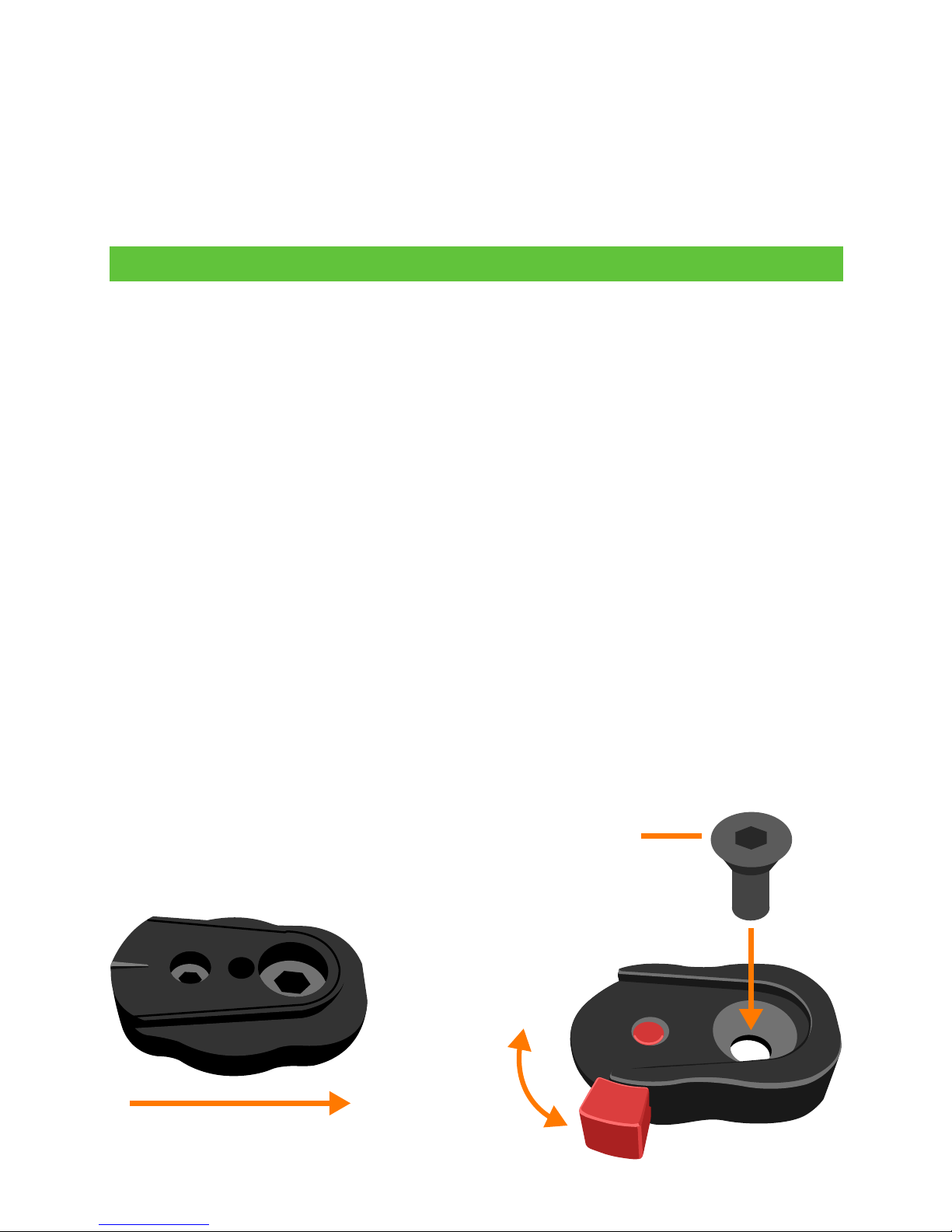
To charge, connect the wall charger to the Magic Power’s
DC port. When charging, the charge symbol () will appear
on the display and the charge percentage will slowly rise. The
battery takes about two hours to reach full charge from 1%. The
Magic Power can also be charged via a Micro USB cable. This
charging method can take several hours, however.
The included quick release mount can be attached to the
camera or any accessory with a standard 1/4-20 insert, present
on virtually all camera cages and most other camera mounting
accessories. For frequent relocation of the Magic Power, we
recommend the use of an adjustable camera clamp, which
can be easily attached to rail rods, tripods, monopods, etc.
To attach the Magic Power to the quick release mount, simply
slide the Magic Power’s quick release plate, located on the
back of the battery, onto the quick release mount and secure
it by locking the red tab in the upward position. To release, slide
the red tab downward.
Setup
Slide downward into mount
Lock
Unlock
Fasten to camera,
cage or other accessory
Thanks for purchasing a Juicebox! To ensure best results, please
read the following instructions before use.
We’d love to hear from you! Send us your feedback or support
questions to [email protected]. Also, please take the time
to review us online. Thank you for your support!
Page 3
operation
To power a compatible Blackmagic camera, connect the camera’s DC port to the Magic Power’s DC port with the included
DC power cable. Tap the Magic Power’s power button to turn
on the battery. While in use, the Magic Power will display the
wattage output that is being used by the connected device(s).
The Magic Power’s maximum continuous output is 50 watts.
A second device can be powered simultaneously, such as a
eld monitor, with the use of a DC splitter cable, available here:
juicebox.direct/product/jbsc-01/
While in use, the Magic Power will charge the connected camera’s primary (internal or mounted) battery while also powering
the camera itself. The Magic Power will power a Blackmagic Micro or Pocket camera with or without a primary battery installed.
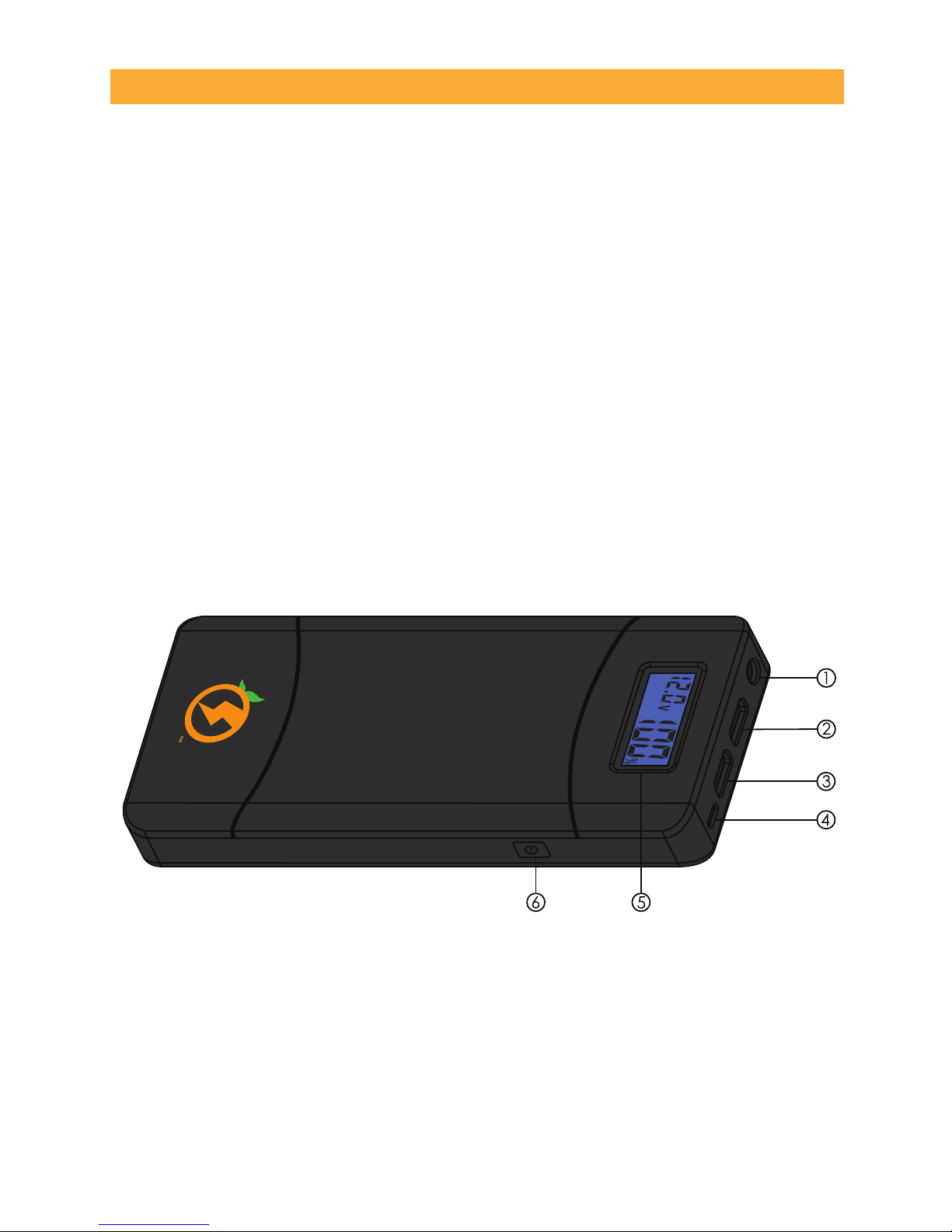
The Magic Power’s components are:
1. DC Port: 12V/2A for compatible Blackmagic Cameras
2. USB Port 1: 5v/2.1A output
3. USB Port 2: QC 2.0 quick charging output (5V, 9V, 12V)
NOTE: Only one USB output can be used at a time.
4. Micro Input: Charge Juicebox with micro USB cable
5. Display Screen: Displays voltage, capacity, wattage
6. On/Off: Power on/off and reset
Page 4

Specifications
Model No. JBMP-02
Accessories DC Charger, DC Power Cable, BMPCC
Power Cable, Quick Release Plate, 1/4-20
Screw, Allen Wrench
Capacity 15600mAh, 57.7Wh
Net Weight 1.0 lbs. / 458 grams
Cell Type Lithium Ion ICR18650
Input Micro USB Port: 5V, 2.1A Max.
DC Port: 13V-20V, 3A Max.
Output USB Port 1: 5V, 2.1A
USB Port 2 (QC 2.0): 5V, 9V, 12V, 2.1A
DC Port: 12V, 2A
Circuit Protection Over-voltage, under-voltage, over-cur-
rent, over-temperature, short-circuit
Efciency 5V/2A≈93%, 9V/2A≈95%, 12V/2A≈97%
Charge Time Micro USB (2.1A) Charger: 8.5 Hours
Included DC Wall Charger: 2 Hours
Storage Time Recommended recharge after 90 days
If a malfunction occurs, the Magic Power battery output will shut
off automatically in order to protect the battery and connected
devices. One of the following error codes will be displayed:
OV: Over-voltage protection
UV: Under-voltage protection
OC: Over-current protection
OT: Over-temperature protection
In this case, the Magic Power will need to be reset, either by
powering it off and on or by connecting it to the wall charger.
Be sure to nd the cause of failure, such as a faulty cable or
mismatched device, before reconnecting the Magic Power.
Troubleshooting
 Loading...