

Page 1
User Manual for Long Range Universal Camera Remote Control
Model: RM-4D
This Long Range Universal Camera Remote Control RM-4D can be used to control more than 50 models of camera, 100%
compatible with the original Remote Control and with longer operate range.
♦ Camera compatible table
K10D K100D K110D *ist DS2 *ist DS *ist DL2 *ist DL
Pentax
*ist D Optio S6/S60 Optio
S5z/S5n/S5i
Optio S4i/S4 Optio
SV/SVi
Optio 550/555 Optio 750z
Samsung
GX-1S GX-1L
D80 D40 D50 D70s D70 F75 F65
Nikon
CoolPix8400 CoolPix8800 Nuvis S LiteTouch
EOS400D EOS350D EOS300D EOS30/33/30V EOS50/55 EOSKissIII EOS100
Canon
DSLR/SLR
EOS10 EOS300V EOS300X 3000VQD EOSIX IXUS Jr/II/III SURESHOT
E400 E330 E500 E300 E1 E20 E10
Olympus
C8080 C7070 S t ylus 800 Stylus 500 C5050 C770 C750
♦ Camera setup for remote control photography
Pentax & Samsung DSLR Camera
1. Mount the camera on tripod and place it on a flat ground.
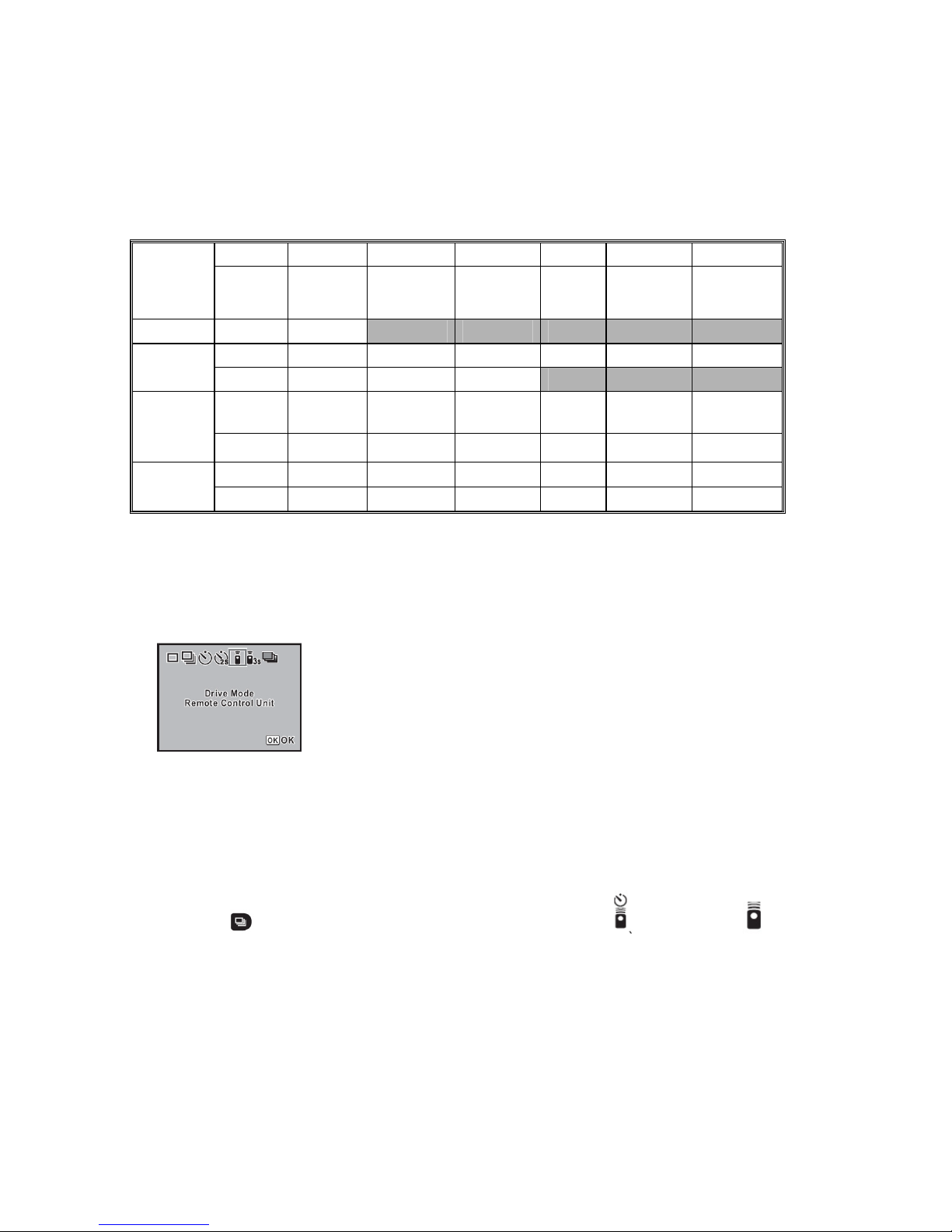
2. Select the LCD menu until the display as below
3. Point the remote control towards the front of the camera.
4. Press the shutter-release button on the Pentax block.
Nikon Camera
1. Mount the camera on tripod and place it on a flat ground.
2. Press the
button on the camera and rotate the main command dial until (delay remote) or (quick response
remote) is displayed on the control panel.
3. Frame the photograph and aim the transmitter on the RM-4D at the infrared receiver on the camera.
4. Press the shutter-release button on the Nikon block
Canon Camera
1. Mount the camera on tripod and place it on a flat ground.
Page 2
2. Press the button until the is displayed on the control panel.
3. Frame the photograph and aim the transmitter on the RM-4D at the infrared receiver on the camera.
4. Press the shutter-release button on the Canon block
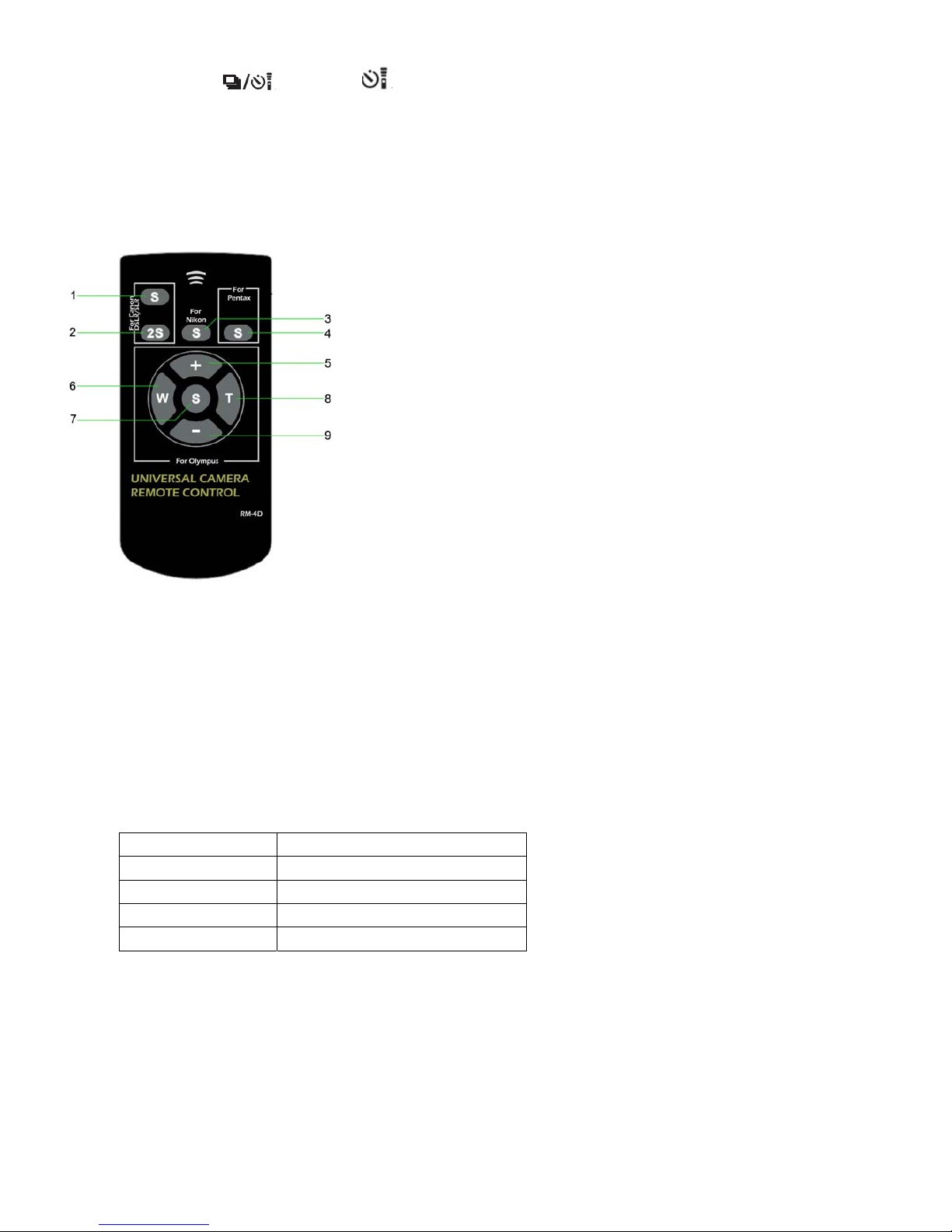
♦ Function Key Meaning
Canon Block
DSLR/SLR/Point & Shoot
1. Shutter-release button (In Auto Focus mode, Auto Focus will be active before shutter is
released.).
2. 2-secs delay Shutter-release button (In Auto Focus mode, Auto Focus will be active before the
shutter is released.).
Nikon Block
3. Shutter-release button (In Auto Focus mode, Auto Focus will be active before the shutter is
released.).
Pentax & Samsung Block
4. Shutter-release button (by default, Auto Focus will not be active automatically. However,
you can change this by setting the [AF in remote control] to [On] in the custom function.
Olympus Block
5. Display the forward photo.
6. Zoom Out button. Adjust the focal length of the lens to the wide angle, suitable for landscape photography.
7. Shutter-release button (In the mode of Auto Focus, Auto Focus will be active before shutter is released.).
8. Zoom In button. Adjust the focal length of the lens to the narrow angle, suitable for portrait photography.
9. Display the backward photo.
♦ Operation Distance
The operation distance may vary between cameras.
Brand Range
Pentax & Samsung 1CM to 15M
Nikon 1CM to 25M
Canon DSLR 1CM to 10M
Olympus 1CM to 15M
 Loading...