

Page 1
NOTICE D’UTILISATION
Spy RF AIR
10077
Page 2

TABLE OF CONTENTS
I. INTRODUCTION ............................................................................................................................................................ 3
a) Equipment ................................................................................................................................................................................. 3
b) Symbols ..................................................................................................................................................................................... 3
II. INSTALLATION RECOMMANDATIONS ....................................................................................................................... 3
a) Perturbations sources .............................................................................................................................................................. 3
III. PRESENTATION ............................................................................................................................................................ 4
IV. INSTALLATION ............................................................................................................................................................. 4
a) Installation ................................................................................................................................................................................. 4
V. USE ................................................................................................................................................................................ 5
a) Stop ............................................................................................................................................................................................ 5
b) Start ............................................................................................................................................................................................ 5
c) Waiting mode ............................................................................................................................................................................ 5
d) Configuration............................................................................................................................................................................. 5
e) Measurement start .................................................................................................................................................................... 5
f) Automatic start .......................................................................................................................................................................... 5
g) Manual start ............................................................................................................................................................................... 6
h) Alarm visualisation ................................................................................................................................................................... 6
i) Measurement stop .................................................................................................................................................................... 6
j) Leds and pushbutton actions functioning .............................................................................................................................. 6
VI. BATTERY CHANGE ...................................................................................................................................................... 7
VII. RESET ............................................................................................................................................................................ 7
VIII. FEATURES .................................................................................................................................................................... 7
IX. WARRANTY ................................................................................................................................................................... 8
X. MAINTENANCE CONTRACT ........................................................................................................................................ 8
XI. ENVIRONMENT PROTECTION ..................................................................................................................................... 8
©JRI 2
Page 3
I. INTRODUCTION
Congratulations, you own a SPY RF AIR ! This device is equipped with a built in temperature and humidity sensor which
enables you to record the temperature and humidity of ambient air and to transfer wirelessly the recorded data by radio
frequency to a PC.
a) Equipment
1 SPY RF AIR
1 wall-mounting bracket
1 user manual
b) Symbols
RECYCLING : do not throw in a rubbish dump or in a domestic waste container. Comply to the regulation to throw away the device.
CE MARKING :this equipment is certified to comply with the European regulation for the electric security, inflammability, disturbing
radiation emission and immunity to surrounding electric disturbances.
FCC ID :W45 03330
This device complies with Part 15 of the FCC Rules. Operation is subject to the following two conditions: (1) this device may not cause
harmful interference, and (2) this device must accept any interference received, including interference that may cause undesired
operation
In accordance with FCC requirements, changes or modifications not expressly approved by JRI could void the user's
authority to operate this product.
NOTE: This equipment has been tested and found to comply with the limits for a Class A digital device, pursuant to Part
15 of the FCC Rules. These limits are designed to provide reasonable protection against harmful interference when the
equipment is operated in a commercial environment. This equipment generates, uses and can radiate radio frequency
energy and, if not installed and used in accordance with the instruction manual, may cause harmful interference to radio
communications. Operation of this equipment in a residential area is likely to cause harmful interference in which case the
user will be required to correct the interference at his own expense.
II. INSTALLATION RECOMMANDATIONS
The Spy RF is a recorder of physical parameters able to communicate wirelessly with the operating software SIRIUS.
The wireless communication is based on radio frequency. As we are daily in contact with it (radio, TV…) it is easy to think
that it always works. These true if basic rules on positioning recorders are respected because wireless communication is
subject to perturbations.
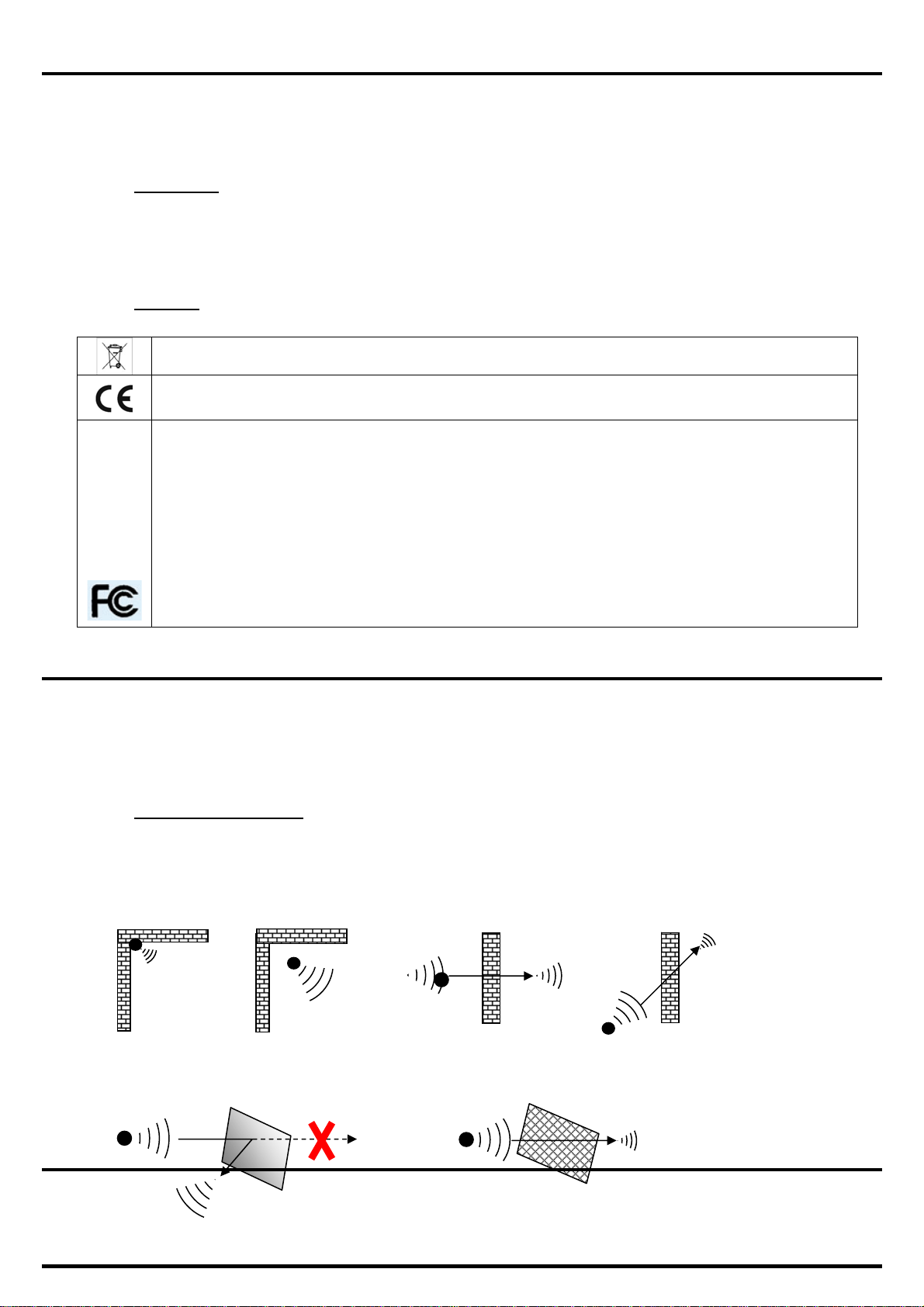
a) Perturbations sources
Presence of obstacles in the way of the waves between the Spy RF ModeM and the Spy Rf (wall, ceiling,
person, furniture…) or close to the antenna.
Obstacles thickness in the way of the waves. The absorption is more important in diagonal as
perpendicularly
Waves cannot pass through full metallic walls. On the other hand, a perforated wall allows the waves to pass
with attenuation.
©JRI 3
Page 4
III. PRESENTATION
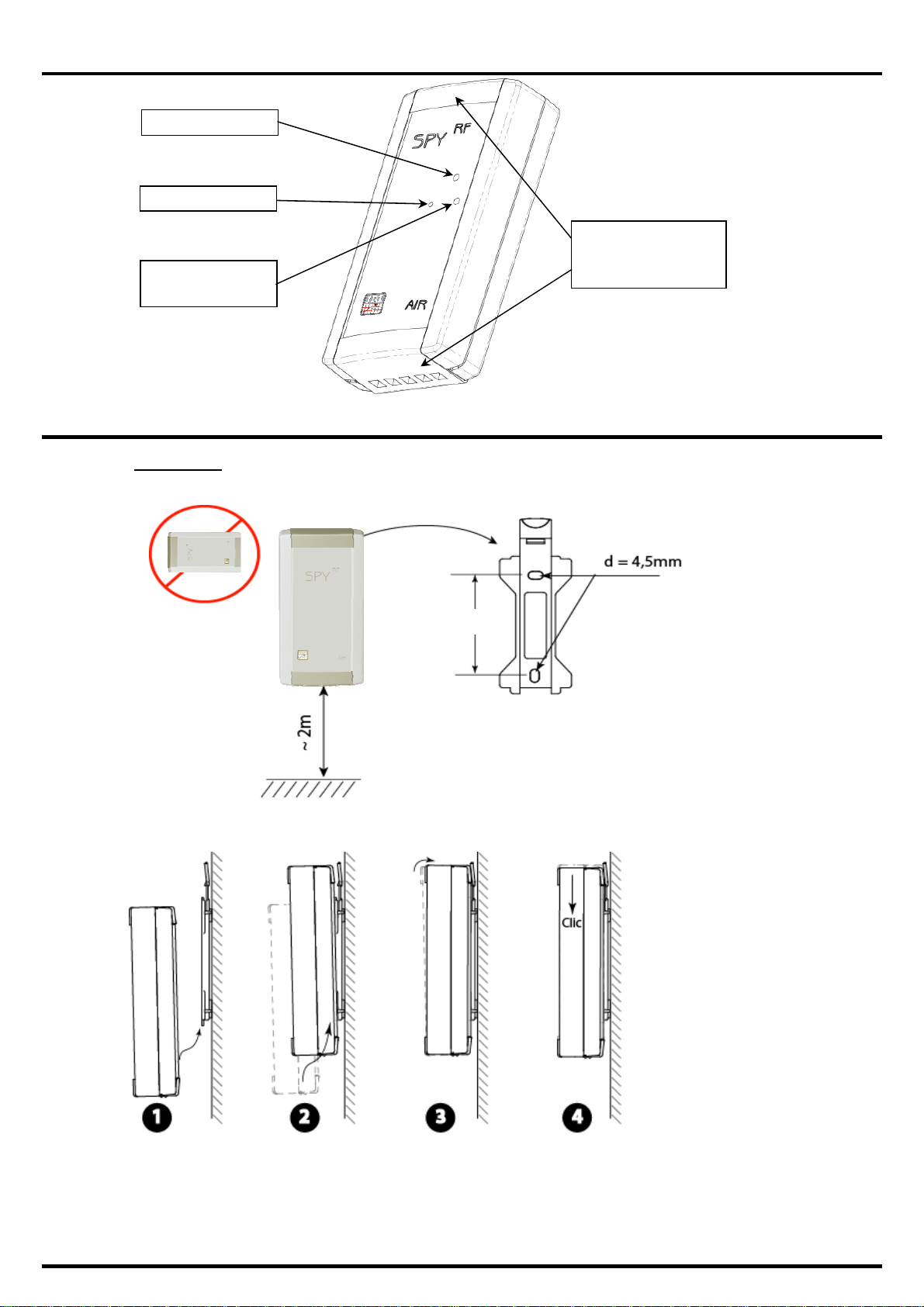
Bouton poussoir
Témoin d’alarme
Témoin de
fonctionnement
IV. INSTALLATION
a) Installation
Capots ajourés pour
la ventilation des
capteurs
55mm
©JRI 4
Page 5
V. USE
a) Stop
When you receive it, your SPY RF is stopped. Only the time clock is active. It can neither emit nor receive anything.
b) Start
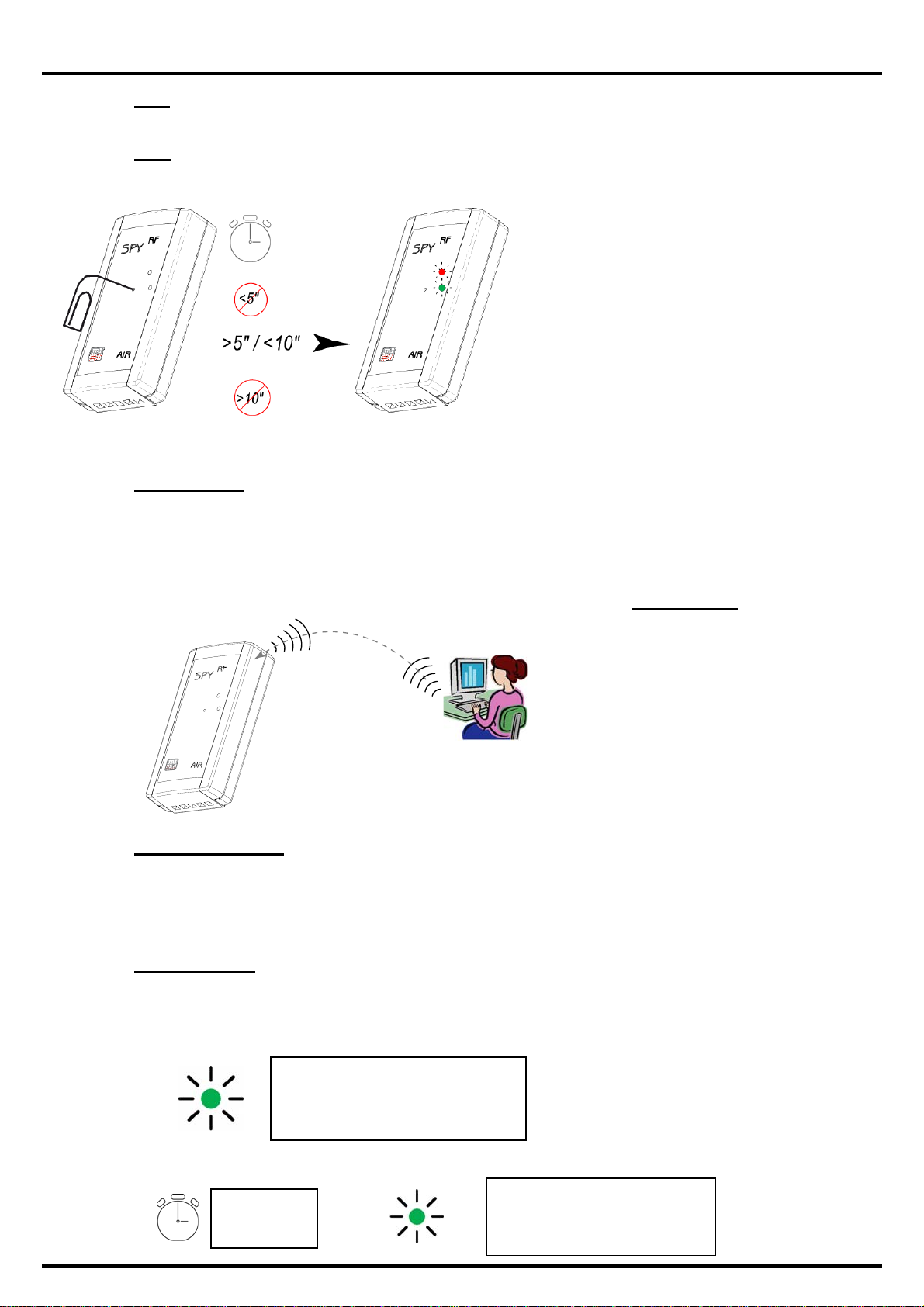
To start your SPY RF AIR, please press between 5
and 10” on the button:
- the 2 LEDs are on and flash at the same time
- all the display segments are also on
- SPY RF is now in waiting mode
Remark: If you press >10’’ => no effect => remains
off
c) Waiting mode
The SPY RF AIR is ready to receive a configuration or to start a new recording session.
The symbol “Halt” is on: no measures in progress.
Use the pushbutton to start.
d) Configuration
SPY RF configuration is done from the Sirius
software and then transferred into your SPY RF
by radio frequency.
e) Measurement start
The SPY RF has 2 starting mode:
automatic start
manual start
f) Automatic start
Your SPY RF starts recording:
automatically when the configuration is transferred,
Working LED (green):
2’’ => starting measurements
then flashes every 1 minute
at a programmed date and time:
©JRI 5
dd / mm / yy
hh / mm / ss
Working LED (green):
2’’ => starting measurements
then flashes every 1 minute
Page 6
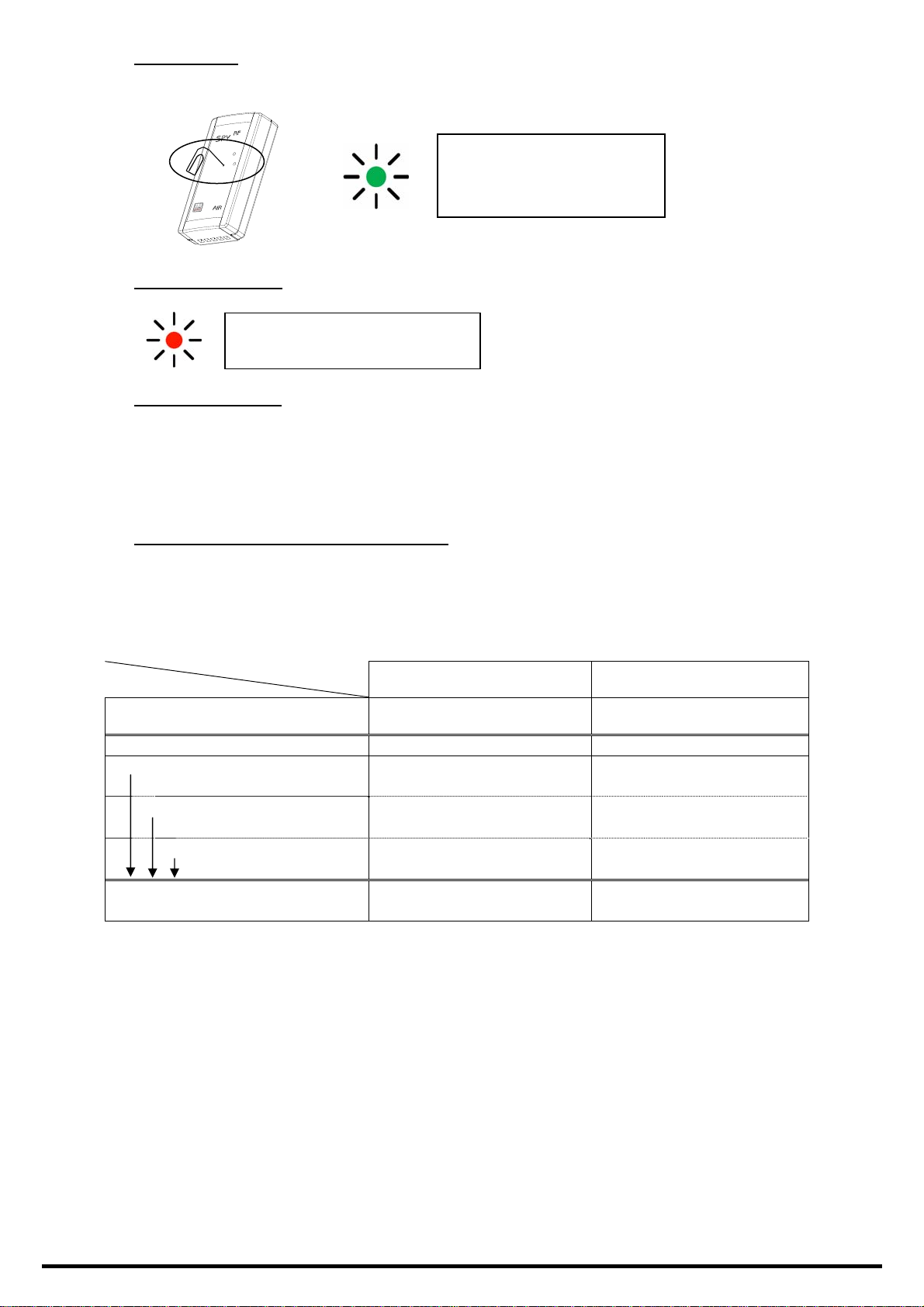
g) Manual start
Press shortly on the pushbutton
Working LED (green):
2’’ => starting measurements
then flashes every 1 minute
h) Alarm visualisation
Alarm LED (red):
Flashes every 15’’.
i) Measurement stop
Depending on the configuration, the SPY RF can stop recording or not. The different options are:
Rolling memory: once the memory is full, the new values replace the old ones.
Full memory: the recorder stops when its memory is full.
With the software: you can put the SPY RF in standby mode with Sirius when you do not use your recorder.
j) Leds and pushbutton actions functioning
The green led is on 2’’ when the measurement starts and then flashes each 1’ in recording mode.
Specials functioning regarding the recorder using mode :
Device set up in storage mode
Pushbutton pressing
Mode
OFF -
Starting measurements
Pushbutton
Delayed (date & time) - -
Measuring
Immediately
Green led 2" = beginning of
Green led 10" = auto control -
< 5" 5’’> pressing <10’’
The 2 leds are on and flash
at the same time.
measurements
- -
-
©JRI 6
Page 7
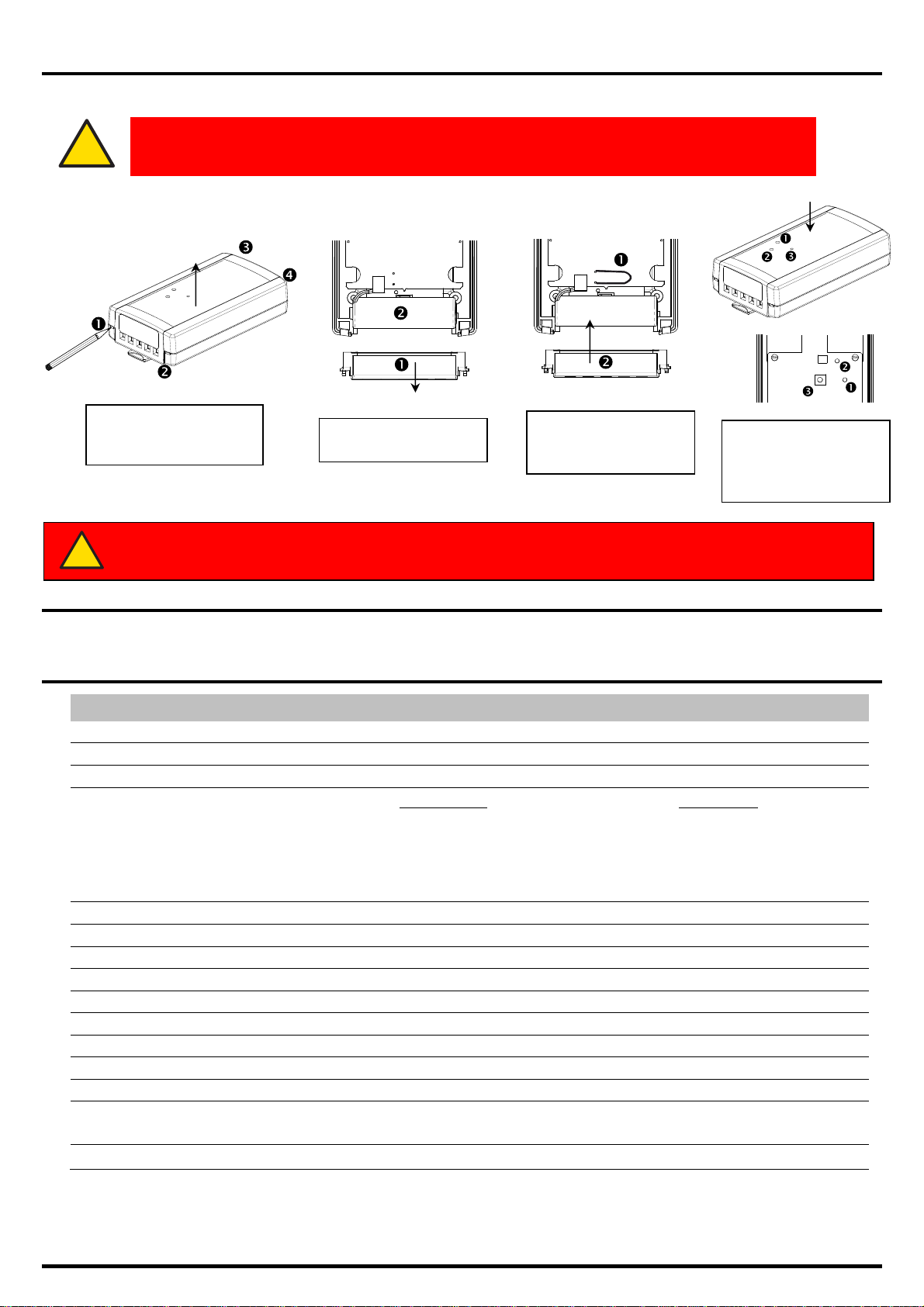
VI. BATTERY CHANGE
p
When the SPY RF battery has to be replaced, the LCD screen displays the following message:
!
To replace the battery, follow the instructions below:
Unlock the cover ()
thancks to a pencil then
ull up the cover
!
DOWNLOAD THE MEMORY BEFORE CHANGING THE BATTERY. NEVER WAIT
UNTIL THE BATTERY IS EMPTY OR THE DATA WILL BE DELETED.
Remove the perforated
cover
Reset the unit with a
paper clip and put back
the perforated cover
BEWARE: KEEP THE BATTERY FAR FROM FIRE. DON’T TRY TO RELOAD IT OR TO SHORT-
CIRCUIT IT ONLY USE BATTERIES SUPPLIED BY JRI (REF: 06569)
Put the cover back. Take
care to align the holes of
the cover with the leds
and the push
VII. RESET
If the device does not work anymore (cannot turn it on…), use the Reset function in the same way as the battery change.
VIII. FEATURES
FEATURES SPY RF TH
Measurement range
Number of channels
Type of input
Accuracy*
*
Accuracy is established in laboratory conditions
and valid in these conditions of use
Operating conditions
Temperature for storage
Memory size
Recording interval
Radio range (in free field)
Radio band
Battery lifetime
Dimensions
Protection level
CE ERM compliance
FCC Compliance FCC part 15
±0,4°C from -20 à 30°C and
±0,5°C outside this range
-30°C +70°C and 0 to 100%HR (not condensed)
2
Built in TH digital sensor
Temperature:
Repeatability, linearity, hysteresis:
Hygrometry
±2% at 23°C from 10 to 90% and ±3.5%
outside this range
Factory gauge inaccuracy: ±1.2%
-30°C +70°C
-40°C +85°C
1s to 90 min
20 000 measurements
1 km
868MHz or 902 MHz
2 years
222x65x30mm
IP34
EN 301 489 / EN 61000 / EN 61010
EN 55022 / EN 300 220
:
©JRI 7
Page 8

IX. WARRANTY
JRI products carry a one year warranty and guarantee a gainst defects in their com ponents or workmans hip.
During this period if any product supplied by the Company proves on inspection to be defective, the Company will at its own opt ion
replace the same or refund to the Buyer the price of the product.
In no circumstances will JRI' liability exceed the price of the product paid by the buyer or the cost of replacement.
JRI shall not in any event be liable to the Buyer for any indirect or conse quential loss or dam age costs or exp enses whatsoe ver which
might arise out of or in connection with the supply of the product or its consequent use.
Consequently, the products warrantee and guarantee specified above, does not cover damage caused by fair wear and tear,
abnormal storage conditions, incorrect use, accidental misuse, abuse, neglect, misapplication or modification, or use with non-JRI'
hardware/software. No warranty of fitnes s for a particular purpose is offer ed and the user assumes the entire risk of using the prod uct.
In line with our policy of continuo us development , we reserve the rig ht to amend our product spe cification wit hout prior notice.
X. MAINTENANCE CONTRACT
How to optimize your radio frequency installation?
RF measuring systems communicate by radio frequency. However, there may be several factors that can modify the radio ways
already defined, such as moving from a building, adding walls, … Radio frequency requires thus a periodical follow up performed by
specialists.
That’s why JRI has created maintenance contracts. We bring you a global solution which makes your maintenance easier. This
overall service offer includes maintenance and also metr ological services, which ensure you that your system is fully performant.
You won’t worry about your devices maintenance anymore !
With this maintenance contract you will benefit for a minimal peri od of 2 year s from the foll owing adva ntages:
- material verification once or twice a year
- warranty extension
- telemaintenance
- telephone assistance
- material replacement on site or by return in o ur manufacture
- metrological certificates: verification of mea surement acc uracy
- battery change
- access to new software versions and updates
- on-site intervention time within 3 op en days aft er problem ident ification by our experts
+33 (0) 892 680 933 (0,282 € HT/min)
XI. ENVIRONMENT PROTECTION
JRI recommends to our customers to throw away their measuring and recording de vices which are unserviceable and/or beyond
repair in a way that is appropriate to environment protect ion. Ins ofar as the prod uction of w aste can not be av oided, it is be st to re-use
them by proceeding with adapted recycling depending on the mat erial used and considering the environment protecti on.
RoHS Directive
The ROHS European Directive rules and limits the presence of hazardous substances in electrical and electronic equipments (EEE).
In the article 2, the scope of this Directive excludes "9. Monit oring and Control Instruments" an d our products are part of this category.
Nevertheless, our company has decided to apply the whole dispositions of this Directive for all our new electronic devices which will
comply to this 2002/95/CE Directive.
©JRI 8
 Loading...